Today‘s Learner
Why should our approach evolve?
I present to you:
A Brief History of
‗Technology‘ in Education
A Brief History of ‗Technology‘ in
Education
―Students today can’t prepare Bark to calculate
their problems. They depend on their slates,
which are more expensive. What will they do
when the slate is dropped and it breaks? They
will not be able to write.‖
~Teachers Conference. 1703
A Brief History of ‗Technology‘ in
Education
―Students today depend upon paper too much.
They don’t know how to write on slate without
getting chalk dust all over themselves. They can’t
clean a slate properly. What will they do when
they run out of the paper?‖
~Principals‘ Association, 1815
A Brief History of ‗Technology‘ in
Education
―Students today depend too much upon ink. They
don’t know how to use a pen knife to sharpen a
pencil. Pen and ink will never replace the pencil.‖
~National Association of
Teachers, 1907
A Brief History of ‗Technology‘ in
Education
―Students today depend too much upon store
bought ink. They don’t know how to make their
own. When they run out of ink they will be unable
to write words or ciphers until their next trip to the
settlement. This is a sad commentary on modern
education.‖
~Rural American Teacher, 1928
A Brief History of ‗Technology‘ in
Education
―Students today depend on these expensive
fountain pens. They can no longer write with a
straight pen and nib. We parents must not allow
them to wallow in such luxury to the detriment of
learning how to cope in the real business world,
which is not so extravagant.‖
~PTA Gazette, 1941
A Brief History of ‗Technology‘ in
Education
―Ball-point pens will be the ruin of education in our
country. Students use these devices and then
throw them away. The American values of thrift
and frugality are being discarded. Business and
banks will never allow such expensive luxuries.‖
~Federal Teacher, 1950
A Brief History of ‗Technology‘ in
Education
“The Internet is not a great tool for teaching. The
Internet pales in comparison to the hype
surrounding it. People think that children can
think of any topic and pull up a wealth of
information on it, but that is not the case. The
information in a library is what people seem to
expect, but nobody has the time to transcribe
entire libraries onto computers. There is nothing
on the Internet that is incredibly beneficial to
education, yet we continue to waste money on
it.‖
~The Monterey County Herald, 1999
A Brief History of ‗Technology‘ in
Education
―We are not going to allow iPods and BlackBerrys
and cellphones and things that are disruptive in
the classroom. Teachers cannot be expected to
look under every kid’s desk at what they are
doing‖
~Mayor Bloomberg, 2006
David Warlick sums up what is so very shortsighted
about many of the snapshots in time just listed:
―Food for thought: I’m getting tired of hearing
people continue to ask for the evidence that
technology helps students learn. It doesn’t matter.
We know — that good teachers help students
learn. We need technology in every classroom
and in every student and teacher’s hand,
because it is the pen and paper of our
time, and it is the lens through which we
experience much of our world.‖
~David Warlick
Why plug yourself in?
 Our students are Digital Natives (Marc
Prensky, Don Tapsott), and as such, have been
‗plugged in‘ since birth.
~Digital Native: a person who was born during or
after the general introduction of digital
technology, and through interacting with digital
technology from an early age, has a greater
understanding of its concepts
Digital Immigrants
 Those who came into technology later in life can
be characterised as being Digital Immigrants
 Digital Immigrants have 2 choices:
 choose to adapt, accepting that we do not know this
world as well as our children and look to them to
help us learn
 choose to be inflexible immigrants, focusing on how
good things used to be
 If we are to reach our children and help them
learn, we must adapt, we must face the fact that
our students are no longer the people our
educational system was designed to teach.
 Perhaps by effectively integrating Web 2.0 tools
into our practice, we will:
 not only engage our students further in their
learning and prepare them for their collective future
(instead of ours); but also
 teach them to use these tools effectively, and
more importantly, responsibly.
It needs to be said that nothing replaces good
teaching. The best teachers don‘t need
technology to educate our students; no
technology in the world can replace good
practice.
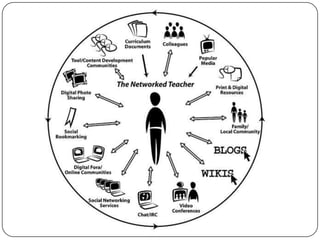
So, what is a Networked Teacher?
 Research tells us that we spend far more (read:
too much) time teaching and assessing our
students with lower order thinking types of
activities.
 So, where does the use of Blogs, Wikis, & other
Web 2.0 tools ―fit‖ in Bloom‘s Taxonomy?
Bloom's Revised Taxonomy Sub
Categories
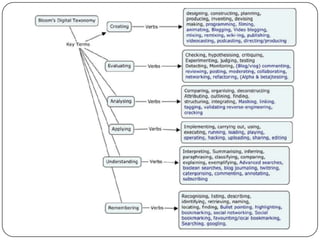
Each of the categories or taxonomic elements has a
number of key verbs associated with it:
 Creating- designing, constructing, planning,
producing, inventing, devising, making
 Evaluating- Checking, hypothesizing, critiquing,
Experimenting, judging, testing, Detecting, Monitoring
 Analyzing- Comparing, organizing, deconstructing,
Attributing, outlining, finding, structuring, integrating
 Applying- Implementing, carrying out, using,
executing
 Understanding- Interpreting, Summarizing, inferring,
paraphrasing, classifying, comparing, explaining,
exemplifying
 Remembering- Recognizing, listing, describing,
identifying, retrieving, naming, locating, finding
Let‘s have a closer look at the three
highest orders of thinking:
Analyzing, Evaluating & Creating
Analyzing
 Linking – this is establishing and building links
within and outside of documents and web pages.
 Tagging – selecting one or several key terms that
best describe the crux of the content
Evaluating
 Blog/vlog commenting and reflecting – Constructive criticism and
reflective practice are often facilitated by the use of blogs and
video blogs. Students commenting and replying to postings have
to evaluate the material in context and reply.
 Posting – posting comments to blogs, discussion boards,
threaded discussions. These are increasingly common elements
of students' daily practice. Good postings like good comments,
are not simple one-line answers but rather are structured and
constructed to evaluate the topic or concept.
 Moderating – This is high level evaluation; the moderator must
be able to evaluate a posting or comment from a variety of
perspectives, assessing its worth, value and appropriateness.
 Collaborating and networking – Collaboration is an increasing
feature of education. In a world increasingly focused on
communication, collaboration leading to collective intelligence is
a key aspect. Effective collaboration involves evaluating the
strengths and abilities of the participants and evaluating the
contribution they make. Networking is a feature of collaboration,
contacting and communicating with relevant person via a
network of associates.
Creating
 Publishing – whether via the web or from
home computers, publishing in text, media
or digital formats is increasing. Again this
requires a huge overview of not only the
content being published, but the process
and product. Related to this concept are also
Video blogging – the production of video
blogs, blogging and also wiki-ing - creating,
adding to and modify content in wikis.
Creating or building Mash ups would also fit
here.
In Summation
 Web 2.0 tools address three key features of
successful instructional tasks that lead to the
greatest student achievement:
 They are collaborative
 They are student-centred
 They are authentic
Blogs
 Blogging is educationally sound for teaching
students because: (Davis 2008)
 Blogs provide a space for sharing opinions and
learning in order to grow communities of
discourse and knowledge — a space where
students and teachers can learn from each other.
 Blogs help learners to see knowledge as
interconnected as opposed to a set of discrete
facts.
Blogs
 Blogs can give students a totally new perspective
on the meaning of voice.
 As students explore their own learning and
thinking, their distinctive voices emerge.
 Student voices are essential to the conversations
we need to have about learning.
Blogs
 Blogs foster ownership and choice. They help
lead us away from students trying to find what the
teacher wants in terms of an answer.
 The worldwide audience provides recognition for
students that can be quite profound. Students feel
more compelled to write when they believe many
others may read and respond. It gives them
motivation to excel. Students need to be taught
skills to foster a contributing audience on their
blog.
Blogs
 The archive feature of blogging records ongoing
learning.
 It therefore facilitates reflection and evaluation.
 The archive provides an opportunity for students
to find their thoughts on a matter and then see
how their thinking has changed and why.
Blogs
 The opportunity for collective and collaborative
learning is enormous.
 Students have the opportunity to read their
classmates‘ blogs (thoughts) and those of others.
 This is not possible in a regular classroom setting.
 The interactive nature of blogging creates
enthusiasm for writing and communication.
Blogs
 Blogging engages students in conversation and
learning
 Blogging provides the possibility of connecting
with experts on which the topic students are
writing.
 Blogging encourages global conversations about
learning–conversations not previously possible in
our classrooms.
Blogs
 Blogging provides the opportunity for our students
to learn to write for life-long learning.
 Blogging affords us the opportunity to teach
responsible public writing. Students can learn
about the power of the published word and the
responsibilities involved with public writing
If the dog just wanted to get its family‘s attention,
perhaps barking is more effective, no?
This brings up a good starting point: a blog needs
to be purposeful in order to be effective.
What type of Blog will you create?
Ideas for Types of Blogs
 Teacher Blogs
 Monthly classroom newsletters, school newsletters,
calendars, events, homework assignments and
other pertinent class information
 Post photos and comment on class activities
 Homework
 The days homework or links to extra practice
 End-of-Day or End-of-Week guided writing letter
 Create a dynamic teaching site, posting not only
class-related information, but also activities,
discussion topics, links to additional information
about topics they are studying in class, and
readings to inspire learning
Ideas for Types of Blogs
 Teacher Blogs cont‘d
 Provide online readings for your students to read
and react to
 Create an online book club
 Parent Engagement Activities
 Build and publish a class newspaper, using student-
written articles and photos they take
 Post Interesting links
 Ministry of Education reports
 Reading/Math/etc. Activities
 Community organizations
 Family entertainment opportunities in the community
Ideas for Types of Blogs
 Student Blogs
 Digital Portfolio
 Publish writing assignments such as: Poetry,
Book Reviews, Short Stories, Movie Reviews,
Essays, Letters, Persuasive Writing, etc.
 Ability to upload other types of documents and
scans or pictures of student work and art projects,
podcasts, vodcasts
 Autobiographical writing such as Journaling
 Express their opinions on topics you are
studying in class
Ideas for Types of Blogs
 Student Blogs cont‘d
 Write comments, opinions, or questions on daily
news items or issues of interest
 Discuss activities they did in class and tell what they
think about them (You, the teacher, can learn a lot
this way!)
 Cross-curricular: Science reports, Math, Art
Impressions,
 Online Literature Discussions
 Threaded response from classmates
 Venue for developing proficiency in giving and
receiving descriptive feedback

Today's learner mitch champagne

  • 1.
  • 2.
    Why should ourapproach evolve? I present to you: A Brief History of ‗Technology‘ in Education
  • 3.
    A Brief Historyof ‗Technology‘ in Education ―Students today can’t prepare Bark to calculate their problems. They depend on their slates, which are more expensive. What will they do when the slate is dropped and it breaks? They will not be able to write.‖ ~Teachers Conference. 1703
  • 4.
    A Brief Historyof ‗Technology‘ in Education ―Students today depend upon paper too much. They don’t know how to write on slate without getting chalk dust all over themselves. They can’t clean a slate properly. What will they do when they run out of the paper?‖ ~Principals‘ Association, 1815
  • 5.
    A Brief Historyof ‗Technology‘ in Education ―Students today depend too much upon ink. They don’t know how to use a pen knife to sharpen a pencil. Pen and ink will never replace the pencil.‖ ~National Association of Teachers, 1907
  • 6.
    A Brief Historyof ‗Technology‘ in Education ―Students today depend too much upon store bought ink. They don’t know how to make their own. When they run out of ink they will be unable to write words or ciphers until their next trip to the settlement. This is a sad commentary on modern education.‖ ~Rural American Teacher, 1928
  • 7.
    A Brief Historyof ‗Technology‘ in Education ―Students today depend on these expensive fountain pens. They can no longer write with a straight pen and nib. We parents must not allow them to wallow in such luxury to the detriment of learning how to cope in the real business world, which is not so extravagant.‖ ~PTA Gazette, 1941
  • 8.
    A Brief Historyof ‗Technology‘ in Education ―Ball-point pens will be the ruin of education in our country. Students use these devices and then throw them away. The American values of thrift and frugality are being discarded. Business and banks will never allow such expensive luxuries.‖ ~Federal Teacher, 1950
  • 9.
    A Brief Historyof ‗Technology‘ in Education “The Internet is not a great tool for teaching. The Internet pales in comparison to the hype surrounding it. People think that children can think of any topic and pull up a wealth of information on it, but that is not the case. The information in a library is what people seem to expect, but nobody has the time to transcribe entire libraries onto computers. There is nothing on the Internet that is incredibly beneficial to education, yet we continue to waste money on it.‖ ~The Monterey County Herald, 1999
  • 10.
    A Brief Historyof ‗Technology‘ in Education ―We are not going to allow iPods and BlackBerrys and cellphones and things that are disruptive in the classroom. Teachers cannot be expected to look under every kid’s desk at what they are doing‖ ~Mayor Bloomberg, 2006
  • 11.
    David Warlick sumsup what is so very shortsighted about many of the snapshots in time just listed: ―Food for thought: I’m getting tired of hearing people continue to ask for the evidence that technology helps students learn. It doesn’t matter. We know — that good teachers help students learn. We need technology in every classroom and in every student and teacher’s hand, because it is the pen and paper of our time, and it is the lens through which we experience much of our world.‖ ~David Warlick
  • 12.
    Why plug yourselfin?  Our students are Digital Natives (Marc Prensky, Don Tapsott), and as such, have been ‗plugged in‘ since birth. ~Digital Native: a person who was born during or after the general introduction of digital technology, and through interacting with digital technology from an early age, has a greater understanding of its concepts
  • 14.
    Digital Immigrants  Thosewho came into technology later in life can be characterised as being Digital Immigrants  Digital Immigrants have 2 choices:  choose to adapt, accepting that we do not know this world as well as our children and look to them to help us learn  choose to be inflexible immigrants, focusing on how good things used to be  If we are to reach our children and help them learn, we must adapt, we must face the fact that our students are no longer the people our educational system was designed to teach.
  • 15.
     Perhaps byeffectively integrating Web 2.0 tools into our practice, we will:  not only engage our students further in their learning and prepare them for their collective future (instead of ours); but also  teach them to use these tools effectively, and more importantly, responsibly.
  • 16.
    It needs tobe said that nothing replaces good teaching. The best teachers don‘t need technology to educate our students; no technology in the world can replace good practice.
  • 17.
    So, what isa Networked Teacher?
  • 19.
     Research tellsus that we spend far more (read: too much) time teaching and assessing our students with lower order thinking types of activities.  So, where does the use of Blogs, Wikis, & other Web 2.0 tools ―fit‖ in Bloom‘s Taxonomy?
  • 20.
    Bloom's Revised TaxonomySub Categories Each of the categories or taxonomic elements has a number of key verbs associated with it:  Creating- designing, constructing, planning, producing, inventing, devising, making  Evaluating- Checking, hypothesizing, critiquing, Experimenting, judging, testing, Detecting, Monitoring  Analyzing- Comparing, organizing, deconstructing, Attributing, outlining, finding, structuring, integrating  Applying- Implementing, carrying out, using, executing  Understanding- Interpreting, Summarizing, inferring, paraphrasing, classifying, comparing, explaining, exemplifying  Remembering- Recognizing, listing, describing, identifying, retrieving, naming, locating, finding
  • 22.
    Let‘s have acloser look at the three highest orders of thinking: Analyzing, Evaluating & Creating
  • 23.
    Analyzing  Linking –this is establishing and building links within and outside of documents and web pages.  Tagging – selecting one or several key terms that best describe the crux of the content
  • 24.
    Evaluating  Blog/vlog commentingand reflecting – Constructive criticism and reflective practice are often facilitated by the use of blogs and video blogs. Students commenting and replying to postings have to evaluate the material in context and reply.  Posting – posting comments to blogs, discussion boards, threaded discussions. These are increasingly common elements of students' daily practice. Good postings like good comments, are not simple one-line answers but rather are structured and constructed to evaluate the topic or concept.  Moderating – This is high level evaluation; the moderator must be able to evaluate a posting or comment from a variety of perspectives, assessing its worth, value and appropriateness.  Collaborating and networking – Collaboration is an increasing feature of education. In a world increasingly focused on communication, collaboration leading to collective intelligence is a key aspect. Effective collaboration involves evaluating the strengths and abilities of the participants and evaluating the contribution they make. Networking is a feature of collaboration, contacting and communicating with relevant person via a network of associates.
  • 25.
    Creating  Publishing –whether via the web or from home computers, publishing in text, media or digital formats is increasing. Again this requires a huge overview of not only the content being published, but the process and product. Related to this concept are also Video blogging – the production of video blogs, blogging and also wiki-ing - creating, adding to and modify content in wikis. Creating or building Mash ups would also fit here.
  • 26.
    In Summation  Web2.0 tools address three key features of successful instructional tasks that lead to the greatest student achievement:  They are collaborative  They are student-centred  They are authentic
  • 27.
    Blogs  Blogging iseducationally sound for teaching students because: (Davis 2008)  Blogs provide a space for sharing opinions and learning in order to grow communities of discourse and knowledge — a space where students and teachers can learn from each other.  Blogs help learners to see knowledge as interconnected as opposed to a set of discrete facts.
  • 28.
    Blogs  Blogs cangive students a totally new perspective on the meaning of voice.  As students explore their own learning and thinking, their distinctive voices emerge.  Student voices are essential to the conversations we need to have about learning.
  • 29.
    Blogs  Blogs fosterownership and choice. They help lead us away from students trying to find what the teacher wants in terms of an answer.  The worldwide audience provides recognition for students that can be quite profound. Students feel more compelled to write when they believe many others may read and respond. It gives them motivation to excel. Students need to be taught skills to foster a contributing audience on their blog.
  • 30.
    Blogs  The archivefeature of blogging records ongoing learning.  It therefore facilitates reflection and evaluation.  The archive provides an opportunity for students to find their thoughts on a matter and then see how their thinking has changed and why.
  • 31.
    Blogs  The opportunityfor collective and collaborative learning is enormous.  Students have the opportunity to read their classmates‘ blogs (thoughts) and those of others.  This is not possible in a regular classroom setting.  The interactive nature of blogging creates enthusiasm for writing and communication.
  • 32.
    Blogs  Blogging engagesstudents in conversation and learning  Blogging provides the possibility of connecting with experts on which the topic students are writing.  Blogging encourages global conversations about learning–conversations not previously possible in our classrooms.
  • 33.
    Blogs  Blogging providesthe opportunity for our students to learn to write for life-long learning.  Blogging affords us the opportunity to teach responsible public writing. Students can learn about the power of the published word and the responsibilities involved with public writing
  • 35.
    If the dogjust wanted to get its family‘s attention, perhaps barking is more effective, no? This brings up a good starting point: a blog needs to be purposeful in order to be effective. What type of Blog will you create?
  • 36.
    Ideas for Typesof Blogs  Teacher Blogs  Monthly classroom newsletters, school newsletters, calendars, events, homework assignments and other pertinent class information  Post photos and comment on class activities  Homework  The days homework or links to extra practice  End-of-Day or End-of-Week guided writing letter  Create a dynamic teaching site, posting not only class-related information, but also activities, discussion topics, links to additional information about topics they are studying in class, and readings to inspire learning
  • 37.
    Ideas for Typesof Blogs  Teacher Blogs cont‘d  Provide online readings for your students to read and react to  Create an online book club  Parent Engagement Activities  Build and publish a class newspaper, using student- written articles and photos they take  Post Interesting links  Ministry of Education reports  Reading/Math/etc. Activities  Community organizations  Family entertainment opportunities in the community
  • 38.
    Ideas for Typesof Blogs  Student Blogs  Digital Portfolio  Publish writing assignments such as: Poetry, Book Reviews, Short Stories, Movie Reviews, Essays, Letters, Persuasive Writing, etc.  Ability to upload other types of documents and scans or pictures of student work and art projects, podcasts, vodcasts  Autobiographical writing such as Journaling  Express their opinions on topics you are studying in class
  • 39.
    Ideas for Typesof Blogs  Student Blogs cont‘d  Write comments, opinions, or questions on daily news items or issues of interest  Discuss activities they did in class and tell what they think about them (You, the teacher, can learn a lot this way!)  Cross-curricular: Science reports, Math, Art Impressions,  Online Literature Discussions  Threaded response from classmates  Venue for developing proficiency in giving and receiving descriptive feedback