How the titles for
the opening
sequence were
created and
edited.
The first step for
making the titles was
selecting the text of
the title in the
typography chosen and
pasting it into
Photoshop.
Next, I used the
magic want tool to
remove the
majority of the
white background
from the pasted
image.
I then used the rubber
tool to remove the rest of
the pasted image that was
not needed.
I then used the
magic wand tool
again back on the
text layer to
select the text of
the title that I
wanted from the
pasted image.
I then pasted a whit image into a
new layer on Photoshop. I then used
the keys ctrl T to change the size of
the white image and stretch it to be
larger than the text of the title.
I then clicked
select inverse
on the text
layer, swapped
back to the
white layer and
pressed delete.
I then moved the
white text layer
from beneath the
original txt layer
to see the shaped
text.
I then duplicated the
white text layer and
labelled it white blur.
On the duplicated layer
I clicked filter from the
selection bar, scrolled
down to blue and
clicked Gauissan blur.
I then changed
the pixel level to
11 and clicked
okay.
The final step was to
merge the blurred layer
and the text layer
together to create the
complete title layer.
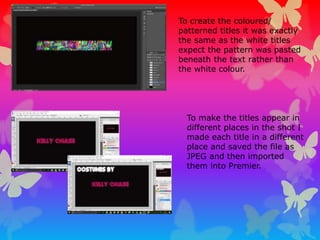
To create the coloured/
patterned titles it was exactly
the same as the white titles
expect the pattern was pasted
beneath the text rather than
the white colour.
To make the titles appear in
different places in the shot I
made each title in a different
place and saved the file as
JPEG and then imported
them into Premier.
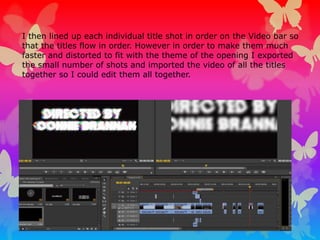
I then lined up each individual title shot in order on the Video bar so
that the titles flow in order. However in order to make them much
faster and distorted to fit with the theme of the opening I exported
the small number of shots and imported the video of all the titles
together so I could edit them all together.
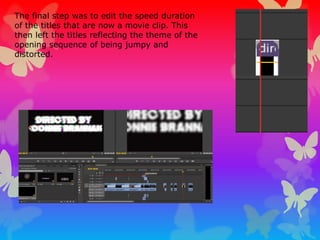
The final step was to edit the speed duration
of the titles that are now a movie clip. This
then left the titles reflecting the theme of the
opening sequence of being jumpy and
distorted.

Titles

  • 1.
    How the titlesfor the opening sequence were created and edited.
  • 2.
    The first stepfor making the titles was selecting the text of the title in the typography chosen and pasting it into Photoshop.
  • 3.
    Next, I usedthe magic want tool to remove the majority of the white background from the pasted image. I then used the rubber tool to remove the rest of the pasted image that was not needed.
  • 4.
    I then usedthe magic wand tool again back on the text layer to select the text of the title that I wanted from the pasted image. I then pasted a whit image into a new layer on Photoshop. I then used the keys ctrl T to change the size of the white image and stretch it to be larger than the text of the title.
  • 5.
    I then clicked selectinverse on the text layer, swapped back to the white layer and pressed delete. I then moved the white text layer from beneath the original txt layer to see the shaped text.
  • 6.
    I then duplicatedthe white text layer and labelled it white blur. On the duplicated layer I clicked filter from the selection bar, scrolled down to blue and clicked Gauissan blur.
  • 7.
    I then changed thepixel level to 11 and clicked okay. The final step was to merge the blurred layer and the text layer together to create the complete title layer.
  • 8.
    To create thecoloured/ patterned titles it was exactly the same as the white titles expect the pattern was pasted beneath the text rather than the white colour. To make the titles appear in different places in the shot I made each title in a different place and saved the file as JPEG and then imported them into Premier.
  • 9.
    I then linedup each individual title shot in order on the Video bar so that the titles flow in order. However in order to make them much faster and distorted to fit with the theme of the opening I exported the small number of shots and imported the video of all the titles together so I could edit them all together.
  • 10.
    The final stepwas to edit the speed duration of the titles that are now a movie clip. This then left the titles reflecting the theme of the opening sequence of being jumpy and distorted.