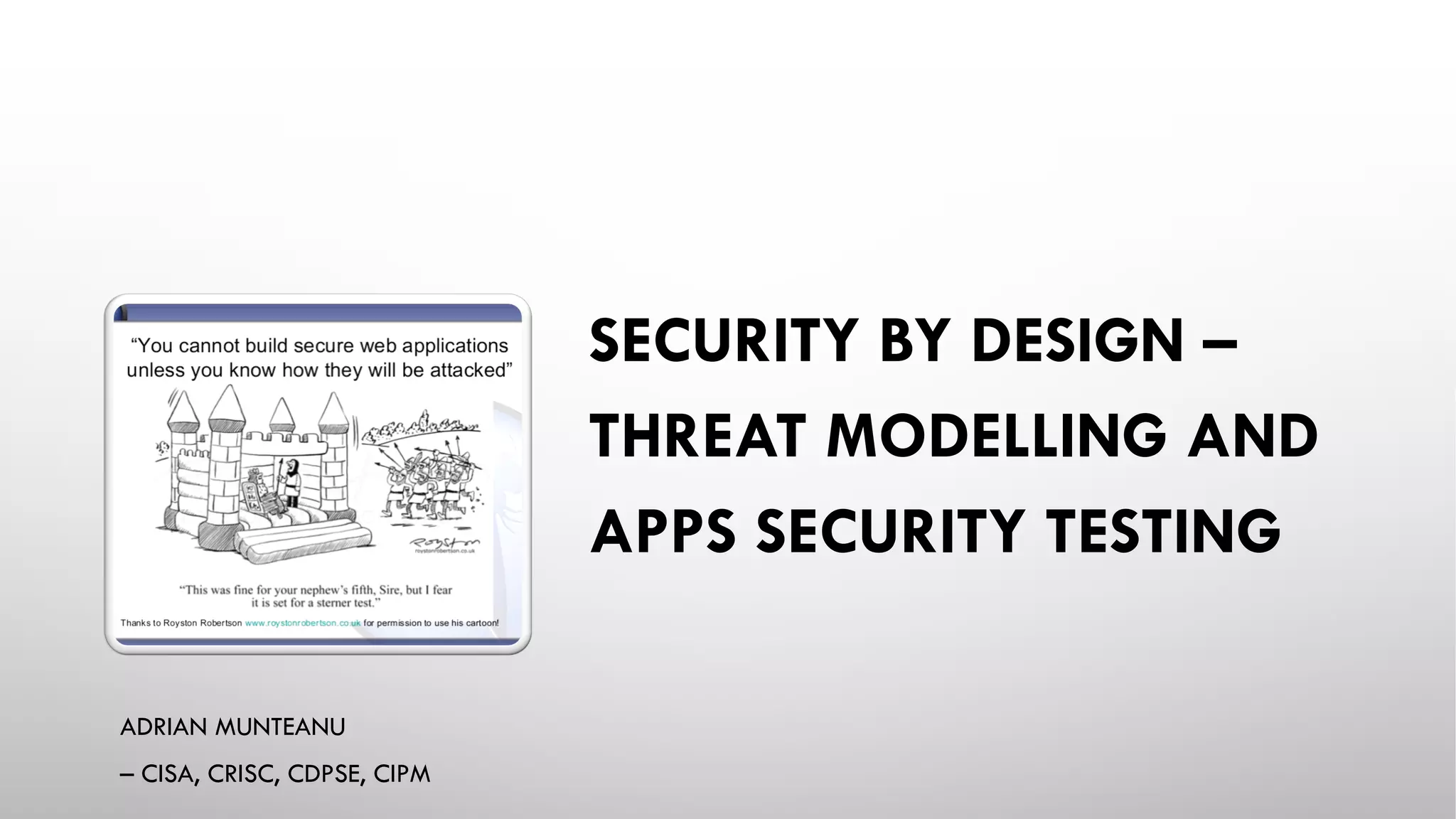
SECURITY BY DESIGN –
THREAT MODELLING AND
APPS SECURITY TESTING
ADRIAN MUNTEANU
– CISA, CRISC, CDPSE, CIPM
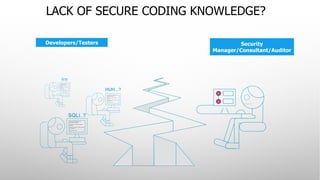
LACK OF SECURE CODING KNOWLEDGE?
Developers/Testers Security
Manager/Consultant/Auditor
WHAT ABOUT
BUILDING
CARS LIKE
APPLICATION?
• 70% of all cars would be built without following the original designs
and blueprints. The other 30% would not have designs.
• Car design would assume that safety is a function of road design
and that all drivers were considerate, sober and expert drivers.
• Cars would have no airbags, mirrors, seat belts, doors, roll-bars,
side-impact bars, or locks, because no-one had asked for them. But
they would all have at least six cup holders.
• Not all the components would be bolted together securely and
many of them would not be built to tolerate even the slightest
abuse.
• Safety tests would assume frontal impact only. Cars would not be
roll tested, or tested for stability in emergency maneuvers, brake
effectiveness, side impact and resistance to theft.
• Many safety features originally included might be removed before
the car was completed, because they might adversely impact
performance.
WHAT ABOUT
BUILDING
CARS LIKE
APPLICATION?
• 70% of all cars would be subject to monthly recalls to add major
components left out of the initial production. The other 30% wouldn’t
be recalled, because no-one would sue anyway.
• The after-market for safety devices would include such useful
products as training wheels, screen doors, elastic seatbelts and
devices that would restrict the car’s top speed to 3mph, if found to be
unsafe (which would be always).
• Useful safety could be found, but could only be custom retro-fitted,
would take six months to fit and would cost more than the car itself.
• A RAR inspection would consist of counting the wheels and making
recommendations on wheel quantity.
• Your only warning indicator would be large quantities of smoke and
flame in the cab.
• You could only get insurance from one provider, it would be extremely
expensive, require a duplicate rar inspection, and you might still never
be able to claim against the policy.
(SOURCE: DENIS VERDON)
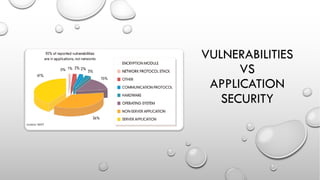
VULNERABILITIES
VS
APPLICATION
SECURITY
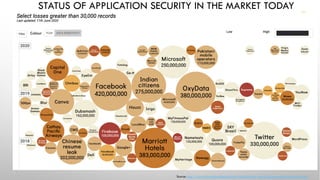
STATUS OF APPLICATION SECURITY IN THE MARKET TODAY
Source: http://www.informationisbeautiful.net/visualizations/worlds-biggest-data-breaches-hacks/
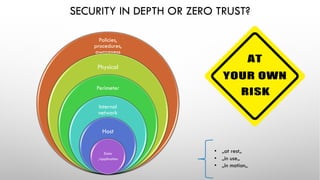
SECURITY IN DEPTH OR ZERO TRUST?
• „at rest„
• „in use„
• „in motion„
Policies,
procedures,
awareness
Physical
Perimeter
Internal
network
Host
Data
/application
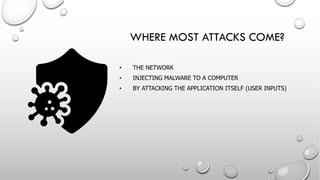
• THE NETWORK
• INJECTING MALWARE TO A COMPUTER
• BY ATTACKING THE APPLICATION ITSELF (USER INPUTS)
WHERE MOST ATTACKS COME?
COMMON
APPLICATION
VULNERABILITIES
• Affect the DB (SQLi)
Steal / corrupt information
• Affect the applications users (cross site scripting)
Steal user account
Deface a site (fake site’s content)
Inject malware to the sites users
INDUSTRY
SOLUTIONS
• WEB APPLICATION FIREWALL (WAF)/WEB GATEWAY/MAIL GATEWAY
• IPS/IDS
• WHITELIST
• SANDBOX
• ......
• PEN TESTING THE APPLICATION
• DYNAMIC APPLICATION SECURITY TESTING (DAST)
• STATIC APPLICATION SECURITY TESTING (SAST)
• RUNTIME APPLICATION SELF PROTECTION (RASP)
FIREWALL
• Controls network activity
• Informs / blocks incoming and outgoing traffic on the network
Pro’s:
• Secure from external network based attacks
• blocks malware from communicating with the outside world
Cons:
• Leaves you vulnerable to attacks on the application (SQLi, XSS, etc..)
WEB
APPLICATION
FIREWALL
• Intelligent firewall – inspects transfer for suspicious patterns
and blocks them.
• Is configurable
Pro’s:
• Same as firewall
• Can block some attacks on the application
Cons:
• Continuous configuration
• Blocks legitimate traffic à lost business à
• used only in alert mode
PENETRATION
TESTING
• Manual simulation of hack attacks using various tools and
techniques.
• Usually done as a service (versus in-house)
Pro’s:
• Many attack vectors tested
• Fix recommendations
Cons:
• Slow (weeks of testing)
• Snapshot analysis
• Expensive
• End of development (delays release, fixing code is costly)
DYNAMIC
APPLICATION
SECURITY
TESTING
(DAST)
PRO’S:
• Tests the runtime behavior of the application – more accurate
Cons:
• Random testing – limited coverage
• Black box testing – limited coverage (type of vulnerabilities)
• Done at end of development (delays release, fixing code is costly)
• Doesn’t give remediation advice, just a URL
STATIC
APPLICATION
SECURITY
TESTING
(SAST)
• Automatic tool that reviews the source code to find security
vulnerabilities
• Source code analysis / white box testing
• Securing applications at development time
Pro’s:
• Comprehensive
• Early detection à low fixing cost
• Real time feedback à security awareness
Cons:
• Could be less accurate (more false positives)
RUNTIME
APPLICATION
SELF
PROTECTION
• RASP protects the application without and requiring any
code change!
• The RASP enabled application can alert about / block attacks
in real-time.
• RASP is made available to developers as a series of function
calls (pre-programmed security instrumentation procedures)
that may be included in source code.
Pro’s:
• Effectively protects the application in runtime
• No coding required (!)
Cons:
• Less vulnerability coverage than SAST
• Few languages currently supported
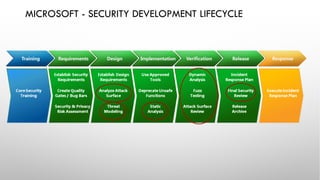
MICROSOFT - SECURITY DEVELOPMENT LIFECYCLE
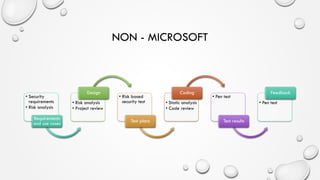
NON - MICROSOFT
• Security
requirements
• Risk analysis
Requirements
and use cases
• Risk analysis
• Project review
Design
• Risk based
security test
Test plans
• Static analysis
• Code review
Coding
• Pen test
Test results
• Pen test
Feedback
THE GOOD,
THE BAD
AND THE
UGLY
• Security analyst:
• Get involved early in SDLC. Security is a function of the asset we
want to secure, what's it worth?
• Understanding the information held in the application and the types
of users is half the battle.
• Involve an analyst in the design phase and thereafter.
• Developer:
• Embrace secure application development. (Educate)
• Quality is not just “does it work” security is a measure of quality also.
THE GOOD,
THE BAD
AND THE
UGLY
• QA/tester:
• Security vulnerabilities are to be considered bugs, the same way as
a functional bug, and tracked in the same manner.
• Manager:
• Consider security as added value in an application – $1 spent up front
saves $10 during development and $100 after release
APPLICATION
SECURITY
REQUIREMENTS
• Start with a generic set of security requirements
• Must include all security mechanisms
• Must address all common vulnerabilities
• Can be use (or misuse) cases
• Should address all driving requirements (regulation, standards, best
practices, etc.)
DESIGN
REVIEWS
• Better to find flaws early
• Security design reviews
• Check to ensure design meets requirements
• Also check to make sure you didn’t miss a requirement
• Assemble a team
• Experts in the technology
• Security-minded team members
• Do a high-level penetration test against the design
• Be sure to do root cause analysis on any flaws identified
THREAT
MODELLING
MANIFESTO
VALUES
• A CULTURE OF FINDING AND FIXING DESIGN ISSUES OVER CHECKBOX
COMPLIANCE.
• PEOPLE AND COLLABORATION OVER PROCESSES, METHODOLOGIES, AND
TOOLS.
• A JOURNEY OF UNDERSTANDING OVER A SECURITY OR PRIVACY SNAPSHOT.
• DOING THREAT MODELING OVER TALKING ABOUT IT.
• CONTINUOUS REFINEMENT OVER A SINGLE DELIVERY.
PRINCIPLES
•The best use of threat modelling is to improve the security and privacy of a system
through early and frequent analysis.
•Threat modelling must align with an organization’s development practices and follow
design changes in iterations that are each scoped to manageable portions of the
system.
•The outcomes of threat modelling are meaningful when they are of value to
stakeholders.
•Dialog is key to establishing the common understandings that lead to value, while
documents record those understandings, and enable measurement.
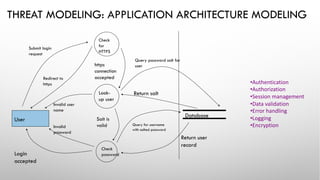
THREAT MODELING: APPLICATION ARCHITECTURE MODELING
User
Database
Submit login
request
Query password salt for
user
Query for username
with salted password
Redirect to
https
Login
accepted
Invalid user
name
Check
for
HTTPS
Look-
up user
https
connection
accepted
Return salt
Salt is
valid
Return user
record
Invalid
password
Check
password
•Authentication
•Authorization
•Session management
•Data validation
•Error handling
•Logging
•Encryption
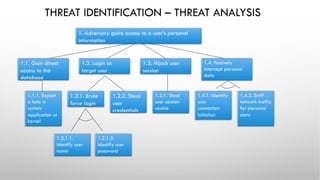
THREAT IDENTIFICATION – THREAT ANALYSIS
1. Adversary gains access to a user’s personal
information
1.1. Gain direct
access to the
database
1.2. Login as
target user
1.3. Hijack user
session
1.4. Passively
intercept personal
data
1.1.1. Exploit
a hole in
system
application or
kernel
1.2.1. Brute
force login
1.2.2. Steal
user
credentials
1.3.1. Steal
user session
cookie
1.4.1. Identify
user
connection
initiation
1.4.2. Sniff
network traffic
for personal
data
1.2.1.1.
Identify user
name
1.2.1.2.
Identify user
password
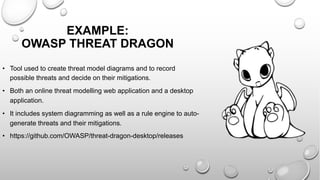
• Tool used to create threat model diagrams and to record
possible threats and decide on their mitigations.
• Both an online threat modelling web application and a desktop
application.
• It includes system diagramming as well as a rule engine to auto-
generate threats and their mitigations.
• https://github.com/OWASP/threat-dragon-desktop/releases
EXAMPLE:
OWASP THREAT DRAGON
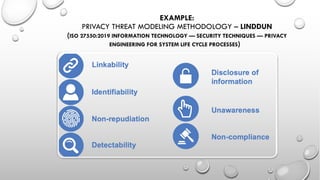
EXAMPLE:
PRIVACY THREAT MODELING METHODOLOGY – LINDDUN
(ISO 27550:2019 INFORMATION TECHNOLOGY — SECURITY TECHNIQUES — PRIVACY
ENGINEERING FOR SYSTEM LIFE CYCLE PROCESSES)
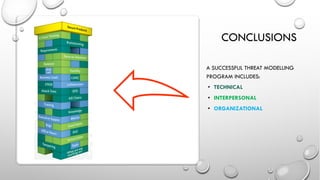
CONCLUSIONS
A SUCCESSFUL THREAT MODELLING
PROGRAM INCLUDES:
• TECHNICAL
• INTERPERSONAL
• ORGANIZATIONAL

Threat modelling & apps testing

  • 1.
    SECURITY BY DESIGN– THREAT MODELLING AND APPS SECURITY TESTING ADRIAN MUNTEANU – CISA, CRISC, CDPSE, CIPM
  • 2.
    LACK OF SECURECODING KNOWLEDGE? Developers/Testers Security Manager/Consultant/Auditor
  • 3.
    WHAT ABOUT BUILDING CARS LIKE APPLICATION? •70% of all cars would be built without following the original designs and blueprints. The other 30% would not have designs. • Car design would assume that safety is a function of road design and that all drivers were considerate, sober and expert drivers. • Cars would have no airbags, mirrors, seat belts, doors, roll-bars, side-impact bars, or locks, because no-one had asked for them. But they would all have at least six cup holders. • Not all the components would be bolted together securely and many of them would not be built to tolerate even the slightest abuse. • Safety tests would assume frontal impact only. Cars would not be roll tested, or tested for stability in emergency maneuvers, brake effectiveness, side impact and resistance to theft. • Many safety features originally included might be removed before the car was completed, because they might adversely impact performance.
  • 4.
    WHAT ABOUT BUILDING CARS LIKE APPLICATION? •70% of all cars would be subject to monthly recalls to add major components left out of the initial production. The other 30% wouldn’t be recalled, because no-one would sue anyway. • The after-market for safety devices would include such useful products as training wheels, screen doors, elastic seatbelts and devices that would restrict the car’s top speed to 3mph, if found to be unsafe (which would be always). • Useful safety could be found, but could only be custom retro-fitted, would take six months to fit and would cost more than the car itself. • A RAR inspection would consist of counting the wheels and making recommendations on wheel quantity. • Your only warning indicator would be large quantities of smoke and flame in the cab. • You could only get insurance from one provider, it would be extremely expensive, require a duplicate rar inspection, and you might still never be able to claim against the policy. (SOURCE: DENIS VERDON)
  • 5.
  • 6.
    STATUS OF APPLICATIONSECURITY IN THE MARKET TODAY Source: http://www.informationisbeautiful.net/visualizations/worlds-biggest-data-breaches-hacks/
  • 7.
    SECURITY IN DEPTHOR ZERO TRUST? • „at rest„ • „in use„ • „in motion„ Policies, procedures, awareness Physical Perimeter Internal network Host Data /application
  • 8.
    • THE NETWORK •INJECTING MALWARE TO A COMPUTER • BY ATTACKING THE APPLICATION ITSELF (USER INPUTS) WHERE MOST ATTACKS COME?
  • 9.
    COMMON APPLICATION VULNERABILITIES • Affect theDB (SQLi) Steal / corrupt information • Affect the applications users (cross site scripting) Steal user account Deface a site (fake site’s content) Inject malware to the sites users
  • 10.
    INDUSTRY SOLUTIONS • WEB APPLICATIONFIREWALL (WAF)/WEB GATEWAY/MAIL GATEWAY • IPS/IDS • WHITELIST • SANDBOX • ...... • PEN TESTING THE APPLICATION • DYNAMIC APPLICATION SECURITY TESTING (DAST) • STATIC APPLICATION SECURITY TESTING (SAST) • RUNTIME APPLICATION SELF PROTECTION (RASP)
  • 11.
    FIREWALL • Controls networkactivity • Informs / blocks incoming and outgoing traffic on the network Pro’s: • Secure from external network based attacks • blocks malware from communicating with the outside world Cons: • Leaves you vulnerable to attacks on the application (SQLi, XSS, etc..)
  • 12.
    WEB APPLICATION FIREWALL • Intelligent firewall– inspects transfer for suspicious patterns and blocks them. • Is configurable Pro’s: • Same as firewall • Can block some attacks on the application Cons: • Continuous configuration • Blocks legitimate traffic à lost business à • used only in alert mode
  • 13.
    PENETRATION TESTING • Manual simulationof hack attacks using various tools and techniques. • Usually done as a service (versus in-house) Pro’s: • Many attack vectors tested • Fix recommendations Cons: • Slow (weeks of testing) • Snapshot analysis • Expensive • End of development (delays release, fixing code is costly)
  • 14.
    DYNAMIC APPLICATION SECURITY TESTING (DAST) PRO’S: • Tests theruntime behavior of the application – more accurate Cons: • Random testing – limited coverage • Black box testing – limited coverage (type of vulnerabilities) • Done at end of development (delays release, fixing code is costly) • Doesn’t give remediation advice, just a URL
  • 15.
    STATIC APPLICATION SECURITY TESTING (SAST) • Automatic toolthat reviews the source code to find security vulnerabilities • Source code analysis / white box testing • Securing applications at development time Pro’s: • Comprehensive • Early detection à low fixing cost • Real time feedback à security awareness Cons: • Could be less accurate (more false positives)
  • 16.
    RUNTIME APPLICATION SELF PROTECTION • RASP protectsthe application without and requiring any code change! • The RASP enabled application can alert about / block attacks in real-time. • RASP is made available to developers as a series of function calls (pre-programmed security instrumentation procedures) that may be included in source code. Pro’s: • Effectively protects the application in runtime • No coding required (!) Cons: • Less vulnerability coverage than SAST • Few languages currently supported
  • 18.
    MICROSOFT - SECURITYDEVELOPMENT LIFECYCLE
  • 19.
    NON - MICROSOFT •Security requirements • Risk analysis Requirements and use cases • Risk analysis • Project review Design • Risk based security test Test plans • Static analysis • Code review Coding • Pen test Test results • Pen test Feedback
  • 20.
    THE GOOD, THE BAD ANDTHE UGLY • Security analyst: • Get involved early in SDLC. Security is a function of the asset we want to secure, what's it worth? • Understanding the information held in the application and the types of users is half the battle. • Involve an analyst in the design phase and thereafter. • Developer: • Embrace secure application development. (Educate) • Quality is not just “does it work” security is a measure of quality also.
  • 21.
    THE GOOD, THE BAD ANDTHE UGLY • QA/tester: • Security vulnerabilities are to be considered bugs, the same way as a functional bug, and tracked in the same manner. • Manager: • Consider security as added value in an application – $1 spent up front saves $10 during development and $100 after release
  • 22.
    APPLICATION SECURITY REQUIREMENTS • Start witha generic set of security requirements • Must include all security mechanisms • Must address all common vulnerabilities • Can be use (or misuse) cases • Should address all driving requirements (regulation, standards, best practices, etc.)
  • 23.
    DESIGN REVIEWS • Better tofind flaws early • Security design reviews • Check to ensure design meets requirements • Also check to make sure you didn’t miss a requirement • Assemble a team • Experts in the technology • Security-minded team members • Do a high-level penetration test against the design • Be sure to do root cause analysis on any flaws identified
  • 25.
    THREAT MODELLING MANIFESTO VALUES • A CULTUREOF FINDING AND FIXING DESIGN ISSUES OVER CHECKBOX COMPLIANCE. • PEOPLE AND COLLABORATION OVER PROCESSES, METHODOLOGIES, AND TOOLS. • A JOURNEY OF UNDERSTANDING OVER A SECURITY OR PRIVACY SNAPSHOT. • DOING THREAT MODELING OVER TALKING ABOUT IT. • CONTINUOUS REFINEMENT OVER A SINGLE DELIVERY. PRINCIPLES •The best use of threat modelling is to improve the security and privacy of a system through early and frequent analysis. •Threat modelling must align with an organization’s development practices and follow design changes in iterations that are each scoped to manageable portions of the system. •The outcomes of threat modelling are meaningful when they are of value to stakeholders. •Dialog is key to establishing the common understandings that lead to value, while documents record those understandings, and enable measurement.
  • 26.
    THREAT MODELING: APPLICATIONARCHITECTURE MODELING User Database Submit login request Query password salt for user Query for username with salted password Redirect to https Login accepted Invalid user name Check for HTTPS Look- up user https connection accepted Return salt Salt is valid Return user record Invalid password Check password •Authentication •Authorization •Session management •Data validation •Error handling •Logging •Encryption
  • 27.
    THREAT IDENTIFICATION –THREAT ANALYSIS 1. Adversary gains access to a user’s personal information 1.1. Gain direct access to the database 1.2. Login as target user 1.3. Hijack user session 1.4. Passively intercept personal data 1.1.1. Exploit a hole in system application or kernel 1.2.1. Brute force login 1.2.2. Steal user credentials 1.3.1. Steal user session cookie 1.4.1. Identify user connection initiation 1.4.2. Sniff network traffic for personal data 1.2.1.1. Identify user name 1.2.1.2. Identify user password
  • 28.
    • Tool usedto create threat model diagrams and to record possible threats and decide on their mitigations. • Both an online threat modelling web application and a desktop application. • It includes system diagramming as well as a rule engine to auto- generate threats and their mitigations. • https://github.com/OWASP/threat-dragon-desktop/releases EXAMPLE: OWASP THREAT DRAGON
  • 29.
    EXAMPLE: PRIVACY THREAT MODELINGMETHODOLOGY – LINDDUN (ISO 27550:2019 INFORMATION TECHNOLOGY — SECURITY TECHNIQUES — PRIVACY ENGINEERING FOR SYSTEM LIFE CYCLE PROCESSES)
  • 30.
    CONCLUSIONS A SUCCESSFUL THREATMODELLING PROGRAM INCLUDES: • TECHNICAL • INTERPERSONAL • ORGANIZATIONAL