MCA DEPARTMENT | Operators& Expressions
C
1
Operators:
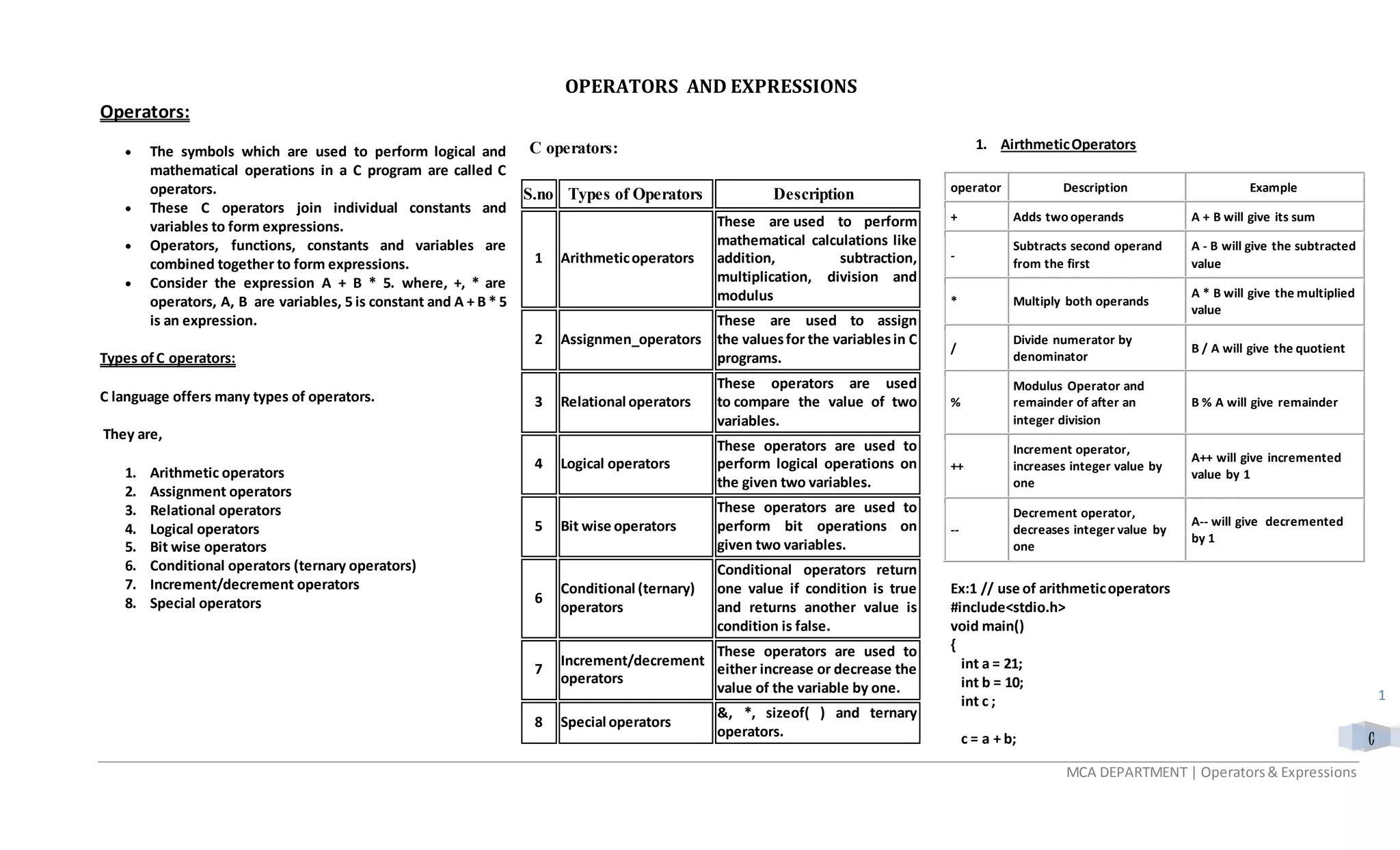
 The symbols which are used to perform logical and
mathematical operations in a C program are called C
operators.
 These C operators join individual constants and
variables to form expressions.
 Operators, functions, constants and variables are
combined together to form expressions.
 Consider the expression A + B * 5. where, +, * are
operators, A, B are variables, 5 is constant and A + B * 5
is an expression.
Types ofC operators:
C language offers many types of operators.
They are,
1. Arithmetic operators
2. Assignment operators
3. Relational operators
4. Logical operators
5. Bit wise operators
6. Conditional operators (ternary operators)
7. Increment/decrement operators
8. Special operators
C operators:
S.no Types of Operators Description
1 Arithmeticoperators
These are used to perform
mathematical calculations like
addition, subtraction,
multiplication, division and
modulus
2 Assignmen_operators
These are used to assign
the valuesfor the variablesin C
programs.
3 Relational operators
These operators are used
to compare the value of two
variables.
4 Logical operators
These operators are used to
perform logical operations on
the given two variables.
5 Bit wise operators
These operators are used to
perform bit operations on
given two variables.
6
Conditional (ternary)
operators
Conditional operators return
one value if condition is true
and returns another value is
condition is false.
7
Increment/decrement
operators
These operators are used to
either increase or decrease the
value of the variable by one.
8 Special operators
&, *, sizeof( ) and ternary
operators.
1. AirthmeticOperators
operator Description Example
+ Adds two operands A + B will give its sum
-
Subtracts second operand
from the first
A - B will give the subtracted
value
* Multiply both operands
A * B will give the multiplied
value
/
Divide numerator by
denominator
B / A will give the quotient
%
Modulus Operator and
remainder of after an
integer division
B % A will give remainder
++
Increment operator,
increases integer value by
one
A++ will give incremented
value by 1
--
Decrement operator,
decreases integer value by
one
A-- will give decremented
by 1
Ex:1 // use of arithmeticoperators
#include<stdio.h>
void main()
{
int a = 21;
int b = 10;
int c ;
c = a + b;
OPERATORS AND EXPRESSIONS
MCA DEPARTMENT | Operators& Expressions
C
2
printf("Line 1- Value of c is%dn", c );
c = a - b;
printf("Line 2- Value of c is%dn", c );
c = a * b;
printf("Line 3- Value of c is%dn", c );
c = a / b;
printf("Line 4- Value of c is%dn", c );
c = a % b;
printf("Line 5- Value of c is%dn", c );
c = a++;
printf("Line 6- Value of c is%dn", c );
c = a--;
printf("Line 7- Value of c is%dn", c );
}
Output:
Line 1 - Value of c is 31
Line 2 - Value of c is 11
Line 3 - Value of c is 210
Line 4 - Value of c is 2
Line 5 - Value of c is 1
Line 6 - Value of c is 21
Line 7 - Value of c is 22
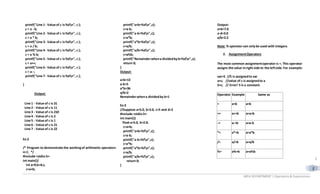
Ex:2
/* Program to demonstrate the workingof arithmetic operators
in C. */
#include <stdio.h>
int main(){
int a=9,b=4,c;
c=a+b;
printf("a+b=%dn",c);
c=a-b;
printf("a-b=%dn",c);
c=a*b;
printf("a*b=%dn",c);
c=a/b;
printf("a/b=%dn",c);
c=a%b;
printf("Remainderwhena dividedbyb=%dn",c);
return 0;
}
Output:
a+b=13
a-b=5
a*b=36
a/b=2
Remainderwhena dividedby b=1
Ex:3
//Suppose a=5.0, b=2.0, c=5 and d=2
#include <stdio.h>
int main(){
float a=5.0, b=2.0;
c=a+b;
printf("a+b=%fn",c);
c=a-b;
printf("a-b=%fn",c);
c=a*b;
printf("a*b=%fn",c);
c=a/b;
printf("a/b=%fn",c);
return 0;
}
Output:
a+b=7.0
a-d=3.0
a/b=2.5
Note: % operator can onlybe used with integers.
2. AssignmentOperators
The most common assignmentoperator is =. This operator
assigns the value inright side to the leftside.For example:
var=5 //5 is assignedto var
a=c; //value of c is assignedto a
5=c; // Error! 5 is a constant.
Operator Example Same as
= a=b a=b
+= a+=b a=a+b
-= a-=b a=a-b
*= a*=b a=a*b
/= a/=b a=a/b
%= a%=b a=a%b
MCA DEPARTMENT | Operators& Expressions
C
3
Ex: 4
//use of assignment operator
#include<stdio.h>
int main()
{
int a = 21;
int c ;
c = a;
printf("Line 1 - = Operator Example, Value of c = %dn", c );
c += a;
printf("Line 2 - += Operator Example, Value of c = %dn", c );
c -= a;
printf("Line 3 - -= Operator Example, Value of c = %dn", c );
c *= a;
printf("Line 4 - *= Operator Example, Value of c = %dn", c );
c /= a;
printf("Line 5 - /= Operator Example, Value of c = %dn", c );
c = 200;
c %= a;
printf("Line 6 - %= Operator Example, Value of c = %dn", c );
c <<= 2;
printf("Line 7 - <<= Operator Example, Value of c = %dn", c );
c >>= 2;
printf("Line 8 - >>= Operator Example, Value of c = %dn", c );
c &= 2;
printf("Line 9 - &= Operator Example, Value of c = %dn", c );
c ^= 2;
printf("Line 10 - ^= Operator Example, Value of c = %dn", c );
c |= 2;
printf("Line 11 - |= Operator Example, Value of c = %dn", c );
return 0;
}
Output:
Line 1 - = Operator Example, Value of c = 21
Line 2 - += Operator Example, Value of c = 42
Line 3 - -= Operator Example, Value of c = 21
Line 4 - *= Operator Example, Value of c = 441
Line 5 - /= Operator Example, Value of c = 21
Line 6 - %= Operator Example, Value of c = 11
Line 7 - <<= Operator Example, Value of c = 44
Line 8 - >>= Operator Example, Value of c = 11
Line 9 - &= Operator Example, Value of c = 2
Line 10 - ^= Operator Example, Value of c = 0
Line 11 - |= Operator Example, Value of c = 2
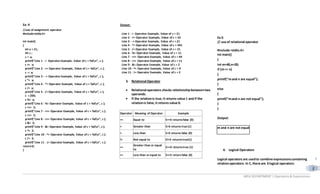
3. Relational Operator
 Relational operators checks relationshipbetweentwo
operands.
 If the relationis true,it returns value 1 and if the
relationis false,it returns value 0.
Operator Meaning of Operator Example
== Equal to 5==3 returnsfalse (0)
> Greater than 5>3 returns true (1)
< Less than 5<3 returns false (0)
!= Not equal to 5!=3 returnstrue(1)
>=
Greater than or equal
to
5>=3 returnstrue (1)
<= Less than or equal to 5<=3 return false (0)
Ex:5
// use of relational operator
#include <stdio.h>
int main()
{
int m=40,n=20;
if (m== n)
{
printf(“mand n are equal”);
}
else
{
printf(“mand n are not equal”);
}
}
Output:
m and n are not equal
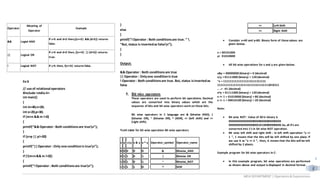
4. Logical Operators
Logical operators are usedto combine expressionscontaining
relationoperators. In C, there are 3 logical operators:
MCA DEPARTMENT | Operators& Expressions
C
4
Operator
Meaning of
Operator
Example
&& Logial AND
If c=5 and d=2 then,((c==5) && (d>5)) returns
false.
|| Logical OR
If c=5 and d=2 then, ((c==5) || (d>5)) returns
true.
! Logical NOT If c=5 then, !(c==5) returns false.
Ex:6
// use of relational operators
#include <stdio.h>
int main()
{
int m=40,n=20;
int o=20,p=30;
if (m>n && m !=0)
{
printf(“&& Operator: Both conditionsare truen”);
}
if (o>p || p!=20)
{
printf(“||Operator : Only one conditionis truen”);
}
if (!(m>n&& m !=0))
{
printf(“!Operator : Both conditionsare truen”);
}
else
{
printf(“!Operator : Both conditionsare true. ” 
“But, status is invertedas falsen”);
}
}
Output:
&& Operator : Both conditionsare true
|| Operator : Onlyone conditionis true
! Operator : Both conditionsare true. But, status isinvertedas
false
5. Bit wise operators
These operators are used to perform bit operations. Decimal
values are converted into binary values which are the
sequence of bits and bit wise operators work on these bits.
Bit wise operators in C language are & (bitwise AND), |
(bitwise OR), ~ (bitwise OR), ^ (XOR), << (left shift) and >>
(right shift).
Truth table for bit wise operation Bit wise operators
x y x|y x & y x ^ y Operator_symbol Operator_name
0 0 0 0 0 & Bitwise_AND
0 1 1 0 1 | Bitwise OR
1 0 1 0 1 ~ Bitwise_NOT
1 1 1 1 0 ^ XOR
<< Left Shift
>> Right Shift
 Consider x=40 and y=80. Binary form of these values are
given below.
x = 00101000
y= 01010000
 All bit wise operations for x and y are given below.
x&y = 00000000 (binary) = 0 (decimal)
x|y = 01111000 (binary) = 120 (decimal)
~x = 11111111111111111111111111
11111111111111111111111111111111010111
.. ..= -41 (decimal)
x^y = 01111000 (binary) = 120 (decimal)
x << 1 = 01010000 (binary) = 80 (decimal)
x >> 1 = 00010100 (binary) = 20 (decimal)
Note:
 Bit wise NOT : Value of 40 in binary is
00000000000000000000000000000000
00000000000000000010100000000000.So, all 0′s are
converted into 1′s in bit wise NOT operation.
 Bit wise left shift and right shift : In left shift operation “x <<
1 “, 1 means that the bits will be left shifted by one place. If
we use it as “x << 2 “, then, it means that the bits will be left
shifted by 2 places.
Example program for bit wise operators in C:
 In this example program, bit wise operations are performed
as shown above and output is displayed in decimal format.
MCA DEPARTMENT | Operators& Expressions
C
5
EX:7
#include <stdio.h>
int main()
{
int m = 40,n = 80,AND_opr,OR_opr,XOR_opr,NOT_opr ;
AND_opr = (m&n);
OR_opr = (m|n);
NOT_opr = (~m);
XOR_opr = (m^n);
printf(“AND_opr value = %dn”,AND_opr );
printf(“OR_opr value = %dn”,OR_opr );
printf(“NOT_opr value = %dn”,NOT_opr );
printf(“XOR_opr value = %dn”,XOR_opr );
printf(“left_shift value = %dn”, m << 1);
printf(“right_shift value = %dn”, m >> 1);
}
Output:
AND_opr value = 0
OR_opr value = 120
NOT_opr value = -41
XOR_opr value = 120
left_shift value = 80
right_shift value = 20
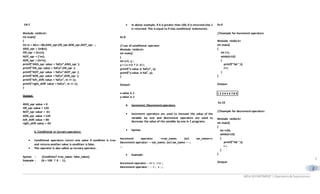
6. Conditional or ternary operators:
 Conditional operators return one value if condition is true
and returns another value is condition is false.
 This operator is also called as ternary operator.
Syntax : (Condition? true_value: false_value);
Example : (A > 100 ? 0 : 1);
.
 In above example, if A is greater than 100, 0 is returned else 1
is returned. This is equal to if else conditional statements.
Ex:8
// use of conditional operator
#include <stdio.h>
int main()
{
int x=1, y ;
y = ( x ==1 ? 2 : 0 ) ;
printf(“x value is %dn”, x);
printf(“y value is %d”, y);
}
Output:
x value is 1
y value is 2
6. Increment /Decrement operators
 Increment operators are used to increase the value of the
variable by one and decrement operators are used to
decrease the value of the variable by one in C programs.
 Syntax:
Increment operator: ++var_name; (or) var_name++;
Decrement operator: – -var_name; (or) var_name – -;
…
 Example:
Increment operator : ++ i ; i ++ ;
Decrement operator : - - i ; i- - ;
Ex:9
//Example for increment operators
#include <stdio.h>
int main()
{
int i=1;
while(i<10)
{
printf("%d ",i);
i++;
}
}
Output:
1 2 3 4 5 6 7 8 9
Ex:10
//Example for decrement operators
#include <stdio.h>
int main()
{
int i=20;
while(i>10)
{
printf("%d ",i);
i--;
}
}
Output:
MCA DEPARTMENT | Operators& Expressions
C
6
20 19 18 17 16 15 14 13 12 11
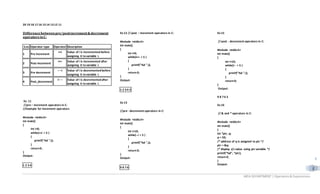
Differencebetweenpre/postincrement&decrement
operatorsinC:
S.no Operator type Operator Description
1 Pre increment
++i Value of i is incremented before
assigning it to variable i.
2 Post-increment
i++ Value of i is incremented after
assigning it to variable i.
3 Pre decrement
– –i Value of i is decremented before
assigning it to variable i.
4 Post_decrement
i– – Value of i is decremented after
assigning it to variable i.
Ex: 11
//pre – increment operators in C:
//Example for increment operators
#include <stdio.h>
int main()
{
int i=0;
while(++i < 5 )
{
printf("%d ",i);
}
return 0;
}
Output:
1 2 3 4
Ex:12 // post – increment operators in C:
#include <stdio.h>
int main()
{
int i=0;
while(i++ < 5 )
{
printf("%d ",i);
}
return 0;
}
Output:
1 2 3 4 5
Ex:13
//pre - decrement operators in C:
#include <stdio.h>
int main()
{
int i=10;
while(--i > 5 )
{
printf("%d ",i);
}
return 0;
}
Output:
9 8 7 6
Ex:15
// post - decrement operators in C:
#include <stdio.h>
int main()
{
int i=10;
while(i-- > 5 )
{
printf("%d ",i);
}
return 0;
}
Output:
9 8 7 6 5
Ex:16
// & and * operators in C:
#include <stdio.h>
int main()
{
int *ptr, q;
q = 50;
/* address of q is assigned to ptr */
ptr = &q;
/* display q’s value using ptr variable */
printf(“%d”, *ptr);
return 0;
}
Output:
MCA DEPARTMENT | Operators& Expressions
C
7
50
Ex:17
//program for sizeof() operator in C:
#include <stdio.h>
#include <limits.h>
int main()
{
int a;
char b;
float c;
double d;
printf(“Storage size for int data type:%d n”,sizeof(a));
printf(“Storage size for char data type:%d n”,sizeof(b));
printf(“Storage size for float data type:%d n”,sizeof(c));
printf(“Storage size for double data type:%dn”,sizeof(d));
return 0;
}
Output:
Storage size for int data type:4
Storage size for char data type:1
Storage size for float data type:4
Storage size for double data type:8
Operator Precedence& Associativity
Category Operator Associativity
Postfix () [] -> . ++ - - Left to right
Unary
+ - ! ~ ++ - - (type) *
& sizeof
Right to left
Multiplicative * / % Left to right
Additive + - Left to right
Shift << >> Left to right
Relational < <= > >= Left to right
Equality == != Left to right
Bitwise AND & Left to right
Bitwise XOR ^ Left to right
Bitwise OR | Left to right
Logical AND && Left to right
Logical OR || Left to right
Conditional ?: Right to left
Assignment
= += -= *= /= %= >>=
<<= &= ^= |=
Right to left
Comma , Left to right
EXPRESSIONS
Combinations of operands and operators with seperators are called as
expressions.
Ex:
int a, b, c:
c = a+b; //--- Expression statement
TypeConversions
 Converting from one data type to another data type is called
type conversion
 There are two kinds of type conversion
Implicit: Same data type conversion
 Smaller data type into bigger
(memory size)
Explicit: Different Data type
 Type Casting
(Float--- int (or) int ---- float)
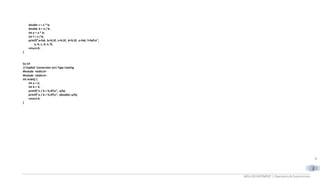
Ex:18
// Implicit conversion
#include <stdio.h>
int main() {
int a = 2;
double b = 3.5;
Type Conversion
Implicit Explicit
MCA DEPARTMENT | Operators& Expressions
C
8
double c = a * b;
double d = a / b;
int e = a * b;
int f = a / b;
printf("a=%d, b=%.3f, c=%.3f, d=%.3f, e=%d, f=%dn",
a, b, c, d, e, f);
return 0;
}
Ex:19
// Explicit Conversion (or) Type Casting
#include <stdio.h>
#include <stdio.h>
int main() {
int a = 2;
int b = 3;
printf("a / b = %.3fn", a/b);
printf("a / b = %.3fn", (double) a/b);
return 0;
}

Theory3

  • 1.
    MCA DEPARTMENT |Operators& Expressions C 1 Operators:  The symbols which are used to perform logical and mathematical operations in a C program are called C operators.  These C operators join individual constants and variables to form expressions.  Operators, functions, constants and variables are combined together to form expressions.  Consider the expression A + B * 5. where, +, * are operators, A, B are variables, 5 is constant and A + B * 5 is an expression. Types ofC operators: C language offers many types of operators. They are, 1. Arithmetic operators 2. Assignment operators 3. Relational operators 4. Logical operators 5. Bit wise operators 6. Conditional operators (ternary operators) 7. Increment/decrement operators 8. Special operators C operators: S.no Types of Operators Description 1 Arithmeticoperators These are used to perform mathematical calculations like addition, subtraction, multiplication, division and modulus 2 Assignmen_operators These are used to assign the valuesfor the variablesin C programs. 3 Relational operators These operators are used to compare the value of two variables. 4 Logical operators These operators are used to perform logical operations on the given two variables. 5 Bit wise operators These operators are used to perform bit operations on given two variables. 6 Conditional (ternary) operators Conditional operators return one value if condition is true and returns another value is condition is false. 7 Increment/decrement operators These operators are used to either increase or decrease the value of the variable by one. 8 Special operators &, *, sizeof( ) and ternary operators. 1. AirthmeticOperators operator Description Example + Adds two operands A + B will give its sum - Subtracts second operand from the first A - B will give the subtracted value * Multiply both operands A * B will give the multiplied value / Divide numerator by denominator B / A will give the quotient % Modulus Operator and remainder of after an integer division B % A will give remainder ++ Increment operator, increases integer value by one A++ will give incremented value by 1 -- Decrement operator, decreases integer value by one A-- will give decremented by 1 Ex:1 // use of arithmeticoperators #include<stdio.h> void main() { int a = 21; int b = 10; int c ; c = a + b; OPERATORS AND EXPRESSIONS
  • 2.
    MCA DEPARTMENT |Operators& Expressions C 2 printf("Line 1- Value of c is%dn", c ); c = a - b; printf("Line 2- Value of c is%dn", c ); c = a * b; printf("Line 3- Value of c is%dn", c ); c = a / b; printf("Line 4- Value of c is%dn", c ); c = a % b; printf("Line 5- Value of c is%dn", c ); c = a++; printf("Line 6- Value of c is%dn", c ); c = a--; printf("Line 7- Value of c is%dn", c ); } Output: Line 1 - Value of c is 31 Line 2 - Value of c is 11 Line 3 - Value of c is 210 Line 4 - Value of c is 2 Line 5 - Value of c is 1 Line 6 - Value of c is 21 Line 7 - Value of c is 22 Ex:2 /* Program to demonstrate the workingof arithmetic operators in C. */ #include <stdio.h> int main(){ int a=9,b=4,c; c=a+b; printf("a+b=%dn",c); c=a-b; printf("a-b=%dn",c); c=a*b; printf("a*b=%dn",c); c=a/b; printf("a/b=%dn",c); c=a%b; printf("Remainderwhena dividedbyb=%dn",c); return 0; } Output: a+b=13 a-b=5 a*b=36 a/b=2 Remainderwhena dividedby b=1 Ex:3 //Suppose a=5.0, b=2.0, c=5 and d=2 #include <stdio.h> int main(){ float a=5.0, b=2.0; c=a+b; printf("a+b=%fn",c); c=a-b; printf("a-b=%fn",c); c=a*b; printf("a*b=%fn",c); c=a/b; printf("a/b=%fn",c); return 0; } Output: a+b=7.0 a-d=3.0 a/b=2.5 Note: % operator can onlybe used with integers. 2. AssignmentOperators The most common assignmentoperator is =. This operator assigns the value inright side to the leftside.For example: var=5 //5 is assignedto var a=c; //value of c is assignedto a 5=c; // Error! 5 is a constant. Operator Example Same as = a=b a=b += a+=b a=a+b -= a-=b a=a-b *= a*=b a=a*b /= a/=b a=a/b %= a%=b a=a%b
  • 3.
    MCA DEPARTMENT |Operators& Expressions C 3 Ex: 4 //use of assignment operator #include<stdio.h> int main() { int a = 21; int c ; c = a; printf("Line 1 - = Operator Example, Value of c = %dn", c ); c += a; printf("Line 2 - += Operator Example, Value of c = %dn", c ); c -= a; printf("Line 3 - -= Operator Example, Value of c = %dn", c ); c *= a; printf("Line 4 - *= Operator Example, Value of c = %dn", c ); c /= a; printf("Line 5 - /= Operator Example, Value of c = %dn", c ); c = 200; c %= a; printf("Line 6 - %= Operator Example, Value of c = %dn", c ); c <<= 2; printf("Line 7 - <<= Operator Example, Value of c = %dn", c ); c >>= 2; printf("Line 8 - >>= Operator Example, Value of c = %dn", c ); c &= 2; printf("Line 9 - &= Operator Example, Value of c = %dn", c ); c ^= 2; printf("Line 10 - ^= Operator Example, Value of c = %dn", c ); c |= 2; printf("Line 11 - |= Operator Example, Value of c = %dn", c ); return 0; } Output: Line 1 - = Operator Example, Value of c = 21 Line 2 - += Operator Example, Value of c = 42 Line 3 - -= Operator Example, Value of c = 21 Line 4 - *= Operator Example, Value of c = 441 Line 5 - /= Operator Example, Value of c = 21 Line 6 - %= Operator Example, Value of c = 11 Line 7 - <<= Operator Example, Value of c = 44 Line 8 - >>= Operator Example, Value of c = 11 Line 9 - &= Operator Example, Value of c = 2 Line 10 - ^= Operator Example, Value of c = 0 Line 11 - |= Operator Example, Value of c = 2 3. Relational Operator  Relational operators checks relationshipbetweentwo operands.  If the relationis true,it returns value 1 and if the relationis false,it returns value 0. Operator Meaning of Operator Example == Equal to 5==3 returnsfalse (0) > Greater than 5>3 returns true (1) < Less than 5<3 returns false (0) != Not equal to 5!=3 returnstrue(1) >= Greater than or equal to 5>=3 returnstrue (1) <= Less than or equal to 5<=3 return false (0) Ex:5 // use of relational operator #include <stdio.h> int main() { int m=40,n=20; if (m== n) { printf(“mand n are equal”); } else { printf(“mand n are not equal”); } } Output: m and n are not equal 4. Logical Operators Logical operators are usedto combine expressionscontaining relationoperators. In C, there are 3 logical operators:
  • 4.
    MCA DEPARTMENT |Operators& Expressions C 4 Operator Meaning of Operator Example && Logial AND If c=5 and d=2 then,((c==5) && (d>5)) returns false. || Logical OR If c=5 and d=2 then, ((c==5) || (d>5)) returns true. ! Logical NOT If c=5 then, !(c==5) returns false. Ex:6 // use of relational operators #include <stdio.h> int main() { int m=40,n=20; int o=20,p=30; if (m>n && m !=0) { printf(“&& Operator: Both conditionsare truen”); } if (o>p || p!=20) { printf(“||Operator : Only one conditionis truen”); } if (!(m>n&& m !=0)) { printf(“!Operator : Both conditionsare truen”); } else { printf(“!Operator : Both conditionsare true. ” “But, status is invertedas falsen”); } } Output: && Operator : Both conditionsare true || Operator : Onlyone conditionis true ! Operator : Both conditionsare true. But, status isinvertedas false 5. Bit wise operators These operators are used to perform bit operations. Decimal values are converted into binary values which are the sequence of bits and bit wise operators work on these bits. Bit wise operators in C language are & (bitwise AND), | (bitwise OR), ~ (bitwise OR), ^ (XOR), << (left shift) and >> (right shift). Truth table for bit wise operation Bit wise operators x y x|y x & y x ^ y Operator_symbol Operator_name 0 0 0 0 0 & Bitwise_AND 0 1 1 0 1 | Bitwise OR 1 0 1 0 1 ~ Bitwise_NOT 1 1 1 1 0 ^ XOR << Left Shift >> Right Shift  Consider x=40 and y=80. Binary form of these values are given below. x = 00101000 y= 01010000  All bit wise operations for x and y are given below. x&y = 00000000 (binary) = 0 (decimal) x|y = 01111000 (binary) = 120 (decimal) ~x = 11111111111111111111111111 11111111111111111111111111111111010111 .. ..= -41 (decimal) x^y = 01111000 (binary) = 120 (decimal) x << 1 = 01010000 (binary) = 80 (decimal) x >> 1 = 00010100 (binary) = 20 (decimal) Note:  Bit wise NOT : Value of 40 in binary is 00000000000000000000000000000000 00000000000000000010100000000000.So, all 0′s are converted into 1′s in bit wise NOT operation.  Bit wise left shift and right shift : In left shift operation “x << 1 “, 1 means that the bits will be left shifted by one place. If we use it as “x << 2 “, then, it means that the bits will be left shifted by 2 places. Example program for bit wise operators in C:  In this example program, bit wise operations are performed as shown above and output is displayed in decimal format.
  • 5.
    MCA DEPARTMENT |Operators& Expressions C 5 EX:7 #include <stdio.h> int main() { int m = 40,n = 80,AND_opr,OR_opr,XOR_opr,NOT_opr ; AND_opr = (m&n); OR_opr = (m|n); NOT_opr = (~m); XOR_opr = (m^n); printf(“AND_opr value = %dn”,AND_opr ); printf(“OR_opr value = %dn”,OR_opr ); printf(“NOT_opr value = %dn”,NOT_opr ); printf(“XOR_opr value = %dn”,XOR_opr ); printf(“left_shift value = %dn”, m << 1); printf(“right_shift value = %dn”, m >> 1); } Output: AND_opr value = 0 OR_opr value = 120 NOT_opr value = -41 XOR_opr value = 120 left_shift value = 80 right_shift value = 20 6. Conditional or ternary operators:  Conditional operators return one value if condition is true and returns another value is condition is false.  This operator is also called as ternary operator. Syntax : (Condition? true_value: false_value); Example : (A > 100 ? 0 : 1); .  In above example, if A is greater than 100, 0 is returned else 1 is returned. This is equal to if else conditional statements. Ex:8 // use of conditional operator #include <stdio.h> int main() { int x=1, y ; y = ( x ==1 ? 2 : 0 ) ; printf(“x value is %dn”, x); printf(“y value is %d”, y); } Output: x value is 1 y value is 2 6. Increment /Decrement operators  Increment operators are used to increase the value of the variable by one and decrement operators are used to decrease the value of the variable by one in C programs.  Syntax: Increment operator: ++var_name; (or) var_name++; Decrement operator: – -var_name; (or) var_name – -; …  Example: Increment operator : ++ i ; i ++ ; Decrement operator : - - i ; i- - ; Ex:9 //Example for increment operators #include <stdio.h> int main() { int i=1; while(i<10) { printf("%d ",i); i++; } } Output: 1 2 3 4 5 6 7 8 9 Ex:10 //Example for decrement operators #include <stdio.h> int main() { int i=20; while(i>10) { printf("%d ",i); i--; } } Output:
  • 6.
    MCA DEPARTMENT |Operators& Expressions C 6 20 19 18 17 16 15 14 13 12 11 Differencebetweenpre/postincrement&decrement operatorsinC: S.no Operator type Operator Description 1 Pre increment ++i Value of i is incremented before assigning it to variable i. 2 Post-increment i++ Value of i is incremented after assigning it to variable i. 3 Pre decrement – –i Value of i is decremented before assigning it to variable i. 4 Post_decrement i– – Value of i is decremented after assigning it to variable i. Ex: 11 //pre – increment operators in C: //Example for increment operators #include <stdio.h> int main() { int i=0; while(++i < 5 ) { printf("%d ",i); } return 0; } Output: 1 2 3 4 Ex:12 // post – increment operators in C: #include <stdio.h> int main() { int i=0; while(i++ < 5 ) { printf("%d ",i); } return 0; } Output: 1 2 3 4 5 Ex:13 //pre - decrement operators in C: #include <stdio.h> int main() { int i=10; while(--i > 5 ) { printf("%d ",i); } return 0; } Output: 9 8 7 6 Ex:15 // post - decrement operators in C: #include <stdio.h> int main() { int i=10; while(i-- > 5 ) { printf("%d ",i); } return 0; } Output: 9 8 7 6 5 Ex:16 // & and * operators in C: #include <stdio.h> int main() { int *ptr, q; q = 50; /* address of q is assigned to ptr */ ptr = &q; /* display q’s value using ptr variable */ printf(“%d”, *ptr); return 0; } Output:
  • 7.
    MCA DEPARTMENT |Operators& Expressions C 7 50 Ex:17 //program for sizeof() operator in C: #include <stdio.h> #include <limits.h> int main() { int a; char b; float c; double d; printf(“Storage size for int data type:%d n”,sizeof(a)); printf(“Storage size for char data type:%d n”,sizeof(b)); printf(“Storage size for float data type:%d n”,sizeof(c)); printf(“Storage size for double data type:%dn”,sizeof(d)); return 0; } Output: Storage size for int data type:4 Storage size for char data type:1 Storage size for float data type:4 Storage size for double data type:8 Operator Precedence& Associativity Category Operator Associativity Postfix () [] -> . ++ - - Left to right Unary + - ! ~ ++ - - (type) * & sizeof Right to left Multiplicative * / % Left to right Additive + - Left to right Shift << >> Left to right Relational < <= > >= Left to right Equality == != Left to right Bitwise AND & Left to right Bitwise XOR ^ Left to right Bitwise OR | Left to right Logical AND && Left to right Logical OR || Left to right Conditional ?: Right to left Assignment = += -= *= /= %= >>= <<= &= ^= |= Right to left Comma , Left to right EXPRESSIONS Combinations of operands and operators with seperators are called as expressions. Ex: int a, b, c: c = a+b; //--- Expression statement TypeConversions  Converting from one data type to another data type is called type conversion  There are two kinds of type conversion Implicit: Same data type conversion  Smaller data type into bigger (memory size) Explicit: Different Data type  Type Casting (Float--- int (or) int ---- float) Ex:18 // Implicit conversion #include <stdio.h> int main() { int a = 2; double b = 3.5; Type Conversion Implicit Explicit
  • 8.
    MCA DEPARTMENT |Operators& Expressions C 8 double c = a * b; double d = a / b; int e = a * b; int f = a / b; printf("a=%d, b=%.3f, c=%.3f, d=%.3f, e=%d, f=%dn", a, b, c, d, e, f); return 0; } Ex:19 // Explicit Conversion (or) Type Casting #include <stdio.h> #include <stdio.h> int main() { int a = 2; int b = 3; printf("a / b = %.3fn", a/b); printf("a / b = %.3fn", (double) a/b); return 0; }