1
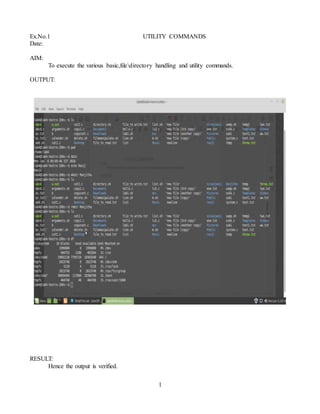
Ex.No.1 UTILITY COMMANDS
Date:
AIM:
To execute the various basic,filedirectory handling and utility commands.
OUTPUT:
RESULT:
Hence the output is verified.
2
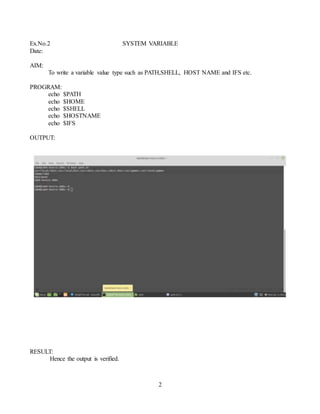
Ex.No.2 SYSTEM VARIABLE
Date:
AIM:
To write a variable value type such as PATH,SHELL, HOST NAME and IFS etc.
PROGRAM:
echo $PATH
echo $HOME
echo $SHELL
echo $HOSTNAME
echo $IFS
OUTPUT:
RESULT:
Hence the output is verified.
3
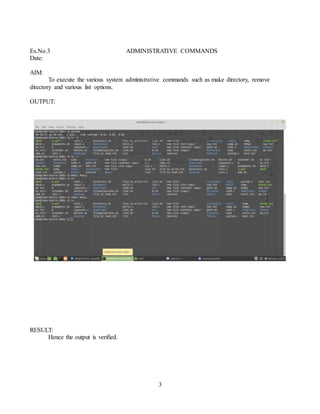
Ex.No.3 ADMINISTRATIVE COMMANDS
Date:
AIM:
To execute the various system administrative commands such as make directory, remove
directory and various list options.
OUTPUT:
RESULT:
Hence the output is verified.
4
Ex.No.4 DISPLAY THE LIST OF USERS
Date
AIM:
To write a program to display the list of users currently logged in.
PROGRAM:
function line ()
{
echo “ ******* ”
}
echo “yours username: $ (echo $ user)”
line
echo “current date and time : $ (date)”
line
echo “ currently logged on yours: ”
who
line
OUTPUT:
yours user name:
******
current date and time:
thu mar 12 2020, 1.40pm
currently logged on yours:
mtnc lab4 ++y7 2020,1.40pm
********
RESULT:
Hence the output is verified.
5
Ex.No.5 DISPLAY THE LIST OF USERS
Date
AIM:
To write a shell script that displays a list of all files in the current directory to which the user has
read ,write and execute permissions.
PROGRAM:
echo "enter the directory name"
read dir
if [ -d $dir ]
then
cd $dir
ls > f
exec < f
while read line
do
if [ -f $line ]
then
if [ -r $line -a -w $line -a -x $line ]
then
echo "$line has all permissions"
else
echo "files not having all permissions"
fi
fi
done
fi
OUTPUT:
RESULT :
Hence the output is verified.
6
Ex.No.6 DELETE THE FILES
Date
AIM:
To write a shell script to delete all the temporary files.
PROGRAM:
rm -rf / tmp / *
rm -rf / var / tmp / *
fsck -A
exit
OUTPUT:
The file deleted.
RESULT:
Hence the output is verified.
7
Ex.No.7 DISPLAY SOURCE CODE IN GIVEN FILE
Date
AIM:
To write the shell script that accepts a file name, starting and ending line numbers as arguments
and display all the lines between the given line numbers.
PROCEDURE:
1. Start
2. Get the filename.
3. Get the starting and ending line number.
4. Using -n and cat command.
5. Display the given lines of the files.
6. Stop.
PROGRAM:
echo "enter the file name"
read fname
echo "enter the starting line number"
read s
echo "enter the ending number"
read n
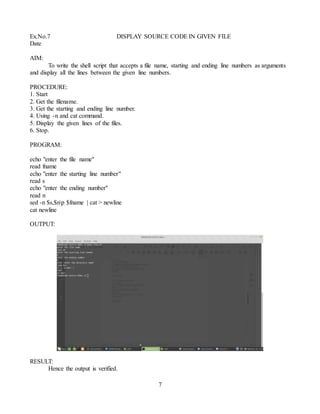
sed -n $s,$np $fname | cat > newline
cat newline
OUTPUT:
RESULT:
Hence the output is verified.
8
Ex.No.8 DELETE A LINE CONTAINING SPECIFIED WORD
Date
AIM:
To write a shell script that deletes all lines containing a specified word in one or more files
supplied as arguments to it.
PROCEDURE:
1. Start.
2. Get the file names as command line arguments.
3. Write “enter the word to search and delete”.
4. Read word.
5. For each argument repeat step 6 to step 8.
6. if it is file then go to next step else display “error in file”.
7. Search the lines not contain specified “word”.
8. Write the above result into same file.
9. Stop.
PROGRAM:
if [ $# -eq 0 ]
then
echo NO ARUGUMENTS
else
pattern=$1
shift
for fname in $*
do
if [ -f $fname ]
then
echo DELETING $pattern FROM $fname
sed '/'$pattern'/d' $fname
else
echo $fname NOT FOUND
fi
done
fi
9
OUTPUT:
RESULT:
Hence the output is verified.
10
Ex.No.9 FILES OR DIRECTORY DOCUMENTS.
Date
AIM:
To write a shell script that receives any number of file names as its arguments, check if every
argument supplied is a file or a directory and reports accordingly. Whenever the argument is a file, the
number of lines on its to be reported.
PROCEDURE:
1. Start.
2. Get the file names and command line arguments.
3. Check the file is directory or file.
4. Display the number of lines in the file.
5. stop.
PROGRAM:
for x in $*
do
if [ -f $x ]
then
echo "$x is a file"
echo "no of lines in the files are"
wc -l $x
elif [ -d $x ]
then
echo "$x is a directory"
else
echo "enter valid filename or directory name"
fi
done
11
OUTPUT:
RESULT:
Hence the output is verified.
Ex. No.10 .ARITHMETIC AND LOGICAL CALCULATIONS
Date:
AIM:
To write a simple shell script for basic arithmetic and logical calculations.
ALGORITHM:
1. Start the program.
2. Read the two numbers.
3. Perform the arithmetic operations for addition, subtraction, multiplication and division.
4. Compare the two variables ,to find the arithmetic and logical calculations.
5. Display the arithmetic and logical values.
6. Stop.
12
PROGRAM:
#!/bin/sh
a=10
b=10
val=`expr $a + $b`
echo "a + b : $val"
val=`expr $a - $b`
echo "a - b : $val"
val=`expr $a * $b`
echo "a * b : $val"
val=`expr $b / $a`
echo "b / a : $val"
val=`expr $b % $a`
echo "b % a : $val"
if [ $a == $b ]
then
echo "a is equal to b"
fi
if [ $a != $b ]
then
echo "a is not equal to b"
fi
OUTPUT:
13
RESULT:
Hence the output is verified.
Ex .No. 11.FACTORIAL OF THE GIVEN NUMBER
Date:
AIM:
To write a shell script to find the factorial of a given number.
PROCEDURE:
1. start
2. get the number as “num”
3. calculate the factorial number
4. display the number
5. stop
SHELL COMMAND:
echo "enter a number"
read num
fact=1
while [ $num -gt 1 ]
14
do
fact=$(( fact * num ))
num=$(( num -1 ))
done
echo $fact
OUTPUT:
RESULT:
hence the output is verified.
15
Ex. No.12. STRING OPERATIONS
Date:
AIM:
To write a shell script to perform various operations on given string.
PROCEDURE:
1. start
2. get two strings
3. to perform the string operation such as string compare, string length, reverse the string,
combine the string etc.
4. display the result string
5. stop
SHELL COMMAND:
clear
choice=y
while [ "$choice" = "y" ]
do
echo "____________________________________________"
echo "1. COMPARE TWO STRINGS"
echo "2. JOIN TWO STRINGS"
echo "3. FIND THE LENGTH OF A GIVEN STRING"
echo "4. OCCURRENCE OF CHARACTER AND WORDS"
echo "5. REVERSE THE STRING"
echo "6. EXIT"
echo "____________________________________________"
echo "Enter Choice: "
read ch
echo "____________________________________________"
case $ch in
1)
echo "Enter String1: "
read str1
echo "Enter String2: "
read str2
if [ $str1 = $str2 ]
then
echo "String is equal"
else
echo "String is not equal"
fi
;;
2)
echo "Enter String1: "
read str1
16
echo "Enter String2: "
read str2
str3=$str1$str2
echo "Join String: " $str3
;;
3)
len=0
echo "Enter String1: "
read str1
len=$(echo "$str1" | wc -c)
len=`expr $len - 1`
echo "Length: " $len
;;
4)
echo "Enter String: "
read str
echo "Enter Word to find : "
read word
echo $str | cat > str1.txt
grep -o $word str1.txt | cat > str2.txt
count=`grep -c $word str2.txt`
echo "Count: "$count
;;
5)
echo "Enter String1: "
read str
len=`expr $str | wc -c`
len=`expr $len - 1`
while [ $len -gt 0 ]
do
rev=`expr $str | cut -c $len`
ans=$ans$rev
len=`expr $len - 1`
done
echo "Reverse String: "$ans
;;
6) exit ;;
*) echo "Invalid Choice ....." ;;
esac
echo "Do u want to continue.....? [y/n]"
read choice
17
case $choice in
Y|y) choice=y;;
N|n) choice=n;;
*) choice=y;;
esac
done
OUTPUT:
RESULT:
Hence the output is verified.
18
Ex. No.13 VOWELS CHECKING
Date:
AIM:
To write an awk script to find the number of lines in a file that do not contain vowels I (or) o
PROCEDURE:
1. start the program
2. to create the text file containing text with vowels and non vowels
3. read the file name (that is text)
4. check the words in the file not containing vowels
5. display the number of lines not containing vowels
6. stop
PROGRAM:
#!/bin/bash
echo "Enter file name"
read file
awk '$0!~/[aeiou]/{ count++ }
END{print "The number of lines that does not contain vowels are: ",count}' $file
OUTPUT:
new
19
RESULT:
Hence the output is verified
20
Ex. No.14. CHARACTER, WORDS AND LINE IN A FILE
Date:
AIM:
To write an awk script to find the number of character, words and lines
PROCEDURE:
1. start
2. get source file name
3. print character
4. print word
5. print lines
6. stop
PROGRAM:
echo Enter the filename
read file
w=`cat $file | wc -w`
c=`cat $file | wc -c`
l=`grep -c "." $file`
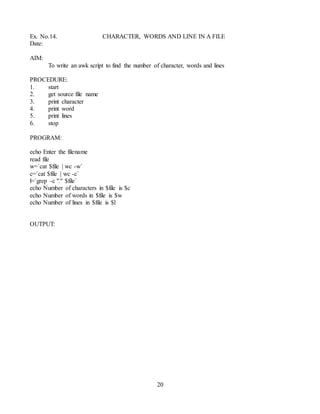
echo Number of characters in $file is $c
echo Number of words in $file is $w
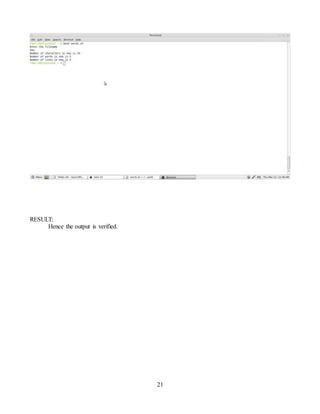
echo Number of lines in $file is $l
OUTPUT:
21
RESULT:
Hence the output is verified.
22
Ex No.15 .BINARY SEARCH
Date:
AIM:
To write a shell script to search an element from an array using binary search
PROCEDURE:
1. Start
2. get the size of an array
3. get the elements one by one
4. get the target value
5. start with the middle element. If the target value is equal to the middle element of the array, then
return the index of the middle element. If not compare the middle with other value
6. when a match is found, print successful search
7. if no match is found, print unsuccessful search
8. stop the program
PROGRAM:
echo Enter array limit
read limit
echo Enter elements
n=1
while [ $n -le $limit ]
do
read num
eval arr$n=$num
n=`expr $n + 1`
done
echo Enter key element
read key
low=1
high=$n
found=0
while [ $found -eq 0 -a $high -gt $low ]
do
mid=`expr ( $low + $high ) / 2`
eval t=$arr$mid
if [ $key -eq $t ]
then
found=1
elif [ $key -lt $t ]
then
high=`expr $mid - 1`
else
low=`expr $mid + 1`
fi
done
23
if [ $found -eq 0 ]
then
echo Unsuccessfull search
else
echo Successfull search
fi
OUTPUT:
RESULT:
Hence the output is verified
24
Ex. No.16. FILE OPERATIONS
Date:
AIM:
To write a c program that takes one or more file/directory names as command line input and
reports the following information on the file.
A) file type
B) number of links
C)take of last access
D)read,write and execute permissions
PROCEDURE:
1. get the file name in the command line.
2. Display the node number
3. report the file or directory
4. display the number of link
5. display the time of last access
6. display the modification time
7. display the last change time
8. display the read,write and execute permissions
9. stop
PROGRAM:
#include<stdio.h>
#include<fcntl.h>
#include<sys/stat.h>
#include<time.h>
int main(int argc,char *argv[])
{
char *at,*mt,*ct; struct stat buf; stat(argv[1],&buf);
printf("the inode no is : %dn",buf.st_ino); if(S_ISDIR(buf.st_mode))
printf("it is a directory"); if(S_ISREG(buf.st_mode)) printf("it is regurlar filen");
printf("the no of links is %dn",buf.st_nlink); at=ctime(&buf.st_atime);
printf("the time of last access is %sn",at); mt=ctime(&buf.st_mtime);
printf("the modification time is :%sn",mt); ct=ctime(&buf.st_ctime);
printf("time of last change is : %sn",ct); if((buf.st_mode&S_IRUSR)==S_IRUSR)
printf("user has read permissionn"); if((buf.st_mode &S_IWUSR)==S_IWUSR)
printf("user has write permisssionn"); if((buf.st_mode &S_IXUSR)==S_IXUSR)
printf("user has execute permissionn"); if((buf.st_mode & S_IRGRP)==S_IRGRP)
printf("group has read permissionn"); if((buf.st_mode &S_IWGRP)==S_IWGRP)
printf("group has write permissionn"); if((buf.st_mode & S_IXGRP)==S_IXGRP)
printf("group has execute permissionn"); if((buf.st_mode &S_IROTH)==S_IROTH)
printf("others has read permissionn"); if((buf.st_mode &S_IWOTH)==S_IWOTH)
25
printf("others has write permissionn"); if((buf.st_mode &S_IXOTH)==S_IXOTH)
printf("others has execute permisssionn");
}
OUTPUT:
$ gedit sample.c
$ gcc sample.c – o sample
$./ sample
the node number is :4
it is a directory
the number of links is 5
the time of last access is: 12.30 pm
the modification time: 12:40 pm
time of last change :12.40 pm
user has read permission
user has write permission
user has execute permissions
group has read
others has read permissions
others has write permissions
others has execute permissions
RESULT:
Hence the output is verified
26
Ex. No.17 SUSPENDING AND RESUMING PROCESS
Date:
AIM:
To write the program for suspending and resuming process
PROCEDURE:
1. start
2. get the file name
3. call the process
4. enter suspend time of child process
5. enter parent sleep time
6. resume child process
7. terminate the child process
8. end the parent process
PROGRAM:
#include<stdio.h>
#include <ospace/linux.h>
int child _function( )
{
while (true)
{
printf(“child loop n”);
os_this_ process::sleep(1);
}
return 0;
}
int main()
{
os_linux_toolkit initialize;
os_process child(child function);
os_this_porocess::sleep(4);
print(“child.suspend()n”);
child.suspend();
printf(“parent sleep for 4 seconds n”);
os_this _process::sleep(4);
printf(“child.resume()n”);
child.resume();
os_this_process::sleep (4);
printf(“child.terminate()”);
child.terminate();
print(“parent finished”);
return 0;
}
27
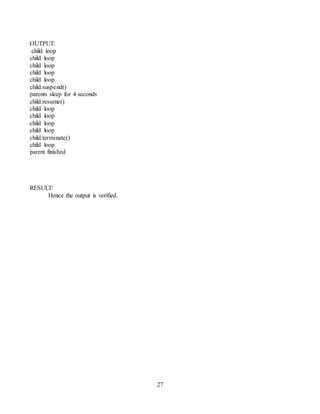
OUTPUT:
child loop
child loop
child loop
child loop
child loop
child.suspend()
parents sleep for 4 seconds
child.resume()
child loop
child loop
child loop
child loop
child.terminate()
child loop
parent finished
RESULT:
Hence the output is verified.

Linux Lab Manual.doc

  • 1.
    1 Ex.No.1 UTILITY COMMANDS Date: AIM: Toexecute the various basic,filedirectory handling and utility commands. OUTPUT: RESULT: Hence the output is verified.
  • 2.
    2 Ex.No.2 SYSTEM VARIABLE Date: AIM: Towrite a variable value type such as PATH,SHELL, HOST NAME and IFS etc. PROGRAM: echo $PATH echo $HOME echo $SHELL echo $HOSTNAME echo $IFS OUTPUT: RESULT: Hence the output is verified.
  • 3.
    3 Ex.No.3 ADMINISTRATIVE COMMANDS Date: AIM: Toexecute the various system administrative commands such as make directory, remove directory and various list options. OUTPUT: RESULT: Hence the output is verified.
  • 4.
    4 Ex.No.4 DISPLAY THELIST OF USERS Date AIM: To write a program to display the list of users currently logged in. PROGRAM: function line () { echo “ ******* ” } echo “yours username: $ (echo $ user)” line echo “current date and time : $ (date)” line echo “ currently logged on yours: ” who line OUTPUT: yours user name: ****** current date and time: thu mar 12 2020, 1.40pm currently logged on yours: mtnc lab4 ++y7 2020,1.40pm ******** RESULT: Hence the output is verified.
  • 5.
    5 Ex.No.5 DISPLAY THELIST OF USERS Date AIM: To write a shell script that displays a list of all files in the current directory to which the user has read ,write and execute permissions. PROGRAM: echo "enter the directory name" read dir if [ -d $dir ] then cd $dir ls > f exec < f while read line do if [ -f $line ] then if [ -r $line -a -w $line -a -x $line ] then echo "$line has all permissions" else echo "files not having all permissions" fi fi done fi OUTPUT: RESULT : Hence the output is verified.
  • 6.
    6 Ex.No.6 DELETE THEFILES Date AIM: To write a shell script to delete all the temporary files. PROGRAM: rm -rf / tmp / * rm -rf / var / tmp / * fsck -A exit OUTPUT: The file deleted. RESULT: Hence the output is verified.
  • 7.
    7 Ex.No.7 DISPLAY SOURCECODE IN GIVEN FILE Date AIM: To write the shell script that accepts a file name, starting and ending line numbers as arguments and display all the lines between the given line numbers. PROCEDURE: 1. Start 2. Get the filename. 3. Get the starting and ending line number. 4. Using -n and cat command. 5. Display the given lines of the files. 6. Stop. PROGRAM: echo "enter the file name" read fname echo "enter the starting line number" read s echo "enter the ending number" read n sed -n $s,$np $fname | cat > newline cat newline OUTPUT: RESULT: Hence the output is verified.
  • 8.
    8 Ex.No.8 DELETE ALINE CONTAINING SPECIFIED WORD Date AIM: To write a shell script that deletes all lines containing a specified word in one or more files supplied as arguments to it. PROCEDURE: 1. Start. 2. Get the file names as command line arguments. 3. Write “enter the word to search and delete”. 4. Read word. 5. For each argument repeat step 6 to step 8. 6. if it is file then go to next step else display “error in file”. 7. Search the lines not contain specified “word”. 8. Write the above result into same file. 9. Stop. PROGRAM: if [ $# -eq 0 ] then echo NO ARUGUMENTS else pattern=$1 shift for fname in $* do if [ -f $fname ] then echo DELETING $pattern FROM $fname sed '/'$pattern'/d' $fname else echo $fname NOT FOUND fi done fi
  • 9.
  • 10.
    10 Ex.No.9 FILES ORDIRECTORY DOCUMENTS. Date AIM: To write a shell script that receives any number of file names as its arguments, check if every argument supplied is a file or a directory and reports accordingly. Whenever the argument is a file, the number of lines on its to be reported. PROCEDURE: 1. Start. 2. Get the file names and command line arguments. 3. Check the file is directory or file. 4. Display the number of lines in the file. 5. stop. PROGRAM: for x in $* do if [ -f $x ] then echo "$x is a file" echo "no of lines in the files are" wc -l $x elif [ -d $x ] then echo "$x is a directory" else echo "enter valid filename or directory name" fi done
  • 11.
    11 OUTPUT: RESULT: Hence the outputis verified. Ex. No.10 .ARITHMETIC AND LOGICAL CALCULATIONS Date: AIM: To write a simple shell script for basic arithmetic and logical calculations. ALGORITHM: 1. Start the program. 2. Read the two numbers. 3. Perform the arithmetic operations for addition, subtraction, multiplication and division. 4. Compare the two variables ,to find the arithmetic and logical calculations. 5. Display the arithmetic and logical values. 6. Stop.
  • 12.
    12 PROGRAM: #!/bin/sh a=10 b=10 val=`expr $a +$b` echo "a + b : $val" val=`expr $a - $b` echo "a - b : $val" val=`expr $a * $b` echo "a * b : $val" val=`expr $b / $a` echo "b / a : $val" val=`expr $b % $a` echo "b % a : $val" if [ $a == $b ] then echo "a is equal to b" fi if [ $a != $b ] then echo "a is not equal to b" fi OUTPUT:
  • 13.
    13 RESULT: Hence the outputis verified. Ex .No. 11.FACTORIAL OF THE GIVEN NUMBER Date: AIM: To write a shell script to find the factorial of a given number. PROCEDURE: 1. start 2. get the number as “num” 3. calculate the factorial number 4. display the number 5. stop SHELL COMMAND: echo "enter a number" read num fact=1 while [ $num -gt 1 ]
  • 14.
    14 do fact=$(( fact *num )) num=$(( num -1 )) done echo $fact OUTPUT: RESULT: hence the output is verified.
  • 15.
    15 Ex. No.12. STRINGOPERATIONS Date: AIM: To write a shell script to perform various operations on given string. PROCEDURE: 1. start 2. get two strings 3. to perform the string operation such as string compare, string length, reverse the string, combine the string etc. 4. display the result string 5. stop SHELL COMMAND: clear choice=y while [ "$choice" = "y" ] do echo "____________________________________________" echo "1. COMPARE TWO STRINGS" echo "2. JOIN TWO STRINGS" echo "3. FIND THE LENGTH OF A GIVEN STRING" echo "4. OCCURRENCE OF CHARACTER AND WORDS" echo "5. REVERSE THE STRING" echo "6. EXIT" echo "____________________________________________" echo "Enter Choice: " read ch echo "____________________________________________" case $ch in 1) echo "Enter String1: " read str1 echo "Enter String2: " read str2 if [ $str1 = $str2 ] then echo "String is equal" else echo "String is not equal" fi ;; 2) echo "Enter String1: " read str1
  • 16.
    16 echo "Enter String2:" read str2 str3=$str1$str2 echo "Join String: " $str3 ;; 3) len=0 echo "Enter String1: " read str1 len=$(echo "$str1" | wc -c) len=`expr $len - 1` echo "Length: " $len ;; 4) echo "Enter String: " read str echo "Enter Word to find : " read word echo $str | cat > str1.txt grep -o $word str1.txt | cat > str2.txt count=`grep -c $word str2.txt` echo "Count: "$count ;; 5) echo "Enter String1: " read str len=`expr $str | wc -c` len=`expr $len - 1` while [ $len -gt 0 ] do rev=`expr $str | cut -c $len` ans=$ans$rev len=`expr $len - 1` done echo "Reverse String: "$ans ;; 6) exit ;; *) echo "Invalid Choice ....." ;; esac echo "Do u want to continue.....? [y/n]" read choice
  • 17.
    17 case $choice in Y|y)choice=y;; N|n) choice=n;; *) choice=y;; esac done OUTPUT: RESULT: Hence the output is verified.
  • 18.
    18 Ex. No.13 VOWELSCHECKING Date: AIM: To write an awk script to find the number of lines in a file that do not contain vowels I (or) o PROCEDURE: 1. start the program 2. to create the text file containing text with vowels and non vowels 3. read the file name (that is text) 4. check the words in the file not containing vowels 5. display the number of lines not containing vowels 6. stop PROGRAM: #!/bin/bash echo "Enter file name" read file awk '$0!~/[aeiou]/{ count++ } END{print "The number of lines that does not contain vowels are: ",count}' $file OUTPUT: new
  • 19.
  • 20.
    20 Ex. No.14. CHARACTER,WORDS AND LINE IN A FILE Date: AIM: To write an awk script to find the number of character, words and lines PROCEDURE: 1. start 2. get source file name 3. print character 4. print word 5. print lines 6. stop PROGRAM: echo Enter the filename read file w=`cat $file | wc -w` c=`cat $file | wc -c` l=`grep -c "." $file` echo Number of characters in $file is $c echo Number of words in $file is $w echo Number of lines in $file is $l OUTPUT:
  • 21.
  • 22.
    22 Ex No.15 .BINARYSEARCH Date: AIM: To write a shell script to search an element from an array using binary search PROCEDURE: 1. Start 2. get the size of an array 3. get the elements one by one 4. get the target value 5. start with the middle element. If the target value is equal to the middle element of the array, then return the index of the middle element. If not compare the middle with other value 6. when a match is found, print successful search 7. if no match is found, print unsuccessful search 8. stop the program PROGRAM: echo Enter array limit read limit echo Enter elements n=1 while [ $n -le $limit ] do read num eval arr$n=$num n=`expr $n + 1` done echo Enter key element read key low=1 high=$n found=0 while [ $found -eq 0 -a $high -gt $low ] do mid=`expr ( $low + $high ) / 2` eval t=$arr$mid if [ $key -eq $t ] then found=1 elif [ $key -lt $t ] then high=`expr $mid - 1` else low=`expr $mid + 1` fi done
  • 23.
    23 if [ $found-eq 0 ] then echo Unsuccessfull search else echo Successfull search fi OUTPUT: RESULT: Hence the output is verified
  • 24.
    24 Ex. No.16. FILEOPERATIONS Date: AIM: To write a c program that takes one or more file/directory names as command line input and reports the following information on the file. A) file type B) number of links C)take of last access D)read,write and execute permissions PROCEDURE: 1. get the file name in the command line. 2. Display the node number 3. report the file or directory 4. display the number of link 5. display the time of last access 6. display the modification time 7. display the last change time 8. display the read,write and execute permissions 9. stop PROGRAM: #include<stdio.h> #include<fcntl.h> #include<sys/stat.h> #include<time.h> int main(int argc,char *argv[]) { char *at,*mt,*ct; struct stat buf; stat(argv[1],&buf); printf("the inode no is : %dn",buf.st_ino); if(S_ISDIR(buf.st_mode)) printf("it is a directory"); if(S_ISREG(buf.st_mode)) printf("it is regurlar filen"); printf("the no of links is %dn",buf.st_nlink); at=ctime(&buf.st_atime); printf("the time of last access is %sn",at); mt=ctime(&buf.st_mtime); printf("the modification time is :%sn",mt); ct=ctime(&buf.st_ctime); printf("time of last change is : %sn",ct); if((buf.st_mode&S_IRUSR)==S_IRUSR) printf("user has read permissionn"); if((buf.st_mode &S_IWUSR)==S_IWUSR) printf("user has write permisssionn"); if((buf.st_mode &S_IXUSR)==S_IXUSR) printf("user has execute permissionn"); if((buf.st_mode & S_IRGRP)==S_IRGRP) printf("group has read permissionn"); if((buf.st_mode &S_IWGRP)==S_IWGRP) printf("group has write permissionn"); if((buf.st_mode & S_IXGRP)==S_IXGRP) printf("group has execute permissionn"); if((buf.st_mode &S_IROTH)==S_IROTH) printf("others has read permissionn"); if((buf.st_mode &S_IWOTH)==S_IWOTH)
  • 25.
    25 printf("others has writepermissionn"); if((buf.st_mode &S_IXOTH)==S_IXOTH) printf("others has execute permisssionn"); } OUTPUT: $ gedit sample.c $ gcc sample.c – o sample $./ sample the node number is :4 it is a directory the number of links is 5 the time of last access is: 12.30 pm the modification time: 12:40 pm time of last change :12.40 pm user has read permission user has write permission user has execute permissions group has read others has read permissions others has write permissions others has execute permissions RESULT: Hence the output is verified
  • 26.
    26 Ex. No.17 SUSPENDINGAND RESUMING PROCESS Date: AIM: To write the program for suspending and resuming process PROCEDURE: 1. start 2. get the file name 3. call the process 4. enter suspend time of child process 5. enter parent sleep time 6. resume child process 7. terminate the child process 8. end the parent process PROGRAM: #include<stdio.h> #include <ospace/linux.h> int child _function( ) { while (true) { printf(“child loop n”); os_this_ process::sleep(1); } return 0; } int main() { os_linux_toolkit initialize; os_process child(child function); os_this_porocess::sleep(4); print(“child.suspend()n”); child.suspend(); printf(“parent sleep for 4 seconds n”); os_this _process::sleep(4); printf(“child.resume()n”); child.resume(); os_this_process::sleep (4); printf(“child.terminate()”); child.terminate(); print(“parent finished”); return 0; }
  • 27.
    27 OUTPUT: child loop child loop childloop child loop child loop child.suspend() parents sleep for 4 seconds child.resume() child loop child loop child loop child loop child.terminate() child loop parent finished RESULT: Hence the output is verified.