C Operators
Introduction to Operators
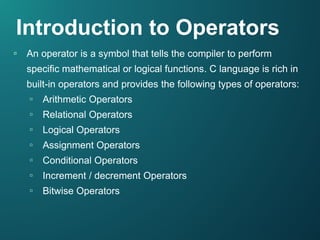
▫ An operator is a symbol that tells the compiler to perform
specific mathematical or logical functions. C language is rich in
built-in operators and provides the following types of operators:
▫ Arithmetic Operators
▫ Relational Operators
▫ Logical Operators
▫ Assignment Operators
▫ Conditional Operators
▫ Increment / decrement Operators
▫ Bitwise Operators
Arithmetic Operators
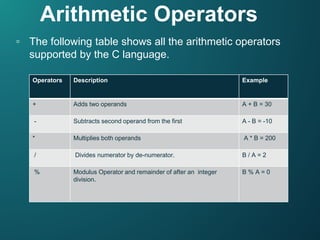
▫ The following table shows all the arithmetic operators
supported by the C language.
Operators Description Example
+ Adds two operands A + B = 30
- Subtracts second operand from the first A - B = -10
* Multiplies both operands A * B = 200
/ Divides numerator by de-numerator. B / A = 2
% Modulus Operator and remainder of after an integer
division.
B % A = 0
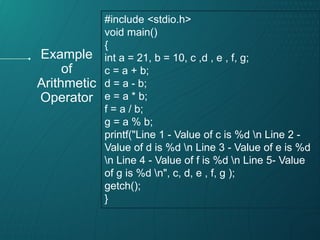
#include <stdio.h>
void main()
{
int a = 21, b = 10, c ,d , e , f, g;
c = a + b;
d = a - b;
e = a * b;
f = a / b;
g = a % b;
printf("Line 1 - Value of c is %d n Line 2 -
Value of d is %d n Line 3 - Value of e is %d
n Line 4 - Value of f is %d n Line 5- Value
of g is %d n", c, d, e , f, g );
getch();
}
Example
of
Arithmetic
Operator
Result of code
When you compile and execute the above program, it
produces the following result:
Line 1 - Value of c is 31
Line 2 - Value of c is 11
Line 3 - Value of c is 210
Line 4 - Value of c is 2
Line 5 - Value of c is 1
Relational Operators
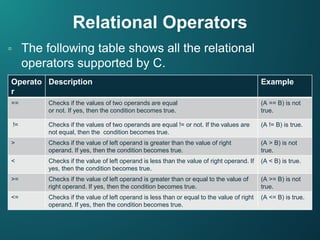
▫ The following table shows all the relational
operators supported by C.
Operato
r
Description Example
== Checks if the values of two operands are equal
or not. If yes, then the condition becomes true.
(A == B) is not
true.
!= Checks if the values of two operands are equal != or not. If the values are
not equal, then the condition becomes true.
(A != B) is true.
> Checks if the value of left operand is greater than the value of right
operand. If yes, then the condition becomes true.
(A > B) is not
true.
< Checks if the value of left operand is less than the value of right operand. If
yes, then the condition becomes true.
(A < B) is true.
>= Checks if the value of left operand is greater than or equal to the value of
right operand. If yes, then the condition becomes true.
(A >= B) is not
true.
<= Checks if the value of left operand is less than or equal to the value of right
operand. If yes, then the condition becomes true.
(A <= B) is true.
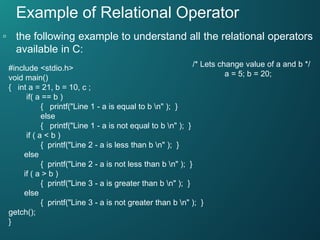
Example of Relational Operator
▫ the following example to understand all the relational operators
available in C:
#include <stdio.h>
void main()
{ int a = 21, b = 10, c ;
if( a == b )
{ printf("Line 1 - a is equal to b n" ); }
else
{ printf("Line 1 - a is not equal to b n" ); }
if ( a < b )
{ printf("Line 2 - a is less than b n" ); }
else
{ printf("Line 2 - a is not less than b n" ); }
if ( a > b )
{ printf("Line 3 - a is greater than b n" ); }
else
{ printf("Line 3 - a is not greater than b n" ); }
getch();
}
/* Lets change value of a and b */
a = 5; b = 20;
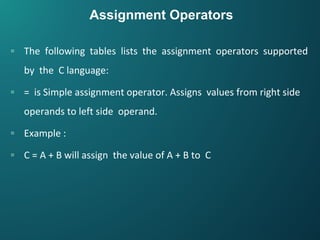
Assignment Operators
▫ The following tables lists the assignment operators supported
by the C language:
▫ = is Simple assignment operator. Assigns values from right side
operands to left side operand.
▫ Example :
▫ C = A + B will assign the value of A + B to C
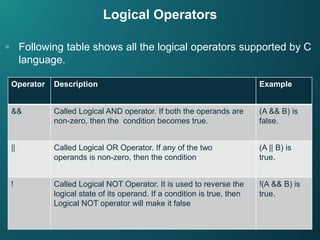
Logical Operators
▫ Following table shows all the logical operators supported by C
language.
Operator Description Example
&& Called Logical AND operator. If both the operands are
non-zero, then the condition becomes true.
(A && B) is
false.
|| Called Logical OR Operator. If any of the two
operands is non-zero, then the condition
(A || B) is
true.
! Called Logical NOT Operator. It is used to reverse the
logical state of its operand. If a condition is true, then
Logical NOT operator will make it false
!(A && B) is
true.
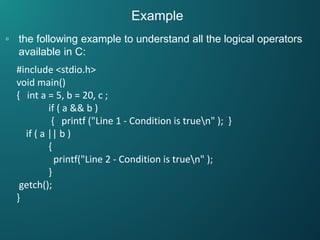
Example
▫ the following example to understand all the logical operators
available in C:
#include <stdio.h>
void main()
{ int a = 5, b = 20, c ;
if ( a && b )
{ printf ("Line 1 - Condition is truen" ); }
if ( a || b )
{
printf("Line 2 - Condition is truen" );
}
getch();
}
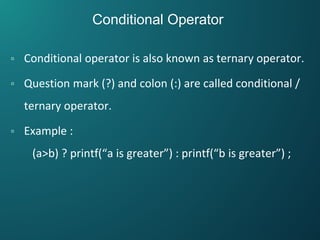
Conditional Operator
▫ Conditional operator is also known as ternary operator.
▫ Question mark (?) and colon (:) are called conditional /
ternary operator.
▫ Example :
(a>b) ? printf(“a is greater”) : printf(“b is greater”) ;
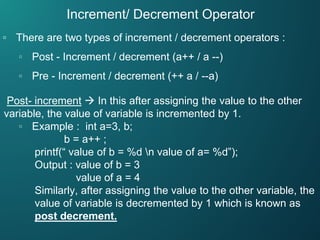
Increment/ Decrement Operator
▫ There are two types of increment / decrement operators :
▫ Post - Increment / decrement (a++ / a --)
▫ Pre - Increment / decrement (++ a / --a)
Post- increment  In this after assigning the value to the other
variable, the value of variable is incremented by 1.
▫ Example : int a=3, b;
b = a++ ;
printf(“ value of b = %d n value of a= %d”);
Output : value of b = 3
value of a = 4
Similarly, after assigning the value to the other variable, the
value of variable is decremented by 1 which is known as
post decrement.
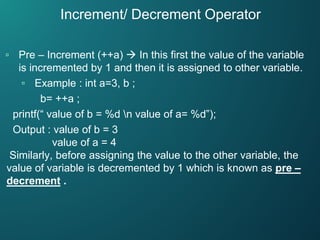
▫ Pre – Increment (++a)  In this first the value of the variable
is incremented by 1 and then it is assigned to other variable.
▫ Example : int a=3, b ;
b= ++a ;
printf(“ value of b = %d n value of a= %d”);
Output : value of b = 3
value of a = 4
Similarly, before assigning the value to the other variable, the
value of variable is decremented by 1 which is known as pre –
decrement .
Increment/ Decrement Operator
Bitwise Operators
▫ Bitwise operators work on bits and perform bit-by-bit
operation. The truth table for &, |, and ^ is as follows:
p q p & q p | q p ^ q
0 0 0 0 0
0 1 0 1 1
1 1 1 1 0
1 0 0 1 1
Example
▫ Assume A = 60 and B = 13; in binary format, they will be as
follows:
▫ A = 0011 1100
▫ B = 0000 1101
▫ A&B = 0000 1100
▫ A|B = 0011 1101
▫ A^B = 0011 0001
▫ ~A = 1100 0011
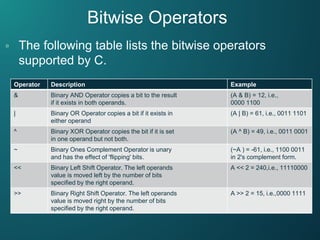
Bitwise Operators
▫ The following table lists the bitwise operators
supported by C.
Operator Description Example
& Binary AND Operator copies a bit to the result
if it exists in both operands.
(A & B) = 12, i.e.,
0000 1100
| Binary OR Operator copies a bit if it exists in
either operand
(A | B) = 61, i.e., 0011 1101
^ Binary XOR Operator copies the bit if it is set
in one operand but not both.
(A ^ B) = 49, i.e., 0011 0001
~ Binary Ones Complement Operator is unary
and has the effect of 'flipping' bits.
(~A ) = -61, i.e., 1100 0011
in 2's complement form.
<< Binary Left Shift Operator. The left operands
value is moved left by the number of bits
specified by the right operand.
A << 2 = 240,i.e., 11110000
>> Binary Right Shift Operator. The left operands
value is moved right by the number of bits
specified by the right operand.
A >> 2 = 15, i.e.,0000 1111
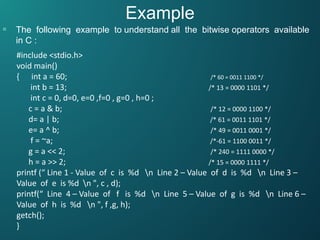
Example
▫ The following example to understand all the bitwise operators available
in C :
#include <stdio.h>
void main()
{ int a = 60; /* 60 = 0011 1100 */
int b = 13; /* 13 = 0000 1101 */
int c = 0, d=0, e=0 ,f=0 , g=0 , h=0 ;
c = a & b; /* 12 = 0000 1100 */
d= a | b; /* 61 = 0011 1101 */
e= a ^ b; /* 49 = 0011 0001 */
f = ~a; /*-61 = 1100 0011 */
g = a << 2; /* 240 = 1111 0000 */
h = a >> 2; /* 15 = 0000 1111 */
printf (“ Line 1 - Value of c is %d n Line 2 – Value of d is %d n Line 3 –
Value of e is %d n ", c , d);
printf(“ Line 4 – Value of f is %d n Line 5 – Value of g is %d n Line 6 –
Value of h is %d n ", f ,g, h);
getch();
}
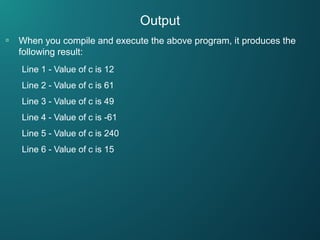
Output
▫ When you compile and execute the above program, it produces the
following result:
Line 1 - Value of c is 12
Line 2 - Value of c is 61
Line 3 - Value of c is 49
Line 4 - Value of c is -61
Line 5 - Value of c is 240
Line 6 - Value of c is 15

C operators

  • 1.
  • 2.
    Introduction to Operators ▫An operator is a symbol that tells the compiler to perform specific mathematical or logical functions. C language is rich in built-in operators and provides the following types of operators: ▫ Arithmetic Operators ▫ Relational Operators ▫ Logical Operators ▫ Assignment Operators ▫ Conditional Operators ▫ Increment / decrement Operators ▫ Bitwise Operators
  • 3.
    Arithmetic Operators ▫ Thefollowing table shows all the arithmetic operators supported by the C language. Operators Description Example + Adds two operands A + B = 30 - Subtracts second operand from the first A - B = -10 * Multiplies both operands A * B = 200 / Divides numerator by de-numerator. B / A = 2 % Modulus Operator and remainder of after an integer division. B % A = 0
  • 4.
    #include <stdio.h> void main() { inta = 21, b = 10, c ,d , e , f, g; c = a + b; d = a - b; e = a * b; f = a / b; g = a % b; printf("Line 1 - Value of c is %d n Line 2 - Value of d is %d n Line 3 - Value of e is %d n Line 4 - Value of f is %d n Line 5- Value of g is %d n", c, d, e , f, g ); getch(); } Example of Arithmetic Operator
  • 5.
    Result of code Whenyou compile and execute the above program, it produces the following result: Line 1 - Value of c is 31 Line 2 - Value of c is 11 Line 3 - Value of c is 210 Line 4 - Value of c is 2 Line 5 - Value of c is 1
  • 6.
    Relational Operators ▫ Thefollowing table shows all the relational operators supported by C. Operato r Description Example == Checks if the values of two operands are equal or not. If yes, then the condition becomes true. (A == B) is not true. != Checks if the values of two operands are equal != or not. If the values are not equal, then the condition becomes true. (A != B) is true. > Checks if the value of left operand is greater than the value of right operand. If yes, then the condition becomes true. (A > B) is not true. < Checks if the value of left operand is less than the value of right operand. If yes, then the condition becomes true. (A < B) is true. >= Checks if the value of left operand is greater than or equal to the value of right operand. If yes, then the condition becomes true. (A >= B) is not true. <= Checks if the value of left operand is less than or equal to the value of right operand. If yes, then the condition becomes true. (A <= B) is true.
  • 7.
    Example of RelationalOperator ▫ the following example to understand all the relational operators available in C: #include <stdio.h> void main() { int a = 21, b = 10, c ; if( a == b ) { printf("Line 1 - a is equal to b n" ); } else { printf("Line 1 - a is not equal to b n" ); } if ( a < b ) { printf("Line 2 - a is less than b n" ); } else { printf("Line 2 - a is not less than b n" ); } if ( a > b ) { printf("Line 3 - a is greater than b n" ); } else { printf("Line 3 - a is not greater than b n" ); } getch(); } /* Lets change value of a and b */ a = 5; b = 20;
  • 8.
    Assignment Operators ▫ Thefollowing tables lists the assignment operators supported by the C language: ▫ = is Simple assignment operator. Assigns values from right side operands to left side operand. ▫ Example : ▫ C = A + B will assign the value of A + B to C
  • 9.
    Logical Operators ▫ Followingtable shows all the logical operators supported by C language. Operator Description Example && Called Logical AND operator. If both the operands are non-zero, then the condition becomes true. (A && B) is false. || Called Logical OR Operator. If any of the two operands is non-zero, then the condition (A || B) is true. ! Called Logical NOT Operator. It is used to reverse the logical state of its operand. If a condition is true, then Logical NOT operator will make it false !(A && B) is true.
  • 10.
    Example ▫ the followingexample to understand all the logical operators available in C: #include <stdio.h> void main() { int a = 5, b = 20, c ; if ( a && b ) { printf ("Line 1 - Condition is truen" ); } if ( a || b ) { printf("Line 2 - Condition is truen" ); } getch(); }
  • 11.
    Conditional Operator ▫ Conditionaloperator is also known as ternary operator. ▫ Question mark (?) and colon (:) are called conditional / ternary operator. ▫ Example : (a>b) ? printf(“a is greater”) : printf(“b is greater”) ;
  • 12.
    Increment/ Decrement Operator ▫There are two types of increment / decrement operators : ▫ Post - Increment / decrement (a++ / a --) ▫ Pre - Increment / decrement (++ a / --a) Post- increment  In this after assigning the value to the other variable, the value of variable is incremented by 1. ▫ Example : int a=3, b; b = a++ ; printf(“ value of b = %d n value of a= %d”); Output : value of b = 3 value of a = 4 Similarly, after assigning the value to the other variable, the value of variable is decremented by 1 which is known as post decrement.
  • 13.
    ▫ Pre –Increment (++a)  In this first the value of the variable is incremented by 1 and then it is assigned to other variable. ▫ Example : int a=3, b ; b= ++a ; printf(“ value of b = %d n value of a= %d”); Output : value of b = 3 value of a = 4 Similarly, before assigning the value to the other variable, the value of variable is decremented by 1 which is known as pre – decrement . Increment/ Decrement Operator
  • 14.
    Bitwise Operators ▫ Bitwiseoperators work on bits and perform bit-by-bit operation. The truth table for &, |, and ^ is as follows: p q p & q p | q p ^ q 0 0 0 0 0 0 1 0 1 1 1 1 1 1 0 1 0 0 1 1
  • 15.
    Example ▫ Assume A= 60 and B = 13; in binary format, they will be as follows: ▫ A = 0011 1100 ▫ B = 0000 1101 ▫ A&B = 0000 1100 ▫ A|B = 0011 1101 ▫ A^B = 0011 0001 ▫ ~A = 1100 0011
  • 16.
    Bitwise Operators ▫ Thefollowing table lists the bitwise operators supported by C. Operator Description Example & Binary AND Operator copies a bit to the result if it exists in both operands. (A & B) = 12, i.e., 0000 1100 | Binary OR Operator copies a bit if it exists in either operand (A | B) = 61, i.e., 0011 1101 ^ Binary XOR Operator copies the bit if it is set in one operand but not both. (A ^ B) = 49, i.e., 0011 0001 ~ Binary Ones Complement Operator is unary and has the effect of 'flipping' bits. (~A ) = -61, i.e., 1100 0011 in 2's complement form. << Binary Left Shift Operator. The left operands value is moved left by the number of bits specified by the right operand. A << 2 = 240,i.e., 11110000 >> Binary Right Shift Operator. The left operands value is moved right by the number of bits specified by the right operand. A >> 2 = 15, i.e.,0000 1111
  • 17.
    Example ▫ The followingexample to understand all the bitwise operators available in C : #include <stdio.h> void main() { int a = 60; /* 60 = 0011 1100 */ int b = 13; /* 13 = 0000 1101 */ int c = 0, d=0, e=0 ,f=0 , g=0 , h=0 ; c = a & b; /* 12 = 0000 1100 */ d= a | b; /* 61 = 0011 1101 */ e= a ^ b; /* 49 = 0011 0001 */ f = ~a; /*-61 = 1100 0011 */ g = a << 2; /* 240 = 1111 0000 */ h = a >> 2; /* 15 = 0000 1111 */ printf (“ Line 1 - Value of c is %d n Line 2 – Value of d is %d n Line 3 – Value of e is %d n ", c , d); printf(“ Line 4 – Value of f is %d n Line 5 – Value of g is %d n Line 6 – Value of h is %d n ", f ,g, h); getch(); }
  • 18.
    Output ▫ When youcompile and execute the above program, it produces the following result: Line 1 - Value of c is 12 Line 2 - Value of c is 61 Line 3 - Value of c is 49 Line 4 - Value of c is -61 Line 5 - Value of c is 240 Line 6 - Value of c is 15