1
Department of Computer Application
BCA Semester – 1
Group – 2
Roll No. – CACOM21007 – CACOM21012
2
C - PROGRAMMING
Content :-
1. Overview of C
2. Operators & Expressions
3
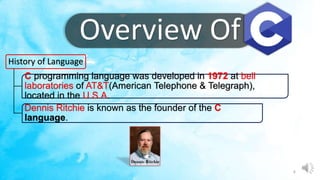
Overview Of
History of Language
C programming language was developed in 1972 at bell
laboratories of AT&T(American Telephone & Telegraph),
located in the U.S.A.
Dennis Ritchie is known as the founder of the C
language.
4
• ALGOL
1960
• BCPL
1967
• B
1970
• Traditional
1973
• C or C89
1989
• ISO C
1990
International Group
Martin Richard
Ken Thompson
Dennis Ritchie
ANSI Committee
ISO Committee
Year Developed by
Language
5
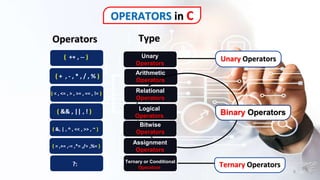
OPERATORS in C
Operators
( ++ , -- )
( + , - , * , / , % )
( < , <= , > , >= , == , != )
( && , || , ! )
( &, | , ^ , << , >> , ~ )
( = ,+= ,-= ,*= ,/= ,%= )
?:
Type
Unary
Operators
Arithmetic
Operators
Relational
Operators
Logical
Operators
Bitwise
Operators
Assignment
Operators
Ternary or Conditional
Operators
Binary Operators
Unary Operators
Ternary Operators
6
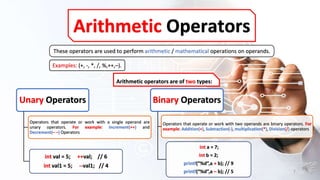
Arithmetic Operators
These operators are used to perform arithmetic / mathematical operations on operands.
Arithmetic operators are of two types:
Unary Operators
Operators that operate or work with a single operand are
unary operators. For example: Increment(++) and
Decrement(– –) Operators
int val = 5; ++val; // 6
int val1 = 5; --val1; // 4
Binary Operators
Operators that operate or work with two operands are binary operators. For
example: Addition(+), Subtraction(-), multiplication(*), Division(/) operators
int a = 7;
int b = 2;
printf(“%d”,a + b); // 9
printf(“%d”,a – b); // 5
Examples: (+, -, *, /, %,++,–).
7
8
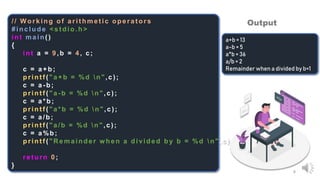
// W orking of arit hmet ic operat ors
#include < st dio.h >
int main( )
{
int a = 9 ,b = 4 , c;
c = a+ b ;
printf ( "a+b = %d n",c) ;
c = a - b;
print f ( "a - b = %d n",c ) ;
c = a*b;
print f ( "a*b = %d n",c ) ;
c = a/b;
print f ( "a/b = %d n",c ) ;
c = a%b ;
print f ( "R emainder w hen a divided by b = %d n",c ) ;
return 0;
}
a+b = 13
a-b = 5
a*b = 36
a/b = 2
Remainder when a divided by b=1
Output
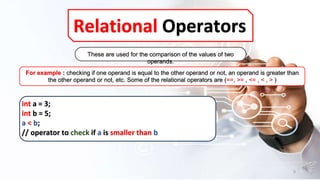
Relational Operators
These are used for the comparison of the values of two
operands.
For example : checking if one operand is equal to the other operand or not, an operand is greater than
the other operand or not, etc. Some of the relational operators are (==, >= , <= , < , > )
int a = 3;
int b = 5;
a < b;
// operator to check if a is smaller than b
9
10
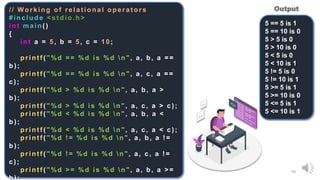
// Working of relational operators
#include < st dio.h >
int main ( )
{
int a = 5 , b = 5 , c = 1 0 ;
print f ( "%d = = %d is %d n", a, b, a = =
b) ;
print f ( "%d = = %d is %d n", a, c, a = =
c) ;
print f ( "%d > %d is %d n", a, b, a >
b) ;
print f ( "%d > %d is %d n", a, c, a > c) ;
print f ( "%d < %d is %d n", a, b, a <
b) ;
print f ( "%d < %d is %d n", a, c, a < c) ;
printf ( "%d ! = %d is %d n", a, b, a !=
b) ;
print f ( "%d ! = %d is %d n", a, c, a ! =
c) ;
print f ( "%d > = %d is %d n", a, b, a > =
b);
5 == 5 is 1
5 == 10 is 0
5 > 5 is 0
5 > 10 is 0
5 < 5 is 0
5 < 10 is 1
5 != 5 is 0
5 != 10 is 1
5 >= 5 is 1
5 >= 10 is 0
5 <= 5 is 1
5 <= 10 is 1
Output
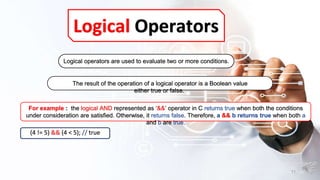
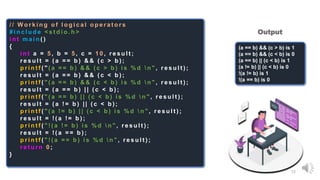
Logical Operators
The result of the operation of a logical operator is a Boolean value
either true or false.
For example : the logical AND represented as ‘&&’ operator in C returns true when both the conditions
under consideration are satisfied. Otherwise, it returns false. Therefore, a && b returns true when both a
and b are true.
Logical operators are used to evaluate two or more conditions.
(4 != 5) && (4 < 5); // true
11
12
/ / W o r k i n g o f l o g i c a l o p e r a t o r s
# i n c l u d e < s t d i o . h >
i n t m a i n ( )
{
i n t a = 5 , b = 5 , c = 1 0 , r e s u l t ;
r e s u l t = ( a = = b ) & & ( c > b ) ;
p r i n t f ( " ( a = = b ) & & ( c > b ) i s % d  n " , r e s u l t ) ;
r e s u l t = ( a = = b ) & & ( c < b ) ;
p r i n t f ( " ( a = = b ) & & ( c < b ) i s % d  n " , r e s u l t ) ;
r e s u l t = ( a = = b ) | | ( c < b ) ;
p r i n t f ( " ( a = = b ) | | ( c < b ) i s % d  n " , r e s u l t ) ;
r e s u l t = ( a ! = b ) | | ( c < b ) ;
p r i n t f ( " ( a ! = b ) | | ( c < b ) i s % d  n " , r e s u l t ) ;
r e s u l t = ! ( a ! = b ) ;
p r i n t f ( " ! ( a ! = b ) i s % d  n " , r e s u l t ) ;
r e s u l t = ! ( a = = b ) ;
p r i n t f ( " ! ( a = = b ) i s % d  n " , r e s u l t ) ;
r e t u r n 0 ;
}
(a == b) && (c > b) is 1
(a == b) && (c < b) is 0
(a == b) || (c < b) is 1
(a != b) || (c < b) is 0
!(a != b) is 1
!(a == b) is 0
Output
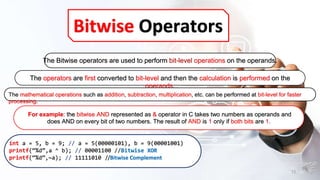
Bitwise Operators
The operators are first converted to bit-level and then the calculation is performed on the
operands.
For example: the bitwise AND represented as & operator in C takes two numbers as operands and
does AND on every bit of two numbers. The result of AND is 1 only if both bits are 1.
The Bitwise operators are used to perform bit-level operations on the operands.
The mathematical operations such as addition, subtraction, multiplication, etc. can be performed at bit-level for faster
processing.
int a = 5, b = 9; // a = 5(00000101), b = 9(00001001)
printf(“%d”,a ^ b); // 00001100 //Bitwise XOR
printf(“%d”,~a); // 11111010 //Bitwise Complement
13
14
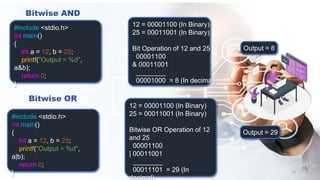
#include <stdio.h>
int main()
{
int a = 12, b = 25;
printf("Output = %d",
a&b);
return 0;
}
Output = 8
12 = 00001100 (In Binary)
25 = 00011001 (In Binary)
Bit Operation of 12 and 25
00001100
& 00011001
________
00001000 = 8 (In decimal)
Bitwise AND
Bitwise OR
#include <stdio.h>
int main()
{
int a = 12, b = 25;
printf("Output = %d",
a|b);
return 0;
}
12 = 00001100 (In Binary)
25 = 00011001 (In Binary)
Bitwise OR Operation of 12
and 25
00001100
| 00011001
________
00011101 = 29 (In
decimal)
Output = 29
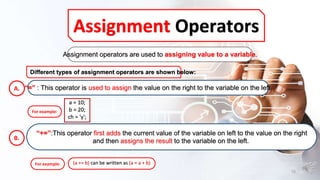
Assignment Operators
Assignment operators are used to assigning value to a variable.
“=” : This operator is used to assign the value on the right to the variable on the left.
Different types of assignment operators are shown below:
“+=”:This operator first adds the current value of the variable on left to the value on the right
and then assigns the result to the variable on the left.
a = 10;
b = 20;
ch = 'y';
For example:
For example: (a += b) can be written as (a = a + b)
A.
B.
15
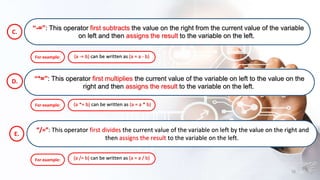
“-=”: This operator first subtracts the value on the right from the current value of the variable
on left and then assigns the result to the variable on the left.
“*=”: This operator first multiplies the current value of the variable on left to the value on the
right and then assigns the result to the variable on the left.
For example:
For example: (a *= b) can be written as (a = a * b)
C.
D.
(a -= b) can be written as (a = a - b)
E.
“/=”: This operator first divides the current value of the variable on left by the value on the right and
then assigns the result to the variable on the left.
For example: (a /= b) can be written as (a = a / b)
16
17
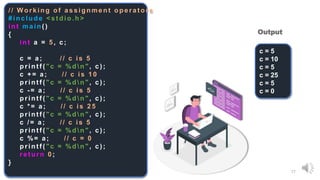
// W orking of assignment operat ors
#include < st dio.h >
int main ( )
{
int a = 5 , c;
c = a; // c is 5
print f ( "c = %d n", c) ;
c + = a; // c is 10
print f ( "c = %d n", c) ;
c - = a; // c is 5
print f ( "c = %d n", c) ;
c *= a; // c is 2 5
print f ( "c = %d n", c) ;
c /= a; // c is 5
printf ( "c = %d n", c);
c %= a; // c = 0
print f ( "c = %d n", c) ;
ret urn 0 ;
}
c = 5
c = 10
c = 5
c = 25
c = 5
c = 0
Output
Operators Precedence
18
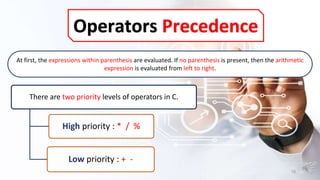
At first, the expressions within parenthesis are evaluated. If no parenthesis is present, then the arithmetic
expression is evaluated from left to right.
There are two priority levels of operators in C.
High priority : * / %
Low priority : + -
19
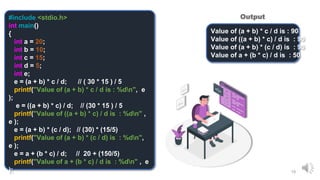
#include <stdio.h>
int main()
{
int a = 20;
int b = 10;
int c = 15;
int d = 5;
int e;
e = (a + b) * c / d; // ( 30 * 15 ) / 5
printf("Value of (a + b) * c / d is : %dn", e
);
e = ((a + b) * c) / d; // (30 * 15 ) / 5
printf("Value of ((a + b) * c) / d is : %dn" ,
e );
e = (a + b) * (c / d); // (30) * (15/5)
printf("Value of (a + b) * (c / d) is : %dn",
e );
e = a + (b * c) / d; // 20 + (150/5)
printf("Value of a + (b * c) / d is : %dn" , e
);
Value of (a + b) * c / d is : 90
Value of ((a + b) * c) / d is : 90
Value of (a + b) * (c / d) is : 90
Value of a + (b * c) / d is : 50
Output
20
Presented By:
( 07 12)

C - programming - Ankit Kumar Singh

  • 1.
  • 2.
    Department of ComputerApplication BCA Semester – 1 Group – 2 Roll No. – CACOM21007 – CACOM21012 2
  • 3.
    C - PROGRAMMING Content:- 1. Overview of C 2. Operators & Expressions 3
  • 4.
    Overview Of History ofLanguage C programming language was developed in 1972 at bell laboratories of AT&T(American Telephone & Telegraph), located in the U.S.A. Dennis Ritchie is known as the founder of the C language. 4
  • 5.
    • ALGOL 1960 • BCPL 1967 •B 1970 • Traditional 1973 • C or C89 1989 • ISO C 1990 International Group Martin Richard Ken Thompson Dennis Ritchie ANSI Committee ISO Committee Year Developed by Language 5
  • 6.
    OPERATORS in C Operators (++ , -- ) ( + , - , * , / , % ) ( < , <= , > , >= , == , != ) ( && , || , ! ) ( &, | , ^ , << , >> , ~ ) ( = ,+= ,-= ,*= ,/= ,%= ) ?: Type Unary Operators Arithmetic Operators Relational Operators Logical Operators Bitwise Operators Assignment Operators Ternary or Conditional Operators Binary Operators Unary Operators Ternary Operators 6
  • 7.
    Arithmetic Operators These operatorsare used to perform arithmetic / mathematical operations on operands. Arithmetic operators are of two types: Unary Operators Operators that operate or work with a single operand are unary operators. For example: Increment(++) and Decrement(– –) Operators int val = 5; ++val; // 6 int val1 = 5; --val1; // 4 Binary Operators Operators that operate or work with two operands are binary operators. For example: Addition(+), Subtraction(-), multiplication(*), Division(/) operators int a = 7; int b = 2; printf(“%d”,a + b); // 9 printf(“%d”,a – b); // 5 Examples: (+, -, *, /, %,++,–). 7
  • 8.
    8 // W orkingof arit hmet ic operat ors #include < st dio.h > int main( ) { int a = 9 ,b = 4 , c; c = a+ b ; printf ( "a+b = %d n",c) ; c = a - b; print f ( "a - b = %d n",c ) ; c = a*b; print f ( "a*b = %d n",c ) ; c = a/b; print f ( "a/b = %d n",c ) ; c = a%b ; print f ( "R emainder w hen a divided by b = %d n",c ) ; return 0; } a+b = 13 a-b = 5 a*b = 36 a/b = 2 Remainder when a divided by b=1 Output
  • 9.
    Relational Operators These areused for the comparison of the values of two operands. For example : checking if one operand is equal to the other operand or not, an operand is greater than the other operand or not, etc. Some of the relational operators are (==, >= , <= , < , > ) int a = 3; int b = 5; a < b; // operator to check if a is smaller than b 9
  • 10.
    10 // Working ofrelational operators #include < st dio.h > int main ( ) { int a = 5 , b = 5 , c = 1 0 ; print f ( "%d = = %d is %d n", a, b, a = = b) ; print f ( "%d = = %d is %d n", a, c, a = = c) ; print f ( "%d > %d is %d n", a, b, a > b) ; print f ( "%d > %d is %d n", a, c, a > c) ; print f ( "%d < %d is %d n", a, b, a < b) ; print f ( "%d < %d is %d n", a, c, a < c) ; printf ( "%d ! = %d is %d n", a, b, a != b) ; print f ( "%d ! = %d is %d n", a, c, a ! = c) ; print f ( "%d > = %d is %d n", a, b, a > = b); 5 == 5 is 1 5 == 10 is 0 5 > 5 is 0 5 > 10 is 0 5 < 5 is 0 5 < 10 is 1 5 != 5 is 0 5 != 10 is 1 5 >= 5 is 1 5 >= 10 is 0 5 <= 5 is 1 5 <= 10 is 1 Output
  • 11.
    Logical Operators The resultof the operation of a logical operator is a Boolean value either true or false. For example : the logical AND represented as ‘&&’ operator in C returns true when both the conditions under consideration are satisfied. Otherwise, it returns false. Therefore, a && b returns true when both a and b are true. Logical operators are used to evaluate two or more conditions. (4 != 5) && (4 < 5); // true 11
  • 12.
    12 / / Wo r k i n g o f l o g i c a l o p e r a t o r s # i n c l u d e < s t d i o . h > i n t m a i n ( ) { i n t a = 5 , b = 5 , c = 1 0 , r e s u l t ; r e s u l t = ( a = = b ) & & ( c > b ) ; p r i n t f ( " ( a = = b ) & & ( c > b ) i s % d n " , r e s u l t ) ; r e s u l t = ( a = = b ) & & ( c < b ) ; p r i n t f ( " ( a = = b ) & & ( c < b ) i s % d n " , r e s u l t ) ; r e s u l t = ( a = = b ) | | ( c < b ) ; p r i n t f ( " ( a = = b ) | | ( c < b ) i s % d n " , r e s u l t ) ; r e s u l t = ( a ! = b ) | | ( c < b ) ; p r i n t f ( " ( a ! = b ) | | ( c < b ) i s % d n " , r e s u l t ) ; r e s u l t = ! ( a ! = b ) ; p r i n t f ( " ! ( a ! = b ) i s % d n " , r e s u l t ) ; r e s u l t = ! ( a = = b ) ; p r i n t f ( " ! ( a = = b ) i s % d n " , r e s u l t ) ; r e t u r n 0 ; } (a == b) && (c > b) is 1 (a == b) && (c < b) is 0 (a == b) || (c < b) is 1 (a != b) || (c < b) is 0 !(a != b) is 1 !(a == b) is 0 Output
  • 13.
    Bitwise Operators The operatorsare first converted to bit-level and then the calculation is performed on the operands. For example: the bitwise AND represented as & operator in C takes two numbers as operands and does AND on every bit of two numbers. The result of AND is 1 only if both bits are 1. The Bitwise operators are used to perform bit-level operations on the operands. The mathematical operations such as addition, subtraction, multiplication, etc. can be performed at bit-level for faster processing. int a = 5, b = 9; // a = 5(00000101), b = 9(00001001) printf(“%d”,a ^ b); // 00001100 //Bitwise XOR printf(“%d”,~a); // 11111010 //Bitwise Complement 13
  • 14.
    14 #include <stdio.h> int main() { inta = 12, b = 25; printf("Output = %d", a&b); return 0; } Output = 8 12 = 00001100 (In Binary) 25 = 00011001 (In Binary) Bit Operation of 12 and 25 00001100 & 00011001 ________ 00001000 = 8 (In decimal) Bitwise AND Bitwise OR #include <stdio.h> int main() { int a = 12, b = 25; printf("Output = %d", a|b); return 0; } 12 = 00001100 (In Binary) 25 = 00011001 (In Binary) Bitwise OR Operation of 12 and 25 00001100 | 00011001 ________ 00011101 = 29 (In decimal) Output = 29
  • 15.
    Assignment Operators Assignment operatorsare used to assigning value to a variable. “=” : This operator is used to assign the value on the right to the variable on the left. Different types of assignment operators are shown below: “+=”:This operator first adds the current value of the variable on left to the value on the right and then assigns the result to the variable on the left. a = 10; b = 20; ch = 'y'; For example: For example: (a += b) can be written as (a = a + b) A. B. 15
  • 16.
    “-=”: This operatorfirst subtracts the value on the right from the current value of the variable on left and then assigns the result to the variable on the left. “*=”: This operator first multiplies the current value of the variable on left to the value on the right and then assigns the result to the variable on the left. For example: For example: (a *= b) can be written as (a = a * b) C. D. (a -= b) can be written as (a = a - b) E. “/=”: This operator first divides the current value of the variable on left by the value on the right and then assigns the result to the variable on the left. For example: (a /= b) can be written as (a = a / b) 16
  • 17.
    17 // W orkingof assignment operat ors #include < st dio.h > int main ( ) { int a = 5 , c; c = a; // c is 5 print f ( "c = %d n", c) ; c + = a; // c is 10 print f ( "c = %d n", c) ; c - = a; // c is 5 print f ( "c = %d n", c) ; c *= a; // c is 2 5 print f ( "c = %d n", c) ; c /= a; // c is 5 printf ( "c = %d n", c); c %= a; // c = 0 print f ( "c = %d n", c) ; ret urn 0 ; } c = 5 c = 10 c = 5 c = 25 c = 5 c = 0 Output
  • 18.
    Operators Precedence 18 At first,the expressions within parenthesis are evaluated. If no parenthesis is present, then the arithmetic expression is evaluated from left to right. There are two priority levels of operators in C. High priority : * / % Low priority : + -
  • 19.
    19 #include <stdio.h> int main() { inta = 20; int b = 10; int c = 15; int d = 5; int e; e = (a + b) * c / d; // ( 30 * 15 ) / 5 printf("Value of (a + b) * c / d is : %dn", e ); e = ((a + b) * c) / d; // (30 * 15 ) / 5 printf("Value of ((a + b) * c) / d is : %dn" , e ); e = (a + b) * (c / d); // (30) * (15/5) printf("Value of (a + b) * (c / d) is : %dn", e ); e = a + (b * c) / d; // 20 + (150/5) printf("Value of a + (b * c) / d is : %dn" , e ); Value of (a + b) * c / d is : 90 Value of ((a + b) * c) / d is : 90 Value of (a + b) * (c / d) is : 90 Value of a + (b * c) / d is : 50 Output
  • 20.