



The Developer Friendly
Container & Micro Services
Platform
Jussi Nummelin, Resident Wharfie
@JNummelin
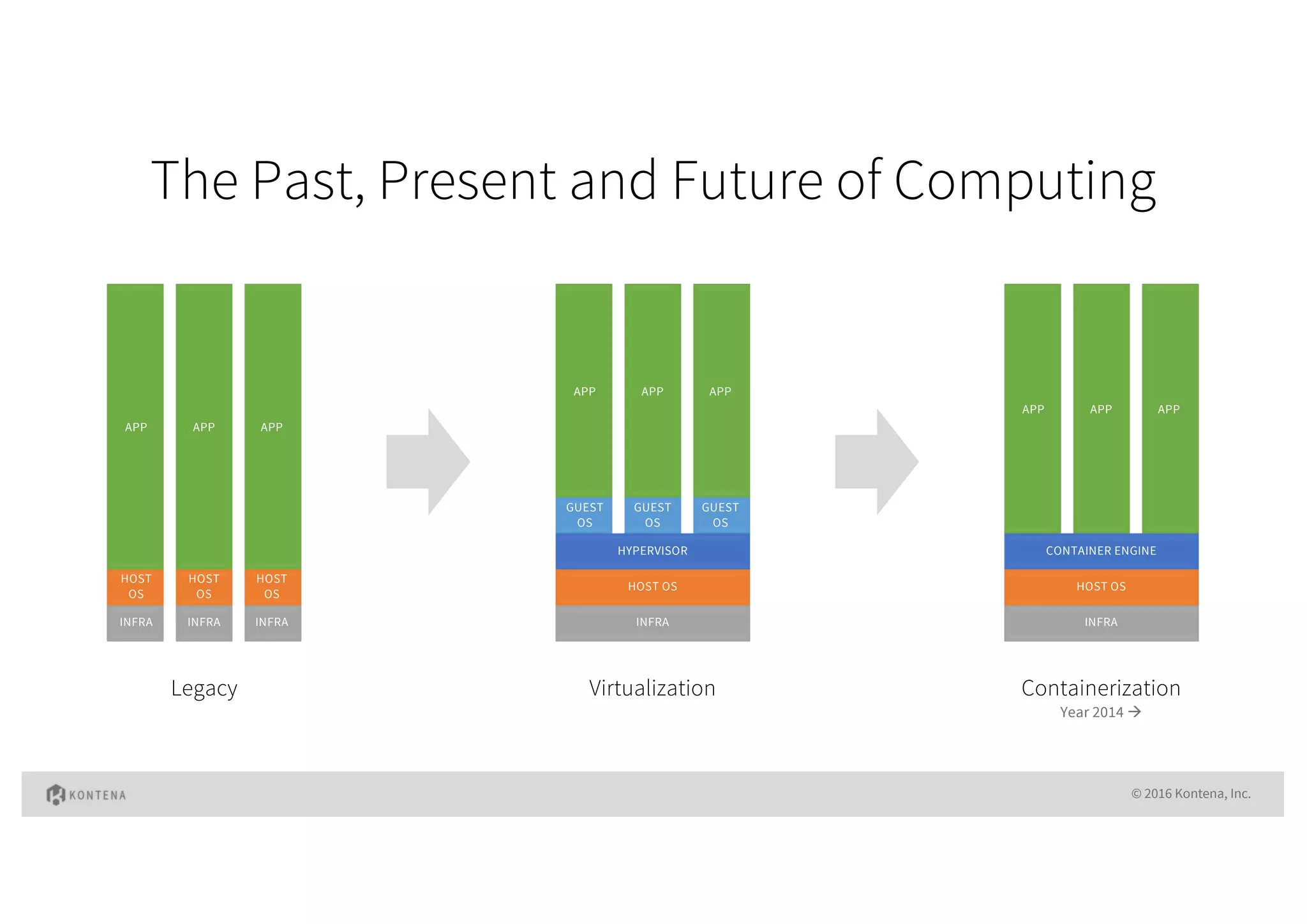
The Past, Present and Future of Computing
© 2016 Kontena, Inc.
INFRA
HOST
OS
APP
INFRA
HOST
OS
APP
INFRA
HOST
OS
APP
INFRA
HOST OS
HYPERVISOR
GUEST
OS
GUEST
OS
GUEST
OS
APP APP APP
INFRA
HOST OS
CONTAINER ENGINE
APP APP APP
Legacy Virtualization Containerization
Year 2014 à
docker run –d mysql
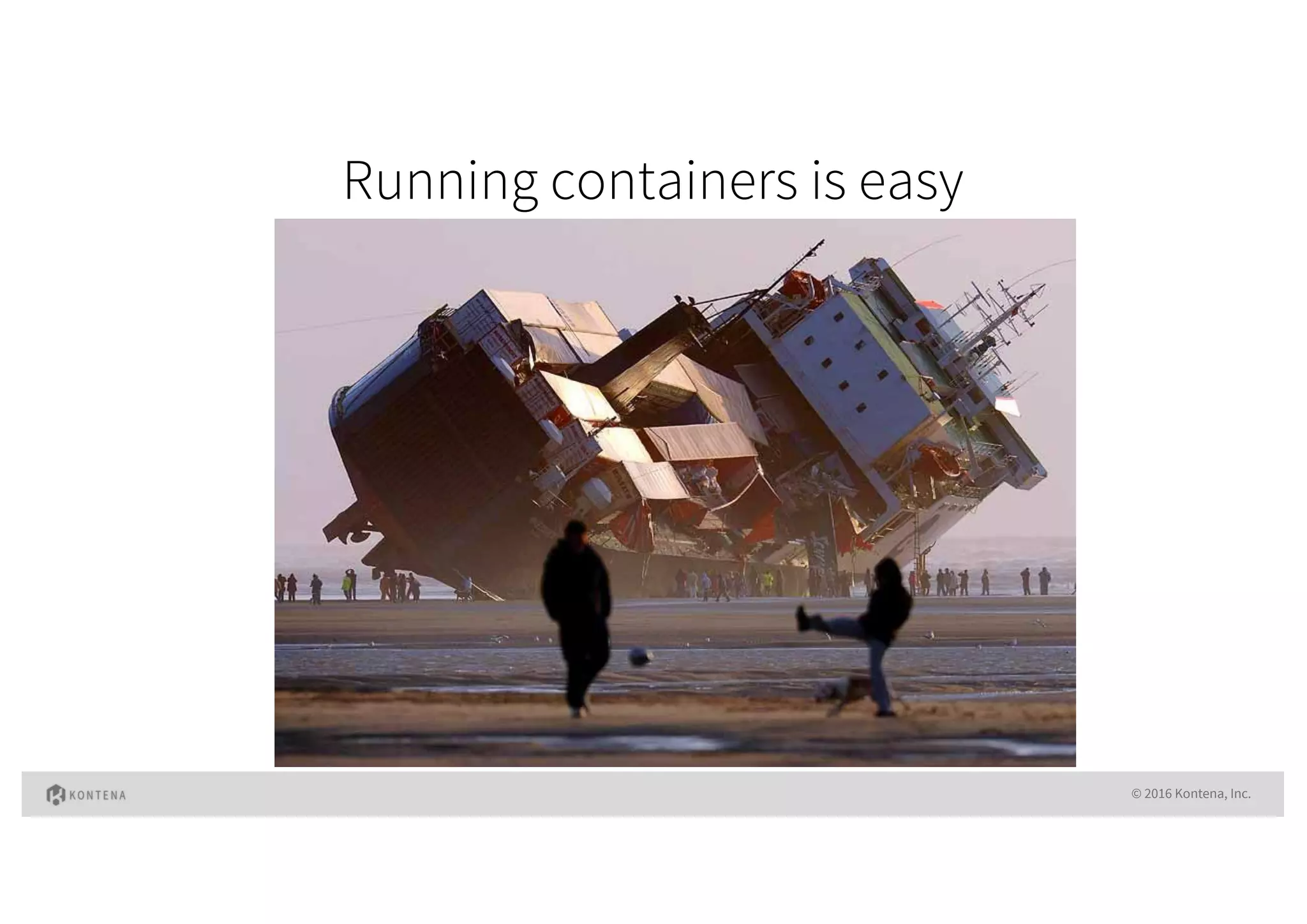
Running containers is easy
© 2016 Kontena, Inc.
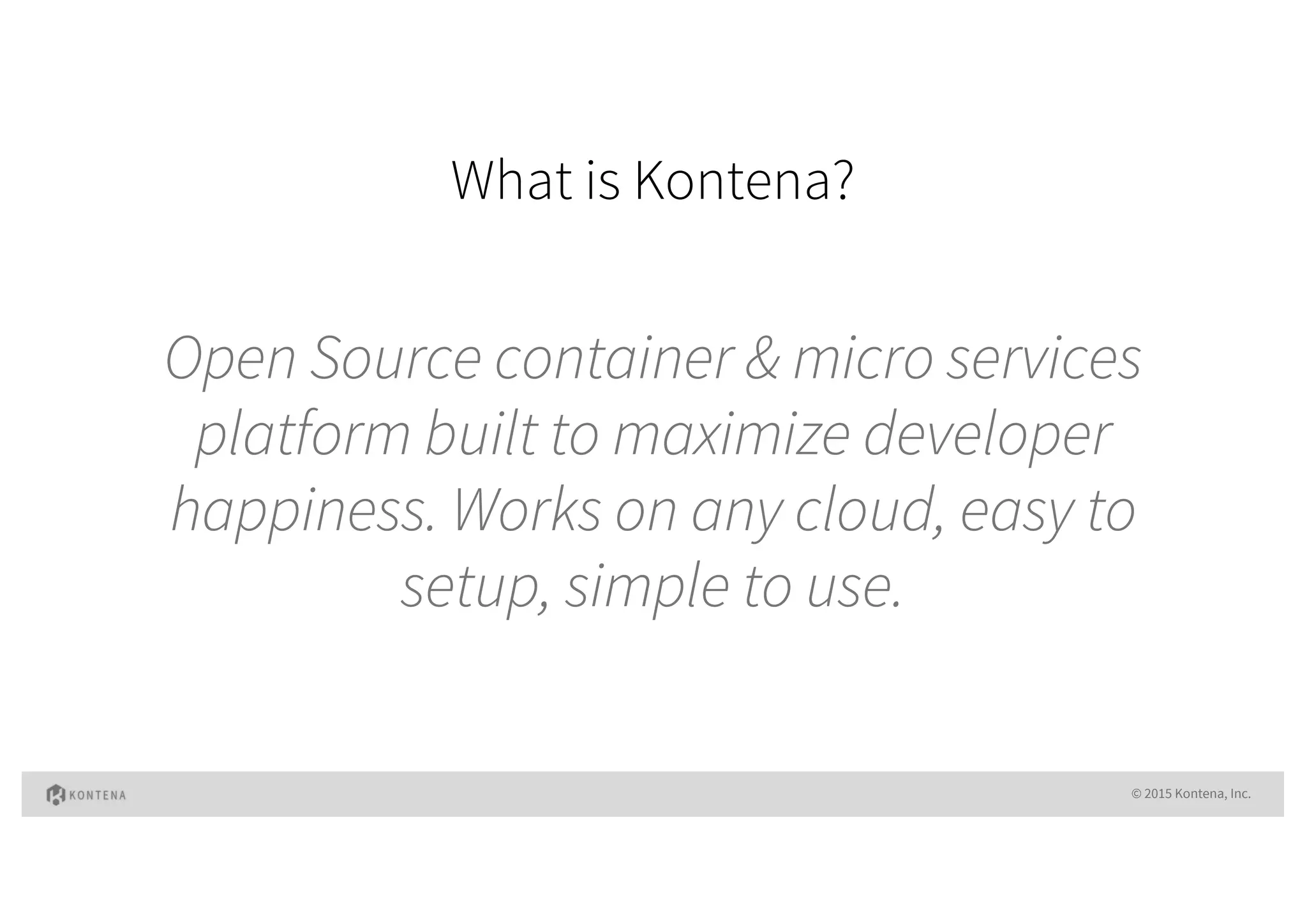
What is Kontena?
© 2015 Kontena, Inc.
Open Source container & micro services
platform built to maximize developer
happiness. Works on any cloud, easy to
setup, simple to use.
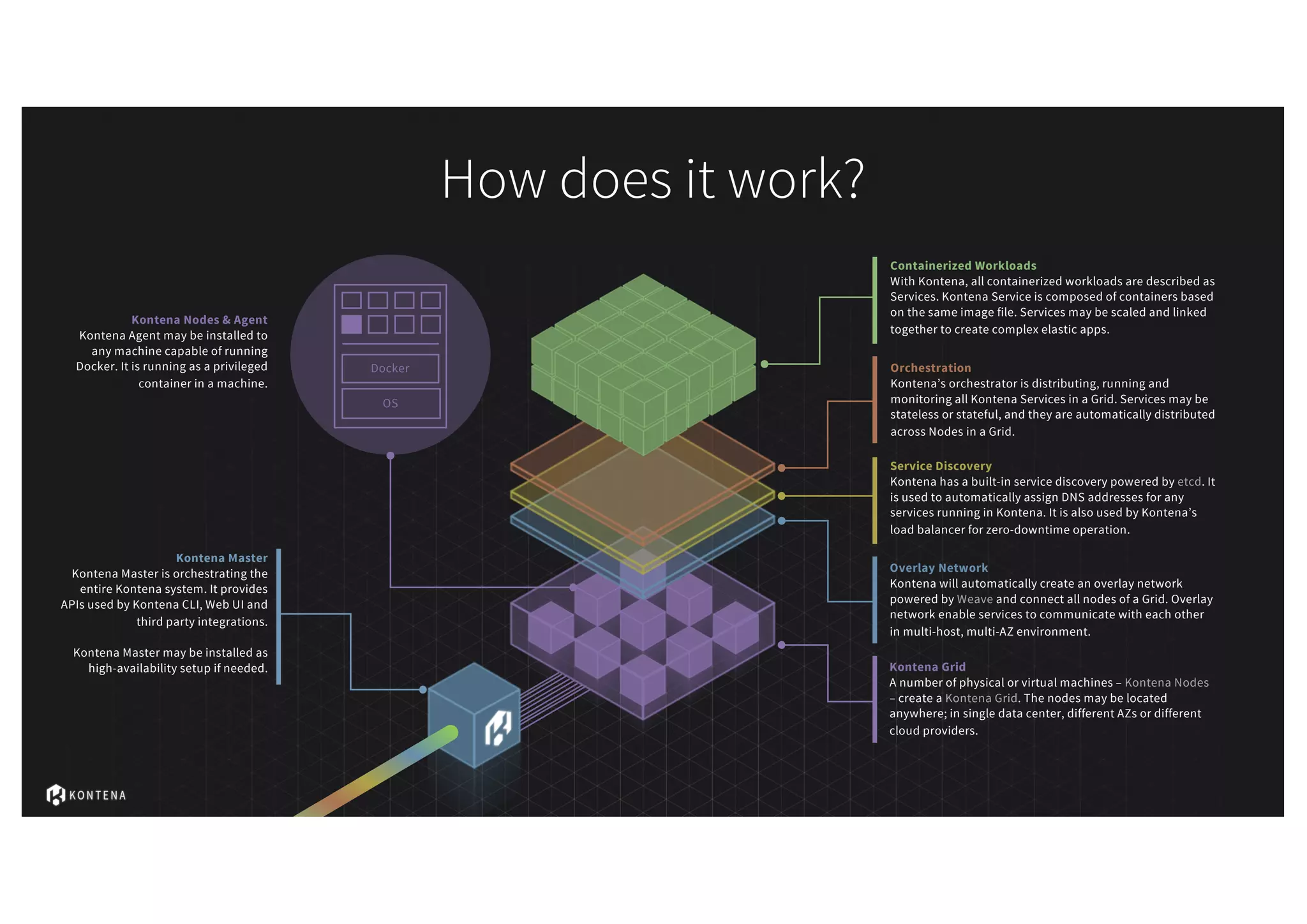
How does it work?
Kontena Grid
A number of physical or virtual machines – Kontena Nodes
– create a Kontena Grid. The nodes may be located
anywhere; in single data center, different AZs or different
cloud providers.
Overlay Network
Kontena will automatically create an overlay network
powered by Weave and connect all nodes of a Grid. Overlay
network enable services to communicate with each other
in multi-host, multi-AZ environment.
Service Discovery
Kontena has a built-in service discovery powered by etcd. It
is used to automatically assign DNS addresses for any
services running in Kontena. It is also used by Kontena’s
load balancer for zero-downtime operation.
Orchestration
Kontena’s orchestrator is distributing, running and
monitoring all Kontena Services in a Grid. Services may be
stateless or stateful, and they are automatically distributed
across Nodes in a Grid.
Containerized Workloads
With Kontena, all containerized workloads are described as
Services. Kontena Service is composed of containers based
on the same image file. Services may be scaled and linked
together to create complex elastic apps.
OS
Docker
Kontena Nodes & Agent
Kontena Agent may be installed to
any machine capable of running
Docker. It is running as a privileged
container in a machine.
Kontena Master
Kontena Master is orchestrating the
entire Kontena system. It provides
APIs used by Kontena CLI, Web UI and
third party integrations.
Kontena Master may be installed as
high-availability setup if needed.
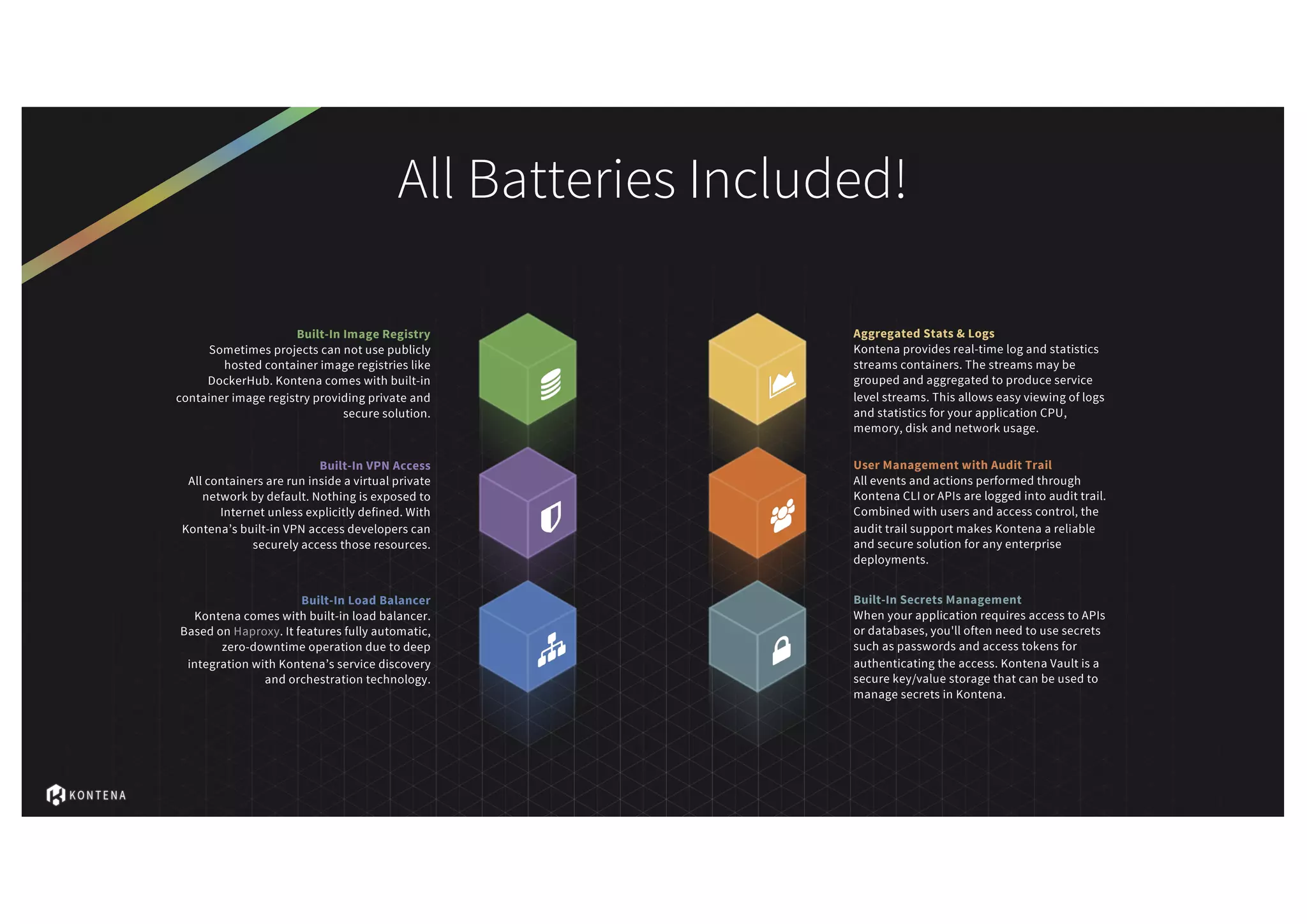
All Batteries Included!
Built-In Image Registry
Sometimes projects can not use publicly
hosted container image registries like
DockerHub. Kontena comes with built-in
container image registry providing private and
secure solution.
Built-In VPN Access
All containers are run inside a virtual private
network by default. Nothing is exposed to
Internet unless explicitly defined. With
Kontena’s built-in VPN access developers can
securely access those resources.
Built-In Load Balancer
Kontena comes with built-in load balancer.
Based on Haproxy. It features fully automatic,
zero-downtime operation due to deep
integration with Kontena’s service discovery
and orchestration technology.
Aggregated Stats & Logs
Kontena provides real-time log and statistics
streams containers. The streams may be
grouped and aggregated to produce service
level streams. This allows easy viewing of logs
and statistics for your application CPU,
memory, disk and network usage.
User Management with Audit Trail
All events and actions performed through
Kontena CLI or APIs are logged into audit trail.
Combined with users and access control, the
audit trail support makes Kontena a reliable
and secure solution for any enterprise
deployments.
Built-In Secrets Management
When your application requires access to APIs
or databases, you'll often need to use secrets
such as passwords and access tokens for
authenticating the access. Kontena Vault is a
secure key/value storage that can be used to
manage secrets in Kontena.
“Includes all the s**t you don’t want to
implement by yourself”
WordPress in a container(s)
© 2016 Kontena, Inc.
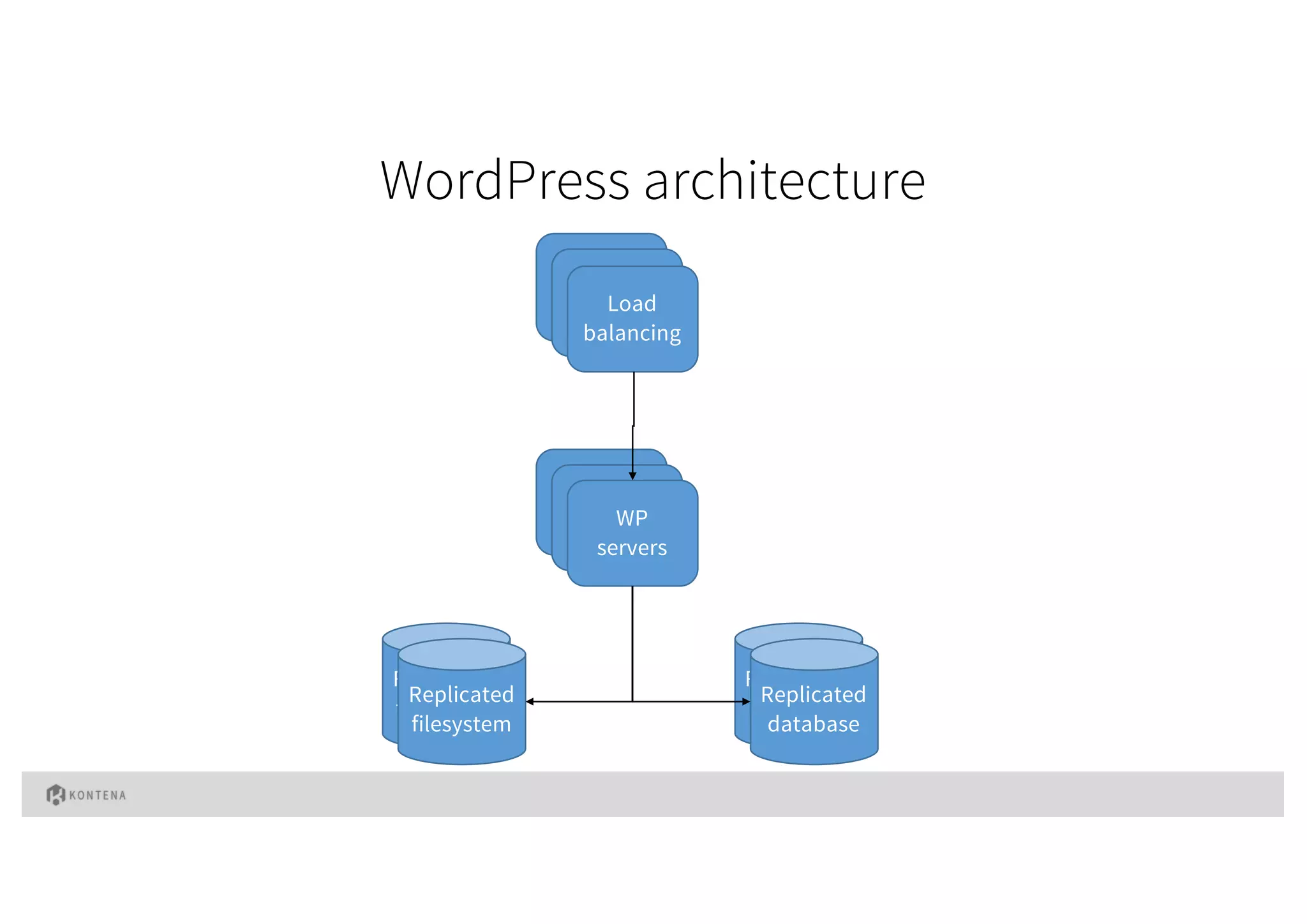
WordPress architecture
Load
balancing
Load
balancing
Load
balancing
Load
balancing
Load
balancing
WP
servers
Replicated
filesystem
Replicated
database
Replicated
database
Replicated
filesystem
Let’s try it out with containers
© 2016 Kontena, Inc.
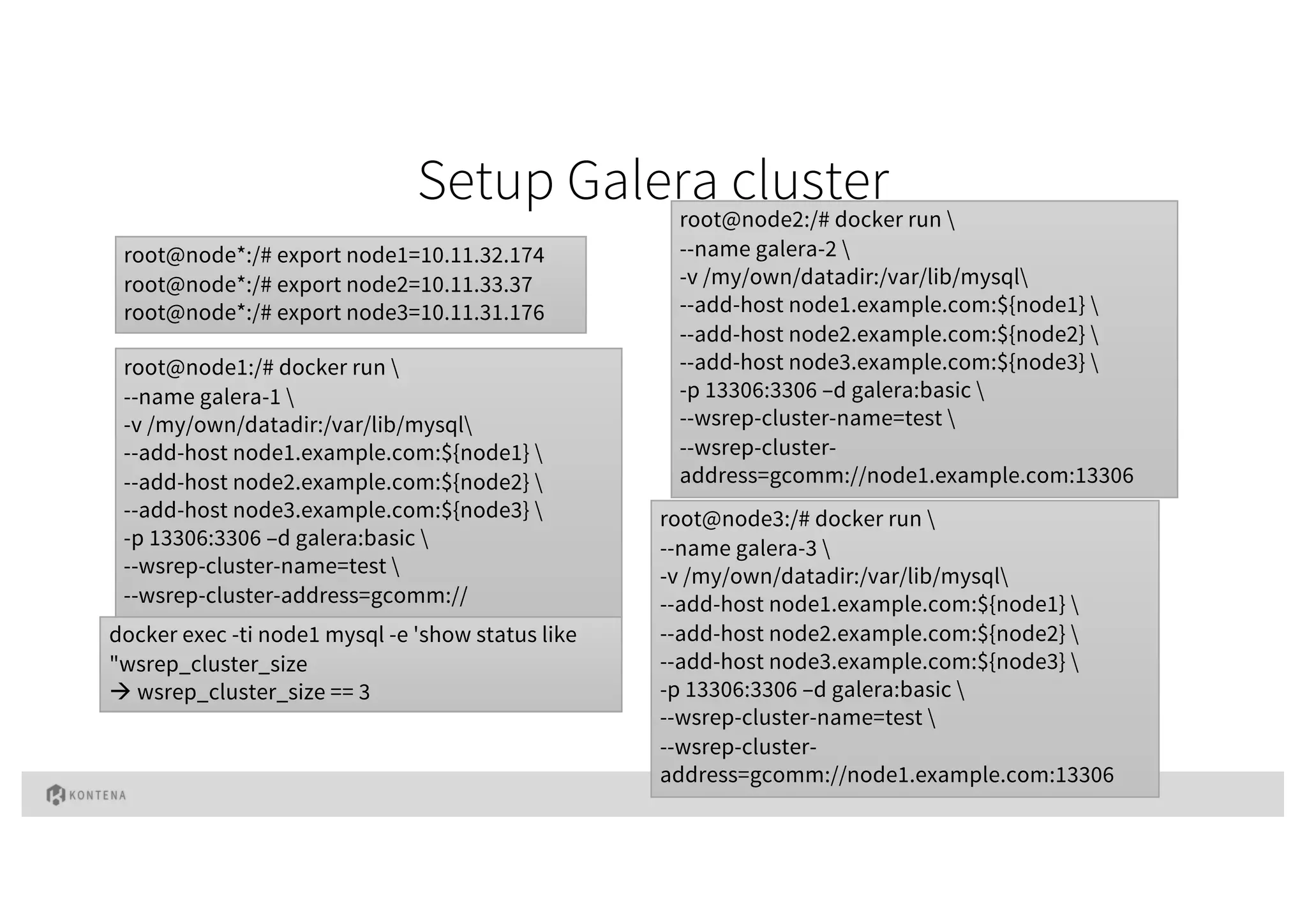
Setup Galera cluster
root@node1:/# docker run 
--name galera-1 
-v /my/own/datadir:/var/lib/mysql
--add-host node1.example.com:${node1} 
--add-host node2.example.com:${node2} 
--add-host node3.example.com:${node3} 
-p 13306:3306 –d galera:basic 
--wsrep-cluster-name=test 
--wsrep-cluster-address=gcomm://
root@node*:/# export node1=10.11.32.174
root@node*:/# export node2=10.11.33.37
root@node*:/# export node3=10.11.31.176
root@node2:/# docker run 
--name galera-2 
-v /my/own/datadir:/var/lib/mysql
--add-host node1.example.com:${node1} 
--add-host node2.example.com:${node2} 
--add-host node3.example.com:${node3} 
-p 13306:3306 –d galera:basic 
--wsrep-cluster-name=test 
--wsrep-cluster-
address=gcomm://node1.example.com:13306
root@node3:/# docker run 
--name galera-3 
-v /my/own/datadir:/var/lib/mysql
--add-host node1.example.com:${node1} 
--add-host node2.example.com:${node2} 
--add-host node3.example.com:${node3} 
-p 13306:3306 –d galera:basic 
--wsrep-cluster-name=test 
--wsrep-cluster-
address=gcomm://node1.example.com:13306
docker exec -ti node1 mysql -e 'show status like
"wsrep_cluster_size
à wsrep_cluster_size == 3
© 2015 Kontena, Inc.
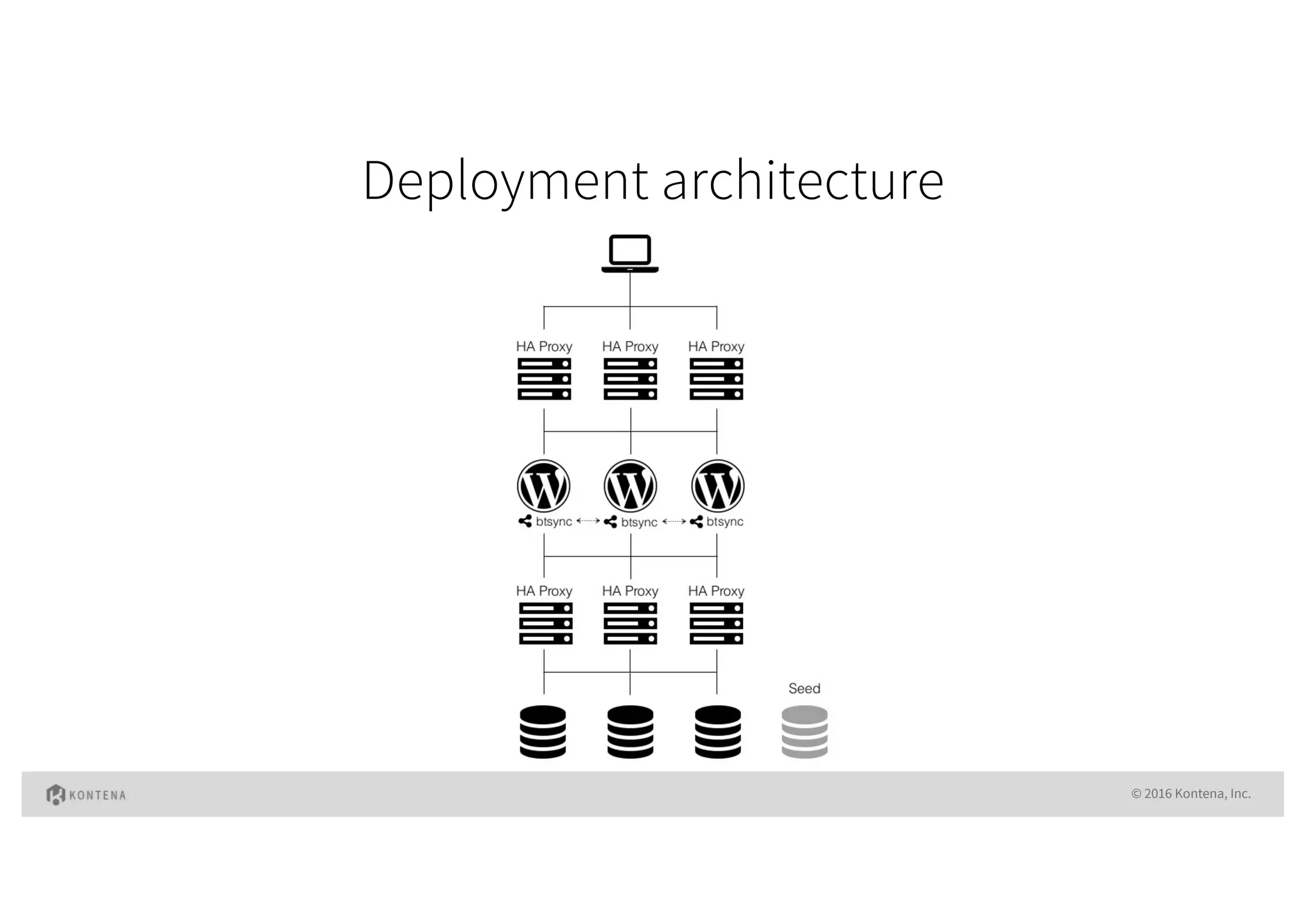
Let’s do it properly
Deployment architecture
© 2016 Kontena, Inc.
Our mission is to become
number 1 container &
microservices platform
for developers
! info@kontena.io
" @kontenainc
# slack.kontena.io
$ github.com/kontena/kontena
meetup.com/pro/kontena
% www.kontena.io
Stay up to date!
Thank You!
www.kontena.io

The Developer Friendly Container & Micro Services Platform

  • 1.
    The Developer Friendly Container& Micro Services Platform Jussi Nummelin, Resident Wharfie @JNummelin
  • 2.
    The Past, Presentand Future of Computing © 2016 Kontena, Inc. INFRA HOST OS APP INFRA HOST OS APP INFRA HOST OS APP INFRA HOST OS HYPERVISOR GUEST OS GUEST OS GUEST OS APP APP APP INFRA HOST OS CONTAINER ENGINE APP APP APP Legacy Virtualization Containerization Year 2014 à
  • 3.
    docker run –dmysql Running containers is easy © 2016 Kontena, Inc.
  • 4.
    What is Kontena? ©2015 Kontena, Inc. Open Source container & micro services platform built to maximize developer happiness. Works on any cloud, easy to setup, simple to use.
  • 5.
    How does itwork? Kontena Grid A number of physical or virtual machines – Kontena Nodes – create a Kontena Grid. The nodes may be located anywhere; in single data center, different AZs or different cloud providers. Overlay Network Kontena will automatically create an overlay network powered by Weave and connect all nodes of a Grid. Overlay network enable services to communicate with each other in multi-host, multi-AZ environment. Service Discovery Kontena has a built-in service discovery powered by etcd. It is used to automatically assign DNS addresses for any services running in Kontena. It is also used by Kontena’s load balancer for zero-downtime operation. Orchestration Kontena’s orchestrator is distributing, running and monitoring all Kontena Services in a Grid. Services may be stateless or stateful, and they are automatically distributed across Nodes in a Grid. Containerized Workloads With Kontena, all containerized workloads are described as Services. Kontena Service is composed of containers based on the same image file. Services may be scaled and linked together to create complex elastic apps. OS Docker Kontena Nodes & Agent Kontena Agent may be installed to any machine capable of running Docker. It is running as a privileged container in a machine. Kontena Master Kontena Master is orchestrating the entire Kontena system. It provides APIs used by Kontena CLI, Web UI and third party integrations. Kontena Master may be installed as high-availability setup if needed.
  • 6.
    All Batteries Included! Built-InImage Registry Sometimes projects can not use publicly hosted container image registries like DockerHub. Kontena comes with built-in container image registry providing private and secure solution. Built-In VPN Access All containers are run inside a virtual private network by default. Nothing is exposed to Internet unless explicitly defined. With Kontena’s built-in VPN access developers can securely access those resources. Built-In Load Balancer Kontena comes with built-in load balancer. Based on Haproxy. It features fully automatic, zero-downtime operation due to deep integration with Kontena’s service discovery and orchestration technology. Aggregated Stats & Logs Kontena provides real-time log and statistics streams containers. The streams may be grouped and aggregated to produce service level streams. This allows easy viewing of logs and statistics for your application CPU, memory, disk and network usage. User Management with Audit Trail All events and actions performed through Kontena CLI or APIs are logged into audit trail. Combined with users and access control, the audit trail support makes Kontena a reliable and secure solution for any enterprise deployments. Built-In Secrets Management When your application requires access to APIs or databases, you'll often need to use secrets such as passwords and access tokens for authenticating the access. Kontena Vault is a secure key/value storage that can be used to manage secrets in Kontena.
  • 7.
    “Includes all thes**t you don’t want to implement by yourself”
  • 8.
    WordPress in acontainer(s) © 2016 Kontena, Inc.
  • 9.
  • 10.
    Let’s try itout with containers © 2016 Kontena, Inc.
  • 11.
    Setup Galera cluster root@node1:/#docker run --name galera-1 -v /my/own/datadir:/var/lib/mysql --add-host node1.example.com:${node1} --add-host node2.example.com:${node2} --add-host node3.example.com:${node3} -p 13306:3306 –d galera:basic --wsrep-cluster-name=test --wsrep-cluster-address=gcomm:// root@node*:/# export node1=10.11.32.174 root@node*:/# export node2=10.11.33.37 root@node*:/# export node3=10.11.31.176 root@node2:/# docker run --name galera-2 -v /my/own/datadir:/var/lib/mysql --add-host node1.example.com:${node1} --add-host node2.example.com:${node2} --add-host node3.example.com:${node3} -p 13306:3306 –d galera:basic --wsrep-cluster-name=test --wsrep-cluster- address=gcomm://node1.example.com:13306 root@node3:/# docker run --name galera-3 -v /my/own/datadir:/var/lib/mysql --add-host node1.example.com:${node1} --add-host node2.example.com:${node2} --add-host node3.example.com:${node3} -p 13306:3306 –d galera:basic --wsrep-cluster-name=test --wsrep-cluster- address=gcomm://node1.example.com:13306 docker exec -ti node1 mysql -e 'show status like "wsrep_cluster_size à wsrep_cluster_size == 3
  • 12.
  • 13.
    Let’s do itproperly
  • 14.
  • 15.
    Our mission isto become number 1 container & microservices platform for developers
  • 16.
    ! info@kontena.io " @kontenainc #slack.kontena.io $ github.com/kontena/kontena meetup.com/pro/kontena % www.kontena.io Stay up to date!
  • 17.