How to Leverage Appium in
Your Mobile App Testing
7 January 2014
Ville-Veikko Helppi

Saad Chaudry

Technical Product Manager

Sr. Software Engineer

ville-veikko.helppi@bitbar.com

saad.chaudry@bitbar.com
Agenda
• Different Ways to Automate Your App Testing
• Appium and How It Compares Against Other
Test Automation Frameworks
• Appium with Real Devices (@Testdroid Cloud)
• 10 Tips for Professional Mobile App Testing
• Demonstration
• Q&A
© Copyrights by Bitbar Technologies Ltd. 2014
All rights reserved.

2
Agenda
• Different Ways to Automate Your App Testing
• Appium and How It Compares Against Other
Test Automation Frameworks
• Appium with Real Devices (@Testdroid Cloud)
• 10 Tips for Professional Mobile App Testing
• Demonstration
• Q&A
© Copyrights by Bitbar Technologies Ltd. 2014
All rights reserved.

3
Different Approaches To Testing

© Copyrights by Bitbar Technologies Ltd. 2014
All rights reserved.

4
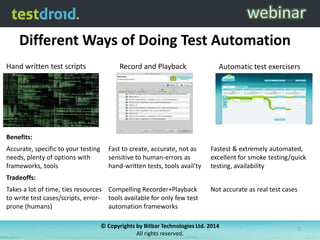
Different Ways of Doing Test Automation
Hand written test scripts

Record and Playback

Automatic test exercisers

Fast to create, accurate, not as
sensitive to human-errors as
hand-written tests, tools avail’ty

Fastest & extremely automated,
excellent for smoke testing/quick
testing, availability

Benefits:
Accurate, specific to your testing
needs, plenty of options with
frameworks, tools
Tradeoffs:
Takes a lot of time, ties resources Compelling Recorder+Playback
to write test cases/scripts, error- tools available for only few test
prone (humans)
automation frameworks

Not accurate as real test cases

© Copyrights by Bitbar Technologies Ltd. 2014
All rights reserved.

5
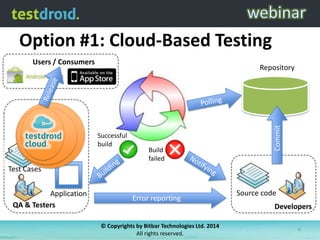
Option #1: Cloud-Based Testing
Users / Consumers

Successful
build

Build
failed

Commit

Repository

Test Cases
Application
QA & Testers

Error reporting

Source code
Developers

© Copyrights by Bitbar Technologies Ltd. 2014
All rights reserved.

6
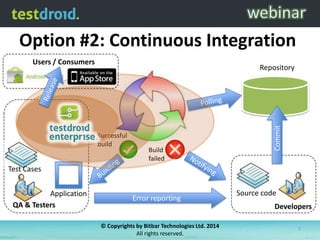
Option #2: Continuous Integration
Users / Consumers

Successful
build

Build
failed

Commit

Repository

Test Cases
Application
QA & Testers

Error reporting

Source code
Developers

© Copyrights by Bitbar Technologies Ltd. 2014
All rights reserved.

7
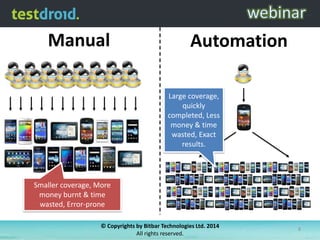
Manual

Automation
Large coverage,
quickly
completed, Less
money & time
wasted, Exact
results.

Smaller coverage, More
money burnt & time
wasted, Error-prone
© Copyrights by Bitbar Technologies Ltd. 2014
All rights reserved.

8
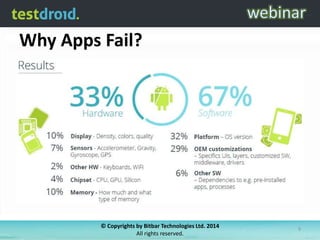
Why Apps Fail?

© Copyrights by Bitbar Technologies Ltd. 2014
All rights reserved.

9
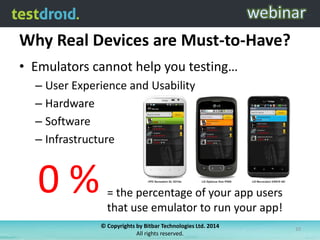
Why Real Devices are Must-to-Have?
• Emulators cannot help you testing…
– User Experience and Usability
– Hardware
– Software
– Infrastructure

0%

= the percentage of your app users
that use emulator to run your app!
© Copyrights by Bitbar Technologies Ltd. 2014
All rights reserved.

10
How to Improve the App Quality
• Automate generic things as much as you can
• During the development your app changes –
the same must apply for testing!
• Carefully select (testing) technology & partner
• Use all 24 hours per day with test automation
• Cloud-based platform is the only solution to
get you quickly covered in the global markets
© Copyrights by Bitbar Technologies Ltd. 2014
All rights reserved.

11
Agenda
• Different Ways to Automate Your App Testing
• Appium and How It Compares Against Other
Test Automation Frameworks
• Appium with Real Devices (@Testdroid Cloud)
• 10 Tips for Professional Mobile App Testing
• Demonstration
• Q&A
© Copyrights by Bitbar Technologies Ltd. 2014
All rights reserved.

12
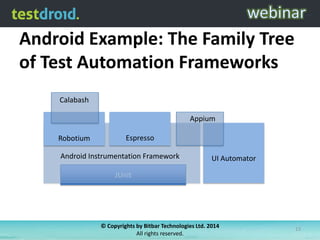
Android Example: The Family Tree
of Test Automation Frameworks
Calabash

Appium
Robotium

Espresso

Android Instrumentation Framework

UI Automator

JUnit

© Copyrights by Bitbar Technologies Ltd. 2014
All rights reserved.

13
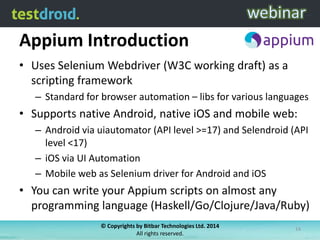
Appium Introduction
• Uses Selenium Webdriver (W3C working draft) as a
scripting framework
– Standard for browser automation – libs for various languages

• Supports native Android, native iOS and mobile web:
– Android via uiautomator (API level >=17) and Selendroid (API
level <17)
– iOS via UI Automation
– Mobile web as Selenium driver for Android and iOS

• You can write your Appium scripts on almost any
programming language (Haskell/Go/Clojure/Java/Ruby)
© Copyrights by Bitbar Technologies Ltd. 2014
All rights reserved.

14
Appium: How it works?
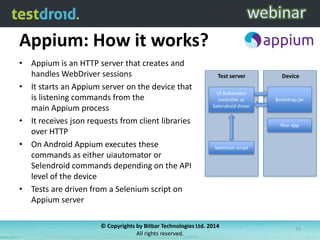
• Appium is an HTTP server that creates and
handles WebDriver sessions
• It starts an Appium server on the device that
is listening commands from the
main Appium process
• It receives json requests from client libraries
over HTTP
• On Android Appium executes these
commands as either uiautomator or
Selendroid commands depending on the API
level of the device
• Tests are driven from a Selenium script on
Appium server

Test server

Device

UI Automator
controller or
Selendroid driver

Bootstrap.jar

Your app

Selenium script

© Copyrights by Bitbar Technologies Ltd. 2014
All rights reserved.

15
Appium: Test Lifecycle
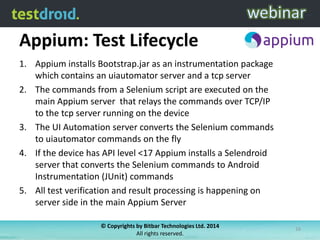
1. Appium installs Bootstrap.jar as an instrumentation package
which contains an uiautomator server and a tcp server
2. The commands from a Selenium script are executed on the
main Appium server that relays the commands over TCP/IP
to the tcp server running on the device
3. The UI Automation server converts the Selenium commands
to uiautomator commands on the fly
4. If the device has API level <17 Appium installs a Selendroid
server that converts the Selenium commands to Android
Instrumentation (JUnit) commands
5. All test verification and result processing is happening on
server side in the main Appium Server
© Copyrights by Bitbar Technologies Ltd. 2014
All rights reserved.

16
Appium: Code Example
# wait for hello
sleep(3)
textFields = driver.find_elements_by_tag_name('textField')
assertEqual(textFields[0].get_attribute("value"), "Hello")
# click sign-in button
driver.find_elements_by_name('Sign in')[0].click()

# find the text fields again, and enter username and password
textFields = driver.find_elements_by_tag_name('textField')
textFields[0].send_keys("twitter_username")
textFields[1].send_keys("passw0rd")
# click the Login button (the first button in the view) + sleep
driver.find_elements_by_tag_name('button')[0].click()
sleep(3)
# click the first button with name "Compose” + type in the tweet message + press “Send”
driver.find_elements_by_name('Compose')[0].click()
driver.find_elements_by_tag_name('textField')[0].send_keys(”#Testdroid is awesome!")
driver.find_elements_by_name('Send')[0].click()
# exit
driver.quit()

© Copyrights by Bitbar Technologies Ltd. 2014
All rights reserved.

17
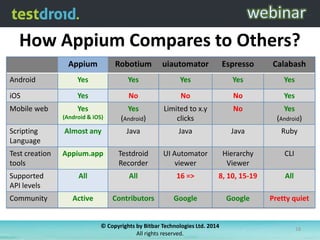
How Appium Compares to Others?
Appium

Robotium

uiautomator

Espresso

Calabash

Android

Yes

Yes

Yes

Yes

Yes

iOS

Yes

No

No

No

Yes

Mobile web

Yes

Yes

No

Yes

(Android & iOS)

(Android)

Limited to x.y
clicks

Scripting
Language

Almost any

Java

Java

Java

Ruby

Test creation
tools

Appium.app

Testdroid
Recorder

UI Automator
viewer

Hierarchy
Viewer

CLI

Supported
API levels

All

All

16 =>

8, 10, 15-19

All

Community

Active

Contributors

Google

Google

Pretty quiet

(Android)

© Copyrights by Bitbar Technologies Ltd. 2014
All rights reserved.

18
Agenda
• Different Ways to Automate Your App Testing
• Appium and How It Compares Against Other
Test Automation Frameworks
• Appium with Real Devices (@Testdroid Cloud)
• 10 Tips for Professional Mobile App Testing
• Demonstration
• Q&A
© Copyrights by Bitbar Technologies Ltd. 2014
All rights reserved.

19
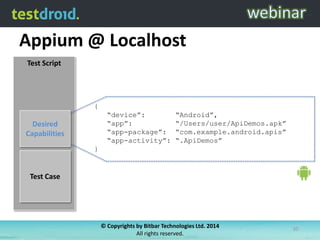
Appium @ Localhost
Test Script

{
“device”:
“app”:
“app-package”:
“app-activity”:

Desired
Capabilities

“Android”,
“/Users/user/ApiDemos.apk”
“com.example.android.apis”
“.ApiDemos”

}

Test Case

© Copyrights by Bitbar Technologies Ltd. 2014
All rights reserved.

20
Appium @ Localhost
Test Script

Desired
Capabilities

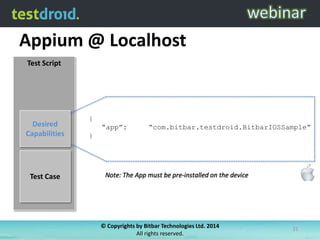
{
“app”:

“com.bitbar.testdroid.BitbarIOSSample”

}

Test Case

© Copyrights by Bitbar Technologies Ltd. 2014
All rights reserved.

21
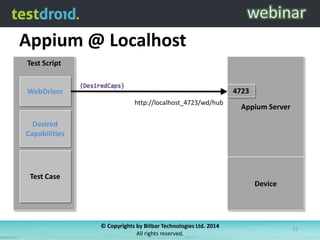
Appium @ Localhost
Test Script
4723

WebDriver
http://localhost_4723/wd/hub

Appium Server

Desired
Capabilities

Test Case

Device

© Copyrights by Bitbar Technologies Ltd. 2014
All rights reserved.

22
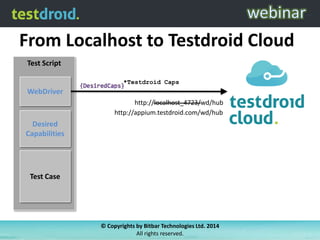
From Localhost to Testdroid Cloud
Test Script
*Testdroid Caps

WebDriver
http://localhost_4723/wd/hub
http://appium.testdroid.com/wd/hub

Desired
Capabilities

Test Case

© Copyrights by Bitbar Technologies Ltd. 2014
All rights reserved.
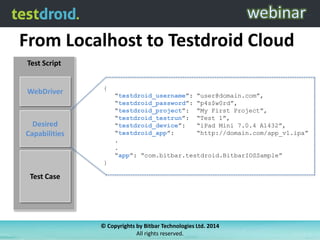
From Localhost to Testdroid Cloud
Test Script

WebDriver

{

“testdroid_username”: “user@domain.com”,
“testdroid_password”: “p4s$w0rd”,
“testdroid_project”: “My First Project”,
“testdroid_testrun”: “Test 1”,
“testdroid_device”:
“iPad Mini 7.0.4 A1432”,
“testdroid_app”:
“http://domain.com/app_v1.ipa”
.
.
“app”: “com.bitbar.testdroid.BitbarIOSSample”

Desired
Capabilities

}

Test Case

© Copyrights by Bitbar Technologies Ltd. 2014
All rights reserved.
© Copyrights by Bitbar Technologies Ltd. 2014
All rights reserved.

25
© Copyrights by Bitbar Technologies Ltd. 2014
All rights reserved.

26
© Copyrights by Bitbar Technologies Ltd. 2014
All rights reserved.

27
© Copyrights by Bitbar Technologies Ltd. 2014
All rights reserved.

28
© Copyrights by Bitbar Technologies Ltd. 2014
All rights reserved.

29
© Copyrights by Bitbar Technologies Ltd. 2014
All rights reserved.

30
© Copyrights by Bitbar Technologies Ltd. 2014
All rights reserved.

31
© Copyrights by Bitbar Technologies Ltd. 2014
All rights reserved.

32
© Copyrights by Bitbar Technologies Ltd. 2014
All rights reserved.

33
© Copyrights by Bitbar Technologies Ltd. 2014
All rights reserved.

34
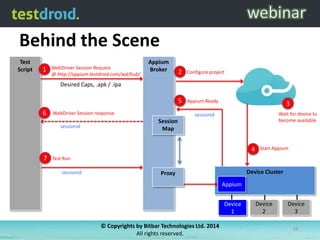
Behind the Scene
Test
Script

1

WebDriver Session Request
@ http://appium.testdroid.com/wd/hub/

Appium
Broker

2

Configure project

5

Appium Ready

Desired Caps, .apk / .ipa

6

WebDriver Session response

sessionid

3
Wait for device to
become available

sessionid

Session
Map

4
7

Start Appium

Test Run
sessionid

Device Cluster

Proxy
Appium
Device
Device
1
1
© Copyrights by Bitbar Technologies Ltd. 2014
All rights reserved.

Device
2

Device
3
35
Agenda
• Different Ways to Automate Your App Testing
• Appium and How It Compares Against Other
Test Automation Frameworks
• Appium with Real Devices (@Testdroid Cloud)
• 10 Tips for Professional Mobile App Testing
• Demonstration
• Q&A
© Copyrights by Bitbar Technologies Ltd. 2014
All rights reserved.

36
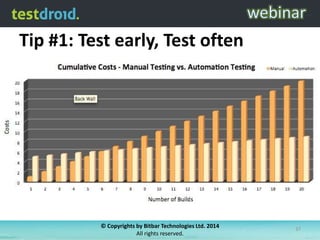
Tip #1: Test early, Test often

© Copyrights by Bitbar Technologies Ltd. 2014
All rights reserved.

37
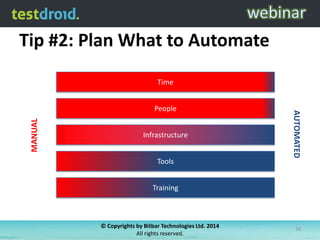
Tip #2: Plan What to Automate
Time

MANUAL

Infrastructure
Tools

AUTOMATED

People

Training

© Copyrights by Bitbar Technologies Ltd. 2014
All rights reserved.

38
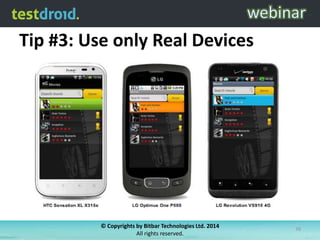
Tip #3: Use only Real Devices

© Copyrights by Bitbar Technologies Ltd. 2014
All rights reserved.

39
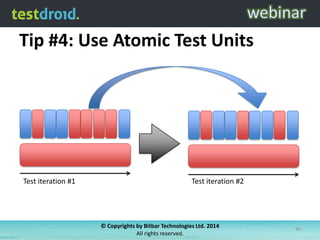
Tip #4: Use Atomic Test Units

Test iteration #1

Test iteration #2

© Copyrights by Bitbar Technologies Ltd. 2014
All rights reserved.

40
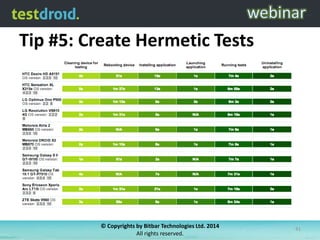
Tip #5: Create Hermetic Tests

© Copyrights by Bitbar Technologies Ltd. 2014
All rights reserved.

41
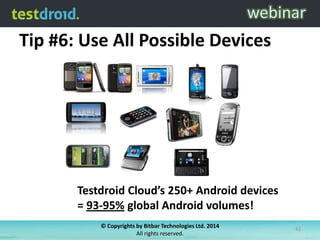
Tip #6: Use All Possible Devices

Testdroid Cloud’s 250+ Android devices
= 93-95% global Android volumes!
© Copyrights by Bitbar Technologies Ltd. 2014
All rights reserved.

42
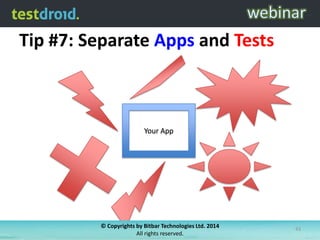
Tip #7: Separate Apps and Tests

Your App

© Copyrights by Bitbar Technologies Ltd. 2014
All rights reserved.

43
Tip #8: Output Everything to Logs

© Copyrights by Bitbar Technologies Ltd. 2014
All rights reserved.

44
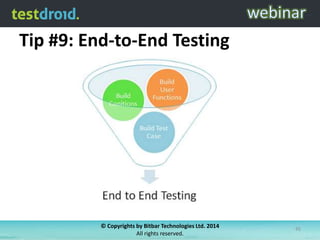
Tip #9: End-to-End Testing

© Copyrights by Bitbar Technologies Ltd. 2014
All rights reserved.

45
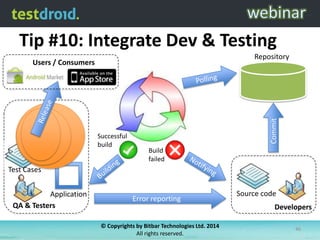
Tip #10: Integrate Dev & Testing
Repository

Successful
build

Commit

Users / Consumers

Build
failed

Test Cases
Application
QA & Testers

Error reporting

Source code
Developers

© Copyrights by Bitbar Technologies Ltd. 2014
All rights reserved.

46
Agenda
• Different Ways to Automate Your App Testing
• Appium and How It Compares Against Other
Test Automation Frameworks
• Appium with Real Devices (@Testdroid Cloud)
• 10 Tips for Professional Mobile App Testing
• Demonstration
• Q&A
© Copyrights by Bitbar Technologies Ltd. 2014
All rights reserved.

47
Agenda
• Different Ways to Automate Your App Testing
• Appium and How It Compares Against Other
Test Automation Frameworks
• Appium with Real Devices (@Testdroid Cloud)
• 10 Tips for Professional Mobile App Testing
• Demonstration
• Q&A
© Copyrights by Bitbar Technologies Ltd. 2014
All rights reserved.

48
© Copyrights by Bitbar Technologies Ltd. 2014
All rights reserved.

49

How to Leverage Appium in Your Mobile App Testing

  • 1.
    How to LeverageAppium in Your Mobile App Testing 7 January 2014 Ville-Veikko Helppi Saad Chaudry Technical Product Manager Sr. Software Engineer ville-veikko.helppi@bitbar.com saad.chaudry@bitbar.com
  • 2.
    Agenda • Different Waysto Automate Your App Testing • Appium and How It Compares Against Other Test Automation Frameworks • Appium with Real Devices (@Testdroid Cloud) • 10 Tips for Professional Mobile App Testing • Demonstration • Q&A © Copyrights by Bitbar Technologies Ltd. 2014 All rights reserved. 2
  • 3.
    Agenda • Different Waysto Automate Your App Testing • Appium and How It Compares Against Other Test Automation Frameworks • Appium with Real Devices (@Testdroid Cloud) • 10 Tips for Professional Mobile App Testing • Demonstration • Q&A © Copyrights by Bitbar Technologies Ltd. 2014 All rights reserved. 3
  • 4.
    Different Approaches ToTesting © Copyrights by Bitbar Technologies Ltd. 2014 All rights reserved. 4
  • 5.
    Different Ways ofDoing Test Automation Hand written test scripts Record and Playback Automatic test exercisers Fast to create, accurate, not as sensitive to human-errors as hand-written tests, tools avail’ty Fastest & extremely automated, excellent for smoke testing/quick testing, availability Benefits: Accurate, specific to your testing needs, plenty of options with frameworks, tools Tradeoffs: Takes a lot of time, ties resources Compelling Recorder+Playback to write test cases/scripts, error- tools available for only few test prone (humans) automation frameworks Not accurate as real test cases © Copyrights by Bitbar Technologies Ltd. 2014 All rights reserved. 5
  • 6.
    Option #1: Cloud-BasedTesting Users / Consumers Successful build Build failed Commit Repository Test Cases Application QA & Testers Error reporting Source code Developers © Copyrights by Bitbar Technologies Ltd. 2014 All rights reserved. 6
  • 7.
    Option #2: ContinuousIntegration Users / Consumers Successful build Build failed Commit Repository Test Cases Application QA & Testers Error reporting Source code Developers © Copyrights by Bitbar Technologies Ltd. 2014 All rights reserved. 7
  • 8.
    Manual Automation Large coverage, quickly completed, Less money& time wasted, Exact results. Smaller coverage, More money burnt & time wasted, Error-prone © Copyrights by Bitbar Technologies Ltd. 2014 All rights reserved. 8
  • 9.
    Why Apps Fail? ©Copyrights by Bitbar Technologies Ltd. 2014 All rights reserved. 9
  • 10.
    Why Real Devicesare Must-to-Have? • Emulators cannot help you testing… – User Experience and Usability – Hardware – Software – Infrastructure 0% = the percentage of your app users that use emulator to run your app! © Copyrights by Bitbar Technologies Ltd. 2014 All rights reserved. 10
  • 11.
    How to Improvethe App Quality • Automate generic things as much as you can • During the development your app changes – the same must apply for testing! • Carefully select (testing) technology & partner • Use all 24 hours per day with test automation • Cloud-based platform is the only solution to get you quickly covered in the global markets © Copyrights by Bitbar Technologies Ltd. 2014 All rights reserved. 11
  • 12.
    Agenda • Different Waysto Automate Your App Testing • Appium and How It Compares Against Other Test Automation Frameworks • Appium with Real Devices (@Testdroid Cloud) • 10 Tips for Professional Mobile App Testing • Demonstration • Q&A © Copyrights by Bitbar Technologies Ltd. 2014 All rights reserved. 12
  • 13.
    Android Example: TheFamily Tree of Test Automation Frameworks Calabash Appium Robotium Espresso Android Instrumentation Framework UI Automator JUnit © Copyrights by Bitbar Technologies Ltd. 2014 All rights reserved. 13
  • 14.
    Appium Introduction • UsesSelenium Webdriver (W3C working draft) as a scripting framework – Standard for browser automation – libs for various languages • Supports native Android, native iOS and mobile web: – Android via uiautomator (API level >=17) and Selendroid (API level <17) – iOS via UI Automation – Mobile web as Selenium driver for Android and iOS • You can write your Appium scripts on almost any programming language (Haskell/Go/Clojure/Java/Ruby) © Copyrights by Bitbar Technologies Ltd. 2014 All rights reserved. 14
  • 15.
    Appium: How itworks? • Appium is an HTTP server that creates and handles WebDriver sessions • It starts an Appium server on the device that is listening commands from the main Appium process • It receives json requests from client libraries over HTTP • On Android Appium executes these commands as either uiautomator or Selendroid commands depending on the API level of the device • Tests are driven from a Selenium script on Appium server Test server Device UI Automator controller or Selendroid driver Bootstrap.jar Your app Selenium script © Copyrights by Bitbar Technologies Ltd. 2014 All rights reserved. 15
  • 16.
    Appium: Test Lifecycle 1.Appium installs Bootstrap.jar as an instrumentation package which contains an uiautomator server and a tcp server 2. The commands from a Selenium script are executed on the main Appium server that relays the commands over TCP/IP to the tcp server running on the device 3. The UI Automation server converts the Selenium commands to uiautomator commands on the fly 4. If the device has API level <17 Appium installs a Selendroid server that converts the Selenium commands to Android Instrumentation (JUnit) commands 5. All test verification and result processing is happening on server side in the main Appium Server © Copyrights by Bitbar Technologies Ltd. 2014 All rights reserved. 16
  • 17.
    Appium: Code Example #wait for hello sleep(3) textFields = driver.find_elements_by_tag_name('textField') assertEqual(textFields[0].get_attribute("value"), "Hello") # click sign-in button driver.find_elements_by_name('Sign in')[0].click() # find the text fields again, and enter username and password textFields = driver.find_elements_by_tag_name('textField') textFields[0].send_keys("twitter_username") textFields[1].send_keys("passw0rd") # click the Login button (the first button in the view) + sleep driver.find_elements_by_tag_name('button')[0].click() sleep(3) # click the first button with name "Compose” + type in the tweet message + press “Send” driver.find_elements_by_name('Compose')[0].click() driver.find_elements_by_tag_name('textField')[0].send_keys(”#Testdroid is awesome!") driver.find_elements_by_name('Send')[0].click() # exit driver.quit() © Copyrights by Bitbar Technologies Ltd. 2014 All rights reserved. 17
  • 18.
    How Appium Comparesto Others? Appium Robotium uiautomator Espresso Calabash Android Yes Yes Yes Yes Yes iOS Yes No No No Yes Mobile web Yes Yes No Yes (Android & iOS) (Android) Limited to x.y clicks Scripting Language Almost any Java Java Java Ruby Test creation tools Appium.app Testdroid Recorder UI Automator viewer Hierarchy Viewer CLI Supported API levels All All 16 => 8, 10, 15-19 All Community Active Contributors Google Google Pretty quiet (Android) © Copyrights by Bitbar Technologies Ltd. 2014 All rights reserved. 18
  • 19.
    Agenda • Different Waysto Automate Your App Testing • Appium and How It Compares Against Other Test Automation Frameworks • Appium with Real Devices (@Testdroid Cloud) • 10 Tips for Professional Mobile App Testing • Demonstration • Q&A © Copyrights by Bitbar Technologies Ltd. 2014 All rights reserved. 19
  • 20.
    Appium @ Localhost TestScript { “device”: “app”: “app-package”: “app-activity”: Desired Capabilities “Android”, “/Users/user/ApiDemos.apk” “com.example.android.apis” “.ApiDemos” } Test Case © Copyrights by Bitbar Technologies Ltd. 2014 All rights reserved. 20
  • 21.
    Appium @ Localhost TestScript Desired Capabilities { “app”: “com.bitbar.testdroid.BitbarIOSSample” } Test Case © Copyrights by Bitbar Technologies Ltd. 2014 All rights reserved. 21
  • 22.
    Appium @ Localhost TestScript 4723 WebDriver http://localhost_4723/wd/hub Appium Server Desired Capabilities Test Case Device © Copyrights by Bitbar Technologies Ltd. 2014 All rights reserved. 22
  • 23.
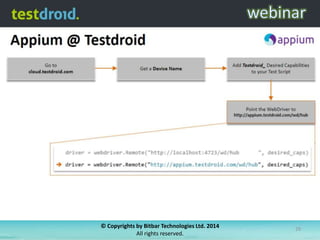
    From Localhost toTestdroid Cloud Test Script *Testdroid Caps WebDriver http://localhost_4723/wd/hub http://appium.testdroid.com/wd/hub Desired Capabilities Test Case © Copyrights by Bitbar Technologies Ltd. 2014 All rights reserved.
  • 24.
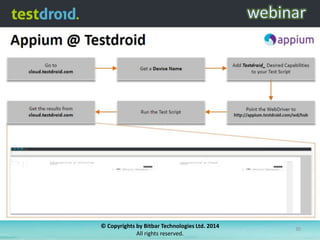
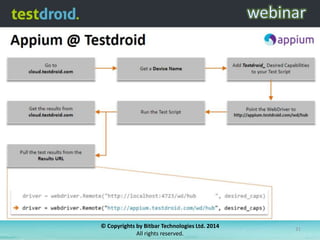
    From Localhost toTestdroid Cloud Test Script WebDriver { “testdroid_username”: “user@domain.com”, “testdroid_password”: “p4s$w0rd”, “testdroid_project”: “My First Project”, “testdroid_testrun”: “Test 1”, “testdroid_device”: “iPad Mini 7.0.4 A1432”, “testdroid_app”: “http://domain.com/app_v1.ipa” . . “app”: “com.bitbar.testdroid.BitbarIOSSample” Desired Capabilities } Test Case © Copyrights by Bitbar Technologies Ltd. 2014 All rights reserved.
  • 25.
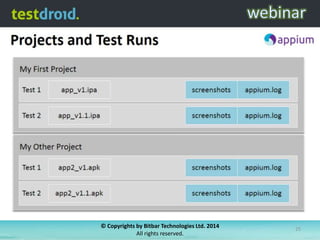
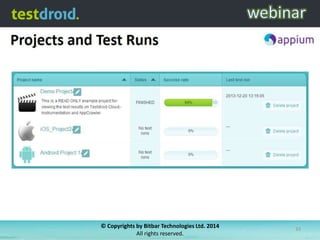
    © Copyrights byBitbar Technologies Ltd. 2014 All rights reserved. 25
  • 26.
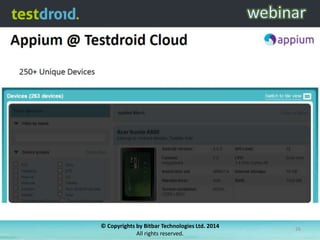
    © Copyrights byBitbar Technologies Ltd. 2014 All rights reserved. 26
  • 27.
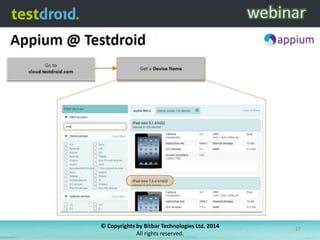
    © Copyrights byBitbar Technologies Ltd. 2014 All rights reserved. 27
  • 28.
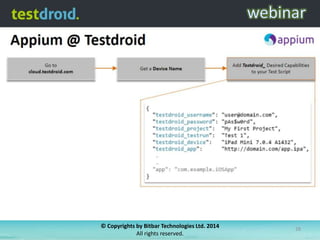
    © Copyrights byBitbar Technologies Ltd. 2014 All rights reserved. 28
  • 29.
    © Copyrights byBitbar Technologies Ltd. 2014 All rights reserved. 29
  • 30.
    © Copyrights byBitbar Technologies Ltd. 2014 All rights reserved. 30
  • 31.
    © Copyrights byBitbar Technologies Ltd. 2014 All rights reserved. 31
  • 32.
    © Copyrights byBitbar Technologies Ltd. 2014 All rights reserved. 32
  • 33.
    © Copyrights byBitbar Technologies Ltd. 2014 All rights reserved. 33
  • 34.
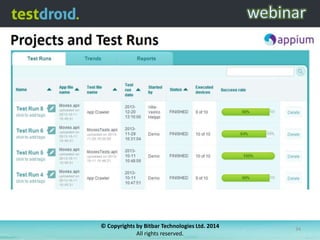
    © Copyrights byBitbar Technologies Ltd. 2014 All rights reserved. 34
  • 35.
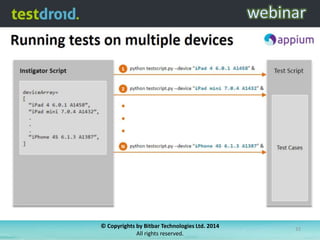
    Behind the Scene Test Script 1 WebDriverSession Request @ http://appium.testdroid.com/wd/hub/ Appium Broker 2 Configure project 5 Appium Ready Desired Caps, .apk / .ipa 6 WebDriver Session response sessionid 3 Wait for device to become available sessionid Session Map 4 7 Start Appium Test Run sessionid Device Cluster Proxy Appium Device Device 1 1 © Copyrights by Bitbar Technologies Ltd. 2014 All rights reserved. Device 2 Device 3 35
  • 36.
    Agenda • Different Waysto Automate Your App Testing • Appium and How It Compares Against Other Test Automation Frameworks • Appium with Real Devices (@Testdroid Cloud) • 10 Tips for Professional Mobile App Testing • Demonstration • Q&A © Copyrights by Bitbar Technologies Ltd. 2014 All rights reserved. 36
  • 37.
    Tip #1: Testearly, Test often © Copyrights by Bitbar Technologies Ltd. 2014 All rights reserved. 37
  • 38.
    Tip #2: PlanWhat to Automate Time MANUAL Infrastructure Tools AUTOMATED People Training © Copyrights by Bitbar Technologies Ltd. 2014 All rights reserved. 38
  • 39.
    Tip #3: Useonly Real Devices © Copyrights by Bitbar Technologies Ltd. 2014 All rights reserved. 39
  • 40.
    Tip #4: UseAtomic Test Units Test iteration #1 Test iteration #2 © Copyrights by Bitbar Technologies Ltd. 2014 All rights reserved. 40
  • 41.
    Tip #5: CreateHermetic Tests © Copyrights by Bitbar Technologies Ltd. 2014 All rights reserved. 41
  • 42.
    Tip #6: UseAll Possible Devices Testdroid Cloud’s 250+ Android devices = 93-95% global Android volumes! © Copyrights by Bitbar Technologies Ltd. 2014 All rights reserved. 42
  • 43.
    Tip #7: SeparateApps and Tests Your App © Copyrights by Bitbar Technologies Ltd. 2014 All rights reserved. 43
  • 44.
    Tip #8: OutputEverything to Logs © Copyrights by Bitbar Technologies Ltd. 2014 All rights reserved. 44
  • 45.
    Tip #9: End-to-EndTesting © Copyrights by Bitbar Technologies Ltd. 2014 All rights reserved. 45
  • 46.
    Tip #10: IntegrateDev & Testing Repository Successful build Commit Users / Consumers Build failed Test Cases Application QA & Testers Error reporting Source code Developers © Copyrights by Bitbar Technologies Ltd. 2014 All rights reserved. 46
  • 47.
    Agenda • Different Waysto Automate Your App Testing • Appium and How It Compares Against Other Test Automation Frameworks • Appium with Real Devices (@Testdroid Cloud) • 10 Tips for Professional Mobile App Testing • Demonstration • Q&A © Copyrights by Bitbar Technologies Ltd. 2014 All rights reserved. 47
  • 48.
    Agenda • Different Waysto Automate Your App Testing • Appium and How It Compares Against Other Test Automation Frameworks • Appium with Real Devices (@Testdroid Cloud) • 10 Tips for Professional Mobile App Testing • Demonstration • Q&A © Copyrights by Bitbar Technologies Ltd. 2014 All rights reserved. 48
  • 49.
    © Copyrights byBitbar Technologies Ltd. 2014 All rights reserved. 49