The Mobile Grid - Getting Started
Android & iOS
Kiev, Ukraine - 26 Feb 2016
How will you test all of these?!
The Challenge!
And each one of these cases?
• Validate every locale / languages your app supports.
• Validate every OS version your app supports.
• Validate different resolutions.
• Validate different screen sizes (phones, tablets, phablets etc..).
• Validate different device manufacturers.
You could try the single test
approach!
Not recommend…
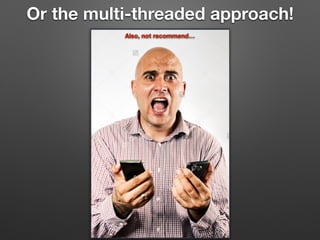
Or the multi-threaded approach!
Also, not recommend…
Though, this guy doesn’t seem to mind.
Still not recommend, however…
Hire an army of zombie testers?!
Nah, definitely not recommended!!!
So what options do we have?!
• Test Automation of course!
• But how, why, and where???
Run Tests Single threaded?
Still, not recommend…
Parallelization!
Selenium Grid + Appium
BFFS 4EVER
Test On The Cloud
• The Pros:
• It’s the present and the future of automated testing.
• Ease of setup and integration.
• Save on costs of buying mobile devices or machines.
• Some test services provide you with excellent analytics and reporting.
• Some test services integrate well with cloud CI services. e.g. Travis CI.
• You expose your app to a much larger range of devices and OS’s.
• The Cons:
• It can be difficult sometimes to narrow down issues.
• Network problems.
• Latency issues.
• Outages can occur.
• Bugs in their software.
• Acquired by another company and then shutdown.
• Costs can become significant when running CI on every commit.
Cloud Test Services
• Sauce Labs
• Test Object
• Amazon Test Cloud (was Appthwack)
• Google Test Lab (was Appurify)
• Perfecto Mobile
• Testdroid
• TouchTest
• Keynote (was Device Anywhere)
Just to name a few…
The Mobile Grid
• The Pros:
• You can run tests an unlimited amount without worrying about costs.
• You’re not handcuffed to a cloud test services 24/7 availability.
• You have all the critical test data local for debugging.
• Have full access to every connected device via adb or instruments.
• No latency issues.
• You don't expose your app or sensitive data to the cloud.
• The Cons:
• Can be tough finding documentation or good examples specific to your bindings.
• Takes a bit of time to setup and smooth things out.
• Require some degree of ops knowledge.
• You might not be able to expose your app to a large range of devices and os’s.
• Build and maintain the entire setup (software & hardware).
• Devices can be a real pain! (I’ll cover this later.)
What I’ll demo…
• Getting all of the connected devices programmatically.
• Launching Grid hub & Appium nodes programmatically.
• Capturing screenshots, logs, video and logcat for reporting.
• Running single threaded.
• Running tests distributed.
• Running tests in parallel.
• Leveraging cloud test services such as Sauce Labs.
• Reduce your runtime costs by only executing selected scenarios.
• Generating an Allure report with all above metadata attached.
• The grid setup at Wunderlist.
• and lets briefly look at the core code…
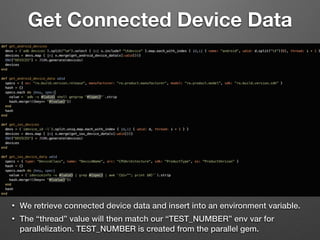
Get Connected Device Data
• We retrieve connected device data and insert into an environment variable.
• The “thread” value will then match our “TEST_NUMBER” env var for
parallelization. TEST_NUMBER is created from the parallel gem.
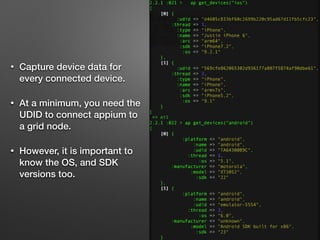
• Capture device data for
every connected device.
• At a minimum, you need the
UDID to connect appium to
a grid node.
• However, it is important to
know the OS, and SDK
versions too.
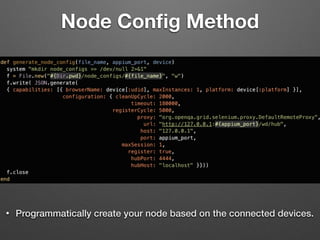
Node Config Method
• Programmatically create your node based on the connected devices.
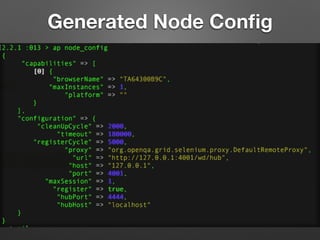
Generated Node Config
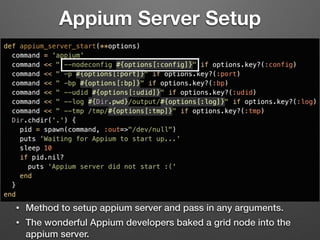
Appium Server Setup
• Method to setup appium server and pass in any arguments.
• The wonderful Appium developers baked a grid node into the
appium server.
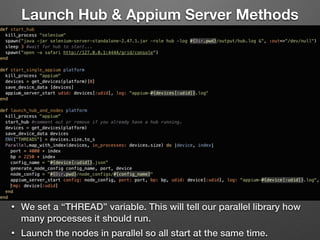
Launch Hub & Appium Server Methods
• We set a “THREAD” variable. This will tell our parallel library how
many processes it should run.
• Launch the nodes in parallel so all start at the same time.
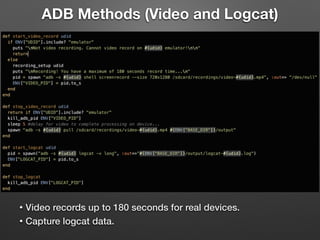
ADB Methods (Video and Logcat)
• Video records up to 180 seconds for real devices.
• Capture logcat data.
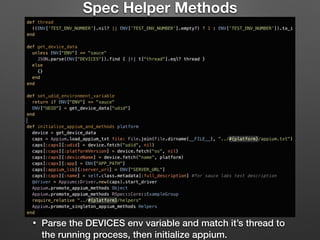
Spec Helper Methods
• Parse the DEVICES env variable and match it’s thread to
the running process, then initialize appium.
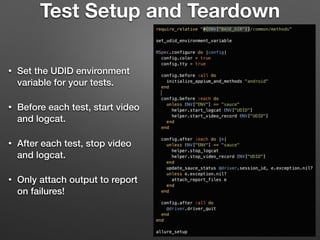
Test Setup and Teardown
• Set the UDID environment
variable for your tests.
• Before each test, start video
and logcat.
• After each test, stop video
and logcat.
• Only attach output to report
on failures!
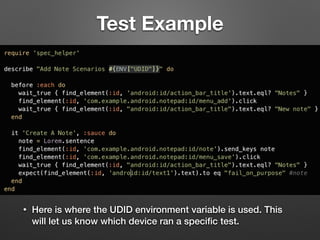
Test Example
• Here is where the UDID environment variable is used. This
will let us know which device ran a specific test.
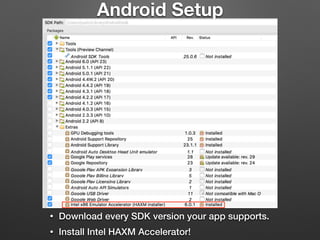
Android Setup
• Download every SDK version your app supports.
• Install Intel HAXM Accelerator!
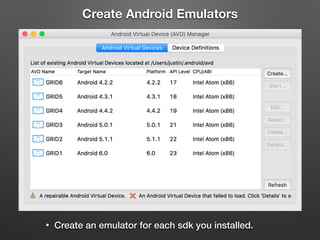
Create Android Emulators
• Create an emulator for each sdk you installed.
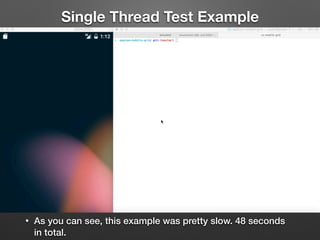
Single Thread Test Example
• As you can see, this example was pretty slow. 48 seconds
in total.
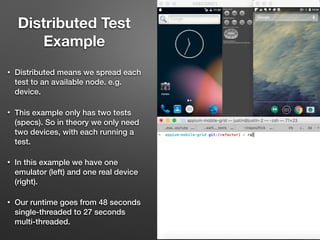
• Distributed means we spread each
test to an available node. e.g.
device.
• This example only has two tests
(specs). So in theory we only need
two devices, with each running a
test.
• In this example we have one
emulator (left) and one real device
(right).
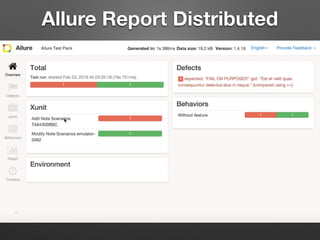
• Our runtime goes from 48 seconds
single-threaded to 27 seconds
multi-threaded.
Distributed Test
Example
Allure Report Distributed
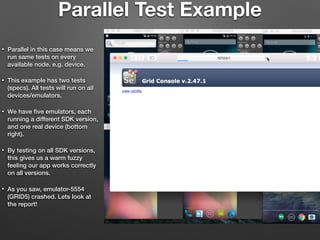
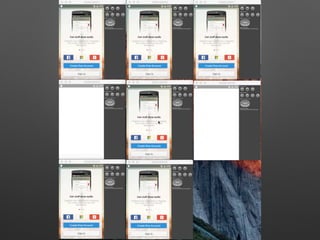
Parallel Test Example
• Parallel in this case means we
run same tests on every
available node. e.g. device.
• This example has two tests
(specs). All tests will run on all
devices/emulators.
• We have five emulators, each
running a different SDK version,
and one real device (bottom
right).
• By testing on all SDK versions,
this gives us a warm fuzzy
feeling our app works correctly
on all versions.
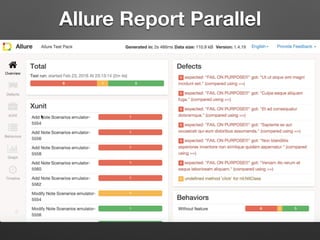
• As you saw, emulator-5554
(GRID5) crashed. Lets look at
the report!
Allure Report Parallel
Run On The Cloud
• In the example tests theres only one spec tagged with “sauce”.
If you we had more, we could run in parallel for faster test
execution in Sauce Labs. e.g rake android[dist,sauce].
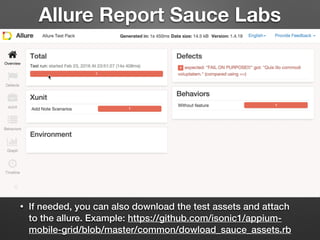
Allure Report Sauce Labs
• If needed, you can also download the test assets and attach
to the allure. Example: https://github.com/isonic1/appium-
mobile-grid/blob/master/common/dowload_sauce_assets.rb
iOS Setup
• Enable Developer Mode on your devices.
• Pair your devices to your machine.
• Enable UI Automation in the Developer menu.
• Ideally, connect a device running each os version your app
supports. iOS is generally pretty good at backwards
compatibility of os versions.
Real devices…
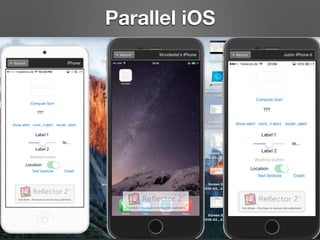
Parallel iOS
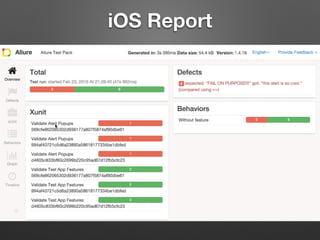
iOS Report
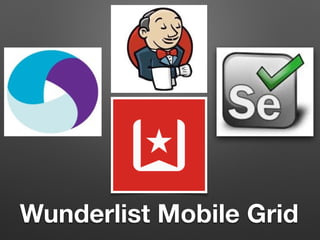
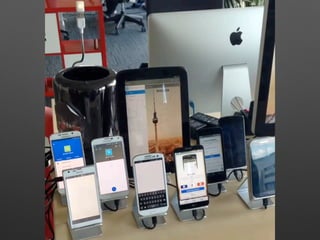
Wunderlist Mobile Grid
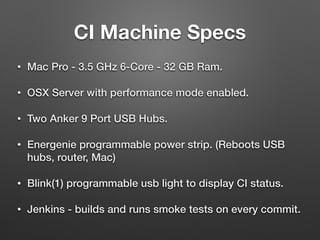
• Mac Pro - 3.5 GHz 6-Core - 32 GB Ram.
• OSX Server with performance mode enabled.
• Two Anker 9 Port USB Hubs.
• Energenie programmable power strip. (Reboots USB
hubs, router, Mac)
• Blink(1) programmable usb light to display CI status.
• Jenkins - builds and runs smoke tests on every commit.
CI Machine Specs
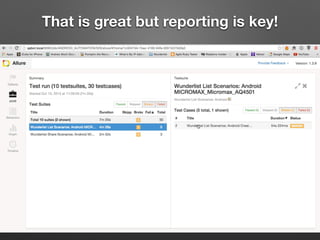
That is great but reporting is key!
Challenges
• Adb disconnects.
• I programmatically rebooting USB hubs before every test run. This reconnects adb.
• WiFi issues.
• I toggle airplane mode on/off prior to every test run.
• Other Possible Solutions:
• Reverse USB tethering. (requires rooting.)
• Using multiple routers on different broadcasting channels.
• Alternatives to real devices:
• Android Studio emulators.
• Cannot video record. *I will open a source a solution to this.
• A big plus IMO is that you have access your apps files (database) without rooting.
• Can use up a significant amount of memory depending on specs and the number running.
• Using Genymotion emulators. It’s the closest vm software to a real device.
• Has video recording but no API or CLI to start the recording. :/
• Some devices just behave erratically. (random reboots, adb connection issues, wonky text output,
battery issues).
Things to be excited about!
• A replacement for Apple's xcodebuild that makes it easier to build and test iOS or OSX apps.
• https://github.com/facebook/xctool
• WebDriverAgent is a WebDriver server for iOS that runs inside the Simulator and is written
entirely in Objective-C. Can run multiple iOS simulators in parallel.
• https://github.com/facebook/webdriveragent
• Run iOS tests on multiple simulators in parallel at the same time.
• https://github.com/plu/parallel_ios_tests
• Appium iOS driver, backed by Apple XCUITest.
• https://github.com/appium/appium-xcuitest-driver
• Remote control all your Smartphone devices From the comfort of your browser.
• http://openstf.io/
Lastly, some thank you’s
• Thank you to the Selenium open source developers and the
community whom make WebDriver happen.
• Also Dan Cuellar, the creator of Appium, whom is here at the
conference with us.
• If you see Dan, please give him a big bearhug! He’ll love it!
• Without Dan, people like him, and all the open source developers
we would never have these amazing tools to help do our jobs
more efficiently, and for free.
Thank You!
• email: justin.ison@gmail.com
• twitter: @isonic1
• https://github.com/isonic1/appium-mobile-grid
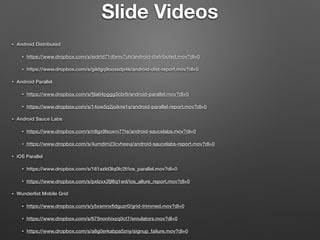
• Android Distributed
• https://www.dropbox.com/s/eidrtd71dbmv7uh/android-distributed.mov?dl=0
• https://www.dropbox.com/s/gildgq9oossdp4k/android-dist-report.mov?dl=0
• Android Parallel
• https://www.dropbox.com/s/fjla64pggg3cbr6/android-parallel.mov?dl=0
• https://www.dropbox.com/s/14ow5q2joikne1s/android-parallel-report.mov?dl=0
• Android Sauce Labs
• https://www.dropbox.com/s/n8gx9lsoxrn77te/android-saucelabs.mov?dl=0
• https://www.dropbox.com/s/4umdim23cvheevj/android-saucelabs-report.mov?dl=0
• iOS Parallel
• https://www.dropbox.com/s/161azld3lq0lc2f/ios_parallel.mov?dl=0
• https://www.dropbox.com/s/pxlzxx2ljl6q1wd/ios_allure_report.mov?dl=0
• Wunderlist Mobile Grid
• https://www.dropbox.com/s/y5xsmnxfldguzr0/grid-trimmed.mov?dl=0
• https://www.dropbox.com/s/675nonhixzq0ct7/emulators.mov?dl=0
• https://www.dropbox.com/s/a8g0erkabpa5zny/signup_failure.mov?dl=0
Slide Videos

Selenium Camp 2016 - Kiev, Ukraine

  • 1.
    The Mobile Grid- Getting Started Android & iOS Kiev, Ukraine - 26 Feb 2016
  • 2.
    How will youtest all of these?! The Challenge!
  • 3.
    And each oneof these cases? • Validate every locale / languages your app supports. • Validate every OS version your app supports. • Validate different resolutions. • Validate different screen sizes (phones, tablets, phablets etc..). • Validate different device manufacturers.
  • 4.
    You could trythe single test approach! Not recommend…
  • 5.
    Or the multi-threadedapproach! Also, not recommend…
  • 6.
    Though, this guydoesn’t seem to mind. Still not recommend, however…
  • 7.
    Hire an armyof zombie testers?! Nah, definitely not recommended!!!
  • 8.
    So what optionsdo we have?! • Test Automation of course! • But how, why, and where???
  • 9.
    Run Tests Singlethreaded? Still, not recommend…
  • 10.
  • 11.
    Selenium Grid +Appium BFFS 4EVER
  • 12.
    Test On TheCloud • The Pros: • It’s the present and the future of automated testing. • Ease of setup and integration. • Save on costs of buying mobile devices or machines. • Some test services provide you with excellent analytics and reporting. • Some test services integrate well with cloud CI services. e.g. Travis CI. • You expose your app to a much larger range of devices and OS’s. • The Cons: • It can be difficult sometimes to narrow down issues. • Network problems. • Latency issues. • Outages can occur. • Bugs in their software. • Acquired by another company and then shutdown. • Costs can become significant when running CI on every commit.
  • 13.
    Cloud Test Services •Sauce Labs • Test Object • Amazon Test Cloud (was Appthwack) • Google Test Lab (was Appurify) • Perfecto Mobile • Testdroid • TouchTest • Keynote (was Device Anywhere) Just to name a few…
  • 14.
    The Mobile Grid •The Pros: • You can run tests an unlimited amount without worrying about costs. • You’re not handcuffed to a cloud test services 24/7 availability. • You have all the critical test data local for debugging. • Have full access to every connected device via adb or instruments. • No latency issues. • You don't expose your app or sensitive data to the cloud. • The Cons: • Can be tough finding documentation or good examples specific to your bindings. • Takes a bit of time to setup and smooth things out. • Require some degree of ops knowledge. • You might not be able to expose your app to a large range of devices and os’s. • Build and maintain the entire setup (software & hardware). • Devices can be a real pain! (I’ll cover this later.)
  • 15.
    What I’ll demo… •Getting all of the connected devices programmatically. • Launching Grid hub & Appium nodes programmatically. • Capturing screenshots, logs, video and logcat for reporting. • Running single threaded. • Running tests distributed. • Running tests in parallel. • Leveraging cloud test services such as Sauce Labs. • Reduce your runtime costs by only executing selected scenarios. • Generating an Allure report with all above metadata attached. • The grid setup at Wunderlist. • and lets briefly look at the core code…
  • 16.
    Get Connected DeviceData • We retrieve connected device data and insert into an environment variable. • The “thread” value will then match our “TEST_NUMBER” env var for parallelization. TEST_NUMBER is created from the parallel gem.
  • 17.
    • Capture devicedata for every connected device. • At a minimum, you need the UDID to connect appium to a grid node. • However, it is important to know the OS, and SDK versions too.
  • 18.
    Node Config Method •Programmatically create your node based on the connected devices.
  • 19.
  • 20.
    Appium Server Setup •Method to setup appium server and pass in any arguments. • The wonderful Appium developers baked a grid node into the appium server.
  • 21.
    Launch Hub &Appium Server Methods • We set a “THREAD” variable. This will tell our parallel library how many processes it should run. • Launch the nodes in parallel so all start at the same time.
  • 22.
    ADB Methods (Videoand Logcat) • Video records up to 180 seconds for real devices. • Capture logcat data.
  • 23.
    Spec Helper Methods •Parse the DEVICES env variable and match it’s thread to the running process, then initialize appium.
  • 24.
    Test Setup andTeardown • Set the UDID environment variable for your tests. • Before each test, start video and logcat. • After each test, stop video and logcat. • Only attach output to report on failures!
  • 25.
    Test Example • Hereis where the UDID environment variable is used. This will let us know which device ran a specific test.
  • 27.
    Android Setup • Downloadevery SDK version your app supports. • Install Intel HAXM Accelerator!
  • 28.
    Create Android Emulators •Create an emulator for each sdk you installed.
  • 29.
    Single Thread TestExample • As you can see, this example was pretty slow. 48 seconds in total.
  • 31.
    • Distributed meanswe spread each test to an available node. e.g. device. • This example only has two tests (specs). So in theory we only need two devices, with each running a test. • In this example we have one emulator (left) and one real device (right). • Our runtime goes from 48 seconds single-threaded to 27 seconds multi-threaded. Distributed Test Example
  • 32.
  • 33.
    Parallel Test Example •Parallel in this case means we run same tests on every available node. e.g. device. • This example has two tests (specs). All tests will run on all devices/emulators. • We have five emulators, each running a different SDK version, and one real device (bottom right). • By testing on all SDK versions, this gives us a warm fuzzy feeling our app works correctly on all versions. • As you saw, emulator-5554 (GRID5) crashed. Lets look at the report!
  • 34.
  • 35.
    Run On TheCloud • In the example tests theres only one spec tagged with “sauce”. If you we had more, we could run in parallel for faster test execution in Sauce Labs. e.g rake android[dist,sauce].
  • 36.
    Allure Report SauceLabs • If needed, you can also download the test assets and attach to the allure. Example: https://github.com/isonic1/appium- mobile-grid/blob/master/common/dowload_sauce_assets.rb
  • 38.
    iOS Setup • EnableDeveloper Mode on your devices. • Pair your devices to your machine. • Enable UI Automation in the Developer menu. • Ideally, connect a device running each os version your app supports. iOS is generally pretty good at backwards compatibility of os versions. Real devices…
  • 39.
  • 40.
  • 41.
  • 42.
    • Mac Pro- 3.5 GHz 6-Core - 32 GB Ram. • OSX Server with performance mode enabled. • Two Anker 9 Port USB Hubs. • Energenie programmable power strip. (Reboots USB hubs, router, Mac) • Blink(1) programmable usb light to display CI status. • Jenkins - builds and runs smoke tests on every commit. CI Machine Specs
  • 45.
    That is greatbut reporting is key!
  • 46.
    Challenges • Adb disconnects. •I programmatically rebooting USB hubs before every test run. This reconnects adb. • WiFi issues. • I toggle airplane mode on/off prior to every test run. • Other Possible Solutions: • Reverse USB tethering. (requires rooting.) • Using multiple routers on different broadcasting channels. • Alternatives to real devices: • Android Studio emulators. • Cannot video record. *I will open a source a solution to this. • A big plus IMO is that you have access your apps files (database) without rooting. • Can use up a significant amount of memory depending on specs and the number running. • Using Genymotion emulators. It’s the closest vm software to a real device. • Has video recording but no API or CLI to start the recording. :/ • Some devices just behave erratically. (random reboots, adb connection issues, wonky text output, battery issues).
  • 47.
    Things to beexcited about! • A replacement for Apple's xcodebuild that makes it easier to build and test iOS or OSX apps. • https://github.com/facebook/xctool • WebDriverAgent is a WebDriver server for iOS that runs inside the Simulator and is written entirely in Objective-C. Can run multiple iOS simulators in parallel. • https://github.com/facebook/webdriveragent • Run iOS tests on multiple simulators in parallel at the same time. • https://github.com/plu/parallel_ios_tests • Appium iOS driver, backed by Apple XCUITest. • https://github.com/appium/appium-xcuitest-driver • Remote control all your Smartphone devices From the comfort of your browser. • http://openstf.io/
  • 49.
    Lastly, some thankyou’s • Thank you to the Selenium open source developers and the community whom make WebDriver happen. • Also Dan Cuellar, the creator of Appium, whom is here at the conference with us. • If you see Dan, please give him a big bearhug! He’ll love it! • Without Dan, people like him, and all the open source developers we would never have these amazing tools to help do our jobs more efficiently, and for free.
  • 50.
    Thank You! • email:justin.ison@gmail.com • twitter: @isonic1 • https://github.com/isonic1/appium-mobile-grid
  • 51.
    • Android Distributed •https://www.dropbox.com/s/eidrtd71dbmv7uh/android-distributed.mov?dl=0 • https://www.dropbox.com/s/gildgq9oossdp4k/android-dist-report.mov?dl=0 • Android Parallel • https://www.dropbox.com/s/fjla64pggg3cbr6/android-parallel.mov?dl=0 • https://www.dropbox.com/s/14ow5q2joikne1s/android-parallel-report.mov?dl=0 • Android Sauce Labs • https://www.dropbox.com/s/n8gx9lsoxrn77te/android-saucelabs.mov?dl=0 • https://www.dropbox.com/s/4umdim23cvheevj/android-saucelabs-report.mov?dl=0 • iOS Parallel • https://www.dropbox.com/s/161azld3lq0lc2f/ios_parallel.mov?dl=0 • https://www.dropbox.com/s/pxlzxx2ljl6q1wd/ios_allure_report.mov?dl=0 • Wunderlist Mobile Grid • https://www.dropbox.com/s/y5xsmnxfldguzr0/grid-trimmed.mov?dl=0 • https://www.dropbox.com/s/675nonhixzq0ct7/emulators.mov?dl=0 • https://www.dropbox.com/s/a8g0erkabpa5zny/signup_failure.mov?dl=0 Slide Videos