Presented By:
Omar Usman
TESTING USINGAPPIUM
Introduction
01
APPIUM
Introduction
‣ Appium is an open source tool for automating native,
mobile web, and hybrid applications on iOS mobile,
Android mobile, and Windows desktop platforms.
‣ Appium is Used to automate tests for native,
hybrid(.ipa and .apk) and mobile web applications.
‣ Native apps are those written using the iOS, Android,
or Windows SDKs
02
Why Appium
WHY APPIUM?
‣ Open Source Not only is Appium free of cost, but also open source. This
means Appium can be tweaked infinitely to work according to your whims.
‣ Cross-Platform Appium can test any mobile application whether it be a
native one, a hybrid one or even a web app. Whether the app works only
on iOS or Android or even both, Appium has you covered. Above that,
Appium, itself can be installed on Windows, Mac and Linux.
‣ Framework Support Appium as a framework is also supported by various
automation testing tools out there.You shouldn't be locked into a specific
language or framework to write and run your tests.
‣ Community A budding community is extremely necessary. An active
community results in faster bug reports and easier troubleshooting which
is key to the success of an automation testing tool.
03
Architecture
HOW APPIUM WORKS
APPIUM ARCHITECTURE
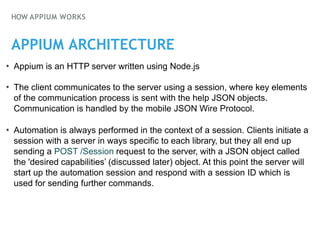
• Appium is an HTTP server written using Node.js
• The client communicates to the server using a session, where key elements
of the communication process is sent with the help JSON objects.
Communication is handled by the mobile JSON Wire Protocol.
• Automation is always performed in the context of a session. Clients initiate a
session with a server in ways specific to each library, but they all end up
sending a POST /Session request to the server, with a JSON object called
the 'desired capabilities’ (discussed later) object. At this point the server will
start up the automation session and respond with a session ID which is
used for sending further commands.
HOW APPIUM WORKS
APPIUM ARCHITECTURE
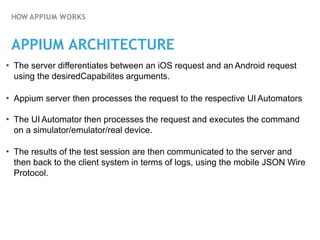
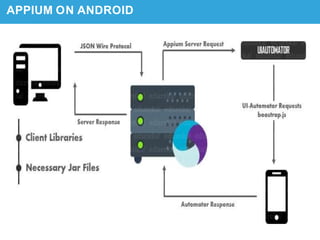
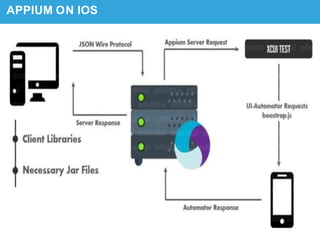
• The server differentiates between an iOS request and an Android request
using the desiredCapabilites arguments.
• Appium server then processes the request to the respective UI Automators
• The UI Automator then processes the request and executes the command
on a simulator/emulator/real device.
• The results of the test session are then communicated to the server and
then back to the client system in terms of logs, using the mobile JSON Wire
Protocol.
APPIUM ON ANDROID
APPIUM ON IOS
System
Requirements
04
SYSTEM REQUIREMENTS
ANDROID
• Java (version 7 or later).
• Android SDK API (version 17 or later).
• Android Virtual Device (AVD) or real device.
• Node and npm
IOS
• Xcode (greater than or equal to 4.6.3; 5.1 is recommended) with the
command-line build tool
• Mac OS X 10.7 or later
• Java version 7 or later
• Homebrew
• Node and npm
STEPS TO SETUP
1.InstallANDROID SDK.
2.Install JDK (Java Development Kit)
3.Install Eclipse or IntelliJ
4.Install Appium and Appium Desktop Client
5.Install Appium Doctor in Terminal
6.Install Selenium Server JAR
7.Appium Client Library (in Java, Ruby, Python, PHP, JavaScript, and C#)
8.Add These Files to Eclipse Project (or as Dependencies)
Getting Started
05
GETTING STARTED
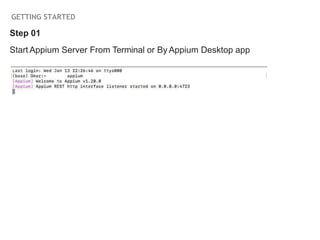
Step 01
Start Appium Server From Terminal or By Appium Desktop app
GETTING STARTED
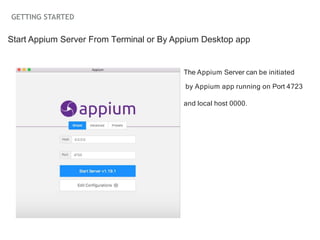
Start Appium Server From Terminal or By Appium Desktop app
The Appium Server can be initiated
by Appium app running on Port 4723
and local host 0000.
GETTING STARTED
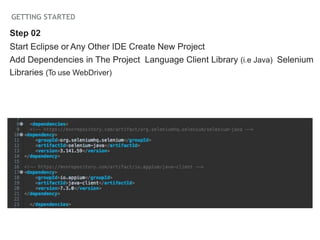
Step 02
Start Eclipse or Any Other IDE Create New Project
Add Dependencies in The Project Language Client Library (i.e Java) Selenium
Libraries (To use WebDriver)
GETTING STARTED
Add Desired Capabilities In Java Code for Selenium Server
deviceName = Your Device NAME
udid = Device UDID
platformName = Android or IOS
platformVersion = System Version
appPackage = Name of Package You are going to Target
appActivity = Name of Unique App you are Going to Test
Step 03
GETTING STARTED
Find Object’s ID in App By UIAutomator or UIAutomatorViewer
Use these ID values of respective elements in Code to test your app
accordingly
Step 04
You are Good To Test
CONS of Appium
06
CONS OF APPIUM
Cons
‣ Appium does not support testing of Android Version
lower than 4.2.
‣ Limited support for hybrid app testing. e.g.: not
possible to test the switching action of application from
the web app to native and vice-versa.
‣ Sometimes it is hard to Setup on System.
‣ No support to run Appium Inspector on Microsoft
Windows.
REFERENCES AND LINKS
References
‣
‣
‣ http://appium.io/docs/en/about-appium/intro/
http://appium.io/docs/en/about-appium/getting-started/
index.html
https://www.toolsqa.com/mobile-automation/appium/
appium-tutorial/
Thank You!

appiumpresent-211128171811.pptx projet de presentation

  • 1.
  • 2.
  • 3.
    APPIUM Introduction ‣ Appium isan open source tool for automating native, mobile web, and hybrid applications on iOS mobile, Android mobile, and Windows desktop platforms. ‣ Appium is Used to automate tests for native, hybrid(.ipa and .apk) and mobile web applications. ‣ Native apps are those written using the iOS, Android, or Windows SDKs
  • 4.
  • 5.
    WHY APPIUM? ‣ OpenSource Not only is Appium free of cost, but also open source. This means Appium can be tweaked infinitely to work according to your whims. ‣ Cross-Platform Appium can test any mobile application whether it be a native one, a hybrid one or even a web app. Whether the app works only on iOS or Android or even both, Appium has you covered. Above that, Appium, itself can be installed on Windows, Mac and Linux. ‣ Framework Support Appium as a framework is also supported by various automation testing tools out there.You shouldn't be locked into a specific language or framework to write and run your tests. ‣ Community A budding community is extremely necessary. An active community results in faster bug reports and easier troubleshooting which is key to the success of an automation testing tool.
  • 7.
  • 8.
    HOW APPIUM WORKS APPIUMARCHITECTURE • Appium is an HTTP server written using Node.js • The client communicates to the server using a session, where key elements of the communication process is sent with the help JSON objects. Communication is handled by the mobile JSON Wire Protocol. • Automation is always performed in the context of a session. Clients initiate a session with a server in ways specific to each library, but they all end up sending a POST /Session request to the server, with a JSON object called the 'desired capabilities’ (discussed later) object. At this point the server will start up the automation session and respond with a session ID which is used for sending further commands.
  • 9.
    HOW APPIUM WORKS APPIUMARCHITECTURE • The server differentiates between an iOS request and an Android request using the desiredCapabilites arguments. • Appium server then processes the request to the respective UI Automators • The UI Automator then processes the request and executes the command on a simulator/emulator/real device. • The results of the test session are then communicated to the server and then back to the client system in terms of logs, using the mobile JSON Wire Protocol.
  • 10.
  • 11.
  • 12.
  • 13.
    SYSTEM REQUIREMENTS ANDROID • Java(version 7 or later). • Android SDK API (version 17 or later). • Android Virtual Device (AVD) or real device. • Node and npm IOS • Xcode (greater than or equal to 4.6.3; 5.1 is recommended) with the command-line build tool • Mac OS X 10.7 or later • Java version 7 or later • Homebrew • Node and npm
  • 14.
    STEPS TO SETUP 1.InstallANDROIDSDK. 2.Install JDK (Java Development Kit) 3.Install Eclipse or IntelliJ 4.Install Appium and Appium Desktop Client 5.Install Appium Doctor in Terminal 6.Install Selenium Server JAR 7.Appium Client Library (in Java, Ruby, Python, PHP, JavaScript, and C#) 8.Add These Files to Eclipse Project (or as Dependencies)
  • 15.
  • 16.
    GETTING STARTED Step 01 StartAppium Server From Terminal or By Appium Desktop app
  • 17.
    GETTING STARTED Start AppiumServer From Terminal or By Appium Desktop app The Appium Server can be initiated by Appium app running on Port 4723 and local host 0000.
  • 18.
    GETTING STARTED Step 02 StartEclipse or Any Other IDE Create New Project Add Dependencies in The Project Language Client Library (i.e Java) Selenium Libraries (To use WebDriver)
  • 19.
    GETTING STARTED Add DesiredCapabilities In Java Code for Selenium Server deviceName = Your Device NAME udid = Device UDID platformName = Android or IOS platformVersion = System Version appPackage = Name of Package You are going to Target appActivity = Name of Unique App you are Going to Test Step 03
  • 20.
    GETTING STARTED Find Object’sID in App By UIAutomator or UIAutomatorViewer Use these ID values of respective elements in Code to test your app accordingly Step 04 You are Good To Test
  • 21.
  • 22.
    CONS OF APPIUM Cons ‣Appium does not support testing of Android Version lower than 4.2. ‣ Limited support for hybrid app testing. e.g.: not possible to test the switching action of application from the web app to native and vice-versa. ‣ Sometimes it is hard to Setup on System. ‣ No support to run Appium Inspector on Microsoft Windows.
  • 23.
    REFERENCES AND LINKS References ‣ ‣ ‣http://appium.io/docs/en/about-appium/intro/ http://appium.io/docs/en/about-appium/getting-started/ index.html https://www.toolsqa.com/mobile-automation/appium/ appium-tutorial/
  • 24.