A Comprehensive Guide to
Cross-Platform Mobile Test
Automation Using Appium
As smartphones and multi-platform devices continue to surge, traditional
manual app testing practices are struggling to keep up with demand.
Businesses across industries are experiencing significant product delivery
delays and costly product defects. To ensure efficient and cost-effective
testing across all platforms, an effective mobile app testing platform is
essential. It should be secure, support functional and automated testing, and
prioritize speed and quality.
In this current era, businesses must deliver the best possible user experience
through their apps. However, achieving this can only be challenging with the
right tools. That's where Appium comes in. This powerful mobile app testing
solution offers comprehensive features to help businesses optimize their
app's performance and provide an unparalleled digital experience. With
Appium, businesses can take their app testing capabilities to the next level,
ensuring customers receive an exceptional mobile experience every time.
This blog on automated Appium testing provides a comprehensive overview
of the framework, covering all the necessary information and benefits to help
you harness the power of this fantastic automation testing tool for
cross-platform mobile app testing.
What is Appium testing and why is it so
popular?
Appium is an open-source automation testing framework widely used for
mobile app testing. It offers scalability and flexibility, making mobile app
testing much more efficient. Appium is a cross-platform testing framework
that allows testers to write test scripts against multiple platforms, including
iOS, Windows, and Android, using the same API. With Appium, QAs can write
test scripts in different programming languages, such as Java, JavaScript,
PHP, Ruby, Python, and C#.
Appium is a mobile automation tool that uses Node.js to operate as an HTTP
server. It supports simulators and emulators and processes HTTP requests
from Selenium client libraries differently based on the platforms. One of the
best things about Appium is that it translates Selenium WebDriver commands
into platform-specific commands like UIAutomator2 (Android) or XCUITest
(iOS), making it independent of the underlying mobile OS. Automation scripts
can be run on real Android and iOS devices using the W3C WebDriver protocol.
When testing an Android app, Appium automates it with the help of the
UIAutomator library, while on iOS, it proxies commands to a UIAutomation
script running in instruments.
Overall, Appium testing is widely adopted by modern enterprises to create a
comprehensive mobile automation framework due to its growing user base,
strong community, and flexibility.
Types of Apps Appium Can Automate
Appium supports automation across three major types of mobile apps:
●​ Native apps (built with platform SDKs like Swift/Obj‑C for iOS or
Java/Kotlin for Android)
●​ Mobile web apps (accessed via mobile browsers)
●​ Hybrid apps (web-based apps packaged inside a native wrapper)
Architecture of the Appium Framework
Appium follows a client – server – device model :
1.​ Appium Client Libraries (Java, Python, JS, etc.) deliver
platform-neutral test commands.
2.​ These commands hit the Appium Server (Node.js process) via HTTP.
3.​ The server dispatches platform-specific instructions to real devices or
emulators:​
●​ Android → UIAutomator2 / Espresso / Selendroid backends
●​ iOS → XCUITest / WebDriverAgent
4.​ The device executes the actions and returns results to the server,
which then passes them back to the client.
This layered architecture enables powerful cross-platform testing with
minimal changes to test scripts.
How Does Appium Work?
Here’s the typical flow during an Appium test session:
1.​ Your test script (written using Selenium WebDriver‑style APIs) starts
and sends commands via Appium client.
2.​ The Appium Server translates these into platform-specific automation
calls:​
●​ Android → communicates via bootstrap.jar and UIAutomator2
●​ iOS → uses WebDriverAgent and XCUITest framework
3.​ The device or simulator/emulator performs the action (e.g. tap, swipe,
locate element).
4.​ Execution results are sent back up through the server to your test
script.
5.​ Tests can run in parallel across multiple devices if multiple Appium
servers/processes are used simultaneously.
Why should you prefer Appium testing?
●​ Write Once, Run Anywhere: Appium’s cross-platform nature lets you
use the same test scripts on Android, iOS, web browsers, and even
desktop platforms.
●​ No App Modification Needed: You don’t need to recompile your app
or add special testing code; Appium works with your untouched
binaries (native, hybrid, or web).
●​ Supports Native, Web & Hybrid Apps: Automate native mobile apps,
mobile web apps, and hybrid applications—all via the same WebDriver
API.
●​ Flexible in Languages & Frameworks: Write tests in Java, Python,
Ruby, JavaScript, C#, etc. and run them using your preferred
frameworks (pytest, Cucumber, Mocha, etc.). While Appium doesn’t
include JUnit or TestNG, it integrates smoothly when tests are written
in Java.
●​ Parallel Test Execution: Test automation with Appium supports
parallel execution of test scripts across multiple Android and iOS
sessions using frameworks like UIAutomator (Android) and XCUITest
(iOS), significantly accelerating the testing process and enhancing
scalability.
●​ Device Coverage: Emulators to Real Devices: Run tests on simulators
and real devices alike. Real-device testing is essential for final
acceptance, as emulators lack full hardware fidelity.
●​ Collaborative Screen-Casting: Appium allows real-time sharing of
device interactions, saving time on manual reproduction and
facilitating team communication.
●​ CI/CD Integration Ready: Seamlessly works with Jenkins, GitHub
Actions, CircleCI, BrowserStack, Sauce Labs, Perfecto, etc. to
automate test execution in pipelines.
●​ Open-Source with Active Community: Appium is free, extensible
(especially with Appium 2.0), and backed by a strong community
contributing plugins, drivers, and updates.
How does cross-platform test automation
work with Appium?
Appium employs the W3C WebDriver protocol (no more JSON Wire) to
automate native, hybrid, and web apps across Android and iOS. You write
tests with standard WebDriver client libraries, which send JSON-based
commands to the Appium server. The server routes these to the appropriate
platform driver, UiAutomator2/Espresso for Android and XCUITest for iOS,
which in turn invoke native automation frameworks.
1. Android Automation
Architecture & Drivers
●​ Appium Server (Node.js) receives W3C requests.
●​ Uses the UiAutomator2 or optional Espresso driver—no bootstrap.jar
or Selendroid.
●​ Interacts natively via Android’s UIAutomator2/Espresso.
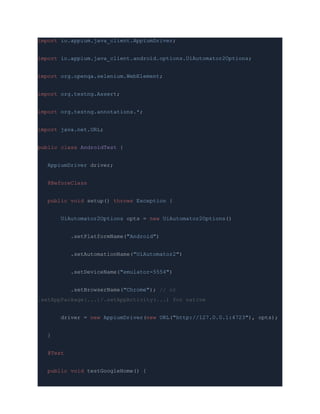
Setup & Code (Java, Appium 2+)
import io.appium.java_client.AppiumDriver;
import io.appium.java_client.android.options.UiAutomator2Options;
import org.openqa.selenium.WebElement;
import org.testng.Assert;
import org.testng.annotations.*;
import java.net.URL;
public class AndroidTest {
AppiumDriver driver;
@BeforeClass
public void setup() throws Exception {
UiAutomator2Options opts = new UiAutomator2Options()
.setPlatformName("Android")
.setAutomationName("UiAutomator2")
.setDeviceName("emulator-5554")
.setBrowserName("Chrome"); // or
.setAppPackage(...)/.setAppActivity(...) for native
driver = new AppiumDriver(new URL("http://127.0.0.1:4723"), opts);
}
@Test
public void testGoogleHome() {
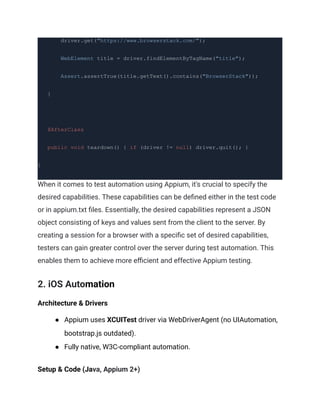
driver.get("https://www.browserstack.com/");
WebElement title = driver.findElementByTagName("title");
Assert.assertTrue(title.getText().contains("BrowserStack"));
}
@AfterClass
public void teardown() { if (driver != null) driver.quit(); }
}
When it comes to test automation using Appium, it's crucial to specify the
desired capabilities. These capabilities can be defined either in the test code
or in appium.txt files. Essentially, the desired capabilities represent a JSON
object consisting of keys and values sent from the client to the server. By
creating a session for a browser with a specific set of desired capabilities,
testers can gain greater control over the server during test automation. This
enables them to achieve more efficient and effective Appium testing.
2. iOS Automation
Architecture & Drivers
●​ Appium uses XCUITest driver via WebDriverAgent (no UIAutomation,
bootstrap.js outdated).
●​ Fully native, W3C-compliant automation.
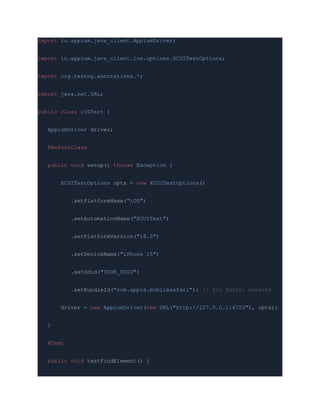
Setup & Code (Java, Appium 2+)
import io.appium.java_client.AppiumDriver;
import io.appium.java_client.ios.options.XCUITestOptions;
import org.testng.annotations.*;
import java.net.URL;
public class iOSTest {
AppiumDriver driver;
@BeforeClass
public void setup() throws Exception {
XCUITestOptions opts = new XCUITestOptions()
.setPlatformName("iOS")
.setAutomationName("XCUITest")
.setPlatformVersion("18.0")
.setDeviceName("iPhone 15")
.setUdid("YOUR_UDID")
.setBundleId("com.apple.mobilesafari"); // for Safari browser
driver = new AppiumDriver(new URL("http://127.0.0.1:4723"), opts);
}
@Test
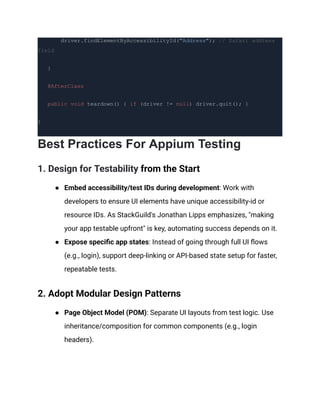
public void testFindElement() {
driver.findElementByAccessibilityId("Address"); // Safari address
field
}
@AfterClass
public void teardown() { if (driver != null) driver.quit(); }
}
Best Practices For Appium Testing
1. Design for Testability from the Start
●​ Embed accessibility/test IDs during development: Work with
developers to ensure UI elements have unique accessibility-id or
resource IDs. As StackGuild's Jonathan Lipps emphasizes, "making
your app testable upfront" is key, automating success depends on it.
●​ Expose specific app states: Instead of going through full UI flows
(e.g., login), support deep-linking or API-based state setup for faster,
repeatable tests.
2. Adopt Modular Design Patterns
●​ Page Object Model (POM): Separate UI layouts from test logic. Use
inheritance/composition for common components (e.g., login
headers).
●​ Behavior‑Driven Development (BDD): Frame scenarios in natural
language using Cucumber or SpecFlow. This enhances cross-team
clarity and ensures test coverage matches business needs.
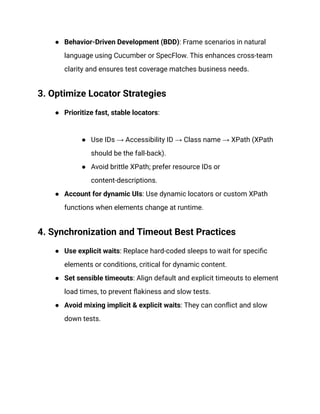
3. Optimize Locator Strategies
●​ Prioritize fast, stable locators:​
●​ Use IDs → Accessibility ID → Class name → XPath (XPath
should be the fall-back).
●​ Avoid brittle XPath; prefer resource IDs or
content-descriptions.
●​ Account for dynamic UIs: Use dynamic locators or custom XPath
functions when elements change at runtime.
4. Synchronization and Timeout Best Practices
●​ Use explicit waits: Replace hard-coded sleeps to wait for specific
elements or conditions, critical for dynamic content.
●​ Set sensible timeouts: Align default and explicit timeouts to element
load times, to prevent flakiness and slow tests.‍
●​ Avoid mixing implicit & explicit waits: They can conflict and slow
down tests.
How can HeadSpin's Appium-based test
automation solution provide global
companies a competitive edge?
HeadSpin's AI-driven Platform provides a secure and scalable solution for
cross-browser testing and debugging mobile, web, audio, and video apps. Our
expert consulting services can help you choose the right mobile automation
testing framework for your enterprise.
HeadSpin's Appium automation testing for cross-platform apps can help you:
●​ Streamline the entire CI/CD process, create robust Appium scripts
with ease, and reduce the complexity of test frameworks.
●​ Support parallel testing on multiple mobile devices to ensure optimal
app performance across various devices, networks, and global
locations.
●​ Test apps on real remote devices in real locations, accelerate
development up to 10x, and easily identify and resolve critical bugs.
●​ Utilize tools for browser compatibility testing and capture real-time
feedback.
The Next Steps
Appium is the preferred mobile testing solution for fast and reliable testing
across various platforms and devices, providing feasibility, flexibility, and
cost-friendliness for delivering optimal user experiences within the continuous
delivery approach.
HeadSpin provides a global device infrastructure with cloud-based access to
real Android, iOS, and Windows devices, saving testers time and enabling
them to meet deadlines faster without additional setup.
Experience the benefits of cross-platform compatibility and user-friendliness
by running Appium tests on thousands of real devices with HeadSpin's unique
Appium test automation solution. Contact us today to learn more.
This article was originally published on:
https://www.headspin.io/blog/appium-based-cross-platform-mobile-app-testing

A Comprehensive Guide to Cross-Platform Mobile Test Automation Using Appium.pdf

  • 1.
    A Comprehensive Guideto Cross-Platform Mobile Test Automation Using Appium As smartphones and multi-platform devices continue to surge, traditional manual app testing practices are struggling to keep up with demand. Businesses across industries are experiencing significant product delivery delays and costly product defects. To ensure efficient and cost-effective testing across all platforms, an effective mobile app testing platform is essential. It should be secure, support functional and automated testing, and prioritize speed and quality. In this current era, businesses must deliver the best possible user experience through their apps. However, achieving this can only be challenging with the right tools. That's where Appium comes in. This powerful mobile app testing solution offers comprehensive features to help businesses optimize their
  • 2.
    app's performance andprovide an unparalleled digital experience. With Appium, businesses can take their app testing capabilities to the next level, ensuring customers receive an exceptional mobile experience every time. This blog on automated Appium testing provides a comprehensive overview of the framework, covering all the necessary information and benefits to help you harness the power of this fantastic automation testing tool for cross-platform mobile app testing. What is Appium testing and why is it so popular? Appium is an open-source automation testing framework widely used for mobile app testing. It offers scalability and flexibility, making mobile app testing much more efficient. Appium is a cross-platform testing framework that allows testers to write test scripts against multiple platforms, including iOS, Windows, and Android, using the same API. With Appium, QAs can write test scripts in different programming languages, such as Java, JavaScript, PHP, Ruby, Python, and C#. Appium is a mobile automation tool that uses Node.js to operate as an HTTP server. It supports simulators and emulators and processes HTTP requests from Selenium client libraries differently based on the platforms. One of the best things about Appium is that it translates Selenium WebDriver commands into platform-specific commands like UIAutomator2 (Android) or XCUITest (iOS), making it independent of the underlying mobile OS. Automation scripts can be run on real Android and iOS devices using the W3C WebDriver protocol.
  • 3.
    When testing anAndroid app, Appium automates it with the help of the UIAutomator library, while on iOS, it proxies commands to a UIAutomation script running in instruments. Overall, Appium testing is widely adopted by modern enterprises to create a comprehensive mobile automation framework due to its growing user base, strong community, and flexibility. Types of Apps Appium Can Automate Appium supports automation across three major types of mobile apps: ●​ Native apps (built with platform SDKs like Swift/Obj‑C for iOS or Java/Kotlin for Android) ●​ Mobile web apps (accessed via mobile browsers) ●​ Hybrid apps (web-based apps packaged inside a native wrapper) Architecture of the Appium Framework Appium follows a client – server – device model : 1.​ Appium Client Libraries (Java, Python, JS, etc.) deliver platform-neutral test commands. 2.​ These commands hit the Appium Server (Node.js process) via HTTP. 3.​ The server dispatches platform-specific instructions to real devices or emulators:​ ●​ Android → UIAutomator2 / Espresso / Selendroid backends
  • 4.
    ●​ iOS →XCUITest / WebDriverAgent 4.​ The device executes the actions and returns results to the server, which then passes them back to the client. This layered architecture enables powerful cross-platform testing with minimal changes to test scripts. How Does Appium Work? Here’s the typical flow during an Appium test session: 1.​ Your test script (written using Selenium WebDriver‑style APIs) starts and sends commands via Appium client. 2.​ The Appium Server translates these into platform-specific automation calls:​ ●​ Android → communicates via bootstrap.jar and UIAutomator2 ●​ iOS → uses WebDriverAgent and XCUITest framework 3.​ The device or simulator/emulator performs the action (e.g. tap, swipe, locate element). 4.​ Execution results are sent back up through the server to your test script. 5.​ Tests can run in parallel across multiple devices if multiple Appium servers/processes are used simultaneously. Why should you prefer Appium testing?
  • 5.
    ●​ Write Once,Run Anywhere: Appium’s cross-platform nature lets you use the same test scripts on Android, iOS, web browsers, and even desktop platforms. ●​ No App Modification Needed: You don’t need to recompile your app or add special testing code; Appium works with your untouched binaries (native, hybrid, or web). ●​ Supports Native, Web & Hybrid Apps: Automate native mobile apps, mobile web apps, and hybrid applications—all via the same WebDriver API. ●​ Flexible in Languages & Frameworks: Write tests in Java, Python, Ruby, JavaScript, C#, etc. and run them using your preferred frameworks (pytest, Cucumber, Mocha, etc.). While Appium doesn’t include JUnit or TestNG, it integrates smoothly when tests are written in Java. ●​ Parallel Test Execution: Test automation with Appium supports parallel execution of test scripts across multiple Android and iOS sessions using frameworks like UIAutomator (Android) and XCUITest (iOS), significantly accelerating the testing process and enhancing scalability. ●​ Device Coverage: Emulators to Real Devices: Run tests on simulators and real devices alike. Real-device testing is essential for final acceptance, as emulators lack full hardware fidelity. ●​ Collaborative Screen-Casting: Appium allows real-time sharing of device interactions, saving time on manual reproduction and facilitating team communication.
  • 6.
    ●​ CI/CD IntegrationReady: Seamlessly works with Jenkins, GitHub Actions, CircleCI, BrowserStack, Sauce Labs, Perfecto, etc. to automate test execution in pipelines. ●​ Open-Source with Active Community: Appium is free, extensible (especially with Appium 2.0), and backed by a strong community contributing plugins, drivers, and updates. How does cross-platform test automation work with Appium? Appium employs the W3C WebDriver protocol (no more JSON Wire) to automate native, hybrid, and web apps across Android and iOS. You write tests with standard WebDriver client libraries, which send JSON-based commands to the Appium server. The server routes these to the appropriate platform driver, UiAutomator2/Espresso for Android and XCUITest for iOS, which in turn invoke native automation frameworks. 1. Android Automation Architecture & Drivers ●​ Appium Server (Node.js) receives W3C requests. ●​ Uses the UiAutomator2 or optional Espresso driver—no bootstrap.jar or Selendroid. ●​ Interacts natively via Android’s UIAutomator2/Espresso. Setup & Code (Java, Appium 2+)
  • 7.
    import io.appium.java_client.AppiumDriver; import io.appium.java_client.android.options.UiAutomator2Options; importorg.openqa.selenium.WebElement; import org.testng.Assert; import org.testng.annotations.*; import java.net.URL; public class AndroidTest { AppiumDriver driver; @BeforeClass public void setup() throws Exception { UiAutomator2Options opts = new UiAutomator2Options() .setPlatformName("Android") .setAutomationName("UiAutomator2") .setDeviceName("emulator-5554") .setBrowserName("Chrome"); // or .setAppPackage(...)/.setAppActivity(...) for native driver = new AppiumDriver(new URL("http://127.0.0.1:4723"), opts); } @Test public void testGoogleHome() {
  • 8.
    driver.get("https://www.browserstack.com/"); WebElement title =driver.findElementByTagName("title"); Assert.assertTrue(title.getText().contains("BrowserStack")); } @AfterClass public void teardown() { if (driver != null) driver.quit(); } } When it comes to test automation using Appium, it's crucial to specify the desired capabilities. These capabilities can be defined either in the test code or in appium.txt files. Essentially, the desired capabilities represent a JSON object consisting of keys and values sent from the client to the server. By creating a session for a browser with a specific set of desired capabilities, testers can gain greater control over the server during test automation. This enables them to achieve more efficient and effective Appium testing. 2. iOS Automation Architecture & Drivers ●​ Appium uses XCUITest driver via WebDriverAgent (no UIAutomation, bootstrap.js outdated). ●​ Fully native, W3C-compliant automation. Setup & Code (Java, Appium 2+)
  • 9.
    import io.appium.java_client.AppiumDriver; import io.appium.java_client.ios.options.XCUITestOptions; importorg.testng.annotations.*; import java.net.URL; public class iOSTest { AppiumDriver driver; @BeforeClass public void setup() throws Exception { XCUITestOptions opts = new XCUITestOptions() .setPlatformName("iOS") .setAutomationName("XCUITest") .setPlatformVersion("18.0") .setDeviceName("iPhone 15") .setUdid("YOUR_UDID") .setBundleId("com.apple.mobilesafari"); // for Safari browser driver = new AppiumDriver(new URL("http://127.0.0.1:4723"), opts); } @Test public void testFindElement() {
  • 10.
    driver.findElementByAccessibilityId("Address"); // Safariaddress field } @AfterClass public void teardown() { if (driver != null) driver.quit(); } } Best Practices For Appium Testing 1. Design for Testability from the Start ●​ Embed accessibility/test IDs during development: Work with developers to ensure UI elements have unique accessibility-id or resource IDs. As StackGuild's Jonathan Lipps emphasizes, "making your app testable upfront" is key, automating success depends on it. ●​ Expose specific app states: Instead of going through full UI flows (e.g., login), support deep-linking or API-based state setup for faster, repeatable tests. 2. Adopt Modular Design Patterns ●​ Page Object Model (POM): Separate UI layouts from test logic. Use inheritance/composition for common components (e.g., login headers).
  • 11.
    ●​ Behavior‑Driven Development(BDD): Frame scenarios in natural language using Cucumber or SpecFlow. This enhances cross-team clarity and ensures test coverage matches business needs. 3. Optimize Locator Strategies ●​ Prioritize fast, stable locators:​ ●​ Use IDs → Accessibility ID → Class name → XPath (XPath should be the fall-back). ●​ Avoid brittle XPath; prefer resource IDs or content-descriptions. ●​ Account for dynamic UIs: Use dynamic locators or custom XPath functions when elements change at runtime. 4. Synchronization and Timeout Best Practices ●​ Use explicit waits: Replace hard-coded sleeps to wait for specific elements or conditions, critical for dynamic content. ●​ Set sensible timeouts: Align default and explicit timeouts to element load times, to prevent flakiness and slow tests.‍ ●​ Avoid mixing implicit & explicit waits: They can conflict and slow down tests.
  • 12.
    How can HeadSpin'sAppium-based test automation solution provide global companies a competitive edge? HeadSpin's AI-driven Platform provides a secure and scalable solution for cross-browser testing and debugging mobile, web, audio, and video apps. Our expert consulting services can help you choose the right mobile automation testing framework for your enterprise. HeadSpin's Appium automation testing for cross-platform apps can help you: ●​ Streamline the entire CI/CD process, create robust Appium scripts with ease, and reduce the complexity of test frameworks. ●​ Support parallel testing on multiple mobile devices to ensure optimal app performance across various devices, networks, and global locations. ●​ Test apps on real remote devices in real locations, accelerate development up to 10x, and easily identify and resolve critical bugs. ●​ Utilize tools for browser compatibility testing and capture real-time feedback. The Next Steps Appium is the preferred mobile testing solution for fast and reliable testing across various platforms and devices, providing feasibility, flexibility, and cost-friendliness for delivering optimal user experiences within the continuous delivery approach.
  • 13.
    HeadSpin provides aglobal device infrastructure with cloud-based access to real Android, iOS, and Windows devices, saving testers time and enabling them to meet deadlines faster without additional setup. Experience the benefits of cross-platform compatibility and user-friendliness by running Appium tests on thousands of real devices with HeadSpin's unique Appium test automation solution. Contact us today to learn more. This article was originally published on: https://www.headspin.io/blog/appium-based-cross-platform-mobile-app-testing