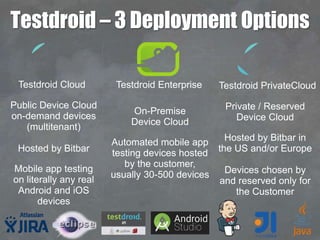
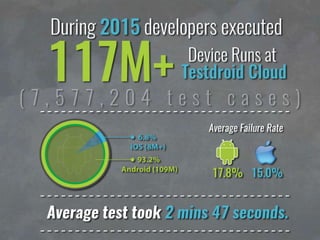

Public Device Cloud
on-demand devices
(multitenant)
Hosted by Bitbar
Mobile app testing
on literally any real
Android and iOS
devices
Private / Reserved
Device Cloud
Hosted by Bitbar in
the US and/or Europe
Devices chosen by
and reserved only for
the Customer
On-Premise
Device Cloud
Automated mobile app
testing devices hosted
by the customer,
usually 30-500 devices
Testdroid – 3 Deployment Options
Testdroid Cloud Testdroid Enterprise Testdroid PrivateCloud
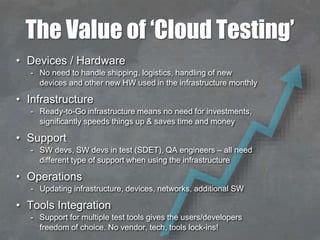
The Value of ‘Cloud Testing’
• Devices / Hardware
- No need to handle shipping, logistics, handling of new
devices and other new HW used in the infrastructure monthly
• Infrastructure
- Ready-to-Go infrastructure means no need for investments,
significantly speeds things up & saves time and money
• Support
- SW devs, SW devs in test (SDET), QA engineers – all need
different type of support when using the infrastructure
• Operations
- Updating infrastructure, devices, networks, additional SW
• Tools Integration
- Support for multiple test tools gives the users/developers
freedom of choice. No vendor, tech, tools lock-ins!
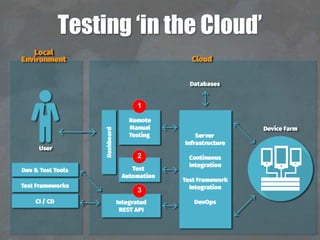
Testing ‘in the Cloud’
1
2
3
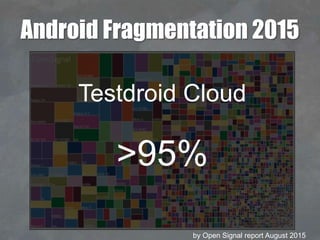
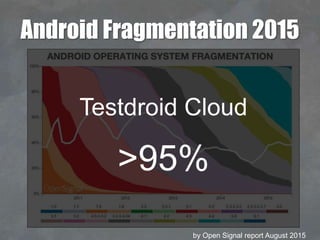
Android Fragmentation 2015
by Open Signal report August 2015
Testdroid Cloud
>95%
Android Fragmentation 2015
by Open Signal report August 2015
Testdroid Cloud
>95%
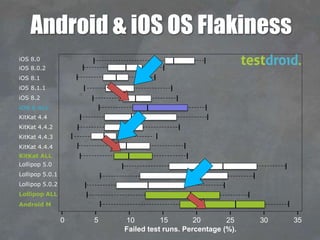
Android & iOS OS Flakiness
iOS 8.0
iOS 8.0.2
iOS 8.1
iOS 8.1.1
iOS 8.2
iOS 8 ALL
KitKat 4.4
KitKat 4.4.2
KitKat 4.4.3
KitKat 4.4.4
KitKat ALL
Lollipop 5.0
Lollipop 5.0.1
Lollipop 5.0.2
Lollipop ALL
Android M
0 5 10 15 20 25 30 35
Failed test runs. Percentage (%).
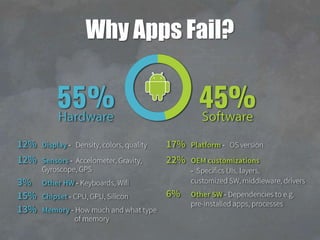
Why Apps Fail?
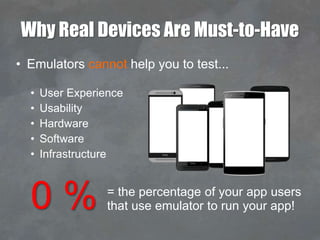
Why Real Devices Are Must-to-Have
• Emulators cannot help you to test...
• User Experience
• Usability
• Hardware
• Software
• Infrastructure
0 % = the percentage of your app users
that use emulator to run your app!
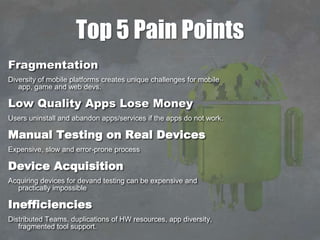
Top 5 Pain Points
Fragmentation
Diversity of mobile platforms creates unique challenges for mobile
app, game and web devs.
Low Quality Apps Lose Money
Users uninstall and abandon apps/services if the apps do not work.
Manual Testing on Real Devices
Expensive, slow and error-prone process
Device Acquisition
Acquiring devices for devand testing can be expensive and
practically impossible
Inefficiencies
Distributed Teams, duplications of HW resources, app diversity,
fragmented tool support.
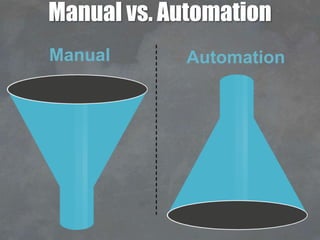
Manual vs. Automation
Manual Automation
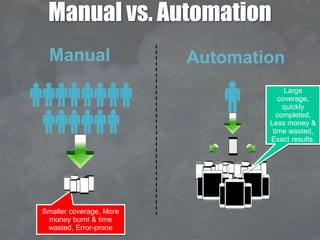
Manual vs. Automation
Smaller coverage, More
money burnt & time
wasted, Error-prone
Manual Automation
Large
coverage,
quickly
completed,
Less money &
time wasted,
Exact results.
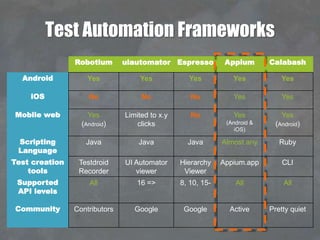
Test Automation Frameworks
Robotium uiautomator Espresso Appium Calabash
Android Yes Yes Yes Yes Yes
iOS No No No Yes Yes
Mobile web Yes
(Android)
Limited to x.y
clicks
No Yes
(Android &
iOS)
Yes
(Android)
Scripting
Language
Java Java Java Almost any Ruby
Test creation
tools
Testdroid
Recorder
UI Automator
viewer
Hierarchy
Viewer
Appium.app CLI
Supported
API levels
All 16 => 8, 10, 15- All All
Community Contributors Google Google Active Pretty quiet
APPIUM / SELENIUM IN THE CLOUD WITH
REAL DEVICES & REAL BROWSERS
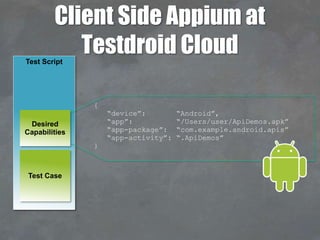
Client Side Appium at
Testdroid CloudTest Script
Test Case
Desired
Capabilities
{
“device”: “Android”,
“app”: “/Users/user/ApiDemos.apk”
“app-package”: “com.example.android.apis”
“app-activity”: “.ApiDemos”
}
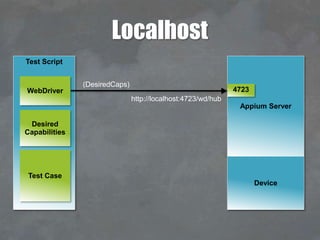
Test Script
Test Case
Desired
Capabilities
WebDriver
http://localhost:4723/wd/hub
Appium Server
4723
Device
Localhost
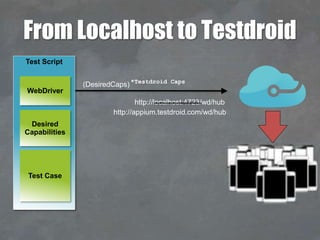
(DesiredCaps)
http://localhost:4723/wd/hub
*Testdroid Caps
http://appium.testdroid.com/wd/hub
(DesiredCaps)
Test Script
Test Case
Desired
Capabilities
WebDriver
From Localhost to Testdroid
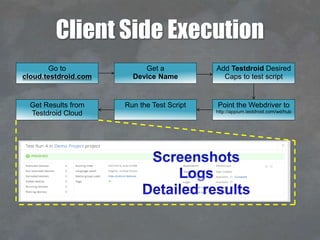
Client Side Execution
Go to
cloud.testdroid.com
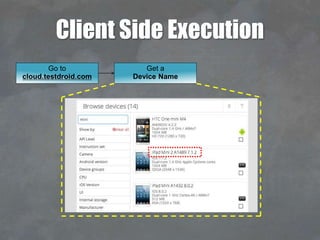
Client Side Execution
Get a
Device Name
Go to
cloud.testdroid.com
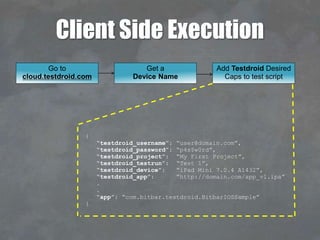
Client Side Execution
Add Testdroid Desired
Caps to test script
{
“testdroid_username”: “user@domain.com”,
“testdroid_password”: “p4s$w0rd”,
“testdroid_project”: “My First Project”,
“testdroid_testrun”: “Test 1”,
“testdroid_device”: “iPad Mini 7.0.4 A1432”,
“testdroid_app”: “http://domain.com/app_v1.ipa”
.
.
“app”: “com.bitbar.testdroid.BitbarIOSSample”
}
Get a
Device Name
Go to
cloud.testdroid.com
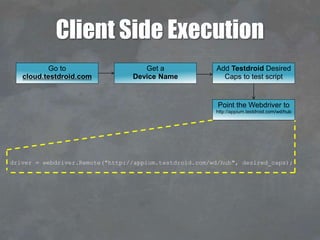
Client Side Execution
driver = webdriver.Remote("http://appium.testdroid.com/wd/hub", desired_caps);
Point the Webdriver to
http://appium.testdroid.com/wd/hub
Add Testdroid Desired
Caps to test script
Get a
Device Name
Go to
cloud.testdroid.com
Client Side Execution
Run the Test ScriptGet Results from
Testdroid Cloud
Point the Webdriver to
http://appium.testdroid.com/wd/hub
Add Testdroid Desired
Caps to test script
Get a
Device Name
Go to
cloud.testdroid.com
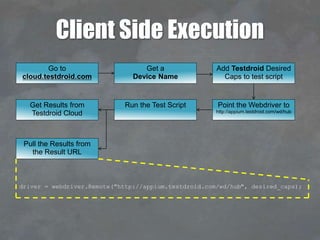
Client Side Execution
Pull the Results from
the Result URL
driver = webdriver.Remote("http://appium.testdroid.com/wd/hub", desired_caps);
Run the Test ScriptGet Results from
Testdroid Cloud
Point the Webdriver to
http://appium.testdroid.com/wd/hub
Add Testdroid Desired
Caps to test script
Get a
Device Name
Go to
cloud.testdroid.com
Multiple Devices – Client Side
python testscript.py –device <devicename>1
python testscript.py –device <devicename>2
python testscript.py –device <devicename>n
Test Script
Test Cases
Instigator Script
deviceArray=
[
“iPad 4 6.0.1 A1458”,
“iPad mini 7.0.4 A1432”,
.
.
.
“iPhone 4S 6.1.3 A1387”,
]
TESTDROID CLOUD AT GLANCE
THANK YOU!
More information about frameworks, devices
and testing at www.testdroid.com

Testdroid: Release Perfect Apps with Mobile Visual Testing in the Cloud

  • 2.
    Public Device Cloud on-demanddevices (multitenant) Hosted by Bitbar Mobile app testing on literally any real Android and iOS devices Private / Reserved Device Cloud Hosted by Bitbar in the US and/or Europe Devices chosen by and reserved only for the Customer On-Premise Device Cloud Automated mobile app testing devices hosted by the customer, usually 30-500 devices Testdroid – 3 Deployment Options Testdroid Cloud Testdroid Enterprise Testdroid PrivateCloud
  • 4.
    The Value of‘Cloud Testing’ • Devices / Hardware - No need to handle shipping, logistics, handling of new devices and other new HW used in the infrastructure monthly • Infrastructure - Ready-to-Go infrastructure means no need for investments, significantly speeds things up & saves time and money • Support - SW devs, SW devs in test (SDET), QA engineers – all need different type of support when using the infrastructure • Operations - Updating infrastructure, devices, networks, additional SW • Tools Integration - Support for multiple test tools gives the users/developers freedom of choice. No vendor, tech, tools lock-ins!
  • 5.
    Testing ‘in theCloud’ 1 2 3
  • 6.
    Android Fragmentation 2015 byOpen Signal report August 2015 Testdroid Cloud >95%
  • 7.
    Android Fragmentation 2015 byOpen Signal report August 2015 Testdroid Cloud >95%
  • 8.
    Android & iOSOS Flakiness iOS 8.0 iOS 8.0.2 iOS 8.1 iOS 8.1.1 iOS 8.2 iOS 8 ALL KitKat 4.4 KitKat 4.4.2 KitKat 4.4.3 KitKat 4.4.4 KitKat ALL Lollipop 5.0 Lollipop 5.0.1 Lollipop 5.0.2 Lollipop ALL Android M 0 5 10 15 20 25 30 35 Failed test runs. Percentage (%).
  • 9.
  • 10.
    Why Real DevicesAre Must-to-Have • Emulators cannot help you to test... • User Experience • Usability • Hardware • Software • Infrastructure 0 % = the percentage of your app users that use emulator to run your app!
  • 11.
    Top 5 PainPoints Fragmentation Diversity of mobile platforms creates unique challenges for mobile app, game and web devs. Low Quality Apps Lose Money Users uninstall and abandon apps/services if the apps do not work. Manual Testing on Real Devices Expensive, slow and error-prone process Device Acquisition Acquiring devices for devand testing can be expensive and practically impossible Inefficiencies Distributed Teams, duplications of HW resources, app diversity, fragmented tool support.
  • 12.
  • 13.
    Manual vs. Automation Smallercoverage, More money burnt & time wasted, Error-prone Manual Automation Large coverage, quickly completed, Less money & time wasted, Exact results.
  • 14.
    Test Automation Frameworks Robotiumuiautomator Espresso Appium Calabash Android Yes Yes Yes Yes Yes iOS No No No Yes Yes Mobile web Yes (Android) Limited to x.y clicks No Yes (Android & iOS) Yes (Android) Scripting Language Java Java Java Almost any Ruby Test creation tools Testdroid Recorder UI Automator viewer Hierarchy Viewer Appium.app CLI Supported API levels All 16 => 8, 10, 15- All All Community Contributors Google Google Active Pretty quiet
  • 15.
    APPIUM / SELENIUMIN THE CLOUD WITH REAL DEVICES & REAL BROWSERS
  • 17.
    Client Side Appiumat Testdroid CloudTest Script Test Case Desired Capabilities { “device”: “Android”, “app”: “/Users/user/ApiDemos.apk” “app-package”: “com.example.android.apis” “app-activity”: “.ApiDemos” }
  • 18.
  • 19.
  • 20.
    Client Side Execution Goto cloud.testdroid.com
  • 21.
    Client Side Execution Geta Device Name Go to cloud.testdroid.com
  • 22.
    Client Side Execution AddTestdroid Desired Caps to test script { “testdroid_username”: “user@domain.com”, “testdroid_password”: “p4s$w0rd”, “testdroid_project”: “My First Project”, “testdroid_testrun”: “Test 1”, “testdroid_device”: “iPad Mini 7.0.4 A1432”, “testdroid_app”: “http://domain.com/app_v1.ipa” . . “app”: “com.bitbar.testdroid.BitbarIOSSample” } Get a Device Name Go to cloud.testdroid.com
  • 23.
    Client Side Execution driver= webdriver.Remote("http://appium.testdroid.com/wd/hub", desired_caps); Point the Webdriver to http://appium.testdroid.com/wd/hub Add Testdroid Desired Caps to test script Get a Device Name Go to cloud.testdroid.com
  • 24.
    Client Side Execution Runthe Test ScriptGet Results from Testdroid Cloud Point the Webdriver to http://appium.testdroid.com/wd/hub Add Testdroid Desired Caps to test script Get a Device Name Go to cloud.testdroid.com
  • 25.
    Client Side Execution Pullthe Results from the Result URL driver = webdriver.Remote("http://appium.testdroid.com/wd/hub", desired_caps); Run the Test ScriptGet Results from Testdroid Cloud Point the Webdriver to http://appium.testdroid.com/wd/hub Add Testdroid Desired Caps to test script Get a Device Name Go to cloud.testdroid.com
  • 26.
    Multiple Devices –Client Side python testscript.py –device <devicename>1 python testscript.py –device <devicename>2 python testscript.py –device <devicename>n Test Script Test Cases Instigator Script deviceArray= [ “iPad 4 6.0.1 A1458”, “iPad mini 7.0.4 A1432”, . . . “iPhone 4S 6.1.3 A1387”, ]
  • 27.
  • 28.
    THANK YOU! More informationabout frameworks, devices and testing at www.testdroid.com