We make mobile developers’ lives easier.
Ville-Veikko Helppi
Technical Product Manager
ville-veikko.helppi@bitbar.com
+358400949001
16 April 2015
TESTDROID AND SOME STATISTICS
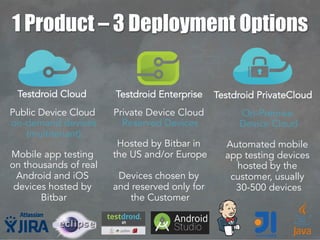
Public Device Cloud
on-demand devices
(multitenant)
Mobile app testing
on thousands of real
Android and iOS
devices hosted by
Bitbar
Private Device Cloud
Reserved Devices
Hosted by Bitbar in
the US and/or Europe
Devices chosen by
and reserved only for
the Customer
On-Premise
Device Cloud
Automated mobile
app testing devices
hosted by the
customer, usually
30-500 devices
1 Product – 3 Deployment Options
Testdroid Cloud Testdroid Enterprise Testdroid PrivateCloud
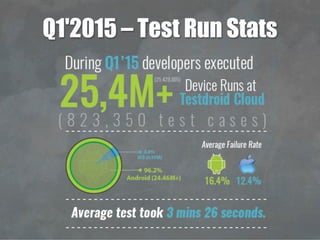
Q1'2015 – Test Run Stats
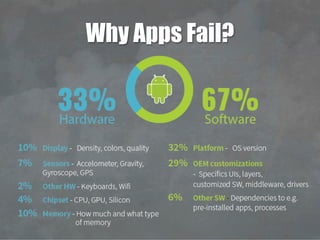
Why Apps Fail?
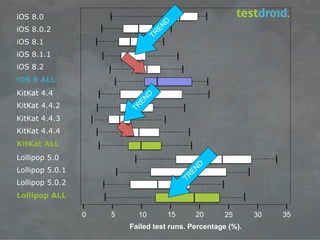
iOS 8.0
iOS 8.0.2
iOS 8.1
iOS 8.1.1
iOS 8.2
iOS 8 ALL
KitKat 4.4
KitKat 4.4.2
KitKat 4.4.3
KitKat 4.4.4
KitKat ALL
Lollipop 5.0
Lollipop 5.0.1
Lollipop 5.0.2
Lollipop ALL
0 5 10 15 20 25 30 35
Failed test runs. Percentage (%).
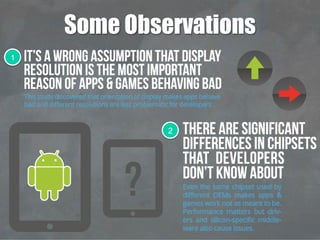
Some Observations
1
2
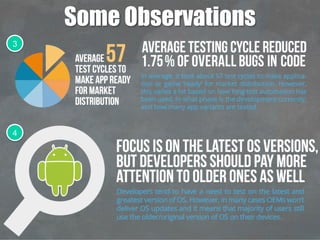
Some Observations
3
4
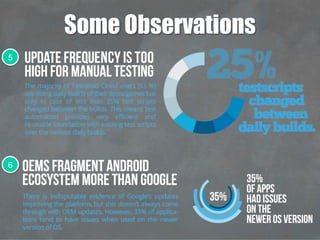
Some Observations
5
6
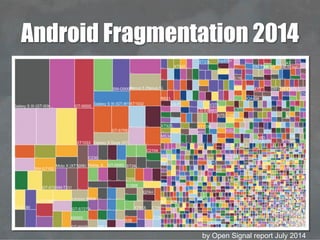
Android Fragmentation 2014
by Open Signal report July 2014
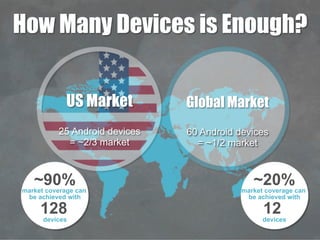
How Many Devices is Enough?
~90%market coverage can
be achieved with
128
devices
~20%market coverage can
be achieved with
12
devices
US Market
25 Android devices
= ~2/3 market
Global Market
60 Android devices
= ~1/2 market
MOBILE TEST AUTOMATION
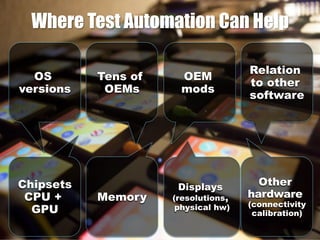
OS
versions
Chipsets
CPU +
GPU
Tens of
OEMs
Memory
Displays
(resolutions,
physical hw)
OEM
mods
Other
hardware
(connectivity
calibration)
Relation
to other
software
Where Test Automation Can Help
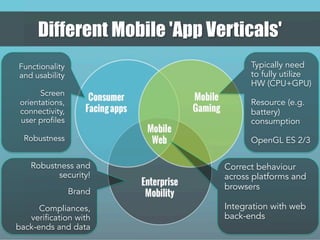
Correct behaviour
across platforms and
browsers
Integration with web
back-ends
Typically need
to fully utilize
HW (CPU+GPU)
Resource (e.g.
battery)
consumption
OpenGL ES 2/3
Functionality
and usability
Screen
orientations,
connectivity,
user profiles
Robustness
Robustness and
security!
Brand
Compliances,
verification with
back-ends and data
Different Mobile 'App Verticals'
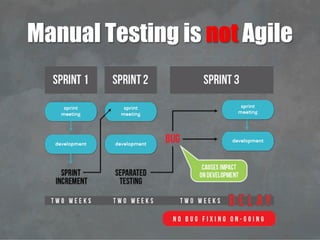
Manual Testing is not Agile
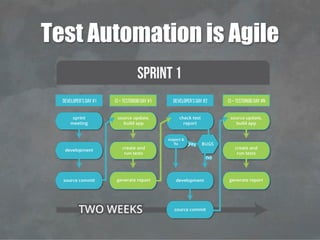
Test Automation is Agile
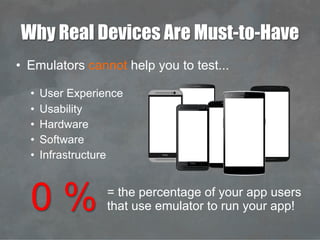
Why Real Devices Are Must-to-Have
•  Emulators cannot help you to test...
•  User Experience
•  Usability
•  Hardware
•  Software
•  Infrastructure
0 % = the percentage of your app users
that use emulator to run your app!
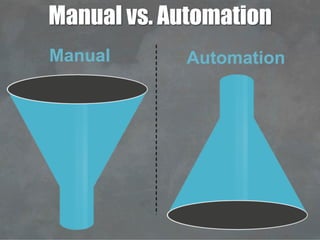
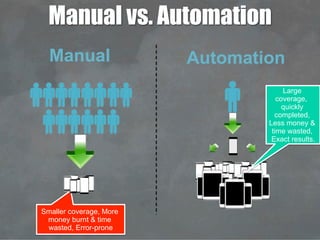
Manual vs. Automation
Manual Automation
Manual vs. Automation
Smaller coverage, More
money burnt & time
wasted, Error-prone
Manual Automation
Large
coverage,
quickly
completed,
Less money &
time wasted,
Exact results.
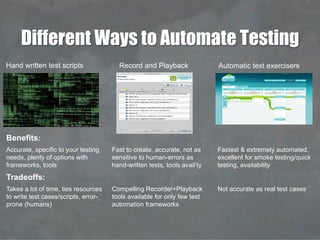
Different Ways to Automate Testing
Automatic test exercisersRecord and PlaybackHand written test scripts
Benefits:
Accurate, specific to your testing
needs, plenty of options with
frameworks, tools
Fast to create, accurate, not as
sensitive to human-errors as
hand-written tests, tools avail’ty
Fastest & extremely automated,
excellent for smoke testing/quick
testing, availability
Tradeoffs:
Takes a lot of time, ties resources
to write test cases/scripts, error-
prone (humans)
Compelling Recorder+Playback
tools available for only few test
automation frameworks
Not accurate as real test cases
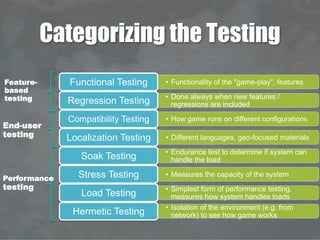
Categorizing the Testing
•  Functionality of the "game-play", featuresFunctional Testing
•  Done always when new features /
regressions are includedRegression Testing
•  How game runs on different configurationsCompatibility Testing
•  Different languages, geo-focused materialsLocalization Testing
•  Endurance test to determine if system can
handle the loadSoak Testing
•  Measures the capacity of the systemStress Testing
•  Simplest form of performance testing,
measures how system handles loadsLoad Testing
•  Isolation of the environment (e.g. from
network) to see how game worksHermetic Testing
Feature-
based
testing
Performance
testing
End-user
testing
TEST AUTOMATION FRAMEWORKS
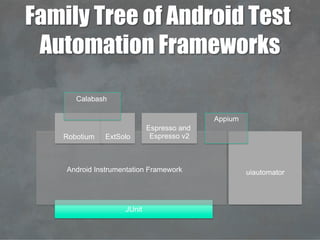
Family Tree of Android Test
Automation Frameworks
JUnit
Android Instrumentation Framework
Robotium
Espresso and
Espresso v2
uiautomator
Appium
ExtSolo
Calabash
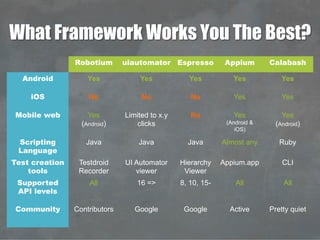
What Framework Works You The Best?
Robotium uiautomator Espresso Appium Calabash
Android Yes Yes Yes Yes Yes
iOS No No No Yes Yes
Mobile web Yes
(Android)
Limited to x.y
clicks
No Yes
(Android &
iOS)
Yes
(Android)
Scripting
Language
Java Java Java Almost any Ruby
Test creation
tools
Testdroid
Recorder
UI Automator
viewer
Hierarchy
Viewer
Appium.app CLI
Supported
API levels
All 16 => 8, 10, 15- All All
Community Contributors Google Google Active Pretty quiet
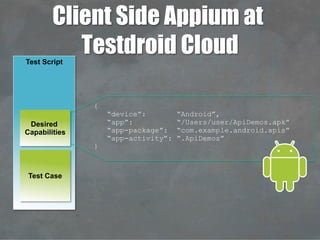
Client Side Appium at
Testdroid CloudTest Script
Test Case
Desired
Capabilities
{
“device”: “Android”,
“app”: “/Users/user/ApiDemos.apk”
“app-package”: “com.example.android.apis”
“app-activity”: “.ApiDemos”
}
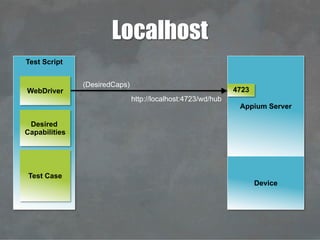
Test Script
Test Case
Desired
Capabilities
WebDriver
http://localhost:4723/wd/hub
Appium Server
4723
Device
Localhost
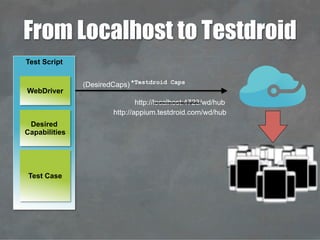
(DesiredCaps)
http://localhost:4723/wd/hub
*Testdroid Caps
http://appium.testdroid.com/wd/hub
(DesiredCaps)
Test Script
Test Case
Desired
Capabilities
WebDriver
From Localhost to Testdroid
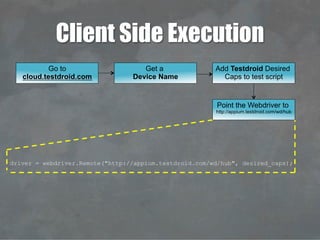
Client Side Execution
Go to
cloud.testdroid.com
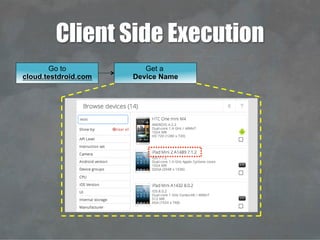
Client Side Execution
Get a
Device Name
Go to
cloud.testdroid.com
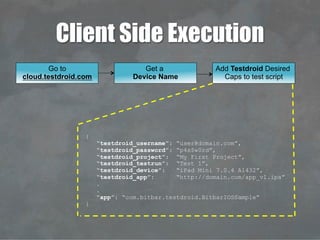
Client Side Execution
Add Testdroid Desired
Caps to test script
{
“testdroid_username”: “user@domain.com”,
“testdroid_password”: “p4s$w0rd”,
“testdroid_project”: “My First Project”,
“testdroid_testrun”: “Test 1”,
“testdroid_device”: “iPad Mini 7.0.4 A1432”,
“testdroid_app”: “http://domain.com/app_v1.ipa”
.
.
“app”: “com.bitbar.testdroid.BitbarIOSSample”
}
Get a
Device Name
Go to
cloud.testdroid.com
Client Side Execution
driver = webdriver.Remote("http://appium.testdroid.com/wd/hub", desired_caps);
Point the Webdriver to
http://appium.testdroid.com/wd/hub
Add Testdroid Desired
Caps to test script
Get a
Device Name
Go to
cloud.testdroid.com
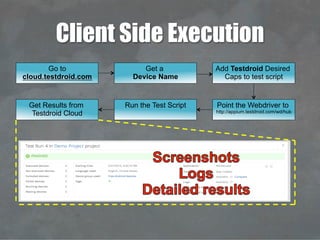
Client Side Execution
Run the Test ScriptGet Results from
Testdroid Cloud
Point the Webdriver to
http://appium.testdroid.com/wd/hub
Add Testdroid Desired
Caps to test script
Get a
Device Name
Go to
cloud.testdroid.com
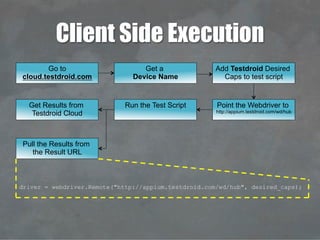
Client Side Execution
Pull the Results from
the Result URL
driver = webdriver.Remote("http://appium.testdroid.com/wd/hub", desired_caps);
Run the Test ScriptGet Results from
Testdroid Cloud
Point the Webdriver to
http://appium.testdroid.com/wd/hub
Add Testdroid Desired
Caps to test script
Get a
Device Name
Go to
cloud.testdroid.com
Multiple Devices – Client Side
python testscript.py –device <devicename>1
python testscript.py –device <devicename>2
python testscript.py –device <devicename>n
Test Script
Test Cases
Instigator Script
deviceArray=
[
“iPad 4 6.0.1 A1458”,
“iPad mini 7.0.4 A1432”,
.
.
.
“iPhone 4S 6.1.3 A1387”,
]
21
3
4
5
6
7
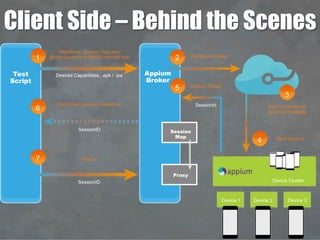
WebDriver Session Request
@http://appium.testdroid.com/wd/hub
WebDriver Session Response
Testrun
Configure Project
Appium Ready
Wait for Device to
Become Available
Device 1 Device 2 Device 3
Session
Map
Proxy
Device Cluster
Start Appium
Desired Capabilities, .apk / .ipa
SessionID
SessionID
Sessionid
Test
Script
Appium
Broker
Client Side – Behind the Scenes
Introducing "Server Side Appium"
Demonstration
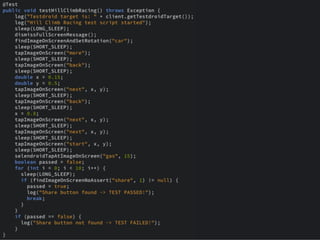
Appium with Real Devices using Image
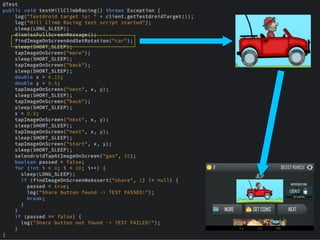
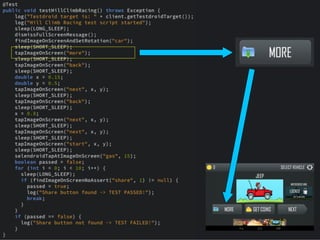
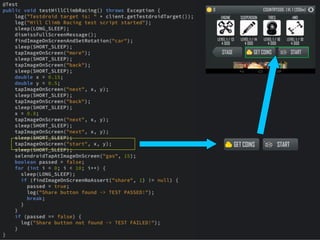
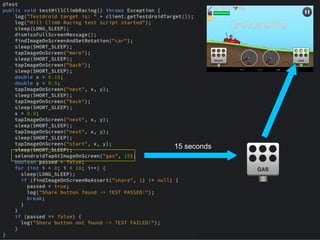
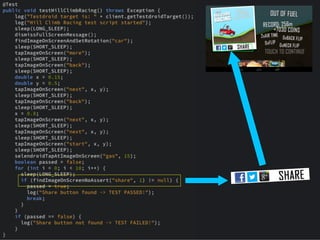
Recognition for Hill Climb Racing
Setup
•  Using real Android devices at Testdroid Cloud
•  Parallel test runs without a need to configure desired
capabilities
•  Device groups (= set of devices used for runs) can be
manually created and configured
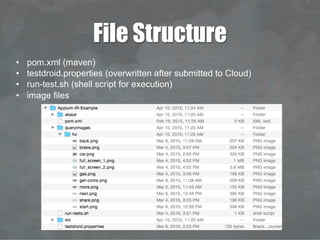
File Structure
•  pom.xml (maven)
•  testdroid.properties (overwritten after submitted to Cloud)
•  run-test.sh (shell script for execution)
•  image files
15 seconds
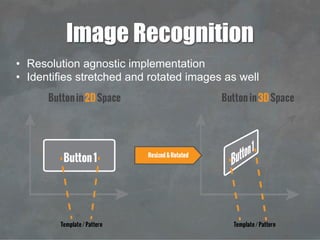
Image Recognition
•  Resolution agnostic implementation
•  Identifies stretched and rotated images as well
Let's See How it Works!
THANK YOU!
More information about frameworks,
devices and testing at www.testdroid.com

LDNSE: Testdroid for Mobile App and Web Testing (London Selenium Meetup)

  • 1.
    We make mobiledevelopers’ lives easier. Ville-Veikko Helppi Technical Product Manager ville-veikko.helppi@bitbar.com +358400949001 16 April 2015
  • 2.
  • 3.
    Public Device Cloud on-demanddevices (multitenant) Mobile app testing on thousands of real Android and iOS devices hosted by Bitbar Private Device Cloud Reserved Devices Hosted by Bitbar in the US and/or Europe Devices chosen by and reserved only for the Customer On-Premise Device Cloud Automated mobile app testing devices hosted by the customer, usually 30-500 devices 1 Product – 3 Deployment Options Testdroid Cloud Testdroid Enterprise Testdroid PrivateCloud
  • 4.
  • 5.
  • 6.
    iOS 8.0 iOS 8.0.2 iOS8.1 iOS 8.1.1 iOS 8.2 iOS 8 ALL KitKat 4.4 KitKat 4.4.2 KitKat 4.4.3 KitKat 4.4.4 KitKat ALL Lollipop 5.0 Lollipop 5.0.1 Lollipop 5.0.2 Lollipop ALL 0 5 10 15 20 25 30 35 Failed test runs. Percentage (%).
  • 7.
  • 8.
  • 9.
  • 10.
    Android Fragmentation 2014 byOpen Signal report July 2014
  • 11.
    How Many Devicesis Enough? ~90%market coverage can be achieved with 128 devices ~20%market coverage can be achieved with 12 devices US Market 25 Android devices = ~2/3 market Global Market 60 Android devices = ~1/2 market
  • 12.
  • 13.
    OS versions Chipsets CPU + GPU Tens of OEMs Memory Displays (resolutions, physicalhw) OEM mods Other hardware (connectivity calibration) Relation to other software Where Test Automation Can Help
  • 14.
    Correct behaviour across platformsand browsers Integration with web back-ends Typically need to fully utilize HW (CPU+GPU) Resource (e.g. battery) consumption OpenGL ES 2/3 Functionality and usability Screen orientations, connectivity, user profiles Robustness Robustness and security! Brand Compliances, verification with back-ends and data Different Mobile 'App Verticals'
  • 15.
  • 16.
  • 17.
    Why Real DevicesAre Must-to-Have •  Emulators cannot help you to test... •  User Experience •  Usability •  Hardware •  Software •  Infrastructure 0 % = the percentage of your app users that use emulator to run your app!
  • 18.
  • 19.
    Manual vs. Automation Smallercoverage, More money burnt & time wasted, Error-prone Manual Automation Large coverage, quickly completed, Less money & time wasted, Exact results.
  • 20.
    Different Ways toAutomate Testing Automatic test exercisersRecord and PlaybackHand written test scripts Benefits: Accurate, specific to your testing needs, plenty of options with frameworks, tools Fast to create, accurate, not as sensitive to human-errors as hand-written tests, tools avail’ty Fastest & extremely automated, excellent for smoke testing/quick testing, availability Tradeoffs: Takes a lot of time, ties resources to write test cases/scripts, error- prone (humans) Compelling Recorder+Playback tools available for only few test automation frameworks Not accurate as real test cases
  • 21.
    Categorizing the Testing • Functionality of the "game-play", featuresFunctional Testing •  Done always when new features / regressions are includedRegression Testing •  How game runs on different configurationsCompatibility Testing •  Different languages, geo-focused materialsLocalization Testing •  Endurance test to determine if system can handle the loadSoak Testing •  Measures the capacity of the systemStress Testing •  Simplest form of performance testing, measures how system handles loadsLoad Testing •  Isolation of the environment (e.g. from network) to see how game worksHermetic Testing Feature- based testing Performance testing End-user testing
  • 22.
  • 23.
    Family Tree ofAndroid Test Automation Frameworks JUnit Android Instrumentation Framework Robotium Espresso and Espresso v2 uiautomator Appium ExtSolo Calabash
  • 24.
    What Framework WorksYou The Best? Robotium uiautomator Espresso Appium Calabash Android Yes Yes Yes Yes Yes iOS No No No Yes Yes Mobile web Yes (Android) Limited to x.y clicks No Yes (Android & iOS) Yes (Android) Scripting Language Java Java Java Almost any Ruby Test creation tools Testdroid Recorder UI Automator viewer Hierarchy Viewer Appium.app CLI Supported API levels All 16 => 8, 10, 15- All All Community Contributors Google Google Active Pretty quiet
  • 25.
    Client Side Appiumat Testdroid CloudTest Script Test Case Desired Capabilities { “device”: “Android”, “app”: “/Users/user/ApiDemos.apk” “app-package”: “com.example.android.apis” “app-activity”: “.ApiDemos” }
  • 26.
  • 27.
  • 28.
    Client Side Execution Goto cloud.testdroid.com
  • 29.
    Client Side Execution Geta Device Name Go to cloud.testdroid.com
  • 30.
    Client Side Execution AddTestdroid Desired Caps to test script { “testdroid_username”: “user@domain.com”, “testdroid_password”: “p4s$w0rd”, “testdroid_project”: “My First Project”, “testdroid_testrun”: “Test 1”, “testdroid_device”: “iPad Mini 7.0.4 A1432”, “testdroid_app”: “http://domain.com/app_v1.ipa” . . “app”: “com.bitbar.testdroid.BitbarIOSSample” } Get a Device Name Go to cloud.testdroid.com
  • 31.
    Client Side Execution driver= webdriver.Remote("http://appium.testdroid.com/wd/hub", desired_caps); Point the Webdriver to http://appium.testdroid.com/wd/hub Add Testdroid Desired Caps to test script Get a Device Name Go to cloud.testdroid.com
  • 32.
    Client Side Execution Runthe Test ScriptGet Results from Testdroid Cloud Point the Webdriver to http://appium.testdroid.com/wd/hub Add Testdroid Desired Caps to test script Get a Device Name Go to cloud.testdroid.com
  • 33.
    Client Side Execution Pullthe Results from the Result URL driver = webdriver.Remote("http://appium.testdroid.com/wd/hub", desired_caps); Run the Test ScriptGet Results from Testdroid Cloud Point the Webdriver to http://appium.testdroid.com/wd/hub Add Testdroid Desired Caps to test script Get a Device Name Go to cloud.testdroid.com
  • 34.
    Multiple Devices –Client Side python testscript.py –device <devicename>1 python testscript.py –device <devicename>2 python testscript.py –device <devicename>n Test Script Test Cases Instigator Script deviceArray= [ “iPad 4 6.0.1 A1458”, “iPad mini 7.0.4 A1432”, . . . “iPhone 4S 6.1.3 A1387”, ]
  • 35.
    21 3 4 5 6 7 WebDriver Session Request @http://appium.testdroid.com/wd/hub WebDriverSession Response Testrun Configure Project Appium Ready Wait for Device to Become Available Device 1 Device 2 Device 3 Session Map Proxy Device Cluster Start Appium Desired Capabilities, .apk / .ipa SessionID SessionID Sessionid Test Script Appium Broker Client Side – Behind the Scenes
  • 36.
  • 37.
    Demonstration Appium with RealDevices using Image Recognition for Hill Climb Racing
  • 38.
    Setup •  Using realAndroid devices at Testdroid Cloud •  Parallel test runs without a need to configure desired capabilities •  Device groups (= set of devices used for runs) can be manually created and configured
  • 39.
    File Structure •  pom.xml(maven) •  testdroid.properties (overwritten after submitted to Cloud) •  run-test.sh (shell script for execution) •  image files
  • 44.
  • 46.
    Image Recognition •  Resolutionagnostic implementation •  Identifies stretched and rotated images as well
  • 47.
    Let's See Howit Works!
  • 48.
    THANK YOU! More informationabout frameworks, devices and testing at www.testdroid.com