Graduate Professional Project Chance Harris April 10, 2007 Panel: Dr. Michael Korpi, Brian Elliott, Robert Darden
Project Overview Construct a 3D model of locations/scenarios from Justin Wilson’s script Shoot green screen test footage Test lighting scenarios Matching virtual lights with on-set lights Green screen lighting for visual effects Composite footage into virtual sets
Software/Equipment Used Software Blender 3D Shake Sketchup Pro Final Cut Pro Equipment Sony HDW F900 camcorder Mac Pro
Conceptualize Hand drawn map courtesy of Justin
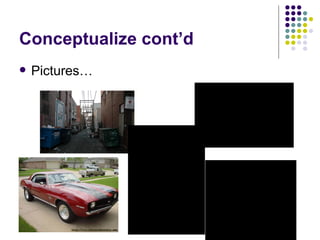
Conceptualize cont’d Pictures…
Initial 3D modeling/lighting tests Best strategy for large scale modeling project Software workflow (Blender, Sketchup, Shake) Collaboration with Justin for overall lighting (“bluish nighttime”)
Acquisition/Creation of Elements Textures
Acquisition/Creation of Elements Use basic polygons in Blender 3D and Sketchup to create objects Apply textures to finished models
Organize Objects Rough layout of streets, concrete, grass, crops, etc. Add buildings according to the grid of streets Gradual transition from downtown to rural Pepper with details Street lights, dumpsters, fences, railroad, crates, tractor, etc.
Lighting Very versatile…allows for lights to be placed, moved, articulated, dimmed, and colored very specifically.--- DEMO Position lights Street lamps, accents, “global sun” Adjust  specularity ,  reflectance, and translucence  of objects Ex: window is very similar to white wall, except the window will have much higher translucence and specularity Concrete tweaked to have low reflectance/specularity
Cameras Equally versatile as lights Ability to place, rotate, move, and manipulate properties (focus, lens type, aspect ratio, frame rate) Add as many as I want Animated or stationary Helpful for composition before long renders DEMO
Studio Work Test shots of Justin in front of the green screen Natural lighting vs. even lighting Determine best simulation for passing lights while driving Obstruct light, spin light, constant light…fix in post Swivel chair for camera moves
Shake Compositing Integrate footage with 3D renders Extensive use of masks to make Justin appear “inside the car” Color correcting (animations looked much “cleaner” that footage) Dirty up the animation Advantages of stylized looks in Sin City and 300 Artificial lighting Motion tracking and keyframing for simulated camera moves
Complications RENDERING TIME! 30 second animation took almost 3 days Textures and lighting = long renders Importance of renderfarm Pixar average of 6 hours/frame Motion Tracking Shake can only track in 2D, which makes a simulated camera rotation around the car very difficult to match. 3D tracking programs (PFTrack, Boujou) are very expensive
Complications Lighting Balance between set lights and virtual sources is very delicate Easier to have virtual sets lighted and rendered before shooting No green floor Had to shoot around this No ability to include actor’s feet in shots

Test

  • 1.
    Graduate Professional ProjectChance Harris April 10, 2007 Panel: Dr. Michael Korpi, Brian Elliott, Robert Darden
  • 2.
    Project Overview Constructa 3D model of locations/scenarios from Justin Wilson’s script Shoot green screen test footage Test lighting scenarios Matching virtual lights with on-set lights Green screen lighting for visual effects Composite footage into virtual sets
  • 3.
    Software/Equipment Used SoftwareBlender 3D Shake Sketchup Pro Final Cut Pro Equipment Sony HDW F900 camcorder Mac Pro
  • 4.
    Conceptualize Hand drawnmap courtesy of Justin
  • 5.
  • 6.
    Initial 3D modeling/lightingtests Best strategy for large scale modeling project Software workflow (Blender, Sketchup, Shake) Collaboration with Justin for overall lighting (“bluish nighttime”)
  • 7.
  • 8.
    Acquisition/Creation of ElementsUse basic polygons in Blender 3D and Sketchup to create objects Apply textures to finished models
  • 9.
    Organize Objects Roughlayout of streets, concrete, grass, crops, etc. Add buildings according to the grid of streets Gradual transition from downtown to rural Pepper with details Street lights, dumpsters, fences, railroad, crates, tractor, etc.
  • 10.
    Lighting Very versatile…allowsfor lights to be placed, moved, articulated, dimmed, and colored very specifically.--- DEMO Position lights Street lamps, accents, “global sun” Adjust specularity , reflectance, and translucence of objects Ex: window is very similar to white wall, except the window will have much higher translucence and specularity Concrete tweaked to have low reflectance/specularity
  • 11.
    Cameras Equally versatileas lights Ability to place, rotate, move, and manipulate properties (focus, lens type, aspect ratio, frame rate) Add as many as I want Animated or stationary Helpful for composition before long renders DEMO
  • 12.
    Studio Work Testshots of Justin in front of the green screen Natural lighting vs. even lighting Determine best simulation for passing lights while driving Obstruct light, spin light, constant light…fix in post Swivel chair for camera moves
  • 13.
    Shake Compositing Integratefootage with 3D renders Extensive use of masks to make Justin appear “inside the car” Color correcting (animations looked much “cleaner” that footage) Dirty up the animation Advantages of stylized looks in Sin City and 300 Artificial lighting Motion tracking and keyframing for simulated camera moves
  • 14.
    Complications RENDERING TIME!30 second animation took almost 3 days Textures and lighting = long renders Importance of renderfarm Pixar average of 6 hours/frame Motion Tracking Shake can only track in 2D, which makes a simulated camera rotation around the car very difficult to match. 3D tracking programs (PFTrack, Boujou) are very expensive
  • 15.
    Complications Lighting Balancebetween set lights and virtual sources is very delicate Easier to have virtual sets lighted and rendered before shooting No green floor Had to shoot around this No ability to include actor’s feet in shots