

A Remote Monitoring and Control System  TELELAB Presented by : Avinash Pathak Dron Sharma
What TELELAB is ?? TELELAB  is a system designed for remote monitoring and controlling which may be required in scientific research, testing and experimentation. It provides the observer with the data he/she requires without him/her being physically present at the place where the actual experiment is being conducted.
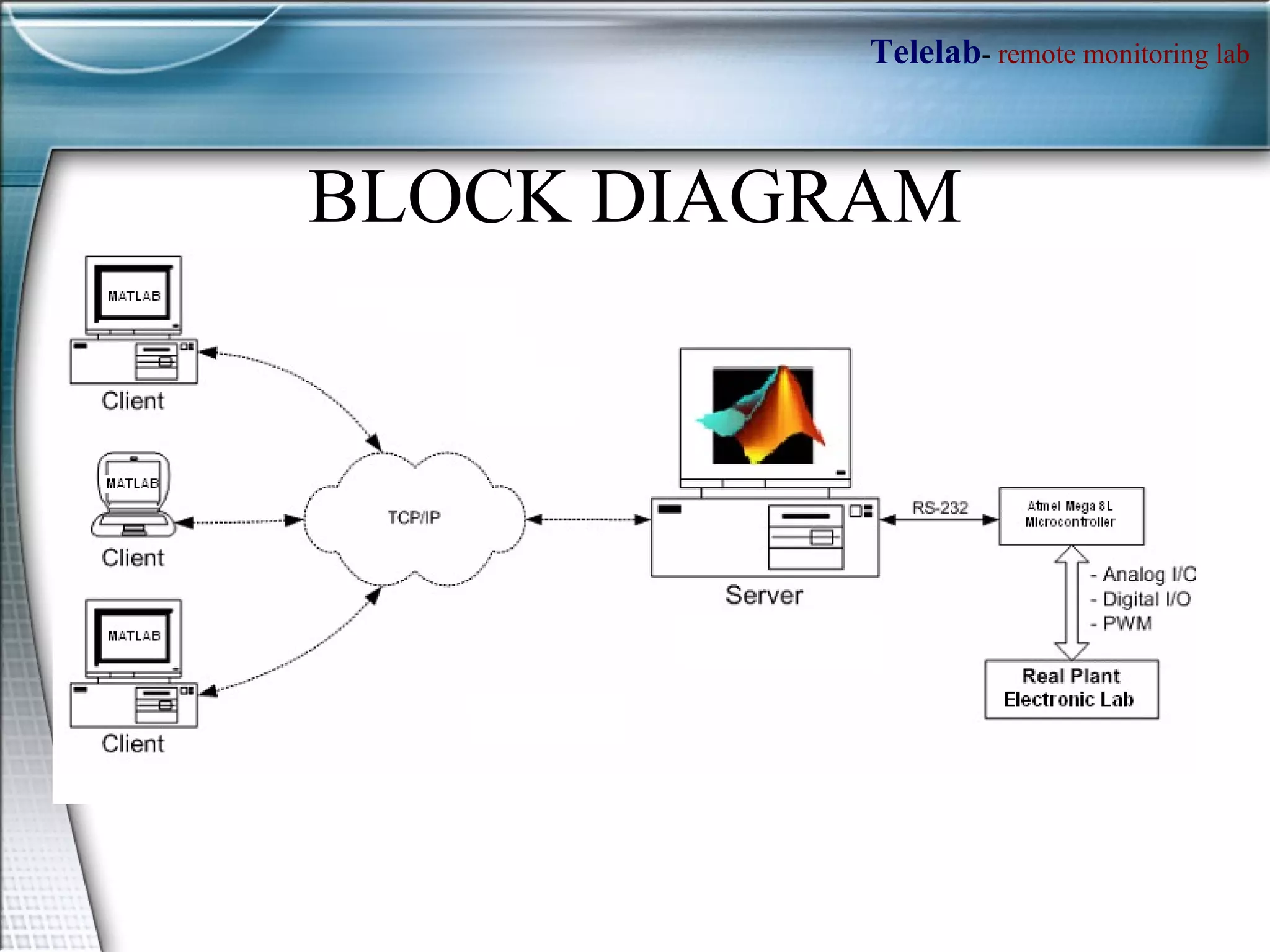
BLOCK DIAGRAM
Features of TELELAB Designed controller (Simulink file) is automatically converted as a real-time executable and uploaded on a remote PC connected to one or more processes, guaranteeing hard real-time performance The experiments are controlled by a standard web browser allowing a full modification of controller parameters and observing signals on real-time plots. Since a centralized server is employed to handle the remote PC’s, experiments can be easily shared among different laboratories or even different departments/universities, so reducing costs and facilitating the birth of laboratory consortia Much more practical and industrial oriented program.
HOW WE WILL ACHIEVE IT !!!!
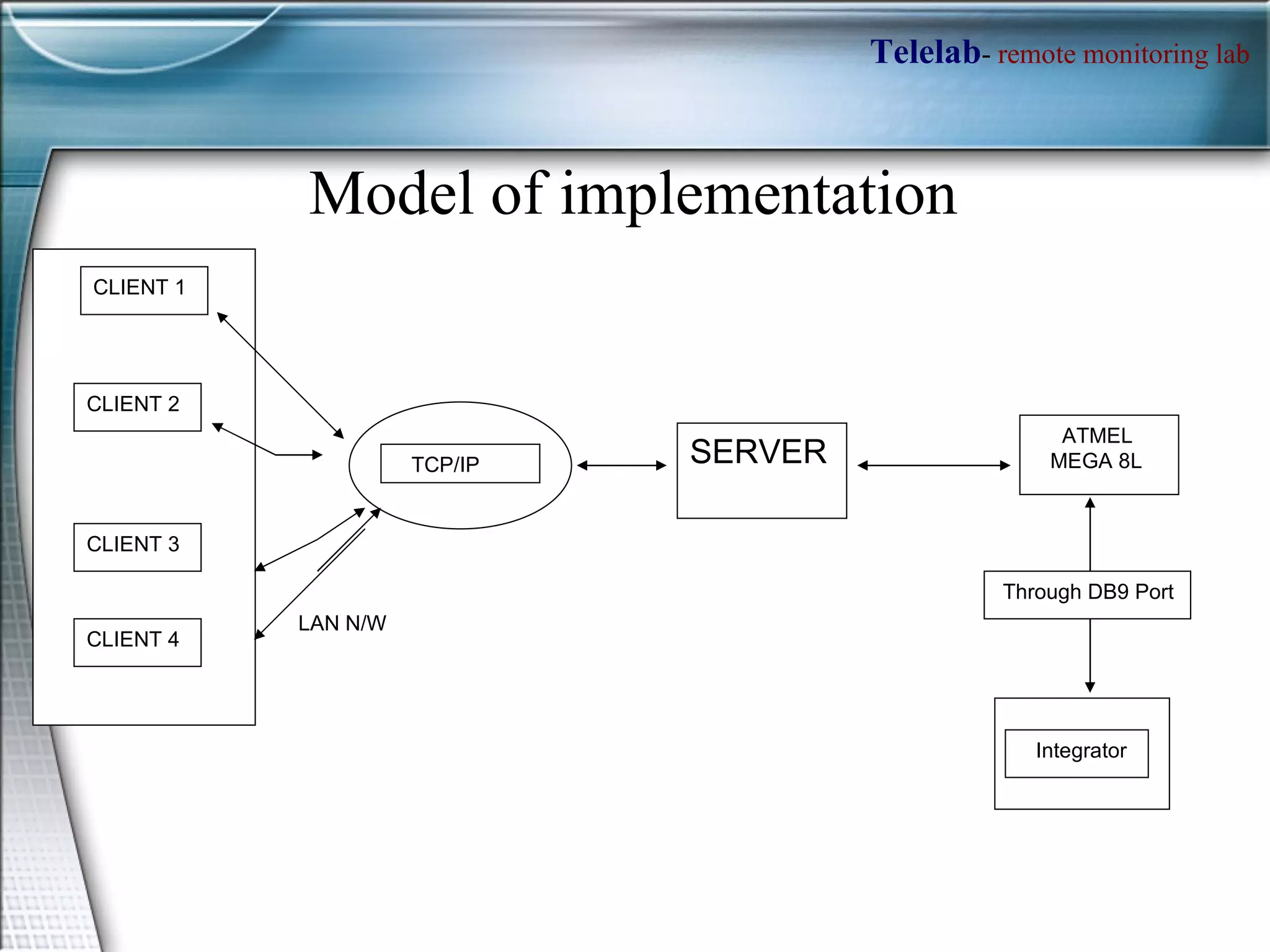
Integrator ATMEL  MEGA 8L SERVER TCP/IP CLIENT 2 CLIENT 3 CLIENT 4 CLIENT 1 Through DB9 Port LAN N/W Model of implementation
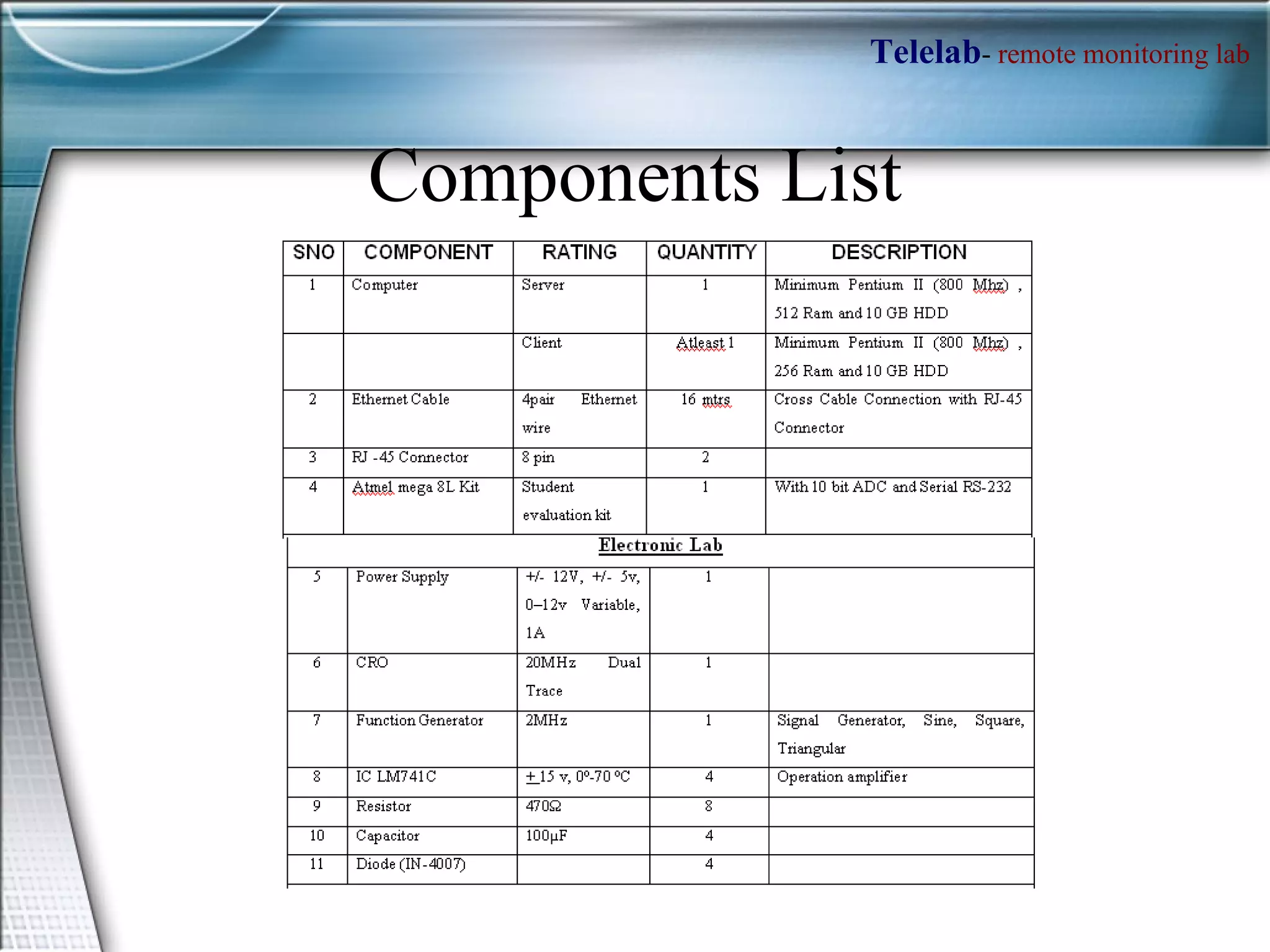
Components List
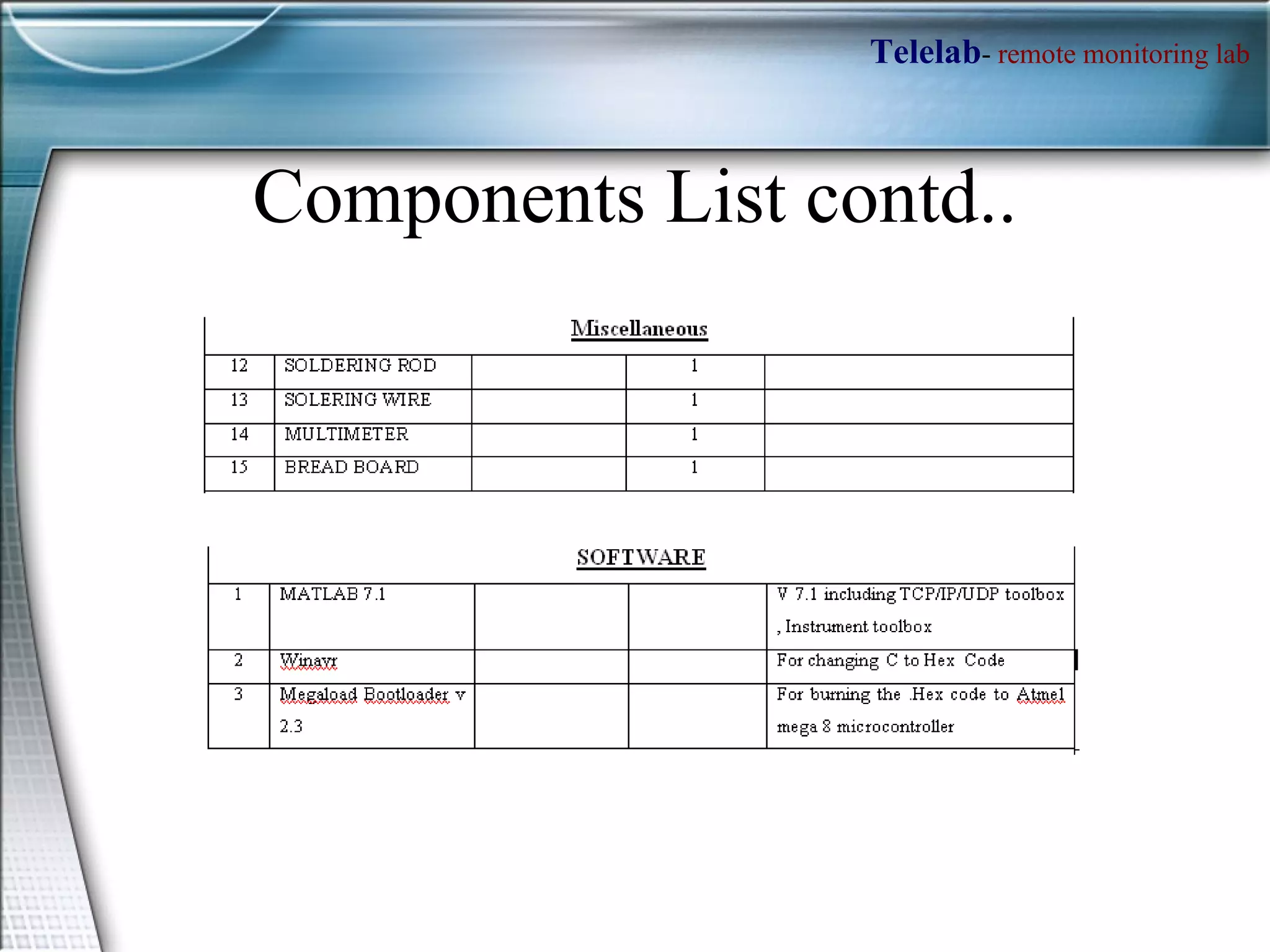
Components List contd..
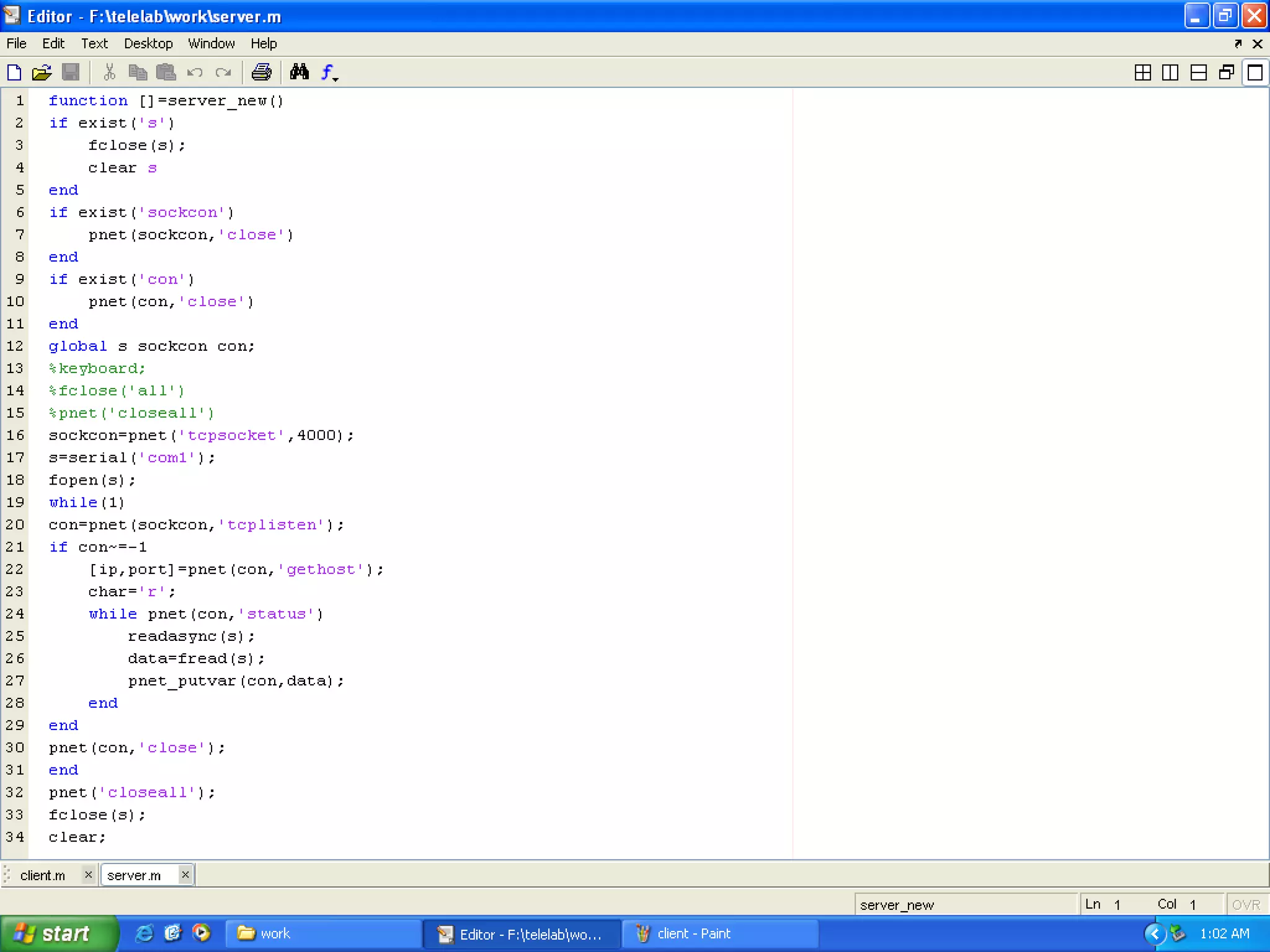
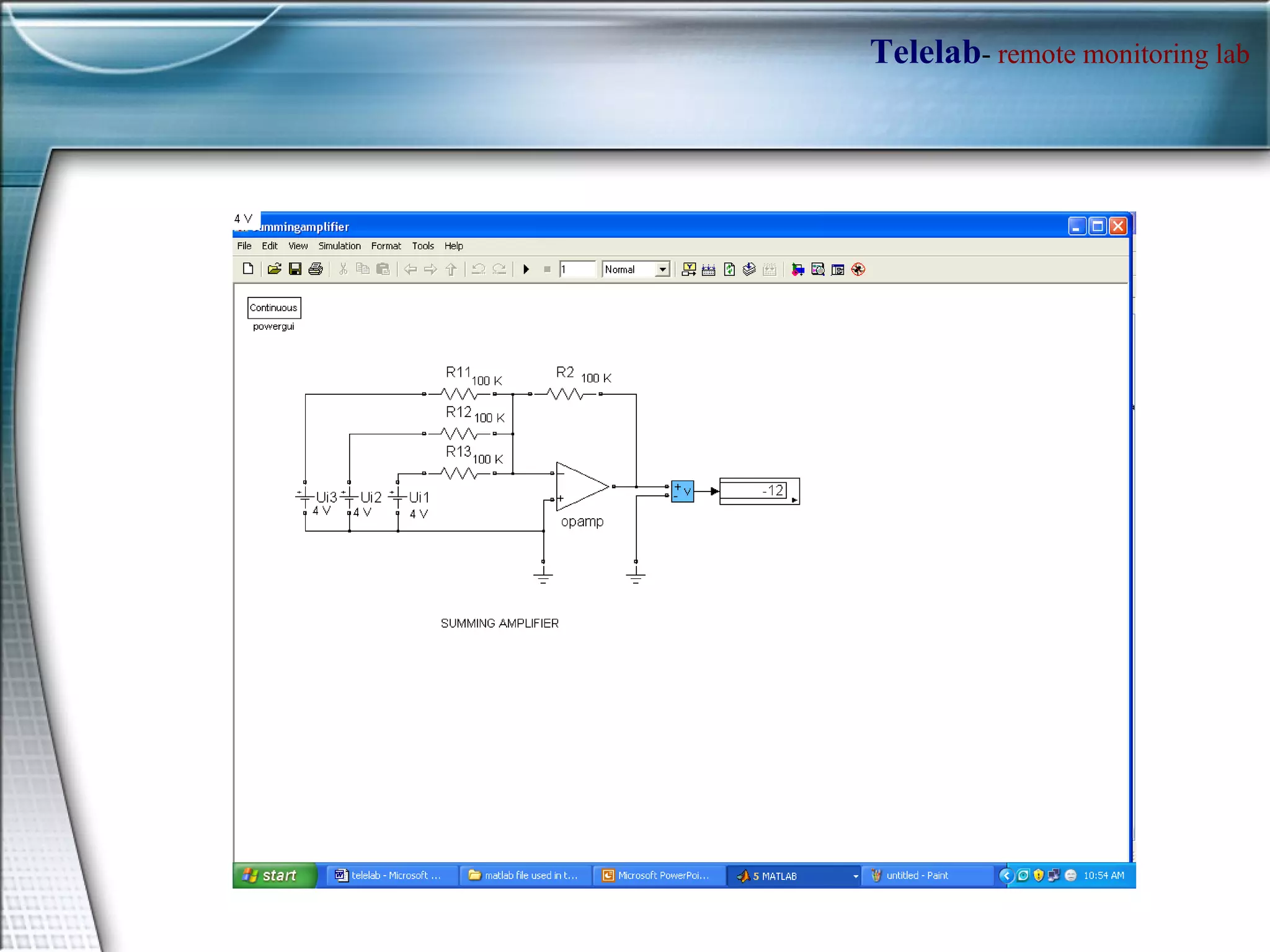
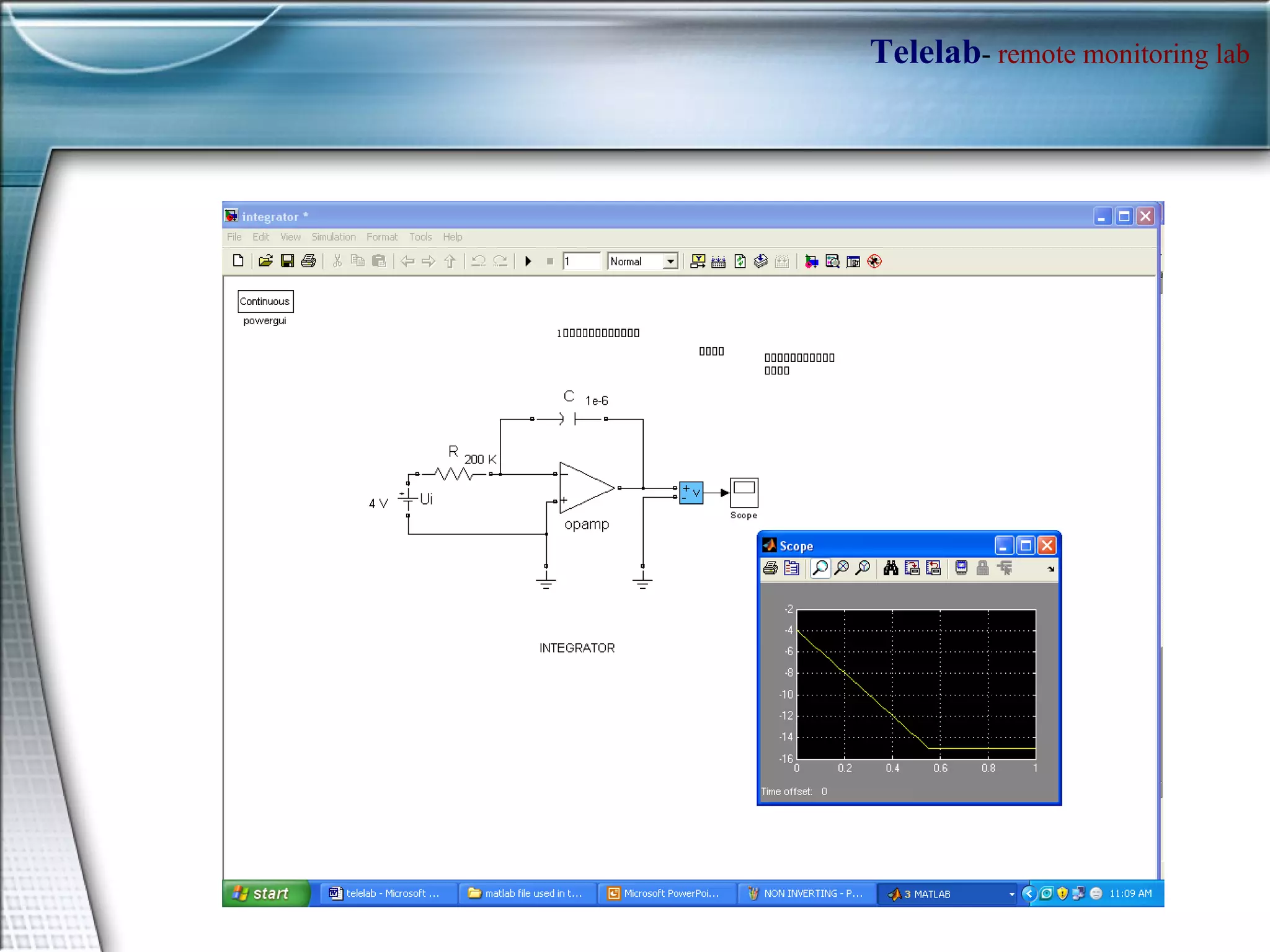
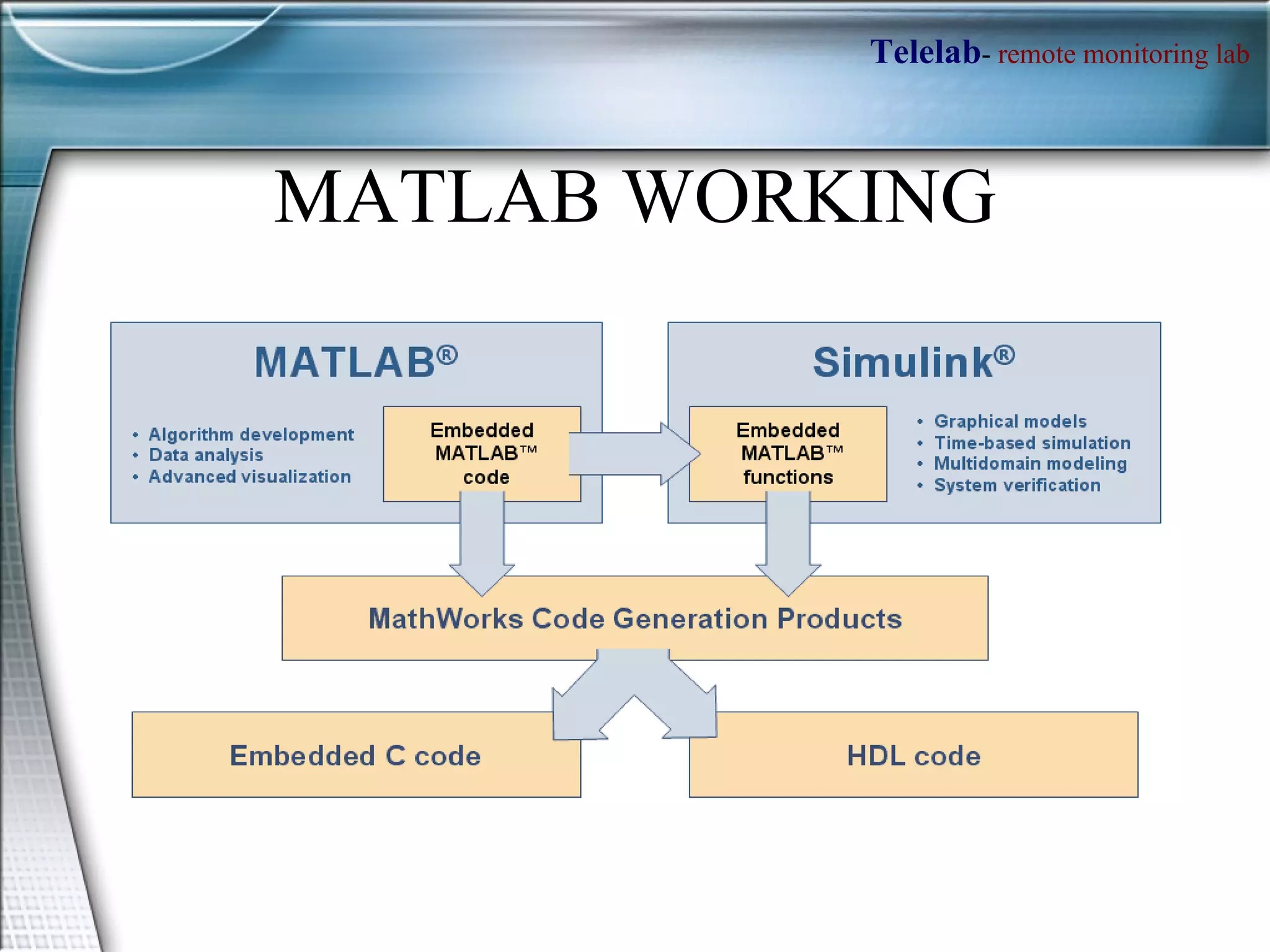
MATLAB WORKING
Applications of MATLAB Math and computation Algorithm development Data acquisition Modeling, simulation, and prototyping Data analysis, exploration, and visualization Scientific and engineering graphics Application development, including graphical user interface building
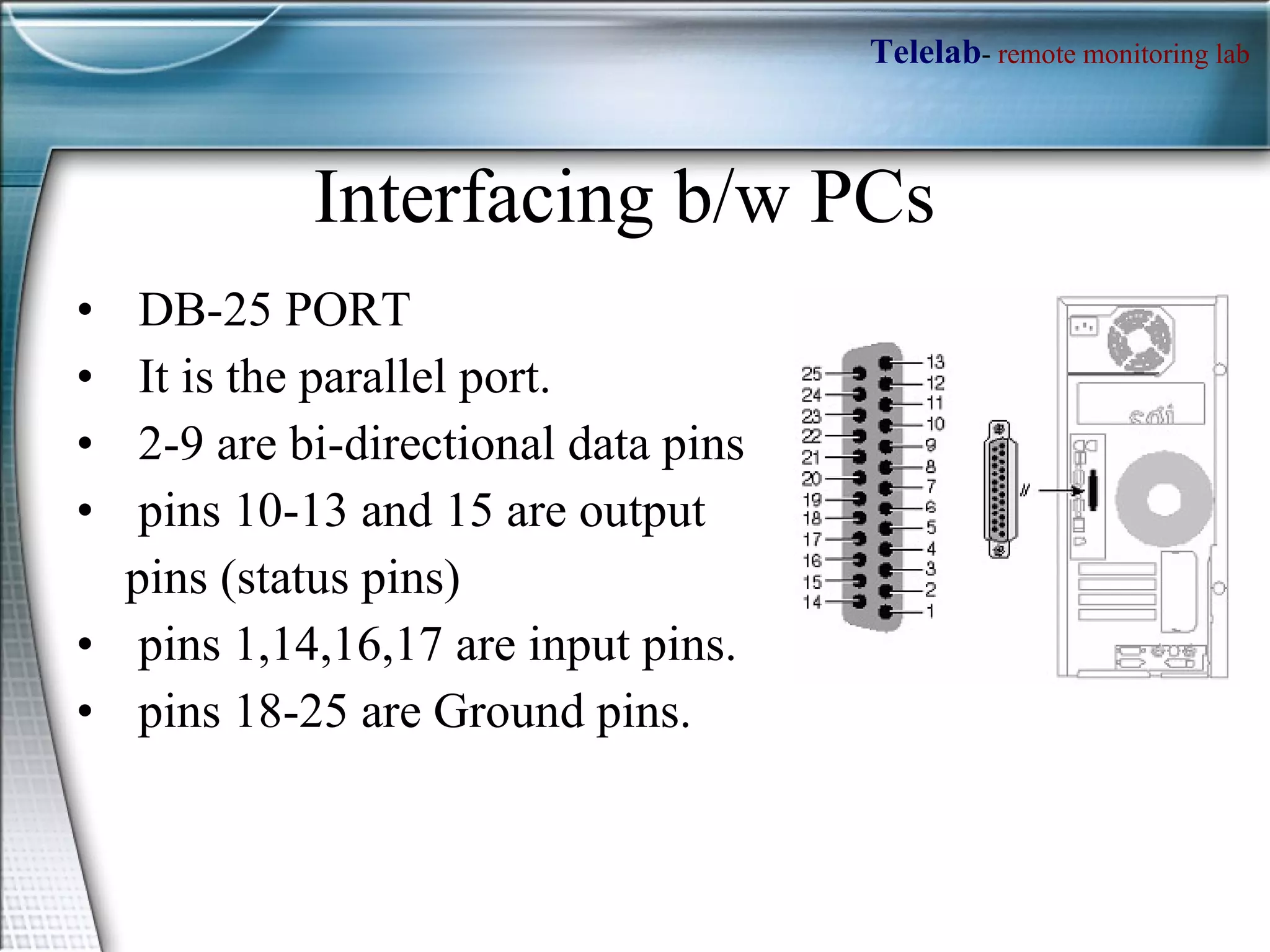
Interfacing b/w PCs DB-25 PORT It is the parallel port. 2-9 are bi-directional data pins pins 10-13 and 15 are output  pins (status pins)  pins 1,14,16,17 are input pins.  pins 18-25 are Ground pins.
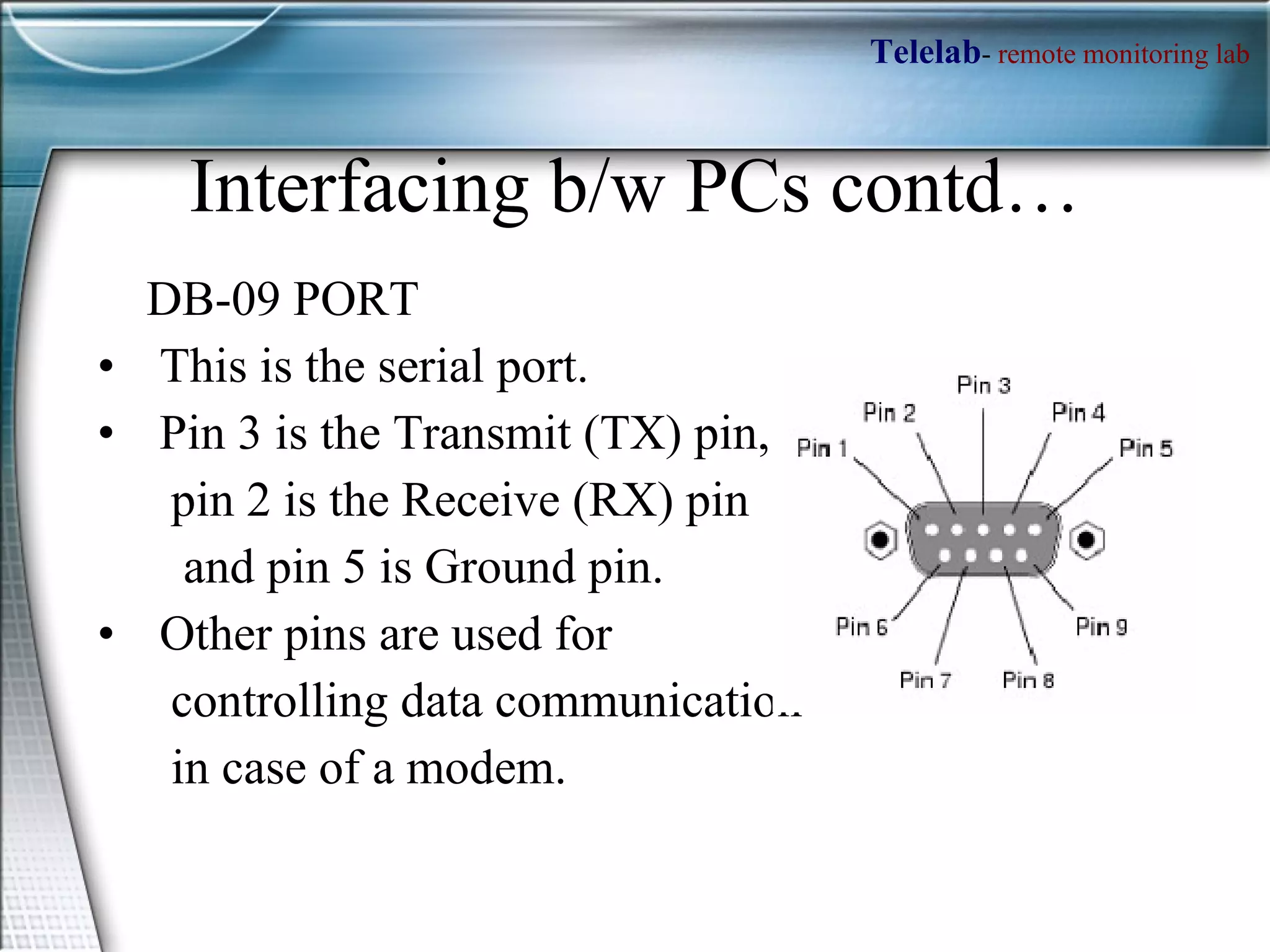
Interfacing b/w PCs contd… DB-09 PORT This is the serial port. Pin 3 is the Transmit (TX) pin,  pin 2 is the Receive (RX) pin  and pin 5 is Ground pin.  Other pins are used for  controlling data communication in case of a modem.
How access the Parallel port ?? MATLAB has an  adaptor  to access the parallel port . To access the parallel port in MATLAB, define an object  >> parport= digitalio('parallel','LPT1');  obtain the port address using,  >> get(parport,'PortAddress')  >> daqhwinfo('parallel'); % To get data acquisition hardware information We have to define the pins 2-9 as output pins, by using addline function  >> addline(parport, 0:7, 'out')  Now put the data which you want to output to the parallel port into a matrix; e.g.  >> dataout = logical([1 0 1 0 1 0 1 1]);  Now to output these values, use the putvalue function  >> putvalue(parport,dataout);  Alternatively, you can write the decimal equivalent of the binary data and output it.  >> data = 23;  >> putvalue(parport,data);
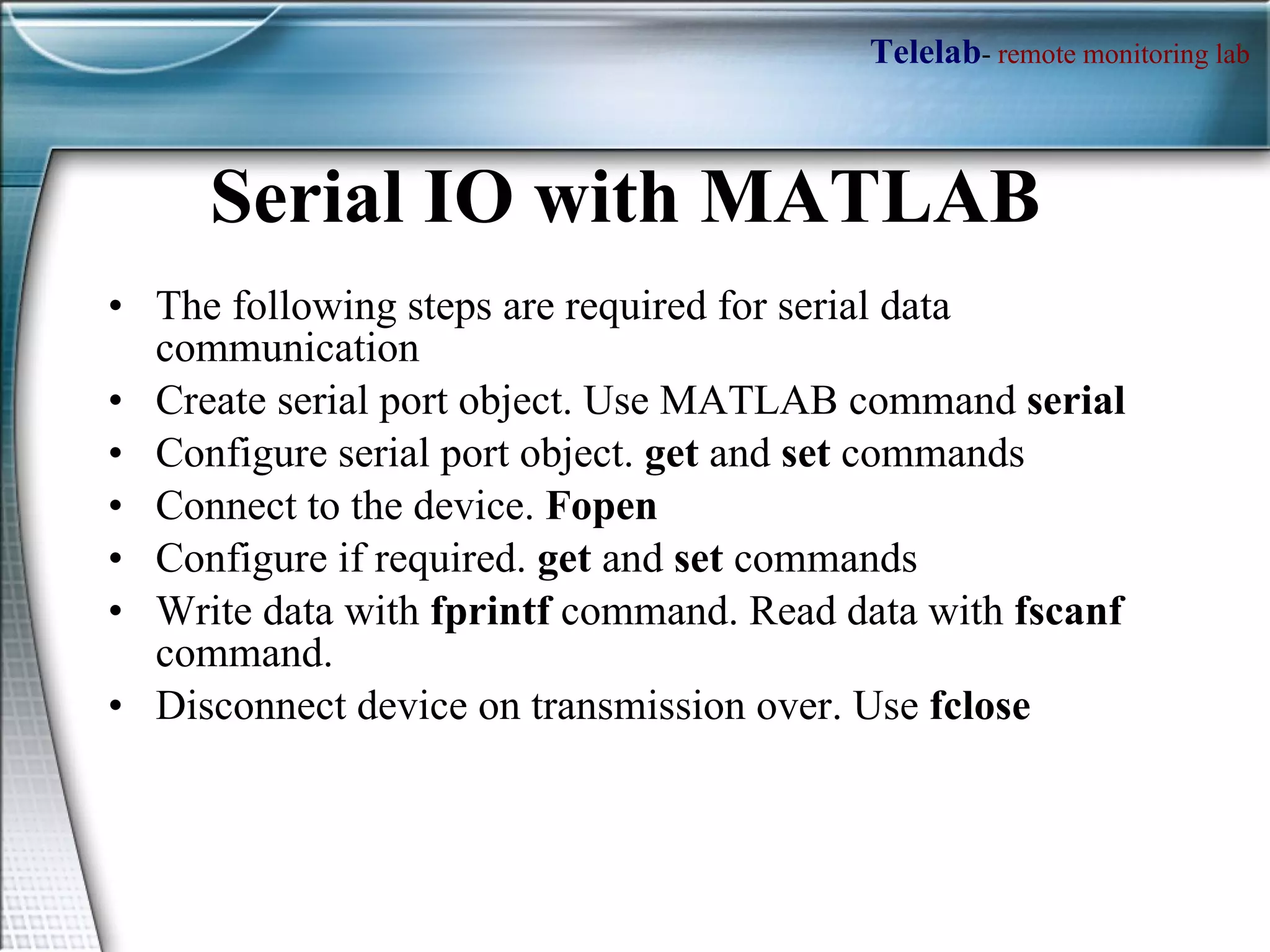
Serial IO with MATLAB  The following steps are required for serial data communication Create serial port object. Use MATLAB command  serial Configure serial port object.  get  and  set  commands Connect to the device.  Fopen Configure if required.  get  and  set  commands Write data with  fprintf  command. Read data with  fscanf  command. Disconnect device on transmission over. Use  fclose
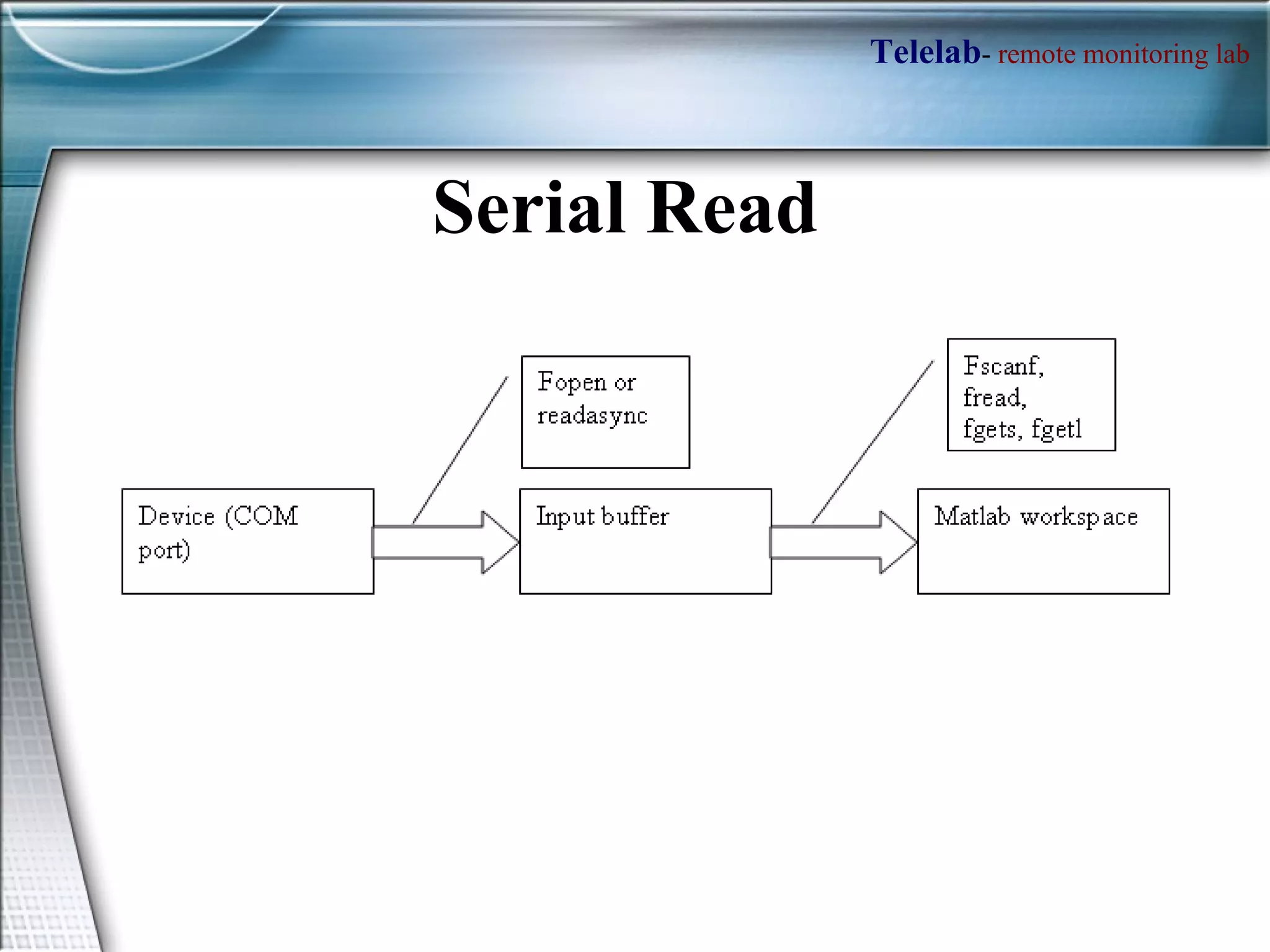
Serial Read
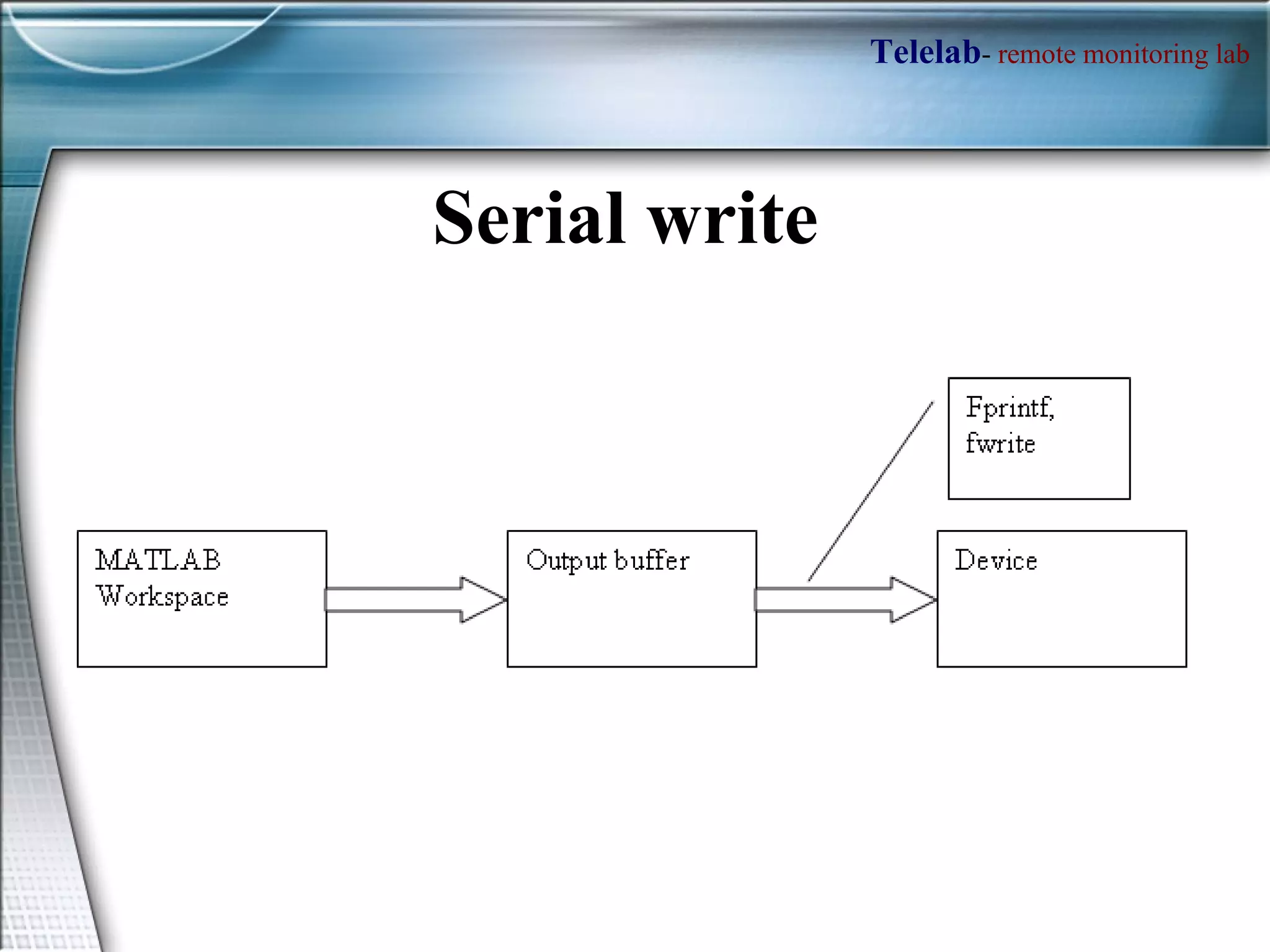
Serial write
 
 
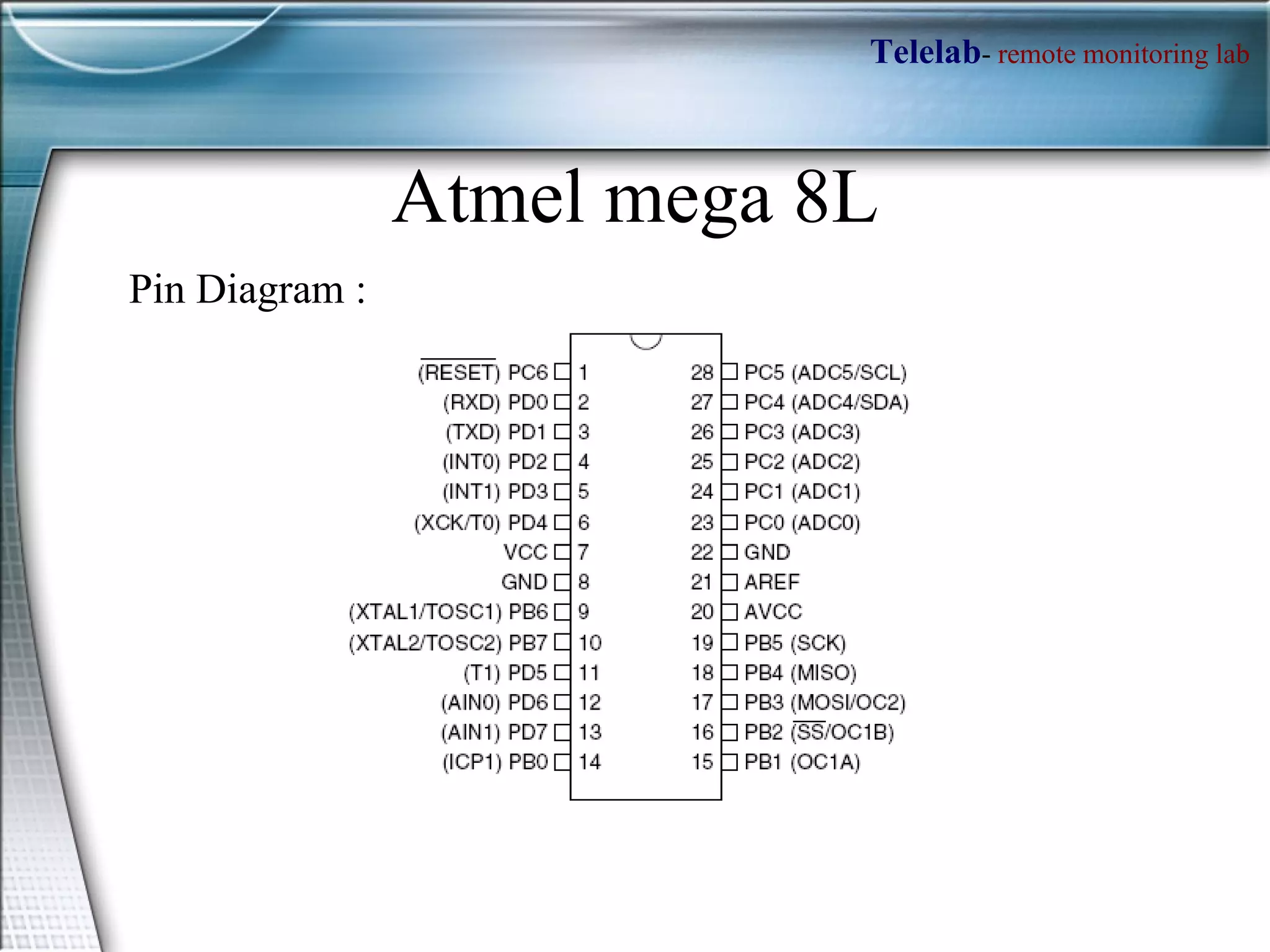
Atmel mega 8L Pin Diagram :
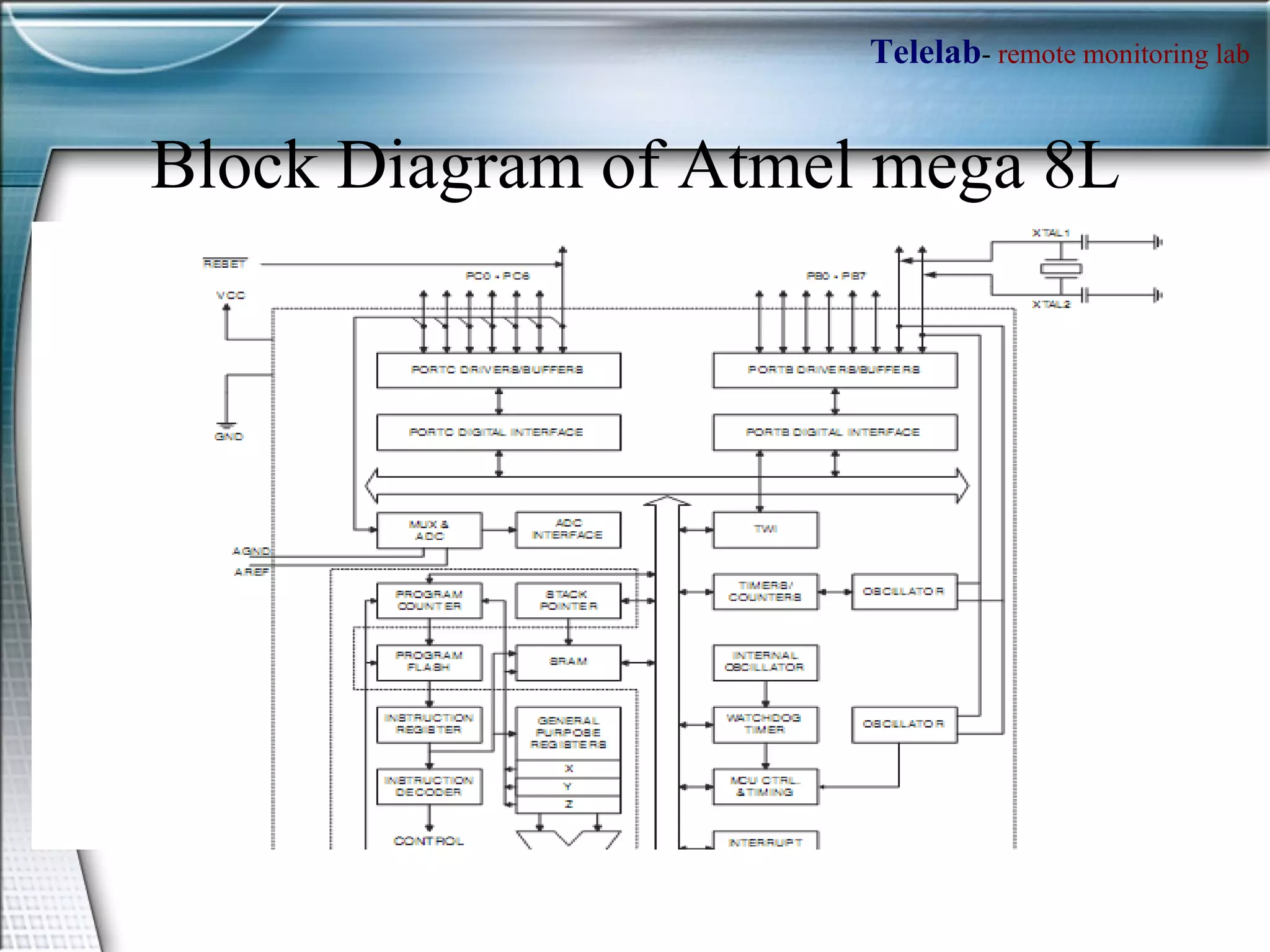
Block Diagram of Atmel mega 8L
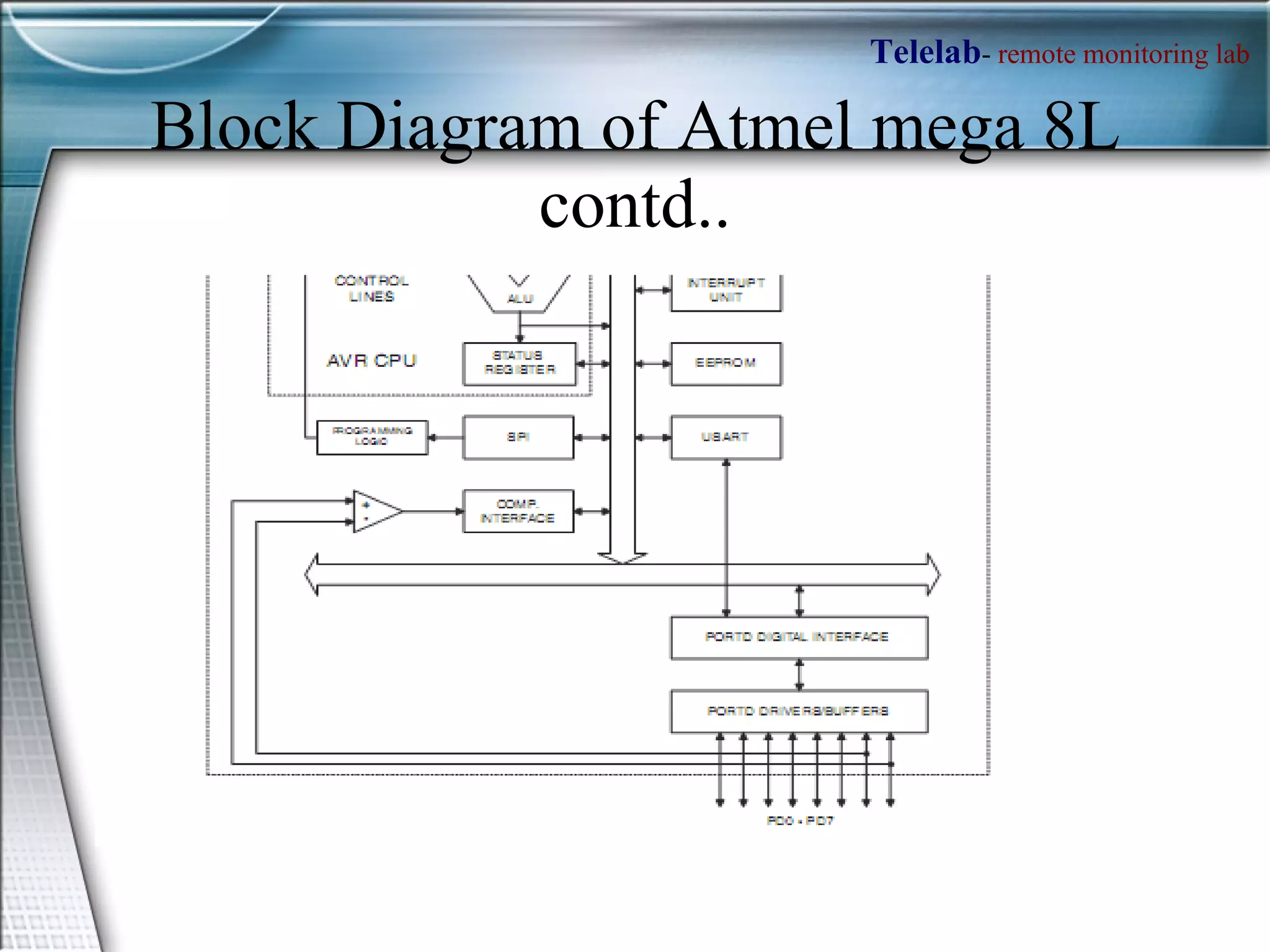
Block Diagram of Atmel mega 8L contd..
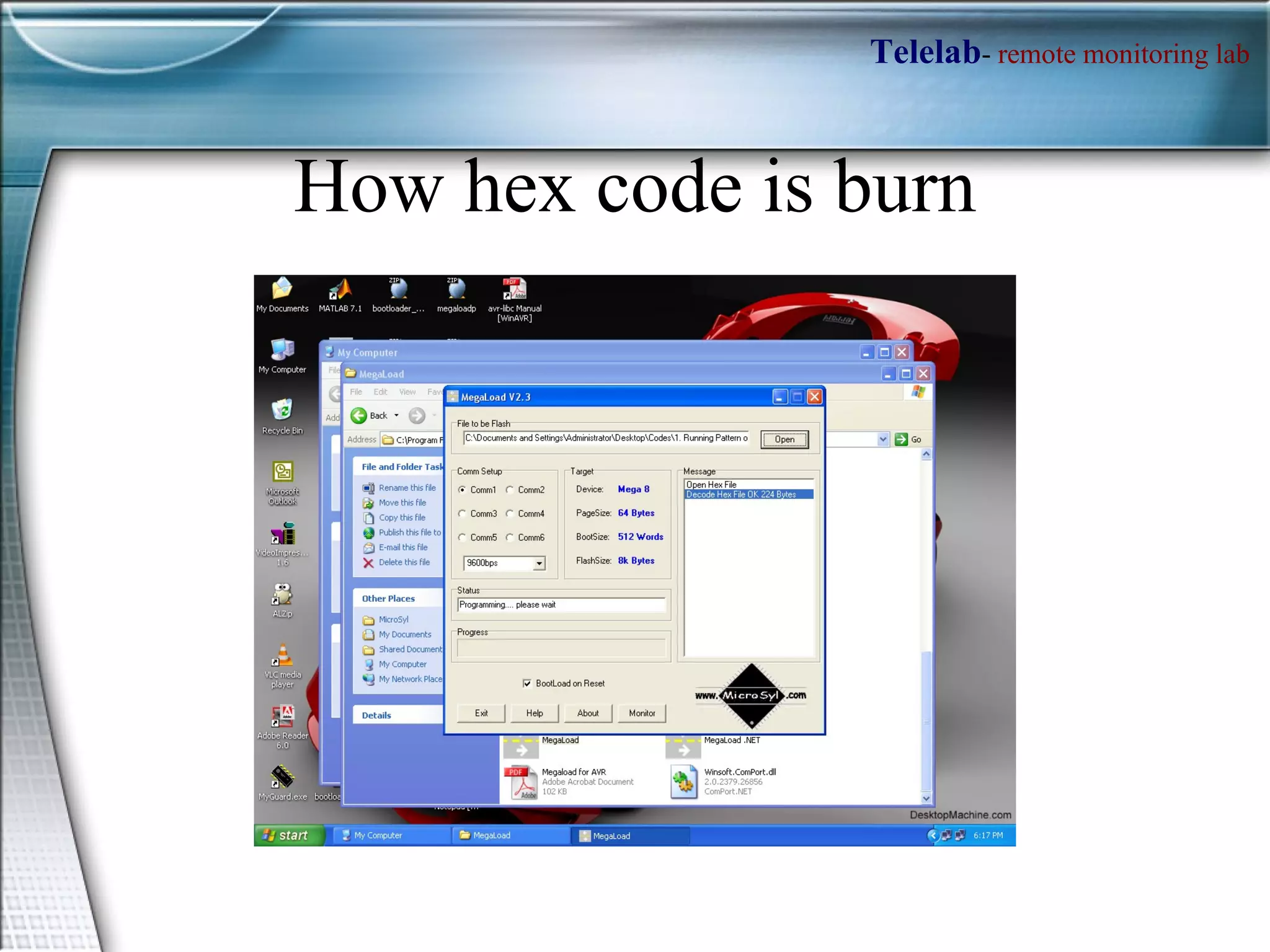
How hex code is burn
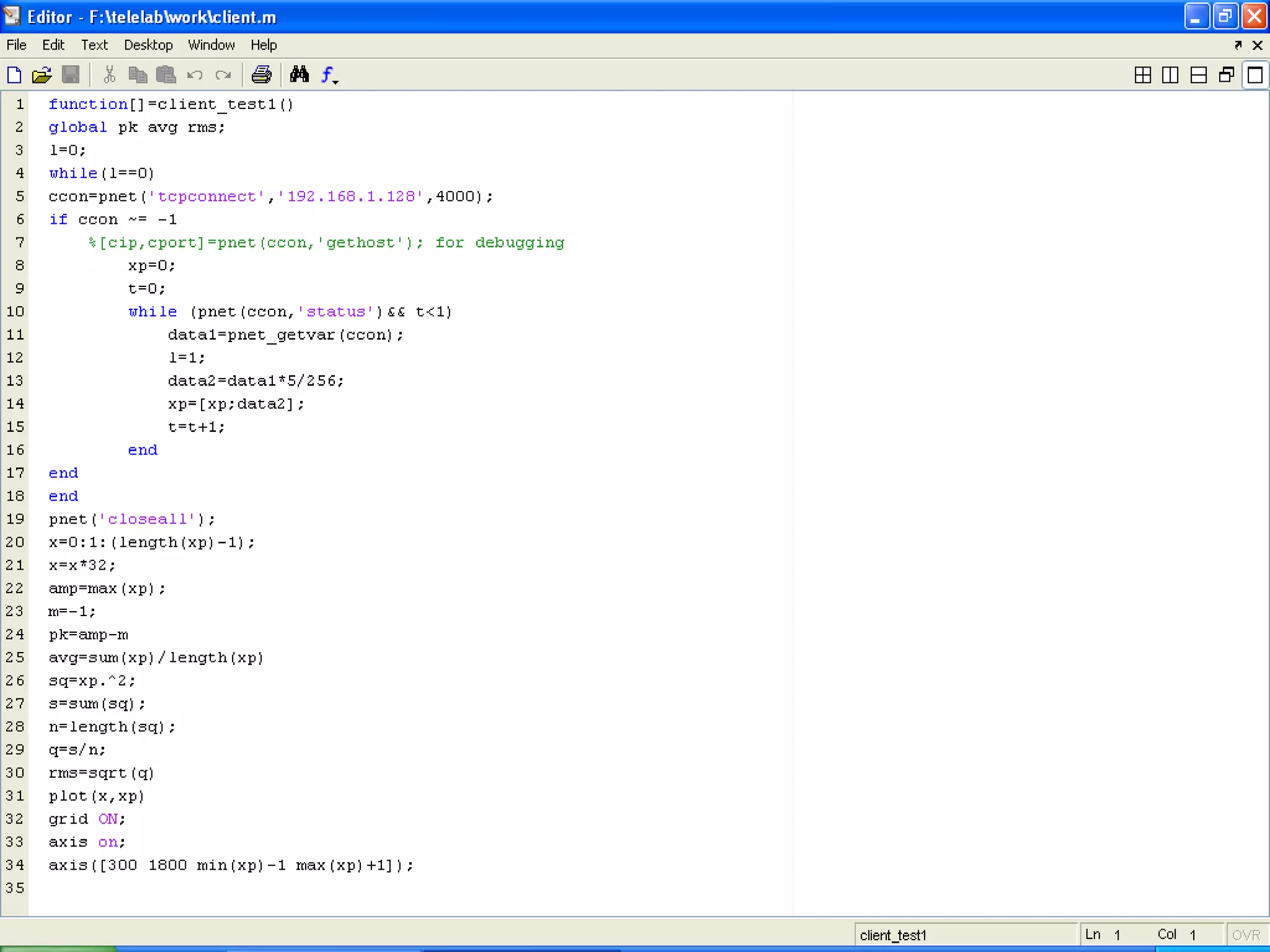
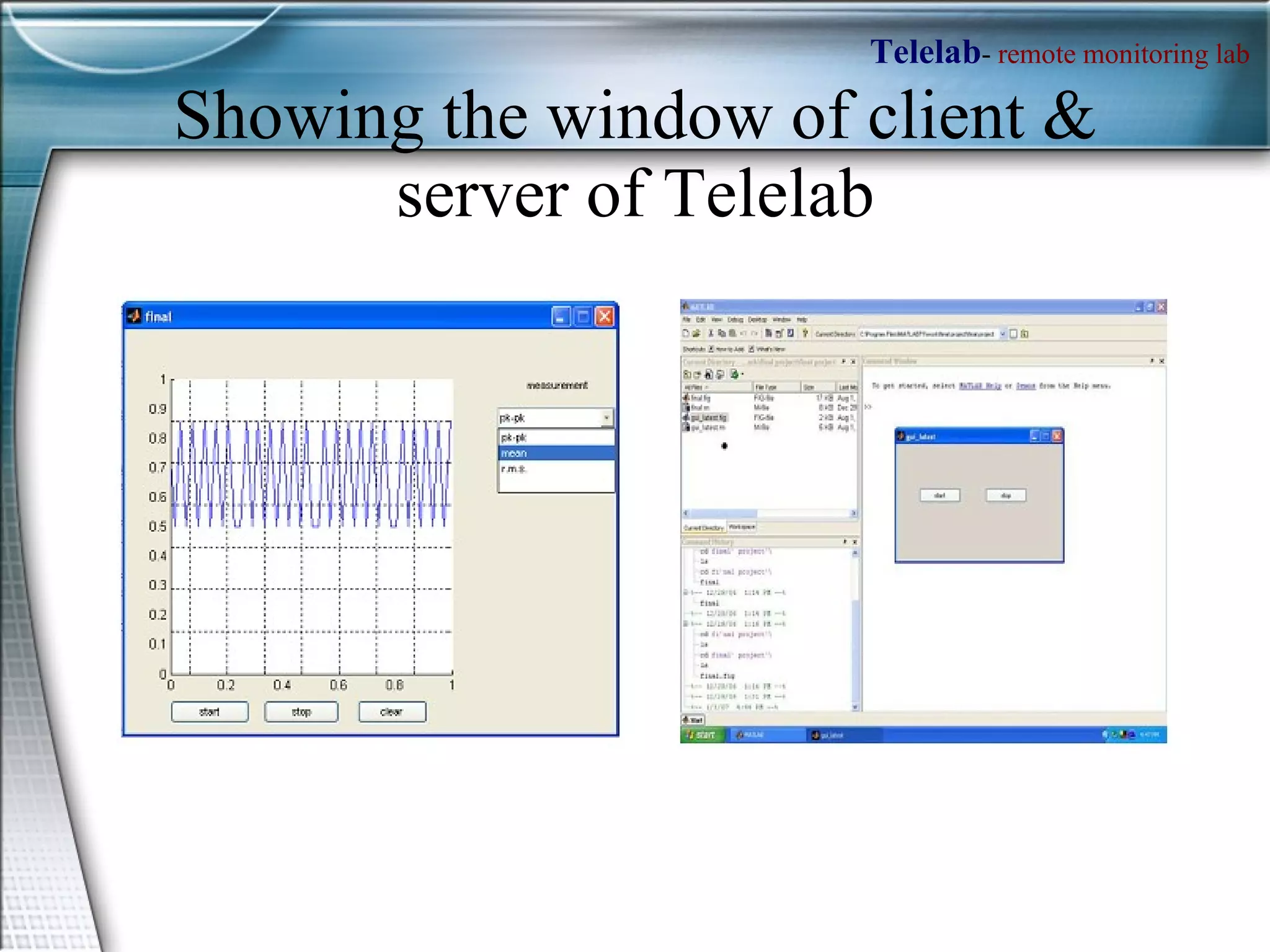
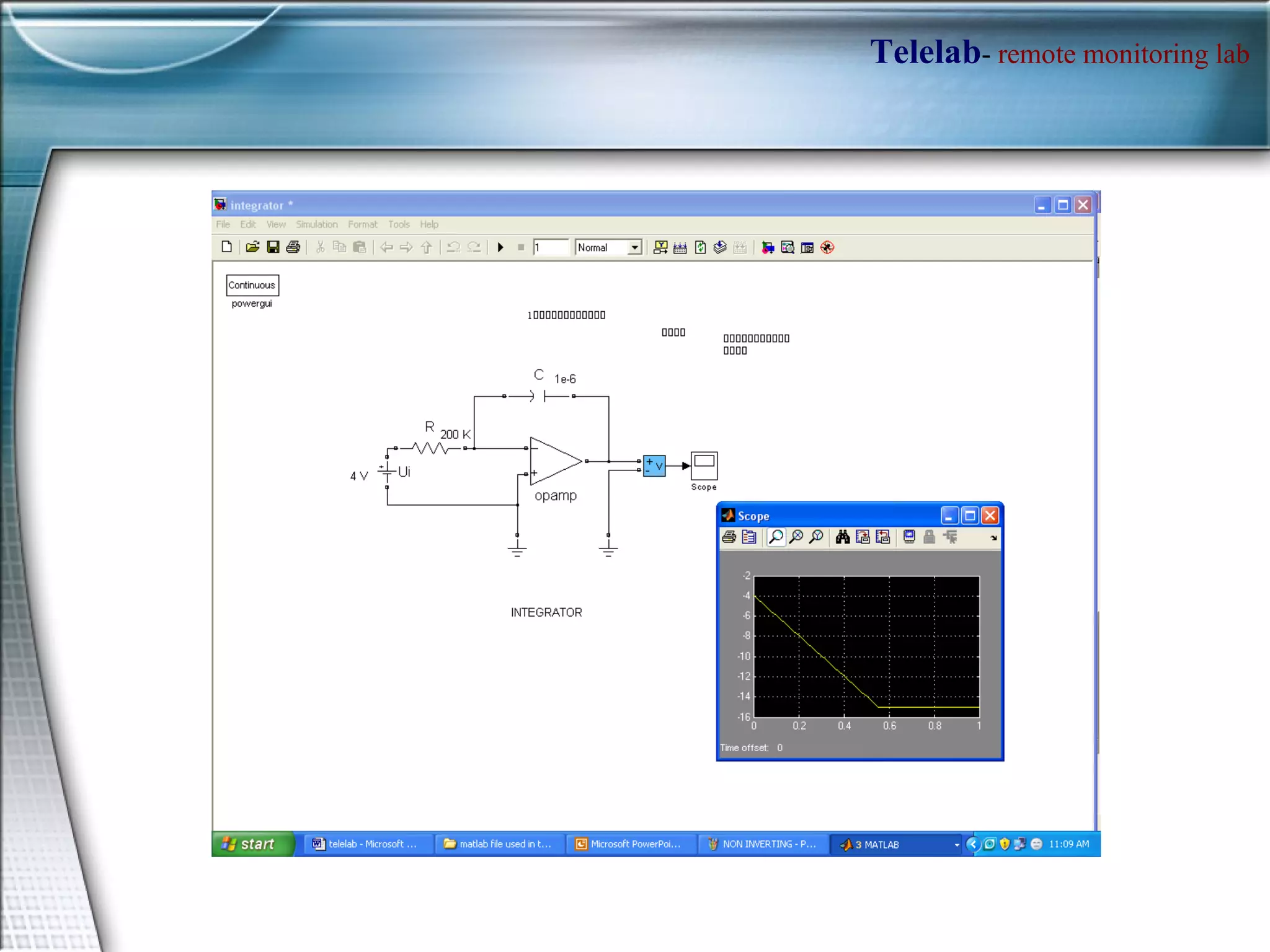
Showing the window of client & server of Telelab


REFERENCES [1]  Matlab help. http://www.mathworks.com/academia/  [2]  ‘tcp udp ip’ toolbox for Matlab. http //www.mathworks.com/matlabcentral/f ileexchange/ loadF ile.do?objectI d = 345  [3] Instrument Control Toolbox for Matlab. http :  //www.mathworks.com/access/helpdesk  [4]  WinAvr help.  [5]  Atmel Avr Manuals mega8 and some appnotes. http :  //atmel.com/dyn/resources  [6]  Real Systems in the Virtual Lab 2000. [Online]. Available:  http://prt.fernunihagen.de/rsvl  [7]  Remote Lab Experiment  RC Oscillator for Learning of Control. S. Uran, D. Hercog and K. Jezernik. University of Maribor, Faculty of Electrical Engineering and Computer Science, Maribor, Slovenia  [8]  S. Dormido, Control Learning: Present and Future, In Proc. 15 IFAC World Congres on Automatic Control,Barcelona, Spain, 2002.  [9]  M. Casini, et all, The Automatic Control Telelab, IEEE Control Systems Magazine, vol. 24, No. 3, 2004, pp.36-44.

Telelab 2

  • 1.
    A Remote Monitoringand Control System TELELAB Presented by : Avinash Pathak Dron Sharma
  • 2.
    What TELELAB is?? TELELAB is a system designed for remote monitoring and controlling which may be required in scientific research, testing and experimentation. It provides the observer with the data he/she requires without him/her being physically present at the place where the actual experiment is being conducted.
  • 3.
  • 4.
    Features of TELELABDesigned controller (Simulink file) is automatically converted as a real-time executable and uploaded on a remote PC connected to one or more processes, guaranteeing hard real-time performance The experiments are controlled by a standard web browser allowing a full modification of controller parameters and observing signals on real-time plots. Since a centralized server is employed to handle the remote PC’s, experiments can be easily shared among different laboratories or even different departments/universities, so reducing costs and facilitating the birth of laboratory consortia Much more practical and industrial oriented program.
  • 5.
    HOW WE WILLACHIEVE IT !!!!
  • 6.
    Integrator ATMEL MEGA 8L SERVER TCP/IP CLIENT 2 CLIENT 3 CLIENT 4 CLIENT 1 Through DB9 Port LAN N/W Model of implementation
  • 7.
  • 8.
  • 9.
  • 10.
    Applications of MATLABMath and computation Algorithm development Data acquisition Modeling, simulation, and prototyping Data analysis, exploration, and visualization Scientific and engineering graphics Application development, including graphical user interface building
  • 11.
    Interfacing b/w PCsDB-25 PORT It is the parallel port. 2-9 are bi-directional data pins pins 10-13 and 15 are output pins (status pins) pins 1,14,16,17 are input pins. pins 18-25 are Ground pins.
  • 12.
    Interfacing b/w PCscontd… DB-09 PORT This is the serial port. Pin 3 is the Transmit (TX) pin, pin 2 is the Receive (RX) pin and pin 5 is Ground pin. Other pins are used for controlling data communication in case of a modem.
  • 13.
    How access theParallel port ?? MATLAB has an adaptor to access the parallel port . To access the parallel port in MATLAB, define an object >> parport= digitalio('parallel','LPT1'); obtain the port address using, >> get(parport,'PortAddress') >> daqhwinfo('parallel'); % To get data acquisition hardware information We have to define the pins 2-9 as output pins, by using addline function >> addline(parport, 0:7, 'out') Now put the data which you want to output to the parallel port into a matrix; e.g. >> dataout = logical([1 0 1 0 1 0 1 1]); Now to output these values, use the putvalue function >> putvalue(parport,dataout); Alternatively, you can write the decimal equivalent of the binary data and output it. >> data = 23; >> putvalue(parport,data);
  • 14.
    Serial IO withMATLAB The following steps are required for serial data communication Create serial port object. Use MATLAB command serial Configure serial port object. get and set commands Connect to the device. Fopen Configure if required. get and set commands Write data with fprintf command. Read data with fscanf command. Disconnect device on transmission over. Use fclose
  • 15.
  • 16.
  • 17.
  • 18.
  • 19.
    Atmel mega 8LPin Diagram :
  • 20.
    Block Diagram ofAtmel mega 8L
  • 21.
    Block Diagram ofAtmel mega 8L contd..
  • 22.
    How hex codeis burn
  • 23.
    Showing the windowof client & server of Telelab
  • 24.
  • 25.
  • 26.
  • 27.
    REFERENCES [1] Matlab help. http://www.mathworks.com/academia/ [2] ‘tcp udp ip’ toolbox for Matlab. http //www.mathworks.com/matlabcentral/f ileexchange/ loadF ile.do?objectI d = 345 [3] Instrument Control Toolbox for Matlab. http : //www.mathworks.com/access/helpdesk [4] WinAvr help. [5] Atmel Avr Manuals mega8 and some appnotes. http : //atmel.com/dyn/resources [6] Real Systems in the Virtual Lab 2000. [Online]. Available: http://prt.fernunihagen.de/rsvl [7] Remote Lab Experiment RC Oscillator for Learning of Control. S. Uran, D. Hercog and K. Jezernik. University of Maribor, Faculty of Electrical Engineering and Computer Science, Maribor, Slovenia [8] S. Dormido, Control Learning: Present and Future, In Proc. 15 IFAC World Congres on Automatic Control,Barcelona, Spain, 2002. [9] M. Casini, et all, The Automatic Control Telelab, IEEE Control Systems Magazine, vol. 24, No. 3, 2004, pp.36-44.