ADAM-3600 Seires
Training Kit
IAG Inter-corn AE
Alex Hsieh (謝明宏)
Agenda
 Overview of ADAM-3600 & Demo Box Hands-On
 First Step - Build Up Your Own iRTU System
 Methods for Trouble Shooting
 Connecting the Dots – Upper Link Setting
 Logic Building – Using SoftLogic for Complex Logic
(Demo)
Overview of ADAM-3600 & Demo Box
Hands-On
In this section you’ll know:
 What iRTU is and its 8 features
 The installation of Advantech TagLink Studio
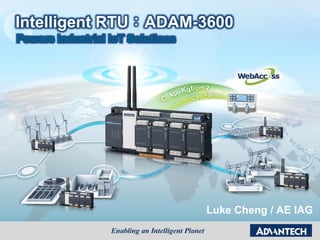
Intelligent RTU:ADAM-3600
Powers Industrial IoT Solutions
Luke Cheng / AE IAG
Outline
 Introduction to ADAM-3600& DEMO Box
 Application Story of ADAM-3600
 Features Highlight on ADAM-3600
 Conclusion
Outline
 Introduction to ADAM-3600 & DEMO Box
 Application Story of ADAM-3600
 Features Highlight on ADAM-3600
 Conclusion
Intelligent RTU in the IoT Era
Precise Sensing Smart Node in Far & Wide Area
Telecommunication to
the Cloud
High Adaptability to Environment
Self-diagnosis / healing
Big Data Pretreatments
Part of Telemetry / SCADA system
iRTU Powers Industrial IoT Solutions
Scene of Oil Production
Easy monitoring &
intuitive control
OperatorEngineer
Remote diagnosis &
maintenance
Visual management &
strategy development
Executives
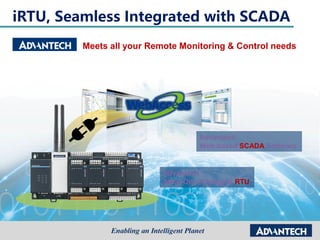
iRTU, Seamless Integrated with SCADA
Meets all your Remote Monitoring & Control needs
Advantech
Web-based SCADA Software
One-stop shopping for IoT S/W & H/W, Minimize purchasing and support effort
Advantech
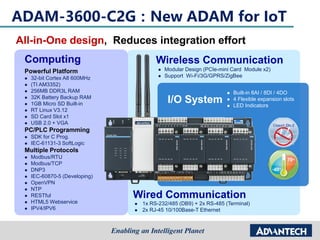
All-in-One Intelligent RTU
Wired Communication
 1x RS-232/485 (DB9) + 2x RS-485 (Terminal)
 2x RJ-45 10/100Base-T Ethernet
Wireless Communication
 Modular Design (PCIe-mini Card Module x2)
 Support Wi-Fi/3G/GPRS/ZigBee
Computing
Powerful Platform
 32-bit Cortex A8 600MHz
 (TI AM3352)
 256MB DDR3L RAM
 32K Battery Backup RAM
 1GB Micro SD Built-in
 RT Linux V3.12
 SD Card Slot x1
 USB 2.0 + VGA
PC/PLC Programming
 SDK for C Prog.
 IEC-61131-3 SoftLogic
Multiple Protocols
 Modbus/RTU
 Modbus/TCP
 DNP3
 IEC-60870-5 (Developing)
 OpenVPN
 NTP
 RESTful
 HTML5 Webservice
 IPV4/IPV6
I/O System
 Built-in 8AI / 8DI / 4DO
 4 Flexible expansion slots
 LED Indicators
ADAM-3600-C2G:New ADAM for IoT
All-in-One design, Reduces integration effort
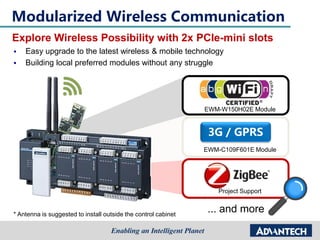
Modularized Wireless Communication
Explore Wireless Possibility with 2x PCIe-mini slots
3G / GPRS
... and more* Antenna is suggested to install outside the control cabinet
 Easy upgrade to the latest wireless & mobile technology
 Building local preferred modules without any struggle
EWM-W150H02E Module
EWM-C109F601E Module
Project Support
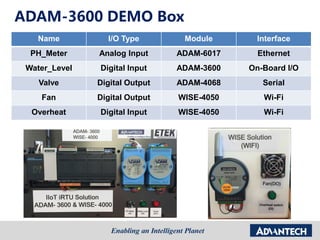
ADAM-3600 DEMO Box
Name I/O Type Module Interface
PH_Meter Analog Input ADAM-6017 Ethernet
Water_Level Digital Input ADAM-3600 On-Board I/O
Valve Digital Output ADAM-4068 Serial
Fan Digital Output WISE-4050 Wi-Fi
Overheat Digital Input WISE-4050 Wi-Fi
Installation
 Software SetupTagLinkStudio_1.2.0.62_Release_#31
Outline
 Introduction to ADAM-3600& DEMO Box
 Application Story of ADAM-3600
 Features Highlight on ADAM-3600
 Conclusion
Green House &
Irrigation
Unman
Outstation
Facility
Monitoring
Substation
IED
Refrigerated
Truck
Oil & Gas
Well and Pipe
Remote
Pump Station
Building Energy
Saving
Transport
Monitoring
iRTU, Born for Remote Automation
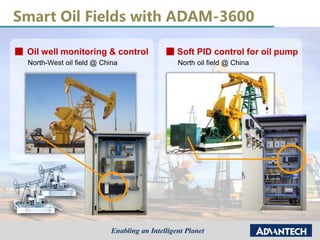
Smart Oil Fields with ADAM-3600
Oil well monitoring & control Soft PID control for oil pump
North-West oil field @ China North oil field @ China
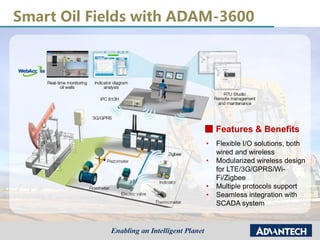
Smart Oil Fields with ADAM-3600
Features & Benefits
• Flexible I/O solutions, both
wired and wireless
• Modularized wireless design
for LTE/3G/GPRS/Wi-
Fi/Zigbee
• Multiple protocols support
• Seamless integration with
SCADA system
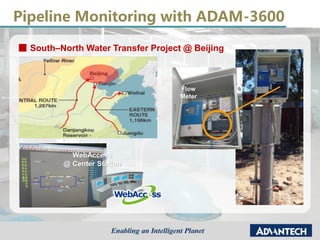
Pipeline Monitoring with ADAM-3600
South–North Water Transfer Project @ Beijing
WebAccess
@ Center Station
Flow
Meter
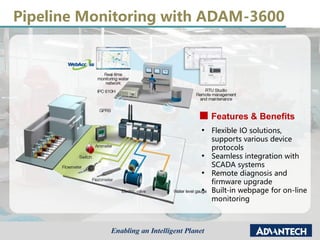
Pipeline Monitoring with ADAM-3600
Features & Benefits
• Flexible IO solutions,
supports various device
protocols
• Seamless integration with
SCADA systems
• Remote diagnosis and
firmware upgrade
• Built-in webpage for on-line
monitoring
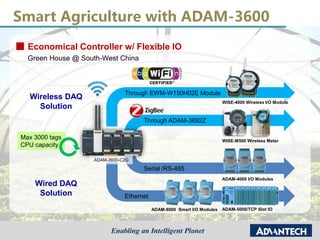
Smart Agriculture with ADAM-3600
Economical Controller w/ Flexible IO
Green House @ South-West China
Max 3000 tags
CPU capacity
Serial /RS-485
Ethernet
Wireless DAQ
Solution
Wired DAQ
Solution
ADAM-3600-C2G
Through EWM-W150H02E Module
WISE-4000 Wireless I/O Module
WISE-M500 Wireless Meter
Through ADAM-3692Z
ADAM-4000 I/O Modules
ADAM-6000 Smart I/O Modules ADAM-5000/TCP Slot IO
Outline
 Introduction to ADAM-3600 & DEMO Box
 Application Story of ADAM-3600
 Features Highlight on ADAM-3600
 Conclusion
iRTU Equips Key IoT Technology
RTU
(Remote Terminal Unit)
Gateway Concentrator
Transfer Physical Value to be
Tags, and secure the linkage with
cloud and each node. Targets 3
typical applications shown below.
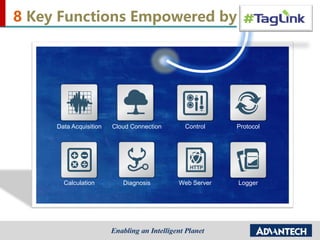
Data Acquisition
LoggerWeb Server
Cloud Connection
Calculation
Control
Diagnosis
Protocol
8 Key Functions Empowered by
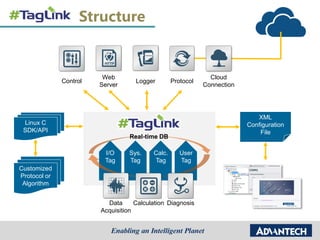
Structure
I/O
Tag
Sys.
Tag
Calc.
Tag
User
Tag
Calculation Diagnosis
Logger
Web
Server
Cloud
Connection
Control Protocol
Real-time DB
Linux C
SDK/API
Customized
Protocol or
Algorithm
XML
Configuration
File
Off-line Utility
Data
Acquisition
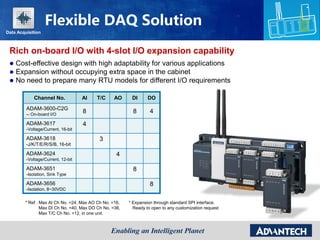
Rich on-board I/O with 4-slot I/O expansion capability
Channel No. AI T/C AO DI DO
ADAM-3600-C2G
-- On-board I/O
8 8 4
ADAM-3617
-Voltage/Current, 16-bit
4
ADAM-3618
-J/K/T/E/R/S/B, 16-bit
3
ADAM-3624
-Voltage/Current, 12-bit
4
ADAM-3651
-Isolation, Sink Type
8
ADAM-3656
-Isolation, 8~30VDC
8
* Ref . Max AI Ch No. =24, Max AO Ch No. =16,
Max DI Ch No. =40, Max DO Ch No. =36,
Max T/C Ch No. =12, in one unit.
* Expansion through standard SPI interface.
Ready to open to any customization request
 Cost-effective design with high adaptability for various applications
 Expansion without occupying extra space in the cabinet
 No need to prepare many RTU models for different I/O requirements
Flexible DAQ Solution
Data Acquisition
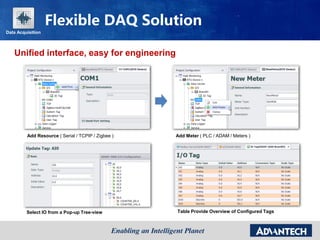
Unified interface, easy for engineering
Add Resource ( Serial / TCPIP / Zigbee ) Add Meter ( PLC / ADAM / Meters )
Select IO from a Pop-up Tree-view Table Provide Overview of Configured Tags
Flexible DAQ Solution
Data Acquisition
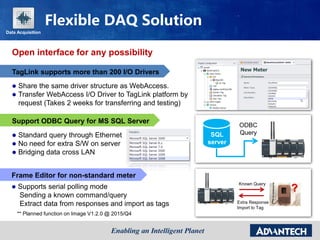
Open interface for any possibility
TagLink supports more than 200 I/O Drivers
 Share the same driver structure as WebAccess.
 Transfer WebAccess I/O Driver to TagLink platform by
request (Takes 2 weeks for transferring and testing)
SQL
server
ODBC
Query
Support ODBC Query for MS SQL Server
?
Frame Editor for non-standard meter
 Supports serial polling mode
Sending a known command/query
Extract data from responses and import as tags
Known Query
Extra Response
Import to Tag
** Planned function on Image V1.2.0 @ 2015/Q4
 Standard query through Ethernet
 No need for extra S/W on server
 Bridging data cross LAN
Flexible DAQ Solution
Data Acquisition
Raw Data
Query by
Address
SCADA
RTU
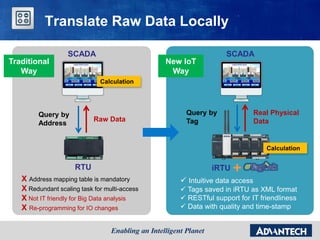
X Address mapping table is mandatory
X Redundant scaling task for multi-access
X Not IT friendly for Big Data analysis
X Re-programming for IO changes
Calculation
Traditional
Way
Translate Raw Data Locally
Query by
Tag
Real Physical
Data
SCADA
iRTU
 Intuitive data access
 Tags saved in iRTU as XML format
 RESTful support for IT friendliness
 Data with quality and time-stamp
New IoT
Way
Calculation
Calculation
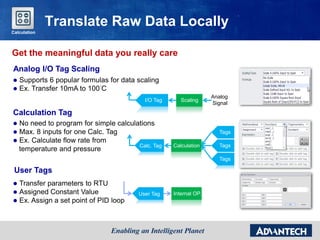
Get the meaningful data you really care
Translate Raw Data Locally
Analog I/O Tag Scaling
 Supports 6 popular formulas for data scaling
 Ex. Transfer 10mA to 100°C
Scaling
Analog
Signal
I/O Tag
Calc. Tag Calculation
Tags
Tags
Tags
Calculation Tag
 No need to program for simple calculations
 Max. 8 inputs for one Calc. Tag
 Ex. Calculate flow rate from
temperature and pressure
User Tag Internal OP.
User Tags
 Transfer parameters to RTU
 Assigned Constant Value
 Ex. Assign a set point of PID loop
Calculation
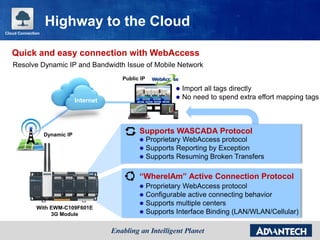
Internet
With EWM-C109F601E
3G Module
Supports WASCADA Protocol
 Proprietary WebAccess protocol
 Supports Reporting by Exception
 Supports Resuming Broken Transfers
“WhereIAm” Active Connection Protocol
 Proprietary WebAccess protocol
 Configurable active connecting behavior
 Supports multiple centers
 Supports Interface Binding (LAN/WLAN/Cellular)
Dynamic IP
Public IP
 Import all tags directly
 No need to spend extra effort mapping tags
Cloud Connection
Highway to the Cloud
Resolve Dynamic IP and Bandwidth Issue of Mobile Network
Quick and easy connection with WebAccess
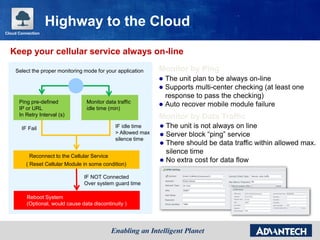
Keep your cellular service always on-line
Ping pre-defined
IP or URL
In Retry Interval (s)
Monitor data traffic
idle time (min)
IF Fail
Reconnect to the Cellular Service
( Reset Cellular Module in some condition)
IF NOT Connected
Over system guard time
Reboot System
(Optional, would cause data discontinuity )
Select the proper monitoring mode for your application Monitor by Ping
 The unit plan to be always on-line
 Supports multi-center checking (at least one
response to pass the checking)
 Auto recover mobile module failure
Monitor by Data Traffic
 The unit is not always on line
 Server block “ping” service
 There should be data traffic within allowed max.
silence time
 No extra cost for data flow
Highway to the Cloud
IF idle time
> Allowed max
silence time
Cloud Connection
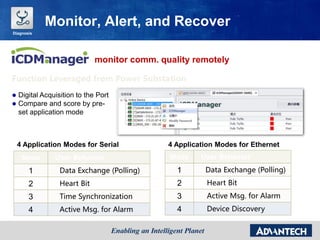
monitor comm. quality remotely
Function Leveraged from Power Substation
4 Application Modes for Serial
Mode User Behavior
1 Data Exchange (Polling)
2 Heart Bit
3 Time Synchronization
4 Active Msg. for Alarm
4 Application Modes for Ethernet
Mode User Behavior
1 Data Exchange (Polling)
2 Heart Bit
3 Active Msg. for Alarm
4 Device Discovery
Monitor, Alert, and Recover
 Digital Acquisition to the Port
 Compare and score by pre-
set application mode
Diagnosis
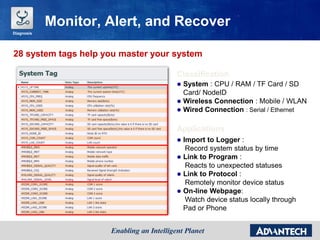
28 system tags help you master your system
Classification
 System : CPU / RAM / TF Card / SD
Card/ NodeID
 Wireless Connection : Mobile / WLAN
 Wired Connection : Serial / Ethernet
Applications
 Import to Logger :
Record system status by time
 Link to Program :
Reacts to unexpected statuses
 Link to Protocol :
Remotely monitor device status
 On-line Webpage:
Watch device status locally through
Pad or Phone
Diagnosis
Monitor, Alert, and Recover
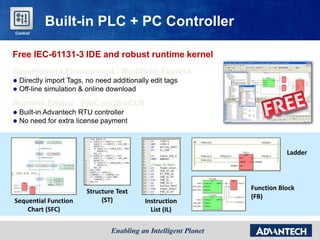
Free IEC-61131-3 IDE and robust runtime kernel
Development Environment : MultiProg Express
 Directly import Tags, no need additionally edit tags
 Off-line simulation & online download
Runtime Engine : ProConOS eCLR
 Built-in Advantech RTU controller
 No need for extra license payment
Built-in PLC + PC Controller
Sequential Function
Chart (SFC)
Structure Text
(ST) Instruction
List (IL)
Ladder
Function Block
(FB)
Control
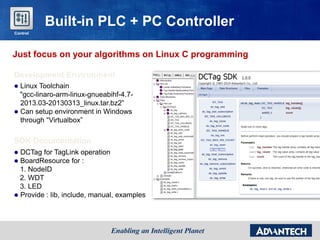
Just focus on your algorithms on Linux C programming
Development Environment
 Linux Toolchain
"gcc-linaro-arm-linux-gnueabihf-4.7-
2013.03-20130313_linux.tar.bz2”
 Can setup environment in Windows
through “Virtualbox”
SDK Documentation
 DCTag for TagLink operation
 BoardResource for :
1. NodeID
2. WDT
3. LED
 Provide : lib, include, manual, examples
Built-in PLC + PC Controller
Control
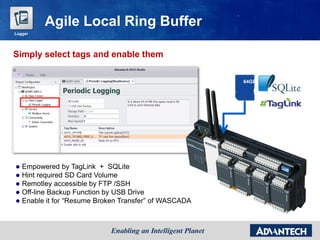
 Empowered by TagLink + SQLite
 Hint required SD Card Volume
 Remotley accessible by FTP /SSH
 Off-line Backup Function by USB Drive
 Enable it for “Resume Broken Transfer” of WASCADA
64GB
Simply select tags and enable them
Agile Local Ring Buffer
Logger
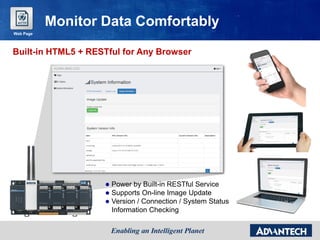
Built-in HTML5 + RESTful for Any Browser
 Power by Built-in RESTful Service
 Supports On-line Image Update
 Version / Connection / System Status
Information Checking
Monitor Data Comfortably
Web Page
In Big Data era, we need more than Modbus…
DNP3 Protocol
WASCADA
Interface to the World
Sequential of Event
Data with Time-stamp
Supplementary Report
Data Retrofit
Data Encryption / Authorization
Active/Scheduled Data Upload
Global Time Synchronization
Protocol
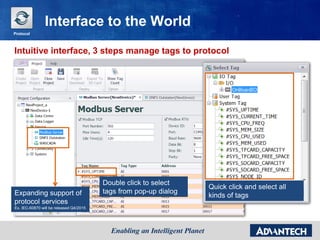
Intuitive interface, 3 steps manage tags to protocol
Interface to the World
Double click to select
tags from pop-up dialog
Quick click and select all
kinds of tagsExpanding support of
protocol services
Ex. IEC-60870 will be released Q4/2015
Protocol
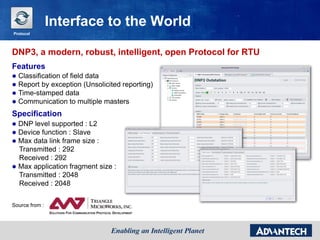
DNP3, a modern, robust, intelligent, open Protocol for RTU
Features
 Classification of field data
 Report by exception (Unsolicited reporting)
 Time-stamped data
 Communication to multiple masters
Specification
 DNP level supported : L2
 Device function : Slave
 Max data link frame size :
Transmitted : 292
Received : 292
 Max application fragment size :
Transmitted : 2048
Received : 2048
Source from :
Interface to the World
Protocol
Outline
 Introduction to ADAM-3600 & DEMO Box
 Application Story of ADAM-3600
 Features Highlight on ADAM-3600
 Conclusion
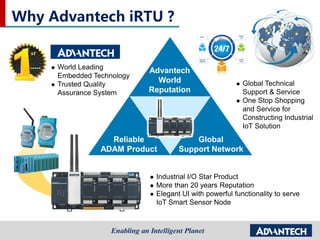
Why Advantech iRTU ?
 World Leading
Embedded Technology
 Trusted Quality
Assurance System
 Global Technical
Support & Service
 One Stop Shopping
and Service for
Constructing Industrial
IoT Solution
 Industrial I/O Star Product
 More than 20 years Reputation
 Elegant UI with powerful functionality to serve
IoT Smart Sensor Node
Advantech
World
Reputation
Reliable
ADAM Product
Global
Support Network
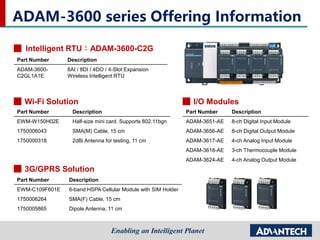
ADAM-3600 series Offering Information
Intelligent RTU:ADAM-3600-C2G
3G/GPRS Solution
Part Number Description
EWM-C109F601E 6-band HSPA Cellular Module with SIM Holder
1750006264 SMA(F) Cable, 15 cm
1750005865 Dipole Antenna, 11 cm
Wi-Fi Solution
Part Number Description
EWM-W150H02E Half-size mini card. Supports 802.11bgn
1750006043 SMA(M) Cable, 15 cm
1750000318 2dBi Antenna for testing, 11 cm
Part Number Description
ADAM-3651-AE 8-ch Digital Input Module
ADAM-3656-AE 8-ch Digital Output Module
ADAM-3617-AE 4-ch Analog Input Module
ADAM-3618-AE 3-ch Thermocouple Module
ADAM-3624-AE 4-ch Analog Output Module
I/O Modules
Part Number Description
ADAM-3600-
C2GL1A1E
8AI / 8DI / 4DO / 4-Slot Expansion
Wireless Intelligent RTU
Contact Information
 Axel Chou, PM
– VOIP: 523-6293
– E-mail: Axel.Chou@advantech.com.tw
 Li Shi, PME
– VOIP: 523-6529
– E-mail: Li.Shi@advantech.com.cn
 Cindy Liu, SCM
– VOIP: 511-7036
– E-mail: Cindy109.Liu@advantech.com.tw
 Elaine Huang, Marcom
– VOIP: 511-2633
– E-mail: Elaine.Huang@advantech.com.tw
First Step - Build up your Own iRTU
system
In this section you’ll know:
 The system structure of ADAM-3600 demo box
 Using TagLink to connect to ADAM-3600
 Using TagLink Studio for on-line and off-line
configuration
 Connecting ADAM-3600 with end-devices
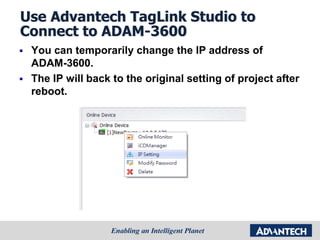
Use Advantech TagLink Studio to
Connect to ADAM-3600
 You can temporarily change the IP address of
ADAM-3600.
 The IP will back to the original setting of project after
reboot.
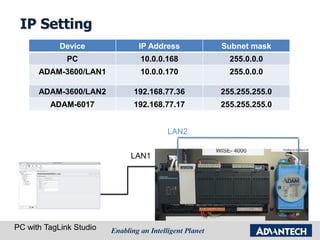
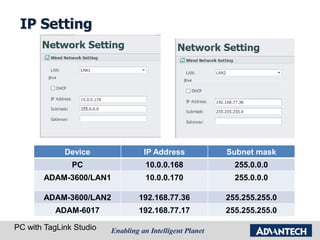
IP Setting
PC with TagLink Studio
LAN1
LAN2
Device IP Address Subnet mask
PC 10.0.0.168 255.0.0.0
ADAM-3600/LAN1 10.0.0.170 255.0.0.0
ADAM-3600/LAN2 192.168.77.36 255.255.255.0
ADAM-6017 192.168.77.17 255.255.255.0
IP Setting
PC with TagLink Studio
Device IP Address Subnet mask
PC 10.0.0.168 255.0.0.0
ADAM-3600/LAN1 10.0.0.170 255.0.0.0
ADAM-3600/LAN2 192.168.77.36 255.255.255.0
ADAM-6017 192.168.77.17 255.255.255.0
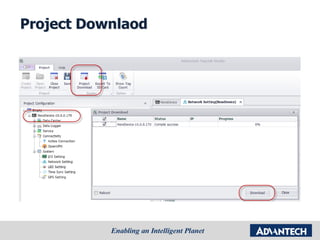
Project Downlaod
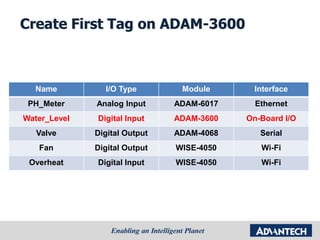
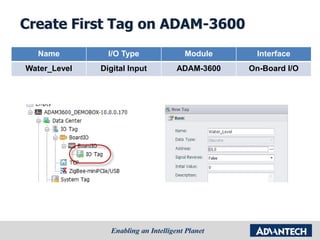
Create First Tag on ADAM-3600
Name I/O Type Module Interface
PH_Meter Analog Input ADAM-6017 Ethernet
Water_Level Digital Input ADAM-3600 On-Board I/O
Valve Digital Output ADAM-4068 Serial
Fan Digital Output WISE-4050 Wi-Fi
Overheat Digital Input WISE-4050 Wi-Fi
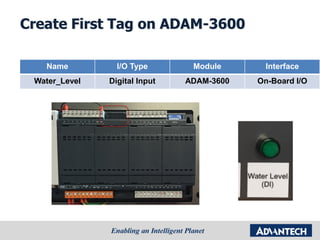
Create First Tag on ADAM-3600
Name I/O Type Module Interface
Water_Level Digital Input ADAM-3600 On-Board I/O
Create First Tag on ADAM-3600
Name I/O Type Module Interface
Water_Level Digital Input ADAM-3600 On-Board I/O
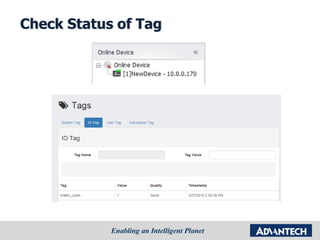
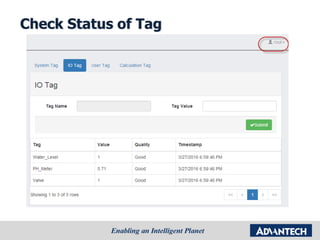
Check Status of Tag
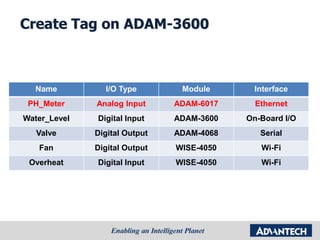
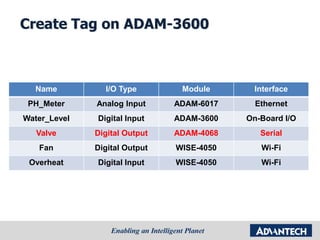
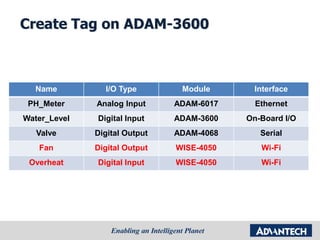
Create Tag on ADAM-3600
Name I/O Type Module Interface
PH_Meter Analog Input ADAM-6017 Ethernet
Water_Level Digital Input ADAM-3600 On-Board I/O
Valve Digital Output ADAM-4068 Serial
Fan Digital Output WISE-4050 Wi-Fi
Overheat Digital Input WISE-4050 Wi-Fi
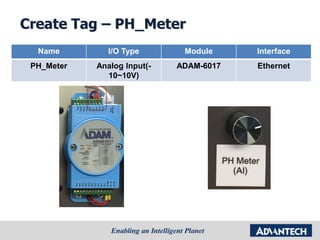
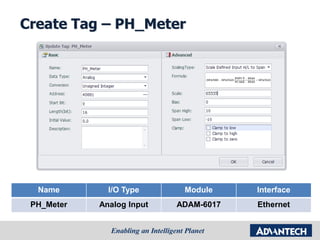
Create Tag – PH_Meter
Name I/O Type Module Interface
PH_Meter Analog Input(-
10~10V)
ADAM-6017 Ethernet
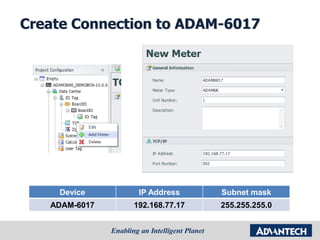
Create Connection to ADAM-6017
Device IP Address Subnet mask
ADAM-6017 192.168.77.17 255.255.255.0
Create Tag – PH_Meter
Name I/O Type Module Interface
PH_Meter Analog Input ADAM-6017 Ethernet
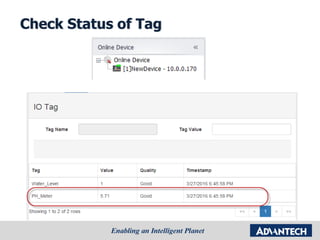
Check Status of Tag
Create Tag on ADAM-3600
Name I/O Type Module Interface
PH_Meter Analog Input ADAM-6017 Ethernet
Water_Level Digital Input ADAM-3600 On-Board I/O
Valve Digital Output ADAM-4068 Serial
Fan Digital Output WISE-4050 Wi-Fi
Overheat Digital Input WISE-4050 Wi-Fi
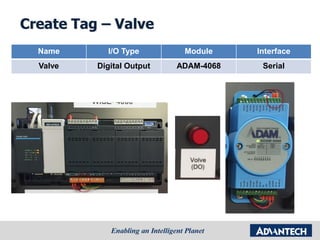
Create Tag – Valve
Name I/O Type Module Interface
Valve Digital Output ADAM-4068 Serial
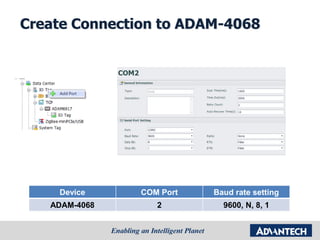
Create Connection to ADAM-4068
Device COM Port Baud rate setting
ADAM-4068 2 9600, N, 8, 1
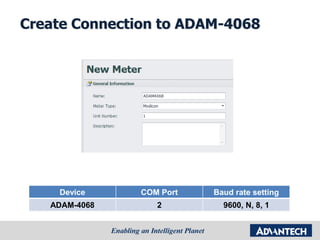
Create Connection to ADAM-4068
Device COM Port Baud rate setting
ADAM-4068 2 9600, N, 8, 1
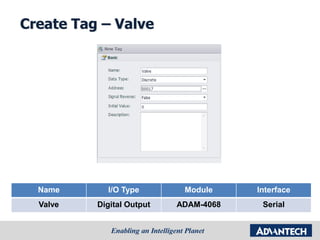
Create Tag – Valve
Name I/O Type Module Interface
Valve Digital Output ADAM-4068 Serial
Check Status of Tag
Create Tag on ADAM-3600
Name I/O Type Module Interface
PH_Meter Analog Input ADAM-6017 Ethernet
Water_Level Digital Input ADAM-3600 On-Board I/O
Valve Digital Output ADAM-4068 Serial
Fan Digital Output WISE-4050 Wi-Fi
Overheat Digital Input WISE-4050 Wi-Fi
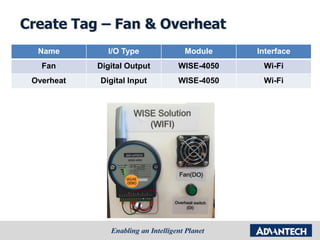
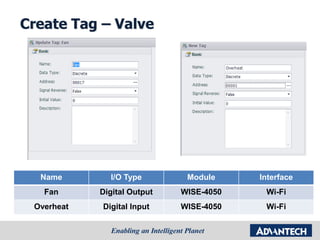
Create Tag – Fan & Overheat
Name I/O Type Module Interface
Fan Digital Output WISE-4050 Wi-Fi
Overheat Digital Input WISE-4050 Wi-Fi
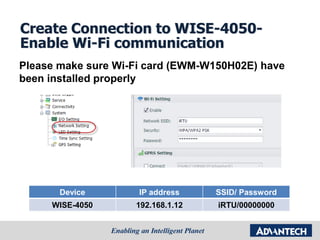
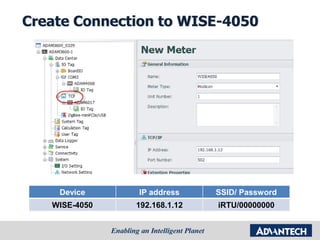
Create Connection to WISE-4050-
Enable Wi-Fi communication
Device IP address SSID/ Password
WISE-4050 192.168.1.12 iRTU/00000000
Please make sure Wi-Fi card (EWM-W150H02E) have
been installed properly
Create Connection to WISE-4050
Device IP address SSID/ Password
WISE-4050 192.168.1.12 iRTU/00000000
Create Tag – Valve
Name I/O Type Module Interface
Fan Digital Output WISE-4050 Wi-Fi
Overheat Digital Input WISE-4050 Wi-Fi
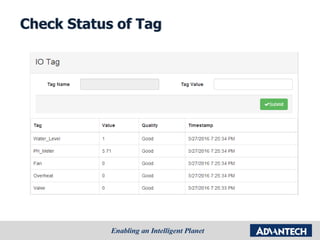
Check Status of Tag
Methods for trouble shooting
In this section you’ll know:
 Web server & Online monitor
 ICD manager
 System log and system tag
 backup project in CF card
 LED troubleshooting
 3G / WIFI setting
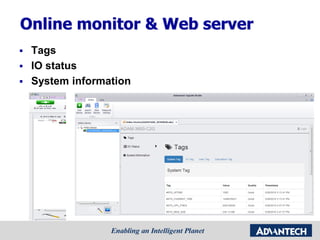
Online monitor & Web server
 Tags
 IO status
 System information
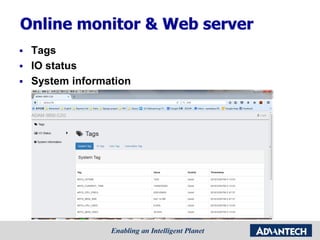
Online monitor & Web server
 Tags
 IO status
 System information
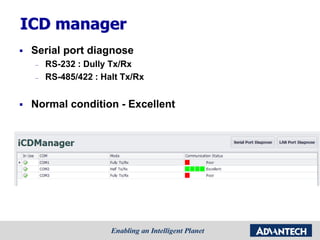
ICD manager
 Serial port diagnose
– RS-232 : Dully Tx/Rx
– RS-485/422 : Halt Tx/Rx
 Normal condition - Excellent
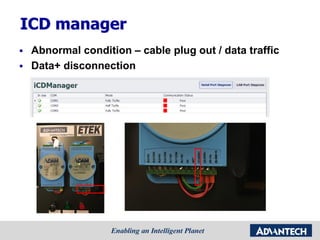
ICD manager
 Abnormal condition – cable plug out / data traffic
 Data+ disconnection
ICD manager
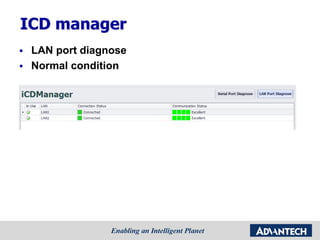
 LAN port diagnose
 Normal condition
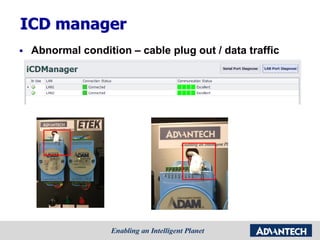
ICD manager
 Abnormal condition – cable plug out / data traffic
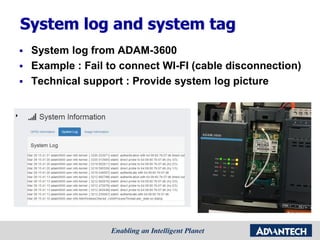
System log and system tag
 System log from ADAM-3600
 Example : Fail to connect WI-FI (cable disconnection)
 Technical support : Provide system log picture
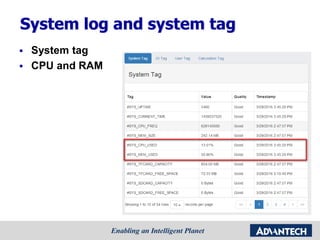
System log and system tag
 System tag
 CPU and RAM
System log and system tag
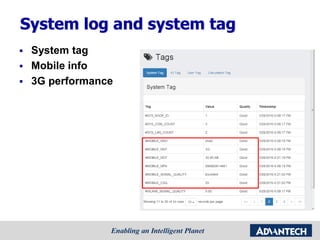
 System tag
 Mobile info
 3G performance
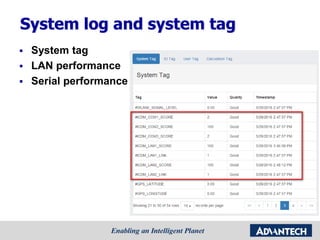
System log and system tag
 System tag
 LAN performance
 Serial performance
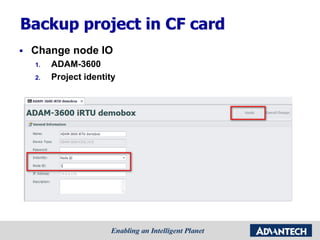
Backup project in CF card
 Change node IO
1. ADAM-3600
2. Project identity
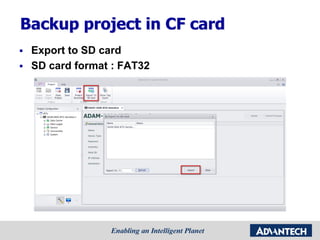
Backup project in CF card
 Export to SD card
 SD card format : FAT32
Backup project in CF card
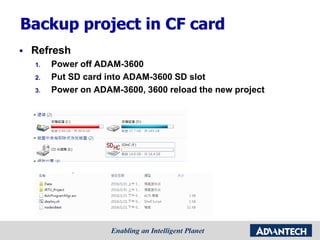
 Refresh
1. Power off ADAM-3600
2. Put SD card into ADAM-3600 SD slot
3. Power on ADAM-3600, 3600 reload the new project
Backup project in CF card
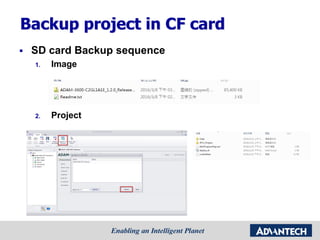
 SD card Backup sequence
1. Image
2. Project
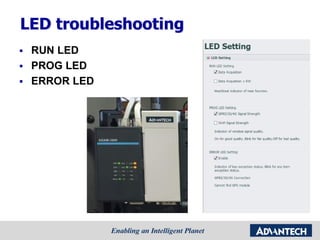
LED troubleshooting
 RUN LED
 PROG LED
 ERROR LED
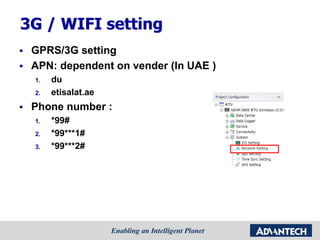
3G / WIFI setting
 GPRS/3G setting
 APN: dependent on vender (In UAE )
1. du
2. etisalat.ae
 Phone number :
1. *99#
2. *99***1#
3. *99***2#
3G / WIFI setting
 GPRS/3G setting
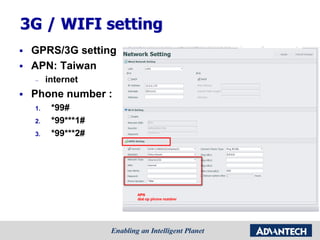
 APN: Taiwan
– internet
 Phone number :
1. *99#
2. *99***1#
3. *99***2#
3G / WIFI setting
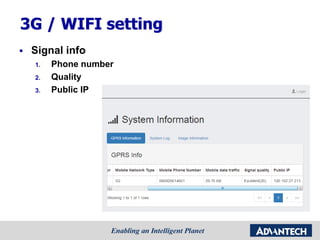
 Signal info
1. Phone number
2. Quality
3. Public IP
3G / WIFI setting
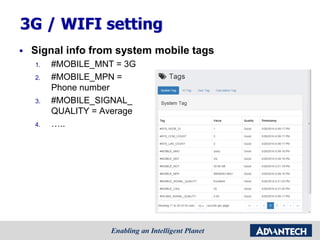
 Signal info from system mobile tags
1. #MOBILE_MNT = 3G
2. #MOBILE_MPN =
Phone number
3. #MOBILE_SIGNAL_
QUALITY = Average
4. …..
3G / WIFI setting
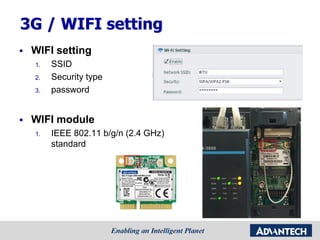
 WIFI setting
1. SSID
2. Security type
3. password
 WIFI module
1. IEEE 802.11 b/g/n (2.4 GHz)
standard
Connecting the Dots – Upper Link
Setting
 In this section you’ll know:
 Modbus protocol
– Modbus server tag configuration
– Hand on : modscan /modsim utility
 DNP3 protocol : Axon utility
– DNP3 outstation configuration
– Hand on : Axon utility
Connecting the Dots – Upper Link
Setting
 In this section you’ll know:
 Modbus protocol
– Modbus server tag configuration
– Hand on : modscan /modsim utility
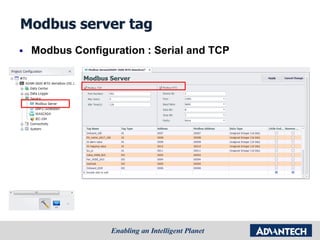
Modbus server tag
 Modbus Configuration : Serial and TCP
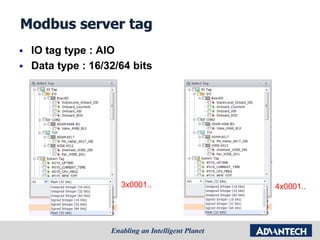
Modbus server tag
 IO tag type : AIO
 Data type : 16/32/64 bits
3x0001.. 4x0001..
Modbus server tag
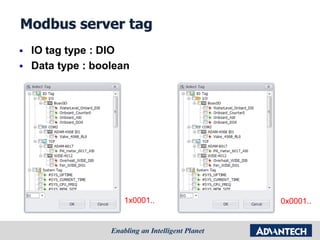
 IO tag type : DIO
 Data type : boolean
1x0001.. 0x0001..
Modbus server tag
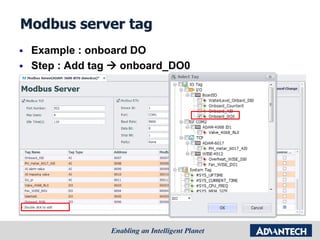
 Example : onboard DO
 Step : Add tag  onboard_DO0
Modbus server tag
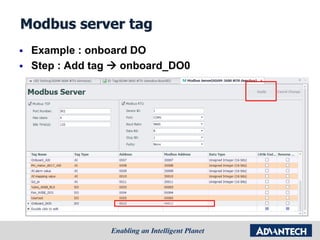
 Example : onboard DO
 Step : Add tag  onboard_DO0
Modbus server tag
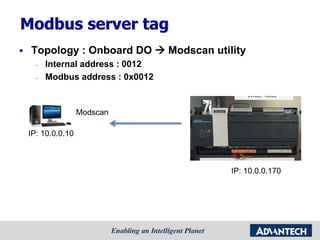
 Topology : Onboard DO  Modscan utility
– Internal address : 0012
– Modbus address : 0x0012
Modscan
IP: 10.0.0.10
IP: 10.0.0.170
Modbus server tag
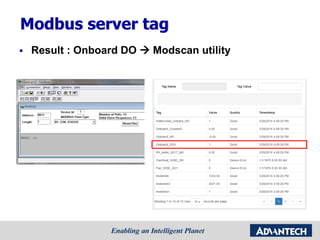
 Result : Onboard DO  Modscan utility
Hand on : Modscan /Modsim utility
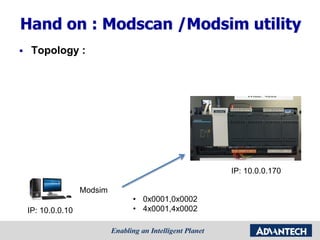
 Topology :
Modsim
• 0x0001,0x0002
• 4x0001,4x0002IP: 10.0.0.10
IP: 10.0.0.170
Hand on : Modscan /Modsim utility
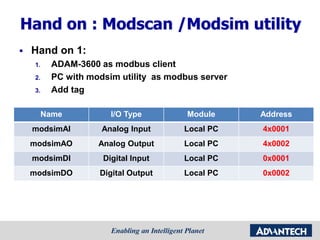
 Hand on 1:
1. ADAM-3600 as modbus client
2. PC with modsim utility as modbus server
3. Add tag
Name I/O Type Module Address
modsimAI Analog Input Local PC 4x0001
modsimAO Analog Output Local PC 4x0002
modsimDI Digital Input Local PC 0x0001
modsimDO Digital Output Local PC 0x0002
Hand on : Modscan /Modsim utility
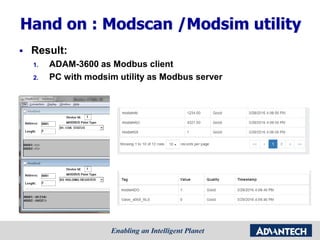
 Result:
1. ADAM-3600 as Modbus client
2. PC with modsim utility as Modbus server
Hand on : Modscan /Modsim utility
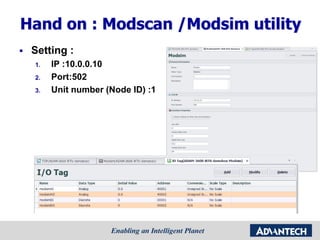
 Setting :
1. IP :10.0.0.10
2. Port:502
3. Unit number (Node ID) :1
Hand on : Modscan /Modsim utility
 Topology :
Modscan
Modsim
• 0x0001,0x0002
• 4x0001,4x0002
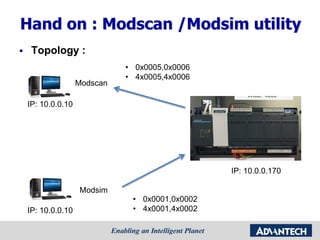
• 0x0005,0x0006
• 4x0005,4x0006
IP: 10.0.0.10
IP: 10.0.0.10
IP: 10.0.0.170
Hand on : Modscan /Modsim utility
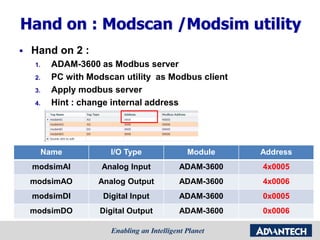
 Hand on 2 :
1. ADAM-3600 as Modbus server
2. PC with Modscan utility as Modbus client
3. Apply modbus server
4. Hint : change internal address
Name I/O Type Module Address
modsimAI Analog Input ADAM-3600 4x0005
modsimAO Analog Output ADAM-3600 4x0006
modsimDI Digital Input ADAM-3600 0x0005
modsimDO Digital Output ADAM-3600 0x0006
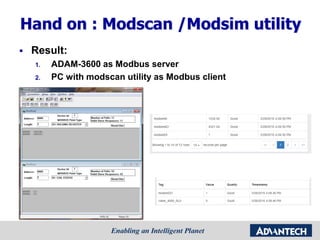
Hand on : Modscan /Modsim utility
 Result:
1. ADAM-3600 as Modbus server
2. PC with modscan utility as Modbus client
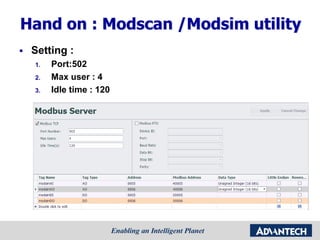
Hand on : Modscan /Modsim utility
 Setting :
1. Port:502
2. Max user : 4
3. Idle time : 120
Connecting the Dots – Upper Link
Setting
 In this section you’ll know:
 Modbus protocol
– Modbus server tag configuration
– Hand on : modscan /modsim utility
 DNP3 protocol : Axon utility
– DNP3 outstation configuration
– Hand on : Axon utility
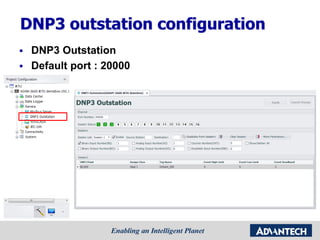
DNP3 outstation configuration
 DNP3 Outstation
 Default port : 20000
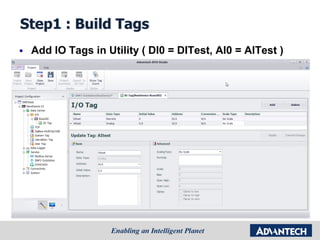
Step1 : Build Tags
 Add IO Tags in Utility ( DI0 = DITest, AI0 = AITest )
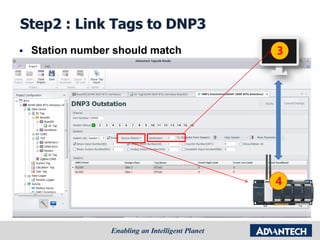
Step2 : Link Tags to DNP3
 Station number should match
DNP3
4
3
Simulation PC
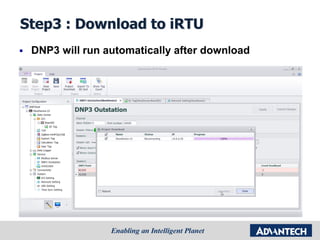
Step3 : Download to iRTU
 DNP3 will run automatically after download
Axon Utility
 Freeware for Multiple Protocols :
– DNP3 Master Simulator (LAN/WAN and Serial),
– DNP3 Slave Simulator (LAN/WAN and Serial),
– IEC 60870-5-104 Master Simulator,
– IEC 60870-5-104 Slave Simulator,
– IEC 60870-5-103 Master Simulator,
– IEC 60870-5-101 Master Simulator,
– IEC 60870-5-101 Slave Simulator,
– Modbus Master Simulator,
– Modbus Slave Simulator,
 Licensed version :
– Use of multiple Protocols at once
– Connection Monitor
– Without Advertising
– Without waiting to start
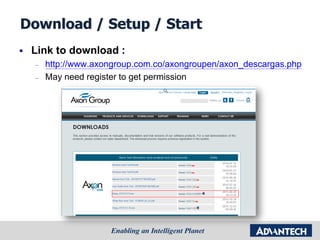
Download / Setup / Start
 Link to download :
– http://www.axongroup.com.co/axongroupen/axon_descargas.php
– May need register to get permission
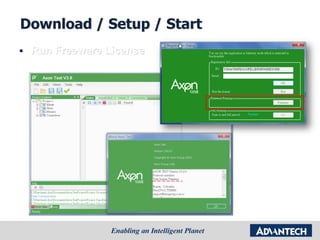
Download / Setup / Start
 Run Freeware License
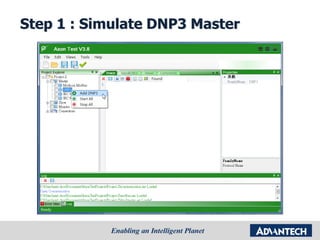
Step 1 : Simulate DNP3 Master
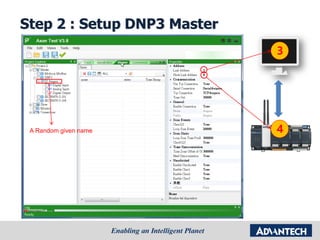
Step 2 : Setup DNP3 Master
DNP3
4
3
Simulation PC
A Random given name
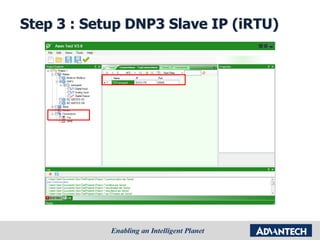
Step 3 : Setup DNP3 Slave IP (iRTU)
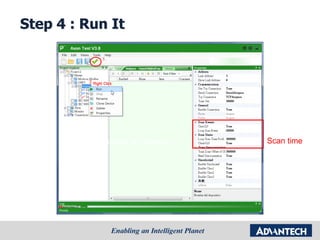
Step 4 : Run It
Now the simulator is Listening !! Scan time
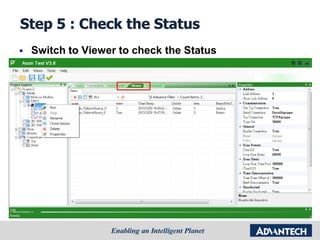
Step 5 : Check the Status
 Switch to Viewer to check the Status
Hand on : Axon/Modsim utility
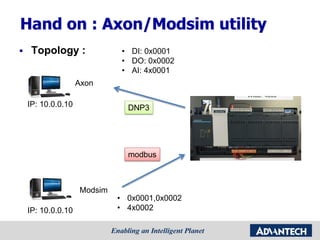
 Topology :
Axon
Modsim
• DI: 0x0001
• DO: 0x0002
• AI: 4x0001
IP: 10.0.0.10
IP: 10.0.0.10
• 0x0001,0x0002
• 4x0002
modbus
DNP3
Hand on : Axon/Modsim utility
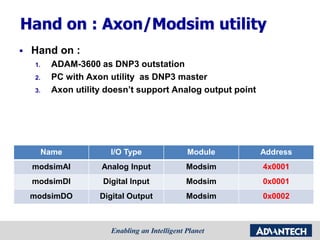
 Hand on :
1. ADAM-3600 as DNP3 outstation
2. PC with Axon utility as DNP3 master
3. Axon utility doesn’t support Analog output point
Name I/O Type Module Address
modsimAI Analog Input Modsim 4x0001
modsimDI Digital Input Modsim 0x0001
modsimDO Digital Output Modsim 0x0002
Hand on : Axon/Modsim utility
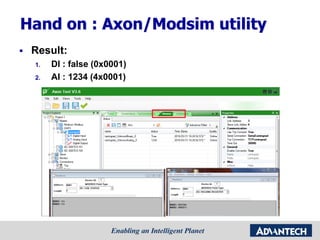
 Result:
1. DI : false (0x0001)
2. AI : 1234 (4x0001)
Hand on : Axon/Modsim utility
 Setting :
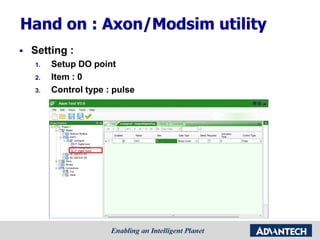
1. Setup DO point
2. Item : 0
3. Control type : pulse
Hand on : Axon/Modsim utility
 Setting :
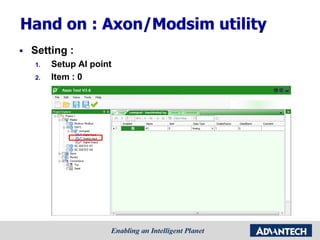
1. Setup AI point
2. Item : 0
Hand on : Axon/Modsim utility
 Setting :
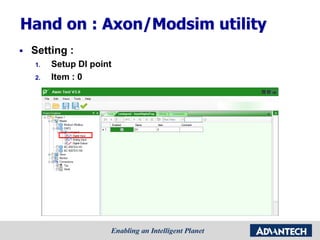
1. Setup DI point
2. Item : 0
Hand on : Axon/Modsim utility
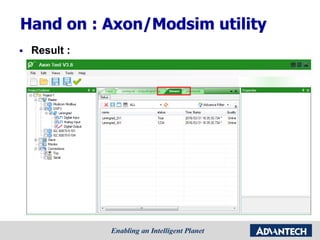
 Result :
Hand on : Axon/Modsim utility
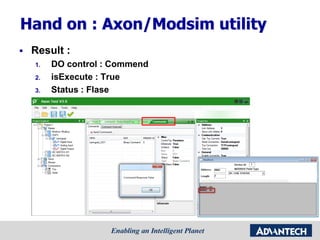
 Result :
1. DO control : Commend
2. isExecute : True
3. Status : Flase
Hand on : Axon/Modsim utility
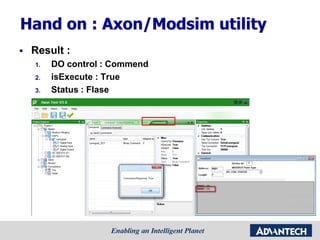
 Result :
1. DO control : Commend
2. isExecute : True
3. Status : Flase
Logic Building – Using SoftLogic for
Complex Logic (Demo)
In this section you’ll know:
 Installation of MULTIPROG Express (Free IDE for
ADAM-3600)
 How to import and configure the Tags into
MULTIPROG Express
 How to start the KW project and check the status on-
line

[Advantech] ADAM-3600 training kit and Taglink

  • 1.
    ADAM-3600 Seires Training Kit IAGInter-corn AE Alex Hsieh (謝明宏)
  • 2.
    Agenda  Overview ofADAM-3600 & Demo Box Hands-On  First Step - Build Up Your Own iRTU System  Methods for Trouble Shooting  Connecting the Dots – Upper Link Setting  Logic Building – Using SoftLogic for Complex Logic (Demo)
  • 3.
    Overview of ADAM-3600& Demo Box Hands-On In this section you’ll know:  What iRTU is and its 8 features  The installation of Advantech TagLink Studio
  • 4.
    Intelligent RTU:ADAM-3600 Powers IndustrialIoT Solutions Luke Cheng / AE IAG
  • 5.
    Outline  Introduction toADAM-3600& DEMO Box  Application Story of ADAM-3600  Features Highlight on ADAM-3600  Conclusion
  • 6.
    Outline  Introduction toADAM-3600 & DEMO Box  Application Story of ADAM-3600  Features Highlight on ADAM-3600  Conclusion
  • 7.
    Intelligent RTU inthe IoT Era Precise Sensing Smart Node in Far & Wide Area Telecommunication to the Cloud High Adaptability to Environment Self-diagnosis / healing Big Data Pretreatments Part of Telemetry / SCADA system
  • 8.
    iRTU Powers IndustrialIoT Solutions Scene of Oil Production Easy monitoring & intuitive control OperatorEngineer Remote diagnosis & maintenance Visual management & strategy development Executives
  • 9.
    iRTU, Seamless Integratedwith SCADA Meets all your Remote Monitoring & Control needs Advantech Web-based SCADA Software One-stop shopping for IoT S/W & H/W, Minimize purchasing and support effort Advantech All-in-One Intelligent RTU
  • 10.
    Wired Communication  1xRS-232/485 (DB9) + 2x RS-485 (Terminal)  2x RJ-45 10/100Base-T Ethernet Wireless Communication  Modular Design (PCIe-mini Card Module x2)  Support Wi-Fi/3G/GPRS/ZigBee Computing Powerful Platform  32-bit Cortex A8 600MHz  (TI AM3352)  256MB DDR3L RAM  32K Battery Backup RAM  1GB Micro SD Built-in  RT Linux V3.12  SD Card Slot x1  USB 2.0 + VGA PC/PLC Programming  SDK for C Prog.  IEC-61131-3 SoftLogic Multiple Protocols  Modbus/RTU  Modbus/TCP  DNP3  IEC-60870-5 (Developing)  OpenVPN  NTP  RESTful  HTML5 Webservice  IPV4/IPV6 I/O System  Built-in 8AI / 8DI / 4DO  4 Flexible expansion slots  LED Indicators ADAM-3600-C2G:New ADAM for IoT All-in-One design, Reduces integration effort
  • 11.
    Modularized Wireless Communication ExploreWireless Possibility with 2x PCIe-mini slots 3G / GPRS ... and more* Antenna is suggested to install outside the control cabinet  Easy upgrade to the latest wireless & mobile technology  Building local preferred modules without any struggle EWM-W150H02E Module EWM-C109F601E Module Project Support
  • 12.
    ADAM-3600 DEMO Box NameI/O Type Module Interface PH_Meter Analog Input ADAM-6017 Ethernet Water_Level Digital Input ADAM-3600 On-Board I/O Valve Digital Output ADAM-4068 Serial Fan Digital Output WISE-4050 Wi-Fi Overheat Digital Input WISE-4050 Wi-Fi
  • 13.
  • 14.
    Outline  Introduction toADAM-3600& DEMO Box  Application Story of ADAM-3600  Features Highlight on ADAM-3600  Conclusion
  • 15.
    Green House & Irrigation Unman Outstation Facility Monitoring Substation IED Refrigerated Truck Oil& Gas Well and Pipe Remote Pump Station Building Energy Saving Transport Monitoring iRTU, Born for Remote Automation
  • 16.
    Smart Oil Fieldswith ADAM-3600 Oil well monitoring & control Soft PID control for oil pump North-West oil field @ China North oil field @ China
  • 17.
    Smart Oil Fieldswith ADAM-3600 Features & Benefits • Flexible I/O solutions, both wired and wireless • Modularized wireless design for LTE/3G/GPRS/Wi- Fi/Zigbee • Multiple protocols support • Seamless integration with SCADA system
  • 18.
    Pipeline Monitoring withADAM-3600 South–North Water Transfer Project @ Beijing WebAccess @ Center Station Flow Meter
  • 19.
    Pipeline Monitoring withADAM-3600 Features & Benefits • Flexible IO solutions, supports various device protocols • Seamless integration with SCADA systems • Remote diagnosis and firmware upgrade • Built-in webpage for on-line monitoring
  • 20.
    Smart Agriculture withADAM-3600 Economical Controller w/ Flexible IO Green House @ South-West China Max 3000 tags CPU capacity Serial /RS-485 Ethernet Wireless DAQ Solution Wired DAQ Solution ADAM-3600-C2G Through EWM-W150H02E Module WISE-4000 Wireless I/O Module WISE-M500 Wireless Meter Through ADAM-3692Z ADAM-4000 I/O Modules ADAM-6000 Smart I/O Modules ADAM-5000/TCP Slot IO
  • 21.
    Outline  Introduction toADAM-3600 & DEMO Box  Application Story of ADAM-3600  Features Highlight on ADAM-3600  Conclusion
  • 22.
    iRTU Equips KeyIoT Technology RTU (Remote Terminal Unit) Gateway Concentrator Transfer Physical Value to be Tags, and secure the linkage with cloud and each node. Targets 3 typical applications shown below.
  • 23.
    Data Acquisition LoggerWeb Server CloudConnection Calculation Control Diagnosis Protocol 8 Key Functions Empowered by
  • 24.
    Structure I/O Tag Sys. Tag Calc. Tag User Tag Calculation Diagnosis Logger Web Server Cloud Connection Control Protocol Real-timeDB Linux C SDK/API Customized Protocol or Algorithm XML Configuration File Off-line Utility Data Acquisition
  • 25.
    Rich on-board I/Owith 4-slot I/O expansion capability Channel No. AI T/C AO DI DO ADAM-3600-C2G -- On-board I/O 8 8 4 ADAM-3617 -Voltage/Current, 16-bit 4 ADAM-3618 -J/K/T/E/R/S/B, 16-bit 3 ADAM-3624 -Voltage/Current, 12-bit 4 ADAM-3651 -Isolation, Sink Type 8 ADAM-3656 -Isolation, 8~30VDC 8 * Ref . Max AI Ch No. =24, Max AO Ch No. =16, Max DI Ch No. =40, Max DO Ch No. =36, Max T/C Ch No. =12, in one unit. * Expansion through standard SPI interface. Ready to open to any customization request  Cost-effective design with high adaptability for various applications  Expansion without occupying extra space in the cabinet  No need to prepare many RTU models for different I/O requirements Flexible DAQ Solution Data Acquisition
  • 26.
    Unified interface, easyfor engineering Add Resource ( Serial / TCPIP / Zigbee ) Add Meter ( PLC / ADAM / Meters ) Select IO from a Pop-up Tree-view Table Provide Overview of Configured Tags Flexible DAQ Solution Data Acquisition
  • 27.
    Open interface forany possibility TagLink supports more than 200 I/O Drivers  Share the same driver structure as WebAccess.  Transfer WebAccess I/O Driver to TagLink platform by request (Takes 2 weeks for transferring and testing) SQL server ODBC Query Support ODBC Query for MS SQL Server ? Frame Editor for non-standard meter  Supports serial polling mode Sending a known command/query Extract data from responses and import as tags Known Query Extra Response Import to Tag ** Planned function on Image V1.2.0 @ 2015/Q4  Standard query through Ethernet  No need for extra S/W on server  Bridging data cross LAN Flexible DAQ Solution Data Acquisition
  • 28.
    Raw Data Query by Address SCADA RTU XAddress mapping table is mandatory X Redundant scaling task for multi-access X Not IT friendly for Big Data analysis X Re-programming for IO changes Calculation Traditional Way Translate Raw Data Locally Query by Tag Real Physical Data SCADA iRTU  Intuitive data access  Tags saved in iRTU as XML format  RESTful support for IT friendliness  Data with quality and time-stamp New IoT Way Calculation Calculation
  • 29.
    Get the meaningfuldata you really care Translate Raw Data Locally Analog I/O Tag Scaling  Supports 6 popular formulas for data scaling  Ex. Transfer 10mA to 100°C Scaling Analog Signal I/O Tag Calc. Tag Calculation Tags Tags Tags Calculation Tag  No need to program for simple calculations  Max. 8 inputs for one Calc. Tag  Ex. Calculate flow rate from temperature and pressure User Tag Internal OP. User Tags  Transfer parameters to RTU  Assigned Constant Value  Ex. Assign a set point of PID loop Calculation
  • 30.
    Internet With EWM-C109F601E 3G Module SupportsWASCADA Protocol  Proprietary WebAccess protocol  Supports Reporting by Exception  Supports Resuming Broken Transfers “WhereIAm” Active Connection Protocol  Proprietary WebAccess protocol  Configurable active connecting behavior  Supports multiple centers  Supports Interface Binding (LAN/WLAN/Cellular) Dynamic IP Public IP  Import all tags directly  No need to spend extra effort mapping tags Cloud Connection Highway to the Cloud Resolve Dynamic IP and Bandwidth Issue of Mobile Network Quick and easy connection with WebAccess
  • 31.
    Keep your cellularservice always on-line Ping pre-defined IP or URL In Retry Interval (s) Monitor data traffic idle time (min) IF Fail Reconnect to the Cellular Service ( Reset Cellular Module in some condition) IF NOT Connected Over system guard time Reboot System (Optional, would cause data discontinuity ) Select the proper monitoring mode for your application Monitor by Ping  The unit plan to be always on-line  Supports multi-center checking (at least one response to pass the checking)  Auto recover mobile module failure Monitor by Data Traffic  The unit is not always on line  Server block “ping” service  There should be data traffic within allowed max. silence time  No extra cost for data flow Highway to the Cloud IF idle time > Allowed max silence time Cloud Connection
  • 32.
    monitor comm. qualityremotely Function Leveraged from Power Substation 4 Application Modes for Serial Mode User Behavior 1 Data Exchange (Polling) 2 Heart Bit 3 Time Synchronization 4 Active Msg. for Alarm 4 Application Modes for Ethernet Mode User Behavior 1 Data Exchange (Polling) 2 Heart Bit 3 Active Msg. for Alarm 4 Device Discovery Monitor, Alert, and Recover  Digital Acquisition to the Port  Compare and score by pre- set application mode Diagnosis
  • 33.
    28 system tagshelp you master your system Classification  System : CPU / RAM / TF Card / SD Card/ NodeID  Wireless Connection : Mobile / WLAN  Wired Connection : Serial / Ethernet Applications  Import to Logger : Record system status by time  Link to Program : Reacts to unexpected statuses  Link to Protocol : Remotely monitor device status  On-line Webpage: Watch device status locally through Pad or Phone Diagnosis Monitor, Alert, and Recover
  • 34.
    Free IEC-61131-3 IDEand robust runtime kernel Development Environment : MultiProg Express  Directly import Tags, no need additionally edit tags  Off-line simulation & online download Runtime Engine : ProConOS eCLR  Built-in Advantech RTU controller  No need for extra license payment Built-in PLC + PC Controller Sequential Function Chart (SFC) Structure Text (ST) Instruction List (IL) Ladder Function Block (FB) Control
  • 35.
    Just focus onyour algorithms on Linux C programming Development Environment  Linux Toolchain "gcc-linaro-arm-linux-gnueabihf-4.7- 2013.03-20130313_linux.tar.bz2”  Can setup environment in Windows through “Virtualbox” SDK Documentation  DCTag for TagLink operation  BoardResource for : 1. NodeID 2. WDT 3. LED  Provide : lib, include, manual, examples Built-in PLC + PC Controller Control
  • 36.
     Empowered byTagLink + SQLite  Hint required SD Card Volume  Remotley accessible by FTP /SSH  Off-line Backup Function by USB Drive  Enable it for “Resume Broken Transfer” of WASCADA 64GB Simply select tags and enable them Agile Local Ring Buffer Logger
  • 37.
    Built-in HTML5 +RESTful for Any Browser  Power by Built-in RESTful Service  Supports On-line Image Update  Version / Connection / System Status Information Checking Monitor Data Comfortably Web Page
  • 38.
    In Big Dataera, we need more than Modbus… DNP3 Protocol WASCADA Interface to the World Sequential of Event Data with Time-stamp Supplementary Report Data Retrofit Data Encryption / Authorization Active/Scheduled Data Upload Global Time Synchronization Protocol
  • 39.
    Intuitive interface, 3steps manage tags to protocol Interface to the World Double click to select tags from pop-up dialog Quick click and select all kinds of tagsExpanding support of protocol services Ex. IEC-60870 will be released Q4/2015 Protocol
  • 40.
    DNP3, a modern,robust, intelligent, open Protocol for RTU Features  Classification of field data  Report by exception (Unsolicited reporting)  Time-stamped data  Communication to multiple masters Specification  DNP level supported : L2  Device function : Slave  Max data link frame size : Transmitted : 292 Received : 292  Max application fragment size : Transmitted : 2048 Received : 2048 Source from : Interface to the World Protocol
  • 41.
    Outline  Introduction toADAM-3600 & DEMO Box  Application Story of ADAM-3600  Features Highlight on ADAM-3600  Conclusion
  • 42.
    Why Advantech iRTU?  World Leading Embedded Technology  Trusted Quality Assurance System  Global Technical Support & Service  One Stop Shopping and Service for Constructing Industrial IoT Solution  Industrial I/O Star Product  More than 20 years Reputation  Elegant UI with powerful functionality to serve IoT Smart Sensor Node Advantech World Reputation Reliable ADAM Product Global Support Network
  • 43.
    ADAM-3600 series OfferingInformation Intelligent RTU:ADAM-3600-C2G 3G/GPRS Solution Part Number Description EWM-C109F601E 6-band HSPA Cellular Module with SIM Holder 1750006264 SMA(F) Cable, 15 cm 1750005865 Dipole Antenna, 11 cm Wi-Fi Solution Part Number Description EWM-W150H02E Half-size mini card. Supports 802.11bgn 1750006043 SMA(M) Cable, 15 cm 1750000318 2dBi Antenna for testing, 11 cm Part Number Description ADAM-3651-AE 8-ch Digital Input Module ADAM-3656-AE 8-ch Digital Output Module ADAM-3617-AE 4-ch Analog Input Module ADAM-3618-AE 3-ch Thermocouple Module ADAM-3624-AE 4-ch Analog Output Module I/O Modules Part Number Description ADAM-3600- C2GL1A1E 8AI / 8DI / 4DO / 4-Slot Expansion Wireless Intelligent RTU
  • 44.
    Contact Information  AxelChou, PM – VOIP: 523-6293 – E-mail: Axel.Chou@advantech.com.tw  Li Shi, PME – VOIP: 523-6529 – E-mail: Li.Shi@advantech.com.cn  Cindy Liu, SCM – VOIP: 511-7036 – E-mail: Cindy109.Liu@advantech.com.tw  Elaine Huang, Marcom – VOIP: 511-2633 – E-mail: Elaine.Huang@advantech.com.tw
  • 45.
    First Step -Build up your Own iRTU system In this section you’ll know:  The system structure of ADAM-3600 demo box  Using TagLink to connect to ADAM-3600  Using TagLink Studio for on-line and off-line configuration  Connecting ADAM-3600 with end-devices
  • 46.
    Use Advantech TagLinkStudio to Connect to ADAM-3600  You can temporarily change the IP address of ADAM-3600.  The IP will back to the original setting of project after reboot.
  • 47.
    IP Setting PC withTagLink Studio LAN1 LAN2 Device IP Address Subnet mask PC 10.0.0.168 255.0.0.0 ADAM-3600/LAN1 10.0.0.170 255.0.0.0 ADAM-3600/LAN2 192.168.77.36 255.255.255.0 ADAM-6017 192.168.77.17 255.255.255.0
  • 48.
    IP Setting PC withTagLink Studio Device IP Address Subnet mask PC 10.0.0.168 255.0.0.0 ADAM-3600/LAN1 10.0.0.170 255.0.0.0 ADAM-3600/LAN2 192.168.77.36 255.255.255.0 ADAM-6017 192.168.77.17 255.255.255.0
  • 49.
  • 50.
    Create First Tagon ADAM-3600 Name I/O Type Module Interface PH_Meter Analog Input ADAM-6017 Ethernet Water_Level Digital Input ADAM-3600 On-Board I/O Valve Digital Output ADAM-4068 Serial Fan Digital Output WISE-4050 Wi-Fi Overheat Digital Input WISE-4050 Wi-Fi
  • 51.
    Create First Tagon ADAM-3600 Name I/O Type Module Interface Water_Level Digital Input ADAM-3600 On-Board I/O
  • 52.
    Create First Tagon ADAM-3600 Name I/O Type Module Interface Water_Level Digital Input ADAM-3600 On-Board I/O
  • 53.
  • 54.
    Create Tag onADAM-3600 Name I/O Type Module Interface PH_Meter Analog Input ADAM-6017 Ethernet Water_Level Digital Input ADAM-3600 On-Board I/O Valve Digital Output ADAM-4068 Serial Fan Digital Output WISE-4050 Wi-Fi Overheat Digital Input WISE-4050 Wi-Fi
  • 55.
    Create Tag –PH_Meter Name I/O Type Module Interface PH_Meter Analog Input(- 10~10V) ADAM-6017 Ethernet
  • 56.
    Create Connection toADAM-6017 Device IP Address Subnet mask ADAM-6017 192.168.77.17 255.255.255.0
  • 57.
    Create Tag –PH_Meter Name I/O Type Module Interface PH_Meter Analog Input ADAM-6017 Ethernet
  • 58.
  • 59.
    Create Tag onADAM-3600 Name I/O Type Module Interface PH_Meter Analog Input ADAM-6017 Ethernet Water_Level Digital Input ADAM-3600 On-Board I/O Valve Digital Output ADAM-4068 Serial Fan Digital Output WISE-4050 Wi-Fi Overheat Digital Input WISE-4050 Wi-Fi
  • 60.
    Create Tag –Valve Name I/O Type Module Interface Valve Digital Output ADAM-4068 Serial
  • 61.
    Create Connection toADAM-4068 Device COM Port Baud rate setting ADAM-4068 2 9600, N, 8, 1
  • 62.
    Create Connection toADAM-4068 Device COM Port Baud rate setting ADAM-4068 2 9600, N, 8, 1
  • 63.
    Create Tag –Valve Name I/O Type Module Interface Valve Digital Output ADAM-4068 Serial
  • 64.
  • 65.
    Create Tag onADAM-3600 Name I/O Type Module Interface PH_Meter Analog Input ADAM-6017 Ethernet Water_Level Digital Input ADAM-3600 On-Board I/O Valve Digital Output ADAM-4068 Serial Fan Digital Output WISE-4050 Wi-Fi Overheat Digital Input WISE-4050 Wi-Fi
  • 66.
    Create Tag –Fan & Overheat Name I/O Type Module Interface Fan Digital Output WISE-4050 Wi-Fi Overheat Digital Input WISE-4050 Wi-Fi
  • 67.
    Create Connection toWISE-4050- Enable Wi-Fi communication Device IP address SSID/ Password WISE-4050 192.168.1.12 iRTU/00000000 Please make sure Wi-Fi card (EWM-W150H02E) have been installed properly
  • 68.
    Create Connection toWISE-4050 Device IP address SSID/ Password WISE-4050 192.168.1.12 iRTU/00000000
  • 69.
    Create Tag –Valve Name I/O Type Module Interface Fan Digital Output WISE-4050 Wi-Fi Overheat Digital Input WISE-4050 Wi-Fi
  • 70.
  • 71.
    Methods for troubleshooting In this section you’ll know:  Web server & Online monitor  ICD manager  System log and system tag  backup project in CF card  LED troubleshooting  3G / WIFI setting
  • 72.
    Online monitor &Web server  Tags  IO status  System information
  • 73.
    Online monitor &Web server  Tags  IO status  System information
  • 74.
    ICD manager  Serialport diagnose – RS-232 : Dully Tx/Rx – RS-485/422 : Halt Tx/Rx  Normal condition - Excellent
  • 75.
    ICD manager  Abnormalcondition – cable plug out / data traffic  Data+ disconnection
  • 76.
    ICD manager  LANport diagnose  Normal condition
  • 77.
    ICD manager  Abnormalcondition – cable plug out / data traffic
  • 78.
    System log andsystem tag  System log from ADAM-3600  Example : Fail to connect WI-FI (cable disconnection)  Technical support : Provide system log picture
  • 79.
    System log andsystem tag  System tag  CPU and RAM
  • 80.
    System log andsystem tag  System tag  Mobile info  3G performance
  • 81.
    System log andsystem tag  System tag  LAN performance  Serial performance
  • 82.
    Backup project inCF card  Change node IO 1. ADAM-3600 2. Project identity
  • 83.
    Backup project inCF card  Export to SD card  SD card format : FAT32
  • 84.
    Backup project inCF card  Refresh 1. Power off ADAM-3600 2. Put SD card into ADAM-3600 SD slot 3. Power on ADAM-3600, 3600 reload the new project
  • 85.
    Backup project inCF card  SD card Backup sequence 1. Image 2. Project
  • 86.
    LED troubleshooting  RUNLED  PROG LED  ERROR LED
  • 87.
    3G / WIFIsetting  GPRS/3G setting  APN: dependent on vender (In UAE ) 1. du 2. etisalat.ae  Phone number : 1. *99# 2. *99***1# 3. *99***2#
  • 88.
    3G / WIFIsetting  GPRS/3G setting  APN: Taiwan – internet  Phone number : 1. *99# 2. *99***1# 3. *99***2#
  • 89.
    3G / WIFIsetting  Signal info 1. Phone number 2. Quality 3. Public IP
  • 90.
    3G / WIFIsetting  Signal info from system mobile tags 1. #MOBILE_MNT = 3G 2. #MOBILE_MPN = Phone number 3. #MOBILE_SIGNAL_ QUALITY = Average 4. …..
  • 91.
    3G / WIFIsetting  WIFI setting 1. SSID 2. Security type 3. password  WIFI module 1. IEEE 802.11 b/g/n (2.4 GHz) standard
  • 92.
    Connecting the Dots– Upper Link Setting  In this section you’ll know:  Modbus protocol – Modbus server tag configuration – Hand on : modscan /modsim utility  DNP3 protocol : Axon utility – DNP3 outstation configuration – Hand on : Axon utility
  • 93.
    Connecting the Dots– Upper Link Setting  In this section you’ll know:  Modbus protocol – Modbus server tag configuration – Hand on : modscan /modsim utility
  • 94.
    Modbus server tag Modbus Configuration : Serial and TCP
  • 95.
    Modbus server tag IO tag type : AIO  Data type : 16/32/64 bits 3x0001.. 4x0001..
  • 96.
    Modbus server tag IO tag type : DIO  Data type : boolean 1x0001.. 0x0001..
  • 97.
    Modbus server tag Example : onboard DO  Step : Add tag  onboard_DO0
  • 98.
    Modbus server tag Example : onboard DO  Step : Add tag  onboard_DO0
  • 99.
    Modbus server tag Topology : Onboard DO  Modscan utility – Internal address : 0012 – Modbus address : 0x0012 Modscan IP: 10.0.0.10 IP: 10.0.0.170
  • 100.
    Modbus server tag Result : Onboard DO  Modscan utility
  • 101.
    Hand on :Modscan /Modsim utility  Topology : Modsim • 0x0001,0x0002 • 4x0001,4x0002IP: 10.0.0.10 IP: 10.0.0.170
  • 102.
    Hand on :Modscan /Modsim utility  Hand on 1: 1. ADAM-3600 as modbus client 2. PC with modsim utility as modbus server 3. Add tag Name I/O Type Module Address modsimAI Analog Input Local PC 4x0001 modsimAO Analog Output Local PC 4x0002 modsimDI Digital Input Local PC 0x0001 modsimDO Digital Output Local PC 0x0002
  • 103.
    Hand on :Modscan /Modsim utility  Result: 1. ADAM-3600 as Modbus client 2. PC with modsim utility as Modbus server
  • 104.
    Hand on :Modscan /Modsim utility  Setting : 1. IP :10.0.0.10 2. Port:502 3. Unit number (Node ID) :1
  • 105.
    Hand on :Modscan /Modsim utility  Topology : Modscan Modsim • 0x0001,0x0002 • 4x0001,4x0002 • 0x0005,0x0006 • 4x0005,4x0006 IP: 10.0.0.10 IP: 10.0.0.10 IP: 10.0.0.170
  • 106.
    Hand on :Modscan /Modsim utility  Hand on 2 : 1. ADAM-3600 as Modbus server 2. PC with Modscan utility as Modbus client 3. Apply modbus server 4. Hint : change internal address Name I/O Type Module Address modsimAI Analog Input ADAM-3600 4x0005 modsimAO Analog Output ADAM-3600 4x0006 modsimDI Digital Input ADAM-3600 0x0005 modsimDO Digital Output ADAM-3600 0x0006
  • 107.
    Hand on :Modscan /Modsim utility  Result: 1. ADAM-3600 as Modbus server 2. PC with modscan utility as Modbus client
  • 108.
    Hand on :Modscan /Modsim utility  Setting : 1. Port:502 2. Max user : 4 3. Idle time : 120
  • 109.
    Connecting the Dots– Upper Link Setting  In this section you’ll know:  Modbus protocol – Modbus server tag configuration – Hand on : modscan /modsim utility  DNP3 protocol : Axon utility – DNP3 outstation configuration – Hand on : Axon utility
  • 110.
    DNP3 outstation configuration DNP3 Outstation  Default port : 20000
  • 111.
    Step1 : BuildTags  Add IO Tags in Utility ( DI0 = DITest, AI0 = AITest )
  • 112.
    Step2 : LinkTags to DNP3  Station number should match DNP3 4 3 Simulation PC
  • 113.
    Step3 : Downloadto iRTU  DNP3 will run automatically after download
  • 114.
    Axon Utility  Freewarefor Multiple Protocols : – DNP3 Master Simulator (LAN/WAN and Serial), – DNP3 Slave Simulator (LAN/WAN and Serial), – IEC 60870-5-104 Master Simulator, – IEC 60870-5-104 Slave Simulator, – IEC 60870-5-103 Master Simulator, – IEC 60870-5-101 Master Simulator, – IEC 60870-5-101 Slave Simulator, – Modbus Master Simulator, – Modbus Slave Simulator,  Licensed version : – Use of multiple Protocols at once – Connection Monitor – Without Advertising – Without waiting to start
  • 115.
    Download / Setup/ Start  Link to download : – http://www.axongroup.com.co/axongroupen/axon_descargas.php – May need register to get permission
  • 116.
    Download / Setup/ Start  Run Freeware License
  • 117.
    Step 1 :Simulate DNP3 Master
  • 118.
    Step 2 :Setup DNP3 Master DNP3 4 3 Simulation PC A Random given name
  • 119.
    Step 3 :Setup DNP3 Slave IP (iRTU)
  • 120.
    Step 4 :Run It Now the simulator is Listening !! Scan time
  • 121.
    Step 5 :Check the Status  Switch to Viewer to check the Status
  • 122.
    Hand on :Axon/Modsim utility  Topology : Axon Modsim • DI: 0x0001 • DO: 0x0002 • AI: 4x0001 IP: 10.0.0.10 IP: 10.0.0.10 • 0x0001,0x0002 • 4x0002 modbus DNP3
  • 123.
    Hand on :Axon/Modsim utility  Hand on : 1. ADAM-3600 as DNP3 outstation 2. PC with Axon utility as DNP3 master 3. Axon utility doesn’t support Analog output point Name I/O Type Module Address modsimAI Analog Input Modsim 4x0001 modsimDI Digital Input Modsim 0x0001 modsimDO Digital Output Modsim 0x0002
  • 124.
    Hand on :Axon/Modsim utility  Result: 1. DI : false (0x0001) 2. AI : 1234 (4x0001)
  • 125.
    Hand on :Axon/Modsim utility  Setting : 1. Setup DO point 2. Item : 0 3. Control type : pulse
  • 126.
    Hand on :Axon/Modsim utility  Setting : 1. Setup AI point 2. Item : 0
  • 127.
    Hand on :Axon/Modsim utility  Setting : 1. Setup DI point 2. Item : 0
  • 128.
    Hand on :Axon/Modsim utility  Result :
  • 129.
    Hand on :Axon/Modsim utility  Result : 1. DO control : Commend 2. isExecute : True 3. Status : Flase
  • 130.
    Hand on :Axon/Modsim utility  Result : 1. DO control : Commend 2. isExecute : True 3. Status : Flase
  • 131.
    Logic Building –Using SoftLogic for Complex Logic (Demo) In this section you’ll know:  Installation of MULTIPROG Express (Free IDE for ADAM-3600)  How to import and configure the Tags into MULTIPROG Express  How to start the KW project and check the status on- line