FIRSTFare 2010LabVIEW OverviewDennis C. Erickson ~ Senior Mentor for Teams 1510 and 2898Daniel Bramblett ~ Team 1510Amy Wiegand ~ Team 29151
IntroductionWorking with National Instrument’sHardware and SoftwareSpecifically:Software ~ LabVIEWHardware ~ cRIO2
IntroductionLabVIEWVI = Virtual InstrumentEW = Engineering WorkstationVI = Virtual Instrument or in other languages “Routine”, SubVI = Subroutine3
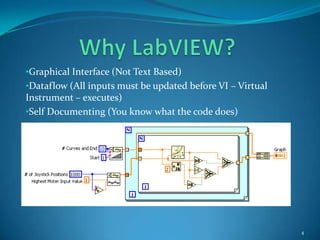
Why LabVIEW?Graphical Interface (Not Text Based)
Dataflow (All inputs must be updated before VI – Virtual Instrument – executes)
Self Documenting (You know what the code does)4
Why LabVIEW?Portable Code (VIs are easily reused)
Advanced set of diagnostic tools; probes, execution highlighting, error reporting, ability to surround the code with a “virtual world simulation environment” for testing.5
Why LabVIEW?Perfectly tailored for NI hardware
Automatically handles multiple cores  and threads
Easily compiles to RT (Real-time) Operating Systems and FPGA (Field Programmable Gate Arrays) used in the cRIO processor6
Why Do More Than Necessary to Win the Contest?While it is entirely possible to win a contest with a robot that is “bare bones” the better goal is to learn how to do things along the way that may or may not be used.7
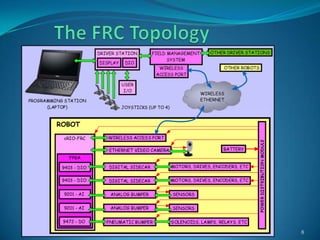
The FRC Topology8
The SoftwareUsed to Make Stuff MoveThis section offers a brief short course on the language LabVIEW9
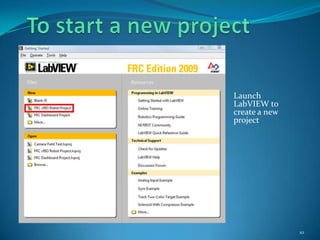
To start a new projectLaunch LabVIEW to create a new project10
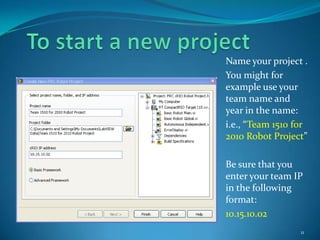
To start a new projectName your project .You might for example use your team name and year in the name:i.e., “Team 1510 for 2010 Robot Project”Be sure that you enter your team IP in the following format:10.15.10.0211
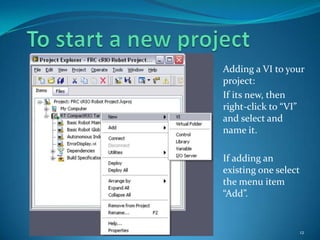
To start a new projectAdding a VI to your project:If its new, then right-click to “VI” and select and name it.If adding an existing one select the menu item “Add”.12
LabVIEW Functions - Front PanelSome example controls and indicators for the Front Panel13Numerical Controls and Indicators
LabVIEW Functions - Front PanelSome example controls and indicators for the Front Panel14Booleans
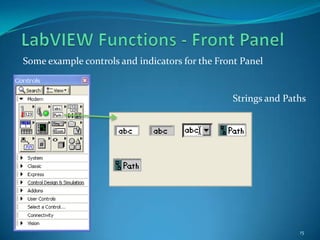
LabVIEW Functions - Front PanelSome example controls and indicators for the Front Panel15Strings and Paths
LabVIEW Functions - Front PanelSome example controls and indicators for the Front Panel16Arrays, Clusters, Matrices and Dialog Boxes
LabVIEW Functions - Front PanelSome example controls and indicators for the Front Panel17List Boxes, Tables and Trees
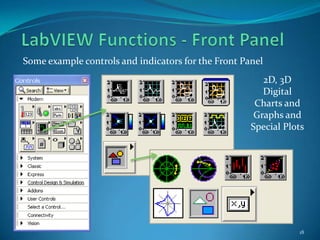
LabVIEW Functions - Front PanelSome example controls and indicators for the Front Panel182D, 3D Digital Charts and Graphs and Special Plots
LabVIEW Functions - Front PanelSome example controls and indicators for the Front Panel19Rings and Enums
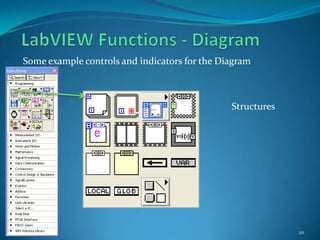
LabVIEW Functions - DiagramSome example controls and indicators for the Diagram20Structures
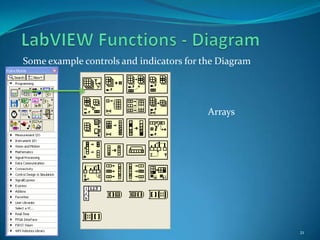
LabVIEW Functions - DiagramSome example controls and indicators for the Diagram21Arrays
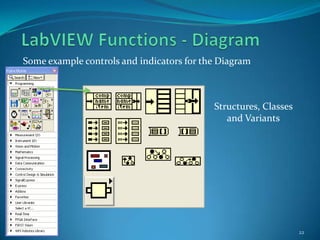
LabVIEW Functions - DiagramSome example controls and indicators for the Diagram22Structures, Classes and Variants
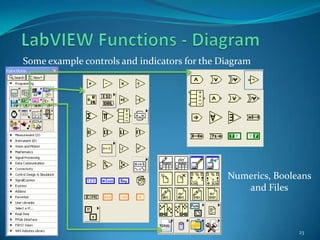
LabVIEW Functions - DiagramSome example controls and indicators for the Diagram23Numerics, Booleans and Files
LabVIEW Functions - DiagramSome example controls and indicators for the Diagram24Timing, Dialog Boxes, Waveforms, etc, etcHundreds of other functions
An Example of Virtual TestingTesting the Joystick Power Function VI25Task: Test the VI with 1000 simulated Joystick positions from 0 to +1 to 0 to -1 (White Line) and create 9 plots with the following function:Plotn = (motor speed)mWhere:Plotn = a series of plots(9 total)Motor speed = voltage input to the motor (from 1 to -1)m = power function (use to alter the forward sensitivity of the Joystick)
The HardwareUsed to Move StuffThis discussion touches on the following principle areas:The cRIO hardware (The Brain)
The Sensors, Motors and Actuators that can be used
The DS Drive Station (Link from the User to the robot’s brain)26
cRIO HardwarecRIO – Compact Real-time Input/OutputA PAC (Programmable Automation Controller) which is an industrial controller that is used in advanced systems incorporating software capabilities such as control, communication, data logging, and signal processing requiring rugged hardware performing logic, motion, process control, and vision. For FIRST applications, ideal for robot building.27A fully populated cRIO example

First fare 2010 lab-view overview

  • 1.
    FIRSTFare 2010LabVIEW OverviewDennisC. Erickson ~ Senior Mentor for Teams 1510 and 2898Daniel Bramblett ~ Team 1510Amy Wiegand ~ Team 29151
  • 2.
    IntroductionWorking with NationalInstrument’sHardware and SoftwareSpecifically:Software ~ LabVIEWHardware ~ cRIO2
  • 3.
    IntroductionLabVIEWVI = VirtualInstrumentEW = Engineering WorkstationVI = Virtual Instrument or in other languages “Routine”, SubVI = Subroutine3
  • 4.
  • 5.
    Dataflow (All inputsmust be updated before VI – Virtual Instrument – executes)
  • 6.
    Self Documenting (Youknow what the code does)4
  • 7.
    Why LabVIEW?Portable Code(VIs are easily reused)
  • 8.
    Advanced set ofdiagnostic tools; probes, execution highlighting, error reporting, ability to surround the code with a “virtual world simulation environment” for testing.5
  • 9.
  • 10.
  • 11.
    Easily compiles toRT (Real-time) Operating Systems and FPGA (Field Programmable Gate Arrays) used in the cRIO processor6
  • 12.
    Why Do MoreThan Necessary to Win the Contest?While it is entirely possible to win a contest with a robot that is “bare bones” the better goal is to learn how to do things along the way that may or may not be used.7
  • 13.
  • 14.
    The SoftwareUsed toMake Stuff MoveThis section offers a brief short course on the language LabVIEW9
  • 15.
    To start anew projectLaunch LabVIEW to create a new project10
  • 16.
    To start anew projectName your project .You might for example use your team name and year in the name:i.e., “Team 1510 for 2010 Robot Project”Be sure that you enter your team IP in the following format:10.15.10.0211
  • 17.
    To start anew projectAdding a VI to your project:If its new, then right-click to “VI” and select and name it.If adding an existing one select the menu item “Add”.12
  • 18.
    LabVIEW Functions -Front PanelSome example controls and indicators for the Front Panel13Numerical Controls and Indicators
  • 19.
    LabVIEW Functions -Front PanelSome example controls and indicators for the Front Panel14Booleans
  • 20.
    LabVIEW Functions -Front PanelSome example controls and indicators for the Front Panel15Strings and Paths
  • 21.
    LabVIEW Functions -Front PanelSome example controls and indicators for the Front Panel16Arrays, Clusters, Matrices and Dialog Boxes
  • 22.
    LabVIEW Functions -Front PanelSome example controls and indicators for the Front Panel17List Boxes, Tables and Trees
  • 23.
    LabVIEW Functions -Front PanelSome example controls and indicators for the Front Panel182D, 3D Digital Charts and Graphs and Special Plots
  • 24.
    LabVIEW Functions -Front PanelSome example controls and indicators for the Front Panel19Rings and Enums
  • 25.
    LabVIEW Functions -DiagramSome example controls and indicators for the Diagram20Structures
  • 26.
    LabVIEW Functions -DiagramSome example controls and indicators for the Diagram21Arrays
  • 27.
    LabVIEW Functions -DiagramSome example controls and indicators for the Diagram22Structures, Classes and Variants
  • 28.
    LabVIEW Functions -DiagramSome example controls and indicators for the Diagram23Numerics, Booleans and Files
  • 29.
    LabVIEW Functions -DiagramSome example controls and indicators for the Diagram24Timing, Dialog Boxes, Waveforms, etc, etcHundreds of other functions
  • 30.
    An Example ofVirtual TestingTesting the Joystick Power Function VI25Task: Test the VI with 1000 simulated Joystick positions from 0 to +1 to 0 to -1 (White Line) and create 9 plots with the following function:Plotn = (motor speed)mWhere:Plotn = a series of plots(9 total)Motor speed = voltage input to the motor (from 1 to -1)m = power function (use to alter the forward sensitivity of the Joystick)
  • 31.
    The HardwareUsed toMove StuffThis discussion touches on the following principle areas:The cRIO hardware (The Brain)
  • 32.
    The Sensors, Motorsand Actuators that can be used
  • 33.
    The DS DriveStation (Link from the User to the robot’s brain)26
  • 34.
    cRIO HardwarecRIO –Compact Real-time Input/OutputA PAC (Programmable Automation Controller) which is an industrial controller that is used in advanced systems incorporating software capabilities such as control, communication, data logging, and signal processing requiring rugged hardware performing logic, motion, process control, and vision. For FIRST applications, ideal for robot building.27A fully populated cRIO example