Technology to Facilitate
Student Engagement and
Formative Assessment
Jeremy Anderson
Outcomes
By the end of today, you will be able to:
• Describe three tools for engaging students
• Explain the primary purpose of each tool
• Select the best tool to facilitate various types
of learning activities and content
Tools for Engagement
• Discussion Boards
• Blogs (Journals)
• Wikis
DISCUSSION BOARDS
Create flowing discourse on a topic
Discussion Boards – Imagine this…
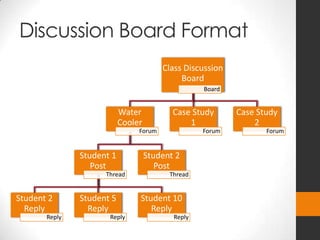
Discussion Board Format
Class Discussion
Board
Board
Water
Cooler
Forum
Student 1
Post
Thread
Student 2
Reply
Reply
Student 5
Reply
Reply
Student 10
Reply
Reply
Student 2
Post
Thread
Case Study
1
Forum
Case Study
2
Forum
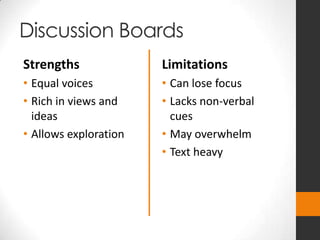
Discussion Boards
Strengths
• Equal voices
• Rich in views and
ideas
• Allows exploration
Limitations
• Can lose focus
• Lacks non-verbal
cues
• May overwhelm
• Text heavy
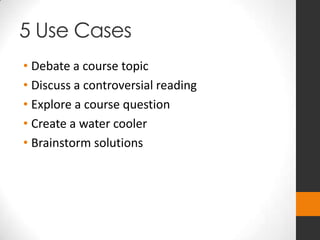
5 Use Cases
• Debate a course topic
• Discuss a controversial reading
• Explore a course question
• Create a water cooler
• Brainstorm solutions
BLOGS
Focus on author’s voice and message
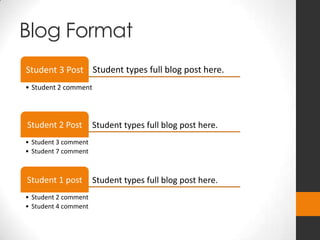
Blogs – Imagine this…
Student types full blog post here.Student 3 Post
• Student 2 comment
Student types full blog post here.Student 2 Post
• Student 3 comment
• Student 7 comment
Student types full blog post here.Student 1 post
• Student 2 comment
• Student 4 comment
Blog Format
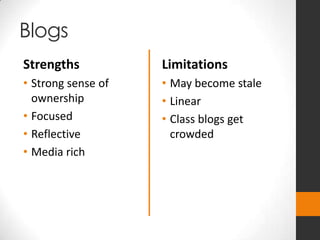
Blogs
Strengths
• Strong sense of
ownership
• Focused
• Reflective
• Media rich
Limitations
• May become stale
• Linear
• Class blogs get
crowded
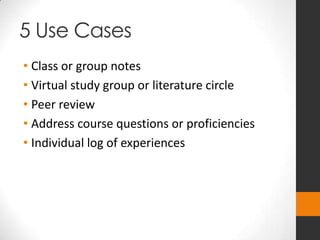
5 Use Cases
• Class or group notes
• Virtual study group or literature circle
• Peer review
• Address course questions or proficiencies
• Individual log of experiences
WIKIS
Collaboratively create a product
Wikis – Imagine this…
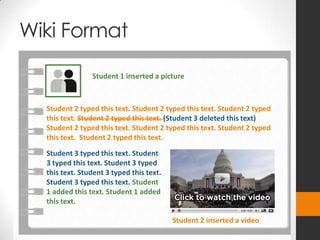
Wiki Format
Student 1 inserted a picture
Student 2 typed this text. Student 2 typed this text. Student 2 typed
this text. Student 2 typed this text. (Student 3 deleted this text)
Student 2 typed this text. Student 2 typed this text. Student 2 typed
this text. Student 2 typed this text.
Student 3 typed this text. Student
3 typed this text. Student 3 typed
this text. Student 3 typed this text.
Student 3 typed this text. Student
1 added this text. Student 1 added
this text.
Student 2 inserted a video
Wikis
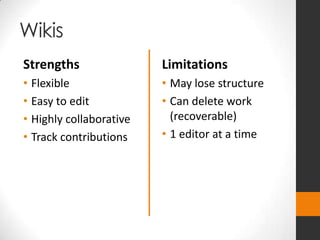
Strengths
• Flexible
• Easy to edit
• Highly collaborative
• Track contributions
Limitations
• May lose structure
• Can delete work
(recoverable)
• 1 editor at a time
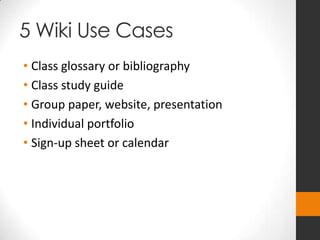
5 Wiki Use Cases
• Class glossary or bibliography
• Class study guide
• Group paper, website, presentation
• Individual portfolio
• Sign-up sheet or calendar
LEARNING CHECK
What is it and what is it
good for?
• Discussion Board
• Blog
• Wiki
LET’S APPLY IT!
Brainstorm
Choose an activity or assignment you currently
use and select the technology that would most
appropriately facilitate that activity.
• What is the nature of the content?
• What is the purpose (outcome) of the assignment?
• What type of discourse do you want?
• Whose voice should be heard?
• What level of collaboration do you want?
Questions?
Comments?
THANK YOU!

Blog, Wiki, or Discussion Board? Best educational uses for each

  • 1.
    Technology to Facilitate StudentEngagement and Formative Assessment Jeremy Anderson
  • 2.
    Outcomes By the endof today, you will be able to: • Describe three tools for engaging students • Explain the primary purpose of each tool • Select the best tool to facilitate various types of learning activities and content
  • 3.
    Tools for Engagement •Discussion Boards • Blogs (Journals) • Wikis
  • 4.
  • 5.
    Discussion Boards –Imagine this…
  • 6.
    Discussion Board Format ClassDiscussion Board Board Water Cooler Forum Student 1 Post Thread Student 2 Reply Reply Student 5 Reply Reply Student 10 Reply Reply Student 2 Post Thread Case Study 1 Forum Case Study 2 Forum
  • 7.
    Discussion Boards Strengths • Equalvoices • Rich in views and ideas • Allows exploration Limitations • Can lose focus • Lacks non-verbal cues • May overwhelm • Text heavy
  • 8.
    5 Use Cases •Debate a course topic • Discuss a controversial reading • Explore a course question • Create a water cooler • Brainstorm solutions
  • 9.
    BLOGS Focus on author’svoice and message
  • 10.
  • 11.
    Student types fullblog post here.Student 3 Post • Student 2 comment Student types full blog post here.Student 2 Post • Student 3 comment • Student 7 comment Student types full blog post here.Student 1 post • Student 2 comment • Student 4 comment Blog Format
  • 12.
    Blogs Strengths • Strong senseof ownership • Focused • Reflective • Media rich Limitations • May become stale • Linear • Class blogs get crowded
  • 13.
    5 Use Cases •Class or group notes • Virtual study group or literature circle • Peer review • Address course questions or proficiencies • Individual log of experiences
  • 14.
  • 15.
  • 16.
    Wiki Format Student 1inserted a picture Student 2 typed this text. Student 2 typed this text. Student 2 typed this text. Student 2 typed this text. (Student 3 deleted this text) Student 2 typed this text. Student 2 typed this text. Student 2 typed this text. Student 2 typed this text. Student 3 typed this text. Student 3 typed this text. Student 3 typed this text. Student 3 typed this text. Student 3 typed this text. Student 1 added this text. Student 1 added this text. Student 2 inserted a video
  • 17.
    Wikis Strengths • Flexible • Easyto edit • Highly collaborative • Track contributions Limitations • May lose structure • Can delete work (recoverable) • 1 editor at a time
  • 18.
    5 Wiki UseCases • Class glossary or bibliography • Class study guide • Group paper, website, presentation • Individual portfolio • Sign-up sheet or calendar
  • 19.
  • 20.
    What is itand what is it good for? • Discussion Board • Blog • Wiki
  • 21.
  • 22.
    Brainstorm Choose an activityor assignment you currently use and select the technology that would most appropriately facilitate that activity. • What is the nature of the content? • What is the purpose (outcome) of the assignment? • What type of discourse do you want? • Whose voice should be heard? • What level of collaboration do you want?
  • 23.
  • 24.

Editor's Notes

  • #4 Discussion boards – forums with threads and repliesBlogs – a series of posts, posts can have comments / journal – a private log (student-teacher)Wikis – a collaboratively edited, very simple website
  • #6 Imagine you pose a question to your students, step outside, and allow them to answer the questionIt will be lively, open, many voicesFocus is on task, topic, debate, ideaBut it also allows for flowing discourse
  • #7 The technical structure of a discussion boardBoard: a list or collection of forums (topics)Forums: the main topics for discussionsThreads: the main responses to the discussion topicReplies: questions or comments on the threads
  • #8 How have we used discussion boards?How might we account for the limitations of discussion boards? To maintain focus – write clear expectations / instructions To cut down on being overwhelmed – create discussion groups To ease problem of non-verbal cues – create discussion rules as a class
  • #10 Brief definition here
  • #11 Best for presenting individual voicesHierarchical discourseFocus is on voice, opinion, point of view, presentation
  • #12 List of posts with text, links, images, and videosFirst posted is last on pageComments are usually collapsible
  • #13 How have we accounted for the limitations of blogs? Content may become stale – assign a posting schedule Crowding – break blogs into groups, days, topics, etc.
  • #17 Brief definition here
  • #18 Best for creating as a groupOne person controls at a time, control can be passedFocus is on collaborative creationAllows flexibility of form, presentation
  • #20 How have we accounted for the limitations of the wiki tool? One editor – created individual pages Lose structure – provided a template