Technology Action Plan EDLD 5352 Greg Gibbs
Technology Integration Organizational Leadership Superintendent Responsible for employing staff and evaluating administrators, makes sure that progress is made towards goals and objectives
Technology Integration Organizational Leadership Asst. Superintendent Curriculum Director Responsible for providing resources and ensuring that technology standards and effective use are aligned with curriculum
Technology Integration Organizational Leadership Director of Technology Responsible for providing infrastructure so that technology can effectively be used in classrooms and on campuses
Technology Integration Organizational Leadership Campus Principal Responsible for evaluating teachers, using PDAS and walk-throughs, for effective instructional technology use, allocates campus budget for needs, ensures that professional development goals for teachers are being met through certificate checks, must make sure district and campus objectives are met for technology use
Technology Integration Organizational Leadership Campus Technologist Responsible for problems with hardware integration and software installation of support programs for instruction, works with district director to make sure system runs smoothly
Technology Integration Organizational Leadership Teachers Must ensure that technology is effectively used in the classroom, must align use with standards, must increase student higher order thinking skills using technology, document uses through lesson plans and evaluations
Technology Integration Organizational Leadership Effective Communication Teachers must know why the surveys like the STaR charts are extremely important Opening communication will allow principal to gather important opinions and ideas from staff Gather Data and Analyze It Using information gathered from campus STaR charts, teachers evaluations, AEIS, SBDM, and TAKS to find needs Use the information to maintain professional development training, continually ask for feedback, review staff development sessions to make sure they are in accordance with goals and beneficial Report findings to Superintendent to gain more resources for needs Allocate funding in appropriate manner to efficiently be used How does the principal manage useful integration?
Professional Development Plan Must  include training that is beneficial and appropriate Make use of online sources to train teachers in finding ways to meet their own needs Find ways to integrate web-based techniques like Moodle, blogging, AEIS data, WEBCAT, and ICAT
Professional Development Plan Goal – Provide technology instructional support for all teachers, staff, and administrators Instruct support personnel on technology uses and ways to help teachers use it effectively – librarians, counselors, paraprofessionals, etc. Teachers are trained on the uses of AEIS and other online data gathering sources Provide training in collaboration with regional ESCs Provide training and support for teacher use of web page building development for student access to lessons and interactivity
Professional Development Plan Provide curriculum management software Train in the use of eLearning software like Moodle or Interwrite system Provide training in the disaggregation of online data Training in the use of projectors, smartboards, multimedia presentations, and resources to use them Provide online professional development that can be collaborative and ongoing – PD360 Allow teachers online access to evaluations, as well as administrators online access to PDAS evaluation tools Make sure all plans correlate to the eRATE grant, LRPT, and NCLB standards
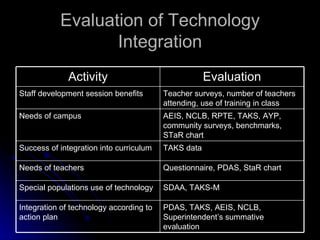
Evaluation of Technology Integration PDAS, TAKS, AEIS, NCLB, Superintendent’s summative evaluation Integration of technology according to action plan SDAA, TAKS-M Special populations use of technology  Questionnaire, PDAS, StaR chart Needs of teachers TAKS data Success of integration into curriculum AEIS, NCLB, RPTE, TAKS, AYP, community surveys, benchmarks, STaR chart Needs of campus Teacher surveys, number of teachers attending, use of training in class Staff development session benefits Evaluation Activity
Evaluation of Technology Integration Lessons that use technology integration will be reviewed by teachers and one will be reviewed with student surveys for feedback STaR chart results will come from 100% of teachers – results will be posted through email and school web page Staff development hours must consist of half from a technology course used in teacher’s subject area or a general use course – web page building, blogging uses, etc. End of year – teachers that have sufficient use of technology will be given off on an extra professional development workday as a reward

Technology Action Plan

  • 1.
    Technology Action PlanEDLD 5352 Greg Gibbs
  • 2.
    Technology Integration OrganizationalLeadership Superintendent Responsible for employing staff and evaluating administrators, makes sure that progress is made towards goals and objectives
  • 3.
    Technology Integration OrganizationalLeadership Asst. Superintendent Curriculum Director Responsible for providing resources and ensuring that technology standards and effective use are aligned with curriculum
  • 4.
    Technology Integration OrganizationalLeadership Director of Technology Responsible for providing infrastructure so that technology can effectively be used in classrooms and on campuses
  • 5.
    Technology Integration OrganizationalLeadership Campus Principal Responsible for evaluating teachers, using PDAS and walk-throughs, for effective instructional technology use, allocates campus budget for needs, ensures that professional development goals for teachers are being met through certificate checks, must make sure district and campus objectives are met for technology use
  • 6.
    Technology Integration OrganizationalLeadership Campus Technologist Responsible for problems with hardware integration and software installation of support programs for instruction, works with district director to make sure system runs smoothly
  • 7.
    Technology Integration OrganizationalLeadership Teachers Must ensure that technology is effectively used in the classroom, must align use with standards, must increase student higher order thinking skills using technology, document uses through lesson plans and evaluations
  • 8.
    Technology Integration OrganizationalLeadership Effective Communication Teachers must know why the surveys like the STaR charts are extremely important Opening communication will allow principal to gather important opinions and ideas from staff Gather Data and Analyze It Using information gathered from campus STaR charts, teachers evaluations, AEIS, SBDM, and TAKS to find needs Use the information to maintain professional development training, continually ask for feedback, review staff development sessions to make sure they are in accordance with goals and beneficial Report findings to Superintendent to gain more resources for needs Allocate funding in appropriate manner to efficiently be used How does the principal manage useful integration?
  • 9.
    Professional Development PlanMust include training that is beneficial and appropriate Make use of online sources to train teachers in finding ways to meet their own needs Find ways to integrate web-based techniques like Moodle, blogging, AEIS data, WEBCAT, and ICAT
  • 10.
    Professional Development PlanGoal – Provide technology instructional support for all teachers, staff, and administrators Instruct support personnel on technology uses and ways to help teachers use it effectively – librarians, counselors, paraprofessionals, etc. Teachers are trained on the uses of AEIS and other online data gathering sources Provide training in collaboration with regional ESCs Provide training and support for teacher use of web page building development for student access to lessons and interactivity
  • 11.
    Professional Development PlanProvide curriculum management software Train in the use of eLearning software like Moodle or Interwrite system Provide training in the disaggregation of online data Training in the use of projectors, smartboards, multimedia presentations, and resources to use them Provide online professional development that can be collaborative and ongoing – PD360 Allow teachers online access to evaluations, as well as administrators online access to PDAS evaluation tools Make sure all plans correlate to the eRATE grant, LRPT, and NCLB standards
  • 12.
    Evaluation of TechnologyIntegration PDAS, TAKS, AEIS, NCLB, Superintendent’s summative evaluation Integration of technology according to action plan SDAA, TAKS-M Special populations use of technology Questionnaire, PDAS, StaR chart Needs of teachers TAKS data Success of integration into curriculum AEIS, NCLB, RPTE, TAKS, AYP, community surveys, benchmarks, STaR chart Needs of campus Teacher surveys, number of teachers attending, use of training in class Staff development session benefits Evaluation Activity
  • 13.
    Evaluation of TechnologyIntegration Lessons that use technology integration will be reviewed by teachers and one will be reviewed with student surveys for feedback STaR chart results will come from 100% of teachers – results will be posted through email and school web page Staff development hours must consist of half from a technology course used in teacher’s subject area or a general use course – web page building, blogging uses, etc. End of year – teachers that have sufficient use of technology will be given off on an extra professional development workday as a reward