TECHNOLOGY INTEGRATION
Objectives:
To explore how technology can support
your instructional goals
To explore a variety of web-based and
iOS applications to support instructional
goals
To connect technology – instructional
goals – district goals.

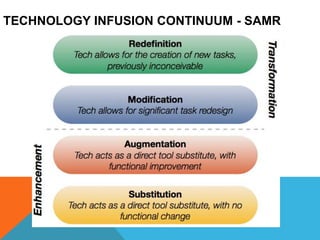
TECHNOLOGY INFUSION CONTINUUM - SAMR
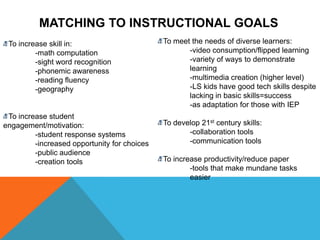
MATCHING TO INSTRUCTIONAL GOALS
To increase skill in:
-math computation
-sight word recognition
-phonemic awareness
-reading fluency
-geography
To increase student
engagement/motivation:
-student response systems
-increased opportunity for choices
-public audience
-creation tools
To meet the needs of diverse learners:
-video consumption/flipped learning
-variety of ways to demonstrate
learning
-multimedia creation (higher level)
-LS kids have good tech skills despite
lacking in basic skills=success
-as adaptation for those with IEP
To develop 21st century skills:
-collaboration tools
-communication tools
To increase productivity/reduce paper
-tools that make mundane tasks
easier
WHAT ARE YOUR GOALS FOR THIS SESSION?
If you browse or read a lot on the web, we
believe you will find Diigo indispensable.
Diigo is two services in one -- it is a
research and collaborative research tool on
the one hand, and a knowledge-sharing
community and social content site on the
other.
Social bookmarking site
Dropbox is a free service that lets you
bring your photos, docs, and videos
anywhere and share them easily. Never
email yourself a file again!https://skydrive.live.com/
https://www.sugarsync.com/
https://www.box.com/
One safe place for all your stuff. Upload
photos, videos, documents, and other files
that are important to you.
Create word processing, presentation, and
forms without any software.
Socrative is a smart, student response
system that empowers teachers to collect
data from their students via smartphones,
laptops, and tablets. It is a great way for
teachers to assess students and collect
immediate feedback.
Infuse Learning is similar to Socrative but
has a draw feature.
Ways to use Padlet
A Padlet on Padlet
Padlet is an Internet application that allows
people to express their thoughts on a
common topic easily. It works like an online
sheet of paper where people can put any
content (e.g. images, videos, documents,
text) anywhere on the page, together with
anyone, from any device.
PM Session!
I’ve mastered this!
LearnZillion is a learning platform that
combines video lessons, assessments,
and progress reporting. Each lesson
highlights a Common Core standard,
starting with math in grades 3-9.
More educational video sites
THOUGHTS?
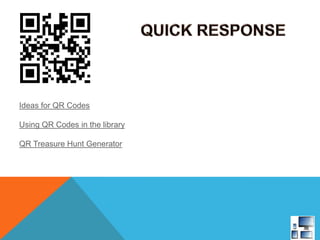
Ideas for QR Codes
Using QR Codes in the library
QR Treasure Hunt Generator
http://nlvm.usu.edu/en/nav/vlibrary.html
http://www.mathplayground.com/math_manipulatives.html
Additional
online digital
reading
resources
StoryBird
CLICK BELOW FOR MANY MORE
LINKS TO VALUABLE WEBSITES
AND TOOLS!

Tech training 7.17.13

  • 2.
    TECHNOLOGY INTEGRATION Objectives: To explorehow technology can support your instructional goals To explore a variety of web-based and iOS applications to support instructional goals To connect technology – instructional goals – district goals.

  • 3.
  • 4.
    MATCHING TO INSTRUCTIONALGOALS To increase skill in: -math computation -sight word recognition -phonemic awareness -reading fluency -geography To increase student engagement/motivation: -student response systems -increased opportunity for choices -public audience -creation tools To meet the needs of diverse learners: -video consumption/flipped learning -variety of ways to demonstrate learning -multimedia creation (higher level) -LS kids have good tech skills despite lacking in basic skills=success -as adaptation for those with IEP To develop 21st century skills: -collaboration tools -communication tools To increase productivity/reduce paper -tools that make mundane tasks easier
  • 5.
    WHAT ARE YOURGOALS FOR THIS SESSION?
  • 7.
    If you browseor read a lot on the web, we believe you will find Diigo indispensable. Diigo is two services in one -- it is a research and collaborative research tool on the one hand, and a knowledge-sharing community and social content site on the other. Social bookmarking site
  • 8.
    Dropbox is afree service that lets you bring your photos, docs, and videos anywhere and share them easily. Never email yourself a file again!https://skydrive.live.com/ https://www.sugarsync.com/ https://www.box.com/
  • 9.
    One safe placefor all your stuff. Upload photos, videos, documents, and other files that are important to you. Create word processing, presentation, and forms without any software.
  • 13.
    Socrative is asmart, student response system that empowers teachers to collect data from their students via smartphones, laptops, and tablets. It is a great way for teachers to assess students and collect immediate feedback. Infuse Learning is similar to Socrative but has a draw feature.
  • 14.
    Ways to usePadlet A Padlet on Padlet Padlet is an Internet application that allows people to express their thoughts on a common topic easily. It works like an online sheet of paper where people can put any content (e.g. images, videos, documents, text) anywhere on the page, together with anyone, from any device.
  • 17.
  • 18.
    LearnZillion is alearning platform that combines video lessons, assessments, and progress reporting. Each lesson highlights a Common Core standard, starting with math in grades 3-9. More educational video sites
  • 19.
  • 21.
    Ideas for QRCodes Using QR Codes in the library QR Treasure Hunt Generator
  • 22.
  • 26.
  • 28.
    CLICK BELOW FORMANY MORE LINKS TO VALUABLE WEBSITES AND TOOLS!

Editor's Notes