Deirdre Bonnycastle
  February 27 th 2012
 Has had access to the Internet from birth

 Has had access to email since elementary
 school

 Has been using social networking
 programs since high school
 May think they can multitask, but can’t

 Has access to information overload like no
 other generation
 May not know how to access legitimate
 information (science vs opinion)
 May never have been exposed to
 educational technology.
 Growing exponentially, too rapidly to keep
 up

 Start with your objectives and choose
 technology to help achieve that objective
 Involve your students by asking “If we want
 to do X, what tools might we use.”
 Have the librarian teach a class in search
 literacy
 Create a social bookmarking account for
 your class where they can share articles
 Create a class newsletter

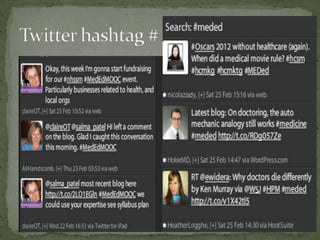
 Learn to use Twitter

 Learn about Apps, Simulators, Case sites
 Bookmarking http://www.diigo.com/


 Newsletter http://www.scoop.it/


 Twitter http://twitter.com/


 Tweetdeck http://www.tweetdeck.com/
 Students can see how others write which
 helps improve their writing
 Other students can comment on what was
 written thus improving everyone's reflection
 and discussion skills
 Other professionals can comment on what
 students writes thus engaging them in
 professional discourse
 UofS
 http://www.usask.ca/its/services/webpage_
 hosting/blogs/
 Blogger
 http://www.blogger.com/tour_start.g
 Google Doc
 http://youtu.be/zApehuekC-M
Creates document that can be edited by a
group
  Team task
  Committee
  Research group
  Case based learning
 U of S
 http://www.usask.ca/its/services/webpage_
 hosting/wiki/
 Blackboard has a wiki tool

 PBworks http://pbworks.com/

 Wikispaces http://www.wikispaces.com/
Teaching generation z

Teaching generation z

  • 1.
    Deirdre Bonnycastle February 27 th 2012
  • 4.
     Has hadaccess to the Internet from birth  Has had access to email since elementary school  Has been using social networking programs since high school
  • 5.
     May thinkthey can multitask, but can’t  Has access to information overload like no other generation  May not know how to access legitimate information (science vs opinion)  May never have been exposed to educational technology.
  • 6.
     Growing exponentially,too rapidly to keep up  Start with your objectives and choose technology to help achieve that objective  Involve your students by asking “If we want to do X, what tools might we use.”
  • 7.
     Have thelibrarian teach a class in search literacy  Create a social bookmarking account for your class where they can share articles  Create a class newsletter  Learn to use Twitter  Learn about Apps, Simulators, Case sites
  • 8.
     Bookmarking http://www.diigo.com/ Newsletter http://www.scoop.it/  Twitter http://twitter.com/  Tweetdeck http://www.tweetdeck.com/
  • 10.
     Students cansee how others write which helps improve their writing  Other students can comment on what was written thus improving everyone's reflection and discussion skills  Other professionals can comment on what students writes thus engaging them in professional discourse
  • 11.
     UofS http://www.usask.ca/its/services/webpage_ hosting/blogs/  Blogger http://www.blogger.com/tour_start.g  Google Doc http://youtu.be/zApehuekC-M
  • 12.
    Creates document thatcan be edited by a group  Team task  Committee  Research group  Case based learning
  • 13.
     U ofS http://www.usask.ca/its/services/webpage_ hosting/wiki/  Blackboard has a wiki tool  PBworks http://pbworks.com/  Wikispaces http://www.wikispaces.com/