Transitional Upgrade from
Windows Server 2008 r2 to
Windows Server 2012 r2
BY: AHAD LODHI
Basic Terminologies
 Active Directory (AD)
 Domain Name Server (DNS)
 Sites
 Domain
 Forest
 Group Policy
Server Upgradation - I ( Client Sever
Connectivity)
 Install and Configure Windows Sever 2008 r2
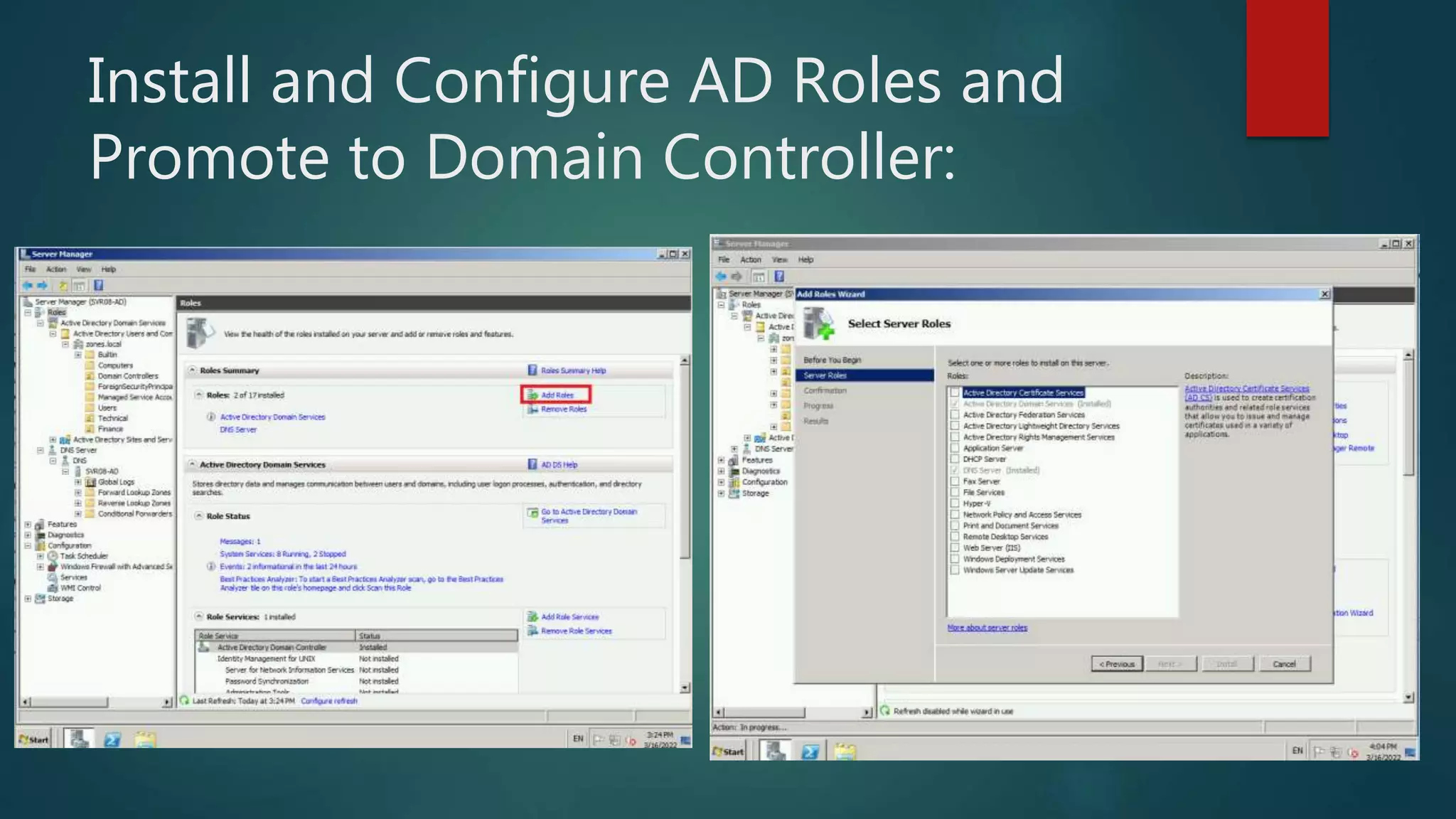
 Install Active Directory (AD) Roles and Promote to Domain Controller (DC)
 Install and Configure Client – PC
 Add PC to Active Directory
 Create Organizational Unit (OU) and Users
 Create and apply Group Policy Objects (GPO’s)
Server Upgradation –II (Upgrading from
Server 2008 r2 to Server 2012 r2)
 Install and Configure Windows Sever 2012
 Domain join to Server 2008
 Install AD Roles and add domain to existing Forest
 Schema Preparation
 FSMO Roles upgradation
 Raise Domain Functional Level
 Graceful Demotion of AD
Active Directory
 Active Directory (AD) is a database and set of services that connect
users with the network resources they need to get their work done.
The database (or directory) contains critical information about your
environment, including what users and computers there are and who's
allowed to do what.
 Active Directory helps you organize your company's users, computer
and more. Your IT admin uses AD to organize your company's complete
hierarchy from which computers belong on which network, to what your
profile picture looks like or which users have access to the storage room.
Domain Naming Service
 The Internet's system for converting alphabetic names into numeric IP
addresses. For example, when a Web address (URL) is typed into a browser,
DNS servers return the IP address of the Web server associated with that
name.
 The DNS system is a hierarchy of duplicated database servers worldwide
that begin with the "root servers" for the top-level domains (.com, .net,
.org, etc.). The root servers point to the "authoritative" servers located in
ISPs, as well as in large companies, that turn the names into IP addresses;
the process known as "name resolution." Using
our www.company.com example, COMPANY.COM is the domain name,
and WWW is the hostname. The domain name is the organization's
identity on the Web, and the hostname is the name of the Web server
within that domain.
Site, Domain, Forest
 AD sites are physical groupings of well-connected IP subnets that are used
to replicate information among domain controllers (DC) efficiently. AD
sites can be imagined as a map that describes the best routes for carrying out
replication in AD, thus making efficient use of the available network
bandwidth.
 An Active Directory domain is a collection of objects within a Microsoft Active
Directory network. An object can be a single user or a group or it can be a
hardware component, such as a computer or printer. Each domain holds a
database containing object identity information.
 Active Directory domains are grouped in a tree structure; a group of Active
Directory trees is known as a forest, which is the highest level of organization
within Active Directory. Active Directory domains can have multiple child
domains, which in turn can have their own child domains. Authentication
within Active Directory works through a transitive trust relationship.
Group Policy
 Group Policy is a hierarchical infrastructure that allows a network
administrator in charge of Microsoft's Active Directory to implement
specific configurations for users and computers. Group Policy is
primarily a security tool, and can be used to apply security settings to users
and computers.
 A Group Policy Object (GPO) is a virtual collection of policy settings. A
GPO has a unique name, such as a GUID. Group Policy settings are
contained in a GPO. A GPO can represent policy settings in the file system
and in the Active Directory.
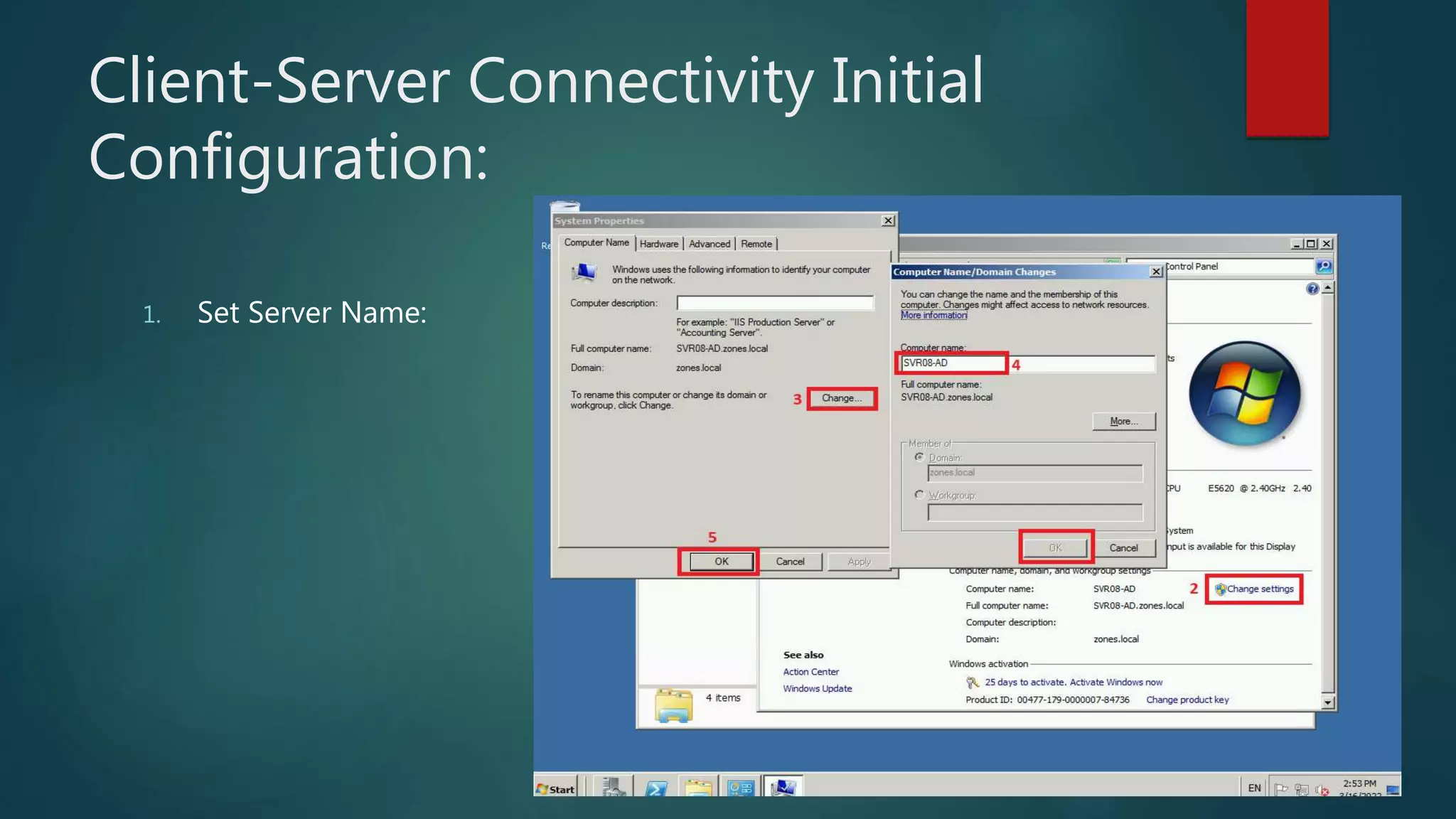
Client-Server Connectivity Initial
Configuration:
1. Set Server Name:
Client-Server Connectivity Initial
Configuration:
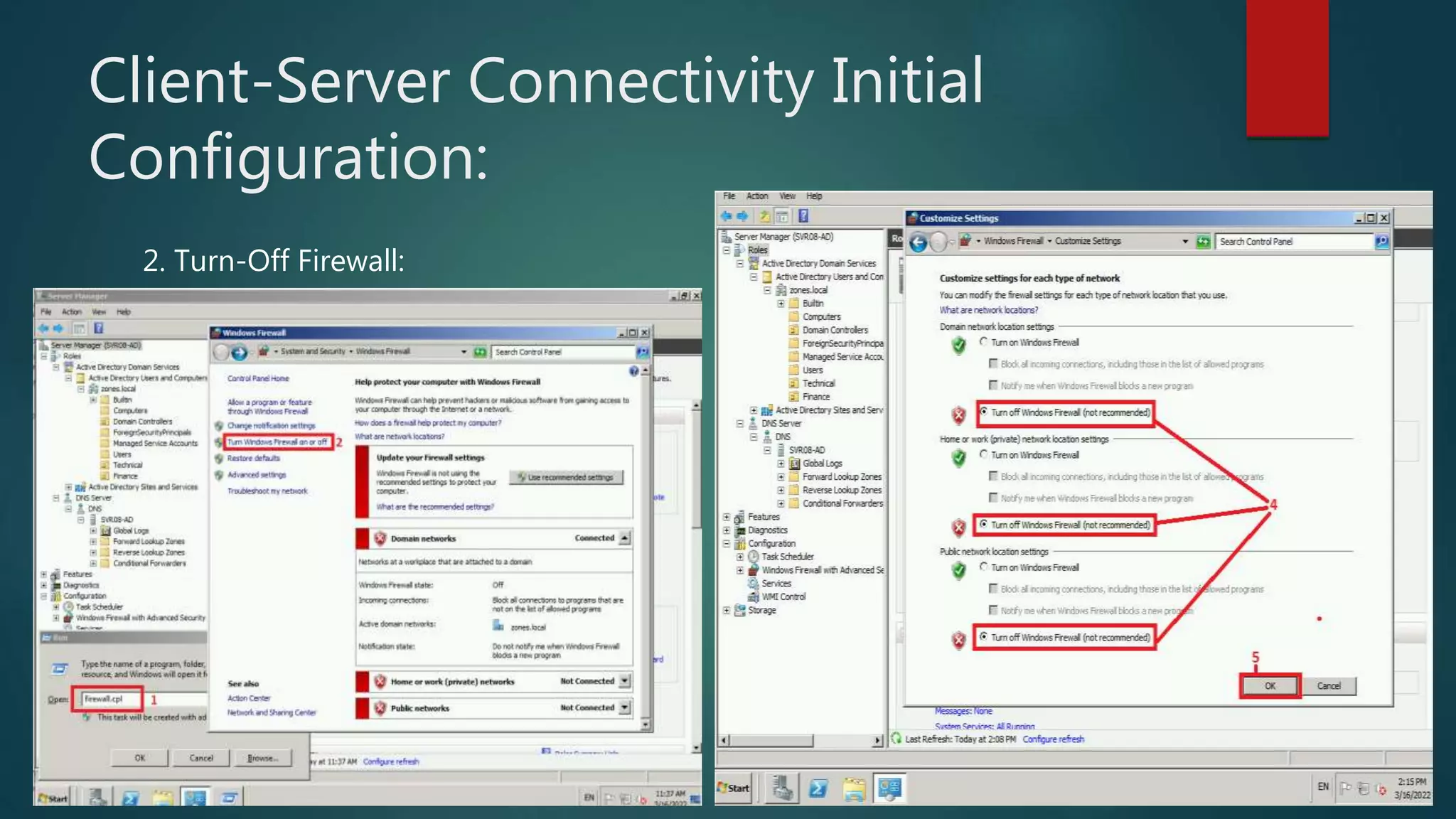
2. Turn-Off Firewall:
Client-Server Connectivity Initial
Configuration:
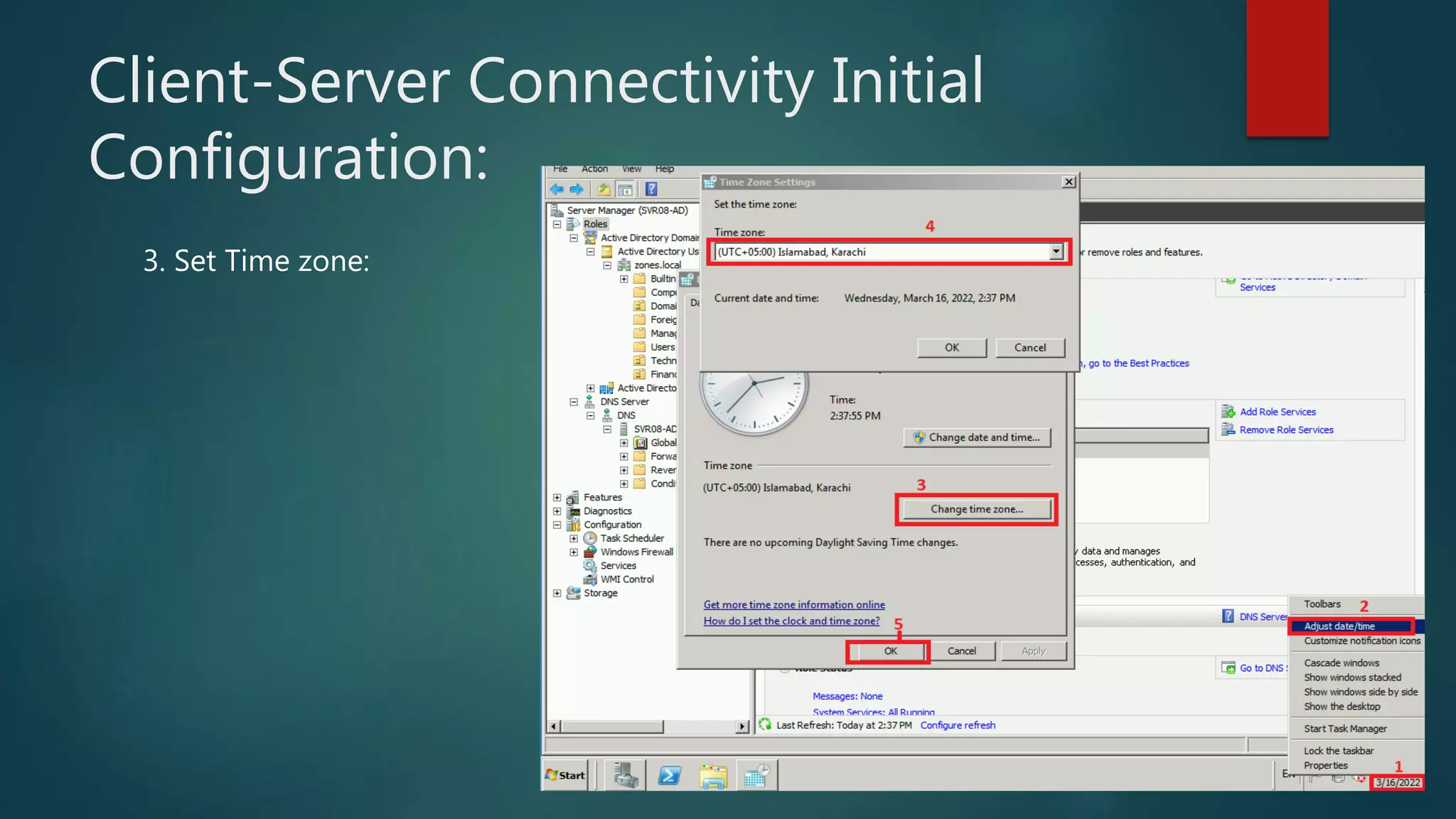
3. Set Time zone:
Client-Server Connectivity Initial
Configuration:
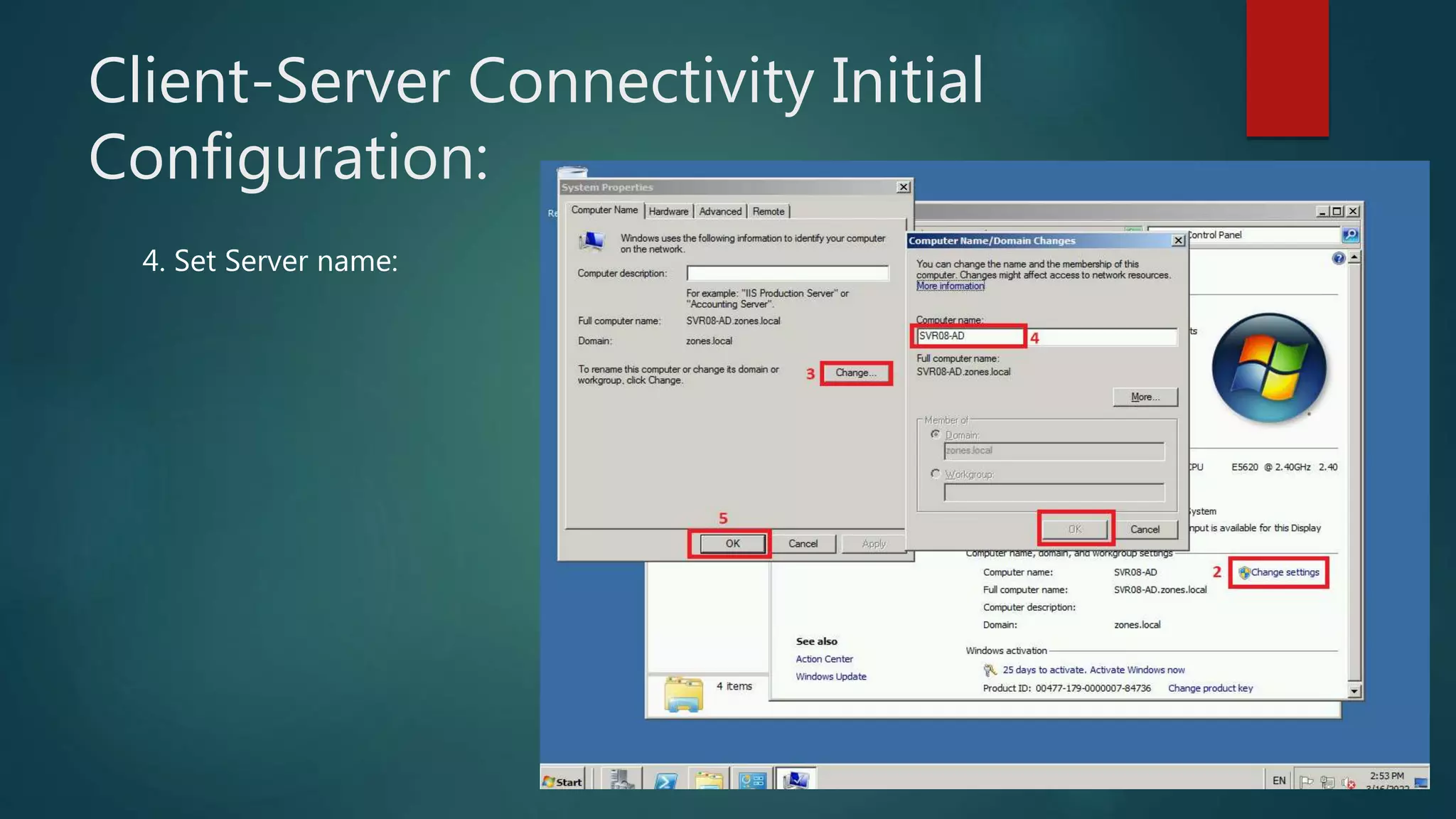
4. Set Server name:
Client-Server Connectivity Initial
Configuration:
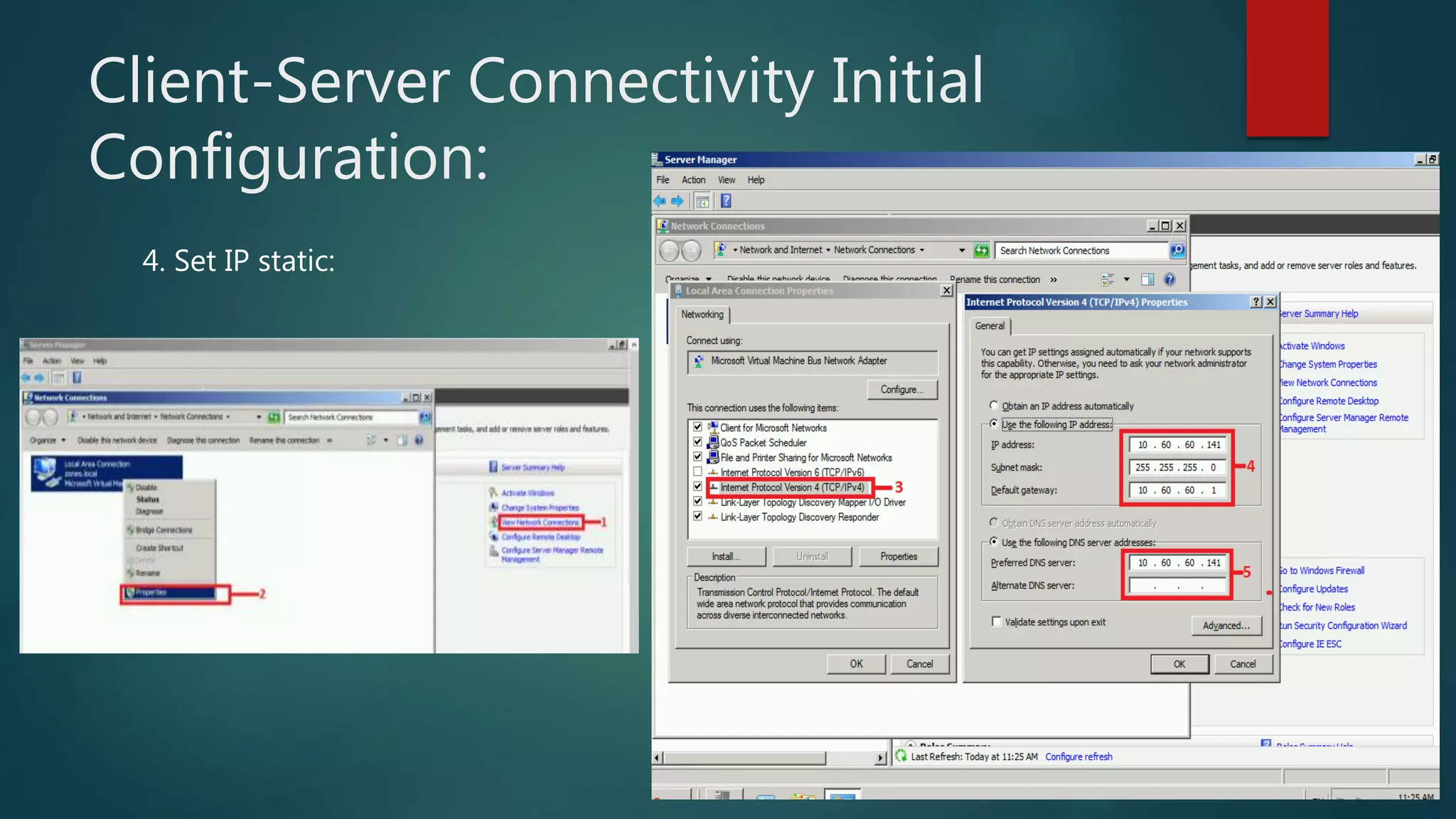
4. Set IP static:
Install and Configure AD Roles and
Promote to Domain Controller:
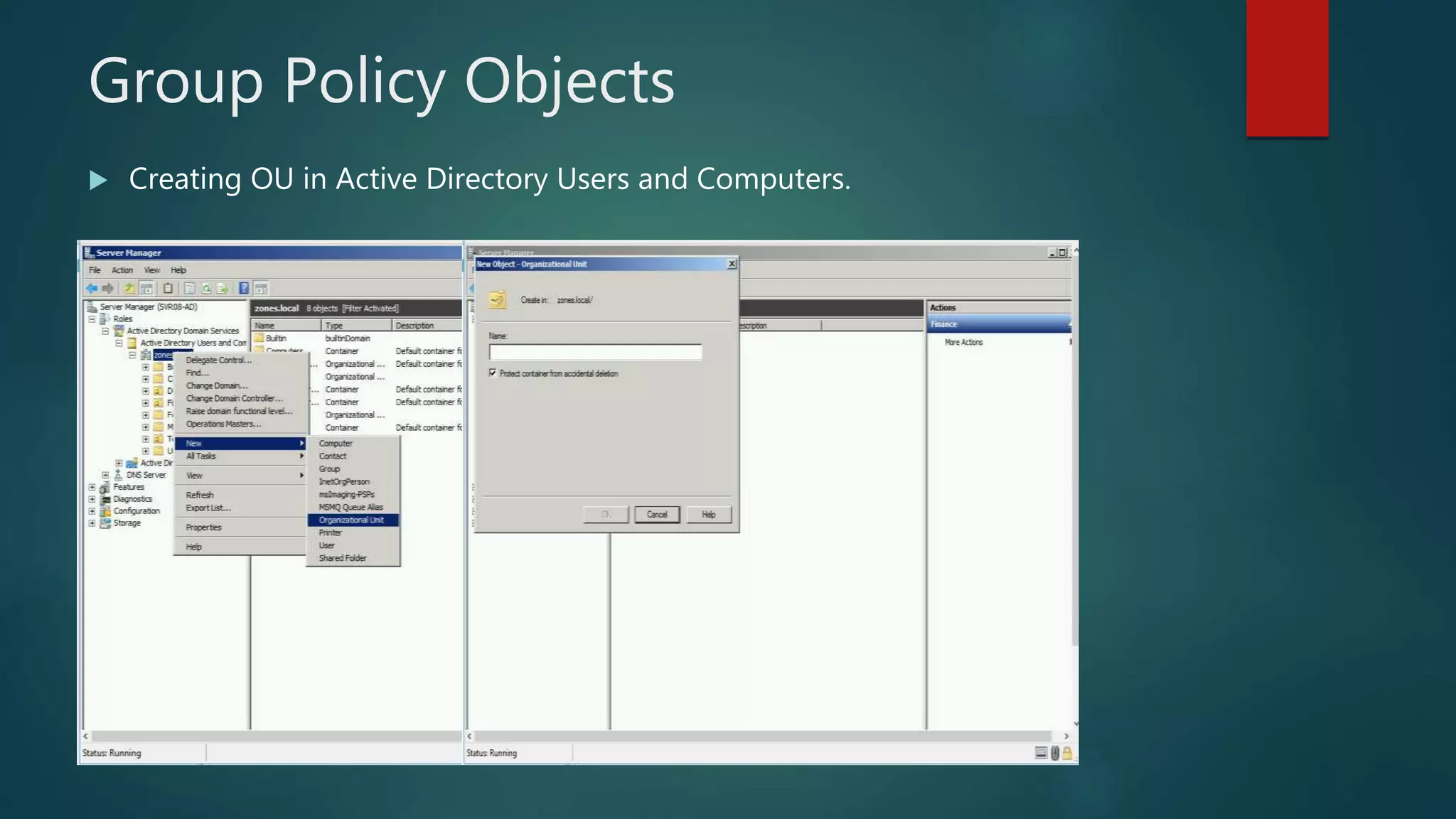
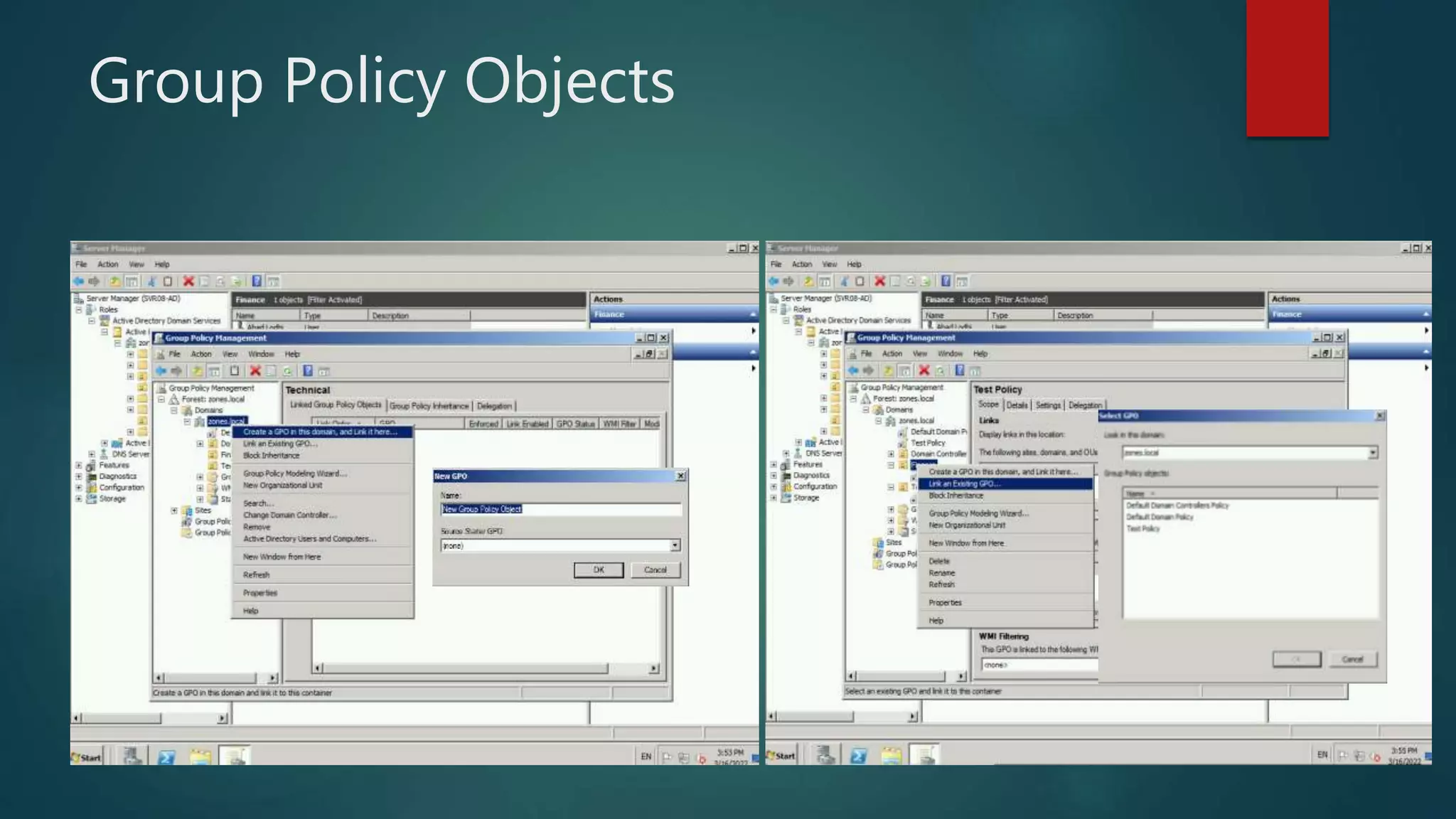
Group Policy Objects
 Creating OU in Active Directory Users and Computers.
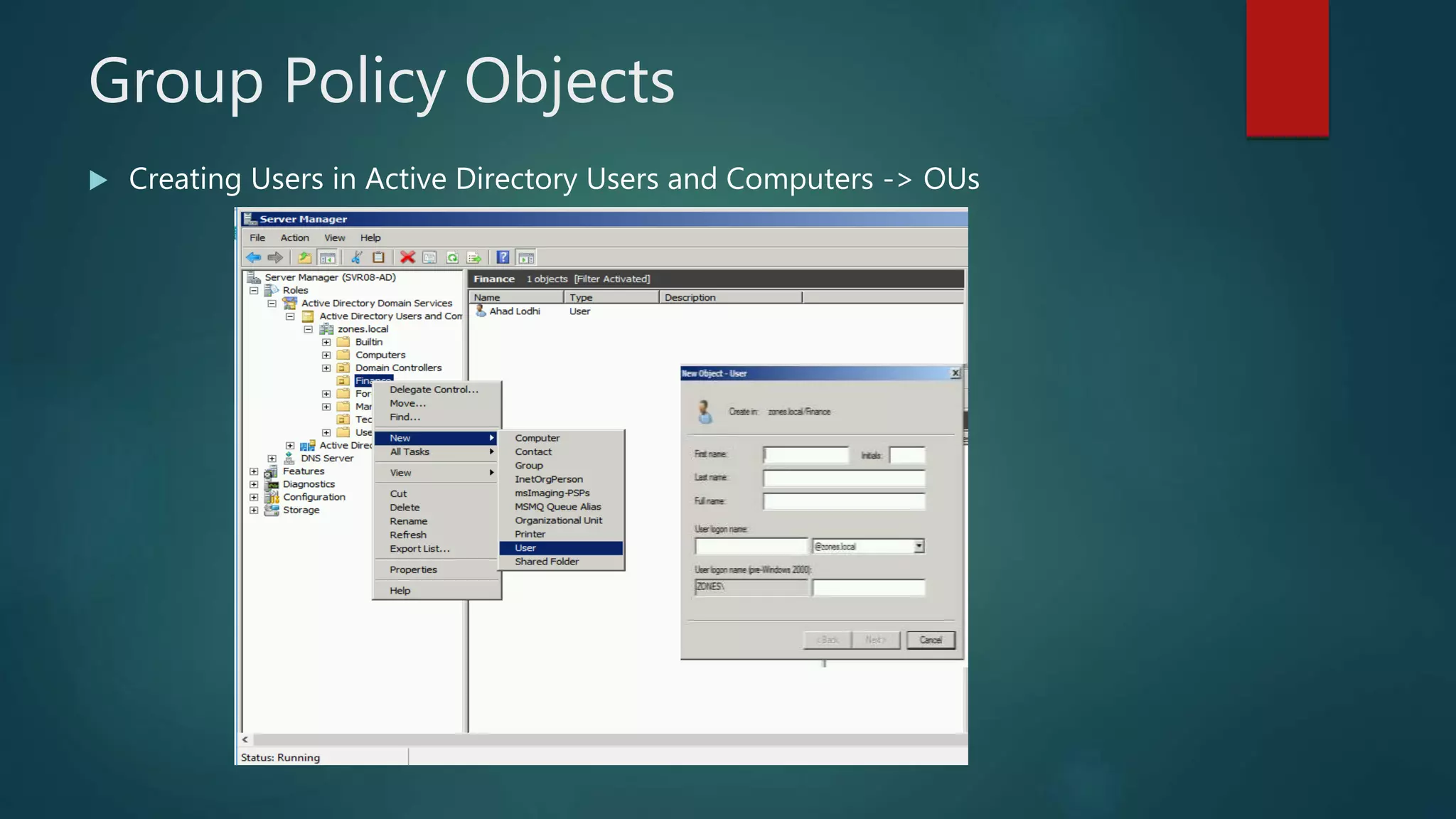
Group Policy Objects
 Creating Users in Active Directory Users and Computers -> OUs
Group Policy Objects
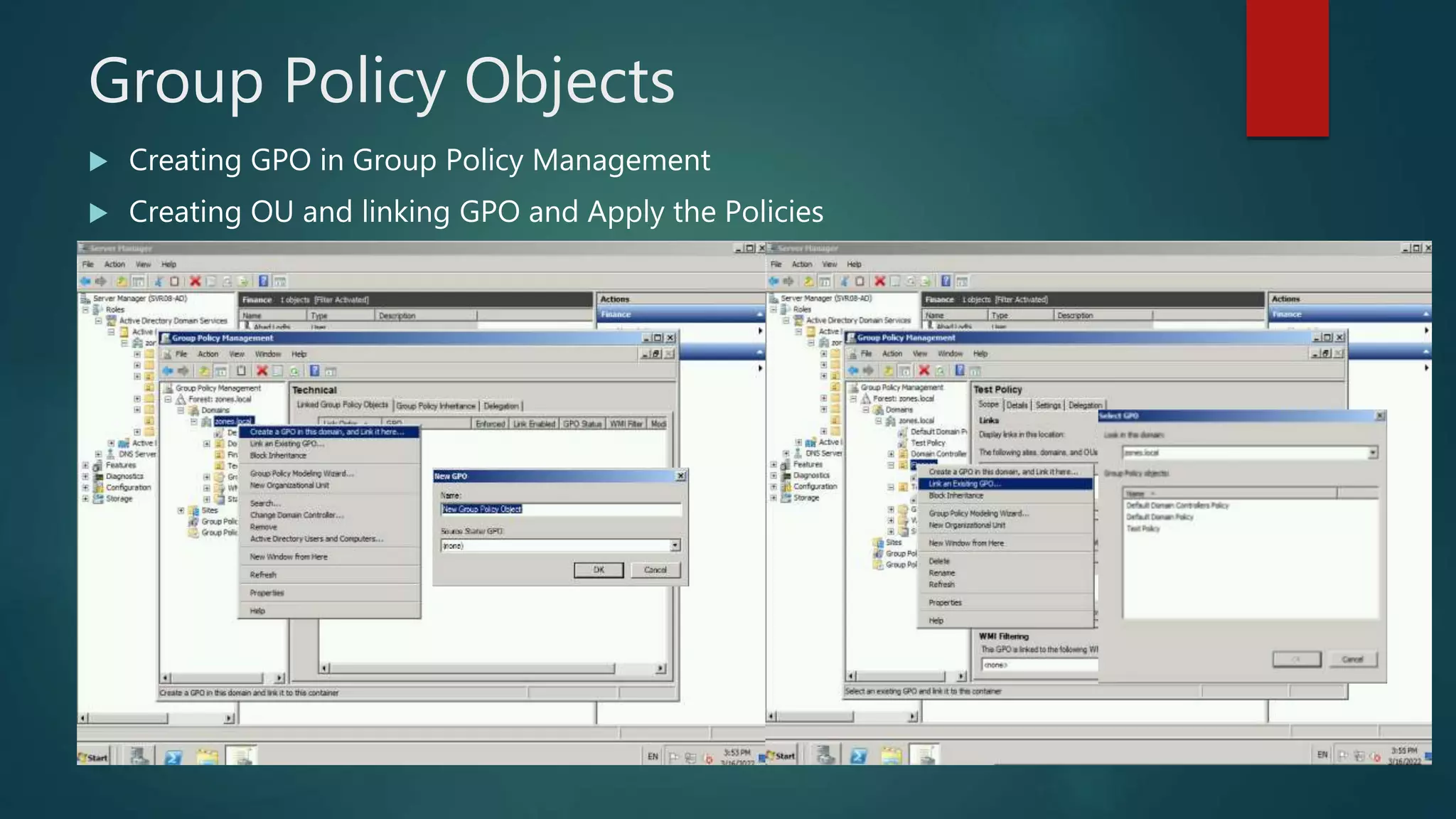
 Creating GPO in Group Policy Management
 Creating OU and linking GPO and Apply the Policies
Group Policy Objects

Migration Demo.pptx

  • 1.
    Transitional Upgrade from WindowsServer 2008 r2 to Windows Server 2012 r2 BY: AHAD LODHI
  • 2.
    Basic Terminologies  ActiveDirectory (AD)  Domain Name Server (DNS)  Sites  Domain  Forest  Group Policy
  • 3.
    Server Upgradation -I ( Client Sever Connectivity)  Install and Configure Windows Sever 2008 r2  Install Active Directory (AD) Roles and Promote to Domain Controller (DC)  Install and Configure Client – PC  Add PC to Active Directory  Create Organizational Unit (OU) and Users  Create and apply Group Policy Objects (GPO’s)
  • 4.
    Server Upgradation –II(Upgrading from Server 2008 r2 to Server 2012 r2)  Install and Configure Windows Sever 2012  Domain join to Server 2008  Install AD Roles and add domain to existing Forest  Schema Preparation  FSMO Roles upgradation  Raise Domain Functional Level  Graceful Demotion of AD
  • 5.
    Active Directory  ActiveDirectory (AD) is a database and set of services that connect users with the network resources they need to get their work done. The database (or directory) contains critical information about your environment, including what users and computers there are and who's allowed to do what.  Active Directory helps you organize your company's users, computer and more. Your IT admin uses AD to organize your company's complete hierarchy from which computers belong on which network, to what your profile picture looks like or which users have access to the storage room.
  • 6.
    Domain Naming Service The Internet's system for converting alphabetic names into numeric IP addresses. For example, when a Web address (URL) is typed into a browser, DNS servers return the IP address of the Web server associated with that name.  The DNS system is a hierarchy of duplicated database servers worldwide that begin with the "root servers" for the top-level domains (.com, .net, .org, etc.). The root servers point to the "authoritative" servers located in ISPs, as well as in large companies, that turn the names into IP addresses; the process known as "name resolution." Using our www.company.com example, COMPANY.COM is the domain name, and WWW is the hostname. The domain name is the organization's identity on the Web, and the hostname is the name of the Web server within that domain.
  • 7.
    Site, Domain, Forest AD sites are physical groupings of well-connected IP subnets that are used to replicate information among domain controllers (DC) efficiently. AD sites can be imagined as a map that describes the best routes for carrying out replication in AD, thus making efficient use of the available network bandwidth.  An Active Directory domain is a collection of objects within a Microsoft Active Directory network. An object can be a single user or a group or it can be a hardware component, such as a computer or printer. Each domain holds a database containing object identity information.  Active Directory domains are grouped in a tree structure; a group of Active Directory trees is known as a forest, which is the highest level of organization within Active Directory. Active Directory domains can have multiple child domains, which in turn can have their own child domains. Authentication within Active Directory works through a transitive trust relationship.
  • 8.
    Group Policy  GroupPolicy is a hierarchical infrastructure that allows a network administrator in charge of Microsoft's Active Directory to implement specific configurations for users and computers. Group Policy is primarily a security tool, and can be used to apply security settings to users and computers.  A Group Policy Object (GPO) is a virtual collection of policy settings. A GPO has a unique name, such as a GUID. Group Policy settings are contained in a GPO. A GPO can represent policy settings in the file system and in the Active Directory.
  • 9.
  • 10.
  • 11.
  • 12.
  • 13.
  • 14.
    Install and ConfigureAD Roles and Promote to Domain Controller:
  • 15.
    Group Policy Objects Creating OU in Active Directory Users and Computers.
  • 16.
    Group Policy Objects Creating Users in Active Directory Users and Computers -> OUs
  • 17.
    Group Policy Objects Creating GPO in Group Policy Management  Creating OU and linking GPO and Apply the Policies
  • 18.