

AD 102 – Break out of the box
Integrate existing Domino data with modern websites
Karl-Henry Martinsson
Deep South Insurance
 Swede living in Dallas
 Sr. Applications Developer, Deep South Insurance
 Life-long geek
 Programming since 1982
 Ex-Microsoft (1988-90)
 Ex-journalist (1993-1997, freelance 1998-2011)
 Web developer since 1994
 Notes/Domino developer since 1996
 IBM Champion 2014 and 2015
 http://blog.texasswede.com
I AM…
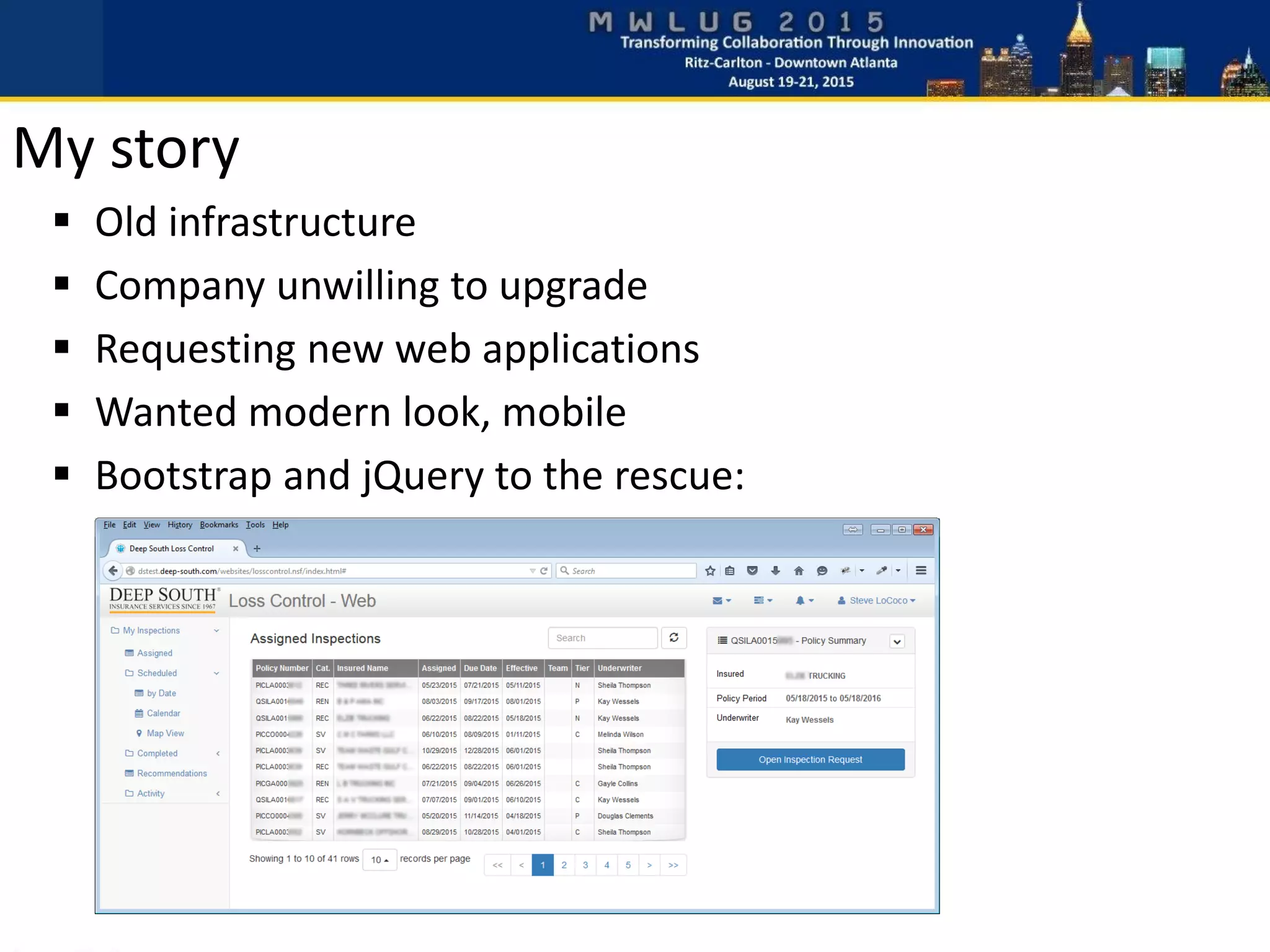
 Old infrastructure
 Company unwilling to upgrade
 Requesting new web applications
 Wanted modern look, mobile
 Bootstrap and jQuery to the rescue:
My story
Agenda
“Integrate existing Domino data with modern websites”
 Why integrate?
 Why jQuery and not XPages?
 Separate the workload
 Client – Javascript/jQuery, Ajax, JSON
 Server – Lotusscript
 Improve the UI – Bootstrap
 Demos
All sample code will be available for download at
http://blog.texasswede.com/MWLUG
 Limited or no migration options
 Desire to modernize
 Code re-use
 Take advantage of the power of Domino
 No one will know you are using a Domino backend
 Use existing skillset
 Learn valuable new skills
Why integrate?
 Infrastructure not supporting XPages
 No XPages skills
 Tight deadline – no time to learn
 More control
 Plugin availability
Why not use Xpages?
 Separate design and code
 Focus expertise on their respective areas
 Use established front-end technologies
 Back-end focus on business logic and data
 Collaboration is important!
Separate the workload
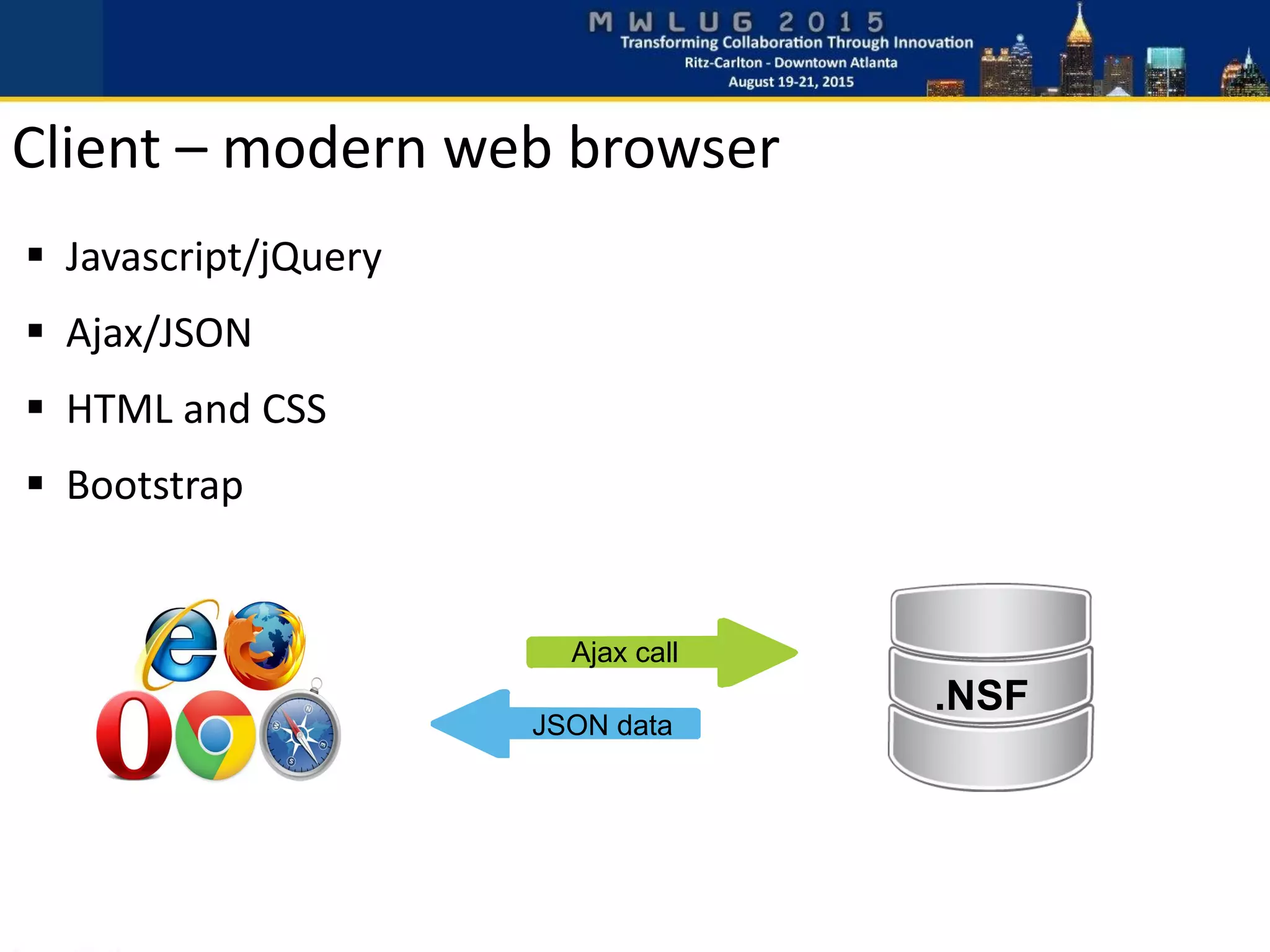
 Javascript/jQuery
 Ajax/JSON
 HTML and CSS
 Bootstrap
Ajax call
JSON data
.NSF
Client – modern web browser
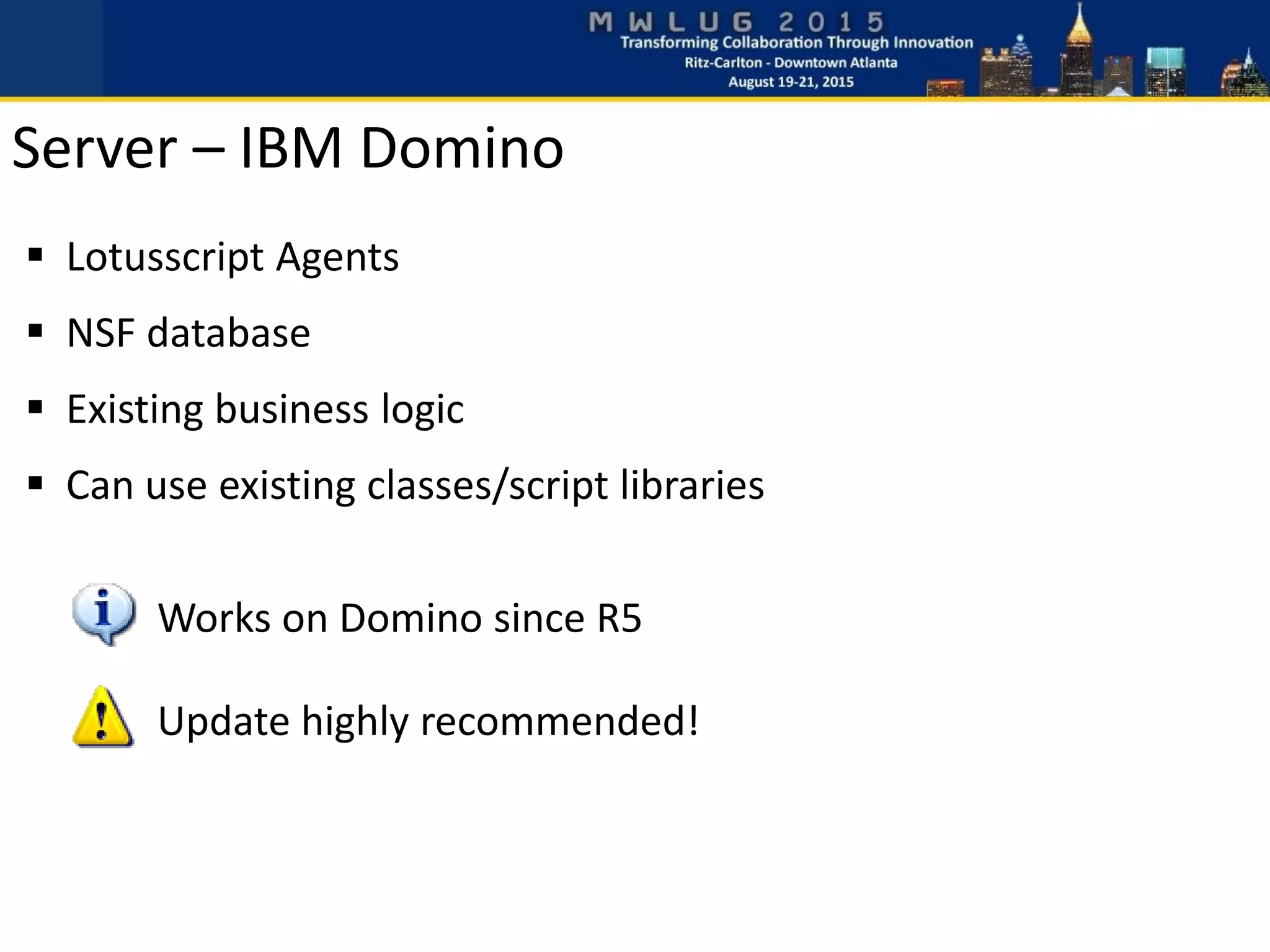
 Lotusscript Agents
 NSF database
 Existing business logic
 Can use existing classes/script libraries
Works on Domino since R5
Update highly recommended!
Server – IBM Domino
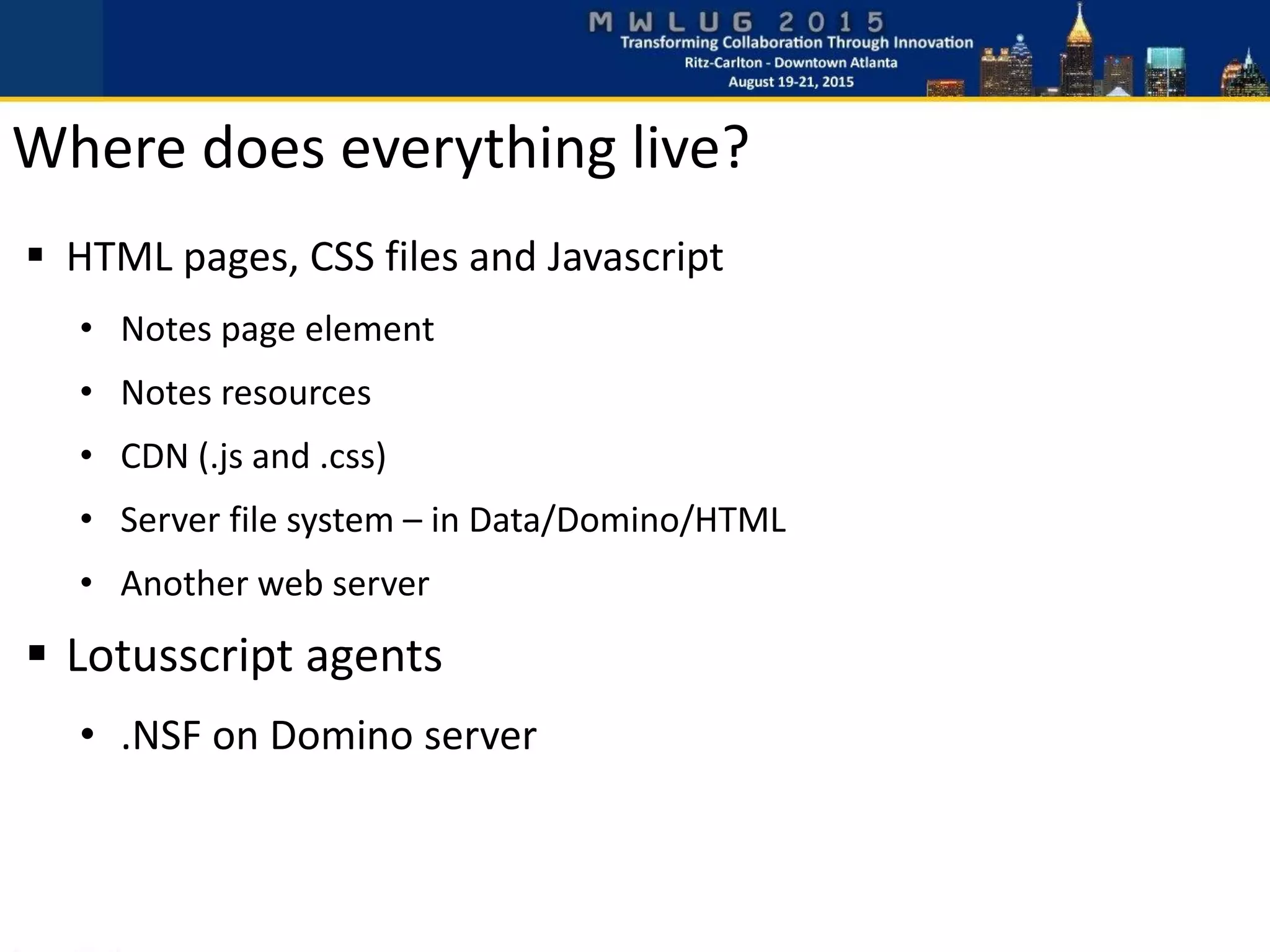
Where does everything live?
 HTML pages, CSS files and Javascript
• Notes page element
• Notes resources
• CDN (.js and .css)
• Server file system – in Data/Domino/HTML
• Another web server
 Lotusscript agents
• .NSF on Domino server
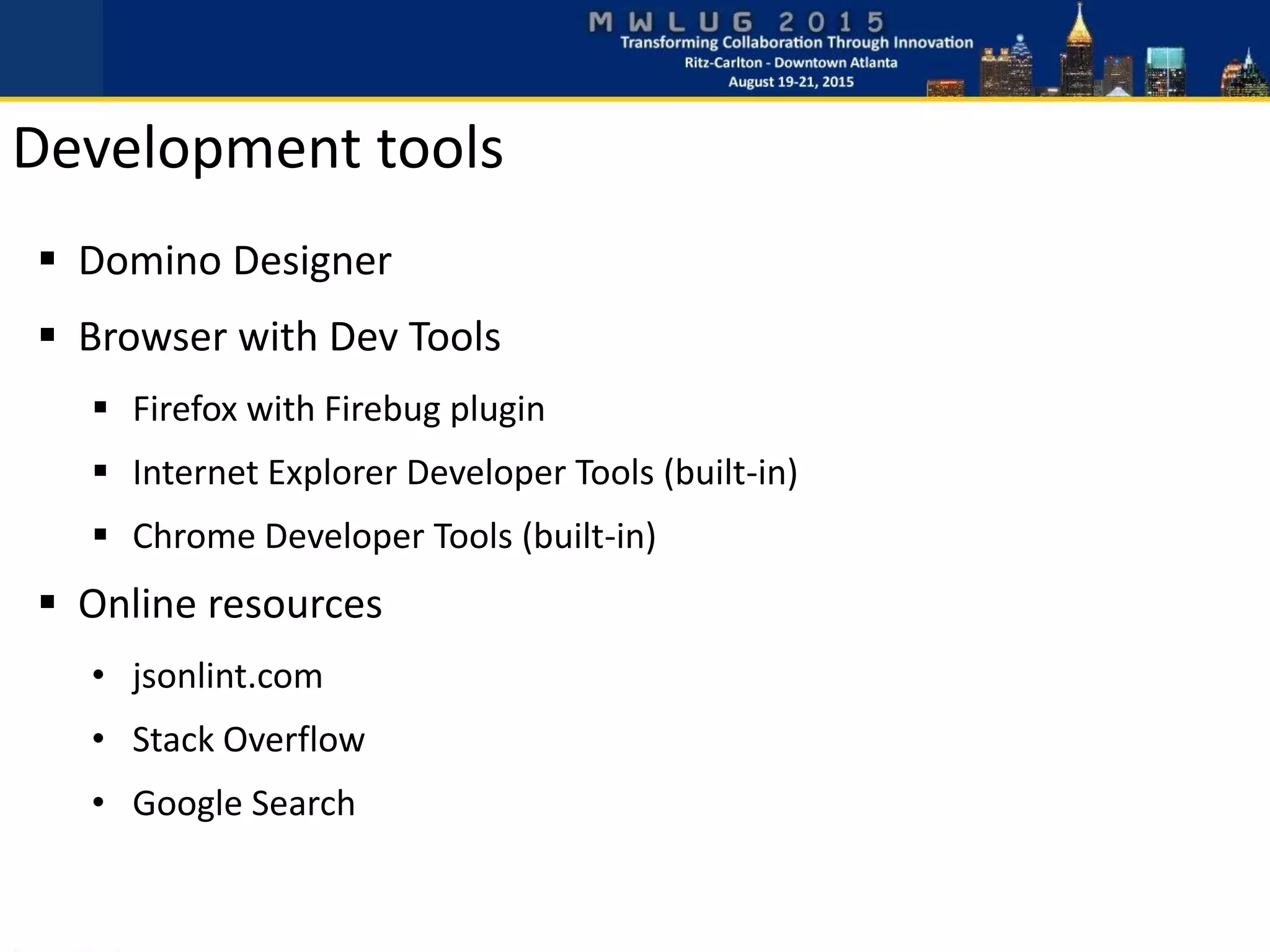
Development tools
 Domino Designer
 Browser with Dev Tools
 Firefox with Firebug plugin
 Internet Explorer Developer Tools (built-in)
 Chrome Developer Tools (built-in)
 Online resources
• jsonlint.com
• Stack Overflow
• Google Search
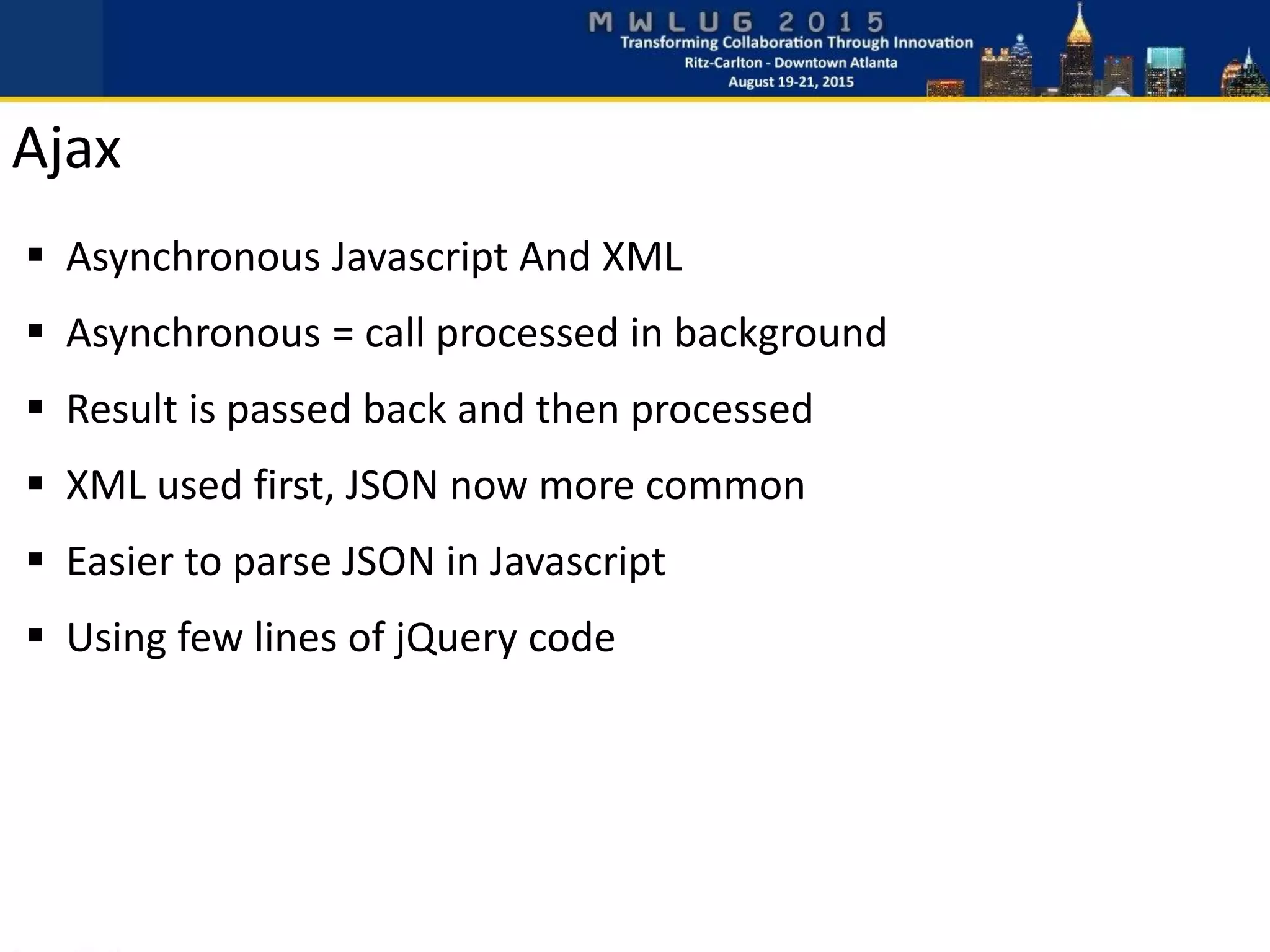
 Asynchronous Javascript And XML
 Asynchronous = call processed in background
 Result is passed back and then processed
 XML used first, JSON now more common
 Easier to parse JSON in Javascript
 Using few lines of jQuery code
Ajax
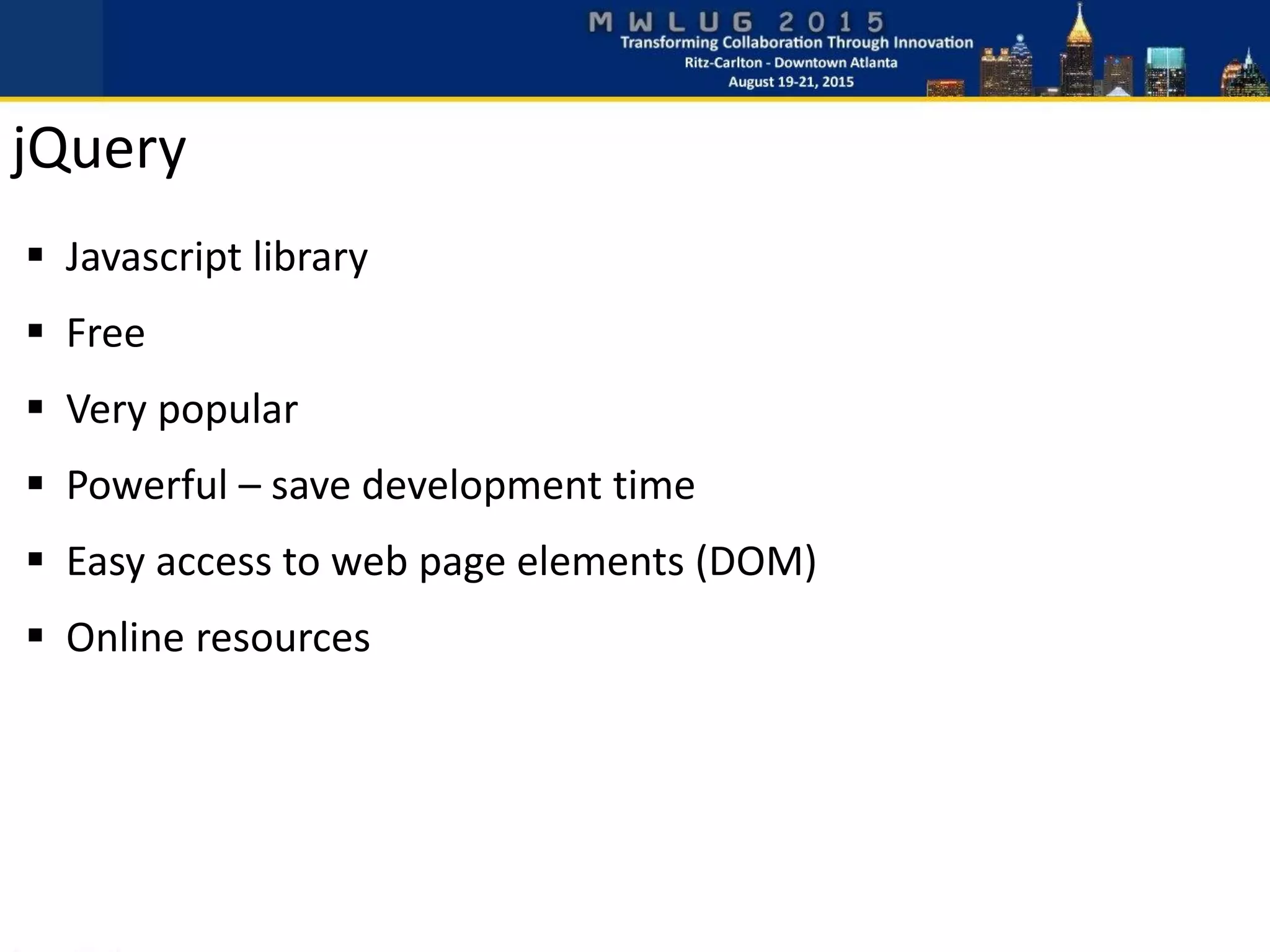
jQuery
 Javascript library
 Free
 Very popular
 Powerful – save development time
 Easy access to web page elements (DOM)
 Online resources
$.ajax({
url: '/websites/example.nsf/ajax_GetUserDetails?OpenAgent',
data: {name: “Karl-Henry Martinsson”},
cache: false
}).done(function(data) {
// Process returned data here
}).fail(function(e) {
// Process failed call here
});
or
$.ajax({
url: '/websites/example.nsf/ajax_GetUserDetails?OpenAgent',
data: {name: userName},
cache: false
}).success(function(data) {
// Process returned data here
});
 Can be more complex – .done(), .fail() and .always()
 Arguments passed as JSON
 cache: false – “cache buster”
Calling Ajax using jQuery
 JavaScript Object Notation
 Describe data as Javascript objects
 Preferred to XML in web applications
• Less “chatty” (less bandwidth)
• Very easy to access values directly in Javascript
 Any data types, including other objects
 Array of objects
JSON
 ?ReadViewEntries&OutputFormat=JSON
• Available in Domino 7.0.2+
• Can be hard to parse
 Formula in Notes view
• http://www.eknori.de/2011-07-23/formula-magic/
 Lotusscript agent
• Generate your own JSON
• Test at JSONLint.com
• Use JSON classes
o My Class.JSON
o JSON Lotusscript Classes by Troy Reimer (OpenNTF.org)
Generate JSON on Domino
 XPages agent (SSJS XAgent)
• Domino 8.5.2 and XPages knowledge
• Better performance than Lotusscript
• http://www.wissel.net/blog/d6plinks/shwl-7mgfbn
 REST Services control from Extension Library
• Domino 8.5.2 and ExtLib on server
Generate JSON on Domino – Xpages Style
 First button will update specified element with text
• Static text - stored in the Javascript source code
 Second button will trigger an Ajax call to server
• Server agent returns plain text
• No parsing of name-value pairs
• No database lookups or other server interaction
• Returned text can contain HTML
• Javascript updates specified element with returned text
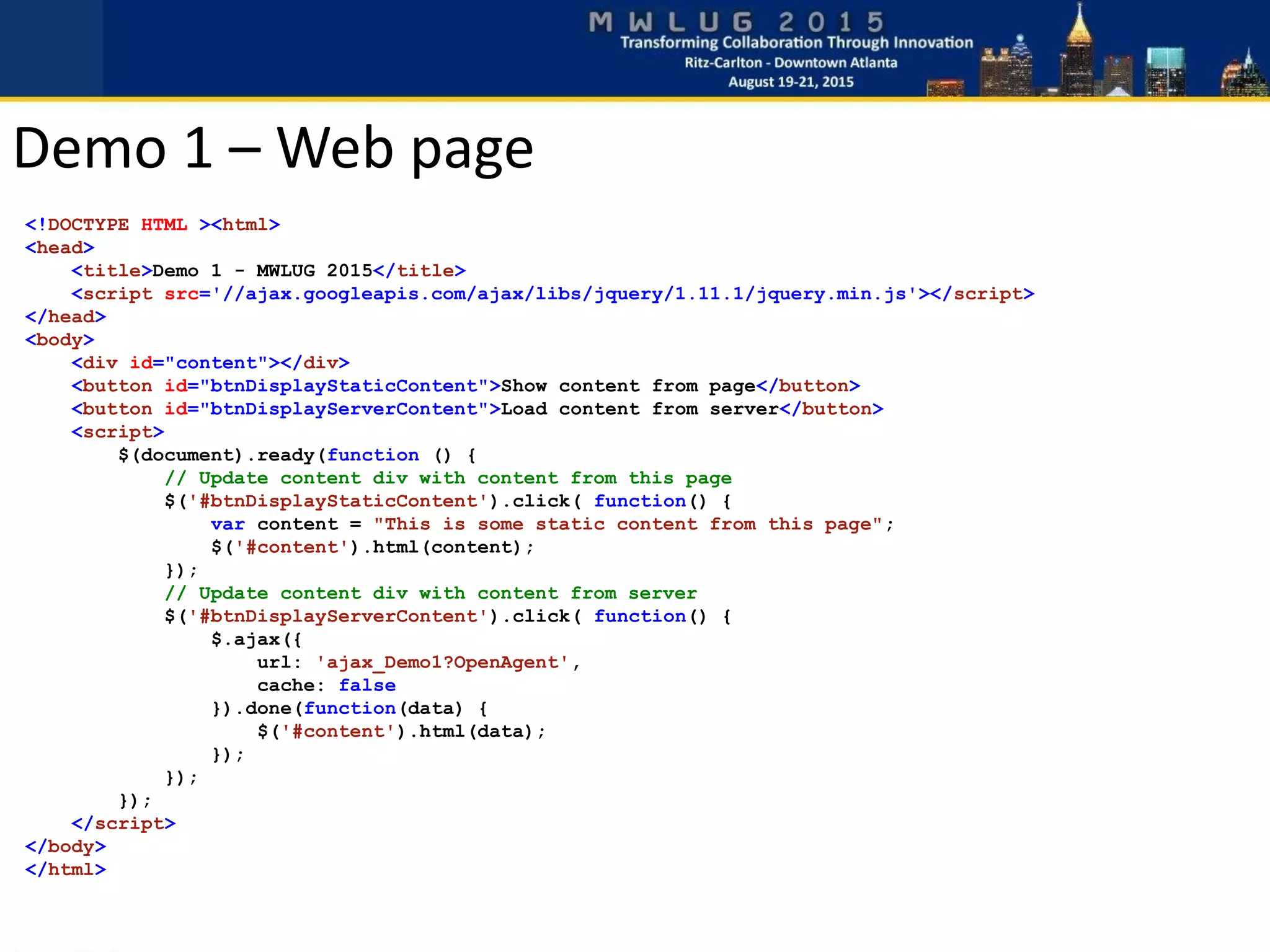
 Google as CDN for jQuery
 jQuery also hosted by Microsoft and others
Demo 1 – Text/HTML response
<!DOCTYPE HTML ><html>
<head>
<title>Demo 1 - MWLUG 2015</title>
<script src='//ajax.googleapis.com/ajax/libs/jquery/1.11.1/jquery.min.js'></script>
</head>
<body>
<div id="content"></div>
<button id="btnDisplayStaticContent">Show content from page</button>
<button id="btnDisplayServerContent">Load content from server</button>
<script>
$(document).ready(function () {
// Update content div with content from this page
$('#btnDisplayStaticContent').click( function() {
var content = "This is some static content from this page";
$('#content').html(content);
});
// Update content div with content from server
$('#btnDisplayServerContent').click( function() {
$.ajax({
url: 'ajax_Demo1?OpenAgent',
cache: false
}).done(function(data) {
$('#content').html(data);
});
});
});
</script>
</body>
</html>
Demo 1 – Web page
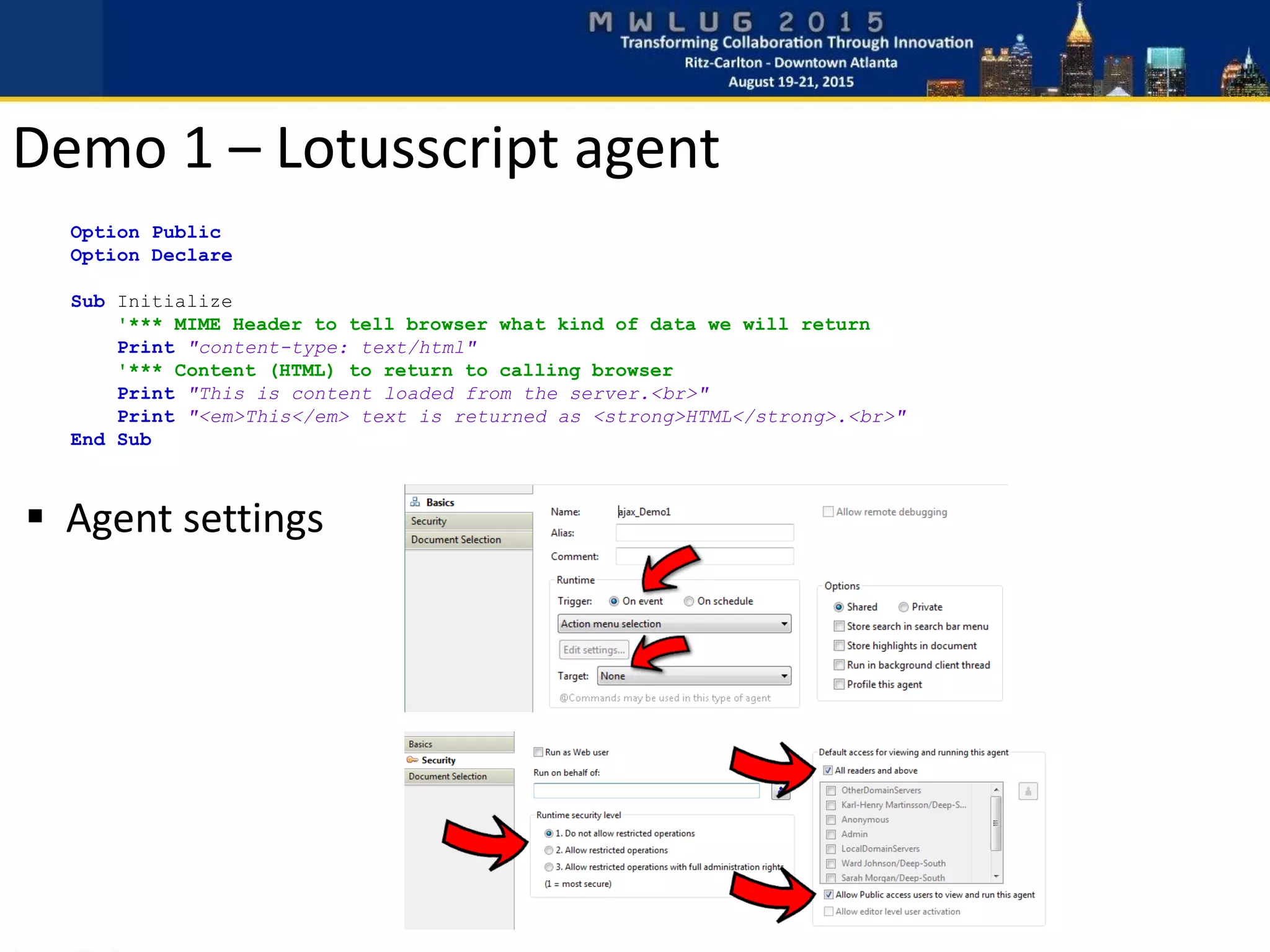
Option Public
Option Declare
Sub Initialize
'*** MIME Header to tell browser what kind of data we will return
Print "content-type: text/html"
'*** Content (HTML) to return to calling browser
Print "This is content loaded from the server.<br>"
Print "<em>This</em> text is returned as <strong>HTML</strong>.<br>"
End Sub
 Agent settings
Demo 1 – Lotusscript agent
 Read text field, pass to server
 Return and display computed text
 Simple URL class
• http://blog.texasswede.com/free-code-class-to-read-url-name-value-pairs/
 Using @URLDecode
Demo 2 – Text/HTML response
<!DOCTYPE HTML ><html>
<head>
<title>Demo 2 - MWLUG 2015</title>
<script src='//ajax.googleapis.com/ajax/libs/jquery/1.11.1/jquery.min.js'></script>
</head>
<body>
Name: <input type="text" id="userName"></input>
<br>
<br>
<button id="btnDisplayServerContent">Load content from server</button>
<br>
<br>
<div id="content"></div>
<script>
$(document).ready(function () {
// Update content div with dynamic content
$('#btnDisplayServerContent').click( function() {
// Get username from input field
var userName = $('#userName').val();
// Make Ajax call to server, passing user name as argument
$.ajax({
url: 'ajax_Demo2?OpenAgent',
data: {name: userName},
cache: false
}).done(function(data) {
$('#content').html(data);
});
});
});
</script>
</body>
</html>
Demo 2 – Web page
Option Public
Option Declare
Use "Class.URL"
Sub Initialize
'--- Local Notes classes used in agent
Dim db As NotesDatabase
Dim view As NotesView
Dim doc As NotesDocument
'--- Custom classes
Dim url As URLData
'*** Create new URLData object
Set url = New URLData()
'*** MIME Header to tell browser what kind of data we will return
Print "content-type: text/html"
'*** Check reqired values for this agent
If url.IsValue("name")=False Then
Print "Missing argument 'name'."
Exit Sub
End If
'*** Process name argument
If url.GetValue("name")="" Then
Print "'Name' is empty."
Else
Print "Hello, " + url.GetValue("name") + "!"
End If
End Sub
Demo 2 – Lotusscript agent
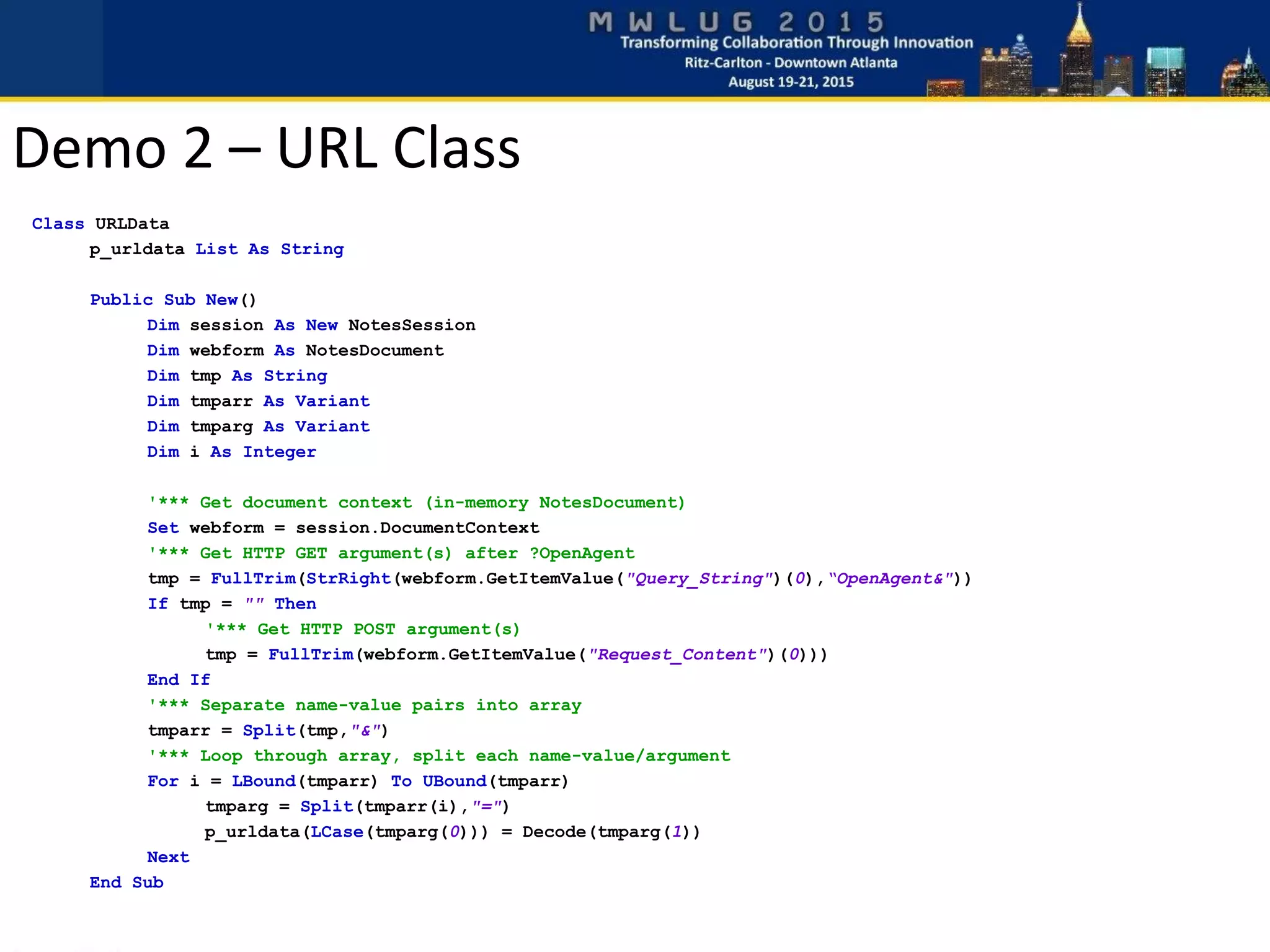
Class URLData
p_urldata List As String
Public Sub New()
Dim session As New NotesSession
Dim webform As NotesDocument
Dim tmp As String
Dim tmparr As Variant
Dim tmparg As Variant
Dim i As Integer
'*** Get document context (in-memory NotesDocument)
Set webform = session.DocumentContext
'*** Get HTTP GET argument(s) after ?OpenAgent
tmp = FullTrim(StrRight(webform.GetItemValue("Query_String")(0),“OpenAgent&"))
If tmp = "" Then
'*** Get HTTP POST argument(s)
tmp = FullTrim(webform.GetItemValue("Request_Content")(0)))
End If
'*** Separate name-value pairs into array
tmparr = Split(tmp,"&")
'*** Loop through array, split each name-value/argument
For i = LBound(tmparr) To UBound(tmparr)
tmparg = Split(tmparr(i),"=")
p_urldata(LCase(tmparg(0))) = Decode(tmparg(1))
Next
End Sub
Demo 2 – URL Class
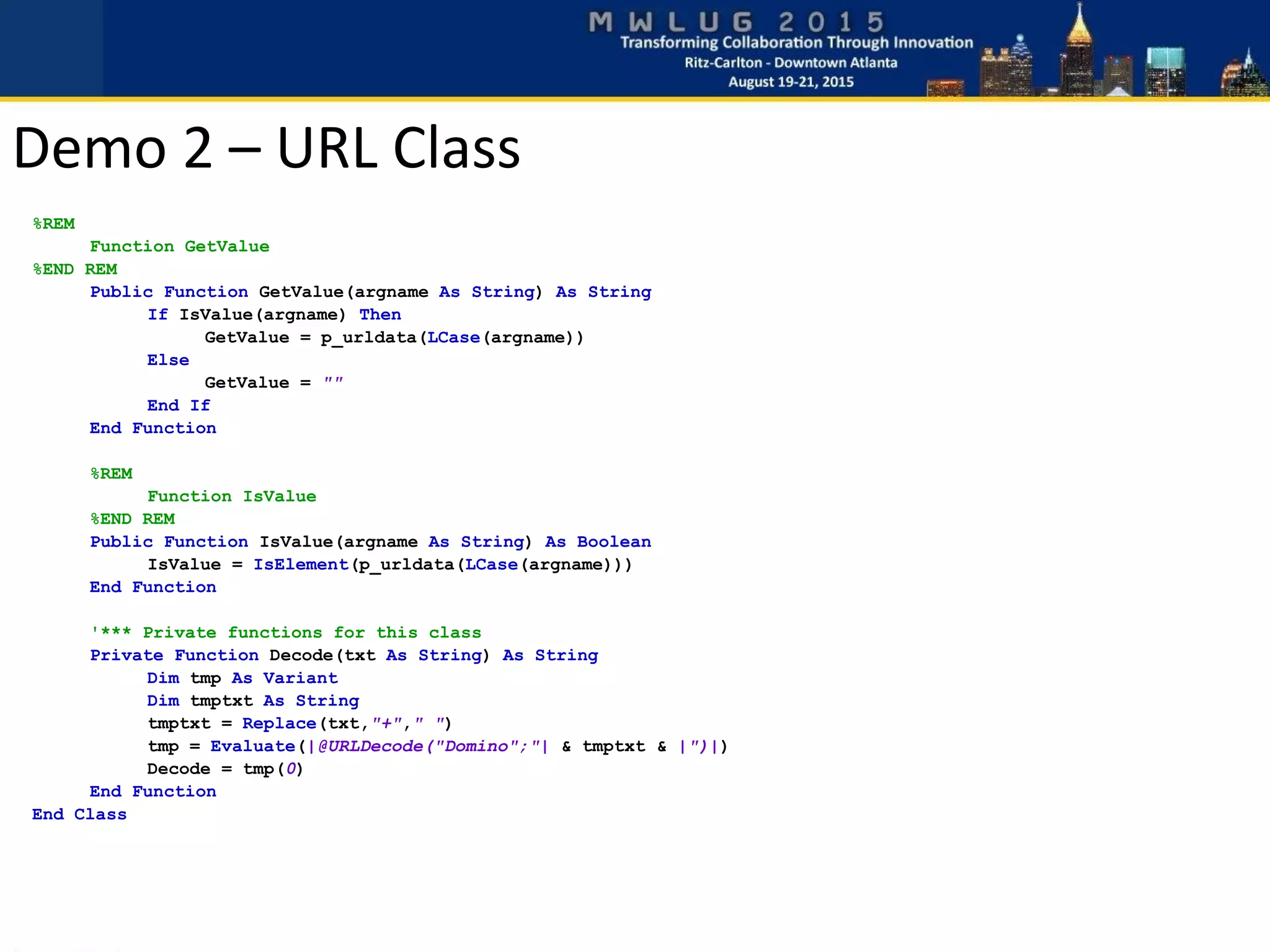
%REM
Function GetValue
%END REM
Public Function GetValue(argname As String) As String
If IsValue(argname) Then
GetValue = p_urldata(LCase(argname))
Else
GetValue = ""
End If
End Function
%REM
Function IsValue
%END REM
Public Function IsValue(argname As String) As Boolean
IsValue = IsElement(p_urldata(LCase(argname)))
End Function
'*** Private functions for this class
Private Function Decode(txt As String) As String
Dim tmp As Variant
Dim tmptxt As String
tmptxt = Replace(txt,"+"," ")
tmp = Evaluate(|@URLDecode("Domino";"| & tmptxt & |")|)
Decode = tmp(0)
End Function
End Class
Demo 2 – URL Class
 Status - success or error
 Multiple values
 Error message
 Case sensitive!
Demo 3 – Return JSON data
Demo 3 – Lotusscript JSON class
 Simplify JSON creation
 Add values (strings) and fix quotes within value
 Add boolean values (true/false)
 Set status (success or error)
 Send MIME type and JSON string back
Demo 3 – Lotusscript agent
Option Public
Option Declare
Use "Class.JSON"
Sub Initialize
'--- Custom class
Dim json As JSONData
'*** Create new JSONData object
Set json = New JSONData()
'*** Generate JSON to return
Call json.SetValue("PhoneNumber", "817-555-1212")
Call json.SetValue("Email", "texasswede@gmail.com")
Call json.SetValue("Name", "Karl-Henry Martinsson")
json.success = True
Call json.SendToBrowser()
End Sub
<body>
<br>
<button id="btnDisplayServerContent">Load user info</button>
<br>
<br>
<div id="userInfo">
<div>
User Name: <span id="userName"></span>
</div>
<div>
Phone number: <span id="userPhoneNumber"></span>
</div>
<div>
Email Address: <span id="userEmail"></span>
</div>
</div>
<div id="errorInfo"></div>
</body>
 Use span elements to hold values
 id attribute used to identify element
 Must be unique on page
Demo 3 – Return JSON data
$.ajax({
url: 'ajax_Demo3?OpenAgent',
cache: false
}).success(function(data) {
if(data.status=="success") {
// Populate the different fields and display the section
$('#userPhoneNumber').html(data.PhoneNumber);
$('#userEmail').html(data.Email);
$('#userName').html(data.Name);
$("#userInfo").fadeIn(1500);
} else {
// Display error message passed from server
$("#errorInfo").html(data.errormsg);
$("#errorInfo").fadeIn(1000);
}
});
 Very little code needed
 Put values into specified elements
 Case is important!
Demo 3 – Return JSON data
 Open source front-end framework
 CSS + some jQuery
 Responsive
 Themes, color schemes and plugins
 CDN or local copy
 3rd party resources and plugins
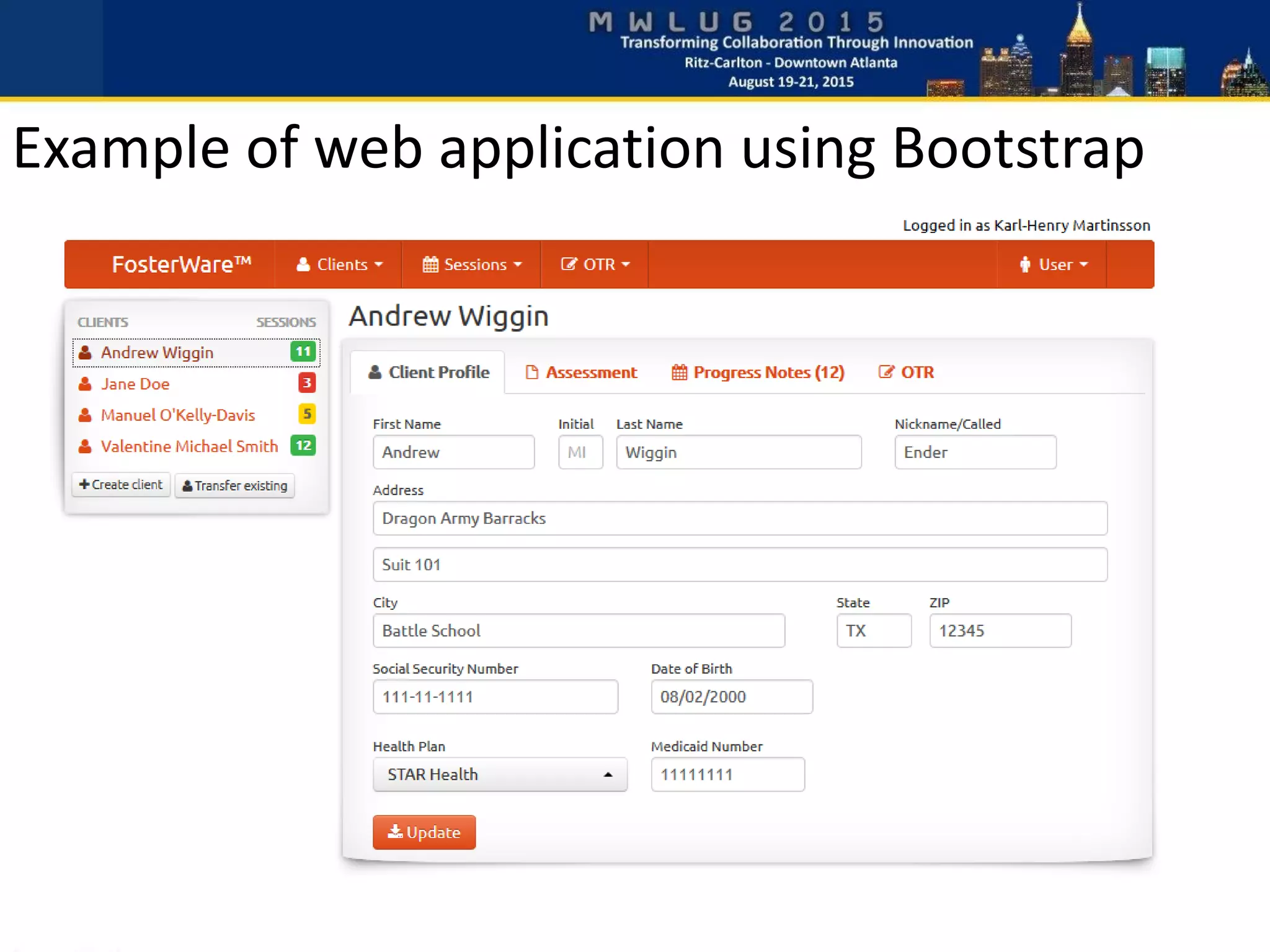
Twitter Bootstrap
Example of web application using Bootstrap
The password reset application pictured above is a free download.
You can get it at http://blog.texasswede.com/free-software-password-reset-for-notesdomino/
Another Bootstrap web application
 Rapid development
 Responsive
 Cross-browser
 Plenty of resources
 Actively being developed
Benefits of using Bootstrap
 Only supporting the latest browsers
 Major changes between v2 and v3
 Version specific plugins
 Some plugins not themeable
Potential issues with Bootstrap
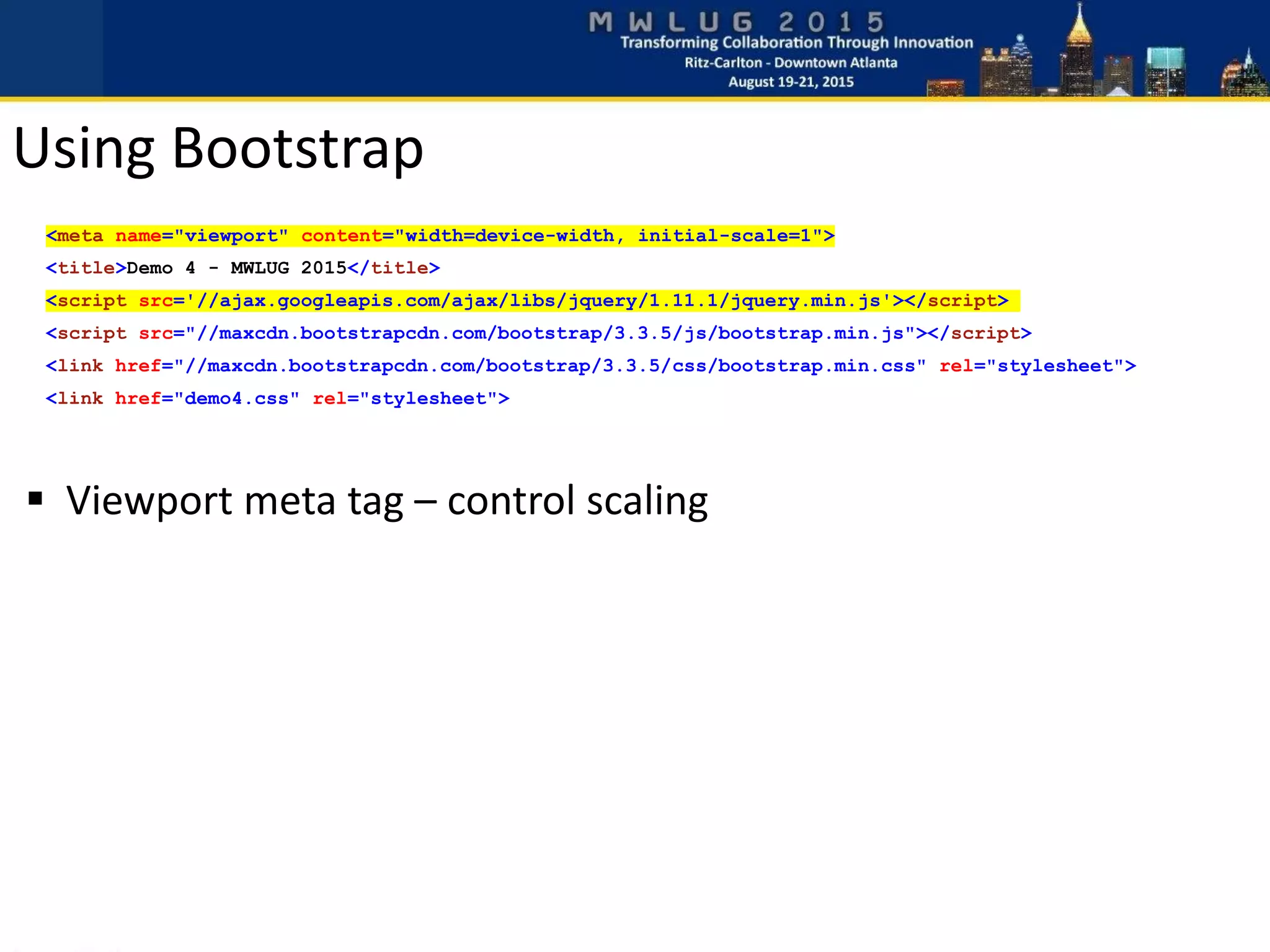
 Viewport meta tag – control scaling
<meta name="viewport" content="width=device-width, initial-scale=1">
<title>Demo 4 - MWLUG 2015</title>
<script src='//ajax.googleapis.com/ajax/libs/jquery/1.11.1/jquery.min.js'></script>
<script src="//maxcdn.bootstrapcdn.com/bootstrap/3.3.5/js/bootstrap.min.js"></script>
<link href="//maxcdn.bootstrapcdn.com/bootstrap/3.3.5/css/bootstrap.min.css" rel="stylesheet">
<link href="demo4.css" rel="stylesheet">
Using Bootstrap
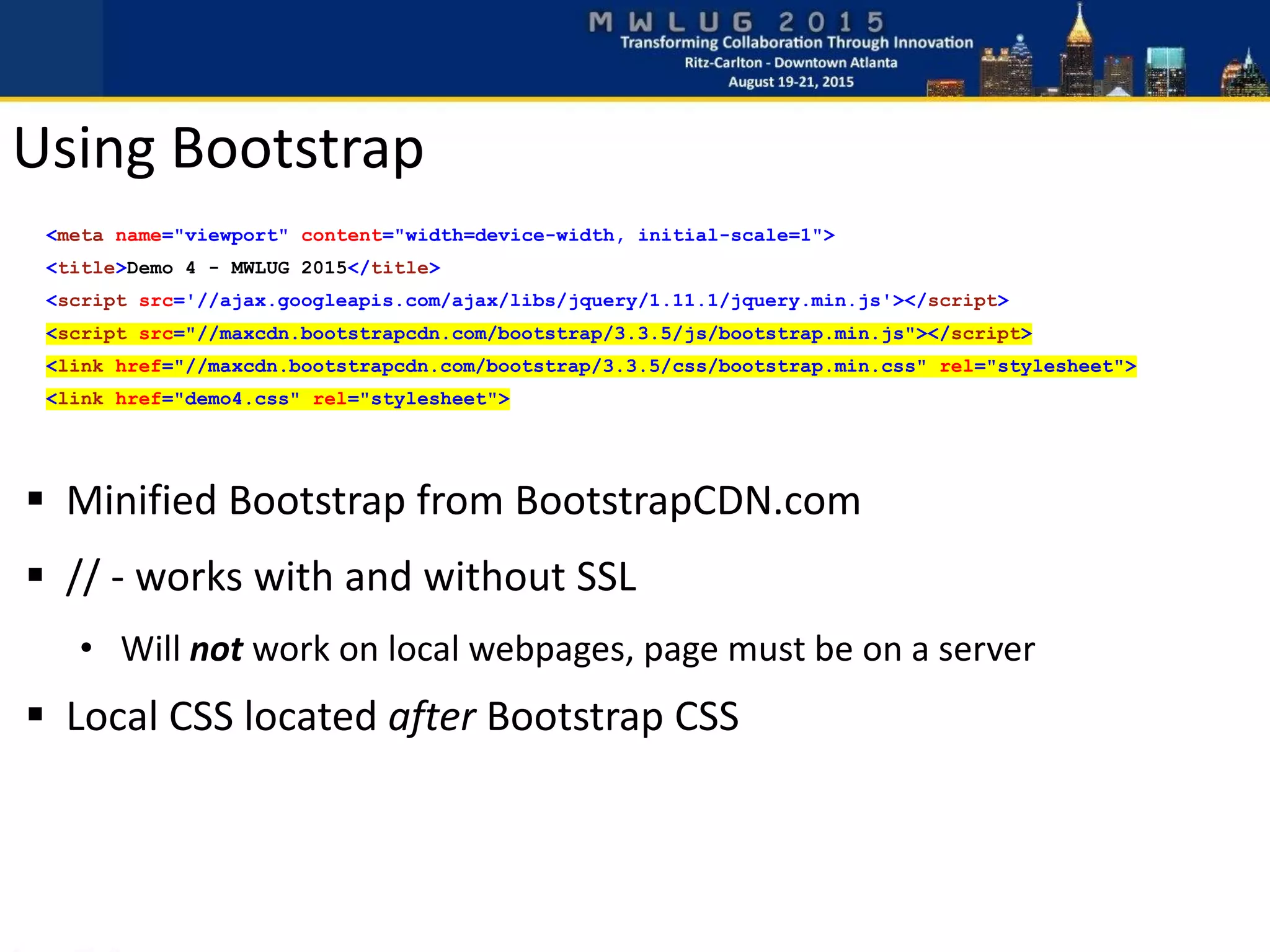
 Minified Bootstrap from BootstrapCDN.com
 // - works with and without SSL
• Will not work on local webpages, page must be on a server
 Local CSS located after Bootstrap CSS
Using Bootstrap
<meta name="viewport" content="width=device-width, initial-scale=1">
<title>Demo 4 - MWLUG 2015</title>
<script src='//ajax.googleapis.com/ajax/libs/jquery/1.11.1/jquery.min.js'></script>
<script src="//maxcdn.bootstrapcdn.com/bootstrap/3.3.5/js/bootstrap.min.js"></script>
<link href="//maxcdn.bootstrapcdn.com/bootstrap/3.3.5/css/bootstrap.min.css" rel="stylesheet">
<link href="demo4.css" rel="stylesheet">
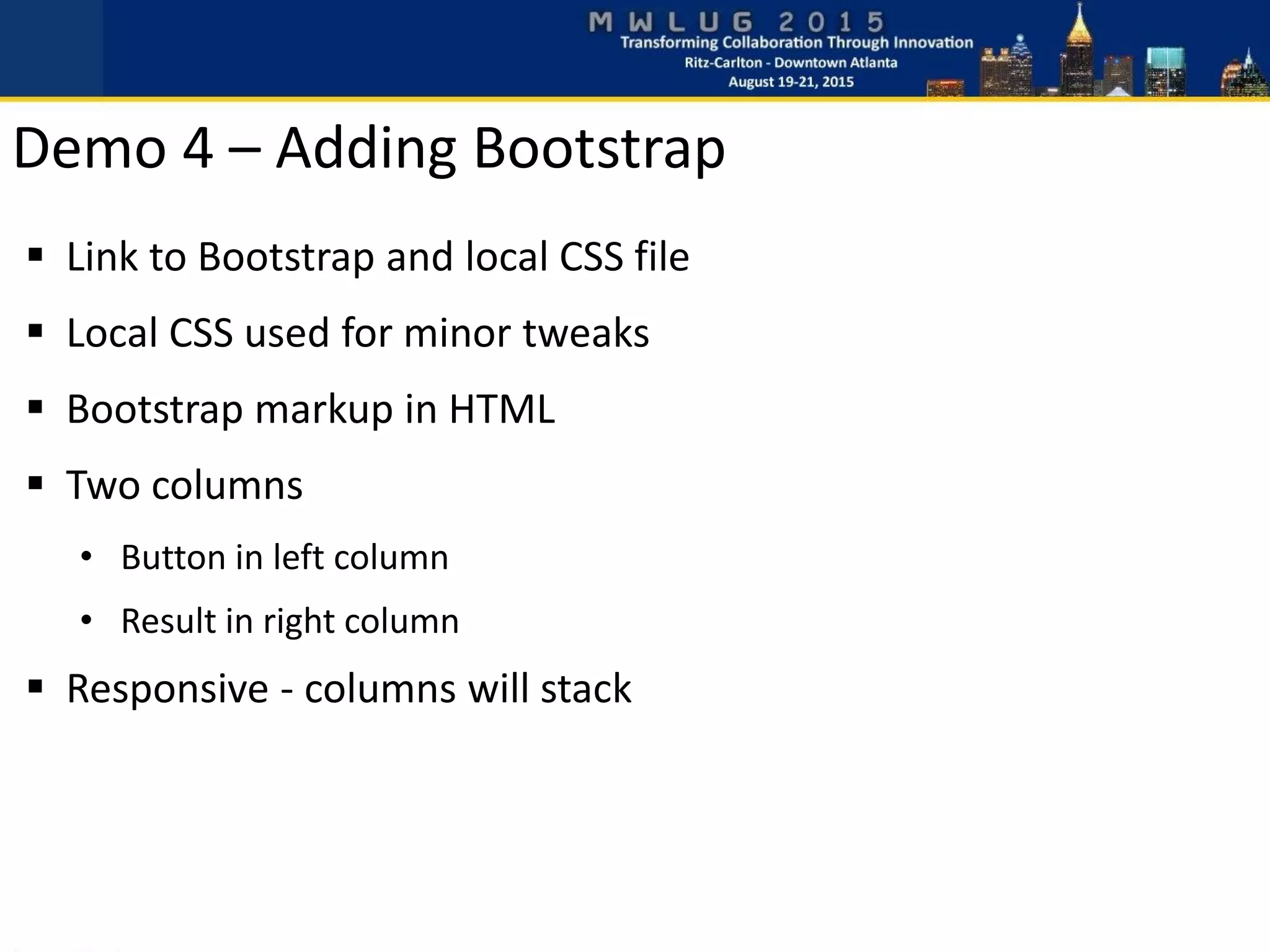
 Link to Bootstrap and local CSS file
 Local CSS used for minor tweaks
 Bootstrap markup in HTML
 Two columns
• Button in left column
• Result in right column
 Responsive - columns will stack
Demo 4 – Adding Bootstrap
HTML <body>
<div class="container">
<div class="row">
<div class="col-md-6">
<button class="btn btn-primary" id="btnDisplayServerContent">Load user info</button>
</div>
<div id="userInfo" class="well col-md-6">
<label>User Name:</label> <div class="jsonData" id="userName"></div>
<label>Phone number:</label> <div class="jsonData" id="userPhoneNumber"></div>
<label>Email Address:</label> <div class="jsonData" id="userEmail"></div>
</div>
</div>
<div class="alert alert-danger" id="errorInfo"></div>
</div>
HTML <head>
<script src='//ajax.googleapis.com/ajax/libs/jquery/1.11.1/jquery.min.js'></script>
<script src="//maxcdn.bootstrapcdn.com/bootstrap/3.3.5/js/bootstrap.min.js"></script>
<link href="//maxcdn.bootstrapcdn.com/bootstrap/3.3.5/css/bootstrap.min.css" rel="stylesheet">
<link href="demo4.css" rel="stylesheet">
Demo 4 – Adding Bootstrap
demo4.css
container {
margin-top: 20px;
}
label {
font-size: 10pt;
margin-bottom: 0px;
margin-top: 10px;
}
label:first-child {
margin-top: 0px;
}
.jsonData {
font-size: 12pt;
}
 Add 20 pixel margin to top of page
 Make label text smaller, remove bottom margin and add
top margin, except on the first label
 Set the text size of JSON data returned to 12pt
Demo 4 – Adding Bootstrap
jQuery
// Hide error section and user info section
$("#errorInfo").hide();
$("#userInfo").hide();
// Update content div with dynamic content
$('#btnDisplayServerContent').click( function() {
// Make Ajax call to server
$.ajax({
url: 'ajax_Demo3?OpenAgent',
cache: false
}).success(function(data) {
if(data.status=="success") {
// Populate the different fields and display the section
$('#userPhoneNumber').html(data.PhoneNumber);
$('#userEmail').html(data.Email);
$('#userName').html(data.Name);
$("#userInfo").fadeIn(1500);
} else {
// Display error message passed from server
$("#errorInfo").html(data.errormsg);
$("#errorInfo").fadeIn(1000);
}
});
});
 data-json=”JSON_data_element”
 data- prefix is ”standard”
 .each()
 Read value and get corresponding JSON
• $(this) – current element in jQuery
• data[”Name”] will return the JSON value “Name”
Demo 5 – Process JSON
jQuery
// For each element with class jsonData
$(".jsonData").each( function() {
// Get the field name from the custom attribute data-json
// and set the content of the current element to
// the corresponding JSON value
jsonfield = $(this).attr("data-json");
$(this).html(data[jsonfield]);
});
HTML
<div id="userInfo" class="well col-md-6">
<label>User Name:</label> <div class="jsonData" id=user"Name" data-json="Name"></div>
<label>Phone number:</label> <div class="jsonData" id="userPhoneNumber" data-json="PhoneNumber"></div>
<label>Email Address:</label> <div class="jsonData" id="userEmail" data-json="Email"></div>
</div>
$("div[data-json]").each( function() {
Demo 5 – Process JSON
 JSON name = id of element to put data in
 Less HTML markup
 Still very little code, and very flexible
 Add # in front of element name!
jQuery
$.each(data, function(id, item) {
elementName = "#" + id;
elementValue = data[id];
$(elementName).html(elementValue);
});
HTML
<label>User Name:</label> <div id="Name"></div>
<label>Phone number:</label> <div id="PhoneNumber"></div>
<label>Email Address:</label> <div id="Email"></div>
Demo 6 – Process JSON (another way)
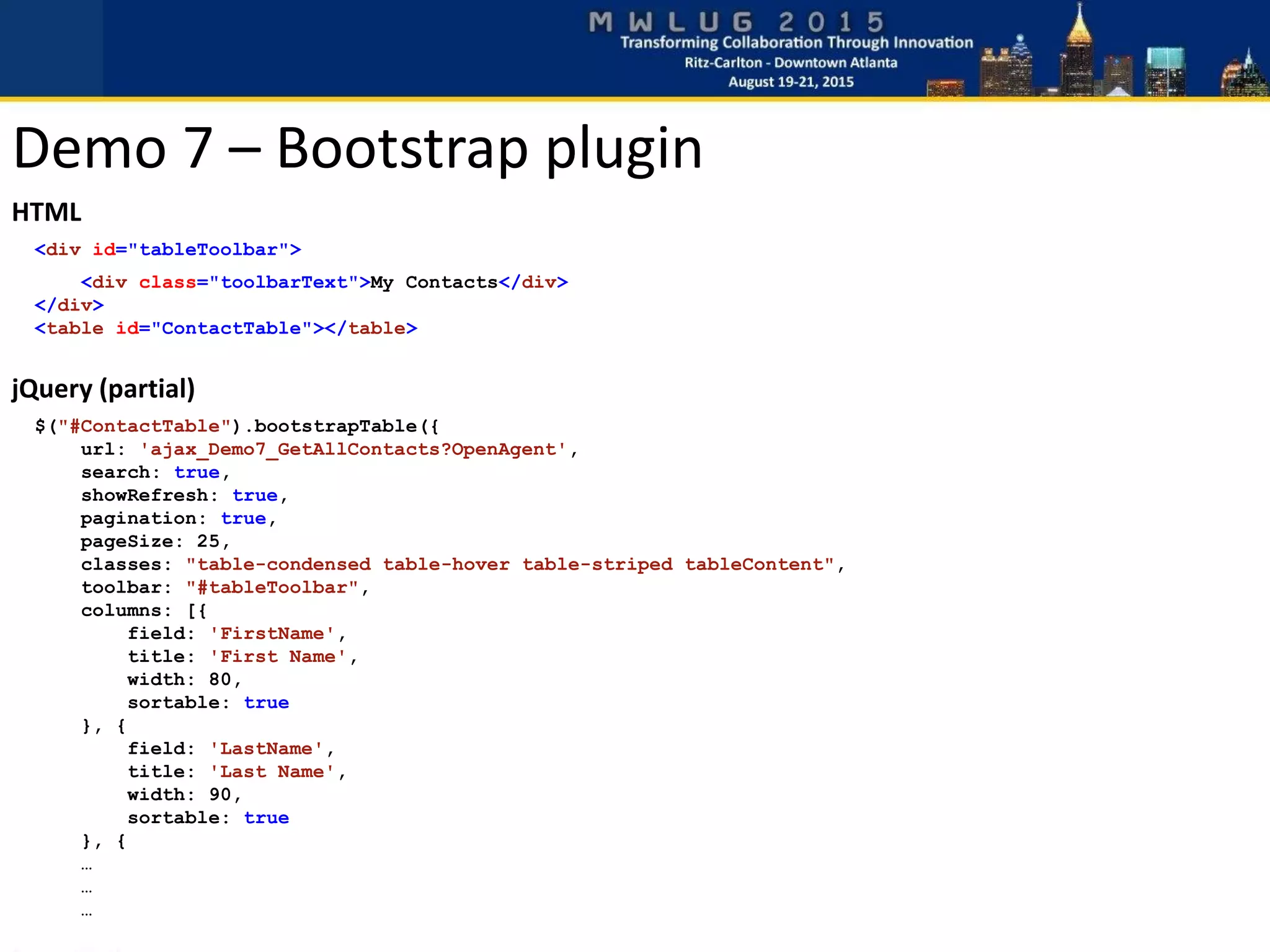
Demo 7 – Bootstrap plugin
 Plugin by @wenzhixin
 Get it at http://bootstrap-table.wenzhixin.net.cn/
 CDN hosted version at CloudFlare.com
 Minimal HTML markup
 Javascript mainly to define columns and settings
HTML
<div id="tableToolbar">
<div class="toolbarText">My Contacts</div>
</div>
<table id="ContactTable"></table>
jQuery (partial)
$("#ContactTable").bootstrapTable({
url: 'ajax_Demo7_GetAllContacts?OpenAgent',
search: true,
showRefresh: true,
pagination: true,
pageSize: 25,
classes: "table-condensed table-hover table-striped tableContent",
toolbar: "#tableToolbar",
columns: [{
field: 'FirstName',
title: 'First Name',
width: 80,
sortable: true
}, {
field: 'LastName',
title: 'Last Name',
width: 90,
sortable: true
}, {
…
…
…
Demo 7 – Bootstrap plugin
Demo 7 – Bootstrap Table plugin
Lotusscript code (partial)
'*** Get all documents in view to process
Set db = session.CurrentDatabase
Set view = db.GetView("(LookupContactsByLastName)")
Set col = view.AllEntries
'*** Start of JSON string
jsonString = “”
'*** Loop through all entries and build JSON to return
Set entry = col.GetFirstEntry
Do Until entry Is Nothing
'*** Build JSON for each entry and add to string
Set json = New JSONData()
Call json.SetValue("LastName", CStr(entry.ColumnValues(0)))
Call json.SetValue("FirstName", CStr(entry.ColumnValues(1)))
Call json.SetValue("Company", CStr(entry.ColumnValues(2)))
Call json.SetValue("Address", CStr(entry.ColumnValues(3)))
Call json.SetValue("City", CStr(entry.ColumnValues(4)))
Call json.SetValue("State", CStr(entry.ColumnValues(5)))
Call json.SetValue("ZIP", CStr(entry.ColumnValues(6)))
Call json.SetValue("DocUNID", CStr(entry.ColumnValues(9)))
'*** Add new JSON to existing JSON string
jsonString = jsonString + json.GetJSON() + "," + Chr$(13)
Set entry = col.GetNextEntry(entry)
Loop
'*** Remove the trailing comma and line break if we have data
If Len(jsonString) > 4 then
jsonString = Left$(jsonString,Len(jsonString)-2)
End If
'*** Add brackets for array
jsonString = "[ " + Chr$(13) + jsonString + Chr$(13) + “ ]“
'*** MIME Header to tell browser what kind of data we will send
Print "content-type: application/json"
'*** Send JSON back to browser
Print jsonString
Demo 7 – Bootstrap Table plugin
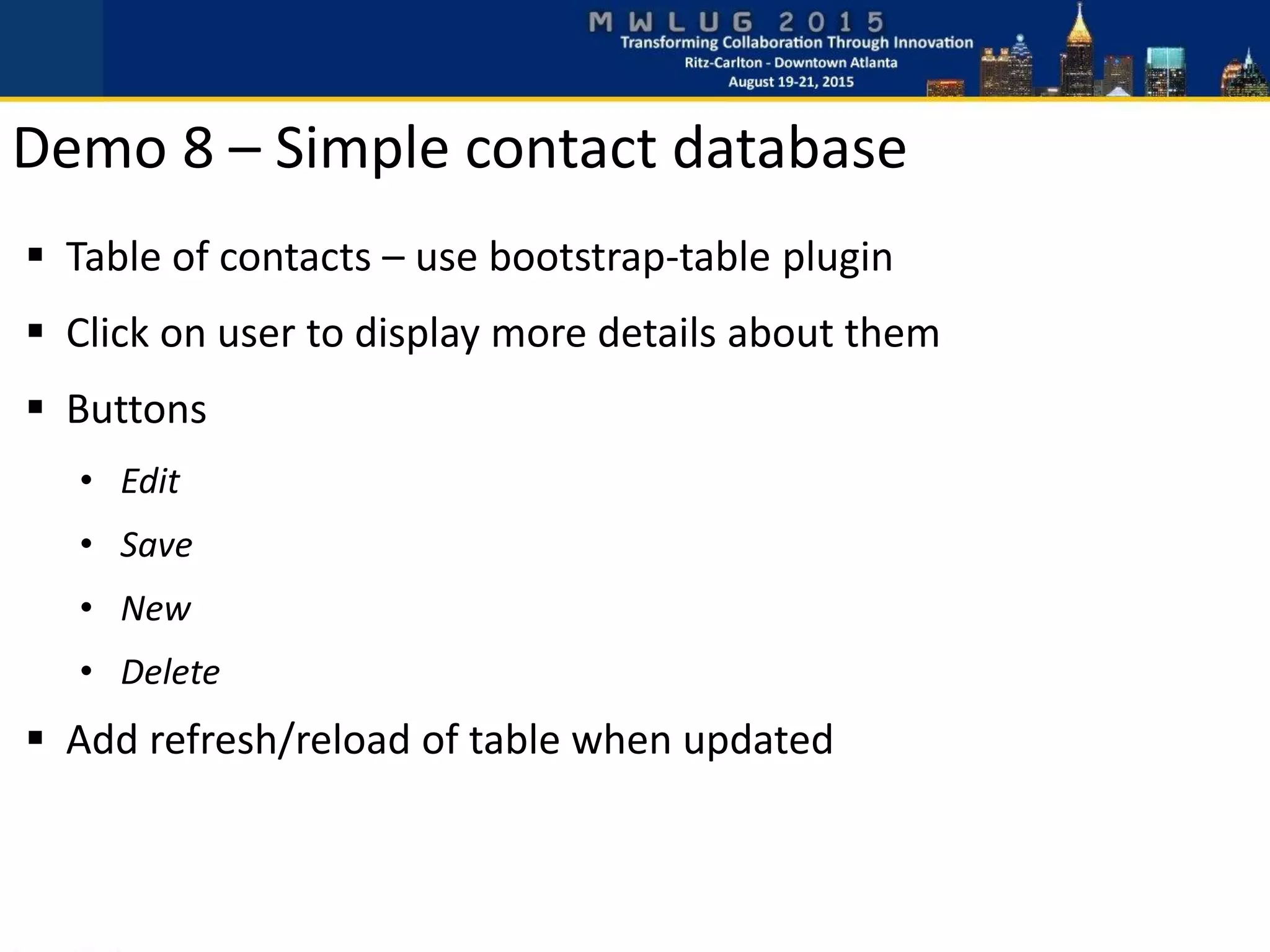
Demo 8 – Simple contact database
 Table of contacts – use bootstrap-table plugin
 Click on user to display more details about them
 Buttons
• Edit
• Save
• New
• Delete
 Add refresh/reload of table when updated
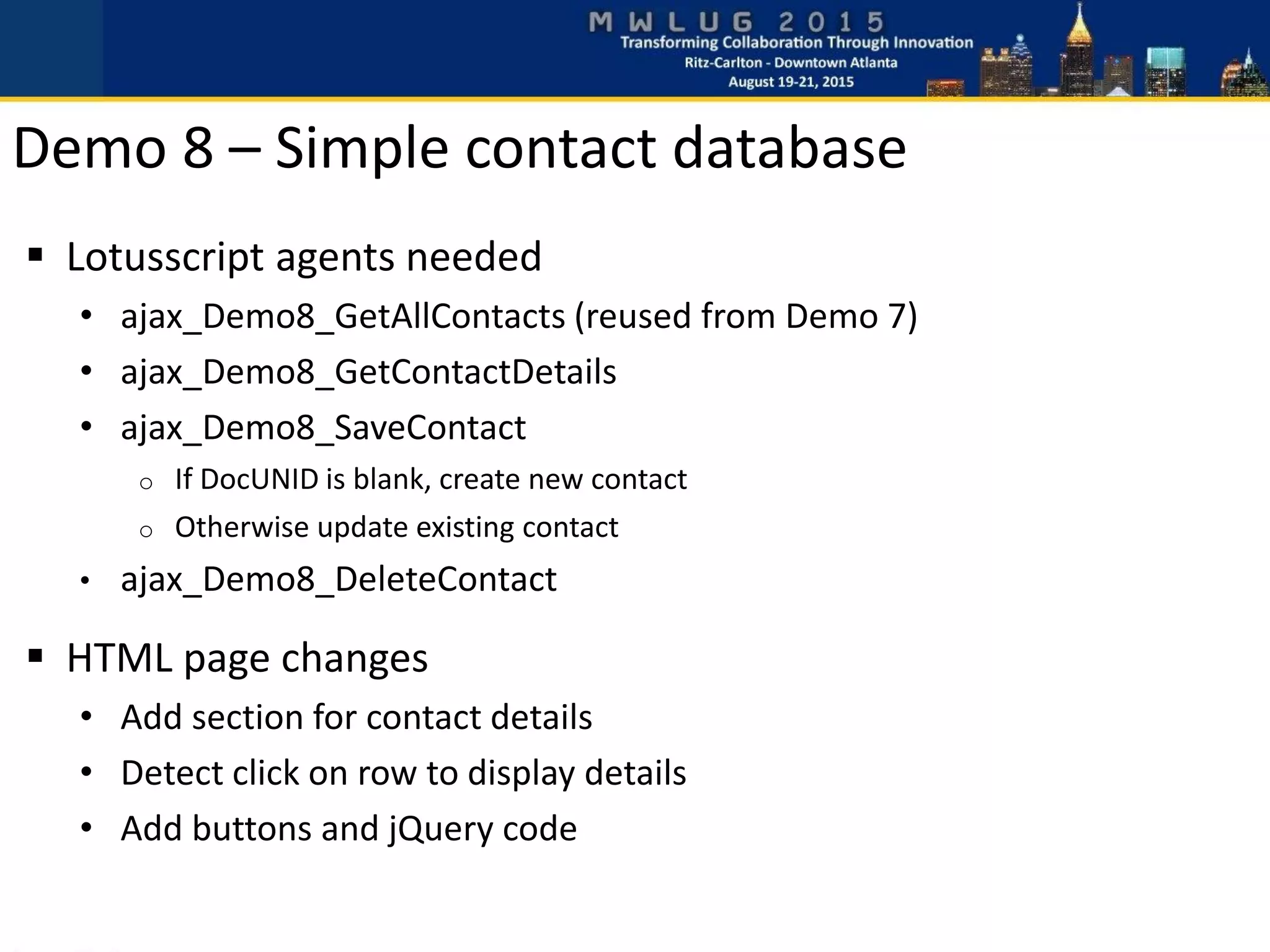
Demo 8 – Simple contact database
 Lotusscript agents needed
• ajax_Demo8_GetAllContacts (reused from Demo 7)
• ajax_Demo8_GetContactDetails
• ajax_Demo8_SaveContact
o If DocUNID is blank, create new contact
o Otherwise update existing contact
• ajax_Demo8_DeleteContact
 HTML page changes
• Add section for contact details
• Detect click on row to display details
• Add buttons and jQuery code
Demo 8 – Simple contact database
HTML – buttons
<button class="btn btn-sm btn-primary" id="btnNewContact">New</button>
<button class="btn btn-sm btn-primary" id="btnEditContact">Edit</button>
<button class="btn btn-sm btn-success" id="btnSaveContact">Save</button>
<button class="btn btn-sm btn-danger pull-right" id="btnDeleteContact">Delete</button>
jQuery – Edit and New buttons
//*** Button actions
$("#btnEditContact").on("click", function(e) {
editContact();
});
$("#btnNewContact").on("click", function() {
editContact();
// Empty all input fields
$('input[data-notesfield]').each( function() {
$(this).val("");
});
// Empty hidden DocUNID field
$("#docUNID").attr("data-UNID","");
// Hide ‘Delete’ button
$("#btnDeleteContact").hide();
});
jQuery – Save button
$("#btnSaveContact").on("click", function() {
$("#btnSaveContact").hide();
var json = new Object();
// Store field values in JSON object
var docunid = $("#docUNID").attr("data-UNID");
json["DocUNID"] = docunid;
$('input[data-notesfield]').each( function() {
var id = $(this).attr("id");
var notesfield = $(this).attr("data-notesfield");
json[notesfield] = $(this).val();
});
// Perform a call to the server to save values
$.ajax({
url: "ajax_Demo8_SaveContact?OpenAgent",
type: "POST",
data: json
}).done(function(data) {
if (data.status=="error") {
alert("Failure: " + data.msg);
} else if (data.status=="success") {
setReadMode(); // Convert INPUT back to DIV
$("#contactTable").bootstrapTable("refresh", {silent: true});
}).fail( function(e) {
alert("Failure!","Failed to save contact. Error: " + e.errorThrown);
});
$("#btnEditContact").show();
});
Demo 8 – Simple contact database
jQuery – Delete button
$("#btnDeleteContact").on("click", function(e) {
var docunid = $("#docUNID").attr("data-UNID");
$.ajax({
url: "ajax_Demo8_DeleteContact?OpenAgent",
type: "POST",
data: {DocUNID: docunid }
}).done(function(data) {
if (data.status=="error") {
alert("Failure: " + data.msg);
} else if (data.status=="success") {
$("#contactTable").bootstrapTable("refresh", {silent: true});
// Empty all input fields
$('input[data-notesfield]').each( function() {
$(this).val("");
});
// Empty all div with Notes data
$('div[data-notesfield]').each( function() {
$(this).html("");
});
// Empty hidden DocUNID storage
$("#docUNID").attr("data-UNID","")
$("#btnDeleteContact").hide();
$("#btnEditContact").hide();
}
}).fail( function(e) {
alert("Failure!","Failed to delete contact. Error: " + e.errorThrown);
});
});
Demo 8 – Simple contact database
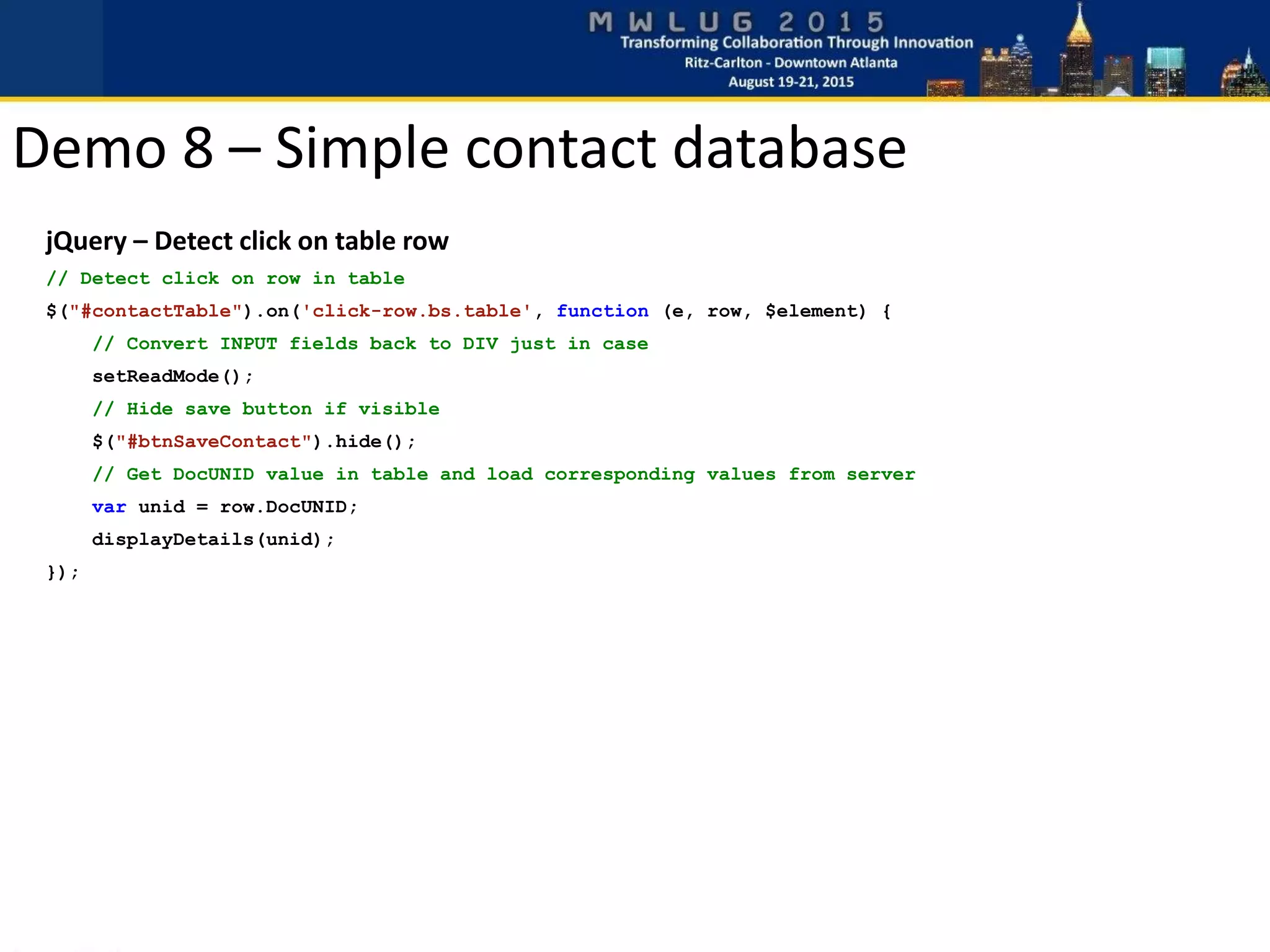
jQuery – Detect click on table row
// Detect click on row in table
$("#contactTable").on('click-row.bs.table', function (e, row, $element) {
// Convert INPUT fields back to DIV just in case
setReadMode();
// Hide save button if visible
$("#btnSaveContact").hide();
// Get DocUNID value in table and load corresponding values from server
var unid = row.DocUNID;
displayDetails(unid);
});
Demo 8 – Simple contact database
jQuery – Load contact details from server and display on page
// Get contact details from Domino server and populate fields
// using the DocUIND value as lookup key
function displayDetails(docunid) {
$.ajax({
url: 'ajax_Demo8_GetContactDetails?OpenAgent',
data: {DocUNID: docunid},
cache: false
}).success(function(data) {
if(data.status=="success") {
// For each element with data-notesfield attribute
$('div[data-notesfield]').each( function() {
notesfield = $(this).attr("data-notesfield");
if (data[notesfield]!=null) {
fieldvalue = data[notesfield];
$(this).html(fieldvalue);
}
});
// Store DocUNID in enmpty div for later use
$("#docUNID").attr("data-UNID",data.DocUNID);
// Display previously hidden editand delete buttons
$("#btnEditContact").show();
$("#btnDeleteContact").show();
}
});
}
Demo 8 – Simple contact database
jQuery – Change between DIV and INPUT
// Put contact details into edit mode by changing DIV to INPUT
function editContact() {
$("#btnEditContact").hide();
// Change all div with Notes data to input
$('div[data-notesfield]').each( function() {
var id = $(this).attr("id");
var notesfield = $(this).attr("data-notesfield");
var input = "<input class='jsonData inputNotesField form-control input-sm' id='" + id
input = input + "' data-notesfield='" + notesfield + "' value='" + $(this).html() + "'></input>";
$(this).replaceWith(input)
});
$("#btnSaveContact").show();
$("#btnEditContact").hide();
}
// Put contact details into read mode by changing INPUT to DIV
function setReadMode() {
$('input[data-notesfield]').each( function() {
var id = $(this).attr("id");
var notesfield = $(this).attr("data-notesfield");
var div = "<div class='jsonData displayNotesField' id='" + id
div = div + "' data-notesfield='" + notesfield + "'>" + $(this).val() + "</div>";
$(this).replaceWith(div)
});
}
Demo 8 – Simple contact database
 Similar to Demo 8, but using FullCalendar plugin
 Get it at http://fullcalendar.io
 Lotusscript agents
• ajax_Demo9_GetAllEvents
• Returning events between specific days
• Calendar automatically sends start and end date
• ajax_Demo8_GetEventDetails
• ajax_Demo8_UpdateEvent
• Triggered when moving event or changing duration
• Arguments: DocUNID, start date and end date
Demo 9 – Calendar using Domino data
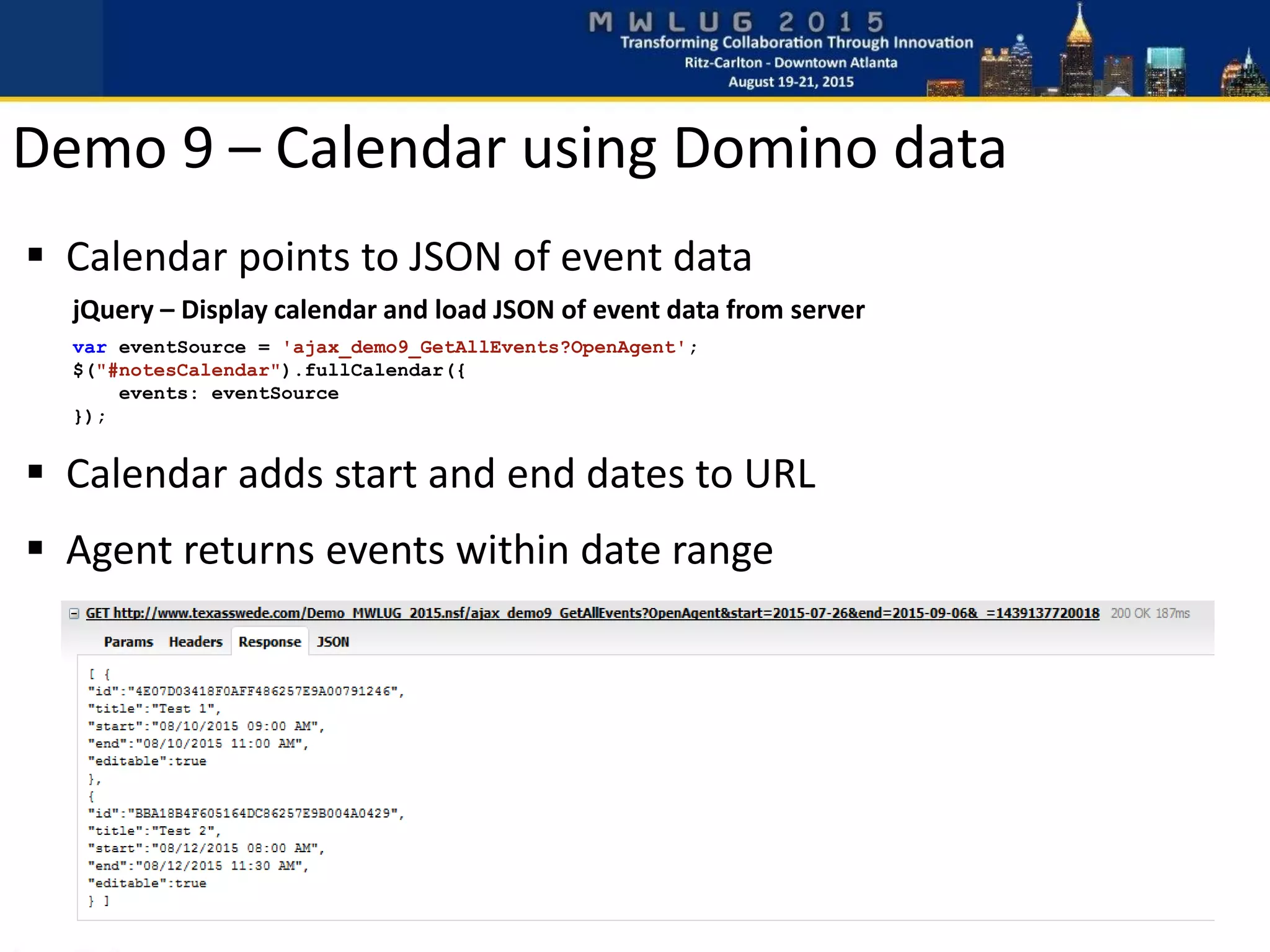
 Calendar points to JSON of event data
Demo 9 – Calendar using Domino data
jQuery – Display calendar and load JSON of event data from server
var eventSource = 'ajax_demo9_GetAllEvents?OpenAgent';
$("#notesCalendar").fullCalendar({
events: eventSource
});
 Calendar adds start and end dates to URL
 Agent returns events within date range
Demo 9 – Calendar using Domino data
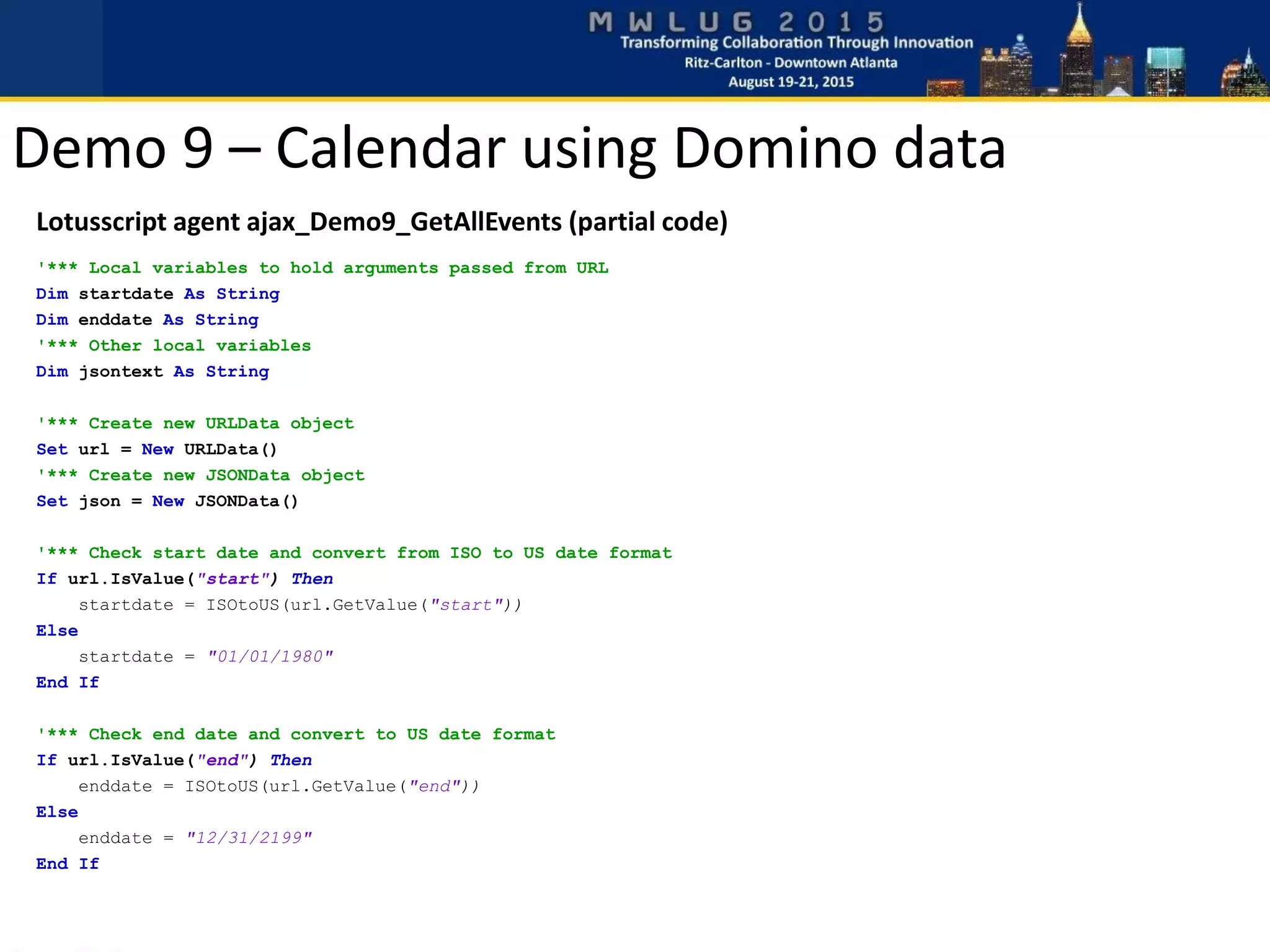
Lotusscript agent ajax_Demo9_GetAllEvents (partial code)
'*** Local variables to hold arguments passed from URL
Dim startdate As String
Dim enddate As String
'*** Other local variables
Dim jsontext As String
'*** Create new URLData object
Set url = New URLData()
'*** Create new JSONData object
Set json = New JSONData()
'*** Check start date and convert from ISO to US date format
If url.IsValue("start") Then
startdate = ISOtoUS(url.GetValue("start"))
Else
startdate = "01/01/1980"
End If
'*** Check end date and convert to US date format
If url.IsValue("end") Then
enddate = ISOtoUS(url.GetValue("end"))
Else
enddate = "12/31/2199"
End If
Demo 9 – Calendar using Domino data
Lotusscript agent ajax_Demo9_GetAllEvents (partial code)
'*** Send MIME header to browser
Print "content-type: application/json"
jsontext = ""
Set db = session.CurrentDatabase
Set view = db.GetView("Events")
Set col = view.AllEntries
Set entry = col.GetFirstEntry()
Do Until entry Is Nothing
If CDat(entry.ColumnValues(0))>=CDat(startdate) Then
If CDat(entry.ColumnValues(0))<=CDat(enddate) Then
Call json.SetValue("id", CStr(entry.ColumnValues(5)))
Call json.SetValue("title",CStr(entry.ColumnValues(3)))
Call json.SetValue("start", Format$(CDat(entry.ColumnValues(0)),"mm/dd/yyyy hh:nn ampm"))
Call json.SetValue("end", Format$(entry.ColumnValues(1),"mm/dd/yyyy hh:nn ampm"))
'*** Make the entry editable in calendar (allow changing date/time)
Call json.SetBoolean("editable", True)
End If
End If
jsontext = jsontext + json.GetJSON() + "," + Chr$(13)
Set entry = col.GetNextEntry(entry)
Loop
If Len(jsontext)>4 Then
jsontext = Left$(jsontext,Len(jsontext)-2)
End If
Print "[ " + jsontext + " ]"
Demo 9 – Calendar using Domino data
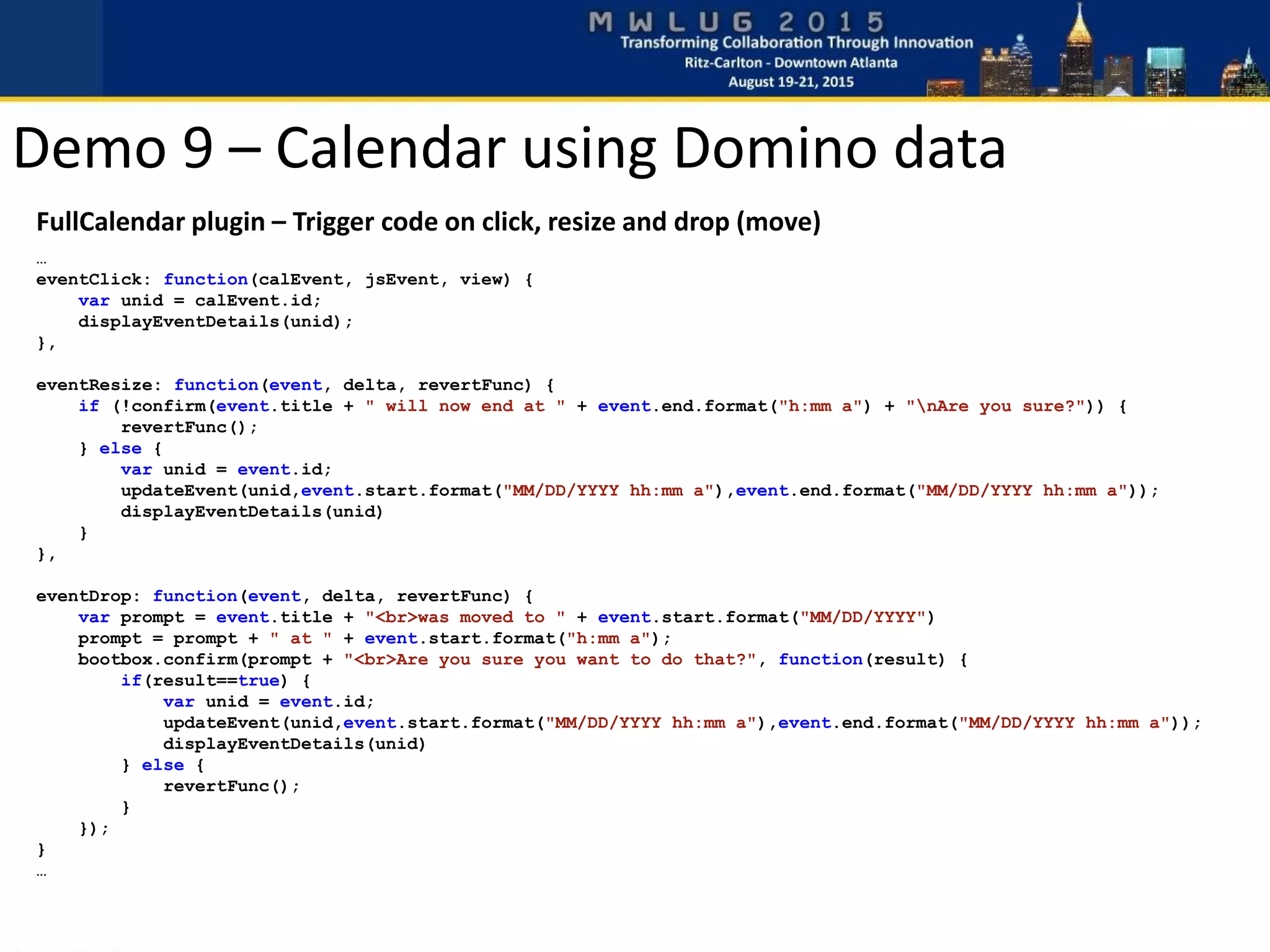
FullCalendar plugin – Trigger code on click, resize and drop (move)
…
eventClick: function(calEvent, jsEvent, view) {
var unid = calEvent.id;
displayEventDetails(unid);
},
eventResize: function(event, delta, revertFunc) {
if (!confirm(event.title + " will now end at " + event.end.format("h:mm a") + "nAre you sure?")) {
revertFunc();
} else {
var unid = event.id;
updateEvent(unid,event.start.format("MM/DD/YYYY hh:mm a"),event.end.format("MM/DD/YYYY hh:mm a"));
displayEventDetails(unid)
}
},
eventDrop: function(event, delta, revertFunc) {
var prompt = event.title + "<br>was moved to " + event.start.format("MM/DD/YYYY")
prompt = prompt + " at " + event.start.format("h:mm a");
bootbox.confirm(prompt + "<br>Are you sure you want to do that?", function(result) {
if(result==true) {
var unid = event.id;
updateEvent(unid,event.start.format("MM/DD/YYYY hh:mm a"),event.end.format("MM/DD/YYYY hh:mm a"));
displayEventDetails(unid)
} else {
revertFunc();
}
});
}
…
Demo 9 – Calendar using Domino data
Javascript code – Update event on server
function updateEvent(docunid,startDT,endDT) {
var json = new Object();
json["DocUNID"] = docunid;
json["EventStart"] = startDT;
json["EventEnd"] = endDT;
// Perform a call to the server to save new event date/time
$.ajax({
url: "ajax_Demo9_UpdateEvent?OpenAgent",
type: "POST",
data: json
}).done(function(data) {
if (data.status=="error") {
bootstrapAlert(data.msg,"danger");
} else if (data.status=="success") {
bootstrapAlert(data.msg,"success");
}
}).fail( function(e) {
bootstrapAlert("Failed to create progress note. Error: " + e.errorThrown,"danger");
});
}
Demo 9 – Calendar using Domino data
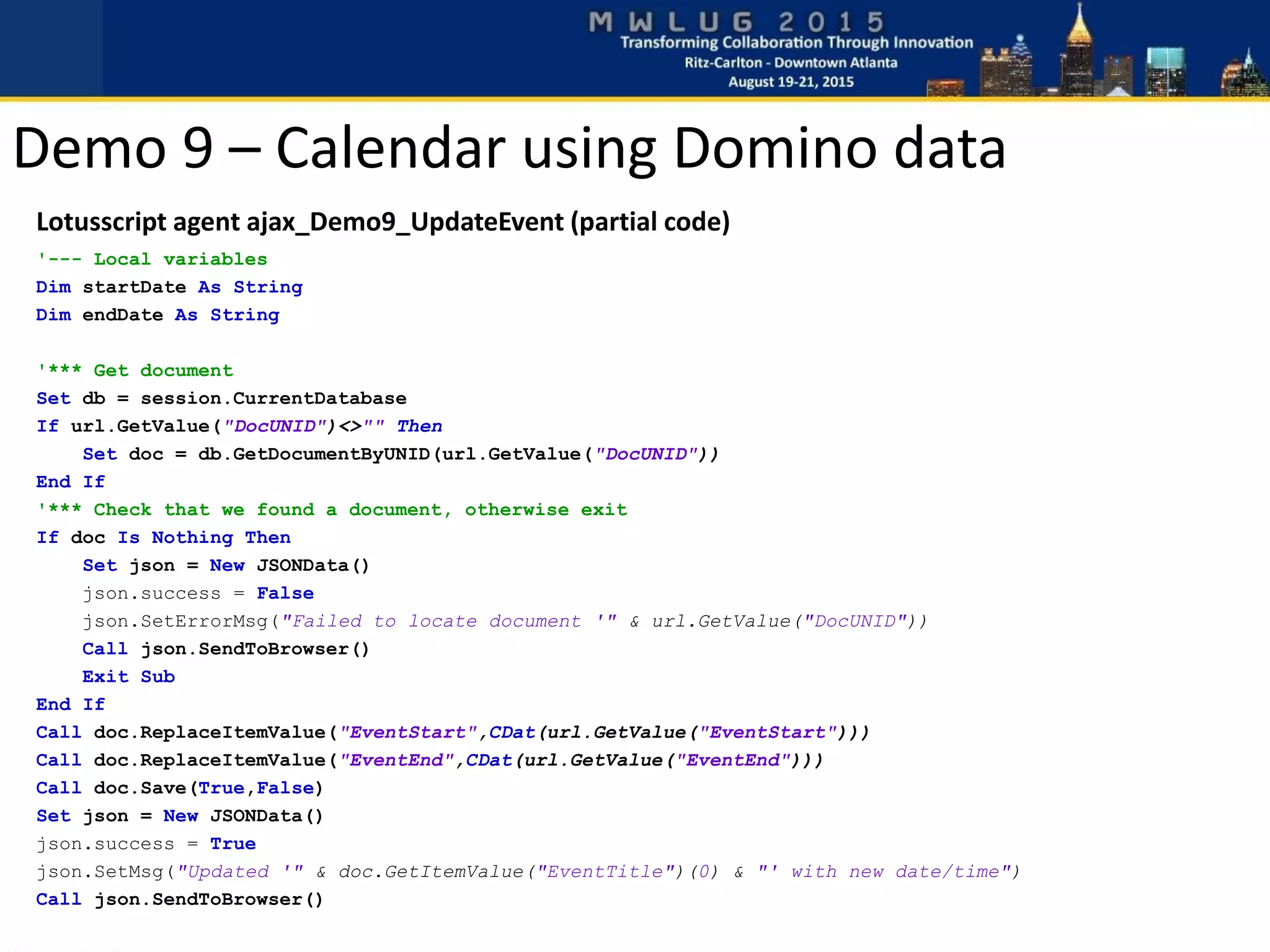
Lotusscript agent ajax_Demo9_UpdateEvent (partial code)
'--- Local variables
Dim startDate As String
Dim endDate As String
'*** Get document
Set db = session.CurrentDatabase
If url.GetValue("DocUNID")<>"" Then
Set doc = db.GetDocumentByUNID(url.GetValue("DocUNID"))
End If
'*** Check that we found a document, otherwise exit
If doc Is Nothing Then
Set json = New JSONData()
json.success = False
json.SetErrorMsg("Failed to locate document '" & url.GetValue("DocUNID"))
Call json.SendToBrowser()
Exit Sub
End If
Call doc.ReplaceItemValue("EventStart",CDat(url.GetValue("EventStart")))
Call doc.ReplaceItemValue("EventEnd",CDat(url.GetValue("EventEnd")))
Call doc.Save(True,False)
Set json = New JSONData()
json.success = True
json.SetMsg("Updated '" & doc.GetItemValue("EventTitle")(0) & "' with new date/time")
Call json.SendToBrowser()
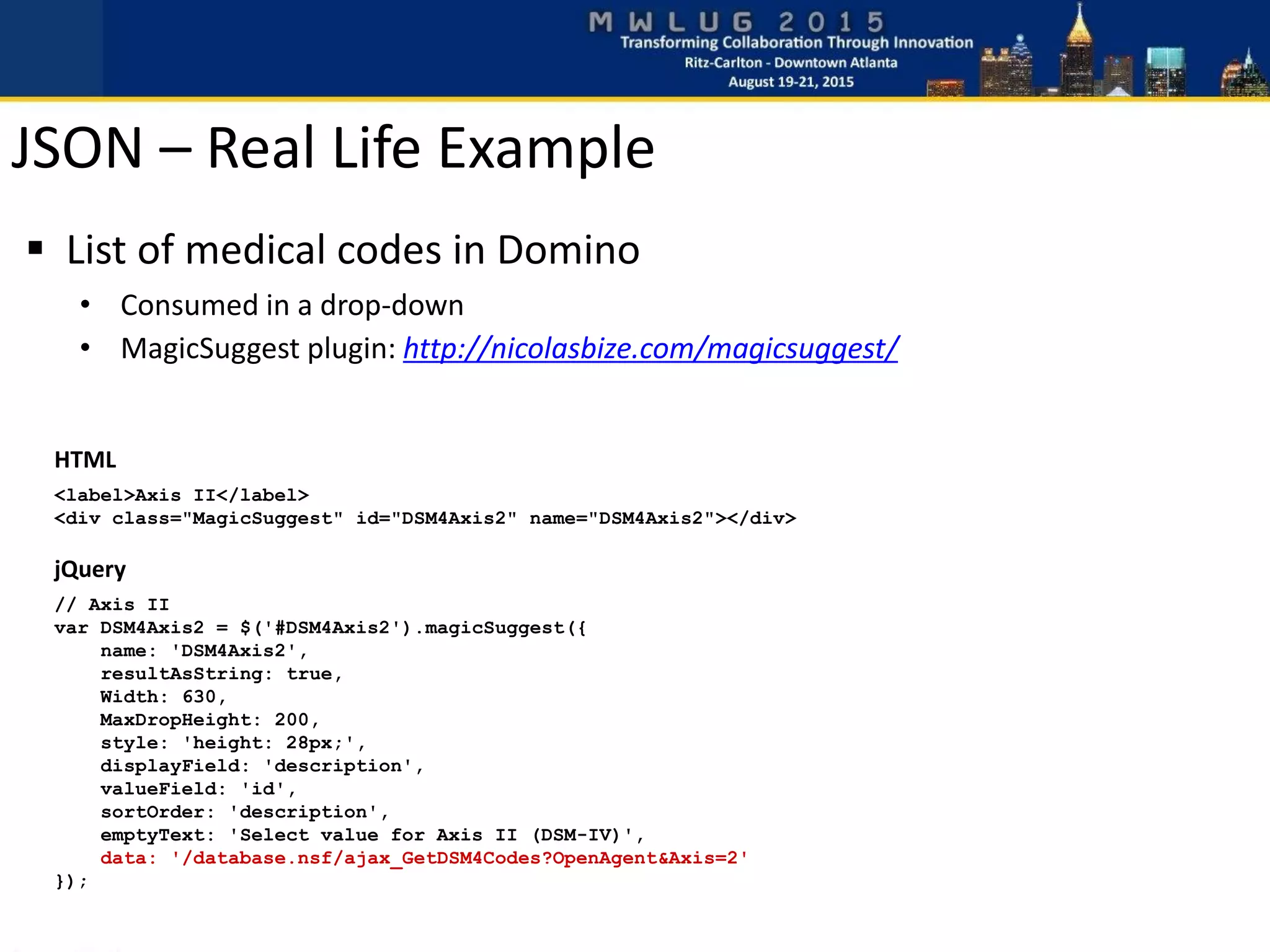
HTML
<label>Axis II</label>
<div class="MagicSuggest" id="DSM4Axis2" name="DSM4Axis2"></div>
jQuery
// Axis II
var DSM4Axis2 = $('#DSM4Axis2').magicSuggest({
name: 'DSM4Axis2',
resultAsString: true,
Width: 630,
MaxDropHeight: 200,
style: 'height: 28px;',
displayField: 'description',
valueField: 'id',
sortOrder: 'description',
emptyText: 'Select value for Axis II (DSM-IV)',
data: '/database.nsf/ajax_GetDSM4Codes?OpenAgent&Axis=2'
});
 List of medical codes in Domino
• Consumed in a drop-down
• MagicSuggest plugin: http://nicolasbize.com/magicsuggest/
JSON – Real Life Example
JSON generated by agent ajax_GetDSM4Codes
[
{"id":"301","description":"Paranoid Personality Disorder"},
{"id":"301.13","description":"Cyclothymic Disorder"},
{"id":"301.2", "description":"Schizoid Personality Disorder"},
{"id":"301.22","description":"Schizotypal Personality Disorder"},
{"id":"301.4","description":"Obsessive-Compulsive Personality Disorder"},
{"id":"301.5","description":"Histrionic Personality Disorder"},
{"id":"301.6","description":"Dependent Personality Disorder"},
{"id":"301.7","description":"Antisocial Personality Disorder"},
{"id":"301.81","description":"Narcissistic Personality Disorder"},
{"id":"301.82","description":"Avoidant Personality Disorder"},
{"id":"301.83","description":"Borderline Personality Disorder"},
{"id":"301.9","description":"Personality Disorder NOS"}
]
MagicSuggest rendered in browser:
JSON – Real Life Example
Summary
 Ajax/JSON efficient to access Domino data
 CRUD using server based agents (Lotusscript)
 jQuery and Bootstrap to speed up development
 Plugins available for free
 Some new easy-to-learn knowledge required
 Skills beneficial on other platforms as well
Questions?
Thank you!
Presentation & Sample Code:
http://blog.texasswede.com/MWLUG
http://www.texasswede.com/Demo_MWLUG_2015.nsf/demo1
http://www.texasswede.com/Demo_MWLUG_2015.nsf/demo2
http://www.texasswede.com/Demo_MWLUG_2015.nsf/demo3
http://www.texasswede.com/Demo_MWLUG_2015.nsf/demo4
http://www.texasswede.com/Demo_MWLUG_2015.nsf/demo5
http://www.texasswede.com/Demo_MWLUG_2015.nsf/demo6
http://www.texasswede.com/Demo_MWLUG_2015.nsf/demo7
http://www.texasswede.com/Demo_MWLUG_2015.nsf/demo8
http://www.texasswede.com/Demo_MWLUG_2015.nsf/demo9
Demo Links
Presentation & Sample Database
http://blog.texasswede.com/MWLUG

AD102 - Break out of the Box

  • 1.
    AD 102 –Break out of the box Integrate existing Domino data with modern websites Karl-Henry Martinsson Deep South Insurance
  • 2.
     Swede livingin Dallas  Sr. Applications Developer, Deep South Insurance  Life-long geek  Programming since 1982  Ex-Microsoft (1988-90)  Ex-journalist (1993-1997, freelance 1998-2011)  Web developer since 1994  Notes/Domino developer since 1996  IBM Champion 2014 and 2015  http://blog.texasswede.com I AM…
  • 3.
     Old infrastructure Company unwilling to upgrade  Requesting new web applications  Wanted modern look, mobile  Bootstrap and jQuery to the rescue: My story
  • 4.
    Agenda “Integrate existing Dominodata with modern websites”  Why integrate?  Why jQuery and not XPages?  Separate the workload  Client – Javascript/jQuery, Ajax, JSON  Server – Lotusscript  Improve the UI – Bootstrap  Demos All sample code will be available for download at http://blog.texasswede.com/MWLUG
  • 5.
     Limited orno migration options  Desire to modernize  Code re-use  Take advantage of the power of Domino  No one will know you are using a Domino backend  Use existing skillset  Learn valuable new skills Why integrate?
  • 6.
     Infrastructure notsupporting XPages  No XPages skills  Tight deadline – no time to learn  More control  Plugin availability Why not use Xpages?
  • 7.
     Separate designand code  Focus expertise on their respective areas  Use established front-end technologies  Back-end focus on business logic and data  Collaboration is important! Separate the workload
  • 8.
     Javascript/jQuery  Ajax/JSON HTML and CSS  Bootstrap Ajax call JSON data .NSF Client – modern web browser
  • 9.
     Lotusscript Agents NSF database  Existing business logic  Can use existing classes/script libraries Works on Domino since R5 Update highly recommended! Server – IBM Domino
  • 10.
    Where does everythinglive?  HTML pages, CSS files and Javascript • Notes page element • Notes resources • CDN (.js and .css) • Server file system – in Data/Domino/HTML • Another web server  Lotusscript agents • .NSF on Domino server
  • 11.
    Development tools  DominoDesigner  Browser with Dev Tools  Firefox with Firebug plugin  Internet Explorer Developer Tools (built-in)  Chrome Developer Tools (built-in)  Online resources • jsonlint.com • Stack Overflow • Google Search
  • 12.
     Asynchronous JavascriptAnd XML  Asynchronous = call processed in background  Result is passed back and then processed  XML used first, JSON now more common  Easier to parse JSON in Javascript  Using few lines of jQuery code Ajax
  • 13.
    jQuery  Javascript library Free  Very popular  Powerful – save development time  Easy access to web page elements (DOM)  Online resources
  • 14.
    $.ajax({ url: '/websites/example.nsf/ajax_GetUserDetails?OpenAgent', data: {name:“Karl-Henry Martinsson”}, cache: false }).done(function(data) { // Process returned data here }).fail(function(e) { // Process failed call here }); or $.ajax({ url: '/websites/example.nsf/ajax_GetUserDetails?OpenAgent', data: {name: userName}, cache: false }).success(function(data) { // Process returned data here });  Can be more complex – .done(), .fail() and .always()  Arguments passed as JSON  cache: false – “cache buster” Calling Ajax using jQuery
  • 15.
     JavaScript ObjectNotation  Describe data as Javascript objects  Preferred to XML in web applications • Less “chatty” (less bandwidth) • Very easy to access values directly in Javascript  Any data types, including other objects  Array of objects JSON
  • 16.
     ?ReadViewEntries&OutputFormat=JSON • Availablein Domino 7.0.2+ • Can be hard to parse  Formula in Notes view • http://www.eknori.de/2011-07-23/formula-magic/  Lotusscript agent • Generate your own JSON • Test at JSONLint.com • Use JSON classes o My Class.JSON o JSON Lotusscript Classes by Troy Reimer (OpenNTF.org) Generate JSON on Domino
  • 17.
     XPages agent(SSJS XAgent) • Domino 8.5.2 and XPages knowledge • Better performance than Lotusscript • http://www.wissel.net/blog/d6plinks/shwl-7mgfbn  REST Services control from Extension Library • Domino 8.5.2 and ExtLib on server Generate JSON on Domino – Xpages Style
  • 18.
     First buttonwill update specified element with text • Static text - stored in the Javascript source code  Second button will trigger an Ajax call to server • Server agent returns plain text • No parsing of name-value pairs • No database lookups or other server interaction • Returned text can contain HTML • Javascript updates specified element with returned text  Google as CDN for jQuery  jQuery also hosted by Microsoft and others Demo 1 – Text/HTML response
  • 19.
    <!DOCTYPE HTML ><html> <head> <title>Demo1 - MWLUG 2015</title> <script src='//ajax.googleapis.com/ajax/libs/jquery/1.11.1/jquery.min.js'></script> </head> <body> <div id="content"></div> <button id="btnDisplayStaticContent">Show content from page</button> <button id="btnDisplayServerContent">Load content from server</button> <script> $(document).ready(function () { // Update content div with content from this page $('#btnDisplayStaticContent').click( function() { var content = "This is some static content from this page"; $('#content').html(content); }); // Update content div with content from server $('#btnDisplayServerContent').click( function() { $.ajax({ url: 'ajax_Demo1?OpenAgent', cache: false }).done(function(data) { $('#content').html(data); }); }); }); </script> </body> </html> Demo 1 – Web page
  • 20.
    Option Public Option Declare SubInitialize '*** MIME Header to tell browser what kind of data we will return Print "content-type: text/html" '*** Content (HTML) to return to calling browser Print "This is content loaded from the server.<br>" Print "<em>This</em> text is returned as <strong>HTML</strong>.<br>" End Sub  Agent settings Demo 1 – Lotusscript agent
  • 22.
     Read textfield, pass to server  Return and display computed text  Simple URL class • http://blog.texasswede.com/free-code-class-to-read-url-name-value-pairs/  Using @URLDecode Demo 2 – Text/HTML response
  • 23.
    <!DOCTYPE HTML ><html> <head> <title>Demo2 - MWLUG 2015</title> <script src='//ajax.googleapis.com/ajax/libs/jquery/1.11.1/jquery.min.js'></script> </head> <body> Name: <input type="text" id="userName"></input> <br> <br> <button id="btnDisplayServerContent">Load content from server</button> <br> <br> <div id="content"></div> <script> $(document).ready(function () { // Update content div with dynamic content $('#btnDisplayServerContent').click( function() { // Get username from input field var userName = $('#userName').val(); // Make Ajax call to server, passing user name as argument $.ajax({ url: 'ajax_Demo2?OpenAgent', data: {name: userName}, cache: false }).done(function(data) { $('#content').html(data); }); }); }); </script> </body> </html> Demo 2 – Web page
  • 24.
    Option Public Option Declare Use"Class.URL" Sub Initialize '--- Local Notes classes used in agent Dim db As NotesDatabase Dim view As NotesView Dim doc As NotesDocument '--- Custom classes Dim url As URLData '*** Create new URLData object Set url = New URLData() '*** MIME Header to tell browser what kind of data we will return Print "content-type: text/html" '*** Check reqired values for this agent If url.IsValue("name")=False Then Print "Missing argument 'name'." Exit Sub End If '*** Process name argument If url.GetValue("name")="" Then Print "'Name' is empty." Else Print "Hello, " + url.GetValue("name") + "!" End If End Sub Demo 2 – Lotusscript agent
  • 25.
    Class URLData p_urldata ListAs String Public Sub New() Dim session As New NotesSession Dim webform As NotesDocument Dim tmp As String Dim tmparr As Variant Dim tmparg As Variant Dim i As Integer '*** Get document context (in-memory NotesDocument) Set webform = session.DocumentContext '*** Get HTTP GET argument(s) after ?OpenAgent tmp = FullTrim(StrRight(webform.GetItemValue("Query_String")(0),“OpenAgent&")) If tmp = "" Then '*** Get HTTP POST argument(s) tmp = FullTrim(webform.GetItemValue("Request_Content")(0))) End If '*** Separate name-value pairs into array tmparr = Split(tmp,"&") '*** Loop through array, split each name-value/argument For i = LBound(tmparr) To UBound(tmparr) tmparg = Split(tmparr(i),"=") p_urldata(LCase(tmparg(0))) = Decode(tmparg(1)) Next End Sub Demo 2 – URL Class
  • 26.
    %REM Function GetValue %END REM PublicFunction GetValue(argname As String) As String If IsValue(argname) Then GetValue = p_urldata(LCase(argname)) Else GetValue = "" End If End Function %REM Function IsValue %END REM Public Function IsValue(argname As String) As Boolean IsValue = IsElement(p_urldata(LCase(argname))) End Function '*** Private functions for this class Private Function Decode(txt As String) As String Dim tmp As Variant Dim tmptxt As String tmptxt = Replace(txt,"+"," ") tmp = Evaluate(|@URLDecode("Domino";"| & tmptxt & |")|) Decode = tmp(0) End Function End Class Demo 2 – URL Class
  • 28.
     Status -success or error  Multiple values  Error message  Case sensitive! Demo 3 – Return JSON data
  • 29.
    Demo 3 –Lotusscript JSON class  Simplify JSON creation  Add values (strings) and fix quotes within value  Add boolean values (true/false)  Set status (success or error)  Send MIME type and JSON string back
  • 30.
    Demo 3 –Lotusscript agent Option Public Option Declare Use "Class.JSON" Sub Initialize '--- Custom class Dim json As JSONData '*** Create new JSONData object Set json = New JSONData() '*** Generate JSON to return Call json.SetValue("PhoneNumber", "817-555-1212") Call json.SetValue("Email", "texasswede@gmail.com") Call json.SetValue("Name", "Karl-Henry Martinsson") json.success = True Call json.SendToBrowser() End Sub
  • 31.
    <body> <br> <button id="btnDisplayServerContent">Load userinfo</button> <br> <br> <div id="userInfo"> <div> User Name: <span id="userName"></span> </div> <div> Phone number: <span id="userPhoneNumber"></span> </div> <div> Email Address: <span id="userEmail"></span> </div> </div> <div id="errorInfo"></div> </body>  Use span elements to hold values  id attribute used to identify element  Must be unique on page Demo 3 – Return JSON data
  • 32.
    $.ajax({ url: 'ajax_Demo3?OpenAgent', cache: false }).success(function(data){ if(data.status=="success") { // Populate the different fields and display the section $('#userPhoneNumber').html(data.PhoneNumber); $('#userEmail').html(data.Email); $('#userName').html(data.Name); $("#userInfo").fadeIn(1500); } else { // Display error message passed from server $("#errorInfo").html(data.errormsg); $("#errorInfo").fadeIn(1000); } });  Very little code needed  Put values into specified elements  Case is important! Demo 3 – Return JSON data
  • 34.
     Open sourcefront-end framework  CSS + some jQuery  Responsive  Themes, color schemes and plugins  CDN or local copy  3rd party resources and plugins Twitter Bootstrap
  • 35.
    Example of webapplication using Bootstrap
  • 36.
    The password resetapplication pictured above is a free download. You can get it at http://blog.texasswede.com/free-software-password-reset-for-notesdomino/ Another Bootstrap web application
  • 37.
     Rapid development Responsive  Cross-browser  Plenty of resources  Actively being developed Benefits of using Bootstrap
  • 38.
     Only supportingthe latest browsers  Major changes between v2 and v3  Version specific plugins  Some plugins not themeable Potential issues with Bootstrap
  • 39.
     Viewport metatag – control scaling <meta name="viewport" content="width=device-width, initial-scale=1"> <title>Demo 4 - MWLUG 2015</title> <script src='//ajax.googleapis.com/ajax/libs/jquery/1.11.1/jquery.min.js'></script> <script src="//maxcdn.bootstrapcdn.com/bootstrap/3.3.5/js/bootstrap.min.js"></script> <link href="//maxcdn.bootstrapcdn.com/bootstrap/3.3.5/css/bootstrap.min.css" rel="stylesheet"> <link href="demo4.css" rel="stylesheet"> Using Bootstrap
  • 40.
     Minified Bootstrapfrom BootstrapCDN.com  // - works with and without SSL • Will not work on local webpages, page must be on a server  Local CSS located after Bootstrap CSS Using Bootstrap <meta name="viewport" content="width=device-width, initial-scale=1"> <title>Demo 4 - MWLUG 2015</title> <script src='//ajax.googleapis.com/ajax/libs/jquery/1.11.1/jquery.min.js'></script> <script src="//maxcdn.bootstrapcdn.com/bootstrap/3.3.5/js/bootstrap.min.js"></script> <link href="//maxcdn.bootstrapcdn.com/bootstrap/3.3.5/css/bootstrap.min.css" rel="stylesheet"> <link href="demo4.css" rel="stylesheet">
  • 41.
     Link toBootstrap and local CSS file  Local CSS used for minor tweaks  Bootstrap markup in HTML  Two columns • Button in left column • Result in right column  Responsive - columns will stack Demo 4 – Adding Bootstrap
  • 42.
    HTML <body> <div class="container"> <divclass="row"> <div class="col-md-6"> <button class="btn btn-primary" id="btnDisplayServerContent">Load user info</button> </div> <div id="userInfo" class="well col-md-6"> <label>User Name:</label> <div class="jsonData" id="userName"></div> <label>Phone number:</label> <div class="jsonData" id="userPhoneNumber"></div> <label>Email Address:</label> <div class="jsonData" id="userEmail"></div> </div> </div> <div class="alert alert-danger" id="errorInfo"></div> </div> HTML <head> <script src='//ajax.googleapis.com/ajax/libs/jquery/1.11.1/jquery.min.js'></script> <script src="//maxcdn.bootstrapcdn.com/bootstrap/3.3.5/js/bootstrap.min.js"></script> <link href="//maxcdn.bootstrapcdn.com/bootstrap/3.3.5/css/bootstrap.min.css" rel="stylesheet"> <link href="demo4.css" rel="stylesheet"> Demo 4 – Adding Bootstrap
  • 43.
    demo4.css container { margin-top: 20px; } label{ font-size: 10pt; margin-bottom: 0px; margin-top: 10px; } label:first-child { margin-top: 0px; } .jsonData { font-size: 12pt; }  Add 20 pixel margin to top of page  Make label text smaller, remove bottom margin and add top margin, except on the first label  Set the text size of JSON data returned to 12pt Demo 4 – Adding Bootstrap
  • 44.
    Demo 4 –Adding Bootstrap jQuery // Hide error section and user info section $("#errorInfo").hide(); $("#userInfo").hide(); // Update content div with dynamic content $('#btnDisplayServerContent').click( function() { // Make Ajax call to server $.ajax({ url: 'ajax_Demo3?OpenAgent', cache: false }).success(function(data) { if(data.status=="success") { // Populate the different fields and display the section $('#userPhoneNumber').html(data.PhoneNumber); $('#userEmail').html(data.Email); $('#userName').html(data.Name); $("#userInfo").fadeIn(1500); } else { // Display error message passed from server $("#errorInfo").html(data.errormsg); $("#errorInfo").fadeIn(1000); } }); });
  • 46.
     data-json=”JSON_data_element”  data-prefix is ”standard”  .each()  Read value and get corresponding JSON • $(this) – current element in jQuery • data[”Name”] will return the JSON value “Name” Demo 5 – Process JSON
  • 47.
    jQuery // For eachelement with class jsonData $(".jsonData").each( function() { // Get the field name from the custom attribute data-json // and set the content of the current element to // the corresponding JSON value jsonfield = $(this).attr("data-json"); $(this).html(data[jsonfield]); }); HTML <div id="userInfo" class="well col-md-6"> <label>User Name:</label> <div class="jsonData" id=user"Name" data-json="Name"></div> <label>Phone number:</label> <div class="jsonData" id="userPhoneNumber" data-json="PhoneNumber"></div> <label>Email Address:</label> <div class="jsonData" id="userEmail" data-json="Email"></div> </div> $("div[data-json]").each( function() { Demo 5 – Process JSON
  • 49.
     JSON name= id of element to put data in  Less HTML markup  Still very little code, and very flexible  Add # in front of element name! jQuery $.each(data, function(id, item) { elementName = "#" + id; elementValue = data[id]; $(elementName).html(elementValue); }); HTML <label>User Name:</label> <div id="Name"></div> <label>Phone number:</label> <div id="PhoneNumber"></div> <label>Email Address:</label> <div id="Email"></div> Demo 6 – Process JSON (another way)
  • 51.
    Demo 7 –Bootstrap plugin  Plugin by @wenzhixin  Get it at http://bootstrap-table.wenzhixin.net.cn/  CDN hosted version at CloudFlare.com  Minimal HTML markup  Javascript mainly to define columns and settings
  • 52.
    HTML <div id="tableToolbar"> <div class="toolbarText">MyContacts</div> </div> <table id="ContactTable"></table> jQuery (partial) $("#ContactTable").bootstrapTable({ url: 'ajax_Demo7_GetAllContacts?OpenAgent', search: true, showRefresh: true, pagination: true, pageSize: 25, classes: "table-condensed table-hover table-striped tableContent", toolbar: "#tableToolbar", columns: [{ field: 'FirstName', title: 'First Name', width: 80, sortable: true }, { field: 'LastName', title: 'Last Name', width: 90, sortable: true }, { … … … Demo 7 – Bootstrap plugin
  • 53.
    Demo 7 –Bootstrap Table plugin Lotusscript code (partial) '*** Get all documents in view to process Set db = session.CurrentDatabase Set view = db.GetView("(LookupContactsByLastName)") Set col = view.AllEntries '*** Start of JSON string jsonString = “” '*** Loop through all entries and build JSON to return Set entry = col.GetFirstEntry Do Until entry Is Nothing '*** Build JSON for each entry and add to string Set json = New JSONData() Call json.SetValue("LastName", CStr(entry.ColumnValues(0))) Call json.SetValue("FirstName", CStr(entry.ColumnValues(1))) Call json.SetValue("Company", CStr(entry.ColumnValues(2))) Call json.SetValue("Address", CStr(entry.ColumnValues(3))) Call json.SetValue("City", CStr(entry.ColumnValues(4))) Call json.SetValue("State", CStr(entry.ColumnValues(5))) Call json.SetValue("ZIP", CStr(entry.ColumnValues(6))) Call json.SetValue("DocUNID", CStr(entry.ColumnValues(9))) '*** Add new JSON to existing JSON string jsonString = jsonString + json.GetJSON() + "," + Chr$(13) Set entry = col.GetNextEntry(entry) Loop '*** Remove the trailing comma and line break if we have data If Len(jsonString) > 4 then jsonString = Left$(jsonString,Len(jsonString)-2) End If '*** Add brackets for array jsonString = "[ " + Chr$(13) + jsonString + Chr$(13) + “ ]“ '*** MIME Header to tell browser what kind of data we will send Print "content-type: application/json" '*** Send JSON back to browser Print jsonString
  • 54.
    Demo 7 –Bootstrap Table plugin
  • 56.
    Demo 8 –Simple contact database  Table of contacts – use bootstrap-table plugin  Click on user to display more details about them  Buttons • Edit • Save • New • Delete  Add refresh/reload of table when updated
  • 57.
    Demo 8 –Simple contact database  Lotusscript agents needed • ajax_Demo8_GetAllContacts (reused from Demo 7) • ajax_Demo8_GetContactDetails • ajax_Demo8_SaveContact o If DocUNID is blank, create new contact o Otherwise update existing contact • ajax_Demo8_DeleteContact  HTML page changes • Add section for contact details • Detect click on row to display details • Add buttons and jQuery code
  • 58.
    Demo 8 –Simple contact database HTML – buttons <button class="btn btn-sm btn-primary" id="btnNewContact">New</button> <button class="btn btn-sm btn-primary" id="btnEditContact">Edit</button> <button class="btn btn-sm btn-success" id="btnSaveContact">Save</button> <button class="btn btn-sm btn-danger pull-right" id="btnDeleteContact">Delete</button> jQuery – Edit and New buttons //*** Button actions $("#btnEditContact").on("click", function(e) { editContact(); }); $("#btnNewContact").on("click", function() { editContact(); // Empty all input fields $('input[data-notesfield]').each( function() { $(this).val(""); }); // Empty hidden DocUNID field $("#docUNID").attr("data-UNID",""); // Hide ‘Delete’ button $("#btnDeleteContact").hide(); });
  • 59.
    jQuery – Savebutton $("#btnSaveContact").on("click", function() { $("#btnSaveContact").hide(); var json = new Object(); // Store field values in JSON object var docunid = $("#docUNID").attr("data-UNID"); json["DocUNID"] = docunid; $('input[data-notesfield]').each( function() { var id = $(this).attr("id"); var notesfield = $(this).attr("data-notesfield"); json[notesfield] = $(this).val(); }); // Perform a call to the server to save values $.ajax({ url: "ajax_Demo8_SaveContact?OpenAgent", type: "POST", data: json }).done(function(data) { if (data.status=="error") { alert("Failure: " + data.msg); } else if (data.status=="success") { setReadMode(); // Convert INPUT back to DIV $("#contactTable").bootstrapTable("refresh", {silent: true}); }).fail( function(e) { alert("Failure!","Failed to save contact. Error: " + e.errorThrown); }); $("#btnEditContact").show(); }); Demo 8 – Simple contact database
  • 60.
    jQuery – Deletebutton $("#btnDeleteContact").on("click", function(e) { var docunid = $("#docUNID").attr("data-UNID"); $.ajax({ url: "ajax_Demo8_DeleteContact?OpenAgent", type: "POST", data: {DocUNID: docunid } }).done(function(data) { if (data.status=="error") { alert("Failure: " + data.msg); } else if (data.status=="success") { $("#contactTable").bootstrapTable("refresh", {silent: true}); // Empty all input fields $('input[data-notesfield]').each( function() { $(this).val(""); }); // Empty all div with Notes data $('div[data-notesfield]').each( function() { $(this).html(""); }); // Empty hidden DocUNID storage $("#docUNID").attr("data-UNID","") $("#btnDeleteContact").hide(); $("#btnEditContact").hide(); } }).fail( function(e) { alert("Failure!","Failed to delete contact. Error: " + e.errorThrown); }); }); Demo 8 – Simple contact database
  • 61.
    jQuery – Detectclick on table row // Detect click on row in table $("#contactTable").on('click-row.bs.table', function (e, row, $element) { // Convert INPUT fields back to DIV just in case setReadMode(); // Hide save button if visible $("#btnSaveContact").hide(); // Get DocUNID value in table and load corresponding values from server var unid = row.DocUNID; displayDetails(unid); }); Demo 8 – Simple contact database
  • 62.
    jQuery – Loadcontact details from server and display on page // Get contact details from Domino server and populate fields // using the DocUIND value as lookup key function displayDetails(docunid) { $.ajax({ url: 'ajax_Demo8_GetContactDetails?OpenAgent', data: {DocUNID: docunid}, cache: false }).success(function(data) { if(data.status=="success") { // For each element with data-notesfield attribute $('div[data-notesfield]').each( function() { notesfield = $(this).attr("data-notesfield"); if (data[notesfield]!=null) { fieldvalue = data[notesfield]; $(this).html(fieldvalue); } }); // Store DocUNID in enmpty div for later use $("#docUNID").attr("data-UNID",data.DocUNID); // Display previously hidden editand delete buttons $("#btnEditContact").show(); $("#btnDeleteContact").show(); } }); } Demo 8 – Simple contact database
  • 63.
    jQuery – Changebetween DIV and INPUT // Put contact details into edit mode by changing DIV to INPUT function editContact() { $("#btnEditContact").hide(); // Change all div with Notes data to input $('div[data-notesfield]').each( function() { var id = $(this).attr("id"); var notesfield = $(this).attr("data-notesfield"); var input = "<input class='jsonData inputNotesField form-control input-sm' id='" + id input = input + "' data-notesfield='" + notesfield + "' value='" + $(this).html() + "'></input>"; $(this).replaceWith(input) }); $("#btnSaveContact").show(); $("#btnEditContact").hide(); } // Put contact details into read mode by changing INPUT to DIV function setReadMode() { $('input[data-notesfield]').each( function() { var id = $(this).attr("id"); var notesfield = $(this).attr("data-notesfield"); var div = "<div class='jsonData displayNotesField' id='" + id div = div + "' data-notesfield='" + notesfield + "'>" + $(this).val() + "</div>"; $(this).replaceWith(div) }); } Demo 8 – Simple contact database
  • 65.
     Similar toDemo 8, but using FullCalendar plugin  Get it at http://fullcalendar.io  Lotusscript agents • ajax_Demo9_GetAllEvents • Returning events between specific days • Calendar automatically sends start and end date • ajax_Demo8_GetEventDetails • ajax_Demo8_UpdateEvent • Triggered when moving event or changing duration • Arguments: DocUNID, start date and end date Demo 9 – Calendar using Domino data
  • 66.
     Calendar pointsto JSON of event data Demo 9 – Calendar using Domino data jQuery – Display calendar and load JSON of event data from server var eventSource = 'ajax_demo9_GetAllEvents?OpenAgent'; $("#notesCalendar").fullCalendar({ events: eventSource });  Calendar adds start and end dates to URL  Agent returns events within date range
  • 67.
    Demo 9 –Calendar using Domino data Lotusscript agent ajax_Demo9_GetAllEvents (partial code) '*** Local variables to hold arguments passed from URL Dim startdate As String Dim enddate As String '*** Other local variables Dim jsontext As String '*** Create new URLData object Set url = New URLData() '*** Create new JSONData object Set json = New JSONData() '*** Check start date and convert from ISO to US date format If url.IsValue("start") Then startdate = ISOtoUS(url.GetValue("start")) Else startdate = "01/01/1980" End If '*** Check end date and convert to US date format If url.IsValue("end") Then enddate = ISOtoUS(url.GetValue("end")) Else enddate = "12/31/2199" End If
  • 68.
    Demo 9 –Calendar using Domino data Lotusscript agent ajax_Demo9_GetAllEvents (partial code) '*** Send MIME header to browser Print "content-type: application/json" jsontext = "" Set db = session.CurrentDatabase Set view = db.GetView("Events") Set col = view.AllEntries Set entry = col.GetFirstEntry() Do Until entry Is Nothing If CDat(entry.ColumnValues(0))>=CDat(startdate) Then If CDat(entry.ColumnValues(0))<=CDat(enddate) Then Call json.SetValue("id", CStr(entry.ColumnValues(5))) Call json.SetValue("title",CStr(entry.ColumnValues(3))) Call json.SetValue("start", Format$(CDat(entry.ColumnValues(0)),"mm/dd/yyyy hh:nn ampm")) Call json.SetValue("end", Format$(entry.ColumnValues(1),"mm/dd/yyyy hh:nn ampm")) '*** Make the entry editable in calendar (allow changing date/time) Call json.SetBoolean("editable", True) End If End If jsontext = jsontext + json.GetJSON() + "," + Chr$(13) Set entry = col.GetNextEntry(entry) Loop If Len(jsontext)>4 Then jsontext = Left$(jsontext,Len(jsontext)-2) End If Print "[ " + jsontext + " ]"
  • 69.
    Demo 9 –Calendar using Domino data FullCalendar plugin – Trigger code on click, resize and drop (move) … eventClick: function(calEvent, jsEvent, view) { var unid = calEvent.id; displayEventDetails(unid); }, eventResize: function(event, delta, revertFunc) { if (!confirm(event.title + " will now end at " + event.end.format("h:mm a") + "nAre you sure?")) { revertFunc(); } else { var unid = event.id; updateEvent(unid,event.start.format("MM/DD/YYYY hh:mm a"),event.end.format("MM/DD/YYYY hh:mm a")); displayEventDetails(unid) } }, eventDrop: function(event, delta, revertFunc) { var prompt = event.title + "<br>was moved to " + event.start.format("MM/DD/YYYY") prompt = prompt + " at " + event.start.format("h:mm a"); bootbox.confirm(prompt + "<br>Are you sure you want to do that?", function(result) { if(result==true) { var unid = event.id; updateEvent(unid,event.start.format("MM/DD/YYYY hh:mm a"),event.end.format("MM/DD/YYYY hh:mm a")); displayEventDetails(unid) } else { revertFunc(); } }); } …
  • 70.
    Demo 9 –Calendar using Domino data Javascript code – Update event on server function updateEvent(docunid,startDT,endDT) { var json = new Object(); json["DocUNID"] = docunid; json["EventStart"] = startDT; json["EventEnd"] = endDT; // Perform a call to the server to save new event date/time $.ajax({ url: "ajax_Demo9_UpdateEvent?OpenAgent", type: "POST", data: json }).done(function(data) { if (data.status=="error") { bootstrapAlert(data.msg,"danger"); } else if (data.status=="success") { bootstrapAlert(data.msg,"success"); } }).fail( function(e) { bootstrapAlert("Failed to create progress note. Error: " + e.errorThrown,"danger"); }); }
  • 71.
    Demo 9 –Calendar using Domino data Lotusscript agent ajax_Demo9_UpdateEvent (partial code) '--- Local variables Dim startDate As String Dim endDate As String '*** Get document Set db = session.CurrentDatabase If url.GetValue("DocUNID")<>"" Then Set doc = db.GetDocumentByUNID(url.GetValue("DocUNID")) End If '*** Check that we found a document, otherwise exit If doc Is Nothing Then Set json = New JSONData() json.success = False json.SetErrorMsg("Failed to locate document '" & url.GetValue("DocUNID")) Call json.SendToBrowser() Exit Sub End If Call doc.ReplaceItemValue("EventStart",CDat(url.GetValue("EventStart"))) Call doc.ReplaceItemValue("EventEnd",CDat(url.GetValue("EventEnd"))) Call doc.Save(True,False) Set json = New JSONData() json.success = True json.SetMsg("Updated '" & doc.GetItemValue("EventTitle")(0) & "' with new date/time") Call json.SendToBrowser()
  • 73.
    HTML <label>Axis II</label> <div class="MagicSuggest"id="DSM4Axis2" name="DSM4Axis2"></div> jQuery // Axis II var DSM4Axis2 = $('#DSM4Axis2').magicSuggest({ name: 'DSM4Axis2', resultAsString: true, Width: 630, MaxDropHeight: 200, style: 'height: 28px;', displayField: 'description', valueField: 'id', sortOrder: 'description', emptyText: 'Select value for Axis II (DSM-IV)', data: '/database.nsf/ajax_GetDSM4Codes?OpenAgent&Axis=2' });  List of medical codes in Domino • Consumed in a drop-down • MagicSuggest plugin: http://nicolasbize.com/magicsuggest/ JSON – Real Life Example
  • 74.
    JSON generated byagent ajax_GetDSM4Codes [ {"id":"301","description":"Paranoid Personality Disorder"}, {"id":"301.13","description":"Cyclothymic Disorder"}, {"id":"301.2", "description":"Schizoid Personality Disorder"}, {"id":"301.22","description":"Schizotypal Personality Disorder"}, {"id":"301.4","description":"Obsessive-Compulsive Personality Disorder"}, {"id":"301.5","description":"Histrionic Personality Disorder"}, {"id":"301.6","description":"Dependent Personality Disorder"}, {"id":"301.7","description":"Antisocial Personality Disorder"}, {"id":"301.81","description":"Narcissistic Personality Disorder"}, {"id":"301.82","description":"Avoidant Personality Disorder"}, {"id":"301.83","description":"Borderline Personality Disorder"}, {"id":"301.9","description":"Personality Disorder NOS"} ] MagicSuggest rendered in browser: JSON – Real Life Example
  • 75.
    Summary  Ajax/JSON efficientto access Domino data  CRUD using server based agents (Lotusscript)  jQuery and Bootstrap to speed up development  Plugins available for free  Some new easy-to-learn knowledge required  Skills beneficial on other platforms as well
  • 76.
  • 77.
    Thank you! Presentation &Sample Code: http://blog.texasswede.com/MWLUG
  • 78.