SynapseIndia Dotnet Web
Applications Development
Web Services vs. Traditional Web
Applications
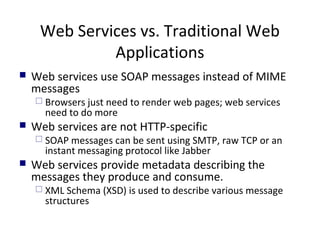
 Web services use SOAP messages instead of MIME
messages
 Browsers just need to render web pages; web services
need to do more
 Web services are not HTTP-specific
 SOAP messages can be sent using SMTP, raw TCP or an
instant messaging protocol like Jabber
 Web services provide metadata describing the
messages they produce and consume.
 XML Schema (XSD) is used to describe various message
structures
Extensible Markup Language (XML)
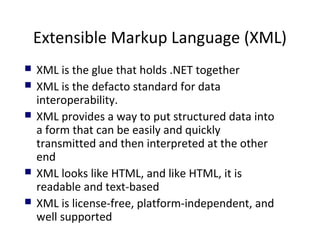
 XML is the glue that holds .NET together
 XML is the defacto standard for data
interoperability.
 XML provides a way to put structured data into
a form that can be easily and quickly
transmitted and then interpreted at the other
end
 XML looks like HTML, and like HTML, it is
readable and text-based
 XML is license-free, platform-independent, and
well supported
Simple Object Access Protocol
(SOAP)

“SOAP provides a simple and lightweight
mechanism for exchanging structured and typed
information between peers in a decentralized,
distributed environment using XML “
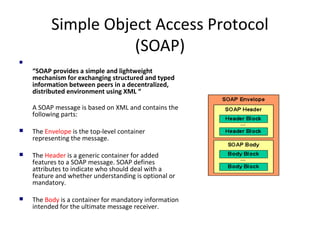
A SOAP message is based on XML and contains the
following parts:
 The Envelope is the top-level container
representing the message.
 The Header is a generic container for added
features to a SOAP message. SOAP defines
attributes to indicate who should deal with a
feature and whether understanding is optional or
mandatory.
 The Body is a container for mandatory information
intended for the ultimate message receiver.
SOAP (cont’d)
 Soap is the communications protocol for XML Web services.
 SOAP is a specification that defines the XML format for messages—and that's
about it – a SOAP implementation will probably include mechanisms for
object activation and naming services but the SOAP standard doesn't specify
them
 Optional parts of SOAP specification describe how to represent program data
as XML and how to use SOAP to do Remote Procedure Calls
 SOAP is much smaller and simpler to implement than many of the previous
protocols.
 DCE and CORBA took years to implement, so only a few implementations
were ever released; SOAP, however, can use existing XML Parsers and HTTP
libraries to do most of the hard work, so a SOAP implementation can be
completed in a matter of months – so several implementations for it have
been released (> 70 to date).
 SOAP obviously doesn't do everything that DCE or CORBA do, but the lack of
complexity in exchange for features is what makes SOAP so readily available
Web Service Description Language
(WSDL)
 A Web Service Description defines all the supported methods
that a Web Service provides.
 WSDL is an XML grammar that developers and development
tools use to represent the capabilities and syntax of a Web
Service.
 Similar to IDL for COM and CORBA
 Imagine you want to start calling a SOAP method provided by
one of your business partners. WSDL specifies what a request
message must contain and what the response message will
look like in unambiguous notation.
Universal Discovery Description and
Integration (UDDI)
 UDDI is the yellow pages of Web Services
 you can search for a company that offers the services you need, read about the service
offered and contact someone for more information
 A UDDI directory entry is an XML file that describes a business and the services it offers.
 There are three parts to an entry in the UDDI directory
 "white pages" describe the company offering the service: name, address, contacts, etc.
 "yellow pages" include industrial categories based on standard taxonomies such as the North
American Industry Classification System and the Standard Industrial Classification.
 "green pages" describe the interface to the service in enough detail for someone to write an
application to use the Web service.
 UDDI defines a document format and protocol for searching and retrieving discovery
documents - which in turn link to DISCO documents.
 DISCO (Discovery of Web Services) is a Microsoft protocol for retrieving the contracts for
Web Services (WDSL documents).
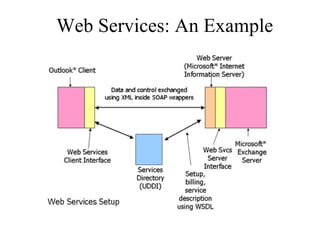
Web Services: An Example
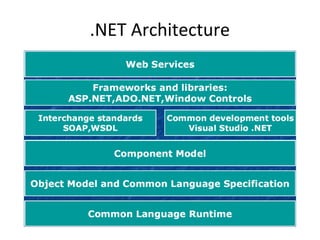
.NET Architecture
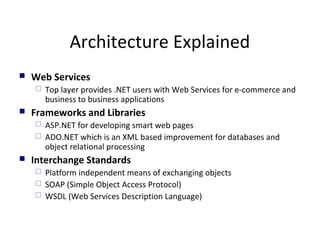
Architecture Explained
 Web Services
 Top layer provides .NET users with Web Services for e-commerce and
business to business applications
 Frameworks and Libraries
 ASP.NET for developing smart web pages
 ADO.NET which is an XML based improvement for databases and
object relational processing
 Interchange Standards
 Platform independent means of exchanging objects
 SOAP (Simple Object Access Protocol)
 WSDL (Web Services Description Language)
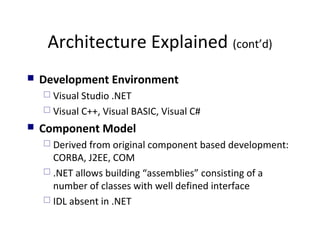
Architecture Explained (cont’d)
 Development Environment
 Visual Studio .NET
 Visual C++, Visual BASIC, Visual C#
 Component Model
 Derived from original component based development:
CORBA, J2EE, COM
 .NET allows building “assemblies” consisting of a
number of classes with well defined interface
 IDL absent in .NET

SynapseIndia dotnet web applications development

  • 1.
  • 2.
    Web Services vs.Traditional Web Applications  Web services use SOAP messages instead of MIME messages  Browsers just need to render web pages; web services need to do more  Web services are not HTTP-specific  SOAP messages can be sent using SMTP, raw TCP or an instant messaging protocol like Jabber  Web services provide metadata describing the messages they produce and consume.  XML Schema (XSD) is used to describe various message structures
  • 3.
    Extensible Markup Language(XML)  XML is the glue that holds .NET together  XML is the defacto standard for data interoperability.  XML provides a way to put structured data into a form that can be easily and quickly transmitted and then interpreted at the other end  XML looks like HTML, and like HTML, it is readable and text-based  XML is license-free, platform-independent, and well supported
  • 4.
    Simple Object AccessProtocol (SOAP)  “SOAP provides a simple and lightweight mechanism for exchanging structured and typed information between peers in a decentralized, distributed environment using XML “ A SOAP message is based on XML and contains the following parts:  The Envelope is the top-level container representing the message.  The Header is a generic container for added features to a SOAP message. SOAP defines attributes to indicate who should deal with a feature and whether understanding is optional or mandatory.  The Body is a container for mandatory information intended for the ultimate message receiver.
  • 5.
    SOAP (cont’d)  Soapis the communications protocol for XML Web services.  SOAP is a specification that defines the XML format for messages—and that's about it – a SOAP implementation will probably include mechanisms for object activation and naming services but the SOAP standard doesn't specify them  Optional parts of SOAP specification describe how to represent program data as XML and how to use SOAP to do Remote Procedure Calls  SOAP is much smaller and simpler to implement than many of the previous protocols.  DCE and CORBA took years to implement, so only a few implementations were ever released; SOAP, however, can use existing XML Parsers and HTTP libraries to do most of the hard work, so a SOAP implementation can be completed in a matter of months – so several implementations for it have been released (> 70 to date).  SOAP obviously doesn't do everything that DCE or CORBA do, but the lack of complexity in exchange for features is what makes SOAP so readily available
  • 6.
    Web Service DescriptionLanguage (WSDL)  A Web Service Description defines all the supported methods that a Web Service provides.  WSDL is an XML grammar that developers and development tools use to represent the capabilities and syntax of a Web Service.  Similar to IDL for COM and CORBA  Imagine you want to start calling a SOAP method provided by one of your business partners. WSDL specifies what a request message must contain and what the response message will look like in unambiguous notation.
  • 7.
    Universal Discovery Descriptionand Integration (UDDI)  UDDI is the yellow pages of Web Services  you can search for a company that offers the services you need, read about the service offered and contact someone for more information  A UDDI directory entry is an XML file that describes a business and the services it offers.  There are three parts to an entry in the UDDI directory  "white pages" describe the company offering the service: name, address, contacts, etc.  "yellow pages" include industrial categories based on standard taxonomies such as the North American Industry Classification System and the Standard Industrial Classification.  "green pages" describe the interface to the service in enough detail for someone to write an application to use the Web service.  UDDI defines a document format and protocol for searching and retrieving discovery documents - which in turn link to DISCO documents.  DISCO (Discovery of Web Services) is a Microsoft protocol for retrieving the contracts for Web Services (WDSL documents).
  • 8.
  • 9.
  • 10.
    Architecture Explained  WebServices  Top layer provides .NET users with Web Services for e-commerce and business to business applications  Frameworks and Libraries  ASP.NET for developing smart web pages  ADO.NET which is an XML based improvement for databases and object relational processing  Interchange Standards  Platform independent means of exchanging objects  SOAP (Simple Object Access Protocol)  WSDL (Web Services Description Language)
  • 11.
    Architecture Explained (cont’d) Development Environment  Visual Studio .NET  Visual C++, Visual BASIC, Visual C#  Component Model  Derived from original component based development: CORBA, J2EE, COM  .NET allows building “assemblies” consisting of a number of classes with well defined interface  IDL absent in .NET