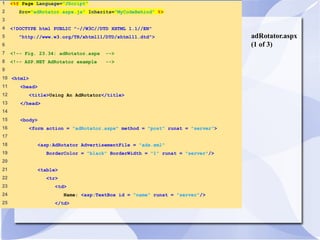
adRotator.aspx 
(1 of 3) 
1 <%@ Page Language="JScript" 
2 Src="adRotator.aspx.js" Inherits="MyCodeBehind" %> 
3 
4 <!DOCTYPE html PUBLIC "-//W3C//DTD XHTML 1.1//EN" 
5 "http://www.w3.org/TR/xhtml11/DTD/xhtml11.dtd"> 
6 
7 <!-- Fig. 23.34: adRotator.aspx --> 
8 <!-- ASP.NET AdRotator example --> 
9 
10 <html> 
11 <head> 
12 <title>Using An AdRotator</title> 
13 </head> 
14 
15 <body> 
16 <form action = "adRotator.aspx" method = "post" runat = "server"> 
17 
18 <asp:AdRotator AdvertisementFile = "ads.xml" 
19 BorderColor = "black" BorderWidth = "1" runat = "server"/> 
20 
21 <table> 
22 <tr> 
23 <td> 
24 Name: <asp:TextBox id = "name" runat = "server"/> 
25 </td>
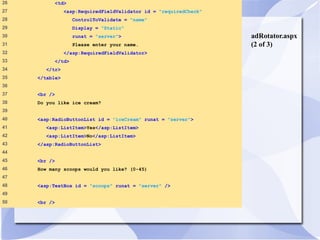
adRotator.aspx 
(2 of 3) 
26 <td> 
27 <asp:RequiredFieldValidator id = "requiredCheck" 
28 ControlToValidate = "name" 
29 Display = "Static" 
30 runat = "server"> 
31 Please enter your name. 
32 </asp:RequiredFieldValidator> 
33 </td> 
34 </tr> 
35 </table> 
36 
37 <br /> 
38 Do you like ice cream? 
39 
40 <asp:RadioButtonList id = "iceCream" runat = "server"> 
41 <asp:ListItem>Yes</asp:ListItem> 
42 <asp:ListItem>No</asp:ListItem> 
43 </asp:RadioButtonList> 
44 
45 <br /> 
46 How many scoops would you like? (0-45) 
47 
48 <asp:TextBox id = "scoops" runat = "server" /> 
49 
50 <br />
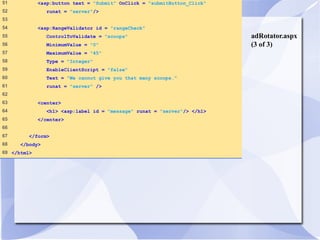
adRotator.aspx 
(3 of 3) 
51 <asp:button text = "Submit" OnClick = "submitButton_Click" 
52 runat = "server"/> 
53 
54 <asp:RangeValidator id = "rangeCheck" 
55 ControlToValidate = "scoops" 
56 MinimumValue = "0" 
57 MaximumValue = "45" 
58 Type = "Integer" 
59 EnableClientScript = "false" 
60 Text = "We cannot give you that many scoops." 
61 runat = "server" /> 
62 
63 <center> 
64 <h1> <asp:label id = "message" runat = "server"/> </h1> 
65 </center> 
66 
67 </form> 
68 </body> 
69 </html>
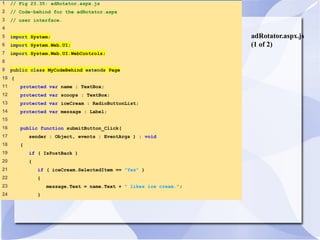
adRotator.aspx.js 
(1 of 2) 
1 // Fig 23.35: adRotator.aspx.js 
2 // Code-behind for the adRotator.aspx 
3 // user interface. 
4 
5 import System; 
6 import System.Web.UI; 
7 import System.Web.UI.WebControls; 
8 
9 public class MyCodeBehind extends Page 
10 { 
11 protected var name : TextBox; 
12 protected var scoops : TextBox; 
13 protected var iceCream : RadioButtonList; 
14 protected var message : Label; 
15 
16 public function submitButton_Click( 
17 sender : Object, events : EventArgs ) : void 
18 { 
19 if ( IsPostBack ) 
20 { 
21 if ( iceCream.SelectedItem == "Yes" ) 
22 { 
23 message.Text = name.Text + " likes ice cream."; 
24 }
adRotator.aspx.js 
(2 of 2) 
25 else 
26 { 
27 message.Text = name.Text + " does not like ice cream."; 
28 } 
29 } 
30 } // end submitButton_Click 
31 } // end class MyCodeBehind
23.11 Code-Behind Approach 
Fig. 23.36 Using the command prompt to compile the code-behind.
23.11 Code-Behind Approach 
Fig. 23.37 Output of AdRotator.aspx using the code-behind method.
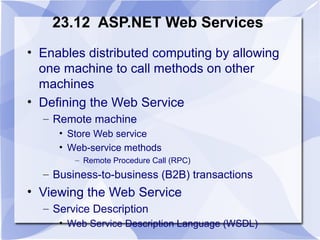
23.12 ASP.NET Web Services 
• Enables distributed computing by allowing 
one machine to call methods on other 
machines 
• Defining the Web Service 
– Remote machine 
• Store Web service 
• Web-service methods 
– Remote Procedure Call (RPC) 
– Business-to-business (B2B) transactions 
• Viewing the Web Service 
– Service Description 
• Web Service Description Language (WSDL)
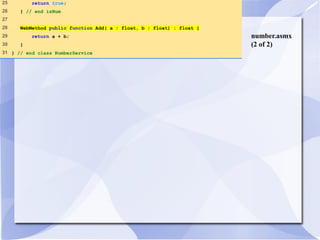
number.asmx 
(1 of 2) 
1 <%@ WebService Language="JScript" Class="NumberService" %> 
2 
3 // Fig. 23.38: number.asmx 
4 // A simple Web Service 
5 
6 import System; 
7 import System.Web.Services; 
8 
9 public class NumberService extends WebService 
10 { 
11 // Determines whether all the characters in a String are digits 
12 WebMethod public function isNum( number : String ) : Boolean 
13 { 
14 var digitArray : char[]; 
15 digitArray = number.ToCharArray(); 
16 
17 for ( var i : int = 0; i < digitArray.Length ; i++ ) 
18 { 
19 if ( !Char.IsDigit( digitArray[ i ] ) ) 
20 { 
21 return false; 
22 } 
23 } 
24
number.asmx 
(2 of 2) 
25 return true; 
26 } // end isNum 
27 
28 WebMethod public function Add( a : float, b : float) : float { 
29 return a + b; 
30 } 
31 } // end class NumberService
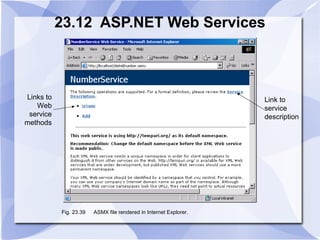
23.12 ASP.NET Web Services 
Links to 
Web 
service 
methods 
Link to 
service 
description 
Fig. 23.39 ASMX file rendered in Internet Explorer.
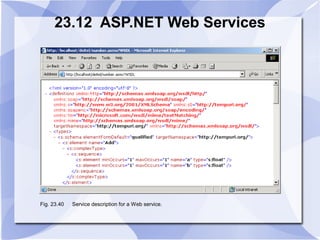
23.12 ASP.NET Web Services 
Fig. 23.40 Service description for a Web service.
23.12 ASP.NET Web Services 
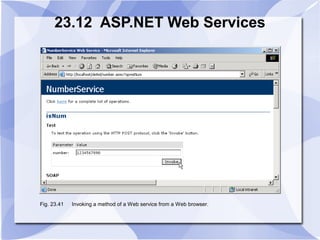
Fig. 23.41 Invoking a method of a Web service from a Web browser.
23.12 ASP.NET Web Services 
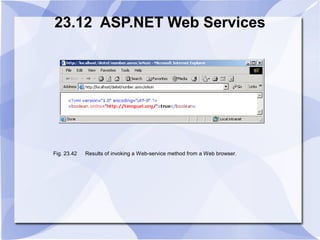
Fig. 23.42 Results of invoking a Web-service method from a Web browser.

Synapse india dotnet development web approch

  • 1.
    adRotator.aspx (1 of3) 1 <%@ Page Language="JScript" 2 Src="adRotator.aspx.js" Inherits="MyCodeBehind" %> 3 4 <!DOCTYPE html PUBLIC "-//W3C//DTD XHTML 1.1//EN" 5 "http://www.w3.org/TR/xhtml11/DTD/xhtml11.dtd"> 6 7 <!-- Fig. 23.34: adRotator.aspx --> 8 <!-- ASP.NET AdRotator example --> 9 10 <html> 11 <head> 12 <title>Using An AdRotator</title> 13 </head> 14 15 <body> 16 <form action = "adRotator.aspx" method = "post" runat = "server"> 17 18 <asp:AdRotator AdvertisementFile = "ads.xml" 19 BorderColor = "black" BorderWidth = "1" runat = "server"/> 20 21 <table> 22 <tr> 23 <td> 24 Name: <asp:TextBox id = "name" runat = "server"/> 25 </td>
  • 2.
    adRotator.aspx (2 of3) 26 <td> 27 <asp:RequiredFieldValidator id = "requiredCheck" 28 ControlToValidate = "name" 29 Display = "Static" 30 runat = "server"> 31 Please enter your name. 32 </asp:RequiredFieldValidator> 33 </td> 34 </tr> 35 </table> 36 37 <br /> 38 Do you like ice cream? 39 40 <asp:RadioButtonList id = "iceCream" runat = "server"> 41 <asp:ListItem>Yes</asp:ListItem> 42 <asp:ListItem>No</asp:ListItem> 43 </asp:RadioButtonList> 44 45 <br /> 46 How many scoops would you like? (0-45) 47 48 <asp:TextBox id = "scoops" runat = "server" /> 49 50 <br />
  • 3.
    adRotator.aspx (3 of3) 51 <asp:button text = "Submit" OnClick = "submitButton_Click" 52 runat = "server"/> 53 54 <asp:RangeValidator id = "rangeCheck" 55 ControlToValidate = "scoops" 56 MinimumValue = "0" 57 MaximumValue = "45" 58 Type = "Integer" 59 EnableClientScript = "false" 60 Text = "We cannot give you that many scoops." 61 runat = "server" /> 62 63 <center> 64 <h1> <asp:label id = "message" runat = "server"/> </h1> 65 </center> 66 67 </form> 68 </body> 69 </html>
  • 4.
    adRotator.aspx.js (1 of2) 1 // Fig 23.35: adRotator.aspx.js 2 // Code-behind for the adRotator.aspx 3 // user interface. 4 5 import System; 6 import System.Web.UI; 7 import System.Web.UI.WebControls; 8 9 public class MyCodeBehind extends Page 10 { 11 protected var name : TextBox; 12 protected var scoops : TextBox; 13 protected var iceCream : RadioButtonList; 14 protected var message : Label; 15 16 public function submitButton_Click( 17 sender : Object, events : EventArgs ) : void 18 { 19 if ( IsPostBack ) 20 { 21 if ( iceCream.SelectedItem == "Yes" ) 22 { 23 message.Text = name.Text + " likes ice cream."; 24 }
  • 5.
    adRotator.aspx.js (2 of2) 25 else 26 { 27 message.Text = name.Text + " does not like ice cream."; 28 } 29 } 30 } // end submitButton_Click 31 } // end class MyCodeBehind
  • 6.
    23.11 Code-Behind Approach Fig. 23.36 Using the command prompt to compile the code-behind.
  • 7.
    23.11 Code-Behind Approach Fig. 23.37 Output of AdRotator.aspx using the code-behind method.
  • 8.
    23.12 ASP.NET WebServices • Enables distributed computing by allowing one machine to call methods on other machines • Defining the Web Service – Remote machine • Store Web service • Web-service methods – Remote Procedure Call (RPC) – Business-to-business (B2B) transactions • Viewing the Web Service – Service Description • Web Service Description Language (WSDL)
  • 9.
    number.asmx (1 of2) 1 <%@ WebService Language="JScript" Class="NumberService" %> 2 3 // Fig. 23.38: number.asmx 4 // A simple Web Service 5 6 import System; 7 import System.Web.Services; 8 9 public class NumberService extends WebService 10 { 11 // Determines whether all the characters in a String are digits 12 WebMethod public function isNum( number : String ) : Boolean 13 { 14 var digitArray : char[]; 15 digitArray = number.ToCharArray(); 16 17 for ( var i : int = 0; i < digitArray.Length ; i++ ) 18 { 19 if ( !Char.IsDigit( digitArray[ i ] ) ) 20 { 21 return false; 22 } 23 } 24
  • 10.
    number.asmx (2 of2) 25 return true; 26 } // end isNum 27 28 WebMethod public function Add( a : float, b : float) : float { 29 return a + b; 30 } 31 } // end class NumberService
  • 11.
    23.12 ASP.NET WebServices Links to Web service methods Link to service description Fig. 23.39 ASMX file rendered in Internet Explorer.
  • 12.
    23.12 ASP.NET WebServices Fig. 23.40 Service description for a Web service.
  • 13.
    23.12 ASP.NET WebServices Fig. 23.41 Invoking a method of a Web service from a Web browser.
  • 14.
    23.12 ASP.NET WebServices Fig. 23.42 Results of invoking a Web-service method from a Web browser.