Endpoint Encryption Powered
by PGP Technology
Proof Of Concept Document
IFTIKHAR ALI IQBAL
iftikhariqbal@gmail.com
https://www.linkedin.com/in/iftikhariqbal/
Last Update: November 2016 2
Document Control
Revision History
Version Date Changes
1.0 20 May 2016 Initial Draft
1.1 21 Nov 2016 POC details added for Drive Encryption
Last Update: November 2016 3
Table of Contents
Introduction...............................................................................................................................4
Overview.................................................................................................................................4
Components............................................................................................................................4
Proof of Concept (POC) Environment.......................................................................................5
Architecture.............................................................................................................................5
Success Criteria..........................................................................................................................6
System Requirements...............................................................................................................7
Symantec Encryption Management Server................................................................................7
Symantec Desktop Encryption..................................................................................................7
Last Update: November 2016 4
Introduction
Overview
This document is intended to provide <Customer Name> with a list of success criteria driving
the success ofSymantec Drive Encryption. The objective is to demonstrate the key capabilities
of Symantec Drive Encryption for <Customer Name> environment.
Symantec Drive Encryption
Symantec Drive Encryption is a software product from Symantec Corporation that secures
files stored on protected drives with transparent full disk encryption. If a protected systemis
lost or stolen, data stored on the protected drive is completely inaccessible without the
proper authentication.
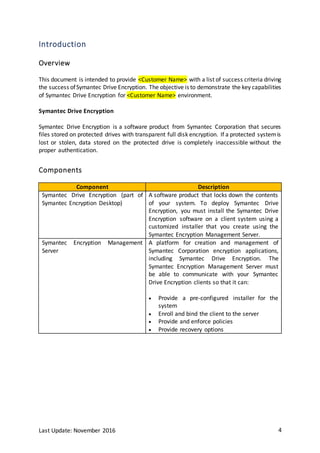
Components
Component Description
Symantec Drive Encryption (part of
Symantec Encryption Desktop)
A software product that locks down the contents
of your system. To deploy Symantec Drive
Encryption, you must install the Symantec Drive
Encryption software on a client system using a
customized installer that you create using the
Symantec Encryption Management Server.
Symantec Encryption Management
Server
A platform for creation and management of
Symantec Corporation encryption applications,
including Symantec Drive Encryption. The
Symantec Encryption Management Server must
be able to communicate with your Symantec
Drive Encryption clients so that it can:
 Provide a pre-configured installer for the
system
 Enroll and bind the client to the server
 Provide and enforce policies
 Provide recovery options
Last Update: November 2016 5
Proof of Concept (POC) Environment
Architecture
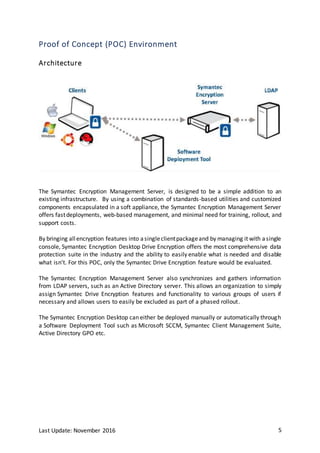
The Symantec Encryption Management Server, is designed to be a simple addition to an
existing infrastructure. By using a combination of standards-based utilities and customized
components encapsulated in a soft appliance, the Symantec Encryption Management Server
offers fastdeployments, web-based management, and minimal need for training, rollout, and
support costs.
By bringing allencryption features into asingleclientpackageand by managing it with asingle
console, Symantec Encryption Desktop Drive Encryption offers the most comprehensive data
protection suite in the industry and the ability to easily enable what is needed and disable
what isn’t. For this POC, only the Symantec Drive Encryption feature would be evaluated.
The Symantec Encryption Management Server also synchronizes and gathers information
from LDAP servers, such as an Active Directory server. This allows an organization to simply
assign Symantec Drive Encryption features and functionality to various groups of users if
necessary and allows users to easily be excluded as part of a phased rollout.
The Symantec Encryption Desktop can either be deployed manually or automatically through
a Software Deployment Tool such as Microsoft SCCM, Symantec Client Management Suite,
Active Directory GPO etc.
Last Update: November 2016 6
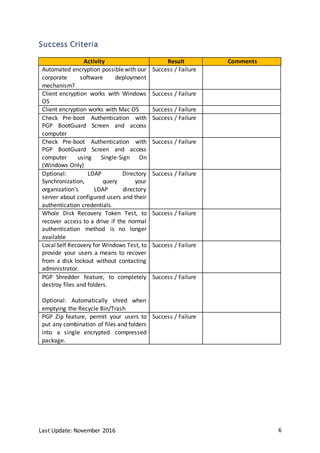
Success Criteria
Activity Result Comments
Automated encryption possiblewith our
corporate software deployment
mechanism?
Success / Failure
Client encryption works with Windows
OS
Success / Failure
Client encryption works with Mac OS Success / Failure
Check Pre-boot Authentication with
PGP BootGuard Screen and access
computer
Success / Failure
Check Pre-boot Authentication with
PGP BootGuard Screen and access
computer using Single-Sign On
(Windows Only)
Success / Failure
Optional: LDAP Directory
Synchronization, query your
organization's LDAP directory
server about configured users and their
authentication credentials.
Success / Failure
Whole Disk Recovery Token Test, to
recover access to a drive if the normal
authentication method is no longer
available
Success / Failure
LocalSelf Recovery for Windows Test, to
provide your users a means to recover
from a disk lockout without contacting
administrator.
Success / Failure
PGP Shredder feature, to completely
destroy files and folders.
Optional: Automatically shred when
emptying the Recycle Bin/Trash
Success / Failure
PGP Zip feature, permit your users to
put any combination of files and folders
into a single encrypted compressed
package.
Success / Failure
Last Update: November 2016 7
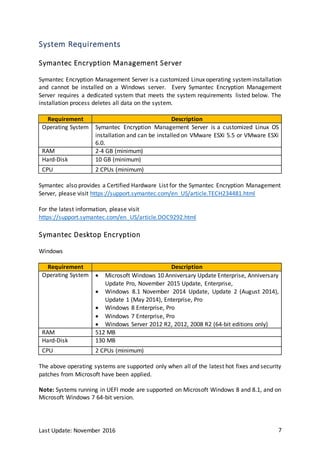
System Requirements
Symantec Encryption Management Server
Symantec Encryption Management Server is a customized Linux operating systeminstallation
and cannot be installed on a Windows server. Every Symantec Encryption Management
Server requires a dedicated system that meets the system requirements listed below. The
installation process deletes all data on the system.
Requirement Description
Operating System Symantec Encryption Management Server is a customized Linux OS
installation and can be installed on VMware ESXi 5.5 or VMware ESXi
6.0.
RAM 2-4 GB (minimum)
Hard-Disk 10 GB (minimum)
CPU 2 CPUs (minimum)
Symantec also provides a Certified Hardware List for the Symantec Encryption Management
Server, please visit https://support.symantec.com/en_US/article.TECH234481.html
For the latest information, please visit
https://support.symantec.com/en_US/article.DOC9292.html
Symantec Desktop Encryption
Windows
Requirement Description
Operating System  Microsoft Windows 10 Anniversary Update Enterprise, Anniversary
Update Pro, November 2015 Update, Enterprise,
 Windows 8.1 November 2014 Update, Update 2 (August 2014),
Update 1 (May 2014), Enterprise, Pro
 Windows 8 Enterprise, Pro
 Windows 7 Enterprise, Pro
 Windows Server 2012 R2, 2012, 2008 R2 (64-bit editions only)
RAM 512 MB
Hard-Disk 130 MB
CPU 2 CPUs (minimum)
The above operating systems are supported only when all of the latest hot fixes and security
patches from Microsoft have been applied.
Note: Systems running in UEFI mode are supported on Microsoft Windows 8 and 8.1, and on
Microsoft Windows 7 64-bit version.
Last Update: November 2016 8
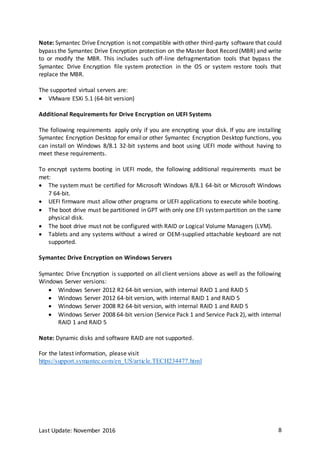
Note: Symantec Drive Encryption is not compatible with other third-party software that could
bypass the Symantec Drive Encryption protection on the Master Boot Record (MBR) and write
to or modify the MBR. This includes such off-line defragmentation tools that bypass the
Symantec Drive Encryption file system protection in the OS or system restore tools that
replace the MBR.
The supported virtual servers are:
 VMware ESXi 5.1 (64-bit version)
Additional Requirements for Drive Encryption on UEFI Systems
The following requirements apply only if you are encrypting your disk. If you are installing
Symantec Encryption Desktop for emailor other Symantec Encryption Desktop functions, you
can install on Windows 8/8.1 32-bit systems and boot using UEFI mode without having to
meet these requirements.
To encrypt systems booting in UEFI mode, the following additional requirements must be
met:
 The system must be certified for Microsoft Windows 8/8.1 64-bit or Microsoft Windows
7 64-bit.
 UEFI firmware must allow other programs or UEFI applications to execute while booting.
 The boot drive must be partitioned in GPT with only one EFI systempartition on the same
physical disk.
 The boot drive must not be configured with RAID or Logical Volume Managers (LVM).
 Tablets and any systems without a wired or OEM-supplied attachable keyboard are not
supported.
Symantec Drive Encryption on Windows Servers
Symantec Drive Encryption is supported on all client versions above as well as the following
Windows Server versions:
 Windows Server 2012 R2 64-bit version, with internal RAID 1 and RAID 5
 Windows Server 2012 64-bit version, with internal RAID 1 and RAID 5
 Windows Server 2008 R2 64-bit version, with internal RAID 1 and RAID 5
 Windows Server 2008 64-bit version (Service Pack 1 and Service Pack 2), with internal
RAID 1 and RAID 5
Note: Dynamic disks and software RAID are not supported.
For the latest information, please visit
https://support.symantec.com/en_US/article.TECH234477.html
Last Update: November 2016 9
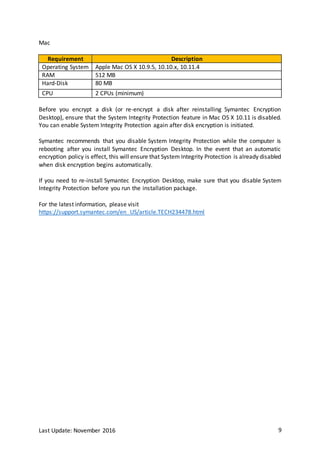
Mac
Requirement Description
Operating System Apple Mac OS X 10.9.5, 10.10.x, 10.11.4
RAM 512 MB
Hard-Disk 80 MB
CPU 2 CPUs (minimum)
Before you encrypt a disk (or re-encrypt a disk after reinstalling Symantec Encryption
Desktop), ensure that the System Integrity Protection feature in Mac OS X 10.11 is disabled.
You can enable System Integrity Protection again after disk encryption is initiated.
Symantec recommends that you disable System Integrity Protection while the computer is
rebooting after you install Symantec Encryption Desktop. In the event that an automatic
encryption policy is effect, this will ensure that System Integrity Protection is already disabled
when disk encryption begins automatically.
If you need to re-install Symantec Encryption Desktop, make sure that you disable System
Integrity Protection before you run the installation package.
For the latest information, please visit
https://support.symantec.com/en_US/article.TECH234478.html

Symantec Endpoint Encryption - Proof Of Concept Document

  • 1.
    Endpoint Encryption Powered byPGP Technology Proof Of Concept Document IFTIKHAR ALI IQBAL iftikhariqbal@gmail.com https://www.linkedin.com/in/iftikhariqbal/
  • 2.
    Last Update: November2016 2 Document Control Revision History Version Date Changes 1.0 20 May 2016 Initial Draft 1.1 21 Nov 2016 POC details added for Drive Encryption
  • 3.
    Last Update: November2016 3 Table of Contents Introduction...............................................................................................................................4 Overview.................................................................................................................................4 Components............................................................................................................................4 Proof of Concept (POC) Environment.......................................................................................5 Architecture.............................................................................................................................5 Success Criteria..........................................................................................................................6 System Requirements...............................................................................................................7 Symantec Encryption Management Server................................................................................7 Symantec Desktop Encryption..................................................................................................7
  • 4.
    Last Update: November2016 4 Introduction Overview This document is intended to provide <Customer Name> with a list of success criteria driving the success ofSymantec Drive Encryption. The objective is to demonstrate the key capabilities of Symantec Drive Encryption for <Customer Name> environment. Symantec Drive Encryption Symantec Drive Encryption is a software product from Symantec Corporation that secures files stored on protected drives with transparent full disk encryption. If a protected systemis lost or stolen, data stored on the protected drive is completely inaccessible without the proper authentication. Components Component Description Symantec Drive Encryption (part of Symantec Encryption Desktop) A software product that locks down the contents of your system. To deploy Symantec Drive Encryption, you must install the Symantec Drive Encryption software on a client system using a customized installer that you create using the Symantec Encryption Management Server. Symantec Encryption Management Server A platform for creation and management of Symantec Corporation encryption applications, including Symantec Drive Encryption. The Symantec Encryption Management Server must be able to communicate with your Symantec Drive Encryption clients so that it can:  Provide a pre-configured installer for the system  Enroll and bind the client to the server  Provide and enforce policies  Provide recovery options
  • 5.
    Last Update: November2016 5 Proof of Concept (POC) Environment Architecture The Symantec Encryption Management Server, is designed to be a simple addition to an existing infrastructure. By using a combination of standards-based utilities and customized components encapsulated in a soft appliance, the Symantec Encryption Management Server offers fastdeployments, web-based management, and minimal need for training, rollout, and support costs. By bringing allencryption features into asingleclientpackageand by managing it with asingle console, Symantec Encryption Desktop Drive Encryption offers the most comprehensive data protection suite in the industry and the ability to easily enable what is needed and disable what isn’t. For this POC, only the Symantec Drive Encryption feature would be evaluated. The Symantec Encryption Management Server also synchronizes and gathers information from LDAP servers, such as an Active Directory server. This allows an organization to simply assign Symantec Drive Encryption features and functionality to various groups of users if necessary and allows users to easily be excluded as part of a phased rollout. The Symantec Encryption Desktop can either be deployed manually or automatically through a Software Deployment Tool such as Microsoft SCCM, Symantec Client Management Suite, Active Directory GPO etc.
  • 6.
    Last Update: November2016 6 Success Criteria Activity Result Comments Automated encryption possiblewith our corporate software deployment mechanism? Success / Failure Client encryption works with Windows OS Success / Failure Client encryption works with Mac OS Success / Failure Check Pre-boot Authentication with PGP BootGuard Screen and access computer Success / Failure Check Pre-boot Authentication with PGP BootGuard Screen and access computer using Single-Sign On (Windows Only) Success / Failure Optional: LDAP Directory Synchronization, query your organization's LDAP directory server about configured users and their authentication credentials. Success / Failure Whole Disk Recovery Token Test, to recover access to a drive if the normal authentication method is no longer available Success / Failure LocalSelf Recovery for Windows Test, to provide your users a means to recover from a disk lockout without contacting administrator. Success / Failure PGP Shredder feature, to completely destroy files and folders. Optional: Automatically shred when emptying the Recycle Bin/Trash Success / Failure PGP Zip feature, permit your users to put any combination of files and folders into a single encrypted compressed package. Success / Failure
  • 7.
    Last Update: November2016 7 System Requirements Symantec Encryption Management Server Symantec Encryption Management Server is a customized Linux operating systeminstallation and cannot be installed on a Windows server. Every Symantec Encryption Management Server requires a dedicated system that meets the system requirements listed below. The installation process deletes all data on the system. Requirement Description Operating System Symantec Encryption Management Server is a customized Linux OS installation and can be installed on VMware ESXi 5.5 or VMware ESXi 6.0. RAM 2-4 GB (minimum) Hard-Disk 10 GB (minimum) CPU 2 CPUs (minimum) Symantec also provides a Certified Hardware List for the Symantec Encryption Management Server, please visit https://support.symantec.com/en_US/article.TECH234481.html For the latest information, please visit https://support.symantec.com/en_US/article.DOC9292.html Symantec Desktop Encryption Windows Requirement Description Operating System  Microsoft Windows 10 Anniversary Update Enterprise, Anniversary Update Pro, November 2015 Update, Enterprise,  Windows 8.1 November 2014 Update, Update 2 (August 2014), Update 1 (May 2014), Enterprise, Pro  Windows 8 Enterprise, Pro  Windows 7 Enterprise, Pro  Windows Server 2012 R2, 2012, 2008 R2 (64-bit editions only) RAM 512 MB Hard-Disk 130 MB CPU 2 CPUs (minimum) The above operating systems are supported only when all of the latest hot fixes and security patches from Microsoft have been applied. Note: Systems running in UEFI mode are supported on Microsoft Windows 8 and 8.1, and on Microsoft Windows 7 64-bit version.
  • 8.
    Last Update: November2016 8 Note: Symantec Drive Encryption is not compatible with other third-party software that could bypass the Symantec Drive Encryption protection on the Master Boot Record (MBR) and write to or modify the MBR. This includes such off-line defragmentation tools that bypass the Symantec Drive Encryption file system protection in the OS or system restore tools that replace the MBR. The supported virtual servers are:  VMware ESXi 5.1 (64-bit version) Additional Requirements for Drive Encryption on UEFI Systems The following requirements apply only if you are encrypting your disk. If you are installing Symantec Encryption Desktop for emailor other Symantec Encryption Desktop functions, you can install on Windows 8/8.1 32-bit systems and boot using UEFI mode without having to meet these requirements. To encrypt systems booting in UEFI mode, the following additional requirements must be met:  The system must be certified for Microsoft Windows 8/8.1 64-bit or Microsoft Windows 7 64-bit.  UEFI firmware must allow other programs or UEFI applications to execute while booting.  The boot drive must be partitioned in GPT with only one EFI systempartition on the same physical disk.  The boot drive must not be configured with RAID or Logical Volume Managers (LVM).  Tablets and any systems without a wired or OEM-supplied attachable keyboard are not supported. Symantec Drive Encryption on Windows Servers Symantec Drive Encryption is supported on all client versions above as well as the following Windows Server versions:  Windows Server 2012 R2 64-bit version, with internal RAID 1 and RAID 5  Windows Server 2012 64-bit version, with internal RAID 1 and RAID 5  Windows Server 2008 R2 64-bit version, with internal RAID 1 and RAID 5  Windows Server 2008 64-bit version (Service Pack 1 and Service Pack 2), with internal RAID 1 and RAID 5 Note: Dynamic disks and software RAID are not supported. For the latest information, please visit https://support.symantec.com/en_US/article.TECH234477.html
  • 9.
    Last Update: November2016 9 Mac Requirement Description Operating System Apple Mac OS X 10.9.5, 10.10.x, 10.11.4 RAM 512 MB Hard-Disk 80 MB CPU 2 CPUs (minimum) Before you encrypt a disk (or re-encrypt a disk after reinstalling Symantec Encryption Desktop), ensure that the System Integrity Protection feature in Mac OS X 10.11 is disabled. You can enable System Integrity Protection again after disk encryption is initiated. Symantec recommends that you disable System Integrity Protection while the computer is rebooting after you install Symantec Encryption Desktop. In the event that an automatic encryption policy is effect, this will ensure that System Integrity Protection is already disabled when disk encryption begins automatically. If you need to re-install Symantec Encryption Desktop, make sure that you disable System Integrity Protection before you run the installation package. For the latest information, please visit https://support.symantec.com/en_US/article.TECH234478.html