AN INTRO TO PACKER 
& 
SUITCASE: A PACKER BASED OS IMAGE BUILD SYSTEM 
Tom McLaughlin 
tmclaughlin@hubspot.com 
@tmclaughbos
WHAT IS PACKER? 
• Tool for creating OS images for multiple platforms from a single description 
source 
• Hashicorp (https://www.hashicorp.com/) developed software 
• Makers of Vagrant
IDENTICAL IMAGES 
• “identical” OS images for multiple platforms
IDENTICAL IMAGES 
• Identical == Exactly the same except for minor platform differences
WHY USE PACKER? 
• Build images for multiple platforms 
• Support multiple virtualization platforms 
• All these images should be identical to provide a consistent experience 
and expectations 
• Speed up development and reduce errors 
• Replacement for homegrown tools and scripts
USING PACKER 
• Starts with an image template that defines a build. 
• Templates are 3 or optionally 4 sections. 
• Variables (optional) 
• Builders 
• Provisioners 
• Post-processors
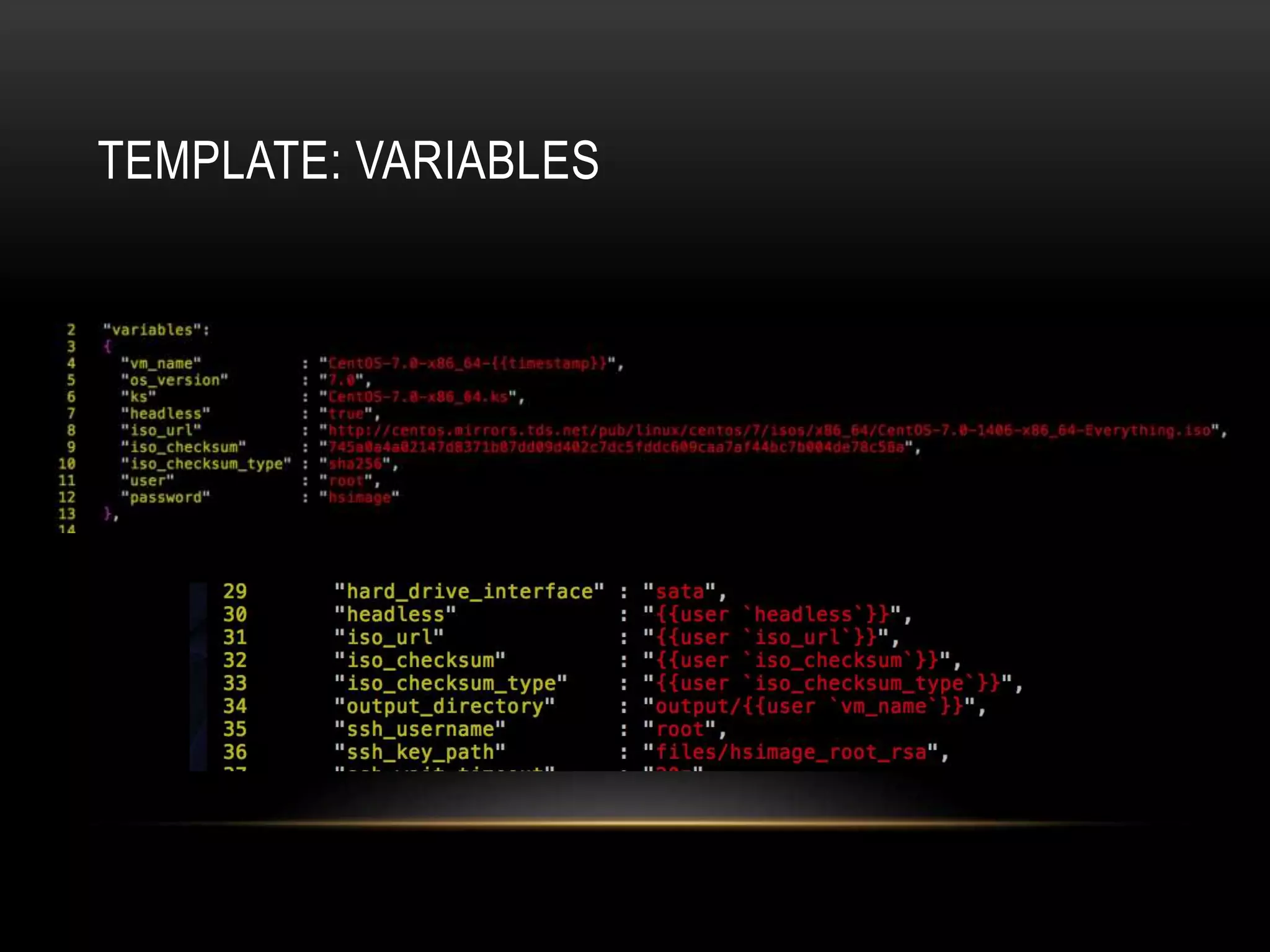
TEMPLATE: VARIABLES
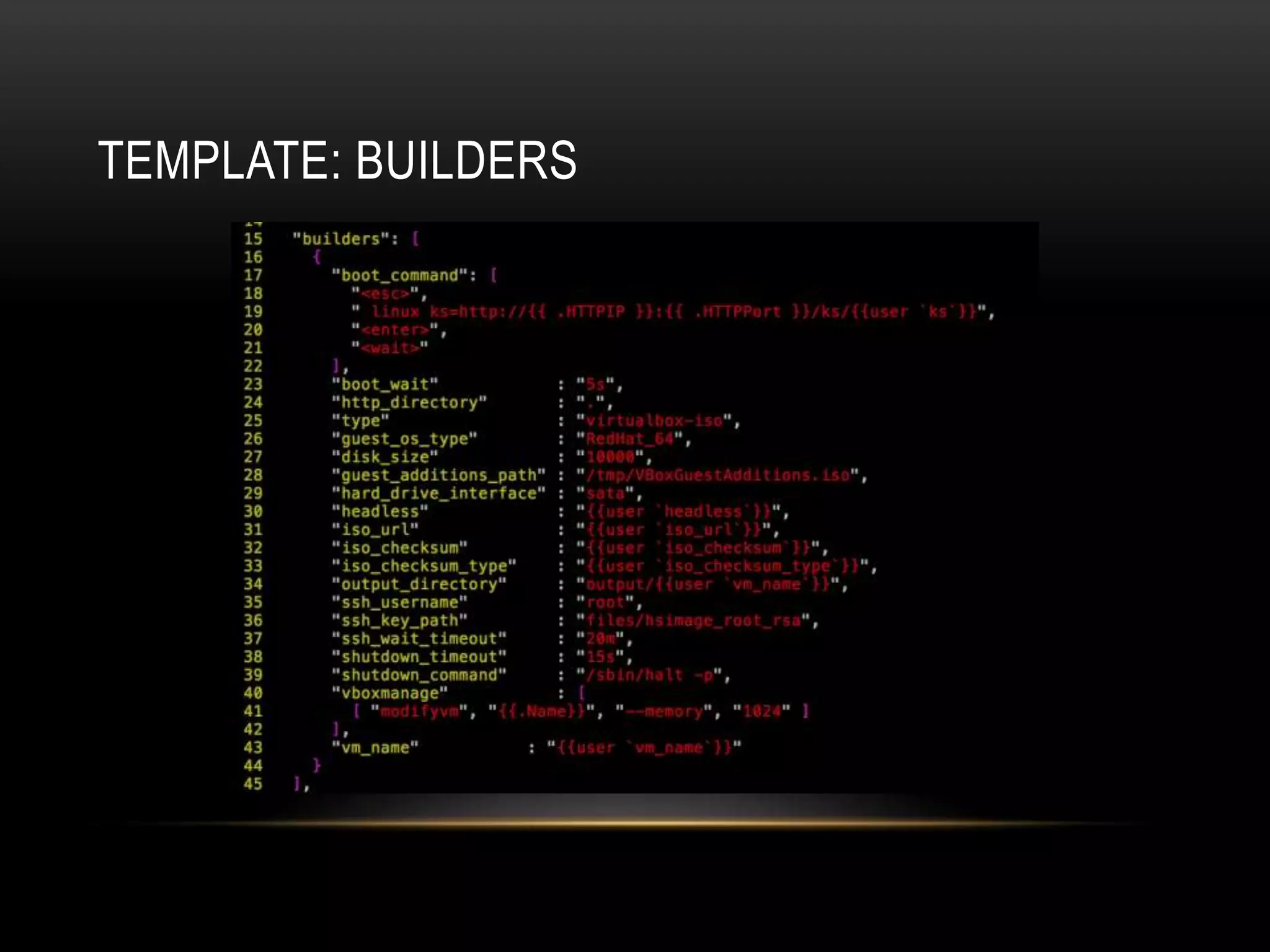
TEMPLATE: BUILDERS
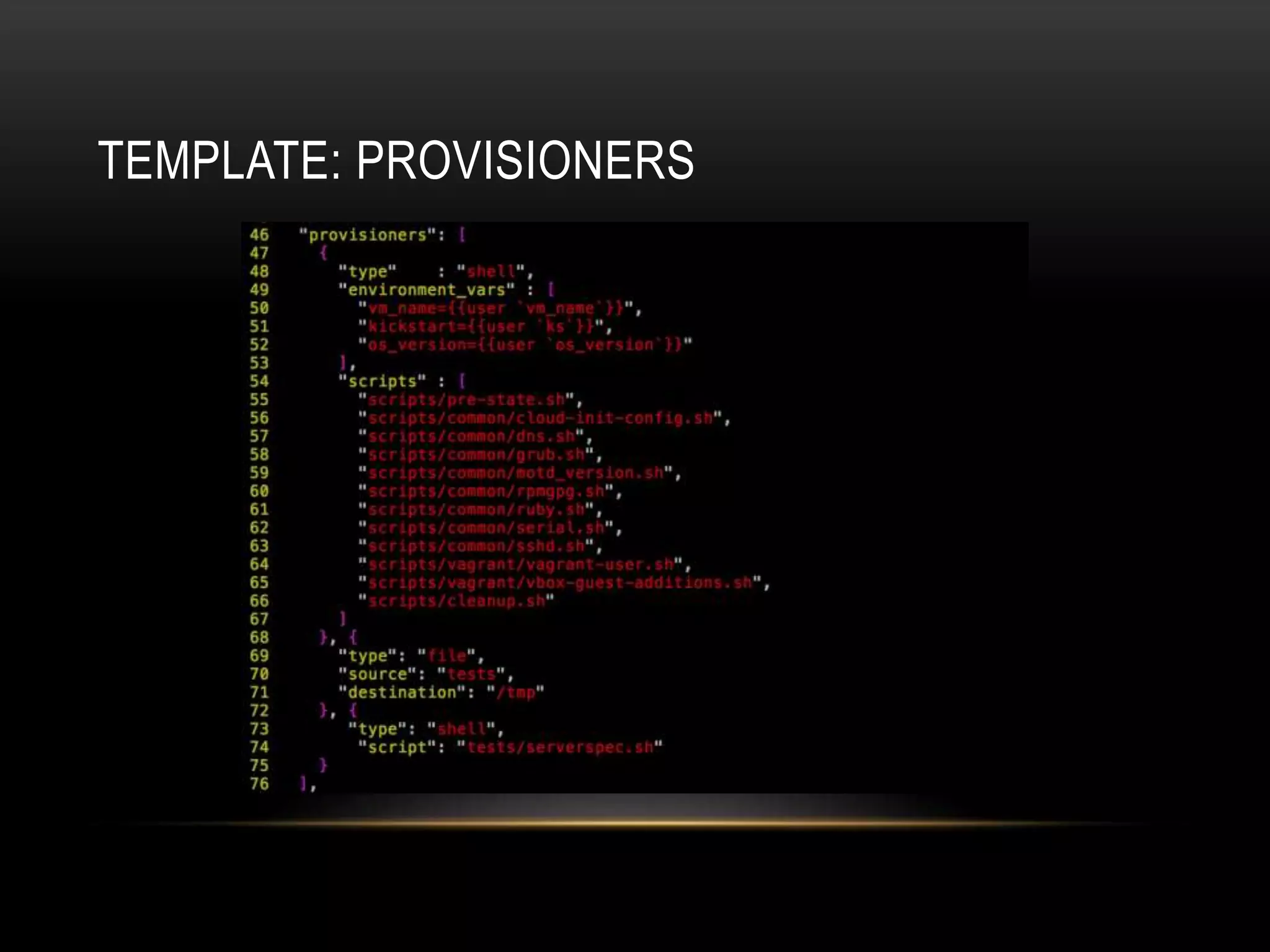
TEMPLATE: PROVISIONERS
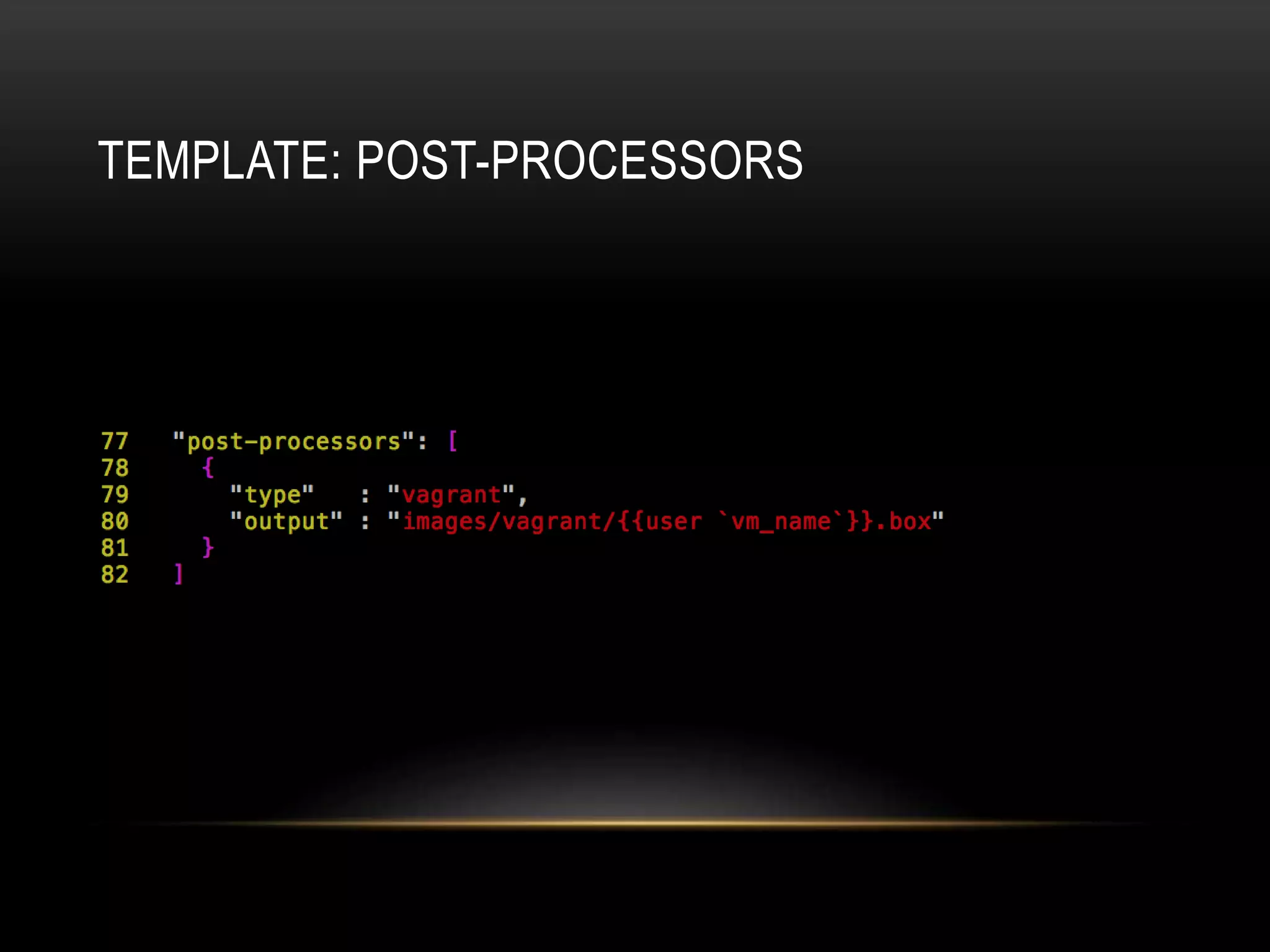
TEMPLATE: POST-PROCESSORS
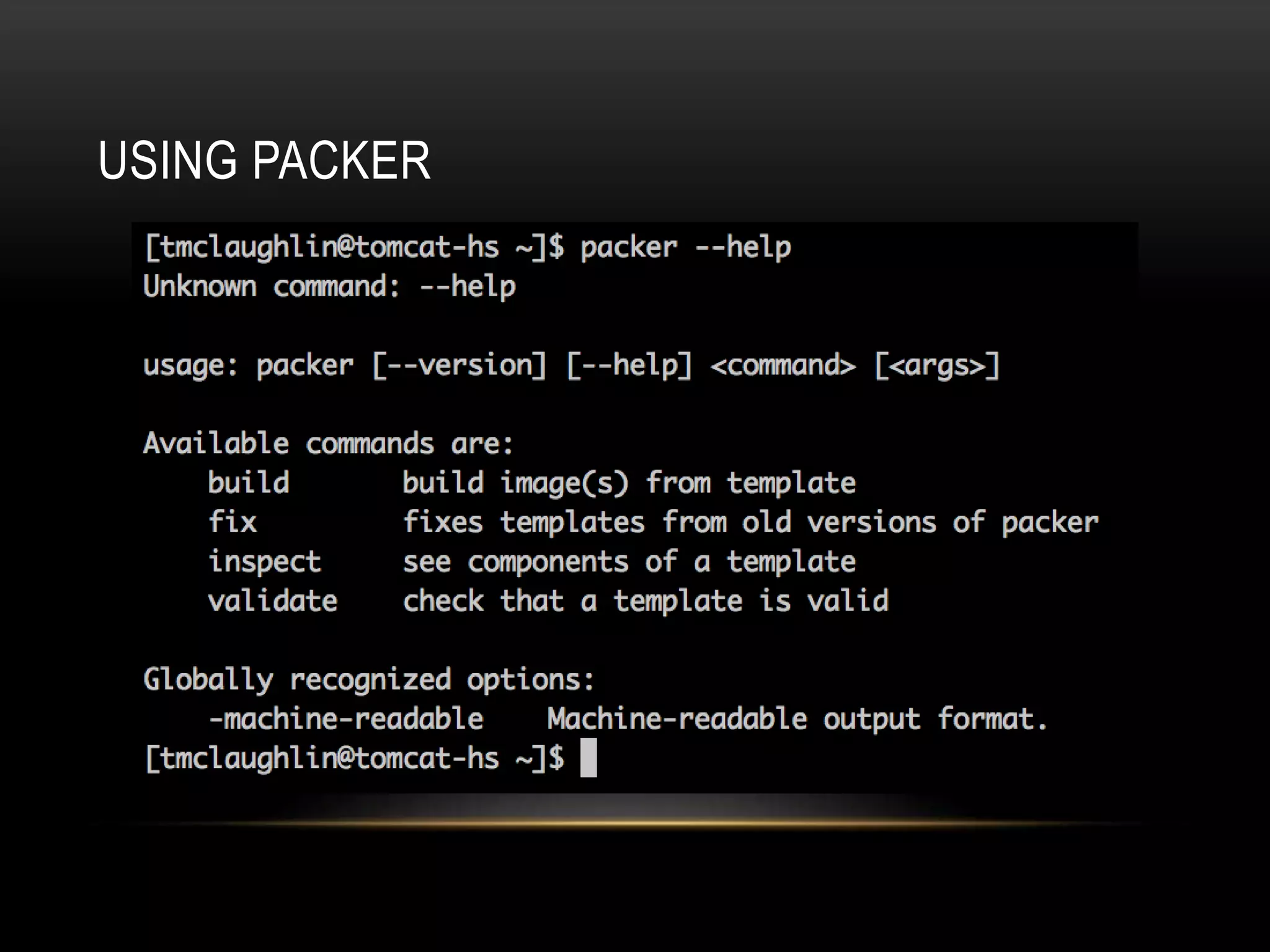
USING PACKER
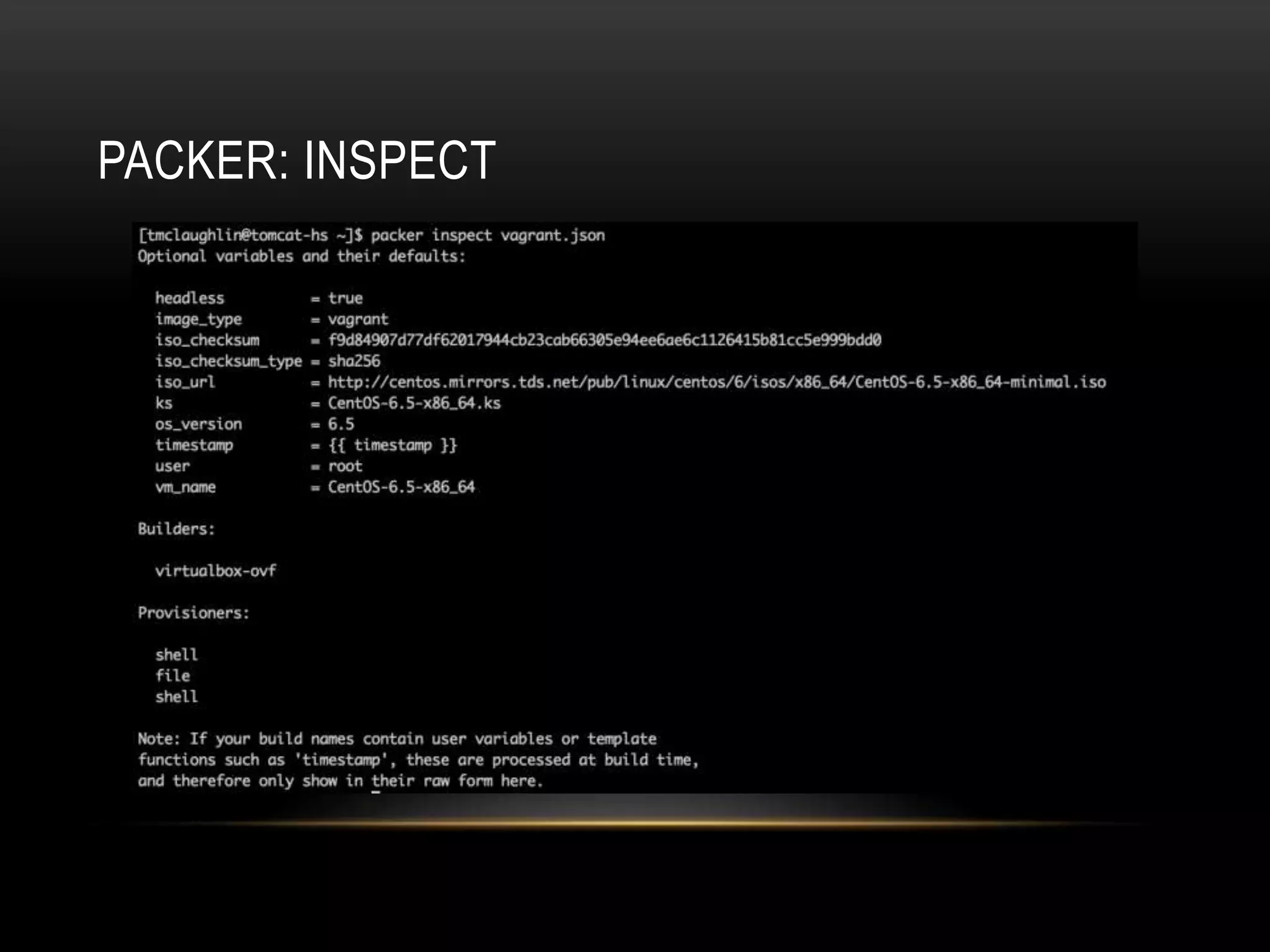
PACKER: INSPECT
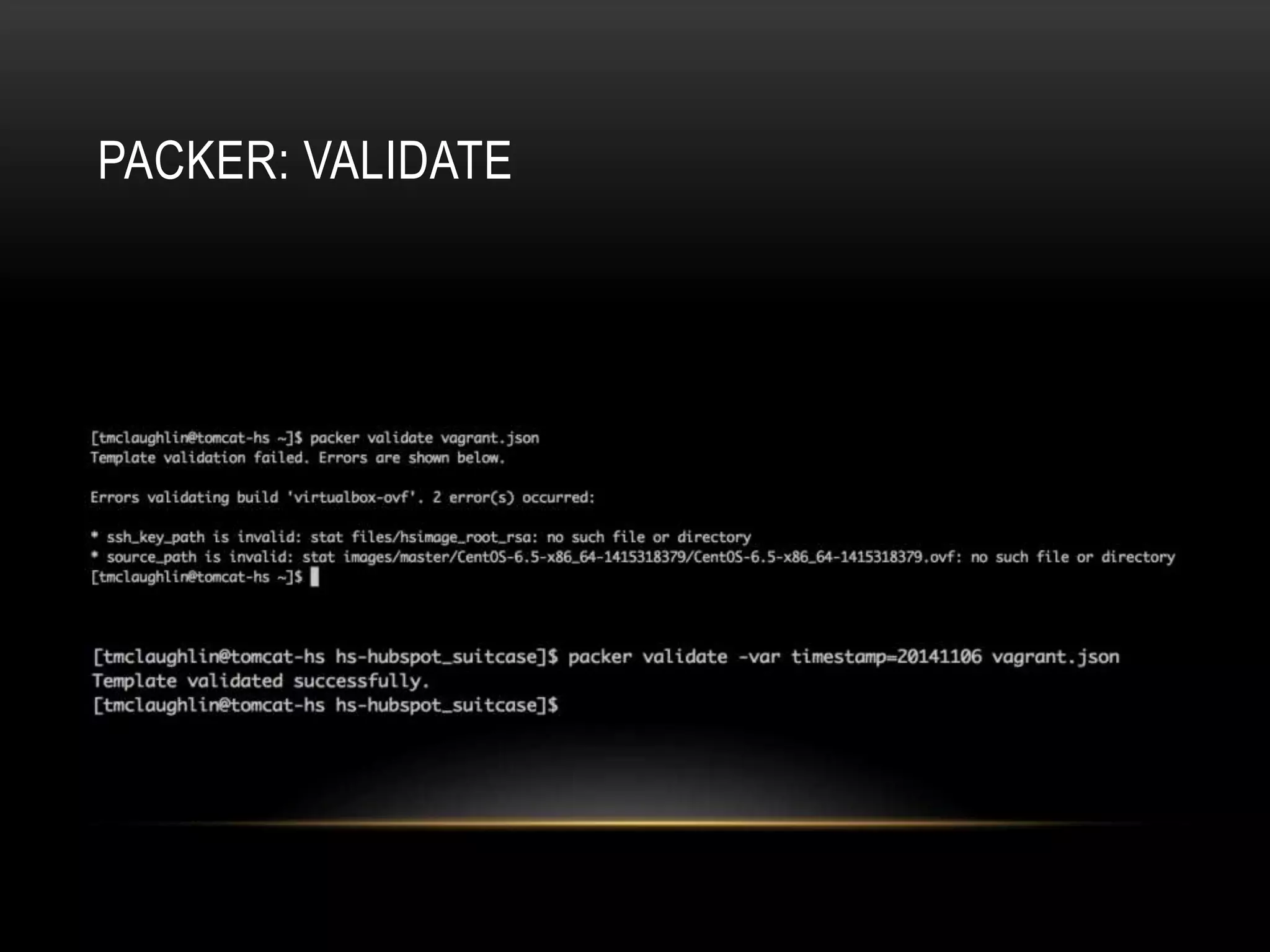
PACKER: VALIDATE
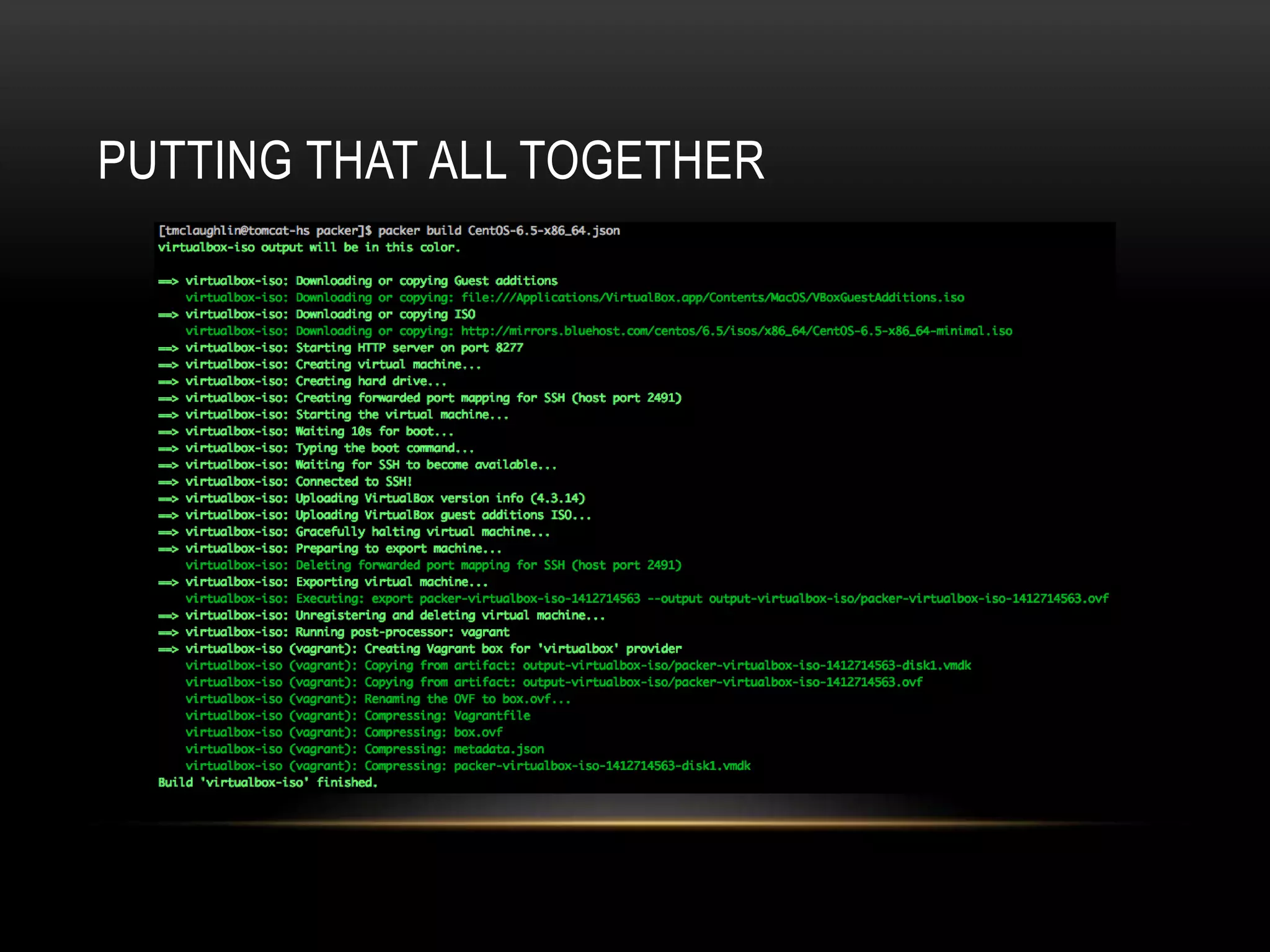
PUTTING THAT ALL TOGETHER
PACKER RESOURCES 
• Homepage: https://www.packer.io 
• Documentation: https://www.packer.io/docs 
• Plugins: http://github.com 
• Search repos 
• “packer-builder” 
• “packer-provisioner” 
• “packer-post-processor” 
• Make sure you have Go installed
PACKER SUPPORT 
• IRC: 
• Freenode #packer-tool 
• Mailing list: 
• https://groups.google.com/forum/#!forum/packer-tool
PACKER’S LIMITATIONS 
• EC2 builder for instance backed AMIs requires an existing AMI. 
• No builder for EC2 HVM images (sort of). 
• No logic in template to associate provisioners or post-processors with 
particular builders 
• Each image would require it’s own fully kickstarted build process.
SUITCASE 
Let’s create something around 
Packer to solve these problems!
HOW SUITCASE WORKS 
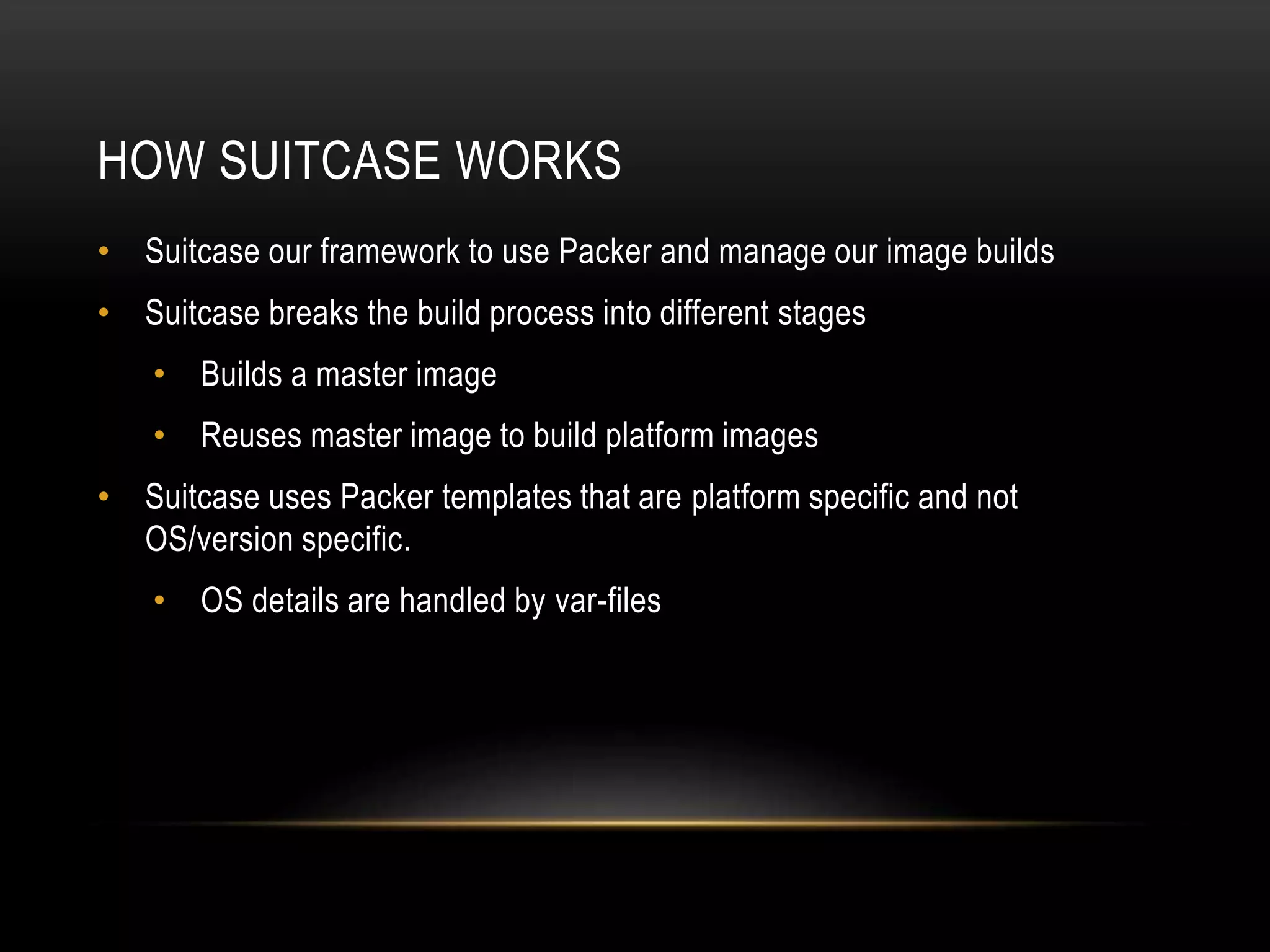
• Suitcase our framework to use Packer and manage our image builds 
• Suitcase breaks the build process into different stages 
• Builds a master image 
• Reuses master image to build platform images 
• Suitcase uses Packer templates that are platform specific and not 
OS/version specific. 
• OS details are handled by var-files
HOW SUITCASE WORKS (CONT.) 
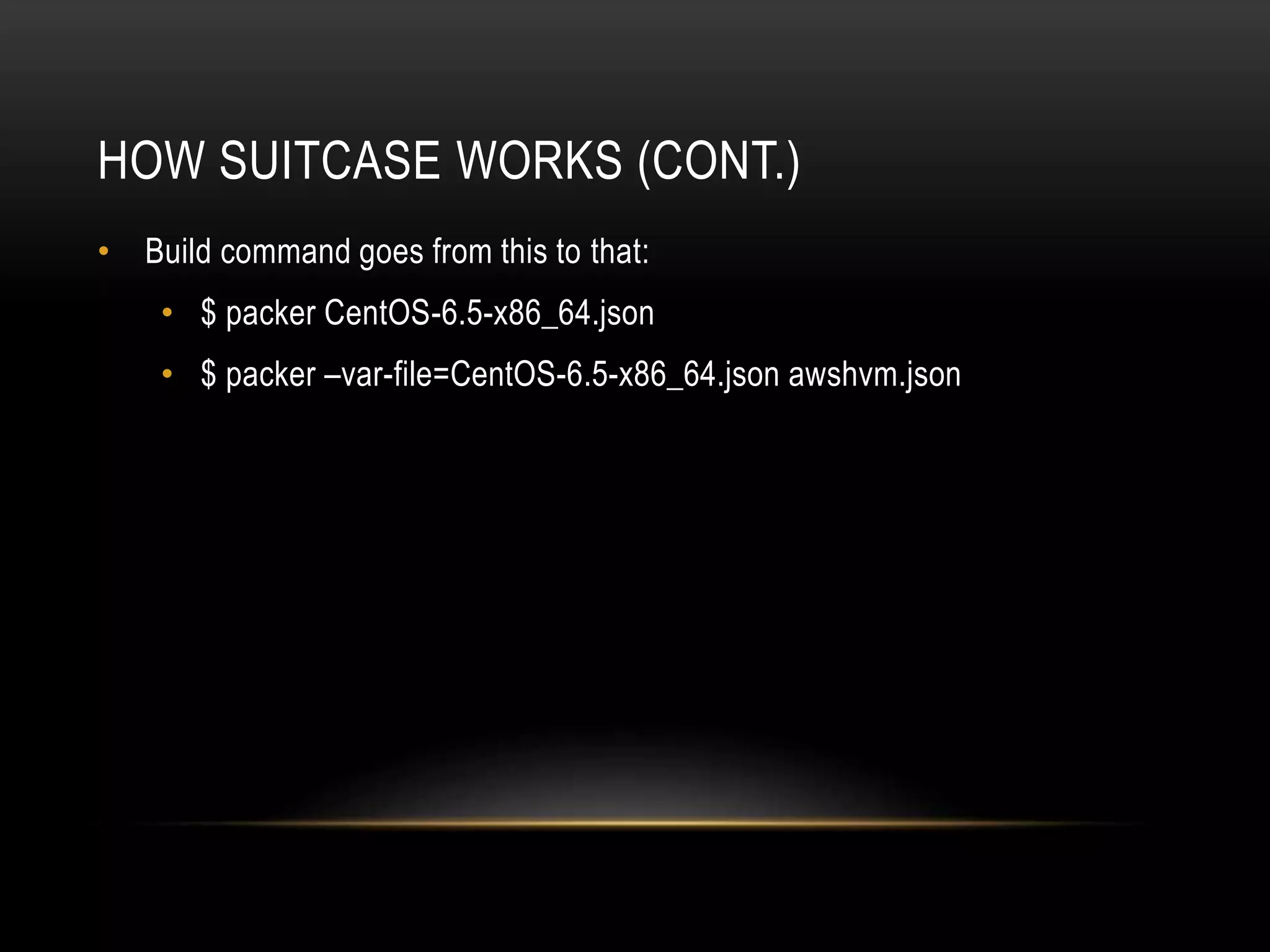
• Build command goes from this to that: 
• $ packer CentOS-6.5-x86_64.json 
• $ packer –var-file=CentOS-6.5-x86_64.json awshvm.json
TYING IT ALL TOGETHER WITH RAKE 
• rake packer:build[<image>] os=<var-file> [timestamp=<YYYYMMDDhhmm>] 
• Build given image 
• Build the master image if it doesn’t already exist 
• rake packer:upload[<image>] os=<var-file> [timestamp=<YYYYMMDDhhmm>] 
• Uploads the artifact to S3 for safe keeping 
• rake packer:register[<image>] os=<var-file> [timestamp=<YYYYMMDDhhmm>] 
• Uploads and registers an AMI 
• rake packer:clean[<image>] os=<var-file> [timestamp=<YYYYMMDDhhmm>] 
• Cleans image artifacts from your workspace
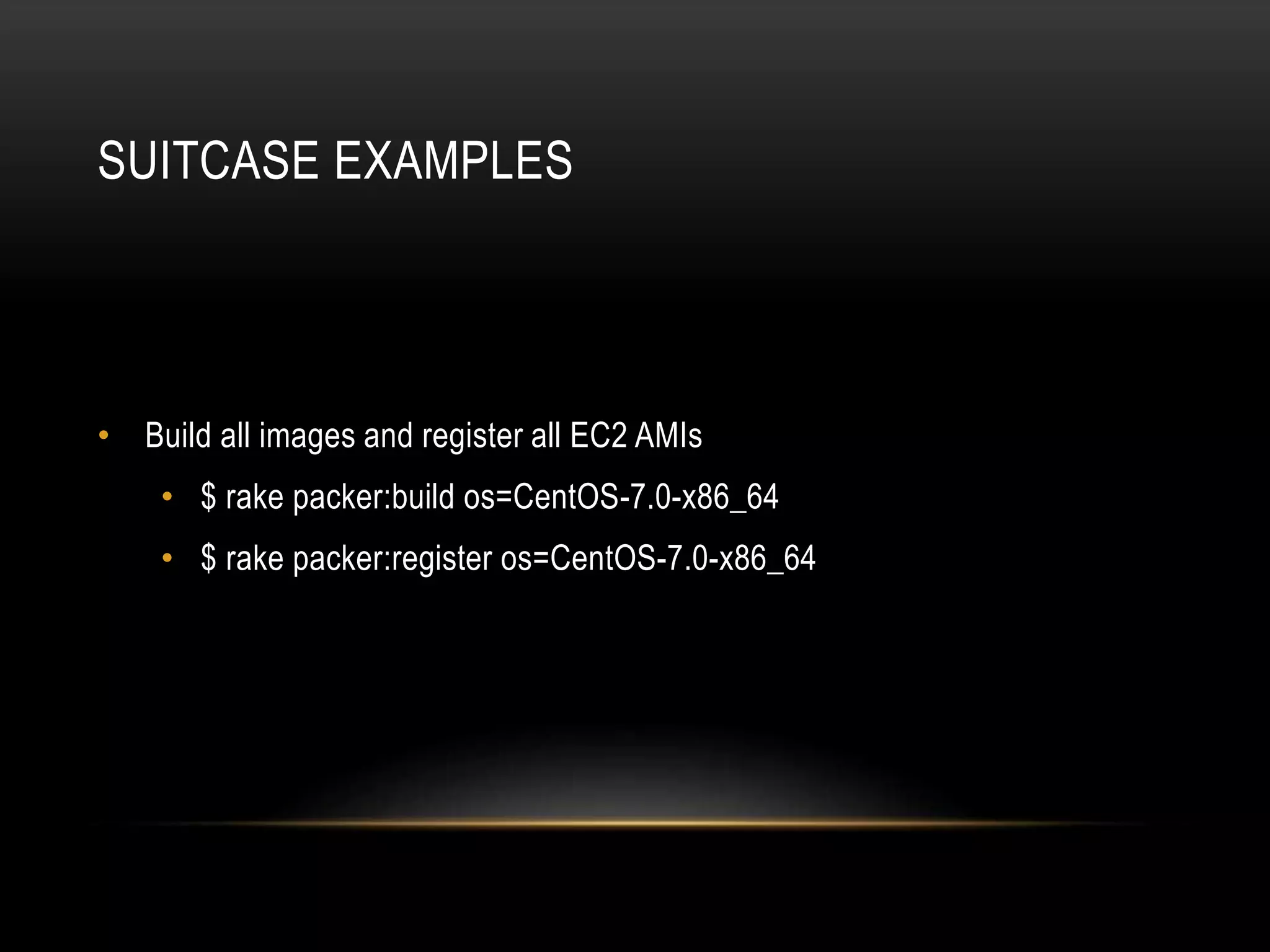
SUITCASE EXAMPLES 
• Build all images and register all EC2 AMIs 
• $ rake packer:build os=CentOS-7.0-x86_64 
• $ rake packer:register os=CentOS-7.0-x86_64
SUITCASE EXAMPLES (CONT.) 
• Build and register an AWS HVM image 
• $ rake packer:register[awshvm] os=CentOS-7.0-x86_64
SUITCASE EXAMPLES (CONT.) 
• Building an image from an existing master. 
• $ rake packer:build[master] os=CentOS-7.0-x86_64 
• (observe image timestamp from output. ex. 201410031904) 
• $ rake packer:build[awshvm] os=CentOS-7.0-x86_64  
timestamp=<timestamp>
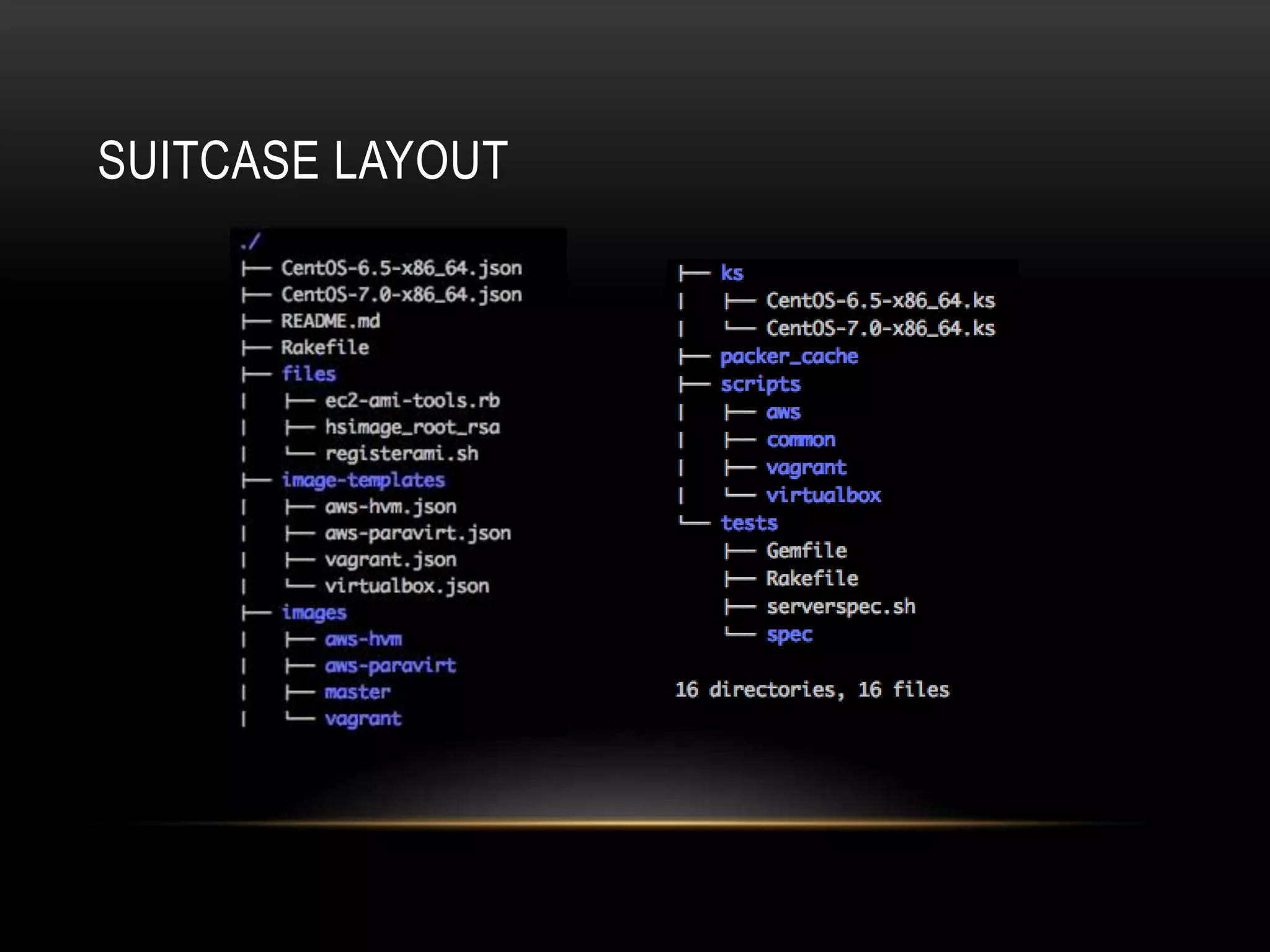
SUITCASE LAYOUT
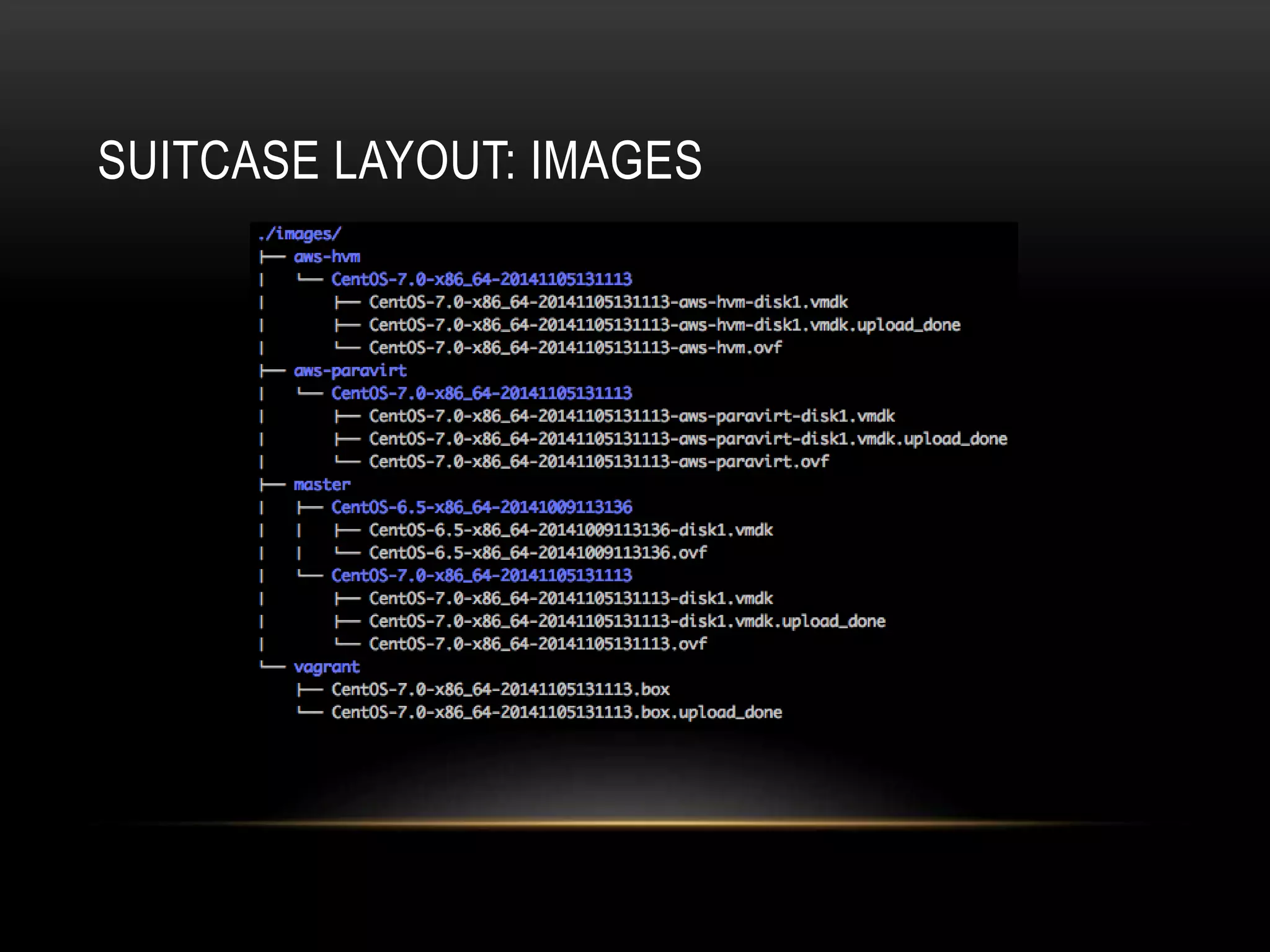
SUITCASE LAYOUT: IMAGES
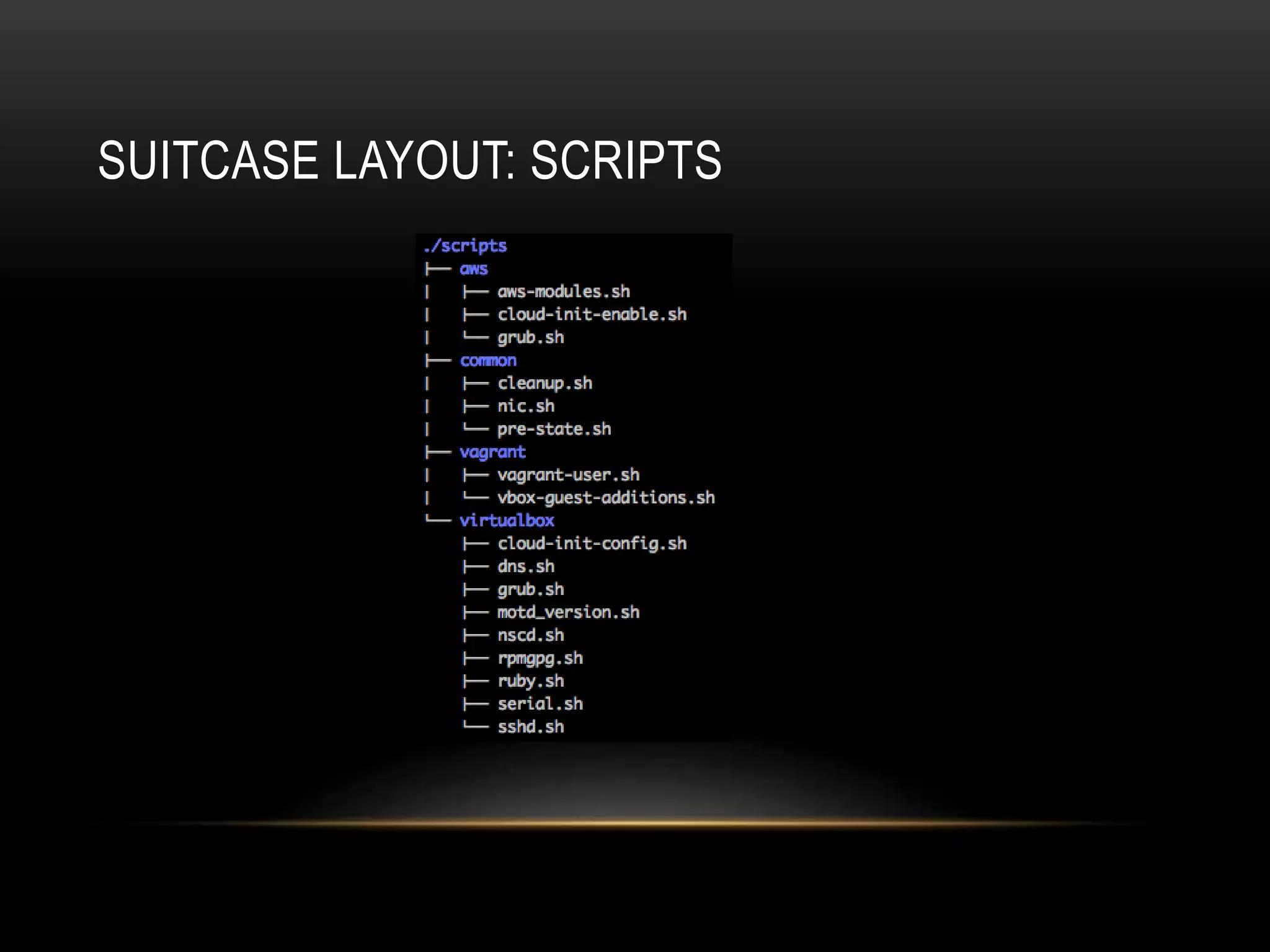
SUITCASE LAYOUT: SCRIPTS
GAINS FROM SUITCASE 
BUT THERE’S MORE!
SERVERSPEC 
• Serverspec (http://serverspec.org) integration 
• Let’s us define tests that images should conform to 
• Helps us catch potential mistakes.
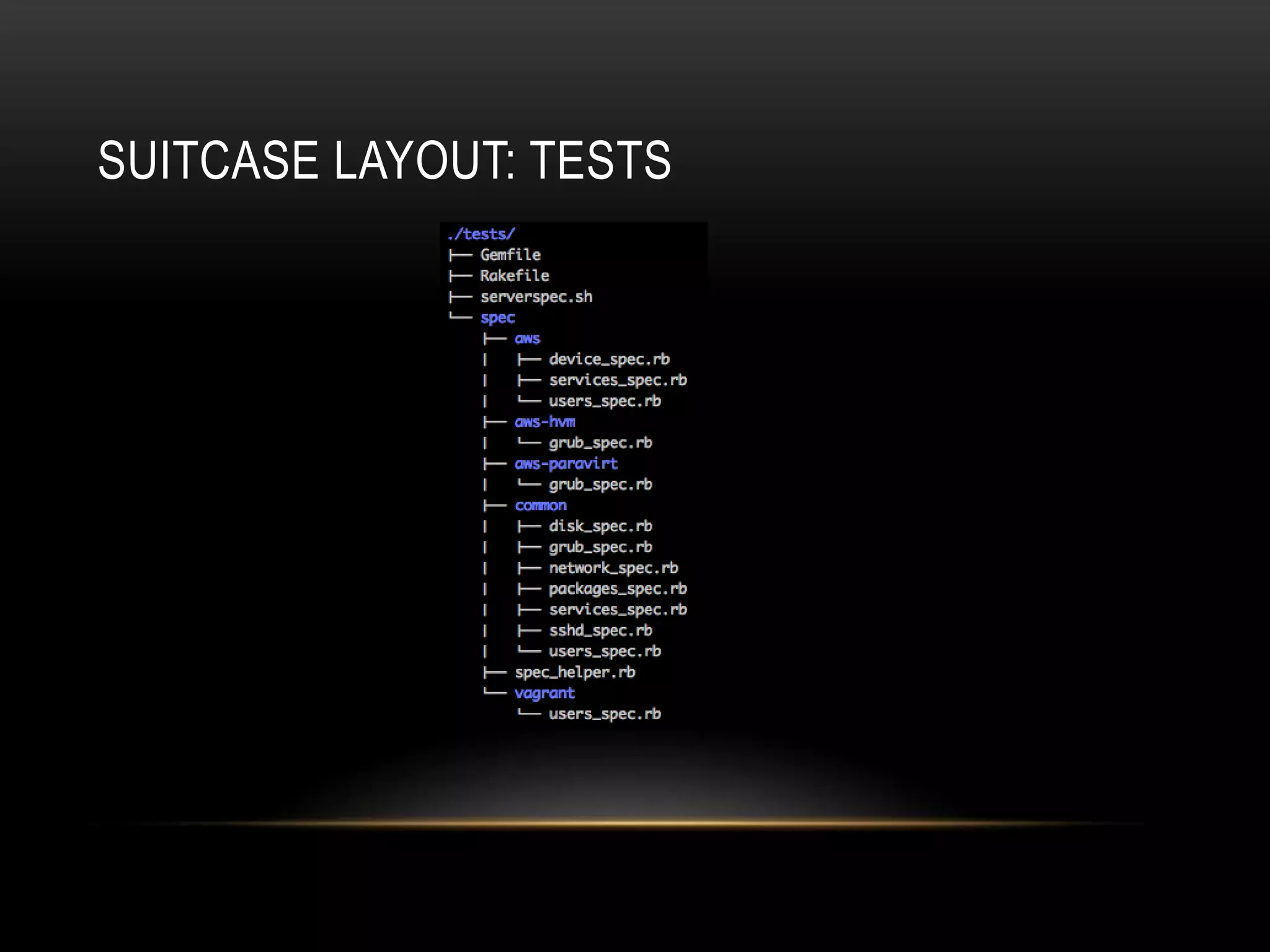
SUITCASE LAYOUT: TESTS
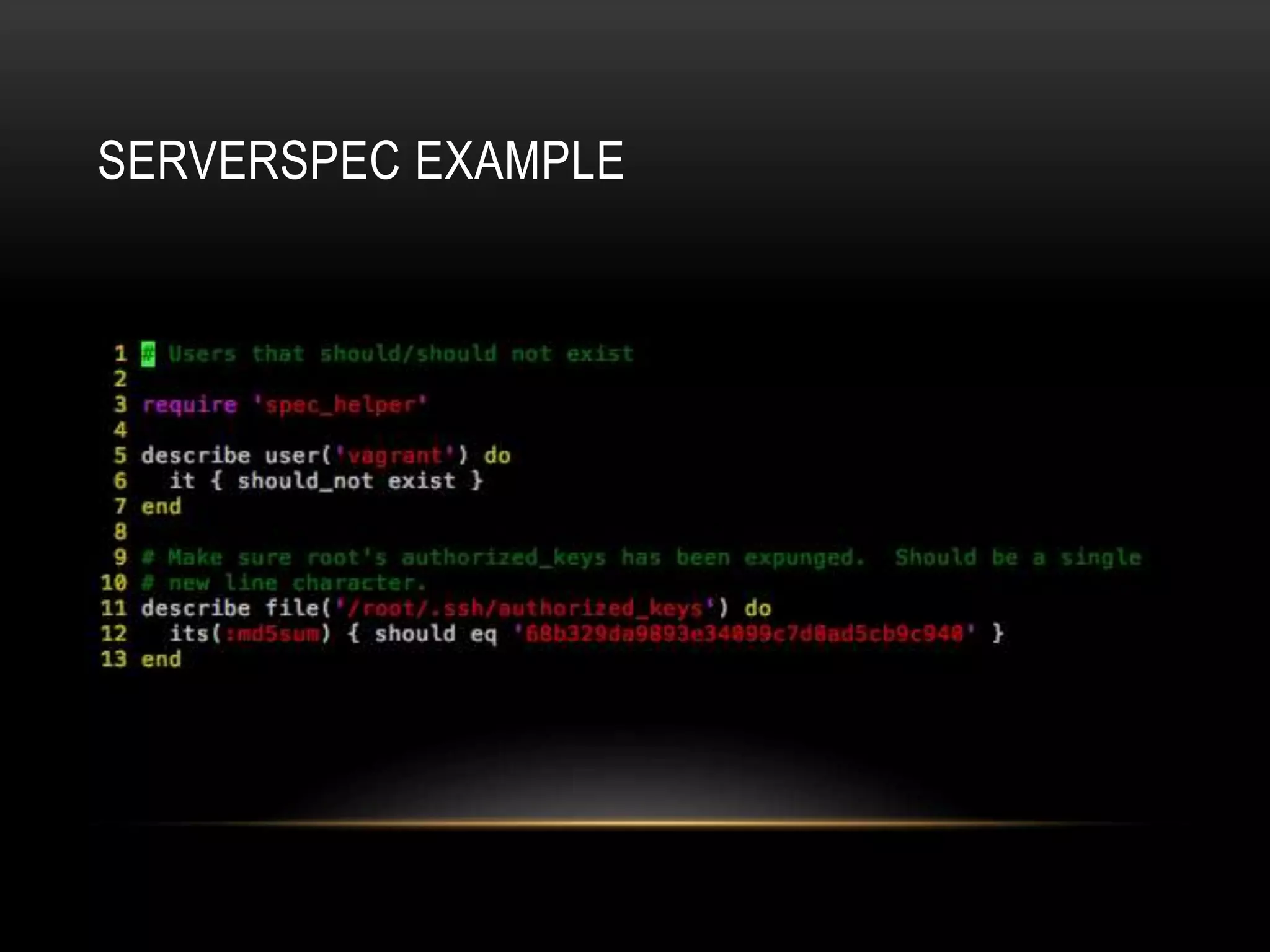
SERVERSPEC EXAMPLE
PROBLEMS SOLVED SUITCASE 
• Sped up the development of new images 
• Don’t need to run the kickstart installation with every change I make 
• Images are all “identical” 
• Each is descended from the same initial master image 
• Many previously disconnected moving parts are now connected 
• Building images 
• Archiving images 
• Registering images 
• Added testing 
• Easy enough to use by almost anyone on the team 
• No more reliance on a single person who knows all the steps
TODO 
• Make Rakefile simpler 
• Not sure we need so many image specific targets 
• Replace ec2-ami-tools with awscli 
• We patched it to make some needed commands work on OS X 
• Fetch artifacts from S3 
• Useful of an image needs to be regenerated 
• Open source this so others can use it as a reference
QUESTIONS 
???

Introduction to Packer and Suitcase: A Packer-based OS Image Build System

  • 1.
    AN INTRO TOPACKER & SUITCASE: A PACKER BASED OS IMAGE BUILD SYSTEM Tom McLaughlin tmclaughlin@hubspot.com @tmclaughbos
  • 2.
    WHAT IS PACKER? • Tool for creating OS images for multiple platforms from a single description source • Hashicorp (https://www.hashicorp.com/) developed software • Makers of Vagrant
  • 3.
    IDENTICAL IMAGES •“identical” OS images for multiple platforms
  • 4.
    IDENTICAL IMAGES •Identical == Exactly the same except for minor platform differences
  • 5.
    WHY USE PACKER? • Build images for multiple platforms • Support multiple virtualization platforms • All these images should be identical to provide a consistent experience and expectations • Speed up development and reduce errors • Replacement for homegrown tools and scripts
  • 6.
    USING PACKER •Starts with an image template that defines a build. • Templates are 3 or optionally 4 sections. • Variables (optional) • Builders • Provisioners • Post-processors
  • 7.
  • 8.
  • 9.
  • 10.
  • 11.
  • 12.
  • 13.
  • 14.
  • 15.
    PACKER RESOURCES •Homepage: https://www.packer.io • Documentation: https://www.packer.io/docs • Plugins: http://github.com • Search repos • “packer-builder” • “packer-provisioner” • “packer-post-processor” • Make sure you have Go installed
  • 16.
    PACKER SUPPORT •IRC: • Freenode #packer-tool • Mailing list: • https://groups.google.com/forum/#!forum/packer-tool
  • 17.
    PACKER’S LIMITATIONS •EC2 builder for instance backed AMIs requires an existing AMI. • No builder for EC2 HVM images (sort of). • No logic in template to associate provisioners or post-processors with particular builders • Each image would require it’s own fully kickstarted build process.
  • 18.
    SUITCASE Let’s createsomething around Packer to solve these problems!
  • 19.
    HOW SUITCASE WORKS • Suitcase our framework to use Packer and manage our image builds • Suitcase breaks the build process into different stages • Builds a master image • Reuses master image to build platform images • Suitcase uses Packer templates that are platform specific and not OS/version specific. • OS details are handled by var-files
  • 20.
    HOW SUITCASE WORKS(CONT.) • Build command goes from this to that: • $ packer CentOS-6.5-x86_64.json • $ packer –var-file=CentOS-6.5-x86_64.json awshvm.json
  • 21.
    TYING IT ALLTOGETHER WITH RAKE • rake packer:build[<image>] os=<var-file> [timestamp=<YYYYMMDDhhmm>] • Build given image • Build the master image if it doesn’t already exist • rake packer:upload[<image>] os=<var-file> [timestamp=<YYYYMMDDhhmm>] • Uploads the artifact to S3 for safe keeping • rake packer:register[<image>] os=<var-file> [timestamp=<YYYYMMDDhhmm>] • Uploads and registers an AMI • rake packer:clean[<image>] os=<var-file> [timestamp=<YYYYMMDDhhmm>] • Cleans image artifacts from your workspace
  • 22.
    SUITCASE EXAMPLES •Build all images and register all EC2 AMIs • $ rake packer:build os=CentOS-7.0-x86_64 • $ rake packer:register os=CentOS-7.0-x86_64
  • 23.
    SUITCASE EXAMPLES (CONT.) • Build and register an AWS HVM image • $ rake packer:register[awshvm] os=CentOS-7.0-x86_64
  • 24.
    SUITCASE EXAMPLES (CONT.) • Building an image from an existing master. • $ rake packer:build[master] os=CentOS-7.0-x86_64 • (observe image timestamp from output. ex. 201410031904) • $ rake packer:build[awshvm] os=CentOS-7.0-x86_64 timestamp=<timestamp>
  • 25.
  • 26.
  • 27.
  • 28.
    GAINS FROM SUITCASE BUT THERE’S MORE!
  • 29.
    SERVERSPEC • Serverspec(http://serverspec.org) integration • Let’s us define tests that images should conform to • Helps us catch potential mistakes.
  • 30.
  • 31.
  • 32.
    PROBLEMS SOLVED SUITCASE • Sped up the development of new images • Don’t need to run the kickstart installation with every change I make • Images are all “identical” • Each is descended from the same initial master image • Many previously disconnected moving parts are now connected • Building images • Archiving images • Registering images • Added testing • Easy enough to use by almost anyone on the team • No more reliance on a single person who knows all the steps
  • 33.
    TODO • MakeRakefile simpler • Not sure we need so many image specific targets • Replace ec2-ami-tools with awscli • We patched it to make some needed commands work on OS X • Fetch artifacts from S3 • Useful of an image needs to be regenerated • Open source this so others can use it as a reference
  • 34.

Editor's Notes

  • #2 Who builds OS images here? So you like the process? What do you hate having to do? How many platforms do you support? So we’ll be talking about Packer and how we tied it all together in something called suitcase. Suitcase is our framework for building images built around Packer.
  • #3 Hashicorp software We know them as the developers of Vagrant. Packer allows you to create OS images for multiple platforms from a single source By using templates it lets us describe an OS once and build it for many different platforms
  • #4 We want these images to be <QUOTES> “identical”. Our applications should run on same looking systems regardless of the virtualization platform. App developers shouldn’t have to care or deal with differences in the OS image used for one platform in our infrastructure vs. another
  • #5 Identical really means “Exactly the same except for minor platform dependent needs” For example, Vagrant needs a non-secure user that our EC2 images should not have.
  • #6 Make it easier to build identical images for multiple platforms Not uncommon to support multiple virtualization environments these days At my last job we had VMware in production A team experimenting with EC2 And devs using virtualization locally for faster development Our images need consistency to prevent accidental screw ups. We don’t want to hear “I built my app using Vagrant assuming these packages at these versions would be in production” For the OS maintainer, it speed up development of images for new OS versions by reducing manual labor. For example CentOS 7 My old process involved to generate a new AMI Creating a VM in VirtualBox. Mounting an ISO Pointing the installer to my kickstart Letting the installer run for 15-20 minutes Exporting the disk from VirtualBox Using tools from ec2-ami-tools to bundle, upload, and register the AMI. That was just the HVM image Then the paravirt image required some more manual chicanery to make that work. Doing that process for every change was pure awful. Replace homegrown tools that you have to maintaining I’m assuming image creation is mostly to all automated for people. We did had a tool for generating kickstarts for every platform… Simple but annoying sometimes when I had to fiddle with it.
  • #7 A template defines a build amd is divided into 3 or optionally 4 sections. Variables which is optional Builders Provisioners Post-processors *Bring up full file in VIM*
  • #8 Set reusable values to be used in other sections of the template. This example shows the ISO information is easy to change when the next version comes out. Variables are overridable from the command line I can add “–var headless=false” if I want to watch an installation. Maybe see why it fails. Variables can also be stored in a separate file that is passed in as an argument to Packer
  • #9 This is platforms to build for and how they should be built This example is for doing a kickstart install from an ISO image to a virtualbox instance Multiple platforms can be defined for producing multiple different images Example platforms AWS EC2 (multiple methods) EBS v. instance store backed Existing source v. scratch builds (chroot) VirtualBox (multiple methods) Existing source v. scratch builds (iso) Vmware OpenStack Docker
  • #10 Things to do to an image after the OS has been built. Like a kickstart %post section We would do things like scrubbing MACs, hostnames, etc. We can run shell scripts, Puppet manifests, etc. Run spec tests. We can integrate testing into our process to make sure the resulting image looks like what we expect.
  • #11 Things to do to the image after the instance has shutdown. Make a Vagrant box Upload to VMware images to vSphere. Found the number of post-processors sort of limited.
  • #12 Only command you’ll probably use here is BUILD
  • #13 “packer inspect” displays the basic information about your build. Easier than trying to read JSON sometimes.
  • #14 Check your JSON
  • #15 Now we can put this all together packer build <template> In this example it Boots a virtualbox instance Runs the OS installer in the background Would run any provisioners we had defined None shown since the pic wouldn’t fit on slide Then a post-processor bundles a Vagrant box.
  • #16 Homepage Documentation Found it at times confusing Plugins are scattered around GitHub You need the Go language runtime installed to install plugins. By the time I started looking into these I had an idea I was going to use a multi-stage process with Rake/Make so I ignored these and built what I needed like S3 archival into my scripts. Still, useful for say building for non-officially supported platforms. LXC SoftLayer Provisioners: Didn’t find many Post-processors: Not many either
  • #17 HELP! IRC which I use a lot Mildly active Was enough to ghet the help I needed ML 1 or 2 messages a day. I just don’t do email much
  • #18 EC2 builder for instance backed AMIs requires an existing AMI. This breaks our chain of control over the OS Creating an image for a new OS version, ex. CentOS 7, would require us to start with a third party image. RedHat only released an HVM image for 7.0. Paravirt image I used to troubleshoot some issues in our build was from an untrusted third party. Potential auditors may not like that. Continuously updating an existing image was out of the question Our Vagrant image would vary from our HVM and paravirt images in unknown ways Our paravirt and HVM images would probably vary in unknown ways. No builder for EC2 HVM images (sort of). HVM images are actually just raw disk images exported from VirtualBox for us. Both EC2 HVM and Vagrant would use the “virtualbox-iso” builder Packer will not allow two of the same builder in a template. No logic in template to associate provisioners or post-processors with particular builders We have a subset of scripts for EC2 and a subset for Vagrant to handle platform differences Vagrant is actually a post-processor so every defined build would end up with a Vagrant image I couldn’t see how to maybe build a Vagrant box from one of multiple define builds in the template Each build would be a fully kickstarted build There was no way to save time by copying a reusing builds. For example Build an image and export an image for one platform Continue more processing of that image and export an image for another platform ~15-20m per image performing the kickstart process.
  • #19 ENTER SUITCASE!
  • #20 Suitcase is nothing more than the framework we created for building images via Packer. Nothing too revolutionary… Just made Packer easier to use. Here’s how it works. We break the build process up into multiple stages. We create a master image artifact which is copied and reused to create platform images This helps us solve the issue of having to kickstart every build and reusing an image to save time. We deviate from traditional packer usage by making our templates platform specific and not OS/version specific We handle OS details via var-files
  • #21 *Bring up examples*
  • #22 Process has multiple stages with dependencies on prior stages so we tied this together with a Rakefile. Above are the basic commands. Every command can take an optional image to build if you don’t want to build all of them. The ‘os’ argument is the name of the OS var-file to use Since our process lets you stop and start we distinguish builds by a timestamp If you want or need to you can work on different images versions in your workspace at once.
  • #23 Most straightforward example This is what I’d do if I wanted to generate a new batch of OS images for all my platforms. Currently AWS HVM AWS paravirt AWS Vagrant I do this in two commands because registering AMIs can be prone to failure.
  • #24 Build and register an AWS HVM image This will also build a new master image Usually just used for testing If we generate one image for wide distribution we should be regenerating them all
  • #25 Maybe we’ve made changes to our AWS HVM provisioner scripts? How about we skip the 10-15 minutes of installing the OS again! This saved me countless amounts of time while doing my CentOS 7.0 builds
  • #26 Layout of repo OS var files live in the root. files/ is where we store helper scripts and files. Ami registration script. Our SSH key used for installs ks/ is where kickstarts live for the virtualbox creation
  • #27 Our images directories
  • #28 We organize scripts by platform. You still have to add each script you want run to an image template There is no autoloading of scripts. This is just an organizational feature.
  • #29 BUT THERE’S MORE!
  • #30 The provisioner stage needed root access and the credentials. We really needed to make sure this info was expunged before production. So… We integrated Serverspec! Serverspec lets us write tests to check the state of the final image. This helps me ensure I don’t break expectations when developing a new image Helps me catch things that shouldn’t make it into prod.
  • #31 Tests are arranged by platform Script is smart enough to load the right tests based on platform. No more work after dropping test into correct directory. All images execute common/ tests AWS types execute aws-<type>/ and aws/
  • #32 EC2 images should not have a Vagrant user Root’s authorized_keys used during provisiong phase should be expunged.
  • #33 So what did we solve by making suitcase? New image development was sped up by not having to go through the installer each time. We’ve retained end to end control of our AWS images Our images are “identical” Every image descends from the same base image. And it’s reasonably easy to find what’s different by comparing provisoners for each platform. One unified process instead of multiple disconnected steps Building Archiving Registering Added testing because it was so easy to perform
  • #34 Rakefile could be simpler New platforms require 30-40 lines. Need to understand how it all works to know what to add and where. ec2-ami-toolsrequire patching to work on OS X Couldn’t figure out how to do the image bundling with AWS CLI For convenience, fetch artifacts from S3 Might want to regenerate an accidentally deleted AMI from the master It’s not something you can just drop into your org… But would provide a useful starting point for organizations wishing to utilize packer