Apache CloudStack
Tooling Ecosystem
Apache Cloudstack India User
Group
By Kiran Chavala
About Me
• QA Engineer – ShapeBlue
• Involved with CloudStack/Forks since 2013
by providing technical support to various
customers
• Open-source enthusiast
• Addicted to various Podcasts/Audiobooks
Reach me at:
Twitter : @kiranchavala
Email : kiran.chavala@shapeblue.com
Agenda
• Cloudstack Api and Command Line tool
• Configuration/Infrastructure Orchestration & Management tools
• Kubernetes Cluster Deployment Tool
• Observability/Monitoring/Visualization Tools
• Performance Benchmarking Tool
• Demo
• Questions
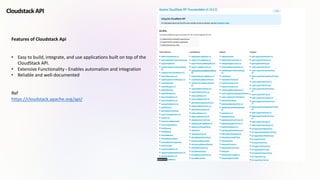
Features of Cloudstack Api
• Easy to build, integrate, and use applications built on top of the
CloudStack API.
• Extensive Functionality - Enables automation and integration
• Reliable and well-documented
Ref
https://cloudstack.apache.org/api/
Cloudstack API
Cloudmonkey Cli tool
Cloudmonkey is a popular and defacto command line interface (CLI) for
Apache CloudStack.
Features
•Usable as a command line tool and interactive shell
•Written in GO Language
•Management server profiles: select, customize and use different server
profiles using
•All commands are lowercase unlike API
•Api Discovery using sync feature, with build time api precaching for
failsafe sync
•Raw api execution support
•Auto-completion via double <tab>
•Reverse search using Ctrl+R
•Emacs compatible keybindings
•Pipeable output
•Unix shell execution
•Support to handle async jobs using user defined blocking or non-
blocking way
•Tabular or JSON output with filtering of table columns
•Colored output
•Unicode support
•Api parameter value completion
https://github.com/apache/cloudstack-cloudmonkey
[Cloudstack]
url = http://10.0.34.2:8080/client/api
username = admin
password = password
domain = /
apikey = LIN6rqXuaJwMPfGYFh13qDwYz5VNNz1J2J6qIOWcd3oLQOq0WtD4CwRundBL6rzXToa3lQOC_vKjI3nkHtiD8Q
secretkey = R6QPwRUz09TVXBjXNwZk7grTjcPtsFRphH6xhN1oPvnc12YUk296t4KHytg8zRLczDA0X5NsLVi4d8rfMMx3yg
Configuration/Infrastructure Orchestration &
Management tools
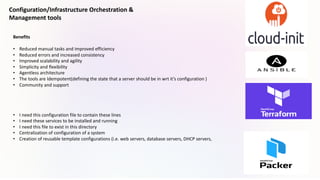
Benefits
• Reduced manual tasks and improved efficiency
• Reduced errors and increased consistency
• Improved scalability and agility
• Simplicity and flexibility
• Agentless architecture
• The tools are Idempotent(defining the state that a server should be in wrt it’s configuration )
• Community and support
• I need this configuration file to contain these lines
• I need these services to be installed and running
• I need this file to exist in this directory
• Centralization of configuration of a system
• Creation of reusable template configurations (i.e. web servers, database servers, DHCP servers,
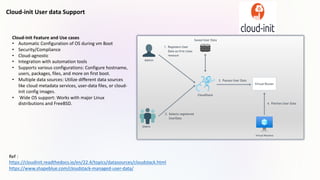
Cloud-init User data Support
Cloud-init Feature and Use cases
• Automatic Configuration of OS during vm Boot
• Security/Compliance
• Cloud-agnostic
• Integration with automation tools
• Supports various configurations: Configure hostname,
users, packages, files, and more on first boot.
• Multiple data sources: Utilize different data sources
like cloud metadata services, user-data files, or cloud-
init config images.
• Wide OS support: Works with major Linux
distributions and FreeBSD.
Ref :
https://cloudinit.readthedocs.io/en/22.4/topics/datasources/cloudstack.html
https://www.shapeblue.com/cloudstack-managed-user-data/
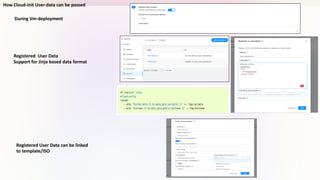
How Cloud-init User-data can be passed
During Vm-deployment
Registered User Data
Support for Jinja based data format
Registered User Data can be linked
to template/ISO
Ansible
Ansible is a deployment and configuration management tool similar in intent to Chef and Puppet. It
allows (usually) DevOps teams to orchestrate the deployment and configuration of their environments
without having to re-write custom scripts to make changes.
Why Ansible
• Client/Server architecture not required
• Only SSH connectivity required (password or public/private keys)
• Modules can be in any language capable of returning JSON or key=value text pairs
• Has an API
When to use Ansible
• Deploying Hypervisor hosts
• Deploying Cloudstack- Management infrastructure
• Configuration changes to hosts and management VMs
• Patching of hosts and management VMs
• Deployment & configuration of guest VMs
Ref:
https://www.shapeblue.com/deploying-cloudstack-with-ansible/
https://docs.ansible.com/ansible/latest/scenario_guides/guide_cloudstack.html
https://docs.cloudstack.apache.org/projects/archived-cloudstack-getting-started/en/latest/ansible.html
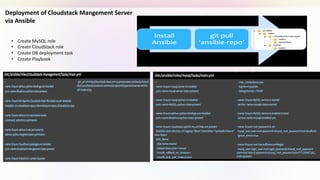
• Create MySQL role
• Create CloudStack role
• Create DB deployment task
• Create Playbook
Deployment of Cloudstack Mangement Server
via Ansible
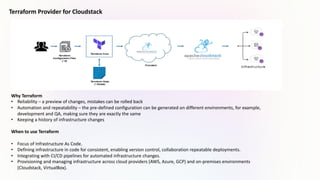
Terraform Provider for Cloudstack
Why Terraform
• Reliability – a preview of changes, mistakes can be rolled back
• Automation and repeatability – the pre-defined configuration can be generated on different environments, for example,
development and QA, making sure they are exactly the same
• Keeping a history of infrastructure changes
When to use Terraform
• Focus of Infrastructure As Code.
• Defining infrastructure in code for consistent, enabling version control, collaboration repeatable deployments.
• Integrating with CI/CD pipelines for automated infrastructure changes.
• Provisioning and managing infrastructure across cloud providers (AWS, Azure, GCP) and on-premises environments
(Cloudstack, VirtualBox).
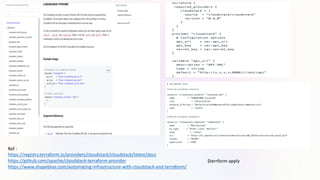
Ref :
https://registry.terraform.io/providers/cloudstack/cloudstack/latest/docs
https://github.com/apache/cloudstack-terraform-provider
https://www.shapeblue.com/automating-infrastructure-with-cloudstack-and-terraform/
$terrform apply
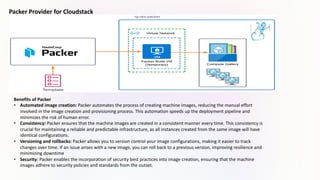
Packer Provider for Cloudstack
Benefits of Packer
• Automated image creation: Packer automates the process of creating machine images, reducing the manual effort
involved in the image creation and provisioning process. This automation speeds up the deployment pipeline and
minimizes the risk of human error.
• Consistency: Packer ensures that the machine images are created in a consistent manner every time. This consistency is
crucial for maintaining a reliable and predictable infrastructure, as all instances created from the same image will have
identical configurations.
• Versioning and rollbacks: Packer allows you to version control your image configurations, making it easier to track
changes over time. If an issue arises with a new image, you can roll back to a previous version, improving resilience and
minimizing downtime
• Security: Packer enables the incorporation of security best practices into image creation, ensuring that the machine
images adhere to security policies and standards from the outset.
Ref:
https://developer.hashicorp.com/packer/integrations/hashicorp/cloudstack/latest/components/builder/cloudstack
https://github.com/hashicorp/packer-plugin-cloudstack/tree/main
Packer build custom-image.hcl
packer {
required_plugins {
cloudstack = {
version = ">= 1.0.0"
source = "github.com/hashicorp/cloudstack"
}
}
}
variable "cloudstack_api_url" {
description = "The api url of Cloudstack Account."
default = "http://10.0.34.2:8080/client/api"
}
When to use Packer
Multi-platform deployments: When you need to deploy your
application across multiple platforms or cloud providers (e.g.,
AWS, Azure, Clodustack ).Packer allows you to create
machine images for each platform from a single
configuration. This ensures consistency and reduces the
effort needed to manage different image formats.
Compliance and security requirements: Packer enables the
incorporation of security best practices into machine image
creation, ensuring that images adhere to security policies
and compliance standards from the beginning. This is critical
for maintaining a secure infrastructure.
Customization of base images: When you need to start with
a base image and customize it with specific configurations,
software, or settings, Packer allows you to define these
customizations in a declarative manner, making it easy to
reproduce the same configuration across different images.
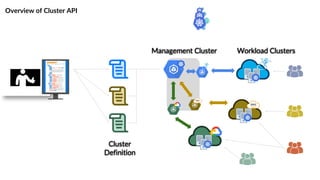
Kubernetes Cluster Deployment Tool
Cluster API is a Kubernetes subproject focused on providing declarative APIs and tooling to simplify
provisioning, upgrading, and operating multiple Kubernetes clusters.
Benefits of using Cluster API
• Declarative Configuration/IaC concept: Cluster API allows users to define cluster
configurations in a declarative manner using Kubernetes manifests.
• Consistent Cluster Management: Organizations can establish a consistent approach to
managing Kubernetes clusters. This consistency simplifies operations, reduces the
likelihood of misconfigurations, and improves the overall manageability of clusters
• Multi-Cloud and Multi-Cluster Support: Cluster API is designed to be cloud-agnostic,
enabling users to manage clusters across different cloud providers or on-premises
environments. It provides a consistent way to manage clusters regardless of the
underlying infrastructure.
• GitOps Workflows: Cluster API facilitates GitOps workflows by allowing cluster
configurations to be versioned in a Git repository. This makes it easy to track changes,
roll back to previous configurations, and collaborate on cluster management using Git-
based workflows
• Cluster Versioning: CAPI supports cluster versioning, allowing for the management of
multiple versions of clusters concurrently. This is useful for organizations that need to
maintain different versions of clusters for various applications or teams
Ref:
https://github.com/kubernetes-sigs/cluster-api
https://cluster-api-cloudstack.sigs.k8s.io/getting-
started.html
Overview of Cluster API
Management Cluster Workload Clusters
Cluster
Definition
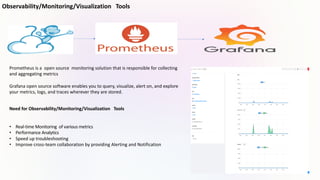
Observability/Monitoring/Visualization Tools
Need for Observability/Monitoring/Visualization Tools
• Real-time Monitoring of various metrics
• Performance Analytics
• Speed up troubleshooting
• Improve cross-team collaboration by providing Alerting and Notification
Prometheus is a open source monitoring solution that is responsible for collecting
and aggregating metrics
Grafana open source software enables you to query, visualize, alert on, and explore
your metrics, logs, and traces wherever they are stored.
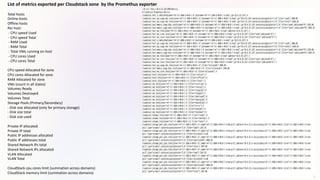
List of metrics exported per Cloudstack zone by the Promethus exporter
Total hosts
Online hosts
Offline hosts
Per host:
- CPU speed Used
- CPU speed Total
- RAM Used
- RAM Total
- Total VMs running on host
- CPU cores Used
- CPU cores Total
CPU speed Allocated for zone
CPU cores Allocated for zone
RAM Allocated for zone
VMs (count in all states)
Volumes Ready
Volumes Destroyed
Volumes Total
Storage Pools (Primary/Secondary)
- Disk size allocated (only for primary storage)
- Disk size total
- Disk size used
Private IP allocated
Private IP total
Public IP addresses allocated
Public IP addresses total
Shared Network IPs total
Shared Network IPs allocated
VLAN Allocated
VLAN Total
CloudStack cpu cores limit (summation across domains)
CloudStack memory limit (summation across domains)
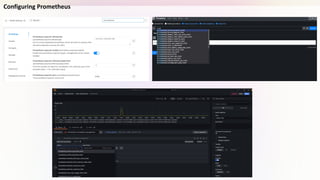
Configuring Prometheus
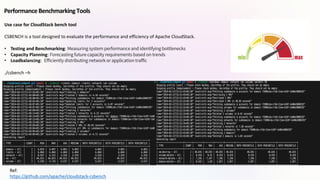
Performance Benchmarking Tools
Ref:
https://github.com/apache/cloudstack-csbench
Use case for CloudStack bench tool
CSBENCH is a tool designed to evaluate the performance and efficiency of Apache CloudStack.
• Testing and Benchmarking: Measuring system performance and identifying bottlenecks
• Capacity Planning: Forecasting future capacity requirements based on trends
• Loadbalancing: Efficiently distributing network or application traffic
./csbench –h
Demo
CloudStack Tooling Ecosystem – Kiran Chavala, ShapeBlue

CloudStack Tooling Ecosystem – Kiran Chavala, ShapeBlue

  • 1.
    Apache CloudStack Tooling Ecosystem ApacheCloudstack India User Group By Kiran Chavala
  • 2.
    About Me • QAEngineer – ShapeBlue • Involved with CloudStack/Forks since 2013 by providing technical support to various customers • Open-source enthusiast • Addicted to various Podcasts/Audiobooks Reach me at: Twitter : @kiranchavala Email : kiran.chavala@shapeblue.com
  • 3.
    Agenda • Cloudstack Apiand Command Line tool • Configuration/Infrastructure Orchestration & Management tools • Kubernetes Cluster Deployment Tool • Observability/Monitoring/Visualization Tools • Performance Benchmarking Tool • Demo • Questions
  • 4.
    Features of CloudstackApi • Easy to build, integrate, and use applications built on top of the CloudStack API. • Extensive Functionality - Enables automation and integration • Reliable and well-documented Ref https://cloudstack.apache.org/api/ Cloudstack API
  • 5.
    Cloudmonkey Cli tool Cloudmonkeyis a popular and defacto command line interface (CLI) for Apache CloudStack. Features •Usable as a command line tool and interactive shell •Written in GO Language •Management server profiles: select, customize and use different server profiles using •All commands are lowercase unlike API •Api Discovery using sync feature, with build time api precaching for failsafe sync •Raw api execution support •Auto-completion via double <tab> •Reverse search using Ctrl+R •Emacs compatible keybindings •Pipeable output •Unix shell execution •Support to handle async jobs using user defined blocking or non- blocking way •Tabular or JSON output with filtering of table columns •Colored output •Unicode support •Api parameter value completion https://github.com/apache/cloudstack-cloudmonkey [Cloudstack] url = http://10.0.34.2:8080/client/api username = admin password = password domain = / apikey = LIN6rqXuaJwMPfGYFh13qDwYz5VNNz1J2J6qIOWcd3oLQOq0WtD4CwRundBL6rzXToa3lQOC_vKjI3nkHtiD8Q secretkey = R6QPwRUz09TVXBjXNwZk7grTjcPtsFRphH6xhN1oPvnc12YUk296t4KHytg8zRLczDA0X5NsLVi4d8rfMMx3yg
  • 6.
    Configuration/Infrastructure Orchestration & Managementtools Benefits • Reduced manual tasks and improved efficiency • Reduced errors and increased consistency • Improved scalability and agility • Simplicity and flexibility • Agentless architecture • The tools are Idempotent(defining the state that a server should be in wrt it’s configuration ) • Community and support • I need this configuration file to contain these lines • I need these services to be installed and running • I need this file to exist in this directory • Centralization of configuration of a system • Creation of reusable template configurations (i.e. web servers, database servers, DHCP servers,
  • 7.
    Cloud-init User dataSupport Cloud-init Feature and Use cases • Automatic Configuration of OS during vm Boot • Security/Compliance • Cloud-agnostic • Integration with automation tools • Supports various configurations: Configure hostname, users, packages, files, and more on first boot. • Multiple data sources: Utilize different data sources like cloud metadata services, user-data files, or cloud- init config images. • Wide OS support: Works with major Linux distributions and FreeBSD. Ref : https://cloudinit.readthedocs.io/en/22.4/topics/datasources/cloudstack.html https://www.shapeblue.com/cloudstack-managed-user-data/
  • 8.
    How Cloud-init User-datacan be passed During Vm-deployment Registered User Data Support for Jinja based data format Registered User Data can be linked to template/ISO
  • 9.
    Ansible Ansible is adeployment and configuration management tool similar in intent to Chef and Puppet. It allows (usually) DevOps teams to orchestrate the deployment and configuration of their environments without having to re-write custom scripts to make changes. Why Ansible • Client/Server architecture not required • Only SSH connectivity required (password or public/private keys) • Modules can be in any language capable of returning JSON or key=value text pairs • Has an API When to use Ansible • Deploying Hypervisor hosts • Deploying Cloudstack- Management infrastructure • Configuration changes to hosts and management VMs • Patching of hosts and management VMs • Deployment & configuration of guest VMs Ref: https://www.shapeblue.com/deploying-cloudstack-with-ansible/ https://docs.ansible.com/ansible/latest/scenario_guides/guide_cloudstack.html https://docs.cloudstack.apache.org/projects/archived-cloudstack-getting-started/en/latest/ansible.html
  • 10.
    • Create MySQLrole • Create CloudStack role • Create DB deployment task • Create Playbook Deployment of Cloudstack Mangement Server via Ansible
  • 11.
    Terraform Provider forCloudstack Why Terraform • Reliability – a preview of changes, mistakes can be rolled back • Automation and repeatability – the pre-defined configuration can be generated on different environments, for example, development and QA, making sure they are exactly the same • Keeping a history of infrastructure changes When to use Terraform • Focus of Infrastructure As Code. • Defining infrastructure in code for consistent, enabling version control, collaboration repeatable deployments. • Integrating with CI/CD pipelines for automated infrastructure changes. • Provisioning and managing infrastructure across cloud providers (AWS, Azure, GCP) and on-premises environments (Cloudstack, VirtualBox).
  • 12.
  • 13.
    Packer Provider forCloudstack Benefits of Packer • Automated image creation: Packer automates the process of creating machine images, reducing the manual effort involved in the image creation and provisioning process. This automation speeds up the deployment pipeline and minimizes the risk of human error. • Consistency: Packer ensures that the machine images are created in a consistent manner every time. This consistency is crucial for maintaining a reliable and predictable infrastructure, as all instances created from the same image will have identical configurations. • Versioning and rollbacks: Packer allows you to version control your image configurations, making it easier to track changes over time. If an issue arises with a new image, you can roll back to a previous version, improving resilience and minimizing downtime • Security: Packer enables the incorporation of security best practices into image creation, ensuring that the machine images adhere to security policies and standards from the outset.
  • 14.
    Ref: https://developer.hashicorp.com/packer/integrations/hashicorp/cloudstack/latest/components/builder/cloudstack https://github.com/hashicorp/packer-plugin-cloudstack/tree/main Packer build custom-image.hcl packer{ required_plugins { cloudstack = { version = ">= 1.0.0" source = "github.com/hashicorp/cloudstack" } } } variable "cloudstack_api_url" { description = "The api url of Cloudstack Account." default = "http://10.0.34.2:8080/client/api" } When to use Packer Multi-platform deployments: When you need to deploy your application across multiple platforms or cloud providers (e.g., AWS, Azure, Clodustack ).Packer allows you to create machine images for each platform from a single configuration. This ensures consistency and reduces the effort needed to manage different image formats. Compliance and security requirements: Packer enables the incorporation of security best practices into machine image creation, ensuring that images adhere to security policies and compliance standards from the beginning. This is critical for maintaining a secure infrastructure. Customization of base images: When you need to start with a base image and customize it with specific configurations, software, or settings, Packer allows you to define these customizations in a declarative manner, making it easy to reproduce the same configuration across different images.
  • 15.
    Kubernetes Cluster DeploymentTool Cluster API is a Kubernetes subproject focused on providing declarative APIs and tooling to simplify provisioning, upgrading, and operating multiple Kubernetes clusters. Benefits of using Cluster API • Declarative Configuration/IaC concept: Cluster API allows users to define cluster configurations in a declarative manner using Kubernetes manifests. • Consistent Cluster Management: Organizations can establish a consistent approach to managing Kubernetes clusters. This consistency simplifies operations, reduces the likelihood of misconfigurations, and improves the overall manageability of clusters • Multi-Cloud and Multi-Cluster Support: Cluster API is designed to be cloud-agnostic, enabling users to manage clusters across different cloud providers or on-premises environments. It provides a consistent way to manage clusters regardless of the underlying infrastructure. • GitOps Workflows: Cluster API facilitates GitOps workflows by allowing cluster configurations to be versioned in a Git repository. This makes it easy to track changes, roll back to previous configurations, and collaborate on cluster management using Git- based workflows • Cluster Versioning: CAPI supports cluster versioning, allowing for the management of multiple versions of clusters concurrently. This is useful for organizations that need to maintain different versions of clusters for various applications or teams Ref: https://github.com/kubernetes-sigs/cluster-api https://cluster-api-cloudstack.sigs.k8s.io/getting- started.html
  • 16.
    Overview of ClusterAPI Management Cluster Workload Clusters Cluster Definition
  • 17.
    Observability/Monitoring/Visualization Tools Need forObservability/Monitoring/Visualization Tools • Real-time Monitoring of various metrics • Performance Analytics • Speed up troubleshooting • Improve cross-team collaboration by providing Alerting and Notification Prometheus is a open source monitoring solution that is responsible for collecting and aggregating metrics Grafana open source software enables you to query, visualize, alert on, and explore your metrics, logs, and traces wherever they are stored.
  • 18.
    List of metricsexported per Cloudstack zone by the Promethus exporter Total hosts Online hosts Offline hosts Per host: - CPU speed Used - CPU speed Total - RAM Used - RAM Total - Total VMs running on host - CPU cores Used - CPU cores Total CPU speed Allocated for zone CPU cores Allocated for zone RAM Allocated for zone VMs (count in all states) Volumes Ready Volumes Destroyed Volumes Total Storage Pools (Primary/Secondary) - Disk size allocated (only for primary storage) - Disk size total - Disk size used Private IP allocated Private IP total Public IP addresses allocated Public IP addresses total Shared Network IPs total Shared Network IPs allocated VLAN Allocated VLAN Total CloudStack cpu cores limit (summation across domains) CloudStack memory limit (summation across domains)
  • 19.
  • 20.
    Performance Benchmarking Tools Ref: https://github.com/apache/cloudstack-csbench Usecase for CloudStack bench tool CSBENCH is a tool designed to evaluate the performance and efficiency of Apache CloudStack. • Testing and Benchmarking: Measuring system performance and identifying bottlenecks • Capacity Planning: Forecasting future capacity requirements based on trends • Loadbalancing: Efficiently distributing network or application traffic ./csbench –h
  • 21.