Packer & TerraForm
A brief intro in automation using Packer and TerraForm
Today’s challenges
Increasingly complex infrastructure to setup
• Multiple environments for testing and production
• Evolution / Changing of infrastructure
• Documentation of infrastructure
• More than one server involved
Infrastructure as Code (IaC)
Infrastructure as Code (IaC) is the process of managing and provisioning computing
infrastructure (processes, bare-metal servers, virtual servers, etc.) and their configuration
through machine-processable definition files
• Cost (reduction)
• Speed (faster execution)
• and Risk (remove errors and security violations)
Introducing Packer and TerraForm
Packer
Packer is a tool for creating machine and container images
for multiple platforms from a single source configuration.
Treat server as immutable
Any configuration change results in a
completely new server
Allows for easier tools then Chef or Puppet
JSON configuration language
TerraForm
Terraform provides a common configuration to launch
infrastructure. Once launched, Terraform safely and
efficiently changes infrastructure as the configuration is
evolved
Describe infrastructure in a declarative way
Keep track of changes to the infrastructure
Changing infrastructure is accessible to entire
team
Rollback your infrastructure to a previous point
Why use Packer?
Standardise development environments and machine images.
Create near identical state infrastructure across multiple
environments
Why use TerraForm?
To orchestrate and create resources in your environments with ease
and simplicity
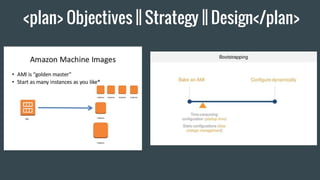
<plan> Objectives || Strategy || Design</plan>
Packer
https://www.packer.io/
Packer Concepts:
Builders
Provisioners
Parallel Builds
Post Processors
Building Images
Create a template
: configuration file used to define what
image we want built and how
Notes
Define the builders
Define provisioners
Define post-processors
Define variables (access keys etc)
<NB/>: Parallel Builds
Example
{
"builders": [],
"description": "A packer example template",
"min_packer_version": "0.8.0",
"provisioners": [],
"post-processors": [],
"variables": []
}
Builders
Amazon EC2 (AMI)
DigitalOcean
Docker
Google Compute Engine
OpenStack
VirtualBox
<Commands/>:
packer build
packer fix
packer inspect
packer validate
{
"variables": {
"aws_access_key": "YOURACCESSKEY",
"aws_secret_key": "YOURSECRETKEY",
"do_api_token": "YOURAPITOKEN"
},
"builders": [{
"type": "amazon-ebs",
"access_key": "{{user `aws_access_key`}}",
"secret_key": "{{user `aws_secret_key`}}",
"region": "us-east-1",
"source_ami": "ami-fce3c696",
"instance_type": "t2.micro",
"ssh_username": "ubuntu",
"ami_name": "packer-example {{timestamp}}"
},{
"type": "digitalocean",
"api_token": "{{user `do_api_token`}}",
"image": "ubuntu-14-04-x64",
"region": "nyc3",
"size": "512mb"
}],
"provisioners": [{
"type": "shell",
"inline": [
"sleep 30",
"sudo apt-get update",
"sudo apt-get install -y redis-server"
]
}]
}
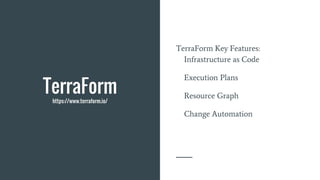
TerraForm
https://www.terraform.io/
TerraForm Key Features:
Infrastructure as Code
Execution Plans
Resource Graph
Change Automation
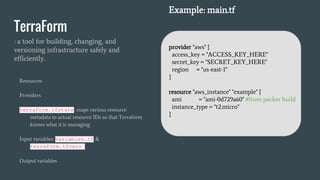
TerraForm
: a tool for building, changing, and
versioning infrastructure safely and
efficiently.
Resources
Providers
terraform.tfstate: maps various resource
metadata to actual resource IDs so that Terraform
knows what it is managing
Input variables: variables.tf &
terraform.tfvars
Output variables
Example: main.tf
provider "aws" {
access_key = "ACCESS_KEY_HERE"
secret_key = "SECRET_KEY_HERE"
region = "us-east-1"
}
resource "aws_instance" "example" {
ami = "ami-0d729a60" #from packer build
instance_type = "t2.micro"
}
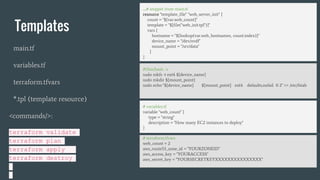
Templates
main.tf
variables.tf
terraform.tfvars
*.tpl (template resource)
<commands/>:
terraform validate
terraform plan
terraform apply
terraform destroy
# variables.tf
variable "web_count" {
type = "string"
description = "How many EC2 instances to deploy"
}
# terraform.tfvars
web_count = 2
aws_route53_zone_id = "YOURZONEID"
aws_access_key = "YOURACCESS"
aws_secret_key = "YOURSECRETKEYXXXXXXXXXXXXXXX"
….# snippet from main.tf
resource "template_file" "web_server_init" {
count = "${var.web_count}"
template = "${file("web_init.tpl")}"
vars {
hostname = "${lookup(var.web_hostnames, count.index)}"
device_name = "/dev/xvdf"
mount_point = "/srv/data"
}
}
#!/bin/bash -v
sudo mkfs -t ext4 ${device_name}
sudo mkdir ${mount_point}
sudo echo "${device_name} ${mount_point} ext4 defaults,nofail 0 2" >> /etc/fstab
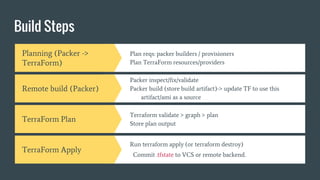
Build Steps
Planning (Packer ->
TerraForm)
Plan reqs: packer builders / provisioners
Plan TerraForm resources/providers
Remote build (Packer)
Packer inspect/fix/validate
Packer build (store build artifact)-> update TF to use this
artifact/ami as a source
TerraForm Plan
Terraform validate > graph > plan
Store plan output
TerraForm Apply
Run terraform apply (or terraform destroy)
Commit .tfstate to VCS or remote backend.
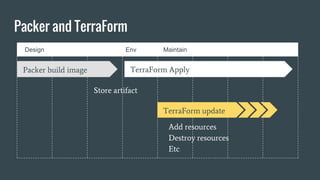
Design Env Maintain
Packer and TerraForm
Packer build image TerraForm Apply
Store artifact
TerraForm update
Add resources
Destroy resources
Etc

Automation with Packer and TerraForm

  • 1.
    Packer & TerraForm Abrief intro in automation using Packer and TerraForm
  • 2.
    Today’s challenges Increasingly complexinfrastructure to setup • Multiple environments for testing and production • Evolution / Changing of infrastructure • Documentation of infrastructure • More than one server involved
  • 3.
    Infrastructure as Code(IaC) Infrastructure as Code (IaC) is the process of managing and provisioning computing infrastructure (processes, bare-metal servers, virtual servers, etc.) and their configuration through machine-processable definition files • Cost (reduction) • Speed (faster execution) • and Risk (remove errors and security violations)
  • 4.
    Introducing Packer andTerraForm Packer Packer is a tool for creating machine and container images for multiple platforms from a single source configuration. Treat server as immutable Any configuration change results in a completely new server Allows for easier tools then Chef or Puppet JSON configuration language TerraForm Terraform provides a common configuration to launch infrastructure. Once launched, Terraform safely and efficiently changes infrastructure as the configuration is evolved Describe infrastructure in a declarative way Keep track of changes to the infrastructure Changing infrastructure is accessible to entire team Rollback your infrastructure to a previous point
  • 5.
    Why use Packer? Standardisedevelopment environments and machine images. Create near identical state infrastructure across multiple environments Why use TerraForm? To orchestrate and create resources in your environments with ease and simplicity
  • 6.
    <plan> Objectives ||Strategy || Design</plan>
  • 7.
  • 8.
    Create a template :configuration file used to define what image we want built and how Notes Define the builders Define provisioners Define post-processors Define variables (access keys etc) <NB/>: Parallel Builds Example { "builders": [], "description": "A packer example template", "min_packer_version": "0.8.0", "provisioners": [], "post-processors": [], "variables": [] }
  • 9.
    Builders Amazon EC2 (AMI) DigitalOcean Docker GoogleCompute Engine OpenStack VirtualBox <Commands/>: packer build packer fix packer inspect packer validate { "variables": { "aws_access_key": "YOURACCESSKEY", "aws_secret_key": "YOURSECRETKEY", "do_api_token": "YOURAPITOKEN" }, "builders": [{ "type": "amazon-ebs", "access_key": "{{user `aws_access_key`}}", "secret_key": "{{user `aws_secret_key`}}", "region": "us-east-1", "source_ami": "ami-fce3c696", "instance_type": "t2.micro", "ssh_username": "ubuntu", "ami_name": "packer-example {{timestamp}}" },{ "type": "digitalocean", "api_token": "{{user `do_api_token`}}", "image": "ubuntu-14-04-x64", "region": "nyc3", "size": "512mb" }], "provisioners": [{ "type": "shell", "inline": [ "sleep 30", "sudo apt-get update", "sudo apt-get install -y redis-server" ] }] }
  • 10.
    TerraForm https://www.terraform.io/ TerraForm Key Features: Infrastructureas Code Execution Plans Resource Graph Change Automation
  • 11.
    TerraForm : a toolfor building, changing, and versioning infrastructure safely and efficiently. Resources Providers terraform.tfstate: maps various resource metadata to actual resource IDs so that Terraform knows what it is managing Input variables: variables.tf & terraform.tfvars Output variables Example: main.tf provider "aws" { access_key = "ACCESS_KEY_HERE" secret_key = "SECRET_KEY_HERE" region = "us-east-1" } resource "aws_instance" "example" { ami = "ami-0d729a60" #from packer build instance_type = "t2.micro" }
  • 12.
    Templates main.tf variables.tf terraform.tfvars *.tpl (template resource) <commands/>: terraformvalidate terraform plan terraform apply terraform destroy # variables.tf variable "web_count" { type = "string" description = "How many EC2 instances to deploy" } # terraform.tfvars web_count = 2 aws_route53_zone_id = "YOURZONEID" aws_access_key = "YOURACCESS" aws_secret_key = "YOURSECRETKEYXXXXXXXXXXXXXXX" ….# snippet from main.tf resource "template_file" "web_server_init" { count = "${var.web_count}" template = "${file("web_init.tpl")}" vars { hostname = "${lookup(var.web_hostnames, count.index)}" device_name = "/dev/xvdf" mount_point = "/srv/data" } } #!/bin/bash -v sudo mkfs -t ext4 ${device_name} sudo mkdir ${mount_point} sudo echo "${device_name} ${mount_point} ext4 defaults,nofail 0 2" >> /etc/fstab
  • 13.
    Build Steps Planning (Packer-> TerraForm) Plan reqs: packer builders / provisioners Plan TerraForm resources/providers Remote build (Packer) Packer inspect/fix/validate Packer build (store build artifact)-> update TF to use this artifact/ami as a source TerraForm Plan Terraform validate > graph > plan Store plan output TerraForm Apply Run terraform apply (or terraform destroy) Commit .tfstate to VCS or remote backend.
  • 14.
    Design Env Maintain Packerand TerraForm Packer build image TerraForm Apply Store artifact TerraForm update Add resources Destroy resources Etc