Packer
by Hashicorp
Agenda
● Packer - overview
● Advantages
● Use cases
● Supported platforms
● Workflow - Build, Provision & Post Process
● Demo
Packer is a tool for creating machine and container images for
multiple platforms from a single source configuration.
A machine image is a single static unit that contains a
pre-configured operating system and installed software which is
used to quickly create new running machines.
Packer only builds images. It does not attempt to manage them
in any way. After they're built, it is up to you to launch or destroy
them.
Packer
Advantages of using :
● Super fast infrastructure deployment - Packer images allow you to launch completely
provisioned and configured machines in seconds. This benefits not only production, but
development as well.
● Multi-provider portability - Packer creates identical images for multiple platforms, you can
run production in AWS, staging/QA in a private cloud like OpenStack, and development in
desktop virtualization solutions such as VMware or VirtualBox. Each environment is running
an identical machine image, giving ultimate portability.
● Improved stability - Packer installs and configures all the software for a machine at the time
the image is built. If there are bugs in these scripts, they'll be caught early, rather later when a
machine is launched.
● Greater testability - After a machine image is built, that machine image can be quickly
launched and smoke tested to verify that things appear to be working. If they are, you can be
confident that any other machines launched from that image will function properly.
Packer
● Continuous Delivery - Add Packer in the middle of your continuous delivery pipeline. It can
be used to generate new machine images for multiple platforms on every change to
Chef/Puppet. As part of this pipeline, the newly created images can then be launched and
tested, verifying the infrastructure changes work. If the tests pass, you can be confident that
the image will work when deployed. This brings a new level of stability and testability to
infrastructure changes.
● Dev/Prod Parity - Packer helps keep development, staging, and production as similar as
possible. Packer can be used to generate images for multiple platforms at the same time. So if
you use AWS for production and Docker for development, you can generate both an AMI and
a VMware machine using Packer at the same time from the same template. Mix this in with
the continuous delivery use case above, and you have a pretty slick system for consistent
work environments from development all the way through to production.
● Appliance/Demo Creation - Since Packer creates consistent images for multiple platforms
in parallel, it is perfect for creating appliances and disposable product demos. As your
software changes, you can automatically create appliances with the software pre-installed.
Potential users can then get started with your software by deploying it to the environment of
their choice. Packaging up software with complex requirements has never been so easy.
Use cases
Supported Platforms
● Amazon EC2 (AMI)
● CloudStack
● OpenStack
● DigitalOcean
● Docker
● Google Compute Engine
● Parallels
● QEMU
● VirtualBox (OVF)
● VMware (VMX)
You can add support to any platform by extending Packer by
plugins [2].
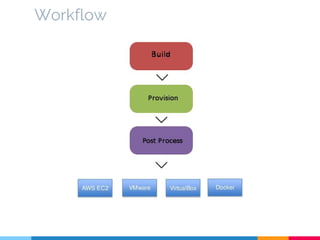
Workflow
Workflow - terminology
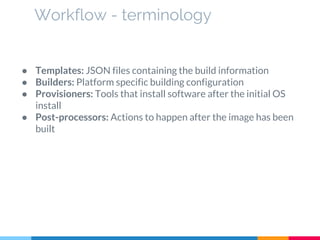
● Templates: JSON files containing the build information
● Builders: Platform specific building configuration
● Provisioners: Tools that install software after the initial OS
install
● Post-processors: Actions to happen after the image has been
built
{
"variables": {
"aws_access_key": "{{env `AWS_ACCESS_KEY`}}",
"aws_secret_key": "{{env `AWS_SECRET_KEY`}}"
},
"builders": [{
"type": "amazon-ebs",
"access_key": "{{user `aws_access_key`}}",
"secret_key": "{{user `aws_secret_key`}}",
"region": "us-east-1",
"source_ami": "ami-fce3c696",
"instance_type": "t2.micro",
"ssh_username": "admin",
"ami_name": "yourApp {{timestamp}}"
}]
}
Validate -> packer validate packer.json
Packer can create multiple images for multiple platforms in parallel, all configured from a single template [8].
Workflow - Build
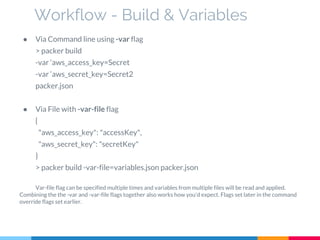
● Via Command line using -var flag
> packer build
-var ‘aws_access_key=Secret
-var ‘aws_secret_key=Secret2
packer.json
● Via File with -var-file flag
{
"aws_access_key": "accessKey",
"aws_secret_key": "secretKey"
}
> packer build -var-file=variables.json packer.json
Var-file flag can be specified multiple times and variables from multiple files will be read and applied.
Combining the the -var and -var-file flags together also works how you'd expect. Flags set later in the command
override flags set earlier.
Workflow - Build & Variables
{
"variables": ["..."],
"builders": ["..."],
"provisioners": [{
"type": "shell",
"inline": [
"sleep 30", --waiting for SSH to be available
"sudo apt-get update",
"sudo apt-get install -y redis-server"
]
}, {
"type": "shell",
"script": "./scripts/install-java.sh",
}]
}
Others - Remote shell, File uploads, Ansible (local & remote), Chef, Puppet, Salt, PowerShell etc.
Workflow - Provision
{
"variables": "...",
"builders": ["..."],
"provisioners": ["..."],
"post-processors": [
{
"type": "compress",
"format": "tar.gz"
}
]
}
Others - Amazon Import, CheckSum, Docker Push/Tag/Save, Google Compute Export, Vagrant,
vSphere etc.
Workflow - Post Process
Demo
Thanks!
Any questions ?
Thank you http://www.slidescarnival.com for layout!
References :
1. https://www.packer.io
2. https://www.packer.io/docs/extend/builder.html
3. https://www.packer.io/docs/builders/virtualbox-iso.html
4. https://www.packer.io/docs/builders/amazon.html
5. https://www.packer.io/docs/builders/docker.html
6. https://www.packer.io/intro/getting-started/build-image.html
7. https://www.packer.io/intro/getting-started/provision.html
8. https://www.packer.io/intro/getting-started/parallel-builds.html
9. https://www.packer.io/docs/templates/user-variables.html
10. https://www.packer.io/docs/templates/post-processors.html
11. https://github.com/chef/bento
12. http://blog.deimos.fr/2015/01/16/packer-build-multiple-images
-easily/
13. http://kappataumu.com/articles/creating-an-Ubuntu-VM-with-
packer.html

Packer by HashiCorp

  • 1.
  • 2.
    Agenda ● Packer -overview ● Advantages ● Use cases ● Supported platforms ● Workflow - Build, Provision & Post Process ● Demo
  • 3.
    Packer is atool for creating machine and container images for multiple platforms from a single source configuration. A machine image is a single static unit that contains a pre-configured operating system and installed software which is used to quickly create new running machines. Packer only builds images. It does not attempt to manage them in any way. After they're built, it is up to you to launch or destroy them. Packer
  • 4.
    Advantages of using: ● Super fast infrastructure deployment - Packer images allow you to launch completely provisioned and configured machines in seconds. This benefits not only production, but development as well. ● Multi-provider portability - Packer creates identical images for multiple platforms, you can run production in AWS, staging/QA in a private cloud like OpenStack, and development in desktop virtualization solutions such as VMware or VirtualBox. Each environment is running an identical machine image, giving ultimate portability. ● Improved stability - Packer installs and configures all the software for a machine at the time the image is built. If there are bugs in these scripts, they'll be caught early, rather later when a machine is launched. ● Greater testability - After a machine image is built, that machine image can be quickly launched and smoke tested to verify that things appear to be working. If they are, you can be confident that any other machines launched from that image will function properly. Packer
  • 5.
    ● Continuous Delivery- Add Packer in the middle of your continuous delivery pipeline. It can be used to generate new machine images for multiple platforms on every change to Chef/Puppet. As part of this pipeline, the newly created images can then be launched and tested, verifying the infrastructure changes work. If the tests pass, you can be confident that the image will work when deployed. This brings a new level of stability and testability to infrastructure changes. ● Dev/Prod Parity - Packer helps keep development, staging, and production as similar as possible. Packer can be used to generate images for multiple platforms at the same time. So if you use AWS for production and Docker for development, you can generate both an AMI and a VMware machine using Packer at the same time from the same template. Mix this in with the continuous delivery use case above, and you have a pretty slick system for consistent work environments from development all the way through to production. ● Appliance/Demo Creation - Since Packer creates consistent images for multiple platforms in parallel, it is perfect for creating appliances and disposable product demos. As your software changes, you can automatically create appliances with the software pre-installed. Potential users can then get started with your software by deploying it to the environment of their choice. Packaging up software with complex requirements has never been so easy. Use cases
  • 6.
    Supported Platforms ● AmazonEC2 (AMI) ● CloudStack ● OpenStack ● DigitalOcean ● Docker ● Google Compute Engine ● Parallels ● QEMU ● VirtualBox (OVF) ● VMware (VMX) You can add support to any platform by extending Packer by plugins [2].
  • 7.
  • 8.
    Workflow - terminology ●Templates: JSON files containing the build information ● Builders: Platform specific building configuration ● Provisioners: Tools that install software after the initial OS install ● Post-processors: Actions to happen after the image has been built
  • 9.
    { "variables": { "aws_access_key": "{{env`AWS_ACCESS_KEY`}}", "aws_secret_key": "{{env `AWS_SECRET_KEY`}}" }, "builders": [{ "type": "amazon-ebs", "access_key": "{{user `aws_access_key`}}", "secret_key": "{{user `aws_secret_key`}}", "region": "us-east-1", "source_ami": "ami-fce3c696", "instance_type": "t2.micro", "ssh_username": "admin", "ami_name": "yourApp {{timestamp}}" }] } Validate -> packer validate packer.json Packer can create multiple images for multiple platforms in parallel, all configured from a single template [8]. Workflow - Build
  • 10.
    ● Via Commandline using -var flag > packer build -var ‘aws_access_key=Secret -var ‘aws_secret_key=Secret2 packer.json ● Via File with -var-file flag { "aws_access_key": "accessKey", "aws_secret_key": "secretKey" } > packer build -var-file=variables.json packer.json Var-file flag can be specified multiple times and variables from multiple files will be read and applied. Combining the the -var and -var-file flags together also works how you'd expect. Flags set later in the command override flags set earlier. Workflow - Build & Variables
  • 11.
    { "variables": ["..."], "builders": ["..."], "provisioners":[{ "type": "shell", "inline": [ "sleep 30", --waiting for SSH to be available "sudo apt-get update", "sudo apt-get install -y redis-server" ] }, { "type": "shell", "script": "./scripts/install-java.sh", }] } Others - Remote shell, File uploads, Ansible (local & remote), Chef, Puppet, Salt, PowerShell etc. Workflow - Provision
  • 12.
    { "variables": "...", "builders": ["..."], "provisioners":["..."], "post-processors": [ { "type": "compress", "format": "tar.gz" } ] } Others - Amazon Import, CheckSum, Docker Push/Tag/Save, Google Compute Export, Vagrant, vSphere etc. Workflow - Post Process
  • 13.
  • 14.
    Thanks! Any questions ? Thankyou http://www.slidescarnival.com for layout! References : 1. https://www.packer.io 2. https://www.packer.io/docs/extend/builder.html 3. https://www.packer.io/docs/builders/virtualbox-iso.html 4. https://www.packer.io/docs/builders/amazon.html 5. https://www.packer.io/docs/builders/docker.html 6. https://www.packer.io/intro/getting-started/build-image.html 7. https://www.packer.io/intro/getting-started/provision.html 8. https://www.packer.io/intro/getting-started/parallel-builds.html 9. https://www.packer.io/docs/templates/user-variables.html 10. https://www.packer.io/docs/templates/post-processors.html 11. https://github.com/chef/bento 12. http://blog.deimos.fr/2015/01/16/packer-build-multiple-images -easily/ 13. http://kappataumu.com/articles/creating-an-Ubuntu-VM-with- packer.html