Presented by
K.Swapna (09D21A0552)
K.Priyanka (09D21A0534)
V.Navyasree (09D21A0525)
Internal Guide
Mrs.B.Deepthi
Assistant Prof.
C.S.E
1/48student tracking system
Abstract
 Student Tracking System software accomplishes
guest logging, resource tracking, time-keeping,
and class roster management all within centralized
tracking system software. Student Tracking System
allows an organization to log, track, analyze,
tutoring centers, classrooms, etc., which requires
visitors to be logged.
2/48student tracking system
Introduction
 Outsourcing some activities.
 A Web Application is developed.
 Functionality of server.
3/48student tracking system
Existing System
 Wide-spread Businesses
 Franchise Model
 Stand-Alone Applications
4/48student tracking system
Proposed System
 Automation of the Entire Process.
 Easy Access of Information to Management.
 Easy Access of Information to Students.
5/48student tracking system
Modules involved
Access Management process to allow coaching
center personnel.
Coaching Center Profile and franchise information
setup and maintenance process.
Coaching Center Curriculum and schedules
setup and maintenance process.
6/48student tracking system
Modules involved
Student enrollment and status
tracking process
Content setup and maintenance
process
Student information retrieval process
Archiving and Backup process
7/48student tracking system
Project Requirements
 Hardware Requirements.
 Software Requirements.
8/48student tracking system
Hardware Requirements
Content Description
HDD 20 GB (Min)
40 GB (Recommended)
RAM 1 GB (Min)
9/48student tracking system
Software Requirements
Content Description
OS Windows XP(SP-3)
Or higher
IDE MS Visual Studio 2010
User Interface ASP .NET, HTML, CSS
Client-Side Scripting Java Script
Programming Language C#
Web Server IIS
Data Base MS SQL Server 2008 R2
10/48student tracking system
Design
 E-R DIAGRAMS
 DATA FLOW DIAGRAMS
 UML DIAGRAMS
11/48student tracking system
They specify the existential entities and also the standard relations through
which the system exists and the cardinalities that are necessary for the system
state to continue.
ER-DIAGRAM:
12/48student tracking system
E-R DIAGRAM
Batchstudents
studentId
BatchId
StudentName
RollNumber
StudentFee
ContactNumber
CourseSchedules
ScheduleId
InstituteId
ScheduleName
CourseId
MaxStudents
ScheduleStartDate
ScheduleEndDate
ClassStartTime
MasterBatches
BatchId
InstituteId
NumberOfStudents
CourseId
Details
CollegeName
MasterCourses
CourseId
InstituteId
CourseName
Contents
CourseFee
NameOftheStaff
MasterInstitutes
InstituteId
InstituteName
AddressDetails
ContactDetails
status
StudentPayments
PaymentId
StudentId
InstituteId
Amountpaid
PaidOn
ReceiptNumber
13/48student tracking system
DATA FLOW DIAGRAMS
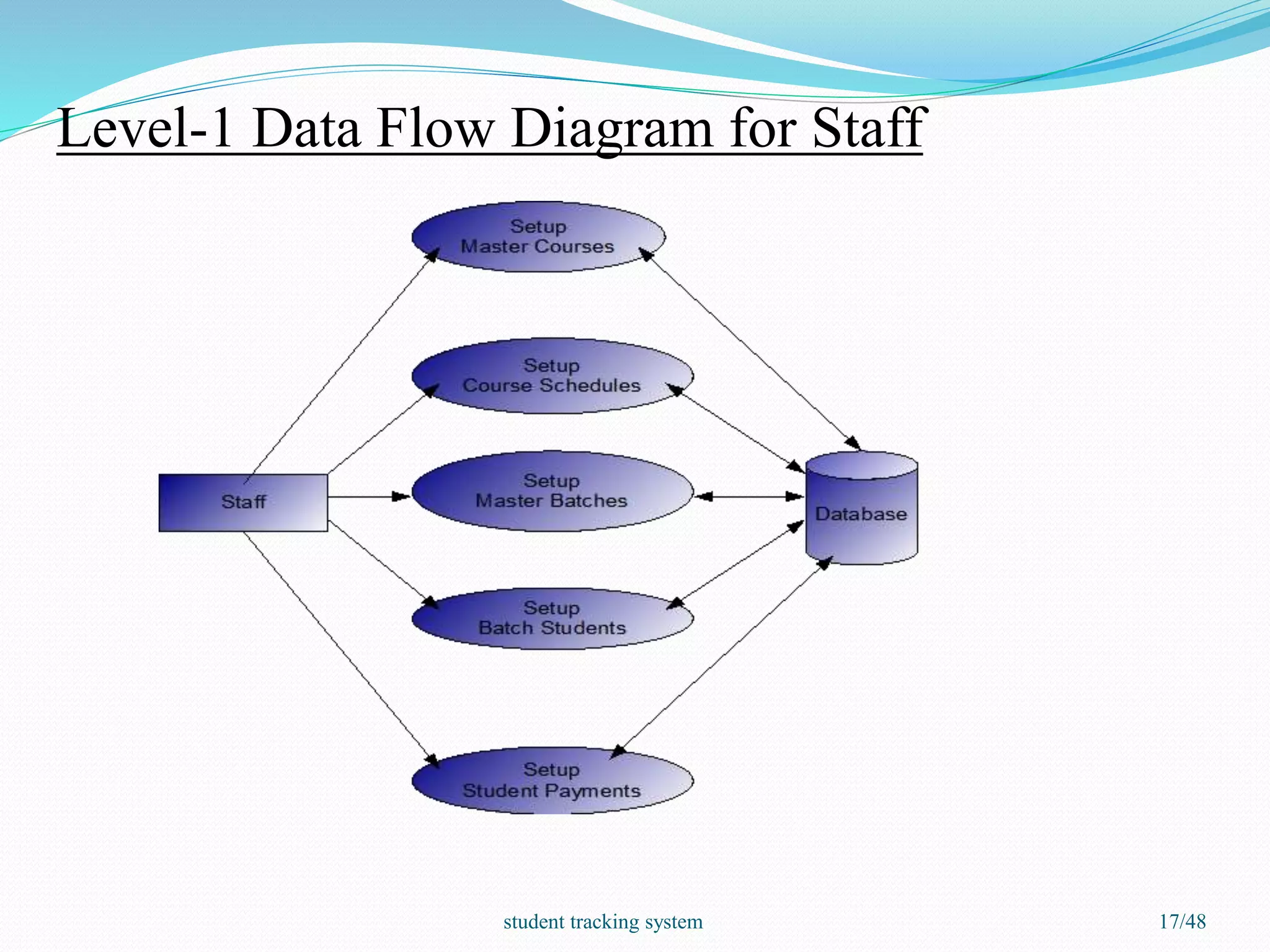
A data flow diagram is graphical tool used to describe and analyze
movement of data through a system.
LEVELS OF DFD:
 LEVEL-0: System Input/Output
 LEVEL-1: Subsystem Level Dataflow Functional
 LEVEL-2: File Level Detail Data Flow.
14/48student tracking system
LEVEL-0: System Input/Output
15/48student tracking system
Level-1 Data Flow Diagram for Admin
16/48student tracking system
Level-1 Data Flow Diagram for Staff
17/48student tracking system
Level - 2 Data Flow Diagram for Admin
18/48student tracking system
Level -2 Data Flow Diagram for Staff
19/48student tracking system
UML DIAGRAMS
 Unified Modeling Language includes a set of graphic
notation techniques to create visual models of object-
oriented software-intensive systems.
20/48student tracking system
9 Types of UML diagrams:
 Class Diagram
 Object Diagram
 Usecase Diagram
 Interaction Diagrams
 Activity Diagram
 State Chart Diagram
 Component Diagram
 Deployment Diagram
21/48student tracking system
UML DIAGRAMS
USECASE DIAGRAM:
It is a behavioral diagram that shows a set of use case actors and
their relationships.
22/48student tracking system
Use-Case diagram:
fig 1:Usecase Diagram
23/48student tracking system
Class Diagram
Fig 2: Class Diagram
 These diagrams reveal the
static design view
 It consists of classes,
interfaces and
collaborations.
MasterUsers
+UserId
+UserTYpe
+FirstName
+LastName
+Phone
+Mobile
+Email
+LoginId
+Password
+Status
+View()
+Update()
MasterLocations
+LocationId
+LocationName
+District
+State
+Status
+view()
+Update()
MasterInstitutes
+InstituteId
+InstituteName
+AddressDetails
+ContactDetails
+Status
+View()
+Update()
MasterCourses
+CourseId
+InstituteId
+CourseName
+Contents
+CourseFee
+NameOfTheStaff
+Status
+View()
+Update()
CourseSchedules
+ScheduleId
+InstituteId
+ScheduleName
+CourseId
+MaxStudents
+ScheduleStartDate
+ScheduleEndDate
+ClassStartTime
+ClassEndTime
+LabStartTime
+LabEndTime
+LabNumber
+Status
+View()
+Update()
StudentPayments
+PaymentId
+StudentId
+AmountPaid
+PaidOn
+InstituteId
+ReceiptNumber
+Status
+view()
+update()
MasterBatches
+BatchId
+InstituteId
+NumberOfStudents
+CourseId
+Details
+CollegeName
+ScheduleId
+Status
+View()
+Update()
BatchStudents
+StudentId
+BatchId
+StudentName
+RollNumber
+StudentFee
+ContactNumber
+Email
+Status
+View()
+Update()
1..*
1
1..*
1
24/48student tracking system
INTERACTION DIAGRAMS:
Interaction diagrams model the behavior of use cases by
describing the way groups of objects interact to complete the
task.
 SEQUENCE DIAGRAM
 COLLABORATION DIAGRAM
25/48student tracking system
Sequence Diagrams
Fig 3.1: Sequence Diagram For Admin
The sequence diagram
shows the ordering of the
messages.
 It shows the order of the
messages that the admin
should perform.
Home MasterUsers MasterLocations MasterInstituesAdmin
1 : Login()
2 : Validation()
3 : Return()
4 : Setup() 5 : View/update()
6 : Setup()
7 : View/update()
8 : Setup()
9 : view/update()
10 : logout()
26/48student tracking system
Sequence Diagrams
Fig 3.2: Sequence Diagram For Staff
Home Master Courses Course Schedules Master Batches Batch Students Student Payments HomeStaff
1 : login()
2 : Validation()
3 : Return()
4 : Setup()
5 : View()
6 : Update()
7 : setup()
8 : View()
9 : update()
10 : Setup()
11 : View()
12 : Update()
13 : Setup()
14 : View()
15 : Update()
16 : Setup()
17 : View()
18 : Update()
19 : logout()
27/48student tracking system
Collaboration Diagrams
Fig 4.1: Collaboration Diagram For
Admin
 It models the objects relating
to their structural behavior.
 This includes transmission of
message between the
objects.
Admin
Home
MasterUsers
MasterLocations
MasterInstitutes
Home
1 : login()
2 : Validation()
3 : Return()
4 : Setup()
5 : View()
6 : Update()
7 : Setup()
8 : View()
9 : update()
10 : Setup()
11 : View()
12 : Update()
13 : logout()
28/48student tracking system
Collaboration Diagrams
Fig 4.2: Collaboration Diagram For Staff
Home
Master Courses
Course Schedules
Master Batches Batch Students Student Payments
Home
Staff
1 : login()
2 : Validation()
3 : Return()
4 : Setup()
5 : View()
6 : Update()
7 : setup()
8 : View()
9 : update()
10 : Setup()
11 : View()
12 : Update()
13 : Setup()
14 : View()
15 : Update()
16 : Setup()
17 : View()
18 : Update()
19 : logout()
29/48student tracking system
STATE CHART DIAGRAM:
 The state-chart diagram explains the life time of an object.
 The state chart diagram of login validation tells the actions that
should be performed by a user.
 The user should enter the details in the form, and then either he can
submit the form or reset the form.
30/48student tracking system
State chart diagram
Fig 5: State Chart Diagram
31/48student tracking system
ACTIVITY DIAGRAM:
 Activity diagram shows the flow of events or activities within our
system.
 It represents the business and operational workflows of the system.
32/48student tracking system
Activity Diagram
Fig 6: Activity Diagram for User
33/48student tracking system
COMPONENT DIAGRAM:
 Component diagrams are used to model physical aspects of a system.
 Component diagram is used to visualize the organization and
relationships among components in a system.
 They are also used to make executing systems.
34/48student tracking system
Component Diagram
ADMIN STAFF
setupUsers
<<artifact>>
setuplocations
<<artifact>>
setupinstitutes
<<artifact>>
View&update usres
<<artifact>>
view&update locations
<<artifact>>
view&update institutes
<<artifact>>
setupbatches
<<artifact>>
setup schedules
<<artifact>>
setup courses
<<artifact>>
setup students
<<artifact>>
view&update batches
<<artifact>>
setup payments
<<artifact>>
view&update schedules
<<artifact>>
view&update students
<<artifact>>
view&update courses
<<artifact>>
view&update payments
<<artifact>>
Fig 7: Component Diagram
35/48student tracking system
DEPLOYMENT DIAGRAM:
 Shows the run time processing nodes and the components
that live on them.
 Deployment diagrams address the static deployment view
of the architecture.
36/48student tracking system
Deployment Diagram
Fig 8: Deployment Diagram
37/48student tracking system
Screen Shots
Home Page :
Fig 9.0: Screenshot for Home Page
38/48student tracking system
Admin
Fig 9.1: Screenshot for Admin Page
39/48student tracking system
Registration Page :
Fig 9.2: Screenshot for Registration Page
40/48student tracking system
Contact Us Page :
Fig 9.3: Screenshot for Contact Us Page
41/48student tracking system
Login Page :
Fig 9.4: Screenshot for Home Page
42/48student tracking system
Test case1:Checking for proper alignment
and navigation of hyperlinks
Priority (H,L): High
Test Objective: To check whether the alignment is correct or not and by clicking on
menu or hyperlink it must navigate to appropriate page.
Test Description :The alignment is checked and [menu] or [hyperlink] is also checked.
Requirements Verified: Yes
Test Environment : SQL Server
Test Setup/Pre-conditions: Receiver should be in connection accept state
Actions Expected
The pages are verified for redirection and
alignment.
Logged successfully
Pass: Yes Condition Pass: Yes Fail: No
Problems/Issues: NIL
Output: Successfully Executed
Home Page :
TEST CASES
43/48student tracking system
Test case1: Validating the Admin/Staff
login
Priority (H,L): High
Test Objective: To check whether the Admin/Staff has logged into the application
Test Description: The Admin/Staff enters the login data that will be verified against the
valid data in the database
Requirements Verified: Yes
Test Environment : SQL Server
Test Setup/Pre-conditions: Receiver should be in connection accept state
Actions Expected
The Admin/Staff will enter the data Logged successfully
Pass: Yes Condition Pass: Yes Fail: No
Problems/Issues: NIL
Output: Successfully Executed
Login Page :
44/48student tracking system
Conclusion
 It will be a medium for the educational societies for proper
management of student’s information along with the staff ’s
information in an organized way.
 Easy flow of information between the different staff and student’s.
 The loss or misleading of information on trivial problems can be
reduced.
45/48student tracking system
References
 FOR .NET INSTALLATION
www.support.mircosoft.com
 FOR DEPLOYMENT AND PACKING ON SERVER
www.developer.com
www.15seconds.com
 FOR SQL
www.msdn.microsoft.com
 FOR ASP.NET
www.msdn.microsoft.com/net/quickstart/aspplus/default.com
www.asp.net
www.fmexpense.com/quickstart/aspplus/default.com
46/48student tracking system
Any queries??
47/48student tracking system
Thank you
48/48student tracking system

Student Tracking System

  • 1.
    Presented by K.Swapna (09D21A0552) K.Priyanka(09D21A0534) V.Navyasree (09D21A0525) Internal Guide Mrs.B.Deepthi Assistant Prof. C.S.E 1/48student tracking system
  • 2.
    Abstract  Student TrackingSystem software accomplishes guest logging, resource tracking, time-keeping, and class roster management all within centralized tracking system software. Student Tracking System allows an organization to log, track, analyze, tutoring centers, classrooms, etc., which requires visitors to be logged. 2/48student tracking system
  • 3.
    Introduction  Outsourcing someactivities.  A Web Application is developed.  Functionality of server. 3/48student tracking system
  • 4.
    Existing System  Wide-spreadBusinesses  Franchise Model  Stand-Alone Applications 4/48student tracking system
  • 5.
    Proposed System  Automationof the Entire Process.  Easy Access of Information to Management.  Easy Access of Information to Students. 5/48student tracking system
  • 6.
    Modules involved Access Managementprocess to allow coaching center personnel. Coaching Center Profile and franchise information setup and maintenance process. Coaching Center Curriculum and schedules setup and maintenance process. 6/48student tracking system
  • 7.
    Modules involved Student enrollmentand status tracking process Content setup and maintenance process Student information retrieval process Archiving and Backup process 7/48student tracking system
  • 8.
    Project Requirements  HardwareRequirements.  Software Requirements. 8/48student tracking system
  • 9.
    Hardware Requirements Content Description HDD20 GB (Min) 40 GB (Recommended) RAM 1 GB (Min) 9/48student tracking system
  • 10.
    Software Requirements Content Description OSWindows XP(SP-3) Or higher IDE MS Visual Studio 2010 User Interface ASP .NET, HTML, CSS Client-Side Scripting Java Script Programming Language C# Web Server IIS Data Base MS SQL Server 2008 R2 10/48student tracking system
  • 11.
    Design  E-R DIAGRAMS DATA FLOW DIAGRAMS  UML DIAGRAMS 11/48student tracking system
  • 12.
    They specify theexistential entities and also the standard relations through which the system exists and the cardinalities that are necessary for the system state to continue. ER-DIAGRAM: 12/48student tracking system
  • 13.
  • 14.
    DATA FLOW DIAGRAMS Adata flow diagram is graphical tool used to describe and analyze movement of data through a system. LEVELS OF DFD:  LEVEL-0: System Input/Output  LEVEL-1: Subsystem Level Dataflow Functional  LEVEL-2: File Level Detail Data Flow. 14/48student tracking system
  • 15.
  • 16.
    Level-1 Data FlowDiagram for Admin 16/48student tracking system
  • 17.
    Level-1 Data FlowDiagram for Staff 17/48student tracking system
  • 18.
    Level - 2Data Flow Diagram for Admin 18/48student tracking system
  • 19.
    Level -2 DataFlow Diagram for Staff 19/48student tracking system
  • 20.
    UML DIAGRAMS  UnifiedModeling Language includes a set of graphic notation techniques to create visual models of object- oriented software-intensive systems. 20/48student tracking system
  • 21.
    9 Types ofUML diagrams:  Class Diagram  Object Diagram  Usecase Diagram  Interaction Diagrams  Activity Diagram  State Chart Diagram  Component Diagram  Deployment Diagram 21/48student tracking system
  • 22.
    UML DIAGRAMS USECASE DIAGRAM: Itis a behavioral diagram that shows a set of use case actors and their relationships. 22/48student tracking system
  • 23.
    Use-Case diagram: fig 1:UsecaseDiagram 23/48student tracking system
  • 24.
    Class Diagram Fig 2:Class Diagram  These diagrams reveal the static design view  It consists of classes, interfaces and collaborations. MasterUsers +UserId +UserTYpe +FirstName +LastName +Phone +Mobile +Email +LoginId +Password +Status +View() +Update() MasterLocations +LocationId +LocationName +District +State +Status +view() +Update() MasterInstitutes +InstituteId +InstituteName +AddressDetails +ContactDetails +Status +View() +Update() MasterCourses +CourseId +InstituteId +CourseName +Contents +CourseFee +NameOfTheStaff +Status +View() +Update() CourseSchedules +ScheduleId +InstituteId +ScheduleName +CourseId +MaxStudents +ScheduleStartDate +ScheduleEndDate +ClassStartTime +ClassEndTime +LabStartTime +LabEndTime +LabNumber +Status +View() +Update() StudentPayments +PaymentId +StudentId +AmountPaid +PaidOn +InstituteId +ReceiptNumber +Status +view() +update() MasterBatches +BatchId +InstituteId +NumberOfStudents +CourseId +Details +CollegeName +ScheduleId +Status +View() +Update() BatchStudents +StudentId +BatchId +StudentName +RollNumber +StudentFee +ContactNumber +Email +Status +View() +Update() 1..* 1 1..* 1 24/48student tracking system
  • 25.
    INTERACTION DIAGRAMS: Interaction diagramsmodel the behavior of use cases by describing the way groups of objects interact to complete the task.  SEQUENCE DIAGRAM  COLLABORATION DIAGRAM 25/48student tracking system
  • 26.
    Sequence Diagrams Fig 3.1:Sequence Diagram For Admin The sequence diagram shows the ordering of the messages.  It shows the order of the messages that the admin should perform. Home MasterUsers MasterLocations MasterInstituesAdmin 1 : Login() 2 : Validation() 3 : Return() 4 : Setup() 5 : View/update() 6 : Setup() 7 : View/update() 8 : Setup() 9 : view/update() 10 : logout() 26/48student tracking system
  • 27.
    Sequence Diagrams Fig 3.2:Sequence Diagram For Staff Home Master Courses Course Schedules Master Batches Batch Students Student Payments HomeStaff 1 : login() 2 : Validation() 3 : Return() 4 : Setup() 5 : View() 6 : Update() 7 : setup() 8 : View() 9 : update() 10 : Setup() 11 : View() 12 : Update() 13 : Setup() 14 : View() 15 : Update() 16 : Setup() 17 : View() 18 : Update() 19 : logout() 27/48student tracking system
  • 28.
    Collaboration Diagrams Fig 4.1:Collaboration Diagram For Admin  It models the objects relating to their structural behavior.  This includes transmission of message between the objects. Admin Home MasterUsers MasterLocations MasterInstitutes Home 1 : login() 2 : Validation() 3 : Return() 4 : Setup() 5 : View() 6 : Update() 7 : Setup() 8 : View() 9 : update() 10 : Setup() 11 : View() 12 : Update() 13 : logout() 28/48student tracking system
  • 29.
    Collaboration Diagrams Fig 4.2:Collaboration Diagram For Staff Home Master Courses Course Schedules Master Batches Batch Students Student Payments Home Staff 1 : login() 2 : Validation() 3 : Return() 4 : Setup() 5 : View() 6 : Update() 7 : setup() 8 : View() 9 : update() 10 : Setup() 11 : View() 12 : Update() 13 : Setup() 14 : View() 15 : Update() 16 : Setup() 17 : View() 18 : Update() 19 : logout() 29/48student tracking system
  • 30.
    STATE CHART DIAGRAM: The state-chart diagram explains the life time of an object.  The state chart diagram of login validation tells the actions that should be performed by a user.  The user should enter the details in the form, and then either he can submit the form or reset the form. 30/48student tracking system
  • 31.
    State chart diagram Fig5: State Chart Diagram 31/48student tracking system
  • 32.
    ACTIVITY DIAGRAM:  Activitydiagram shows the flow of events or activities within our system.  It represents the business and operational workflows of the system. 32/48student tracking system
  • 33.
    Activity Diagram Fig 6:Activity Diagram for User 33/48student tracking system
  • 34.
    COMPONENT DIAGRAM:  Componentdiagrams are used to model physical aspects of a system.  Component diagram is used to visualize the organization and relationships among components in a system.  They are also used to make executing systems. 34/48student tracking system
  • 35.
    Component Diagram ADMIN STAFF setupUsers <<artifact>> setuplocations <<artifact>> setupinstitutes <<artifact>> View&updateusres <<artifact>> view&update locations <<artifact>> view&update institutes <<artifact>> setupbatches <<artifact>> setup schedules <<artifact>> setup courses <<artifact>> setup students <<artifact>> view&update batches <<artifact>> setup payments <<artifact>> view&update schedules <<artifact>> view&update students <<artifact>> view&update courses <<artifact>> view&update payments <<artifact>> Fig 7: Component Diagram 35/48student tracking system
  • 36.
    DEPLOYMENT DIAGRAM:  Showsthe run time processing nodes and the components that live on them.  Deployment diagrams address the static deployment view of the architecture. 36/48student tracking system
  • 37.
    Deployment Diagram Fig 8:Deployment Diagram 37/48student tracking system
  • 38.
    Screen Shots Home Page: Fig 9.0: Screenshot for Home Page 38/48student tracking system
  • 39.
    Admin Fig 9.1: Screenshotfor Admin Page 39/48student tracking system
  • 40.
    Registration Page : Fig9.2: Screenshot for Registration Page 40/48student tracking system
  • 41.
    Contact Us Page: Fig 9.3: Screenshot for Contact Us Page 41/48student tracking system
  • 42.
    Login Page : Fig9.4: Screenshot for Home Page 42/48student tracking system
  • 43.
    Test case1:Checking forproper alignment and navigation of hyperlinks Priority (H,L): High Test Objective: To check whether the alignment is correct or not and by clicking on menu or hyperlink it must navigate to appropriate page. Test Description :The alignment is checked and [menu] or [hyperlink] is also checked. Requirements Verified: Yes Test Environment : SQL Server Test Setup/Pre-conditions: Receiver should be in connection accept state Actions Expected The pages are verified for redirection and alignment. Logged successfully Pass: Yes Condition Pass: Yes Fail: No Problems/Issues: NIL Output: Successfully Executed Home Page : TEST CASES 43/48student tracking system
  • 44.
    Test case1: Validatingthe Admin/Staff login Priority (H,L): High Test Objective: To check whether the Admin/Staff has logged into the application Test Description: The Admin/Staff enters the login data that will be verified against the valid data in the database Requirements Verified: Yes Test Environment : SQL Server Test Setup/Pre-conditions: Receiver should be in connection accept state Actions Expected The Admin/Staff will enter the data Logged successfully Pass: Yes Condition Pass: Yes Fail: No Problems/Issues: NIL Output: Successfully Executed Login Page : 44/48student tracking system
  • 45.
    Conclusion  It willbe a medium for the educational societies for proper management of student’s information along with the staff ’s information in an organized way.  Easy flow of information between the different staff and student’s.  The loss or misleading of information on trivial problems can be reduced. 45/48student tracking system
  • 46.
    References  FOR .NETINSTALLATION www.support.mircosoft.com  FOR DEPLOYMENT AND PACKING ON SERVER www.developer.com www.15seconds.com  FOR SQL www.msdn.microsoft.com  FOR ASP.NET www.msdn.microsoft.com/net/quickstart/aspplus/default.com www.asp.net www.fmexpense.com/quickstart/aspplus/default.com 46/48student tracking system
  • 47.
  • 48.