UML ARCHITECTURE OF A WEB-BASED INTERACTIVE
                          COURSE TOOL
                      Lakshmi K. Bhetanabhotla, N. Bussa, A. Mohammad,
                                 O. Abdalla, and Hany H. Ammar
                      Dept. of Computer Science and Electrical Engineering,
                                    West Virginia University
                                  Morgantown, WV26506-6109
                                       hammar@wvu.edu
             Abstract: The demand for educational software is growing exponentially with the surge
             of interest in educational reform, the Internet and distance education. A Web-based
             Interactive Course Tool was developed at West Virginia University. The tool provides
             components for instructors, administrators, and students to interact effectively through the
             Internet. This paper presents an object-oriented software architecture model of this tool.

             Keywords: Distant Teaching and virtual classroom, Internet University Object-Oriented
             Analysis and Design using UML, Visual Modeling

    1. Introduction                                        administrator is granted the privileges to add a
Network - based distributed education is a reality         new course, a new instructor or a new student to
today. This is the result of an increasing demand          the database, register them for a particular
for distance education for reasons like increased          course, query the list of students registered for
commute time, jammed classrooms and parking                any particular course, or the list of courses
lots [1]. It also provides access to quality courses       lectured by a particular instructor, etc.,
to the learners who are unable to attend classes in        The focus of this paper is to develop software
the traditional ways. It enables adults and full-          architecture for this tool and discuss issues
time employees to acquire education similar to             related to implementation and testing. Section 2
attending any other school.                                of the paper presents component-based software
Web-based Interactive Course Tool (WICT) is                architecture.    Section      3    discusses  the
one such instructional delivery environment                implementation and testing issues, and section 4
developed in the Laboratory of Computer-based              provides conclusions and future work.
Instructional Technology (LCIT), at the Dept of
Computer Science and Electrical Engineering at                  2. UML Architecture of WICT.
West Virginia University [2][3][4][7]. This tool           The Unified Modeling Language (UML) is a
provides support for distance education over the           language      for    specifying,    visualizing,
Internet with a high level of interactivity between        constructing, and documenting the artifacts of
students and instructors through implementing              software systems, as well as for business
both Synchronous and Asynchronous modes.                   modeling and other non-software systems. The
The instructors are provided functionalities to            UML represents a collection of best engineering
add a new course, create course notes, quizzes,            practices that have proven successful in the
assignments, exams and evaluation forms and                modeling of large and complex systems. UML
view their results; participate in the discussion          provides the application modeling language for
groups and message boards and also post the                [5]:
student grades online. The students are allowed                 N Business process modeling with use-
to view the posted course notes and assignments,                cases.
take the online quizzes and exams, complete and                 N Class and object modeling.
submit the evaluation forms for the instructor,                 N Component modeling
get their grades online and participate in the                  N Distribution and deployment modeling.
discussion groups and message boards. The
    N
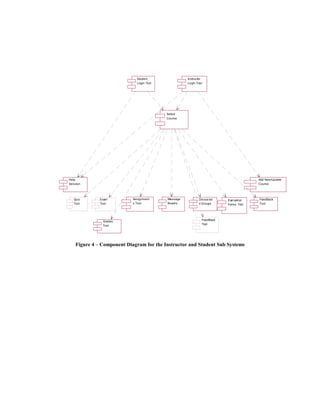
This project adopted UML modeling techniques         Figure 3 represents the component diagram of
for the design. The three kinds of UML models        the whole system. The system consists of three
used to describe the component-based model of        sub systems and a Database Component. The
this project are the Use-Case Diagrams,              three sub systems, Student Sub System,
Component Diagrams and the Class Diagrams.           Instructor Sub System and the Administrator Sub
The design begins with the illustration of Use-      System are dependent on the central Database
Case diagrams that represent the system and one      Component.
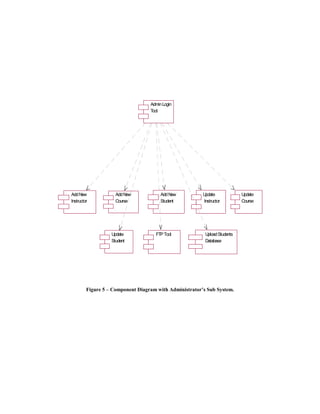
or more outside interactors (called actors),         Figure 4 is the general representation of the
together with actions performed by the system.       components involved in the whole System whose
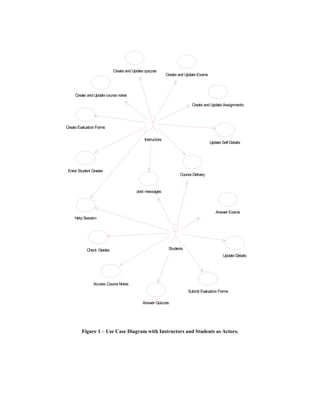
Figure 1 illustrates the interaction of the          top layer is the Students’ and the Instructors’
Instructors and the Students with the System.        Interface.
Instructors are Students are the external entities    The Instructors and the Students enter the
to the System who can log into the System and        System through a Login Tool Component in the
use the functionality provided by the system. The    first layer, and then the Select Course Tool
interaction between the Instructors and the          Component in the second layer. The components
Students can take place in two modes;                in the next layer of the hierarchy are dependent
Synchronous and Asynchronous modes. The              on the session variables that are passed on from
Synchronous interactivity is provided by             the tools in the first two layers. Figure 5 is the
functionality offered by the tools like Course       representation of the rest of the components
Delivery, Discussion Groups, Feedback tool and       involved in the system whose top Layer is the
Help Session. The course delivery tool and the       Administrators interface. A more detailed
help session tool are based on the Microsoft         representation of the interfaces that form the first
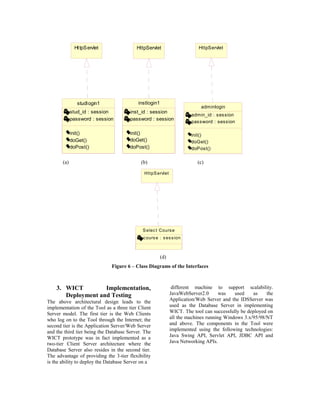
Netmeeting conferencing component. The               layer in the figures 4 and 5 is represented in the
Feedback tool is part of Course delivery and is      Figure 6.
intended to give the instructor immediate            Figure 6 (a) - represents the class diagram of the
feedback on the impressions of the students          Student's Interface in the Students Sub System to
during lecture delivery. These impressions           the Select Course Tool. Figure 6 (b) - represents
include three faces: a smiley face, a doubtful       the class diagram of the Instructor's Interface in
face, and a confused face. Quiz Tool, Grades         the Instructor Sub System to the Select Course
Tool, Assignments Tool, etc provide support for      Tool. Figure 6 (c) - represents the class diagram
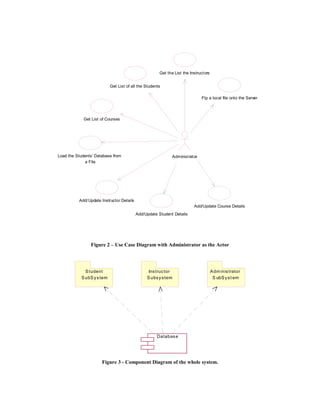
asynchronous communication. Figure 2                 of the Administrator's Interface in the
illustrates the interaction of the Administrator     Administrator Sub System to the other
with the System. The Administrator is also an        components in the Sub System.
external entity to the System who can log into       Figure 6 (d) - represents the class diagram of the
the System and use the functionality provided by     Select Course Tool, which is an interface
the System. The Use-Case Diagrams give an            between the Students and the Instructors
overview of the System functionality and its         Interface to the rest of the components in their
respective users from a Users’ perspective. A        respective Sub Systems A class diagram is a
more detailed documentation of the design issues     collection of (static) declarative model elements,
from a developer and a maintainer’s perspective      such as classes, interfaces, and their
is the illustration of the Component diagrams.       relationships, connected as a graph to each other
Component diagrams show the software                 and to their contents. A detailed class diagram
components that make up a reusable piece of          representation of each of the components
software, their interfaces, and their                represented in the above diagrams is documented
interrelationships. [6]                              in [7]
.


.


.
Create and Update quizzes
                                                           Create and Update Exams


     Create and Update course notes

                                                                         Create and Update Assignments


Create Evaluation Forms

                                             Instructors
                                                                                     Update Self Details


 Enter Student Grades
                                                                  Course Delivery


                                        post messages


                                                                                        Answer Exams
     Help Session


            Check Grades                                    Students
                                                                                             Update Details


                Access Course Notes
                                                                       Submit Evaluation Forms

                                           Answer Quizzes


         Figure 1 – Use Case Diagram with Instructors and Students as Actors.
Get the List the Instruct ors


                           Get List of all the Students

                                                                               Ftp a local file onto the Server


             Get List of Courses


Load the Students' Database from                             Administ rat or
             a File


          Add/ Update Instructor Details
                                                                          Add/Update Course Details
                                           Add/Update Student Details


                Figure 2 – Use Case Diagram with Administrator as the Actor


             S tudent                            Ins truc tor                         A dm inis trator
           S ubS y s tem                        S ubs y s tem                          S ubS y s t em


                                                     Databas e


                      Figure 3 - Component Diagram of the whole system.
Student                In structor
                              Login Tool             Lo gin Tool


                                           Select
                                           Course


Help                                                                                    Add New/Update
Se ssion                                                                                Course


   Quiz       Exam          Assignment     Message           Discus sio   Eval uation   FeedBack
   Tool       Tool          s Tool         Board s           n Groups     Forms Tool    Tool


               Grades                                          FeedBack
               Tool                                            Tool


    Figure 4 – Component Diagram for the Instructor and Student Sub Systems
Admin Login
                                   Tool


Add New              Add New            Add New          Update             Update
Instructor           Course             Student          Instructor         Course


                   Update            FTP Tool             Upload Students
                   Student                                Database


         Figure 5 – Component Diagram with Administrator’s Sub System.
Ht tpS ervlet               HttpServlet                      HttpServlet


                studlogin1                 instlogin1
                                                                            adminlogin
             stud_id : session         inst_id : session
                                                                       admin_id : session
             password : session        password : session
                                                                       password : session

             init()                    init()                          init()
             doGet()                   doGet()                         doGet()
             doPost()                  doPost()                        doPost()

       (a)                                  (b)                           (c)

                                             HttpS ervlet


                                             S elec t Cours e
                                             c ours e : s es s ion


                                                        (d)
                              Figure 6 – Class Diagrams of the Interfaces


    3. WICT         Implementation,                            different machine to support scalability.
       Deployment and Testing                                 JavaWebServer2.0       was   used    as    the
The above architectural design leads to the                   Application/Web Server and the IDSServer was
implementation of the Tool as a three tier Client             used as the Database Server in implementing
Server model. The first tier is the Web Clients               WICT. The tool can successfully be deployed on
who log on to the Tool through the Internet; the              all the machines running Windows 3.x/95/98/NT
second tier is the Application Server/Web Server              and above. The components in the Tool were
and the third tier being the Database Server. The             implemented using the following technologies:
WICT prototype was in fact implemented as a                   Java Swing API, Servlet API, JDBC API and
two-tier Client Server architecture where the                 Java Networking APIs.
Database Server also resides in the second tier.
The advantage of providing the 3-tier flexibility
is the ability to deploy the Database Server on a
The testing of Web-based applications has some       performance problems in terms of unacceptable
similarity with the testing of desktop systems,      network delays and degradation in the quality of
which involve the need to test the usual             audio-video interactions.
functionality, configuration, and compatibility,
as well as performing all the standard test types.        5. References
However, Web application testing is more             [1] Mark, J Pullen. The Internet-Based Lecture:
difficult because complexities are multiplied by     Converging Teaching and Technology, ACM
all the commercial components that interact with     Conference on Innovation and Technology in
the application. When an error is located in a       Computer Science Education (ITiCSE), July
Web environment, its often difficult to pinpoint     2000.
where the error occurs. The behavior seen or the     [2] NagaRaju, Bussa. WVU - Interactive Web
error message received may be the result of          Based Distance Learning Tool, MSEE Thesis,
errors happening on different distributed            Department of Computer Science and Electrical
components of the system and the error may be        Engineering, West Virginia University,
difficult to reproduce. Web environments are         December 1999.
dense with error-prone technology variables. The     (http://etd.wvu.edu/ETDS/E1116/bussa_n_etd.pd
five fundamental considerations of Web-              f)
application testing are:                             [3] Osama S. Abdalla, DBAdmin : A Web-
     N     When an error is flagged on the client    based Application for Distance Education, A
           side, it may be the symptom of an error   Masters of Computer Engineering Problem
           instead of the error itself.              Report, Dept. of Computer Science and
     N     Errors may be environment-dependent       Electrical Engineering, West Virginia
           and may not appear in different           University, December 1998.
           environments.                             [4] AbdulMobeen Mohammad, WVUCT: A
     N Errors may be in the code or in the           Process Centered Environment for Distance
     configuration.                                  Education, MSEE Thesis, Dept. of Computer
     N     Errors may reside in any of several       Science and Electrical Engineering, West
           layers.                                   Virginia University, March 1998.
     N     Examining the two classes of operating    [5] The Unified Modeling Language,
           environments - static versus dynamic -    http://www.rational.com/uml/gstart/index.jsp.
           demands different approaches.             [6] Gomaa, Hassan “Designing Concurrent
 The WICT prototype has been tested in the Lab       Distributed, and Real-time Applications with
and the successful and failed test cases are         UML, Object Technology Series, Addison
documented in [7]. Testing of the tool               Wesley, 2000, ISBN 0-201-65793-7.
components on actual courses is yet to be            [7] Lakshmi Bhetanabhotla, “Enhancements of
conducted.                                           WICT”, A Masters in Computer Science
                                                     Problem Report, Dept. of Computer Science and
                                                     Electrical Engineering, West Virginia
    4. Conclusions                                   University, October 2000.
A UML software architecture model of a Web-
based Interactive Course Tool is proposed. The
architecture contains components to support
interactions between instructors and students.
These components include a help session
components and a course delivery components
base on NetMeeting, the Microsoft conferencing
tool. A simple prototype of the tool is
implemented, deployed and then tested. The
scalability of the proposed architecture can be
enhanced using a distributed component
architecture based on a broker framework such
as CORBA (Common Object Request Broker
Architecture). The broker services could be
utilized to develop an extensible architecture.
The use of a conferencing tool component for
student instructor interactions could pose

Ammar 1

  • 1.
    UML ARCHITECTURE OFA WEB-BASED INTERACTIVE COURSE TOOL Lakshmi K. Bhetanabhotla, N. Bussa, A. Mohammad, O. Abdalla, and Hany H. Ammar Dept. of Computer Science and Electrical Engineering, West Virginia University Morgantown, WV26506-6109 hammar@wvu.edu Abstract: The demand for educational software is growing exponentially with the surge of interest in educational reform, the Internet and distance education. A Web-based Interactive Course Tool was developed at West Virginia University. The tool provides components for instructors, administrators, and students to interact effectively through the Internet. This paper presents an object-oriented software architecture model of this tool. Keywords: Distant Teaching and virtual classroom, Internet University Object-Oriented Analysis and Design using UML, Visual Modeling 1. Introduction administrator is granted the privileges to add a Network - based distributed education is a reality new course, a new instructor or a new student to today. This is the result of an increasing demand the database, register them for a particular for distance education for reasons like increased course, query the list of students registered for commute time, jammed classrooms and parking any particular course, or the list of courses lots [1]. It also provides access to quality courses lectured by a particular instructor, etc., to the learners who are unable to attend classes in The focus of this paper is to develop software the traditional ways. It enables adults and full- architecture for this tool and discuss issues time employees to acquire education similar to related to implementation and testing. Section 2 attending any other school. of the paper presents component-based software Web-based Interactive Course Tool (WICT) is architecture. Section 3 discusses the one such instructional delivery environment implementation and testing issues, and section 4 developed in the Laboratory of Computer-based provides conclusions and future work. Instructional Technology (LCIT), at the Dept of Computer Science and Electrical Engineering at 2. UML Architecture of WICT. West Virginia University [2][3][4][7]. This tool The Unified Modeling Language (UML) is a provides support for distance education over the language for specifying, visualizing, Internet with a high level of interactivity between constructing, and documenting the artifacts of students and instructors through implementing software systems, as well as for business both Synchronous and Asynchronous modes. modeling and other non-software systems. The The instructors are provided functionalities to UML represents a collection of best engineering add a new course, create course notes, quizzes, practices that have proven successful in the assignments, exams and evaluation forms and modeling of large and complex systems. UML view their results; participate in the discussion provides the application modeling language for groups and message boards and also post the [5]: student grades online. The students are allowed N Business process modeling with use- to view the posted course notes and assignments, cases. take the online quizzes and exams, complete and N Class and object modeling. submit the evaluation forms for the instructor, N Component modeling get their grades online and participate in the N Distribution and deployment modeling. discussion groups and message boards. The N
  • 2.
    This project adoptedUML modeling techniques Figure 3 represents the component diagram of for the design. The three kinds of UML models the whole system. The system consists of three used to describe the component-based model of sub systems and a Database Component. The this project are the Use-Case Diagrams, three sub systems, Student Sub System, Component Diagrams and the Class Diagrams. Instructor Sub System and the Administrator Sub The design begins with the illustration of Use- System are dependent on the central Database Case diagrams that represent the system and one Component. or more outside interactors (called actors), Figure 4 is the general representation of the together with actions performed by the system. components involved in the whole System whose Figure 1 illustrates the interaction of the top layer is the Students’ and the Instructors’ Instructors and the Students with the System. Interface. Instructors are Students are the external entities The Instructors and the Students enter the to the System who can log into the System and System through a Login Tool Component in the use the functionality provided by the system. The first layer, and then the Select Course Tool interaction between the Instructors and the Component in the second layer. The components Students can take place in two modes; in the next layer of the hierarchy are dependent Synchronous and Asynchronous modes. The on the session variables that are passed on from Synchronous interactivity is provided by the tools in the first two layers. Figure 5 is the functionality offered by the tools like Course representation of the rest of the components Delivery, Discussion Groups, Feedback tool and involved in the system whose top Layer is the Help Session. The course delivery tool and the Administrators interface. A more detailed help session tool are based on the Microsoft representation of the interfaces that form the first Netmeeting conferencing component. The layer in the figures 4 and 5 is represented in the Feedback tool is part of Course delivery and is Figure 6. intended to give the instructor immediate Figure 6 (a) - represents the class diagram of the feedback on the impressions of the students Student's Interface in the Students Sub System to during lecture delivery. These impressions the Select Course Tool. Figure 6 (b) - represents include three faces: a smiley face, a doubtful the class diagram of the Instructor's Interface in face, and a confused face. Quiz Tool, Grades the Instructor Sub System to the Select Course Tool, Assignments Tool, etc provide support for Tool. Figure 6 (c) - represents the class diagram asynchronous communication. Figure 2 of the Administrator's Interface in the illustrates the interaction of the Administrator Administrator Sub System to the other with the System. The Administrator is also an components in the Sub System. external entity to the System who can log into Figure 6 (d) - represents the class diagram of the the System and use the functionality provided by Select Course Tool, which is an interface the System. The Use-Case Diagrams give an between the Students and the Instructors overview of the System functionality and its Interface to the rest of the components in their respective users from a Users’ perspective. A respective Sub Systems A class diagram is a more detailed documentation of the design issues collection of (static) declarative model elements, from a developer and a maintainer’s perspective such as classes, interfaces, and their is the illustration of the Component diagrams. relationships, connected as a graph to each other Component diagrams show the software and to their contents. A detailed class diagram components that make up a reusable piece of representation of each of the components software, their interfaces, and their represented in the above diagrams is documented interrelationships. [6] in [7] . . .
  • 3.
    Create and Updatequizzes Create and Update Exams Create and Update course notes Create and Update Assignments Create Evaluation Forms Instructors Update Self Details Enter Student Grades Course Delivery post messages Answer Exams Help Session Check Grades Students Update Details Access Course Notes Submit Evaluation Forms Answer Quizzes Figure 1 – Use Case Diagram with Instructors and Students as Actors.
  • 4.
    Get the Listthe Instruct ors Get List of all the Students Ftp a local file onto the Server Get List of Courses Load the Students' Database from Administ rat or a File Add/ Update Instructor Details Add/Update Course Details Add/Update Student Details Figure 2 – Use Case Diagram with Administrator as the Actor S tudent Ins truc tor A dm inis trator S ubS y s tem S ubs y s tem S ubS y s t em Databas e Figure 3 - Component Diagram of the whole system.
  • 5.
    Student In structor Login Tool Lo gin Tool Select Course Help Add New/Update Se ssion Course Quiz Exam Assignment Message Discus sio Eval uation FeedBack Tool Tool s Tool Board s n Groups Forms Tool Tool Grades FeedBack Tool Tool Figure 4 – Component Diagram for the Instructor and Student Sub Systems
  • 6.
    Admin Login Tool Add New Add New Add New Update Update Instructor Course Student Instructor Course Update FTP Tool Upload Students Student Database Figure 5 – Component Diagram with Administrator’s Sub System.
  • 7.
    Ht tpS ervlet HttpServlet HttpServlet studlogin1 instlogin1 adminlogin stud_id : session inst_id : session admin_id : session password : session password : session password : session init() init() init() doGet() doGet() doGet() doPost() doPost() doPost() (a) (b) (c) HttpS ervlet S elec t Cours e c ours e : s es s ion (d) Figure 6 – Class Diagrams of the Interfaces 3. WICT Implementation, different machine to support scalability. Deployment and Testing JavaWebServer2.0 was used as the The above architectural design leads to the Application/Web Server and the IDSServer was implementation of the Tool as a three tier Client used as the Database Server in implementing Server model. The first tier is the Web Clients WICT. The tool can successfully be deployed on who log on to the Tool through the Internet; the all the machines running Windows 3.x/95/98/NT second tier is the Application Server/Web Server and above. The components in the Tool were and the third tier being the Database Server. The implemented using the following technologies: WICT prototype was in fact implemented as a Java Swing API, Servlet API, JDBC API and two-tier Client Server architecture where the Java Networking APIs. Database Server also resides in the second tier. The advantage of providing the 3-tier flexibility is the ability to deploy the Database Server on a
  • 8.
    The testing ofWeb-based applications has some performance problems in terms of unacceptable similarity with the testing of desktop systems, network delays and degradation in the quality of which involve the need to test the usual audio-video interactions. functionality, configuration, and compatibility, as well as performing all the standard test types. 5. References However, Web application testing is more [1] Mark, J Pullen. The Internet-Based Lecture: difficult because complexities are multiplied by Converging Teaching and Technology, ACM all the commercial components that interact with Conference on Innovation and Technology in the application. When an error is located in a Computer Science Education (ITiCSE), July Web environment, its often difficult to pinpoint 2000. where the error occurs. The behavior seen or the [2] NagaRaju, Bussa. WVU - Interactive Web error message received may be the result of Based Distance Learning Tool, MSEE Thesis, errors happening on different distributed Department of Computer Science and Electrical components of the system and the error may be Engineering, West Virginia University, difficult to reproduce. Web environments are December 1999. dense with error-prone technology variables. The (http://etd.wvu.edu/ETDS/E1116/bussa_n_etd.pd five fundamental considerations of Web- f) application testing are: [3] Osama S. Abdalla, DBAdmin : A Web- N When an error is flagged on the client based Application for Distance Education, A side, it may be the symptom of an error Masters of Computer Engineering Problem instead of the error itself. Report, Dept. of Computer Science and N Errors may be environment-dependent Electrical Engineering, West Virginia and may not appear in different University, December 1998. environments. [4] AbdulMobeen Mohammad, WVUCT: A N Errors may be in the code or in the Process Centered Environment for Distance configuration. Education, MSEE Thesis, Dept. of Computer N Errors may reside in any of several Science and Electrical Engineering, West layers. Virginia University, March 1998. N Examining the two classes of operating [5] The Unified Modeling Language, environments - static versus dynamic - http://www.rational.com/uml/gstart/index.jsp. demands different approaches. [6] Gomaa, Hassan “Designing Concurrent The WICT prototype has been tested in the Lab Distributed, and Real-time Applications with and the successful and failed test cases are UML, Object Technology Series, Addison documented in [7]. Testing of the tool Wesley, 2000, ISBN 0-201-65793-7. components on actual courses is yet to be [7] Lakshmi Bhetanabhotla, “Enhancements of conducted. WICT”, A Masters in Computer Science Problem Report, Dept. of Computer Science and Electrical Engineering, West Virginia 4. Conclusions University, October 2000. A UML software architecture model of a Web- based Interactive Course Tool is proposed. The architecture contains components to support interactions between instructors and students. These components include a help session components and a course delivery components base on NetMeeting, the Microsoft conferencing tool. A simple prototype of the tool is implemented, deployed and then tested. The scalability of the proposed architecture can be enhanced using a distributed component architecture based on a broker framework such as CORBA (Common Object Request Broker Architecture). The broker services could be utilized to develop an extensible architecture. The use of a conferencing tool component for student instructor interactions could pose