Storage Overview
Unit Objective
In this unit you should be able to understand
• Storage network technologies
• Types of storage system
• Fiber channels
• Fabric in storage
• Storage Area Networking
• Storage Virtualization
Storage Overview
• What is Storage Networking Technology?
– Storage networking is the process of linking storage
devices together and connecting to other IT networks and
provides a centralized repository for data that can be
accessed by users and uses high-speed connections to
provide fast performance.
– Storage networking is used in reference to storage area
networks (SANs) which links multiple storage devices and
provides block-level storage
Storage Overview
– The Storage networking can include direct-attached
storage (DAS), network-attached storage (NAS) and
storage-area network (SANs).
– The interface technologies used in storage networking
include Fibre Channel (FC), iSCSI and serial-attached SCSI
(SAS).
Storage Overview
– The benefits of storage networking are improved
performance, reliability and availability and also make it
easier to back up data for disaster recovery purpose.
– Storage networks are often used in parallel to storage
management technologies like storage resource
management software, virtualization and compression.
Storage Overview
• Types of Storage System
– Storage is a technology consisting of components and
recording media to retain digital data for the purpose of
future usage. It is a core function and fundamental
component of computers.
– All computers use a storage hierarchy which puts
expensive and small storage options into the CPU.
– The volatile technologies are referred to as memory and
the slow permanent technologies are referred to as
Storage.
Storage Overview
– The computer represents data using binary numeral
system. Text, numbers, pictures, audio are converted into
string of bits or binary digits having value of 0 or 1.
– Storage in a Computer is measured usually in bytes,
Kilobytes(KB), Megabytes(MB), Gigabytes(GB) and
presently in Terabytes(TB).
Storage Overview
• Types of Storage
– Primary Storage: Primary storage is also known as
memory, which is directly accessible to the CPU.
– RAM, ROM and Cache memory are examples of primary
memory.
– Secondary Storage: Secondary storage is also referred to
as external memory or auxillary storage and is the one
which is not directly accessible by the CPU.
– Examples of secondary storage technologies are Flash
memory, Floppy disks, magnetic tapes, Optical devices like
CD, DVD and also Zip drives.
Storage Overview
• Storage Devices and Technologies
– Hard Disk Drive: The most widely used storage device in
desktop and Laptop computers is the Hard Disk Drive.
– The hard disk drive consists of magnetic coated disks
called “platters” stacked one above other and is written
and read by drive heads.
– External disks can be connected using interfaces like SCSI,
USB or eSATA.
Storage Overview
• Storage Devices and Technologies
– RAID or Disk Array: The hard disk drives are grouped
together using hardware or software and is treated as a
single data storage unit.
– The data is recorded across multiple hard disk drives in
parallel, increasing the access time significantly.
– The array of multiple hard disk drives which forms the
RAID can also be partitioned and assigned with a file
system.
Storage Overview
• RAID Functions
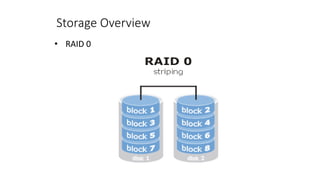
– Striping is the process in which consecutive logical bytes
of data is stored per blocks in the consecutive physical
disks which forms the array.
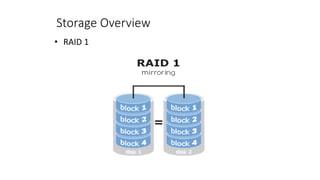
– Mirroring is the process in which the data is written to the
same block on two or more physical disks in the array.
– Parity Calculation - If there are N number of disks in the
RAID array, N-1 consecutive blocks are used for storing
data blocks and the Nth block is used for storing the parity
Storage Overview
• RAID Types
RAID 0
– RAID 0 is also called as Data Striping with No Parity
information. RAID 0 requires a minimum of 2 Hard Disk
drives.
– The advantages of RAID 0 is the increase in performance
due to the parallelism in the read and write process.
Storage Overview
• RAID 0
Storage Overview
• RAID 1
– RAID 1 is called as Data Mirroring. RAID 1 requires a
minimum of two or more Hard Disk drives.
– The advantages of RAID 1 are good performance in the
read operation as the data is read parallely from several
disks.
Storage Overview
• RAID 1
Storage Overview
• RAID 4
– RAID 4 is a process of independent, whole Block Access in
which the data is stored across the number of disks (N-1)
and the other disk acts as a dedicated Parity Drive which
stores the parity information.
Storage Overview
• RAID 5
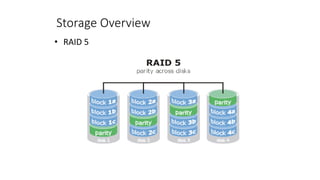
– RAID 5 is the process identical to the RAID 4, but the
parity is striped across multiple drives in the array.
– RAID 5 requires a minimum of 3 hard disk drives for its
configuration.
– The advantage of RAID 5 is the good read performance due
to the parallelism like RAID 0.
Storage Overview
• RAID 5
Storage Overview
• Optical Storage
– Optical Storage is one of the low-cost and reliable storage
media used in personal computers for incremental data
archiving.
– Optical storage are available in any one of the three basic
formats like Compact Disk (CD), Digital versatile disk (DVD)
and Blue-ray disk (BD).
– The capacities and speeds of the optical discs are lower
comparing with the Hard Disk Drives and Tape drives.
Storage Overview
• Solid State Drives
– Solid state drives do not contain any moving parts like the
magnetic drives.
– Solid state drives are also known as flash memory, thumb
drives, USB flash drives, Memory Stick, Secure digital
cards.
– The SSDs are relatively expensive when compared to the
other types for their low capacity, but are very convenient
for backing up the data.
Storage Overview
• FC-AL (Fibre Channel Arbitrated Loop)
– FC-AL is a fibre channel topology used to connect devices
using a loop topology, similar to a token ring network.
– A token is used to prevent data from colliding when two
or more streams are sent at the same time. FC-AL passes
data using one-way loop technique.
– FC-AL technology eliminates the expensive fibre channel
switches and allows several servers and storage devices to
be connected.
Storage Overview
• FC-AL topology has three major fibre channels to
connect ports:
– Switched Fabric : A network topology using crossbar
switches that connects devices.
– Point-to-Point : Allows two-way data communication
connecting one device to another.
– Arbitrated Loop : Devices are connected in a loop, only two
devices can communicate at the same time. This is the
most common fibre channel used in FC-AL.
Storage Overview
• FABRIC
– Storage Area Network (SAN) Fabric is hardware used to
connect workstations and servers to the storage device in
a SAN.
– Fibre Channel switching technology is used in a SAN Fabric
to enable any-server to any-storage device connectivity.
– Fabric is a network topology used to connect network
nodes with each other using one or more network
switches.
Storage Overview
• Switched FABRIC
– Switched Fabric is a topology in which the devices are
connected to each other through one or more Fibre
Channel switches.
– Switched Fabric topology has the best scalability of the
three Fibre Channel topologies like Arbitrated loop and
Point-to-point.
– The traffic is spread across multiple physical links in
Switched Fabric and is the only one requiring switches.
Storage Overview
• Storage Area Network
– Storage Area Network (SAN) is a dedicated network that
carries data between computer systems and storage
devices.
– SAN forms a communication infrastructure providing
physical connections and consists of a management layer,
which organizes the connections, storage elements, and
computer systems so that the data transfer is secure and
robust.
– SAN supports block level operations and does not provide
file abstraction.
Storage Overview
• Storage Area Network
– SAN uses a Fibre Channel Fabric topology designed to
handle storage communications.
– SAN uses different technologies to interconnect different
network nodes. Fibre channel is a dedicated high
performance channel. It uses the fibre channel protocol.
– SANs can also support disk mirroring, archival and
retrieval of archived data, backup and restore and data
migration from one storage device to another.
Storage Overview
• Zoning
– Zoning is the allocation of resources for the devices load
balancing and for allowing access to data only for certain
users.
– Zoning is similar to the File System.
– Zoning is used to minimize the risk of data corruption and
minimizing the spread of virus and trojans.
Storage Overview
• Zoning
Zoning is of two types
– Hard zoning: The zoning in which each device is assigned
to a particular zone and this does not change.
– Soft Zoning: The zoning in which the device assignments
can be changed to accommodate variations in demand on
different servers in the network.
Storage Overview
• Storage Virtualization
– Storage Virtualization is a concept in which the storage
system uses virtualization concepts which enables better
functionality and advanced features within and across
storage systems.
– Storage virtualization hides the complexity of the SAN by
pooling together multiple storage devices to appear as a
single storage device.
Storage Overview
• Types of Storage Virtualization
– Host based: The virtualization layer is provided by a server
and presents a single drive for the applications. The host
based storage virtualization depends on the software at
the server often at the OS level.
– Appliance Based: In the Appliance based virtualization a
hardware appliance is used which sits on the storage
network
– Network Based: The network based virtualization is
similar to the appliance based except that it works at the
switching level.
Storage Overview
• Advantages of Storage Virtualization
– Improvised storage management in an IT environment
– Better storage utilization
– Less energy usage
– Increase in loading and backup speed
– Cost effective, no need to purchase additional software
and hardware
Storage Overview
• Types of Virtualization
– Block Virtualization: The abstraction (separation) of
logical storage (partition) from the physical storage so that
the partition can be accessed without regard to the
physical storage.
– File Virtualization: File virtualization eliminates the
dependencies between the data accessed at the file level
and the physical location where the files are stored.
Unit Summary
You should now be able to
• Understand various storage devices
• Understand the types of storage systems
• Understand storage networking technologies
• Understand storage virtualization
Thank You

Storage Networking and Overview ppt.pdf

  • 2.
  • 3.
    Unit Objective In thisunit you should be able to understand • Storage network technologies • Types of storage system • Fiber channels • Fabric in storage • Storage Area Networking • Storage Virtualization
  • 4.
    Storage Overview • Whatis Storage Networking Technology? – Storage networking is the process of linking storage devices together and connecting to other IT networks and provides a centralized repository for data that can be accessed by users and uses high-speed connections to provide fast performance. – Storage networking is used in reference to storage area networks (SANs) which links multiple storage devices and provides block-level storage
  • 5.
    Storage Overview – TheStorage networking can include direct-attached storage (DAS), network-attached storage (NAS) and storage-area network (SANs). – The interface technologies used in storage networking include Fibre Channel (FC), iSCSI and serial-attached SCSI (SAS).
  • 6.
    Storage Overview – Thebenefits of storage networking are improved performance, reliability and availability and also make it easier to back up data for disaster recovery purpose. – Storage networks are often used in parallel to storage management technologies like storage resource management software, virtualization and compression.
  • 7.
    Storage Overview • Typesof Storage System – Storage is a technology consisting of components and recording media to retain digital data for the purpose of future usage. It is a core function and fundamental component of computers. – All computers use a storage hierarchy which puts expensive and small storage options into the CPU. – The volatile technologies are referred to as memory and the slow permanent technologies are referred to as Storage.
  • 8.
    Storage Overview – Thecomputer represents data using binary numeral system. Text, numbers, pictures, audio are converted into string of bits or binary digits having value of 0 or 1. – Storage in a Computer is measured usually in bytes, Kilobytes(KB), Megabytes(MB), Gigabytes(GB) and presently in Terabytes(TB).
  • 9.
    Storage Overview • Typesof Storage – Primary Storage: Primary storage is also known as memory, which is directly accessible to the CPU. – RAM, ROM and Cache memory are examples of primary memory. – Secondary Storage: Secondary storage is also referred to as external memory or auxillary storage and is the one which is not directly accessible by the CPU. – Examples of secondary storage technologies are Flash memory, Floppy disks, magnetic tapes, Optical devices like CD, DVD and also Zip drives.
  • 10.
    Storage Overview • StorageDevices and Technologies – Hard Disk Drive: The most widely used storage device in desktop and Laptop computers is the Hard Disk Drive. – The hard disk drive consists of magnetic coated disks called “platters” stacked one above other and is written and read by drive heads. – External disks can be connected using interfaces like SCSI, USB or eSATA.
  • 11.
    Storage Overview • StorageDevices and Technologies – RAID or Disk Array: The hard disk drives are grouped together using hardware or software and is treated as a single data storage unit. – The data is recorded across multiple hard disk drives in parallel, increasing the access time significantly. – The array of multiple hard disk drives which forms the RAID can also be partitioned and assigned with a file system.
  • 12.
    Storage Overview • RAIDFunctions – Striping is the process in which consecutive logical bytes of data is stored per blocks in the consecutive physical disks which forms the array. – Mirroring is the process in which the data is written to the same block on two or more physical disks in the array. – Parity Calculation - If there are N number of disks in the RAID array, N-1 consecutive blocks are used for storing data blocks and the Nth block is used for storing the parity
  • 13.
    Storage Overview • RAIDTypes RAID 0 – RAID 0 is also called as Data Striping with No Parity information. RAID 0 requires a minimum of 2 Hard Disk drives. – The advantages of RAID 0 is the increase in performance due to the parallelism in the read and write process.
  • 14.
  • 15.
    Storage Overview • RAID1 – RAID 1 is called as Data Mirroring. RAID 1 requires a minimum of two or more Hard Disk drives. – The advantages of RAID 1 are good performance in the read operation as the data is read parallely from several disks.
  • 16.
  • 17.
    Storage Overview • RAID4 – RAID 4 is a process of independent, whole Block Access in which the data is stored across the number of disks (N-1) and the other disk acts as a dedicated Parity Drive which stores the parity information.
  • 18.
    Storage Overview • RAID5 – RAID 5 is the process identical to the RAID 4, but the parity is striped across multiple drives in the array. – RAID 5 requires a minimum of 3 hard disk drives for its configuration. – The advantage of RAID 5 is the good read performance due to the parallelism like RAID 0.
  • 19.
  • 20.
    Storage Overview • OpticalStorage – Optical Storage is one of the low-cost and reliable storage media used in personal computers for incremental data archiving. – Optical storage are available in any one of the three basic formats like Compact Disk (CD), Digital versatile disk (DVD) and Blue-ray disk (BD). – The capacities and speeds of the optical discs are lower comparing with the Hard Disk Drives and Tape drives.
  • 21.
    Storage Overview • SolidState Drives – Solid state drives do not contain any moving parts like the magnetic drives. – Solid state drives are also known as flash memory, thumb drives, USB flash drives, Memory Stick, Secure digital cards. – The SSDs are relatively expensive when compared to the other types for their low capacity, but are very convenient for backing up the data.
  • 22.
    Storage Overview • FC-AL(Fibre Channel Arbitrated Loop) – FC-AL is a fibre channel topology used to connect devices using a loop topology, similar to a token ring network. – A token is used to prevent data from colliding when two or more streams are sent at the same time. FC-AL passes data using one-way loop technique. – FC-AL technology eliminates the expensive fibre channel switches and allows several servers and storage devices to be connected.
  • 23.
    Storage Overview • FC-ALtopology has three major fibre channels to connect ports: – Switched Fabric : A network topology using crossbar switches that connects devices. – Point-to-Point : Allows two-way data communication connecting one device to another. – Arbitrated Loop : Devices are connected in a loop, only two devices can communicate at the same time. This is the most common fibre channel used in FC-AL.
  • 24.
    Storage Overview • FABRIC –Storage Area Network (SAN) Fabric is hardware used to connect workstations and servers to the storage device in a SAN. – Fibre Channel switching technology is used in a SAN Fabric to enable any-server to any-storage device connectivity. – Fabric is a network topology used to connect network nodes with each other using one or more network switches.
  • 25.
    Storage Overview • SwitchedFABRIC – Switched Fabric is a topology in which the devices are connected to each other through one or more Fibre Channel switches. – Switched Fabric topology has the best scalability of the three Fibre Channel topologies like Arbitrated loop and Point-to-point. – The traffic is spread across multiple physical links in Switched Fabric and is the only one requiring switches.
  • 26.
    Storage Overview • StorageArea Network – Storage Area Network (SAN) is a dedicated network that carries data between computer systems and storage devices. – SAN forms a communication infrastructure providing physical connections and consists of a management layer, which organizes the connections, storage elements, and computer systems so that the data transfer is secure and robust. – SAN supports block level operations and does not provide file abstraction.
  • 27.
    Storage Overview • StorageArea Network – SAN uses a Fibre Channel Fabric topology designed to handle storage communications. – SAN uses different technologies to interconnect different network nodes. Fibre channel is a dedicated high performance channel. It uses the fibre channel protocol. – SANs can also support disk mirroring, archival and retrieval of archived data, backup and restore and data migration from one storage device to another.
  • 28.
    Storage Overview • Zoning –Zoning is the allocation of resources for the devices load balancing and for allowing access to data only for certain users. – Zoning is similar to the File System. – Zoning is used to minimize the risk of data corruption and minimizing the spread of virus and trojans.
  • 29.
    Storage Overview • Zoning Zoningis of two types – Hard zoning: The zoning in which each device is assigned to a particular zone and this does not change. – Soft Zoning: The zoning in which the device assignments can be changed to accommodate variations in demand on different servers in the network.
  • 30.
    Storage Overview • StorageVirtualization – Storage Virtualization is a concept in which the storage system uses virtualization concepts which enables better functionality and advanced features within and across storage systems. – Storage virtualization hides the complexity of the SAN by pooling together multiple storage devices to appear as a single storage device.
  • 31.
    Storage Overview • Typesof Storage Virtualization – Host based: The virtualization layer is provided by a server and presents a single drive for the applications. The host based storage virtualization depends on the software at the server often at the OS level. – Appliance Based: In the Appliance based virtualization a hardware appliance is used which sits on the storage network – Network Based: The network based virtualization is similar to the appliance based except that it works at the switching level.
  • 32.
    Storage Overview • Advantagesof Storage Virtualization – Improvised storage management in an IT environment – Better storage utilization – Less energy usage – Increase in loading and backup speed – Cost effective, no need to purchase additional software and hardware
  • 33.
    Storage Overview • Typesof Virtualization – Block Virtualization: The abstraction (separation) of logical storage (partition) from the physical storage so that the partition can be accessed without regard to the physical storage. – File Virtualization: File virtualization eliminates the dependencies between the data accessed at the file level and the physical location where the files are stored.
  • 34.
    Unit Summary You shouldnow be able to • Understand various storage devices • Understand the types of storage systems • Understand storage networking technologies • Understand storage virtualization
  • 35.