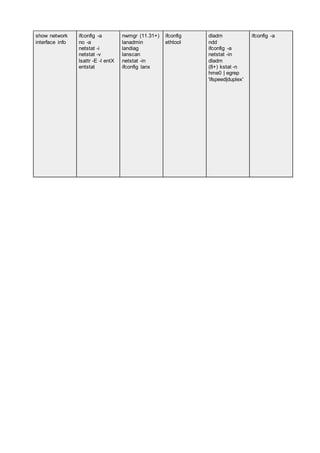
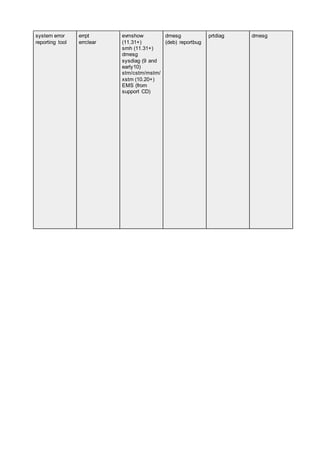
The Big Picture 3
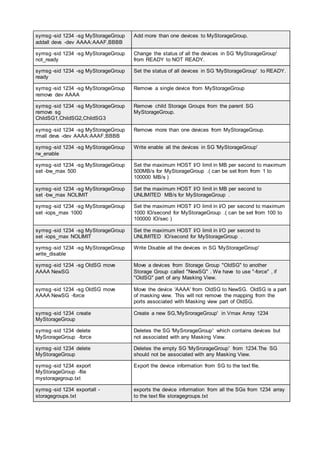
DAS 3
NAS 3
Disk Array 3
Tape Libraries 3
Storage Array 4
Storage Area Network SAN 4
Disk (DL) and Virtual Tape Libraries (VTL) 5
IP Storage 5
Content Aware Storage CAS 5
ILM Information Lifecycle Management (ILM) 6
Communication 6
Directional Transmission Modes 6
The OSI Model 7
Data structures 8
Cyclic Redundancy Check (CRC) 10
DATA vs INFORMATION 10
Times Impacts 11
The SNIA Shared Storage Model (SSM) 15
Port Types include: 16
Storage Arrays 19
BROCADE 20
CISCO 30
EMC 31
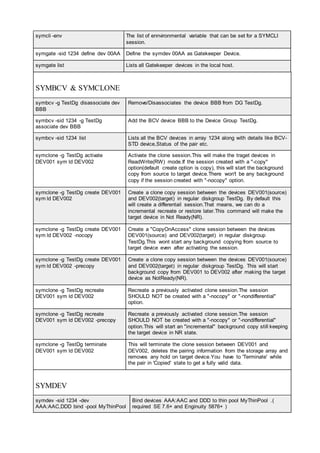
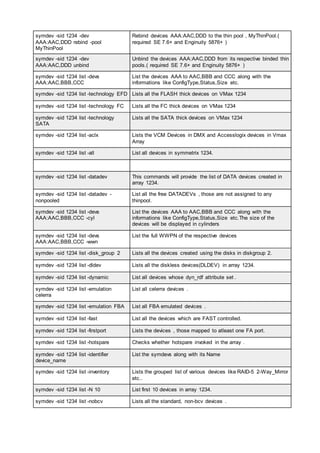
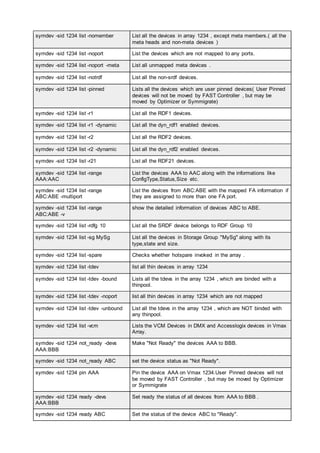
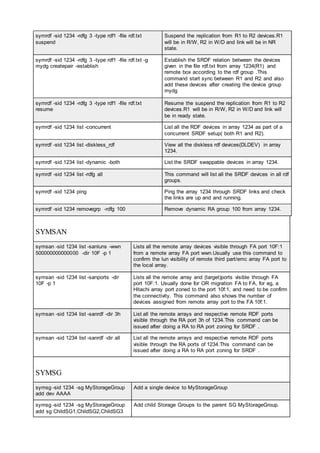
EMC COMMANDS 38
HITACHI 61
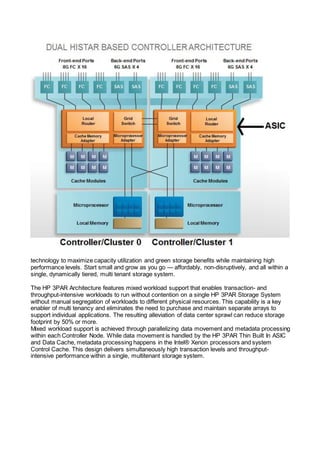
HP 3PAR 66
IBM 78
DSC8000 78
SVC V7000 79
NETAPP 80
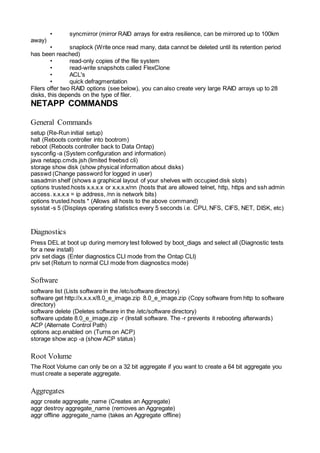
NETAPP COMMANDS 82
General Commands 82
Diagnostics 82
Software 82
Root Volume 82
Aggregates 82
Volumes 83
Qtree’s 83
Snapshots 83
SnapMirror 83
Cluster 84
Autosupport 84
Hot Spares 84
Disks 84
Luns 85
Fiber FCP 85
iSCSI 85
Cifs 85
NFS 86
HTTP Admin 86
SIS (Deduplication) 86
User Accounts 86
DNS 87
Logging 87
Network 87
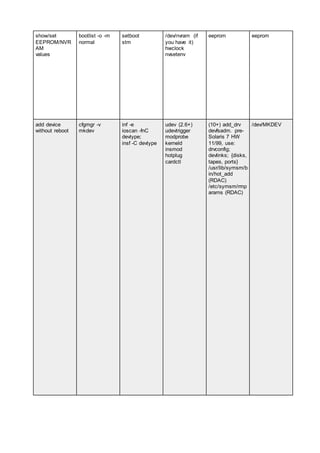
OS COMMANDS CHEAT SHEET 112
The Big Picture
DAS
Early mainframe systems used several techniques to manage VD wait and move control away
from the CPU. Imagine the motherboard of a personal computer with a special connection to
extend the bus outside of the case. Called the channel, this path provided the necessary link
between the CPU and its peripheral equipment. lt was expensive. Management of disk requests
moved from the CPU to the self-contained [lO controller, now attached to the channel. A similar
approach called front-end processor,managed network connectivity. These techniques offloaded
the I/O workload from the CPU and more effectively managed the wait for completion of
outstanding requests through cache. While mainframe is not a subject area for this course, the
concept of a controller is a recurring pattern in the storage infrastructure.
Later techniques connected multiple disks to the same bus and transferred control into the disks.
This allowed each disk to work independently, in parallel, instead of sequentially. In early personal
computing the interface limit was two disks, each clamped on a ribbon cable bus. Enterprise
computing often used the Small Computer Systems Interface, known as SCSI (pronounced
skuzzy). SCSI gave the appearance of a connection string, although internally it was a bus. a bus
with higher attachment limits; each disk has an address describing its logical position on the bus.
The physical number of wires in the bus limited the count of available addresses. Address limits
are a pattern. Even today, the logical address limits can vary from the standard.
NAS
As networks emerged and stabilized, it was not enough that we could move data or files on the
network; it was inconvenient and had serious limitations. File sharing emerged as a way to make
information available to multiple hosts, simultaneously. Storage. connected to a single host,
became available to other hosts through the network. The special software served files to clients in
response to their requests. The NAS device became a centralized repository for shared
documents. At other hosts, known as clients. the remote files appear to be local. The abstraction
simply made the files available. Later, this concept gained the title: Network Attached Storage, also
known as NAS. Officially, a NAS device is a dedicated file server, optimized for the task of serving
files, often, without the ability to be a general-purpose server. File serving and NAS devices are
both patterns.
File sharing services and specialized NAS devices are very common. lt would be difficult to size
the total market because the techniques are in many places. My personal favorite is a sea floor
sensor robot that is a client to shared directories in land-based systems where many robots store
reports of water current, temperature, waves and other readings for analysis. Robot NAS users.
Disk Array
The combination ofJBOD with an embedded controller is the earliest form ofa disk array. A disk
array is a set of one or more commonly addressable disk subsystems, combined With a body of
control software. The control software presents the disks’ storage capacity to one or more hosts as
one or more virtual or logical disks, similar to the volume manager software that ran on the hosts.
The control software also includes techniques to protect the data from single disk failure and
improve performance.
Tape Libraries
Tape libraries evolved as common enclosures around one or more tape transports. T he name is
an illusion to the books on shelves found in a library. They include common power. tape storage
and media handling devices. Larger versions include many drives, extensive media storage and
complex shared robotics. Unlike the controller in a disk array, the controller in a tape library
focuses on media and robot management rather than performance and protection. Most rely on
host control software to manage I/O. Protection usually means tape copies. controlled by a host
with added integrity checks that are part of the tape transport or the duplication software. Some
new forms include disk and tape under the same controller. The term tape array is a more proper
description, but less commonly used.
Storage Array
The phrase Storage Array emerged as a collective term to describe a disk array with enhanced
capabilities. Unlike a group of separately managed disk arrays, a storage array provides common
management and shared access to a collection of one or more disk arrays, referred to as the
aggregated storage elements. In almost every vendor, cache algorithms adapt to use access
patterns to reduce I/O wait for read and write requests. Some of the special services include local
and remote replication. snap, and secure delete. New services tend to start here and are later
move down to disk arrays.
The informal array classes include frame, modular and mid-tier. The largest frame arrays include a
cabinet of controller electronics and supporting cabinets to hold over a thousand disks. This gives
you an internal capacity of over 500 terabytes. Few need that much storage, however the
construction of frame arrays offers the best resiliency. As a result, they are at the enterprise core.
Mid-tier arrays are more practical through 80 or 90 terabytes, at lower cost; making them the
growth area of the industry. Many enterprises surround the core with mid-tier to reduce cost. Three
more patterns.
Storage Area Network SAN
Storage Area Networks (SAN) give us the ability to move data between the computer systems and
storage elements. and among the elements without direct physical paths. A SAN is most often a
switched communications infrastructure. It provides physical connectivity and a management layer
to organize the connections, storage elements and computer systems so that data transfer is both
secure and robust. We loosely think of DAS and SAN as moving blocks of data. In contrast. we
thing of NAS as moving whole files. Many people believe that the term SAN is a synonym for Fibre
Channel technology. Yet, the pure definition suggests that any form of network whose primary
purpose is to “provide access to storage elements" is a SAN. In addition. a SAN does not need to
be switched; it just needs to be a network.
We use the term Fabric to bring focus to the switch interconnections. The fabric exists between
any two ports connected to end devices. called nodes. A node can be any device that is not a
fabric device. The fabrics’ purpose is to transmit data between nodes. The path is a virtual
channel. Therefore, the SAN is the entire environment and the fabric is a subset. Having a
switching fabric is a big benefit because it solves many connectivity problems. Giving access to
any attached resource, it allows placement of equipment where it makes the most sense, and
establishes a consistent connectivity pattern. The typical pattern is point-to-point, from a node to
the fabric.
The fabric takes care of the rest. Fabrics do have cost. but the benefits outweigh the cost in many
scenarios.Convenient access to resources makes the fabric very practical. Consider a remotely
managed data center. You can add disks to a server, bypass a failing tape drive and add or
replace a server without the physical presence of a single person in the data center; you just need
properly connected devices.
Fabrics make it possible to consolidate and centralize resources. However, some people take the
approach a bit too far. They ignore the network 80/20 rule that 80% of all traffic is local. It is still
important to use good judgment when placing physical resources. Storage devices are less
forgiving. but are more tolerant of single bit errors than say Web or IP based connections.
However, given guaranteed. high-speed network facilities, it becomes possible to link the
fabrics. Once the link is in place. you can access remote resources. Perhaps you want to copy a
tape from the local tape library to the remote library. meeting a legal or insurance requirement to
store backups in a distant location. By using the extended fabric, you will not worry about the tape
will falling off the back of a truck. causing the company to be in the headlines for losing personal
information.
Disk (DL) and Virtual Tape Libraries (VTL)
Disk (DL) and Virtual Tape Libraries (VTL) use disk array technology for backup and recovery. VTL
is the most popular approach. ln a VTL. the disk array appears to be many tape transports, using
disk space to create many virtual tapes. The sizes of the virtual tapes are similar to real tape.
Because it uses a common tape metaphor, it is easy to setup and use, in addition, it easy to copy
from virtual to real tape. In contrast, the disk library looks like a big disk, and the backup is just a
file on disk. In both cases, recovery of independent data from the disk is much faster because it
does not have to load or move tape. File access within the backup virtual tape or backup file is just
a bunch of pointer and offset arithmetic. However, the time for a lull recovery varies too much to
make a performance statement. it may be better, worse, or the same. We can meet disaster
recovery requirements by copying the backup blocks in the library to a remote location. In addition,
a new technique called data de-duplication reduces total requirements while increasing the number
of recovery points.
IP Storage
IP Storage allows hosts to connect to disk and tape via the TCP/IP protocol. Variants allow Fibre
channel extension services. The concept that “any network whose primary purpose stop access
storage elements qualifies as a SAN”, is more difficult when we consider IP based storage. lt is
Similar to in that its primary fabric is the internet. It is different in that IP Storage moves blocks and
NAS move files. NAS is not in the category of SAN. it certainly is not a fabric, and you cannot find
a box called a NAS switch. IP Storage, although sharing networking resources with other kinds of
traffic, appears to be a fabric, a virtualized fabric within the internet, and for that reason, it loosely
qualifies as a SAN.
A less pure. view is that IP Storage is hybrid technology at a great price point. Many vendors
released IP Storage with embedded aggregation, virtualization and services that work well With
inexpensive disk. Some vendors only added IP Storage under duress, because end-users put an
ISCSI check box on their RFP`s. However, it offers new fabric options, including connection on IP
or Fibre Channel or both with known patterns. Now that people have tried it, they are using it more.
IP Storage is an Important technology that will change the face of storage infrastructure.
Content Aware Storage CAS
Another set of emerging technologies includes Object Storage Device (OSD) and Content Aware
Storage (CAS). While different in execution. they both challenge the notion that a computer needs
to know where the blocks are stored. When you store data using either technology, these deVices
return an object identifier and perform all the tasks of finding blocks without burden to the host
operating system. When you want to retrieve data, you provide the identifier. This is a transfer of
control from the operating system into the storage. The OSD side is hardware aware, implemented
in the storage layer and the CAS side is software aware. implemented in a controller. In CAS and
OSD, both can set metadata flags to render a file immutable (i.e., un-erasable) for a unit of time, or
set a flag to encrypt the file on disk without using compute cycles for the calculations. These are
just two possible functions. OSD is block based. built within IP Storage. CAS is IP network based
and may appear as a file based technology. They are useful for meeting regulatory compliance
making them of much importance today.
ILM Information Lifecycle Management (ILM)
ILM Information Lifecycle Management (ILM) is one of the buzzwords of the storage industry
today. It is both a concept and an emerging technology. The concept existed for a very long time.
Yet, the technology is only emerging. This paradigm causes confusion, but at least it now has a
label.
On first glance at the big picture, you see all of the technologies we just considered and you realize
that many parts were missing. Then look at it again, and awareness comes over you that those
parts only exist to meet requirements.
Communication
Communication, at its most human form, is the process of exchanging ideas and information. We
exchange them by the written word, speech and signaling. It is an active process. The process
involves the encoding, transmitting, and decoding of messages. Messages are the object of the
exchange.There are many means of communicating and many different language systems. Yet
speech and language is only a portion of our exchange. Other aspects of communication may
enhance or even eclipse the linguistic code. These aspects are paralinguistic, nonlinguistic and
metalinguistic. paralinguistic mechanisms signal attitude or emotion and include intonation, stress,
rate of delivery, and pause or hesitation. Nonlinguistic clues include gestures, body posture, facial
expression, eye contact, head and body movement, and physical distance or proxemics.
Metalinguistic cues signal the status of communication based on our intuitions about the
acceptability of utterances. In other words, metalinguistic skills enable us to talk about language,
analyze it, think about it, separate it from context, and then judge it.
The process has three stages, encode, transmit and decode.
• Encode: In a digital sense, the encoding process converts binary data into the signals
appropriate for transmission across a communications channels. Often, the process
encapsulates the message in a frame (the envelope), along with a code to check for errors in the
message, on receipt. If privacy is a concern, we may encrypt the message.
• Transmit: The transmission channel works within a set of behavioral algorithms, message
formats and message semantics used to support communications between the entities across a
network.
• Decode: On receipt, the decoding process converts the signals received from the signaling of the
communications channel to the binary data of the end-point.
Expectation It is a reasonable expectation that the delivery of the message will be without
alteration, in a predictable time to the intended recipient. In addition, the user expects transparent
processing, i.e., they do not need to know how the network does it, just, that the message will
arrive. Metadata Not all messages represent content. Some messages contain control information
or data about the data. They may be just as important, if not more important than the original
message.
Directional Transmission Modes
In traditional data communications, we say that there are three (3) directional transmission modes:
simplex, half-duplex and full duplex. Used in a storage sense, the latter two of these patterns
describe the way that we connect our storage to a host. Knowing the difference will help you to
know the potential bandwidth between two points.
Simplex transmission is in only one direction between sending and receiving nodes. It is similar to
a one-way street. Typical examples include broadcast transmission from radio, television or
satellite sources. Generally, the receivers are unknown; however, they know the transmission
frequency.
Half-duplex transmission, also known as “HDX”, is the ability of a transmission facility to transport
data in both directions, but not simultaneously on the same link. A half-duplex facility uses some
form of Request-to-Send (RTS) and Clear-to-Send (CTS) to manage transmission direction. For
example, a half-duplex, 100-megabyte (100 MB) connection has 100 MB of bandwidth.We
associate half-duplex with a shared transmit and receive connection.
Full-duplex transmission, also known as “FDX” is the ability of a transmission facility to transport
data in both directions, simultaneously. A full-duplex facility, also known as the link, typically
contains two unidirectional channels, transmitting in opposite directions. Effective bandwidth
doubles because the facility can send and receive over the same link. For example, a full-duplex
100-megabyte (100 MB) connection has 200 MB of bandwidth. We associate full duplex with an
independent transmit and receive connection.
The OSI Model
What is OSI? The OSI Reference Model describes the functions and interfaces that enable
computers to communicate with each other. There are seven (7) functional layers in the model.
Each layer is a group of related functions that provide services to the layer above. while receiving
services from the layer below. For any layer there is only a need to know the interface protocol of
the adjacent layers and of no others. In current practice cross-layer optimization breaks the
boundaries, however the functions remain. Published in 1984 by the International Organization for
Standardization (ISO), it remains the primary reference for communication protocol design. Why?
Because it is a layered architecture, with ordered functionality and defined interfaces that we
combine to meet our purposes.
Relevance: Many of the concepts and terms of OSI are common to other forms of networking,
including storage networks. The unique nature of storing data requires variance from the model,
yet the terms remain Within storage specifications. However, you need to take care as some
storage terms have context sensitive use that differs from 081. It is a good place for us to start in
the study of storage protocols. The following list outlines the seven layers of the OSl model.
Layer 7 The Application Layer
Provides networking services to user-defined applications or process and it issues requests on
their behalf to the presentation layer. It serves user interface functions for programs like telnet,
HTTP and SMTP; however, it is not a human interface. For example, an e-mall program is
above this layer. When we write an e-mail and hit send, this sublayer provides the functional
elements that takes data from the program and prepares it for placement on a network.
Layer 6 The Presentation Layer
PRovides formatting services to the application layer. It establishes context between application
layer entities while encapsulating Presentation Service Data Unit into Session Protocol Data Units
and moving them down the stack. Higher-layer entities may use different syntax and semantics, as
long as this layer understands both entities, and the mapping between them.
This layer seems confusing on first read. A way to think of the formatting services is like a human
translator. The person hears the words and loosely converts words from one language to another
Within a context of cultural knowledge. This results in equal meaning, preserving the message. For
example, if the source computer sends a JPEG, and the destination computer needs a GIF, this
layer would reformat the presentation. In this case, the mapping is loose. It is important to note that
there is no rule that translation occurs in the sender or receiver. Other user interface functions that
are more rigid include character set conversion, e.g., ASCII to EBCDlC, serializing objects and
other data structures into and out of XML, and cryptographic encoding rules to allow end-to—end
encryption in this layer.
Layer 5 The session layer
Manages connections between hosts. If an application on one host needs to talk to an Session
application on another, the application layer sets the connection up and ensures resources are
available to facilitate the connection. You need all three layers to do the setup. Network people
tend to refer to Layers 5-7 collectively as the application layers.
Layer 4 The transport layer
Is responsible for taking the chunk of data from the application and preparing it for Transport
shipment or placement on the network. Prepping data for transport involves chopping the chunk
into smaller pieces and adding a header that identifies the sending and receiving applications
(otherwise known as port numbers). Each piece of data and associated headers is called a packet.
Content switches operate at this level.
Layer 3 The network layer
Is responsible for adding another header to the front of the packet, which identifies Network the
unique source and destination address. The process of routing IP packets occurs at this level.
Layer 2 The data link layer
Is responsible for adding another header identifying the particular Layer 3 protocol Data Link used
and the source and destination hardware addresses (also known as Media Access Control
(MACAddresses). At this point, the packet is complete and ready to go onto the network. Ethernet
switching and bridging operate at this level.It is important to appreciate that the data link layer
includes several functional components that include:
• Error Control
• Flow Control and
• Connection Management
Layer 1 The physical layer
Is responsible for converting the packet into binary signals to be transmitted over Physical the
network. The actual physical network can be copper, fiber, or wireless radio frequency. This layer
also provides a method for the receiving computer to validate that the data was not compromised
during transmission.
The combination of the seven layers is often called a stack. A transmitting workstation traverses
the stack from Layer 7 down to Layer l, converting the application data into network signals. The
receiving workstation traverses the stack in the opposite direction: from Layer 1 to Layer 7. It
converts the received transmission back into a chunk of data for the running application.
Each layer of the OSI model uses its own protocol to communicate with its peer layer in the
destination device. The OSI model specifies how each layer communicates with the layers above
and below it, allowing vendors to focus on specific layers that work with any other vendor’s
adjacent layers.
Data structures
Data structures enable the network to use, store and transmit data efficiently. They evolved to be
the most efficient algorithm within the context of the messages they expected to transmit and the
network they would traverse. The choice of data structure often begins from the choice of an
abstract data structure. Then, they evolve over time as the context and network changes. Our well-
designed data structures, allow for performance of critical operations in the process of transmitting
data.
A message is an object of communication. It is something, which provides information; it can also
be this information itself. In this case, the meaning is dependent upon the context in which it is
used; the term may apply to both the information and its form.
More precisely, in the communication science, a message is information, sent from a source to a
receiver. Some common definitions include:
• Any thought or idea expressed briefly in a plain or secret language, prepared in a form suitable
for transmission by any means of communication
• An arbitrary amount of information with a defined or implied beginning and end
• Record information, a stream of data expressed in plain or encrypted language (notation) and
prepared in a format specified for intended transmission by a telecommunications system
Note that the message is not necessarily the payload. The payload or mission bit stream is the
data, such as a data field, block, or stream, being processed or transported the part that
represents user information and user overhead information. It may include user-requested
additional information, such as network management and accounting information. In addition, the
payload does not include system overhead information for the processing or transport system.
Finally, owing to size, a message may be broken into multiple payloads.
Segmentation has several contexts. In the context of a message, we recognize that the size of a
message may be larger than the maximum payload size of a packet. In a single network with
known maximum packet size, the transport layer protocol can immediately divide, segment or
fragment, larger messages into smaller units for transfer cross the network. In the case of internets
comprising networks with varying maximum packet sizes, however, either the minimum packet size
must be known; otherwise, the end-point will default to the local maximum. If it is not known, then
the network layer in each end and intermediate system must perform the necessary segmentation
(fragmentation) and reassembly operation. The first alternative will result in some networks in the
path being used inefficiently,while the second requires an additional function to be performed by
the network layer.
Note that we use the term segment in the context of the original message being split into smaller
units, while we use the fragment in the context of a packet being remade into smaller packets. The
term segmentation is also used in the context of network, to split or isolate a network workload.
A packet is the fundamental unit of information carriage in all modem computer networks. The
packet is a formatted block of data carried by a computer network. Networks that do not support
packets, such as traditional point-to-point telecommunications links (not to be confused with other
point-to-point circuits); simply transmit data as a series of bytes, characters, or bits alone. When
data is formatted into a packet, the network can transmit longer messages more efficiently and
reliably. The term datagram is sometimes also used, and in some contexts its meaning is subtly
different from packet.
A packet consists of two kinds of data, protocol control information (PCI) and user data, also
known as the payload. PCI carries information about the user data, such as source and destination
address, error detection codes, like checksums, and sequencing information. Typically, PCI is
found in packet headers and trailers, with payload placed in between.
Packet vs Datagram
In general, the term packet applies to any message, formatted as a packet, while the term,
datagram is generally reserved for the packets of an unreliable service. A reliable service is one
where the user is notified if delivery fails. An unreliable service is one where the user is gm notified
if delivery fails. For example, IP provides an unreliable service. TCP uses IP to prove a reliable
service, whereas UDP uses IP to provide an unreliable service. All these protocols use packets,
but UDP packets are generally called datagrams.
When a network does not guarantee packet delivery, then it becomes the host’s responsibility to
provide: reliability by detecting and retransmitting lost packets. Our experience during the early
days of the internet indicated that the network itself could not reliably detect all packet delivery
failures. As a result, the responsibility for error detection was pushed on the sending host, i.e. was
the message received, if not, retransmit. This led to the “end-to-end” principle, which is one of the
Internet`s fundamental design assumptions.
Whenever possible, communications protocol operations should be defined to occur at the end-
points of a communications system, or as close as possible to the resource being controlled.
Cyclic Redundancy Check (CRC)
To assure that the message sent is the message received, at a minimum, packet based network
protocols implement a cyclic redundancy check (CRC). The term CRC is often used to denote
either the function or the function's output. A CRC can be used in the same way as a checksum to
detect accidental alteration of data during transmission or storage. CRCs are popular because they
are simple to implement in binary hardware, are easy to analyze mathematically, and are
particularly good at detecting common errors caused by noise in transmission channels.
A CRC is an error-detecting code whose computation resembles a long division computation in
which the quotient is discarded and the remainder becomes the result, with the important
distinction that the arithmetic used is the carry-less arithmetic of a finite field. The length of the
remainder is always less than the length of the divisor, which therefore determines how long the
result can be. The definition of a particular CRC specifies the divisor to be used, among other
things. Although CRCs can be constructed using any finite field, all commonly used CRCs employ
a finite field, the field of two elements, usually called 0 and l, comfortably matching computer
architecture. We will only discuss binary CRCs, but the principles are more general.
CRCs are not, by themselves, suitable for protecting against intentional alteration of data (for
example, in authentication applications for data security), because their convenient mathematical
properties make it easy to compute the CRC adjustment required to match any given change to
the data.It is important to understand that while useful for error detection, CRCs cannot be safely
relied upon to verify data integrity fully in the face of intelligent (rather than random) changes.
Novices sometimes assume that a CRC can guarantee verify data integrity; their reasoning
suggests that:
if a message and its CRC are encrypted then transmitted over an insecure channel on receipt,
decrypt check that decrypted CRC matches the decrypted message then the message cannot
have been altered in transit
SAN protocols use CRC mechanisms. However, SANS go further, using 10-bit bytes with
embedded parity in addition to CRC. This technique allows Fibre Channel to recover from single bit
errors using the CRC to validate the correction. In a typical Ethernet based network, a single-bit
error would require retransmission“. Under increasing load, such a network would experience more
retransmission, which in turn would further increase load, at some point creating an avalanche.
The SAN protocol authors recognized the impact of retransmissions and opted for an approach
that made the protocols’ performance more predictable under load. The disk drive industry also
uses variants of these techniques.
DATA vs INFORMATION
There is a big difference between the terms data and information. Many people use them
incorrectly, because they believe that they are interchangeable. Care in using these terms will help
you to consistently describe storage technologies.
Data is a grouping of bits and bytes that may contain an individual fact or multiple facts, or a value,
or a set of values, but they are not significant in and of themselves because they are without
context.
Information has context. Context converts data into information. Without context, the data is
useless to the owner. When storing data on paper forms, the forms have headings to give meaning
to the data. In the past, we would file the forms in folders and drawers and cabinets, each with
labels. Today, we preserve these approaches in windowing and database metaphors using data
structures, directories and file names.
Times Impacts
We are always waiting for a response from the system, even in a system that is close to perfection.
All architectures are a collection of time impacts. Understanding their sources and limits is key part
of all storage and systems work. The measures of delay, latency, and response time are often
overlooked; however, they are very important because the cost of improving them is a function of
the value we place on performance, from either the end-user or the machine’s perspective.
Latency is the delay induced by the physical structure of a device or process. ln the case of a
medium such as fiber or wire, the limit is the speed of light. We cannot make light faster; therefore,
the latency is a function of length and is predictable.
Unlike latency, delay varies according to the time spent in queue. An overloaded device at any
point, end-to-end can induce delay, and that delay may be unpredictable.
Response time is one of the most important storage performance metrics, denoting the time it
takes to finish a given storage operation. The operation could be defined as any of these storage
operations: read, write, open, close, search, etc. The response time is measured from the initiation
of the operation(request) to the completion of the operation (reply.) End-to~end measurement is
most important, and includes all times of all components. Often, response time is graphed against
throughput in IOPS.
Response time is a range of time (measured in milliseconds) where each response to the
corresponding request must fall. The appropriate range is a defined metric between lT and the
user of the system. It is specified in a Service Level Agreement (SLA) typically measured from the
perspective of the end-user. A failure to meet the SLA occurs if a specified percentage of requests
fall outside of the stated range over a specified time. Remediation may require an adjustment in
workload or the infrastructure.
Utilization is the fraction of time that a resource (channel or device) is busy. It is expressed as a
fraction of the resources total capacity. Utilization has a direct impact on response time. For
example: an increase in utilization results in an increase in response time, approaching infinity as
utilization approaches 100% and a decrease in utilization results in a decrease in response time,
approaching the standard, no load, service time. This is true in a system based on random arrivals.
Value
Perhaps you want to play a game that requires you to reboot your workstation. If there was
something that you could do to make the workstation reboot more quickly, then you could get back
into the game more quickly. The personal effort and/or components required to reduce reboot time
have cost, however, that cost may be offset by the value you place on gaining more game time. In
a similar way, changes in these time impacts have value when a business owner can see a
financial benefit by using better or additional components and/or architectural changes.
Combining these thoughts, latency is often internal to components, a function of distance or
architectural design limit, and is difficult to change unless we use higher quality components,
reduce distance or change the architecture. However, we can reduce delay by providing more
queues and simultaneously decrease response time by lowering utilization. As you can see,
managing time, i.e., performance is both art and science, limited by value.
Bandwidth is the total amount of data transferred through a system or medium over a unit of time,
also known as data transmission rate. Bandwidth is often described using two different levels:
Raw bandwidth or line-speed is the specified transmission rate of a component. A transmission
line or bus will have a physical signal rate that determines the maximum possible data rate. The
user guarantee is not to observe anything faster than this specified rate.
Sustained bandwidth is the data rate after accounting for all the overheads that might be needed
for the transmission operations. The sustained bandwidth will always be less than the raw band-
width if the transmission medium has contention or if parts of the transmission are not considered
usable data. Sustained bandwidth is a better representation of the performance a user observes
when using the component. Tradition requires use of upper case “B” for bytes and lower case “b”
for bits.
The bit rate is the number of bits that are moved or processed per unit of time. It is inclusive of the
useful data as well as the protocol overhead. In contrast, the net bit rate, useful bit rate or
information rate excludes the physical layer protocol overhead, but generally, not the network layer
protocol overhead.
Throughput is an average of the amount of work performed by a component or system over a unit
of time. Throughput is generally expressed in operations per second, transactions per second or
bytes (of useful data) per second. Although throughput and bandwidth are sometimes used
interchangeably, there is a fundamental difference. The difference stems from the fact that
operations reported in the throughput can have different data sizes. This affects the bandwidth
directly; therefore, we need to understand the impact of block or transaction size on actual
throughput. We know in the case of hard drives, low block size yields higher lOPS but
exponentially lower throughput.
ln a network, throughput often excludes data link layer protocol overhead and sometimes network
layer protocol overhead. It is not an instantaneous measure, but rather a long-term average
measured at a reference point below the network layer and above the physical layer.
The maximum theoretical throughput is the maximum possible quantity of data that can be
transmitted under optimal circumstances. lt is similar to, but usually lower than channel capacity.
Channel capacity is the upper limit of the amount of information that can be transmitted over a
communications channel, reliably.
IOPS l/O´s per second are a measure of performance for storage devices. Unlike bandwidth, it
represents the number of exchanges with a device at a specific block size. Bandwidth is
approximately equal to request size * lOPS. If a device makes a claim to be capable of a maximum
number of lOPS, the claim should include the block size, random or sequential requests and cache
hit ratio; if unstated assume the lowest block size at 100% cache hit-ratio.
Availability is the proportion of time that a Customer is able to access a particular service. The
measure of availability is from the Customer’s point of view. Availability depends on:
• Reliability of components
• Resilience to failure
• Quality of maintenance and support
• Quality of operating procedures
Reliability of a service is determined by the amount of freedom from operational failure. Reliability
can further be defined as the ability of components to perform a required function under stated
conditions for a stated period. Measurements of reliability include:
• Mean Time Between Failures (MTBF)
• Mean Time Between System Incidents (MTBSl)
• Number of breaks per unit time (period)
• Resilience built into the service
• Preventative maintenance applied (assumed, but measured)
Serviceabilityis the ability of external suppliers to meet the contractual conditions regarding
reliability, maintainability and maintenance support of components.
Security Availability Management is closely related to security as the Availability of all IT Service
components also includes data. The relevance of Availability in Security, as previously mentioned,
is shown in the CIA rule:
• Confidentiality
• Integrity
• Availability
JBOD has the un-enviable problem of depending on the host for the management of data
protection services. This takes processor cycles away from its regular work, and limits the overall
protection to the uptime of the system.
RAID based systems manage the data protection within their system and promise to manage
faults, within limits. Often, using battery backups, they can guarantee that data will not be lost
(except if someone pushes the big red emergency shutoff of the back).
MTBF is a relative number, relative to time. As a drive ages, it’s Mean Time Between Failure
accelerates from I loss per 1,000 in I I4 years to 44 failures (+|- 11) over a five-year span.
Probability of failure is greatest for mechanical components, like a disk drive. Therefore. PFO'
tecting data on disk is the first line of defense against data loss caused by equipment failure
(people cause failures more than equipment).
The channel poses the next greatest risk to availability. If data protection services, such as
mirroring are used. and both drives share the same physical channel, the channel becomes a
single point of failure. We increase availability by using at least two channels when accessing
one or more storage devices.
If the server fails. we increase availability, or reduce risk to availability by using one or more
additional servers, with access to the same data. The SAN is particularly useful in making data
available to multiple hosts.
Replication and copy services, local and remote, enable higher availability
Storage arrays. also known as striped or mirrored drive arrays provide data protection services,
on a large scale. Most arrays are a blend of protection services.
Parity checking verifies data transmission.
RAID technology provides capacity and management benefits, while improving performance
(due to distributed disk activity,) reliability and availability (if one disk fails. others keep working).
Disk striping with parity is the method of fault tolerance that provides the fastest read/write
performance.
There are six levels of RAID surrounding the commonly known, RAID 0.
RAID 0: Striping
RAID 1: Mirroring
RAID 2: Striping with ECC
RAID 3: Synchronous Access. Dedicated Parity
RAID 4: Independent Access, Dedicated Parity
RAID 5: Independent Access, Distributed Parity
RAID 6: Independent Access. Distributed Dual Parity
Continuous Data Protection (CDP). captures changes to data, the delta, and storage them to a
separate location. The captures are time based and allow a change of view to the way the data
looked at a specific point in time. It is not a substitute for a backup;
however, it is useful in the backup process.
Content Addressable Storage (CAS) stores content as ‘objects’ which consist of data and
annotated metadata. lt generates a globally unique name (address) for each object that is
independent of the current computing environment, organization, location or technology; therefore
objects can be moved. transparently (i. e., without knowledge or intervention of the owner
Data De-duplication is a method of reducing storage needs by eliminating redundant data, i.e.,
discovering duplicate blocks and internally replacing them with pointers to a shared block.
Thin Provisioning is a method of optimizing the efficiency with which the available space is
utilized by recognizing that all blocks begin as null blocks, and that real storage only need be
provisioned when a block is non-null. This technique gives the appearance to the host operating
system of full provisioning. Thin provisioning can increase data fragmentation, impacting
performance.
Replication services, local and remote, in addition to snap and CDP services, aid in backup and
recovery. They work by managing the relationship of blocks in the original data to sets of blocks
storage in another part of the storage subsystem. By copying the blocks, i.e., creating an image,
the image becomes useful for other purposes. By maintaining a list of changes to the blocks in the
original a view to a point-in-time is created. Using the metadata enables recovery, via changed
blocks, or continuing changes to be
recorded.
Remote replication introduces special dependencies into the infrastructure, the relationship of
timed response from the storage subsystem to the host, based on the type of replication selected.
These types: Synchronous, Semi-synchronous, Asynchronous and Adaptive each respectively
decrease the availability index of the data; however, decrease the cost of providing the service, by
reducing the bandwidth requirements.
Storage virtualization, originally provided by the host operating system, then by the storage
array. becomes available as an appliance. lt is the act of integrating one or more back-end
services or functions with additional front-end functionality for the purpose of providing useful
abstractions. Essentially allowing you to create from any networked storage, new devices, and
apply other services to those devices.
Volume management, most often thought of as a host tool, provides an ability to create groups of
disks as a pool of logical extents (or blocks) from which logical disks are created in the size that
you want.
File systems reside on disks, physical or logical, and are the essential component of all
processing in the infrastructure. They provide the access structures (directory/file and permissions
management) and integrate with a common system call interface.
Security services, including device and link encryption, and port authentication are essential parts
of today’s storage infrastructure. Administrators need to apply the same duty of care to storage
infrastructure as they do to any other infrastructure.
The SNIA Shared Storage Model (SSM)
is a model, not a product, intended to move the industry toward storage services rather than the
current state as a subsystem or a peripheral.
A storage service must be shared, stable and take on an independent lifecycle. This is
consistent with changes to other parts of the IT infrastructure. It yields increases m reliability,
scalability, manageability and interoperability while reducing the total cost of ownership and
improving financial performance and efficiency.
The primary value of the model is providing a common vocabulary to assist in creating common
comparisons between common solutions so that clients can have better structure in their choices
and vendors can better explain their differences.
Before the model, language was “ad hoc” and focus was box or brand centric. SSM has three main
components, file/record layer, block layer and services subsystem.
The file/record layer packs small things such as files (byte vectors) and database tuples (records)
into larger entities such as block—level volumes and storage device logical units.
The block layer provides low-level storage to higher layer, typically with an access interface that
supports one or more linear vectors of fixed-size blocks. These logical address spaces are called
logical units (LUs) in SCSl. A secondary responsibility is simple form naming, such as the Logical
Unit Name or LUN. Within this layer we find block aggregation.
Block aggregation manages space, striping and redundancy (through RAID). It can be done in the
host, network or storage array. lt imports block vectors from the devices below and exports one or
block-vectors as aggregated or virtualized volumes to the higher level users. ln addition, it can
make multiple associations, enabling specialized copy, snap, and other services.
There are eight (8) possible paths from the application layer to the physical storage de-
vices.
Caching can occur in any layer, in any device.
• The existence of access paths does not imply permission to use. Access control encapsulates
permissions.
• The third main component is the service subsystem. It covers the storage domain and crosses
the block and record layers.
• Data is not storage. The recursion is: information (the meaning of data, i. e., data + context), data
(the bytes to be stored), and containers (the place where the bytes are stored.
Direct Attached Block Storage includes one, and only one (active) host on each storage
interconnect. It does not use switches or hubs, although extenders (repeaters) are allowed). In
addition it uses the block interface protocol for all operations over the Interconnect.
SAN-Attached Block Storage enables multiple hosts and devices to attach to a shared storage
interconnection. lt uses a block interface protocol over the interconnect. Each host is configured
with a consistent allocation of the shared device resource.
Block storage aggregation in a storage network, aka, SAN Appliance has multiple hosts and
devices attached to a shared storage interconnect, employs a block interface protocol over the
interconnect and by providing block-aggregation functions in a dedicated “appliance” that is on the
data-data path for each operation.
Storage network-attached block storage with metadata server, a. k.a., asymmetric block
service, enable multiple hosts and devices attached to a share storage interconnect, to
communicate directly with the storage devices while employing a metadata service to provide
layout information (“block metadata”) to the hosts on the current layout of block data on those
storage devices. The interconnect uses a block interface protocol.
Multi-site block storage is characterized by the use of peer-to-peer protocols between like
components of two or more systems at different sites to maintain data replicas at each site.
A File Server is a self contained, single package that contains storage devices and a file/record
subsystem controller. It employs client-server file/record protocol to access the data and uses a
network that is typically not specialized for or dedicated to storage traffic, typically a LAN.
File Server Controller, “NAS head” decouples storage devices from the file/record subsystem
controller that provides access to them. lt employs a client-server file/record protocol to access the
file/record subsystem from the client hosts, and uses a network that is typically not specialized for,
or dedicated to storage traffic.
NAS/file server metadata manager, a. k.a., “asymmetric file service” allows multiple hosts and
devices to attach to a shared storage interconnect that employs a block interface protocol. It uses
a separate file system metadata (data about the data) server using an extended client-server file/
record protocol, to obtain layout information for the files they wish to access, and then enables
direct access across the share storage interconnect, using
a block interface protocol.
Object-based Storage Devices (OSD), a.k.a., CMU NASD (Carnegie Mellon University Network
Attached Secure Disks, is a storage device where the device take4s on the data-layout
responsibilities, exporting a large number of “byte vectors” (objects) rather than a small number of
logical units; each such object is typically used to hold the contents of a single file. lt also employs
a separate metadata server to provide object access and authentication information to the hosts,
and optionally, the storage devices using an extended client-server file/object interface.
FIBER CHANNEL
There are several types ofFibre Channel ports.
Port Types include:
B_Port
Identifier for bridge port: a pen within a bridge device used to extend a Fibre Channel inter-switch
link. The B_Port connects only to an FL_Port on a Fibre Channel Switch.
E_Port
Identifier for expansion port: connects a Fibre Channel switch to another Fibre Channel switch or
bridging device via an inter-switch link E_Ports are used to link Fibre channel switches to form a
multi-switch fabric.
EX_Port
Identifier for non-merging expansion port: a type of E_Pott used to connect a multi protocol router
to an edge fabric. An EX_Port follows standard FL_Port protocol and supports FC_NAT but does
not allow fabric merge across EX_Ports. This port is vendor specific.
F_Port
Identifier for fabric port: port on a switch connected to a node. lt is the "Fabric" port within a Fibre
Channel fabric switch that provides a point-to-point link attachment to a single N_Port. F Ports are
intermediate ports in virtual point-to-point links between end ports, for example N_Port to F Port to
F_Port to N_Port using a single Fibre Channel fabric switch.
FL_Port
Identifier for fabric loop port: A "Fabric Loop" port within a Fibre Channel fabric switch is capable of
Fibre Channel Arbitrated Loop operations and is connected to one or more NL_Ports via a Fibre
Channel Arbitrated Loop. An FL_Port becomes a shared entry point for public NL_Port devices to
a Fibre Channel fabric. FL_Ports are intermediate ports in virtual point-to~point links between end
ports that do not reside on the same loop, for example NLgPort to FL_Port to F Port to N Port
through a single Fibre Channel fabric switch.
G_Port
Identifier for generic port: A "Generic" switch Port that can operate as either an E_Port. EX_Port or
an F_Port. A G_Port can determine operating mode at switch port initialization. F_Port when an
N_Port attachment is determined, S_Port when an E_Port attachment is determined.
L_Port
Identifier for loop port: A "Loop" port is capable of performing arbitrated loop functions and
protocols. NL_Ports and FL_Ports are examples of loop-capable ports.
N_Port
Identifier for node port: A "Node" port connects via a point-to-point link to either a single N_Port or
a single F_Port.N_Ports handle creation, detection. and flow of message units to and from the
connected systems. N_Ports are end ports in virtual point-to-point links through a fabric, for
example N_Port to F_Port to F_Port to N_Port using a single Fibre Channel fabric switch.
NL_Port
Identifier for node loop port: A "Node Loop" port is capable of arbitrated loop functions and PTOIO'
cols. An NL_Port connects via an arbitrated loop to other NL_Port and at most a single FL_Port.
NL_Ports handle creation, detection, and flow of message units to and from the connected
systems. NL_Ports are end ports in virtual point—to-point links through a fabric, for example
NL_Port to F_Port to F_Port to N_Port using a single Fibre Channel fabric switch. In the absence
of a fabric switch F L_Port, NL_Ports can communicate with other NL_Ports in virtual point-to-point
links through a FC-AL open loop circuit often through FC-AL (Arbitrated Loop) hub or loop switch
devices.
S_Port
Identifier for service port: A logical port inside a switch addressable by external N_Ports for service
functions. An S_Port may be an implicit switch port or a separate entity such as a name server
connected to and controlled by the switch, S_Ports have well known port names to facilitate early
discovery by N_Ports.
U_Port
Identifier for universal port; a port that can operate as a G_Port, E_Port, F_Port or FL_Port. Most
switches and related fabric devices contain Universal Ports to allow any device to connect to any
port, with selection of the actual port type being automatic. '
VN_Port
Identifier for virtual network port: a virtual node port, used when an HBA is addressed as multiple
virtual HBAs in a virtual machine environment. The VN_Port acts as an independent entity,
although the physical device may support one or more active VN_Ports.
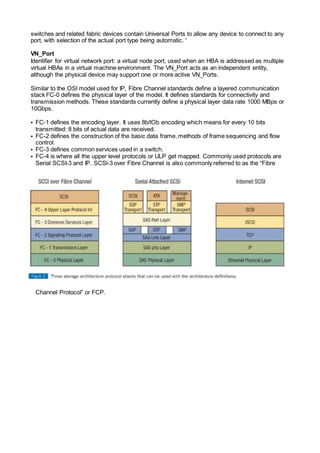
Similar to the OSI model used for IP, Fibre Channel standards define a layered communication
stack FC-0 defines the physical layer of the model. It defines standards for connectivity and
transmission methods. These standards currently define a physical layer data rate 1000 MBps or
10Gbps.
• FC-1 defines the encoding layer. It uses 8b/lOb encoding which means for every 10 bits
transmitted: 8 bits of actual data are received.
• FC-2 defines the construction of the basic data frame, methods of frame sequencing and flow
control.
• FC-3 defines common services used in a switch.
• FC-4 is where all the upper level protocols or ULP get mapped. Commonly used protocols are
Serial SCSI-3 and IP. SCSl-3 over Fibre Channel is also commonly referred to as the “Fibre
Channel Protocol” or FCP.
Fibre Channel Port Types: Fibre Channel standards use the term node to describe any device
connected to one or more other devices over Fibre Channel. Each node has at least one port that
connects to other ports on other nodes.
FC-PC-2 has standardized a shorthand for identifying physical interfaces. the nomenclature for
technology options is listed below: EX 400-SM-LC-L
SPEED MEDIA TRANSMITTER DISTANCE
1200=1.200 MB/sec SM single mode LC longwave laser
cost reduced (1.300
nm)
V very long distance (2
m to > 50km)
800=800 MB/sec M5 multimode SO
micron
LL longwave laser
(1,300 nm . 1,550 nm)
L long distance (2 m to
10 km}
400=400 MB/sec M6 multimode 62.5
micron
SN shortwave laser
(780 nm 850 nm)
l intermediate distance
(0.5 m to 2 km)
200=200 MB/sec SE unbalanced copper EL electrical S short distance (<
100 m)
100=100 MB/sec DF balanced copper
Storage Arrays
The storage arrays are reliable high-performance Integrated Cached Disk Array designed for
online data storage. The lCDA relies on components assembled in a proprietary architecture run
by micro-code to ensure optimum performance, availability, scalability and connectivity.
In Array, the channel directors and disk directors share cache. Hitachi uses cache in large,
dedicated chunks, but path management is switched; the switching backplane prevents the
traditional pitfalls of bus arbitration. The crossbar switch architecture establishes dedicated paths
between front end (CHIP) and back end(ACP) devices.
There are four parameters that HDS uses to support its performance points:
• IO queue time
• Seek Time
• Latency
• Transfer time
IBM built from off the shelf components, which reduces the manufacturing cost. These components
include two RS6000 processors with SSA drive controllers and arrays. Caching is contained in the
modified AIX environment, essentially UNIX-like cache, along with control of the Shark.
Most arrays support RAID-5, -l/0, -I, -3, -0
Logical Units (LUNs) are bound to RAID groups and then presented to hosts
Maximum 32 LUNs/group
Maximum of 224 LUNs/array
Hot spares are disks that are not available for individual use but stored for use in case of
failure.
Cache is allocated in pages and can be 2-, 4-, 8-, IG KB in size
Write cache contains a bitmap that indicates status of the page
Each cache page can be considered “dirty” or “invalid”
Each SP bitmap is mirrored to its peer SP
Cache is flushed via three methods: idle flushing, watermark flushing or forced flushing
Prefetch can be variable or constant. Several parameters define variable prefetch (Prefetch
Multiple, Segment Multiple and Maximum Prefetch) and constant prefetch(Prefetch Size and
Segment Size)
Write-aside caching allows data to be written directly to disk by-passing the write
cache
Write cache is safeguarded by vaulting, Persistent Storage Manager (PSM) and
sniffer components
RAID group/LUN expansion methodology enables dynamic storage expansion, This feature is
available only with RAID-5, RAID4/0 and RAID-0 groups with less than 16 drives. RAID group/LUN
expansion is not available in a RAID 1 or RAID 3 configuration.
BROCADE
Zoning Commands
alicreate “Name”,
“domain,port#”
Used to create an alias
alicreate
“Name”,”portname1;
portname2″
To create multiple ports under a single alias
alidelete “Name” To delete an alias
aliadd “Name”,
“domain,port#”
To add additional ports to an alias
aliremove “Name”,
“domain,port#”
To remove a port from the alias
alishow “AliName” To show the alias configuration on the switch
zonecreate “Zone Name”,
“alias1; alias2″
To create zones based on alias
zonedelete “ZoneName” To delete a zone
zoneadd “ZoneName”,
“alias name”
To add additional alias into the zone
zoneremove “ZoneName”,
“alias name”
To remove an alias from the zone
zoneshow “zoneName” To show the zone configuration information
cfgcreate “Configname”,
“Zone1; Zone2″
To create configurations by adding in zones
cfgdelete “ConfigName” To delete a configuration
cfgadd “ConfigName”,
“Zone3″
To add additional zones in the configuration
cfgremove “ConfigName”,
“Zone3″
To remove a zone from the configuration
cfgshow “ConfigName” To show the details of that configuration
cfgenable “ConfigName” To enable a configuration on the switch
cfgsave To have the effective configuration to be written into
the flash memory
Show Commands
psshow Displays the status of the power supply
fansshow Displays the status of the fans
tempshow Displays the status of the temperature readings
sensorshow Displays the status of the sensor readings
nsshow Displays information in the name server
nsshow -t Displays information in the name server
nsshow -r Displays the information in the name server along with the
state change registration details
nscamshow Displays detailed information of all the devices connected to
all the switches in the fabric (Remote Name Servers)
nsallshow Displays the 24 bit address of all devices that are in the fabric
licenseshow Displays all the licenses that have been added in the switch
date Displays the current date set on the switch
bannershow Displays the banner that will appear when logging in using the
CLI or web tools
httpcfgshow Displays the JAVA version the switch expects at the
management console
switchname Displays the name of the switch
fabricshow Displays information of all the switches in the fabric
userconfig –show
-a
Displays the account information like role , description ,
password exp date , locked status
switchstatusshow Displays the overall status of the switch
switchstatuspolicy
show
Displays policy set for the switch regarding Marginal(Yellow)
or Down(Red) error status
portshow To show the port status
portcfgshow Displays the speed set for all ports on all slots and other
detailed port information
configshow
fabric.ops
Displays the parameters of the switch. Ensure all switches in a
fabric have the same parameters in order to communicate
configshow
fabric.ops.pidFor
mat
Displays the PID set for a switch Core , Native or Extended
edge
switchuptime OR
uptime
Displays the uptime for the switch
firmwareshow Displays the firmware on the switch
version Displays the current firmware version on the switch
hashow Displays the status of local and remote CP’s. High availability ,
heartbeat and synchronization
Port Settings
portcfgshow Displays the port settings
portcfg rscnsupr
[slot/port] –enable
A registered state change registration is suppressed when a
state change occurs on the port
portcfg rscnsupr
[slot/port] –disable
A registered state change registration is sent when a state
change occurs on the port
portname To assign a name for a port
portdisable To disable a port or slot
portenable To enable a port or slot
portcfgpersistentdisa
ble
To disable a port , status would not change even after
rebooting the switch
portcfgpersistentena
ble
To enable a port , status would not change even after
rebooting the switch
portshow To show the port status
portcfgspeed , To set speed for a port#te – 0:auto negotiated 1,2,4 Gbit/sec
, 1 : 1Gbit/sec , 2 : 2 Gbit/sec , 4 : 4Gbit/sec
switchcfgspeed To set speed for all the ports on the switch Note – 0:auto
negotiated 1,2,4 Gbit/sec , 1 : 1Gbit/sec , 2 : 2 Gbit/sec , 4 :
4Gbit/sec
portcfgshow Displays the speed set for all ports on all slots and other
detailed port information
portcfgdefault To set the port settings to default
portcfglongdistance To set the long distance mode . Default is L0(Normal), as per
distance will display LE <=10 kms , L0.5 <=25kms , L1
<=50 kms, L2<=100kms , LD=auto , LS = Static
portcfgeport Used to disable a port from being a E port
Time and Date Settings
date Displays the current date set on the switch
tsclockserver 10.10.1.1 Instruction for the principal switch to synchronize time
with the NTP server (specify the ip address of the NTP
server)
tsclockserver LOCL Instruction to stop NTP server synchronization (Local time
of the switch)
date mmddhhmmyy To set the time of the switch when the NTP server
synchronization is cancelled
tstimezone -5 To set the time zone for individual switches
License Commands
licenseshow Displays all the licenses that are added in the switch
licenseadd To add a new license to the switch
licenseremove To remove a license from the switch
licenseidshow Based on Switch WWN
Banner Commands
bannershow Displays the banner that will appear when logging in using the CLI or
web tools
bannerset To set the banner which will appear when logging in using the CLI or
web tools
bannerset “” To remove the bannerset (two quotes)
Password commands
passwd To change the password for that particular login
passwdcfg –set -
lowercase 3 uppercase 1
-digits 2 -punctuation 2 -
minlength 10 -history 3
To set the password rules
passwdcfg –set -
minpasswordage 1
To set the minimum password age in Days
passwdcfg –set -
maxpasswordage 30
To set the maximum password age in Days
passwdcfg –set -warning
23
To set a warning for the expiration Days remaining
passwdcfg –set -
lockoutthreshold 5
To set the account lockout thresh hold
passwdcfg –set -
lockoutduration 30
To set the account lockout duration in Minutes
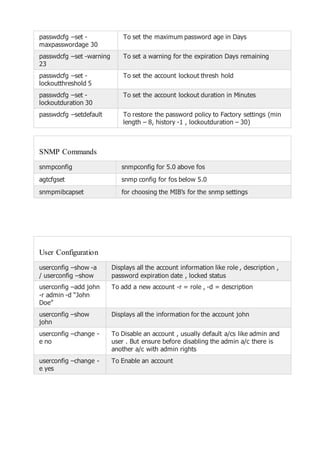
passwdcfg –setdefault To restore the password policy to Factory settings (min
length – 8, history -1 , lockoutduration – 30)
SNMP Commands
snmpconfig snmpconfig for 5.0 above fos
agtcfgset snmp config for fos below 5.0
snmpmibcapset for choosing the MIB’s for the snmp settings
User Configuration
userconfig –show -a
/ userconfig –show
Displays all the account information like role , description ,
password expiration date , locked status
userconfig –add john
-r admin -d “John
Doe”
To add a new account -r = role , -d = description
userconfig –show
john
Displays all the information for the account john
userconfig –change -
e no
To Disable an account , usually default a/cs like admin and
user . But ensure before disabling the admin a/c there is
another a/c with admin rights
userconfig –change -
e yes
To Enable an account
Firmware commands
configupload Saves the switch config as an ASCII text
file to an FTP server
configdownload To restore a switch configuration from
ASCII text file Note – Need to disable the
switch before downloading the config file
configure => cfgload attributes : [y]
=> Ensure secure config upload /
download : [y]
Fabric OS v 4.4 & above provides Secure
File Copy Protocol (SCP) during upload or
download of configurations
firmwaredownload To download the firmware to be installed
on the switch
firmwareshow To be run after installing the firmware on
the switch
version Displays the current firmware version on
the switch
fastboot Needs to be run after installing the
firmware. This does not include the post.
reboot Needs to be run after installing the
firmware. This includes the post.
Miscellaneous commands
killtelnet To kill a particular session which is using telnet
configure To configure a switch
quietmode To switch off the quiet mode
quietmode 1 To suppress messages to the console
switchname Displays the switch name
switchname “EXAMPLE” To assign a switch name
bannerset To set the banner which will appear when logging in using
the CLI or web tools
timeout Displays the timeout time set for Telnet session on the
switch
timeout 10 To set a specific timeout time for the Telnet session
switchuptime or uptime Displays the uptime for the switch
switchcfgspeed To set speed for all the ports on the switch Note – 0:auto
negotiated 1,2,4 Gbit/sec , 1 : 1Gbit/sec , 2 : 2 Gbit/sec ,
4 : 4Gbit/sec
fastboot To reboot the switch without post
reboot To reboot the switch with the post
switchstatusshow Displays the overall status of the switch
switchstatuspolicyshow Displays policy set for the switch regarding
Marginal(Yellow) or Down(Red) error status
switchstatuspolicyset To change the policy set for the switch regarding
Marginal(Yellow) or Down(Red) error status
Show Commands
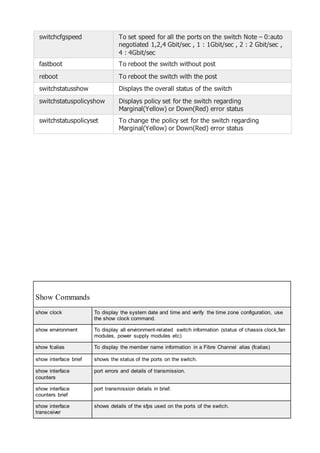
show clock To display the system date and time and verify the time zone configuration, use
the show clock command.
show environment To display all environment-related switch information (status of chassis clock,fan
modules, power supply modules etc)
show fcalias To display the member name information in a Fibre Channel alias (fcalias)
show interface brief shows the status of the ports on the switch.
show interface
counters
port errors and details of transmission.
show interface
counters brief
port transmission details in brief.
show interface
transceiver
shows details of the sfps used on the ports of the switch.
show running-config show the details of the switch, ports, firmware, etc.
show interface mgmt0 To display the details of the management console.
show vsan x To display details of a VSAN.
show module To display details of the switching module.
show interface fcx/x
capabilities
To details of the matrix support for that port.
show port-resources
module x
To check port resources like bb credits, rate mode, bandwidth for ports on a
24/48 bit module.
show interface trunk
vsan x-x
To checkper vsan information on trunk ports.
show vsan
membership interface
fcx/x – x
To check the vsan membership on port level for an interface.
show vsan x
membership
To check the ports that are part of a vsan.
show version To display the version of system software that is currently running on the switch,
use the show version command.
show vsan To display information about configured VSAN.
show vsan usage To check the vsans created and available vsan ids to be created.
show wwn To display the status of the WWN configuration.
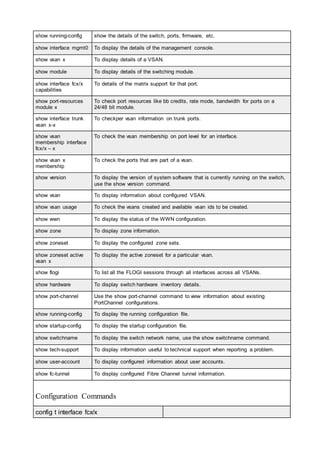
show zone To display zone information.
show zoneset To display the configured zone sets.
show zoneset active
vsan x
To display the active zoneset for a particular vsan.
show flogi To list all the FLOGI sessions through all interfaces across all VSANs.
show hardware To display switch hardware inventory details.
show port-channel Use the show port-channel command to view information about existing
PortChannel configurations.
show running-config To display the running configuration file.
show startup-config To display the startup configuration file.
show switchname To display the switch network name, use the show switchname command.
show tech-support To display information useful to technical support when reporting a problem.
show user-account To display configured information about user accounts.
show fc-tunnel To display configured Fibre Channel tunnel information.
Configuration Commands
config t interface fcx/x
shutdown / no shutdown This CLI sequence will disable/enable a
port on the switch and saves the
configurationcopy running-config startup-config
config t interface fcx/x This command sequence put a decription
for a switch port(here putting description
as emcsaninfo) and saves the
configuration
switchport description emcsaninfo
copy running-config startup-config
config tinterface fcx/x This will Assign a bbcredits to a switch
port and saves the configuration
switchport fcrxbbcredit xx/default
copy running-config startup-config”
config tinterface mgmt0 This will Set ip address for the
management interface,set default gateway
and save the configurationipaddress xx.xx.xx.xx 255.255.255.255
no shutdown
ip default-gateway 1.1.2.3
copy running-config startup-config”
config t vsan database to delete a Vsan , cannot delete default
vsan
no vsan XX
config tinterface vsan xx This step will disable or enable a vsan XX
shutdown / no shutdown
config tinterface fcx/x This will used to set port speed
switchport speed
1000/2000/4000/auto/auto max xxxx
config tinterface fc x/x This will used for configuring rate mode of
a switch port
switchport rate-mode dedicated/shared
config tinterface fc x/x Steps to add a port to a port channel
channel-group x/auto
config tinterface fc x/x Steps to manually set the port type on a
switch
switchport mode e/f/fl/n
config t trunk protocol enable Steps to enable trunk protocol on a swith
(default)
config tinterface fc x/x Steps to enable/disable trunk on a port
level
switchport trunk mode on/off/auto
config t interface fc x/x Steps to configure an allowed list of vsans
to communicate through that port (TE
switchport trunk allowed vsan x-x/x
switchport trunk allowed vsan add x PORT) and allows to add a specific vsan
to the allowed list of vsans
config tfcdomain restart vsan x Steps to forcefully reconfigure without
affecting traffic and force vsan to configure
with data traffic affectedfcdomain restart disruptive vsan x
config tvsan database Steps to create a new vsan (default)
vsan x
config tvsan database Steps to delete a vsan
no vsan x
config tvsan database Steps to create a vsan ,then assign a
name. Steps to suspend a vsan and
unsuspend itvsan x
vsan x name abc
vsan x suspend
no vsan x suspend
end
config tvsan database Steps to create a vsan and add a port on
interface into a vsan
vsan x
vsan x interface fcx/x
config t vsan database Steps to remove a port on an interface
from a vsan
vsan x
no vsan x interface fcx/x
config t vsan database Steps to remove a port on an interface
from a vsan
vsan x
no vsan x interface fcx/x
CISCO
EMC
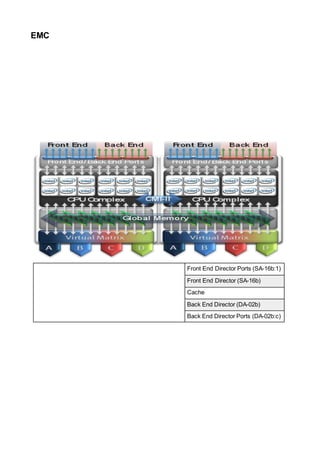
Front End Director Ports (SA-16b:1)
Front End Director (SA-16b)
Cache
Back End Director (DA-02b)
Back End Director Ports (DA-02b:c)
Disk Devices
Front End Director
A channel director (front end director) is a card that connects a host to the symmetrix, each card
can have up to four ports.
Cache
Symmetrix cache memory buffers I/O transfers between the director channels and the storage
devices. The cache is divided up into regions to eliminate contention.
Back End Director
A disk director (back end director) transfers data from disk to cache. Each back-end director can
have upto four interfaces (C,D,E and F). Each back-end director interface can handle seven SCSI
ids (0-6)
Disk Devices
The disk devices that are attached to the back-end directors could be either SCSI or FC-AL.
Interconnect The direct matrix interconnect is a matrix of high speed connections to all component
switch bandwidth up to 64Gb/s
SAN Components
The are many components to a SAN Architecture. A host can connect to a SAN via direct
connection or via a SAN switch.
Host HBA Host bus adaptor cards are used to access SAN storage systems
SAN Cables There are many types of cables and connectors:
Types: Multimode (<500m), single mode (>500m) and copper
Connectors: ST, SC (1Gb), LC (2Gb)
SAN Switches The primary function of a switch is to provide a physical connection
and logical routing of data frames between the attached devices.
Support multiple protocols: Fibre channel, iSCSI, FCIP, iFCP
Type of switch: Workgroup, Directors
SAN Zoning Zoning is used to partition a fibre channel switched fabric into
subsets of logical devices. Each zone contains a set of members that
are permitted to access each other. Members are HBA's, switch ports
and SAN ports.
Types of zoning: hard, soft and mixed
Zone sets This is a group of zones that relate to one another, only one zone set
can be active at any one time.
Storage Arrays Storage array is were all the disk devices are located.
Volume Access Control This is also know as LUN masking. The storage array maintains a
database that contains a map of the storage volumes and WWN's
that are allowed to access it. The VCM database in a symmetrix
would contain the LUN masking information.
SAN Login
The below table documents the various processes that occur when a fibre channel device is
connected to a SAN
Information/process FLOGI (fabric login) PLOGI (port login) PRLI (process login)
What is need ? - Link initialization
- Cable
- HBA and driver
- Switch Port
- FLOGI
- Zoning
- Persistent binding
- Driver setting
- PLOGI
- Device masking (target)
- Device mapping (initiator)
- Driver setting (initiator)
What information is
passed
- WWN
- S_ID
- Protocol
- Class
- Zoning
- WWN
- S_ID
- ULP
- Class
- BB Credit
- LUN
Who does the
communication ?
- N_port to F_port - N_port to N_port - ULP( scsi-3 to scsi-3)
where to find the
information ?
Unix
- syslog
- switch utilites
Windows
- Event viewer
- Switch viewer
Unix
- Syslog
- Driver Ulitities
Windows
- Driver utilities
Unix
- Syslog
- Host based volume
management
Windows
- Driver Utilities
- Host based volume
management
- Device Manager
If any one of the above were to fail then the host will not be allowed to access the disks on the
SAN.
VCM Database
The Symmetrix Volume Configuration Management (VCM) database stores access configurations
that are used to grant host access to logical devices in a Symmetrix storage array.
The VCM database resides on a special system resource logical device, referred to as the VCMDB
device, on each Symmetrix storage array.
Information stored in the VCM database includes, but is not limited to:
• Host and storage World Wide Names
• SID Lock and Volume Visibility settings
• Native logical device data, such as the front-end directors and storage ports to
which they are mapped
Masking operations performed on Symmetrix storage devices result in modifications to the VCM
database in the Symmetrix array. The VCM database can be backed up, restored, initialized and
activated. The Symmetrix SDM Agent must be running in order to perform VCM database
operations (except deleting backup files).
Switches
There are three models of switchs M-series (Mcdata), B-series (Brocade) and the MDS-series
(Cisco). Each of the switch offer a web interface and a CLI. The following tasks can be set on most
switches:
• Configure network params
• Configure fabric params (BB Credit, R_A_TOV, E_D_TOV, switch PID format,
Domain ID)
• Enable/Disable ports
• Configure port speeds
• Configure Zoning
BB Credit Configure the number of buffers that are available to attached devices for
frame receipt default 16. Values range 1-16.
R_A_TOV Resource allocation time out value. This works with the E_D_TOV to
determine switch actions when presented with an error condition
E_D_TOV Error detect time out value. This timer is used to flag potential error
condition when an expected response is not received within the set time
SYMACCESS
symaccess -sid 1234 -f MyBackup.txt backup Creates a file MyBackup containing all the group
and view information currently on the Symmetrix
array 1234
symaccess -sid 1234 -f MyBackup.txt restore Restores all the group
symaccess -sid 1234 -f Total_views backup This command will backup all the Maksing Views
information for array 1234 to file Total_views.
symaccess -sid 1234 -f Total_views restore This command will restore all Masking view
information for Vmax Array 1234 from file
Total_views , which is earlier created by "backup"
option.
symaccess -sid 1234 -file Views_Groups_1234.txt
backup
Backup all the view and group information currently
on VMAX 1234 to the file Views_Groups_1234.txt.
symaccess -sid 1234 -file Views_Groups_1234.txt
list
List all the Group(storage,port,initiator) information
from the backup file "Views_Groups_1234.txt".
symaccess -sid 1234 -file Views_Groups_1234.txt
list view
Lists all the views from the backup file
"Views_Groups_1234.txt".
symaccess -sid 1234 -file Views_Groups_1234.txt
restore
Restores all the groups, views, and security
informations from the previously(created using
backup option) file.
symaccess -sid 1234 -name IG_Servers -type
initiator -ig IG_Server_A remove
Remove Initiator Group 'IG_Server_A' from parent
Initiator Group 'IG_Servers'
symaccess -sid 1234 -name IG_Server_A -type
initiator -wwn xxxx remove
Remove HBA WWN 'xxxx' from Initiator Group
'IG_Server_A'
symaccess -sid 1234 -name
PG_1_2_15_16_E0_Group -type port -dirport
1e:0,16e:0 remove
Remove ports 1e:0 and 16e:0 from port group
'PG_1_2_15_16_E0_Group'.
symaccess -sid 1234 -name
PG_1_2_15_16_E0_Group -type port -dirport
1e:0,16e:0 remove -unmap
Remove ports 1e:0 and 16e:0 from port group
'PG_1_2_15_16_E0_Group'.The '-unmap' option
also unmap(from 1e:0 and 16:e0) the devices on all
related Storage Groups associated with port group
'PG_1_2_15_16_E0_Group'.
symaccess -sid 1234 -type initiator -name Host1
add -wwn 1000000000000002
Add another HBA WWN to the existing Initiator
group(IG) "Host1".
symaccess -sid 1234 -type initiator -name Host1
create -consistent_lun
Create the Initiator Group Host1 and enable the
LUN id consistency at the same time.
symaccess -sid 1234 -type initiator -name Host1
create -wwn 1000000000000001
Creates and initiator group called Host1 by adding
the specified wwn
symaccess -sid 1234 -type initiator -name Host1
rename -new_name Host2
Rename the Initiator Gorup Host1 as Host2
symaccess -sid 1234 -type initiator -name Host1 set
consistent_lun on
Enable the LUN id consistency on an existing IG.
symaccess -sid 1234 -type initiator -name
Host1_Host2_IG add -ig Host2_IG
Add a child Initiator Group(Host2_IG) to the parent
Initiator Group(Host1_Host2_IG).
symaccess -sid 1234 -type port -name
3E0_4E0_13E0_14E0 -dirport
3e:0,4e:0,13e:0,14e:0 create
Create the portgroup E0_4E0_13E0_14E0 with
specified ports
symaccess -sid 1234 -type port -name
3E0_4E0_13E0_14E0 rename -new_name
3E1_4E1_13E1_14E1
Rename the Port Gorup 3E0_4E0_13E0_14E0 as
3E1_4E1_13E1_14E1
symaccess -sid 1234 -type port -name MyPorts add
-dirport 6e:0
Add an aditional port 6e:0 to the existing port
group(PG) "MyPorts".
symaccess -sid 1234 -type storage -name Host1
add devs AAA:AAB
Add the devices AAA:AAB to storage group Host1.
symaccess -sid 1234 -type storage -name Host1
add devs AAA:AAB -celerra
Add the Celerra devices AAA:AAB to storage group
Host1.
symaccess -sid 1234 -type storage -name Host1
create devs AAA:AAB
Create the storage group Host1 with specified range
of devices
symaccess -sid 1234 -type storage -name Host1
remove devs AAA:AAB
Remove the device AAA to AAB from storage group
Host1
symaccess -sid 1234 -type storage -name Host1
remove devs AAA:AAB -unmap
Remove the device AAA to AAB from storage group
Host1 and also unmap from the FAs
symaccess -sid 1234 -type storage -name Host1
remove devs AAA:AAB -unmap -celerra
Remove the celerra device AAA to AAB from
storage group Host1 and also unmap from the FAs
symaccess -sid 1234 -type storage -name Host1
rename -new_name Host2
Rename the Storage Gorup Host1 as Host2
symaccess -sid 1234 -wwn 1000000000000001
rename -alias Host1/HBA01
Create/Rename Node Name(Host1) and
Portname(HBA01) in Access-logix database for
given WWN.
symaccess -sid 1234 -wwn xxxx replace -new_wwn
yyyy
Replace all occurance of wwn xxxx with yyyy in
array 1234
symaccess -sid 1234 create view -name
Host1_Allocation -sg Host1 -pg
3E0_4E0_13E0_14E0 -ig Host1
Create a masking view combined with specified
groups
symaccess -sid 1234 delete -name MyInitiator -type
init
Delete/Remove an empty initiator group.The "-force"
must be used if the initiator group(IG) is not
empty.We can't delete IG if it is part of a Masking
View.
symaccess -sid 1234 delete -name MyPortGroup -
type port
Delete/Remove an empty port group.The "-force"
must be used if the port group(PG) is not empty.We
can't delete PG if it is part of any Masking View.
symaccess -sid 1234 delete -name
MyStorageGroup -type storage
Delete/Remove an empty storage group.The "-
force" must be used if the storage group(SG) is not
empty.We can't delete SG if it is part of a Masking
View.
symaccess -sid 1234 delete view -name
Host1_Allocation
Delete view Host1_Allocation.
symaccess -sid 1234 delete view -name
Host1_Allocation -unmap
Delete view Host1_Allocation and also unmap all
the device in associated storage group.
symaccess -sid 1234 list List all Initiator, Port and Storage Groups Created
for Array 1234
symaccess -sid 1234 list -name MyGroup List all groups named MyGroup
symaccess -sid 1234 list -name MyGroup -v List all groups named MyGroup and also shows the
related Masking Views
symaccess -sid 1234 list -type init -name MyIG Find the number of child initiators in IG MyIG and
number of associated Masking Views.
symaccess -sid 1234 list -type init -name MyIG -v Find the number of child Initiator Groups in IG MyIG
and also shows the associated Masking View.
symaccess -sid 1234 list -type initiator List all Initiator Groups Created for Array 1234
symaccess -sid 1234 list -type initiator -wwn xxxx Check whether the HBA WWN xxxx is a member of
any Initiator Group.
symaccess -sid 1234 list -type port List all Port Groups Created for Array 1234
symaccess -sid 1234 list -type port -name MyPG Find the number of ports in Port Group MyPG and
numbers of associated Masking views.
symaccess -sid 1234 list -type port -name MyPG -v Find the number of ports in Port Group MyPG and
also shows the associated Masking Views.
symaccess -sid 1234 list -type storage List all Storage Groups Created for Array 1234
symaccess -sid 1234 list -type storage -dev AAA Check whether the device AAA is part of of any
Storage Groups.
symaccess -sid 1234 list -type storage -name MySg Find the number of devices in storage Group MySg
and number of associated Masking Views.
symaccess -sid 1234 list -type storage -name MySg
-v
Find the number of devices in storage group MySg
and also shows the associated Masking View
symaccess -sid 1234 list -v List all Initiator,Port and Storage Groups Created for
Array 1234 along with related Masking Views
symaccess -sid 1234 list assignment -dev 9A0:9AF Shows the masking details of devices from 9A0 to
9AF
symaccess -sid 1234 list devinfo -ig MyInitiator List the details of devices assigned to the
initiatorgroup MyInitiator
symaccess -sid 1234 list logins -dirport 12f:1 List WWPNs logged in to FA port 12f:1
symaccess -sid 1234 list logins -wwn xxxx Check whether wwn xxx logged in to any of the FAs
on array 1234.
symaccess -sid 1234 list logins -wwn xxxx -v Check whether wwn xxx logged in to any of the FAs
on array 1234."-v" options also provides the time of
login change. This is helpful if the wwpn not logged
in now on the FAs , but want to know when its got
disconnected.
symaccess -sid 1234 list no_assignments -dirport
12f:1
Shows the devices are mapped to 12f:1 but not part
of any masking view.
symaccess -sid 1234 list view List masking views Created for Array 1234 with
related groups details
symaccess -sid 1234 list view -name
Host1_Allocation -detail
Provides detailed infomation about the masking
view .This output is same as 'symmaccess show
view'.
symaccess -sid 1234 remove -login -wwn
1000000000000001
Completely remove the wwn 1000000000000001
from the login history table of vmax 1234
symaccess -sid 1234 remove -login -wwn
1000000000000001 -dirport 12g:1
Delete the wwn 1000000000000001 on port 6g:1
from the login history table of vmax 1234
symaccess -sid 1234 show MyInitiatorGroup -type
initiator
Shows the contents of initiator group
MyInitiatorGroup Created on Array 1234
symaccess -sid 1234 show MyInitiatorGroup -type
initiator -detail
By including '-detail' option will shows the Flag
settings like 'FCID Lockdown' ,'Consistent Lun'.. for
each WWN number in the initiator group.
symaccess -sid 1234 show MyPortGroup -type port Shows the contents of port group MyPortGroup
Createdon Array 1234
symaccess -sid 1234 show MyStorageGroup -type
storage
Shows the contents of storage group
MyStorageGroup Created on Array 1234
symaccess -sid 1234 show view MyView Shows the contents of view MyView Created on
Array 1234
symaccess -sid 1234 show view MyView -detail This command is the best option to see both parent
and child initiator groups( cascaded initiator group)
and associated devices for a masking view.
symaccess -sid 1234 show view Server_A_B_View -
ig Server_B_IG
Displays the content of view 'Server_A_B_View' with
the WWN details of child-Initiator group
'Server_B_IG'.
symaccess -sid 1234 verify Verify the ACLX database in VMax 1234 is
consistent.
symaccess -sid 1234 view -name Host1_Allocation
rename -new_name Host2_Allocation
Rename name of view Host1_Allocation as
Host2_Allocation
symaccess -sid 1234 view -name Host1_Allocation
rename -new_name Host2_Allocation
Rename name of view Host1_Allocation as
Host2_Allocation
symaccess list hba Shows the wwn of the local HBA and the devices
assigned to those.
EMC COMMANDS
symaccess -sid 1234 -f MyBackup.txt backup Creates a file MyBackup containing all the group
and view information currently on the Symmetrix
array 1234
symaccess -sid 1234 -f MyBackup.txt restore Restores all the group
symaccess -sid 1234 -f Total_views backup This command will backup all the Maksing Views
information for array 1234 to file Total_views.
symaccess -sid 1234 -f Total_views restore This command will restore all Masking view
information for Vmax Array 1234 from file
Total_views , which is earlier created by "backup"
option.
symaccess -sid 1234 -file Views_Groups_1234.txt
backup
Backup all the view and group information currently
on VMAX 1234 to the file Views_Groups_1234.txt.
symaccess -sid 1234 -file Views_Groups_1234.txt
list
List all the Group(storage,port,initiator) information
from the backup file "Views_Groups_1234.txt".
symaccess -sid 1234 -file Views_Groups_1234.txt
list view
Lists all the views from the backup file
"Views_Groups_1234.txt".
symaccess -sid 1234 -file Views_Groups_1234.txt
restore
Restores all the groups, views, and security
informations from the previously(created using
backup option) file.
symaccess -sid 1234 -name IG_Servers -type
initiator -ig IG_Server_A remove
Remove Initiator Group 'IG_Server_A' from parent
Initiator Group 'IG_Servers'
symaccess -sid 1234 -name IG_Server_A -type
initiator -wwn xxxx remove
Remove HBA WWN 'xxxx' from Initiator Group
'IG_Server_A'
symaccess -sid 1234 -name
PG_1_2_15_16_E0_Group -type port -dirport
1e:0,16e:0 remove
Remove ports 1e:0 and 16e:0 from port group
'PG_1_2_15_16_E0_Group'.
symaccess -sid 1234 -name
PG_1_2_15_16_E0_Group -type port -dirport
1e:0,16e:0 remove -unmap
Remove ports 1e:0 and 16e:0 from port group
'PG_1_2_15_16_E0_Group'.The '-unmap' option
also unmap(from 1e:0 and 16:e0) the devices on all
related Storage Groups associated with port group
'PG_1_2_15_16_E0_Group'.
symaccess -sid 1234 -type initiator -name Host1
add -wwn 1000000000000002
Add another HBA WWN to the existing Initiator
group(IG) "Host1".
symaccess -sid 1234 -type initiator -name Host1
create -consistent_lun
Create the Initiator Group Host1 and enable the
LUN id consistency at the same time.
symaccess -sid 1234 -type initiator -name Host1
create -wwn 1000000000000001
Creates and initiator group called Host1 by adding
the specified wwn
symaccess -sid 1234 -type initiator -name Host1
rename -new_name Host2
Rename the Initiator Gorup Host1 as Host2
symaccess -sid 1234 -type initiator -name Host1 set
consistent_lun on
Enable the LUN id consistency on an existing IG.
symaccess -sid 1234 -type initiator -name
Host1_Host2_IG add -ig Host2_IG
Add a child Initiator Group(Host2_IG) to the parent
Initiator Group(Host1_Host2_IG).
symaccess -sid 1234 -type port -name
3E0_4E0_13E0_14E0 -dirport
3e:0,4e:0,13e:0,14e:0 create
Create the portgroup E0_4E0_13E0_14E0 with
specified ports
symaccess -sid 1234 -type port -name
3E0_4E0_13E0_14E0 rename -new_name
3E1_4E1_13E1_14E1
Rename the Port Gorup 3E0_4E0_13E0_14E0 as
3E1_4E1_13E1_14E1
symaccess -sid 1234 -type port -name MyPorts add
-dirport 6e:0
Add an aditional port 6e:0 to the existing port
group(PG) "MyPorts".
symaccess -sid 1234 -type storage -name Host1
add devs AAA:AAB
Add the devices AAA:AAB to storage group Host1.
symaccess -sid 1234 -type storage -name Host1
add devs AAA:AAB -celerra
Add the Celerra devices AAA:AAB to storage group
Host1.
symaccess -sid 1234 -type storage -name Host1
create devs AAA:AAB
Create the storage group Host1 with specified range
of devices
symaccess -sid 1234 -type storage -name Host1
remove devs AAA:AAB
Remove the device AAA to AAB from storage group
Host1
symaccess -sid 1234 -type storage -name Host1
remove devs AAA:AAB -unmap
Remove the device AAA to AAB from storage group
Host1 and also unmap from the FAs
symaccess -sid 1234 -type storage -name Host1
remove devs AAA:AAB -unmap -celerra
Remove the celerra device AAA to AAB from
storage group Host1 and also unmap from the FAs
symaccess -sid 1234 -type storage -name Host1
rename -new_name Host2
Rename the Storage Gorup Host1 as Host2
symaccess -sid 1234 -wwn 1000000000000001
rename -alias Host1/HBA01
Create/Rename Node Name(Host1) and
Portname(HBA01) in Access-logix database for
given WWN.
symaccess -sid 1234 -wwn xxxx replace -new_wwn
yyyy
Replace all occurance of wwn xxxx with yyyy in
array 1234
symaccess -sid 1234 create view -name
Host1_Allocation -sg Host1 -pg
3E0_4E0_13E0_14E0 -ig Host1
Create a masking view combined with specified
groups
symaccess -sid 1234 delete -name MyInitiator -type
init
Delete/Remove an empty initiator group.The "-force"
must be used if the initiator group(IG) is not
empty.We can't delete IG if it is part of a Masking
View.
symaccess -sid 1234 delete -name MyPortGroup -
type port
Delete/Remove an empty port group.The "-force"
must be used if the port group(PG) is not empty.We
can't delete PG if it is part of any Masking View.
symaccess -sid 1234 delete -name
MyStorageGroup -type storage
Delete/Remove an empty storage group.The "-force"
must be used if the storage group(SG) is not
empty.We can't delete SG if it is part of a Masking
View.
symaccess -sid 1234 delete view -name
Host1_Allocation
Delete view Host1_Allocation.
symaccess -sid 1234 delete view -name
Host1_Allocation -unmap
Delete view Host1_Allocation and also unmap all
the device in associated storage group.
symaccess -sid 1234 list List all Initiator, Port and Storage Groups Created
for Array 1234
symaccess -sid 1234 list -name MyGroup List all groups named MyGroup
symaccess -sid 1234 list -name MyGroup -v List all groups named MyGroup and also shows the
related Masking Views
symaccess -sid 1234 list -type init -name MyIG Find the number of child initiators in IG MyIG and
number of associated Masking Views.
symaccess -sid 1234 list -type init -name MyIG -v Find the number of child Initiator Groups in IG MyIG
and also shows the associated Masking View.
symaccess -sid 1234 list -type initiator List all Initiator Groups Created for Array 1234
symaccess -sid 1234 list -type initiator -wwn xxxx Check whether the HBA WWN xxxx is a member of
any Initiator Group.
symaccess -sid 1234 list -type port List all Port Groups Created for Array 1234
symaccess -sid 1234 list -type port -name MyPG Find the number of ports in Port Group MyPG and
numbers of associated Masking views.
symaccess -sid 1234 list -type port -name MyPG -v Find the number of ports in Port Group MyPG and
also shows the associated Masking Views.
symaccess -sid 1234 list -type storage List all Storage Groups Created for Array 1234
symaccess -sid 1234 list -type storage -dev AAA Check whether the device AAA is part of of any
Storage Groups.
symaccess -sid 1234 list -type storage -name MySg Find the number of devices in storage Group MySg
and number of associated Masking Views.
symaccess -sid 1234 list -type storage -name MySg
-v
Find the number of devices in storage group MySg
and also shows the associated Masking View
symaccess -sid 1234 list -v List all Initiator,Port and Storage Groups Created for
Array 1234 along with related Masking Views
symaccess -sid 1234 list assignment -dev 9A0:9AF Shows the masking details of devices from 9A0 to
9AF
symaccess -sid 1234 list devinfo -ig MyInitiator List the details of devices assigned to the
initiatorgroup MyInitiator
symaccess -sid 1234 list logins -dirport 12f:1 List WWPNs logged in to FA port 12f:1
symaccess -sid 1234 list logins -wwn xxxx Check whether wwn xxx logged in to any of the FAs
on array 1234.
symaccess -sid 1234 list logins -wwn xxxx -v Check whether wwn xxx logged in to any of the FAs
on array 1234."-v" options also provides the time of
login change. This is helpful if the wwpn not logged
in now on the FAs , but want to know when its got
disconnected.
symaccess -sid 1234 list no_assignments -dirport
12f:1
Shows the devices are mapped to 12f:1 but not part
of any masking view.
symaccess -sid 1234 list view List masking views Created for Array 1234 with
related groups details
symaccess -sid 1234 list view -name
Host1_Allocation -detail
Provides detailed infomation about the masking
view .This output is same as 'symmaccess show
view'.
symaccess -sid 1234 remove -login -wwn
1000000000000001
Completely remove the wwn 1000000000000001
from the login history table of vmax 1234
symaccess -sid 1234 remove -login -wwn
1000000000000001 -dirport 12g:1
Delete the wwn 1000000000000001 on port 6g:1
from the login history table of vmax 1234
symaccess -sid 1234 show MyInitiatorGroup -type
initiator
Shows the contents of initiator group
MyInitiatorGroup Created on Array 1234
symaccess -sid 1234 show MyInitiatorGroup -type
initiator -detail
By including '-detail' option will shows the Flag
settings like 'FCID Lockdown' ,'Consistent Lun'.. for
each WWN number in the initiator group.
symaccess -sid 1234 show MyPortGroup -type port Shows the contents of port group MyPortGroup
Createdon Array 1234
symaccess -sid 1234 show MyStorageGroup -type
storage
Shows the contents of storage group
MyStorageGroup Created on Array 1234
symaccess -sid 1234 show view MyView Shows the contents of view MyView Created on
Array 1234
symaccess -sid 1234 show view MyView -detail This command is the best option to see both parent
and child initiator groups( cascaded initiator group)
and associated devices for a masking view.
symaccess -sid 1234 show view Server_A_B_View -
ig Server_B_IG
Displays the content of view 'Server_A_B_View' with
the WWN details of child-Initiator group
'Server_B_IG'.
symaccess -sid 1234 verify Verify the ACLX database in VMax 1234 is
consistent.
symaccess -sid 1234 view -name Host1_Allocation
rename -new_name Host2_Allocation
Rename name of view Host1_Allocation as
Host2_Allocation
symaccess -sid 1234 view -name Host1_Allocation
rename -new_name Host2_Allocation
Rename name of view Host1_Allocation as
Host2_Allocation
symaccess list hba Shows the wwn of the local HBA and the devices
assigned to those.
SYMCONFIGURE
symconfigure -sid 1234 -cmd "activate dev
AAAA:AAAB in pool MyThinPool , type = thin;"
commit
Activate DATA devices AAAA:AAAB in thin pool for
use.Reads and writes can be done on allocated or
unallocated space on Activated DATA devices.
symconfigure -sid 1234 -cmd "add dev AAA:AAB to
pool MyThinPool, type=thin,
member_state=ENABLE;" commit
Add the DATA devices AAA to AAB to MyTHinPool
and enable its state.
symconfigure -sid 1234 -cmd "add dev AAAA:AAAB
to pool MyDSEPool, type=rdfa_dse,
member_state=ENABLE;" commit
Add SAVEDEVices AAAA:AAAB to DSE pool
MyDSEPool and enable.
symconfigure -sid 1234 -cmd "add dev AAAA:AAAB
to pool MySnapPool, type=snap,
member_state=ENABLE;" commit
Add SAVEDEVices AAAA:AAAB to SANP pool
MySnapPool and enable.
symconfigure -sid 1234 -cmd "bind tdev AAA to pool
MyPool preallocate size=ALL ;" commit
Bind the device AAA to thin pool MyPool and
prellocate the entire size of device.
symconfigure -sid 1234 -cmd "bind tdev AAA:AAB to
pool MyPool preallocate size =5GB ;" commit
Bind the TDEVS AAA and AAB( of 10GB each ) to
thin pool MyPool and preallocate 5GB for each
device.
symconfigure -sid 1234 -cmd "bind tdev AAA:AAB to
pool MyPool;" commit
Bind the TDEVS AAA and AAB to thin pool MyPool.
symconfigure -sid 1234 -cmd "bind tdev in SG
Server1_SG to pool My_Pool;" commit
Bind the devices in Storage Group "Server1_SG" to
thin pool "My_Pool"
symconfigure -sid 1234 -cmd "convert rdf dev AAA
to dynamic;" commit
convert static SRDF device AAA to dynamic device.
symconfigure -sid 1234 -cmd "create dev count=10,
size=1025, emulation=FBA, config=TDEV;" commit
Create 10 thin devices of cylinder size 1025( around
1GB ) with emulation type as FBA.
symconfigure -sid 1234 -cmd "create dev count=10,
size=10GB, emulation=FBA, config=TDEV, binding
to pool=MyPool,preallocate size=5GB ;" commit
Create 10 thin devices of size 20GB with emulation
type as FBA , bind to thin pool MyPool and
prellocate 5GB.
symconfigure -sid 1234 -cmd "create dev count=10,
size=10GB, emulation=FBA, config=TDEV, binding
to pool=MyPool;" commit
Create 10 thin devices of size 20GB with emulation
type as FBA and also bind to thin pool MyPool.
symconfigure -sid 1234 -cmd "create dev count=10,
size=18414, emulation=FBA,
data_member_count=3, config=RAID-5,
disk_group=2, dynamic_capability=dyn_rdf;" commit
Create 10 RAID-5 devices of size 18414 cylinders ,
as emulation FBA from diskgroup 2 and also set the
dynamic bit on those.
symconfigure -sid 1234 -cmd "create dev count=10,
size=20GB, emulation=FBA, config=TDEV;" commit
Create 10 thin devices of size 20GB with emulation
type as FBA.
symconfigure -sid 1234 -cmd "create dev count=4,
config=RAID-5, data_member_count=3,
attribute=datadev, emulation=FBA, size=2GB,
disk_group=1;" commit
Create 4 RAID-5 DATADEVS of 2GB each in
diskgroup1 with FBA emulation.
symconfigure -sid 1234 -cmd "create gatekeeper
count=10,emulation=FBA,type=thin;" commit
Create 10 thin GateKeeper devices of emulation
FBA. The size of each device will be ~3MB/3
cylinders.
symconfigure -sid 1234 -cmd "create gatekeeper
count=10,emulation=FBA;" commit
Create 10 thick gatekeeper devices of FBA
emulation. The size of each device will be ~3MB/3
cylinders.
symconfigure -sid 1234 -cmd "create pool
My_DSE_pool ,type = rdfa_dse;" commit
Create a DSE pool for RDF/Asynchronous
operations.
symconfigure -sid 1234 -cmd "create pool
My_Snap_pool ,type = snap;" commit
Create a SNAP pool for snapshot operations.
symconfigure -sid 1234 -cmd "create pool
My_Thinpool ,type = thin;" commit
Create a thin pool .
symconfigure -sid 1234 -cmd "create pool ThinPool1
type =thin;" commit
Create thinpool named "ThinPool1"
symconfigure -sid 1234 -cmd "deactivate dev
AAAA:AAAB in pool MyThinPool , type = thin;"
commit
Activate DATA devices AAAA:AAAB in thin pool for
use.Reads and writes can be done on already
allocated space on Activated DATA devices.No new
allocations can be done on deactivated DATA
devices.
symconfigure -sid 1234 -cmd "delete dev
AAA:AAB;" commit
delete the symdevs AAA:AAB.
symconfigure -sid 1234 -cmd "delete pool
My_Snap_pool ,type = snap;" commit
Delete SNAP pool My_Snap_pool.
symconfigure -sid 1234 -cmd "delete pool
MyThinPool , type=thin;" commit
Delete an empty thin pool called MyThinPool.
symconfigure -sid 1234 -cmd "delete pool
My_DSE_pool ,type = rdfa_dse;" commit
Delete DSE pool My_DSE_pool.
symconfigure -sid 1234 -cmd "delete pool
My_Thinpool ,type = thin;" commit
Delete thin pool My_Thinpool.
symconfigure -sid 1234 -cmd "disable dev AAA:AAB
in pool MyThinPool, type=thin;" commit
Disable DATA devices AAA and AAB in
MyThinPool. If the DATA device to be used for thin
extent allocation , it should be on enabled state.
Once it is disabled , we can remove the DATA
devices from thin pool. Symmetrix automatically
initiates drain operation on disabled DATA devices
without any disruption to the application. Once all
the allocated extents are drained to other DATA
devices, the disabled DATA devices can be
removed from the thin pool.
symconfigure -sid 1234 -cmd "dissolve meta dev
AAAA:AAAF,BBBB;" commit
dissolve meta heads AAAA to AAAF and BBBB.
symconfigure -sid 1234 -cmd "enable dev AAA:AAB
in pool MyThinPool, type=thin;" commit
Enable the DATA devices AAA and AAB in
MyThinPool.Once enabled , a data device in a thin
pool , can be use to allocate extents to its bounded
thin devices.
symconfigure -sid 1234 -cmd "enable rdfa on
ra_group 100,make_group_swappable=TRUE;"
commit
Enable RDF Asynchronous on rdf group 100 and
make that role swappable.
symconfigure -sid 1234 -cmd "enable rdfa on
ra_group 100;" commit
Enable RDF Asynchronous on rdf group 100
symconfigure -sid 1234 -cmd "form meta from dev
AAA, config=striped, stripe_size=1920; add dev
AAB to meta AAA;" commit
Create a 2 member striped meta; AAA as meta
head and AAB as member. utility for DMX , utility for
Vmax
symconfigure -sid 1234 -cmd "form meta from dev
AAAA, config=concatenated;add dev AAAB to meta
AAAA;" commit
Create 2 member concatenated meta device , AAAA
as meta head.
symconfigure -sid 1234 -cmd "form meta from dev
AAAA, config=striped, stripe_size=1920;add dev
AAAB to meta AAAA;" commit
Create 2 member striped meta , device AAAA as
meta head.
symconfigure -sid 1234 -cmd "map dev AAAA to dir
3e:0 lun=AF;" commit
Map device AAAA to FA port 3e:0 , with lun id as AF
symconfigure -sid 1234 -cmd "rebind tdev
AAAA:AAAB to pool T2_2TB;" commit
Bind devices AAAA:AAAB , which are already
bounded to a thin pool , to another thin pool
T2_2TB.The already written data on the earlier
bounded pool will not migrated to the newly
bounded pool.The upcoming writes will go to the
newly bounded pool.
symconfigure -sid 1234 -cmd "remove dev AAA
from pool MyThinPool, type=thin;" commit
Remove DATA device AAA from MyTHinPool.AAA
must be disabled before executing this command.
symconfigure -sid 1234 -cmd "remove dev AAAB
from meta AAAA;" commit
Remove a meta member AAAB from meta AAAA.
symconfigure -sid 1234 -cmd "rename pool
MyOldThinPool to MyNewThinPool type = thin;"
commit
Rename thin pool MyOldThinPool to
MyNewThinPool .
symconfigure -sid 1234 -cmd "rename pool
My_Thinpool to My_New_Thinpool type =thin;"
commit
Rename thin pool My_Thinpool to
My_New_Thinpool.
symconfigure -sid 1234 -cmd "reserve dev AAA;" -
owner Rajesh -comment "Reserved for Migration"
reserve -nop
Reserve the device AAA for migration.
symconfigure -sid 1234 -cmd "set dev AAA
attribute=dyn_rdf;" preview
With 'cmd" option we can mention the commands to
be executed along with the symconfigure command
itself and thus avoid the creation of a command file.
symconfigure -sid 1234 -cmd "set dev AAAA
device_name='testdevice' ;" commit
set the device_name identifier for device "AAAA" as
"testdevice".These devices can be listed by
command "symdev -sid 1234 list -identifier
device_name" .
symconfigure -sid 1234 -cmd "set dev AAAA NO
device_name ; " commit
Remove the device_name identifier ,"testdevice" for
device AAAA.
symconfigure -sid 1234 -cmd "set device ABCD
emulation=CELERRA_FBA;" commit
Convert FBA Device ABCD to a CELERA Device.(
The current emulation type of the device ABCD is
FBA.)
symconfigure -sid 1234 -cmd "set device ABCD
emulation=FBA;" commit
Convert a CELERA_FBA device to FBA.(the
existing emulation type of device ABCD is
CELERA_FBA)
symconfigure -sid 1234 -cmd "set disk_group 5,
disk_group_name = Tier2_400GB;" commit
Assign a name "Tier2_400GB" to disk group 5.
symconfigure -sid 1234 -cmd "set pool MyThinPool,
type=thin, max_subs_percent=150;" commit
set the maximum over subscription ratio of thin pool
to 150%. If want to keep unlimited ratio , give value
as "none".
symconfigure -sid 1234 -cmd "set symmetrix
concurrent_rdf=ENABLE;" commit
Enables the concurrent SRDF Feature in a
Symmetric Array.This will enable to create SRDF-R1
devices with multiple R2s.
symconfigure -sid 1234 -cmd "set symmetrix
dynamic_concurrent_rdf=ENABLE;" commit
enables the concurrent SRDF capability in the array
level, where can have multiple R2s for a single R1
dynamic rdf device.
symconfigure -sid 1234 -cmd "set symmetrix
dynamic_rdf=ENABLE;" commit
Enables the Dynamic RDF capabilty of the array.
symconfigure -sid 1234 -cmd "start allocate on tdev
AAAA:AABB start_cyl=0 end_cyl = last_cyl;" commit
Allocate the tdevs AAAA to AABB to 100% of its
defined size.
symconfigure -sid 1234 -cmd "start free on tdev
AAA:AAF start_cyl =0 end_cyl = last_cyl;" commit
Reclaim the allocated but unwritten space of thin
pool space for the mentioned tdevs.
symconfigure -sid 1234 -cmd "start reclaim on tdev
AAA:AAF allocate_type = persistent;" commit
Reclaim the allocated but unwritten space as well as
the allocated thin pool space completely written with
zeros, even it is allocated as persistent .
symconfigure -sid 1234 -cmd "start reclaim on tdev
AAA:AAF;" commit
Reclaim the allocated but unused space as well as
the pool space completely written with zeros.
symconfigure -sid 1234 -cmd "unbind tdev
AAAA:AAAB from pool T2_2TB;" commit
Unbind thin devices AAAA to AAAB from it bounded
thin pool T2_2TB.
symconfigure -sid 1234 -cmd "unbind tdev in DG
Server_1_dg from pool T2_2TB;" commit
Unbind all the thin devices as part of device group
Server_1_dg, from its bounded thin pool ,T2_2TB.
symconfigure -sid 1234 -cmd "unbind tdev in SG
Server_1_sg from pool T2_2TB;" commit
Unbind all the thin devices as part of Storage group
Server_1_wg, from its bounded thin pool ,T2_2TB.
symconfigure -sid 1234 -cmd "unmap dev
AAAA:AAAB from dir ALL:ALL;" commit
Unmap devices AAAA and AAAB from all the
mapped FA ports.
symconfigure -sid 1234 -cmd "unmap dev
AAAA:AAAB from dir 3e:0;" commit
Unmap devices AAAA and AAAB only from the
mapped FA port, 3e:0.
symconfigure -sid 1234 -cmd "unmap dev
AAAA:AAAB from dir 3e:ALL;" commit
Unmap devices AAAA and AAAB only from the
mapped FA ports, 3e:0 and 3e:1.
symconfigure -sid 1234 -cmd "unmap dev
AAAA:AAAB from dir ALL:ALL,devmask_access =
remove;" commit
unmap devices AAAA and AAAB from all the
mapped FA ports, also removes the masking.
symconfigure -sid 1234 -f command_file.txt commit Apply the changes defined in the command file.
symconfigure -sid 1234 -f command_file.txt prepare The prepare option will validate the command
syntax and Verify the appropriateness of the
changes and operations.
symconfigure -sid 1234 -f command_file.txt preview Validates the syntax of the commands in
'command_file.txt' and also verify the configuration
changes.
symconfigure -sid 1234 abort Abort a configuration session started earlier.
symconfigure -sid 1234 list -freespace -units mb Shows the Formatted and Unformatted freespace in
MegaBytes on array 1234
symconfigure -sid 1234 list -reserved List the reserved devices in array 1234.
symconfigure -sid 1234 list -v Shows the configuration informations like the micro-
code version , whether the Dynamic RDF is enabled
or not etc..
symconfigure -sid 1234 query Check the status of a running configuration change.
symconfigure -sid 1234 release -reserve_id 10 -nop Release the reservation on device(s).
symconfigure -sid 1234 verify Verify the current symmetrix configuration is ready
for a configuration change.
SYMCFG
symcfg -db Shows the configuration information about the current
symapi database.
symcfg -sid 1234 -dir 4a -p 0 list -addr -avail List the LUN information / availability of lun ids on port
4a0 in array 1234 .
symcfg -sid 1234 -lockn 15 release -force Release the lock 15 held on array 1234 .
symcfg -sid 1234 -SA 6h -P 1 online Make the front-end port 6h:1 to online.
symcfg -sid 1234 -SA 6h -P 1offline Make the front-end port 6h:1 to offline.
symcfg -sid 1234 list -connections List all the hosts wlong with the OS version, connected to
array 1234. This also give the information about the
Service Processor of 1234.
symcfg -sid 1234 list -da all Displays the online status of all Back-end directors.
symcfg -sid 1234 list -datadev -GB Displays the datadevices in array 1234 along with the
pool information of each device is associated with.
symcfg -sid 1234 list -dir all Displays the online status of all directors(
Frontend+Backend).
symcfg -sid 1234 list -env_data Dispalys the information and status of arrays physical
components like powersupply units Fans etc.
symcfg -sid 1234 list -fa all Displays wwn of all front-end director ports.
symcfg -sid 1234 list -fa all -port Displays online and connection status of all front-end
director ports.
symcfg -sid 1234 list -lockn all List all the external locks held in Symmetrix array 1234.
symcfg -sid 1234 list -memory shows the amount and details of memory configure in the
array .
symcfg -sid 1234 list -rdfg 3 List details about rdf group 3 .
symcfg -sid 1234 list -rdfg all List details about all the rdf groups in array.
symcfg -sid 1234 list -rdfg all -dynamic List details about all the dynamic rdf groups in array .
symcfg -sid 1234 list -rdfg all -static List details about all the static rdf groups in array .
symcfg -sid 1234 list -sa all Displays the online status of all Front-end directors.
symcfg -sid 1234 list -srp List all the Storage Resource Pools(SRP) in the Vmax4
array 1234 along with usable, allocated ,free storage
capacity and subscription rate in percentage.
symcfg -sid 1234 list -tdev -gb -thin -pool
My_Pool
List all the thin devices assoicated with thinpool My_Pool
symcfg -sid 1234 list -tdev -bound -GB Lists all the thin devices in array 1234 which are bounded
to a thin pool.
symcfg -sid 1234 list -tdev -GB List all the thin devices in array 1234.And also shows the
thinpools associated to each device with the binding
status.
symcfg -sid 1234 list -tdev -GB -detail With "detail" option ,this commands will displays the
multiple thin pools that each TEVS binded with.
symcfg -sid 1234 list -tdev -range AAA:AAB -
GB
Lists thin devices starting from AAA to ABB and the pools
which are bounded with.
symcfg -sid 1234 list -tdev -sg MySg Lists all the TDEVs in Storage Group MySg with the
bounded poolname and other useful details.
symcfg -sid 1234 list -tdev -sg MySg -detail List all the TDEVs in Storage Group MySg with the
bounded poolname and other useful details.This also
displays actual bounded pool and also the pool which
currently moved due to "rebind" or FAST Policy.
symcfg -sid 1234 list -tdev -unbound -GB Lists all the thin devices in array 1234 which are not
bounded to any thin pools.
symcfg -sid 1234 list -thin -pool -GB List all the thinpools in array 1234.
symcfg -sid 1234 list -thin -pool -GB -detail List all the thinpools in array 1234 along with Subscription
percentage for each thin pool. subscription
percentage=Total Bounded TDEV capacity/Total Thin
Pool Capacity*100.
symcfg -sid 1234 list -v Displays detailed information about the Symmetrix Array
1234.
symcfg -sid 1234 remove Remove the array 1234 from symcfg list.
symcfg -sid 1234 show -pool My_Pool -thin -
GB
List all the datadevices in thinpool My_Pool on array
1234.
symcfg -sid 1234 show -pool My_Pool -thin -
GB -detail
List all the datadevices in thinpool My_Pool on array
1234.The '-detail' option also displays the configurable
options like , Max. subscription Percentage etc.
symcfg -sid 1234 verify Check whether the SYMAPI database is in sync with the
current configuration of array 1234.
symcfg -sid 198 list -rdfg 10 -rdfa Shows the specific SRDF/A information about the rdf
group 10.
symcfg list A brief description of the all connected Symmetrix boxes.
symcfg list -status Check the configuartion and SYMAPI database status of
all arrays.
SYMCLI & SYMGATE
symcli Displays the version of symapi.
symcli -def List of currently defined environmental variables .
symcli -env The list of ennvironmental variable that can be set for a SYMCLI
session.
symgate -sid 1234 define dev 00AA Define the symdev 00AA as Gatekeeper Device.
symgate list Lists all Gatekeeper devices in the local host.
SYMBCV & SYMCLONE
symbcv -g TestDg disassociate dev
BBB
Remove/Disassociates the device BBB from DG TestDg.
symbcv -sid 1234 -g TestDg
associate dev BBB
Add the BCV device BBB to the Device Group TestDg.
symbcv -sid 1234 list Lists all the BCV devices in array 1234 along with details like BCV-
STD device,Status of the pair etc.
symclone -g TestDg activate
DEV001 sym ld DEV002
Activate the clone session.This will make the traget devices in
ReadWrite(RW) mode.If the session created with a "-copy"
option(default create option is copy), this will start the background
copy from source to target device.There won't be any background
copy if the session created with "-nocopy" option.
symclone -g TestDg create DEV001
sym ld DEV002
Create a clone copy session between the devices DEV001(source)
and DEV002(target) in regular diskgroup TestDg. By default this
will create a differentail session.That means, we can do a
incremental recreate or restore later.This command will make the
target device in Not Ready(NR).
symclone -g TestDg create DEV001
sym ld DEV002 -nocopy
Create a "CopyOnAccess" clone session between the devices
DEV001(source) and DEV002(target) in regular diskgroup
TestDg.This wont start any background copying from source to
target device even after activating the session.
symclone -g TestDg create DEV001
sym ld DEV002 -precopy
Create a clone copy session between the devices DEV001(source)
and DEV002(target) in regular diskgroup TestDg. This will start
background copy from DEV001 to DEV002 after making the target
device as NotReady(NR).
symclone -g TestDg recreate
DEV001 sym ld DEV002
Recreate a previously activated clone session.The session
SHOULD NOT be created with a "-nocopy" or "-nondifferential"
option.
symclone -g TestDg recreate
DEV001 sym ld DEV002 -precopy
Recreate a previously activated clone session.The session
SHOULD NOT be created with a "-nocopy" or "-nondifferential"
option.This will start an "incremental" background copy still keeping
the target device in NR state.
symclone -g TestDg terminate
DEV001 sym ld DEV002
This will terminate the clone session between DEV001 and
DEV002, deletes the pairing information from the storage array and
removes any hold on target device.You have to 'Terminate' while
the pair in 'Copied' state to get a fully valid data.
SYMDEV
symdev -sid 1234 -dev
AAA:AAC,DDD bind -pool MyThinPool
Bind devices AAA:AAC and DDD to thin pool MyThinPool .(
required SE 7.6+ and Enginuity 5876+ )
symdev -sid 1234 -dev
AAA:AAC,DDD rebind -pool
MyThinPool
Rebind devices AAA:AAC,DDD to the thin pool , MyThinPool.(
required SE 7.6+ and Enginuity 5876+ )
symdev -sid 1234 -dev
AAA:AAC,DDD unbind
Unbind the devices AAA:AAC,DDD from its respective binded thin
pools.( required SE 7.6+ and Enginuity 5876+ )
symdev -sid 1234 list -devs
AAA:AAC,BBB,CCC
List the devices AAA to AAC,BBB and CCC along with the
informations like ConfigType,Status,Size etc.
symdev -sid 1234 list -technology EFD Lists all the FLASH thick devices on VMax 1234
symdev -sid 1234 list -technology FC Lists all the FC thick devices on VMax 1234
symdev -sid 1234 list -technology
SATA
Lists all the SATA thick devices on VMax 1234
symdev -sid 1234 list -aclx Lists the VCM Devices in DMX and Accesslogix devices in Vmax
Array
symdev -sid 1234 list -all List all devices in symmetrix 1234.
symdev -sid 1234 list -datadev This commands will provide the list of DATA devices created in
array 1234.
symdev -sid 1234 list -datadev -
nonpooled
List all the free DATADEVs , those are not assigned to any
thinpool.
symdev -sid 1234 list -devs
AAA:AAC,BBB,CCC -cyl
List the devices AAA to AAC,BBB and CCC along with the
informations like ConfigType,Status,Size etc.The size of the
devices will be displayed in cylinders
symdev -sid 1234 list -devs
AAA:AAC,BBB,CCC -wwn
List the full WWPN of the respective devices
symdev -sid 1234 list -disk_group 2 Lists all the devices created using the disks in diskgroup 2.
symdev -sid 1234 list -dldev Lists all the diskless devices(DLDEV) in array 1234.
symdev -sid 1234 list -dynamic List all devices whose dyn_rdf attribute set .
symdev -sid 1234 list -emulation
celerra
List all celerra devices .
symdev -sid 1234 list -emulation FBA List all FBA emulated devices .
symdev -sid 1234 list -fast List all the devices which are FAST controlled.
symdev -sid 1234 list -firstport Lists the devices , those mapped to atleast one FA port.
symdev -sid 1234 list -hotspare Checks whether hotspare invoked in the array .
symdev -sid 1234 list -identifier
device_name
List the symdevs along with its Name
symdev -sid 1234 list -inventory Lists the grouped list of various devices like RAID-5 2-Way_Mirror
etc..
symdev -sid 1234 list -N 10 List first 10 devices in array 1234.
symdev -sid 1234 list -nobcv Lists all the standard, non-bcv devices .
symdev -sid 1234 list -nomember List all the devices in array 1234 , except meta members.( all the
meta heads and non-meta devices )
symdev -sid 1234 list -noport List the devices which are not mapped to any ports.
symdev -sid 1234 list -noport -meta List all unmapped meta devices .
symdev -sid 1234 list -notrdf List all the non-srdf devices.
symdev -sid 1234 list -pinned Lists all the devices which are user pinned devices( User Pinned
devices will not be moved by FAST Controller , but may be
moved by Optimizer or Symmigrate)
symdev -sid 1234 list -r1 List all the RDF1 devices.
symdev -sid 1234 list -r1 -dynamic List all the dyn_rdf1 enabled devices.
symdev -sid 1234 list -r2 List all the RDF2 devices.
symdev -sid 1234 list -r2 -dynamic List all the dyn_rdf2 enabled devices.
symdev -sid 1234 list -r21 List all the RDF21 devices.
symdev -sid 1234 list -range
AAA:AAC
List the devices AAA to AAC along with the informations like
ConfigType,Status,Size etc.
symdev -sid 1234 list -range
ABC:ABE -multiport
List the devices from ABC:ABE with the mapped FA information if
they are assigned to more than one FA port.
symdev -sid 1234 list -range
ABC:ABE -v
show the detailed information of devices ABC to ABE.
symdev -sid 1234 list -rdfg 10 List all the SRDF device belongs to RDF Group 10
symdev -sid 1234 list -sg MySg List all the devices in Storage Group "MySg" along with its
type,state and size.
symdev -sid 1234 list -spare Checks whether hotspare invoked in the array .
symdev -sid 1234 list -tdev list all thin devices in array 1234
symdev -sid 1234 list -tdev -bound Lists all the tdevs in the array 1234 , which are binded with a
thinpool.
symdev -sid 1234 list -tdev -noport list all thin devices in array 1234 which are not mapped
symdev -sid 1234 list -tdev -unbound List all the tdevs in the array 1234 , which are NOT binded with
any thinpool.
symdev -sid 1234 list -vcm Lists the VCM Devices in DMX and Accesslogix devices in Vmax
Array.
symdev -sid 1234 not_ready -devs
AAA:BBB
Make "Not Ready" the devices AAA to BBB.
symdev -sid 1234 not_ready ABC set the device status as "Not Ready".
symdev -sid 1234 pin AAA Pin the device AAA on Vmax 1234.User Pinned devices will not
be moved by FAST Controller , but may be moved by Optimizer
or Symmigrate
symdev -sid 1234 ready -devs
AAA:BBB
Set ready the status of all devices from AAA to BBB .
symdev -sid 1234 ready ABC Set the status of the device ABC to "Ready".
symdev -sid 1234 show ABC show the detailed information about device ABC.
symdev -sid 1234 unpin AAA Unpin the device AAA on Vmax 1234.User Pinned devices will
not be moved by FAST Controller , but may be moved by
Optimizer or Symmigrate .
symdev -sid 1234 write_disable -devs
AAA:BBB,BBD -SA all
Write disable the devices AAA:BBB and BBD on all directors.
symdev -sid 1234 write_disable ABC -
SA 3a -p 0
Write disable the device ABC on FA port 3a:0.
symdev -sid 1234 write_disable ABC -
SA all
Write disable the device ABC from through all directors.
SYMDG
symdg -g MyDg -sid 1234 addall -
devs AAA,BBB,CCC,DDD:DDF
Add devices AAA,BBB,CCC,DDD:DDF to devicegroup MyDg
symdg -g MyDg -sid 1234 rmall -
devs AAA,BBB,CCC,DDD:DDF
Remove devices AAA,BBB,CCC,DDD:DDF from devicegroup MyDg
symdg -g MyDg remove ld DEV002 Remove logical device DEV002 from device group MyDG.
symdg -sid 1234 -g mydg move
DEV002 yourdg
Move the device DEV003 from mydg to yourdg( both DGs must be
in same RDFG.
symdg -sid 1234 -g mydg moveall
yourdg
Move all the devices from mydg to yourdg( both DGs must be in
same RDFG.
symdg -sid 1234 export mydg -f
mydgfile.txt
Export mydg to file mydgfile.txt.
symdg -sid 1234 exportall -f
mydgfile.txt
Export all device groups created in array 1234 to file mydgfile.txt.
symdg -sid 1234 import mydg -f
mydgfile.txt
Create mydg from the file mydgfile.txt which created earlier using
export option.
symdg -sid 1234 importall -f
mydgfile.txt
Create all device groups from the file mydgfile.txt which created
earlier using exportall option.
symdg -sid 1234 list List device groups which include the devices from array 1234.
symdg -sid 1234 list -v This will list all the devicegroups belongs to 1234 , and also the
devices in it. This is equal to "show" each device groups in the
array.
symdg create mydg -type rdf1 Create device group mydg of rdf1 type .
symdg delete mydg -force Delete device group mydg.
symdg rename mydg yourdg Renames the mydg to yourdg.
symdg show mydg Shows members/details of mydg.
SYMDISK
symdisk -sid 1234 list List of total disks in the array.
symdisk -sid 1234 list -by_diskgroup Displays all the disks in array by disk groups.
symdisk -sid 1234 list -disk_group 1 Displays all the disks in disk group 1.
symdisk -sid 1234 list -
dskgrp_summary
This provides a brief summary of all diskgroups in array 1234 along
with speed , size and type of disks.
symdisk -sid 1234 list -failed List all the failed drives in array 1234.
symdisk -sid 1234 list -hotspares List Hotspares configured in the array.
symdisk -sid 1234 list -isspare List Hotspares configured in the array.
symdisk -sid 1234 list -v -spare_info Displays the details of all hotspare in the array.
symdisk -sid 1234 show 1A:C12 Shows the detailed information like speed and HYPERS of the disk
1A:C12.
symdisk -sid 1234 show 1A:C12 -
gaps
Shows the available space(GAPS) on the disk 1A:C12.
symdisk -sid 1234 show 1A:C12 -
gaps_only
Shows only the available space(GAPS) on the disk 1A:C12.
SYMFAST
symfast -sid 1234 -fp -fp_name F_Policy1
add -tier_name Tier2 -max_sg_percent 30
Add a Tier "Tier2" to an existing Policy "F_Policy1" with 30%
SG Capacity.
symfast -sid 1234 -fp -fp_name F_Policy1
delete
Delete the FAST Policy "F_Policy1".This policy should not be
associated with any Storage Groups.
symfast -sid 1234 -fp -fp_name F_Policy1
delete -force
Delete the FAST Policy "F_Policy1" which has tiers on it.This
policy should not be associated with any Storage Groups.
symfast -sid 1234 -fp -fp_name F_Policy1
modify -tier_name Tier2 -max_sg_percent
20
Modify the limit of the tier capacity available to a storage
group to 20%.
symfast -sid 1234 -fp -fp_name F_Policy1
remove -tier_name Tier2
Remove the tier "Tier2" from the associated policy
"F_Policy1"
symfast -sid 1234 -fp -fp_name Tier2
rename -name Tier2_New
Rename the FAST Policy "Tier2" to "Tier2_New"
symfast -sid 1234 -fp_name F_Policy1
associate -sg MySg -priority 2
Associate Storage Group "MySg" with FAST Policy
"F_Policy1" and assign priority 2.
symfast -sid 1234 -fp_name F_Policy1
disassociate -sg MySg
Disassociate Storage Group "MySg" from FAST Policy
"F_Policy1".
symfast -sid 1234 -fp_name F_Policy1
modify -sg MySg -priority 1
Change the priority of "MySg" in policy "F_Policy1" to 1
symfast -sid 1234 create -name F_Policy1 Create a FAST Policy "F_Policy1" in array 1234
symfast -sid 1234 create -name F_Policy1
-tier_name Tier0 -max_sg_percent 60
Create a FAST Policy "F_Policy1" in array 1234 and add tier
"Tier0" with a capacity of 30% of a storage group.
symfast -sid 1234 disable -dp Disable FAST controller for Virtual Pool provisioning.
symfast -sid 1234 disable -vp Disable FAST controller for disk group provisioning.
symfast -sid 1234 enable -dp Enable FAST controller for Virtual Pool provisioning.
symfast -sid 1234 enable -vp Enable FAST controller for disk group provisioning.
symfast -sid 1234 list -association -
demand -sg MySg
Shows the Tier usage of devices in MySG.
symfast -sid 1234 list -fp List all the FAST Policies in array 1234 along with the
number of Tiers and Storage Groups(SG) .
symfast -sid 1234 list -fp -dp List all the FAST Policies in array 1234 , which contains Disk
Group Tiers.
symfast -sid 1234 list -fp -vp List all the FAST Policies in array 1234 , which contains
Virtual Pool Tiers.
symfast -sid 1234 list -state Displays the state of both Disk Provisioning(DP) and Virtual
Provisioning(VP) FAST Controller.
symfast -sid 1234 show -fp_name Tier1 Lists all the storage groups and Tiers associated with the
FAST Policy in array 1234
SYMINQ
syminq Lists all physical devices attached to local host.
syminq -mapinfo List all physical devices with target ports which are mapped.
syminq -symmids List the local devices along with the serial number of corresponding array.
syminq -wwn List all physical devices with its corresponding WWPNs attached to local host.
syminq hba Shows the HBA details of the local host like HBA Name , WWN etc..
SYMLD
symld -g mydg -sid 1234 add dev ABC
DEV006
Add the RDF device ABC to device group mydg as
DEV006
symld -g mydg -sid 1234 addall -devs
AAA:AAC,AAF
Add multiple devices to DG "mydg"
symld -g mydg -sid 1234 addall -range
AAA:AAC,AAF
Add multiple devices to DG "mydg"
symld -g mydg -sid 1234 rmall -devs
AAA:AAC,AAF
Remove multiple devices from DG "mydg"
symld -g mydg -sid 1234 rmall -range
AAA:AAC,AAF
Remove multiple devices from DG "mydg"
symld -g mydg remove DEV006 Remove DEV006 form device group mydg.
symld -g mydg rename DEV001 DEV002 Rename the logical dev DEV001 to DEV002 in DG mydg.
SYMLMF
symlmf add -type se -license
FFFF-FFFF-FFFF-FFFF
Register the Traditional Solution Enabler License key FFFF-FFFF-
FFFF-FFFF.
symlmf delete -type se -license
FFFF-FFFF-FFFF-FFFF
Delete the Traditional Solution Enabler License key FFFF-FFFF-
FFFF-FFFF.
symlmf -sid 1234 -type emclm
query
Query the array based licenses and display the usage in vmax 1234
symlmf -sid 1234 -type emclm
show
Show the contents of array based license file installed in Vmax 1234
symlmf -sid 1234 add -type emclm
-file LiceneFileFromEMC
Add Symmetrix Array based licenses in Vmax 1234
symlmf -sid 1234 list -type emclm List the the Array based licenses installed in Vmax 1234
symlmf list -type se List the Traditional Solution Enabler License.
SYMMASKDB
symmaskdb -sid 1234 -awwn hba_alias list devs List the devices masked to given alias hba name .
symmaskdb -sid 1234 -dev ABC list assign List the masking details of the dev ABC .
symmaskdb -sid 1234 -wwn xxxxxxx list devs List the devices masked to given wwn number .
symmaskdb -sid 1234 list database -v Lists the detailed VCMDB database which includes
all the FA ports , the WWN associated with it and
the devices masked to those.Also shows the flag
status like "Visibility"," Lun Offset" ect ..
SYMMASK
symmask -sid 1234 -dir 4a -p 0 list logins List out wwns logged through port 4a0 .
symmask -sid 1234 -wwn
1000000000000001 rename Host1/HBA01
Create/Rename Node Name(Host1) and
Portname(HBA01) in VCMDB for given WWN.
symmask -sid 1234 -wwn xxxx -dir 4a -p 0
add devs ABC,ABD
Mask the devices ABC and ABD to given wwn in 1234
arrray .
symmask -sid 1234 -wwn xxxx -dir 4a -p 0
remove devs ABC,ABD
Unmask the devices ABC and ABD from given wwn in
1234 arrray .
symmask -sid 1234 -wwn xxxx -dir 4a -p 0
remove devs ABC,ABD -unmap
Unmask the devices ABC and ABD from given wwn in
1234 array and also unmap from the mapped director
4a:0
symmask -sid 1234 -wwn xxxx replace yyyy Replace all occurance of wwn xxxx with yyyy in array
1234.
symmask -sid 1234 delete -logins -wwn xxx Delete the login history of wwn xxx from all FA logged
ports.
symmask -sid 1234 list logins -wwn xxx Check whether wwn xxx logged in to any of the FAs on
array 1234.
symmask -sid 1234 refresh Refresh the VCM Data Base after a masking and
unmasking operation.
symmask list hba List HBA details of the host.
SYMMIR
symmir -g TestDg cancel Terminate the relationship between the standard and BCV
devices in device group TestDg.
symmir -g TestDg establish -full Establiash the relationship between the standard and BCV
devices in Device Group TestDg.
symmir -g TestDg query Query the device Group TestDg
symmir -g TestDg split Split the pair in device group TestDg
symmir -sid 1234 -g TestDg attach
DEV001 BCV ld BCV001
Attach the standard device in DG TestDg with the BCV device
BCV001.This will become the preferred BCV device to be paired
with the standard device when a full establish or full restore
action is issued.
symmir -sid 1234 -g TestDg detach
DEV001 BCV ld BCV001
Detach the standard device DEV001 in the TestDg from the BCV
device BCV001.
SYMQOS
symqos -g MyRDFDg list Shows all the devices in MyRDFDg along with background copy
priority for each devices.
symqos -g MyRDFDg set RDF pace
8
Set the background copy priority of the devices in MyRDFDg to
priority 8. priority can be set between 0(Fastest) to 16(Slowest).
symqos -g MyRDFDg set RDF pace
STOP
Stop the background initiated copy of the devices in MyRDFDg.
symqos -g MyRDFDg set RDF pace
URGENT
Set the background copy priority of the devices in MyRDFDg to
the maximum.
symqos -sid 1234 list List the Background copy priority of devices in array 1234.
symqos -sid 1234 list -devs
AAA:BBB,EEE
Lists the background copy priorities( CLONE,BCV,RDF etc ) of
devices.
symqos -sid 1234 set RDF pace 8 -
devs AAA:BBB,EEE
Set the background copy priority of the given RDF devices to
priority 8. priority can be set between 0(Fastest) to 16(Slowest).
SYMRDF
symrdf -g mydg establish -full Establish a full copy on the devices in MyDg
symrdf -g mydg query Query device group.
symrdf -g mydg split Split the srdf pair for devices given in mydg.
symrdf -sid 000000001234 -label dynagrp150 -dir
3h,4h,13h,14h -rdfg 100 -remote_sid
000000005678 -remote_dir 7h,8h,9h,10h -
remote_rdfg 100 addgrp
This command will create a dynamic rdf group 150
from array 1234( RA Port-3h,4h,13h,14h ->5678(
RA Port 7h,8h,9h,10h) with label 'dynagrp150'.
symrdf -sid 1234 -rdfg 3 -file rdf.txt deletepair -force Delete the srdf pairing between R1/R2 and return
them to stanadard.
symrdf -sid 1234 -rdfg 3 -file rdf.txt movepair -
new_rdfg 4
Moves the SRDF devices from rdf group 3 to 4.We
need to split the pair before doing this operation.
symrdf -sid 1234 -rdfg 3 -file rdf.txt query Query the Devices by using device pair file.
symrdf -sid 1234 -rdfg 3 -file rdf.txt set mode
acp_disk
Change the current SRDF mode of the pair file
devices to Adaptive disk mode.
symrdf -sid 1234 -rdfg 3 -file rdf.txt set mode
acp_wp
Change the current SRDF mode of the pair file
devices to Adaptive Copy write pending mode.
symrdf -sid 1234 -rdfg 3 -file rdf.txt set mode sync Change the current SRDF mode of the pair file
devices to Synchronous
symrdf -sid 1234 -rdfg 3 -file rdf_pair.txt query -i 5 Queries the pair devices mentioned in the pairfile
"rdf_pair.txt" in every 5 seconds.This command also
shows the estimated time to sync up all the devices
if those are currently in "sync in progress" state.
symrdf -sid 1234 -rdfg 3 -type rdf1 -file rdf.txt
createpair -establish -rdf_mode sync
Establish the SRDF relation between the devices
given in the file rdf.txt from array 1234(R1) and
remote box according to the rdf group .This
command start copying between R1 and R2 in
SYNC mode.( default is acp_disk mode )
symrdf -sid 1234 -rdfg 3 -type rdf1 -file rdf.txt
createpair -invalidate R2
Establish the SRDF relation between the devices
given in the file rdf.txt from array 1234(R1) and
remote box according to the rdf group .This
command can be used to just create the pair
without starting the data copy from R1 to R2 .
symrdf -sid 1234 -rdfg 3 -type rdf1 -file rdf.txt
establish -full
This command start full copy from R1 to R2
devices. The SRDF pairs are already created .
symrdf -sid 1234 -rdfg 3 -type rdf1 -file rdf.txt
failover
This will make the R1 devices Write Disabled , R2
Write Enabled to host , and logical connections
between R1 to R2 in to Not Ready state.
symrdf -sid 1234 -rdfg 3 -type rdf1 -file rdf.txt split Split the R1 and R2 devices by stopping the
replication. This will make R2 also in Read/Write
mode along with R1 . The link will go to
NotReady(NR) state.
symrdf -sid 1234 -rdfg 3 -type rdf1 -file rdf.txt
suspend
Suspend the replication from R1 to R2 devices.R1
will be in R/W, R2 in W/D and link will be in NR
state.
symrdf -sid 1234 -rdfg 3 -type rdf1 -file rdf.txt -g
mydg createpair -establish
Establish the SRDF relation between the devices
given in the file rdf.txt from array 1234(R1) and
remote box according to the rdf group .This
command start sync between R1 and R2 and also
add these devices after creating the device group
mydg
symrdf -sid 1234 -rdfg 3 -type rdf1 -file rdf.txt
resume
Resume the suspend the replication from R1 to R2
devices.R1 will be in R/W, R2 in W/D and link will
be in ready state.
symrdf -sid 1234 list -concurrent List all the RDF devices in array 1234 as part of a
concurrent SRDF setup( both R1 and R2).
symrdf -sid 1234 list -diskless_rdf View all the diskless rdf devices(DLDEV) in array
1234.
symrdf -sid 1234 list -dynamic -both List the SRDF swappable devices in array 1234.
symrdf -sid 1234 list -rdfg all This command will list all the SRDF devices in all rdf
groups.
symrdf -sid 1234 ping Ping the array 1234 through SRDF links and check
the links are up and and running.
symrdf -sid 1234 removegrp -rdfg 100 Remove dynamic RA group 100 from array 1234.
SYMSAN
symsan -sid 1234 list -sanluns -wwn
500000000000000 -dir 10F -p 1
Lists all the remote array devices visible through FA port 10F:1
from a remote array FA port wwn.Usually use this command to
confirm the lun visibility of remote third part/emc array FA port to
the local array.
symsan -sid 1234 list -sanports -dir
10F -p 1
Lists all the remote array and (target)ports visible through FA
port 10F:1. Usually done for OR migration FA to FA, for eg, a
Hitachi array port zoned to the port 10f:1, and need to be confirm
the connectivity. This command also shows the number of
devices assigned from remote array port to the FA 10f:1.
symsan -sid 1234 list -sanrdf -dir 3h List all the remote arrays and respective remote RDF ports
visible through the RA port 3h of 1234.This command can be
issued after doing a RA to RA port zoning for SRDF .
symsan -sid 1234 list -sanrdf -dir all List all the remote arrays and respective remote RDF ports
visible through the RA ports of 1234.This command can be
issued after doing a RA to RA port zoning for SRDF .
SYMSG
symsg -sid 1234 -sg MyStorageGroup
add dev AAAA
Add a single device to MyStorageGroup
symsg -sid 1234 -sg MyStorageGroup
add sg ChildSG1,ChildSG2,ChildSG3
Add child Storage Groups to the parent SG MyStorageGroup.
symsg -sid 1234 -sg MyStorageGroup
addall devs -dev AAAA:AAAF,BBBB
Add more than one devices to MyStorageGroup.
symsg -sid 1234 -sg MyStorageGroup
not_ready
Change the status of all the devices in SG 'MyStorageGroup'
from READY to NOT READY.
symsg -sid 1234 -sg MyStorageGroup
ready
Set the status of all devices in SG 'MyStorageGroup' to READY.
symsg -sid 1234 -sg MyStorageGroup
remove dev AAAA
Remove a single device from MyStorageGroup
symsg -sid 1234 -sg MyStorageGroup
remove sg
ChildSG1,ChildSG2,ChildSG3
Remove child Storage Groups from the parent SG
MyStorageGroup.
symsg -sid 1234 -sg MyStorageGroup
rmall devs -dev AAAA:AAAF,BBBB
Remove more than one devices from MyStorageGroup.
symsg -sid 1234 -sg MyStorageGroup
rw_enable
Write enable all the devices in SG 'MyStorageGroup'
symsg -sid 1234 -sg MyStorageGroup
set -bw_max 500
Set the maximum HOST I/O limit in MB per second to maximum
500MB/s for MyStorageGroup .( can be set from from 1 to
100000 MB/s )
symsg -sid 1234 -sg MyStorageGroup
set -bw_max NOLIMIT
Set the maximum HOST I/O limit in MB per second to
UNLIMITED MB/s for MyStorageGroup .
symsg -sid 1234 -sg MyStorageGroup
set -iops_max 1000
Set the maximum HOST I/O limit in I/O per second to maximum
1000 IO/second for MyStorageGroup .( can be set from 100 to
100000 IO/sec )
symsg -sid 1234 -sg MyStorageGroup
set -iops_max NOLIMIT
Set the maximum HOST I/O limit in I/O per second to
UNLIMITED IO/second for MyStorageGroup .
symsg -sid 1234 -sg MyStorageGroup
write_disable
Write Disable all the devices in SG 'MyStorageGroup'
symsg -sid 1234 -sg OldSG move
AAAA NewSG
Move a devices from Storage Group "OldSG" to another
Storage Group called "NewSG" . We have to use "-force" , if
"OldSG" part of any Masking View.
symsg -sid 1234 -sg OldSG move
AAAA NewSG -force
Move the device 'AAAA' from OldSG to NewSG. OldSG is a part
of masking view. This will not remove the mapping from the
ports associated with Masking view part of OldSG.
symsg -sid 1234 create
MyStorageGroup
Create a new SG,'MySrorageGroup' in Vmax Array 1234
symsg -sid 1234 delete
MySrorageGroup -force
Deletes the SG 'MySrorageGroup' which contains devices but
not associated with any Masking View.
symsg -sid 1234 delete
MyStorageGroup
Deletes the empty SG 'MySrorageGroup' from 1234.The SG
should not be associated with any Masking View.
symsg -sid 1234 export
MyStorageGroup -file
mystoragegroup.txt
Export the device information from SG to the text file.
symsg -sid 1234 exportall -
storagegroups.txt
exports the device information from all the SGs from 1234 array
to the text file storagegroups.txt
symsg -sid 1234 import
MyStorageGroup -file
MystorageGroup.txt
Create SG 'MyStorageGroup' from the earlier exported file
MystorageGroup.txt.
symsg -sid 1234 importall -file
MystorageGroups.txt
Create storage groups from the earlier exported file
MystorageGroup.txt.Storage Group names will be created
according to the names in text file.
symsg -sid 1234 list List all the storage groups in Vmax array 1234 along with
informations like whether the SG a member of Masking View
and is a part of FAST Policy.
symsg -sid 1234 list -v the -v options displays the member devices of Storage Groups
along with other details given by list.
symsg -sid 1234 list -v the -v options displays the member devices of Storage Groups
along with other details given by list.
symsg -sid 1234 rename
MyStorageGroup
MyNewStorageGroup
Rename SG MyStorageGroup to MyNewStorageGroup
symsg -sid 1234 sg2dg
MyStorageGroup MyDg -R1
Create a new device group MyDg which contains all the RDF1
devices from Storage Group MyStorageGroup.
symsg -sid 1234 show
MyStorageGroup
Shows the devices in MyStorageGroup along with its Masking
View and FAST Policy association status.
SYMSTAT
symstat -sid 000 -dev AAAB -i 5 Displays the I/O statistics for device AAAB, in an interval of 5
seconds.
symfast -sid 000 list -tech EFD -
demand -vp -v
Displays the statistics for EFD disk.
symfast -sid 000 list -tech SSD -
demand -vp -v
Displays the statistics for SSD disk.
symfast -sid 000 list -tech FC -
demand -vp -v
Displays the statistics for FC disk.
symfast -sid 000 list -tech SATA -
demand -vp -v
Displays the statistics for SATA disk.
symstat -sid 000 -i 60 -c 10 -RA
ALL
To display statistics about all RDF directors in the specified
Symmetrix array every 60 seconds for a count of 10.
symstat -sid 000 -SA ALL -i 10 -c
100 -type REQ
To display REQUEST statistics about all front-end SA directors in the
specified Symmetrix every 10 seconds 100 times.
symstat -sid 000 -i 10 -type
backend -dev 68
To display BACKEND statistics for device 068 on the specified
Symmetrix every 10 seconds.
symstat -sid 000 -type REQUEST
-i 60 -c 100
I/O and throughput statistics can be returned for all devices on a
specific array by specifying the Symmetrix ID by -sid, specifying the
interval by –i and the number of samples (counts) by –C. (Symmetrix
ID = 250, counts = 100, interval = 60 in following example) In
command output, IO/Sec READ/WRITE are Read/Write IOPS,
KB/Sec READ/WRITE are Throughput per second.
symstat -i 250 -c 3 -g prod_r1 -ld
DEV001
symstat can display performance statistics such as I/O requests via
front-end adapters and throughput on devices. For example, for
sample intervals of 120 seconds and a sample count of 3 on logical
device DEV001 in device group prod_r1.
symstat -type BACKEND -i 60 -c
3 -g prod_r1 -ld DEV001
Using symstat with the BACKEND type specified,you can display
performance statistics such as I/O requests using a DA (back-end
director) and throughput on a device.
symstat -sid 000 -type
REQUESTS -dir ALL -i 60 -c 100
symstat can display the I/O requests and throughput activity
performance statistics on any or all directors.
symstat -sid 000 -i 60 -c 5 -type
PORT -dir ALL
Using symstat with the PORT type specified, you can display
performance statistics such as I/O requests (IO/Sec) and throughput
(Kbytes/Sec) of director ports for a specific Symmetrix array. For
example, for sample intervals of 60 seconds, and a sample count of 3
(for I/O requests and throughput) on Symmetrix 250 all director ports.
symstat -sid 000 -type MEMIO -i
60 -c 100
Using symstat, you can display performance statistics, such as cache
memory to disk I/O on particular device group. In command output,
WP Tracks are the count not yet destaged to disk.
Prefchd/DestgdTracks/SecareTracks per second pre-fetched from
disk to cache upon detection of a sequential read stream and Tracks
per second saved into disks. %Dev WPmax is Write-pending device
limit percentage which defined on VMAX system level.
symstat -sid 000 -type disk -i 60 -
c 3 -disk 2a,C,5
Using symstat with the DISK type specified,you can display
performance statistics, such as I/O requests and throughput on a
physical disk. For example, for sample intervals of 60 seconds and a
sample count of 3 on disk 02A:C5.
symstat -sid 000 -i 60 -c 2 -type
RDF -rdfg 11
The SRDF type statistics extend the statistical information provided
by the SRDF director to external applications providing greater
visibility into the performance and behavior of Symmetrix arrays in the
field. These statistics can be used to monitor on-going activity and to
analyze problematic behavior. The above command use to return
statistics for all RA group numbers, specify all.
symstat -sid 000 -i 60 -c 2 -type
RDF -dev 37
To return SRDF device-level statistics for device 37.
symstat -sid 000 -i 60 -c 2 -type
RDF -dir 1d
To return SRDF director level statistics.
symstat -sid 250 -i 60 -c 2 -type
RDF -dir 2c –rdflink
To return link-level details.
SYMTIER
symtier -sid 234 create -name Tier3 -tgt_raid5 -
tgt_prot 3+1 -technology SATA -vp -pool
TP3_2000GB
Create a Virtual Provisioned(VP) tier named "Tier3"
from Thin Pool TP3_2000GB of type RAID-5(3+1)
symtier -sid 1234 -tier_name Tier3 add -pool
TP3_1000GB
Add thin pool TP3_1000GB to the existing Storage
Tier "Tier3".TP3_1000GB should not be included in
any other Tier.
symtier -sid 1234 -tier_name Tier3 remove -pool
TP3_1000GB
Remove thin pool TP3_1000GB from the existing
Storage Tier "Tier3".We cannot remove all thin
pools from a VP tier if the tier is part of a FAST
policy. And also, we cannot remove a pool from a
tier if the tier is in an associated policy,and a device
in the storage group is bound to the pool.
symtier -sid 1234 -tier_name Tier1 add -dsk_grp 3 Add disk_group 3 to the existing Storage Tier
"Tier1".
symtier -sid 1234 -tier_name Tier1 remove -dsk_grp
3
Remove disk_group from the existing Storage Tier
"Tier1".
symtier -sid 1234 create -name Tier1 -inc_type
static -tgt_raid5 -tgt_prot 3+1 -technology EFD -
dsk_grp 1
Create Diskroup Povisioned(DP) tier named "Tier1"
from disk_group 1 of type RAID-5.The type of the
disk in disk_group 1 is EFD.
symtier -sid 1234 delete -tier_name Tier0 Delete tier "Tier0" .
symtier -sid 1234 delete -tier_name Tier2 -force Delete non-empty static DP tier "Tier2"
symtier -sid 1234 list Lists all the storage tiers in array 1234.( both
DiskGroup(DP) and Virtual Pool(VP) Tiers )
symtier -sid 1234 list -dp Lists only DiskGroup provisioned Tiers.
symtier -sid 1234 list -vp List only VirtualPool(Thin Pool) provisioned Tiers.
symtier -sid 1234 rename -tier_name Tier0 -name
Tier0_New
Rename tier "Tier0" to "Tier0_New".
symtier -sid 1234 show -tier_name Tier0 Displays detailed information about tier 'Tier0".
HITACHI
HDS Hitachi uses cache in large, dedicated chunks, but path management is switched; the
switching backplane prevents the traditional pitfalls of bus arbitration. The crossbar switch
architecture establishes dedicated paths between front end (CHIP) and back end (ACP) devices.
Bus arbitration remains at the ACP level, as it would be financially impractical to have each disk
directly connected to a switch port.
The architecture provides multiple, redundant, non—blocking paths between the storage ports.
multiple cache nodes, and multiple disk Array Control Processors (ACPs). For redundancy and
performance, the array consists of four cache switches that are cross-connected to four cache
modules. These control memory banks contain addressing and control information and are also
cross-connected to front-end storage ports and back-end disk array ports. Each front end path is
non-blocking and supports concurrent movement of data and control information.
Disks are connected to the disk arrays through dual active Fibre Channel loops. The dual ported
Fibre Channel disks are cross-connected to other ACPs.
HITACHI RAIDCOM COMMANDS
raidcom add host_grp Creates a host group.
raidcom delete host_grp Deletes a host group.
raidcom modify host_grp Sets the host mode.
raidcom get host_grp Displays the host group information.
raidcom add hba_wwn Registers a host to a host group.
raidcom delete hba_wwn Deletes a host (WWN) from a host group.
raidcom get hba_wwn Displays WWN information of a registered host
adapter.
raidcom add lun Sets the LU paths.
raidcom delete lun Deletes a LU path on the host group of the specified
port.
raidcom get lun Displays LU path information.
raidcom modify port Sets port.
raidcom get port Displays port information.
raidcom get ldev Displays LDEV information.
raidcom extend ldev Extends the virtual volume capacity of Dynamic
Provisioning, Dynamic Provisioning for Mainframe,
Dynamic Tiering, or Dynamic Tiering for Mainframe
V-VOL.
raidcom add ldev Creates LDEV or V-VOL.
raidcom delete ldev Deletes LDEV or V-VOL.
raidcom get parity_grp Displays a parity group information.
raidcom get external_grp Displays the external volume information that is
already registered.
raidcom modify ldev Changes the attribute of an LDEV.
raidcom initialize ldev Formats an LDEV.
raidcom discover external_storage Searches the external storage information.
raidcom discover lun Searches the external volume information.
raidcom add external_grp Maps an external volume.
raidcom delete external_grp Unmaps an external volume.
raidcom modify external_grp Changes the attribute of an external volume.
raidcom check_ext_storage external_grp Checks the connection for an external volume and
restarts using.
raidcom disconnect external_grp Disconnects the connection for an external volume.
raidcom add path Adds an external path to the existed path group.
raidcom delete path Deletes an external path.
raidcom check_ext_storage path Recovers a path for the external volume.
raidcom disconnect path Stops a path for the external volume.
raidcom get path Displays an external path.
raidcom get rcu Displays RCU information.
raidcom add rcu Registers an RCU.
raidcom delete rcu Deletes an RCU.
raidcom modify rcu Sets an attribute of RCU.
raidcom add rcu_path Add a logical path of RCU.
raidcom delete rcu_path Deletes a logical path between RCUs.
raidcom add ssid Adds an SSID to an RCU.
raidcom delete ssid Deletes an SSID from an RCU.
raidcom add journal Registers a journal volume to a journal.
raidcom delete journal Deletes a journal volume from a journal. and delete
the journal.
raidcom modify journal Changes an option of Universal Replicator to be
used at a journal.
raidcom get journal Displays a journal group information.
raidcom add snap_pool Creates a pool for Thin Image or Copy-on-Write
Snapshot.
raidcom add dp_pool Creates a pool for Dynamic Provisioning and
Dynamic Provisioning for Mainframe.
raidcom delete pool Deletes a pool for Dynamic Provisioning, Dynamic
Provisioning for Mainframe, Dynamic Tiering, or
Dynamic Tiering for Mainframe.
raidcom modify pool Sets an option of a pool for Dynamic Provisioning,
Dynamic Provisioning for Mainframe, Dynamic
Tiering, or Dynamic Tiering for Mainframe.
raidcom get pool Displays pool information for Dynamic Provisioning,
Dynamic Provisioning for Mainframe, Dynamic
Tiering, or Dynamic Tiering for Mainframe.
raidcom rename pool Changes the pool name.
raidcom get snap_pool Displays pool information for Thin Image or Copy-
on-Write Snapshot.
raidcom get dp_pool Displays pool information for Dynamic Provisioning,
Dynamic Provisioning for Mainframe, Dynamic
Tiering, and Dynamic Tiering for Mainframe.
raidcom set hba_wwn Sets a nickname to the WWN specified on the
specified port.
raidcom reset hba_wwn Deletes a nickname from the WWN specified on the
specified port.
raidcom add copy_grp Creates a copy group.
raidcom delete copy_grp Deletes a copy group.
raidcom get copy_grp Displays copy group information.
raidcom add device_grp Creates a device group.
raidcom delete device_grp Deletes a device group.
raidcom get device_grp Displays a device group.
raidcom lock resource Locks a resource.
raidcom unlock resource Unlocks a resource.
raidcom add resource Creates a resource group and adds a resource to a
resource group.
raidcom delete resource Deletes a resource group and deletes a resource
from a resource group.
raidcom get resource Displays resource group information.
raidcom monitor pool Starts or stops the performance monitoring pool for
Dynamic Tiering and Dynamic Tiering for
Mainframe.
raidcom reallocate pool Starts or stops a relocation of the Dynamic Tiering
and Dynamic Tiering for Mainframe pool.
raidcom get command_status Displays an error information of the configuration
setting command which is executed
asynchronously.
raidcom reset command_status Resets an error information of the configuration
setting command which is executed
asynchronously.
raidcom get error_message Displays the error message for an error code.
raidcom get clpr Displays the CLPR information.
HITACHI CCI REPLICATION COMMANDS
horcctl Used for both maintenance and troubleshooting on CCI. The horcctl
command allows you to change and display the internal trace control
parameters (for example, level, type, buffer size) of the HORC
Manager/CCI commands. If a new value is not specified to a parameter,
the trace control parameter that is specified currently is displayed.
HORC Manager (HORCM) is another name for the CCI software.
horcmshutdown Script for stopping HORCM.
horcmstart Script that starts HORCM. This script can also set the environment
variables for HORCM as needed (for example, HORCM_CONF,
HORCM_LOG, HORCM_LOGS).
horctakeoff Scripted command for executing multiple HORC operation commands combined.
It checks the volume attribute (optionally specified) and decides a takeover action.
The horctakeoff operation is defined to change from 3DC multi-target to 3DC
multi-hop with the state of running APP, after that the horctakeover command can
configure 3DC multi-target on the remote site without stopping the application.
The granularity of either a logical volume or volume group can be specified with
this command.
horctakeover Scripted command for executing multiple TrueCopy takeover operations. It
checks the specified volume's or group's attributes (paircurchk), decides
the takeover function based on the attributes, executes the chosen
takeover function, and returns the result.
paircreate Creates a new volume pair from two unpaired volumes.
paircurchk Checks the current status of the TrueCopy secondary volume(s) by
evaluating the data consistency based on pair status and fence level.
pairdisplay Displays the pair status allowing you to verify completion of pair operations
(for example, paircreate, pairresync). The pairdisplay command is also
used to confirm the configuration of the pair volume connection path (the
physical link of paired volumes and servers).
pairevtwait Waits for completion of pair creation and pair resynchronization and
confirms the status of pair operations
pairmon Obtains the pair status transition of each volume pair and reports it. If the
pair status changes (due to an error or a user-specified command), the
pairmon command issues a message.
pairresync Re-establishes a split pair volume and then restarts the update copy
operations to the secondary volume. The pairresync command can
resynchronize either a paired logical volume or a group of paired volumes.
pairsplit Splits and deletes volume pairs.
pairsyncwait Used to confirm data consistency between the TrueCopy Async/ Universal
Replicator P-VOL and S-VOL by confirming that required writing was
stored in the DFW area of RCU, and confirming whether the last writing
just before this command reached the RCUDFW area.
pairvolchk Checks the attributes and status of a pair volume. It acquires and reports
the attribute of a volume or group connected to the local host (issuing the
command) or remote host. The volume attribute is SMPL (simplex), P VOL
(primary volume), or S VOL (secondary volume).
raidar Displays the status and I/O activity information for the specified
port/TID(s)/LUN(s) at the specified time interval. The configuration
information is acquired directly from the storage system (not from the
configuration definition file).
raidqry Displays the configuration of the connected host and RAID storage
system.
raidscan Displays the status information for the specified port/TID(s)/
LUN(s)/MU#(s). The information is acquired directly from the storage
system (not the configuration definition file).
raidvchkdsp Displays the parameters for data validation of the specified volumes. Unit
of checking for the validation is based on the group of CCI configuration
definition file.
raidvchkscan Displays the fibre port of the storage system, target ID, LDEV mapped for
LUN#, and LDEV status, regardless of the configuration definition file.
raidvchkscan (for
UR/URz)
Supports the (-v jnl [t] [unit#]) option to find the journal volume list setting.
It also displays any information for the journal volume. The Universal
Replicator function is available on the USP V/VM and TagmaStore
USP/TagmaStore NSC storage systems.
raidvchkscan (for
Thin Image, Copy-
on-Write Snapshot,
or Dynamic
Provisioning pool)
Supports the option (-v pid[a] [unit#]) to find the Thin Image, Copy-on-
Write Snapshot, or Dynamic Provisioning pool settings, and displays
information for the Thin Image, Copy-on-Write Snapshot, or Dynamic
Provisioning pool.
raidvchkset You can set the parameters for data validation of the specified volumes.
You also can set to off all of the validation checking without specifying
[type]. Unit of checking for the validation is based on the group of CCI
configuration definition file.
HP 3PAR
The tightly-clustered HP 3PAR Architecture is the storage architecture for the next decade. This
design brings together next-generation hardware and unique software innovations that combine
the benefits of modular and monolithic architectures while eliminating price premiums and scaling
complexities. The revolutionary, zero-detection capable HP 3PAR ASIC uses Thin Built In
technology to maximize capacity utilization and green storage benefits while maintaining high
performance levels. Start small and grow as you go — affordably, non-disruptively, and all within a
single, dynamically tiered, multi tenant storage system.
The HP 3PAR Architecture features mixed workload support that enables transaction- and
throughput-intensive workloads to run without contention on a single HP 3PAR Storage System
without manual segregation of workloads to different physical resources. This capability is a key
enabler of multi tenancy and eliminates the need to purchase and maintain separate arrays to
support individual applications. The resulting alleviation of data center sprawl can reduce storage
footprint by 50% or more.
Mixed workload support is achieved through parallelizing data movement and metadata processing
within each Controller Node. While data movement is handled by the HP 3PAR Thin Built In ASIC
and Data Cache, metadata processing happens in the Intel® Xenon processors and system
Control Cache. This design delivers simultaneously high transaction levels and throughput-
intensive performance within a single, multitenant storage system.
HP 3PAR COMMANDS
createaocfg Creates an AO configuration.
removeaocfg Removes specified AO configurations from the system.
setaocfg Updates an AO configuration.
showaocfg Shows AO configurations in the system.
controlencryption Controls data encryption.
locatecage Locates a particular drive cage.
setcage Sets parameters for a drive cage.
showcage Displays drive cage information.
admitpd Admits one or all physical disks to enable their use.
checkpd Executes surface scans on physical disks.
controlpd Spins physical disks up or down.
dismisspd Dismisses one or more physical disks from use.
setpd Marks physical disks as allocatable for logical disks.
showpd Displays physical disks in the system.
changedomain Changes the current domain CLI environment parameter.
createdomain Shows a list of domains on the system.
createdomainset Defines a new set of domains and provides the option of
assigning one or more domains to that set.
movetodomain Moves objects from one domain to another.
removedomain Removes an existing domain from the system.
removedomainset Removes a domain set or removes domains from an existing
set.
setdomain Sets the parameters and modifies the properties of a domain.
setdomainset Sets the parameters and modifies the properties of a domain
set.
showdomain Displays the list of domains on a system.
showdomainset Displays the domain sets defined on the HP 3PAR Storage
System and their members.
removealert Removes one or more alerts.
setalert Sets the status of system alerts.
showalert Displays system alerts.
showeventlog Displays event logs.
checkhealth Displays the status of the system hardware and software
components.
cli Provides a means to set up your CLI session or to enter directly
into a CLI shell.
clihelp Lists all commands or details for a specified command.
cmore Pages the output of commands.
help Lists all commands or details for a specified command.
setclienv Sets the CLI environment parameters.
showclienv Displays the CLI environment parameters.
canceltask Cancels one or more tasks.
removetask Removes information about one or more tasks and their details.
settask Sets the priority on a specified task.
showtask Displays information about tasks.
starttask Executes commands with long running times.
waittask Asks the CLI to wait for a task to complete before proceeding.
setauthparam Sets the authentication parameters.
showauthparam Shows authentication parameters and integrates the
authentication and authorization features using LDAP.
checkpassword Supports authentication and authorization using LDAP.
setlicense Sets the license key.
showlicense Displays the installed license info or key.
showfirmwaredb Displays a current database of firmware levels.
setdate Sets the system time and date on all nodes.
showdate Displays the date and time on all system nodes.
setnode Sets the properties of the node components such as the serial
number of the power supply.
shownode Displays an overview of the node specific properties.
shownodeenv Displays the node’s environmental status.
showeeprom Displays node EEPROM information.
locatenode Locates a particular node component by blinking LEDs on the
node.
locatesys Locates a system by blinking its LEDs.
setsys Enables you to set system-wide parameters such as the raw
space alert.
showsys Displays the HP 3PAR Storage System properties, including
system name, model, serial number, and system capacity.
setnet Sets the administration network interface configuration.
setntp Sets the NTP server to which the HP 3PAR Storage System
synchronizes.
shownet Displays the network configuration and status.
checkport Performs a loopback test on Fibre Channel ports.
controlport Controls Fibre Channel or Remote Copy ports.
controliscsiport Used to set up the parameters and characteristics of an iSCSI
port.
showiscsisession Shows the iSCSI active sessions per port.
showport Displays system port information.
showportarp Shows the ARP table for iSCSI ports in the system.
showportdev Displays detailed information about devices on a Fibre Channel
port.
showportisns Show iSNS host information for iSCSI ports in the system.
showportlesb Displays Link Error Status Block information about devices on a
Fibre Channel port.
showtarget Displays unrecognized targets.
statfcoe Shows Fibre Channel over Ethernet information.
statiscsi Displays the iSCSI statistics.
statiscsisession Displays the iSCSI session statistics.
setbattery Sets battery properties.
showbattery Displays battery status information.
setsysmgr Sets the system manager startup state.
showsysmgr Displays the system manager startup state.
showtoc Displays the system table of contents summary.
showtocgen Displays the system table of contents generation number.
startnoderescue Initiates a node rescue, which initializes the internal node disk of
the specified node to match the contents of the other node
disks.
histch Displays histogram data for individual chunklets.
setstatch Sets statistics collection mode on chunklets.
setstatpdch Sets statistics collection mode on physical disk chunklets.
statch Displays statistics for individual chunklets.
statcmp Displays statistics for cache memory pages.
statcpu Displays statistics for CPU use.
statlink Displays statistics for links.
histpd Displays histogram data for physical disks.
statpd Displays statistics for physical disks.
histport Displays histogram data for Fibre Channel ports.
statport Displays statistics for Fibre Channel ports.
tunepd Displays physical disks with high service times and optionally
performs load balancing.
tunesys Analyzes disk usage and adjusts resources.
tunealdvv Allows the RAID and Availability characteristics of an existing
Thin Provisioned Virtual Volume to be dynamically modified.
See the HP 3PAR Command Line Interface Administrator’s
Manual for a complete discussion of HP 3PAR System Tuner
Software and the use of the tunealdvv command.
tunetpvv Changes the layout of a Thinly Provisioned Virtual Volume
(TPVV).
tunevv Changes the layout of a virtual volume.
histvlun Displays histogram data for VLUNs.
statvlun Displays statistics for VLUNs.
histvv Displays histogram data for virtual volumes.
statvv Displays statistics for virtual volumes.
histrcvv Displays histogram data for Remote Copy volumes.
statrcvv Displays statistics for Remote Copy volumes.
showpdata Displays preserved data status.
creategroupvvcopy Creates consistent group physical copies of a list of virtual
volumes.
createvvcopy Copies a virtual volume.
promotevvcopy Promotes a physical copy back to a base volume.
admitrcopylink Admits a network link for Remote Copy use.
admitrcopytarget Adds a target to a Remote Copy volume group
admitrcopyvv Admits a virtual volume to a Remote Copy volume group.
checkrclink Performs a latency and throughput test between two connected
HP 3PAR Storage Systems.
creatercopygroup Creates a group for Remote Copy.
creatercopytarget Creates a target for Remote Copy.
dismissrcopylink Dismisses a network link from Remote Copy use.
dismissrcopytarget Dismisses a Remote Copy target from a Remote Copy volume
group.
dismissrcopyvv Dismisses a virtual volume from a Remote Copy volume group.
removercopygroup Removes a group used for Remote Copy.
removercopytarget Removes a target used for Remote Copy.
setrcopygroup Sets the volume group’s policy for dealing with I/O failure and
error handling, or switches the direction of a volume group.
setrcopytarget Sets the Remote Copy target state.
showrcopy Displays the details of a Remote Copy configuration.
showrctransport Shows status and information about end-to-end transport for
Remote Copy in the system.
startrcopy Starts a Remote Copy subsystem.
startrcopygroup Starts a Remote Copy volume group.
statrcopy Displays Remote Copy statistics.
stoprcopy Stops a Remote Copy subsystem.
stoprcopygroup Stops a Remote Copy volume group.
syncrcopy Synchronizes Remote Copy volume groups.
createsv Creates snapshot volumes.
creategroupsv Creates consistent group snapshots of a list of virtual volumes.
promotesv Copies the differences of a virtual copy back to its base volume.
updatevv Updates a snapshot virtual volume with a new snapshot.
admithw Admits new hardware into the system.
controlmag Takes drives or magazines on or off loop.
servicecage Prepares a drive cage for service.
servicehost Prepares a port for host attachment.
servicemag Prepares a drive magazine for service.
upgradecage Upgrades drive cage firmware.
upgradepd Upgrades disk firmware.
servicenode Prepares a node for service.
shutdownnode Shuts down an individual system node.
shutdownsys Shuts down the entire system.
setqos Creates and updates QoS rules in a system.
showqos Lists the QoS rules configured in a system.
statqos Displays historical performance data reports for QoS rules
showpatch Displays patches applied to a system.
showversion Displays software versions.
addsnmpmgr Adds an SNMP manager to receive trap notifications.
checksnmp Allows a user to send an SNMPv2 test trap to the list of
managers
removesnmpmgr Removes an SNMP trap manager.
removesnmppw Removes an SNMP password.
removesnmpuser Removes an SNMP user.
setsnmppw Allows users to update SNMP passwords.
setsnmpmgr Changes an SNMP manager's properties.
setsnmpuser Sets the SNMPv3 user secret key used for generating
authentication and privacy keys.
showsnmpmgr Displays SNMP trap managers.
showsnmppw Displays SNMP access passwords.
showsnmpuser Displays information about SNMP users.
sraomoves Shows the space that Adaptive Optimization (AO) has moved
between tiers.
srcpgspace Displays historical space data reports for common provisioning
groups (CPGs).
srhistld Displays historical histogram performance data reports for
logical disks.
srhistpd Displays historical histogram data reports for physical disks.
srhistport Displays historical histogram performance data reports for ports.
srhistvlun Displays historical histogram performance data reports for
VLUNs.
srldspace Displays historical space data reports for logical disks (LDs).
srpdspace Displays historical space data reports for physical disks (PDs).
srrgiodensity Shows the distribution of IOP/s intensity for Logical Disk (LD)
regions for a common provisioning group (CPG) or Adaptive
Optimization (AO) configuration.
srstatcmp Displays historical performance data reports for cache memory.
srstatcpu Displays historical performance data reports for CPUs.
srstatld Displays historical performance data reports for logical disks.
srstatlink Displays historical performance data reports for links (internode,
PCI and cache memory).
srstatpd Displays historical performance data reports for physical disks.
srstatport Displays historical performance data reports for ports.
srstatqos Displays historical performance data reports for QoS rules.
srstatvlun Displays historical performance data reports for VLUNs.
srvvspace Displays historical space data reports for virtual volumes (VVs).
setcim Sets the properties of the CIM server, including options to
enable or disable the SLP, HTTP and HTTPS ports for the CIM
server.
showcim Displays the CIM server setting information and status.
startcim Starts the CIM server to service CIM requests.
stopcim Stops the CIM server from servicing CIM requests.
createspare Creates spare chunklets.
movech Moves specified chunklets.
movechtospare Moves specified chunklets to spare.
movepd Moves data from specified Physical Disks (PDs) to a temporary
location selected by the system.
movepdtospare Moves specified physical disks to spare.
moverelocpd Moves chunklets relocated from a physical disk to another
physical disk.
removespare Removes spare chunklets.
showspare Displays information about spare and relocated chunklets.
setsshkey Sets the SSH public key for users enabling login without a
password.
showsshkey Displays all SSH public keys that have been set with setshhkey.
removesshkey Removes a user’s SSH public key.
createsched Allows users to schedule tasks that are periodically run by the
scheduler.
removesched Removes a scheduled task from the system.
setsched Allows users to suspend, pause, change the schedule, change
the parameters, and change the name of currently scheduled
tasks.
showsched Displays the state of tasks currently scheduled on the system.
createuser Creates user accounts.
removeuser Removes user accounts.
removeuserconn Removes user connections.
setpassword Changes your password.
setuser Sets your user properties.
setuseracl Sets your Access Control List (ACL).
showuser Displays user accounts.
showuseracl Displays your access control list (ACL).
showuserconn Displays user connections.
showrole Displays information about rights assigned to roles in the
system.
compactcpg Consolidates logical disk space in a CPG into as few logical
disks as possible, allowing unused logical disks to be removed.
createcpg Creates a Common Provisioning Group (CPG).
removecpg Removes CPGs.
setcpg Changes the properties CPGs.
showcpg Displays CPGs.
createhost Creates host and host path definitions.
createhostset Creates a new set of hosts and provides the option of assigning
one or more existing hosts to that set.
removehost Removes host definitions from the system.
removehostset Removes a host set or removes hosts from an existing set.
showhost Displays defined hosts in the system.
showhostset Displays the host sets defined on the HP 3PAR Storage System
and their members.
sethost Sets properties on existing system hosts, including options to
annotate a host with descriptor information such as physical
location, IP address, operating system, model, and so on.
sethostset Sets the parameters and modifies the properties of a host set.
checkld Performs validity checks of data on logical disks.
compactld Consolidates space on the logical disks.
createald Automatically creates logical disks.
createld Creates logical disks.
removeld Removes logical disks.
showld Displays logical disks.
startld Starts logical disks.
showblock Displays block mapping information for virtual volumes, logical
disks, and physical disks.
showldch Displays logical disk to physical disk chunklet mapping.
showldmap Displays logical disk to virtual volume mapping.
showpdch Displays the status of selected chunklets of physical disks.
showpdvv Displays physical disk to virtual volume mapping.
showspace Displays estimated free space.
showvvmap Displays virtual volume to logical disk mapping.
showvvpd Displays virtual volume distribution across physical disks.
createtemplate Creates templates for the creation of logical disks, virtual
volumes, thinly provisioned virtual volumes, and common
provisioning groups.
removetemplate Removes one or more templates.
settemplate Modifies template properties.
showtemplate Displays existing templates.
admitvv Creates and admits remotely exported virtual volume definitions
to enable the migration of these volumes.
checkvv Performs validity checks of virtual volume administrative
information.
createaldvv Automatically creates virtual volumes and their underlying
logical disks.
createavv Automatically creates virtual volumes.
createvv Creates a virtual volume from logical disks.
createvvset Defines a new set of virtual volumes provides the option of
assigning one or more existing virtual volumes to that set.
freespace Frees SA and SD spaces from a virtual volume if they are not in
use.
growaldvv Automatically increases the size of a virtual volume and its
underlying logical disks.
growavv Automatically increases the size of a virtual volume.
growtpvv Enlarges a thin provisioning virtual volume.
growvv Increases the size of a virtual volume by adding logical disks.
importvv Migrates data from a remote LUN to the local HP 3PAR Storage
System.
removevv Removes virtual volumes or logical disks from common
provisioning groups.
removevvset Removes a virtual volume set or virtual volumes from an
existing set.
setvvset Sets the parameters and modifies the properties of a virtual
volume set.
showrsv Displays information about reservation and registration of
VLUNs connected on a Fibre Channel port.
showvv Displays virtual volumes in the system.
showvvcpg Displays the virtual volume sets defined on the HP 3PAR
Storage System and their associated
showvvset Displays the virtual volume sets defined on the HP 3PAR
Storage System and their members.
startvv Starts virtual volumes.
updatesnapspace Starts a task to update the actual snapshot space used by a
virtual volume.
createvlun Creates a virtual volume as a SCSI LUN.
removevlun Removes VLUNs.
showvlun Displays VLUNs in the system.
setwsapi Sets properties of the Web Services API server.
showwsapi Displays the WSAPI server service configuration state.
startwsapi Starts the WSAPI server.
stopwsapi
Stops the WSAPI server.
IBM
The IBM System Storage DS8000 is designed for high performance, reliability, and flexibility and
works in a range of open server operating environments and the IBM System z mainframe. The
DS8000 includes a range of features that automate performance optimization and application
quality of service, as well as provide high levels of reliability and system uptime. The DS8000
offers specialized advanced functions optimized for IBM Power Systems and IBM System z
servers. The DS8000 also can use self-encrypting drives for every drive tier to help secure data at
rest.
DSC8000
User ID creation:
mkuser -pw password -group admin/monitor user_name
chuser-pw new_password user_name
chuser -lock/unlock user_name
chuser -group new_group user_name
Array creation and modification:
lsarraysite -l (to see how array sites are configured)
lsddm -arsite s1 IBM.2107-75V7000 (to see what disks are present in array site s1)
mkarray -dev IBM.2107-75V7000 -raidtype 5/6/10 -arsite sX
lsddm -usage spare ( to see all spares which are available to be configured)
Creation and modification of RANK
mkrank -stgtype fb/ckd -array aX ( to create rank of type fb or ckd)
chrank -extpool pX (assigns a rank to an extent pool)
chrank -unassign rX ( unassigns a rank from an extent pool. Now the rank is free and can be
assigned to any other extent pool)
Creation and modification of Extent Pool
mkextpool -stgtype fb/ckd -rankgrp 0/1 pool_name (rank group will be even or odd as per
balancing)
chrank -extpool pX rX ( to assign rank to extpool. Without this we cant create luns)
chextpool -thershold 75 pX ( to assign threshold value to the ext pool)
Creation and modification of Volume Group
mkvolgrp -type scsimap256/scsimask volgrp_name (creates windows/unix vol group)
chvolgrp -action remove -volume 5000,4001 vX ( removes volumes from vol group)
rmvolgrp vX ( deletes vol group)
showvolgrp vX ( to see what volumes are allocated to vol group)
Creation and modification of Volumes/Luns
mkfbvol -cap 10 -name vol_name -volgrp vX -extpool pX 1000 (creates a fbvol of 10 GB capacity.
The volume name is 1000. Choose the vol name as per the container)
chfbvol -cap 20 vol_id ( increases the vol capacity to 20 GB)
Host creation and Mapping
lshostconnect ( to see existing hosts)
lshostconnect -portgrp ID ( to see what hosts are connected to the portgrp)
lshostconnect -unknown ( to see if server team provided wwpns are free or not)
lsioport ( to list the IO ports)
lshosttype -type scsimap256/scsimask ( to see the type of hosts)
mkhostconnect -wwname/wwpn 10000000C9A7FF -hosttype win2003/win2008/pseries -portgrp X
-ioport I0300,IO200 host_name (Explaination below) --> we can also include volgrp ID
" The above command creates a windows/aix host. The port group is a NUMBER. The ioport value
needs to be calculated from lsioport
managehostconnect -volgrp vX portgrp_id ( maps the vol group to the portgrp ID. As the vol
group has Luns, hosts in the portgrp can see the luns)
managehostconnect -volgrp vX none portgrp_id ( to remove hostmapping from volume group)
rmhostconnect 0003 ( to delete host connection. 0003 is host id. Can be obtained from
lshostconnect)
showhostconnect host_id ( to see what luns are mapped to the host)
SVC V7000
SVCTASK COMMANDS:
svctask mkvdiskhostmap -force -host host_name volume_name ( to force map host)
svctask expandvdisksize/shrinkvdisksize -size 30 -unit gb diskname ( to expand/shrink vdisk)
svctask mkhost -force -hbawwpn 10000000C9B0FA1C:10000000C9C0CCC2 -mask 1111 -name
host_name -type generic ( to create a new host)
svctask mkvdisk -autoexpand -cache readwrite -copies 1 -grainsize 32 -iogrp io-grp0 -mdiskgrp
group_name -name disk_name -rsize 2% -size 50 -syncrate 50 -unit gb -vtype striped (to create
new thin disk)
svctask mkrcrelationship -aux aux_volume -cluster 0000020060802D48 -master master_volume (
to enable new PPRC)
svctask mkrcconsistgrp -cluster 0000020060802D48 -name group_name (to create empty consist
group )
svctask addhostport -force -hbawwpn 10000000C9F219AC host_name ( to add FC port to host)
svctask stoprcconsistgrp -access group_name ( to stop pprc and give mount access)
svctask startrcconsistgrp -primary master/aux -force group_name ( to start the pprc)
svctask startrcrelationship rc_rel_app1 (Start the remote copy relationship for relationship name
rc_rel_app1)
svctask stoprcconsistgrp -access app_CG1 (Stops the copy process for consistency and allows
write access to consistent secondary VDisks in app_CG1 (-access))
svctask migratevdisk -mdiskgrp mdiskgrp_name -vdisk disk_name ( to migrate vdisk to new
group)
svctask rmvdisk -force vdisk_name ( to remove a lun)
svctask chvdisk -name new_name actual_name ( rename a lun)
svctask shrinkvdisksize -size zz -unit gb disk_name
svctask mkuser -name user_name -usergrp group_name -password xxxxxxx
svctask stopsystem -node 5 ( shutdown node )
svctask chrcconsistgrp -name new_name rc_name
svctask chuser -password xxxxx user_id ( to change password)
SVCINFO COMMANDS:
svcinfo lsvdiskhostmap volume_name ( to find all host mappings to a volume)
svcinfo lsvdisk -filtervalue name=volume_name ( to get details of the volume)
svcinfo lsvdisk -filtervalue vdisk_UID= uid ( to get details of the volume)
svcinfo lsfabric -wwpn 110021200212 ( to know wwpn belongs to which host)
svcinfo lsfabric -host hostname ( to know wwpn mappings of specific host)
svcinfo lshostvdiskmap host_name ( to see disks mapped to hosts)
svcinfo lsrcconsistgrp (gives list of consistency gropus)
svcinfo lsvdisksyncprogress ( to see the PPRC copy status)
svcinfo lscopystatus ( to see PPRC coopy status)
svcinfo lscluster Displays cluster members id, name, location, ip-address etc
svclsinfocontroller Displays controllers id, name etc
svcinfo lshost Displays controllers id, name etc
svcinfo lsmdisk Displays id, name, status, mode, mdisk_grp_name etc for all MDisks
svcinfo lsmdiskgrp Displays id, name, status, mdisk_count, vdisk_count, capacity etc for all MDisk
groups
svcinfo lsrcrelationship Displays id, name, master_cluster_name, master_vdisk_name,
consistency_group_name etc
NETAPP
The NetApp filer also know as NetApp Fabric-Attached Storage (FAS) is a type of disk storage
device which owns and controls a filesystem and present files and directories over the network, it
uses an operating systems called Data ONTAP (based on FreeBSD).
NetApp Filers can offer the following
• Supports SAN, NAS, FC, SATA, iSCSI, FCoE and Ethernet all on the same platform
• Supports either SATA, FC and SAS disk drives
• Supports block protocols such as iSCSI, Fibre Channel and AoE
• Supports file protocols such as NFS, CIFS , FTP, TFTP and HTTP
• High availability
• Easy Management
• Scalable
History
NetApp was created in 1992 by David Hitz, James Lau and Michael Malcolm, the company
become public in 1995 and grew rapidly in the dot com boom, the companies headquarters are in
Sunnyvale, California, US. NetApp has acquired a number of companies that helped in
development of various products. The first NetApp network appliance shipped in 1993 known as a
filer, this product was a new beginning in data storage architecture, the device did one task and it
did it extremely well. NetApp made sure that the device was fully compatible to use industry
standard hardware rather than specialized hardware. Today's NetApp products cater for small,
medium and large size corporations and can be found in many blue-chip companies.
NetApp Filer
The NetApp Filer also know as NetApp Fabric-Attached Storage (FAS), is a data storage device, it
can act as a SAN or as a NAS, it serves storage over a network using either file-based or block-
based protocols.
File-Based Protocol NFS, CIFS, FTP, TFTP, HTTP
Block-Based Protocol Fibre Channel (FC), Fibre channel over Ethernet (FCoE), Internet SCSI
(iSCSI)
The most common NetAPP configuration consists of a filer (also known as a controller or head
node) and disk enclosures (also known as shelves), the disk enclosures are connected by FC or
parallel/serial ATA, the filer is then accessed by other Linux, Unix or Window servers via a network
(Ethernet or FC).
The filers run NetApp's own adapted operating system (based on FreeBSD) called Data ONTAP, it
is highly tuned for storage-serving purposes.
All filers have a battery-backed NVRAM, which allows them to commit writes to stable storage
quickly, without waiting on the disks.
It is also possible to cluster filers to create a highly-availability cluster with a private high-speed link
using either FC or InfiniBand, clusters can then be grouped together under a single namespace
when running in the cluster mode of the Data ONTAP 8 operating system.
The filer will be either Intel or AMD processor based computer using PCI, each filer will have a
battery-backed NVRAM adaptor to log all writes for performance and to replay in the event of a
server crash. The Data ONTAP operating system implements a single proprietary file-system
called WAFL (Write Anywhere File Layout).
WAFL is not a filesystem in the traditional sense, but a file layout that supports very large high-
performance RAID arrays (up to 100TB), it provides mechanisms that enable a variety of
filesystems and technologies that want to access disk blocks. WAFL also offers
• snapshots (up to 255 per volume can be made)
• snapmirror (disk replication)
• syncmirror (mirror RAID arrays for extra resilience, can be mirrored up to 100km
away)
• snaplock (Write once read many, data cannot be deleted until its retention period
has been reached)
• read-only copies of the file system
• read-write snapshots called FlexClone
• ACL's
• quick defragmentation
Filers offer two RAID options (see below), you can also create very large RAID arrays up to 28
disks, this depends on the type of filer.
NETAPP COMMANDS
General Commands
setup (Re-Run initial setup)
halt (Reboots controller into bootrom)
reboot (Reboots controller back to Data Ontap)
sysconfig -a (System configuration and information)
java netapp.cmds.jsh (limited freebsd cli)
storage show disk (show physical information about disks)
passwd (Change password for logged in user)
sasadmin shelf (shows a graphical layout of your shelves with occupied disk slots)
options trusted.hosts x.x.x.x or x.x.x.x/nn (hosts that are allowed telnet, http, https and ssh admin
access. x.x.x.x = ip address, /nn is network bits)
options trusted.hosts * (Allows all hosts to the above command)
sysstat -s 5 (Displays operating statistics every 5 seconds i.e. CPU, NFS, CIFS, NET, DISK, etc)
Diagnostics
Press DEL at boot up during memory test followed by boot_diags and select all (Diagnostic tests
for a new install)
priv set diags (Enter diagnostics CLI mode from the Ontap CLI)
priv set (Return to normal CLI mode from diagnostics mode)
Software
software list (Lists software in the /etc/software directory)
software get http://x.x.x.x/8.0_e_image.zip 8.0_e_image.zip (Copy software from http to software
directory)
software delete (Deletes software in the /etc/software directory)
software update 8.0_e_image.zip -r (Install software. The -r prevents it rebooting afterwards)
ACP (Alternate Control Path)
options acp.enabled on (Turns on ACP)
storage show acp -a (show ACP status)
Root Volume
The Root Volume can only be on a 32 bit aggregate if you want to create a 64 bit aggregate you
must create a seperate aggregate.
Aggregates
aggr create aggregate_name (Creates an Aggregate)
aggr destroy aggregate_name (removes an Aggregate)
aggr offline aggregate_name (takes an Aggregate offline)
aggr online aggregate_name (bring an Aggregate online)
aggr options aggregate_name root (makes an Aggregate root|Only use if your Root Aggregate is
damanged)
aggr status (shows status of all aggregates)
aggr status aggregate_name (show status of a specific Aggregate)
aggr show_space aggregate_name (shows specific aggregate space information)
aggr options aggregate_name nosnap=on (Disable snapshot autocreation)
aggr options aggregate_name raidsize=x (x being the number of drives in the RAID)
snap reserve -A aggregate_name 0 (Set Aggregate snap reserve to 0% or any number you enter)
Volumes
vol create volume_name (Creates a volume)
vol autosize volume_name (Shows autosize settings for a given volume)
vol autosize volume_name on|off (Turns Volume autosize on or off)
vol options volume_name (Lists volume options)
vol size volume_name + size k|m|g|t (increase volume size by KB, MB, GB or TB)
vol status -f (lists broken or failed disks)
Qtree’s
qtree create /vol/volume_name/qtree_name (Create a qtree within a volume)
qtree security /vol/volume_name/qtree_name unix|ntfs|mixed (Change security settings of a qtree)
qtree stats qtree_name (Shows CIFS or NFS ops/sec for a given qtree)
Snapshots
snap create volume_name snapshot_name (create a snapshot)
snap list volume_name (List snapshots for a volume)
snap delete volume_name snapshot_name (delete a snapshot on a volume)
snap delete -a volume_name (Deletes all snapshots for a volume)
snap autodelete volume_name show (Shows snapshot autodelete settings for a volume)
snap restore -s snapshot_name volume_name (Restores a snapshot on the specified volume
name)
snap sched volume_name weeks days hours@time (Creates a snapshot schedule on a volume i.e.
snap sched volume 4 5 1@07)
snap delta volume_name (Shows delta changes between snapshots for a given volume)
snap reserve volume_name (Shows the snap reserve for a given volume)
snap reclaimable volume_name snapshot_name (Shows the amount of space reclaimable if you
remove this snapshot from the volume)
options cifs.show_snapshot on (Allows snapshot directory to be browse-able via CIFS)
options nfs.hide_snapshot off (Allows snapshot directory to visible via NFS)
SnapMirror
options snapmirror.enable on (turns on SnapMirror. Replace on with off to toggle)
rdfile /etc/snapmirror.allow (Performed on the Source Filer. You should see you destination filers in
this file.)
wrfile /etc/snapmirror.allow (Performed on the Source Filer. Overwrites the file with the specified
destination filer name and ip address)
vol restrict volume_name (Performed on the Destination. Makes the destination volume read only
which must be done for volume based replication. Don’t use for Qtree based replication)
snapmirror initialize -S srcfiler:source_volume dstfiler:destination_volume (Performed on the
destination. This is for full volume mirror. For example snapmirror initialize -S filer1:vol1 filer2:vol2)
snapmirror initialize -S srcfiler:/vol/vol1/qtree dstfiler:/vol/vol1/qtree (Performed on the destination.
Performans the same as the command above but for Qtree’s only)
snapmirror status (Shows the status of snapmirror and replicated volumes or qtree’s)
snapmirror quiesce volume_name (Performed on Destination. Pauses the SnapMirror Replication)
snapmirror break volume_name (Performed on Destination. Breaks or disengages the SnapMirror
Replication)
snapmirror resync volume_name (Performed on Destination. When data is out of date, for example
working off DR site and wanting to resync back to primary, only performed when SnapMirror
relationship is broken)
snapmirror update -S srcfiler:volume_name dstfiler:volume_name (Performed on Destination.
Forces a new snapshot on the source and performs a replication, only if an initial replication
baseline has been already done)
snapmirror release volume_name dstfiler:volume_name (Performed on Destination. Removes a
snapmirror destination)
/etc/snapmirror.conf (edit or wrfile this file to enter in a snapmirror schedule. i.e. srcfiler:vol1
dstfiler:vol1 – 15 * * * * This will replicate every 15 minutes. Each * represents a value. Starting
from right to left you have day of week, month, day of month, hour minute. Each value can only be
a number. i.e. for month enter in 5 for May)
Cluster
cf enable (enable cluster)
cf disable (disable cluster)
cf takeover (take over resources from other controller)
cf giveback (give back controller resources after a take over)
vFiler – Multistore
vfiler status (Displays the status of the vfiler i.e. running or stopped)
vfiler run vfiler_name setup (Runs the vfiler setup wizard)
vfiler run vfiler_name cifs setup (Runs the cifs setup wizard for a vfiler)
vfiler create vfiler_name -i x.x.x.x /vol/volume_name or qtree_name (Creates a vfiler name with ip
address x.x.x.x and assigns the volume or qtree to the vfiler)
vfiler add vfiler_name -i x.x.x.x /vol/volume_name (Adds an ip address and additional volume to an
existing vfiler name)
vfiler remove vfiler_name -i x.x.x.x /vol/volume_name (Removes an IP address and volume from
an existing vfiler)
vfiler rename vfiler_name_old vfiler_name_new (Renames a vfiler from old name to new name)
vfiler stop vfiler_name (Stops a vfiler instance)
vfiler start vfiler_name (Starts a vfiler instance)
Autosupport
options autosupport.support.enable on (Turns Autosupport on)
options autosupport.support.enable off (Turns Autosupport off)
autosupport.doit “description” (creates an autosupport alert with a user defined description)
Hot Spares
Any functioning disk that is not assigned to an aggregate but is assigned to a controller functions
as a hot spare disk
disk show
vol status -r (displays which disks are allocated as spare)
Disks
disk show (Show disk information)
disk show -n (Show unowned disks)
disk assign 0d.02.0 -s unowned (Changes ownership from owned to unowned or to other cluster
member)
disk assign 0d.02.0 (assigns the disk to the controller you perform the command on)
options disk.auto_assign off (turns auto assign of unowned disks to controllers to off)
options disk.auto_assign on (turns auto assign of unowned disks to controllers to on)
storage show disk -p (displays primary, secondary port, shelf and bay in a metro cluster)
Luns
lun setup (runs the cli lun setup wizard)
lun offline lun_path (takes a lun offline)
lun online lun_path (brings a lun online)
lun show -v (Verbose listing of luns)
lun move /lun_path_source /lun_path_destination (Move lun from source to destination)
lun resize -f lun_path +|- new_size k|m|g|t (Resizes a lun by adding space (+) or subtracting space
(-) Note: a lun can only ever grow 10x it’s original size)
Fiber FCP
fcadmin config -t taget 0a (Changes adapter from initiator to target)
fcadmin config (lists adapter state)
fcadmin start (Start the FCP service)
fcadmin stop (Stop the FCP service)
fcp show adapters (Displays adapter type, status, FC Nodename, FC Portname and slot number)
fcp nodename (Displays fiber channel nodename)
fcp show initiators (Show fiber channel initiators)
fcp wwpn-alias set alias_name (Set a fiber channel alias name for the controller)
fcp wwpn-alias remove -a alias_name (Remove a fiber channel alias name for the controller)
igroup show (Displays initiator groups with WWN’s)
iSCSI
iscsi start (Start the iscsi service)
iscsi stop (Stop the iscsi server)
iscsi status (Show whether iscsi server is running or not running)
iscsi interface show (Show which interfaces are enabled or disabled for iscsi)
iscsi interface enable interface_name (Enable an interface for iscsi)
iscsi interface disableinterface_name (Disable an interface for iscsi)
iscsi nodename (Display the controllers iscsi nodename)
igroup show (Displays iSCSI initiators)
Cifs
cifs setup (cifs setup wizard)
cifs terminate (terminate the cifs service)
cifs restart (restarts cifs)
cifs shares (displays cifs shares)
cifs status (show status of cifs)
cifs lookup SID|name (Either displays the SID if you type in the name or name if you type in the
SID)
cifs sessions (Show you current cifs sessions)
cifs sessions -s username (Shows the current session for a user)
cifs broadbast -v volume_name “message” (Broadcast a message to all users connected to
volume_name)
cifs shares -add share_name /vol/volume_name/qtree_name (Create a cifs share on a specific
volume or qtree)
cifs shares -delete share_name (Deletes a share name)
cifs shares share_name (Displays full path and permissions of the share)
cifs access share_name -g user_rights (Grants specific user rights to the share)
cifs access share_name user_name permission (Grants a specific permission to a user for a
share. Permissions = Full Control, Change, Read, No Access)
cifs domain info (Lists information about the filers connected Windows Domain)
cifs testdc ip_address (Test a specific Windows Domain Controller for connectivity)
cifs prefdc (Displays configured preferred Windows Domain Controllers)
cifs prefdc add domain address_list (Adds a preferred dc for a specific domain i.e. cifs prefdc add
netapplab.local 10.10.10.1)
cifs prefdc delete domain (Delete a preferred Windows Domain Controllers)
cifs gpresult (Displays which Windows Group Policies apply to this filer)
cifs gpupdate (Forces an update of Windows Group Policy)
cifs top (Performance data for cifs. cifs.per_client_stats.enable option must be on to use this
feature)
vscan on (Turns virus scanning on)
vscan off (Turns virus scanning off)
vscan reset (Resets virus scanning)
NFS
nfs setup (Runs the NFS setup wizard)
exportfs (Displays current exports)
exportfs -p path (Adds exports to the /etc/exports file)
exportfs -uav (Unexports all current exports)
exportfs -u path (Unexports a specific export from memory)
exportfs -z path (Unexports a specific export and also removes it from /etc/exports)
exportfs -a (Updates memory buffer with contents in /etc/exports)
nfsstat -d (Displays NFS statistics)
HTTP Admin
options httpd.admin.enable on (Turns on http web admin, na_admin)
options httpd.admin.access host=x.x.x.x,x.x.x.x (Allows admin access for specific hosts separated
by a comma)
SIS (Deduplication)
sis status (Show SIS status)
sis config (Show SIS config)
sis on /vol/vol1 (Turn on deduplication on vol1)
sis config -s mon-fri@23 /vol/vol1 (Configure deduplication to run every monday – Friday at 11pm
on vol1)
sis start -s /vol/vol1 (Run deduplication manually on vol1)
sis status -l /vol/vol1 (Display deduplication status on vol1)
df -s vol1 (View space savings with deduplication)
sis stop /vol/vol1 (Stop deduplication on vol1)
sis off /vol/vol1 (Disables deduplication on vol1)
User Accounts
useradmin user add user_name -g group_name (Adds a user to a group)
useradmin user list (Lists current users)
useradmin user list user_name (List specific user information)
useradmin group list (Lists current groups)
useradmin group delete group_name (Deletes a specific group name)
useradmin group modify group_name -g new_group_name (Modify group name)
useradmin user delete user_name (Delete a specific user)
useradmin user modify user_name -g group_name (Adds a user to a group)
useradmin domain user add user_name -g group_name (Adds a Windows Domain user to a local
group)
useradmin domain user list -g group_name (List Windows Domain users in a specific group)
DNS
dns flush (Flushes the DNS cache)
Reading and Writing Files (Deduplication)
rdfile path/file (Reads a file)
wrfile path/file (Writes to a file. Warning this method overwrites the file. Make sure you copy out
original contents if you wish to keep it. If you haven’t used this before try on the simulator.)
wrfile -a path/file (Writes to a file by appending the changes)
Logging
/etc/messages (All logging is for the system is stored here)
Network
if config vif0 -addr=x.x.x.x -mask=x.x.x.x -gw=x.x.x.x -dns-x.x.x.x (Sets IP information on the
interface named vif0)
TASK  OS AIX HP-UX Linux Solaris SunOS 4
administrative
GUI
smit
smitty
wsm
sam
smh (11.31+)
(rh, FC2+,
RHEL4+)
system-config*
(rh) redhat-
config*
linuxconf
(obsolete)
(SUSE) yast2
(deb) dpkg-
reconfigure
(md) drakconf
solstice
admintool
smc (8 01/01+)
?
managing users useradd (5+)
userdel (5+)
usermod (5+)
lsuser
mkuser
chuser
rmuser
usrck
useradd
userdel
usermod
getprpw
modprpw
pwget
useradd
usermod
userdel
adduser
chage
getent
useradd
userdel
usermod
getent
logins
/usr/sadm/bin/s
muser (9+)
groupadd
edit /etc/passwd
and create
home directory
TASK  OS AIX HP-UX Linux Solaris SunOS 4
list hardware
configuration
prtconf
lscfg
lsattr
lsdev
lspath
ioscan
dmesg (if you're
lucky)
adb
model
stm (from the
SupportPlus
CDROM)
bdf (like most
vendors' df)
getconf
machinfo
(11.23+)
print_manifest
arch
uname
dmesg (if you're
lucky)
cat
/var/log/dmesg
/proc/*
lshw
dmidecode
lspci
lspnp
lsscsi
lsusb
lsmod
(SUSE) hwinfo
/sys/devices/*
prtconf -v
/usr/platform/`u
name -i`/
sbin/prtdiag -v
(sun4u and
sun4d only)
arch -k
psrinfo -v
isainfo -v
dmesg
iostat -En
prtfru
cfgadm -l
/etc/path_to_ins
t
smbios
dmesg (if you're
lucky)
unique id useful
for licensing
uname -u
uname -m
lsattr -El sys0 -a
systemid
uname -i /sbin/ifconfig
eth0
hostid hostid
show/set
EEPROM/NVR
AM
values
bootlist -o -m
normal
setboot
stm
/dev/nvram (if
you have it)
hwclock
nvsetenv
eeprom eeprom
add device
without reboot
cfgmgr -v
mkdev
inf -e
ioscan -fnC
devtype;
insf -C devtype
udev (2.6+)
udevtrigger
modprobe
kerneld
insmod
hotplug
cardctl
(10+) add_drv
devfsadm. pre-
Solaris 7 HW
11/99, use:
drvconfig;
devlinks; {disks,
tapes, ports}
/usr/lib/symsm/b
in/hot_add
(RDAC)
/etc/symsm/rmp
arams (RDAC)
/dev/MKDEV
remove device rmdev rmsf ? (10+) rem_drv
devfsadm
?
tape device /dev/rmt0 /dev/rmt/0m /dev/st0 /dev/rmt/0 /dev/rst0
stdin/ stdout/
stderr
? ? /dev/fd/[012] /dev/fd/[012] ?
X kvm config ? itemap xorgcfg
xorgconfig
Xorg -configure
system-config-
display
xf86config
XFree86 -
configure
redhat-config-
xfree86
/etc/X11/?dm
kdmconfig (x86)
fbconfig;
m64config;
(etc.)
?
TASK  OS AIX HP-UX Linux Solaris SunOS 4
read a disk
label
lspv scsimgr
(11.31+)
diskinfo
pvdisplay
fdisk -l prtvtoc dkinfo
whole disk in
partition
hdisk[0,1,2,...] ? /dev/hda (e.g. if
/dev/hda1
is a partition)
2 c
label a disk mkvg pvcreate cfdisk
fdisk
gdisk
e2label
format
prtvtoc
(x86) fdisk
format
partition a disk mklv smh (11.31+)
lvcreate
sam
parted (if you
have it)
cfdisk
fdisk
gdisk
pdisk (on a
MAC)
(deb) mac-fdisk
(on a MAC)
(md) diskdrake
format
fmthard
format
TASK  OS AIX HP-UX Linux Solaris SunOS 4
kernel /unix /hpux (9)
/stand/vmunix
(10+)
/boot/vmlinuz*
/boot/bootlx
(see
/etc/lilo.conf or
/boot/grub/men
u.lst)
/kernel/genunix
/platform/`unam
e -m`/
kernel/unix
/platform/`unam
e -m`/
kernel/sparcv9/
unix (7+)
/vmunix
show/set kernel
parameters
vmo
ioo
schedo
smh (11.31+)
sam
sysdef
kmtune (11+)
kctune (11.23+)
getconf
/proc/*
/proc/sys/*
sysctl
/etc/sysctl.conf
sysdef
getconf
cat /etc/system
ndd
adb -k
adb
/usr/kvm/sys/
`arch -k`/conf
limit physical
memory
rmss ? mem= (in
lilo.conf or
/boot/grub/grub.
conf)
/etc/project
zonecfg
?
loaded kernel
modules
genkex
vxketadm -s
kmadmin -s
kcmodule -a
(11.23+)
lsmod modinfo ?
load module vxketadm
modname load
cfgmgr
mkdev -l
devname
kmadmin -L
kcmodule
module=loaded
(11.23+)
modprobe
insmod
modload ?
unload module rmdev -l
devname
kmadmin -U
kcmodule
module=unused
(11.23+)
rmmod
modprobe -r
modunload ?
make disk
bootable
bosboot -a mkboot (rh) mkbootdisk
(deb) fdisk -A
(and lilo to
manipulate
mbr)
installboot
/usr/platform/
`uname -i`
/lib/fs/ufs/bootbl
k
raw_device_file
/usr/kvm/mdec
installboot [-
hltv]
protobootblk
bootdevice
startup scripts /etc/rc*
/etc/inittab
/etc/rc* (9)
/etc/rc.config.d
(preferred)
/sbin/rc* (10+)
/sbin/init.d/
/etc/rc* (but
may vary)
/etc/init.d/
chkconfig
service
/etc/rc*
/etc/init.d/
(10+) svcadm
(10+) svcs
/etc/rc*
start/ stop/
config services
startsrc
stopsrc
lssrc
refresh
srcmstr
? (rh) service
(rh) chkconfig
(deb) sysv-rc-
conf
svcs (10+)
svcadm (10+)
?
shutdown (&
power off if
possible)
shutdown -Fh shutdown -yh 0 shutdown -Ph
now
shutdown -y -g0
-i0
halt
poweroff
shutdown -y -g0
-i5
?
run levels 1
*=normal states
for more detail
see
www.phildev.ne
t/runlevels.html
2: multiuser
6: reboot
0: shut down
s,S: single-user
1: sys admin
2: multiuser
3*: share NFS
4*: start GUI
5: user-defined
6: user-defined
(set in
/etc/inittab)
0: halt
s,S,1: vendor-
dependent
1: single-user
2-5*: multiuser
6: reboot
0: firmware
monitor
s,S: single-user
1: sys admin
2: multiuser
3*: share NFS
4*: user-defined
5: power-down
if possible
6: reboot
?
show runlevel 1 who -r who -r /sbin/runlevel who -r ?
time zone info /etc/environmen
t ($TZ)
/usr/lib/tztab /usr/share/zonei
nfo/
/etc/localtime
/usr/share/lib/zo
neinfo/
?
check swap
space
lsps -a swapinfo swapon -s
cat
/proc/meminfo
cat /proc/swaps
free
swap -s
swap -l
pstat -s
core dump
management
chcore
sysdumpdev
coreadm /proc/sys/kernel
/core_pattern
/proc/pid/coredu
mp_filter
coreadm
bind process to
CPU
bindprocessor psrset -b
mpsched -c
intctl
taskset (sched-
utils)
pbind ?
TASK  OS AIX HP-UX Linux Solaris SunOS 4
"normal"
filesystem
jfs hfs
vxfs (11.0+)
ext2
ext3
ReiserFS
ufs
zfs
(OpenSolaris)
4.2
volume-based
filesystem
jfs2 jfs (vxfs)
LVM
VxVM ($)
LVM, LVM2
EVMS
VxVM ($)
zfs(10+)
Solstice
DiskSuite
VxVM ($)
?
file system
description
/etc/filesystems
mount
lsfs
/etc/checklist
(9)
/etc/fstab
(10+)
/etc/fstab /etc/vfstab
(local)
/etc/fstab
volume
manipulation
smitty vg
smitty lvm
smitty jfs
smitty storage
lsvg; varyonvg;
varyoffvg
mkvg; chvg;
reducevg;
extendvg
exportvg;
importvg
mklv; chlv; rmlv
mkfs; crfs; rmfs
vg*; lv*; pv*
extendfs
fsadm
e2fsadm
lvcreate
lvremove
lvextend
vgdisplay
zpool (10+)
meta*
(Solstice
DiskSuite;
Solaris Volume
Mgr (9+))
(7-, found in
/usr/opt/SUNW
md/
sbin/)
/opt/VRTSvxva/
bin/vxva
(Veritas Volume
Mgr) ($)
?
create
filesystem
crfs
mkfs
mkfs
newfs
mke2fs
mkreiserfs
mkdosfs
mkfs.*
newfs
mkfs
zfs (10u2+)
newfs
mkfs
file system
debugging and
recovery
dfsck
fsck
fsdb
fsck
fsdb
fsck
debugfs
e2undel
fsck
fsdb
clri
?
create non-0-
length empty
file
lmktemp prealloc fallocate
dd if=/dev/zero
of=filename
bs=1024k
count=desired
mkfile mkfile
convert DOS-
format text to
Unix format
strings
dosfile.txt >
unixfile.txt
dos2ux dos2unix dos2unix ?
mount CDROM mount -v cdrfs -
o ro
/dev/cd0 /cdrom
smitty cdrom
pfs_mountd
pfsd
pfs_mount
mount
/dev/dsk/cxtydz
4
/SD_CDROM
mount -orr
/dev/cdrom
/mnt/cdrom
(requires "Rock
Ridge
extension"
patches, 11+)
mount
/mnt/cdrom
(deb) mount
/cdrom
/etc/init.d/vold
start; volcheck
or
mount -F hsfs -
o ro
/dev/dsk/c0t6d0
s2 /cdrom
mount -t hsfs -r
/dev/sr0 /cdrom
eject CDROM ? ? eject eject cdrom ?
create/mount
ISO image
mkcd nohup
pfs_mountd&;
nohup pfsd&;
pfs_mount -t
iso9660 -x unix
pathToIso
mountPoint
mkisofs
mount -o loop
pathToIso
mountPoint
mkisofs2;DEVI
CE=`lofiadm -a
/absolute_pathn
ame/image.iso`
; mount -F hsfs
-o ro
$DEVICE
?
ACL
management
aclget
aclput
acledit
ls -e
lsacl
chacl
getacl
setacl
getfacl
setfacl
getfacl
setfacl
?
Fibre Channel /
SAN
fcstat
lscfg -vl fcs0
lsattr -El fcs0
lspath
scsimgr
(11.31+)
fcmsutil
fcdlist
tdutil
tdlist
tddiag
systool
multipath
cfgadm
luxadm
stmsboot
mpathadm
fcinfo
?
TASK  OS AIX HP-UX Linux Solaris SunOS 4
NFS share
definitions
/etc/exports
/etc/xtab
/etc/exports
/etc/dfs/dfstab
(11.31+)
/etc/exports /etc/dfs/dfstab
dfshares
/etc/exports
NFS share
command
exportfs -a
mknfsexp
exportfs -a
share (11.31+)
shareall
(11.31+)
share_nfs
(11.31+)
/etc/init.d/nfs-
server reload
(rh) exportfs -a
share
shareall
exportfs -a
NFS
information
nfsstat
nfso -as
nfsstat cat
/proc/mounts
showmount
nfsstat
?
name resolution
order
/etc/netsvc.conf
/etc/resolv.conf
/etc/nsswitch.co
nf
/etc/nsswitch.co
nf
/etc/resolv.conf
/etc/nsswitch.co
nf
getent
(hardcoded
into libc)
show network
interface info
ifconfig -a
no -a
netstat -i
netstat -v
lsattr -E -l entX
entstat
nwmgr (11.31+)
lanadmin
landiag
lanscan
netstat -in
ifconfig lanx
ifconfig
ethtool
dladm
ndd
ifconfig -a
netstat -in
dladm
(8+) kstat -n
hme0 | egrep
'ifspeed|duplex'
ifconfig -a
change IP smitty chinet
chdev -a
netaddr=
newIP -I en#
mktcpip
rmtcpip
/sbin/set_parms
initial
ifconfig
ifconfig
(rh) redhat-
config-network
(fedora)
system-config-
network
(rh) edit:
/etc/hosts,
/etc/sysconfig/n
etwork,
/etc/sysconfig/
network-scripts/
ifcfg-eth0
(deb) edit
/etc/network/int
erfaces;
/etc/init.d/netwo
rking
restart
edit:
/etc/{resolv.conf
, hosts,
hostname.*,
netmasks,
nodename,
dumpadm.conf,
inet/ipnodes,
net/*/hosts}
sys-unconfig;
reboot (this is
overkill for a
simple IP or
hostname
change)
edit /etc/hosts
/etc/hostname.*
start DHCP
client
dhcpcd ? dhcpcd
dhclient
ifconfig
interface dhcp
?
ping one
packet
ping -c 1
hostname
ping hostname
10 1 (9)
ping hostname -
n 1 (10+)
ping -c 1
hostname
ping
hostname pack
etsize 1
ping hostname
packetsize 1
sniff network iptrace
ipreport
nettl
netfmt
etherfind
tcpdump
wireshark
(formerly
ethereal)
etherape
snoop etherfind
route
definitions
netstat -r
route
/etc/rc.config.d/
netconf
netstat -r
route
(rh)
/etc/sysconfig/n
etwork
(rh)
/etc/sysconfig/st
atic-routes
(deb)
/etc/init.d/netwo
rk
(deb)
/etc/network
/etc/defaultroute
r
/etc/notrouter
/etc/gateways
in.routed
netstat -r
route add
/etc/defaultroute
r
(kernel tweak or
adb to diable
forwarding)
telnetd, ftpd
banner
/etc/security/logi
n.cfg
/etc/inetd.conf
(telnet)
/etc/issue.net
(telnet)
(ftp varies; can
use tcp
wrappers)
/etc/default/teln
etd
/etc/default/ftpd
n/a
set date/time
(from net: ntp or
other)
ntpdate ntpdate ntpdate
rdate
netdate
ntpdate
rdate
?
TASK  OS AIX HP-UX Linux Solaris SunOS 4
auditing audit
auditpr
auditselect
lsaudrec
audisp
audevent
audomon
audsys
(2.6+) auditd
/var/log/faillog
audit
auditd
auditreduce
praudit
encrypted
passwords in
/etc/security/pa
sswd
/etc/passwd
(not Trusted)
/.secure/etc/pas
swd (Trusted 9)
/tcb/files/auth/
(10+)
/etc/shadow
(11.22+)
/etc/shadow
(may vary)
/etc/shadow /etc/passwd
min password
length
/etc/security/us
er
/etc/default/sec
urity
/etc/pam.d/syst
em-auth
/etc/default/pas
swd
?
allow/deny root
logins
/etc/security/us
er
/etc/securetty /etc/securetty /etc/default/logi
n
/dev/ttytab
firewall config genfilt
smitty ipsec4
wsm network
/etc/opt/ipf/ipf.c
onf
iptables
ipchains
ipfwadm
(rh) redhat-
config-
securitylevel
(10+) ipf, ipfs,
ipfstat
/etc/ipf/ipf.conf
(9+) /usr/aset/
(hardening tool)
(9) SunScreen
3.2
?
TASK  OS AIX HP-UX Linux Solaris SunOS 4
show installed
software
lslpp -L rmfn, what (HP-
UX 9)
swlist (HP-UX
10+)
swm list
(11.31+)
(rh) rpm -a -i
(rh) rpm -qa
(rh) yum list
installed
(deb) dselect
(deb) aptitude
(deb) dpkg -l
(gen) ls
/var/db/pkg/*
(gen) eix -I
pkginfo
prodreg
admintool
/var/sadm/install
/contents
?
file is in which
package
lslpp -w file
rpm -qif file
which_fileset
swlist -l file |
grep file
(deb) dpkg --
search file
(deb) apt-file
update && apt-
file search file
(rh) rpm -qif file
(gen) equery b
file
(gen) qfile file
pkgchk -l -p
binaryToCheck
?
add software smitty install
rpm -ihv
installp -acgxYd
/sourcedir
[fileset|ALL]
swm install
(11.31+)
swinstall
(rh) rpm -hiv
(rh) yum install
pkg
(deb) dselect
(deb) apt-get
install pkg
(deb) dpkg -i
(md) urpmi
pkgadd ?
precompiled
binaries of
GPLware and
freeware
perzl.org/aix/
bullfreeware.co
m
www.ibm.com/s
ystems/power/
software/aix/linu
x/toolbox/altlic.h
tml
hpux.cs.utah.ed
u
hpux.connect.or
g.uk
www.linux.org
linux.tucows.co
m
sourceforge.net
rpmfind.net
(deb)
ftp.debian.org
(deb)
packages.debia
n.org
(gen)packages.
gentoo.org3
(gen)gentoo-
portage.com3
(md)easyurpmi.
zarb.org
www.sunfreewa
re.com
www.blastwave.
org
?
C compiler /usr/ibmcxx/bin/
cc
/usr/vac/bin/cc
($)
/opt/softbench/b
in/cc ($)
/bin/cc (9)
/usr/bin/cc (10+;
not necessarily
ANSI; kernel
builder only)
cc
gcc
/opt/SUNWspro/
bin/cc2
/usr/bin/cc
show patch
level
and/or patches
instfix -ivq
oslevel -s
emgr -l
swm list
(11.31+)
swlist -l product
|
grep
PHsomeString
(rh) rpm -q
(rh) cat
/proc/version
(rh) cat
/etc/redhat-
release
(deb) dpkg -s
showrev -p
prodreg (2.6+)
patchadd -p
cat /etc/release
showrev -p
(if you're lucky)
patch tool installp
smitty
update_all
emgr
update (9)
swinstall (10+)
apt-get update
apt-get upgrade
(rh) up2date
(rh) yum update
(md) urpmi
installpatch
(2.5.1-)
patchadd (2.6+)
pkgadd; pkgrm
/usr/sadm/bin/s
mpatch (9+)
n/a
configure/show
runtime linking
fortran-
2000.com/
ArnaudRecipes/
sharedlib.html
dump -H
ldd
chatr
ldd (11+)
kmadmin
ldconfig
ldd
lsmod
crle
ldd
pldd
modinfo
LD_PRELOAD
ldd
link library path $LIBPATH $LD_LIBRARY
_PATH
(64-bit)
$SHLIB_PATH
(32- or 64-bit)
$LD_LIBRARY
_PATH
/etc/ld.so.conf
$LD_LIBRARY
_PATH
(7+ deprecated
in favor of crle)
$LD_LIBRARY
_PATH
tracing utility probevue (6+)
trace
syscalls
truss
watch
trcrpt
caliper fprof
caliper ktrace
trace (freeware)
tusc (11+,
freeware)
strace
ltrace
truss
sotruss
dtrace (10+)
trace
define user
defaults
/etc/security/
mkuser.default
/etc/environmen
t
/etc/default
/etc/PATH
/etc/MANPATH
/etc/default/*
/etc/profile
/etc/security/
/etc/skel/
/etc/profile.d/*
/etc/default/logi
n
/etc/profile
/etc/security/
/etc/profile
csh global .login /etc/csh.login /etc/csh.login /etc/csh.login /etc/.login ?
default syslog
and messages
/var/adm/syslog
/var/adm/messa
ges
/var/adm/syslog
/syslog.log
/var/adm/sulog
/var/spool/mque
ue/syslog
/var/log/syslog
/var/log/messag
es
/usr/adm/messa
ges
/var/log/maillog
/var/adm/messa
ges
/var/log/syslog
softpanorama.o
rg/Logs/solaris_
logs.shtml
/var/adm/messa
ges
/var/log/syslog
(sendmail)
system error
reporting tool
errpt
errclear
evmshow
(11.31+)
smh (11.31+)
dmesg
sysdiag (9 and
early10)
stm/cstm/mstm/
xstm (10.20+)
EMS (from
support CD)
dmesg
(deb) reportbug
prtdiag dmesg
performance
monitoring
ftp://ftp.software
.ibm.com/
aix/tools/perftoo
ls/perfpmr
vmstat; iostat;
sar; filemon;
topas; trace;
svmon;
netpmon;
proctree
glance
gpm
caliper
top; sar; vmstat;
iostat; nfsstat;
netstat;
uustat;
Glance($)
ptree (11.31+)
vmstat
procinfo -D
top
htop
pstree
sar; iostat;
kstat;
mpstat; netstat;
nfsstat;
prstat; trapstat;
vmstat; ptree
iostat; netstat;
vmstat
match process
to file or port
procfiles (5.2+,
files only)
lsof
fuser
lsof
netstat -atup
fuser
lsof2
pfiles
?
manage various
logs
snap ? logrotate
(rh)sysreport;
sosreport
logadm
/opt/SUNWexpl
o/bin/explorer
?
X pop-up /usr/dt/bin/dterr
or.ds
/usr/dt/bin/dterr
or.ds
/usr/X11R6/bin/
xmessage
/usr/dt/bin/dterr
or.ds
?
OS COMMANDS CHEAT SHEET
Storage
Storage
Storage
Storage
Storage
Storage
Storage
Storage
Storage
Storage
Storage
Storage
Storage
Storage
Storage
Storage
Storage
Storage
Storage
Storage
Storage
Storage
Storage
Storage

Storage

  • 1.
    The Big Picture3 DAS 3 NAS 3 Disk Array 3 Tape Libraries 3 Storage Array 4 Storage Area Network SAN 4 Disk (DL) and Virtual Tape Libraries (VTL) 5 IP Storage 5 Content Aware Storage CAS 5 ILM Information Lifecycle Management (ILM) 6 Communication 6 Directional Transmission Modes 6 The OSI Model 7 Data structures 8 Cyclic Redundancy Check (CRC) 10 DATA vs INFORMATION 10 Times Impacts 11 The SNIA Shared Storage Model (SSM) 15 Port Types include: 16 Storage Arrays 19 BROCADE 20 CISCO 30 EMC 31 EMC COMMANDS 38 HITACHI 61 HP 3PAR 66 IBM 78 DSC8000 78 SVC V7000 79 NETAPP 80 NETAPP COMMANDS 82 General Commands 82 Diagnostics 82 Software 82 Root Volume 82
  • 2.
    Aggregates 82 Volumes 83 Qtree’s83 Snapshots 83 SnapMirror 83 Cluster 84 Autosupport 84 Hot Spares 84 Disks 84 Luns 85 Fiber FCP 85 iSCSI 85 Cifs 85 NFS 86 HTTP Admin 86 SIS (Deduplication) 86 User Accounts 86 DNS 87 Logging 87 Network 87 OS COMMANDS CHEAT SHEET 112
  • 3.
    The Big Picture DAS Earlymainframe systems used several techniques to manage VD wait and move control away from the CPU. Imagine the motherboard of a personal computer with a special connection to extend the bus outside of the case. Called the channel, this path provided the necessary link between the CPU and its peripheral equipment. lt was expensive. Management of disk requests moved from the CPU to the self-contained [lO controller, now attached to the channel. A similar approach called front-end processor,managed network connectivity. These techniques offloaded the I/O workload from the CPU and more effectively managed the wait for completion of outstanding requests through cache. While mainframe is not a subject area for this course, the concept of a controller is a recurring pattern in the storage infrastructure. Later techniques connected multiple disks to the same bus and transferred control into the disks. This allowed each disk to work independently, in parallel, instead of sequentially. In early personal computing the interface limit was two disks, each clamped on a ribbon cable bus. Enterprise computing often used the Small Computer Systems Interface, known as SCSI (pronounced skuzzy). SCSI gave the appearance of a connection string, although internally it was a bus. a bus with higher attachment limits; each disk has an address describing its logical position on the bus. The physical number of wires in the bus limited the count of available addresses. Address limits are a pattern. Even today, the logical address limits can vary from the standard. NAS As networks emerged and stabilized, it was not enough that we could move data or files on the network; it was inconvenient and had serious limitations. File sharing emerged as a way to make information available to multiple hosts, simultaneously. Storage. connected to a single host, became available to other hosts through the network. The special software served files to clients in response to their requests. The NAS device became a centralized repository for shared documents. At other hosts, known as clients. the remote files appear to be local. The abstraction simply made the files available. Later, this concept gained the title: Network Attached Storage, also known as NAS. Officially, a NAS device is a dedicated file server, optimized for the task of serving files, often, without the ability to be a general-purpose server. File serving and NAS devices are both patterns. File sharing services and specialized NAS devices are very common. lt would be difficult to size the total market because the techniques are in many places. My personal favorite is a sea floor sensor robot that is a client to shared directories in land-based systems where many robots store reports of water current, temperature, waves and other readings for analysis. Robot NAS users. Disk Array The combination ofJBOD with an embedded controller is the earliest form ofa disk array. A disk array is a set of one or more commonly addressable disk subsystems, combined With a body of control software. The control software presents the disks’ storage capacity to one or more hosts as one or more virtual or logical disks, similar to the volume manager software that ran on the hosts. The control software also includes techniques to protect the data from single disk failure and improve performance. Tape Libraries
  • 4.
    Tape libraries evolvedas common enclosures around one or more tape transports. T he name is an illusion to the books on shelves found in a library. They include common power. tape storage and media handling devices. Larger versions include many drives, extensive media storage and complex shared robotics. Unlike the controller in a disk array, the controller in a tape library focuses on media and robot management rather than performance and protection. Most rely on host control software to manage I/O. Protection usually means tape copies. controlled by a host with added integrity checks that are part of the tape transport or the duplication software. Some new forms include disk and tape under the same controller. The term tape array is a more proper description, but less commonly used. Storage Array The phrase Storage Array emerged as a collective term to describe a disk array with enhanced capabilities. Unlike a group of separately managed disk arrays, a storage array provides common management and shared access to a collection of one or more disk arrays, referred to as the aggregated storage elements. In almost every vendor, cache algorithms adapt to use access patterns to reduce I/O wait for read and write requests. Some of the special services include local and remote replication. snap, and secure delete. New services tend to start here and are later move down to disk arrays. The informal array classes include frame, modular and mid-tier. The largest frame arrays include a cabinet of controller electronics and supporting cabinets to hold over a thousand disks. This gives you an internal capacity of over 500 terabytes. Few need that much storage, however the construction of frame arrays offers the best resiliency. As a result, they are at the enterprise core. Mid-tier arrays are more practical through 80 or 90 terabytes, at lower cost; making them the growth area of the industry. Many enterprises surround the core with mid-tier to reduce cost. Three more patterns. Storage Area Network SAN Storage Area Networks (SAN) give us the ability to move data between the computer systems and storage elements. and among the elements without direct physical paths. A SAN is most often a switched communications infrastructure. It provides physical connectivity and a management layer to organize the connections, storage elements and computer systems so that data transfer is both secure and robust. We loosely think of DAS and SAN as moving blocks of data. In contrast. we thing of NAS as moving whole files. Many people believe that the term SAN is a synonym for Fibre Channel technology. Yet, the pure definition suggests that any form of network whose primary purpose is to “provide access to storage elements" is a SAN. In addition. a SAN does not need to be switched; it just needs to be a network. We use the term Fabric to bring focus to the switch interconnections. The fabric exists between any two ports connected to end devices. called nodes. A node can be any device that is not a fabric device. The fabrics’ purpose is to transmit data between nodes. The path is a virtual channel. Therefore, the SAN is the entire environment and the fabric is a subset. Having a switching fabric is a big benefit because it solves many connectivity problems. Giving access to any attached resource, it allows placement of equipment where it makes the most sense, and establishes a consistent connectivity pattern. The typical pattern is point-to-point, from a node to the fabric. The fabric takes care of the rest. Fabrics do have cost. but the benefits outweigh the cost in many scenarios.Convenient access to resources makes the fabric very practical. Consider a remotely managed data center. You can add disks to a server, bypass a failing tape drive and add or replace a server without the physical presence of a single person in the data center; you just need properly connected devices. Fabrics make it possible to consolidate and centralize resources. However, some people take the approach a bit too far. They ignore the network 80/20 rule that 80% of all traffic is local. It is still
  • 5.
    important to usegood judgment when placing physical resources. Storage devices are less forgiving. but are more tolerant of single bit errors than say Web or IP based connections. However, given guaranteed. high-speed network facilities, it becomes possible to link the fabrics. Once the link is in place. you can access remote resources. Perhaps you want to copy a tape from the local tape library to the remote library. meeting a legal or insurance requirement to store backups in a distant location. By using the extended fabric, you will not worry about the tape will falling off the back of a truck. causing the company to be in the headlines for losing personal information. Disk (DL) and Virtual Tape Libraries (VTL) Disk (DL) and Virtual Tape Libraries (VTL) use disk array technology for backup and recovery. VTL is the most popular approach. ln a VTL. the disk array appears to be many tape transports, using disk space to create many virtual tapes. The sizes of the virtual tapes are similar to real tape. Because it uses a common tape metaphor, it is easy to setup and use, in addition, it easy to copy from virtual to real tape. In contrast, the disk library looks like a big disk, and the backup is just a file on disk. In both cases, recovery of independent data from the disk is much faster because it does not have to load or move tape. File access within the backup virtual tape or backup file is just a bunch of pointer and offset arithmetic. However, the time for a lull recovery varies too much to make a performance statement. it may be better, worse, or the same. We can meet disaster recovery requirements by copying the backup blocks in the library to a remote location. In addition, a new technique called data de-duplication reduces total requirements while increasing the number of recovery points. IP Storage IP Storage allows hosts to connect to disk and tape via the TCP/IP protocol. Variants allow Fibre channel extension services. The concept that “any network whose primary purpose stop access storage elements qualifies as a SAN”, is more difficult when we consider IP based storage. lt is Similar to in that its primary fabric is the internet. It is different in that IP Storage moves blocks and NAS move files. NAS is not in the category of SAN. it certainly is not a fabric, and you cannot find a box called a NAS switch. IP Storage, although sharing networking resources with other kinds of traffic, appears to be a fabric, a virtualized fabric within the internet, and for that reason, it loosely qualifies as a SAN. A less pure. view is that IP Storage is hybrid technology at a great price point. Many vendors released IP Storage with embedded aggregation, virtualization and services that work well With inexpensive disk. Some vendors only added IP Storage under duress, because end-users put an ISCSI check box on their RFP`s. However, it offers new fabric options, including connection on IP or Fibre Channel or both with known patterns. Now that people have tried it, they are using it more. IP Storage is an Important technology that will change the face of storage infrastructure. Content Aware Storage CAS Another set of emerging technologies includes Object Storage Device (OSD) and Content Aware Storage (CAS). While different in execution. they both challenge the notion that a computer needs to know where the blocks are stored. When you store data using either technology, these deVices return an object identifier and perform all the tasks of finding blocks without burden to the host operating system. When you want to retrieve data, you provide the identifier. This is a transfer of control from the operating system into the storage. The OSD side is hardware aware, implemented in the storage layer and the CAS side is software aware. implemented in a controller. In CAS and OSD, both can set metadata flags to render a file immutable (i.e., un-erasable) for a unit of time, or set a flag to encrypt the file on disk without using compute cycles for the calculations. These are just two possible functions. OSD is block based. built within IP Storage. CAS is IP network based and may appear as a file based technology. They are useful for meeting regulatory compliance making them of much importance today.
  • 6.
    ILM Information LifecycleManagement (ILM) ILM Information Lifecycle Management (ILM) is one of the buzzwords of the storage industry today. It is both a concept and an emerging technology. The concept existed for a very long time. Yet, the technology is only emerging. This paradigm causes confusion, but at least it now has a label. On first glance at the big picture, you see all of the technologies we just considered and you realize that many parts were missing. Then look at it again, and awareness comes over you that those parts only exist to meet requirements. Communication Communication, at its most human form, is the process of exchanging ideas and information. We exchange them by the written word, speech and signaling. It is an active process. The process involves the encoding, transmitting, and decoding of messages. Messages are the object of the exchange.There are many means of communicating and many different language systems. Yet speech and language is only a portion of our exchange. Other aspects of communication may enhance or even eclipse the linguistic code. These aspects are paralinguistic, nonlinguistic and metalinguistic. paralinguistic mechanisms signal attitude or emotion and include intonation, stress, rate of delivery, and pause or hesitation. Nonlinguistic clues include gestures, body posture, facial expression, eye contact, head and body movement, and physical distance or proxemics. Metalinguistic cues signal the status of communication based on our intuitions about the acceptability of utterances. In other words, metalinguistic skills enable us to talk about language, analyze it, think about it, separate it from context, and then judge it. The process has three stages, encode, transmit and decode. • Encode: In a digital sense, the encoding process converts binary data into the signals appropriate for transmission across a communications channels. Often, the process encapsulates the message in a frame (the envelope), along with a code to check for errors in the message, on receipt. If privacy is a concern, we may encrypt the message. • Transmit: The transmission channel works within a set of behavioral algorithms, message formats and message semantics used to support communications between the entities across a network. • Decode: On receipt, the decoding process converts the signals received from the signaling of the communications channel to the binary data of the end-point. Expectation It is a reasonable expectation that the delivery of the message will be without alteration, in a predictable time to the intended recipient. In addition, the user expects transparent processing, i.e., they do not need to know how the network does it, just, that the message will arrive. Metadata Not all messages represent content. Some messages contain control information or data about the data. They may be just as important, if not more important than the original message. Directional Transmission Modes In traditional data communications, we say that there are three (3) directional transmission modes: simplex, half-duplex and full duplex. Used in a storage sense, the latter two of these patterns describe the way that we connect our storage to a host. Knowing the difference will help you to know the potential bandwidth between two points.
  • 7.
    Simplex transmission isin only one direction between sending and receiving nodes. It is similar to a one-way street. Typical examples include broadcast transmission from radio, television or satellite sources. Generally, the receivers are unknown; however, they know the transmission frequency. Half-duplex transmission, also known as “HDX”, is the ability of a transmission facility to transport data in both directions, but not simultaneously on the same link. A half-duplex facility uses some form of Request-to-Send (RTS) and Clear-to-Send (CTS) to manage transmission direction. For example, a half-duplex, 100-megabyte (100 MB) connection has 100 MB of bandwidth.We associate half-duplex with a shared transmit and receive connection. Full-duplex transmission, also known as “FDX” is the ability of a transmission facility to transport data in both directions, simultaneously. A full-duplex facility, also known as the link, typically contains two unidirectional channels, transmitting in opposite directions. Effective bandwidth doubles because the facility can send and receive over the same link. For example, a full-duplex 100-megabyte (100 MB) connection has 200 MB of bandwidth. We associate full duplex with an independent transmit and receive connection. The OSI Model What is OSI? The OSI Reference Model describes the functions and interfaces that enable computers to communicate with each other. There are seven (7) functional layers in the model. Each layer is a group of related functions that provide services to the layer above. while receiving services from the layer below. For any layer there is only a need to know the interface protocol of the adjacent layers and of no others. In current practice cross-layer optimization breaks the boundaries, however the functions remain. Published in 1984 by the International Organization for Standardization (ISO), it remains the primary reference for communication protocol design. Why? Because it is a layered architecture, with ordered functionality and defined interfaces that we combine to meet our purposes. Relevance: Many of the concepts and terms of OSI are common to other forms of networking, including storage networks. The unique nature of storing data requires variance from the model, yet the terms remain Within storage specifications. However, you need to take care as some storage terms have context sensitive use that differs from 081. It is a good place for us to start in the study of storage protocols. The following list outlines the seven layers of the OSl model. Layer 7 The Application Layer Provides networking services to user-defined applications or process and it issues requests on their behalf to the presentation layer. It serves user interface functions for programs like telnet, HTTP and SMTP; however, it is not a human interface. For example, an e-mall program is above this layer. When we write an e-mail and hit send, this sublayer provides the functional elements that takes data from the program and prepares it for placement on a network. Layer 6 The Presentation Layer PRovides formatting services to the application layer. It establishes context between application layer entities while encapsulating Presentation Service Data Unit into Session Protocol Data Units and moving them down the stack. Higher-layer entities may use different syntax and semantics, as long as this layer understands both entities, and the mapping between them. This layer seems confusing on first read. A way to think of the formatting services is like a human translator. The person hears the words and loosely converts words from one language to another Within a context of cultural knowledge. This results in equal meaning, preserving the message. For example, if the source computer sends a JPEG, and the destination computer needs a GIF, this layer would reformat the presentation. In this case, the mapping is loose. It is important to note that there is no rule that translation occurs in the sender or receiver. Other user interface functions that are more rigid include character set conversion, e.g., ASCII to EBCDlC, serializing objects and
  • 8.
    other data structuresinto and out of XML, and cryptographic encoding rules to allow end-to—end encryption in this layer. Layer 5 The session layer Manages connections between hosts. If an application on one host needs to talk to an Session application on another, the application layer sets the connection up and ensures resources are available to facilitate the connection. You need all three layers to do the setup. Network people tend to refer to Layers 5-7 collectively as the application layers. Layer 4 The transport layer Is responsible for taking the chunk of data from the application and preparing it for Transport shipment or placement on the network. Prepping data for transport involves chopping the chunk into smaller pieces and adding a header that identifies the sending and receiving applications (otherwise known as port numbers). Each piece of data and associated headers is called a packet. Content switches operate at this level. Layer 3 The network layer Is responsible for adding another header to the front of the packet, which identifies Network the unique source and destination address. The process of routing IP packets occurs at this level. Layer 2 The data link layer Is responsible for adding another header identifying the particular Layer 3 protocol Data Link used and the source and destination hardware addresses (also known as Media Access Control (MACAddresses). At this point, the packet is complete and ready to go onto the network. Ethernet switching and bridging operate at this level.It is important to appreciate that the data link layer includes several functional components that include: • Error Control • Flow Control and • Connection Management Layer 1 The physical layer Is responsible for converting the packet into binary signals to be transmitted over Physical the network. The actual physical network can be copper, fiber, or wireless radio frequency. This layer also provides a method for the receiving computer to validate that the data was not compromised during transmission. The combination of the seven layers is often called a stack. A transmitting workstation traverses the stack from Layer 7 down to Layer l, converting the application data into network signals. The receiving workstation traverses the stack in the opposite direction: from Layer 1 to Layer 7. It converts the received transmission back into a chunk of data for the running application. Each layer of the OSI model uses its own protocol to communicate with its peer layer in the destination device. The OSI model specifies how each layer communicates with the layers above and below it, allowing vendors to focus on specific layers that work with any other vendor’s adjacent layers. Data structures Data structures enable the network to use, store and transmit data efficiently. They evolved to be the most efficient algorithm within the context of the messages they expected to transmit and the network they would traverse. The choice of data structure often begins from the choice of an abstract data structure. Then, they evolve over time as the context and network changes. Our well- designed data structures, allow for performance of critical operations in the process of transmitting data.
  • 9.
    A message isan object of communication. It is something, which provides information; it can also be this information itself. In this case, the meaning is dependent upon the context in which it is used; the term may apply to both the information and its form. More precisely, in the communication science, a message is information, sent from a source to a receiver. Some common definitions include: • Any thought or idea expressed briefly in a plain or secret language, prepared in a form suitable for transmission by any means of communication • An arbitrary amount of information with a defined or implied beginning and end • Record information, a stream of data expressed in plain or encrypted language (notation) and prepared in a format specified for intended transmission by a telecommunications system Note that the message is not necessarily the payload. The payload or mission bit stream is the data, such as a data field, block, or stream, being processed or transported the part that represents user information and user overhead information. It may include user-requested additional information, such as network management and accounting information. In addition, the payload does not include system overhead information for the processing or transport system. Finally, owing to size, a message may be broken into multiple payloads. Segmentation has several contexts. In the context of a message, we recognize that the size of a message may be larger than the maximum payload size of a packet. In a single network with known maximum packet size, the transport layer protocol can immediately divide, segment or fragment, larger messages into smaller units for transfer cross the network. In the case of internets comprising networks with varying maximum packet sizes, however, either the minimum packet size must be known; otherwise, the end-point will default to the local maximum. If it is not known, then the network layer in each end and intermediate system must perform the necessary segmentation (fragmentation) and reassembly operation. The first alternative will result in some networks in the path being used inefficiently,while the second requires an additional function to be performed by the network layer. Note that we use the term segment in the context of the original message being split into smaller units, while we use the fragment in the context of a packet being remade into smaller packets. The term segmentation is also used in the context of network, to split or isolate a network workload. A packet is the fundamental unit of information carriage in all modem computer networks. The packet is a formatted block of data carried by a computer network. Networks that do not support packets, such as traditional point-to-point telecommunications links (not to be confused with other point-to-point circuits); simply transmit data as a series of bytes, characters, or bits alone. When data is formatted into a packet, the network can transmit longer messages more efficiently and reliably. The term datagram is sometimes also used, and in some contexts its meaning is subtly different from packet. A packet consists of two kinds of data, protocol control information (PCI) and user data, also known as the payload. PCI carries information about the user data, such as source and destination address, error detection codes, like checksums, and sequencing information. Typically, PCI is found in packet headers and trailers, with payload placed in between. Packet vs Datagram In general, the term packet applies to any message, formatted as a packet, while the term, datagram is generally reserved for the packets of an unreliable service. A reliable service is one where the user is notified if delivery fails. An unreliable service is one where the user is gm notified if delivery fails. For example, IP provides an unreliable service. TCP uses IP to prove a reliable service, whereas UDP uses IP to provide an unreliable service. All these protocols use packets, but UDP packets are generally called datagrams. When a network does not guarantee packet delivery, then it becomes the host’s responsibility to provide: reliability by detecting and retransmitting lost packets. Our experience during the early days of the internet indicated that the network itself could not reliably detect all packet delivery failures. As a result, the responsibility for error detection was pushed on the sending host, i.e. was
  • 10.
    the message received,if not, retransmit. This led to the “end-to-end” principle, which is one of the Internet`s fundamental design assumptions. Whenever possible, communications protocol operations should be defined to occur at the end- points of a communications system, or as close as possible to the resource being controlled. Cyclic Redundancy Check (CRC) To assure that the message sent is the message received, at a minimum, packet based network protocols implement a cyclic redundancy check (CRC). The term CRC is often used to denote either the function or the function's output. A CRC can be used in the same way as a checksum to detect accidental alteration of data during transmission or storage. CRCs are popular because they are simple to implement in binary hardware, are easy to analyze mathematically, and are particularly good at detecting common errors caused by noise in transmission channels. A CRC is an error-detecting code whose computation resembles a long division computation in which the quotient is discarded and the remainder becomes the result, with the important distinction that the arithmetic used is the carry-less arithmetic of a finite field. The length of the remainder is always less than the length of the divisor, which therefore determines how long the result can be. The definition of a particular CRC specifies the divisor to be used, among other things. Although CRCs can be constructed using any finite field, all commonly used CRCs employ a finite field, the field of two elements, usually called 0 and l, comfortably matching computer architecture. We will only discuss binary CRCs, but the principles are more general. CRCs are not, by themselves, suitable for protecting against intentional alteration of data (for example, in authentication applications for data security), because their convenient mathematical properties make it easy to compute the CRC adjustment required to match any given change to the data.It is important to understand that while useful for error detection, CRCs cannot be safely relied upon to verify data integrity fully in the face of intelligent (rather than random) changes. Novices sometimes assume that a CRC can guarantee verify data integrity; their reasoning suggests that: if a message and its CRC are encrypted then transmitted over an insecure channel on receipt, decrypt check that decrypted CRC matches the decrypted message then the message cannot have been altered in transit SAN protocols use CRC mechanisms. However, SANS go further, using 10-bit bytes with embedded parity in addition to CRC. This technique allows Fibre Channel to recover from single bit errors using the CRC to validate the correction. In a typical Ethernet based network, a single-bit error would require retransmission“. Under increasing load, such a network would experience more retransmission, which in turn would further increase load, at some point creating an avalanche. The SAN protocol authors recognized the impact of retransmissions and opted for an approach that made the protocols’ performance more predictable under load. The disk drive industry also uses variants of these techniques. DATA vs INFORMATION There is a big difference between the terms data and information. Many people use them incorrectly, because they believe that they are interchangeable. Care in using these terms will help you to consistently describe storage technologies. Data is a grouping of bits and bytes that may contain an individual fact or multiple facts, or a value, or a set of values, but they are not significant in and of themselves because they are without context. Information has context. Context converts data into information. Without context, the data is useless to the owner. When storing data on paper forms, the forms have headings to give meaning
  • 11.
    to the data.In the past, we would file the forms in folders and drawers and cabinets, each with labels. Today, we preserve these approaches in windowing and database metaphors using data structures, directories and file names. Times Impacts We are always waiting for a response from the system, even in a system that is close to perfection. All architectures are a collection of time impacts. Understanding their sources and limits is key part of all storage and systems work. The measures of delay, latency, and response time are often overlooked; however, they are very important because the cost of improving them is a function of the value we place on performance, from either the end-user or the machine’s perspective. Latency is the delay induced by the physical structure of a device or process. ln the case of a medium such as fiber or wire, the limit is the speed of light. We cannot make light faster; therefore, the latency is a function of length and is predictable. Unlike latency, delay varies according to the time spent in queue. An overloaded device at any point, end-to-end can induce delay, and that delay may be unpredictable. Response time is one of the most important storage performance metrics, denoting the time it takes to finish a given storage operation. The operation could be defined as any of these storage operations: read, write, open, close, search, etc. The response time is measured from the initiation of the operation(request) to the completion of the operation (reply.) End-to~end measurement is most important, and includes all times of all components. Often, response time is graphed against throughput in IOPS. Response time is a range of time (measured in milliseconds) where each response to the corresponding request must fall. The appropriate range is a defined metric between lT and the user of the system. It is specified in a Service Level Agreement (SLA) typically measured from the perspective of the end-user. A failure to meet the SLA occurs if a specified percentage of requests fall outside of the stated range over a specified time. Remediation may require an adjustment in workload or the infrastructure. Utilization is the fraction of time that a resource (channel or device) is busy. It is expressed as a fraction of the resources total capacity. Utilization has a direct impact on response time. For example: an increase in utilization results in an increase in response time, approaching infinity as utilization approaches 100% and a decrease in utilization results in a decrease in response time, approaching the standard, no load, service time. This is true in a system based on random arrivals. Value Perhaps you want to play a game that requires you to reboot your workstation. If there was something that you could do to make the workstation reboot more quickly, then you could get back into the game more quickly. The personal effort and/or components required to reduce reboot time have cost, however, that cost may be offset by the value you place on gaining more game time. In a similar way, changes in these time impacts have value when a business owner can see a financial benefit by using better or additional components and/or architectural changes. Combining these thoughts, latency is often internal to components, a function of distance or architectural design limit, and is difficult to change unless we use higher quality components, reduce distance or change the architecture. However, we can reduce delay by providing more queues and simultaneously decrease response time by lowering utilization. As you can see, managing time, i.e., performance is both art and science, limited by value. Bandwidth is the total amount of data transferred through a system or medium over a unit of time, also known as data transmission rate. Bandwidth is often described using two different levels:
  • 12.
    Raw bandwidth orline-speed is the specified transmission rate of a component. A transmission line or bus will have a physical signal rate that determines the maximum possible data rate. The user guarantee is not to observe anything faster than this specified rate. Sustained bandwidth is the data rate after accounting for all the overheads that might be needed for the transmission operations. The sustained bandwidth will always be less than the raw band- width if the transmission medium has contention or if parts of the transmission are not considered usable data. Sustained bandwidth is a better representation of the performance a user observes when using the component. Tradition requires use of upper case “B” for bytes and lower case “b” for bits. The bit rate is the number of bits that are moved or processed per unit of time. It is inclusive of the useful data as well as the protocol overhead. In contrast, the net bit rate, useful bit rate or information rate excludes the physical layer protocol overhead, but generally, not the network layer protocol overhead. Throughput is an average of the amount of work performed by a component or system over a unit of time. Throughput is generally expressed in operations per second, transactions per second or bytes (of useful data) per second. Although throughput and bandwidth are sometimes used interchangeably, there is a fundamental difference. The difference stems from the fact that operations reported in the throughput can have different data sizes. This affects the bandwidth directly; therefore, we need to understand the impact of block or transaction size on actual throughput. We know in the case of hard drives, low block size yields higher lOPS but exponentially lower throughput. ln a network, throughput often excludes data link layer protocol overhead and sometimes network layer protocol overhead. It is not an instantaneous measure, but rather a long-term average measured at a reference point below the network layer and above the physical layer. The maximum theoretical throughput is the maximum possible quantity of data that can be transmitted under optimal circumstances. lt is similar to, but usually lower than channel capacity. Channel capacity is the upper limit of the amount of information that can be transmitted over a communications channel, reliably. IOPS l/O´s per second are a measure of performance for storage devices. Unlike bandwidth, it represents the number of exchanges with a device at a specific block size. Bandwidth is approximately equal to request size * lOPS. If a device makes a claim to be capable of a maximum number of lOPS, the claim should include the block size, random or sequential requests and cache hit ratio; if unstated assume the lowest block size at 100% cache hit-ratio. Availability is the proportion of time that a Customer is able to access a particular service. The measure of availability is from the Customer’s point of view. Availability depends on: • Reliability of components • Resilience to failure • Quality of maintenance and support • Quality of operating procedures Reliability of a service is determined by the amount of freedom from operational failure. Reliability can further be defined as the ability of components to perform a required function under stated conditions for a stated period. Measurements of reliability include: • Mean Time Between Failures (MTBF) • Mean Time Between System Incidents (MTBSl) • Number of breaks per unit time (period) • Resilience built into the service • Preventative maintenance applied (assumed, but measured)
  • 13.
    Serviceabilityis the abilityof external suppliers to meet the contractual conditions regarding reliability, maintainability and maintenance support of components. Security Availability Management is closely related to security as the Availability of all IT Service components also includes data. The relevance of Availability in Security, as previously mentioned, is shown in the CIA rule: • Confidentiality • Integrity • Availability JBOD has the un-enviable problem of depending on the host for the management of data protection services. This takes processor cycles away from its regular work, and limits the overall protection to the uptime of the system. RAID based systems manage the data protection within their system and promise to manage faults, within limits. Often, using battery backups, they can guarantee that data will not be lost (except if someone pushes the big red emergency shutoff of the back). MTBF is a relative number, relative to time. As a drive ages, it’s Mean Time Between Failure accelerates from I loss per 1,000 in I I4 years to 44 failures (+|- 11) over a five-year span. Probability of failure is greatest for mechanical components, like a disk drive. Therefore. PFO' tecting data on disk is the first line of defense against data loss caused by equipment failure (people cause failures more than equipment). The channel poses the next greatest risk to availability. If data protection services, such as mirroring are used. and both drives share the same physical channel, the channel becomes a single point of failure. We increase availability by using at least two channels when accessing one or more storage devices. If the server fails. we increase availability, or reduce risk to availability by using one or more additional servers, with access to the same data. The SAN is particularly useful in making data available to multiple hosts. Replication and copy services, local and remote, enable higher availability Storage arrays. also known as striped or mirrored drive arrays provide data protection services, on a large scale. Most arrays are a blend of protection services. Parity checking verifies data transmission. RAID technology provides capacity and management benefits, while improving performance (due to distributed disk activity,) reliability and availability (if one disk fails. others keep working). Disk striping with parity is the method of fault tolerance that provides the fastest read/write performance. There are six levels of RAID surrounding the commonly known, RAID 0. RAID 0: Striping RAID 1: Mirroring RAID 2: Striping with ECC RAID 3: Synchronous Access. Dedicated Parity RAID 4: Independent Access, Dedicated Parity RAID 5: Independent Access, Distributed Parity RAID 6: Independent Access. Distributed Dual Parity
  • 14.
    Continuous Data Protection(CDP). captures changes to data, the delta, and storage them to a separate location. The captures are time based and allow a change of view to the way the data looked at a specific point in time. It is not a substitute for a backup; however, it is useful in the backup process. Content Addressable Storage (CAS) stores content as ‘objects’ which consist of data and annotated metadata. lt generates a globally unique name (address) for each object that is independent of the current computing environment, organization, location or technology; therefore objects can be moved. transparently (i. e., without knowledge or intervention of the owner Data De-duplication is a method of reducing storage needs by eliminating redundant data, i.e., discovering duplicate blocks and internally replacing them with pointers to a shared block. Thin Provisioning is a method of optimizing the efficiency with which the available space is utilized by recognizing that all blocks begin as null blocks, and that real storage only need be provisioned when a block is non-null. This technique gives the appearance to the host operating system of full provisioning. Thin provisioning can increase data fragmentation, impacting performance. Replication services, local and remote, in addition to snap and CDP services, aid in backup and recovery. They work by managing the relationship of blocks in the original data to sets of blocks storage in another part of the storage subsystem. By copying the blocks, i.e., creating an image, the image becomes useful for other purposes. By maintaining a list of changes to the blocks in the original a view to a point-in-time is created. Using the metadata enables recovery, via changed blocks, or continuing changes to be recorded. Remote replication introduces special dependencies into the infrastructure, the relationship of timed response from the storage subsystem to the host, based on the type of replication selected. These types: Synchronous, Semi-synchronous, Asynchronous and Adaptive each respectively decrease the availability index of the data; however, decrease the cost of providing the service, by reducing the bandwidth requirements.
  • 15.
    Storage virtualization, originallyprovided by the host operating system, then by the storage array. becomes available as an appliance. lt is the act of integrating one or more back-end services or functions with additional front-end functionality for the purpose of providing useful abstractions. Essentially allowing you to create from any networked storage, new devices, and apply other services to those devices. Volume management, most often thought of as a host tool, provides an ability to create groups of disks as a pool of logical extents (or blocks) from which logical disks are created in the size that you want. File systems reside on disks, physical or logical, and are the essential component of all processing in the infrastructure. They provide the access structures (directory/file and permissions management) and integrate with a common system call interface. Security services, including device and link encryption, and port authentication are essential parts of today’s storage infrastructure. Administrators need to apply the same duty of care to storage infrastructure as they do to any other infrastructure. The SNIA Shared Storage Model (SSM) is a model, not a product, intended to move the industry toward storage services rather than the current state as a subsystem or a peripheral. A storage service must be shared, stable and take on an independent lifecycle. This is consistent with changes to other parts of the IT infrastructure. It yields increases m reliability, scalability, manageability and interoperability while reducing the total cost of ownership and improving financial performance and efficiency. The primary value of the model is providing a common vocabulary to assist in creating common comparisons between common solutions so that clients can have better structure in their choices and vendors can better explain their differences. Before the model, language was “ad hoc” and focus was box or brand centric. SSM has three main components, file/record layer, block layer and services subsystem. The file/record layer packs small things such as files (byte vectors) and database tuples (records) into larger entities such as block—level volumes and storage device logical units. The block layer provides low-level storage to higher layer, typically with an access interface that supports one or more linear vectors of fixed-size blocks. These logical address spaces are called logical units (LUs) in SCSl. A secondary responsibility is simple form naming, such as the Logical Unit Name or LUN. Within this layer we find block aggregation. Block aggregation manages space, striping and redundancy (through RAID). It can be done in the host, network or storage array. lt imports block vectors from the devices below and exports one or block-vectors as aggregated or virtualized volumes to the higher level users. ln addition, it can make multiple associations, enabling specialized copy, snap, and other services. There are eight (8) possible paths from the application layer to the physical storage de- vices. Caching can occur in any layer, in any device. • The existence of access paths does not imply permission to use. Access control encapsulates permissions. • The third main component is the service subsystem. It covers the storage domain and crosses the block and record layers.
  • 16.
    • Data isnot storage. The recursion is: information (the meaning of data, i. e., data + context), data (the bytes to be stored), and containers (the place where the bytes are stored. Direct Attached Block Storage includes one, and only one (active) host on each storage interconnect. It does not use switches or hubs, although extenders (repeaters) are allowed). In addition it uses the block interface protocol for all operations over the Interconnect. SAN-Attached Block Storage enables multiple hosts and devices to attach to a shared storage interconnection. lt uses a block interface protocol over the interconnect. Each host is configured with a consistent allocation of the shared device resource. Block storage aggregation in a storage network, aka, SAN Appliance has multiple hosts and devices attached to a shared storage interconnect, employs a block interface protocol over the interconnect and by providing block-aggregation functions in a dedicated “appliance” that is on the data-data path for each operation. Storage network-attached block storage with metadata server, a. k.a., asymmetric block service, enable multiple hosts and devices attached to a share storage interconnect, to communicate directly with the storage devices while employing a metadata service to provide layout information (“block metadata”) to the hosts on the current layout of block data on those storage devices. The interconnect uses a block interface protocol. Multi-site block storage is characterized by the use of peer-to-peer protocols between like components of two or more systems at different sites to maintain data replicas at each site. A File Server is a self contained, single package that contains storage devices and a file/record subsystem controller. It employs client-server file/record protocol to access the data and uses a network that is typically not specialized for or dedicated to storage traffic, typically a LAN. File Server Controller, “NAS head” decouples storage devices from the file/record subsystem controller that provides access to them. lt employs a client-server file/record protocol to access the file/record subsystem from the client hosts, and uses a network that is typically not specialized for, or dedicated to storage traffic. NAS/file server metadata manager, a. k.a., “asymmetric file service” allows multiple hosts and devices to attach to a shared storage interconnect that employs a block interface protocol. It uses a separate file system metadata (data about the data) server using an extended client-server file/ record protocol, to obtain layout information for the files they wish to access, and then enables direct access across the share storage interconnect, using a block interface protocol. Object-based Storage Devices (OSD), a.k.a., CMU NASD (Carnegie Mellon University Network Attached Secure Disks, is a storage device where the device take4s on the data-layout responsibilities, exporting a large number of “byte vectors” (objects) rather than a small number of logical units; each such object is typically used to hold the contents of a single file. lt also employs a separate metadata server to provide object access and authentication information to the hosts, and optionally, the storage devices using an extended client-server file/object interface. FIBER CHANNEL There are several types ofFibre Channel ports. Port Types include: B_Port Identifier for bridge port: a pen within a bridge device used to extend a Fibre Channel inter-switch link. The B_Port connects only to an FL_Port on a Fibre Channel Switch. E_Port
  • 17.
    Identifier for expansionport: connects a Fibre Channel switch to another Fibre Channel switch or bridging device via an inter-switch link E_Ports are used to link Fibre channel switches to form a multi-switch fabric. EX_Port Identifier for non-merging expansion port: a type of E_Pott used to connect a multi protocol router to an edge fabric. An EX_Port follows standard FL_Port protocol and supports FC_NAT but does not allow fabric merge across EX_Ports. This port is vendor specific. F_Port Identifier for fabric port: port on a switch connected to a node. lt is the "Fabric" port within a Fibre Channel fabric switch that provides a point-to-point link attachment to a single N_Port. F Ports are intermediate ports in virtual point-to-point links between end ports, for example N_Port to F Port to F_Port to N_Port using a single Fibre Channel fabric switch. FL_Port Identifier for fabric loop port: A "Fabric Loop" port within a Fibre Channel fabric switch is capable of Fibre Channel Arbitrated Loop operations and is connected to one or more NL_Ports via a Fibre Channel Arbitrated Loop. An FL_Port becomes a shared entry point for public NL_Port devices to a Fibre Channel fabric. FL_Ports are intermediate ports in virtual point-to~point links between end ports that do not reside on the same loop, for example NLgPort to FL_Port to F Port to N Port through a single Fibre Channel fabric switch. G_Port Identifier for generic port: A "Generic" switch Port that can operate as either an E_Port. EX_Port or an F_Port. A G_Port can determine operating mode at switch port initialization. F_Port when an N_Port attachment is determined, S_Port when an E_Port attachment is determined. L_Port Identifier for loop port: A "Loop" port is capable of performing arbitrated loop functions and protocols. NL_Ports and FL_Ports are examples of loop-capable ports. N_Port Identifier for node port: A "Node" port connects via a point-to-point link to either a single N_Port or a single F_Port.N_Ports handle creation, detection. and flow of message units to and from the connected systems. N_Ports are end ports in virtual point-to-point links through a fabric, for example N_Port to F_Port to F_Port to N_Port using a single Fibre Channel fabric switch. NL_Port Identifier for node loop port: A "Node Loop" port is capable of arbitrated loop functions and PTOIO' cols. An NL_Port connects via an arbitrated loop to other NL_Port and at most a single FL_Port. NL_Ports handle creation, detection, and flow of message units to and from the connected systems. NL_Ports are end ports in virtual point—to-point links through a fabric, for example NL_Port to F_Port to F_Port to N_Port using a single Fibre Channel fabric switch. In the absence of a fabric switch F L_Port, NL_Ports can communicate with other NL_Ports in virtual point-to-point links through a FC-AL open loop circuit often through FC-AL (Arbitrated Loop) hub or loop switch devices. S_Port Identifier for service port: A logical port inside a switch addressable by external N_Ports for service functions. An S_Port may be an implicit switch port or a separate entity such as a name server connected to and controlled by the switch, S_Ports have well known port names to facilitate early discovery by N_Ports. U_Port Identifier for universal port; a port that can operate as a G_Port, E_Port, F_Port or FL_Port. Most
  • 18.
    switches and relatedfabric devices contain Universal Ports to allow any device to connect to any port, with selection of the actual port type being automatic. ' VN_Port Identifier for virtual network port: a virtual node port, used when an HBA is addressed as multiple virtual HBAs in a virtual machine environment. The VN_Port acts as an independent entity, although the physical device may support one or more active VN_Ports. Similar to the OSI model used for IP, Fibre Channel standards define a layered communication stack FC-0 defines the physical layer of the model. It defines standards for connectivity and transmission methods. These standards currently define a physical layer data rate 1000 MBps or 10Gbps. • FC-1 defines the encoding layer. It uses 8b/lOb encoding which means for every 10 bits transmitted: 8 bits of actual data are received. • FC-2 defines the construction of the basic data frame, methods of frame sequencing and flow control. • FC-3 defines common services used in a switch. • FC-4 is where all the upper level protocols or ULP get mapped. Commonly used protocols are Serial SCSI-3 and IP. SCSl-3 over Fibre Channel is also commonly referred to as the “Fibre Channel Protocol” or FCP.
  • 19.
    Fibre Channel PortTypes: Fibre Channel standards use the term node to describe any device connected to one or more other devices over Fibre Channel. Each node has at least one port that connects to other ports on other nodes. FC-PC-2 has standardized a shorthand for identifying physical interfaces. the nomenclature for technology options is listed below: EX 400-SM-LC-L SPEED MEDIA TRANSMITTER DISTANCE 1200=1.200 MB/sec SM single mode LC longwave laser cost reduced (1.300 nm) V very long distance (2 m to > 50km) 800=800 MB/sec M5 multimode SO micron LL longwave laser (1,300 nm . 1,550 nm) L long distance (2 m to 10 km} 400=400 MB/sec M6 multimode 62.5 micron SN shortwave laser (780 nm 850 nm) l intermediate distance (0.5 m to 2 km) 200=200 MB/sec SE unbalanced copper EL electrical S short distance (< 100 m) 100=100 MB/sec DF balanced copper Storage Arrays The storage arrays are reliable high-performance Integrated Cached Disk Array designed for online data storage. The lCDA relies on components assembled in a proprietary architecture run by micro-code to ensure optimum performance, availability, scalability and connectivity. In Array, the channel directors and disk directors share cache. Hitachi uses cache in large, dedicated chunks, but path management is switched; the switching backplane prevents the
  • 20.
    traditional pitfalls ofbus arbitration. The crossbar switch architecture establishes dedicated paths between front end (CHIP) and back end(ACP) devices. There are four parameters that HDS uses to support its performance points: • IO queue time • Seek Time • Latency • Transfer time IBM built from off the shelf components, which reduces the manufacturing cost. These components include two RS6000 processors with SSA drive controllers and arrays. Caching is contained in the modified AIX environment, essentially UNIX-like cache, along with control of the Shark. Most arrays support RAID-5, -l/0, -I, -3, -0 Logical Units (LUNs) are bound to RAID groups and then presented to hosts Maximum 32 LUNs/group Maximum of 224 LUNs/array Hot spares are disks that are not available for individual use but stored for use in case of failure. Cache is allocated in pages and can be 2-, 4-, 8-, IG KB in size Write cache contains a bitmap that indicates status of the page Each cache page can be considered “dirty” or “invalid” Each SP bitmap is mirrored to its peer SP Cache is flushed via three methods: idle flushing, watermark flushing or forced flushing Prefetch can be variable or constant. Several parameters define variable prefetch (Prefetch Multiple, Segment Multiple and Maximum Prefetch) and constant prefetch(Prefetch Size and Segment Size) Write-aside caching allows data to be written directly to disk by-passing the write cache Write cache is safeguarded by vaulting, Persistent Storage Manager (PSM) and sniffer components RAID group/LUN expansion methodology enables dynamic storage expansion, This feature is available only with RAID-5, RAID4/0 and RAID-0 groups with less than 16 drives. RAID group/LUN expansion is not available in a RAID 1 or RAID 3 configuration. BROCADE
  • 21.
    Zoning Commands alicreate “Name”, “domain,port#” Usedto create an alias alicreate “Name”,”portname1; portname2″ To create multiple ports under a single alias alidelete “Name” To delete an alias aliadd “Name”, “domain,port#” To add additional ports to an alias aliremove “Name”, “domain,port#” To remove a port from the alias alishow “AliName” To show the alias configuration on the switch zonecreate “Zone Name”, “alias1; alias2″ To create zones based on alias zonedelete “ZoneName” To delete a zone zoneadd “ZoneName”, “alias name” To add additional alias into the zone zoneremove “ZoneName”, “alias name” To remove an alias from the zone zoneshow “zoneName” To show the zone configuration information cfgcreate “Configname”, “Zone1; Zone2″ To create configurations by adding in zones cfgdelete “ConfigName” To delete a configuration cfgadd “ConfigName”, “Zone3″ To add additional zones in the configuration cfgremove “ConfigName”, “Zone3″ To remove a zone from the configuration cfgshow “ConfigName” To show the details of that configuration cfgenable “ConfigName” To enable a configuration on the switch cfgsave To have the effective configuration to be written into the flash memory
  • 22.
    Show Commands psshow Displaysthe status of the power supply fansshow Displays the status of the fans tempshow Displays the status of the temperature readings sensorshow Displays the status of the sensor readings nsshow Displays information in the name server nsshow -t Displays information in the name server nsshow -r Displays the information in the name server along with the state change registration details nscamshow Displays detailed information of all the devices connected to all the switches in the fabric (Remote Name Servers) nsallshow Displays the 24 bit address of all devices that are in the fabric licenseshow Displays all the licenses that have been added in the switch date Displays the current date set on the switch bannershow Displays the banner that will appear when logging in using the CLI or web tools httpcfgshow Displays the JAVA version the switch expects at the management console switchname Displays the name of the switch fabricshow Displays information of all the switches in the fabric userconfig –show -a Displays the account information like role , description , password exp date , locked status switchstatusshow Displays the overall status of the switch switchstatuspolicy show Displays policy set for the switch regarding Marginal(Yellow) or Down(Red) error status portshow To show the port status portcfgshow Displays the speed set for all ports on all slots and other detailed port information configshow fabric.ops Displays the parameters of the switch. Ensure all switches in a fabric have the same parameters in order to communicate configshow fabric.ops.pidFor mat Displays the PID set for a switch Core , Native or Extended edge
  • 23.
    switchuptime OR uptime Displays theuptime for the switch firmwareshow Displays the firmware on the switch version Displays the current firmware version on the switch hashow Displays the status of local and remote CP’s. High availability , heartbeat and synchronization Port Settings portcfgshow Displays the port settings portcfg rscnsupr [slot/port] –enable A registered state change registration is suppressed when a state change occurs on the port portcfg rscnsupr [slot/port] –disable A registered state change registration is sent when a state change occurs on the port portname To assign a name for a port portdisable To disable a port or slot portenable To enable a port or slot portcfgpersistentdisa ble To disable a port , status would not change even after rebooting the switch portcfgpersistentena ble To enable a port , status would not change even after rebooting the switch portshow To show the port status portcfgspeed , To set speed for a port#te – 0:auto negotiated 1,2,4 Gbit/sec , 1 : 1Gbit/sec , 2 : 2 Gbit/sec , 4 : 4Gbit/sec switchcfgspeed To set speed for all the ports on the switch Note – 0:auto negotiated 1,2,4 Gbit/sec , 1 : 1Gbit/sec , 2 : 2 Gbit/sec , 4 : 4Gbit/sec portcfgshow Displays the speed set for all ports on all slots and other detailed port information portcfgdefault To set the port settings to default portcfglongdistance To set the long distance mode . Default is L0(Normal), as per distance will display LE <=10 kms , L0.5 <=25kms , L1 <=50 kms, L2<=100kms , LD=auto , LS = Static portcfgeport Used to disable a port from being a E port
  • 24.
    Time and DateSettings date Displays the current date set on the switch tsclockserver 10.10.1.1 Instruction for the principal switch to synchronize time with the NTP server (specify the ip address of the NTP server) tsclockserver LOCL Instruction to stop NTP server synchronization (Local time of the switch) date mmddhhmmyy To set the time of the switch when the NTP server synchronization is cancelled tstimezone -5 To set the time zone for individual switches License Commands licenseshow Displays all the licenses that are added in the switch licenseadd To add a new license to the switch licenseremove To remove a license from the switch licenseidshow Based on Switch WWN Banner Commands bannershow Displays the banner that will appear when logging in using the CLI or web tools bannerset To set the banner which will appear when logging in using the CLI or web tools bannerset “” To remove the bannerset (two quotes) Password commands passwd To change the password for that particular login passwdcfg –set - lowercase 3 uppercase 1 -digits 2 -punctuation 2 - minlength 10 -history 3 To set the password rules passwdcfg –set - minpasswordage 1 To set the minimum password age in Days
  • 25.
    passwdcfg –set - maxpasswordage30 To set the maximum password age in Days passwdcfg –set -warning 23 To set a warning for the expiration Days remaining passwdcfg –set - lockoutthreshold 5 To set the account lockout thresh hold passwdcfg –set - lockoutduration 30 To set the account lockout duration in Minutes passwdcfg –setdefault To restore the password policy to Factory settings (min length – 8, history -1 , lockoutduration – 30) SNMP Commands snmpconfig snmpconfig for 5.0 above fos agtcfgset snmp config for fos below 5.0 snmpmibcapset for choosing the MIB’s for the snmp settings User Configuration userconfig –show -a / userconfig –show Displays all the account information like role , description , password expiration date , locked status userconfig –add john -r admin -d “John Doe” To add a new account -r = role , -d = description userconfig –show john Displays all the information for the account john userconfig –change - e no To Disable an account , usually default a/cs like admin and user . But ensure before disabling the admin a/c there is another a/c with admin rights userconfig –change - e yes To Enable an account
  • 26.
    Firmware commands configupload Savesthe switch config as an ASCII text file to an FTP server configdownload To restore a switch configuration from ASCII text file Note – Need to disable the switch before downloading the config file configure => cfgload attributes : [y] => Ensure secure config upload / download : [y] Fabric OS v 4.4 & above provides Secure File Copy Protocol (SCP) during upload or download of configurations firmwaredownload To download the firmware to be installed on the switch firmwareshow To be run after installing the firmware on the switch version Displays the current firmware version on the switch fastboot Needs to be run after installing the firmware. This does not include the post. reboot Needs to be run after installing the firmware. This includes the post. Miscellaneous commands killtelnet To kill a particular session which is using telnet configure To configure a switch quietmode To switch off the quiet mode quietmode 1 To suppress messages to the console switchname Displays the switch name switchname “EXAMPLE” To assign a switch name bannerset To set the banner which will appear when logging in using the CLI or web tools timeout Displays the timeout time set for Telnet session on the switch timeout 10 To set a specific timeout time for the Telnet session switchuptime or uptime Displays the uptime for the switch
  • 27.
    switchcfgspeed To setspeed for all the ports on the switch Note – 0:auto negotiated 1,2,4 Gbit/sec , 1 : 1Gbit/sec , 2 : 2 Gbit/sec , 4 : 4Gbit/sec fastboot To reboot the switch without post reboot To reboot the switch with the post switchstatusshow Displays the overall status of the switch switchstatuspolicyshow Displays policy set for the switch regarding Marginal(Yellow) or Down(Red) error status switchstatuspolicyset To change the policy set for the switch regarding Marginal(Yellow) or Down(Red) error status Show Commands show clock To display the system date and time and verify the time zone configuration, use the show clock command. show environment To display all environment-related switch information (status of chassis clock,fan modules, power supply modules etc) show fcalias To display the member name information in a Fibre Channel alias (fcalias) show interface brief shows the status of the ports on the switch. show interface counters port errors and details of transmission. show interface counters brief port transmission details in brief. show interface transceiver shows details of the sfps used on the ports of the switch.
  • 28.
    show running-config showthe details of the switch, ports, firmware, etc. show interface mgmt0 To display the details of the management console. show vsan x To display details of a VSAN. show module To display details of the switching module. show interface fcx/x capabilities To details of the matrix support for that port. show port-resources module x To check port resources like bb credits, rate mode, bandwidth for ports on a 24/48 bit module. show interface trunk vsan x-x To checkper vsan information on trunk ports. show vsan membership interface fcx/x – x To check the vsan membership on port level for an interface. show vsan x membership To check the ports that are part of a vsan. show version To display the version of system software that is currently running on the switch, use the show version command. show vsan To display information about configured VSAN. show vsan usage To check the vsans created and available vsan ids to be created. show wwn To display the status of the WWN configuration. show zone To display zone information. show zoneset To display the configured zone sets. show zoneset active vsan x To display the active zoneset for a particular vsan. show flogi To list all the FLOGI sessions through all interfaces across all VSANs. show hardware To display switch hardware inventory details. show port-channel Use the show port-channel command to view information about existing PortChannel configurations. show running-config To display the running configuration file. show startup-config To display the startup configuration file. show switchname To display the switch network name, use the show switchname command. show tech-support To display information useful to technical support when reporting a problem. show user-account To display configured information about user accounts. show fc-tunnel To display configured Fibre Channel tunnel information. Configuration Commands config t interface fcx/x
  • 29.
    shutdown / noshutdown This CLI sequence will disable/enable a port on the switch and saves the configurationcopy running-config startup-config config t interface fcx/x This command sequence put a decription for a switch port(here putting description as emcsaninfo) and saves the configuration switchport description emcsaninfo copy running-config startup-config config tinterface fcx/x This will Assign a bbcredits to a switch port and saves the configuration switchport fcrxbbcredit xx/default copy running-config startup-config” config tinterface mgmt0 This will Set ip address for the management interface,set default gateway and save the configurationipaddress xx.xx.xx.xx 255.255.255.255 no shutdown ip default-gateway 1.1.2.3 copy running-config startup-config” config t vsan database to delete a Vsan , cannot delete default vsan no vsan XX config tinterface vsan xx This step will disable or enable a vsan XX shutdown / no shutdown config tinterface fcx/x This will used to set port speed switchport speed 1000/2000/4000/auto/auto max xxxx config tinterface fc x/x This will used for configuring rate mode of a switch port switchport rate-mode dedicated/shared config tinterface fc x/x Steps to add a port to a port channel channel-group x/auto config tinterface fc x/x Steps to manually set the port type on a switch switchport mode e/f/fl/n config t trunk protocol enable Steps to enable trunk protocol on a swith (default) config tinterface fc x/x Steps to enable/disable trunk on a port level switchport trunk mode on/off/auto config t interface fc x/x Steps to configure an allowed list of vsans to communicate through that port (TE switchport trunk allowed vsan x-x/x
  • 30.
    switchport trunk allowedvsan add x PORT) and allows to add a specific vsan to the allowed list of vsans config tfcdomain restart vsan x Steps to forcefully reconfigure without affecting traffic and force vsan to configure with data traffic affectedfcdomain restart disruptive vsan x config tvsan database Steps to create a new vsan (default) vsan x config tvsan database Steps to delete a vsan no vsan x config tvsan database Steps to create a vsan ,then assign a name. Steps to suspend a vsan and unsuspend itvsan x vsan x name abc vsan x suspend no vsan x suspend end config tvsan database Steps to create a vsan and add a port on interface into a vsan vsan x vsan x interface fcx/x config t vsan database Steps to remove a port on an interface from a vsan vsan x no vsan x interface fcx/x config t vsan database Steps to remove a port on an interface from a vsan vsan x no vsan x interface fcx/x CISCO
  • 31.
    EMC Front End DirectorPorts (SA-16b:1) Front End Director (SA-16b) Cache Back End Director (DA-02b) Back End Director Ports (DA-02b:c)
  • 32.
    Disk Devices Front EndDirector A channel director (front end director) is a card that connects a host to the symmetrix, each card can have up to four ports. Cache Symmetrix cache memory buffers I/O transfers between the director channels and the storage devices. The cache is divided up into regions to eliminate contention. Back End Director A disk director (back end director) transfers data from disk to cache. Each back-end director can have upto four interfaces (C,D,E and F). Each back-end director interface can handle seven SCSI ids (0-6) Disk Devices The disk devices that are attached to the back-end directors could be either SCSI or FC-AL. Interconnect The direct matrix interconnect is a matrix of high speed connections to all component switch bandwidth up to 64Gb/s SAN Components The are many components to a SAN Architecture. A host can connect to a SAN via direct connection or via a SAN switch. Host HBA Host bus adaptor cards are used to access SAN storage systems SAN Cables There are many types of cables and connectors: Types: Multimode (<500m), single mode (>500m) and copper Connectors: ST, SC (1Gb), LC (2Gb) SAN Switches The primary function of a switch is to provide a physical connection and logical routing of data frames between the attached devices. Support multiple protocols: Fibre channel, iSCSI, FCIP, iFCP Type of switch: Workgroup, Directors
  • 33.
    SAN Zoning Zoningis used to partition a fibre channel switched fabric into subsets of logical devices. Each zone contains a set of members that are permitted to access each other. Members are HBA's, switch ports and SAN ports. Types of zoning: hard, soft and mixed Zone sets This is a group of zones that relate to one another, only one zone set can be active at any one time. Storage Arrays Storage array is were all the disk devices are located. Volume Access Control This is also know as LUN masking. The storage array maintains a database that contains a map of the storage volumes and WWN's that are allowed to access it. The VCM database in a symmetrix would contain the LUN masking information. SAN Login The below table documents the various processes that occur when a fibre channel device is connected to a SAN Information/process FLOGI (fabric login) PLOGI (port login) PRLI (process login) What is need ? - Link initialization - Cable - HBA and driver - Switch Port - FLOGI - Zoning - Persistent binding - Driver setting - PLOGI - Device masking (target) - Device mapping (initiator) - Driver setting (initiator) What information is passed - WWN - S_ID - Protocol - Class - Zoning - WWN - S_ID - ULP - Class - BB Credit - LUN Who does the communication ? - N_port to F_port - N_port to N_port - ULP( scsi-3 to scsi-3) where to find the information ? Unix - syslog - switch utilites Windows - Event viewer - Switch viewer Unix - Syslog - Driver Ulitities Windows - Driver utilities Unix - Syslog - Host based volume management Windows - Driver Utilities - Host based volume management - Device Manager If any one of the above were to fail then the host will not be allowed to access the disks on the SAN. VCM Database The Symmetrix Volume Configuration Management (VCM) database stores access configurations that are used to grant host access to logical devices in a Symmetrix storage array. The VCM database resides on a special system resource logical device, referred to as the VCMDB device, on each Symmetrix storage array. Information stored in the VCM database includes, but is not limited to: • Host and storage World Wide Names
  • 34.
    • SID Lockand Volume Visibility settings • Native logical device data, such as the front-end directors and storage ports to which they are mapped Masking operations performed on Symmetrix storage devices result in modifications to the VCM database in the Symmetrix array. The VCM database can be backed up, restored, initialized and activated. The Symmetrix SDM Agent must be running in order to perform VCM database operations (except deleting backup files). Switches There are three models of switchs M-series (Mcdata), B-series (Brocade) and the MDS-series (Cisco). Each of the switch offer a web interface and a CLI. The following tasks can be set on most switches: • Configure network params • Configure fabric params (BB Credit, R_A_TOV, E_D_TOV, switch PID format, Domain ID) • Enable/Disable ports • Configure port speeds • Configure Zoning BB Credit Configure the number of buffers that are available to attached devices for frame receipt default 16. Values range 1-16. R_A_TOV Resource allocation time out value. This works with the E_D_TOV to determine switch actions when presented with an error condition E_D_TOV Error detect time out value. This timer is used to flag potential error condition when an expected response is not received within the set time SYMACCESS symaccess -sid 1234 -f MyBackup.txt backup Creates a file MyBackup containing all the group and view information currently on the Symmetrix array 1234 symaccess -sid 1234 -f MyBackup.txt restore Restores all the group symaccess -sid 1234 -f Total_views backup This command will backup all the Maksing Views information for array 1234 to file Total_views. symaccess -sid 1234 -f Total_views restore This command will restore all Masking view information for Vmax Array 1234 from file Total_views , which is earlier created by "backup" option. symaccess -sid 1234 -file Views_Groups_1234.txt backup Backup all the view and group information currently on VMAX 1234 to the file Views_Groups_1234.txt. symaccess -sid 1234 -file Views_Groups_1234.txt list List all the Group(storage,port,initiator) information from the backup file "Views_Groups_1234.txt". symaccess -sid 1234 -file Views_Groups_1234.txt list view Lists all the views from the backup file "Views_Groups_1234.txt". symaccess -sid 1234 -file Views_Groups_1234.txt restore Restores all the groups, views, and security informations from the previously(created using backup option) file.
  • 35.
    symaccess -sid 1234-name IG_Servers -type initiator -ig IG_Server_A remove Remove Initiator Group 'IG_Server_A' from parent Initiator Group 'IG_Servers' symaccess -sid 1234 -name IG_Server_A -type initiator -wwn xxxx remove Remove HBA WWN 'xxxx' from Initiator Group 'IG_Server_A' symaccess -sid 1234 -name PG_1_2_15_16_E0_Group -type port -dirport 1e:0,16e:0 remove Remove ports 1e:0 and 16e:0 from port group 'PG_1_2_15_16_E0_Group'. symaccess -sid 1234 -name PG_1_2_15_16_E0_Group -type port -dirport 1e:0,16e:0 remove -unmap Remove ports 1e:0 and 16e:0 from port group 'PG_1_2_15_16_E0_Group'.The '-unmap' option also unmap(from 1e:0 and 16:e0) the devices on all related Storage Groups associated with port group 'PG_1_2_15_16_E0_Group'. symaccess -sid 1234 -type initiator -name Host1 add -wwn 1000000000000002 Add another HBA WWN to the existing Initiator group(IG) "Host1". symaccess -sid 1234 -type initiator -name Host1 create -consistent_lun Create the Initiator Group Host1 and enable the LUN id consistency at the same time. symaccess -sid 1234 -type initiator -name Host1 create -wwn 1000000000000001 Creates and initiator group called Host1 by adding the specified wwn symaccess -sid 1234 -type initiator -name Host1 rename -new_name Host2 Rename the Initiator Gorup Host1 as Host2 symaccess -sid 1234 -type initiator -name Host1 set consistent_lun on Enable the LUN id consistency on an existing IG. symaccess -sid 1234 -type initiator -name Host1_Host2_IG add -ig Host2_IG Add a child Initiator Group(Host2_IG) to the parent Initiator Group(Host1_Host2_IG). symaccess -sid 1234 -type port -name 3E0_4E0_13E0_14E0 -dirport 3e:0,4e:0,13e:0,14e:0 create Create the portgroup E0_4E0_13E0_14E0 with specified ports symaccess -sid 1234 -type port -name 3E0_4E0_13E0_14E0 rename -new_name 3E1_4E1_13E1_14E1 Rename the Port Gorup 3E0_4E0_13E0_14E0 as 3E1_4E1_13E1_14E1 symaccess -sid 1234 -type port -name MyPorts add -dirport 6e:0 Add an aditional port 6e:0 to the existing port group(PG) "MyPorts". symaccess -sid 1234 -type storage -name Host1 add devs AAA:AAB Add the devices AAA:AAB to storage group Host1. symaccess -sid 1234 -type storage -name Host1 add devs AAA:AAB -celerra Add the Celerra devices AAA:AAB to storage group Host1. symaccess -sid 1234 -type storage -name Host1 create devs AAA:AAB Create the storage group Host1 with specified range of devices symaccess -sid 1234 -type storage -name Host1 remove devs AAA:AAB Remove the device AAA to AAB from storage group Host1 symaccess -sid 1234 -type storage -name Host1 remove devs AAA:AAB -unmap Remove the device AAA to AAB from storage group Host1 and also unmap from the FAs symaccess -sid 1234 -type storage -name Host1 remove devs AAA:AAB -unmap -celerra Remove the celerra device AAA to AAB from storage group Host1 and also unmap from the FAs symaccess -sid 1234 -type storage -name Host1 rename -new_name Host2 Rename the Storage Gorup Host1 as Host2
  • 36.
    symaccess -sid 1234-wwn 1000000000000001 rename -alias Host1/HBA01 Create/Rename Node Name(Host1) and Portname(HBA01) in Access-logix database for given WWN. symaccess -sid 1234 -wwn xxxx replace -new_wwn yyyy Replace all occurance of wwn xxxx with yyyy in array 1234 symaccess -sid 1234 create view -name Host1_Allocation -sg Host1 -pg 3E0_4E0_13E0_14E0 -ig Host1 Create a masking view combined with specified groups symaccess -sid 1234 delete -name MyInitiator -type init Delete/Remove an empty initiator group.The "-force" must be used if the initiator group(IG) is not empty.We can't delete IG if it is part of a Masking View. symaccess -sid 1234 delete -name MyPortGroup - type port Delete/Remove an empty port group.The "-force" must be used if the port group(PG) is not empty.We can't delete PG if it is part of any Masking View. symaccess -sid 1234 delete -name MyStorageGroup -type storage Delete/Remove an empty storage group.The "- force" must be used if the storage group(SG) is not empty.We can't delete SG if it is part of a Masking View. symaccess -sid 1234 delete view -name Host1_Allocation Delete view Host1_Allocation. symaccess -sid 1234 delete view -name Host1_Allocation -unmap Delete view Host1_Allocation and also unmap all the device in associated storage group. symaccess -sid 1234 list List all Initiator, Port and Storage Groups Created for Array 1234 symaccess -sid 1234 list -name MyGroup List all groups named MyGroup symaccess -sid 1234 list -name MyGroup -v List all groups named MyGroup and also shows the related Masking Views symaccess -sid 1234 list -type init -name MyIG Find the number of child initiators in IG MyIG and number of associated Masking Views. symaccess -sid 1234 list -type init -name MyIG -v Find the number of child Initiator Groups in IG MyIG and also shows the associated Masking View. symaccess -sid 1234 list -type initiator List all Initiator Groups Created for Array 1234 symaccess -sid 1234 list -type initiator -wwn xxxx Check whether the HBA WWN xxxx is a member of any Initiator Group. symaccess -sid 1234 list -type port List all Port Groups Created for Array 1234 symaccess -sid 1234 list -type port -name MyPG Find the number of ports in Port Group MyPG and numbers of associated Masking views. symaccess -sid 1234 list -type port -name MyPG -v Find the number of ports in Port Group MyPG and also shows the associated Masking Views. symaccess -sid 1234 list -type storage List all Storage Groups Created for Array 1234 symaccess -sid 1234 list -type storage -dev AAA Check whether the device AAA is part of of any Storage Groups. symaccess -sid 1234 list -type storage -name MySg Find the number of devices in storage Group MySg and number of associated Masking Views.
  • 37.
    symaccess -sid 1234list -type storage -name MySg -v Find the number of devices in storage group MySg and also shows the associated Masking View symaccess -sid 1234 list -v List all Initiator,Port and Storage Groups Created for Array 1234 along with related Masking Views symaccess -sid 1234 list assignment -dev 9A0:9AF Shows the masking details of devices from 9A0 to 9AF symaccess -sid 1234 list devinfo -ig MyInitiator List the details of devices assigned to the initiatorgroup MyInitiator symaccess -sid 1234 list logins -dirport 12f:1 List WWPNs logged in to FA port 12f:1 symaccess -sid 1234 list logins -wwn xxxx Check whether wwn xxx logged in to any of the FAs on array 1234. symaccess -sid 1234 list logins -wwn xxxx -v Check whether wwn xxx logged in to any of the FAs on array 1234."-v" options also provides the time of login change. This is helpful if the wwpn not logged in now on the FAs , but want to know when its got disconnected. symaccess -sid 1234 list no_assignments -dirport 12f:1 Shows the devices are mapped to 12f:1 but not part of any masking view. symaccess -sid 1234 list view List masking views Created for Array 1234 with related groups details symaccess -sid 1234 list view -name Host1_Allocation -detail Provides detailed infomation about the masking view .This output is same as 'symmaccess show view'. symaccess -sid 1234 remove -login -wwn 1000000000000001 Completely remove the wwn 1000000000000001 from the login history table of vmax 1234 symaccess -sid 1234 remove -login -wwn 1000000000000001 -dirport 12g:1 Delete the wwn 1000000000000001 on port 6g:1 from the login history table of vmax 1234 symaccess -sid 1234 show MyInitiatorGroup -type initiator Shows the contents of initiator group MyInitiatorGroup Created on Array 1234 symaccess -sid 1234 show MyInitiatorGroup -type initiator -detail By including '-detail' option will shows the Flag settings like 'FCID Lockdown' ,'Consistent Lun'.. for each WWN number in the initiator group. symaccess -sid 1234 show MyPortGroup -type port Shows the contents of port group MyPortGroup Createdon Array 1234 symaccess -sid 1234 show MyStorageGroup -type storage Shows the contents of storage group MyStorageGroup Created on Array 1234 symaccess -sid 1234 show view MyView Shows the contents of view MyView Created on Array 1234 symaccess -sid 1234 show view MyView -detail This command is the best option to see both parent and child initiator groups( cascaded initiator group) and associated devices for a masking view. symaccess -sid 1234 show view Server_A_B_View - ig Server_B_IG Displays the content of view 'Server_A_B_View' with the WWN details of child-Initiator group 'Server_B_IG'. symaccess -sid 1234 verify Verify the ACLX database in VMax 1234 is consistent.
  • 38.
    symaccess -sid 1234view -name Host1_Allocation rename -new_name Host2_Allocation Rename name of view Host1_Allocation as Host2_Allocation symaccess -sid 1234 view -name Host1_Allocation rename -new_name Host2_Allocation Rename name of view Host1_Allocation as Host2_Allocation symaccess list hba Shows the wwn of the local HBA and the devices assigned to those. EMC COMMANDS symaccess -sid 1234 -f MyBackup.txt backup Creates a file MyBackup containing all the group and view information currently on the Symmetrix array 1234 symaccess -sid 1234 -f MyBackup.txt restore Restores all the group symaccess -sid 1234 -f Total_views backup This command will backup all the Maksing Views information for array 1234 to file Total_views. symaccess -sid 1234 -f Total_views restore This command will restore all Masking view information for Vmax Array 1234 from file Total_views , which is earlier created by "backup" option. symaccess -sid 1234 -file Views_Groups_1234.txt backup Backup all the view and group information currently on VMAX 1234 to the file Views_Groups_1234.txt. symaccess -sid 1234 -file Views_Groups_1234.txt list List all the Group(storage,port,initiator) information from the backup file "Views_Groups_1234.txt". symaccess -sid 1234 -file Views_Groups_1234.txt list view Lists all the views from the backup file "Views_Groups_1234.txt". symaccess -sid 1234 -file Views_Groups_1234.txt restore Restores all the groups, views, and security informations from the previously(created using backup option) file. symaccess -sid 1234 -name IG_Servers -type initiator -ig IG_Server_A remove Remove Initiator Group 'IG_Server_A' from parent Initiator Group 'IG_Servers' symaccess -sid 1234 -name IG_Server_A -type initiator -wwn xxxx remove Remove HBA WWN 'xxxx' from Initiator Group 'IG_Server_A' symaccess -sid 1234 -name PG_1_2_15_16_E0_Group -type port -dirport 1e:0,16e:0 remove Remove ports 1e:0 and 16e:0 from port group 'PG_1_2_15_16_E0_Group'. symaccess -sid 1234 -name PG_1_2_15_16_E0_Group -type port -dirport 1e:0,16e:0 remove -unmap Remove ports 1e:0 and 16e:0 from port group 'PG_1_2_15_16_E0_Group'.The '-unmap' option also unmap(from 1e:0 and 16:e0) the devices on all related Storage Groups associated with port group 'PG_1_2_15_16_E0_Group'. symaccess -sid 1234 -type initiator -name Host1 add -wwn 1000000000000002 Add another HBA WWN to the existing Initiator group(IG) "Host1". symaccess -sid 1234 -type initiator -name Host1 create -consistent_lun Create the Initiator Group Host1 and enable the LUN id consistency at the same time.
  • 39.
    symaccess -sid 1234-type initiator -name Host1 create -wwn 1000000000000001 Creates and initiator group called Host1 by adding the specified wwn symaccess -sid 1234 -type initiator -name Host1 rename -new_name Host2 Rename the Initiator Gorup Host1 as Host2 symaccess -sid 1234 -type initiator -name Host1 set consistent_lun on Enable the LUN id consistency on an existing IG. symaccess -sid 1234 -type initiator -name Host1_Host2_IG add -ig Host2_IG Add a child Initiator Group(Host2_IG) to the parent Initiator Group(Host1_Host2_IG). symaccess -sid 1234 -type port -name 3E0_4E0_13E0_14E0 -dirport 3e:0,4e:0,13e:0,14e:0 create Create the portgroup E0_4E0_13E0_14E0 with specified ports symaccess -sid 1234 -type port -name 3E0_4E0_13E0_14E0 rename -new_name 3E1_4E1_13E1_14E1 Rename the Port Gorup 3E0_4E0_13E0_14E0 as 3E1_4E1_13E1_14E1 symaccess -sid 1234 -type port -name MyPorts add -dirport 6e:0 Add an aditional port 6e:0 to the existing port group(PG) "MyPorts". symaccess -sid 1234 -type storage -name Host1 add devs AAA:AAB Add the devices AAA:AAB to storage group Host1. symaccess -sid 1234 -type storage -name Host1 add devs AAA:AAB -celerra Add the Celerra devices AAA:AAB to storage group Host1. symaccess -sid 1234 -type storage -name Host1 create devs AAA:AAB Create the storage group Host1 with specified range of devices symaccess -sid 1234 -type storage -name Host1 remove devs AAA:AAB Remove the device AAA to AAB from storage group Host1 symaccess -sid 1234 -type storage -name Host1 remove devs AAA:AAB -unmap Remove the device AAA to AAB from storage group Host1 and also unmap from the FAs symaccess -sid 1234 -type storage -name Host1 remove devs AAA:AAB -unmap -celerra Remove the celerra device AAA to AAB from storage group Host1 and also unmap from the FAs symaccess -sid 1234 -type storage -name Host1 rename -new_name Host2 Rename the Storage Gorup Host1 as Host2 symaccess -sid 1234 -wwn 1000000000000001 rename -alias Host1/HBA01 Create/Rename Node Name(Host1) and Portname(HBA01) in Access-logix database for given WWN. symaccess -sid 1234 -wwn xxxx replace -new_wwn yyyy Replace all occurance of wwn xxxx with yyyy in array 1234 symaccess -sid 1234 create view -name Host1_Allocation -sg Host1 -pg 3E0_4E0_13E0_14E0 -ig Host1 Create a masking view combined with specified groups symaccess -sid 1234 delete -name MyInitiator -type init Delete/Remove an empty initiator group.The "-force" must be used if the initiator group(IG) is not empty.We can't delete IG if it is part of a Masking View. symaccess -sid 1234 delete -name MyPortGroup - type port Delete/Remove an empty port group.The "-force" must be used if the port group(PG) is not empty.We can't delete PG if it is part of any Masking View.
  • 40.
    symaccess -sid 1234delete -name MyStorageGroup -type storage Delete/Remove an empty storage group.The "-force" must be used if the storage group(SG) is not empty.We can't delete SG if it is part of a Masking View. symaccess -sid 1234 delete view -name Host1_Allocation Delete view Host1_Allocation. symaccess -sid 1234 delete view -name Host1_Allocation -unmap Delete view Host1_Allocation and also unmap all the device in associated storage group. symaccess -sid 1234 list List all Initiator, Port and Storage Groups Created for Array 1234 symaccess -sid 1234 list -name MyGroup List all groups named MyGroup symaccess -sid 1234 list -name MyGroup -v List all groups named MyGroup and also shows the related Masking Views symaccess -sid 1234 list -type init -name MyIG Find the number of child initiators in IG MyIG and number of associated Masking Views. symaccess -sid 1234 list -type init -name MyIG -v Find the number of child Initiator Groups in IG MyIG and also shows the associated Masking View. symaccess -sid 1234 list -type initiator List all Initiator Groups Created for Array 1234 symaccess -sid 1234 list -type initiator -wwn xxxx Check whether the HBA WWN xxxx is a member of any Initiator Group. symaccess -sid 1234 list -type port List all Port Groups Created for Array 1234 symaccess -sid 1234 list -type port -name MyPG Find the number of ports in Port Group MyPG and numbers of associated Masking views. symaccess -sid 1234 list -type port -name MyPG -v Find the number of ports in Port Group MyPG and also shows the associated Masking Views. symaccess -sid 1234 list -type storage List all Storage Groups Created for Array 1234 symaccess -sid 1234 list -type storage -dev AAA Check whether the device AAA is part of of any Storage Groups. symaccess -sid 1234 list -type storage -name MySg Find the number of devices in storage Group MySg and number of associated Masking Views. symaccess -sid 1234 list -type storage -name MySg -v Find the number of devices in storage group MySg and also shows the associated Masking View symaccess -sid 1234 list -v List all Initiator,Port and Storage Groups Created for Array 1234 along with related Masking Views symaccess -sid 1234 list assignment -dev 9A0:9AF Shows the masking details of devices from 9A0 to 9AF symaccess -sid 1234 list devinfo -ig MyInitiator List the details of devices assigned to the initiatorgroup MyInitiator symaccess -sid 1234 list logins -dirport 12f:1 List WWPNs logged in to FA port 12f:1 symaccess -sid 1234 list logins -wwn xxxx Check whether wwn xxx logged in to any of the FAs on array 1234.
  • 41.
    symaccess -sid 1234list logins -wwn xxxx -v Check whether wwn xxx logged in to any of the FAs on array 1234."-v" options also provides the time of login change. This is helpful if the wwpn not logged in now on the FAs , but want to know when its got disconnected. symaccess -sid 1234 list no_assignments -dirport 12f:1 Shows the devices are mapped to 12f:1 but not part of any masking view. symaccess -sid 1234 list view List masking views Created for Array 1234 with related groups details symaccess -sid 1234 list view -name Host1_Allocation -detail Provides detailed infomation about the masking view .This output is same as 'symmaccess show view'. symaccess -sid 1234 remove -login -wwn 1000000000000001 Completely remove the wwn 1000000000000001 from the login history table of vmax 1234 symaccess -sid 1234 remove -login -wwn 1000000000000001 -dirport 12g:1 Delete the wwn 1000000000000001 on port 6g:1 from the login history table of vmax 1234 symaccess -sid 1234 show MyInitiatorGroup -type initiator Shows the contents of initiator group MyInitiatorGroup Created on Array 1234 symaccess -sid 1234 show MyInitiatorGroup -type initiator -detail By including '-detail' option will shows the Flag settings like 'FCID Lockdown' ,'Consistent Lun'.. for each WWN number in the initiator group. symaccess -sid 1234 show MyPortGroup -type port Shows the contents of port group MyPortGroup Createdon Array 1234 symaccess -sid 1234 show MyStorageGroup -type storage Shows the contents of storage group MyStorageGroup Created on Array 1234 symaccess -sid 1234 show view MyView Shows the contents of view MyView Created on Array 1234 symaccess -sid 1234 show view MyView -detail This command is the best option to see both parent and child initiator groups( cascaded initiator group) and associated devices for a masking view. symaccess -sid 1234 show view Server_A_B_View - ig Server_B_IG Displays the content of view 'Server_A_B_View' with the WWN details of child-Initiator group 'Server_B_IG'. symaccess -sid 1234 verify Verify the ACLX database in VMax 1234 is consistent. symaccess -sid 1234 view -name Host1_Allocation rename -new_name Host2_Allocation Rename name of view Host1_Allocation as Host2_Allocation symaccess -sid 1234 view -name Host1_Allocation rename -new_name Host2_Allocation Rename name of view Host1_Allocation as Host2_Allocation symaccess list hba Shows the wwn of the local HBA and the devices assigned to those.
  • 42.
    SYMCONFIGURE symconfigure -sid 1234-cmd "activate dev AAAA:AAAB in pool MyThinPool , type = thin;" commit Activate DATA devices AAAA:AAAB in thin pool for use.Reads and writes can be done on allocated or unallocated space on Activated DATA devices. symconfigure -sid 1234 -cmd "add dev AAA:AAB to pool MyThinPool, type=thin, member_state=ENABLE;" commit Add the DATA devices AAA to AAB to MyTHinPool and enable its state. symconfigure -sid 1234 -cmd "add dev AAAA:AAAB to pool MyDSEPool, type=rdfa_dse, member_state=ENABLE;" commit Add SAVEDEVices AAAA:AAAB to DSE pool MyDSEPool and enable. symconfigure -sid 1234 -cmd "add dev AAAA:AAAB to pool MySnapPool, type=snap, member_state=ENABLE;" commit Add SAVEDEVices AAAA:AAAB to SANP pool MySnapPool and enable. symconfigure -sid 1234 -cmd "bind tdev AAA to pool MyPool preallocate size=ALL ;" commit Bind the device AAA to thin pool MyPool and prellocate the entire size of device. symconfigure -sid 1234 -cmd "bind tdev AAA:AAB to pool MyPool preallocate size =5GB ;" commit Bind the TDEVS AAA and AAB( of 10GB each ) to thin pool MyPool and preallocate 5GB for each device. symconfigure -sid 1234 -cmd "bind tdev AAA:AAB to pool MyPool;" commit Bind the TDEVS AAA and AAB to thin pool MyPool. symconfigure -sid 1234 -cmd "bind tdev in SG Server1_SG to pool My_Pool;" commit Bind the devices in Storage Group "Server1_SG" to thin pool "My_Pool" symconfigure -sid 1234 -cmd "convert rdf dev AAA to dynamic;" commit convert static SRDF device AAA to dynamic device. symconfigure -sid 1234 -cmd "create dev count=10, size=1025, emulation=FBA, config=TDEV;" commit Create 10 thin devices of cylinder size 1025( around 1GB ) with emulation type as FBA. symconfigure -sid 1234 -cmd "create dev count=10, size=10GB, emulation=FBA, config=TDEV, binding to pool=MyPool,preallocate size=5GB ;" commit Create 10 thin devices of size 20GB with emulation type as FBA , bind to thin pool MyPool and prellocate 5GB. symconfigure -sid 1234 -cmd "create dev count=10, size=10GB, emulation=FBA, config=TDEV, binding to pool=MyPool;" commit Create 10 thin devices of size 20GB with emulation type as FBA and also bind to thin pool MyPool. symconfigure -sid 1234 -cmd "create dev count=10, size=18414, emulation=FBA, data_member_count=3, config=RAID-5, disk_group=2, dynamic_capability=dyn_rdf;" commit Create 10 RAID-5 devices of size 18414 cylinders , as emulation FBA from diskgroup 2 and also set the dynamic bit on those. symconfigure -sid 1234 -cmd "create dev count=10, size=20GB, emulation=FBA, config=TDEV;" commit Create 10 thin devices of size 20GB with emulation type as FBA. symconfigure -sid 1234 -cmd "create dev count=4, config=RAID-5, data_member_count=3, attribute=datadev, emulation=FBA, size=2GB, disk_group=1;" commit Create 4 RAID-5 DATADEVS of 2GB each in diskgroup1 with FBA emulation. symconfigure -sid 1234 -cmd "create gatekeeper count=10,emulation=FBA,type=thin;" commit Create 10 thin GateKeeper devices of emulation FBA. The size of each device will be ~3MB/3 cylinders.
  • 43.
    symconfigure -sid 1234-cmd "create gatekeeper count=10,emulation=FBA;" commit Create 10 thick gatekeeper devices of FBA emulation. The size of each device will be ~3MB/3 cylinders. symconfigure -sid 1234 -cmd "create pool My_DSE_pool ,type = rdfa_dse;" commit Create a DSE pool for RDF/Asynchronous operations. symconfigure -sid 1234 -cmd "create pool My_Snap_pool ,type = snap;" commit Create a SNAP pool for snapshot operations. symconfigure -sid 1234 -cmd "create pool My_Thinpool ,type = thin;" commit Create a thin pool . symconfigure -sid 1234 -cmd "create pool ThinPool1 type =thin;" commit Create thinpool named "ThinPool1" symconfigure -sid 1234 -cmd "deactivate dev AAAA:AAAB in pool MyThinPool , type = thin;" commit Activate DATA devices AAAA:AAAB in thin pool for use.Reads and writes can be done on already allocated space on Activated DATA devices.No new allocations can be done on deactivated DATA devices. symconfigure -sid 1234 -cmd "delete dev AAA:AAB;" commit delete the symdevs AAA:AAB. symconfigure -sid 1234 -cmd "delete pool My_Snap_pool ,type = snap;" commit Delete SNAP pool My_Snap_pool. symconfigure -sid 1234 -cmd "delete pool MyThinPool , type=thin;" commit Delete an empty thin pool called MyThinPool. symconfigure -sid 1234 -cmd "delete pool My_DSE_pool ,type = rdfa_dse;" commit Delete DSE pool My_DSE_pool. symconfigure -sid 1234 -cmd "delete pool My_Thinpool ,type = thin;" commit Delete thin pool My_Thinpool. symconfigure -sid 1234 -cmd "disable dev AAA:AAB in pool MyThinPool, type=thin;" commit Disable DATA devices AAA and AAB in MyThinPool. If the DATA device to be used for thin extent allocation , it should be on enabled state. Once it is disabled , we can remove the DATA devices from thin pool. Symmetrix automatically initiates drain operation on disabled DATA devices without any disruption to the application. Once all the allocated extents are drained to other DATA devices, the disabled DATA devices can be removed from the thin pool. symconfigure -sid 1234 -cmd "dissolve meta dev AAAA:AAAF,BBBB;" commit dissolve meta heads AAAA to AAAF and BBBB. symconfigure -sid 1234 -cmd "enable dev AAA:AAB in pool MyThinPool, type=thin;" commit Enable the DATA devices AAA and AAB in MyThinPool.Once enabled , a data device in a thin pool , can be use to allocate extents to its bounded thin devices. symconfigure -sid 1234 -cmd "enable rdfa on ra_group 100,make_group_swappable=TRUE;" commit Enable RDF Asynchronous on rdf group 100 and make that role swappable. symconfigure -sid 1234 -cmd "enable rdfa on ra_group 100;" commit Enable RDF Asynchronous on rdf group 100
  • 44.
    symconfigure -sid 1234-cmd "form meta from dev AAA, config=striped, stripe_size=1920; add dev AAB to meta AAA;" commit Create a 2 member striped meta; AAA as meta head and AAB as member. utility for DMX , utility for Vmax symconfigure -sid 1234 -cmd "form meta from dev AAAA, config=concatenated;add dev AAAB to meta AAAA;" commit Create 2 member concatenated meta device , AAAA as meta head. symconfigure -sid 1234 -cmd "form meta from dev AAAA, config=striped, stripe_size=1920;add dev AAAB to meta AAAA;" commit Create 2 member striped meta , device AAAA as meta head. symconfigure -sid 1234 -cmd "map dev AAAA to dir 3e:0 lun=AF;" commit Map device AAAA to FA port 3e:0 , with lun id as AF symconfigure -sid 1234 -cmd "rebind tdev AAAA:AAAB to pool T2_2TB;" commit Bind devices AAAA:AAAB , which are already bounded to a thin pool , to another thin pool T2_2TB.The already written data on the earlier bounded pool will not migrated to the newly bounded pool.The upcoming writes will go to the newly bounded pool. symconfigure -sid 1234 -cmd "remove dev AAA from pool MyThinPool, type=thin;" commit Remove DATA device AAA from MyTHinPool.AAA must be disabled before executing this command. symconfigure -sid 1234 -cmd "remove dev AAAB from meta AAAA;" commit Remove a meta member AAAB from meta AAAA. symconfigure -sid 1234 -cmd "rename pool MyOldThinPool to MyNewThinPool type = thin;" commit Rename thin pool MyOldThinPool to MyNewThinPool . symconfigure -sid 1234 -cmd "rename pool My_Thinpool to My_New_Thinpool type =thin;" commit Rename thin pool My_Thinpool to My_New_Thinpool. symconfigure -sid 1234 -cmd "reserve dev AAA;" - owner Rajesh -comment "Reserved for Migration" reserve -nop Reserve the device AAA for migration. symconfigure -sid 1234 -cmd "set dev AAA attribute=dyn_rdf;" preview With 'cmd" option we can mention the commands to be executed along with the symconfigure command itself and thus avoid the creation of a command file. symconfigure -sid 1234 -cmd "set dev AAAA device_name='testdevice' ;" commit set the device_name identifier for device "AAAA" as "testdevice".These devices can be listed by command "symdev -sid 1234 list -identifier device_name" . symconfigure -sid 1234 -cmd "set dev AAAA NO device_name ; " commit Remove the device_name identifier ,"testdevice" for device AAAA. symconfigure -sid 1234 -cmd "set device ABCD emulation=CELERRA_FBA;" commit Convert FBA Device ABCD to a CELERA Device.( The current emulation type of the device ABCD is FBA.) symconfigure -sid 1234 -cmd "set device ABCD emulation=FBA;" commit Convert a CELERA_FBA device to FBA.(the existing emulation type of device ABCD is CELERA_FBA) symconfigure -sid 1234 -cmd "set disk_group 5, disk_group_name = Tier2_400GB;" commit Assign a name "Tier2_400GB" to disk group 5.
  • 45.
    symconfigure -sid 1234-cmd "set pool MyThinPool, type=thin, max_subs_percent=150;" commit set the maximum over subscription ratio of thin pool to 150%. If want to keep unlimited ratio , give value as "none". symconfigure -sid 1234 -cmd "set symmetrix concurrent_rdf=ENABLE;" commit Enables the concurrent SRDF Feature in a Symmetric Array.This will enable to create SRDF-R1 devices with multiple R2s. symconfigure -sid 1234 -cmd "set symmetrix dynamic_concurrent_rdf=ENABLE;" commit enables the concurrent SRDF capability in the array level, where can have multiple R2s for a single R1 dynamic rdf device. symconfigure -sid 1234 -cmd "set symmetrix dynamic_rdf=ENABLE;" commit Enables the Dynamic RDF capabilty of the array. symconfigure -sid 1234 -cmd "start allocate on tdev AAAA:AABB start_cyl=0 end_cyl = last_cyl;" commit Allocate the tdevs AAAA to AABB to 100% of its defined size. symconfigure -sid 1234 -cmd "start free on tdev AAA:AAF start_cyl =0 end_cyl = last_cyl;" commit Reclaim the allocated but unwritten space of thin pool space for the mentioned tdevs. symconfigure -sid 1234 -cmd "start reclaim on tdev AAA:AAF allocate_type = persistent;" commit Reclaim the allocated but unwritten space as well as the allocated thin pool space completely written with zeros, even it is allocated as persistent . symconfigure -sid 1234 -cmd "start reclaim on tdev AAA:AAF;" commit Reclaim the allocated but unused space as well as the pool space completely written with zeros. symconfigure -sid 1234 -cmd "unbind tdev AAAA:AAAB from pool T2_2TB;" commit Unbind thin devices AAAA to AAAB from it bounded thin pool T2_2TB. symconfigure -sid 1234 -cmd "unbind tdev in DG Server_1_dg from pool T2_2TB;" commit Unbind all the thin devices as part of device group Server_1_dg, from its bounded thin pool ,T2_2TB. symconfigure -sid 1234 -cmd "unbind tdev in SG Server_1_sg from pool T2_2TB;" commit Unbind all the thin devices as part of Storage group Server_1_wg, from its bounded thin pool ,T2_2TB. symconfigure -sid 1234 -cmd "unmap dev AAAA:AAAB from dir ALL:ALL;" commit Unmap devices AAAA and AAAB from all the mapped FA ports. symconfigure -sid 1234 -cmd "unmap dev AAAA:AAAB from dir 3e:0;" commit Unmap devices AAAA and AAAB only from the mapped FA port, 3e:0. symconfigure -sid 1234 -cmd "unmap dev AAAA:AAAB from dir 3e:ALL;" commit Unmap devices AAAA and AAAB only from the mapped FA ports, 3e:0 and 3e:1. symconfigure -sid 1234 -cmd "unmap dev AAAA:AAAB from dir ALL:ALL,devmask_access = remove;" commit unmap devices AAAA and AAAB from all the mapped FA ports, also removes the masking. symconfigure -sid 1234 -f command_file.txt commit Apply the changes defined in the command file. symconfigure -sid 1234 -f command_file.txt prepare The prepare option will validate the command syntax and Verify the appropriateness of the changes and operations. symconfigure -sid 1234 -f command_file.txt preview Validates the syntax of the commands in 'command_file.txt' and also verify the configuration changes. symconfigure -sid 1234 abort Abort a configuration session started earlier. symconfigure -sid 1234 list -freespace -units mb Shows the Formatted and Unformatted freespace in MegaBytes on array 1234
  • 46.
    symconfigure -sid 1234list -reserved List the reserved devices in array 1234. symconfigure -sid 1234 list -v Shows the configuration informations like the micro- code version , whether the Dynamic RDF is enabled or not etc.. symconfigure -sid 1234 query Check the status of a running configuration change. symconfigure -sid 1234 release -reserve_id 10 -nop Release the reservation on device(s). symconfigure -sid 1234 verify Verify the current symmetrix configuration is ready for a configuration change. SYMCFG symcfg -db Shows the configuration information about the current symapi database. symcfg -sid 1234 -dir 4a -p 0 list -addr -avail List the LUN information / availability of lun ids on port 4a0 in array 1234 . symcfg -sid 1234 -lockn 15 release -force Release the lock 15 held on array 1234 . symcfg -sid 1234 -SA 6h -P 1 online Make the front-end port 6h:1 to online. symcfg -sid 1234 -SA 6h -P 1offline Make the front-end port 6h:1 to offline. symcfg -sid 1234 list -connections List all the hosts wlong with the OS version, connected to array 1234. This also give the information about the Service Processor of 1234. symcfg -sid 1234 list -da all Displays the online status of all Back-end directors. symcfg -sid 1234 list -datadev -GB Displays the datadevices in array 1234 along with the pool information of each device is associated with. symcfg -sid 1234 list -dir all Displays the online status of all directors( Frontend+Backend). symcfg -sid 1234 list -env_data Dispalys the information and status of arrays physical components like powersupply units Fans etc. symcfg -sid 1234 list -fa all Displays wwn of all front-end director ports. symcfg -sid 1234 list -fa all -port Displays online and connection status of all front-end director ports. symcfg -sid 1234 list -lockn all List all the external locks held in Symmetrix array 1234. symcfg -sid 1234 list -memory shows the amount and details of memory configure in the array . symcfg -sid 1234 list -rdfg 3 List details about rdf group 3 . symcfg -sid 1234 list -rdfg all List details about all the rdf groups in array. symcfg -sid 1234 list -rdfg all -dynamic List details about all the dynamic rdf groups in array . symcfg -sid 1234 list -rdfg all -static List details about all the static rdf groups in array . symcfg -sid 1234 list -sa all Displays the online status of all Front-end directors. symcfg -sid 1234 list -srp List all the Storage Resource Pools(SRP) in the Vmax4 array 1234 along with usable, allocated ,free storage capacity and subscription rate in percentage.
  • 47.
    symcfg -sid 1234list -tdev -gb -thin -pool My_Pool List all the thin devices assoicated with thinpool My_Pool symcfg -sid 1234 list -tdev -bound -GB Lists all the thin devices in array 1234 which are bounded to a thin pool. symcfg -sid 1234 list -tdev -GB List all the thin devices in array 1234.And also shows the thinpools associated to each device with the binding status. symcfg -sid 1234 list -tdev -GB -detail With "detail" option ,this commands will displays the multiple thin pools that each TEVS binded with. symcfg -sid 1234 list -tdev -range AAA:AAB - GB Lists thin devices starting from AAA to ABB and the pools which are bounded with. symcfg -sid 1234 list -tdev -sg MySg Lists all the TDEVs in Storage Group MySg with the bounded poolname and other useful details. symcfg -sid 1234 list -tdev -sg MySg -detail List all the TDEVs in Storage Group MySg with the bounded poolname and other useful details.This also displays actual bounded pool and also the pool which currently moved due to "rebind" or FAST Policy. symcfg -sid 1234 list -tdev -unbound -GB Lists all the thin devices in array 1234 which are not bounded to any thin pools. symcfg -sid 1234 list -thin -pool -GB List all the thinpools in array 1234. symcfg -sid 1234 list -thin -pool -GB -detail List all the thinpools in array 1234 along with Subscription percentage for each thin pool. subscription percentage=Total Bounded TDEV capacity/Total Thin Pool Capacity*100. symcfg -sid 1234 list -v Displays detailed information about the Symmetrix Array 1234. symcfg -sid 1234 remove Remove the array 1234 from symcfg list. symcfg -sid 1234 show -pool My_Pool -thin - GB List all the datadevices in thinpool My_Pool on array 1234. symcfg -sid 1234 show -pool My_Pool -thin - GB -detail List all the datadevices in thinpool My_Pool on array 1234.The '-detail' option also displays the configurable options like , Max. subscription Percentage etc. symcfg -sid 1234 verify Check whether the SYMAPI database is in sync with the current configuration of array 1234. symcfg -sid 198 list -rdfg 10 -rdfa Shows the specific SRDF/A information about the rdf group 10. symcfg list A brief description of the all connected Symmetrix boxes. symcfg list -status Check the configuartion and SYMAPI database status of all arrays. SYMCLI & SYMGATE symcli Displays the version of symapi. symcli -def List of currently defined environmental variables .
  • 48.
    symcli -env Thelist of ennvironmental variable that can be set for a SYMCLI session. symgate -sid 1234 define dev 00AA Define the symdev 00AA as Gatekeeper Device. symgate list Lists all Gatekeeper devices in the local host. SYMBCV & SYMCLONE symbcv -g TestDg disassociate dev BBB Remove/Disassociates the device BBB from DG TestDg. symbcv -sid 1234 -g TestDg associate dev BBB Add the BCV device BBB to the Device Group TestDg. symbcv -sid 1234 list Lists all the BCV devices in array 1234 along with details like BCV- STD device,Status of the pair etc. symclone -g TestDg activate DEV001 sym ld DEV002 Activate the clone session.This will make the traget devices in ReadWrite(RW) mode.If the session created with a "-copy" option(default create option is copy), this will start the background copy from source to target device.There won't be any background copy if the session created with "-nocopy" option. symclone -g TestDg create DEV001 sym ld DEV002 Create a clone copy session between the devices DEV001(source) and DEV002(target) in regular diskgroup TestDg. By default this will create a differentail session.That means, we can do a incremental recreate or restore later.This command will make the target device in Not Ready(NR). symclone -g TestDg create DEV001 sym ld DEV002 -nocopy Create a "CopyOnAccess" clone session between the devices DEV001(source) and DEV002(target) in regular diskgroup TestDg.This wont start any background copying from source to target device even after activating the session. symclone -g TestDg create DEV001 sym ld DEV002 -precopy Create a clone copy session between the devices DEV001(source) and DEV002(target) in regular diskgroup TestDg. This will start background copy from DEV001 to DEV002 after making the target device as NotReady(NR). symclone -g TestDg recreate DEV001 sym ld DEV002 Recreate a previously activated clone session.The session SHOULD NOT be created with a "-nocopy" or "-nondifferential" option. symclone -g TestDg recreate DEV001 sym ld DEV002 -precopy Recreate a previously activated clone session.The session SHOULD NOT be created with a "-nocopy" or "-nondifferential" option.This will start an "incremental" background copy still keeping the target device in NR state. symclone -g TestDg terminate DEV001 sym ld DEV002 This will terminate the clone session between DEV001 and DEV002, deletes the pairing information from the storage array and removes any hold on target device.You have to 'Terminate' while the pair in 'Copied' state to get a fully valid data. SYMDEV symdev -sid 1234 -dev AAA:AAC,DDD bind -pool MyThinPool Bind devices AAA:AAC and DDD to thin pool MyThinPool .( required SE 7.6+ and Enginuity 5876+ )
  • 49.
    symdev -sid 1234-dev AAA:AAC,DDD rebind -pool MyThinPool Rebind devices AAA:AAC,DDD to the thin pool , MyThinPool.( required SE 7.6+ and Enginuity 5876+ ) symdev -sid 1234 -dev AAA:AAC,DDD unbind Unbind the devices AAA:AAC,DDD from its respective binded thin pools.( required SE 7.6+ and Enginuity 5876+ ) symdev -sid 1234 list -devs AAA:AAC,BBB,CCC List the devices AAA to AAC,BBB and CCC along with the informations like ConfigType,Status,Size etc. symdev -sid 1234 list -technology EFD Lists all the FLASH thick devices on VMax 1234 symdev -sid 1234 list -technology FC Lists all the FC thick devices on VMax 1234 symdev -sid 1234 list -technology SATA Lists all the SATA thick devices on VMax 1234 symdev -sid 1234 list -aclx Lists the VCM Devices in DMX and Accesslogix devices in Vmax Array symdev -sid 1234 list -all List all devices in symmetrix 1234. symdev -sid 1234 list -datadev This commands will provide the list of DATA devices created in array 1234. symdev -sid 1234 list -datadev - nonpooled List all the free DATADEVs , those are not assigned to any thinpool. symdev -sid 1234 list -devs AAA:AAC,BBB,CCC -cyl List the devices AAA to AAC,BBB and CCC along with the informations like ConfigType,Status,Size etc.The size of the devices will be displayed in cylinders symdev -sid 1234 list -devs AAA:AAC,BBB,CCC -wwn List the full WWPN of the respective devices symdev -sid 1234 list -disk_group 2 Lists all the devices created using the disks in diskgroup 2. symdev -sid 1234 list -dldev Lists all the diskless devices(DLDEV) in array 1234. symdev -sid 1234 list -dynamic List all devices whose dyn_rdf attribute set . symdev -sid 1234 list -emulation celerra List all celerra devices . symdev -sid 1234 list -emulation FBA List all FBA emulated devices . symdev -sid 1234 list -fast List all the devices which are FAST controlled. symdev -sid 1234 list -firstport Lists the devices , those mapped to atleast one FA port. symdev -sid 1234 list -hotspare Checks whether hotspare invoked in the array . symdev -sid 1234 list -identifier device_name List the symdevs along with its Name symdev -sid 1234 list -inventory Lists the grouped list of various devices like RAID-5 2-Way_Mirror etc.. symdev -sid 1234 list -N 10 List first 10 devices in array 1234. symdev -sid 1234 list -nobcv Lists all the standard, non-bcv devices .
  • 50.
    symdev -sid 1234list -nomember List all the devices in array 1234 , except meta members.( all the meta heads and non-meta devices ) symdev -sid 1234 list -noport List the devices which are not mapped to any ports. symdev -sid 1234 list -noport -meta List all unmapped meta devices . symdev -sid 1234 list -notrdf List all the non-srdf devices. symdev -sid 1234 list -pinned Lists all the devices which are user pinned devices( User Pinned devices will not be moved by FAST Controller , but may be moved by Optimizer or Symmigrate) symdev -sid 1234 list -r1 List all the RDF1 devices. symdev -sid 1234 list -r1 -dynamic List all the dyn_rdf1 enabled devices. symdev -sid 1234 list -r2 List all the RDF2 devices. symdev -sid 1234 list -r2 -dynamic List all the dyn_rdf2 enabled devices. symdev -sid 1234 list -r21 List all the RDF21 devices. symdev -sid 1234 list -range AAA:AAC List the devices AAA to AAC along with the informations like ConfigType,Status,Size etc. symdev -sid 1234 list -range ABC:ABE -multiport List the devices from ABC:ABE with the mapped FA information if they are assigned to more than one FA port. symdev -sid 1234 list -range ABC:ABE -v show the detailed information of devices ABC to ABE. symdev -sid 1234 list -rdfg 10 List all the SRDF device belongs to RDF Group 10 symdev -sid 1234 list -sg MySg List all the devices in Storage Group "MySg" along with its type,state and size. symdev -sid 1234 list -spare Checks whether hotspare invoked in the array . symdev -sid 1234 list -tdev list all thin devices in array 1234 symdev -sid 1234 list -tdev -bound Lists all the tdevs in the array 1234 , which are binded with a thinpool. symdev -sid 1234 list -tdev -noport list all thin devices in array 1234 which are not mapped symdev -sid 1234 list -tdev -unbound List all the tdevs in the array 1234 , which are NOT binded with any thinpool. symdev -sid 1234 list -vcm Lists the VCM Devices in DMX and Accesslogix devices in Vmax Array. symdev -sid 1234 not_ready -devs AAA:BBB Make "Not Ready" the devices AAA to BBB. symdev -sid 1234 not_ready ABC set the device status as "Not Ready". symdev -sid 1234 pin AAA Pin the device AAA on Vmax 1234.User Pinned devices will not be moved by FAST Controller , but may be moved by Optimizer or Symmigrate symdev -sid 1234 ready -devs AAA:BBB Set ready the status of all devices from AAA to BBB . symdev -sid 1234 ready ABC Set the status of the device ABC to "Ready".
  • 51.
    symdev -sid 1234show ABC show the detailed information about device ABC. symdev -sid 1234 unpin AAA Unpin the device AAA on Vmax 1234.User Pinned devices will not be moved by FAST Controller , but may be moved by Optimizer or Symmigrate . symdev -sid 1234 write_disable -devs AAA:BBB,BBD -SA all Write disable the devices AAA:BBB and BBD on all directors. symdev -sid 1234 write_disable ABC - SA 3a -p 0 Write disable the device ABC on FA port 3a:0. symdev -sid 1234 write_disable ABC - SA all Write disable the device ABC from through all directors. SYMDG symdg -g MyDg -sid 1234 addall - devs AAA,BBB,CCC,DDD:DDF Add devices AAA,BBB,CCC,DDD:DDF to devicegroup MyDg symdg -g MyDg -sid 1234 rmall - devs AAA,BBB,CCC,DDD:DDF Remove devices AAA,BBB,CCC,DDD:DDF from devicegroup MyDg symdg -g MyDg remove ld DEV002 Remove logical device DEV002 from device group MyDG. symdg -sid 1234 -g mydg move DEV002 yourdg Move the device DEV003 from mydg to yourdg( both DGs must be in same RDFG. symdg -sid 1234 -g mydg moveall yourdg Move all the devices from mydg to yourdg( both DGs must be in same RDFG. symdg -sid 1234 export mydg -f mydgfile.txt Export mydg to file mydgfile.txt. symdg -sid 1234 exportall -f mydgfile.txt Export all device groups created in array 1234 to file mydgfile.txt. symdg -sid 1234 import mydg -f mydgfile.txt Create mydg from the file mydgfile.txt which created earlier using export option. symdg -sid 1234 importall -f mydgfile.txt Create all device groups from the file mydgfile.txt which created earlier using exportall option. symdg -sid 1234 list List device groups which include the devices from array 1234. symdg -sid 1234 list -v This will list all the devicegroups belongs to 1234 , and also the devices in it. This is equal to "show" each device groups in the array. symdg create mydg -type rdf1 Create device group mydg of rdf1 type . symdg delete mydg -force Delete device group mydg. symdg rename mydg yourdg Renames the mydg to yourdg. symdg show mydg Shows members/details of mydg. SYMDISK symdisk -sid 1234 list List of total disks in the array.
  • 52.
    symdisk -sid 1234list -by_diskgroup Displays all the disks in array by disk groups. symdisk -sid 1234 list -disk_group 1 Displays all the disks in disk group 1. symdisk -sid 1234 list - dskgrp_summary This provides a brief summary of all diskgroups in array 1234 along with speed , size and type of disks. symdisk -sid 1234 list -failed List all the failed drives in array 1234. symdisk -sid 1234 list -hotspares List Hotspares configured in the array. symdisk -sid 1234 list -isspare List Hotspares configured in the array. symdisk -sid 1234 list -v -spare_info Displays the details of all hotspare in the array. symdisk -sid 1234 show 1A:C12 Shows the detailed information like speed and HYPERS of the disk 1A:C12. symdisk -sid 1234 show 1A:C12 - gaps Shows the available space(GAPS) on the disk 1A:C12. symdisk -sid 1234 show 1A:C12 - gaps_only Shows only the available space(GAPS) on the disk 1A:C12. SYMFAST symfast -sid 1234 -fp -fp_name F_Policy1 add -tier_name Tier2 -max_sg_percent 30 Add a Tier "Tier2" to an existing Policy "F_Policy1" with 30% SG Capacity. symfast -sid 1234 -fp -fp_name F_Policy1 delete Delete the FAST Policy "F_Policy1".This policy should not be associated with any Storage Groups. symfast -sid 1234 -fp -fp_name F_Policy1 delete -force Delete the FAST Policy "F_Policy1" which has tiers on it.This policy should not be associated with any Storage Groups. symfast -sid 1234 -fp -fp_name F_Policy1 modify -tier_name Tier2 -max_sg_percent 20 Modify the limit of the tier capacity available to a storage group to 20%. symfast -sid 1234 -fp -fp_name F_Policy1 remove -tier_name Tier2 Remove the tier "Tier2" from the associated policy "F_Policy1" symfast -sid 1234 -fp -fp_name Tier2 rename -name Tier2_New Rename the FAST Policy "Tier2" to "Tier2_New" symfast -sid 1234 -fp_name F_Policy1 associate -sg MySg -priority 2 Associate Storage Group "MySg" with FAST Policy "F_Policy1" and assign priority 2. symfast -sid 1234 -fp_name F_Policy1 disassociate -sg MySg Disassociate Storage Group "MySg" from FAST Policy "F_Policy1". symfast -sid 1234 -fp_name F_Policy1 modify -sg MySg -priority 1 Change the priority of "MySg" in policy "F_Policy1" to 1 symfast -sid 1234 create -name F_Policy1 Create a FAST Policy "F_Policy1" in array 1234 symfast -sid 1234 create -name F_Policy1 -tier_name Tier0 -max_sg_percent 60 Create a FAST Policy "F_Policy1" in array 1234 and add tier "Tier0" with a capacity of 30% of a storage group. symfast -sid 1234 disable -dp Disable FAST controller for Virtual Pool provisioning. symfast -sid 1234 disable -vp Disable FAST controller for disk group provisioning.
  • 53.
    symfast -sid 1234enable -dp Enable FAST controller for Virtual Pool provisioning. symfast -sid 1234 enable -vp Enable FAST controller for disk group provisioning. symfast -sid 1234 list -association - demand -sg MySg Shows the Tier usage of devices in MySG. symfast -sid 1234 list -fp List all the FAST Policies in array 1234 along with the number of Tiers and Storage Groups(SG) . symfast -sid 1234 list -fp -dp List all the FAST Policies in array 1234 , which contains Disk Group Tiers. symfast -sid 1234 list -fp -vp List all the FAST Policies in array 1234 , which contains Virtual Pool Tiers. symfast -sid 1234 list -state Displays the state of both Disk Provisioning(DP) and Virtual Provisioning(VP) FAST Controller. symfast -sid 1234 show -fp_name Tier1 Lists all the storage groups and Tiers associated with the FAST Policy in array 1234 SYMINQ syminq Lists all physical devices attached to local host. syminq -mapinfo List all physical devices with target ports which are mapped. syminq -symmids List the local devices along with the serial number of corresponding array. syminq -wwn List all physical devices with its corresponding WWPNs attached to local host. syminq hba Shows the HBA details of the local host like HBA Name , WWN etc.. SYMLD symld -g mydg -sid 1234 add dev ABC DEV006 Add the RDF device ABC to device group mydg as DEV006 symld -g mydg -sid 1234 addall -devs AAA:AAC,AAF Add multiple devices to DG "mydg" symld -g mydg -sid 1234 addall -range AAA:AAC,AAF Add multiple devices to DG "mydg" symld -g mydg -sid 1234 rmall -devs AAA:AAC,AAF Remove multiple devices from DG "mydg" symld -g mydg -sid 1234 rmall -range AAA:AAC,AAF Remove multiple devices from DG "mydg" symld -g mydg remove DEV006 Remove DEV006 form device group mydg. symld -g mydg rename DEV001 DEV002 Rename the logical dev DEV001 to DEV002 in DG mydg.
  • 54.
    SYMLMF symlmf add -typese -license FFFF-FFFF-FFFF-FFFF Register the Traditional Solution Enabler License key FFFF-FFFF- FFFF-FFFF. symlmf delete -type se -license FFFF-FFFF-FFFF-FFFF Delete the Traditional Solution Enabler License key FFFF-FFFF- FFFF-FFFF. symlmf -sid 1234 -type emclm query Query the array based licenses and display the usage in vmax 1234 symlmf -sid 1234 -type emclm show Show the contents of array based license file installed in Vmax 1234 symlmf -sid 1234 add -type emclm -file LiceneFileFromEMC Add Symmetrix Array based licenses in Vmax 1234 symlmf -sid 1234 list -type emclm List the the Array based licenses installed in Vmax 1234 symlmf list -type se List the Traditional Solution Enabler License. SYMMASKDB symmaskdb -sid 1234 -awwn hba_alias list devs List the devices masked to given alias hba name . symmaskdb -sid 1234 -dev ABC list assign List the masking details of the dev ABC . symmaskdb -sid 1234 -wwn xxxxxxx list devs List the devices masked to given wwn number . symmaskdb -sid 1234 list database -v Lists the detailed VCMDB database which includes all the FA ports , the WWN associated with it and the devices masked to those.Also shows the flag status like "Visibility"," Lun Offset" ect .. SYMMASK symmask -sid 1234 -dir 4a -p 0 list logins List out wwns logged through port 4a0 . symmask -sid 1234 -wwn 1000000000000001 rename Host1/HBA01 Create/Rename Node Name(Host1) and Portname(HBA01) in VCMDB for given WWN. symmask -sid 1234 -wwn xxxx -dir 4a -p 0 add devs ABC,ABD Mask the devices ABC and ABD to given wwn in 1234 arrray . symmask -sid 1234 -wwn xxxx -dir 4a -p 0 remove devs ABC,ABD Unmask the devices ABC and ABD from given wwn in 1234 arrray . symmask -sid 1234 -wwn xxxx -dir 4a -p 0 remove devs ABC,ABD -unmap Unmask the devices ABC and ABD from given wwn in 1234 array and also unmap from the mapped director 4a:0
  • 55.
    symmask -sid 1234-wwn xxxx replace yyyy Replace all occurance of wwn xxxx with yyyy in array 1234. symmask -sid 1234 delete -logins -wwn xxx Delete the login history of wwn xxx from all FA logged ports. symmask -sid 1234 list logins -wwn xxx Check whether wwn xxx logged in to any of the FAs on array 1234. symmask -sid 1234 refresh Refresh the VCM Data Base after a masking and unmasking operation. symmask list hba List HBA details of the host. SYMMIR symmir -g TestDg cancel Terminate the relationship between the standard and BCV devices in device group TestDg. symmir -g TestDg establish -full Establiash the relationship between the standard and BCV devices in Device Group TestDg. symmir -g TestDg query Query the device Group TestDg symmir -g TestDg split Split the pair in device group TestDg symmir -sid 1234 -g TestDg attach DEV001 BCV ld BCV001 Attach the standard device in DG TestDg with the BCV device BCV001.This will become the preferred BCV device to be paired with the standard device when a full establish or full restore action is issued. symmir -sid 1234 -g TestDg detach DEV001 BCV ld BCV001 Detach the standard device DEV001 in the TestDg from the BCV device BCV001. SYMQOS symqos -g MyRDFDg list Shows all the devices in MyRDFDg along with background copy priority for each devices. symqos -g MyRDFDg set RDF pace 8 Set the background copy priority of the devices in MyRDFDg to priority 8. priority can be set between 0(Fastest) to 16(Slowest). symqos -g MyRDFDg set RDF pace STOP Stop the background initiated copy of the devices in MyRDFDg. symqos -g MyRDFDg set RDF pace URGENT Set the background copy priority of the devices in MyRDFDg to the maximum. symqos -sid 1234 list List the Background copy priority of devices in array 1234. symqos -sid 1234 list -devs AAA:BBB,EEE Lists the background copy priorities( CLONE,BCV,RDF etc ) of devices.
  • 56.
    symqos -sid 1234set RDF pace 8 - devs AAA:BBB,EEE Set the background copy priority of the given RDF devices to priority 8. priority can be set between 0(Fastest) to 16(Slowest). SYMRDF symrdf -g mydg establish -full Establish a full copy on the devices in MyDg symrdf -g mydg query Query device group. symrdf -g mydg split Split the srdf pair for devices given in mydg. symrdf -sid 000000001234 -label dynagrp150 -dir 3h,4h,13h,14h -rdfg 100 -remote_sid 000000005678 -remote_dir 7h,8h,9h,10h - remote_rdfg 100 addgrp This command will create a dynamic rdf group 150 from array 1234( RA Port-3h,4h,13h,14h ->5678( RA Port 7h,8h,9h,10h) with label 'dynagrp150'. symrdf -sid 1234 -rdfg 3 -file rdf.txt deletepair -force Delete the srdf pairing between R1/R2 and return them to stanadard. symrdf -sid 1234 -rdfg 3 -file rdf.txt movepair - new_rdfg 4 Moves the SRDF devices from rdf group 3 to 4.We need to split the pair before doing this operation. symrdf -sid 1234 -rdfg 3 -file rdf.txt query Query the Devices by using device pair file. symrdf -sid 1234 -rdfg 3 -file rdf.txt set mode acp_disk Change the current SRDF mode of the pair file devices to Adaptive disk mode. symrdf -sid 1234 -rdfg 3 -file rdf.txt set mode acp_wp Change the current SRDF mode of the pair file devices to Adaptive Copy write pending mode. symrdf -sid 1234 -rdfg 3 -file rdf.txt set mode sync Change the current SRDF mode of the pair file devices to Synchronous symrdf -sid 1234 -rdfg 3 -file rdf_pair.txt query -i 5 Queries the pair devices mentioned in the pairfile "rdf_pair.txt" in every 5 seconds.This command also shows the estimated time to sync up all the devices if those are currently in "sync in progress" state. symrdf -sid 1234 -rdfg 3 -type rdf1 -file rdf.txt createpair -establish -rdf_mode sync Establish the SRDF relation between the devices given in the file rdf.txt from array 1234(R1) and remote box according to the rdf group .This command start copying between R1 and R2 in SYNC mode.( default is acp_disk mode ) symrdf -sid 1234 -rdfg 3 -type rdf1 -file rdf.txt createpair -invalidate R2 Establish the SRDF relation between the devices given in the file rdf.txt from array 1234(R1) and remote box according to the rdf group .This command can be used to just create the pair without starting the data copy from R1 to R2 . symrdf -sid 1234 -rdfg 3 -type rdf1 -file rdf.txt establish -full This command start full copy from R1 to R2 devices. The SRDF pairs are already created . symrdf -sid 1234 -rdfg 3 -type rdf1 -file rdf.txt failover This will make the R1 devices Write Disabled , R2 Write Enabled to host , and logical connections between R1 to R2 in to Not Ready state. symrdf -sid 1234 -rdfg 3 -type rdf1 -file rdf.txt split Split the R1 and R2 devices by stopping the replication. This will make R2 also in Read/Write mode along with R1 . The link will go to NotReady(NR) state.
  • 57.
    symrdf -sid 1234-rdfg 3 -type rdf1 -file rdf.txt suspend Suspend the replication from R1 to R2 devices.R1 will be in R/W, R2 in W/D and link will be in NR state. symrdf -sid 1234 -rdfg 3 -type rdf1 -file rdf.txt -g mydg createpair -establish Establish the SRDF relation between the devices given in the file rdf.txt from array 1234(R1) and remote box according to the rdf group .This command start sync between R1 and R2 and also add these devices after creating the device group mydg symrdf -sid 1234 -rdfg 3 -type rdf1 -file rdf.txt resume Resume the suspend the replication from R1 to R2 devices.R1 will be in R/W, R2 in W/D and link will be in ready state. symrdf -sid 1234 list -concurrent List all the RDF devices in array 1234 as part of a concurrent SRDF setup( both R1 and R2). symrdf -sid 1234 list -diskless_rdf View all the diskless rdf devices(DLDEV) in array 1234. symrdf -sid 1234 list -dynamic -both List the SRDF swappable devices in array 1234. symrdf -sid 1234 list -rdfg all This command will list all the SRDF devices in all rdf groups. symrdf -sid 1234 ping Ping the array 1234 through SRDF links and check the links are up and and running. symrdf -sid 1234 removegrp -rdfg 100 Remove dynamic RA group 100 from array 1234. SYMSAN symsan -sid 1234 list -sanluns -wwn 500000000000000 -dir 10F -p 1 Lists all the remote array devices visible through FA port 10F:1 from a remote array FA port wwn.Usually use this command to confirm the lun visibility of remote third part/emc array FA port to the local array. symsan -sid 1234 list -sanports -dir 10F -p 1 Lists all the remote array and (target)ports visible through FA port 10F:1. Usually done for OR migration FA to FA, for eg, a Hitachi array port zoned to the port 10f:1, and need to be confirm the connectivity. This command also shows the number of devices assigned from remote array port to the FA 10f:1. symsan -sid 1234 list -sanrdf -dir 3h List all the remote arrays and respective remote RDF ports visible through the RA port 3h of 1234.This command can be issued after doing a RA to RA port zoning for SRDF . symsan -sid 1234 list -sanrdf -dir all List all the remote arrays and respective remote RDF ports visible through the RA ports of 1234.This command can be issued after doing a RA to RA port zoning for SRDF . SYMSG symsg -sid 1234 -sg MyStorageGroup add dev AAAA Add a single device to MyStorageGroup symsg -sid 1234 -sg MyStorageGroup add sg ChildSG1,ChildSG2,ChildSG3 Add child Storage Groups to the parent SG MyStorageGroup.
  • 58.
    symsg -sid 1234-sg MyStorageGroup addall devs -dev AAAA:AAAF,BBBB Add more than one devices to MyStorageGroup. symsg -sid 1234 -sg MyStorageGroup not_ready Change the status of all the devices in SG 'MyStorageGroup' from READY to NOT READY. symsg -sid 1234 -sg MyStorageGroup ready Set the status of all devices in SG 'MyStorageGroup' to READY. symsg -sid 1234 -sg MyStorageGroup remove dev AAAA Remove a single device from MyStorageGroup symsg -sid 1234 -sg MyStorageGroup remove sg ChildSG1,ChildSG2,ChildSG3 Remove child Storage Groups from the parent SG MyStorageGroup. symsg -sid 1234 -sg MyStorageGroup rmall devs -dev AAAA:AAAF,BBBB Remove more than one devices from MyStorageGroup. symsg -sid 1234 -sg MyStorageGroup rw_enable Write enable all the devices in SG 'MyStorageGroup' symsg -sid 1234 -sg MyStorageGroup set -bw_max 500 Set the maximum HOST I/O limit in MB per second to maximum 500MB/s for MyStorageGroup .( can be set from from 1 to 100000 MB/s ) symsg -sid 1234 -sg MyStorageGroup set -bw_max NOLIMIT Set the maximum HOST I/O limit in MB per second to UNLIMITED MB/s for MyStorageGroup . symsg -sid 1234 -sg MyStorageGroup set -iops_max 1000 Set the maximum HOST I/O limit in I/O per second to maximum 1000 IO/second for MyStorageGroup .( can be set from 100 to 100000 IO/sec ) symsg -sid 1234 -sg MyStorageGroup set -iops_max NOLIMIT Set the maximum HOST I/O limit in I/O per second to UNLIMITED IO/second for MyStorageGroup . symsg -sid 1234 -sg MyStorageGroup write_disable Write Disable all the devices in SG 'MyStorageGroup' symsg -sid 1234 -sg OldSG move AAAA NewSG Move a devices from Storage Group "OldSG" to another Storage Group called "NewSG" . We have to use "-force" , if "OldSG" part of any Masking View. symsg -sid 1234 -sg OldSG move AAAA NewSG -force Move the device 'AAAA' from OldSG to NewSG. OldSG is a part of masking view. This will not remove the mapping from the ports associated with Masking view part of OldSG. symsg -sid 1234 create MyStorageGroup Create a new SG,'MySrorageGroup' in Vmax Array 1234 symsg -sid 1234 delete MySrorageGroup -force Deletes the SG 'MySrorageGroup' which contains devices but not associated with any Masking View. symsg -sid 1234 delete MyStorageGroup Deletes the empty SG 'MySrorageGroup' from 1234.The SG should not be associated with any Masking View. symsg -sid 1234 export MyStorageGroup -file mystoragegroup.txt Export the device information from SG to the text file. symsg -sid 1234 exportall - storagegroups.txt exports the device information from all the SGs from 1234 array to the text file storagegroups.txt
  • 59.
    symsg -sid 1234import MyStorageGroup -file MystorageGroup.txt Create SG 'MyStorageGroup' from the earlier exported file MystorageGroup.txt. symsg -sid 1234 importall -file MystorageGroups.txt Create storage groups from the earlier exported file MystorageGroup.txt.Storage Group names will be created according to the names in text file. symsg -sid 1234 list List all the storage groups in Vmax array 1234 along with informations like whether the SG a member of Masking View and is a part of FAST Policy. symsg -sid 1234 list -v the -v options displays the member devices of Storage Groups along with other details given by list. symsg -sid 1234 list -v the -v options displays the member devices of Storage Groups along with other details given by list. symsg -sid 1234 rename MyStorageGroup MyNewStorageGroup Rename SG MyStorageGroup to MyNewStorageGroup symsg -sid 1234 sg2dg MyStorageGroup MyDg -R1 Create a new device group MyDg which contains all the RDF1 devices from Storage Group MyStorageGroup. symsg -sid 1234 show MyStorageGroup Shows the devices in MyStorageGroup along with its Masking View and FAST Policy association status. SYMSTAT symstat -sid 000 -dev AAAB -i 5 Displays the I/O statistics for device AAAB, in an interval of 5 seconds. symfast -sid 000 list -tech EFD - demand -vp -v Displays the statistics for EFD disk. symfast -sid 000 list -tech SSD - demand -vp -v Displays the statistics for SSD disk. symfast -sid 000 list -tech FC - demand -vp -v Displays the statistics for FC disk. symfast -sid 000 list -tech SATA - demand -vp -v Displays the statistics for SATA disk. symstat -sid 000 -i 60 -c 10 -RA ALL To display statistics about all RDF directors in the specified Symmetrix array every 60 seconds for a count of 10. symstat -sid 000 -SA ALL -i 10 -c 100 -type REQ To display REQUEST statistics about all front-end SA directors in the specified Symmetrix every 10 seconds 100 times. symstat -sid 000 -i 10 -type backend -dev 68 To display BACKEND statistics for device 068 on the specified Symmetrix every 10 seconds. symstat -sid 000 -type REQUEST -i 60 -c 100 I/O and throughput statistics can be returned for all devices on a specific array by specifying the Symmetrix ID by -sid, specifying the interval by –i and the number of samples (counts) by –C. (Symmetrix ID = 250, counts = 100, interval = 60 in following example) In command output, IO/Sec READ/WRITE are Read/Write IOPS, KB/Sec READ/WRITE are Throughput per second.
  • 60.
    symstat -i 250-c 3 -g prod_r1 -ld DEV001 symstat can display performance statistics such as I/O requests via front-end adapters and throughput on devices. For example, for sample intervals of 120 seconds and a sample count of 3 on logical device DEV001 in device group prod_r1. symstat -type BACKEND -i 60 -c 3 -g prod_r1 -ld DEV001 Using symstat with the BACKEND type specified,you can display performance statistics such as I/O requests using a DA (back-end director) and throughput on a device. symstat -sid 000 -type REQUESTS -dir ALL -i 60 -c 100 symstat can display the I/O requests and throughput activity performance statistics on any or all directors. symstat -sid 000 -i 60 -c 5 -type PORT -dir ALL Using symstat with the PORT type specified, you can display performance statistics such as I/O requests (IO/Sec) and throughput (Kbytes/Sec) of director ports for a specific Symmetrix array. For example, for sample intervals of 60 seconds, and a sample count of 3 (for I/O requests and throughput) on Symmetrix 250 all director ports. symstat -sid 000 -type MEMIO -i 60 -c 100 Using symstat, you can display performance statistics, such as cache memory to disk I/O on particular device group. In command output, WP Tracks are the count not yet destaged to disk. Prefchd/DestgdTracks/SecareTracks per second pre-fetched from disk to cache upon detection of a sequential read stream and Tracks per second saved into disks. %Dev WPmax is Write-pending device limit percentage which defined on VMAX system level. symstat -sid 000 -type disk -i 60 - c 3 -disk 2a,C,5 Using symstat with the DISK type specified,you can display performance statistics, such as I/O requests and throughput on a physical disk. For example, for sample intervals of 60 seconds and a sample count of 3 on disk 02A:C5. symstat -sid 000 -i 60 -c 2 -type RDF -rdfg 11 The SRDF type statistics extend the statistical information provided by the SRDF director to external applications providing greater visibility into the performance and behavior of Symmetrix arrays in the field. These statistics can be used to monitor on-going activity and to analyze problematic behavior. The above command use to return statistics for all RA group numbers, specify all. symstat -sid 000 -i 60 -c 2 -type RDF -dev 37 To return SRDF device-level statistics for device 37. symstat -sid 000 -i 60 -c 2 -type RDF -dir 1d To return SRDF director level statistics. symstat -sid 250 -i 60 -c 2 -type RDF -dir 2c –rdflink To return link-level details. SYMTIER symtier -sid 234 create -name Tier3 -tgt_raid5 - tgt_prot 3+1 -technology SATA -vp -pool TP3_2000GB Create a Virtual Provisioned(VP) tier named "Tier3" from Thin Pool TP3_2000GB of type RAID-5(3+1) symtier -sid 1234 -tier_name Tier3 add -pool TP3_1000GB Add thin pool TP3_1000GB to the existing Storage Tier "Tier3".TP3_1000GB should not be included in any other Tier.
  • 61.
    symtier -sid 1234-tier_name Tier3 remove -pool TP3_1000GB Remove thin pool TP3_1000GB from the existing Storage Tier "Tier3".We cannot remove all thin pools from a VP tier if the tier is part of a FAST policy. And also, we cannot remove a pool from a tier if the tier is in an associated policy,and a device in the storage group is bound to the pool. symtier -sid 1234 -tier_name Tier1 add -dsk_grp 3 Add disk_group 3 to the existing Storage Tier "Tier1". symtier -sid 1234 -tier_name Tier1 remove -dsk_grp 3 Remove disk_group from the existing Storage Tier "Tier1". symtier -sid 1234 create -name Tier1 -inc_type static -tgt_raid5 -tgt_prot 3+1 -technology EFD - dsk_grp 1 Create Diskroup Povisioned(DP) tier named "Tier1" from disk_group 1 of type RAID-5.The type of the disk in disk_group 1 is EFD. symtier -sid 1234 delete -tier_name Tier0 Delete tier "Tier0" . symtier -sid 1234 delete -tier_name Tier2 -force Delete non-empty static DP tier "Tier2" symtier -sid 1234 list Lists all the storage tiers in array 1234.( both DiskGroup(DP) and Virtual Pool(VP) Tiers ) symtier -sid 1234 list -dp Lists only DiskGroup provisioned Tiers. symtier -sid 1234 list -vp List only VirtualPool(Thin Pool) provisioned Tiers. symtier -sid 1234 rename -tier_name Tier0 -name Tier0_New Rename tier "Tier0" to "Tier0_New". symtier -sid 1234 show -tier_name Tier0 Displays detailed information about tier 'Tier0". HITACHI HDS Hitachi uses cache in large, dedicated chunks, but path management is switched; the switching backplane prevents the traditional pitfalls of bus arbitration. The crossbar switch architecture establishes dedicated paths between front end (CHIP) and back end (ACP) devices. Bus arbitration remains at the ACP level, as it would be financially impractical to have each disk directly connected to a switch port. The architecture provides multiple, redundant, non—blocking paths between the storage ports. multiple cache nodes, and multiple disk Array Control Processors (ACPs). For redundancy and performance, the array consists of four cache switches that are cross-connected to four cache modules. These control memory banks contain addressing and control information and are also cross-connected to front-end storage ports and back-end disk array ports. Each front end path is non-blocking and supports concurrent movement of data and control information. Disks are connected to the disk arrays through dual active Fibre Channel loops. The dual ported Fibre Channel disks are cross-connected to other ACPs.
  • 62.
    HITACHI RAIDCOM COMMANDS raidcomadd host_grp Creates a host group. raidcom delete host_grp Deletes a host group. raidcom modify host_grp Sets the host mode. raidcom get host_grp Displays the host group information. raidcom add hba_wwn Registers a host to a host group. raidcom delete hba_wwn Deletes a host (WWN) from a host group. raidcom get hba_wwn Displays WWN information of a registered host adapter. raidcom add lun Sets the LU paths. raidcom delete lun Deletes a LU path on the host group of the specified port. raidcom get lun Displays LU path information. raidcom modify port Sets port. raidcom get port Displays port information. raidcom get ldev Displays LDEV information.
  • 63.
    raidcom extend ldevExtends the virtual volume capacity of Dynamic Provisioning, Dynamic Provisioning for Mainframe, Dynamic Tiering, or Dynamic Tiering for Mainframe V-VOL. raidcom add ldev Creates LDEV or V-VOL. raidcom delete ldev Deletes LDEV or V-VOL. raidcom get parity_grp Displays a parity group information. raidcom get external_grp Displays the external volume information that is already registered. raidcom modify ldev Changes the attribute of an LDEV. raidcom initialize ldev Formats an LDEV. raidcom discover external_storage Searches the external storage information. raidcom discover lun Searches the external volume information. raidcom add external_grp Maps an external volume. raidcom delete external_grp Unmaps an external volume. raidcom modify external_grp Changes the attribute of an external volume. raidcom check_ext_storage external_grp Checks the connection for an external volume and restarts using. raidcom disconnect external_grp Disconnects the connection for an external volume. raidcom add path Adds an external path to the existed path group. raidcom delete path Deletes an external path. raidcom check_ext_storage path Recovers a path for the external volume. raidcom disconnect path Stops a path for the external volume. raidcom get path Displays an external path. raidcom get rcu Displays RCU information. raidcom add rcu Registers an RCU. raidcom delete rcu Deletes an RCU. raidcom modify rcu Sets an attribute of RCU. raidcom add rcu_path Add a logical path of RCU. raidcom delete rcu_path Deletes a logical path between RCUs. raidcom add ssid Adds an SSID to an RCU. raidcom delete ssid Deletes an SSID from an RCU. raidcom add journal Registers a journal volume to a journal. raidcom delete journal Deletes a journal volume from a journal. and delete the journal.
  • 64.
    raidcom modify journalChanges an option of Universal Replicator to be used at a journal. raidcom get journal Displays a journal group information. raidcom add snap_pool Creates a pool for Thin Image or Copy-on-Write Snapshot. raidcom add dp_pool Creates a pool for Dynamic Provisioning and Dynamic Provisioning for Mainframe. raidcom delete pool Deletes a pool for Dynamic Provisioning, Dynamic Provisioning for Mainframe, Dynamic Tiering, or Dynamic Tiering for Mainframe. raidcom modify pool Sets an option of a pool for Dynamic Provisioning, Dynamic Provisioning for Mainframe, Dynamic Tiering, or Dynamic Tiering for Mainframe. raidcom get pool Displays pool information for Dynamic Provisioning, Dynamic Provisioning for Mainframe, Dynamic Tiering, or Dynamic Tiering for Mainframe. raidcom rename pool Changes the pool name. raidcom get snap_pool Displays pool information for Thin Image or Copy- on-Write Snapshot. raidcom get dp_pool Displays pool information for Dynamic Provisioning, Dynamic Provisioning for Mainframe, Dynamic Tiering, and Dynamic Tiering for Mainframe. raidcom set hba_wwn Sets a nickname to the WWN specified on the specified port. raidcom reset hba_wwn Deletes a nickname from the WWN specified on the specified port. raidcom add copy_grp Creates a copy group. raidcom delete copy_grp Deletes a copy group. raidcom get copy_grp Displays copy group information. raidcom add device_grp Creates a device group. raidcom delete device_grp Deletes a device group. raidcom get device_grp Displays a device group. raidcom lock resource Locks a resource. raidcom unlock resource Unlocks a resource. raidcom add resource Creates a resource group and adds a resource to a resource group. raidcom delete resource Deletes a resource group and deletes a resource from a resource group. raidcom get resource Displays resource group information. raidcom monitor pool Starts or stops the performance monitoring pool for Dynamic Tiering and Dynamic Tiering for Mainframe.
  • 65.
    raidcom reallocate poolStarts or stops a relocation of the Dynamic Tiering and Dynamic Tiering for Mainframe pool. raidcom get command_status Displays an error information of the configuration setting command which is executed asynchronously. raidcom reset command_status Resets an error information of the configuration setting command which is executed asynchronously. raidcom get error_message Displays the error message for an error code. raidcom get clpr Displays the CLPR information. HITACHI CCI REPLICATION COMMANDS horcctl Used for both maintenance and troubleshooting on CCI. The horcctl command allows you to change and display the internal trace control parameters (for example, level, type, buffer size) of the HORC Manager/CCI commands. If a new value is not specified to a parameter, the trace control parameter that is specified currently is displayed. HORC Manager (HORCM) is another name for the CCI software. horcmshutdown Script for stopping HORCM. horcmstart Script that starts HORCM. This script can also set the environment variables for HORCM as needed (for example, HORCM_CONF, HORCM_LOG, HORCM_LOGS). horctakeoff Scripted command for executing multiple HORC operation commands combined. It checks the volume attribute (optionally specified) and decides a takeover action. The horctakeoff operation is defined to change from 3DC multi-target to 3DC multi-hop with the state of running APP, after that the horctakeover command can configure 3DC multi-target on the remote site without stopping the application. The granularity of either a logical volume or volume group can be specified with this command. horctakeover Scripted command for executing multiple TrueCopy takeover operations. It checks the specified volume's or group's attributes (paircurchk), decides the takeover function based on the attributes, executes the chosen takeover function, and returns the result. paircreate Creates a new volume pair from two unpaired volumes. paircurchk Checks the current status of the TrueCopy secondary volume(s) by evaluating the data consistency based on pair status and fence level. pairdisplay Displays the pair status allowing you to verify completion of pair operations (for example, paircreate, pairresync). The pairdisplay command is also used to confirm the configuration of the pair volume connection path (the physical link of paired volumes and servers). pairevtwait Waits for completion of pair creation and pair resynchronization and confirms the status of pair operations pairmon Obtains the pair status transition of each volume pair and reports it. If the pair status changes (due to an error or a user-specified command), the pairmon command issues a message.
  • 66.
    pairresync Re-establishes asplit pair volume and then restarts the update copy operations to the secondary volume. The pairresync command can resynchronize either a paired logical volume or a group of paired volumes. pairsplit Splits and deletes volume pairs. pairsyncwait Used to confirm data consistency between the TrueCopy Async/ Universal Replicator P-VOL and S-VOL by confirming that required writing was stored in the DFW area of RCU, and confirming whether the last writing just before this command reached the RCUDFW area. pairvolchk Checks the attributes and status of a pair volume. It acquires and reports the attribute of a volume or group connected to the local host (issuing the command) or remote host. The volume attribute is SMPL (simplex), P VOL (primary volume), or S VOL (secondary volume). raidar Displays the status and I/O activity information for the specified port/TID(s)/LUN(s) at the specified time interval. The configuration information is acquired directly from the storage system (not from the configuration definition file). raidqry Displays the configuration of the connected host and RAID storage system. raidscan Displays the status information for the specified port/TID(s)/ LUN(s)/MU#(s). The information is acquired directly from the storage system (not the configuration definition file). raidvchkdsp Displays the parameters for data validation of the specified volumes. Unit of checking for the validation is based on the group of CCI configuration definition file. raidvchkscan Displays the fibre port of the storage system, target ID, LDEV mapped for LUN#, and LDEV status, regardless of the configuration definition file. raidvchkscan (for UR/URz) Supports the (-v jnl [t] [unit#]) option to find the journal volume list setting. It also displays any information for the journal volume. The Universal Replicator function is available on the USP V/VM and TagmaStore USP/TagmaStore NSC storage systems. raidvchkscan (for Thin Image, Copy- on-Write Snapshot, or Dynamic Provisioning pool) Supports the option (-v pid[a] [unit#]) to find the Thin Image, Copy-on- Write Snapshot, or Dynamic Provisioning pool settings, and displays information for the Thin Image, Copy-on-Write Snapshot, or Dynamic Provisioning pool. raidvchkset You can set the parameters for data validation of the specified volumes. You also can set to off all of the validation checking without specifying [type]. Unit of checking for the validation is based on the group of CCI configuration definition file. HP 3PAR The tightly-clustered HP 3PAR Architecture is the storage architecture for the next decade. This design brings together next-generation hardware and unique software innovations that combine the benefits of modular and monolithic architectures while eliminating price premiums and scaling complexities. The revolutionary, zero-detection capable HP 3PAR ASIC uses Thin Built In
  • 67.
    technology to maximizecapacity utilization and green storage benefits while maintaining high performance levels. Start small and grow as you go — affordably, non-disruptively, and all within a single, dynamically tiered, multi tenant storage system. The HP 3PAR Architecture features mixed workload support that enables transaction- and throughput-intensive workloads to run without contention on a single HP 3PAR Storage System without manual segregation of workloads to different physical resources. This capability is a key enabler of multi tenancy and eliminates the need to purchase and maintain separate arrays to support individual applications. The resulting alleviation of data center sprawl can reduce storage footprint by 50% or more. Mixed workload support is achieved through parallelizing data movement and metadata processing within each Controller Node. While data movement is handled by the HP 3PAR Thin Built In ASIC and Data Cache, metadata processing happens in the Intel® Xenon processors and system Control Cache. This design delivers simultaneously high transaction levels and throughput- intensive performance within a single, multitenant storage system.
  • 69.
    HP 3PAR COMMANDS createaocfgCreates an AO configuration. removeaocfg Removes specified AO configurations from the system. setaocfg Updates an AO configuration. showaocfg Shows AO configurations in the system. controlencryption Controls data encryption. locatecage Locates a particular drive cage. setcage Sets parameters for a drive cage. showcage Displays drive cage information. admitpd Admits one or all physical disks to enable their use. checkpd Executes surface scans on physical disks. controlpd Spins physical disks up or down. dismisspd Dismisses one or more physical disks from use. setpd Marks physical disks as allocatable for logical disks. showpd Displays physical disks in the system. changedomain Changes the current domain CLI environment parameter. createdomain Shows a list of domains on the system. createdomainset Defines a new set of domains and provides the option of assigning one or more domains to that set. movetodomain Moves objects from one domain to another. removedomain Removes an existing domain from the system. removedomainset Removes a domain set or removes domains from an existing set. setdomain Sets the parameters and modifies the properties of a domain. setdomainset Sets the parameters and modifies the properties of a domain set. showdomain Displays the list of domains on a system. showdomainset Displays the domain sets defined on the HP 3PAR Storage System and their members. removealert Removes one or more alerts. setalert Sets the status of system alerts. showalert Displays system alerts. showeventlog Displays event logs.
  • 70.
    checkhealth Displays thestatus of the system hardware and software components. cli Provides a means to set up your CLI session or to enter directly into a CLI shell. clihelp Lists all commands or details for a specified command. cmore Pages the output of commands. help Lists all commands or details for a specified command. setclienv Sets the CLI environment parameters. showclienv Displays the CLI environment parameters. canceltask Cancels one or more tasks. removetask Removes information about one or more tasks and their details. settask Sets the priority on a specified task. showtask Displays information about tasks. starttask Executes commands with long running times. waittask Asks the CLI to wait for a task to complete before proceeding. setauthparam Sets the authentication parameters. showauthparam Shows authentication parameters and integrates the authentication and authorization features using LDAP. checkpassword Supports authentication and authorization using LDAP. setlicense Sets the license key. showlicense Displays the installed license info or key. showfirmwaredb Displays a current database of firmware levels. setdate Sets the system time and date on all nodes. showdate Displays the date and time on all system nodes. setnode Sets the properties of the node components such as the serial number of the power supply. shownode Displays an overview of the node specific properties. shownodeenv Displays the node’s environmental status. showeeprom Displays node EEPROM information. locatenode Locates a particular node component by blinking LEDs on the node. locatesys Locates a system by blinking its LEDs. setsys Enables you to set system-wide parameters such as the raw space alert.
  • 71.
    showsys Displays theHP 3PAR Storage System properties, including system name, model, serial number, and system capacity. setnet Sets the administration network interface configuration. setntp Sets the NTP server to which the HP 3PAR Storage System synchronizes. shownet Displays the network configuration and status. checkport Performs a loopback test on Fibre Channel ports. controlport Controls Fibre Channel or Remote Copy ports. controliscsiport Used to set up the parameters and characteristics of an iSCSI port. showiscsisession Shows the iSCSI active sessions per port. showport Displays system port information. showportarp Shows the ARP table for iSCSI ports in the system. showportdev Displays detailed information about devices on a Fibre Channel port. showportisns Show iSNS host information for iSCSI ports in the system. showportlesb Displays Link Error Status Block information about devices on a Fibre Channel port. showtarget Displays unrecognized targets. statfcoe Shows Fibre Channel over Ethernet information. statiscsi Displays the iSCSI statistics. statiscsisession Displays the iSCSI session statistics. setbattery Sets battery properties. showbattery Displays battery status information. setsysmgr Sets the system manager startup state. showsysmgr Displays the system manager startup state. showtoc Displays the system table of contents summary. showtocgen Displays the system table of contents generation number. startnoderescue Initiates a node rescue, which initializes the internal node disk of the specified node to match the contents of the other node disks. histch Displays histogram data for individual chunklets. setstatch Sets statistics collection mode on chunklets. setstatpdch Sets statistics collection mode on physical disk chunklets. statch Displays statistics for individual chunklets.
  • 72.
    statcmp Displays statisticsfor cache memory pages. statcpu Displays statistics for CPU use. statlink Displays statistics for links. histpd Displays histogram data for physical disks. statpd Displays statistics for physical disks. histport Displays histogram data for Fibre Channel ports. statport Displays statistics for Fibre Channel ports. tunepd Displays physical disks with high service times and optionally performs load balancing. tunesys Analyzes disk usage and adjusts resources. tunealdvv Allows the RAID and Availability characteristics of an existing Thin Provisioned Virtual Volume to be dynamically modified. See the HP 3PAR Command Line Interface Administrator’s Manual for a complete discussion of HP 3PAR System Tuner Software and the use of the tunealdvv command. tunetpvv Changes the layout of a Thinly Provisioned Virtual Volume (TPVV). tunevv Changes the layout of a virtual volume. histvlun Displays histogram data for VLUNs. statvlun Displays statistics for VLUNs. histvv Displays histogram data for virtual volumes. statvv Displays statistics for virtual volumes. histrcvv Displays histogram data for Remote Copy volumes. statrcvv Displays statistics for Remote Copy volumes. showpdata Displays preserved data status. creategroupvvcopy Creates consistent group physical copies of a list of virtual volumes. createvvcopy Copies a virtual volume. promotevvcopy Promotes a physical copy back to a base volume. admitrcopylink Admits a network link for Remote Copy use. admitrcopytarget Adds a target to a Remote Copy volume group admitrcopyvv Admits a virtual volume to a Remote Copy volume group. checkrclink Performs a latency and throughput test between two connected HP 3PAR Storage Systems. creatercopygroup Creates a group for Remote Copy. creatercopytarget Creates a target for Remote Copy.
  • 73.
    dismissrcopylink Dismisses anetwork link from Remote Copy use. dismissrcopytarget Dismisses a Remote Copy target from a Remote Copy volume group. dismissrcopyvv Dismisses a virtual volume from a Remote Copy volume group. removercopygroup Removes a group used for Remote Copy. removercopytarget Removes a target used for Remote Copy. setrcopygroup Sets the volume group’s policy for dealing with I/O failure and error handling, or switches the direction of a volume group. setrcopytarget Sets the Remote Copy target state. showrcopy Displays the details of a Remote Copy configuration. showrctransport Shows status and information about end-to-end transport for Remote Copy in the system. startrcopy Starts a Remote Copy subsystem. startrcopygroup Starts a Remote Copy volume group. statrcopy Displays Remote Copy statistics. stoprcopy Stops a Remote Copy subsystem. stoprcopygroup Stops a Remote Copy volume group. syncrcopy Synchronizes Remote Copy volume groups. createsv Creates snapshot volumes. creategroupsv Creates consistent group snapshots of a list of virtual volumes. promotesv Copies the differences of a virtual copy back to its base volume. updatevv Updates a snapshot virtual volume with a new snapshot. admithw Admits new hardware into the system. controlmag Takes drives or magazines on or off loop. servicecage Prepares a drive cage for service. servicehost Prepares a port for host attachment. servicemag Prepares a drive magazine for service. upgradecage Upgrades drive cage firmware. upgradepd Upgrades disk firmware. servicenode Prepares a node for service. shutdownnode Shuts down an individual system node. shutdownsys Shuts down the entire system. setqos Creates and updates QoS rules in a system. showqos Lists the QoS rules configured in a system.
  • 74.
    statqos Displays historicalperformance data reports for QoS rules showpatch Displays patches applied to a system. showversion Displays software versions. addsnmpmgr Adds an SNMP manager to receive trap notifications. checksnmp Allows a user to send an SNMPv2 test trap to the list of managers removesnmpmgr Removes an SNMP trap manager. removesnmppw Removes an SNMP password. removesnmpuser Removes an SNMP user. setsnmppw Allows users to update SNMP passwords. setsnmpmgr Changes an SNMP manager's properties. setsnmpuser Sets the SNMPv3 user secret key used for generating authentication and privacy keys. showsnmpmgr Displays SNMP trap managers. showsnmppw Displays SNMP access passwords. showsnmpuser Displays information about SNMP users. sraomoves Shows the space that Adaptive Optimization (AO) has moved between tiers. srcpgspace Displays historical space data reports for common provisioning groups (CPGs). srhistld Displays historical histogram performance data reports for logical disks. srhistpd Displays historical histogram data reports for physical disks. srhistport Displays historical histogram performance data reports for ports. srhistvlun Displays historical histogram performance data reports for VLUNs. srldspace Displays historical space data reports for logical disks (LDs). srpdspace Displays historical space data reports for physical disks (PDs). srrgiodensity Shows the distribution of IOP/s intensity for Logical Disk (LD) regions for a common provisioning group (CPG) or Adaptive Optimization (AO) configuration. srstatcmp Displays historical performance data reports for cache memory. srstatcpu Displays historical performance data reports for CPUs. srstatld Displays historical performance data reports for logical disks. srstatlink Displays historical performance data reports for links (internode, PCI and cache memory).
  • 75.
    srstatpd Displays historicalperformance data reports for physical disks. srstatport Displays historical performance data reports for ports. srstatqos Displays historical performance data reports for QoS rules. srstatvlun Displays historical performance data reports for VLUNs. srvvspace Displays historical space data reports for virtual volumes (VVs). setcim Sets the properties of the CIM server, including options to enable or disable the SLP, HTTP and HTTPS ports for the CIM server. showcim Displays the CIM server setting information and status. startcim Starts the CIM server to service CIM requests. stopcim Stops the CIM server from servicing CIM requests. createspare Creates spare chunklets. movech Moves specified chunklets. movechtospare Moves specified chunklets to spare. movepd Moves data from specified Physical Disks (PDs) to a temporary location selected by the system. movepdtospare Moves specified physical disks to spare. moverelocpd Moves chunklets relocated from a physical disk to another physical disk. removespare Removes spare chunklets. showspare Displays information about spare and relocated chunklets. setsshkey Sets the SSH public key for users enabling login without a password. showsshkey Displays all SSH public keys that have been set with setshhkey. removesshkey Removes a user’s SSH public key. createsched Allows users to schedule tasks that are periodically run by the scheduler. removesched Removes a scheduled task from the system. setsched Allows users to suspend, pause, change the schedule, change the parameters, and change the name of currently scheduled tasks. showsched Displays the state of tasks currently scheduled on the system. createuser Creates user accounts. removeuser Removes user accounts. removeuserconn Removes user connections. setpassword Changes your password.
  • 76.
    setuser Sets youruser properties. setuseracl Sets your Access Control List (ACL). showuser Displays user accounts. showuseracl Displays your access control list (ACL). showuserconn Displays user connections. showrole Displays information about rights assigned to roles in the system. compactcpg Consolidates logical disk space in a CPG into as few logical disks as possible, allowing unused logical disks to be removed. createcpg Creates a Common Provisioning Group (CPG). removecpg Removes CPGs. setcpg Changes the properties CPGs. showcpg Displays CPGs. createhost Creates host and host path definitions. createhostset Creates a new set of hosts and provides the option of assigning one or more existing hosts to that set. removehost Removes host definitions from the system. removehost Removes host definitions from the system. removehostset Removes a host set or removes hosts from an existing set. showhost Displays defined hosts in the system. showhostset Displays the host sets defined on the HP 3PAR Storage System and their members. sethost Sets properties on existing system hosts, including options to annotate a host with descriptor information such as physical location, IP address, operating system, model, and so on. sethostset Sets the parameters and modifies the properties of a host set. checkld Performs validity checks of data on logical disks. compactld Consolidates space on the logical disks. createald Automatically creates logical disks. createld Creates logical disks. removeld Removes logical disks. showld Displays logical disks. startld Starts logical disks. showblock Displays block mapping information for virtual volumes, logical disks, and physical disks.
  • 77.
    showldch Displays logicaldisk to physical disk chunklet mapping. showldmap Displays logical disk to virtual volume mapping. showpdch Displays the status of selected chunklets of physical disks. showpdvv Displays physical disk to virtual volume mapping. showspace Displays estimated free space. showvvmap Displays virtual volume to logical disk mapping. showvvpd Displays virtual volume distribution across physical disks. createtemplate Creates templates for the creation of logical disks, virtual volumes, thinly provisioned virtual volumes, and common provisioning groups. removetemplate Removes one or more templates. settemplate Modifies template properties. showtemplate Displays existing templates. admitvv Creates and admits remotely exported virtual volume definitions to enable the migration of these volumes. checkvv Performs validity checks of virtual volume administrative information. createaldvv Automatically creates virtual volumes and their underlying logical disks. createavv Automatically creates virtual volumes. createvv Creates a virtual volume from logical disks. createvvset Defines a new set of virtual volumes provides the option of assigning one or more existing virtual volumes to that set. freespace Frees SA and SD spaces from a virtual volume if they are not in use. growaldvv Automatically increases the size of a virtual volume and its underlying logical disks. growavv Automatically increases the size of a virtual volume. growtpvv Enlarges a thin provisioning virtual volume. growvv Increases the size of a virtual volume by adding logical disks. importvv Migrates data from a remote LUN to the local HP 3PAR Storage System. removevv Removes virtual volumes or logical disks from common provisioning groups. removevvset Removes a virtual volume set or virtual volumes from an existing set. setvvset Sets the parameters and modifies the properties of a virtual volume set.
  • 78.
    showrsv Displays informationabout reservation and registration of VLUNs connected on a Fibre Channel port. showvv Displays virtual volumes in the system. showvvcpg Displays the virtual volume sets defined on the HP 3PAR Storage System and their associated showvvset Displays the virtual volume sets defined on the HP 3PAR Storage System and their members. startvv Starts virtual volumes. updatesnapspace Starts a task to update the actual snapshot space used by a virtual volume. createvlun Creates a virtual volume as a SCSI LUN. removevlun Removes VLUNs. showvlun Displays VLUNs in the system. setwsapi Sets properties of the Web Services API server. showwsapi Displays the WSAPI server service configuration state. startwsapi Starts the WSAPI server. stopwsapi Stops the WSAPI server. IBM The IBM System Storage DS8000 is designed for high performance, reliability, and flexibility and works in a range of open server operating environments and the IBM System z mainframe. The DS8000 includes a range of features that automate performance optimization and application quality of service, as well as provide high levels of reliability and system uptime. The DS8000 offers specialized advanced functions optimized for IBM Power Systems and IBM System z servers. The DS8000 also can use self-encrypting drives for every drive tier to help secure data at rest. DSC8000 User ID creation: mkuser -pw password -group admin/monitor user_name chuser-pw new_password user_name chuser -lock/unlock user_name chuser -group new_group user_name Array creation and modification: lsarraysite -l (to see how array sites are configured) lsddm -arsite s1 IBM.2107-75V7000 (to see what disks are present in array site s1) mkarray -dev IBM.2107-75V7000 -raidtype 5/6/10 -arsite sX lsddm -usage spare ( to see all spares which are available to be configured) Creation and modification of RANK mkrank -stgtype fb/ckd -array aX ( to create rank of type fb or ckd)
  • 79.
    chrank -extpool pX(assigns a rank to an extent pool) chrank -unassign rX ( unassigns a rank from an extent pool. Now the rank is free and can be assigned to any other extent pool) Creation and modification of Extent Pool mkextpool -stgtype fb/ckd -rankgrp 0/1 pool_name (rank group will be even or odd as per balancing) chrank -extpool pX rX ( to assign rank to extpool. Without this we cant create luns) chextpool -thershold 75 pX ( to assign threshold value to the ext pool) Creation and modification of Volume Group mkvolgrp -type scsimap256/scsimask volgrp_name (creates windows/unix vol group) chvolgrp -action remove -volume 5000,4001 vX ( removes volumes from vol group) rmvolgrp vX ( deletes vol group) showvolgrp vX ( to see what volumes are allocated to vol group) Creation and modification of Volumes/Luns mkfbvol -cap 10 -name vol_name -volgrp vX -extpool pX 1000 (creates a fbvol of 10 GB capacity. The volume name is 1000. Choose the vol name as per the container) chfbvol -cap 20 vol_id ( increases the vol capacity to 20 GB) Host creation and Mapping lshostconnect ( to see existing hosts) lshostconnect -portgrp ID ( to see what hosts are connected to the portgrp) lshostconnect -unknown ( to see if server team provided wwpns are free or not) lsioport ( to list the IO ports) lshosttype -type scsimap256/scsimask ( to see the type of hosts) mkhostconnect -wwname/wwpn 10000000C9A7FF -hosttype win2003/win2008/pseries -portgrp X -ioport I0300,IO200 host_name (Explaination below) --> we can also include volgrp ID " The above command creates a windows/aix host. The port group is a NUMBER. The ioport value needs to be calculated from lsioport managehostconnect -volgrp vX portgrp_id ( maps the vol group to the portgrp ID. As the vol group has Luns, hosts in the portgrp can see the luns) managehostconnect -volgrp vX none portgrp_id ( to remove hostmapping from volume group) rmhostconnect 0003 ( to delete host connection. 0003 is host id. Can be obtained from lshostconnect) showhostconnect host_id ( to see what luns are mapped to the host) SVC V7000 SVCTASK COMMANDS: svctask mkvdiskhostmap -force -host host_name volume_name ( to force map host) svctask expandvdisksize/shrinkvdisksize -size 30 -unit gb diskname ( to expand/shrink vdisk) svctask mkhost -force -hbawwpn 10000000C9B0FA1C:10000000C9C0CCC2 -mask 1111 -name host_name -type generic ( to create a new host) svctask mkvdisk -autoexpand -cache readwrite -copies 1 -grainsize 32 -iogrp io-grp0 -mdiskgrp group_name -name disk_name -rsize 2% -size 50 -syncrate 50 -unit gb -vtype striped (to create new thin disk) svctask mkrcrelationship -aux aux_volume -cluster 0000020060802D48 -master master_volume ( to enable new PPRC) svctask mkrcconsistgrp -cluster 0000020060802D48 -name group_name (to create empty consist group )
  • 80.
    svctask addhostport -force-hbawwpn 10000000C9F219AC host_name ( to add FC port to host) svctask stoprcconsistgrp -access group_name ( to stop pprc and give mount access) svctask startrcconsistgrp -primary master/aux -force group_name ( to start the pprc) svctask startrcrelationship rc_rel_app1 (Start the remote copy relationship for relationship name rc_rel_app1) svctask stoprcconsistgrp -access app_CG1 (Stops the copy process for consistency and allows write access to consistent secondary VDisks in app_CG1 (-access)) svctask migratevdisk -mdiskgrp mdiskgrp_name -vdisk disk_name ( to migrate vdisk to new group) svctask rmvdisk -force vdisk_name ( to remove a lun) svctask chvdisk -name new_name actual_name ( rename a lun) svctask shrinkvdisksize -size zz -unit gb disk_name svctask mkuser -name user_name -usergrp group_name -password xxxxxxx svctask stopsystem -node 5 ( shutdown node ) svctask chrcconsistgrp -name new_name rc_name svctask chuser -password xxxxx user_id ( to change password) SVCINFO COMMANDS: svcinfo lsvdiskhostmap volume_name ( to find all host mappings to a volume) svcinfo lsvdisk -filtervalue name=volume_name ( to get details of the volume) svcinfo lsvdisk -filtervalue vdisk_UID= uid ( to get details of the volume) svcinfo lsfabric -wwpn 110021200212 ( to know wwpn belongs to which host) svcinfo lsfabric -host hostname ( to know wwpn mappings of specific host) svcinfo lshostvdiskmap host_name ( to see disks mapped to hosts) svcinfo lsrcconsistgrp (gives list of consistency gropus) svcinfo lsvdisksyncprogress ( to see the PPRC copy status) svcinfo lscopystatus ( to see PPRC coopy status) svcinfo lscluster Displays cluster members id, name, location, ip-address etc svclsinfocontroller Displays controllers id, name etc svcinfo lshost Displays controllers id, name etc svcinfo lsmdisk Displays id, name, status, mode, mdisk_grp_name etc for all MDisks svcinfo lsmdiskgrp Displays id, name, status, mdisk_count, vdisk_count, capacity etc for all MDisk groups svcinfo lsrcrelationship Displays id, name, master_cluster_name, master_vdisk_name, consistency_group_name etc NETAPP The NetApp filer also know as NetApp Fabric-Attached Storage (FAS) is a type of disk storage device which owns and controls a filesystem and present files and directories over the network, it uses an operating systems called Data ONTAP (based on FreeBSD). NetApp Filers can offer the following • Supports SAN, NAS, FC, SATA, iSCSI, FCoE and Ethernet all on the same platform • Supports either SATA, FC and SAS disk drives • Supports block protocols such as iSCSI, Fibre Channel and AoE • Supports file protocols such as NFS, CIFS , FTP, TFTP and HTTP • High availability • Easy Management • Scalable History NetApp was created in 1992 by David Hitz, James Lau and Michael Malcolm, the company become public in 1995 and grew rapidly in the dot com boom, the companies headquarters are in Sunnyvale, California, US. NetApp has acquired a number of companies that helped in development of various products. The first NetApp network appliance shipped in 1993 known as a filer, this product was a new beginning in data storage architecture, the device did one task and it did it extremely well. NetApp made sure that the device was fully compatible to use industry
  • 81.
    standard hardware ratherthan specialized hardware. Today's NetApp products cater for small, medium and large size corporations and can be found in many blue-chip companies. NetApp Filer The NetApp Filer also know as NetApp Fabric-Attached Storage (FAS), is a data storage device, it can act as a SAN or as a NAS, it serves storage over a network using either file-based or block- based protocols. File-Based Protocol NFS, CIFS, FTP, TFTP, HTTP Block-Based Protocol Fibre Channel (FC), Fibre channel over Ethernet (FCoE), Internet SCSI (iSCSI) The most common NetAPP configuration consists of a filer (also known as a controller or head node) and disk enclosures (also known as shelves), the disk enclosures are connected by FC or parallel/serial ATA, the filer is then accessed by other Linux, Unix or Window servers via a network (Ethernet or FC). The filers run NetApp's own adapted operating system (based on FreeBSD) called Data ONTAP, it is highly tuned for storage-serving purposes. All filers have a battery-backed NVRAM, which allows them to commit writes to stable storage quickly, without waiting on the disks. It is also possible to cluster filers to create a highly-availability cluster with a private high-speed link using either FC or InfiniBand, clusters can then be grouped together under a single namespace when running in the cluster mode of the Data ONTAP 8 operating system. The filer will be either Intel or AMD processor based computer using PCI, each filer will have a battery-backed NVRAM adaptor to log all writes for performance and to replay in the event of a server crash. The Data ONTAP operating system implements a single proprietary file-system called WAFL (Write Anywhere File Layout). WAFL is not a filesystem in the traditional sense, but a file layout that supports very large high- performance RAID arrays (up to 100TB), it provides mechanisms that enable a variety of filesystems and technologies that want to access disk blocks. WAFL also offers • snapshots (up to 255 per volume can be made) • snapmirror (disk replication)
  • 82.
    • syncmirror (mirrorRAID arrays for extra resilience, can be mirrored up to 100km away) • snaplock (Write once read many, data cannot be deleted until its retention period has been reached) • read-only copies of the file system • read-write snapshots called FlexClone • ACL's • quick defragmentation Filers offer two RAID options (see below), you can also create very large RAID arrays up to 28 disks, this depends on the type of filer. NETAPP COMMANDS General Commands setup (Re-Run initial setup) halt (Reboots controller into bootrom) reboot (Reboots controller back to Data Ontap) sysconfig -a (System configuration and information) java netapp.cmds.jsh (limited freebsd cli) storage show disk (show physical information about disks) passwd (Change password for logged in user) sasadmin shelf (shows a graphical layout of your shelves with occupied disk slots) options trusted.hosts x.x.x.x or x.x.x.x/nn (hosts that are allowed telnet, http, https and ssh admin access. x.x.x.x = ip address, /nn is network bits) options trusted.hosts * (Allows all hosts to the above command) sysstat -s 5 (Displays operating statistics every 5 seconds i.e. CPU, NFS, CIFS, NET, DISK, etc) Diagnostics Press DEL at boot up during memory test followed by boot_diags and select all (Diagnostic tests for a new install) priv set diags (Enter diagnostics CLI mode from the Ontap CLI) priv set (Return to normal CLI mode from diagnostics mode) Software software list (Lists software in the /etc/software directory) software get http://x.x.x.x/8.0_e_image.zip 8.0_e_image.zip (Copy software from http to software directory) software delete (Deletes software in the /etc/software directory) software update 8.0_e_image.zip -r (Install software. The -r prevents it rebooting afterwards) ACP (Alternate Control Path) options acp.enabled on (Turns on ACP) storage show acp -a (show ACP status) Root Volume The Root Volume can only be on a 32 bit aggregate if you want to create a 64 bit aggregate you must create a seperate aggregate. Aggregates aggr create aggregate_name (Creates an Aggregate) aggr destroy aggregate_name (removes an Aggregate) aggr offline aggregate_name (takes an Aggregate offline)
  • 83.
    aggr online aggregate_name(bring an Aggregate online) aggr options aggregate_name root (makes an Aggregate root|Only use if your Root Aggregate is damanged) aggr status (shows status of all aggregates) aggr status aggregate_name (show status of a specific Aggregate) aggr show_space aggregate_name (shows specific aggregate space information) aggr options aggregate_name nosnap=on (Disable snapshot autocreation) aggr options aggregate_name raidsize=x (x being the number of drives in the RAID) snap reserve -A aggregate_name 0 (Set Aggregate snap reserve to 0% or any number you enter) Volumes vol create volume_name (Creates a volume) vol autosize volume_name (Shows autosize settings for a given volume) vol autosize volume_name on|off (Turns Volume autosize on or off) vol options volume_name (Lists volume options) vol size volume_name + size k|m|g|t (increase volume size by KB, MB, GB or TB) vol status -f (lists broken or failed disks) Qtree’s qtree create /vol/volume_name/qtree_name (Create a qtree within a volume) qtree security /vol/volume_name/qtree_name unix|ntfs|mixed (Change security settings of a qtree) qtree stats qtree_name (Shows CIFS or NFS ops/sec for a given qtree) Snapshots snap create volume_name snapshot_name (create a snapshot) snap list volume_name (List snapshots for a volume) snap delete volume_name snapshot_name (delete a snapshot on a volume) snap delete -a volume_name (Deletes all snapshots for a volume) snap autodelete volume_name show (Shows snapshot autodelete settings for a volume) snap restore -s snapshot_name volume_name (Restores a snapshot on the specified volume name) snap sched volume_name weeks days hours@time (Creates a snapshot schedule on a volume i.e. snap sched volume 4 5 1@07) snap delta volume_name (Shows delta changes between snapshots for a given volume) snap reserve volume_name (Shows the snap reserve for a given volume) snap reclaimable volume_name snapshot_name (Shows the amount of space reclaimable if you remove this snapshot from the volume) options cifs.show_snapshot on (Allows snapshot directory to be browse-able via CIFS) options nfs.hide_snapshot off (Allows snapshot directory to visible via NFS) SnapMirror options snapmirror.enable on (turns on SnapMirror. Replace on with off to toggle) rdfile /etc/snapmirror.allow (Performed on the Source Filer. You should see you destination filers in this file.) wrfile /etc/snapmirror.allow (Performed on the Source Filer. Overwrites the file with the specified destination filer name and ip address) vol restrict volume_name (Performed on the Destination. Makes the destination volume read only which must be done for volume based replication. Don’t use for Qtree based replication) snapmirror initialize -S srcfiler:source_volume dstfiler:destination_volume (Performed on the destination. This is for full volume mirror. For example snapmirror initialize -S filer1:vol1 filer2:vol2) snapmirror initialize -S srcfiler:/vol/vol1/qtree dstfiler:/vol/vol1/qtree (Performed on the destination. Performans the same as the command above but for Qtree’s only) snapmirror status (Shows the status of snapmirror and replicated volumes or qtree’s)
  • 84.
    snapmirror quiesce volume_name(Performed on Destination. Pauses the SnapMirror Replication) snapmirror break volume_name (Performed on Destination. Breaks or disengages the SnapMirror Replication) snapmirror resync volume_name (Performed on Destination. When data is out of date, for example working off DR site and wanting to resync back to primary, only performed when SnapMirror relationship is broken) snapmirror update -S srcfiler:volume_name dstfiler:volume_name (Performed on Destination. Forces a new snapshot on the source and performs a replication, only if an initial replication baseline has been already done) snapmirror release volume_name dstfiler:volume_name (Performed on Destination. Removes a snapmirror destination) /etc/snapmirror.conf (edit or wrfile this file to enter in a snapmirror schedule. i.e. srcfiler:vol1 dstfiler:vol1 – 15 * * * * This will replicate every 15 minutes. Each * represents a value. Starting from right to left you have day of week, month, day of month, hour minute. Each value can only be a number. i.e. for month enter in 5 for May) Cluster cf enable (enable cluster) cf disable (disable cluster) cf takeover (take over resources from other controller) cf giveback (give back controller resources after a take over) vFiler – Multistore vfiler status (Displays the status of the vfiler i.e. running or stopped) vfiler run vfiler_name setup (Runs the vfiler setup wizard) vfiler run vfiler_name cifs setup (Runs the cifs setup wizard for a vfiler) vfiler create vfiler_name -i x.x.x.x /vol/volume_name or qtree_name (Creates a vfiler name with ip address x.x.x.x and assigns the volume or qtree to the vfiler) vfiler add vfiler_name -i x.x.x.x /vol/volume_name (Adds an ip address and additional volume to an existing vfiler name) vfiler remove vfiler_name -i x.x.x.x /vol/volume_name (Removes an IP address and volume from an existing vfiler) vfiler rename vfiler_name_old vfiler_name_new (Renames a vfiler from old name to new name) vfiler stop vfiler_name (Stops a vfiler instance) vfiler start vfiler_name (Starts a vfiler instance) Autosupport options autosupport.support.enable on (Turns Autosupport on) options autosupport.support.enable off (Turns Autosupport off) autosupport.doit “description” (creates an autosupport alert with a user defined description) Hot Spares Any functioning disk that is not assigned to an aggregate but is assigned to a controller functions as a hot spare disk disk show vol status -r (displays which disks are allocated as spare) Disks disk show (Show disk information) disk show -n (Show unowned disks) disk assign 0d.02.0 -s unowned (Changes ownership from owned to unowned or to other cluster member) disk assign 0d.02.0 (assigns the disk to the controller you perform the command on) options disk.auto_assign off (turns auto assign of unowned disks to controllers to off)
  • 85.
    options disk.auto_assign on(turns auto assign of unowned disks to controllers to on) storage show disk -p (displays primary, secondary port, shelf and bay in a metro cluster) Luns lun setup (runs the cli lun setup wizard) lun offline lun_path (takes a lun offline) lun online lun_path (brings a lun online) lun show -v (Verbose listing of luns) lun move /lun_path_source /lun_path_destination (Move lun from source to destination) lun resize -f lun_path +|- new_size k|m|g|t (Resizes a lun by adding space (+) or subtracting space (-) Note: a lun can only ever grow 10x it’s original size) Fiber FCP fcadmin config -t taget 0a (Changes adapter from initiator to target) fcadmin config (lists adapter state) fcadmin start (Start the FCP service) fcadmin stop (Stop the FCP service) fcp show adapters (Displays adapter type, status, FC Nodename, FC Portname and slot number) fcp nodename (Displays fiber channel nodename) fcp show initiators (Show fiber channel initiators) fcp wwpn-alias set alias_name (Set a fiber channel alias name for the controller) fcp wwpn-alias remove -a alias_name (Remove a fiber channel alias name for the controller) igroup show (Displays initiator groups with WWN’s) iSCSI iscsi start (Start the iscsi service) iscsi stop (Stop the iscsi server) iscsi status (Show whether iscsi server is running or not running) iscsi interface show (Show which interfaces are enabled or disabled for iscsi) iscsi interface enable interface_name (Enable an interface for iscsi) iscsi interface disableinterface_name (Disable an interface for iscsi) iscsi nodename (Display the controllers iscsi nodename) igroup show (Displays iSCSI initiators) Cifs cifs setup (cifs setup wizard) cifs terminate (terminate the cifs service) cifs restart (restarts cifs) cifs shares (displays cifs shares) cifs status (show status of cifs) cifs lookup SID|name (Either displays the SID if you type in the name or name if you type in the SID) cifs sessions (Show you current cifs sessions) cifs sessions -s username (Shows the current session for a user) cifs broadbast -v volume_name “message” (Broadcast a message to all users connected to volume_name) cifs shares -add share_name /vol/volume_name/qtree_name (Create a cifs share on a specific volume or qtree) cifs shares -delete share_name (Deletes a share name) cifs shares share_name (Displays full path and permissions of the share) cifs access share_name -g user_rights (Grants specific user rights to the share) cifs access share_name user_name permission (Grants a specific permission to a user for a share. Permissions = Full Control, Change, Read, No Access)
  • 86.
    cifs domain info(Lists information about the filers connected Windows Domain) cifs testdc ip_address (Test a specific Windows Domain Controller for connectivity) cifs prefdc (Displays configured preferred Windows Domain Controllers) cifs prefdc add domain address_list (Adds a preferred dc for a specific domain i.e. cifs prefdc add netapplab.local 10.10.10.1) cifs prefdc delete domain (Delete a preferred Windows Domain Controllers) cifs gpresult (Displays which Windows Group Policies apply to this filer) cifs gpupdate (Forces an update of Windows Group Policy) cifs top (Performance data for cifs. cifs.per_client_stats.enable option must be on to use this feature) vscan on (Turns virus scanning on) vscan off (Turns virus scanning off) vscan reset (Resets virus scanning) NFS nfs setup (Runs the NFS setup wizard) exportfs (Displays current exports) exportfs -p path (Adds exports to the /etc/exports file) exportfs -uav (Unexports all current exports) exportfs -u path (Unexports a specific export from memory) exportfs -z path (Unexports a specific export and also removes it from /etc/exports) exportfs -a (Updates memory buffer with contents in /etc/exports) nfsstat -d (Displays NFS statistics) HTTP Admin options httpd.admin.enable on (Turns on http web admin, na_admin) options httpd.admin.access host=x.x.x.x,x.x.x.x (Allows admin access for specific hosts separated by a comma) SIS (Deduplication) sis status (Show SIS status) sis config (Show SIS config) sis on /vol/vol1 (Turn on deduplication on vol1) sis config -s mon-fri@23 /vol/vol1 (Configure deduplication to run every monday – Friday at 11pm on vol1) sis start -s /vol/vol1 (Run deduplication manually on vol1) sis status -l /vol/vol1 (Display deduplication status on vol1) df -s vol1 (View space savings with deduplication) sis stop /vol/vol1 (Stop deduplication on vol1) sis off /vol/vol1 (Disables deduplication on vol1) User Accounts useradmin user add user_name -g group_name (Adds a user to a group) useradmin user list (Lists current users) useradmin user list user_name (List specific user information) useradmin group list (Lists current groups) useradmin group delete group_name (Deletes a specific group name) useradmin group modify group_name -g new_group_name (Modify group name) useradmin user delete user_name (Delete a specific user) useradmin user modify user_name -g group_name (Adds a user to a group) useradmin domain user add user_name -g group_name (Adds a Windows Domain user to a local group) useradmin domain user list -g group_name (List Windows Domain users in a specific group)
  • 87.
    DNS dns flush (Flushesthe DNS cache) Reading and Writing Files (Deduplication) rdfile path/file (Reads a file) wrfile path/file (Writes to a file. Warning this method overwrites the file. Make sure you copy out original contents if you wish to keep it. If you haven’t used this before try on the simulator.) wrfile -a path/file (Writes to a file by appending the changes) Logging /etc/messages (All logging is for the system is stored here) Network if config vif0 -addr=x.x.x.x -mask=x.x.x.x -gw=x.x.x.x -dns-x.x.x.x (Sets IP information on the interface named vif0) TASK OS AIX HP-UX Linux Solaris SunOS 4 administrative GUI smit smitty wsm sam smh (11.31+) (rh, FC2+, RHEL4+) system-config* (rh) redhat- config* linuxconf (obsolete) (SUSE) yast2 (deb) dpkg- reconfigure (md) drakconf solstice admintool smc (8 01/01+) ?
  • 88.
    managing users useradd(5+) userdel (5+) usermod (5+) lsuser mkuser chuser rmuser usrck useradd userdel usermod getprpw modprpw pwget useradd usermod userdel adduser chage getent useradd userdel usermod getent logins /usr/sadm/bin/s muser (9+) groupadd edit /etc/passwd and create home directory TASK OS AIX HP-UX Linux Solaris SunOS 4
  • 89.
    list hardware configuration prtconf lscfg lsattr lsdev lspath ioscan dmesg (ifyou're lucky) adb model stm (from the SupportPlus CDROM) bdf (like most vendors' df) getconf machinfo (11.23+) print_manifest arch uname dmesg (if you're lucky) cat /var/log/dmesg /proc/* lshw dmidecode lspci lspnp lsscsi lsusb lsmod (SUSE) hwinfo /sys/devices/* prtconf -v /usr/platform/`u name -i`/ sbin/prtdiag -v (sun4u and sun4d only) arch -k psrinfo -v isainfo -v dmesg iostat -En prtfru cfgadm -l /etc/path_to_ins t smbios dmesg (if you're lucky) unique id useful for licensing uname -u uname -m lsattr -El sys0 -a systemid uname -i /sbin/ifconfig eth0 hostid hostid
  • 90.
    show/set EEPROM/NVR AM values bootlist -o -m normal setboot stm /dev/nvram(if you have it) hwclock nvsetenv eeprom eeprom add device without reboot cfgmgr -v mkdev inf -e ioscan -fnC devtype; insf -C devtype udev (2.6+) udevtrigger modprobe kerneld insmod hotplug cardctl (10+) add_drv devfsadm. pre- Solaris 7 HW 11/99, use: drvconfig; devlinks; {disks, tapes, ports} /usr/lib/symsm/b in/hot_add (RDAC) /etc/symsm/rmp arams (RDAC) /dev/MKDEV
  • 91.
    remove device rmdevrmsf ? (10+) rem_drv devfsadm ? tape device /dev/rmt0 /dev/rmt/0m /dev/st0 /dev/rmt/0 /dev/rst0 stdin/ stdout/ stderr ? ? /dev/fd/[012] /dev/fd/[012] ? X kvm config ? itemap xorgcfg xorgconfig Xorg -configure system-config- display xf86config XFree86 - configure redhat-config- xfree86 /etc/X11/?dm kdmconfig (x86) fbconfig; m64config; (etc.) ? TASK OS AIX HP-UX Linux Solaris SunOS 4
  • 92.
    read a disk label lspvscsimgr (11.31+) diskinfo pvdisplay fdisk -l prtvtoc dkinfo whole disk in partition hdisk[0,1,2,...] ? /dev/hda (e.g. if /dev/hda1 is a partition) 2 c label a disk mkvg pvcreate cfdisk fdisk gdisk e2label format prtvtoc (x86) fdisk format partition a disk mklv smh (11.31+) lvcreate sam parted (if you have it) cfdisk fdisk gdisk pdisk (on a MAC) (deb) mac-fdisk (on a MAC) (md) diskdrake format fmthard format TASK OS AIX HP-UX Linux Solaris SunOS 4
  • 93.
    kernel /unix /hpux(9) /stand/vmunix (10+) /boot/vmlinuz* /boot/bootlx (see /etc/lilo.conf or /boot/grub/men u.lst) /kernel/genunix /platform/`unam e -m`/ kernel/unix /platform/`unam e -m`/ kernel/sparcv9/ unix (7+) /vmunix show/set kernel parameters vmo ioo schedo smh (11.31+) sam sysdef kmtune (11+) kctune (11.23+) getconf /proc/* /proc/sys/* sysctl /etc/sysctl.conf sysdef getconf cat /etc/system ndd adb -k adb /usr/kvm/sys/ `arch -k`/conf limit physical memory rmss ? mem= (in lilo.conf or /boot/grub/grub. conf) /etc/project zonecfg ? loaded kernel modules genkex vxketadm -s kmadmin -s kcmodule -a (11.23+) lsmod modinfo ?
  • 94.
    load module vxketadm modnameload cfgmgr mkdev -l devname kmadmin -L kcmodule module=loaded (11.23+) modprobe insmod modload ? unload module rmdev -l devname kmadmin -U kcmodule module=unused (11.23+) rmmod modprobe -r modunload ? make disk bootable bosboot -a mkboot (rh) mkbootdisk (deb) fdisk -A (and lilo to manipulate mbr) installboot /usr/platform/ `uname -i` /lib/fs/ufs/bootbl k raw_device_file /usr/kvm/mdec installboot [- hltv] protobootblk bootdevice startup scripts /etc/rc* /etc/inittab /etc/rc* (9) /etc/rc.config.d (preferred) /sbin/rc* (10+) /sbin/init.d/ /etc/rc* (but may vary) /etc/init.d/ chkconfig service /etc/rc* /etc/init.d/ (10+) svcadm (10+) svcs /etc/rc* start/ stop/ config services startsrc stopsrc lssrc refresh srcmstr ? (rh) service (rh) chkconfig (deb) sysv-rc- conf svcs (10+) svcadm (10+) ?
  • 95.
    shutdown (& power offif possible) shutdown -Fh shutdown -yh 0 shutdown -Ph now shutdown -y -g0 -i0 halt poweroff shutdown -y -g0 -i5 ? run levels 1 *=normal states for more detail see www.phildev.ne t/runlevels.html 2: multiuser 6: reboot 0: shut down s,S: single-user 1: sys admin 2: multiuser 3*: share NFS 4*: start GUI 5: user-defined 6: user-defined (set in /etc/inittab) 0: halt s,S,1: vendor- dependent 1: single-user 2-5*: multiuser 6: reboot 0: firmware monitor s,S: single-user 1: sys admin 2: multiuser 3*: share NFS 4*: user-defined 5: power-down if possible 6: reboot ? show runlevel 1 who -r who -r /sbin/runlevel who -r ?
  • 96.
    time zone info/etc/environmen t ($TZ) /usr/lib/tztab /usr/share/zonei nfo/ /etc/localtime /usr/share/lib/zo neinfo/ ? check swap space lsps -a swapinfo swapon -s cat /proc/meminfo cat /proc/swaps free swap -s swap -l pstat -s core dump management chcore sysdumpdev coreadm /proc/sys/kernel /core_pattern /proc/pid/coredu mp_filter coreadm bind process to CPU bindprocessor psrset -b mpsched -c intctl taskset (sched- utils) pbind ? TASK OS AIX HP-UX Linux Solaris SunOS 4 "normal" filesystem jfs hfs vxfs (11.0+) ext2 ext3 ReiserFS ufs zfs (OpenSolaris) 4.2 volume-based filesystem jfs2 jfs (vxfs) LVM VxVM ($) LVM, LVM2 EVMS VxVM ($) zfs(10+) Solstice DiskSuite VxVM ($) ?
  • 97.
    file system description /etc/filesystems mount lsfs /etc/checklist (9) /etc/fstab (10+) /etc/fstab /etc/vfstab (local) /etc/fstab volume manipulation smittyvg smitty lvm smitty jfs smitty storage lsvg; varyonvg; varyoffvg mkvg; chvg; reducevg; extendvg exportvg; importvg mklv; chlv; rmlv mkfs; crfs; rmfs vg*; lv*; pv* extendfs fsadm e2fsadm lvcreate lvremove lvextend vgdisplay zpool (10+) meta* (Solstice DiskSuite; Solaris Volume Mgr (9+)) (7-, found in /usr/opt/SUNW md/ sbin/) /opt/VRTSvxva/ bin/vxva (Veritas Volume Mgr) ($) ? create filesystem crfs mkfs mkfs newfs mke2fs mkreiserfs mkdosfs mkfs.* newfs mkfs zfs (10u2+) newfs mkfs
  • 98.
    file system debugging and recovery dfsck fsck fsdb fsck fsdb fsck debugfs e2undel fsck fsdb clri ? createnon-0- length empty file lmktemp prealloc fallocate dd if=/dev/zero of=filename bs=1024k count=desired mkfile mkfile convert DOS- format text to Unix format strings dosfile.txt > unixfile.txt dos2ux dos2unix dos2unix ?
  • 99.
    mount CDROM mount-v cdrfs - o ro /dev/cd0 /cdrom smitty cdrom pfs_mountd pfsd pfs_mount mount /dev/dsk/cxtydz 4 /SD_CDROM mount -orr /dev/cdrom /mnt/cdrom (requires "Rock Ridge extension" patches, 11+) mount /mnt/cdrom (deb) mount /cdrom /etc/init.d/vold start; volcheck or mount -F hsfs - o ro /dev/dsk/c0t6d0 s2 /cdrom mount -t hsfs -r /dev/sr0 /cdrom eject CDROM ? ? eject eject cdrom ? create/mount ISO image mkcd nohup pfs_mountd&; nohup pfsd&; pfs_mount -t iso9660 -x unix pathToIso mountPoint mkisofs mount -o loop pathToIso mountPoint mkisofs2;DEVI CE=`lofiadm -a /absolute_pathn ame/image.iso` ; mount -F hsfs -o ro $DEVICE ? ACL management aclget aclput acledit ls -e lsacl chacl getacl setacl getfacl setfacl getfacl setfacl ?
  • 100.
    Fibre Channel / SAN fcstat lscfg-vl fcs0 lsattr -El fcs0 lspath scsimgr (11.31+) fcmsutil fcdlist tdutil tdlist tddiag systool multipath cfgadm luxadm stmsboot mpathadm fcinfo ? TASK OS AIX HP-UX Linux Solaris SunOS 4 NFS share definitions /etc/exports /etc/xtab /etc/exports /etc/dfs/dfstab (11.31+) /etc/exports /etc/dfs/dfstab dfshares /etc/exports NFS share command exportfs -a mknfsexp exportfs -a share (11.31+) shareall (11.31+) share_nfs (11.31+) /etc/init.d/nfs- server reload (rh) exportfs -a share shareall exportfs -a NFS information nfsstat nfso -as nfsstat cat /proc/mounts showmount nfsstat ? name resolution order /etc/netsvc.conf /etc/resolv.conf /etc/nsswitch.co nf /etc/nsswitch.co nf /etc/resolv.conf /etc/nsswitch.co nf getent (hardcoded into libc)
  • 101.
    show network interface info ifconfig-a no -a netstat -i netstat -v lsattr -E -l entX entstat nwmgr (11.31+) lanadmin landiag lanscan netstat -in ifconfig lanx ifconfig ethtool dladm ndd ifconfig -a netstat -in dladm (8+) kstat -n hme0 | egrep 'ifspeed|duplex' ifconfig -a
  • 102.
    change IP smittychinet chdev -a netaddr= newIP -I en# mktcpip rmtcpip /sbin/set_parms initial ifconfig ifconfig (rh) redhat- config-network (fedora) system-config- network (rh) edit: /etc/hosts, /etc/sysconfig/n etwork, /etc/sysconfig/ network-scripts/ ifcfg-eth0 (deb) edit /etc/network/int erfaces; /etc/init.d/netwo rking restart edit: /etc/{resolv.conf , hosts, hostname.*, netmasks, nodename, dumpadm.conf, inet/ipnodes, net/*/hosts} sys-unconfig; reboot (this is overkill for a simple IP or hostname change) edit /etc/hosts /etc/hostname.* start DHCP client dhcpcd ? dhcpcd dhclient ifconfig interface dhcp ?
  • 103.
    ping one packet ping -c1 hostname ping hostname 10 1 (9) ping hostname - n 1 (10+) ping -c 1 hostname ping hostname pack etsize 1 ping hostname packetsize 1 sniff network iptrace ipreport nettl netfmt etherfind tcpdump wireshark (formerly ethereal) etherape snoop etherfind route definitions netstat -r route /etc/rc.config.d/ netconf netstat -r route (rh) /etc/sysconfig/n etwork (rh) /etc/sysconfig/st atic-routes (deb) /etc/init.d/netwo rk (deb) /etc/network /etc/defaultroute r /etc/notrouter /etc/gateways in.routed netstat -r route add /etc/defaultroute r (kernel tweak or adb to diable forwarding) telnetd, ftpd banner /etc/security/logi n.cfg /etc/inetd.conf (telnet) /etc/issue.net (telnet) (ftp varies; can use tcp wrappers) /etc/default/teln etd /etc/default/ftpd n/a
  • 104.
    set date/time (from net:ntp or other) ntpdate ntpdate ntpdate rdate netdate ntpdate rdate ? TASK OS AIX HP-UX Linux Solaris SunOS 4 auditing audit auditpr auditselect lsaudrec audisp audevent audomon audsys (2.6+) auditd /var/log/faillog audit auditd auditreduce praudit encrypted passwords in /etc/security/pa sswd /etc/passwd (not Trusted) /.secure/etc/pas swd (Trusted 9) /tcb/files/auth/ (10+) /etc/shadow (11.22+) /etc/shadow (may vary) /etc/shadow /etc/passwd min password length /etc/security/us er /etc/default/sec urity /etc/pam.d/syst em-auth /etc/default/pas swd ? allow/deny root logins /etc/security/us er /etc/securetty /etc/securetty /etc/default/logi n /dev/ttytab
  • 105.
    firewall config genfilt smittyipsec4 wsm network /etc/opt/ipf/ipf.c onf iptables ipchains ipfwadm (rh) redhat- config- securitylevel (10+) ipf, ipfs, ipfstat /etc/ipf/ipf.conf (9+) /usr/aset/ (hardening tool) (9) SunScreen 3.2 ? TASK OS AIX HP-UX Linux Solaris SunOS 4 show installed software lslpp -L rmfn, what (HP- UX 9) swlist (HP-UX 10+) swm list (11.31+) (rh) rpm -a -i (rh) rpm -qa (rh) yum list installed (deb) dselect (deb) aptitude (deb) dpkg -l (gen) ls /var/db/pkg/* (gen) eix -I pkginfo prodreg admintool /var/sadm/install /contents ? file is in which package lslpp -w file rpm -qif file which_fileset swlist -l file | grep file (deb) dpkg -- search file (deb) apt-file update && apt- file search file (rh) rpm -qif file (gen) equery b file (gen) qfile file pkgchk -l -p binaryToCheck ? add software smitty install rpm -ihv installp -acgxYd /sourcedir [fileset|ALL] swm install (11.31+) swinstall (rh) rpm -hiv (rh) yum install pkg (deb) dselect (deb) apt-get install pkg (deb) dpkg -i (md) urpmi pkgadd ?
  • 106.
    precompiled binaries of GPLware and freeware perzl.org/aix/ bullfreeware.co m www.ibm.com/s ystems/power/ software/aix/linu x/toolbox/altlic.h tml hpux.cs.utah.ed u hpux.connect.or g.uk www.linux.org linux.tucows.co m sourceforge.net rpmfind.net (deb) ftp.debian.org (deb) packages.debia n.org (gen)packages. gentoo.org3 (gen)gentoo- portage.com3 (md)easyurpmi. zarb.org www.sunfreewa re.com www.blastwave. org ? Ccompiler /usr/ibmcxx/bin/ cc /usr/vac/bin/cc ($) /opt/softbench/b in/cc ($) /bin/cc (9) /usr/bin/cc (10+; not necessarily ANSI; kernel builder only) cc gcc /opt/SUNWspro/ bin/cc2 /usr/bin/cc show patch level and/or patches instfix -ivq oslevel -s emgr -l swm list (11.31+) swlist -l product | grep PHsomeString (rh) rpm -q (rh) cat /proc/version (rh) cat /etc/redhat- release (deb) dpkg -s showrev -p prodreg (2.6+) patchadd -p cat /etc/release showrev -p (if you're lucky)
  • 107.
    patch tool installp smitty update_all emgr update(9) swinstall (10+) apt-get update apt-get upgrade (rh) up2date (rh) yum update (md) urpmi installpatch (2.5.1-) patchadd (2.6+) pkgadd; pkgrm /usr/sadm/bin/s mpatch (9+) n/a configure/show runtime linking fortran- 2000.com/ ArnaudRecipes/ sharedlib.html dump -H ldd chatr ldd (11+) kmadmin ldconfig ldd lsmod crle ldd pldd modinfo LD_PRELOAD ldd
  • 108.
    link library path$LIBPATH $LD_LIBRARY _PATH (64-bit) $SHLIB_PATH (32- or 64-bit) $LD_LIBRARY _PATH /etc/ld.so.conf $LD_LIBRARY _PATH (7+ deprecated in favor of crle) $LD_LIBRARY _PATH tracing utility probevue (6+) trace syscalls truss watch trcrpt caliper fprof caliper ktrace trace (freeware) tusc (11+, freeware) strace ltrace truss sotruss dtrace (10+) trace define user defaults /etc/security/ mkuser.default /etc/environmen t /etc/default /etc/PATH /etc/MANPATH /etc/default/* /etc/profile /etc/security/ /etc/skel/ /etc/profile.d/* /etc/default/logi n /etc/profile /etc/security/ /etc/profile csh global .login /etc/csh.login /etc/csh.login /etc/csh.login /etc/.login ?
  • 109.
  • 110.
    system error reporting tool errpt errclear evmshow (11.31+) smh(11.31+) dmesg sysdiag (9 and early10) stm/cstm/mstm/ xstm (10.20+) EMS (from support CD) dmesg (deb) reportbug prtdiag dmesg
  • 111.
    performance monitoring ftp://ftp.software .ibm.com/ aix/tools/perftoo ls/perfpmr vmstat; iostat; sar; filemon; topas;trace; svmon; netpmon; proctree glance gpm caliper top; sar; vmstat; iostat; nfsstat; netstat; uustat; Glance($) ptree (11.31+) vmstat procinfo -D top htop pstree sar; iostat; kstat; mpstat; netstat; nfsstat; prstat; trapstat; vmstat; ptree iostat; netstat; vmstat match process to file or port procfiles (5.2+, files only) lsof fuser lsof netstat -atup fuser lsof2 pfiles ? manage various logs snap ? logrotate (rh)sysreport; sosreport logadm /opt/SUNWexpl o/bin/explorer ?
  • 112.