Internet and Computing
    Fundamentals I

        Learning Objective:
Identify the Types and Purposes of
          Storage Devices
Review
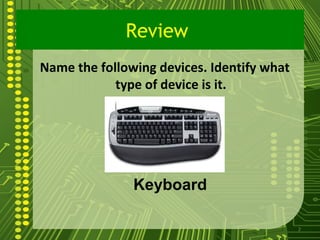
Name the following devices. Identify what
            type of device is it.


               Keyboard

                                            2
Review
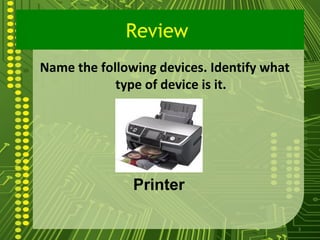
Name the following devices. Identify what
            type of device is it.


               Printer

                                            3
Review
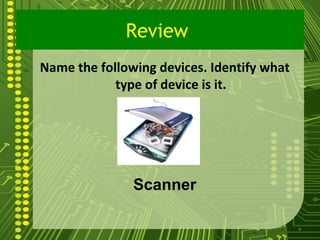
Name the following devices. Identify what
            type of device is it.


               Scanner

                                            4
Review
Name the following devices. Identify what
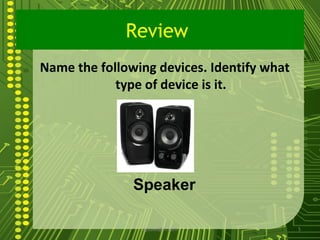
            type of device is it.


               Speaker

                sgisave@in.com              5
Review
Identify the following devices. Identify
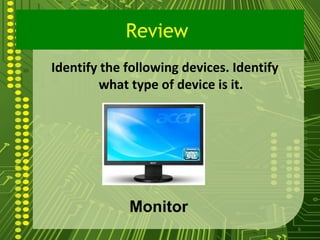
        what type of device is it.


             Monitor
                                           6
7
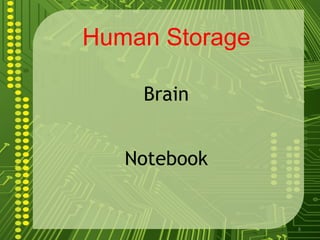
Human Storage

    Brain


   Notebook


                8
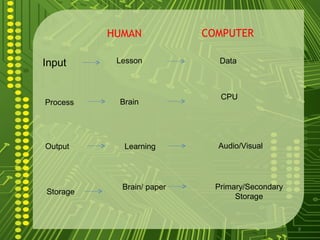
HUMAN            COMPUTER

Input      Lesson             Data


                              CPU
Process    Brain


Output      Learning         Audio/Visual


            Brain/ paper     Primary/Secondary
Storage
                                  Storage


                                                 9
What is a Storage Devices?
      It is a hardware device capable
of storing information

    A term used to describe any location
where    information   can      be     held
permanently or temporarily for later use.


                                          10
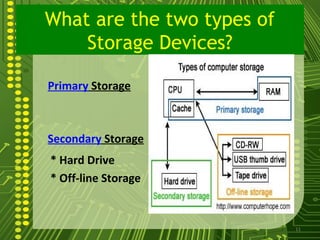
What are the two types of
    Storage Devices?

Primary Storage


Secondary Storage
* Hard Drive
* Off-line Storage


                            11
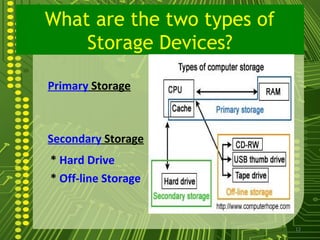
What are the two types of
    Storage Devices?

Primary Storage


Secondary Storage
* Hard Drive
* Off-line Storage


                            12
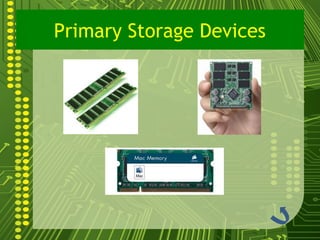
Primary Storage Devices
       Alternatively    referred       to      as internal
memory ,main memory, primary storage is a storage
location that holds memory for short periods of times
while the computer is on. For example, computer RAM
 and cache are both examples of a primary storage
device. This storage is the fastest memory in your
computer and is used to store data while it's being used.
For example, when you open a program data is moved
from the secondary storage into the primary storage.
       RAM and ROM are the Primary Storage of the
Computer


                                                             13
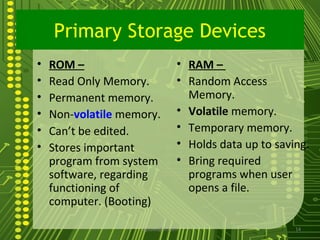
Primary Storage Devices
•   ROM –                        • RAM –
•   Read Only Memory.            • Random Access
•   Permanent memory.              Memory.
•   Non-volatile memory.         • Volatile memory.
•   Can’t be edited.             • Temporary memory.
•   Stores important             • Holds data up to saving.
    program from system          • Bring required
    software, regarding            programs when user
    functioning of                 opens a file.
    computer. (Booting)

                    sgisave@in.com                      14
Primary Storage Devices
Secondary Storage Device
         Alternatively    referred    to
as external memory and auxiliary
storage, secondary      storage is     a
storage      medium      that      holds
information until it is deleted or
overwritten regardless if the computer
has power.


                                   16
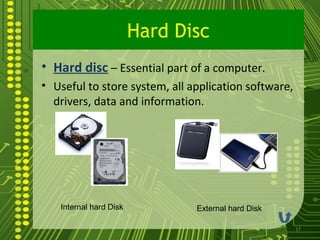
Hard Disc
• Hard disc – Essential part of a computer.
• Useful to store system, all application software,
  drivers, data and information.


   Internal hard Disk          External hard Disk

                                                      17
Secondary Storage Device
Offline Storage Device:
      This are magnetic device used
to store information which can be
detached from the computer unit.
Examples :
      1.Optical Disc
      2. Magnetic Device
      3. Mass Storage Device
              sgisave@in.com          18
Secondary Storage
           Optical Disk
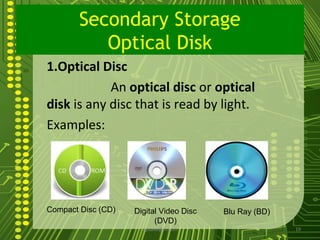
1.Optical Disc
            An optical disc or optical
disk is any disc that is read by light.
Examples:


Compact Disc (CD)   Digital Video Disc   Blu Ray (BD)
                          (DVD)
                      sgisave@in.com                    19
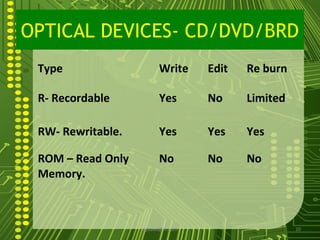
OPTICAL DEVICES- CD/DVD/BRD
 Type                    Write      Edit   Re burn

 R- Recordable           Yes        No     Limited

 RW- Rewritable.         Yes        Yes    Yes

 ROM – Read Only         No         No     No
 Memory.


                   sgisave@in.com                    20
Use of Optical Devices
• CD/DVD/BRD (R) – To store data
  permanently.
• CD/DVD/BRD (RW) – to store data
  temporarily, to carry data.
• CD/DVD/BRD (ROM) – use to store
  software, educational program, movies,
  drivers, games etc.


                 sgisave@in.com            21
Secondary Storage Device
     Offline Storage
Offline Storage Device:
      This are magnetic device used
to store information which can be
detached from the computer unit.
Examples :
      1.Optical Disc
      2. Magnetic Device
      3. Mass Storage Device
              sgisave@in.com          22
Secondary Storage Devices
   Offline Storage Device
2. Magnetic Device-stores data in as much
the same way as music is recorder on casette
tapes or stereo record.
•Example:
•Floppy disk
•Alternatively referred to as a floppy, a floppy diskwas originally created
in 1967 by IBM to help have an alternative to buying hard drives that
were extremely expensive at the time and were not thought of as
something to be used with a standard computer


                              sgisave@in.com                                  23
Secondary Storage Devices
   Offline Storage Device
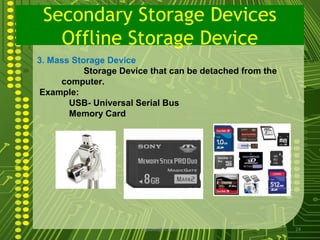
3. Mass Storage Device
           Storage Device that can be detached from the
     computer.
Example:
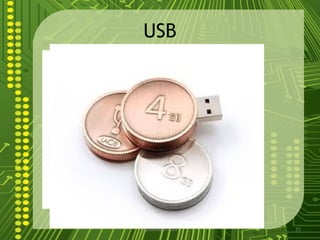
       USB- Universal Serial Bus
       Memory Card


                        sgisave@in.com                    24
USB


sgisave@in.com   25
Summary
      Storage Device are device we used to store
process information. They may be primary or
secondary storage devices
      Primary storage devices are those storage
which are part of the computer. Computers will not
be able to run without it. Primary memory are the
RAM and ROM.
       Secondary storage devices are those storage
 which can be taken out of the computer. They may
 be an optical disk, magnetic disc or mass storage
 device.

                     sgisave@in.com                  26
Assessment
1.What is a storage devices?

2.What are the two types of storage device?

3. What are the different type of optical disk?


                  sgisave@in.com                  27
Quiz Proper
A.Give the meaning of the following:
    1. VCD
    2. DVD
    3. BD
    4. USB
    5. ROM


                            sgisave@in.com   28
volatile
     Volatile    memory    is
memory      that   loses  its
contents when the computer
or hardware device loses
power.
     Non-volatile memory is
memory that keeps its
contents even if the power is
lost

                                29

Storage device

  • 1.
    Internet and Computing Fundamentals I Learning Objective: Identify the Types and Purposes of Storage Devices
  • 2.
    Review Name the followingdevices. Identify what type of device is it. Keyboard 2
  • 3.
    Review Name the followingdevices. Identify what type of device is it. Printer 3
  • 4.
    Review Name the followingdevices. Identify what type of device is it. Scanner 4
  • 5.
    Review Name the followingdevices. Identify what type of device is it. Speaker sgisave@in.com 5
  • 6.
    Review Identify the followingdevices. Identify what type of device is it. Monitor 6
  • 7.
  • 8.
    Human Storage Brain Notebook 8
  • 9.
    HUMAN COMPUTER Input Lesson Data CPU Process Brain Output Learning Audio/Visual Brain/ paper Primary/Secondary Storage Storage 9
  • 10.
    What is aStorage Devices? It is a hardware device capable of storing information A term used to describe any location where information can be held permanently or temporarily for later use. 10
  • 11.
    What are thetwo types of Storage Devices? Primary Storage Secondary Storage * Hard Drive * Off-line Storage 11
  • 12.
    What are thetwo types of Storage Devices? Primary Storage Secondary Storage * Hard Drive * Off-line Storage 12
  • 13.
    Primary Storage Devices Alternatively referred to as internal memory ,main memory, primary storage is a storage location that holds memory for short periods of times while the computer is on. For example, computer RAM and cache are both examples of a primary storage device. This storage is the fastest memory in your computer and is used to store data while it's being used. For example, when you open a program data is moved from the secondary storage into the primary storage. RAM and ROM are the Primary Storage of the Computer 13
  • 14.
    Primary Storage Devices • ROM – • RAM – • Read Only Memory. • Random Access • Permanent memory. Memory. • Non-volatile memory. • Volatile memory. • Can’t be edited. • Temporary memory. • Stores important • Holds data up to saving. program from system • Bring required software, regarding programs when user functioning of opens a file. computer. (Booting) sgisave@in.com 14
  • 15.
  • 16.
    Secondary Storage Device Alternatively referred to as external memory and auxiliary storage, secondary storage is a storage medium that holds information until it is deleted or overwritten regardless if the computer has power. 16
  • 17.
    Hard Disc • Harddisc – Essential part of a computer. • Useful to store system, all application software, drivers, data and information. Internal hard Disk External hard Disk 17
  • 18.
    Secondary Storage Device OfflineStorage Device: This are magnetic device used to store information which can be detached from the computer unit. Examples : 1.Optical Disc 2. Magnetic Device 3. Mass Storage Device sgisave@in.com 18
  • 19.
    Secondary Storage Optical Disk 1.Optical Disc An optical disc or optical disk is any disc that is read by light. Examples: Compact Disc (CD) Digital Video Disc Blu Ray (BD) (DVD) sgisave@in.com 19
  • 20.
    OPTICAL DEVICES- CD/DVD/BRD Type Write Edit Re burn R- Recordable Yes No Limited RW- Rewritable. Yes Yes Yes ROM – Read Only No No No Memory. sgisave@in.com 20
  • 21.
    Use of OpticalDevices • CD/DVD/BRD (R) – To store data permanently. • CD/DVD/BRD (RW) – to store data temporarily, to carry data. • CD/DVD/BRD (ROM) – use to store software, educational program, movies, drivers, games etc. sgisave@in.com 21
  • 22.
    Secondary Storage Device Offline Storage Offline Storage Device: This are magnetic device used to store information which can be detached from the computer unit. Examples : 1.Optical Disc 2. Magnetic Device 3. Mass Storage Device sgisave@in.com 22
  • 23.
    Secondary Storage Devices Offline Storage Device 2. Magnetic Device-stores data in as much the same way as music is recorder on casette tapes or stereo record. •Example: •Floppy disk •Alternatively referred to as a floppy, a floppy diskwas originally created in 1967 by IBM to help have an alternative to buying hard drives that were extremely expensive at the time and were not thought of as something to be used with a standard computer sgisave@in.com 23
  • 24.
    Secondary Storage Devices Offline Storage Device 3. Mass Storage Device Storage Device that can be detached from the computer. Example: USB- Universal Serial Bus Memory Card sgisave@in.com 24
  • 25.
  • 26.
    Summary Storage Device are device we used to store process information. They may be primary or secondary storage devices Primary storage devices are those storage which are part of the computer. Computers will not be able to run without it. Primary memory are the RAM and ROM. Secondary storage devices are those storage which can be taken out of the computer. They may be an optical disk, magnetic disc or mass storage device. sgisave@in.com 26
  • 27.
    Assessment 1.What is astorage devices? 2.What are the two types of storage device? 3. What are the different type of optical disk? sgisave@in.com 27
  • 28.
    Quiz Proper A.Give themeaning of the following: 1. VCD 2. DVD 3. BD 4. USB 5. ROM sgisave@in.com 28
  • 29.
    volatile Volatile memory is memory that loses its contents when the computer or hardware device loses power. Non-volatile memory is memory that keeps its contents even if the power is lost 29