COMPUTER APPLICATION IN BUSINESS
PRESENTEDBY
NAME-AMITKUMARDEY
ROLLNO-12
CLASS-MBA(FM)-2SEMESTER
DEFINITION
• The storage unit is a part of the computer system which is employed to store the information and
instructions to be processed. A storage device is an integral part of the computer hardware which stores
information/data to process the result of any computational work. Without a storage device, a
computer would not be able to run or even boot up. Or in other words, we can say that a storage device
is hardware that is used for storing, porting, or extracting data files. It can also store information/data
both temporarily and permanently.
TYPES OF COMPUTER MEMORY
• Primary Memory
• Secondary Memory
• Tertiary Memory
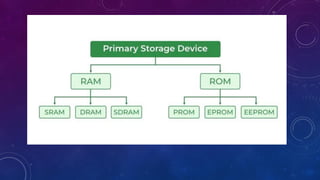
• 1. Primary Memory: It is also known as internalmemory and main memory. Thisis a section of the CPU
that holds program instructions, input data, and intermediateresults. It is generallysmaller in size. RAM
(Random Access Memory) and ROM (Read Only Memory) are examples of primary storage.
•
• 2. Secondary Memory: Secondary storage is a memory that is stored external to the computer. It is
mainly used for the permanent and long-term storage of programs and data. Hard Disks, CDs, DVDs,
Pen/Flash drives, SSD, etc, are examples of secondary storage.
• 3. Tertiary Memory: Tertiary Memory is a type of Memory that is rarely used in personal computers and
due to this, tertiary memory is not considered to be an important one. Tertiary memory works
automaticallywithout human intervention.
TYPES OF COMPUTER STORAGE DEVICES
• Now we will discuss different types of storage devices availablein the market. These storage devices
have their own specificationand use. Some of the commonly used storage devices are:
•
• Primary Storage Devices
• Magnetic Storage Devices
• Flash memory Devices
• OpticalStorage Devices
• Cloud and Virtual Storage
1-PRIMARY STORAGE DEVICES
• RAM: It standsfor Random Access Memory. It is used to store informationthat is used immediatelyor
we can say that it is a temporary memory. Computers bring the software installedon a hard disk to RAM
to process it and to be used by the user. Once, the computer is turned off, the data is deleted. With the
help of RAM, computerscan perform multiple tasks like loading applications,browsing the web, editing
a spreadsheet, experiencing the newest game, etc. It allowsyou to modify quickly among these tasks,
remembering where you’re in one task once you switch to a different task. It is also used to load and
run applications,like your spreadsheet program, answers commands, like all edits you made within the
spreadsheet, or toggle between multiple programs, like once you left the spreadsheet to see the email.
Memory is nearly alwaysactively employedby your computer. It ranges from 1GB – 32GB/64GB
depending upon the specifications.There are different types of RAM, and although they all serve the
same purpose, the most common ones are :
• SRAM: It standsfor Static Random Access Memory. It consists of circuits that retain stored information
as long as the power supply is on. It is also known as volatilememory. It is used to buildCache memory.
The access time of SRAM is lower and it is much faster as compared to DRAM but in terms of cost, it is
costly as compared to DRAM.
• DRAM: It standsfor Dynamic Random Access Memory. It is used to store binary bits in the form of
electrical charges that are appliedto capacitors.The access time of DRAM is slower as compared to
SRAM but it is cheaper than SRAM and has a high packaging density.
• SDRAM: It standsfor SynchronousDynamic Random Access Memory. It is faster than DRAM. It is widely
used in computersand others. After SDRAM was introduced,the upgraded version of double data rate
RAM, i.e., DDR1, DDR2, DDR3, and DDR4 was entered into the market and widely used in home/office
desktops and laptops.
ROM
• It standsfor Read-OnlyMemory. The datawritten or stored in these devices are non-volatile,i.e, once
the data is stored in the memory cannot be modified or deleted. The memory from which will only read
but cannot write it. This type of memory is non-volatile.The information is stored permanentlyduring
manufacture only once. ROM stores instructionsthat are used to start a computer. This operationis
referred to as bootstrap. It is also used in other electronic items like washers and microwaves.ROM
chips can only store a few megabytes(MB) of data,which ranges between 4 and 8 MB per ROM chip.
There are two types of ROM:
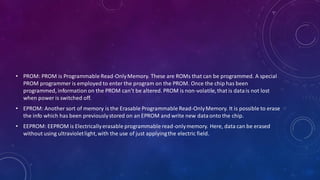
• PROM: PROM is Programmable Read-OnlyMemory. These are ROMs that can be programmed. A special
PROM programmer is employed to enter the program on the PROM. Once the chip has been
programmed, information on the PROM can’t be altered. PROM is non-volatile,that is datais not lost
when power is switched off.
• EPROM: Another sort of memory is the Erasable Programmable Read-OnlyMemory. It is possible to erase
the info which has been previouslystored on an EPROM and write new dataonto the chip.
• EEPROM: EEPROM is Electricallyerasable programmable read-onlymemory. Here, data can be erased
without using ultravioletlight,with the use of just applyingthe electric field.
2-MAGNETIC STORAGE DEVICES
Floppy Disk: Floppy Disk is also known as a floppy diskette. It is generallyused on a personal computer
to store data externally. A Floppy disk is made up of a plastic cartridge and secured with a protective
case. Nowadaysfloppy disk is replaced by new and effective storage devices like USB, etc.
• Hard Disk: Hard Disk is a storage device (HDD) that stores and retrieves data using magnetic storage. It is a non-
volatilestorage device that can be modified or deleted n number of times without any problem. Most
computers and laptopshave HDDs as their secondary storage device. It is actually a set of stacked disks, just like
phonographrecords. In every hard disk, the datais recorded electromagneticallyin concentric circles or we can
say track present on the hard disk, and with the help of a head just like a phonographarm(but fixed in a
position) to read the informationpresent on the track. The read-write speed of HDDs is not so fast but decent. It
ranges from a few GBs to a few and more TB.
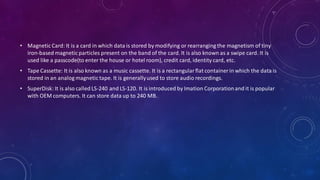
• Magnetic Card: It is a card in which data is stored by modifying or rearranging the magnetism of tiny
iron-based magnetic particles present on the band of the card. It is also known as a swipe card. It is
used like a passcode(to enter the house or hotel room), credit card, identity card, etc.
• Tape Cassette: It is also known as a music cassette. It is a rectangularflat container in which the data is
stored in an analog magnetic tape. It is generallyused to store audio recordings.
• SuperDisk: It is also called LS-240 and LS-120. It is introduced by Imation Corporationand it is popular
with OEM computers. It can store data up to 240 MB.
MAGNETIC STORAGE DEVICES
3-FLASH MEMORY DEVICES
• It is a cheaper and more portable storage device. It is the most commonly used device to store data
because is more reliable and efficient as compared to other storage devices. Some of the commonly
used flash memory devices are:
•
• Pen Drive:
• SSD: It stands for Solid State Drive, a mass storage device like HDD. It is more durablebecause it does
not containopticaldisks inside like hard disks. It needs less power as compared to hard disks, is
lightweight, and has 10x faster read and writes speed as compared to hard disks. But, these are costly
as well. While SSDs serve an equivalentfunction as hard drives, their internalcomponentsare much
different. Unlike hard drives, SSDs don’t have any moving parts and thus they’re called solid-state
drives. Instead of storing data on magnetic platters,SSDs store data using non-volatilestorage. Since
SSDs haven’tany moving parts, they do not need to “spin up”. It ranges from 150GB to a few more TB.
• SD Card: It is known as a Secure Digital Card. It is generallyused with electronic devices like phones,
digitalcameras, etc. To store larger data. It is portable and the size of the SD card is also small so that it
can easily fit into electronic devices. It is availablein different sizes like 2GB, 4GB, 8GB, etc.
• Memory Card: It is generallyused in digitalcameras. Printers, game consoles, etc. It is also used to store
large amountsof data and is availablein different sizes. To run a memory card on a computer you
require a separate memory card reader.
• MultimediaCard: It is also known as MMC. It is an integratedcircuit that is generallyused in-car radios,
digitalcameras, etc. It is an external device to store data/information.
•
FLASH MEMORY DEVICES
4-OPTICAL STORAGE DEVICES
• OpticalStorage Devices is also secondary storage device. It is a removablestorage device. Following are
some opticalstorage devices:
•
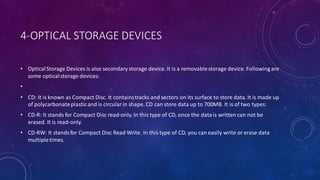
• CD: It is known as Compact Disc. It containstracks and sectors on its surface to store data. It is made up
of polycarbonateplasticand is circularin shape. CD can store data up to 700MB. It is of two types:
• CD-R: It stands for Compact Disc read-only. In this type of CD, once the datais written can not be
erased. It is read-only.
• CD-RW: It stands for Compact Disc Read Write. In this type of CD, you can easily write or erase data
multipletimes.
• DVD: It is known as DigitalVersatile Disc. DVDs are circularflat opticaldiscs used to store data. It comes
in two different sizes one is 4.7GB single-layerdiscs and another one is 8.5GB double-layerdiscs. DVDs
look like CDs but the storage capacityof DVDs is more than as compared to CDs. It is of two types:
• DVD-R:
• DVD-RW: It standsfor DigitalVersatile Disc Read Write. In this type of DVD, you can easily write or erase
data multipletimes.
• Blu-ray Disc: It is just like CD and DVD but the storage capacity of blu ray is up to 25GB. To run a Blu-ray
disc you need a separate Blu-ray reader. ThisBlu-ray technology is used to read a disc from a blue-violet
laser due to which the informationis stored in greater density with a longer wavelength.
OPTICAL STORAGE DEVICES
5-CLOUD AND VIRTUAL STORAGE
• Nowadays,secondary memory has been upgraded to virtualor cloud storage devices. We can store our files and
other stuff in the cloud and the data is stored for as long as we pay for the cloud storage. There are many
companies that provide cloud services largely Google, Amazon, Microsoft, etc. We can pay the rent for the
amount of space we need and we get multiple benefitsout of it. Though it is actuallybeing stored in a physical
device locatedin the data centers of the service provider, the user doesn’t interactwith the physicaldevice and its
maintenance.For example, Amazon Web Services offers AWS S3 as a type of storage where users can store data
virtuallyinstead of being stored in physicalhard drive devices. These sorts of innovationsrepresent the frontier of
where storage media goes.
CHARACTERISTICS OF STORAGE DEVICES
• Data stored in the Memory can be changed or replaced in case of a requirement, because of the
mobilityof the storage devices.
• Storage Devices validatethat saved data can be replaced or deleted as per the requirements because
the storage devices are easily readable,writeable, and rewritable.
• Storage Devices are easy and convenientto access because they do not require much skill set to handle
these resources.
• The storage capacity of these devices is an extra advantageto the system.
• Storage Devices have better performance and data can be easily transferred from one device to
another.
Presentation on storage devices (Computer Application)

Presentation on storage devices (Computer Application)

  • 1.
    COMPUTER APPLICATION INBUSINESS PRESENTEDBY NAME-AMITKUMARDEY ROLLNO-12 CLASS-MBA(FM)-2SEMESTER
  • 2.
    DEFINITION • The storageunit is a part of the computer system which is employed to store the information and instructions to be processed. A storage device is an integral part of the computer hardware which stores information/data to process the result of any computational work. Without a storage device, a computer would not be able to run or even boot up. Or in other words, we can say that a storage device is hardware that is used for storing, porting, or extracting data files. It can also store information/data both temporarily and permanently.
  • 3.
    TYPES OF COMPUTERMEMORY • Primary Memory • Secondary Memory • Tertiary Memory • 1. Primary Memory: It is also known as internalmemory and main memory. Thisis a section of the CPU that holds program instructions, input data, and intermediateresults. It is generallysmaller in size. RAM (Random Access Memory) and ROM (Read Only Memory) are examples of primary storage. • • 2. Secondary Memory: Secondary storage is a memory that is stored external to the computer. It is mainly used for the permanent and long-term storage of programs and data. Hard Disks, CDs, DVDs, Pen/Flash drives, SSD, etc, are examples of secondary storage.
  • 4.
    • 3. TertiaryMemory: Tertiary Memory is a type of Memory that is rarely used in personal computers and due to this, tertiary memory is not considered to be an important one. Tertiary memory works automaticallywithout human intervention.
  • 5.
    TYPES OF COMPUTERSTORAGE DEVICES • Now we will discuss different types of storage devices availablein the market. These storage devices have their own specificationand use. Some of the commonly used storage devices are: • • Primary Storage Devices • Magnetic Storage Devices • Flash memory Devices • OpticalStorage Devices • Cloud and Virtual Storage
  • 6.
    1-PRIMARY STORAGE DEVICES •RAM: It standsfor Random Access Memory. It is used to store informationthat is used immediatelyor we can say that it is a temporary memory. Computers bring the software installedon a hard disk to RAM to process it and to be used by the user. Once, the computer is turned off, the data is deleted. With the help of RAM, computerscan perform multiple tasks like loading applications,browsing the web, editing a spreadsheet, experiencing the newest game, etc. It allowsyou to modify quickly among these tasks, remembering where you’re in one task once you switch to a different task. It is also used to load and run applications,like your spreadsheet program, answers commands, like all edits you made within the spreadsheet, or toggle between multiple programs, like once you left the spreadsheet to see the email. Memory is nearly alwaysactively employedby your computer. It ranges from 1GB – 32GB/64GB depending upon the specifications.There are different types of RAM, and although they all serve the same purpose, the most common ones are :
  • 7.
    • SRAM: Itstandsfor Static Random Access Memory. It consists of circuits that retain stored information as long as the power supply is on. It is also known as volatilememory. It is used to buildCache memory. The access time of SRAM is lower and it is much faster as compared to DRAM but in terms of cost, it is costly as compared to DRAM. • DRAM: It standsfor Dynamic Random Access Memory. It is used to store binary bits in the form of electrical charges that are appliedto capacitors.The access time of DRAM is slower as compared to SRAM but it is cheaper than SRAM and has a high packaging density. • SDRAM: It standsfor SynchronousDynamic Random Access Memory. It is faster than DRAM. It is widely used in computersand others. After SDRAM was introduced,the upgraded version of double data rate RAM, i.e., DDR1, DDR2, DDR3, and DDR4 was entered into the market and widely used in home/office desktops and laptops.
  • 8.
    ROM • It standsforRead-OnlyMemory. The datawritten or stored in these devices are non-volatile,i.e, once the data is stored in the memory cannot be modified or deleted. The memory from which will only read but cannot write it. This type of memory is non-volatile.The information is stored permanentlyduring manufacture only once. ROM stores instructionsthat are used to start a computer. This operationis referred to as bootstrap. It is also used in other electronic items like washers and microwaves.ROM chips can only store a few megabytes(MB) of data,which ranges between 4 and 8 MB per ROM chip. There are two types of ROM:
  • 9.
    • PROM: PROMis Programmable Read-OnlyMemory. These are ROMs that can be programmed. A special PROM programmer is employed to enter the program on the PROM. Once the chip has been programmed, information on the PROM can’t be altered. PROM is non-volatile,that is datais not lost when power is switched off. • EPROM: Another sort of memory is the Erasable Programmable Read-OnlyMemory. It is possible to erase the info which has been previouslystored on an EPROM and write new dataonto the chip. • EEPROM: EEPROM is Electricallyerasable programmable read-onlymemory. Here, data can be erased without using ultravioletlight,with the use of just applyingthe electric field.
  • 11.
    2-MAGNETIC STORAGE DEVICES FloppyDisk: Floppy Disk is also known as a floppy diskette. It is generallyused on a personal computer to store data externally. A Floppy disk is made up of a plastic cartridge and secured with a protective case. Nowadaysfloppy disk is replaced by new and effective storage devices like USB, etc.
  • 12.
    • Hard Disk:Hard Disk is a storage device (HDD) that stores and retrieves data using magnetic storage. It is a non- volatilestorage device that can be modified or deleted n number of times without any problem. Most computers and laptopshave HDDs as their secondary storage device. It is actually a set of stacked disks, just like phonographrecords. In every hard disk, the datais recorded electromagneticallyin concentric circles or we can say track present on the hard disk, and with the help of a head just like a phonographarm(but fixed in a position) to read the informationpresent on the track. The read-write speed of HDDs is not so fast but decent. It ranges from a few GBs to a few and more TB.
  • 13.
    • Magnetic Card:It is a card in which data is stored by modifying or rearranging the magnetism of tiny iron-based magnetic particles present on the band of the card. It is also known as a swipe card. It is used like a passcode(to enter the house or hotel room), credit card, identity card, etc. • Tape Cassette: It is also known as a music cassette. It is a rectangularflat container in which the data is stored in an analog magnetic tape. It is generallyused to store audio recordings. • SuperDisk: It is also called LS-240 and LS-120. It is introduced by Imation Corporationand it is popular with OEM computers. It can store data up to 240 MB.
  • 14.
  • 15.
    3-FLASH MEMORY DEVICES •It is a cheaper and more portable storage device. It is the most commonly used device to store data because is more reliable and efficient as compared to other storage devices. Some of the commonly used flash memory devices are: • • Pen Drive: • SSD: It stands for Solid State Drive, a mass storage device like HDD. It is more durablebecause it does not containopticaldisks inside like hard disks. It needs less power as compared to hard disks, is lightweight, and has 10x faster read and writes speed as compared to hard disks. But, these are costly as well. While SSDs serve an equivalentfunction as hard drives, their internalcomponentsare much different. Unlike hard drives, SSDs don’t have any moving parts and thus they’re called solid-state drives. Instead of storing data on magnetic platters,SSDs store data using non-volatilestorage. Since SSDs haven’tany moving parts, they do not need to “spin up”. It ranges from 150GB to a few more TB.
  • 16.
    • SD Card:It is known as a Secure Digital Card. It is generallyused with electronic devices like phones, digitalcameras, etc. To store larger data. It is portable and the size of the SD card is also small so that it can easily fit into electronic devices. It is availablein different sizes like 2GB, 4GB, 8GB, etc. • Memory Card: It is generallyused in digitalcameras. Printers, game consoles, etc. It is also used to store large amountsof data and is availablein different sizes. To run a memory card on a computer you require a separate memory card reader. • MultimediaCard: It is also known as MMC. It is an integratedcircuit that is generallyused in-car radios, digitalcameras, etc. It is an external device to store data/information. •
  • 17.
  • 18.
    4-OPTICAL STORAGE DEVICES •OpticalStorage Devices is also secondary storage device. It is a removablestorage device. Following are some opticalstorage devices: • • CD: It is known as Compact Disc. It containstracks and sectors on its surface to store data. It is made up of polycarbonateplasticand is circularin shape. CD can store data up to 700MB. It is of two types: • CD-R: It stands for Compact Disc read-only. In this type of CD, once the datais written can not be erased. It is read-only. • CD-RW: It stands for Compact Disc Read Write. In this type of CD, you can easily write or erase data multipletimes.
  • 19.
    • DVD: Itis known as DigitalVersatile Disc. DVDs are circularflat opticaldiscs used to store data. It comes in two different sizes one is 4.7GB single-layerdiscs and another one is 8.5GB double-layerdiscs. DVDs look like CDs but the storage capacityof DVDs is more than as compared to CDs. It is of two types: • DVD-R: • DVD-RW: It standsfor DigitalVersatile Disc Read Write. In this type of DVD, you can easily write or erase data multipletimes. • Blu-ray Disc: It is just like CD and DVD but the storage capacity of blu ray is up to 25GB. To run a Blu-ray disc you need a separate Blu-ray reader. ThisBlu-ray technology is used to read a disc from a blue-violet laser due to which the informationis stored in greater density with a longer wavelength.
  • 20.
  • 21.
    5-CLOUD AND VIRTUALSTORAGE • Nowadays,secondary memory has been upgraded to virtualor cloud storage devices. We can store our files and other stuff in the cloud and the data is stored for as long as we pay for the cloud storage. There are many companies that provide cloud services largely Google, Amazon, Microsoft, etc. We can pay the rent for the amount of space we need and we get multiple benefitsout of it. Though it is actuallybeing stored in a physical device locatedin the data centers of the service provider, the user doesn’t interactwith the physicaldevice and its maintenance.For example, Amazon Web Services offers AWS S3 as a type of storage where users can store data virtuallyinstead of being stored in physicalhard drive devices. These sorts of innovationsrepresent the frontier of where storage media goes.
  • 23.
    CHARACTERISTICS OF STORAGEDEVICES • Data stored in the Memory can be changed or replaced in case of a requirement, because of the mobilityof the storage devices. • Storage Devices validatethat saved data can be replaced or deleted as per the requirements because the storage devices are easily readable,writeable, and rewritable. • Storage Devices are easy and convenientto access because they do not require much skill set to handle these resources. • The storage capacity of these devices is an extra advantageto the system. • Storage Devices have better performance and data can be easily transferred from one device to another.