SQL Server 2005  Reporting Services Bala Subra [email_address]
Executive Summary Delivered through: Traditional and interactive reports  Scalable, manageable and embeddable  server infrastructure Integration with SharePoint, Office applications, browser and other familiar tools  Single platform and tools for all types of structured data (relational, hierarchical, multidimensional) Product enabling employees at all levels of an organization to realize the promise of BI and to promote better decision making
BI User Profiles Information Consumers Information Explorers 5-10% of users 15-25% of users 65-80% of users Analysts SQL Server Reporting Services SQL Server  Analysis Services
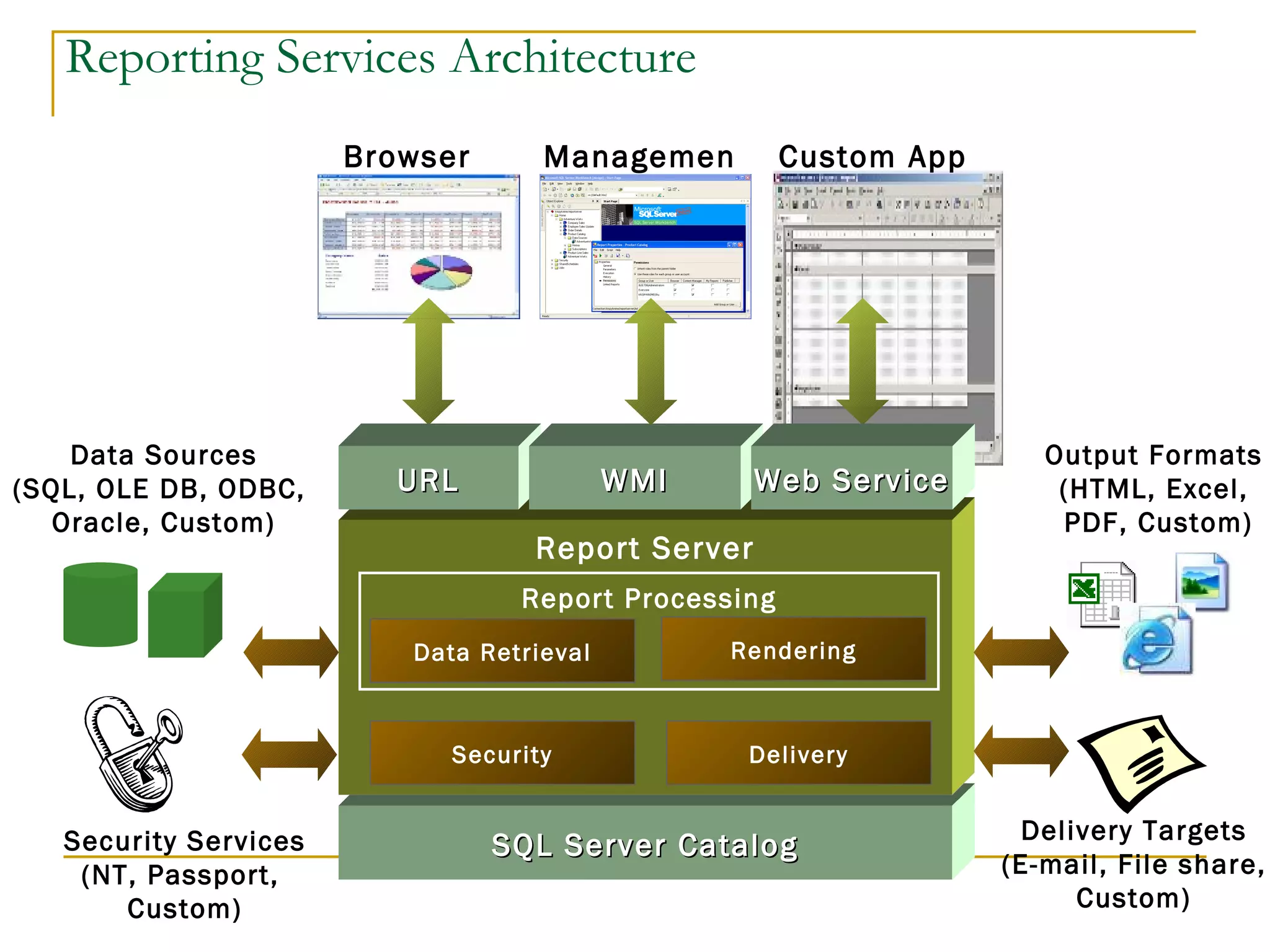
Reporting Services Architecture SQL Server Catalog Report Server Delivery Delivery Targets (E-mail, File share, Custom) Security Services (NT, Passport,  Custom) Security Data Sources (SQL, OLE DB, ODBC,  Oracle, Custom) Output Formats  (HTML, Excel,  PDF, Custom) Report Processing Browser Management Custom App URL WMI Web Service Data Retrieval Rendering
Reporting Services Architecture
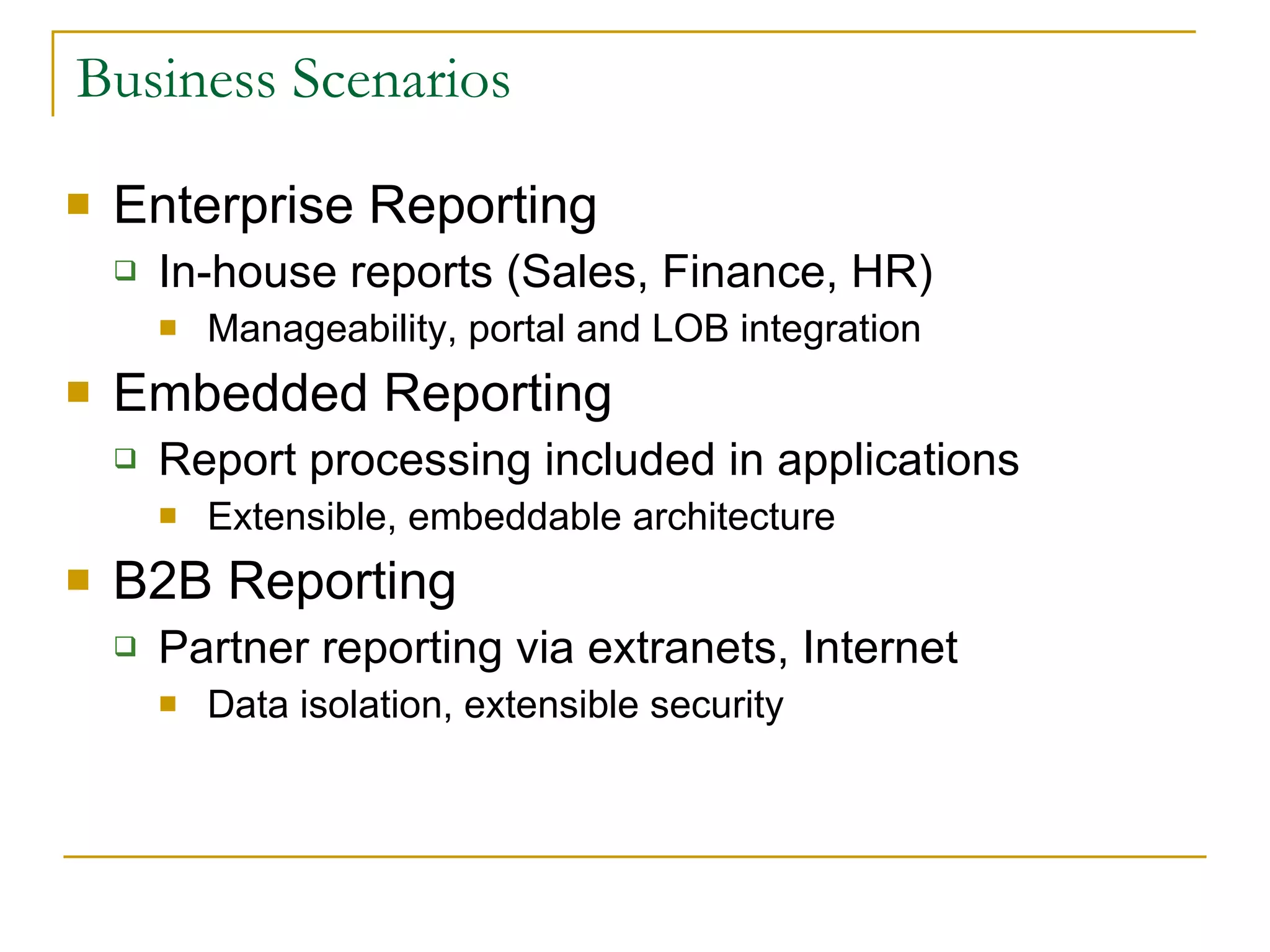
Business Scenarios Enterprise Reporting In-house reports (Sales, Finance, HR) Manageability, portal and LOB integration Embedded Reporting  Report processing included in applications Extensible, embeddable architecture B2B Reporting Partner reporting via extranets, Internet Data isolation, extensible security
Reporting Lifecycle SQL Server Reporting Services supports the full reporting lifecycle, including Authoring,  Management and Delivery Authoring Management Delivery
Report Authoring Report Designer Integrated with Visual Studio .NET 2003 Powerful, XML Report Definition Language (RDL) Freeform / Table / Matrix / Chart Parameters (Dynamic, Hierarchical) Sorting / Filtering / Grouping / Aggregates Interactivity (Drill-down, Drill-through) Full VB.NET Expression Language Published RDL definition to enable 3rd parties to create custom authoring tools Extensible query execution architecture SQL Server / Analysis Services OLE DB / ODBC / Oracle
Report Management Web Service APIs for management  Web management user interface Report Management Functions Report Metadata (Name, Description, Connections, Credentials, Parameters) Scheduling integrated with SQL Server Agent Execution properties (live, cache or snapshot) History of prior executions Extensible, role-based security architecture
Report Delivery Single report definition can be rendered to diverse output formats Web Formats (HTML 4, HTML 3.2, HTML w/OWC) Print Formats (TIFF, RTF, PDF) Data Formats (Excel, XML, CSV) Personalized and administrator defined subscription and delivery Ability to select output formats per subscription Can deliver links as well as rendered reports Data-driven subscriptions for personal delivery Extensible delivery provider architecture E-mail, File System, Custom
Reporting Services Terminology Data Source – a database Dataset – a query against a data source Data Region – an item that displays repeated rows of data Types of Data Regions Table – a banded, tabular report Matrix – a cross-tab (or pivot table) report List – data arranged in free-form fashion Chart – a graph
Creating Reporting Services Project Creating a Report Creating a Group Interactive Sorting Creating Drill-Down Reports
Calculations & Formatting Reporting Services uses VB-like expressions You can use standard +. -, *, /, mod operators String concatenation with & (don’t use +) Aggregate functions: Sum, Count, Avg, Min, Max, First, Last, etc. Also supported: IIf(), Len(), Switch()
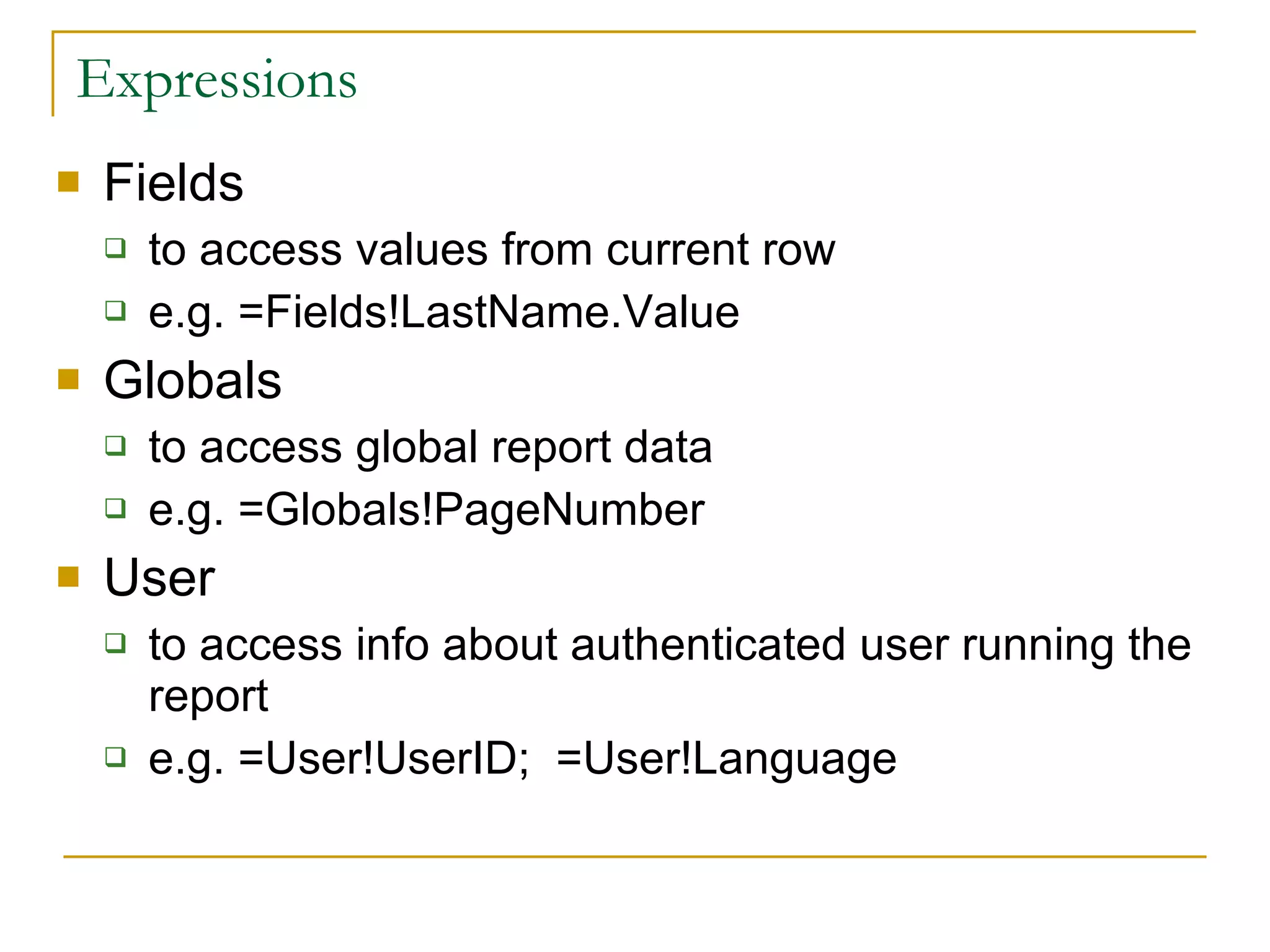
Expressions Fields to access values from current row e.g. =Fields!LastName.Value Globals to access global report data e.g. =Globals!PageNumber User to access info about authenticated user running the report e.g. =User!UserID;  =User!Language
Expressions Parameters to access value of input parameters e.g., =Parameters!Country.Value ReportItems to access values from other sections of report e.g.= ReportItems!txtQuantity.Value *
Using Custom Code You can write your own VB functions and include them in the Code tab of the Report|Report Properties dialog Visual Basic is the only language supported by SSRS in the code window You can also develop custom assemblies that you can call from reports Assemblies can be developed in any .NET language You have to follow a number of steps to reference, deploy, and access your assemblies
Custom Code Example Public Function ColumnSel (ByVal parameter as Parameter, ByVal ColID as integer)  as Boolean If parameter.IsMultiValue then   For i as integer = 0 to parameter.Count-1 If val(parameter.Value(i)) = ColID then Return True End If Next Return False Else Return False End If Return False End Function
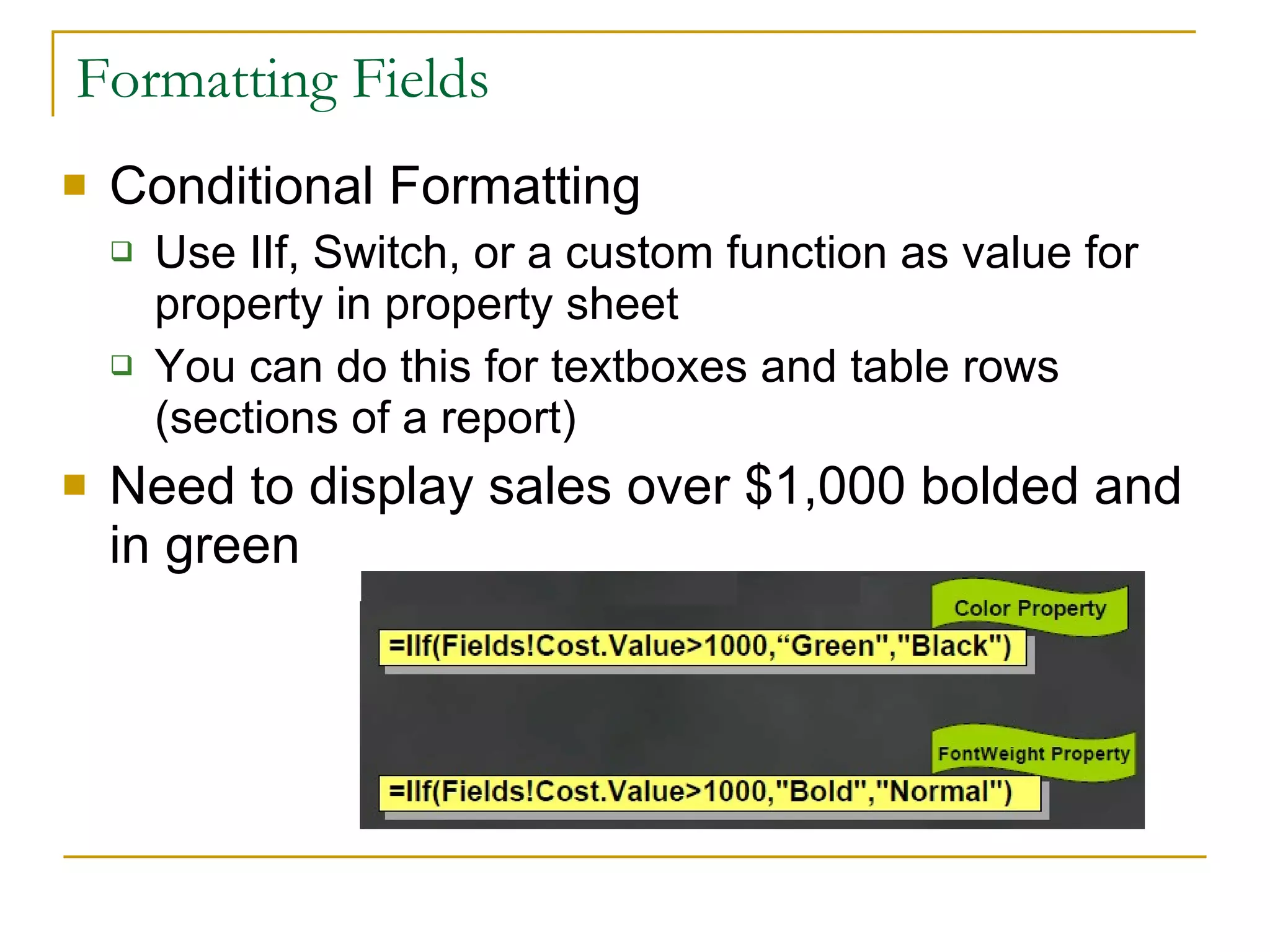
Formatting Fields Conditional Formatting Use IIf, Switch, or a custom function as value for property in property sheet You can do this for textboxes and table rows (sections of a report) Need to display sales over $1,000 bolded and in green
Bala Subra
Themes Core Product Enhancements Extend features based on feedback from SQL2K version Incremental enhancements, performance and scalability Tighter Integration Strengthen SQL Server end-to-end BI scenarios Tighter integration with Office and SharePoint Developer Focus Unparalleled integration for the Visual Studio developer Freely redistributable Windows and ASP.NET controls Empowering End Users Report Builder enables end-user reporting scenarios Increased interactivity
What’s new in 2005 Report Builder VS Integration VS Controls Interactive Sort Multi-valued parameters Parameter Date Picker Management Studio Integration MDX Query builder Configuration Tool Custom Report Item Floating headers Printing from IE (SP2) Web Parts (SP2) 64 bit Support Multi-instance Support Expression builder enhancements
Bala Subra
Most Requested Items Not in 2005 Rich Text support RTF/Doc rendering PPT rendering Shared Styles (Styles sheets) Templates Font embedding in PDF Many Chart enhancement (Same as SP2) Heterogeneous Join Edit in Preview
Rich Client Printing Direct routing of print jobs without needing to export Small ActiveX control downloaded via browser Select page range, orientation, margins Preview page output Server enhancements for performance
Enhanced Expression Editor Available for all expressions in VS Report Designer List of available VB.NET functions Inline parameter information Statement completion Real-time syntax checking
Multi-Valued Parameters Report developer can specify any parameter is multi-valued Report processing constructs SQL or MDX syntax Multiple default values also supported Value sets can passed via URL or SOAP API
Date Picker Parameters Calendar control for choosing dates Localized and Globalized Windows and Web support
Interactive Sort Report author can add ability for end user to resort data within data regions Resorting happens without re-querying the database Support for multi column and for nested / grouped sort
Floating Headers New type of interactivity similar to freeze panes in Excel Works Horizontally and Vertically Table header Matrix column and row headers Table columns Must be continuous columns anchored on the right or left
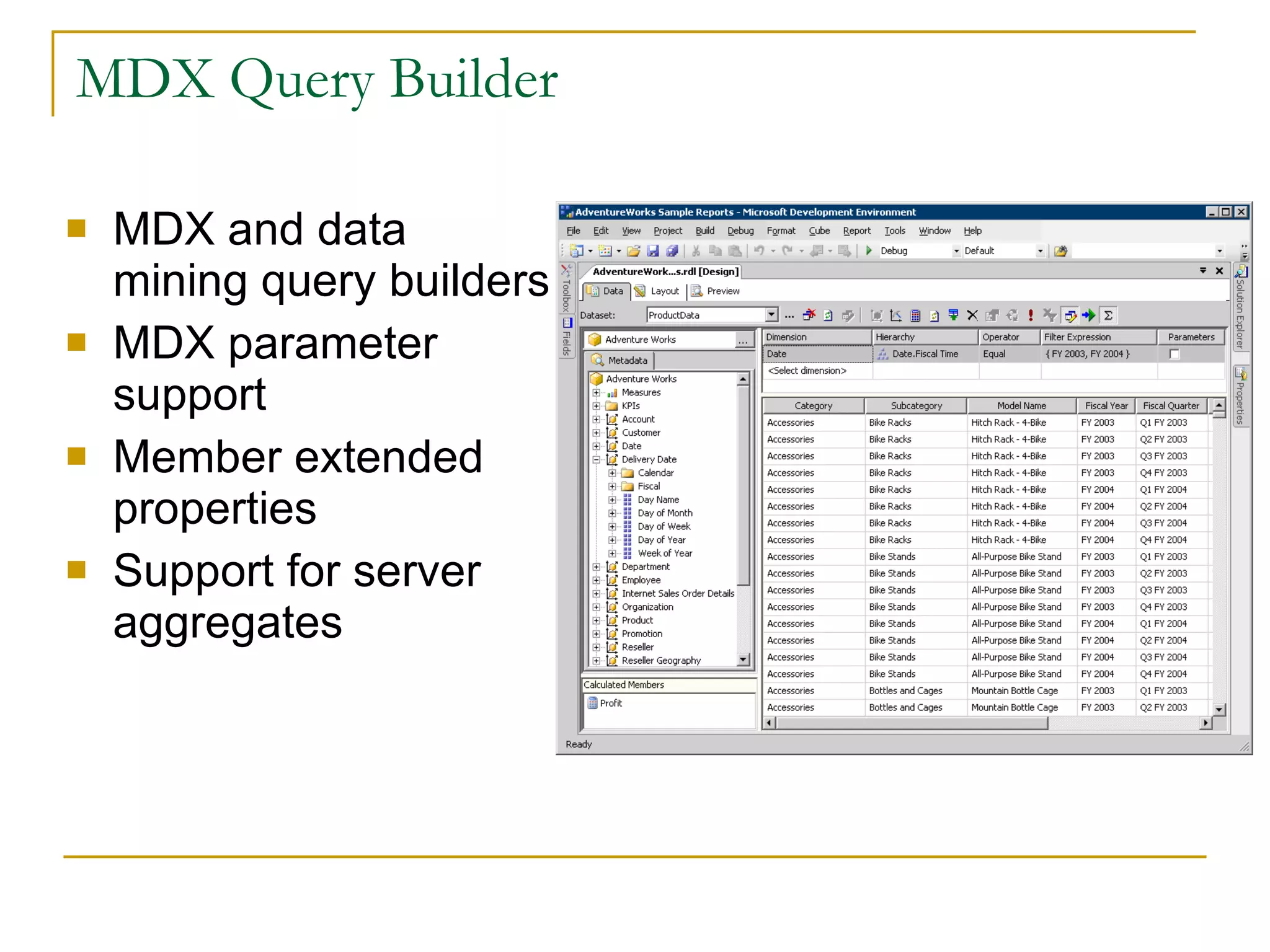
MDX Query Builder MDX and data mining query builders MDX parameter support Member extended properties Support for server aggregates
Custom Report Item Enables ISVs and Developers to add custom visualizations to a report Primary scenario is enhanced charting Additional chart types Maps Gauges Supports interactivity Actions Sort Supports all data region features Filter Grouping Group Filters Etc… The Report Designer supports  a conversion API Currently limited to images Future plans for all report item types
Management Studio Integration Single point of management for all SQL Server components Superset of Report Manager functions Script generation from property dialogs
Server Configuration Tool Graphical configuration tool for Report Server Database Settings Virtual Directories E-Mail Key Management
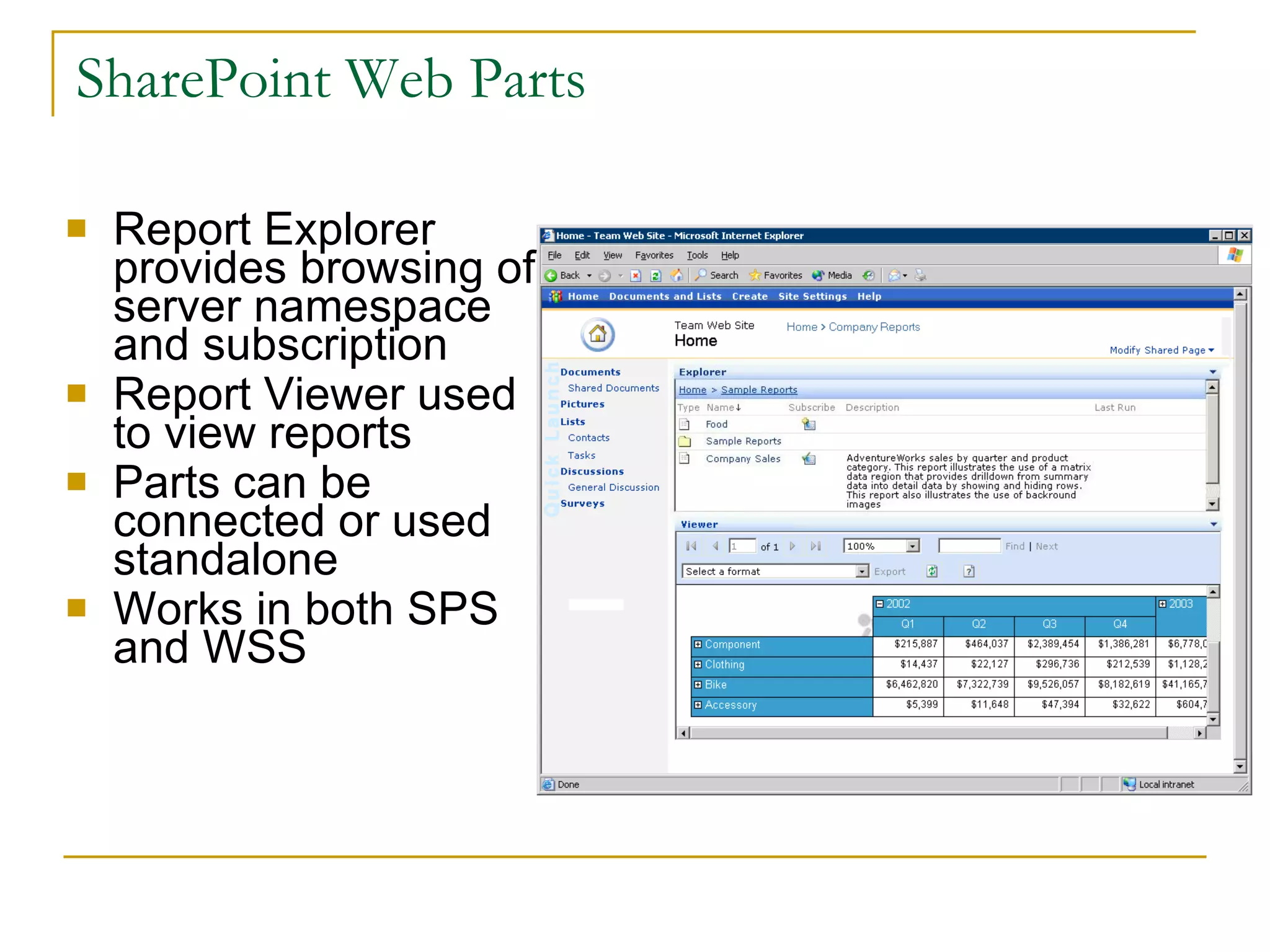
SharePoint Web Parts Report Explorer provides browsing of server namespace and subscription Report Viewer used to view reports Parts can be connected or used standalone Works in both SPS and WSS
Visual Studio Integration Report design completely integrated with Visual Studio language projects Natural extension of VS data functionality Included in VS Pro and above
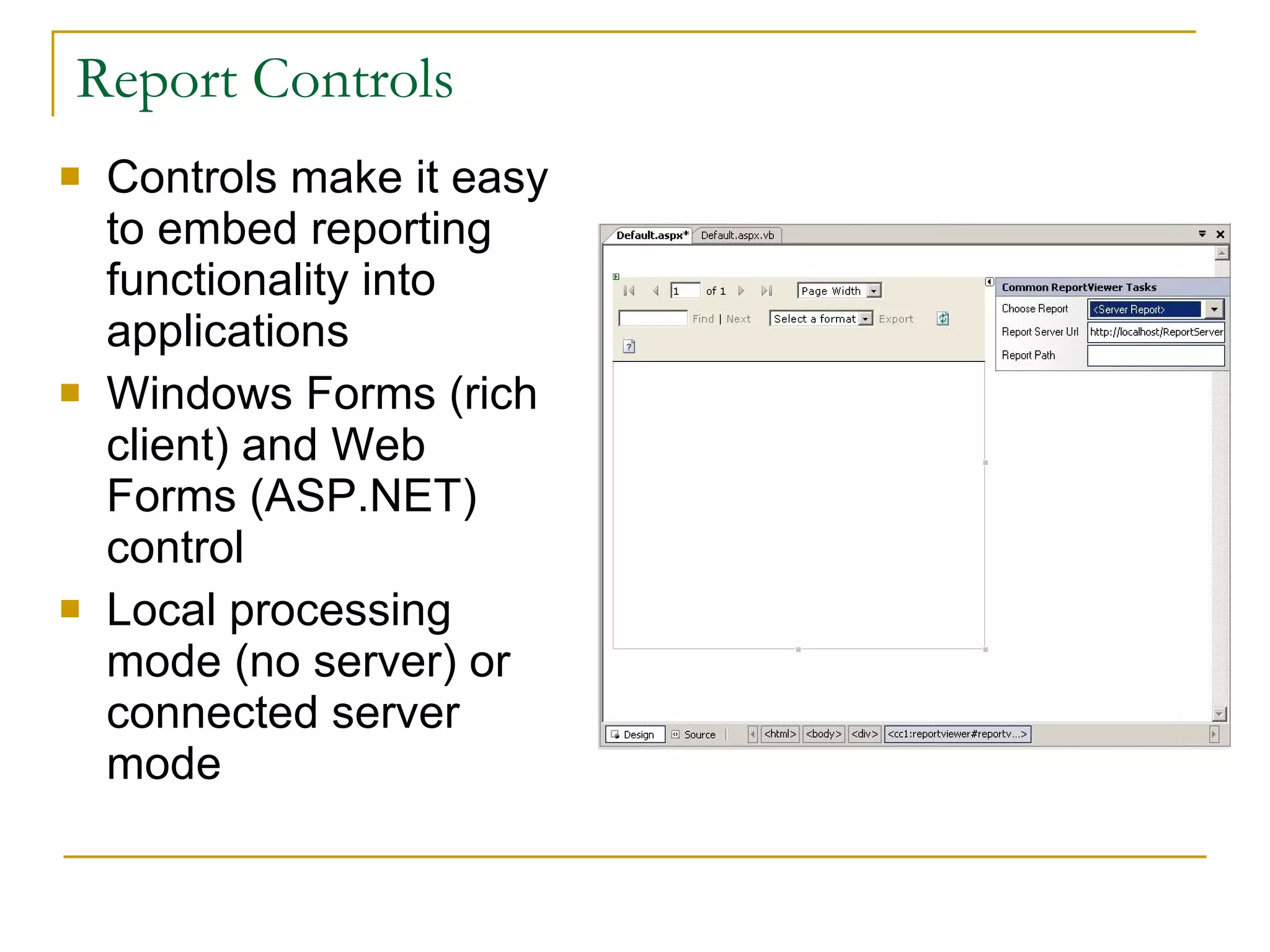
Report Controls Controls make it easy to embed reporting functionality into applications Windows Forms (rich client) and Web Forms (ASP.NET) control Local processing mode (no server) or connected server mode
Report Builder A new ad-hoc report design tool for Reporting Services  Targeted at business users who want to find and share answers to interesting questions Driven from a business model of the data so users do not need to understand the underlying data structures Fully integrated with Reporting Services and delivered in SQL Server 2005
Why Report Builder? Report Viewer Report Builder Report Designer Report Consumers Business Users Power Users Developers
What Report Builder is not… A replacement for Pivot Tables Can be used for some data slice and dice but not specifically designed for this capability An analytical client No support for advanced financial calculations, what ifs, writebacks, financial or business modeling, etc. A developer-focused design tool  No nested data regions, freeform layout, multiple queries, conditional formatting, or custom code An HTML-based design tool Report Builder is a WinForms (.NET Framework) application
Report Builder Architecture SQL Server Catalog Web Service / URL interface Report Server Report Builder Client Model Designer Data Sources (SQL Server,  Analysis Services) Drill through report generation Query generation Report Manager Report Designer SQL Mgmt Studio
Report Builder Client Built on top of familiar Microsoft Office paradigms (Excel, PowerPoint) Reports built via report templates (table, matrix, chart, combinations) “ Click once” application  deployed from the Report  Server Users download and  launch the client from  Report Manager (new or  existing report) Finished reports can be  saved on the server
Report Builder Reports Report Builder reports are just like any other Reporting Services report… Report Builder reports are defined in RDL Managed by the same APIs Secured by the same APIs  Except: Report Builder reports contain semantic model metadata When an Report Builder report is requested by report processing, the metadata is used to generate a query in the source language A new component on the Report Server handles the query generation
Infinite Drill Automatic generation of new drillthrough reports allows users to explore data along model navigation paths Queries for navigation reports are generated on the fly, passing the context of the user’s current “location” Users can keep drilling as long as there is a path to follow from the current item Custom reports can be specified for model items Generated navigation reports are not saved unless the user explicitly saves them
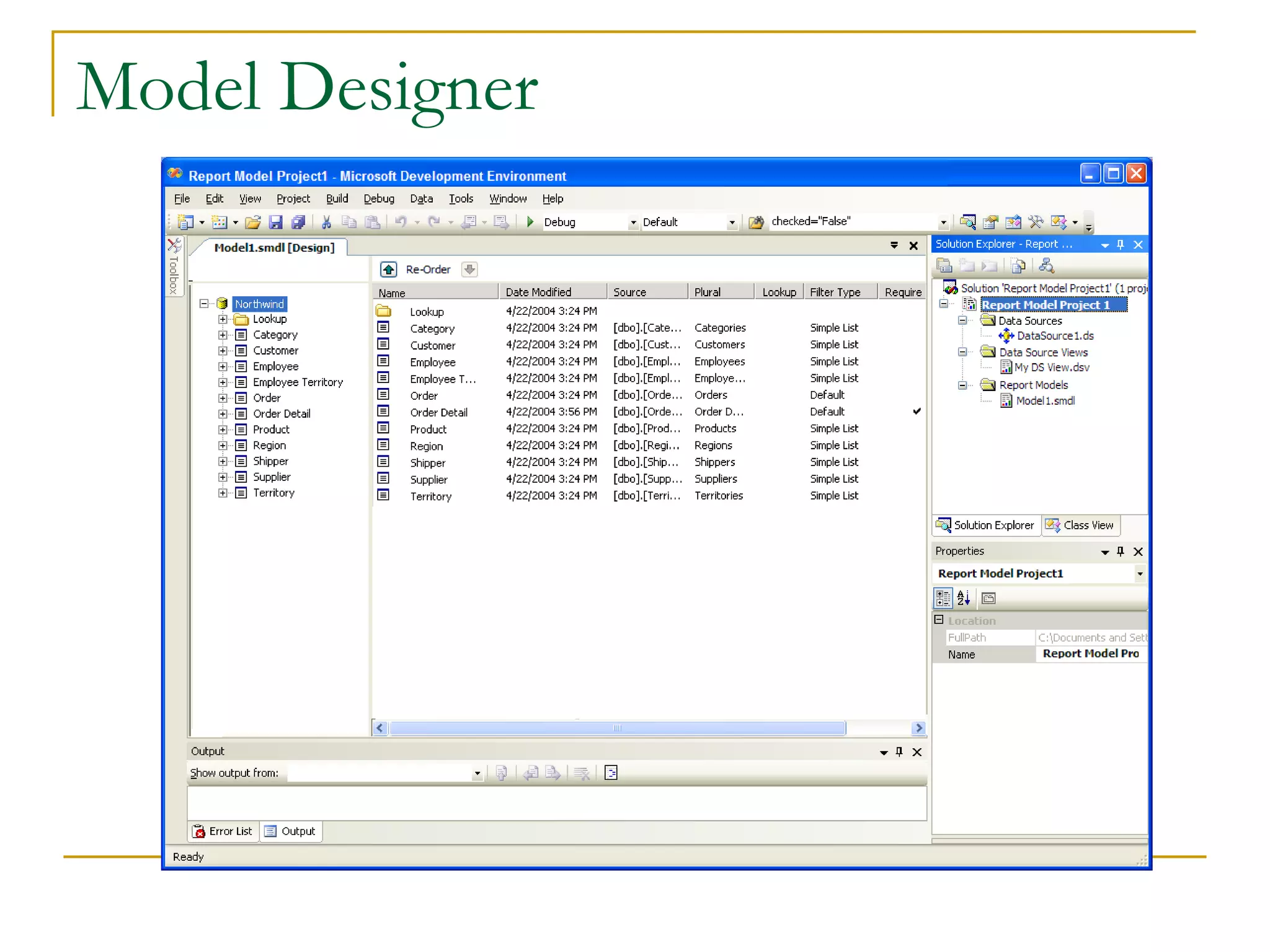
Report Builder Model Designer Hosted in Visual Studio (new project type) For editing models used by Report Builder Auto-generation of models from data sources
Model Design Model Designer is interface for designing/editing a model New project type in BI Development Studio Define fields and roles Define calculated fields Organize model Models can be auto-generated in Model Designer or on the Report Server Generates entities, fields and roles based on source metadata Auto-generation against SQL Server and Analysis Services databases
Model Designer
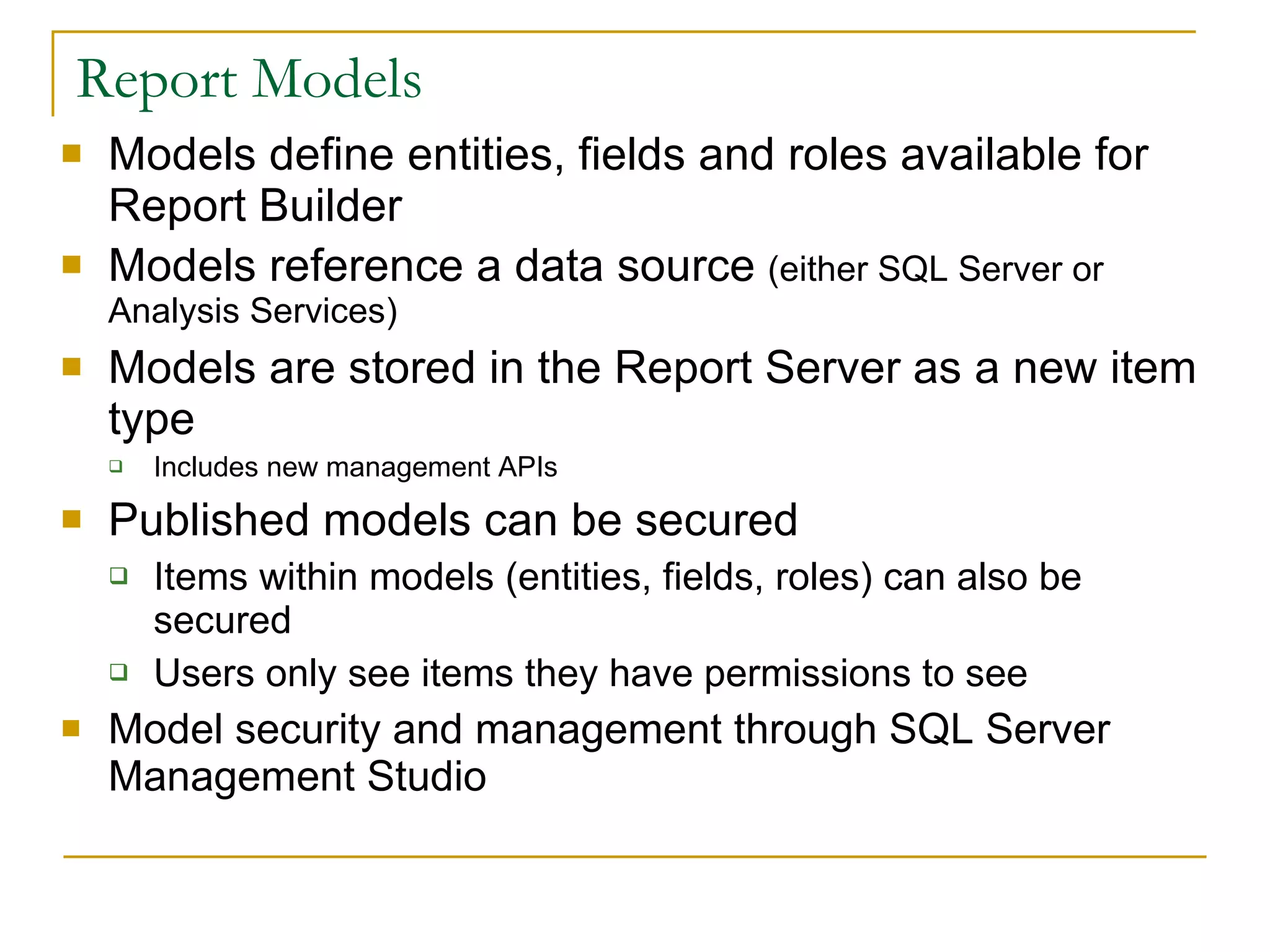
Report Models Models define entities, fields and roles available for Report Builder Models reference a data source  (either SQL Server or Analysis Services) Models are stored in the Report Server as a new item type Includes new management APIs Published models can be secured Items within models (entities, fields, roles) can also be secured  Users only see items they have permissions to see Model security and management through SQL Server Management Studio
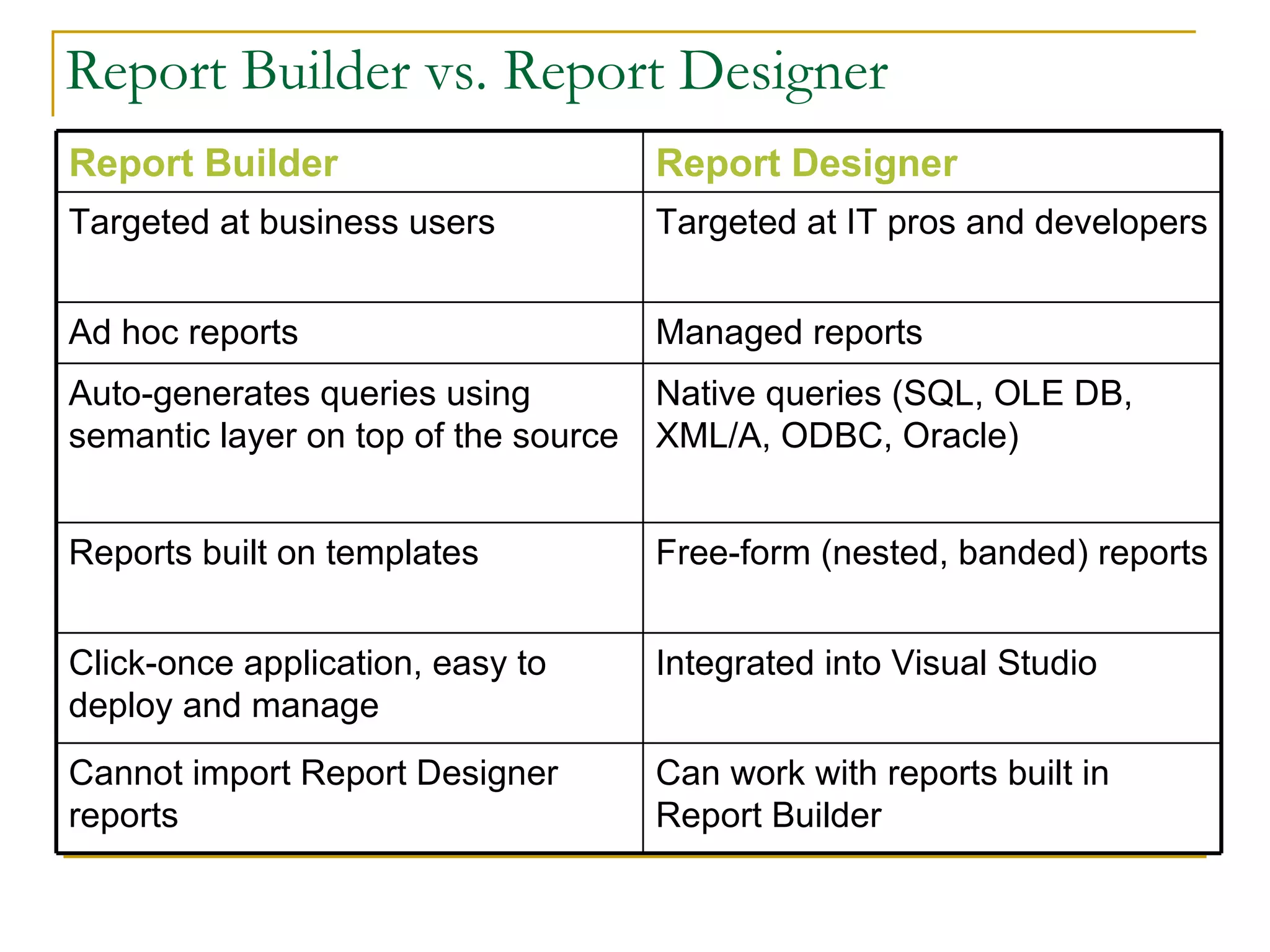
Report Builder vs. Report Designer Can work with reports built in Report Builder Cannot import Report Designer reports Integrated into Visual Studio Click-once application, easy to deploy and manage Free-form (nested, banded) reports Reports built on templates Native queries (SQL, OLE DB, XML/A, ODBC, Oracle) Auto-generates queries using semantic layer on top of the source Managed reports Ad hoc reports Targeted at IT pros and developers  Targeted at business users Report Designer Report Builder
Wrap-up Report Builder is… a new ad hoc report design tool for SQL Server Reporting Services targeted at business users who want to find and share answers to interesting questions driven from a business model of the data so users do not need to understand the underlying data structures is fully integrated with SQL Server Reporting Services and delivered in SQL Server 2005
SQL Server Report Builder Bala Subra
Thank You!

Ssrs 2005 Reporting Services

  • 1.
    SQL Server 2005 Reporting Services Bala Subra [email_address]
  • 2.
    Executive Summary Deliveredthrough: Traditional and interactive reports Scalable, manageable and embeddable server infrastructure Integration with SharePoint, Office applications, browser and other familiar tools Single platform and tools for all types of structured data (relational, hierarchical, multidimensional) Product enabling employees at all levels of an organization to realize the promise of BI and to promote better decision making
  • 3.
    BI User ProfilesInformation Consumers Information Explorers 5-10% of users 15-25% of users 65-80% of users Analysts SQL Server Reporting Services SQL Server Analysis Services
  • 4.
    Reporting Services ArchitectureSQL Server Catalog Report Server Delivery Delivery Targets (E-mail, File share, Custom) Security Services (NT, Passport, Custom) Security Data Sources (SQL, OLE DB, ODBC, Oracle, Custom) Output Formats (HTML, Excel, PDF, Custom) Report Processing Browser Management Custom App URL WMI Web Service Data Retrieval Rendering
  • 5.
  • 6.
    Business Scenarios EnterpriseReporting In-house reports (Sales, Finance, HR) Manageability, portal and LOB integration Embedded Reporting Report processing included in applications Extensible, embeddable architecture B2B Reporting Partner reporting via extranets, Internet Data isolation, extensible security
  • 7.
    Reporting Lifecycle SQLServer Reporting Services supports the full reporting lifecycle, including Authoring, Management and Delivery Authoring Management Delivery
  • 8.
    Report Authoring ReportDesigner Integrated with Visual Studio .NET 2003 Powerful, XML Report Definition Language (RDL) Freeform / Table / Matrix / Chart Parameters (Dynamic, Hierarchical) Sorting / Filtering / Grouping / Aggregates Interactivity (Drill-down, Drill-through) Full VB.NET Expression Language Published RDL definition to enable 3rd parties to create custom authoring tools Extensible query execution architecture SQL Server / Analysis Services OLE DB / ODBC / Oracle
  • 9.
    Report Management WebService APIs for management Web management user interface Report Management Functions Report Metadata (Name, Description, Connections, Credentials, Parameters) Scheduling integrated with SQL Server Agent Execution properties (live, cache or snapshot) History of prior executions Extensible, role-based security architecture
  • 10.
    Report Delivery Singlereport definition can be rendered to diverse output formats Web Formats (HTML 4, HTML 3.2, HTML w/OWC) Print Formats (TIFF, RTF, PDF) Data Formats (Excel, XML, CSV) Personalized and administrator defined subscription and delivery Ability to select output formats per subscription Can deliver links as well as rendered reports Data-driven subscriptions for personal delivery Extensible delivery provider architecture E-mail, File System, Custom
  • 11.
    Reporting Services TerminologyData Source – a database Dataset – a query against a data source Data Region – an item that displays repeated rows of data Types of Data Regions Table – a banded, tabular report Matrix – a cross-tab (or pivot table) report List – data arranged in free-form fashion Chart – a graph
  • 12.
    Creating Reporting ServicesProject Creating a Report Creating a Group Interactive Sorting Creating Drill-Down Reports
  • 13.
    Calculations & FormattingReporting Services uses VB-like expressions You can use standard +. -, *, /, mod operators String concatenation with & (don’t use +) Aggregate functions: Sum, Count, Avg, Min, Max, First, Last, etc. Also supported: IIf(), Len(), Switch()
  • 14.
    Expressions Fields toaccess values from current row e.g. =Fields!LastName.Value Globals to access global report data e.g. =Globals!PageNumber User to access info about authenticated user running the report e.g. =User!UserID; =User!Language
  • 15.
    Expressions Parameters toaccess value of input parameters e.g., =Parameters!Country.Value ReportItems to access values from other sections of report e.g.= ReportItems!txtQuantity.Value *
  • 16.
    Using Custom CodeYou can write your own VB functions and include them in the Code tab of the Report|Report Properties dialog Visual Basic is the only language supported by SSRS in the code window You can also develop custom assemblies that you can call from reports Assemblies can be developed in any .NET language You have to follow a number of steps to reference, deploy, and access your assemblies
  • 17.
    Custom Code ExamplePublic Function ColumnSel (ByVal parameter as Parameter, ByVal ColID as integer) as Boolean If parameter.IsMultiValue then For i as integer = 0 to parameter.Count-1 If val(parameter.Value(i)) = ColID then Return True End If Next Return False Else Return False End If Return False End Function
  • 18.
    Formatting Fields ConditionalFormatting Use IIf, Switch, or a custom function as value for property in property sheet You can do this for textboxes and table rows (sections of a report) Need to display sales over $1,000 bolded and in green
  • 19.
  • 20.
    Themes Core ProductEnhancements Extend features based on feedback from SQL2K version Incremental enhancements, performance and scalability Tighter Integration Strengthen SQL Server end-to-end BI scenarios Tighter integration with Office and SharePoint Developer Focus Unparalleled integration for the Visual Studio developer Freely redistributable Windows and ASP.NET controls Empowering End Users Report Builder enables end-user reporting scenarios Increased interactivity
  • 21.
    What’s new in2005 Report Builder VS Integration VS Controls Interactive Sort Multi-valued parameters Parameter Date Picker Management Studio Integration MDX Query builder Configuration Tool Custom Report Item Floating headers Printing from IE (SP2) Web Parts (SP2) 64 bit Support Multi-instance Support Expression builder enhancements
  • 22.
  • 23.
    Most Requested ItemsNot in 2005 Rich Text support RTF/Doc rendering PPT rendering Shared Styles (Styles sheets) Templates Font embedding in PDF Many Chart enhancement (Same as SP2) Heterogeneous Join Edit in Preview
  • 24.
    Rich Client PrintingDirect routing of print jobs without needing to export Small ActiveX control downloaded via browser Select page range, orientation, margins Preview page output Server enhancements for performance
  • 25.
    Enhanced Expression EditorAvailable for all expressions in VS Report Designer List of available VB.NET functions Inline parameter information Statement completion Real-time syntax checking
  • 26.
    Multi-Valued Parameters Reportdeveloper can specify any parameter is multi-valued Report processing constructs SQL or MDX syntax Multiple default values also supported Value sets can passed via URL or SOAP API
  • 27.
    Date Picker ParametersCalendar control for choosing dates Localized and Globalized Windows and Web support
  • 28.
    Interactive Sort Reportauthor can add ability for end user to resort data within data regions Resorting happens without re-querying the database Support for multi column and for nested / grouped sort
  • 29.
    Floating Headers Newtype of interactivity similar to freeze panes in Excel Works Horizontally and Vertically Table header Matrix column and row headers Table columns Must be continuous columns anchored on the right or left
  • 30.
    MDX Query BuilderMDX and data mining query builders MDX parameter support Member extended properties Support for server aggregates
  • 31.
    Custom Report ItemEnables ISVs and Developers to add custom visualizations to a report Primary scenario is enhanced charting Additional chart types Maps Gauges Supports interactivity Actions Sort Supports all data region features Filter Grouping Group Filters Etc… The Report Designer supports a conversion API Currently limited to images Future plans for all report item types
  • 32.
    Management Studio IntegrationSingle point of management for all SQL Server components Superset of Report Manager functions Script generation from property dialogs
  • 33.
    Server Configuration ToolGraphical configuration tool for Report Server Database Settings Virtual Directories E-Mail Key Management
  • 34.
    SharePoint Web PartsReport Explorer provides browsing of server namespace and subscription Report Viewer used to view reports Parts can be connected or used standalone Works in both SPS and WSS
  • 35.
    Visual Studio IntegrationReport design completely integrated with Visual Studio language projects Natural extension of VS data functionality Included in VS Pro and above
  • 36.
    Report Controls Controlsmake it easy to embed reporting functionality into applications Windows Forms (rich client) and Web Forms (ASP.NET) control Local processing mode (no server) or connected server mode
  • 37.
    Report Builder Anew ad-hoc report design tool for Reporting Services Targeted at business users who want to find and share answers to interesting questions Driven from a business model of the data so users do not need to understand the underlying data structures Fully integrated with Reporting Services and delivered in SQL Server 2005
  • 38.
    Why Report Builder?Report Viewer Report Builder Report Designer Report Consumers Business Users Power Users Developers
  • 39.
    What Report Builderis not… A replacement for Pivot Tables Can be used for some data slice and dice but not specifically designed for this capability An analytical client No support for advanced financial calculations, what ifs, writebacks, financial or business modeling, etc. A developer-focused design tool No nested data regions, freeform layout, multiple queries, conditional formatting, or custom code An HTML-based design tool Report Builder is a WinForms (.NET Framework) application
  • 40.
    Report Builder ArchitectureSQL Server Catalog Web Service / URL interface Report Server Report Builder Client Model Designer Data Sources (SQL Server, Analysis Services) Drill through report generation Query generation Report Manager Report Designer SQL Mgmt Studio
  • 41.
    Report Builder ClientBuilt on top of familiar Microsoft Office paradigms (Excel, PowerPoint) Reports built via report templates (table, matrix, chart, combinations) “ Click once” application deployed from the Report Server Users download and launch the client from Report Manager (new or existing report) Finished reports can be saved on the server
  • 42.
    Report Builder ReportsReport Builder reports are just like any other Reporting Services report… Report Builder reports are defined in RDL Managed by the same APIs Secured by the same APIs Except: Report Builder reports contain semantic model metadata When an Report Builder report is requested by report processing, the metadata is used to generate a query in the source language A new component on the Report Server handles the query generation
  • 43.
    Infinite Drill Automaticgeneration of new drillthrough reports allows users to explore data along model navigation paths Queries for navigation reports are generated on the fly, passing the context of the user’s current “location” Users can keep drilling as long as there is a path to follow from the current item Custom reports can be specified for model items Generated navigation reports are not saved unless the user explicitly saves them
  • 44.
    Report Builder ModelDesigner Hosted in Visual Studio (new project type) For editing models used by Report Builder Auto-generation of models from data sources
  • 45.
    Model Design ModelDesigner is interface for designing/editing a model New project type in BI Development Studio Define fields and roles Define calculated fields Organize model Models can be auto-generated in Model Designer or on the Report Server Generates entities, fields and roles based on source metadata Auto-generation against SQL Server and Analysis Services databases
  • 46.
  • 47.
    Report Models Modelsdefine entities, fields and roles available for Report Builder Models reference a data source (either SQL Server or Analysis Services) Models are stored in the Report Server as a new item type Includes new management APIs Published models can be secured Items within models (entities, fields, roles) can also be secured Users only see items they have permissions to see Model security and management through SQL Server Management Studio
  • 48.
    Report Builder vs.Report Designer Can work with reports built in Report Builder Cannot import Report Designer reports Integrated into Visual Studio Click-once application, easy to deploy and manage Free-form (nested, banded) reports Reports built on templates Native queries (SQL, OLE DB, XML/A, ODBC, Oracle) Auto-generates queries using semantic layer on top of the source Managed reports Ad hoc reports Targeted at IT pros and developers Targeted at business users Report Designer Report Builder
  • 49.
    Wrap-up Report Builderis… a new ad hoc report design tool for SQL Server Reporting Services targeted at business users who want to find and share answers to interesting questions driven from a business model of the data so users do not need to understand the underlying data structures is fully integrated with SQL Server Reporting Services and delivered in SQL Server 2005
  • 50.
    SQL Server ReportBuilder Bala Subra
  • 51.

Editor's Notes

  • #3 © 2004 Microsoft Corporation. All rights reserved. This presentation is for informational purposes only. Microsoft makes no warranties, express or implied, in this summary. 02/06/10 02:56
  • #5 © 2004 Microsoft Corporation. All rights reserved. This presentation is for informational purposes only. Microsoft makes no warranties, express or implied, in this summary. 02/06/10 02:56
  • #6 © 2004 Microsoft Corporation. All rights reserved. This presentation is for informational purposes only. Microsoft makes no warranties, express or implied, in this summary. 02/06/10 02:56
  • #7 © 2004 Microsoft Corporation. All rights reserved. This presentation is for informational purposes only. Microsoft makes no warranties, express or implied, in this summary. 02/06/10 02:56
  • #8 © 2004 Microsoft Corporation. All rights reserved. This presentation is for informational purposes only. Microsoft makes no warranties, express or implied, in this summary. 02/06/10 02:56
  • #9 © 2004 Microsoft Corporation. All rights reserved. This presentation is for informational purposes only. Microsoft makes no warranties, express or implied, in this summary. 02/06/10 02:56
  • #10 © 2004 Microsoft Corporation. All rights reserved. This presentation is for informational purposes only. Microsoft makes no warranties, express or implied, in this summary. 02/06/10 02:56
  • #11 © 2004 Microsoft Corporation. All rights reserved. This presentation is for informational purposes only. Microsoft makes no warranties, express or implied, in this summary. 02/06/10 02:56
  • #12 © 2004 Microsoft Corporation. All rights reserved. This presentation is for informational purposes only. Microsoft makes no warranties, express or implied, in this summary. 02/06/10 02:56
  • #13 © 2004 Microsoft Corporation. All rights reserved. This presentation is for informational purposes only. Microsoft makes no warranties, express or implied, in this summary. 02/06/10 02:56 Creating a Group • Right-click on left margin of table and select Insert Group • Select a field to group on or enter an expression • Select any options (page break at start, page break at end, etc.) and click OK to create group • SSRS doesn't automatically add the group field to the group header (the wizard does, though) but you can add it easily enough Groups • You can use Sorting tab of Grouping and Sorting Properties dialog to sort groups and detail with groups • To edit group, right-click on left-hand margin of group header or footer and select Edit Group • Groups can be nested many deep Interactive Sorting ( New for 2005 ) • Lets users re-sort reports on columns that you pre-specify • Right-click column header, select Properties, & click Interactive Sort tab Creating Drill-Down Reports • Drill Down Reports (rptCustomerHierarchy2) ? Using the Visibility properties of TableRows you can create an interactive drill-down effect ? Printed output will always show the fully expanded data • Document Maps (rptCustomerHierarchy3) ? Use the Document map label property of Grouping and Sorting Properties dialog ? Converts to PDF Bookmarks Displaying Data on a Report • When you drag a field onto a section of a report, SSRS places it within a TextBox • TextBoxes can be bound to a field or to a member of a global collection Expressions • Reporting Services uses VB-like expressions • You can use standard +. -, *, /, mod operators • String concatenation with & (don’t use +) ? =Fields!City.Value & ", " & Fields!Country.Value • Aggregate functions: ? Sum, Count, Avg, Min, Max, First, Last, etc. • Also supported: ? IIf(), Len(), Switch()
  • #14 © 2004 Microsoft Corporation. All rights reserved. This presentation is for informational purposes only. Microsoft makes no warranties, express or implied, in this summary. 02/06/10 02:56
  • #15 © 2004 Microsoft Corporation. All rights reserved. This presentation is for informational purposes only. Microsoft makes no warranties, express or implied, in this summary. 02/06/10 02:56 • =Globals!TotalPages • =Globals!ExecutionTime, etc. Group Calculations rptEmployeeSales2 report • You can use standard aggregate functions ? Sum, Count, Avg, Min, Max, etc. ? e.g. =Sum(Fields!Cost.Value) • Calculating Percentages ? Trick is to give the textbox containing the denominator a name (e.g., txtTotalCost) and use it in expression,referencing it using ReportItems collection ? e.g., • =Sum(Fields!Cost.Value)/ReportItems!txtTotalCost.Value
  • #16 © 2004 Microsoft Corporation. All rights reserved. This presentation is for informational purposes only. Microsoft makes no warranties, express or implied, in this summary. 02/06/10 02:56
  • #17 © 2004 Microsoft Corporation. All rights reserved. This presentation is for informational purposes only. Microsoft makes no warranties, express or implied, in this summary. 02/06/10 02:56
  • #18 © 2004 Microsoft Corporation. All rights reserved. This presentation is for informational purposes only. Microsoft makes no warranties, express or implied, in this summary. 02/06/10 02:56 =iif(code.ColumnSel(Parameters!Column_Sel,3)= true,false,true) Public Function GetColumnColor(ByVal parameter as Parameter) as string Public Function p(ByVal something as String) as String MsgBox(something) Return something End Function Public Function GetFontWeight(ByVal parameter as Parameter) as string
  • #19 © 2004 Microsoft Corporation. All rights reserved. This presentation is for informational purposes only. Microsoft makes no warranties, express or implied, in this summary. 02/06/10 02:56 Formatting Numbers/Dates ? Right-click on textbox and select Properties ? Enter a .NET format string or click on […] • Styles (Font, FontSize, Color, etc.) ? Use property sheet
  • #20 Creating a Report • A number of ways to create a new report, including ? Right click on the Reports node in Solution Explorer and select • Add New Report – starts report wizard • Add|Add New Item – to create a blank report • Import Reports – to import all of the reports from an Access database
  • #52 © 2004 Microsoft Corporation. All rights reserved. This presentation is for informational purposes only. Microsoft makes no warranties, express or implied, in this summary. 02/06/10 02:56