
Moving Beyond InfoPath
SELECTING A BETTER E-FORMS TOOL
The Problem


So you have moved beyond the simple InfoPath forms into advanced
tasks like:


Have repeating sections within forms with parent, child, even grandchild
relationships



Want to report on InfoPath data using tools like SSRS



Want to leverage existing databases/web services for creating rich composite
forms
What are the options?



Out-of-box approach - create form from SQL database



Customer Code - extend your existing form with custom code



Common Library (Rules) - use one set of rules for all forms



Business Connectivity Services - connect external data systems



Custom Web Service - middle-tier service-oriented architecture
Obvious Choice – Submit Data to SQL
Server


SharePoint lists/libraries don't scale


Document permissions (ACLs) peter out at 5,000 items



View performance degredation after 10,000 items



SharePoint protocol (DAV) is slow



Limited reporting options




Export to Excel is two dimensional, Performance Point is hard to figure out

Relational databases (SQL) enable enterprise scenarios


Central data in one place


Easier to: backup, replicate, repurpose across sites, migrate, integrate with other systems, etc.



Reporting: build dynamic reports with Reporting Services



Performance: filtered queries are faster through SOAP
Out-of-box Database Template


Cons



Doesn't work in a browser (because of double hop authentication issue)



Limited data types - must conform to SQL data types





Can't use with existing forms

Schema change requires down time

Pros


Works out-of-box
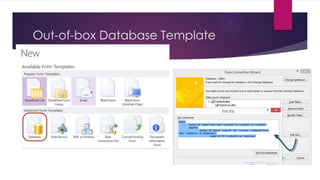
Out-of-box Database Template
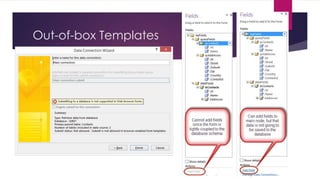
Out-of-box Templates
Custom Code in the Form


Cons


Developer required and browser support requires admin deploy



Tightly coupled solution cannot be reused for other InfoPath templates



Brittle - breaks easily when database schema changes



Expensive - downtime when form datasource changes



Not Best Practice - SQL command cannot be parameterized



Security risk - however, developer can easily "escape" fields to prevent SQL injection




Pros


Works with existing databases



Does not require deploying a web service
Common Library


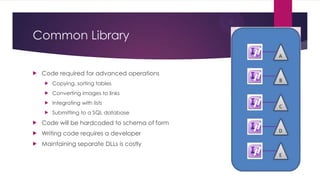
Code required for advanced operations


Copying, sorting tables



Converting images to links



Integrating with lists



Submitting to a SQL database



Code will be hardcoded to schema of form



Writing code requires a developer



Maintaining separate DLLs is costly
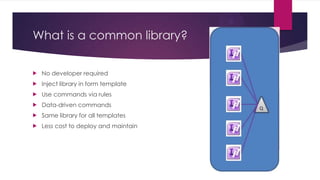
What is a common library?


No developer required



Inject library in form template



Use commands via rules



Data-driven commands



Same library for all templates



Less cost to deploy and maintain
Business Connectivity Services



Cons



Doesn't support repeating data



Doesn't support certain data types (for ex: bigint)



Stored procedures needed for query performance (to reduce result sets)



CRUD XML is complex





Authentication configuration required

Adding fields requires lots of wizard time to reconfigure and doesn't update list editor
(i.e. you have to create a new list)

Pros


Works with existing databases



Provides list-based editing for data
Custom Web Service


Cons



Parameters most likely hardcoded to form template



Web service must be deployed





Developer required

Proliferation of Web services complicates
migration

Pros


No code in form



No code in DB



Fast queries
Data-driven Web Service



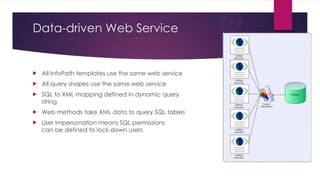
All InfoPath templates use the same web service



All query shapes use the same web service



SQL to XML mapping defined in dynamic query
string



Web methods take XML data to query SQL tables



User impersonation means SQL permissions
can be defined to lock down users
qDabra Data-driven Web Service
(DBXL)


Cons





Web service must be deployed to server
More work to configure with existing databases

Pros


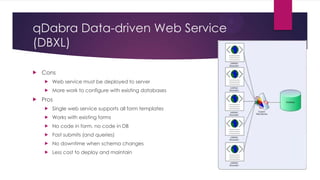
Single web service supports all form templates



Works with existing forms



No code in form, no code in DB



Fast submits (and queries)



No downtime when schema changes



Less cost to deploy and maintain

Beyond InfoPath

  • 1.
    Moving Beyond InfoPath SELECTINGA BETTER E-FORMS TOOL
  • 2.
    The Problem  So youhave moved beyond the simple InfoPath forms into advanced tasks like:  Have repeating sections within forms with parent, child, even grandchild relationships  Want to report on InfoPath data using tools like SSRS  Want to leverage existing databases/web services for creating rich composite forms
  • 3.
    What are theoptions?  Out-of-box approach - create form from SQL database  Customer Code - extend your existing form with custom code  Common Library (Rules) - use one set of rules for all forms  Business Connectivity Services - connect external data systems  Custom Web Service - middle-tier service-oriented architecture
  • 4.
    Obvious Choice –Submit Data to SQL Server  SharePoint lists/libraries don't scale  Document permissions (ACLs) peter out at 5,000 items  View performance degredation after 10,000 items  SharePoint protocol (DAV) is slow  Limited reporting options   Export to Excel is two dimensional, Performance Point is hard to figure out Relational databases (SQL) enable enterprise scenarios  Central data in one place  Easier to: backup, replicate, repurpose across sites, migrate, integrate with other systems, etc.  Reporting: build dynamic reports with Reporting Services  Performance: filtered queries are faster through SOAP
  • 5.
    Out-of-box Database Template  Cons   Doesn'twork in a browser (because of double hop authentication issue)  Limited data types - must conform to SQL data types   Can't use with existing forms Schema change requires down time Pros  Works out-of-box
  • 6.
  • 7.
  • 8.
    Custom Code inthe Form  Cons  Developer required and browser support requires admin deploy  Tightly coupled solution cannot be reused for other InfoPath templates  Brittle - breaks easily when database schema changes  Expensive - downtime when form datasource changes  Not Best Practice - SQL command cannot be parameterized  Security risk - however, developer can easily "escape" fields to prevent SQL injection   Pros  Works with existing databases  Does not require deploying a web service
  • 9.
    Common Library  Code requiredfor advanced operations  Copying, sorting tables  Converting images to links  Integrating with lists  Submitting to a SQL database  Code will be hardcoded to schema of form  Writing code requires a developer  Maintaining separate DLLs is costly
  • 10.
    What is acommon library?  No developer required  Inject library in form template  Use commands via rules  Data-driven commands  Same library for all templates  Less cost to deploy and maintain
  • 11.
    Business Connectivity Services  Cons   Doesn'tsupport repeating data  Doesn't support certain data types (for ex: bigint)  Stored procedures needed for query performance (to reduce result sets)  CRUD XML is complex   Authentication configuration required Adding fields requires lots of wizard time to reconfigure and doesn't update list editor (i.e. you have to create a new list) Pros  Works with existing databases  Provides list-based editing for data
  • 12.
    Custom Web Service  Cons   Parametersmost likely hardcoded to form template  Web service must be deployed   Developer required Proliferation of Web services complicates migration Pros  No code in form  No code in DB  Fast queries
  • 13.
    Data-driven Web Service  AllInfoPath templates use the same web service  All query shapes use the same web service  SQL to XML mapping defined in dynamic query string  Web methods take XML data to query SQL tables  User impersonation means SQL permissions can be defined to lock down users
  • 14.
    qDabra Data-driven WebService (DBXL)  Cons    Web service must be deployed to server More work to configure with existing databases Pros  Single web service supports all form templates  Works with existing forms  No code in form, no code in DB  Fast submits (and queries)  No downtime when schema changes  Less cost to deploy and maintain