Microsoft® System Center
Virtual Machine Manager 2008 R2
Infrastructure Planning and Design Series
Published: June 2008
Updated: September 2009
What Is IPD?
    Guidance that clarifies and streamlines the planning and design
    process for Microsoft® infrastructure technologies

    IPD:
      Defines decision flow
      Describes decisions to be made
      Relates decisions and options for the business
      Frames additional questions for business understanding

    IPD guides are available at www.microsoft.com/ipd


Page 2   |
Getting Started

         MICROSOFT® SYSTEM CENTER
         VIRTUAL MACHINE MANAGER 2008
         R2

Page 3   |
Benefits of Using the VMM Guide
    Benefits for Business Stakeholders/Decision Makers
         Most cost-effective design solution for implementation
         Alignment between the business and IT from the beginning of the
         design process to the end


    Benefits for Infrastructure Stakeholders/
    Decision Makers
         Authoritative guidance
         Business validation questions ensuring that solution meets
         requirements of business and infrastructure stakeholders
         High integrity design criteria that includes product limitations

         Fault-tolerant infrastructure

         Infrastructure that’s sized appropriately for business requirements

Page 4   |
Benefits of Using the VMM Guide (Cont’d)
     Benefits for Consultants or Partners
             Rapid readiness for consulting engagements
             Planning and design template to standardize design and peer
             reviews
             A “leave-behind” for pre- and post-sales visits to customer sites

             General classroom instruction/preparation


     Benefits for the Entire Organization
             Using the guide should result in a design that will be sized,
             configured, and appropriately placed to deliver a solution for
             achieving stated business requirements


Page 5   |
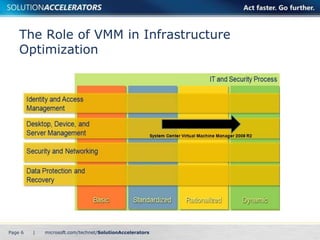
The Role of VMM in Infrastructure
    Optimization


Page 6   |
Purpose and Overview

         Purpose
             To provide design guidance for Virtual Machine Manager
             (VMM)

         Agenda
             What is VMM?

             What’s new in VMM 2008 R2

             VMM architecture design process


Page 7   |
Virtualization Management Challenges
         Lack of agility
             Self-service provisioning

             Speed of provisioning
         Lack of virtualization management (VM)
         organization
         Optimizing use of host resources

         Managing decentralized VMs


Page 8   |
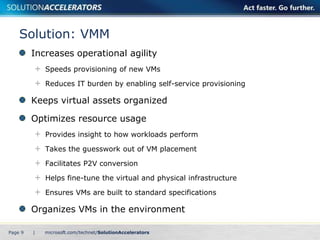
Solution: VMM
         Increases operational agility
             Speeds provisioning of new VMs

             Reduces IT burden by enabling self-service provisioning

         Keeps virtual assets organized

         Optimizes resource usage
             Provides insight to how workloads perform

             Takes the guesswork out of VM placement

             Facilitates P2V conversion

             Helps fine-tune the virtual and physical infrastructure

             Ensures VMs are built to standard specifications

         Organizes VMs in the environment

Page 9   |
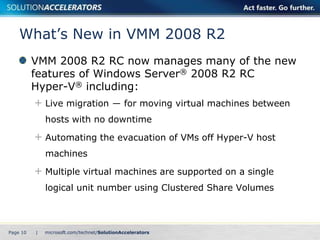
What’s New in VMM 2008 R2
          VMM 2008 R2 RC now manages many of the new
          features of Windows Server® 2008 R2 RC
          Hyper-V® including:
              Live migration ― for moving virtual machines between
              hosts with no downtime

              Automating the evacuation of VMs off Hyper-V host
              machines

              Multiple virtual machines are supported on a single
              logical unit number using Clustered Share Volumes


Page 10   |
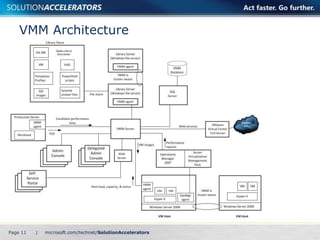
VMM Architecture


Page 11   |
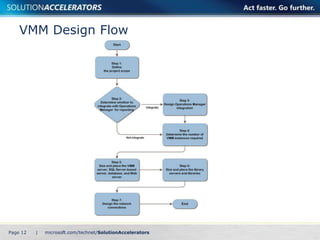
VMM Design Flow


Page 12   |
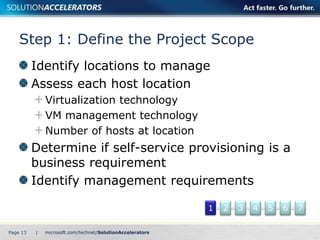
Step 1: Define the Project Scope
          Identify locations to manage
          Assess each host location
              Virtualization technology
              VM management technology
              Number of hosts at location
          Determine if self-service provisioning is a
          business requirement
          Identify management requirements

                                            1   2   3   4   5   6   7

Page 13   |
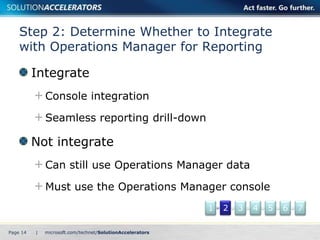
Step 2: Determine Whether to Integrate
    with Operations Manager for Reporting

          Integrate
              Console integration

              Seamless reporting drill-down

          Not integrate
              Can still use Operations Manager data

              Must use the Operations Manager console
                                              1   2   3   4   5   6   7

Page 14   |
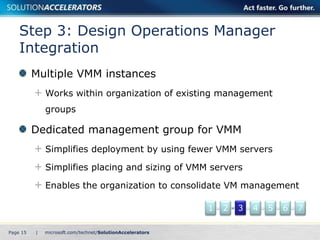
Step 3: Design Operations Manager
    Integration
          Multiple VMM instances
              Works within organization of existing management
              groups

          Dedicated management group for VMM
              Simplifies deployment by using fewer VMM servers

              Simplifies placing and sizing of VMM servers

              Enables the organization to consolidate VM management

                                                  1   2   3   4   5   6   7

Page 15   |
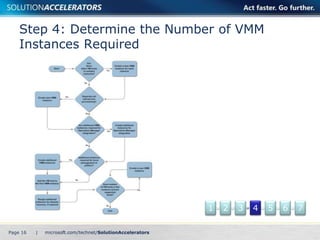
Step 4: Determine the Number of VMM
    Instances Required


                              1   2   3   4   5   6   7

Page 16   |
Step 5: Size and Place the VMM Server,
    SQL Server®-Based Server, Database, and
    Web Server
          Servers
              VMM server
              Database server and database
              Web server
          Design considerations
              Capacity requirements
              Integration
              Performance characteristics
              Unit sizing and volume expectations

                                                    1   2   3   4   5   6   7

Page 17   |
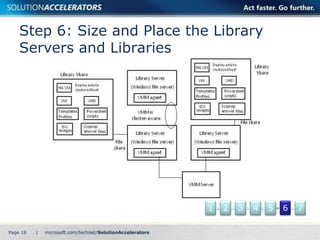
Step 6: Size and Place the Library
    Servers and Libraries


                              1   2   3   4   5   6   7

Page 18   |
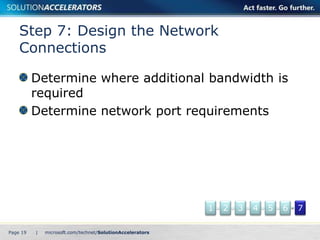
Step 7: Design the Network
    Connections

          Determine where additional bandwidth is
          required
          Determine network port requirements


                                    1   2   3   4   5   6   7

Page 19   |
Conclusion
          Carefully consider infrastructure requirements for
          virtualization management
          Planning is key


          This guide offers major architectural guidance. Refer
          to product documentation for additional details


          Provide feedback to satfdbk@microsoft.com


Page 20    |
Find More Information

          Download the full document and other IPD guides:
               www.microsoft.com/ipd

          Contact the IPD team:
               satfdbk@microsoft.com

          Visit the Microsoft Solution Accelerators Web site:
               www.microsoft.com/technet/SolutionAccelerators


Page 21    |
Questions?

System Center: Virtual Machine Manager 2008 Version 2.0

  • 1.
    Microsoft® System Center VirtualMachine Manager 2008 R2 Infrastructure Planning and Design Series Published: June 2008 Updated: September 2009
  • 2.
    What Is IPD? Guidance that clarifies and streamlines the planning and design process for Microsoft® infrastructure technologies IPD: Defines decision flow Describes decisions to be made Relates decisions and options for the business Frames additional questions for business understanding IPD guides are available at www.microsoft.com/ipd Page 2 |
  • 3.
    Getting Started MICROSOFT® SYSTEM CENTER VIRTUAL MACHINE MANAGER 2008 R2 Page 3 |
  • 4.
    Benefits of Usingthe VMM Guide Benefits for Business Stakeholders/Decision Makers Most cost-effective design solution for implementation Alignment between the business and IT from the beginning of the design process to the end Benefits for Infrastructure Stakeholders/ Decision Makers Authoritative guidance Business validation questions ensuring that solution meets requirements of business and infrastructure stakeholders High integrity design criteria that includes product limitations Fault-tolerant infrastructure Infrastructure that’s sized appropriately for business requirements Page 4 |
  • 5.
    Benefits of Usingthe VMM Guide (Cont’d) Benefits for Consultants or Partners Rapid readiness for consulting engagements Planning and design template to standardize design and peer reviews A “leave-behind” for pre- and post-sales visits to customer sites General classroom instruction/preparation Benefits for the Entire Organization Using the guide should result in a design that will be sized, configured, and appropriately placed to deliver a solution for achieving stated business requirements Page 5 |
  • 6.
    The Role ofVMM in Infrastructure Optimization Page 6 |
  • 7.
    Purpose and Overview Purpose To provide design guidance for Virtual Machine Manager (VMM) Agenda What is VMM? What’s new in VMM 2008 R2 VMM architecture design process Page 7 |
  • 8.
    Virtualization Management Challenges Lack of agility Self-service provisioning Speed of provisioning Lack of virtualization management (VM) organization Optimizing use of host resources Managing decentralized VMs Page 8 |
  • 9.
    Solution: VMM Increases operational agility Speeds provisioning of new VMs Reduces IT burden by enabling self-service provisioning Keeps virtual assets organized Optimizes resource usage Provides insight to how workloads perform Takes the guesswork out of VM placement Facilitates P2V conversion Helps fine-tune the virtual and physical infrastructure Ensures VMs are built to standard specifications Organizes VMs in the environment Page 9 |
  • 10.
    What’s New inVMM 2008 R2 VMM 2008 R2 RC now manages many of the new features of Windows Server® 2008 R2 RC Hyper-V® including: Live migration ― for moving virtual machines between hosts with no downtime Automating the evacuation of VMs off Hyper-V host machines Multiple virtual machines are supported on a single logical unit number using Clustered Share Volumes Page 10 |
  • 11.
  • 12.
  • 13.
    Step 1: Definethe Project Scope Identify locations to manage Assess each host location Virtualization technology VM management technology Number of hosts at location Determine if self-service provisioning is a business requirement Identify management requirements 1 2 3 4 5 6 7 Page 13 |
  • 14.
    Step 2: DetermineWhether to Integrate with Operations Manager for Reporting Integrate Console integration Seamless reporting drill-down Not integrate Can still use Operations Manager data Must use the Operations Manager console 1 2 3 4 5 6 7 Page 14 |
  • 15.
    Step 3: DesignOperations Manager Integration Multiple VMM instances Works within organization of existing management groups Dedicated management group for VMM Simplifies deployment by using fewer VMM servers Simplifies placing and sizing of VMM servers Enables the organization to consolidate VM management 1 2 3 4 5 6 7 Page 15 |
  • 16.
    Step 4: Determinethe Number of VMM Instances Required 1 2 3 4 5 6 7 Page 16 |
  • 17.
    Step 5: Sizeand Place the VMM Server, SQL Server®-Based Server, Database, and Web Server Servers VMM server Database server and database Web server Design considerations Capacity requirements Integration Performance characteristics Unit sizing and volume expectations 1 2 3 4 5 6 7 Page 17 |
  • 18.
    Step 6: Sizeand Place the Library Servers and Libraries 1 2 3 4 5 6 7 Page 18 |
  • 19.
    Step 7: Designthe Network Connections Determine where additional bandwidth is required Determine network port requirements 1 2 3 4 5 6 7 Page 19 |
  • 20.
    Conclusion Carefully consider infrastructure requirements for virtualization management Planning is key This guide offers major architectural guidance. Refer to product documentation for additional details Provide feedback to satfdbk@microsoft.com Page 20 |
  • 21.
    Find More Information Download the full document and other IPD guides: www.microsoft.com/ipd Contact the IPD team: satfdbk@microsoft.com Visit the Microsoft Solution Accelerators Web site: www.microsoft.com/technet/SolutionAccelerators Page 21 |
  • 22.

Editor's Notes

  • #2 Copyright © 2009 Microsoft Corporation. This documentation is licensed to you under the Creative Commons Attribution License. To view a copy of this license, visit http://creativecommons.org/licenses/by/3.0/us/ or send a letter to Creative Commons, 543 Howard Street, 5th Floor, San Francisco, California, 94105, USA. When using this documentation, provide the following attribution: Infrastructure Planning and Design is provided with permission from Microsoft Corporation.  This documentation is provided to you for informational purposes only and is provided to you entirely “AS IS”. Your use of the documentation cannot be understood as substituting for customized service and information that might be developed by Microsoft Corporation for a particular user based upon that user’s particular environment. To the extent permitted by law, MICROSOFT MAKES NO WARRANTY OF ANY KIND, DISCLAIMS ALL EXPRESS, IMPLIED AND STATUTORY WARRANTIES, AND ASSUMES NO LIABILITY TO YOU FOR ANY DAMAGES OF ANY TYPE IN CONNECTION WITH THESE MATERIALS OR ANY INTELLECTUAL PROPERTY IN THEM.  Microsoft may have patents, patent applications, trademarks, or other intellectual property rights covering subject matter within this documentation. Except as provided in a separate agreement from Microsoft, your use of this document does not give you any license to these patents, trademarks or other intellectual property. Information in this document, including URL and other Internet Web site references, is subject to change without notice. Unless otherwise noted, the example companies, organizations, products, domain names, e-mail addresses, logos, people, places and events depicted herein are fictitious.  Microsoft, Hyper-V, SQL Server, and Windows Server are either registered trademarks or trademarks of Microsoft Corporation in the United States and/or other countries.  The names of actual companies and products mentioned herein may be the trademarks of their respective owners. You have no obligation to give Microsoft any suggestions, comments or other feedback (“Feedback”) relating to the documentation. However, if you do provide any Feedback to Microsoft then you provide to Microsoft, without charge, the right to use, share and commercialize your Feedback in any way and for any purpose. You also give to third parties, without charge, any patent rights needed for their products, technologies and services to use or interface with any specific parts of a Microsoft software or service that includes the Feedback. You will not give Feedback that is subject to a license that requires Microsoft to license its software or documentation to third parties because we include your Feedback in them.
  • #3 Infrastructure Planning and Design (IPD) is a series of planning and design guides created to clarify and streamline the planning and design process for Microsoft® infrastructure technologies. Each guide in the series addresses a unique infrastructure technology or scenario. These guides include the following topics:Defining the technical decision flow (flow chart) through the planning processDescribing the decisions to be made and the commonly available options to consider in making the decisionsRelating the decisions and options for the business in terms of cost, complexity, and other characteristicsFraming the decisions in terms of additional questions for the business to ensure a comprehensive understanding of the appropriate business landscapeThe guides in this series are intended to complement and augment Microsoft product documentation.
  • #4 This guide was created to enable infrastructure planners to design virtualization-management infrastructure solutions. This guide includes specific design information, including activities that encourage sound planning. Each activity includes:Prerequisites and background on the activity.Tasks that will be performed to complete the activity.Reference information regarding the activity's impact on characteristics such as cost, complexity, and capacity of the solution.Questions to ensure business needs are captured and reflected in the solution.This guide is written for information technology (IT) infrastructure specialists who are responsible for planning and designing a Virtual Machine Manager infrastructure.
  • #5 Benefits of Using the Virtual Machine Manager GuideBenefits for Business Stakeholders/Decision Makers: Most cost-effective design solution for an implementation. IPD eliminates over-architecting and over-spending by precisely matching the technology solution to the business needs.Alignment between the business and IT from the beginning of the design process to the end. Benefits for Infrastructure Stakeholders/Decision Makers:Authoritative guidance. Microsoft is the best source for guidance about the design of Microsoft products.Business validation questions to ensure the solution meets the requirements of both business and infrastructure stakeholders.High integrity design criteria that includes product limitations.Fault-tolerant infrastructure, where necessary.Proportionate system and network availability to meet business requirements. Infrastructure that is sized appropriately to meet business requirements.
  • #6 Benefits of Using the VMM Guide (continued)Benefits for Consultants or Partners:Rapid readiness for consulting engagements.Planning and design template to standardize design and peer reviews.A “leave-behind” for pre- and post-sales visits to customer sites.General classroom instruction/preparation.Benefits for the Entire Organization:Using the guide should result in a design that will be sized, configured, and appropriately placed to deliver a solution for achieving stated business requirements, while considering the performance, capacity, manageability, and fault tolerance of the system.
  • #7 <This slide shows the effect Virtual Machine Manager has on infrastructure maturity as reflected on the Infrastructure Optimization Model>According to the Core Infrastructure Optimization Model (Core IO), organizations that are actively pursuing virtualization management are meeting one of the requirements to move to the Dynamic level. This guide will assist in planning and designing the infrastructure for virtualization management infrastructure.
  • #8 The purpose of the guide is to focus on the considerations that organizations should take into account when designing a virtualization-management infrastructure.This will be accomplished by enabling planners to determine virtualization-management requirements and, using those requirements, design a Virtual Machine Manager infrastructure.Details about disaster recovery, server support, and server hosting are outside the scope of the guide.
  • #9 Challenges:Organizations are slow to provision new virtual machines, and self-service provisioning is difficult to provide.Organizations lack a global view of the VMs in their environment, making it difficult to organize VMs.Organizations lack insight to the resource requirements of the VMs in their environment or the ability to place VMs intelligently.Organizations can’t centrally manage all of the VMs in their environments.
  • #10 Virtual Machine Manager makes data center management more efficient by simplifying several important tasks. With Virtual Machine Manager, IT administrators can easily consolidate underutilized physical servers, provision new virtual machines, centrally manage virtual assets, and optimize virtual infrastructure—all while taking advantage of existing investments and expertise.
  • #11 VMM 2008 R2 manages many of the new capabilities of Windows Server 2008 R2 Hyper-V including:Live migration for moving virtual machines between hosts with no downtime. VMM performs host compatibility checks and can then initiate and control the migration. This enables users to check on whether a VM is compatible with the destination host instead of doing the migration and then finding out that the VM cannot start on the host.VMM can automate the evacuation of VMs off Hyper-V host machines – for example, to implement maintenance mode. A Hyper-V host can participate in only one live migration at any given time, both as source and destination. This means that the user has to wait for the live migration to complete before attempting another one. VMM R2 can detect the condition where live migration fails due to another live migration in progress, queue up the request in the background, and then retry the request after a period of time. This feature enables users to perform multiple live migrations without needing to keep track of other live migrations that are happening within the cluster; VMM R2 will automatically do the queuing and retries in the background. Multiple virtual machines are supported on a single LUN using Clustered Share Volumes. Quick Storage Migration enables migration of a VM’s storage both within the same host and across hosts while the VM is running, with a minimum of downtime. The downtime depends on the amount of activity going on in the VM at the time of migration; product group tests have shown typical downtimes to be less than 2 minutes.
  • #12 The components of a typical VMM infrastructure are shown in this slide.Project teams should consider having Microsoft Customer Service and Support review their architecture prior to implementation, as that is the organization that can best comment on the supportability of a particular design.
  • #13 The seven steps on this slide represent the most critical design elements in a well-planned Virtual Machine Manager design. Some of these items represent decisions that should be made. Where this is the case, a corresponding list of common response options will be presented. Other items in this list represent tasks that should be carried out. These types of items are addressed because their presence is significant in order to complete the infrastructure design.
  • #14 In this step, the project team should determine which parts of the organization to include in the design. Identify locations to manage – choose which locations in the organization to manage using SCVMM.Assess each host location:Virtualization technology – Identify the virtualization technologies each location uses.VM management technology – Identify the VM management technologies, if any, that each location uses to manage hosts. Number of hosts at location – Record the number of existing and planned hosts.Determine if self-service provisioning is a business requirement.Identify management requirements:Identify the organization’s management model for virtualization.Identify whether there are plans to use server virtualization as a disaster recovery solution.
  • #15 If the Operations Manager data is integrated into the VMM console, the VMM console user can seamlessly drill down from performance views of the VM host machine to examine performance data for each VM guest that is running on the host. They can then drill down further in order to view performance counters for the operating system and applications running in the VM guest.This step’s goal is to determine whether to integrate historical reporting from Operations Manager into the VMM console. The step should be repeated for each VM host that will be managed by VMM. The project team should make this decision early, because if this integration will be done, it may affect the number of Virtual Machine Manager instances the team defines in step 4.Integrate:More easily leverage Operations Manager’s historical reporting data to complement VM placement recommendations.Not Integrate:Users can still take advantage of the performance data that Operations Manager provides.
  • #16 In order to deliver integrated reporting, Virtual Machine Manager uses the Operations Manager Connector Framework to connect to a management group. The scope of the reporting data available from that connection is limited to VM hosts within that management group. Therefore, if more than one management group contains a VM host, the project team has two options to deliver integrated reporting on those VM hosts:Multiple VMM InstancesBenefitsWorks within organization of existing Management Groups.ChallengesMust deploy additional Virtual Machine Manager instances, each with a server, database, and library server.Makes placing and sizing of Virtual Machine Manager servers more complex.Prevents the organization from consolidating management of VMs.Dedicated Management Group for VMMBenefitsSimplifies deployment by using fewer Virtual Machine Manager servers.Simplifies placing and sizing of Virtual Machine Manager servers.Enables the organization to consolidate VM management.ChallengesRequires the addition of a new Operations Manager Management Group and its associated infrastructure.The Operations Manager product currently supports a maximum of 10 multi-homing agents in a Management Group.
  • #17 This step’s goal is to determine the number of Virtual Machine Manager instances the organization requires. Both business and technical requirements drive this determination.Determine required instances (Instances might be required for the following):Isolated networksSelf-service provisioningNumber of Operations Manager management groupsManagement model: local or centralizedPolitical considerationsDisaster recoveryNumber of VM hosts in the project’s scope
  • #18 This step’s goal is to design the servers for each VMM instance that the project team identified in Step 4. Design characteristics include each server’s form factor, size, physical placement and, where necessary, the fault-tolerance strategy.Determining appropriate size, placement, and distribution of server roles is an important element in delivery of required monitoring functionality at a level of performance and fault tolerance that the organization expects.Design the Virtual Machine Manager ServerPhysical PlacementFault ToleranceDesign the Database Server and DatabasePhysical PlacementFault ToleranceDesign the Web Server
  • #19 The Virtual Machine Manager library is a set of resources that can be used to create and configure VMs. Libraries can include the following:Virtual Hard Drive (VHD) and Virtual Machine Configuration (VMC) filesVM templates and guest operating system profilesScripts and Sysprep answer filesISO image filesVirtual floppy disksDesign and Place the Virtual Machine Manager library server Placement: library server on the same LAN segment as the VM hosts it will service Decision: Design Fault ToleranceDistributed File SystemServer Clustering
  • #20 In this step, the project team uses the following information to determine network bandwidth and network port requirements:Determine Where Additional Bandwidth Is RequiredMap ConnectionsMeasure Available BandwidthDetermine TCP/IP Port Requirements
  • #21 This guide summarized the critical design decisions, activities, and tasks required to successfully design a Virtual Machine Manager infrastructure. Identification of the business and technical requirements Virtual Machine Manager and Operations Manager integrationNumber of VMM serversAfter planning and designing the architecture, the project team should conduct limited pilot tests before beginning a major rollout.