Application Integration
Framework
SaboorAhmedAwan@Gmail.com
MS Dynamics AX 2012 Developer
Topics Coverage
• Introduction to AIF
• How document are exchange
• AIF Architecture
• Types of Services
• Integration Ports
• Lab session
What is the AIF and why is important?
• The AIF provides capability to integrate Microsoft Dynamics AX 2012 with
other systems inside and outside an organization by enabling the
exchange of data through XML.
• This formatted XML is referred to as a document, and each document
contains data and business logic. Documents are based on a document
class and defined by using Microsoft Dynamics AX.
• Further, AX 2012 ships together with standard document services that
support common business processes. As in AX 2009, in AX 2012 we can
also customize existing services or create our services.
How documents are exchanged?
• In synchronous mode, requests are tightly coupled to responses, which
means that the submitter of the request must wait for a response from AIF
before proceeding. In this case, AIF does process the request immediately
and then sends a response.
• In asynchronous mode, however, requests are placed into a queue, called
the gateway queue. Queued messages are processed at a later time and
AIF sends a response when processing is completed. In this case,
responses are delayed, but note that large volumes of messages can be
processed more efficiently, and message processing can be controlled by
changing various configuration settings. Further, the AIF can be used to
send and retrieve data into/from AX.
AIF Architecture
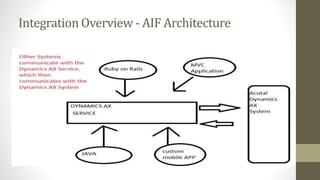
• AX 2012 exposes its functionality through services that are based
on Windows Communication Foundation (WCF) and hosted on
Application Object Server (AOS).
• External applications and client applications on the local area network
consume AX services by accessing them directly from AOS.
AIF Architecture
Integration Overview - AIF Architecture
Types of Services
AX 2012 supports the following three kinds of services:
• Document services are query-based services that can be used to
exchange data with external systems by sending and receiving XML
documents. These documents represent business entities, such as
customers, vendors, or sales orders.
• Custom services can be used by developers to expose any X++ logic, such
as X++ classes and their members, through a service interface.
• System services are provided by Microsoft Dynamics AX. System services
include the Query service, the Metadata service, and the User Session
service.
Further, system services are not customizable, and they are not mapped to
any query or X++ code. For more information about system services, see AIF
System Services.
Integration ports in AX 2012
Each integration port also has a direction. An integration port can be either
an inbound integration port or an outbound integration port.
• An inbound integration port is a destination for messages
that originate from outside Microsoft Dynamics AX.
• An outbound integration port is a destination for messages that originate
from your Microsoft Dynamics AX System. Outbound integration ports are
always enhanced ports.
• Use for Jobs related operations
• Types
• Basic port
• Enhanced port
Layers of Customization in AX
USR ( User layer)
CUS (Customer layer)
VAR ( Value added resellers)
ISV ( Independent service provider)
SNL (Solution layer)
FPK,GLS,SYS (Microsoft
customizations )
Lab Session
AX Side
• Create a Class and operations
• Create a service and configure its
methods
• Incremental Compile
• Register Service
• Configure Ports  Service
Operations
Client Side
• Get WCF service URL from
Configuration Port
• Consume Service
• Create Client, configure
Credentials, Company, etc.
• Call service method
Future Work
• Jobs in AX
• AIF Logging and Trace
• MS Certification (80416A)

Dynamic AX : Application Integration Framework

  • 1.
  • 2.
    Topics Coverage • Introductionto AIF • How document are exchange • AIF Architecture • Types of Services • Integration Ports • Lab session
  • 3.
    What is theAIF and why is important? • The AIF provides capability to integrate Microsoft Dynamics AX 2012 with other systems inside and outside an organization by enabling the exchange of data through XML. • This formatted XML is referred to as a document, and each document contains data and business logic. Documents are based on a document class and defined by using Microsoft Dynamics AX. • Further, AX 2012 ships together with standard document services that support common business processes. As in AX 2009, in AX 2012 we can also customize existing services or create our services.
  • 4.
    How documents areexchanged? • In synchronous mode, requests are tightly coupled to responses, which means that the submitter of the request must wait for a response from AIF before proceeding. In this case, AIF does process the request immediately and then sends a response. • In asynchronous mode, however, requests are placed into a queue, called the gateway queue. Queued messages are processed at a later time and AIF sends a response when processing is completed. In this case, responses are delayed, but note that large volumes of messages can be processed more efficiently, and message processing can be controlled by changing various configuration settings. Further, the AIF can be used to send and retrieve data into/from AX.
  • 5.
    AIF Architecture • AX2012 exposes its functionality through services that are based on Windows Communication Foundation (WCF) and hosted on Application Object Server (AOS). • External applications and client applications on the local area network consume AX services by accessing them directly from AOS.
  • 6.
  • 7.
    Integration Overview -AIF Architecture
  • 8.
    Types of Services AX2012 supports the following three kinds of services: • Document services are query-based services that can be used to exchange data with external systems by sending and receiving XML documents. These documents represent business entities, such as customers, vendors, or sales orders. • Custom services can be used by developers to expose any X++ logic, such as X++ classes and their members, through a service interface. • System services are provided by Microsoft Dynamics AX. System services include the Query service, the Metadata service, and the User Session service. Further, system services are not customizable, and they are not mapped to any query or X++ code. For more information about system services, see AIF System Services.
  • 9.
    Integration ports inAX 2012 Each integration port also has a direction. An integration port can be either an inbound integration port or an outbound integration port. • An inbound integration port is a destination for messages that originate from outside Microsoft Dynamics AX. • An outbound integration port is a destination for messages that originate from your Microsoft Dynamics AX System. Outbound integration ports are always enhanced ports. • Use for Jobs related operations • Types • Basic port • Enhanced port
  • 10.
    Layers of Customizationin AX USR ( User layer) CUS (Customer layer) VAR ( Value added resellers) ISV ( Independent service provider) SNL (Solution layer) FPK,GLS,SYS (Microsoft customizations )
  • 11.
    Lab Session AX Side •Create a Class and operations • Create a service and configure its methods • Incremental Compile • Register Service • Configure Ports  Service Operations Client Side • Get WCF service URL from Configuration Port • Consume Service • Create Client, configure Credentials, Company, etc. • Call service method
  • 12.
    Future Work • Jobsin AX • AIF Logging and Trace • MS Certification (80416A)