Colin Sobers
sobers.colin@gmail.com
678.414.1476
TABLE OF CONTENTS
 Overview – Introduction
 Relational Data Modeling
 SQL Server T-SQL Programming
 SQL Server Integration Services (SSIS)
 MDX Query
 SQL Server Analysis Services (SSAS)
 Dimensional Data Modeling
 SQL Server Reporting Services (SSRS)
 Performance Point Server (PPS)
 Microsoft Office SharePoint Services (MOSS)
 What is SetFocus?
OVERVIEW
   Introduction: This portfolio contains      screen shots of code and result sets, and
    various other screen shots of my development skills using the Microsoft BI Stack toolset.

   Core Technology Microsoft BI Stack
        Microsoft SQL Server 2008, T-SQL and MDX Queries
        SQL Server Management Studio (SSMS) and Business Intelligence Development
         Suite (BIDS)
        SQL Server Integration Services (SSIS)
        SQL Server Analysis Services (SSAS)
        SQL Server Reporting Services (SSRS)
        Microsoft Office Performance Point Server (PPS) and Dashboard Designer
        Microsoft Office SharePoint Server 2007 (MOSS)

 Audience
        Business Executives
        IT Directors/Hiring Managers
        Project Managers, IT Professionals
        BI Designers/Implementers and BI Analysts
RELATIONAL DATA MODELING
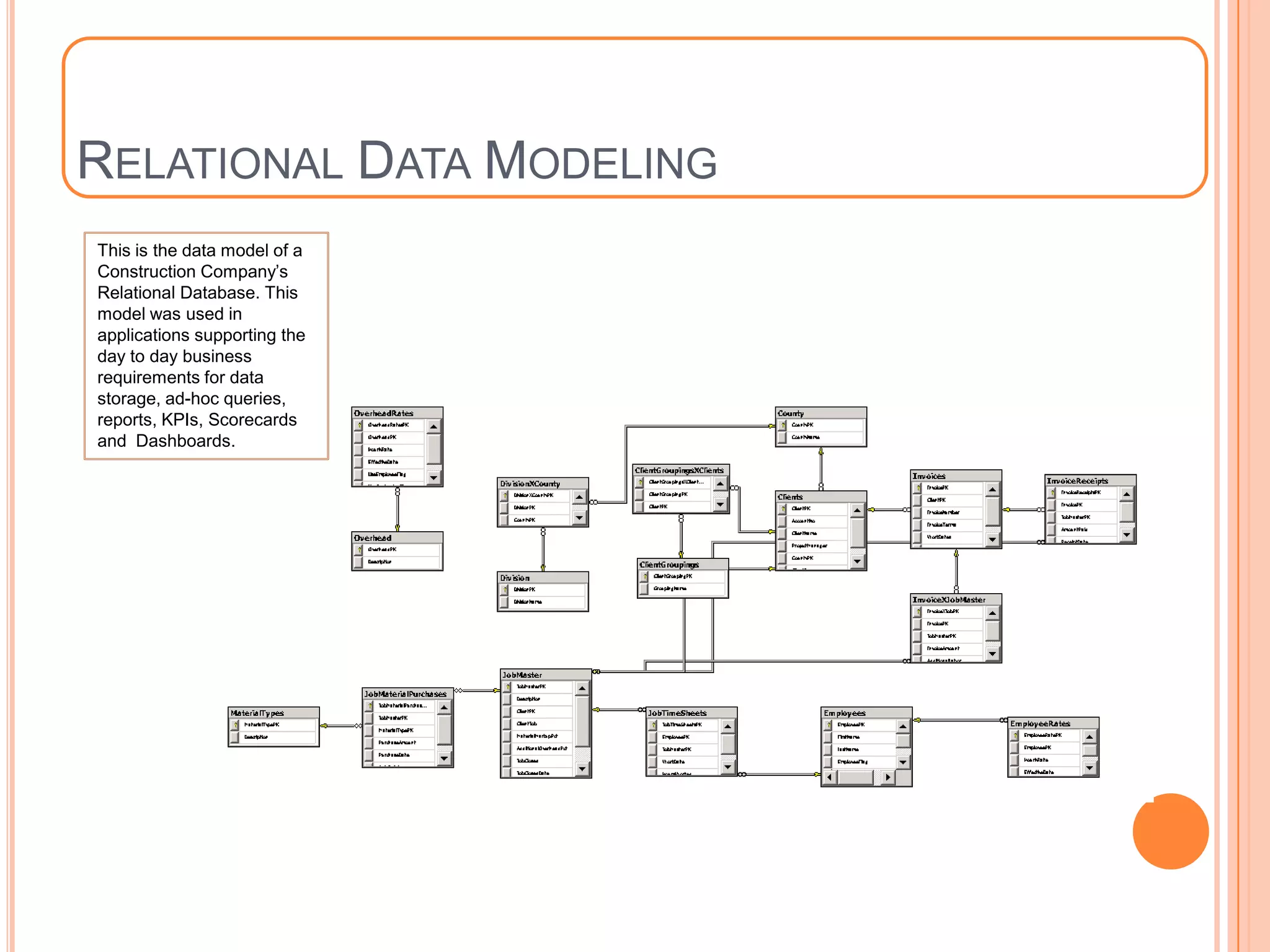
This is the data model of a
Construction Company’s
Relational Database. This
model was used in
applications supporting the
day to day business
requirements for data
storage, ad-hoc queries,
reports, KPIs, Scorecards
and Dashboards.
T-SQL PROJECT
   Introduction: This project was used to help me demonstrate my knowledge of T-
    SQL programming constructs such as: The use of Common Table Expressions, Sub-
    Queries, Recursive Queries, Grouping Sets, System Functions, User Defined Functions
    (UDF), Stored Procedures, Capturing changes using Insert/Update/Delete Database
    Triggers and Change Data Capture(CDC), Transactions with various Transaction
    Isolation Levels, Structured Error Handling using Begin Try/End Try/Catch block and
    many others.
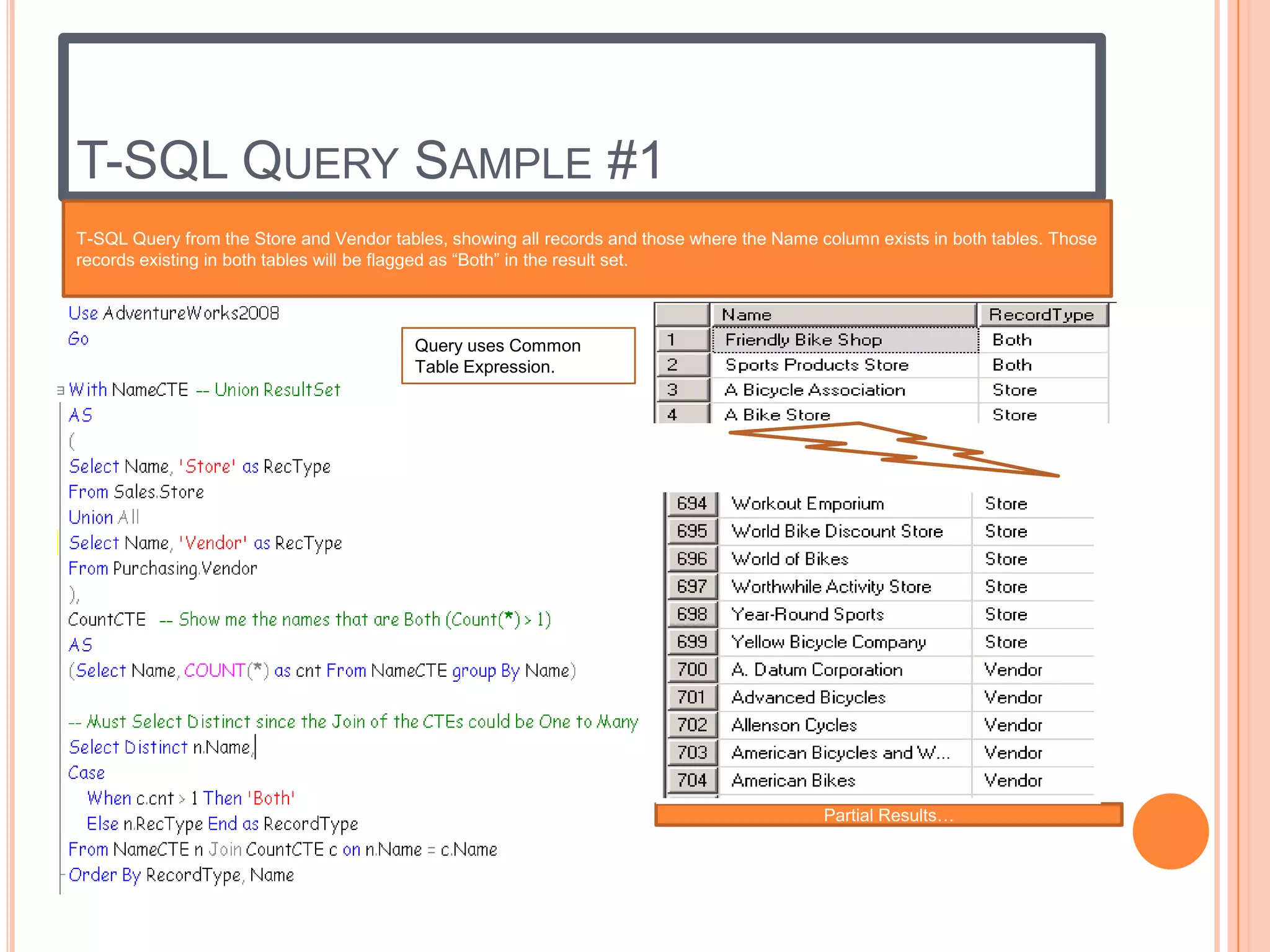
T-SQL QUERY SAMPLE #1
T-SQL Query from the Store and Vendor tables, showing all records and those where the Name column exists in both tables. Those
records existing in both tables will be flagged as “Both” in the result set.


                                         Query uses Common
                                         Table Expression.


                                                                                            Partial Results…
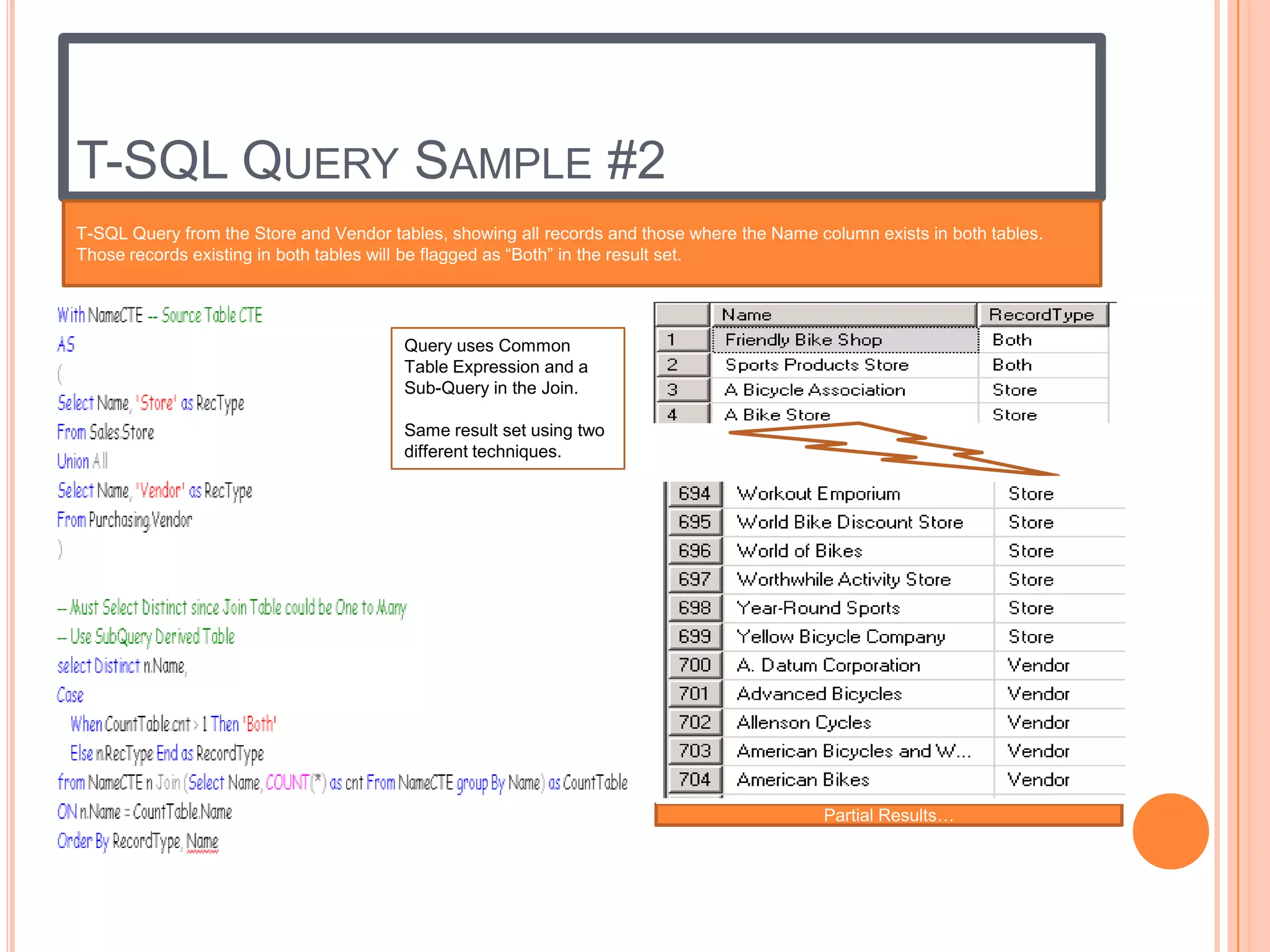
T-SQL QUERY SAMPLE #2
T-SQL Query from the Store and Vendor tables, showing all records and those where the Name column exists in both tables.
Those records existing in both tables will be flagged as “Both” in the result set.


                                        Query uses Common
                                        Table Expression and a
                                        Sub-Query in the Join.

                                        Same result set using two
                                        different techniques.


                                                                                            Partial Results…
SSIS PROJECT
   Introduction: This project was used to help me demonstrate my knowledge
    of SSIS Package Development using the Business Intelligence Development Suite
    (BIDS) tool. The use of Control Flow, Data Flow and their various Task Items to
    perform ETL of a Data Warehouse Staging Area and an OLAP Database,
    Dimension Tables, Fact Tables and Cubes; ETL using Excel Workbooks, CSVs and
    SQL Server Relational database tables as data source and target destinations; To
    Send notification emails upon successful or failure status of the SSIS Package
SSIS PROJECT SAMPLE #1
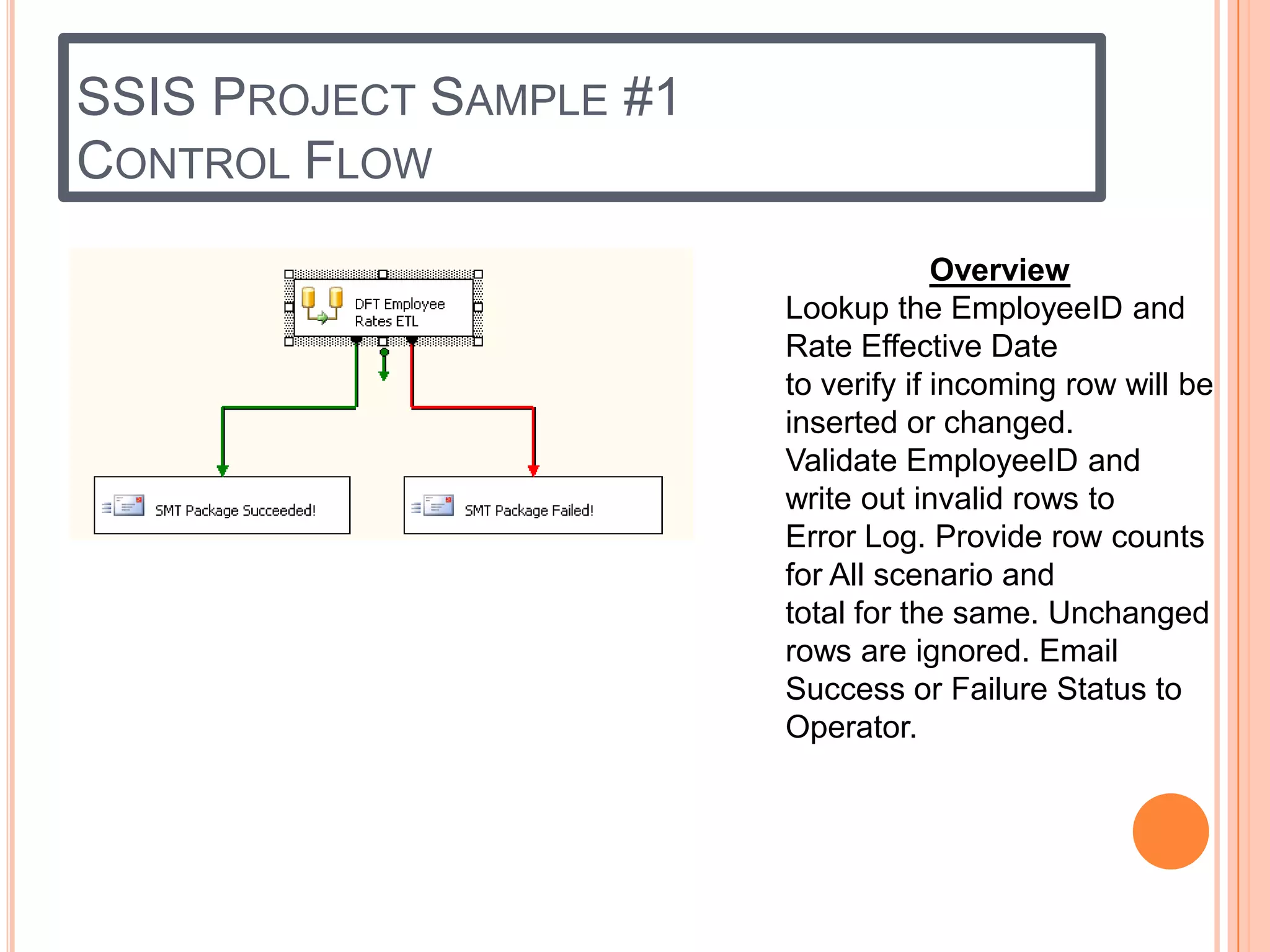
CONTROL FLOW
                                      Overview
                         Lookup the EmployeeID and
                         Rate Effective Date
                         to verify if incoming row will be
                         inserted or changed.
                         Validate EmployeeID and
                         write out invalid rows to
                         Error Log. Provide row counts
                         for All scenario and
                         total for the same. Unchanged
                         rows are ignored. Email
                         Success or Failure Status to
                         Operator.
SSIS PROJECT SAMPLE
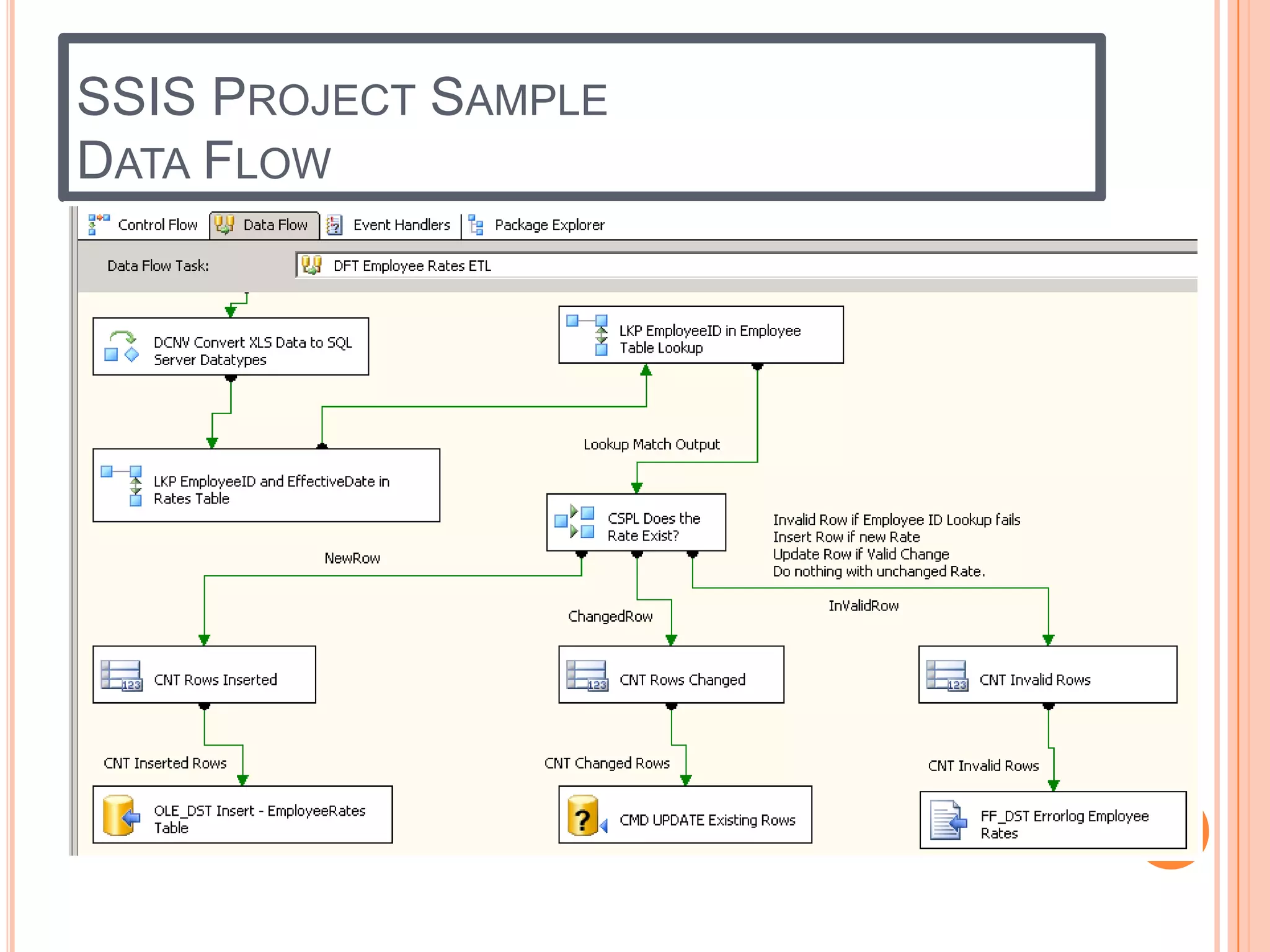
DATA FLOW
SSIS PROJECT SAMPLE
CONTROL FLOW – SEND MAIL TASK WITH
EXPRESSIONS


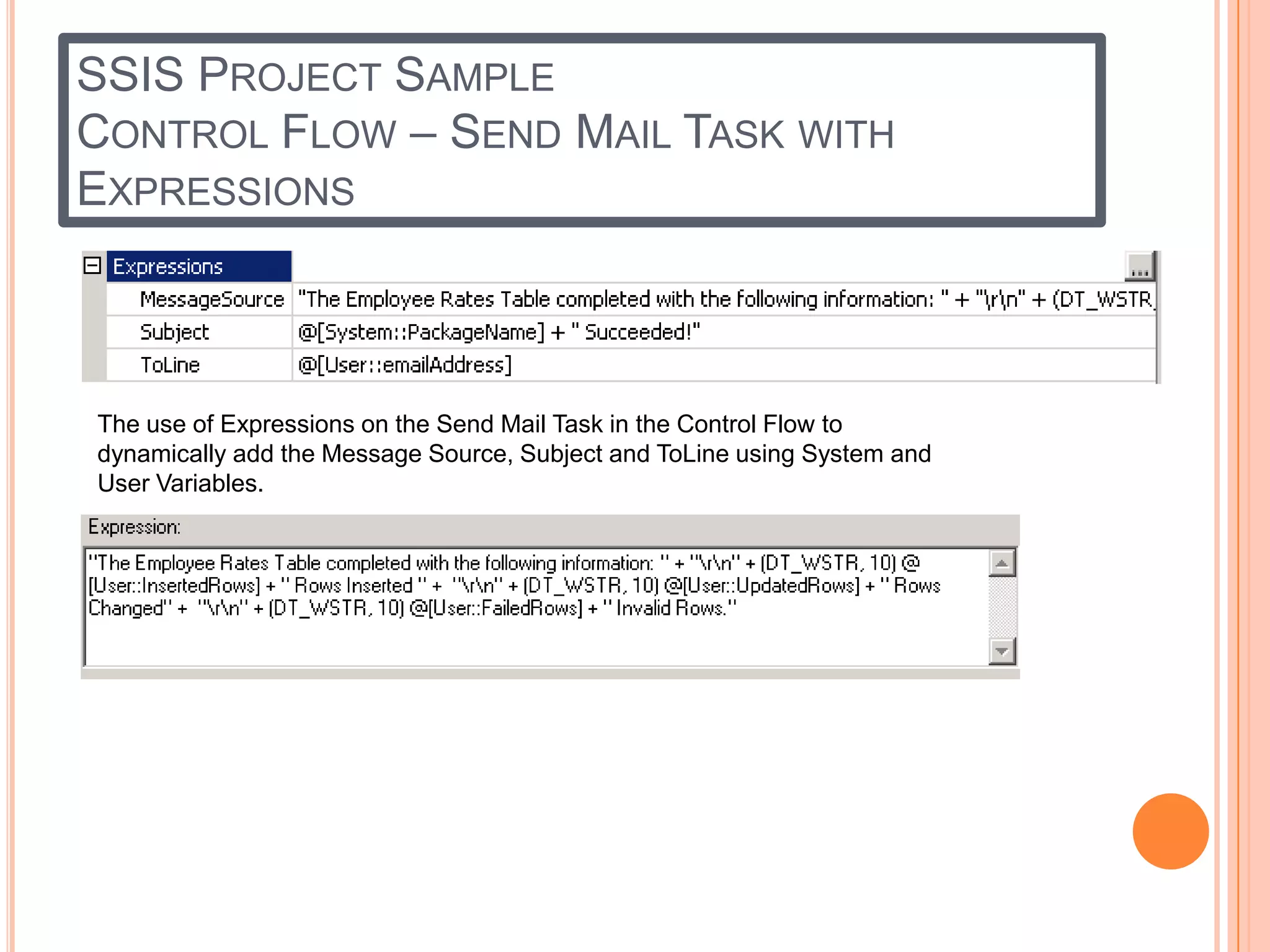
The use of Expressions on the Send Mail Task in the Control Flow to
dynamically add the Message Source, Subject and ToLine using System and
User Variables.
MDX QUERY PROJECT
   Introduction: This project was used to help me demonstrate my knowledge
    of MDX programming constructs by using many of the MDX Functions such as
    Generate to get a list of jobs and the top 3 Employees who work on those jobs
    ranked in descending order from highest hours worked;
    CurrentMember.PrevMember to get the previous Fiscal Quarter Dollar Sales from
    the Current Member; ParallelPeriod to get the Dollar Sales for the Prior year;
    PeriodsToDate to get to Dollar Sales from a given period up to the Current Date
    slice of the query; Filter function to limit the Query result set for Dollar Sales
    greater than $10,000.00; Order Function to sort the result set by highest Dollar
    Sales and various other MDX Functions.
MDX QUERY SAMPLE #1
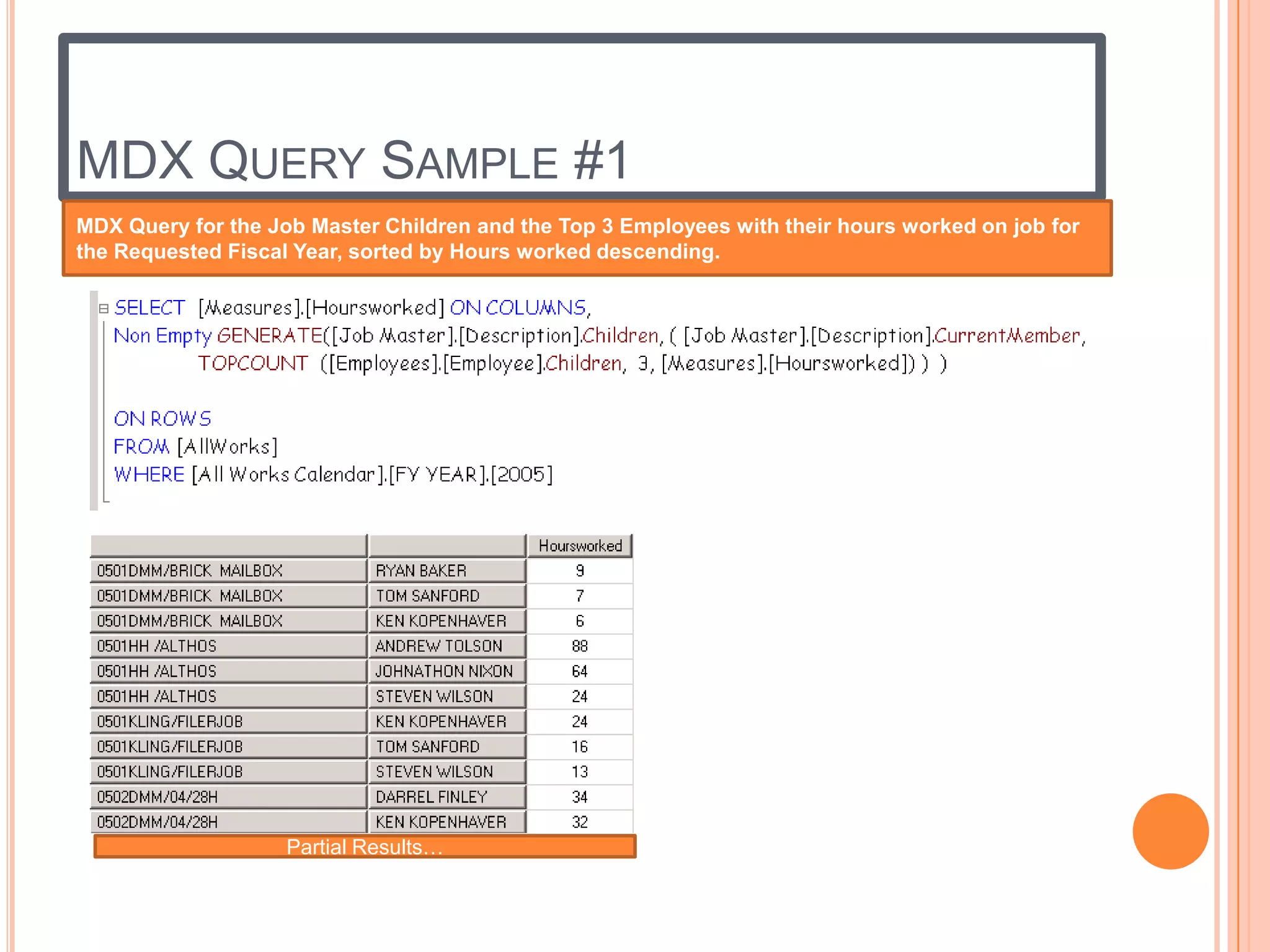
MDX Query for the Job Master Children and the Top 3 Employees with their hours worked on job for
the Requested Fiscal Year, sorted by Hours worked descending.


                    Partial Results…
MDX QUERY SAMPLE #2
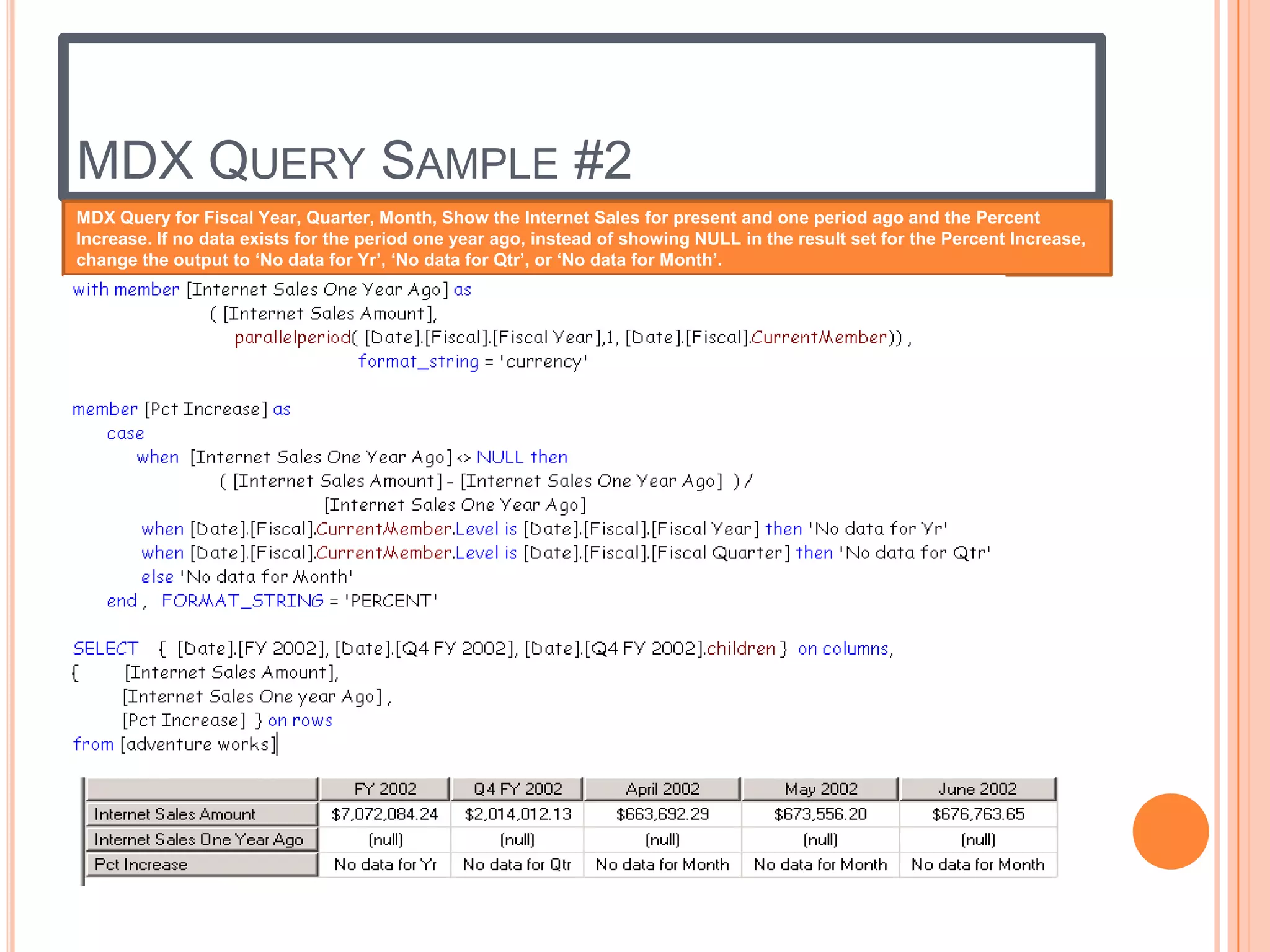
MDX Query for Fiscal Year, Quarter, Month, Show the Internet Sales for present and one period ago and the Percent
Increase. If no data exists for the period one year ago, instead of showing NULL in the result set for the Percent Increase,
change the output to ‘No data for Yr’, ‘No data for Qtr’, or ‘No data for Month’.
SSAS PROJECT
   Introduction: This project was used to help me demonstrate my knowledge
    of SSAS Development using the Business Intelligence Development Suite (BIDS)
    tool. Dimension and Fact Tables were loaded from the Data Warehouse staging
    area and then cubes were created. The examples will show the OLAP Database,
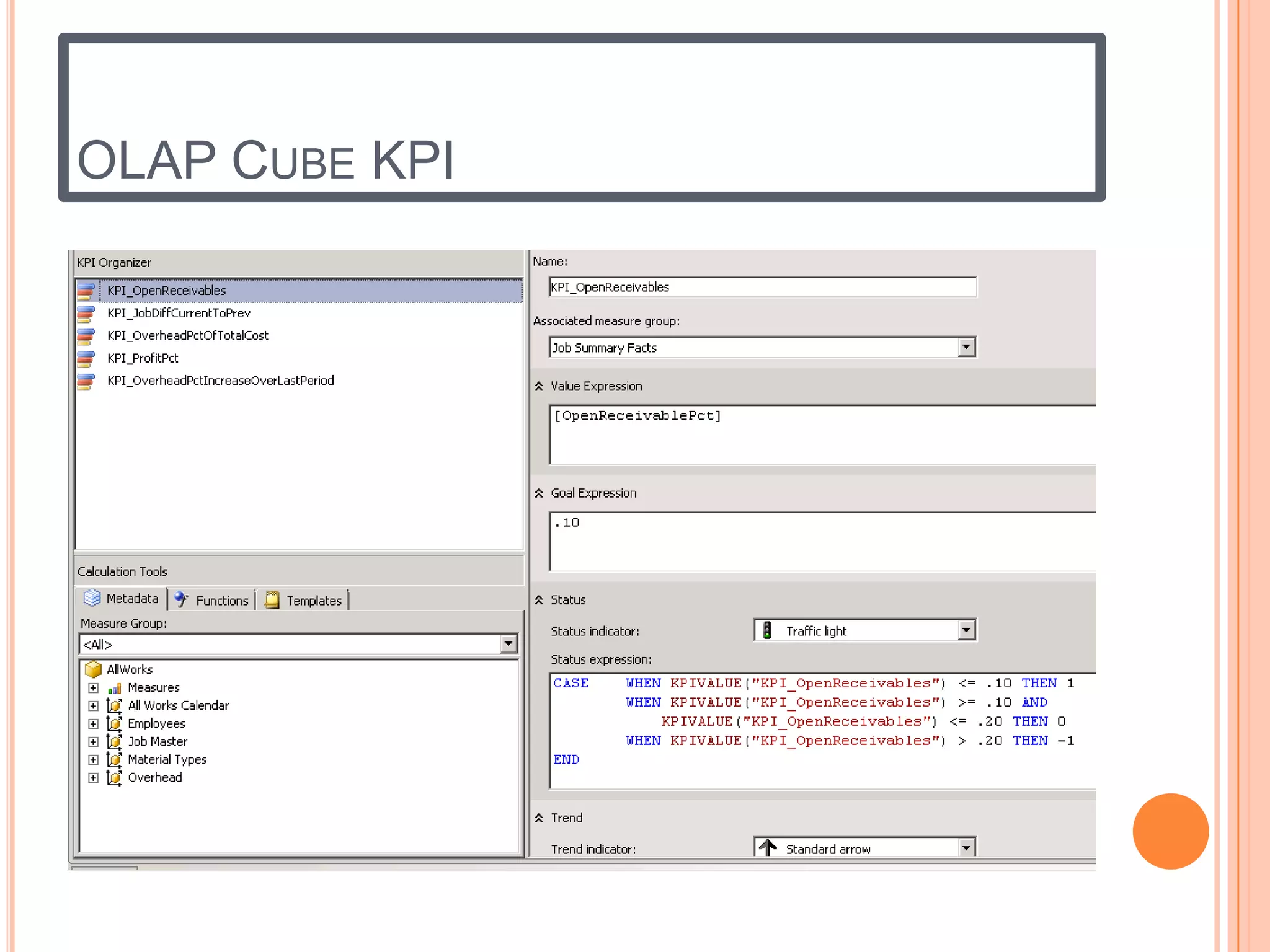
    Dimensions, Fact Tables, Calculations and KPIs.
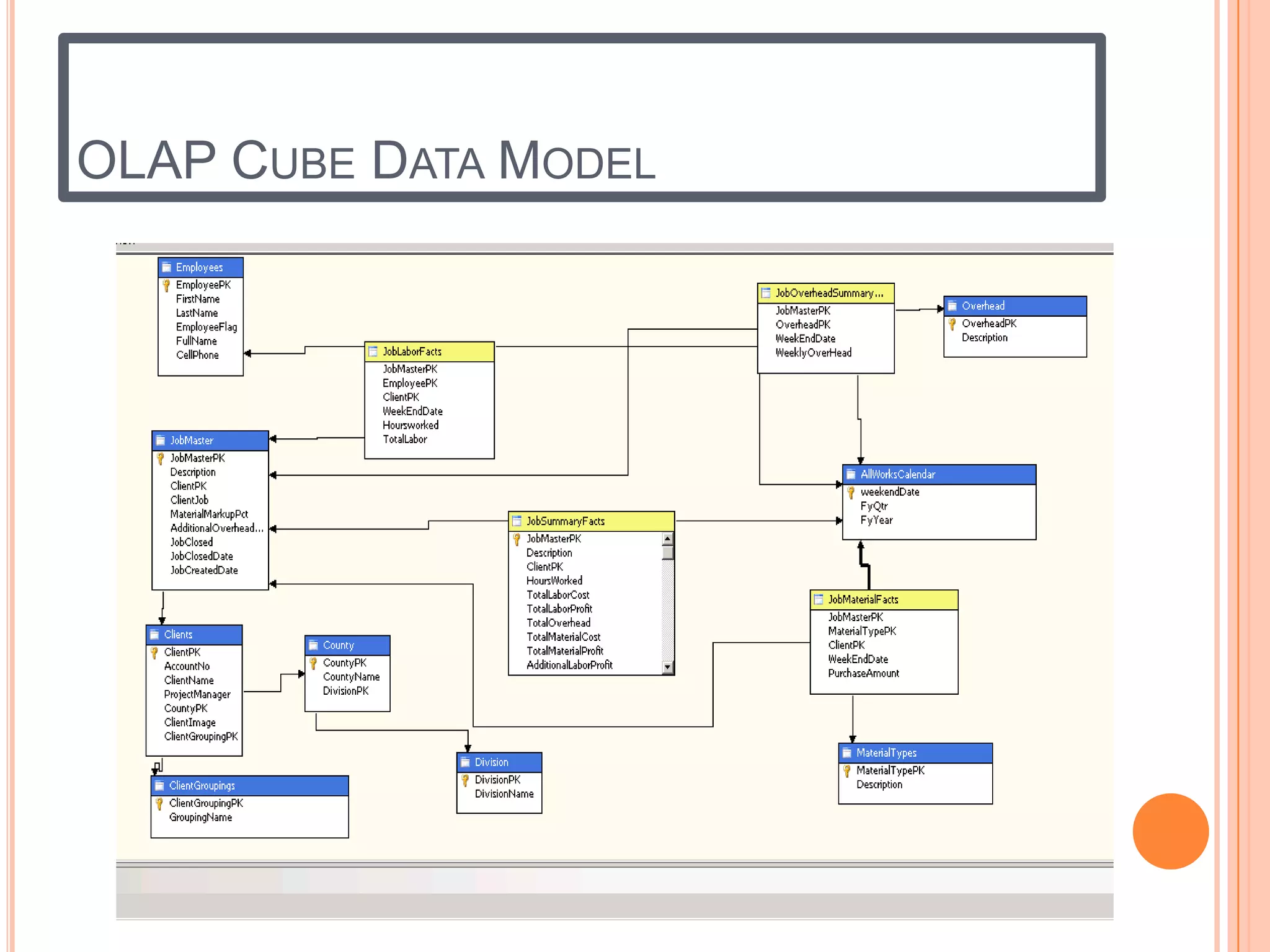
OLAP CUBE DATA MODEL
OLAP CUBE KPI
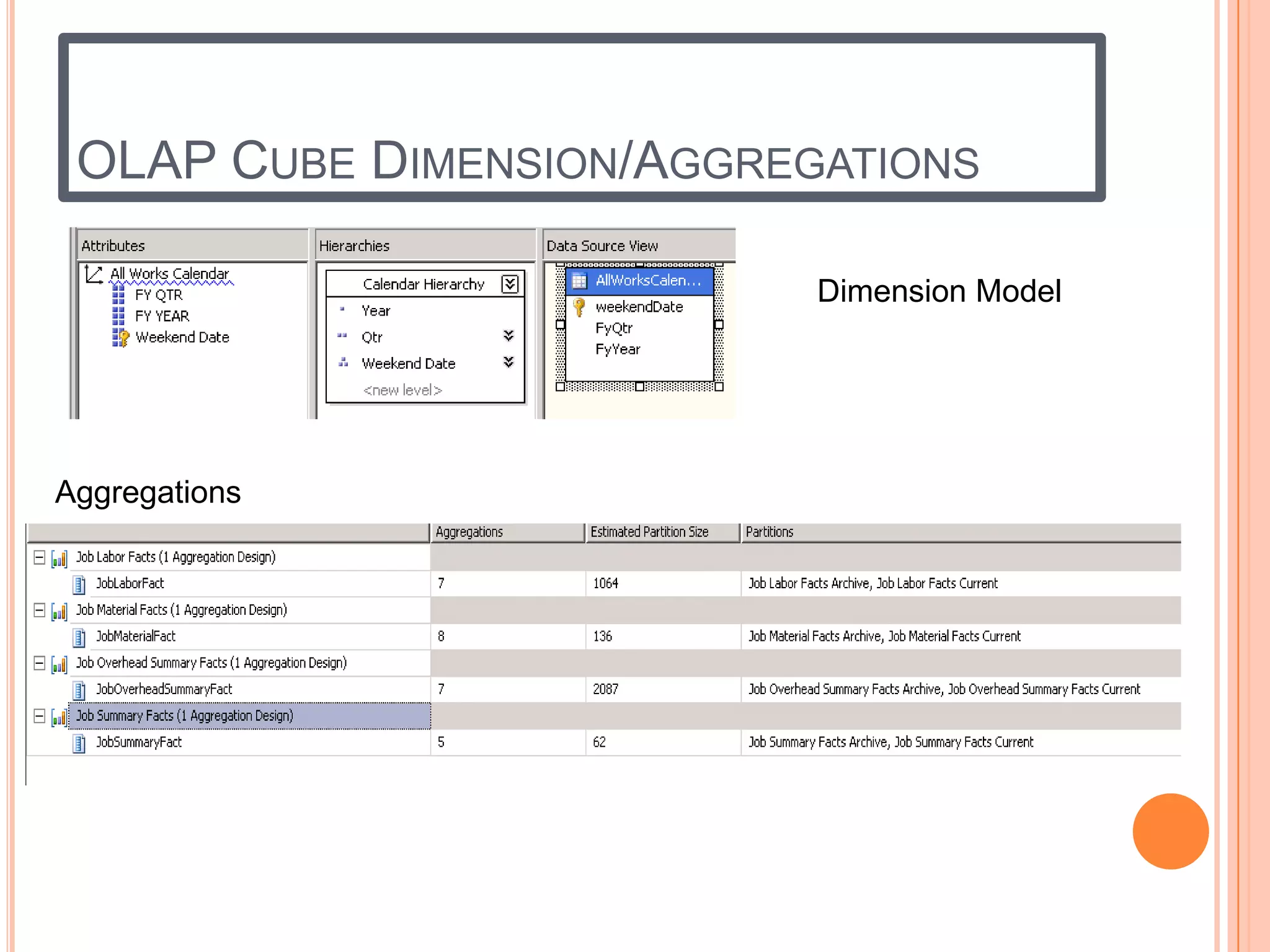
OLAP CUBE DIMENSION/AGGREGATIONS

                           Dimension Model


Aggregations
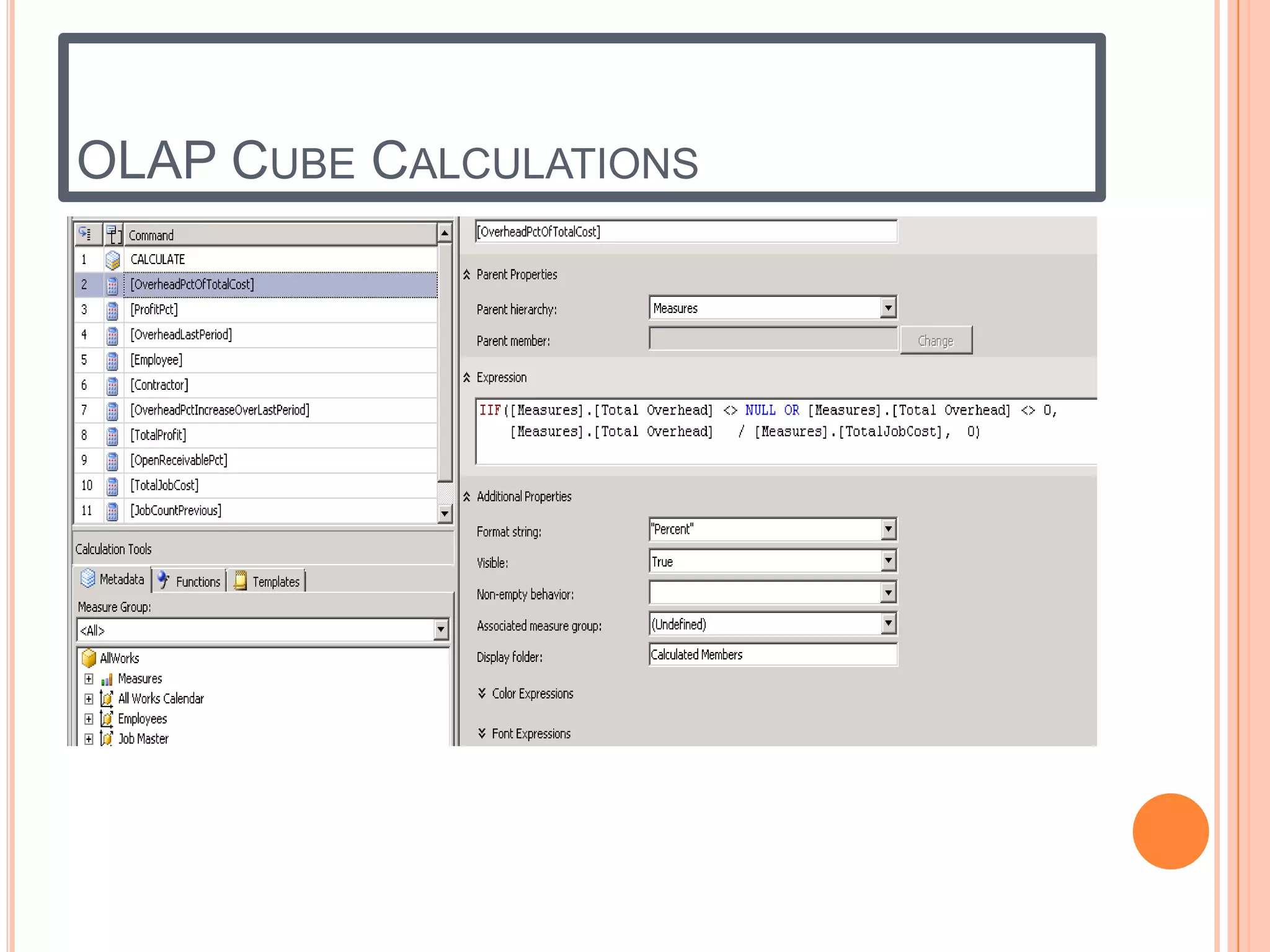
OLAP CUBE CALCULATIONS
SSRS PROJECT
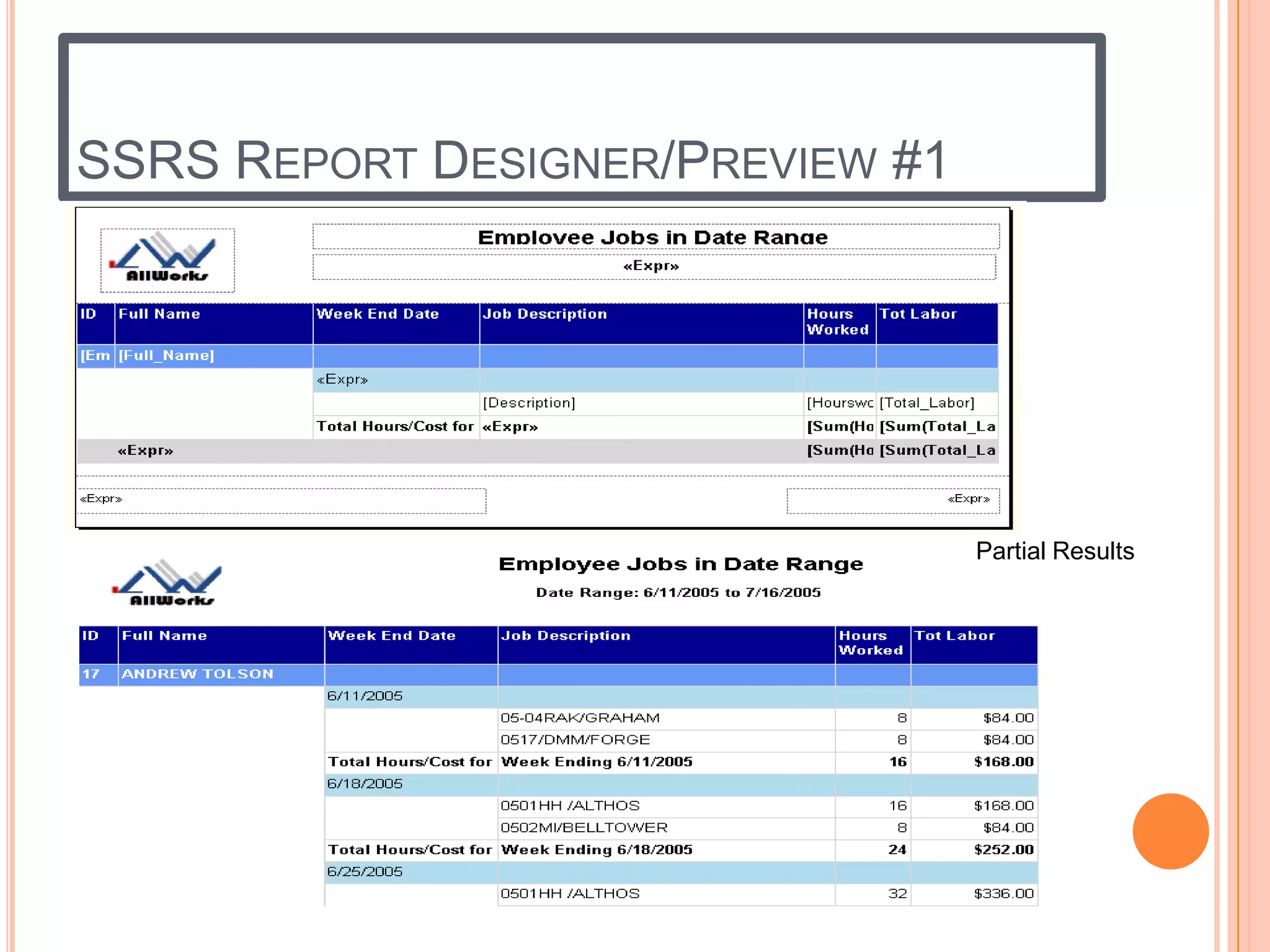
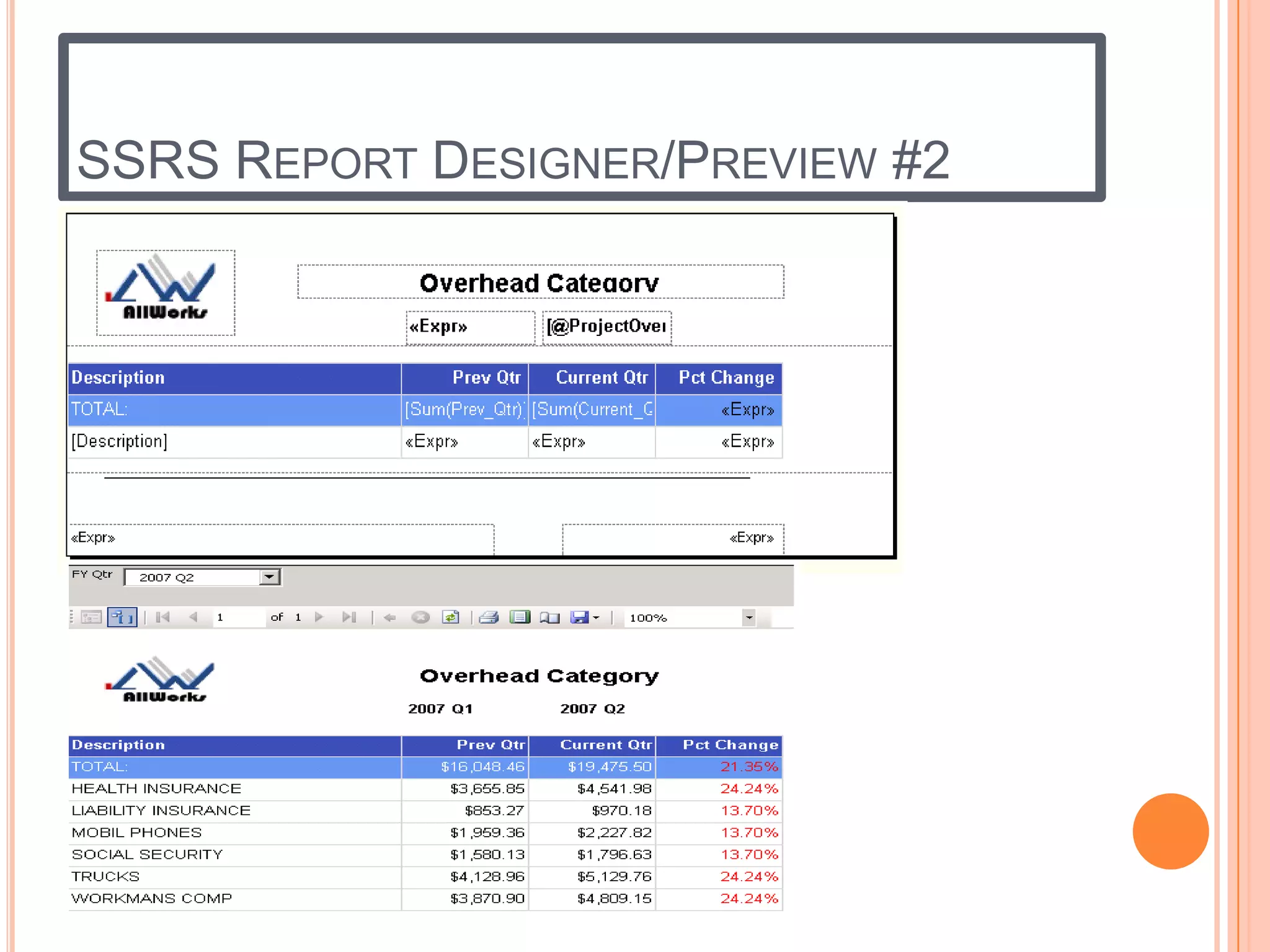
   Introduction: This project was used to help me demonstrate my knowledge of
    SQL Server Reporting Services using BIDS to create and publish reports to Microsoft
    Office SharePoint Server (MOSS). Reports use Cascading Parameters, Built-In fields for
    Page counts in the footer, UserID of user executing the report, Variables, operators and
    various functions to format the reports.
SSRS REPORT DESIGNER/PREVIEW #1


                                  Partial Results
SSRS REPORT DESIGNER/PREVIEW #2
PERFORMANCE POINT SERVER PROJECT
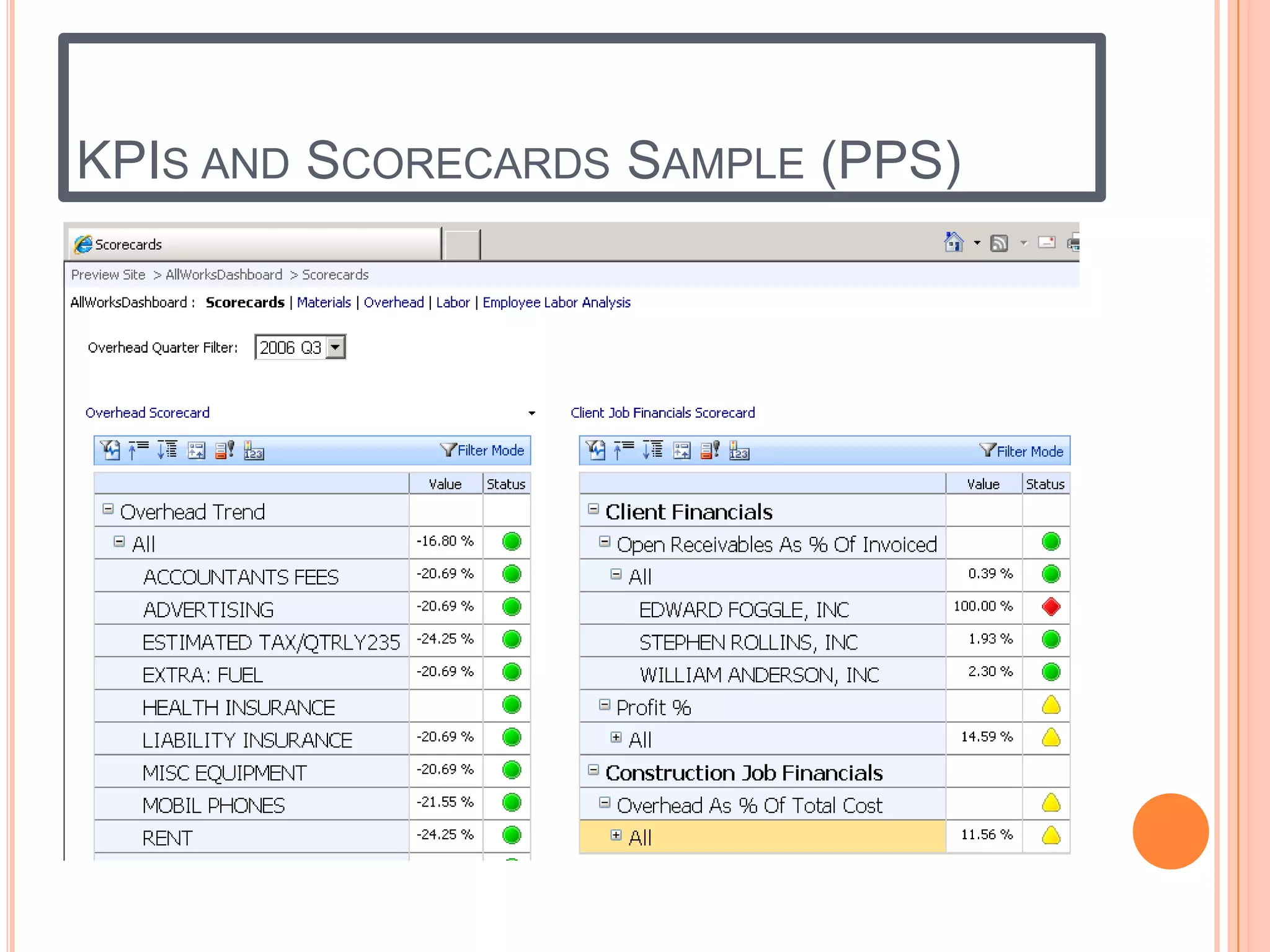
   Introduction: This project was used to help me demonstrate my knowledge of
    Performance Point Server Dashboard Designer and publishing the Dashboards,
    Scorecards and various types of reports to Microsoft Office SharePoint Server (MOSS).
    SSRS and Excel reports were imported into PPS and placed on Dashboards with Filters
    to drive the reports selection criteria.
KPIS AND SCORECARDS SAMPLE (PPS)
PPS KPIS USING GAUGE AND TRAFFIC LIGHT
STATUS INDICATORS
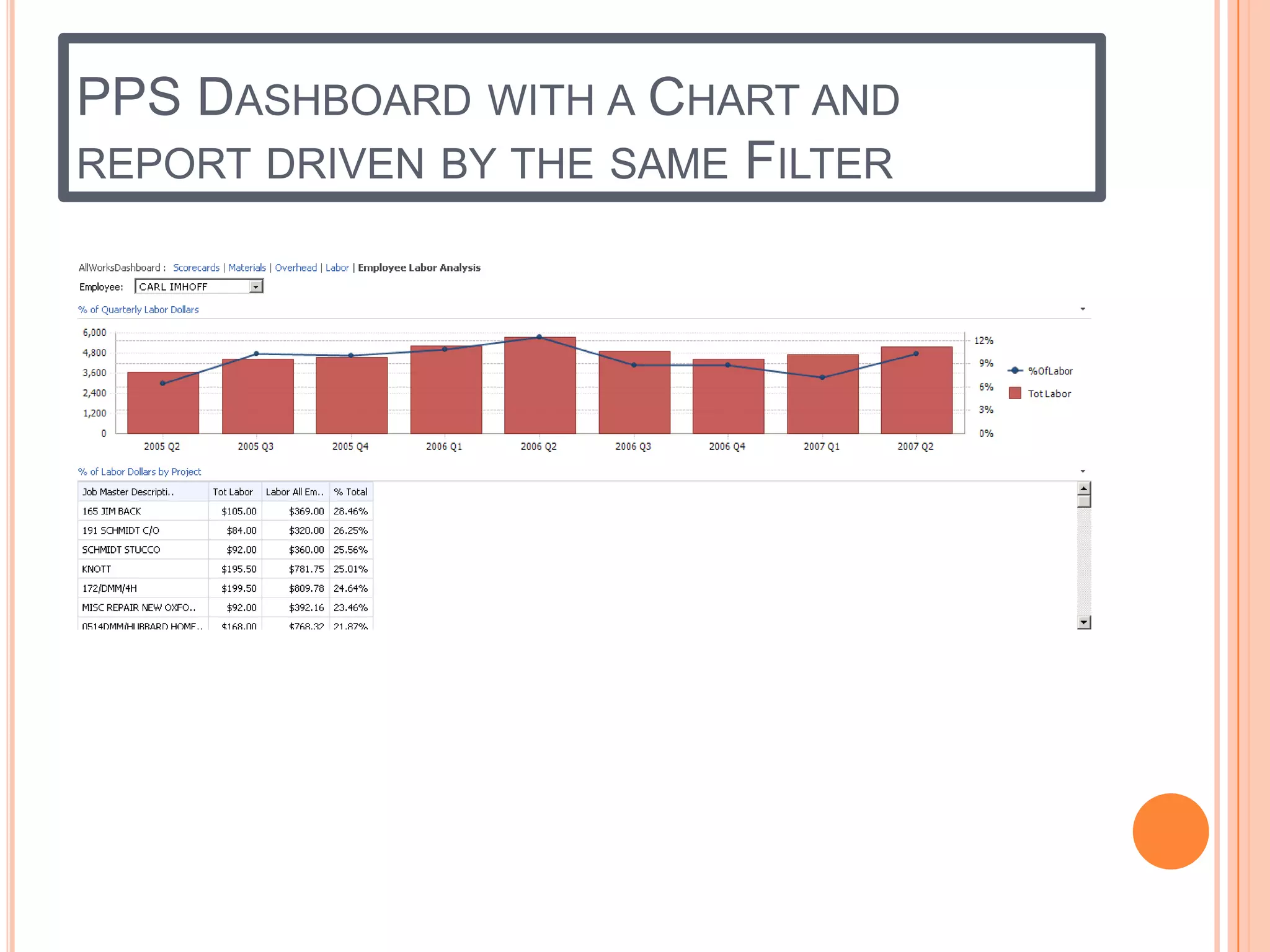
PPS DASHBOARD WITH A CHART AND
REPORT DRIVEN BY THE SAME FILTER
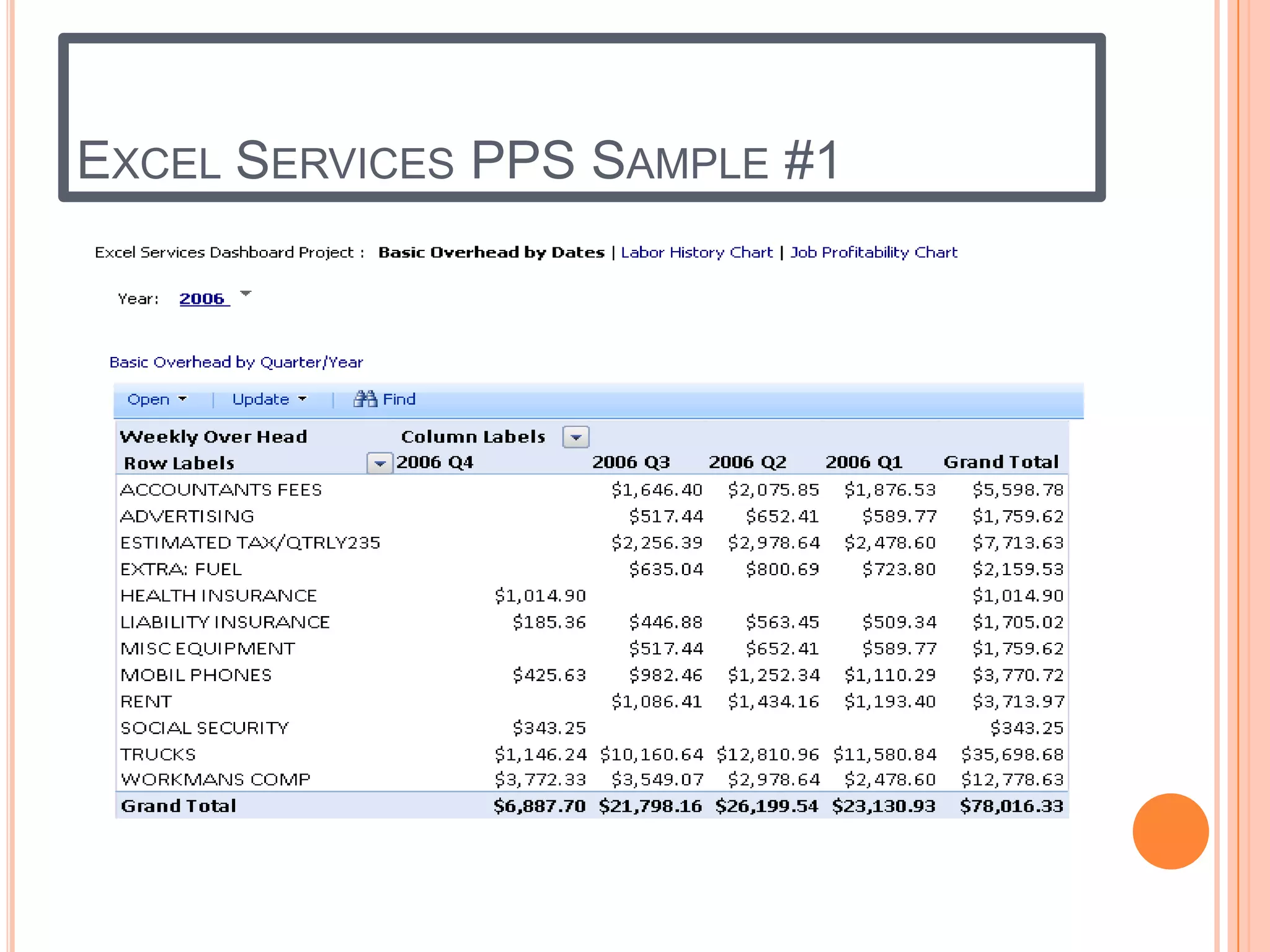
EXCEL SERVICES PPS SAMPLE #1
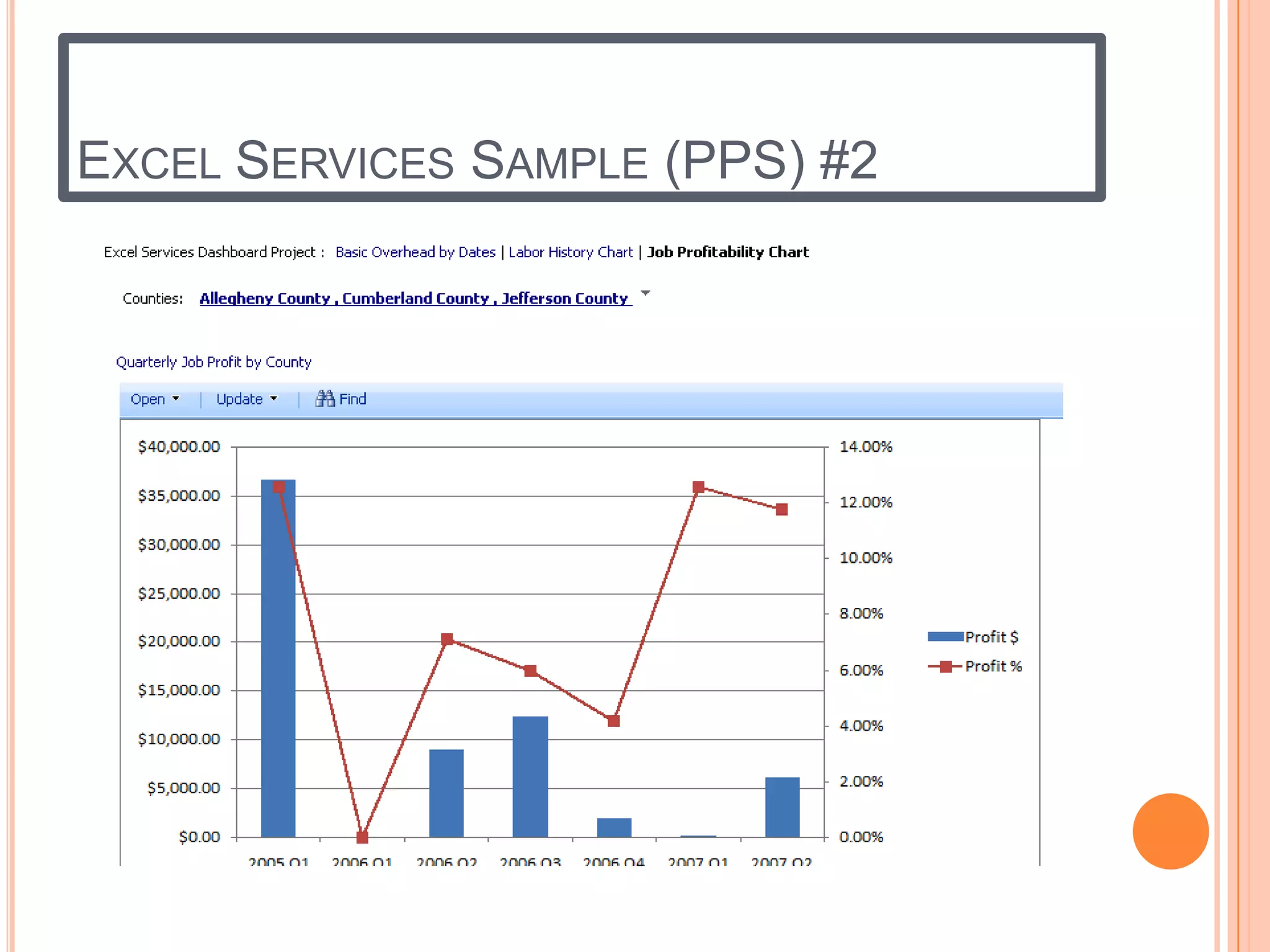
EXCEL SERVICES SAMPLE (PPS) #2
MOSS SITE SAMPLE WITH WEB PARTS
REPORT USING CASCADING PARAMETERS
MOSS Site with report built using Web Parts on the Home Page. Home page also shows
the various Document Libraries where other types of reports, dashboards, scorecards
and Subscriptions are located.
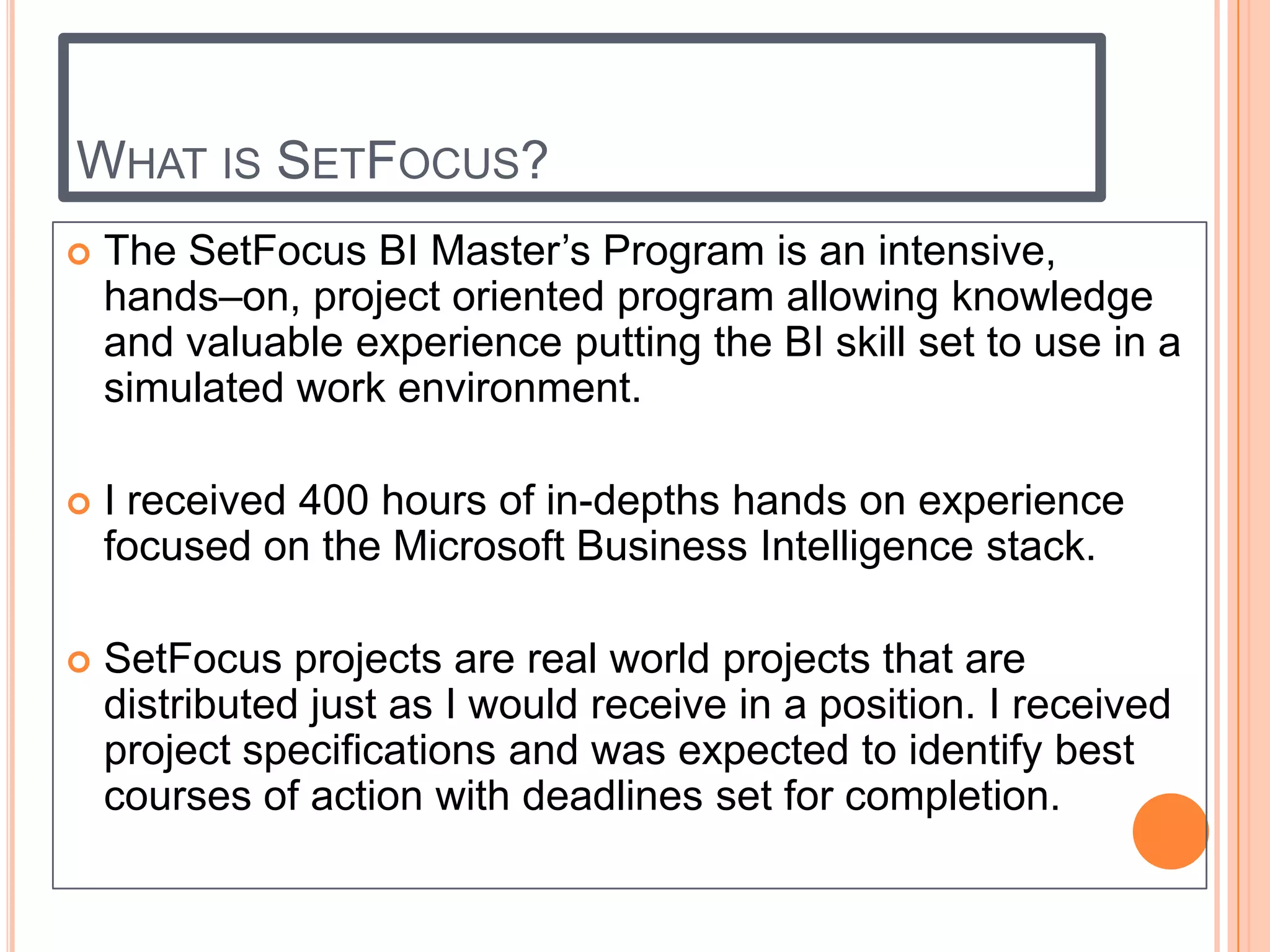
WHAT IS SETFOCUS?
   The SetFocus BI Master’s Program is an intensive,
    hands–on, project oriented program allowing knowledge
    and valuable experience putting the BI skill set to use in a
    simulated work environment.

   I received 400 hours of in-depths hands on experience
    focused on the Microsoft Business Intelligence stack.

   SetFocus projects are real world projects that are
    distributed just as I would receive in a position. I received
    project specifications and was expected to identify best
    courses of action with deadlines set for completion.

Colin\'s BI Portfolio

  • 1.
  • 2.
    TABLE OF CONTENTS Overview – Introduction  Relational Data Modeling  SQL Server T-SQL Programming  SQL Server Integration Services (SSIS)  MDX Query  SQL Server Analysis Services (SSAS)  Dimensional Data Modeling  SQL Server Reporting Services (SSRS)  Performance Point Server (PPS)  Microsoft Office SharePoint Services (MOSS)  What is SetFocus?
  • 3.
    OVERVIEW  Introduction: This portfolio contains screen shots of code and result sets, and various other screen shots of my development skills using the Microsoft BI Stack toolset.  Core Technology Microsoft BI Stack  Microsoft SQL Server 2008, T-SQL and MDX Queries  SQL Server Management Studio (SSMS) and Business Intelligence Development Suite (BIDS)  SQL Server Integration Services (SSIS)  SQL Server Analysis Services (SSAS)  SQL Server Reporting Services (SSRS)  Microsoft Office Performance Point Server (PPS) and Dashboard Designer  Microsoft Office SharePoint Server 2007 (MOSS)  Audience  Business Executives  IT Directors/Hiring Managers  Project Managers, IT Professionals  BI Designers/Implementers and BI Analysts
  • 4.
    RELATIONAL DATA MODELING Thisis the data model of a Construction Company’s Relational Database. This model was used in applications supporting the day to day business requirements for data storage, ad-hoc queries, reports, KPIs, Scorecards and Dashboards.
  • 5.
    T-SQL PROJECT  Introduction: This project was used to help me demonstrate my knowledge of T- SQL programming constructs such as: The use of Common Table Expressions, Sub- Queries, Recursive Queries, Grouping Sets, System Functions, User Defined Functions (UDF), Stored Procedures, Capturing changes using Insert/Update/Delete Database Triggers and Change Data Capture(CDC), Transactions with various Transaction Isolation Levels, Structured Error Handling using Begin Try/End Try/Catch block and many others.
  • 6.
    T-SQL QUERY SAMPLE#1 T-SQL Query from the Store and Vendor tables, showing all records and those where the Name column exists in both tables. Those records existing in both tables will be flagged as “Both” in the result set. Query uses Common Table Expression. Partial Results…
  • 7.
    T-SQL QUERY SAMPLE#2 T-SQL Query from the Store and Vendor tables, showing all records and those where the Name column exists in both tables. Those records existing in both tables will be flagged as “Both” in the result set. Query uses Common Table Expression and a Sub-Query in the Join. Same result set using two different techniques. Partial Results…
  • 8.
    SSIS PROJECT  Introduction: This project was used to help me demonstrate my knowledge of SSIS Package Development using the Business Intelligence Development Suite (BIDS) tool. The use of Control Flow, Data Flow and their various Task Items to perform ETL of a Data Warehouse Staging Area and an OLAP Database, Dimension Tables, Fact Tables and Cubes; ETL using Excel Workbooks, CSVs and SQL Server Relational database tables as data source and target destinations; To Send notification emails upon successful or failure status of the SSIS Package
  • 9.
    SSIS PROJECT SAMPLE#1 CONTROL FLOW Overview Lookup the EmployeeID and Rate Effective Date to verify if incoming row will be inserted or changed. Validate EmployeeID and write out invalid rows to Error Log. Provide row counts for All scenario and total for the same. Unchanged rows are ignored. Email Success or Failure Status to Operator.
  • 10.
  • 11.
    SSIS PROJECT SAMPLE CONTROLFLOW – SEND MAIL TASK WITH EXPRESSIONS The use of Expressions on the Send Mail Task in the Control Flow to dynamically add the Message Source, Subject and ToLine using System and User Variables.
  • 12.
    MDX QUERY PROJECT  Introduction: This project was used to help me demonstrate my knowledge of MDX programming constructs by using many of the MDX Functions such as Generate to get a list of jobs and the top 3 Employees who work on those jobs ranked in descending order from highest hours worked; CurrentMember.PrevMember to get the previous Fiscal Quarter Dollar Sales from the Current Member; ParallelPeriod to get the Dollar Sales for the Prior year; PeriodsToDate to get to Dollar Sales from a given period up to the Current Date slice of the query; Filter function to limit the Query result set for Dollar Sales greater than $10,000.00; Order Function to sort the result set by highest Dollar Sales and various other MDX Functions.
  • 13.
    MDX QUERY SAMPLE#1 MDX Query for the Job Master Children and the Top 3 Employees with their hours worked on job for the Requested Fiscal Year, sorted by Hours worked descending. Partial Results…
  • 14.
    MDX QUERY SAMPLE#2 MDX Query for Fiscal Year, Quarter, Month, Show the Internet Sales for present and one period ago and the Percent Increase. If no data exists for the period one year ago, instead of showing NULL in the result set for the Percent Increase, change the output to ‘No data for Yr’, ‘No data for Qtr’, or ‘No data for Month’.
  • 15.
    SSAS PROJECT  Introduction: This project was used to help me demonstrate my knowledge of SSAS Development using the Business Intelligence Development Suite (BIDS) tool. Dimension and Fact Tables were loaded from the Data Warehouse staging area and then cubes were created. The examples will show the OLAP Database, Dimensions, Fact Tables, Calculations and KPIs.
  • 16.
  • 17.
  • 18.
    OLAP CUBE DIMENSION/AGGREGATIONS Dimension Model Aggregations
  • 19.
  • 20.
    SSRS PROJECT  Introduction: This project was used to help me demonstrate my knowledge of SQL Server Reporting Services using BIDS to create and publish reports to Microsoft Office SharePoint Server (MOSS). Reports use Cascading Parameters, Built-In fields for Page counts in the footer, UserID of user executing the report, Variables, operators and various functions to format the reports.
  • 21.
    SSRS REPORT DESIGNER/PREVIEW#1 Partial Results
  • 22.
  • 23.
    PERFORMANCE POINT SERVERPROJECT  Introduction: This project was used to help me demonstrate my knowledge of Performance Point Server Dashboard Designer and publishing the Dashboards, Scorecards and various types of reports to Microsoft Office SharePoint Server (MOSS). SSRS and Excel reports were imported into PPS and placed on Dashboards with Filters to drive the reports selection criteria.
  • 24.
    KPIS AND SCORECARDSSAMPLE (PPS)
  • 25.
    PPS KPIS USINGGAUGE AND TRAFFIC LIGHT STATUS INDICATORS
  • 26.
    PPS DASHBOARD WITHA CHART AND REPORT DRIVEN BY THE SAME FILTER
  • 27.
  • 28.
  • 29.
    MOSS SITE SAMPLEWITH WEB PARTS REPORT USING CASCADING PARAMETERS MOSS Site with report built using Web Parts on the Home Page. Home page also shows the various Document Libraries where other types of reports, dashboards, scorecards and Subscriptions are located.
  • 30.
    WHAT IS SETFOCUS?  The SetFocus BI Master’s Program is an intensive, hands–on, project oriented program allowing knowledge and valuable experience putting the BI skill set to use in a simulated work environment.  I received 400 hours of in-depths hands on experience focused on the Microsoft Business Intelligence stack.  SetFocus projects are real world projects that are distributed just as I would receive in a position. I received project specifications and was expected to identify best courses of action with deadlines set for completion.