DECISION TABLE
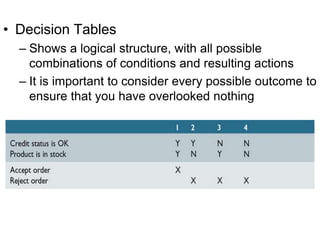
• Decision Tables
– Shows a logical structure, with all possible
combinations of conditions and resulting actions
– It is important to consider every possible outcome to
ensure that you have overlooked nothing
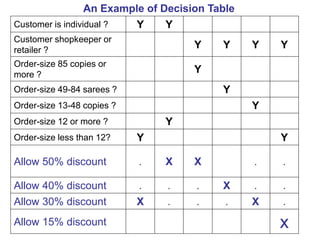
Customer is individual ? Y Y . . . .
Customer shopkeeper or
retailer ?
. . Y Y Y Y
Order-size 85 copies or
more ?
. . Y . . .
Order-size 49-84 sarees ? . . . Y . .
Order-size 13-48 copies ? . . . . Y .
Order-size 12 or more ? . Y . . . .
Order-size less than 12? Y . . . . Y
Allow 50% discount . X X . .
Allow 40% discount . . . X . .
Allow 30% discount X . . . X .
Allow 15% discount x
An Example of Decision Table
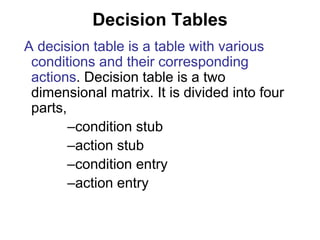
Decision Tables
A decision table is a table with various
conditions and their corresponding
actions. Decision table is a two
dimensional matrix. It is divided into four
parts,
–condition stub
–action stub
–condition entry
–action entry
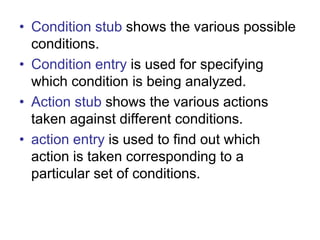
• Condition stub shows the various possible
conditions.
• Condition entry is used for specifying
which condition is being analyzed.
• Action stub shows the various actions
taken against different conditions.
• action entry is used to find out which
action is taken corresponding to a
particular set of conditions.
• Developing Decision Tables
Every decision should be given a name and
the logic of the decision table is independent
of the sequence in which condition rules are
written but the action takes place in the order
in which events occur.
• duplication of terms and meaning should be
avoided and only the standardized language
must be used.
The steps of building the concerned tables
are given below.
1. Firstly figure out the most essential factors to be
considered in making a decision.
This will identify the conditions involved in the decision.
Only those conditions should be selected which have the
potential to either occur or not but partial occurrences are
not permissible.
2. Determine the most possible steps that can take place
under varying conditions and not just under current
condition. This step will identify the actions.
3. Calculate all the possible combinations of
conditions.
For every N number of conditions there are
2*2*2…. (N times) combinations to be considered.
4. Fill the decision rules in the table.
• Entries in a decision table are filled as Y/N
• action entries are generally marked as "X".
• For the conditions that are immaterial a hyphen "-" is
generally put.
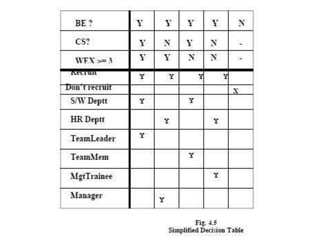
• Decision table is further simplified by eliminating and
consolidating certain rules.
• Impossible rules are eliminated.
There are certain conditions whose values do not affect the
decision and always result in the same action. These rules
can be consolidated into a single rule.
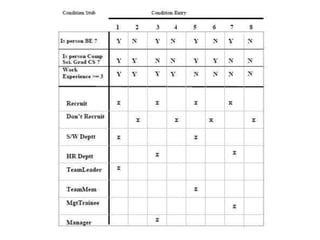
Case study-Consider the recruitment
policy of ABC Software Ltd.
• It the applicant is a BE then recruit otherwise not.
• If the person is from Computer Science, put him/her in
the software development department
• if the person is from non-computer science background
put him/her in HR department.
• If the Person is from Computer Science and having
experience equal to or greater than 3 years, take him/her
as Team leader
• if the experience is less than that then take the person as
Team member.
• If the person recruited is from non Computer Science
background, having experience less than three years,
make him/her Management Trainee otherwise Manager
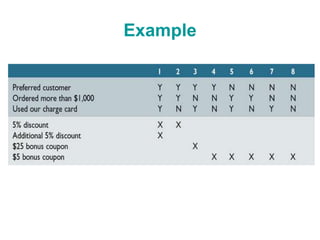
Example
Thank You….

Ssad decision table

  • 1.
  • 2.
    • Decision Tables –Shows a logical structure, with all possible combinations of conditions and resulting actions – It is important to consider every possible outcome to ensure that you have overlooked nothing
  • 3.
    Customer is individual? Y Y . . . . Customer shopkeeper or retailer ? . . Y Y Y Y Order-size 85 copies or more ? . . Y . . . Order-size 49-84 sarees ? . . . Y . . Order-size 13-48 copies ? . . . . Y . Order-size 12 or more ? . Y . . . . Order-size less than 12? Y . . . . Y Allow 50% discount . X X . . Allow 40% discount . . . X . . Allow 30% discount X . . . X . Allow 15% discount x An Example of Decision Table
  • 4.
    Decision Tables A decisiontable is a table with various conditions and their corresponding actions. Decision table is a two dimensional matrix. It is divided into four parts, –condition stub –action stub –condition entry –action entry
  • 5.
    • Condition stubshows the various possible conditions. • Condition entry is used for specifying which condition is being analyzed. • Action stub shows the various actions taken against different conditions. • action entry is used to find out which action is taken corresponding to a particular set of conditions.
  • 6.
    • Developing DecisionTables Every decision should be given a name and the logic of the decision table is independent of the sequence in which condition rules are written but the action takes place in the order in which events occur. • duplication of terms and meaning should be avoided and only the standardized language must be used.
  • 7.
    The steps ofbuilding the concerned tables are given below. 1. Firstly figure out the most essential factors to be considered in making a decision. This will identify the conditions involved in the decision. Only those conditions should be selected which have the potential to either occur or not but partial occurrences are not permissible.
  • 8.
    2. Determine themost possible steps that can take place under varying conditions and not just under current condition. This step will identify the actions. 3. Calculate all the possible combinations of conditions. For every N number of conditions there are 2*2*2…. (N times) combinations to be considered.
  • 9.
    4. Fill thedecision rules in the table. • Entries in a decision table are filled as Y/N • action entries are generally marked as "X". • For the conditions that are immaterial a hyphen "-" is generally put. • Decision table is further simplified by eliminating and consolidating certain rules. • Impossible rules are eliminated. There are certain conditions whose values do not affect the decision and always result in the same action. These rules can be consolidated into a single rule.
  • 10.
    Case study-Consider therecruitment policy of ABC Software Ltd. • It the applicant is a BE then recruit otherwise not. • If the person is from Computer Science, put him/her in the software development department • if the person is from non-computer science background put him/her in HR department. • If the Person is from Computer Science and having experience equal to or greater than 3 years, take him/her as Team leader • if the experience is less than that then take the person as Team member. • If the person recruited is from non Computer Science background, having experience less than three years, make him/her Management Trainee otherwise Manager
  • 13.
  • 14.