SOFTWARE ENGINEERING
INTRODUCTION
UNIT 1
WHAT IS SOFTWARE
• Software is set of instruction that when executed,provide, desired
feature, function,and performance.
• Software is data structure that enable the programs to adequate
manipulate information.
WHAT IS ENGINEERING
Engineering is the application of well-understood scientific methods to the
construction,operation,modification and maintenance of useful devoices and
system.
SOFWARE ENGINEERING
Software Engineering is the design, development and documentation of
software by applying technologies and practice from computer science, project
management, engineering, application domains, interface design, digital asset
management and other fields.
WHY TO STUDY SOFTWARE ENGINEERING
• Higher productivity.
• To acquire skills to develop large programs.
• Ability to solve complex programming problems.
• Learn techniques of specification design.
• Better quality programmers.
CHRACTERSTICS / NATURE OF SOFTWARE
• Software is developed or engineered, not manufactured.
• Most of software is to custom build rather than assemble from existing
component.
• Computer program and associated documentation.
• Easy to modified.
CHRACTERSTICS / NATURE OF SOFTWARE
• Easy to reproduce.
• Software does not wear out.
• Software product m ay be developed for a particular customer or for the
general market.
SOFTWARE APPLICATION
• System software
• Application software
• Engineering and scientific software
• Embedded software
• Product line software
• Web application
• Artificial intelligence software(AI)
• System Software : System software is a collection of programs written to
service other programs . Some software(e.g. compiler , editors and file
management utilities) process processes complex, but determinate,4
information structures. Other systems applications (e.g., operating system
components, drivers, networking software, telecommunications processors)
process largely indeterminate data.
• Application software :Applications in this area process business or
technical data in a way that facilitates business operations or
management/technical decision making. In addition to conventional data
processing applications, application software is used to control business
functions in real time (e.g., point-of-sale transaction processing, real-time
manufacturing process control).
• Engineering / scientific software : has been characterized by “number
crunching” algorithms. Applications range from astronomy to volcanology
,from automotive stress analysis to space shuttle orbital dynamics, and from
molecular biology to automated manufacturing. However, modern
applications within the engineering/scientific area are moving away from
conventional numerical algorithms. Computer-aided design, system
simulation, and other interactive applications have begun to take on real-time
and even system software characteristics.
• Embedded software :resides within a product or system and is used to
implement and control features and functions for the end user and for the
system itself. Embedded software can perform limited and esoteric
functions(e.g., key pad control for a microwave oven) or provide significant
function and control capability (e.g., digital functions in an automobile such
as fuel control, dashboard displays, and braking systems).
•Product-line software : designed to provide a specific capability for
use by many different customers. Product-line software can focus on a
limited and esoteric marketplace (e.g., inventory control products) or address
mass consumer markets (e.g., word processing, spreadsheets, computer
graphics, multimedia, entertainment, database management, and personal and
business financial applications).
•Web applications :called “WebApps,” this network-centric software
category spans a wide array of applications. In their simplest form, WebApps
can be little more than a set of linked hypertext files that present information
using text and limited graphics. However, as Web 2.0 emerges, WebApps are
evolving into sophisticated computing environments that not only provide
stand-alone features, computing functions, and content to the end user, but also
are integrated with corporate databases and business applications.
• Artificial intelligence software :makes use of non numerical
algorithms to solve complex problems that are not amenable to computation
or straightforward analysis. Applications within this area include robotics,
expert systems, pattern recognition (image and voice), artificial neural
networks, theorem proving, and game playing.
SOFTWARE ENGINEERING “A LAYERED
TECHNOLOGY”
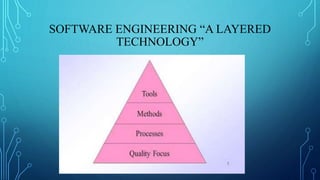
• Software engineering is a layered technology. any engineering approach
(including software engineering) must rest on an organizational commitment
to quality. Total quality management, Six Sigma, and similar philosophies10
foster a continuous process improvement culture, and it is this culture that
ultimately leads to the development of increasingly more effective
approaches to software engineering. The bedrock that supports software
engineering is a quality focus.
SOFTWARE ENGINEERING “A LAYERED
TECHNOLOGY”
SOFTWARE ENGINEERING “A LAYERED
TECHNOLOGY”
• The foundation for software engineering is the process layer. Process defines
a framework with activities for effective delivery of software engineering
technology establishes the context in which technical methods are applied,
work products(models, documents, data, reports, forms, etc.) are produced,
milestones are established,quality is ensured, and change is properly managed.
• Software engineering methods provide the technical how-to’s for building
software.Methods encompass a broad array of tasks that include
communication,equirements analysis, design modeling, program construction,
testing, and support.
SOFTWARE ENGINEERING “A LAYERED
TECHNOLOGY”
Software engineering methods rely on a set of basic principles that govern each
area of the technology and include modeling activities and other descriptive
techniques.
• Software engineering tools provide automated or semi automated support for
the process and the methods. When tools are integrated so that information
created by one tool can be used by another, a system for the support of
software development called computer-aided software engineering(CASE)
SOFTWARE MYTHS
• Propagate misinformation and confusion.
• Three types of myths
- Management myth
- Customer myth
- Practitioner’s myth
MANAGEMENT MYTH
Myth(1)
- Already we have a book of standards and procedure for building
software wont that provide my people with everything they need to
know?
Reality: The book of standards may very well exist but it is used? Are
software practitioners aware of its existence? Is it complete? Is
adaptable?
MANAGEMENT MYTH
Myth(2)
- If we get behind schedule we can add more programmers and can
catch up.
Reality: As new are added, people who are working must spend time
educating the newcomers, nearby reducing amount of time spent on
productive development effort.
CUSTOMER MYTH
Myth(1)
- General statement of objective is enough to begin written programs,
the details can be filled in later .
Reality: Unambiguous requirements can be developed only through
efficient and continuous communication between developer and
customer .
CUSTOMER MYTH
Myth(2)
- Software requirements continually change but change can be easily
accommodated because software is flexible .
Reality: When requirement changes are requested early cost impact is
relatively small. However as time passes cost impact grows rapidly.
PRACTITIONER MYTH
Myth(1)
- Once the program is written, the job has been done.
Reality: Industry data indicate that between 60 and 80 percent of all
effort expended on software will be expended after it is delivered to
customer for first time .
PRACTITIONER MYTH
Myth(2)
- Until the program is running, there is no way of accessing the quality.
Reality: Formal technical review have been found more effective than
actual testing.
PRACTITIONER MYTH
Myth(3)
- The only deliverable work product is the working program.
Reality: A working program is only part of software configuration.
Documentation provides a foundation foe successful engineering .
SOFTWARE PROCESS
SOFTWARE PROCESS
• Software process defines as the structured set of activities that are required
To develop the software system.
The fundamental activities of a software process are:
1. Specification
2. Design and Implementation
3. Validation
4. Evolution
SOFTWARE PROCESS
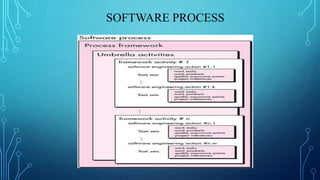
• Process Framework :Process Framework establish foundation the
foundation for a complete software engineering process by identifying a
small number of framework activities that are applicable to all software
projects, regardless of their size or complexity.
SOFTWARE PROCESS
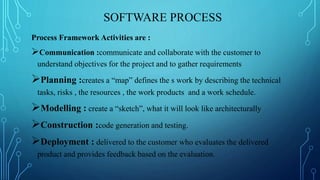
Process Framework Activities are :
Communication :communicate and collaborate with the customer to
understand objectives for the project and to gather requirements
Planning :creates a “map” defines the s work by describing the technical
tasks, risks , the resources , the work products and a work schedule.
Modelling : create a “sketch”, what it will look like architecturally
Construction :code generation and testing.
Deployment : delivered to the customer who evaluates the delivered
product and provides feedback based on the evaluation.
SOFTWARE PROCESS
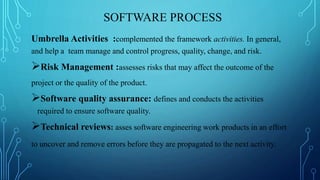
Umbrella Activities :complemented the framework activities. In general,
and help a team manage and control progress, quality, change, and risk.
Risk Management :assesses risks that may affect the outcome of the
project or the quality of the product.
Software quality assurance: defines and conducts the activities
required to ensure software quality.
Technical reviews: asses software engineering work products in an effort
to uncover and remove errors before they are propagated to the next activity.
SOFTWARE PROCESS
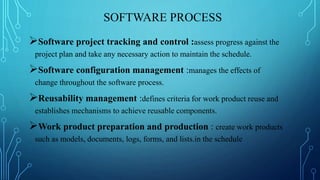
Software project tracking and control :assess progress against the
project plan and take any necessary action to maintain the schedule.
Software configuration management :manages the effects of
change throughout the software process.
Reusability management :defines criteria for work product reuse and
establishes mechanisms to achieve reusable components.
Work product preparation and production : create work products
such as models, documents, logs, forms, and lists.in the schedule
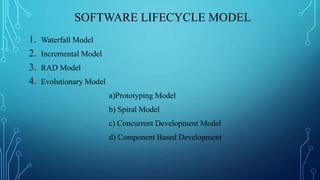
SOFTWARE LIFECYCLE MODEL
1. Waterfall Model
2. Incremental Model
3. RAD Model
4. Evolutionary Model
a)Prototyping Model
b) Spiral Model
c) Concurrent Development Model
d) Component Based Development
WATERFALL MODEL
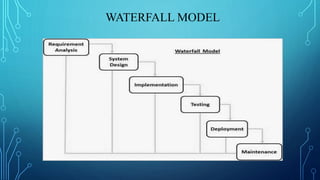
Many people dismiss the waterfall as obsolete and it certainly does have
problems. But this model can still be used in some situation. The waterfall
model is the oldest paradigm for software engineering.
However,over the past three decades. The waterfall model, sometimes called
the classic life cycle, suggests a systematic,sequential approach. Among the
problems that are sometimes encountered when the waterfall model is applied
are:
• Real projects rarely follow the sequential flow that the model, change can
cause confusion as the project team proceeds.
WATERFALL MODEL
• It is difficult for the customer to state all requirements explicitly. The
waterfall model requires such demand.
• The customer must have patience. A working version of the program(s) will
not be available until late in the project time span.
WATERFALL MODEL
WATERFALL MODEL
Advantage
• Simplicity
• Activities are independent
Disadvantage
• Highly impractical for most project.
• Phases are tightly coupled.
INCREMENTAL MODEL
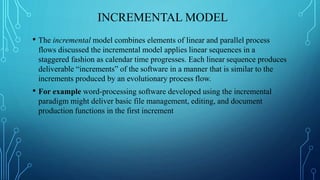
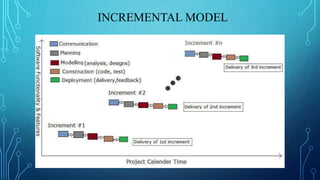
• The incremental model combines elements of linear and parallel process
flows discussed the incremental model applies linear sequences in a
staggered fashion as calendar time progresses. Each linear sequence produces
deliverable “increments” of the software in a manner that is similar to the
increments produced by an evolutionary process flow.
• For example word-processing software developed using the incremental
paradigm might deliver basic file management, editing, and document
production functions in the first increment
INCREMENTAL MODEL
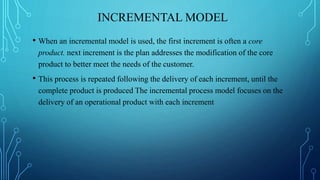
• When an incremental model is used, the first increment is often a core
product. next increment is the plan addresses the modification of the core
product to better meet the needs of the customer.
• This process is repeated following the delivery of each increment, until the
complete product is produced The incremental process model focuses on the
delivery of an operational product with each increment
INCREMENTAL MODEL
INCREMENTAL MODEL
Merits of Incremental Model
• The incremental model can be adopted when there are less involved in the
project.
• Technical risks can be managed with each other increment.
• For a very small time span at least cope product can be delivered to the customer
Drawbacks of Incremental model
• Iteration may create confusion.
• Each phase of iteration can be rigid and many overlap each other.
RAD MODEL
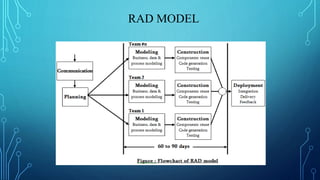
• Rapid Application Development(RAD) is an incremental software process model
that emphasize a short development cycle. RAD is a high speed adaption of the
waterfall model in which rapid development is achieved by component based
construction.
• If requirements are well understood and projects scope is constrained the RAD
process enables a development team to create a fully functional system within a
short period of time.
RAD MODEL
RAD MODEL
Advantage
• It works great speed.
• Continues customer and developer interaction there.
• It works rapidly with waterfall model few steps.
Disadvantage
• RAD needs enough human resources to create required number of RAD
teams
• If developer and customer are not committed to the this model the RAD
model projects fails.
EVOLUTIONARY PROCESS MODEL
Software, like all complex systems, evolves over a period of time. Business and
product requirements often change as development proceeds, making a straight
line path to an end product unrealistic need a process model that has been
explicitly designed to accommodate a product that evolves over time.
Evolutionary models are iterative.
EVOLUTIONARY PROCESS MODEL
1)Prototyping Model
The prototyping paradigm begins with communication. You meet with other
stakeholders to define the overall objectives for the software, identify whatever
requirements are known, and outline areas where further definition is
mandatory. A prototyping iteration is planned quickly, and modeling (in the
form of a “quick design”)occurs. A quick design focuses on a representation of
those aspects of the software that will be visible to end users (e.g., human
interface layout or output display
EVOLUTIONARY PROCESS MODEL
1)Prototyping Model
The quick design leads to the construction of a prototype. The prototype is
deployed and evaluated by stakeholders, who provide feedback that is used to
further refine requirements. Iteration occurs as the prototype is tuned to satisfy
the needs of various stakeholders, while at the same time enabling you to better
understand what needs to be done.
EVOLUTIONARY PROCESS MODEL
1)Prototyping Model
Benefits of Prototyping Model
• Design quality can be improved.
• System can be maintained easily.
• Development efforts may get reduced.
EVOLUTIONARY PROCESS MODEL
2)Spiral Model
The spiral model is an evolutionary software process model that couples the
iterative nature of prototyping with the controlled and systematic aspects of the
waterfall model.
Using the spiral model, software is developed in a series of evolutionary
releases. During early iterations, the release might be a model or prototype.
During later iterations, increasingly more complete versions of the engineered
system are produced
EVOLUTIONARY PROCESS MODEL
2)Spiral Model
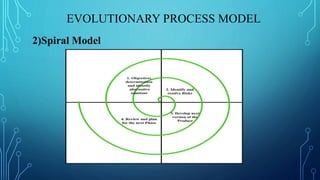
A spiral model is divided into a set of framework activities defined by the software
engineering team. Each of the framework activities represent one segment of the spiral
path evolutionary process begins, the software team performs activities that are
implied by a circuit around the spiral in a clockwise direction, beginning at the center.
The first circuit around the spiral might result in the development of a produce
specification; subsequent passes around the spiral might be used to develop a
prototype and then progressively more sophisticated versions of the software. Each
pass through the planning region results in adjustments to the project plan. Cost and
schedule are adjusted based on feedback derived from the customer after delivery
EVOLUTIONARY PROCESS MODEL
2)Spiral Model
EVOLUTIONARY PROCESS MODEL
2)Spiral Model
Advantage
• Spiral model can be used to throughout the computer software life.
• Provide better accuracy.
Disadvantage
• Convincing customer for evolutionary approach is difficult.
• Expert people are required for evolution of risk.
EVOLUTIONARY PROCESS MODEL
3)Concurrent Development Model
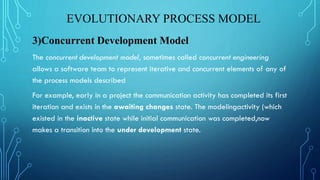
The concurrent development model, sometimes called concurrent engineering
allows a software team to represent iterative and concurrent elements of any of
the process models described
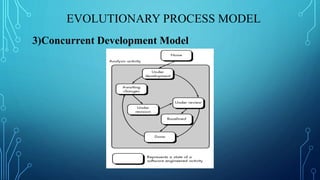
For example, early in a project the communication activity has completed its first
iteration and exists in the awaiting changes state. The modelingactivity (which
existed in the inactive state while initial communication was completed,now
makes a transition into the under development state.
EVOLUTIONARY PROCESS MODEL
3)Concurrent Development Model
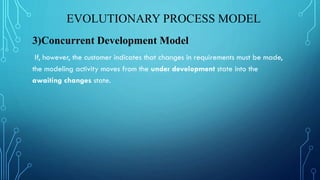
If, however, the customer indicates that changes in requirements must be made,
the modeling activity moves from the under development state into the
awaiting changes state.
EVOLUTIONARY PROCESS MODEL
3)Concurrent Development Model
EVOLUTIONARY PROCESS MODEL
4)Computer Based Development
Commercial off-the-shelf (COTS) software components, developed by vendors
who offer them as products, provide targeted functionality with well-defined
interfaces that enable the component to be integrated into the software that is to
be built. The component-based development model incorporates many of the
characteristics of the spiral model. It is evolutionary in nature demanding an
iterative approach to the creation of software. However, the component-based
development model constructs applications from prepackaged software
components
EVOLUTIONARY PROCESS MODEL
4)Computer Based Development
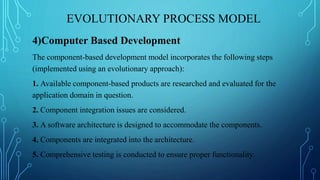
The component-based development model incorporates the following steps
(implemented using an evolutionary approach):
1. Available component-based products are researched and evaluated for the
application domain in question.
2. Component integration issues are considered.
3. A software architecture is designed to accommodate the components.
4. Components are integrated into the architecture.
5. Comprehensive testing is conducted to ensure proper functionality.
THANK YOU!!!

Software engineering unit 1

  • 1.
  • 2.
    WHAT IS SOFTWARE •Software is set of instruction that when executed,provide, desired feature, function,and performance. • Software is data structure that enable the programs to adequate manipulate information.
  • 3.
    WHAT IS ENGINEERING Engineeringis the application of well-understood scientific methods to the construction,operation,modification and maintenance of useful devoices and system.
  • 4.
    SOFWARE ENGINEERING Software Engineeringis the design, development and documentation of software by applying technologies and practice from computer science, project management, engineering, application domains, interface design, digital asset management and other fields.
  • 5.
    WHY TO STUDYSOFTWARE ENGINEERING • Higher productivity. • To acquire skills to develop large programs. • Ability to solve complex programming problems. • Learn techniques of specification design. • Better quality programmers.
  • 6.
    CHRACTERSTICS / NATUREOF SOFTWARE • Software is developed or engineered, not manufactured. • Most of software is to custom build rather than assemble from existing component. • Computer program and associated documentation. • Easy to modified.
  • 7.
    CHRACTERSTICS / NATUREOF SOFTWARE • Easy to reproduce. • Software does not wear out. • Software product m ay be developed for a particular customer or for the general market.
  • 8.
    SOFTWARE APPLICATION • Systemsoftware • Application software • Engineering and scientific software • Embedded software • Product line software • Web application • Artificial intelligence software(AI)
  • 9.
    • System Software: System software is a collection of programs written to service other programs . Some software(e.g. compiler , editors and file management utilities) process processes complex, but determinate,4 information structures. Other systems applications (e.g., operating system components, drivers, networking software, telecommunications processors) process largely indeterminate data. • Application software :Applications in this area process business or technical data in a way that facilitates business operations or management/technical decision making. In addition to conventional data processing applications, application software is used to control business functions in real time (e.g., point-of-sale transaction processing, real-time manufacturing process control).
  • 10.
    • Engineering /scientific software : has been characterized by “number crunching” algorithms. Applications range from astronomy to volcanology ,from automotive stress analysis to space shuttle orbital dynamics, and from molecular biology to automated manufacturing. However, modern applications within the engineering/scientific area are moving away from conventional numerical algorithms. Computer-aided design, system simulation, and other interactive applications have begun to take on real-time and even system software characteristics. • Embedded software :resides within a product or system and is used to implement and control features and functions for the end user and for the system itself. Embedded software can perform limited and esoteric functions(e.g., key pad control for a microwave oven) or provide significant function and control capability (e.g., digital functions in an automobile such as fuel control, dashboard displays, and braking systems).
  • 11.
    •Product-line software :designed to provide a specific capability for use by many different customers. Product-line software can focus on a limited and esoteric marketplace (e.g., inventory control products) or address mass consumer markets (e.g., word processing, spreadsheets, computer graphics, multimedia, entertainment, database management, and personal and business financial applications). •Web applications :called “WebApps,” this network-centric software category spans a wide array of applications. In their simplest form, WebApps can be little more than a set of linked hypertext files that present information using text and limited graphics. However, as Web 2.0 emerges, WebApps are evolving into sophisticated computing environments that not only provide
  • 12.
    stand-alone features, computingfunctions, and content to the end user, but also are integrated with corporate databases and business applications. • Artificial intelligence software :makes use of non numerical algorithms to solve complex problems that are not amenable to computation or straightforward analysis. Applications within this area include robotics, expert systems, pattern recognition (image and voice), artificial neural networks, theorem proving, and game playing.
  • 13.
    SOFTWARE ENGINEERING “ALAYERED TECHNOLOGY” • Software engineering is a layered technology. any engineering approach (including software engineering) must rest on an organizational commitment to quality. Total quality management, Six Sigma, and similar philosophies10 foster a continuous process improvement culture, and it is this culture that ultimately leads to the development of increasingly more effective approaches to software engineering. The bedrock that supports software engineering is a quality focus.
  • 14.
    SOFTWARE ENGINEERING “ALAYERED TECHNOLOGY”
  • 15.
    SOFTWARE ENGINEERING “ALAYERED TECHNOLOGY” • The foundation for software engineering is the process layer. Process defines a framework with activities for effective delivery of software engineering technology establishes the context in which technical methods are applied, work products(models, documents, data, reports, forms, etc.) are produced, milestones are established,quality is ensured, and change is properly managed. • Software engineering methods provide the technical how-to’s for building software.Methods encompass a broad array of tasks that include communication,equirements analysis, design modeling, program construction, testing, and support.
  • 16.
    SOFTWARE ENGINEERING “ALAYERED TECHNOLOGY” Software engineering methods rely on a set of basic principles that govern each area of the technology and include modeling activities and other descriptive techniques. • Software engineering tools provide automated or semi automated support for the process and the methods. When tools are integrated so that information created by one tool can be used by another, a system for the support of software development called computer-aided software engineering(CASE)
  • 17.
    SOFTWARE MYTHS • Propagatemisinformation and confusion. • Three types of myths - Management myth - Customer myth - Practitioner’s myth
  • 18.
    MANAGEMENT MYTH Myth(1) - Alreadywe have a book of standards and procedure for building software wont that provide my people with everything they need to know? Reality: The book of standards may very well exist but it is used? Are software practitioners aware of its existence? Is it complete? Is adaptable?
  • 19.
    MANAGEMENT MYTH Myth(2) - Ifwe get behind schedule we can add more programmers and can catch up. Reality: As new are added, people who are working must spend time educating the newcomers, nearby reducing amount of time spent on productive development effort.
  • 20.
    CUSTOMER MYTH Myth(1) - Generalstatement of objective is enough to begin written programs, the details can be filled in later . Reality: Unambiguous requirements can be developed only through efficient and continuous communication between developer and customer .
  • 21.
    CUSTOMER MYTH Myth(2) - Softwarerequirements continually change but change can be easily accommodated because software is flexible . Reality: When requirement changes are requested early cost impact is relatively small. However as time passes cost impact grows rapidly.
  • 22.
    PRACTITIONER MYTH Myth(1) - Oncethe program is written, the job has been done. Reality: Industry data indicate that between 60 and 80 percent of all effort expended on software will be expended after it is delivered to customer for first time .
  • 23.
    PRACTITIONER MYTH Myth(2) - Untilthe program is running, there is no way of accessing the quality. Reality: Formal technical review have been found more effective than actual testing.
  • 24.
    PRACTITIONER MYTH Myth(3) - Theonly deliverable work product is the working program. Reality: A working program is only part of software configuration. Documentation provides a foundation foe successful engineering .
  • 25.
  • 26.
    SOFTWARE PROCESS • Softwareprocess defines as the structured set of activities that are required To develop the software system. The fundamental activities of a software process are: 1. Specification 2. Design and Implementation 3. Validation 4. Evolution
  • 27.
    SOFTWARE PROCESS • ProcessFramework :Process Framework establish foundation the foundation for a complete software engineering process by identifying a small number of framework activities that are applicable to all software projects, regardless of their size or complexity.
  • 28.
    SOFTWARE PROCESS Process FrameworkActivities are : Communication :communicate and collaborate with the customer to understand objectives for the project and to gather requirements Planning :creates a “map” defines the s work by describing the technical tasks, risks , the resources , the work products and a work schedule. Modelling : create a “sketch”, what it will look like architecturally Construction :code generation and testing. Deployment : delivered to the customer who evaluates the delivered product and provides feedback based on the evaluation.
  • 29.
    SOFTWARE PROCESS Umbrella Activities:complemented the framework activities. In general, and help a team manage and control progress, quality, change, and risk. Risk Management :assesses risks that may affect the outcome of the project or the quality of the product. Software quality assurance: defines and conducts the activities required to ensure software quality. Technical reviews: asses software engineering work products in an effort to uncover and remove errors before they are propagated to the next activity.
  • 30.
    SOFTWARE PROCESS Software projecttracking and control :assess progress against the project plan and take any necessary action to maintain the schedule. Software configuration management :manages the effects of change throughout the software process. Reusability management :defines criteria for work product reuse and establishes mechanisms to achieve reusable components. Work product preparation and production : create work products such as models, documents, logs, forms, and lists.in the schedule
  • 31.
    SOFTWARE LIFECYCLE MODEL 1.Waterfall Model 2. Incremental Model 3. RAD Model 4. Evolutionary Model a)Prototyping Model b) Spiral Model c) Concurrent Development Model d) Component Based Development
  • 32.
    WATERFALL MODEL Many peopledismiss the waterfall as obsolete and it certainly does have problems. But this model can still be used in some situation. The waterfall model is the oldest paradigm for software engineering. However,over the past three decades. The waterfall model, sometimes called the classic life cycle, suggests a systematic,sequential approach. Among the problems that are sometimes encountered when the waterfall model is applied are: • Real projects rarely follow the sequential flow that the model, change can cause confusion as the project team proceeds.
  • 33.
    WATERFALL MODEL • Itis difficult for the customer to state all requirements explicitly. The waterfall model requires such demand. • The customer must have patience. A working version of the program(s) will not be available until late in the project time span.
  • 34.
  • 35.
    WATERFALL MODEL Advantage • Simplicity •Activities are independent Disadvantage • Highly impractical for most project. • Phases are tightly coupled.
  • 36.
    INCREMENTAL MODEL • Theincremental model combines elements of linear and parallel process flows discussed the incremental model applies linear sequences in a staggered fashion as calendar time progresses. Each linear sequence produces deliverable “increments” of the software in a manner that is similar to the increments produced by an evolutionary process flow. • For example word-processing software developed using the incremental paradigm might deliver basic file management, editing, and document production functions in the first increment
  • 37.
    INCREMENTAL MODEL • Whenan incremental model is used, the first increment is often a core product. next increment is the plan addresses the modification of the core product to better meet the needs of the customer. • This process is repeated following the delivery of each increment, until the complete product is produced The incremental process model focuses on the delivery of an operational product with each increment
  • 38.
  • 39.
    INCREMENTAL MODEL Merits ofIncremental Model • The incremental model can be adopted when there are less involved in the project. • Technical risks can be managed with each other increment. • For a very small time span at least cope product can be delivered to the customer Drawbacks of Incremental model • Iteration may create confusion. • Each phase of iteration can be rigid and many overlap each other.
  • 40.
    RAD MODEL • RapidApplication Development(RAD) is an incremental software process model that emphasize a short development cycle. RAD is a high speed adaption of the waterfall model in which rapid development is achieved by component based construction. • If requirements are well understood and projects scope is constrained the RAD process enables a development team to create a fully functional system within a short period of time.
  • 41.
  • 42.
    RAD MODEL Advantage • Itworks great speed. • Continues customer and developer interaction there. • It works rapidly with waterfall model few steps. Disadvantage • RAD needs enough human resources to create required number of RAD teams • If developer and customer are not committed to the this model the RAD model projects fails.
  • 43.
    EVOLUTIONARY PROCESS MODEL Software,like all complex systems, evolves over a period of time. Business and product requirements often change as development proceeds, making a straight line path to an end product unrealistic need a process model that has been explicitly designed to accommodate a product that evolves over time. Evolutionary models are iterative.
  • 44.
    EVOLUTIONARY PROCESS MODEL 1)PrototypingModel The prototyping paradigm begins with communication. You meet with other stakeholders to define the overall objectives for the software, identify whatever requirements are known, and outline areas where further definition is mandatory. A prototyping iteration is planned quickly, and modeling (in the form of a “quick design”)occurs. A quick design focuses on a representation of those aspects of the software that will be visible to end users (e.g., human interface layout or output display
  • 45.
    EVOLUTIONARY PROCESS MODEL 1)PrototypingModel The quick design leads to the construction of a prototype. The prototype is deployed and evaluated by stakeholders, who provide feedback that is used to further refine requirements. Iteration occurs as the prototype is tuned to satisfy the needs of various stakeholders, while at the same time enabling you to better understand what needs to be done.
  • 46.
    EVOLUTIONARY PROCESS MODEL 1)PrototypingModel Benefits of Prototyping Model • Design quality can be improved. • System can be maintained easily. • Development efforts may get reduced.
  • 47.
    EVOLUTIONARY PROCESS MODEL 2)SpiralModel The spiral model is an evolutionary software process model that couples the iterative nature of prototyping with the controlled and systematic aspects of the waterfall model. Using the spiral model, software is developed in a series of evolutionary releases. During early iterations, the release might be a model or prototype. During later iterations, increasingly more complete versions of the engineered system are produced
  • 48.
    EVOLUTIONARY PROCESS MODEL 2)SpiralModel A spiral model is divided into a set of framework activities defined by the software engineering team. Each of the framework activities represent one segment of the spiral path evolutionary process begins, the software team performs activities that are implied by a circuit around the spiral in a clockwise direction, beginning at the center. The first circuit around the spiral might result in the development of a produce specification; subsequent passes around the spiral might be used to develop a prototype and then progressively more sophisticated versions of the software. Each pass through the planning region results in adjustments to the project plan. Cost and schedule are adjusted based on feedback derived from the customer after delivery
  • 49.
  • 50.
    EVOLUTIONARY PROCESS MODEL 2)SpiralModel Advantage • Spiral model can be used to throughout the computer software life. • Provide better accuracy. Disadvantage • Convincing customer for evolutionary approach is difficult. • Expert people are required for evolution of risk.
  • 51.
    EVOLUTIONARY PROCESS MODEL 3)ConcurrentDevelopment Model The concurrent development model, sometimes called concurrent engineering allows a software team to represent iterative and concurrent elements of any of the process models described For example, early in a project the communication activity has completed its first iteration and exists in the awaiting changes state. The modelingactivity (which existed in the inactive state while initial communication was completed,now makes a transition into the under development state.
  • 52.
    EVOLUTIONARY PROCESS MODEL 3)ConcurrentDevelopment Model If, however, the customer indicates that changes in requirements must be made, the modeling activity moves from the under development state into the awaiting changes state.
  • 53.
  • 54.
    EVOLUTIONARY PROCESS MODEL 4)ComputerBased Development Commercial off-the-shelf (COTS) software components, developed by vendors who offer them as products, provide targeted functionality with well-defined interfaces that enable the component to be integrated into the software that is to be built. The component-based development model incorporates many of the characteristics of the spiral model. It is evolutionary in nature demanding an iterative approach to the creation of software. However, the component-based development model constructs applications from prepackaged software components
  • 55.
    EVOLUTIONARY PROCESS MODEL 4)ComputerBased Development The component-based development model incorporates the following steps (implemented using an evolutionary approach): 1. Available component-based products are researched and evaluated for the application domain in question. 2. Component integration issues are considered. 3. A software architecture is designed to accommodate the components. 4. Components are integrated into the architecture. 5. Comprehensive testing is conducted to ensure proper functionality.
  • 56.