






SSIS & HDInsight
Tillmann Eitelberg
Oliver Engels
Who we are…
Tillmann Eitelberg

Oliver Engels

• CTO of oh22information services GmbH

• CEO of oh22data AG

• PASS Regional Mentor Germany

• PASS Regional Mentor Germany

• Vice-president PASS Germany

• President PASS Germany

• Chapter Leader CologneBonn, Germany

• Chapter Leader Frankfurt, Germany

• Microsoft MVP

• Microsoft MVP
• Microsoft vTSP
Agenda
•
•
•
•
•
•
•
•
•

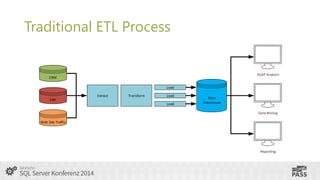
Traditional ETL Process
Challenges of Big Data and unstructured data
Useful Apache Hadoop Components for ETL
Some statements to be clarified...
Using Apache Hadoop within the ETL process
SSIS – not just an simple ETL Tool
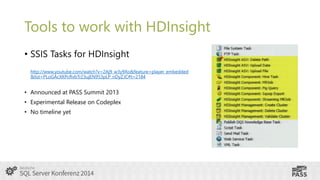
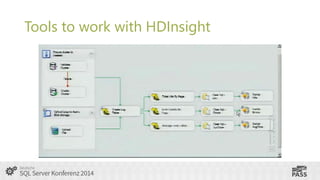
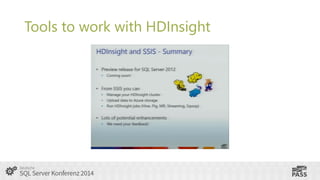
Tools to work with HDInsight
Get started using Windows Azure HDInsight
Use SQL Server Integration Services to …
Traditional ETL Process
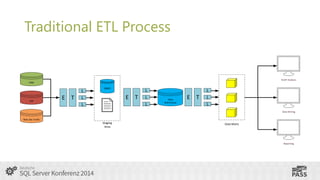
• Extract data from different sources

• different source systems
• different data organization and/or format
• (non-)relational databases, flat files

• Transforms it to fit operational needs
•
•
•
•
•

Translating coded values
Encoding free-form values
Deriving a new calculated value
Aggregation
data profiling, data quality

• Loads it into the end target

• database, data mart, data warehouse
Traditional ETL Process

OLAP Analysis

CRM
Load
Extract

Transform

Load

ERP
Load

Data
Warehouse
Data Mining

Web Site Traffic

Reporting
Traditional ETL Process

OLAP Analysis

CRM

ERP

E T

L
L
L

DBMS

E T

L
L
L

Data
Warehouse

E T

L
L
L
Data Mining

Web Site Traffic

Staging
Area

Data Marts

Reporting
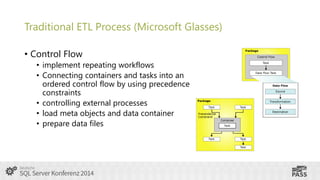
Traditional ETL Process (Microsoft Glasses)
• Control Flow
• implement repeating workflows
• Connecting containers and tasks into an
ordered control flow by using precedence
constraints
• controlling external processes
• load meta objects and data container
• prepare data files
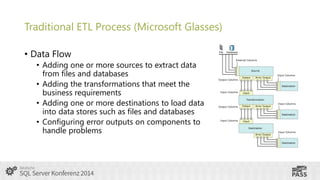
Traditional ETL Process (Microsoft Glasses)
• Data Flow
• Adding one or more sources to extract data
from files and databases
• Adding the transformations that meet the
business requirements
• Adding one or more destinations to load data
into data stores such as files and databases
• Configuring error outputs on components to
handle problems
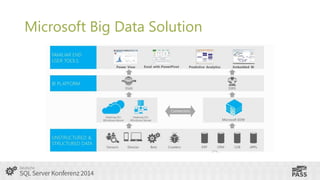
Microsoft Big Data Solution
Challenges of Big Data
• large amounts of data from multiple sources
• the volume of this amount of data goes into the terabytes,
petabytes and exabytes
• Classic relational database systems as well as statistical and
visualization programs are often not able to handle such large
amounts of data
• according to calculations from the year 2011, the global volume
of data doubles every 2 years
Challenges of unstructured data
• does not have a pre-defined data model or is not organized in a predefined manner
• typically text-heavy, but may contain data such as dates, numbers,
and facts as well
• structure, while not formally defined, can still be implied
• aggregates can not be accessed with computer programs through a
single interface
• Emails, audio - and video files without tags, also contributions in
different media such as online forums or on social-media platforms
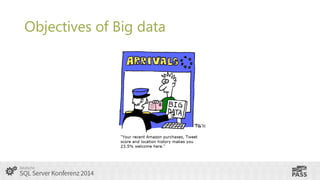
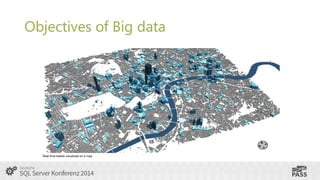
Objectives of Big data

Real time tweets visualized on a map
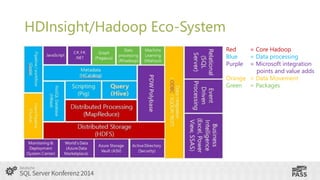
HDInsight/Hadoop Eco-System
Red
Blue
Purple

= Core Hadoop
= Data processing
= Microsoft integration
points and value adds
Orange = Data Movement
Green = Packages
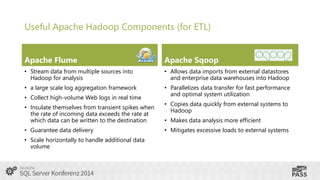
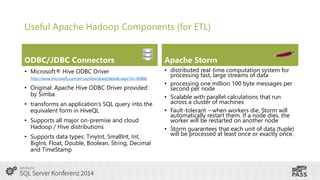
Useful Apache Hadoop Components (for ETL)
Apache Flume

Apache Sqoop

• Stream data from multiple sources into
Hadoop for analysis

• Allows data imports from external datastores
and enterprise data warehouses into Hadoop

• a large scale log aggregation framework

• Parallelizes data transfer for fast performance
and optimal system utilization

• Collect high-volume Web logs in real time
• Insulate themselves from transient spikes when
the rate of incoming data exceeds the rate at
which data can be written to the destination
• Guarantee data delivery
• Scale horizontally to handle additional data
volume

• Copies data quickly from external systems to
Hadoop
• Makes data analysis more efficient
• Mitigates excessive loads to external systems
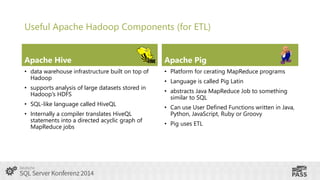
Useful Apache Hadoop Components (for ETL)
Apache Hive

Apache Pig

• data warehouse infrastructure built on top of
Hadoop

• Platform for cerating MapReduce programs

• supports analysis of large datasets stored in
Hadoop's HDFS
• SQL-like language called HiveQL

• Internally a compiler translates HiveQL
statements into a directed acyclic graph of
MapReduce jobs

• Language is called Pig Latin
• abstracts Java MapReduce Job to something
similar to SQL
• Can use User Defined Functions written in Java,
Python, JavaScript, Ruby or Groovy
• Pig uses ETL
Useful Apache Hadoop Components (for ETL)
ODBC/JDBC Connectors

Apache Storm

• Microsoft® Hive ODBC Driver

• distributed real-time computation system for
processing fast, large streams of data
• processing one million 100 byte messages per
second per node
• Scalable with parallel calculations that run
across a cluster of machines
• Fault-tolerant – when workers die, Storm will
automatically restart them. If a node dies, the
worker will be restarted on another node
• Storm guarantees that each unit of data (tuple)
will be processed at least once or exactly once.

http://www.microsoft.com/en-us/download/details.aspx?id=40886

• Original: Apache Hive ODBC Driver provided
by Simba
• transforms an application’s SQL query into the
equivalent form in HiveQL
• Supports all major on-premise and cloud
Hadoop / Hive distributions
• Supports data types: TinyInt, SmallInt, Int,
BigInt, Float, Double, Boolean, String, Decimal
and TimeStamp
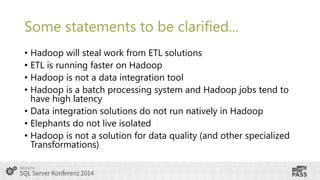
Some statements to be clarified...
• Hadoop will steal work from ETL solutions
• ETL is running faster on Hadoop
• Hadoop is not a data integration tool
• Hadoop is a batch processing system and Hadoop jobs tend to
have high latency
• Data integration solutions do not run natively in Hadoop
• Elephants do not live isolated
• Hadoop is not a solution for data quality (and other specialized
Transformations)
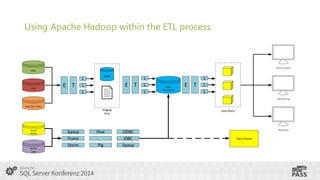
Using Apache Hadoop within the ETL process

OLAP Analysis
CRM

ERP

E T

DBMS

L
L
L

E T

L
L
L

Data
Warehouse

E T

L
L
L
Data Mining

Web Site Traffic

Staging
Area

Social
Media

Sensor
Logs

Sqoop
Flume
Storm

Hive
Pig

Data Marts

ODBC
JDBC
Sqoop

Reporting

Data Science
SSIS – not just a simple ETL Tool
Use SQL Server Integration Services to…
•
•
•
•
•
•

build complex workflows
manage Windows Azure and HDInsight clusters
load data into HDInsight/HDFS
control jobs on HDInsight
get data from Hive, Pig, …
combine Hadoop with „traditional“ ETL
Tools to work with HDInsight
• SSIS Tasks for HDInsight
http://www.youtube.com/watch?v=2Aj9_w3y9Xo&feature=player_embedded
&list=PLoGAcXKPcRvbTr23ujEN953pLP_nDyZJC#t=2184

• Announced at PASS Summit 2013

• Experimental Release on Codeplex
• No timeline yet
Tools to work with HDInsight
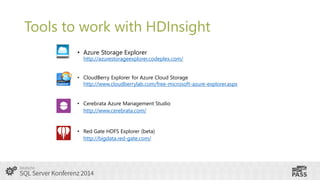
• Azure Storage Explorer

http://azurestorageexplorer.codeplex.com/

• CloudBerry Explorer for Azure Cloud Storage
http://www.cloudberrylab.com/free-microsoft-azure-explorer.aspx
• Cerebrata Azure Management Studio
http://www.cerebrata.com/

• Red Gate HDFS Explorer (beta)
http://bigdata.red-gate.com/
Tools to work with HDInsight
• Microsoft .NET SDK For Hadoop
(nuget Packages)
• Windows Azure HDInsight

Provides a .NET API for cluster management and job submission on Windows Azure HDInsight service.

• Microsoft .NET Map Reduce API For Hadoop

Provides a .NET API for the Map/Reduce functionality of Hadoop Streaming.

• Microsoft .NET API For Hadoop WebClient
Provides a .NET API for WebClient

• Microsoft .NET API for Hadoop

Provides a .NET API for working with Hadoop clusters over HTTP
Tools to work with HDInsight
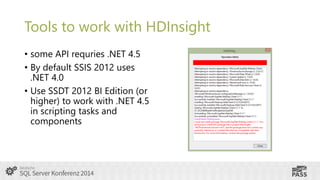
• some API requries .NET 4.5
• By default SSIS 2012 uses
.NET 4.0
• Use SSDT 2012 BI Edition (or
higher) to work with .NET 4.5
in scripting tasks and
components
Tools to work with HDInsight
• NUGet Package Manager is not fully compatible with SQL Server
Integration Services Script Task
• nuget packages (assemblies) must be installed in the global
assembly cache

gacinstall –I <assembly.dll>
• nuget packages/assemblies must be installed on all servers that
are running the packages.
• all assemblies need a strong name
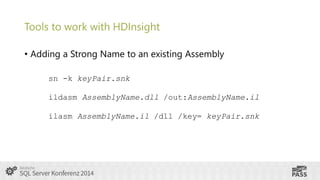
Tools to work with HDInsight
• Adding a Strong Name to an existing Assembly
sn -k keyPair.snk
ildasm AssemblyName.dll /out:AssemblyName.il
ilasm AssemblyName.il /dll /key= keyPair.snk
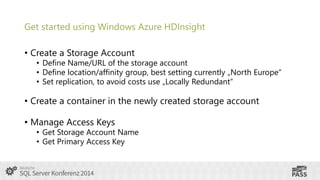
Get started using Windows Azure HDInsight
• Create a Storage Account

• Define Name/URL of the storage account
• Define location/affinity group, best setting currently „North Europe“
• Set replication, to avoid costs use „Locally Redundant“

• Create a container in the newly created storage account
• Manage Access Keys

• Get Storage Account Name
• Get Primary Access Key
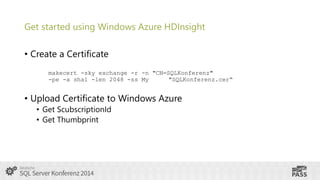
Get started using Windows Azure HDInsight
• Create a Certificate
makecert -sky exchange -r -n "CN=SQLKonferenz"
-pe -a sha1 -len 2048 -ss My
"SQLKonferenz.cer“

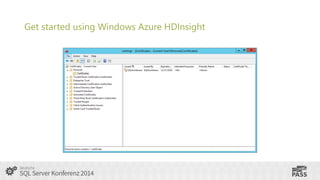
• Upload Certificate to Windows Azure
• Get ScubscriptionId
• Get Thumbprint
Get started using Windows Azure HDInsight
Demo
Get started using Windows
Azure HDInsight
Manage Your HDInsight Cluster
• Create a container in your Windows Azure Storage account
• Create HDInsight Cluster
• Storage Container
• Authentication (Username/Password)
• Cluster Size

• Delete HDInsight Cluster
• (Delete corresponding container)
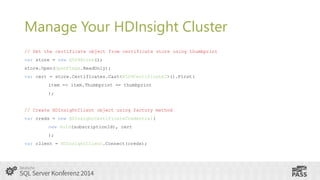
Manage Your HDInsight Cluster
// Get the certificate object from certificate store using thumbprint
var store = new X509Store();

store.Open(OpenFlags.ReadOnly);
var cert = store.Certificates.Cast<X509Certificate2>().First(
item => item.Thumbprint == thumbprint
);

// Create HDInsightClient object using factory method
var creds = new HDInsightCertificateCredential(
new Guid(subscriptionId), cert
);

var client = HDInsightClient.Connect(creds);
Demo
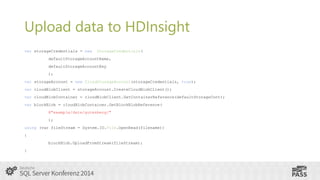
Upload data to HDInsight
var storageCredentials = new

StorageCredentials(

defaultStorageAccountName,

defaultStorageAccountKey
);
var storageAccount = new CloudStorageAccount(storageCredentials, true);
var cloudBlobClient = storageAccount.CreateCloudBlobClient();
var cloudBlobContainer = cloudBlobClient.GetContainerReference(defaultStorageCont);

var blockBlob = cloudBlobContainer.GetBlockBlobReference(
@"example/data/gutenberg/"
);
using (var fileStream = System.IO.File.OpenRead(filename))
{

blockBlob.UploadFromStream(fileStream);
}
Upload data to HDInsight
• ~ 300 MB ca. 45 Sec.
• from an Azure VM in the same region
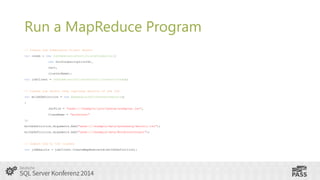
Run a MapReduce Program
// Create Job Submission Client object
var creds = new JobSubmissionCertificateCredential(
new Guid(subscriptionId),
cert,
clusterName);
var jobClient = JobSubmissionClientFactory.Connect(creds);

// Create job object that captures details of the job
var mrJobDefinition = new MapReduceJobCreateParameters()
{

JarFile = "wasb:///example/jars/hadoop-examples.jar",
ClassName = "wordcount"
};
mrJobDefinition.Arguments.Add("wasb:///example/data/gutenberg/davinci.txt");
mrJobDefinition.Arguments.Add("wasb:///example/data/WordCountOutput");

// Submit job to the cluster
var jobResults = jobClient.CreateMapReduceJob(mrJobDefinition);
Demo
Run a Hive Query
• Hive Query via .NET Hadoop SDK
• Download result from Hive query
• Load result from Hive query direct in the data flow
• Microsoft® Hive ODBC Driver

http://www.microsoft.com/en-us/download/confirmation.aspx?id=40886
(available

for x86 and x64)
Demo
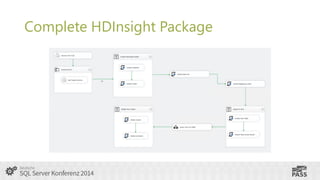
Complete HDInsight Package
Vielen Dank!
Tillmann Eitelberg
t.eitelberg@oh22.net
Oliver Engels
o.engels@oh22.net
SQL Server Konferenz 2014 - SSIS & HDInsight

SQL Server Konferenz 2014 - SSIS & HDInsight

  • 1.
    SSIS & HDInsight TillmannEitelberg Oliver Engels
  • 2.
    Who we are… TillmannEitelberg Oliver Engels • CTO of oh22information services GmbH • CEO of oh22data AG • PASS Regional Mentor Germany • PASS Regional Mentor Germany • Vice-president PASS Germany • President PASS Germany • Chapter Leader CologneBonn, Germany • Chapter Leader Frankfurt, Germany • Microsoft MVP • Microsoft MVP • Microsoft vTSP
  • 3.
    Agenda • • • • • • • • • Traditional ETL Process Challengesof Big Data and unstructured data Useful Apache Hadoop Components for ETL Some statements to be clarified... Using Apache Hadoop within the ETL process SSIS – not just an simple ETL Tool Tools to work with HDInsight Get started using Windows Azure HDInsight Use SQL Server Integration Services to …
  • 4.
    Traditional ETL Process •Extract data from different sources • different source systems • different data organization and/or format • (non-)relational databases, flat files • Transforms it to fit operational needs • • • • • Translating coded values Encoding free-form values Deriving a new calculated value Aggregation data profiling, data quality • Loads it into the end target • database, data mart, data warehouse
  • 5.
    Traditional ETL Process OLAPAnalysis CRM Load Extract Transform Load ERP Load Data Warehouse Data Mining Web Site Traffic Reporting
  • 6.
    Traditional ETL Process OLAPAnalysis CRM ERP E T L L L DBMS E T L L L Data Warehouse E T L L L Data Mining Web Site Traffic Staging Area Data Marts Reporting
  • 7.
    Traditional ETL Process(Microsoft Glasses) • Control Flow • implement repeating workflows • Connecting containers and tasks into an ordered control flow by using precedence constraints • controlling external processes • load meta objects and data container • prepare data files
  • 8.
    Traditional ETL Process(Microsoft Glasses) • Data Flow • Adding one or more sources to extract data from files and databases • Adding the transformations that meet the business requirements • Adding one or more destinations to load data into data stores such as files and databases • Configuring error outputs on components to handle problems
  • 9.
  • 10.
    Challenges of BigData • large amounts of data from multiple sources • the volume of this amount of data goes into the terabytes, petabytes and exabytes • Classic relational database systems as well as statistical and visualization programs are often not able to handle such large amounts of data • according to calculations from the year 2011, the global volume of data doubles every 2 years
  • 11.
    Challenges of unstructureddata • does not have a pre-defined data model or is not organized in a predefined manner • typically text-heavy, but may contain data such as dates, numbers, and facts as well • structure, while not formally defined, can still be implied • aggregates can not be accessed with computer programs through a single interface • Emails, audio - and video files without tags, also contributions in different media such as online forums or on social-media platforms
  • 12.
  • 13.
    Objectives of Bigdata Real time tweets visualized on a map
  • 14.
    HDInsight/Hadoop Eco-System Red Blue Purple = CoreHadoop = Data processing = Microsoft integration points and value adds Orange = Data Movement Green = Packages
  • 15.
    Useful Apache HadoopComponents (for ETL) Apache Flume Apache Sqoop • Stream data from multiple sources into Hadoop for analysis • Allows data imports from external datastores and enterprise data warehouses into Hadoop • a large scale log aggregation framework • Parallelizes data transfer for fast performance and optimal system utilization • Collect high-volume Web logs in real time • Insulate themselves from transient spikes when the rate of incoming data exceeds the rate at which data can be written to the destination • Guarantee data delivery • Scale horizontally to handle additional data volume • Copies data quickly from external systems to Hadoop • Makes data analysis more efficient • Mitigates excessive loads to external systems
  • 16.
    Useful Apache HadoopComponents (for ETL) Apache Hive Apache Pig • data warehouse infrastructure built on top of Hadoop • Platform for cerating MapReduce programs • supports analysis of large datasets stored in Hadoop's HDFS • SQL-like language called HiveQL • Internally a compiler translates HiveQL statements into a directed acyclic graph of MapReduce jobs • Language is called Pig Latin • abstracts Java MapReduce Job to something similar to SQL • Can use User Defined Functions written in Java, Python, JavaScript, Ruby or Groovy • Pig uses ETL
  • 17.
    Useful Apache HadoopComponents (for ETL) ODBC/JDBC Connectors Apache Storm • Microsoft® Hive ODBC Driver • distributed real-time computation system for processing fast, large streams of data • processing one million 100 byte messages per second per node • Scalable with parallel calculations that run across a cluster of machines • Fault-tolerant – when workers die, Storm will automatically restart them. If a node dies, the worker will be restarted on another node • Storm guarantees that each unit of data (tuple) will be processed at least once or exactly once. http://www.microsoft.com/en-us/download/details.aspx?id=40886 • Original: Apache Hive ODBC Driver provided by Simba • transforms an application’s SQL query into the equivalent form in HiveQL • Supports all major on-premise and cloud Hadoop / Hive distributions • Supports data types: TinyInt, SmallInt, Int, BigInt, Float, Double, Boolean, String, Decimal and TimeStamp
  • 18.
    Some statements tobe clarified... • Hadoop will steal work from ETL solutions • ETL is running faster on Hadoop • Hadoop is not a data integration tool • Hadoop is a batch processing system and Hadoop jobs tend to have high latency • Data integration solutions do not run natively in Hadoop • Elephants do not live isolated • Hadoop is not a solution for data quality (and other specialized Transformations)
  • 19.
    Using Apache Hadoopwithin the ETL process OLAP Analysis CRM ERP E T DBMS L L L E T L L L Data Warehouse E T L L L Data Mining Web Site Traffic Staging Area Social Media Sensor Logs Sqoop Flume Storm Hive Pig Data Marts ODBC JDBC Sqoop Reporting Data Science
  • 20.
    SSIS – notjust a simple ETL Tool
  • 21.
    Use SQL ServerIntegration Services to… • • • • • • build complex workflows manage Windows Azure and HDInsight clusters load data into HDInsight/HDFS control jobs on HDInsight get data from Hive, Pig, … combine Hadoop with „traditional“ ETL
  • 22.
    Tools to workwith HDInsight • SSIS Tasks for HDInsight http://www.youtube.com/watch?v=2Aj9_w3y9Xo&feature=player_embedded &list=PLoGAcXKPcRvbTr23ujEN953pLP_nDyZJC#t=2184 • Announced at PASS Summit 2013 • Experimental Release on Codeplex • No timeline yet
  • 23.
    Tools to workwith HDInsight
  • 24.
    Tools to workwith HDInsight
  • 25.
    Tools to workwith HDInsight • Azure Storage Explorer http://azurestorageexplorer.codeplex.com/ • CloudBerry Explorer for Azure Cloud Storage http://www.cloudberrylab.com/free-microsoft-azure-explorer.aspx • Cerebrata Azure Management Studio http://www.cerebrata.com/ • Red Gate HDFS Explorer (beta) http://bigdata.red-gate.com/
  • 26.
    Tools to workwith HDInsight • Microsoft .NET SDK For Hadoop (nuget Packages) • Windows Azure HDInsight Provides a .NET API for cluster management and job submission on Windows Azure HDInsight service. • Microsoft .NET Map Reduce API For Hadoop Provides a .NET API for the Map/Reduce functionality of Hadoop Streaming. • Microsoft .NET API For Hadoop WebClient Provides a .NET API for WebClient • Microsoft .NET API for Hadoop Provides a .NET API for working with Hadoop clusters over HTTP
  • 27.
    Tools to workwith HDInsight • some API requries .NET 4.5 • By default SSIS 2012 uses .NET 4.0 • Use SSDT 2012 BI Edition (or higher) to work with .NET 4.5 in scripting tasks and components
  • 28.
    Tools to workwith HDInsight • NUGet Package Manager is not fully compatible with SQL Server Integration Services Script Task • nuget packages (assemblies) must be installed in the global assembly cache gacinstall –I <assembly.dll> • nuget packages/assemblies must be installed on all servers that are running the packages. • all assemblies need a strong name
  • 29.
    Tools to workwith HDInsight • Adding a Strong Name to an existing Assembly sn -k keyPair.snk ildasm AssemblyName.dll /out:AssemblyName.il ilasm AssemblyName.il /dll /key= keyPair.snk
  • 30.
    Get started usingWindows Azure HDInsight • Create a Storage Account • Define Name/URL of the storage account • Define location/affinity group, best setting currently „North Europe“ • Set replication, to avoid costs use „Locally Redundant“ • Create a container in the newly created storage account • Manage Access Keys • Get Storage Account Name • Get Primary Access Key
  • 31.
    Get started usingWindows Azure HDInsight • Create a Certificate makecert -sky exchange -r -n "CN=SQLKonferenz" -pe -a sha1 -len 2048 -ss My "SQLKonferenz.cer“ • Upload Certificate to Windows Azure • Get ScubscriptionId • Get Thumbprint
  • 32.
    Get started usingWindows Azure HDInsight
  • 33.
    Demo Get started usingWindows Azure HDInsight
  • 34.
    Manage Your HDInsightCluster • Create a container in your Windows Azure Storage account • Create HDInsight Cluster • Storage Container • Authentication (Username/Password) • Cluster Size • Delete HDInsight Cluster • (Delete corresponding container)
  • 35.
    Manage Your HDInsightCluster // Get the certificate object from certificate store using thumbprint var store = new X509Store(); store.Open(OpenFlags.ReadOnly); var cert = store.Certificates.Cast<X509Certificate2>().First( item => item.Thumbprint == thumbprint ); // Create HDInsightClient object using factory method var creds = new HDInsightCertificateCredential( new Guid(subscriptionId), cert ); var client = HDInsightClient.Connect(creds);
  • 36.
  • 37.
    Upload data toHDInsight var storageCredentials = new StorageCredentials( defaultStorageAccountName, defaultStorageAccountKey ); var storageAccount = new CloudStorageAccount(storageCredentials, true); var cloudBlobClient = storageAccount.CreateCloudBlobClient(); var cloudBlobContainer = cloudBlobClient.GetContainerReference(defaultStorageCont); var blockBlob = cloudBlobContainer.GetBlockBlobReference( @"example/data/gutenberg/" ); using (var fileStream = System.IO.File.OpenRead(filename)) { blockBlob.UploadFromStream(fileStream); }
  • 38.
    Upload data toHDInsight • ~ 300 MB ca. 45 Sec. • from an Azure VM in the same region
  • 39.
    Run a MapReduceProgram // Create Job Submission Client object var creds = new JobSubmissionCertificateCredential( new Guid(subscriptionId), cert, clusterName); var jobClient = JobSubmissionClientFactory.Connect(creds); // Create job object that captures details of the job var mrJobDefinition = new MapReduceJobCreateParameters() { JarFile = "wasb:///example/jars/hadoop-examples.jar", ClassName = "wordcount" }; mrJobDefinition.Arguments.Add("wasb:///example/data/gutenberg/davinci.txt"); mrJobDefinition.Arguments.Add("wasb:///example/data/WordCountOutput"); // Submit job to the cluster var jobResults = jobClient.CreateMapReduceJob(mrJobDefinition);
  • 40.
  • 41.
    Run a HiveQuery • Hive Query via .NET Hadoop SDK • Download result from Hive query • Load result from Hive query direct in the data flow • Microsoft® Hive ODBC Driver http://www.microsoft.com/en-us/download/confirmation.aspx?id=40886 (available for x86 and x64)
  • 42.
  • 43.
  • 44.