Data Lake Analytics for the Admin
Tillmann Eitelberg & Oliver Engels
DBCC International – Friday 23.10.2020
WE CREATE
SMART AND CASUAL
DATADESIGN.
EVERY DAY.
2© ppt by OH22
ABOUT US
Tillmann Eitelberg | Oliver Engels
3© ppt by OH22
4
DATA LAKE ANALYTICS FOR THE ADMIN
About Us
© ppt by OH22
Tillmann Eitelberg
CEO
oh22information services GmbH
t.eitelberg@oh22.net
Kellerstr. 3
53772 Königswinter
Deutschland
↗ www.oh22.is
Oliver Engels
CEO
oh22data AG
o.engels@oh22.net
Otto-Hahn-Str. 22
65520 Bad Camberg
Deutschland
↗ www.oh22.net
WHAT IS THE SESSION ABOUT?
5© ppt by OH22
DATA LAKE ANALYTICS FOR THE ADMIN
6© ppt by OH22
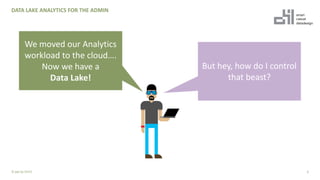
We moved our Analytics
workload to the cloud….
Now we have a
Data Lake!
But hey, how do I control
that beast?
DATA LAKE ANALYTICS FOR THE ADMIN
7© ppt by OH22
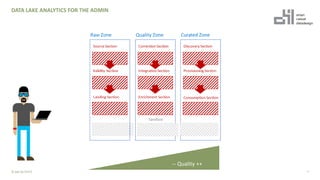
-- Quality ++
+ In Modern Data Warehouse, Lake House or Enterprise Data Lake
there are clear structures how data is stored
+ Data is moved through different zones and / or sections
+ Folder structures result from the respective processing (partitioning)
of the data (e.g. yyyyy/mm/dd/hh/)
+ Data is made available to other users in the company at the end of a
process chain
+ Data is stored in different access tiers to make data management
cost-effective
+ Most of the settings are done by Data Engineers
(or Data Engineers show the Admins where to click)
8
DATA LAKE ANALYTICS FOR THE ADMIN
What is it about?
© ppt by OH22
DATA LAKE ANALYTICS FOR THE ADMIN
9© ppt by OH22
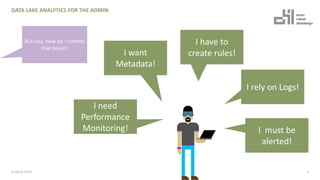
I want
Metadata!
I need
Performance
Monitoring!
I have to
create rules!
I must be
alerted!
I rely on Logs!
+ There are many different Azure services and features that can
give administrators back control
+ Additionally, the Azure Monitor provides a complete overview of
events on the storage account (and of course other services)
+ PowerShell offers additional possibilities to get information
about individual services
10
DATA LAKE ANALYTICS FOR THE ADMIN
How can administrators get an overview?
© ppt by OH22
METADATA
The data about the data for the admin
11© ppt by OH22
12
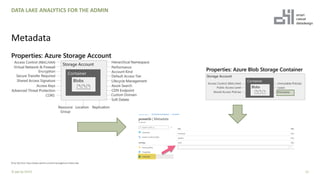
Metadata
© ppt by OH22
DATA LAKE ANALYTICS FOR THE ADMIN
© by SQLChick: https://www.sqlchick.com/entries/tag/Azure+Data+Lake
13
DATA LAKE ANALYTICS FOR THE ADMIN
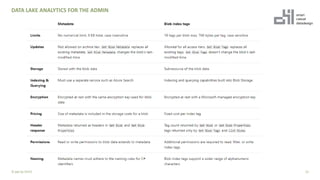
Metadata
© ppt by OH22
14
DATA LAKE ANALYTICS FOR THE ADMIN
Metadata
© ppt by OH22
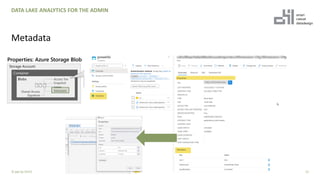
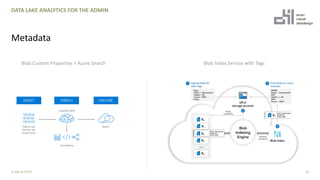
Blob Custom Properties + Azure Search Blob Index Service with Tags
DATA LAKE ANALYTICS FOR THE ADMIN
15© ppt by OH22
DEMO
Metadata with Powershell
16© ppt by OH22
ACTIVITY LOG
17© ppt by OH22
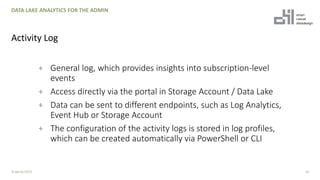
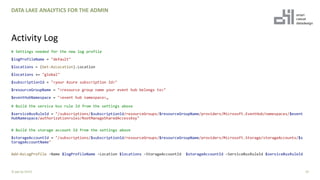
+ General log, which provides insights into subscription-level
events
+ Access directly via the portal in Storage Account / Data Lake
+ Data can be sent to different endpoints, such as Log Analytics,
Event Hub or Storage Account
+ The configuration of the activity logs is stored in log profiles,
which can be created automatically via PowerShell or CLI
18
DATA LAKE ANALYTICS FOR THE ADMIN
Activity Log
© ppt by OH22
# Settings needed for the new log profile
$logProfileName = "default"
$locations = (Get-AzLocation).Location
$locations += "global"
$subscriptionId = "<your Azure subscription Id>"
$resourceGroupName = "<resource group name your event hub belongs to>"
$eventHubNamespace = "<event hub namespace>„
# Build the service bus rule Id from the settings above
$serviceBusRuleId = "/subscriptions/$subscriptionId/resourceGroups/$resourceGroupName/providers/Microsoft.EventHub/namespaces/$event
HubNamespace/authorizationrules/RootManageSharedAccessKey"
# Build the storage account Id from the settings above
$storageAccountId = "/subscriptions/$subscriptionId/resourceGroups/$resourceGroupName/providers/Microsoft.Storage/storageAccounts/$s
torageAccountName"
Add-AzLogProfile -Name $logProfileName -Location $locations -StorageAccountId $storageAccountId -ServiceBusRuleId $serviceBusRuleId
19
DATA LAKE ANALYTICS FOR THE ADMIN
Activity Log
© ppt by OH22
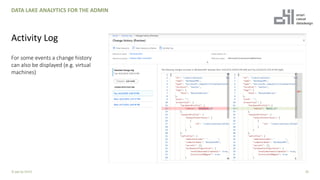
+ For some events a change history
can also be displayed (e.g. virtual
machines)
20
DATA LAKE ANALYTICS FOR THE ADMIN
Activity Log
© ppt by OH22
For some events a change history
can also be displayed (e.g. virtual
machines)
AZURE POLICY
22© ppt by OH22
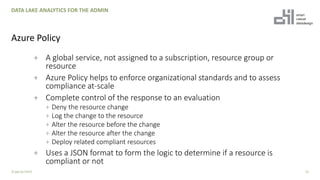
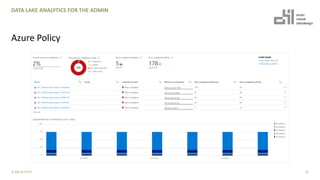
+ A global service, not assigned to a subscription, resource group or
resource
+ Azure Policy helps to enforce organizational standards and to assess
compliance at-scale
+ Complete control of the response to an evaluation
+ Deny the resource change
+ Log the change to the resource
+ Alter the resource before the change
+ Alter the resource after the change
+ Deploy related compliant resources
+ Uses a JSON format to form the logic to determine if a resource is
compliant or not
23
DATA LAKE ANALYTICS FOR THE ADMIN
Azure Policy
© ppt by OH22
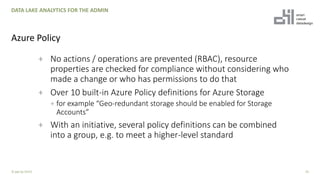
+ No actions / operations are prevented (RBAC), resource
properties are checked for compliance without considering who
made a change or who has permissions to do that
+ Over 10 built-in Azure Policy definitions for Azure Storage
+ for example “Geo-redundant storage should be enabled for Storage
Accounts”
+ With an initiative, several policy definitions can be combined
into a group, e.g. to meet a higher-level standard
24
DATA LAKE ANALYTICS FOR THE ADMIN
Azure Policy
© ppt by OH22
+ The evaluation of the policies take place on the following
events:
+ New policy assignment. ( ~30 minutes).
+ Updated assignment of a existing policy. (~ 30 minutes)
+ Deployment of a resources. (~15 minutes)
+ Every 24 hours
+ Update of the resource provider
+ On-demand (~3 minutes)
25
DATA LAKE ANALYTICS FOR THE ADMIN
Azure Policy
© ppt by OH22
26
DATA LAKE ANALYTICS FOR THE ADMIN
Azure Policy
© ppt by OH22
DEMO
Policies Live
27© ppt by OH22
LOG ANALYTICS
28© ppt by OH22
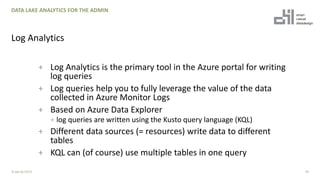
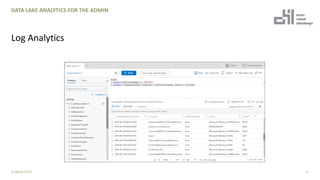
+ Log Analytics is the primary tool in the Azure portal for writing
log queries
+ Log queries help you to fully leverage the value of the data
collected in Azure Monitor Logs
+ Based on Azure Data Explorer
+ log queries are written using the Kusto query language (KQL)
+ Different data sources (= resources) write data to different
tables
+ KQL can (of course) use multiple tables in one query
29
DATA LAKE ANALYTICS FOR THE ADMIN
Log Analytics
© ppt by OH22
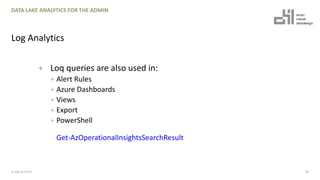
+ Loq queries are also used in:
+ Alert Rules
+ Azure Dashboards
+ Views
+ Export
+ PowerShell
Get-AzOperationalInsightsSearchResult
30
DATA LAKE ANALYTICS FOR THE ADMIN
Log Analytics
© ppt by OH22
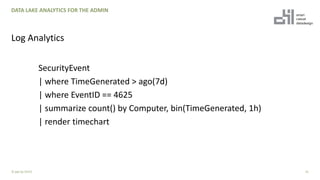
SecurityEvent
| where TimeGenerated > ago(7d)
| where EventID == 4625
| summarize count() by Computer, bin(TimeGenerated, 1h)
| render timechart
31
DATA LAKE ANALYTICS FOR THE ADMIN
Log Analytics
© ppt by OH22
32
DATA LAKE ANALYTICS FOR THE ADMIN
Log Analytics
© ppt by OH22
CLASSIC METRICS
Transition to metrics in Azure Monitor
34© ppt by OH22
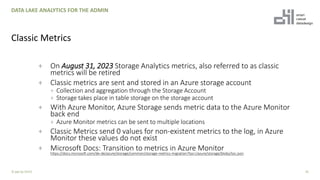
+ On August 31, 2023 Storage Analytics metrics, also referred to as classic
metrics will be retired
+ Classic metrics are sent and stored in an Azure storage account
+ Collection and aggregation through the Storage Account
+ Storage takes place in table storage on the storage account
+ With Azure Monitor, Azure Storage sends metric data to the Azure Monitor
back end
+ Azure Monitor metrics can be sent to multiple locations
+ Classic Metrics send 0 values for non-existent metrics to the log, in Azure
Monitor these values do not exist
+ Microsoft Docs: Transition to metrics in Azure Monitor
https://docs.microsoft.com/de-de/azure/storage/common/storage-metrics-migration?toc=/azure/storage/blobs/toc.json
35
DATA LAKE ANALYTICS FOR THE ADMIN
Classic Metrics
© ppt by OH22
ALERTS
When things happen, I need to be aware
36© ppt by OH22
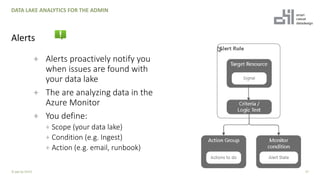
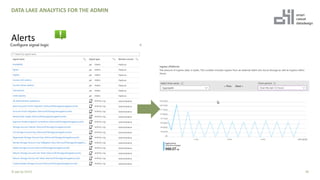
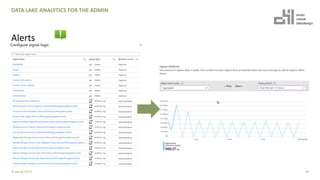
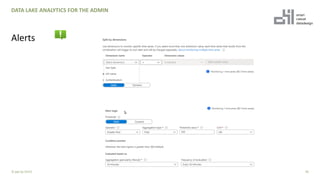
+ Alerts proactively notify you
when issues are found with
your data lake
+ The are analyzing data in the
Azure Monitor
+ You define:
+ Scope (your data lake)
+ Condition (e.g. Ingest)
+ Action (e.g. email, runbook)
37
DATA LAKE ANALYTICS FOR THE ADMIN
Alerts
© ppt by OH22
38
DATA LAKE ANALYTICS FOR THE ADMIN
Alerts
© ppt by OH22
39
DATA LAKE ANALYTICS FOR THE ADMIN
Alerts
© ppt by OH22
40
DATA LAKE ANALYTICS FOR THE ADMIN
Alerts
© ppt by OH22
Thank you sponsors!!

Data lake analytics for the admin

  • 1.
    Data Lake Analyticsfor the Admin Tillmann Eitelberg & Oliver Engels DBCC International – Friday 23.10.2020
  • 2.
    WE CREATE SMART ANDCASUAL DATADESIGN. EVERY DAY. 2© ppt by OH22
  • 3.
    ABOUT US Tillmann Eitelberg| Oliver Engels 3© ppt by OH22
  • 4.
    4 DATA LAKE ANALYTICSFOR THE ADMIN About Us © ppt by OH22 Tillmann Eitelberg CEO oh22information services GmbH t.eitelberg@oh22.net Kellerstr. 3 53772 Königswinter Deutschland ↗ www.oh22.is Oliver Engels CEO oh22data AG o.engels@oh22.net Otto-Hahn-Str. 22 65520 Bad Camberg Deutschland ↗ www.oh22.net
  • 5.
    WHAT IS THESESSION ABOUT? 5© ppt by OH22
  • 6.
    DATA LAKE ANALYTICSFOR THE ADMIN 6© ppt by OH22 We moved our Analytics workload to the cloud…. Now we have a Data Lake! But hey, how do I control that beast?
  • 7.
    DATA LAKE ANALYTICSFOR THE ADMIN 7© ppt by OH22 -- Quality ++
  • 8.
    + In ModernData Warehouse, Lake House or Enterprise Data Lake there are clear structures how data is stored + Data is moved through different zones and / or sections + Folder structures result from the respective processing (partitioning) of the data (e.g. yyyyy/mm/dd/hh/) + Data is made available to other users in the company at the end of a process chain + Data is stored in different access tiers to make data management cost-effective + Most of the settings are done by Data Engineers (or Data Engineers show the Admins where to click) 8 DATA LAKE ANALYTICS FOR THE ADMIN What is it about? © ppt by OH22
  • 9.
    DATA LAKE ANALYTICSFOR THE ADMIN 9© ppt by OH22 I want Metadata! I need Performance Monitoring! I have to create rules! I must be alerted! I rely on Logs!
  • 10.
    + There aremany different Azure services and features that can give administrators back control + Additionally, the Azure Monitor provides a complete overview of events on the storage account (and of course other services) + PowerShell offers additional possibilities to get information about individual services 10 DATA LAKE ANALYTICS FOR THE ADMIN How can administrators get an overview? © ppt by OH22
  • 11.
    METADATA The data aboutthe data for the admin 11© ppt by OH22
  • 12.
    12 Metadata © ppt byOH22 DATA LAKE ANALYTICS FOR THE ADMIN © by SQLChick: https://www.sqlchick.com/entries/tag/Azure+Data+Lake
  • 13.
    13 DATA LAKE ANALYTICSFOR THE ADMIN Metadata © ppt by OH22
  • 14.
    14 DATA LAKE ANALYTICSFOR THE ADMIN Metadata © ppt by OH22 Blob Custom Properties + Azure Search Blob Index Service with Tags
  • 15.
    DATA LAKE ANALYTICSFOR THE ADMIN 15© ppt by OH22
  • 16.
  • 17.
  • 18.
    + General log,which provides insights into subscription-level events + Access directly via the portal in Storage Account / Data Lake + Data can be sent to different endpoints, such as Log Analytics, Event Hub or Storage Account + The configuration of the activity logs is stored in log profiles, which can be created automatically via PowerShell or CLI 18 DATA LAKE ANALYTICS FOR THE ADMIN Activity Log © ppt by OH22
  • 19.
    # Settings neededfor the new log profile $logProfileName = "default" $locations = (Get-AzLocation).Location $locations += "global" $subscriptionId = "<your Azure subscription Id>" $resourceGroupName = "<resource group name your event hub belongs to>" $eventHubNamespace = "<event hub namespace>„ # Build the service bus rule Id from the settings above $serviceBusRuleId = "/subscriptions/$subscriptionId/resourceGroups/$resourceGroupName/providers/Microsoft.EventHub/namespaces/$event HubNamespace/authorizationrules/RootManageSharedAccessKey" # Build the storage account Id from the settings above $storageAccountId = "/subscriptions/$subscriptionId/resourceGroups/$resourceGroupName/providers/Microsoft.Storage/storageAccounts/$s torageAccountName" Add-AzLogProfile -Name $logProfileName -Location $locations -StorageAccountId $storageAccountId -ServiceBusRuleId $serviceBusRuleId 19 DATA LAKE ANALYTICS FOR THE ADMIN Activity Log © ppt by OH22
  • 20.
    + For someevents a change history can also be displayed (e.g. virtual machines) 20 DATA LAKE ANALYTICS FOR THE ADMIN Activity Log © ppt by OH22 For some events a change history can also be displayed (e.g. virtual machines)
  • 21.
  • 22.
    + A globalservice, not assigned to a subscription, resource group or resource + Azure Policy helps to enforce organizational standards and to assess compliance at-scale + Complete control of the response to an evaluation + Deny the resource change + Log the change to the resource + Alter the resource before the change + Alter the resource after the change + Deploy related compliant resources + Uses a JSON format to form the logic to determine if a resource is compliant or not 23 DATA LAKE ANALYTICS FOR THE ADMIN Azure Policy © ppt by OH22
  • 23.
    + No actions/ operations are prevented (RBAC), resource properties are checked for compliance without considering who made a change or who has permissions to do that + Over 10 built-in Azure Policy definitions for Azure Storage + for example “Geo-redundant storage should be enabled for Storage Accounts” + With an initiative, several policy definitions can be combined into a group, e.g. to meet a higher-level standard 24 DATA LAKE ANALYTICS FOR THE ADMIN Azure Policy © ppt by OH22
  • 24.
    + The evaluationof the policies take place on the following events: + New policy assignment. ( ~30 minutes). + Updated assignment of a existing policy. (~ 30 minutes) + Deployment of a resources. (~15 minutes) + Every 24 hours + Update of the resource provider + On-demand (~3 minutes) 25 DATA LAKE ANALYTICS FOR THE ADMIN Azure Policy © ppt by OH22
  • 25.
    26 DATA LAKE ANALYTICSFOR THE ADMIN Azure Policy © ppt by OH22
  • 26.
  • 27.
  • 28.
    + Log Analyticsis the primary tool in the Azure portal for writing log queries + Log queries help you to fully leverage the value of the data collected in Azure Monitor Logs + Based on Azure Data Explorer + log queries are written using the Kusto query language (KQL) + Different data sources (= resources) write data to different tables + KQL can (of course) use multiple tables in one query 29 DATA LAKE ANALYTICS FOR THE ADMIN Log Analytics © ppt by OH22
  • 29.
    + Loq queriesare also used in: + Alert Rules + Azure Dashboards + Views + Export + PowerShell Get-AzOperationalInsightsSearchResult 30 DATA LAKE ANALYTICS FOR THE ADMIN Log Analytics © ppt by OH22
  • 30.
    SecurityEvent | where TimeGenerated> ago(7d) | where EventID == 4625 | summarize count() by Computer, bin(TimeGenerated, 1h) | render timechart 31 DATA LAKE ANALYTICS FOR THE ADMIN Log Analytics © ppt by OH22
  • 31.
    32 DATA LAKE ANALYTICSFOR THE ADMIN Log Analytics © ppt by OH22
  • 32.
    CLASSIC METRICS Transition tometrics in Azure Monitor 34© ppt by OH22
  • 33.
    + On August31, 2023 Storage Analytics metrics, also referred to as classic metrics will be retired + Classic metrics are sent and stored in an Azure storage account + Collection and aggregation through the Storage Account + Storage takes place in table storage on the storage account + With Azure Monitor, Azure Storage sends metric data to the Azure Monitor back end + Azure Monitor metrics can be sent to multiple locations + Classic Metrics send 0 values for non-existent metrics to the log, in Azure Monitor these values do not exist + Microsoft Docs: Transition to metrics in Azure Monitor https://docs.microsoft.com/de-de/azure/storage/common/storage-metrics-migration?toc=/azure/storage/blobs/toc.json 35 DATA LAKE ANALYTICS FOR THE ADMIN Classic Metrics © ppt by OH22
  • 34.
    ALERTS When things happen,I need to be aware 36© ppt by OH22
  • 35.
    + Alerts proactivelynotify you when issues are found with your data lake + The are analyzing data in the Azure Monitor + You define: + Scope (your data lake) + Condition (e.g. Ingest) + Action (e.g. email, runbook) 37 DATA LAKE ANALYTICS FOR THE ADMIN Alerts © ppt by OH22
  • 36.
    38 DATA LAKE ANALYTICSFOR THE ADMIN Alerts © ppt by OH22
  • 37.
    39 DATA LAKE ANALYTICSFOR THE ADMIN Alerts © ppt by OH22
  • 38.
    40 DATA LAKE ANALYTICSFOR THE ADMIN Alerts © ppt by OH22
  • 39.