HDInsight Overview
February 2015
Agenda
 What is Big Data?
 What is Hadoop? What is HDInsight?
 Hadoop Ecosystem
 HDInsight Overview
 Working with HDInsight
 Loading Data
 Querying Data
 Setting up an Environment
 Q&A
What is Big Data?
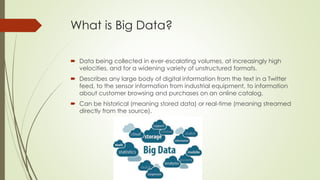
 Data being collected in ever-escalating volumes, at increasingly high
velocities, and for a widening variety of unstructured formats.
 Describes any large body of digital information from the text in a Twitter
feed, to the sensor information from industrial equipment, to information
about customer browsing and purchases on an online catalog.
 Can be historical (meaning stored data) or real-time (meaning streamed
directly from the source).
What is Hadoop and HDInsight?
 Apache Hadoop is an open-source software framework for storing and
processing big data in a distributed fashion on large clusters of commodity
hardware. It accomplishes two tasks: massive data storage and faster
processing.
 HDInsight is Microsoft’s cloud based implementation of Hadoop. HDInsight
was architected to handle any amount of data, scaling from terabytes to
petabytes on demand, and allows users to scale up or down as needed.
Microsoft has partnered with Hortonworks to bring Hadoop to Windows.
Hadoop Names & Technologies
 Hadoop is composed of 3 core components:
 HDFS – Hadoop Distributed File System (can store all kinds of data without prior organization.
Java-based)
 MapReduce – software programming model for processing large sets of data in parallel
 YARN – Resource management framework for scheduling and handling resource requests
from distributed applications
 There are other Hadoop components that can be leveraged within HDInsight:
 Pig – Simpler scripting for MapReduce transformation. Uses language called PigLatin
 Hive – A SQL-like querying language that presents data in the form of tables
 Sqoop – ETL-like tool that moves data between Hadoop and relational databases
 Oozie – a Hadoop job scheduler
 Additional technologies included:
 Ambari, Avro, Hbase, Mahout, Storm, Zookeeper
HDInsight / Hadoop Ecosystem
Advantages of Hadoop in the Cloud
(HDInsight)
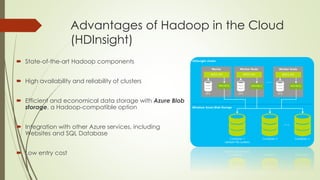
 State-of-the-art Hadoop components
 High availability and reliability of clusters
 Efficient and economical data storage with Azure Blob
storage, a Hadoop-compatible option
 Integration with other Azure services, including
Websites and SQL Database
 Low entry cost
Working with HDInsight
 To get started with HDInsight, you need an MSDN account and an Azure portal
 The main components are
 HDInsight cluster (can scale the number of nodes up or down as needed)
 Azure blob storage (data repository in Azure)
 Running queries and executing jobs can be done through the “Query Console” interface
through the Azure portal, or through Visual Studio
 To use HDInsight in Visual Studio, you need Azure SDK 2.5 for .NET ( VS 2013 | VS 2012 | VS 2015
Preview)
Loading Data to HDInsight
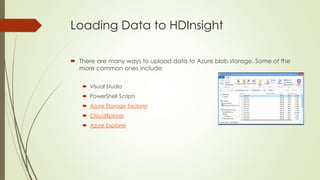
 There are many ways to upload data to Azure blob storage. Some of the
more common ones include:
 Visual Studio
 PowerShell Scripts
 Azure Storage Explorer
 CloudXplorer
 Azure Explorer
Querying Data in HDInsight
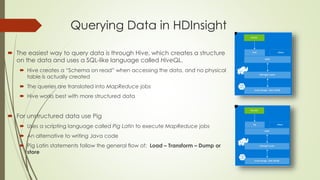
 The easiest way to query data is through Hive, which creates a structure
on the data and uses a SQL-like language called HiveQL.
 Hive creates a “Schema on read” when accessing the data, and no physical
table is actually created
 The queries are translated into MapReduce jobs
 Hive works best with more structured data
 For unstructured data use Pig
 Uses a scripting language called Pig Latin to execute MapReduce jobs
 An alternative to writing Java code
 Pig Latin statements follow the general flow of: Load – Transform – Dump or
store
Models to Consider when Approaching a Big Data
Solution
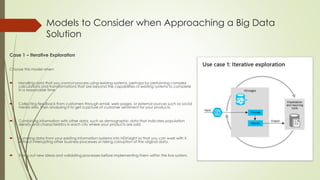
Case 1 – Iterative Exploration
Choose this model when:
 Handling data that you cannot process using existing systems, perhaps by performing complex
calculations and transformations that are beyond the capabilities of existing systems to complete
in a reasonable time.
 Collecting feedback from customers through email, web pages, or external sources such as social
media sites, then analyzing it to get a picture of customer sentiment for your products.
 Combining information with other data, such as demographic data that indicates population
density and characteristics in each city where your products are sold.
 Dumping data from your existing information systems into HDInsight so that you can work with it
without interrupting other business processes or risking corruption of the original data.
 Trying out new ideas and validating processes before implementing them within the live system.
Models to Consider when Approaching a Big Data
Solution
Case 2 – Data warehouse on demand
Choose this model when:
 Storing data in a way that allows you to minimize storage cost by taking advantage of cloud-
based storage systems, and minimizing runtime cost by initiating a cluster to perform processing
only when required.
 Exposing both the source data in raw form, and the results of queries executed over this data in
the familiar row and column format, to a wide range of data analysis tools.
 Storing schemas (or, to be precise, metadata) for tables that are populated by the queries you
execute, and partitioning the data in tables based on a clustered index so that each has a
separate metadata definition and can be handled separately.
 Creating views based on tables, and creating functions for use in both tables and queries.
 Consuming the results directly in business applications through interactive analytical tools such as
Excel, or in corporate reporting platforms such as SQL Server Reporting Services.
Models to Consider when Approaching a Big Data
Solution
Case 3 – ETL automation
Choose this model when:
 Extracting and transforming data before you load it into your existing databases or
analytical tools.
 Performing categorization and restructuring of data, and for extracting summary
results to remove duplication and redundancy.
 Preparing data so that it is in the appropriate format and has appropriate content
to power other applications or services.
Models to Consider when Approaching a Big Data
Solution
Case 4 – BI Integration
Choose this model when:
 You have an existing enterprise data warehouse and BI system that you want to
augment with data from outside your organization.
 You want to explore new ways to combine data in order to provide better insight
into history and to predict future trends.
 You want to give users more opportunities for self-service reporting and analysis
that combines managed business data and big data from other sources.
Overview of the Big Data Process
Note that, in many ways, data analysis is an iterative process; and you
should take this approach when building a big data batch processing
solution.
Given the large volumes of data and correspondingly long processing
times typically involved in big data analysis, it can be useful to start by
implementing a proof of concept iteration in which a small subset of
the source data is used to validate the processing steps and results
before proceeding with a full analysis.
This enables you to test your big data processing design on a small
cluster, or even on a single-node on-premises cluster, before scaling out
to accommodate production level data volumes.
The important point is that, irrespective of how you choose to use Big Data, the end result is the same:
Some kind of analysis of the source data and meaningful visualization of the results.
References
 http://azure.microsoft.com/en-us/documentation/articles/hdinsight-
hadoop-introduction/
 https://msdn.microsoft.com/en-us/library/dn749858.aspx
 https://msdn.microsoft.com/en-us/library/dn749816.aspx
 http://social.technet.microsoft.com/wiki/contents/articles/13820.introductio
n-to-azure-hdinsight.aspx

Hd insight overview

  • 1.
  • 2.
    Agenda  What isBig Data?  What is Hadoop? What is HDInsight?  Hadoop Ecosystem  HDInsight Overview  Working with HDInsight  Loading Data  Querying Data  Setting up an Environment  Q&A
  • 3.
    What is BigData?  Data being collected in ever-escalating volumes, at increasingly high velocities, and for a widening variety of unstructured formats.  Describes any large body of digital information from the text in a Twitter feed, to the sensor information from industrial equipment, to information about customer browsing and purchases on an online catalog.  Can be historical (meaning stored data) or real-time (meaning streamed directly from the source).
  • 4.
    What is Hadoopand HDInsight?  Apache Hadoop is an open-source software framework for storing and processing big data in a distributed fashion on large clusters of commodity hardware. It accomplishes two tasks: massive data storage and faster processing.  HDInsight is Microsoft’s cloud based implementation of Hadoop. HDInsight was architected to handle any amount of data, scaling from terabytes to petabytes on demand, and allows users to scale up or down as needed. Microsoft has partnered with Hortonworks to bring Hadoop to Windows.
  • 5.
    Hadoop Names &Technologies  Hadoop is composed of 3 core components:  HDFS – Hadoop Distributed File System (can store all kinds of data without prior organization. Java-based)  MapReduce – software programming model for processing large sets of data in parallel  YARN – Resource management framework for scheduling and handling resource requests from distributed applications  There are other Hadoop components that can be leveraged within HDInsight:  Pig – Simpler scripting for MapReduce transformation. Uses language called PigLatin  Hive – A SQL-like querying language that presents data in the form of tables  Sqoop – ETL-like tool that moves data between Hadoop and relational databases  Oozie – a Hadoop job scheduler  Additional technologies included:  Ambari, Avro, Hbase, Mahout, Storm, Zookeeper
  • 6.
  • 7.
    Advantages of Hadoopin the Cloud (HDInsight)  State-of-the-art Hadoop components  High availability and reliability of clusters  Efficient and economical data storage with Azure Blob storage, a Hadoop-compatible option  Integration with other Azure services, including Websites and SQL Database  Low entry cost
  • 8.
    Working with HDInsight To get started with HDInsight, you need an MSDN account and an Azure portal  The main components are  HDInsight cluster (can scale the number of nodes up or down as needed)  Azure blob storage (data repository in Azure)  Running queries and executing jobs can be done through the “Query Console” interface through the Azure portal, or through Visual Studio  To use HDInsight in Visual Studio, you need Azure SDK 2.5 for .NET ( VS 2013 | VS 2012 | VS 2015 Preview)
  • 9.
    Loading Data toHDInsight  There are many ways to upload data to Azure blob storage. Some of the more common ones include:  Visual Studio  PowerShell Scripts  Azure Storage Explorer  CloudXplorer  Azure Explorer
  • 10.
    Querying Data inHDInsight  The easiest way to query data is through Hive, which creates a structure on the data and uses a SQL-like language called HiveQL.  Hive creates a “Schema on read” when accessing the data, and no physical table is actually created  The queries are translated into MapReduce jobs  Hive works best with more structured data  For unstructured data use Pig  Uses a scripting language called Pig Latin to execute MapReduce jobs  An alternative to writing Java code  Pig Latin statements follow the general flow of: Load – Transform – Dump or store
  • 11.
    Models to Considerwhen Approaching a Big Data Solution Case 1 – Iterative Exploration Choose this model when:  Handling data that you cannot process using existing systems, perhaps by performing complex calculations and transformations that are beyond the capabilities of existing systems to complete in a reasonable time.  Collecting feedback from customers through email, web pages, or external sources such as social media sites, then analyzing it to get a picture of customer sentiment for your products.  Combining information with other data, such as demographic data that indicates population density and characteristics in each city where your products are sold.  Dumping data from your existing information systems into HDInsight so that you can work with it without interrupting other business processes or risking corruption of the original data.  Trying out new ideas and validating processes before implementing them within the live system.
  • 12.
    Models to Considerwhen Approaching a Big Data Solution Case 2 – Data warehouse on demand Choose this model when:  Storing data in a way that allows you to minimize storage cost by taking advantage of cloud- based storage systems, and minimizing runtime cost by initiating a cluster to perform processing only when required.  Exposing both the source data in raw form, and the results of queries executed over this data in the familiar row and column format, to a wide range of data analysis tools.  Storing schemas (or, to be precise, metadata) for tables that are populated by the queries you execute, and partitioning the data in tables based on a clustered index so that each has a separate metadata definition and can be handled separately.  Creating views based on tables, and creating functions for use in both tables and queries.  Consuming the results directly in business applications through interactive analytical tools such as Excel, or in corporate reporting platforms such as SQL Server Reporting Services.
  • 13.
    Models to Considerwhen Approaching a Big Data Solution Case 3 – ETL automation Choose this model when:  Extracting and transforming data before you load it into your existing databases or analytical tools.  Performing categorization and restructuring of data, and for extracting summary results to remove duplication and redundancy.  Preparing data so that it is in the appropriate format and has appropriate content to power other applications or services.
  • 14.
    Models to Considerwhen Approaching a Big Data Solution Case 4 – BI Integration Choose this model when:  You have an existing enterprise data warehouse and BI system that you want to augment with data from outside your organization.  You want to explore new ways to combine data in order to provide better insight into history and to predict future trends.  You want to give users more opportunities for self-service reporting and analysis that combines managed business data and big data from other sources.
  • 15.
    Overview of theBig Data Process Note that, in many ways, data analysis is an iterative process; and you should take this approach when building a big data batch processing solution. Given the large volumes of data and correspondingly long processing times typically involved in big data analysis, it can be useful to start by implementing a proof of concept iteration in which a small subset of the source data is used to validate the processing steps and results before proceeding with a full analysis. This enables you to test your big data processing design on a small cluster, or even on a single-node on-premises cluster, before scaling out to accommodate production level data volumes. The important point is that, irrespective of how you choose to use Big Data, the end result is the same: Some kind of analysis of the source data and meaningful visualization of the results.
  • 16.
    References  http://azure.microsoft.com/en-us/documentation/articles/hdinsight- hadoop-introduction/  https://msdn.microsoft.com/en-us/library/dn749858.aspx https://msdn.microsoft.com/en-us/library/dn749816.aspx  http://social.technet.microsoft.com/wiki/contents/articles/13820.introductio n-to-azure-hdinsight.aspx

Editor's Notes

  • #8 Microsoft has a partnership deal with Hortonworks so that they get the releases/updates 1-2 months ahead of the general release