SQL Database Terms
A beginners Guide
What is SQL
SQL is a relational database language that is used pretty much everywhere.
Amazon, Target, even mom and pop stores with a simple point of sale system use
some version of a relational database.
There are multiple types
• Oracle
• Microsoft SQL
• MySQL
• And others
Some simple
terms to know
• Database
• Table
• Field
• Unique ID
• Queries
• Select
• Joins
How to Access
Your database
There are different programs
to access an SQL database,
the queries I’ll show were
written using Microsoft SQL
Server Management Studio.
The purpose of this slideshow
is to get you comfortable with
the terms you will encounter
when working with an SQL
database.
Database
The database is where all the data is stored. If you are using a Point of Sale system
that keeps track of items and customers, most likely you are using an SQL database.
Your point of sale system executes queries that run in the background every time
you do a search and hit enter.
Tables
All of your data is stored in multiple tables. For example, you may have a table that
contains all your customer information, and another that stores product info, your
pricing information may be stored in a separate table
Fields
Within the tables you will have fields for every bit of information you need. A
product may have a description field, a SKU field, a UPC field, and a category field.
These fields are used by SQL to deliver the information you need when searching,
and can be used to search for products.
Unique ID
In order to make finding things easy within a database certain items are assigned
unique IDs, usually a sequential number, that will be the used across multiple tables
to signify that product.
For example, you might have your item details in one table and pricing in another.
So a Craftsman Hammer may have a unique ID of 20 and in the pricing table the
unique ID would be used in place of a description. This helps because you may have
multiple products with a similar description, but different UPCs and SKUs. By using
the unique ID you can ensure the correct data is linked to the correct item.
Queries
The way you retrieve information from a database is via queries. Your point of sale
system, or user interface, may give you a limited number of ways to access this.
Think of Amazon search results. If you’re looking for Brave New World it can search
for that title or description across movies, books, posters, etc. By narrowing the
search to just books, you’ve essentially told the Amazon database to execute the
search query and to only search for instances where “book” is possibly the
category field.
This is the most common type of query and it is called a SELECT query.
Select
Queries
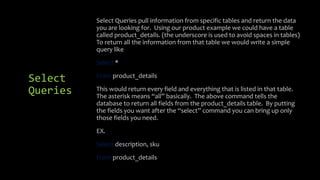
Select Queries pull information from specific tables and return the data
you are looking for. Using our product example we could have a table
called product_details. (the underscore is used to avoid spaces in tables)
To return all the information from that table we would write a simple
query like
Select *
From product_details
This would return every field and everything that is listed in that table.
The asterisk means “all” basically. The above command tells the
database to return all fields from the product_details table. By putting
the fields you want after the “select” command you can bring up only
those fields you need.
EX.
Select description, sku
From product_details
Joins
Joins are used to pull data from multiple tables using a single query. There are
INNER JOINS which match related records from different tables and OUTER JOINS
which include records from one or both tables that do not have corresponding
records in another table.
I use the inner join most often. In our example we have product details and pricing
separate, so if we wish to get those together we need to use a join. These queries
get a bit more complicated, but know that joins are how you bridge different tables
and merge data for output. Combining joins with advanced select statements you
can easily pull data from your database that can truly transform how you use the
data.
Conclusion
While a lot of programs that you use to input data have reporting features,
knowing how to use a program like MS SQL Server Management Studio and how to
write even basic queries can make a profound impact on not only on what
information you get out, but also what information you put it. As you become
comfortable executing select queries you can graduate to updating and deleting
data.
JOE ROBLES
BELLEVUE UNIVERSITY
MASTER OF SCIENCE, MARKETING
DR. JULIA CRONIN-GILMORE
8/16/2015

Sql database terms

  • 1.
    SQL Database Terms Abeginners Guide
  • 2.
    What is SQL SQLis a relational database language that is used pretty much everywhere. Amazon, Target, even mom and pop stores with a simple point of sale system use some version of a relational database. There are multiple types • Oracle • Microsoft SQL • MySQL • And others
  • 3.
    Some simple terms toknow • Database • Table • Field • Unique ID • Queries • Select • Joins How to Access Your database There are different programs to access an SQL database, the queries I’ll show were written using Microsoft SQL Server Management Studio. The purpose of this slideshow is to get you comfortable with the terms you will encounter when working with an SQL database.
  • 4.
    Database The database iswhere all the data is stored. If you are using a Point of Sale system that keeps track of items and customers, most likely you are using an SQL database. Your point of sale system executes queries that run in the background every time you do a search and hit enter.
  • 5.
    Tables All of yourdata is stored in multiple tables. For example, you may have a table that contains all your customer information, and another that stores product info, your pricing information may be stored in a separate table Fields Within the tables you will have fields for every bit of information you need. A product may have a description field, a SKU field, a UPC field, and a category field. These fields are used by SQL to deliver the information you need when searching, and can be used to search for products.
  • 6.
    Unique ID In orderto make finding things easy within a database certain items are assigned unique IDs, usually a sequential number, that will be the used across multiple tables to signify that product. For example, you might have your item details in one table and pricing in another. So a Craftsman Hammer may have a unique ID of 20 and in the pricing table the unique ID would be used in place of a description. This helps because you may have multiple products with a similar description, but different UPCs and SKUs. By using the unique ID you can ensure the correct data is linked to the correct item.
  • 7.
    Queries The way youretrieve information from a database is via queries. Your point of sale system, or user interface, may give you a limited number of ways to access this. Think of Amazon search results. If you’re looking for Brave New World it can search for that title or description across movies, books, posters, etc. By narrowing the search to just books, you’ve essentially told the Amazon database to execute the search query and to only search for instances where “book” is possibly the category field. This is the most common type of query and it is called a SELECT query.
  • 8.
    Select Queries Select Queries pullinformation from specific tables and return the data you are looking for. Using our product example we could have a table called product_details. (the underscore is used to avoid spaces in tables) To return all the information from that table we would write a simple query like Select * From product_details This would return every field and everything that is listed in that table. The asterisk means “all” basically. The above command tells the database to return all fields from the product_details table. By putting the fields you want after the “select” command you can bring up only those fields you need. EX. Select description, sku From product_details
  • 9.
    Joins Joins are usedto pull data from multiple tables using a single query. There are INNER JOINS which match related records from different tables and OUTER JOINS which include records from one or both tables that do not have corresponding records in another table. I use the inner join most often. In our example we have product details and pricing separate, so if we wish to get those together we need to use a join. These queries get a bit more complicated, but know that joins are how you bridge different tables and merge data for output. Combining joins with advanced select statements you can easily pull data from your database that can truly transform how you use the data.
  • 10.
    Conclusion While a lotof programs that you use to input data have reporting features, knowing how to use a program like MS SQL Server Management Studio and how to write even basic queries can make a profound impact on not only on what information you get out, but also what information you put it. As you become comfortable executing select queries you can graduate to updating and deleting data.
  • 11.
    JOE ROBLES BELLEVUE UNIVERSITY MASTEROF SCIENCE, MARKETING DR. JULIA CRONIN-GILMORE 8/16/2015