Apache Spark & Elasticsearch 
Holden Karau - UMD 2014 
Now with 
delicious 
Spark SQL*
Who am I? 
Holden Karau 
● Software Engineer @ Databricks 
● I’ve worked with Elasticsearch before 
● I prefer she/her for pronouns 
● Author of a book on Spark and co-writing another 
● github https://github.com/holdenk 
○ Has all of the code from this talk :) 
● e-mail holden@databricks.com 
● twitter: @holdenkarau 
● linkedin: https://www.linkedin.com/in/holdenkarau
What is Elasticsearch? 
● Lucene based distributed search system 
● Powerful tokenizing, stemming & other 
IR tools 
● Geographic query support 
● Capable of scaling to many nodes
Elasticsearch
Talk overview 
Goal: understand how to work with ES & Spark 
● Spark & Spark streaming let us re-use indexing code 
● We can customize the ES connector to write to the shard 
based on partition 
● Illustrate with twitter & show top tags per region 
● Maybe a live demo of the above demo* 
Assumptions: 
● Familiar(ish) with Search 
● Can read Scala 
Things you don’t have to worry about: 
● All the code is on-line, so don’t worry if you miss 
some 
*If we have extra time at the end
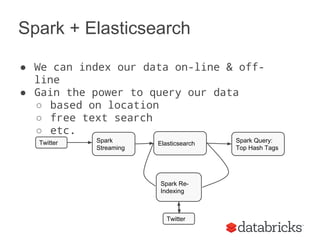
Spark + Elasticsearch 
● We can index our data on-line & off-line 
● Gain the power to query our data 
○ based on location 
○ free text search 
○ etc. 
Twitter Spark 
Streaming 
Elasticsearch Spark Query: 
Top Hash Tags 
Spark Re- 
Indexing 
Twitter
Why should you care? 
Small differences between off-line and on-line 
Spot the difference picture from http://en.wikipedia.org/wiki/Spot_the_difference#mediaviewer/File: 
Spot_the_difference.png
Cat picture from http://galato901.deviantart.com/art/Cat-on-Work-Break-173043455
Lets start with the on-line pipeline 
val ssc = new StreamingContext(master, "IndexTweetsLive", 
Seconds(1)) 
val tweets = TwitterUtils.createStream(ssc, None)
Lets get ready to write the data into 
Elasticsearch 
Photo by Cloned Milkmen
Lets get ready to write the data into 
Elasticsearch 
def setupEsOnSparkContext(sc: SparkContext) = { 
val jobConf = new JobConf(sc.hadoopConfiguration) 
jobConf.set("mapred.output.format.class", 
"org.elasticsearch.hadoop.mr.EsOutputFormat") 
jobConf.setOutputCommitter(classOf[FileOutputCommitter]) 
jobConf.set(ConfigurationOptions.ES_RESOURCE_WRITE, 
“twitter/tweet”) 
FileOutputFormat.setOutputPath(jobConf, new Path("-")) 
jobconf 
}
Add a schema 
curl -XPUT 'http://localhost: 
9200/twitter/tweet/_mapping' -d ' 
{ 
"tweet" : { 
"properties" : { 
"message" : {"type" : "string"}, 
"hashTags" : {"type" : "string"}, 
"location" : {"type" : "geo_point"} 
} 
} 
}'
Lets format our tweets 
def prepareTweets(tweet: twitter4j.Status) = { 
… 
val hashTags = tweet.getHashtagEntities().map(_.getText()) 
HashMap( 
"docid" -> tweet.getId().toString, 
"message" -> tweet.getText(), 
"hashTags" -> hashTags.mkString(" "), 
"location" -> s"$lat,$lon" 
) 
} 
} 
// Convert to HadoopWritable types 
mapToOutput(fields) 
}
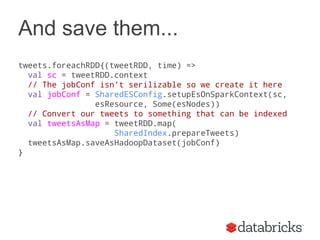
And save them... 
tweets.foreachRDD{(tweetRDD, time) => 
val sc = tweetRDD.context 
// The jobConf isn’t serilizable so we create it here 
val jobConf = SharedESConfig.setupEsOnSparkContext(sc, 
esResource, Some(esNodes)) 
// Convert our tweets to something that can be indexed 
val tweetsAsMap = tweetRDD.map( 
SharedIndex.prepareTweets) 
tweetsAsMap.saveAsHadoopDataset(jobConf) 
}
Elastic Search now has 
Spark SQL! 
case class tweetCS(docid: String, message: String, 
hashTags: String, location: Opiton[String])
Format as a Schema RDD 
def prepareTweetsCaseClass(tweet: twitter4j.Status) = { 
tweetCS(tweet.getId().toString, tweet.getText(), 
hashTags, 
tweet.getGeoLocation() match { 
case null => None 
case loc => { 
val lat = loc.getLatitude() 
val lon = loc.getLongitude() 
Some(s"$lat,$lon") 
} 
}) 
}
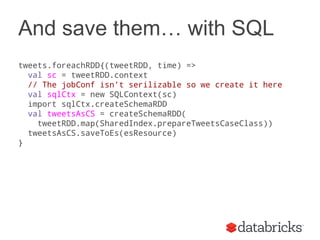
And save them… with SQL 
tweets.foreachRDD{(tweetRDD, time) => 
val sc = tweetRDD.context 
// The jobConf isn’t serilizable so we create it here 
val sqlCtx = new SQLContext(sc) 
import sqlCtx.createSchemaRDD 
val tweetsAsCS = createSchemaRDD( 
tweetRDD.map(SharedIndex.prepareTweetsCaseClass)) 
tweetsAsCS.saveToEs(esResource) 
}
Now let’s query them! 
{"filtered" : { 
"query" : { 
"match_all" : {} 
} 
,"filter" : 
{"geo_distance" : 
{ 
"distance" : "${dist}km", 
"location" : 
{ 
"lat" : "${lat}", 
"lon" : "${lon}" 
}}}}}}
Now let’s find the hash tags :) 
// Set our query 
jobConf.set("es.query", query) 
// Create an RDD of the tweets 
val currentTweets = sc.hadoopRDD(jobConf, 
classOf[EsInputFormat[Object, MapWritable]], 
classOf[Object], classOf[MapWritable]) 
// Convert to a format we can work with 
val tweets = currentTweets.map{ case (key, value) => 
SharedIndex.mapWritableToInput(value) } 
// Extract the hashtags 
val hashTags = tweets.flatMap{t => 
t.getOrElse("hashTags", "").split(" ") 
}
and extract the top hashtags 
object WordCountOrdering extends Ordering[(String, Int)]{ 
def compare(a: (String, Int), b: (String, Int)) = { 
b._2 compare a._2 
} 
} 
val ht = hashtags.map(x => (x, 1)).reduceByKey((x,y) => x+y) 
val topTags = ht.takeOrdered(40)(WordCountOrdering)
or with SQL... 
// Create a Schema RDD of the tweets 
val currentTweets = sqlCtx.esRDD(esResource, query) 
// Extract the hashtags. We could do this in a 
// more SQL way but I’m more comfortable in Scala 
val hashTags = tweets.select(‘hashtags).flatMap{t => 
t.getString(0).split(" ") 
} 
*We used a customized connector to handle location information
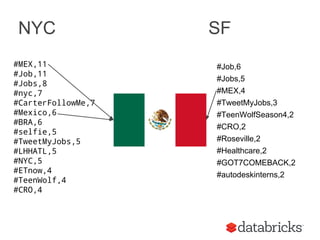
NYC SF 
#MEX,11 
#Job,11 
#Jobs,8 
#nyc,7 
#CarterFollowMe,7 
#Mexico,6 
#BRA,6 
#selfie,5 
#TweetMyJobs,5 
#LHHATL,5 
#NYC,5 
#ETnow,4 
#TeenWolf,4 
#CRO,4 
#Job,6 
#Jobs,5 
#MEX,4 
#TweetMyJobs,3 
#TeenWolfSeason4,2 
#CRO,2 
#Roseville,2 
#Healthcare,2 
#GOT7COMEBACK,2 
#autodeskinterns,2
UMD SF 
I,24 
to,18 
a,13 
the,9 
me,8 
and,7 
in,7 
you,6 
my,5 
that,5 
for,5 
is,5 
of,5 
it,5 
to,14 
in,13 
the,11 
of,11 
a,9 
I,9 
and,8 
you,6 
my,6 
for,5 
our,5 
I didn’t have enough time to index anything fun :(
Indexing Part 2 
(electric boogaloo) 
Writing directly to a node with the correct shard saves us network overhead 
Screen shot of elasticsearch-head http://mobz.github.io/elasticsearch-head/
So what does that give us? 
Spark sets the filename to part-[part #] 
If we have same partitioner we write 
directly 
Partition 1 
Partition 2 
Partition 3 
ES Node 1 
Partition {1,2} 
ES Node 2 
Partition {3}
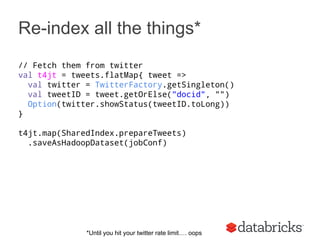
Re-index all the things* 
// Fetch them from twitter 
val t4jt = tweets.flatMap{ tweet => 
val twitter = TwitterFactory.getSingleton() 
val tweetID = tweet.getOrElse("docid", "") 
Option(twitter.showStatus(tweetID.toLong)) 
} 
t4jt.map(SharedIndex.prepareTweets) 
.saveAsHadoopDataset(jobConf) 
*Until you hit your twitter rate limit…. oops
Demo time! 
my ip is 10.109.32.18 
*Until you hit your twitter rate limit…. oops
“Useful” links 
● Feedback holden@databricks.com 
● My twitter: https://twitter.com/holdenkarau 
● Customized ES connector*: https://github. 
com/holdenk/elasticsearch-hadoop 
● Demo code: https://github.com/holdenk/elasticsearchspark 
● Elasticsearch: http://www.elasticsearch.org/ 
● Spark: http://spark.apache.org/ 
● Spark streaming: http://spark.apache.org/streaming/ 
● Elasticsearch Spark documentation: http://www.elasticsearch. 
org/guide/en/elasticsearch/hadoop/current/spark.html 
● http://databricks.com/blog/2014/06/27/application-spotlight-elasticsearch. 
html
So what did we cover? 
● Indexing data with Spark to Elasticsearch 
● Sharing indexing code between Spark & Spark Streaming 
● Using Elasticsearch for geolocal** data in Spark 
● Making our indexing aware of Elasticsearch 
● Lots* of cat pictures 
* There were more before.
Cat photo from https://www.flickr.com/photos/deerwooduk/579761138/in/photolist-4GCc4z-4GCbAV-6Ls27-34evHS-5UBnJv-TeqMG-4iNNn5-4w7s61- 
6GMLYS-6H5QWY-6aJLUT-tqfrf-6mJ1Lr-84kGX-6mJ1GB-vVqN6-dY8aj5-y3jK-7C7P8Z-azEtd/

Spark with Elasticsearch - umd version 2014

  • 1.
    Apache Spark &Elasticsearch Holden Karau - UMD 2014 Now with delicious Spark SQL*
  • 2.
    Who am I? Holden Karau ● Software Engineer @ Databricks ● I’ve worked with Elasticsearch before ● I prefer she/her for pronouns ● Author of a book on Spark and co-writing another ● github https://github.com/holdenk ○ Has all of the code from this talk :) ● e-mail holden@databricks.com ● twitter: @holdenkarau ● linkedin: https://www.linkedin.com/in/holdenkarau
  • 3.
    What is Elasticsearch? ● Lucene based distributed search system ● Powerful tokenizing, stemming & other IR tools ● Geographic query support ● Capable of scaling to many nodes
  • 4.
  • 5.
    Talk overview Goal:understand how to work with ES & Spark ● Spark & Spark streaming let us re-use indexing code ● We can customize the ES connector to write to the shard based on partition ● Illustrate with twitter & show top tags per region ● Maybe a live demo of the above demo* Assumptions: ● Familiar(ish) with Search ● Can read Scala Things you don’t have to worry about: ● All the code is on-line, so don’t worry if you miss some *If we have extra time at the end
  • 6.
    Spark + Elasticsearch ● We can index our data on-line & off-line ● Gain the power to query our data ○ based on location ○ free text search ○ etc. Twitter Spark Streaming Elasticsearch Spark Query: Top Hash Tags Spark Re- Indexing Twitter
  • 7.
    Why should youcare? Small differences between off-line and on-line Spot the difference picture from http://en.wikipedia.org/wiki/Spot_the_difference#mediaviewer/File: Spot_the_difference.png
  • 8.
    Cat picture fromhttp://galato901.deviantart.com/art/Cat-on-Work-Break-173043455
  • 9.
    Lets start withthe on-line pipeline val ssc = new StreamingContext(master, "IndexTweetsLive", Seconds(1)) val tweets = TwitterUtils.createStream(ssc, None)
  • 10.
    Lets get readyto write the data into Elasticsearch Photo by Cloned Milkmen
  • 11.
    Lets get readyto write the data into Elasticsearch def setupEsOnSparkContext(sc: SparkContext) = { val jobConf = new JobConf(sc.hadoopConfiguration) jobConf.set("mapred.output.format.class", "org.elasticsearch.hadoop.mr.EsOutputFormat") jobConf.setOutputCommitter(classOf[FileOutputCommitter]) jobConf.set(ConfigurationOptions.ES_RESOURCE_WRITE, “twitter/tweet”) FileOutputFormat.setOutputPath(jobConf, new Path("-")) jobconf }
  • 12.
    Add a schema curl -XPUT 'http://localhost: 9200/twitter/tweet/_mapping' -d ' { "tweet" : { "properties" : { "message" : {"type" : "string"}, "hashTags" : {"type" : "string"}, "location" : {"type" : "geo_point"} } } }'
  • 13.
    Lets format ourtweets def prepareTweets(tweet: twitter4j.Status) = { … val hashTags = tweet.getHashtagEntities().map(_.getText()) HashMap( "docid" -> tweet.getId().toString, "message" -> tweet.getText(), "hashTags" -> hashTags.mkString(" "), "location" -> s"$lat,$lon" ) } } // Convert to HadoopWritable types mapToOutput(fields) }
  • 14.
    And save them... tweets.foreachRDD{(tweetRDD, time) => val sc = tweetRDD.context // The jobConf isn’t serilizable so we create it here val jobConf = SharedESConfig.setupEsOnSparkContext(sc, esResource, Some(esNodes)) // Convert our tweets to something that can be indexed val tweetsAsMap = tweetRDD.map( SharedIndex.prepareTweets) tweetsAsMap.saveAsHadoopDataset(jobConf) }
  • 15.
    Elastic Search nowhas Spark SQL! case class tweetCS(docid: String, message: String, hashTags: String, location: Opiton[String])
  • 16.
    Format as aSchema RDD def prepareTweetsCaseClass(tweet: twitter4j.Status) = { tweetCS(tweet.getId().toString, tweet.getText(), hashTags, tweet.getGeoLocation() match { case null => None case loc => { val lat = loc.getLatitude() val lon = loc.getLongitude() Some(s"$lat,$lon") } }) }
  • 17.
    And save them…with SQL tweets.foreachRDD{(tweetRDD, time) => val sc = tweetRDD.context // The jobConf isn’t serilizable so we create it here val sqlCtx = new SQLContext(sc) import sqlCtx.createSchemaRDD val tweetsAsCS = createSchemaRDD( tweetRDD.map(SharedIndex.prepareTweetsCaseClass)) tweetsAsCS.saveToEs(esResource) }
  • 18.
    Now let’s querythem! {"filtered" : { "query" : { "match_all" : {} } ,"filter" : {"geo_distance" : { "distance" : "${dist}km", "location" : { "lat" : "${lat}", "lon" : "${lon}" }}}}}}
  • 19.
    Now let’s findthe hash tags :) // Set our query jobConf.set("es.query", query) // Create an RDD of the tweets val currentTweets = sc.hadoopRDD(jobConf, classOf[EsInputFormat[Object, MapWritable]], classOf[Object], classOf[MapWritable]) // Convert to a format we can work with val tweets = currentTweets.map{ case (key, value) => SharedIndex.mapWritableToInput(value) } // Extract the hashtags val hashTags = tweets.flatMap{t => t.getOrElse("hashTags", "").split(" ") }
  • 20.
    and extract thetop hashtags object WordCountOrdering extends Ordering[(String, Int)]{ def compare(a: (String, Int), b: (String, Int)) = { b._2 compare a._2 } } val ht = hashtags.map(x => (x, 1)).reduceByKey((x,y) => x+y) val topTags = ht.takeOrdered(40)(WordCountOrdering)
  • 21.
    or with SQL... // Create a Schema RDD of the tweets val currentTweets = sqlCtx.esRDD(esResource, query) // Extract the hashtags. We could do this in a // more SQL way but I’m more comfortable in Scala val hashTags = tweets.select(‘hashtags).flatMap{t => t.getString(0).split(" ") } *We used a customized connector to handle location information
  • 22.
    NYC SF #MEX,11 #Job,11 #Jobs,8 #nyc,7 #CarterFollowMe,7 #Mexico,6 #BRA,6 #selfie,5 #TweetMyJobs,5 #LHHATL,5 #NYC,5 #ETnow,4 #TeenWolf,4 #CRO,4 #Job,6 #Jobs,5 #MEX,4 #TweetMyJobs,3 #TeenWolfSeason4,2 #CRO,2 #Roseville,2 #Healthcare,2 #GOT7COMEBACK,2 #autodeskinterns,2
  • 23.
    UMD SF I,24 to,18 a,13 the,9 me,8 and,7 in,7 you,6 my,5 that,5 for,5 is,5 of,5 it,5 to,14 in,13 the,11 of,11 a,9 I,9 and,8 you,6 my,6 for,5 our,5 I didn’t have enough time to index anything fun :(
  • 24.
    Indexing Part 2 (electric boogaloo) Writing directly to a node with the correct shard saves us network overhead Screen shot of elasticsearch-head http://mobz.github.io/elasticsearch-head/
  • 25.
    So what doesthat give us? Spark sets the filename to part-[part #] If we have same partitioner we write directly Partition 1 Partition 2 Partition 3 ES Node 1 Partition {1,2} ES Node 2 Partition {3}
  • 26.
    Re-index all thethings* // Fetch them from twitter val t4jt = tweets.flatMap{ tweet => val twitter = TwitterFactory.getSingleton() val tweetID = tweet.getOrElse("docid", "") Option(twitter.showStatus(tweetID.toLong)) } t4jt.map(SharedIndex.prepareTweets) .saveAsHadoopDataset(jobConf) *Until you hit your twitter rate limit…. oops
  • 27.
    Demo time! myip is 10.109.32.18 *Until you hit your twitter rate limit…. oops
  • 28.
    “Useful” links ●Feedback holden@databricks.com ● My twitter: https://twitter.com/holdenkarau ● Customized ES connector*: https://github. com/holdenk/elasticsearch-hadoop ● Demo code: https://github.com/holdenk/elasticsearchspark ● Elasticsearch: http://www.elasticsearch.org/ ● Spark: http://spark.apache.org/ ● Spark streaming: http://spark.apache.org/streaming/ ● Elasticsearch Spark documentation: http://www.elasticsearch. org/guide/en/elasticsearch/hadoop/current/spark.html ● http://databricks.com/blog/2014/06/27/application-spotlight-elasticsearch. html
  • 29.
    So what didwe cover? ● Indexing data with Spark to Elasticsearch ● Sharing indexing code between Spark & Spark Streaming ● Using Elasticsearch for geolocal** data in Spark ● Making our indexing aware of Elasticsearch ● Lots* of cat pictures * There were more before.
  • 30.
    Cat photo fromhttps://www.flickr.com/photos/deerwooduk/579761138/in/photolist-4GCc4z-4GCbAV-6Ls27-34evHS-5UBnJv-TeqMG-4iNNn5-4w7s61- 6GMLYS-6H5QWY-6aJLUT-tqfrf-6mJ1Lr-84kGX-6mJ1GB-vVqN6-dY8aj5-y3jK-7C7P8Z-azEtd/