CF Software Package
Ernesto Reig
Damian McDonald
Elasticsearch – basics and beyond
Agenda
Introduction
• Elasticsearch definition and key points
• Inverted indexes
Cluster configuration and architecture
• Shards and replica
• Memory
• SSD Disks
• Logs
• Cluster topology
Modeling the data
• Mapping
• Analysis
• Handling relationships
JVM and Cluster monitoring
Introduction
Introduction (1): Elasticsearch definition and key points
Elasticsearch is not a NO-SQL database
Elasticsearch is not a Search Engine (uses Apache Lucene)
Elasticsearch is a server used to search & analyze data in real time.
• It is distributed, scalable and highly available.
• It is meant for real-time search and analytics capabilities.
• It comes with a sophisticated RESTful API.
3 key points in Elasticsearch:
• Proper cluster configuration and architecture
• Proper Data Mappings
• Proper JVM and cluster monitoring
Elasticsearch is fragile, delicate, sensitive, frail and tricky
“With great power comes great responsibility” Benjamin Parker
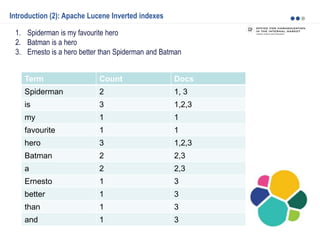
Introduction (2): Apache Lucene Inverted indexes
1. Spiderman is my favourite hero
2. Batman is a hero
3. Ernesto is a hero better than Spiderman and Batman
Term Count Docs
Spiderman 2 1, 3
is 3 1,2,3
my 1 1
favourite 1 1
hero 3 1,2,3
Batman 2 2,3
a 2 2,3
Ernesto 1 3
better 1 3
than 1 3
and 1 3
Cluster configuration and architecture
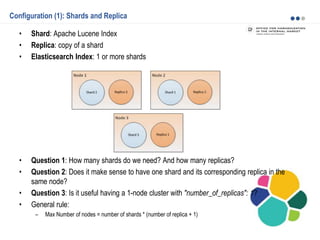
Configuration (1): Shards and Replica
• Shard: Apache Lucene Index
• Replica: copy of a shard
• Elasticsearch Index: 1 or more shards
• Question 1: How many shards do we need? And how many replicas?
• Question 2: Does it make sense to have one shard and its corresponding replica in the
same node?
• Question 3: Is it useful having a 1-node cluster with "number_of_replicas": 1?
• General rule:
– Max Number of nodes = number of shards * (number of replica + 1)
Configuration (2)
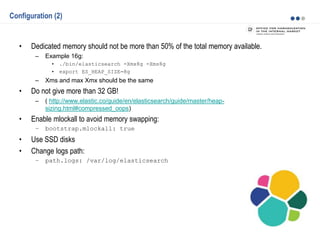
• Dedicated memory should not be more than 50% of the total memory available.
– Example 16g:
• ./bin/elasticsearch -Xmx8g -Xms8g
• export ES_HEAP_SIZE=8g
– Xms and max Xmx should be the same
• Do not give more than 32 GB!
– ( http://www.elastic.co/guide/en/elasticsearch/guide/master/heap-
sizing.html#compressed_oops)
• Enable mlockall to avoid memory swapping:
– bootstrap.mlockall: true
• Use SSD disks
• Change logs path:
– path.logs: /var/log/elasticsearch
Configuration (3): cluster topology (1)
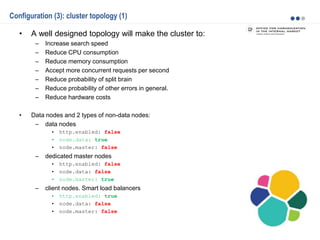
• A well designed topology will make the cluster to:
– Increase search speed
– Reduce CPU consumption
– Reduce memory consumption
– Accept more concurrent requests per second
– Reduce probability of split brain
– Reduce probability of other errors in general.
– Reduce hardware costs
• Data nodes and 2 types of non-data nodes:
– data nodes
• http.enabled: false
• node.data: true
• node.master: false
– dedicated master nodes
• http.enabled: false
• node.data: false
• node.master: true
– client nodes. Smart load balancers
• http.enabled: true
• node.data: false
• node.master: false
Configuration (4): cluster topology (2)
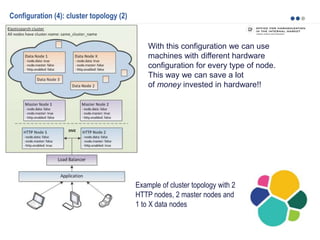
With this configuration we can use
machines with different hardware
configuration for every type of node.
This way we can save a lot
of money invested in hardware!!
Example of cluster topology with 2
HTTP nodes, 2 master nodes and
1 to X data nodes
Modeling the data
Modeling the data (1): Mapping
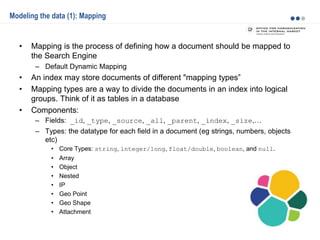
• Mapping is the process of defining how a document should be mapped to
the Search Engine
– Default Dynamic Mapping
• An index may store documents of different "mapping types”
• Mapping types are a way to divide the documents in an index into logical
groups. Think of it as tables in a database
• Components:
– Fields: _id, _type, _source, _all, _parent, _index, _size,…
– Types: the datatype for each field in a document (eg strings, numbers, objects
etc)
• Core Types: string, integer/long, float/double, boolean, and null.
• Array
• Object
• Nested
• IP
• Geo Point
• Geo Shape
• Attachment
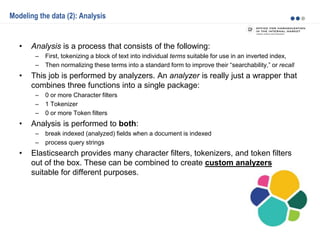
Modeling the data (2): Analysis
• Analysis is a process that consists of the following:
– First, tokenizing a block of text into individual terms suitable for use in an inverted index,
– Then normalizing these terms into a standard form to improve their “searchability,” or recall
• This job is performed by analyzers. An analyzer is really just a wrapper that
combines three functions into a single package:
– 0 or more Character filters
– 1 Tokenizer
– 0 or more Token filters
• Analysis is performed to both:
– break indexed (analyzed) fields when a document is indexed
– process query strings
• Elasticsearch provides many character filters, tokenizers, and token filters
out of the box. These can be combined to create custom analyzers
suitable for different purposes.
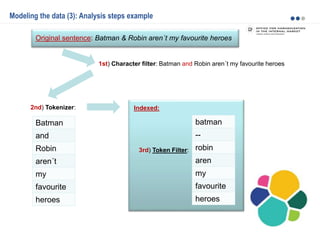
Modeling the data (3): Analysis steps example
Original sentence: Batman & Robin aren´t my favourite heroes
Batman
and
Robin
aren´t
my
favourite
heroes
1st) Character filter: Batman and Robin aren´t my favourite heroes
2nd) Tokenizer:
3rd) Token Filter:
batman
--
robin
aren
my
favourite
heroes
Indexed:
Modeling the data (4): Handling relationships
Handling relationships between entities is not as obvious as it is with a
dedicated relational store. The golden rule of a relational database—normalize
your data—does not apply to Elasticsearch.
Four common techniques are used to manage relational data in Elasticsearch:
• Application-side joins
• Data denormalization
• Nested objects
• Parent/child relationships
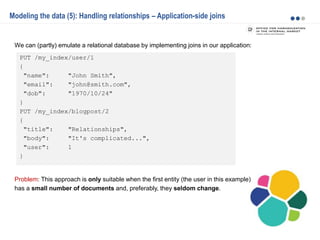
PUT /my_index/user/1
{
"name": "John Smith",
"email": "john@smith.com",
"dob": "1970/10/24"
}
PUT /my_index/blogpost/2
{
"title": "Relationships",
"body": "It's complicated...",
"user": 1
}
Modeling the data (5): Handling relationships – Application-side joins
We can (partly) emulate a relational database by implementing joins in our application:
Problem: This approach is only suitable when the first entity (the user in this example)
has a small number of documents and, preferably, they seldom change.
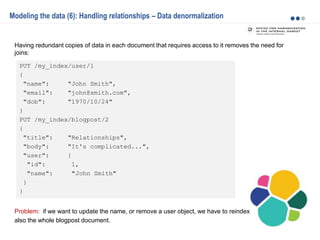
PUT /my_index/user/1
{
"name": "John Smith",
"email": "john@smith.com",
"dob": "1970/10/24"
}
PUT /my_index/blogpost/2
{
"title": "Relationships",
"body": "It's complicated...",
"user": {
"id": 1,
"name": "John Smith"
}
}
Modeling the data (6): Handling relationships – Data denormalization
Having redundant copies of data in each document that requires access to it removes the need for
joins:
Problem: if we want to update the name, or remove a user object, we have to reindex
also the whole blogpost document.
PUT /my_index/blogpost/1
{
"title": "Nest eggs",
"body": "Making your money work...",
"tags": [ "cash", "shares" ],
"comments": [
{
"name": "John Smith",
"comment": "Great article",
"age": 28,
"stars": 4,
"date": "2014-09-01"
},
{
"name": "Alice White",
"comment": "More like this please",
"age": 31,
"stars": 5,
"date": "2014-10-22"
}
]
}
Modeling the data (7): Handling relationships – Nested objects
Given the fact that creating, deleting, and updating a single document in Elasticsearch is atomic, it
makes sense to store closely related entities within the same document:
Problem: As with denormalization, to update, add, or remove a nested object, we have to reindex the
whole document also the whole blogpost document.
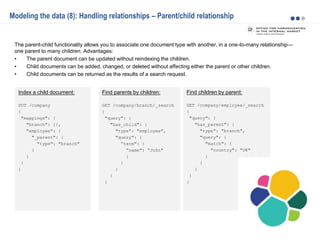
Find children by parent:
GET /company/employee/_search
{
"query": {
"has_parent": {
"type": "branch",
"query": {
"match": {
"country": "UK"
}
}
}
}
}
Index a child document:
PUT /company
{
"mappings": {
"branch": {},
"employee": {
"_parent": {
"type": "branch"
}
}
}
}
Modeling the data (8): Handling relationships – Parent/child relationship
The parent-child functionality allows you to associate one document type with another, in a one-to-many relationship—
one parent to many children. Advantages:
• The parent document can be updated without reindexing the children.
• Child documents can be added, changed, or deleted without affecting either the parent or other children.
• Child documents can be returned as the results of a search request.
Find parents by children:
GET /company/branch/_search
{
"query": {
"has_child": {
"type": "employee",
"query": {
“term": {
“name": “John"
}
}
}
}
}
JVM and Cluster monitoring
• Servers CPU and disk usage
• Elasticsearch logs
• Elasticsearch plugins:
– Marvel
– Bigdesk
– Watcher
• Watch stats (http://localhost:9200/_stats)
• JVM
– Jstat: jstat –gcutil es_pid 2000 1000 (ES pid with jps)
– Visual JVM plugin
– Memory dump – jmap
• Hot threads API
• Before going to production: Apache Jmeter tests!
Thank You

Elasticsearch - basics and beyond

  • 1.
    CF Software Package ErnestoReig Damian McDonald Elasticsearch – basics and beyond
  • 2.
    Agenda Introduction • Elasticsearch definitionand key points • Inverted indexes Cluster configuration and architecture • Shards and replica • Memory • SSD Disks • Logs • Cluster topology Modeling the data • Mapping • Analysis • Handling relationships JVM and Cluster monitoring
  • 3.
  • 4.
    Introduction (1): Elasticsearchdefinition and key points Elasticsearch is not a NO-SQL database Elasticsearch is not a Search Engine (uses Apache Lucene) Elasticsearch is a server used to search & analyze data in real time. • It is distributed, scalable and highly available. • It is meant for real-time search and analytics capabilities. • It comes with a sophisticated RESTful API. 3 key points in Elasticsearch: • Proper cluster configuration and architecture • Proper Data Mappings • Proper JVM and cluster monitoring Elasticsearch is fragile, delicate, sensitive, frail and tricky “With great power comes great responsibility” Benjamin Parker
  • 5.
    Introduction (2): ApacheLucene Inverted indexes 1. Spiderman is my favourite hero 2. Batman is a hero 3. Ernesto is a hero better than Spiderman and Batman Term Count Docs Spiderman 2 1, 3 is 3 1,2,3 my 1 1 favourite 1 1 hero 3 1,2,3 Batman 2 2,3 a 2 2,3 Ernesto 1 3 better 1 3 than 1 3 and 1 3
  • 6.
  • 7.
    Configuration (1): Shardsand Replica • Shard: Apache Lucene Index • Replica: copy of a shard • Elasticsearch Index: 1 or more shards • Question 1: How many shards do we need? And how many replicas? • Question 2: Does it make sense to have one shard and its corresponding replica in the same node? • Question 3: Is it useful having a 1-node cluster with "number_of_replicas": 1? • General rule: – Max Number of nodes = number of shards * (number of replica + 1)
  • 8.
    Configuration (2) • Dedicatedmemory should not be more than 50% of the total memory available. – Example 16g: • ./bin/elasticsearch -Xmx8g -Xms8g • export ES_HEAP_SIZE=8g – Xms and max Xmx should be the same • Do not give more than 32 GB! – ( http://www.elastic.co/guide/en/elasticsearch/guide/master/heap- sizing.html#compressed_oops) • Enable mlockall to avoid memory swapping: – bootstrap.mlockall: true • Use SSD disks • Change logs path: – path.logs: /var/log/elasticsearch
  • 9.
    Configuration (3): clustertopology (1) • A well designed topology will make the cluster to: – Increase search speed – Reduce CPU consumption – Reduce memory consumption – Accept more concurrent requests per second – Reduce probability of split brain – Reduce probability of other errors in general. – Reduce hardware costs • Data nodes and 2 types of non-data nodes: – data nodes • http.enabled: false • node.data: true • node.master: false – dedicated master nodes • http.enabled: false • node.data: false • node.master: true – client nodes. Smart load balancers • http.enabled: true • node.data: false • node.master: false
  • 10.
    Configuration (4): clustertopology (2) With this configuration we can use machines with different hardware configuration for every type of node. This way we can save a lot of money invested in hardware!! Example of cluster topology with 2 HTTP nodes, 2 master nodes and 1 to X data nodes
  • 11.
  • 12.
    Modeling the data(1): Mapping • Mapping is the process of defining how a document should be mapped to the Search Engine – Default Dynamic Mapping • An index may store documents of different "mapping types” • Mapping types are a way to divide the documents in an index into logical groups. Think of it as tables in a database • Components: – Fields: _id, _type, _source, _all, _parent, _index, _size,… – Types: the datatype for each field in a document (eg strings, numbers, objects etc) • Core Types: string, integer/long, float/double, boolean, and null. • Array • Object • Nested • IP • Geo Point • Geo Shape • Attachment
  • 13.
    Modeling the data(2): Analysis • Analysis is a process that consists of the following: – First, tokenizing a block of text into individual terms suitable for use in an inverted index, – Then normalizing these terms into a standard form to improve their “searchability,” or recall • This job is performed by analyzers. An analyzer is really just a wrapper that combines three functions into a single package: – 0 or more Character filters – 1 Tokenizer – 0 or more Token filters • Analysis is performed to both: – break indexed (analyzed) fields when a document is indexed – process query strings • Elasticsearch provides many character filters, tokenizers, and token filters out of the box. These can be combined to create custom analyzers suitable for different purposes.
  • 14.
    Modeling the data(3): Analysis steps example Original sentence: Batman & Robin aren´t my favourite heroes Batman and Robin aren´t my favourite heroes 1st) Character filter: Batman and Robin aren´t my favourite heroes 2nd) Tokenizer: 3rd) Token Filter: batman -- robin aren my favourite heroes Indexed:
  • 15.
    Modeling the data(4): Handling relationships Handling relationships between entities is not as obvious as it is with a dedicated relational store. The golden rule of a relational database—normalize your data—does not apply to Elasticsearch. Four common techniques are used to manage relational data in Elasticsearch: • Application-side joins • Data denormalization • Nested objects • Parent/child relationships
  • 16.
    PUT /my_index/user/1 { "name": "JohnSmith", "email": "john@smith.com", "dob": "1970/10/24" } PUT /my_index/blogpost/2 { "title": "Relationships", "body": "It's complicated...", "user": 1 } Modeling the data (5): Handling relationships – Application-side joins We can (partly) emulate a relational database by implementing joins in our application: Problem: This approach is only suitable when the first entity (the user in this example) has a small number of documents and, preferably, they seldom change.
  • 17.
    PUT /my_index/user/1 { "name": "JohnSmith", "email": "john@smith.com", "dob": "1970/10/24" } PUT /my_index/blogpost/2 { "title": "Relationships", "body": "It's complicated...", "user": { "id": 1, "name": "John Smith" } } Modeling the data (6): Handling relationships – Data denormalization Having redundant copies of data in each document that requires access to it removes the need for joins: Problem: if we want to update the name, or remove a user object, we have to reindex also the whole blogpost document.
  • 18.
    PUT /my_index/blogpost/1 { "title": "Nesteggs", "body": "Making your money work...", "tags": [ "cash", "shares" ], "comments": [ { "name": "John Smith", "comment": "Great article", "age": 28, "stars": 4, "date": "2014-09-01" }, { "name": "Alice White", "comment": "More like this please", "age": 31, "stars": 5, "date": "2014-10-22" } ] } Modeling the data (7): Handling relationships – Nested objects Given the fact that creating, deleting, and updating a single document in Elasticsearch is atomic, it makes sense to store closely related entities within the same document: Problem: As with denormalization, to update, add, or remove a nested object, we have to reindex the whole document also the whole blogpost document.
  • 19.
    Find children byparent: GET /company/employee/_search { "query": { "has_parent": { "type": "branch", "query": { "match": { "country": "UK" } } } } } Index a child document: PUT /company { "mappings": { "branch": {}, "employee": { "_parent": { "type": "branch" } } } } Modeling the data (8): Handling relationships – Parent/child relationship The parent-child functionality allows you to associate one document type with another, in a one-to-many relationship— one parent to many children. Advantages: • The parent document can be updated without reindexing the children. • Child documents can be added, changed, or deleted without affecting either the parent or other children. • Child documents can be returned as the results of a search request. Find parents by children: GET /company/branch/_search { "query": { "has_child": { "type": "employee", "query": { “term": { “name": “John" } } } } }
  • 20.
    JVM and Clustermonitoring
  • 21.
    JVM and Clustermonitoring • Servers CPU and disk usage • Elasticsearch logs • Elasticsearch plugins: – Marvel – Bigdesk – Watcher • Watch stats (http://localhost:9200/_stats) • JVM – Jstat: jstat –gcutil es_pid 2000 1000 (ES pid with jps) – Visual JVM plugin – Memory dump – jmap • Hot threads API • Before going to production: Apache Jmeter tests!
  • 22.